Glama
nasoma

Africa's Talking Airtime MCP

by nasoma

Africa's Talking Airtime MCP

This project implements a Model Context Protocol (MCP) server that enables seamless interaction with the Africa's Talking API for airtime-related operations. It provides a suite of tools for checking account balances, sending airtime, viewing transaction history, and summarizing top-up data. The server uses an SQLite database for persistent storage and includes logic for formatting phone numbers for various African countries.

Key Features

  • Check Balance: Instantly retrieve the current airtime balance of your Africa's Talking account.

  • Send Airtime: Load airtime to any phone number in supported countries.

  • Transaction Logging: Automatically save every transaction to a local SQLite database.

  • Transaction History: View a list of the most recent top-up transactions.

  • Summarize Top-ups: Calculate the total amount of the last 'n' top-ups.

  • Count Top-ups: Count the number of transactions for a specific phone number.

  • Phone Number Formatting: Automatically formats phone numbers to include the correct country code.

Related MCP server: mpesa-mcp

Installation Guide

Prerequisites

  1. Python 3.10 or higher: Ensure you have a modern version of Python installed.

  2. uv Package Manager: This project uses uv for dependency management. Install it by running:

    curl -LsSf https://astral.sh/uv/install.sh | sh

Installing from Smithery

To install Africa's Talking Airtime Server for Claude Desktop automatically via Smithery:

npx -y @smithery/cli install @nasoma/africastalking-airtime-mcp --client claude

Local Setup

  1. Clone the Repository:

    git clone https://github.com/nasoma/africastalking-airtime-mcp.git
    cd africastalking-airtime-mcp
  2. Install Dependencies: Set up the virtual environment and install the required packages using uv:

    uv sync

Using with AI Tools

With Claude Desktop

Add this to your claude_desktop_config.json:

{
  "mcpServers": {
    "Airtime Server": {
      "command": "{{PATH_TO_UV}}", // Run `which uv` and place the output here
      "args": [
        "--directory",
        "{{PATH_TO_PROJECT}}", // cd into the repo, run `pwd` and enter the output here
        "run",
        "main.py"
      ],
      "env": {
        "username": "your_africastalking_username",
        "api_key": "your_africastalking_api_key",
        "country":"your_country", # e.g kenya, uganda, dr congo, rwanda, south africa
        "currency_code":"currency-code"  # e.g. KES, UGX, NGN
      }
    }
  }
}

With Goose

Goose is a good option if you want to use your preferred LLM and supply an API key.

  • Install Goose.

  • Open the settings panel and add a custom extension (MCP Server).

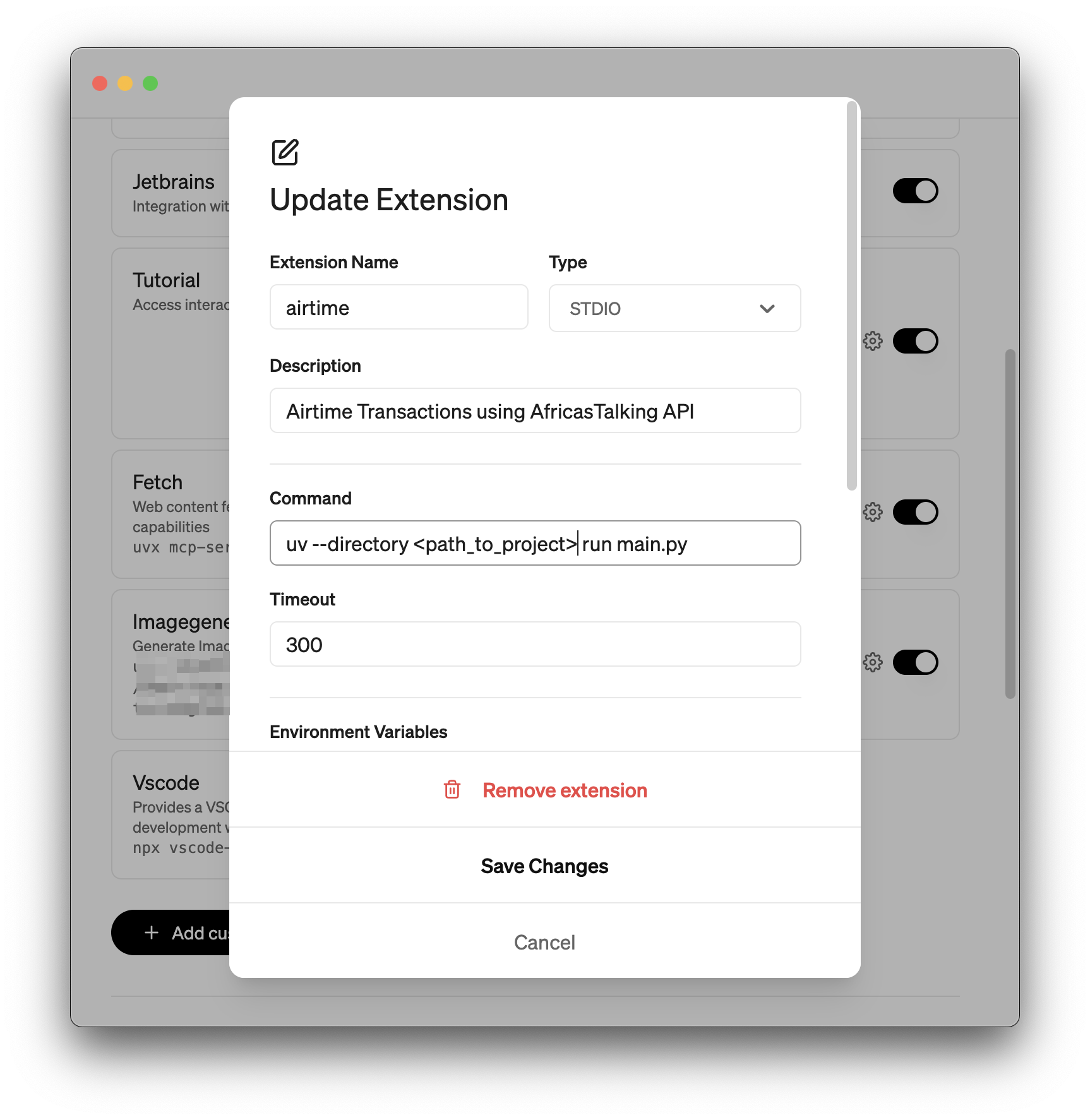
  • Give your extension a name. Type is STDIO.

  • Add the command. Save changes. Goose Demo

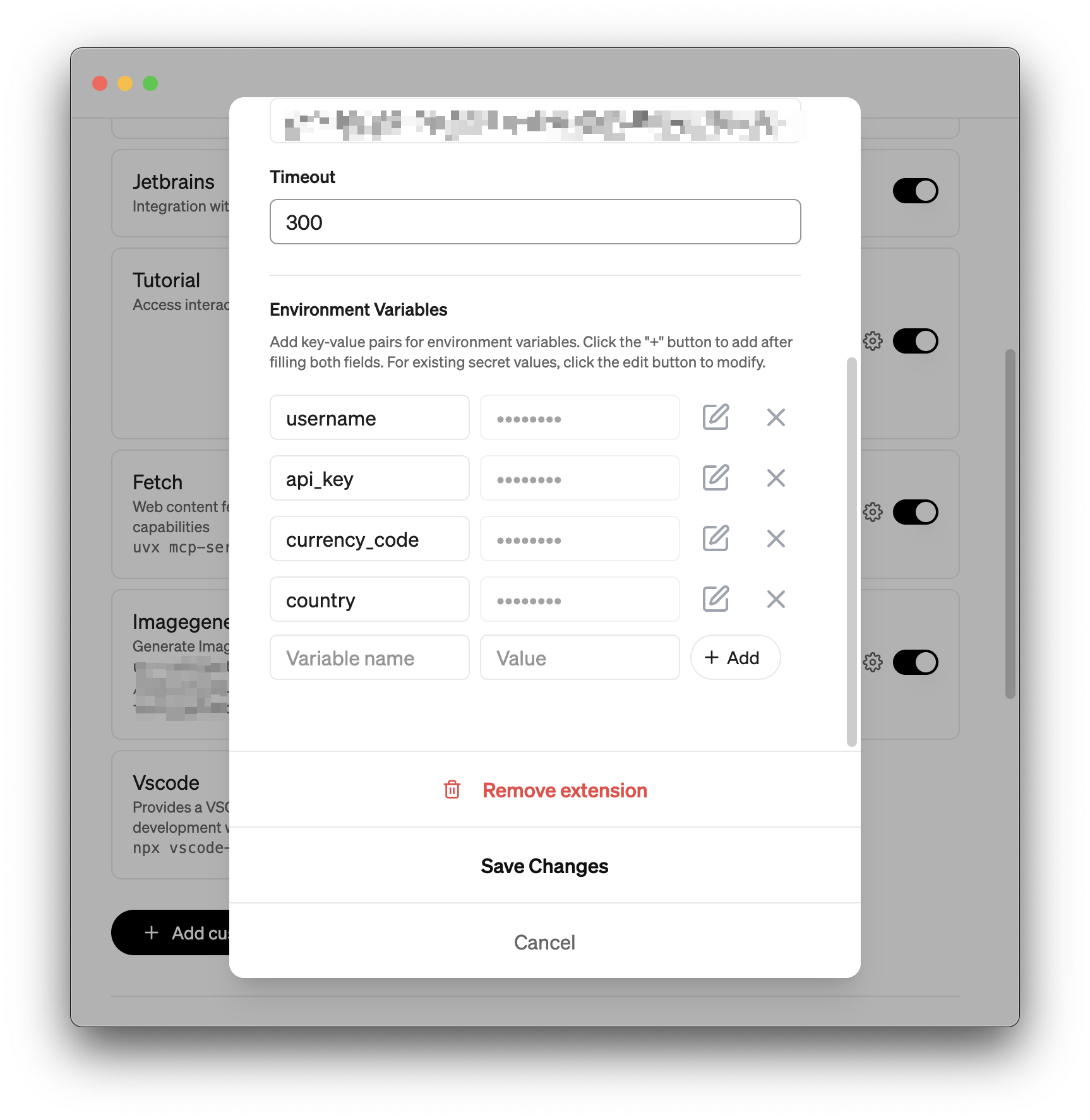
  • Add your environment variables: username, api_key, currency_code and country.

  • Save changes.

Goose Demo2

Tool Reference

The MCP server exposes the following tools for managing airtime:

check_balance

  • Description: Retrieves the current airtime balance from your Africa's Talking account.

  • Usage: check_balance()

  • Returns: A string displaying the account balance (e.g., "Account Balance: KES 1234.00") or an error message.

load_airtime

  • Description: Sends a specified amount of airtime to a phone number and records the transaction.

  • Arguments:

    • phone_number (str): The recipient's phone number.

    • amount (float): The amount of airtime to send.

    • currency_code (str): The currency code (e.g., "KES", "UGX").

  • Usage: load_airtime(phone_number="0712345678", amount=100.0, currency_code="KES")

  • Returns: A confirmation message upon success or an error message.

get_last_topups

  • Description: Fetches the last N airtime top-up transactions from the database.

  • Arguments:

    • limit (int, optional): The number of transactions to retrieve. Defaults to 3.

  • Usage: get_last_topups(limit=5)

  • Returns: A formatted string listing the recent transactions.

sum_last_n_topups

  • Description: Calculates the sum of the last N top-ups.

  • Arguments:

    • n (int, optional): The number of transactions to sum. Defaults to 3.

  • Usage: sum_last_n_topups(n=5)

  • Returns: A string with the total sum, or an error if transactions have different currencies.

count_topups_by_number

  • Description: Counts the number of successful top-ups to a specific phone number.

  • Arguments:

    • phone_number (str): The phone number to query.

  • Usage: count_topups_by_number(phone_number="0712345678")

  • Returns: The total count of top-ups for the given number.

Example Prompts

Here are some example prompts you can use to interact with the MCP server:

  • Check Balance:

    • "What is my Africa's Talking account balance?"

    • "Check my airtime balance."

  • Send Airtime:

    • "Send 100 KES airtime to 0712345678."

    • "Top up my phone +254712345678 with 50 bob."

    • "Load 200 UGX to 0755123456."

  • View Recent Top-ups:

    • "Show me the last 3 airtime transactions."

    • "List my 5 most recent top-ups."

  • Sum Recent Top-ups:

    • "What is the total of my last 3 top-ups?"

    • "How much have I spent in my last 5 transactions?"

  • Count Top-ups:

    • "How many times have I topped up 0712345678?"

    • "Count the top-ups to +254712345678."

Important Notes

  • Funding: Ensure your Africa's Talking account has sufficient funds to send airtime.

  • Phone Number Formatting: Phone numbers are automatically formatted based on the country environment variable.

  • Database: The SQLite database (airtime_transactions.db) is automatically created in the project directory.

  • Supported Models: This MCP server works best with models that support tool calling, such as Claude 3.7 Sonnet or GPT-4.1 Nano.

Credits

Install Server
A
license - permissive license
A
quality
D
maintenance

Maintenance

Maintainers
Response time
Release cycle
Releases (12mo)
Commit activity

Resources

Unclaimed servers have limited discoverability.

Looking for Admin?

If you are the server author, to access and configure the admin panel.

Related MCP Servers

  • A
    license
    -
    quality
    D
    maintenance
    A unified interface for major African payment providers including M-Pesa, Paystack, and MTN MoMo. It enables users to process payments, request funds, and manage transactions across the continent using natural language commands.
    9
    MIT
  • A
    license
    A
    quality
    C
    maintenance
    MCP server for East African fintech APIs — trigger M-Pesa STK Push payments, check transaction status, send SMS to 20+ African networks, and top up airtime via Africa's Talking.
    5
    4
    MIT
  • A
    license
    A
    quality
    D
    maintenance
    Enables AI agents to call x402-gated APIs using a central credit balance, abstracting away blockchain complexity and payment proofs. It provides tools to fetch data from payment-required endpoints, check usage balances, and simulate transaction costs.
    6
    70
    2
    Inno Setup
  • -
    license
    -
    quality
    -
    maintenance
    Field operations agent API for task management, geo-tracking, and team coordination. Built for African logistics, delivery, and field service teams.

View all related MCP servers

Related MCP Connectors

  • Connect your Rede Celcoin account to AI via Brazil's Open Finance: balances, statements, cards, inve

  • Communication stack for AI agents: SMS, AI voice calls, phone numbers, and account events.

  • Track, analyze, and act on your streaming and SaaS subscriptions from any AI agent.

View all MCP Connectors

Latest Blog Posts

MCP directory API

We provide all the information about MCP servers via our MCP API.

curl -X GET 'https://glama.ai/api/mcp/v1/servers/nasoma/africastalking-airtime-mcp'

If you have feedback or need assistance with the MCP directory API, please join our Discord server