LSD MCP Server
The LSD MCP Server provides access to dynamic tools and interactions through trips that extend capabilities, including:
Brave Search: Search the web for relevant links using queries
Run LSD: Execute LSD code and programs dynamically
Find Trips: Discover available LSD trips (specialized skills) based on search queries
Enables use of the LSD SDK and internetdata tools hosted on GitHub for authentication and extending the MCP server's capabilities
Supports the use of published modules (trips) that consist of LSD programs, which can be deployed as skills for the MCP client
Enables extending the MCP server's capabilities using the internetdata SDK, which bridges with the web and can be used to create custom functionality
Click on "Install Server".
Wait a few minutes for the server to deploy. Once ready, it will show a "Started" state.
In the chat, type
@followed by the MCP server name and your instructions, e.g., "@LSD MCP Serverresearch recent developments in quantum computing"
That's it! The server will respond to your query, and you can continue using it as needed.
Here is a step-by-step guide with screenshots.
LSD MCP
This is the updated MCP server for LSD. The reason behind this update is to effectively leverage dynamic tools that are defined as trips using our SDK.
Contents
Related MCP server: superhighway-mcp
Getting started
Authenticating
This is to connect the running MCP server with your account by using our SDK.
The reason for using the terms user and password is because what you're connecting to is our postgres compatible database.
Configuration file
In your home directory, write a JSON to a file named .lsd with the properties user and password with your email and an API key from your profile.
{
"user": "<you@email.domain>",
"password": "<api_key>"
}Environment variables
Alternatively, you can set the environment variables LSD_USER and LSD_PASSWORD.
$ export LSD_USER='you@email.domain'
$ export LSD_PASSWORD='<api_key>'Important: If you run into errors when taking this approach, check the environment variables set are accessible from the PATH or process the MCP client is invoking it from.
Using an MCP registry
Pulse
https://www.pulsemcp.com/servers/lsd-so-internetdata
More coming soon.
From source
Clone this repository
$ git clone https://github.com/lsd-so/mcp.gitIf you're using Claude desktop, update your
claude_desktop_config.jsonfile (here's a guide for creating it).
{
"mcpServers": {
// other MCP servers configured here...
"lsd": {
"command": "node",
"args": [
"/<path>/<to>/mcp/build/index.js"
]
}
}
}Example of usage
Interaction

Extraction

Extending capabilities with LSD
For scenarios where you'd like to teach the MCP client a "skill", you can do so with an LSD trip (what is that?).
What is a trip?
A "trip" is a published module consisting of an LSD program whether it was derived by interacting with our local browser or by directly publishing a trip.
From the bicycle browser
From the Bicycle browser you can derive LSD by using our "click language", this can be activated by clicking on the transcriber icon in the top right:

Or by pressing Command+k (or Ctrl+k for Linux/Windows). Once you've done so, you can interactively "pluck" repeating containers as well as fields of interest:

With the generated LSD, you can edit the aliases like so:
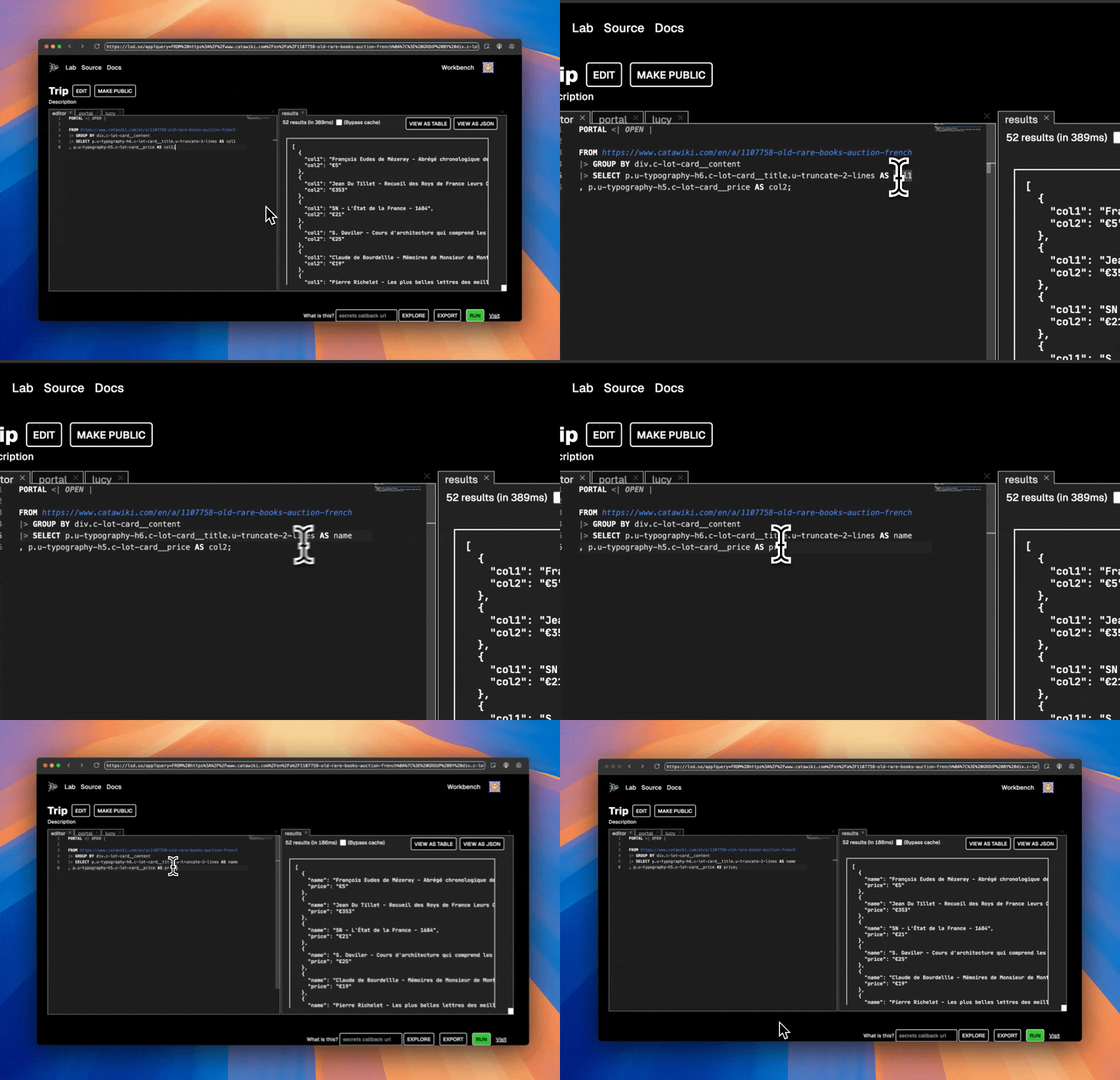
After which you can publish using the language.
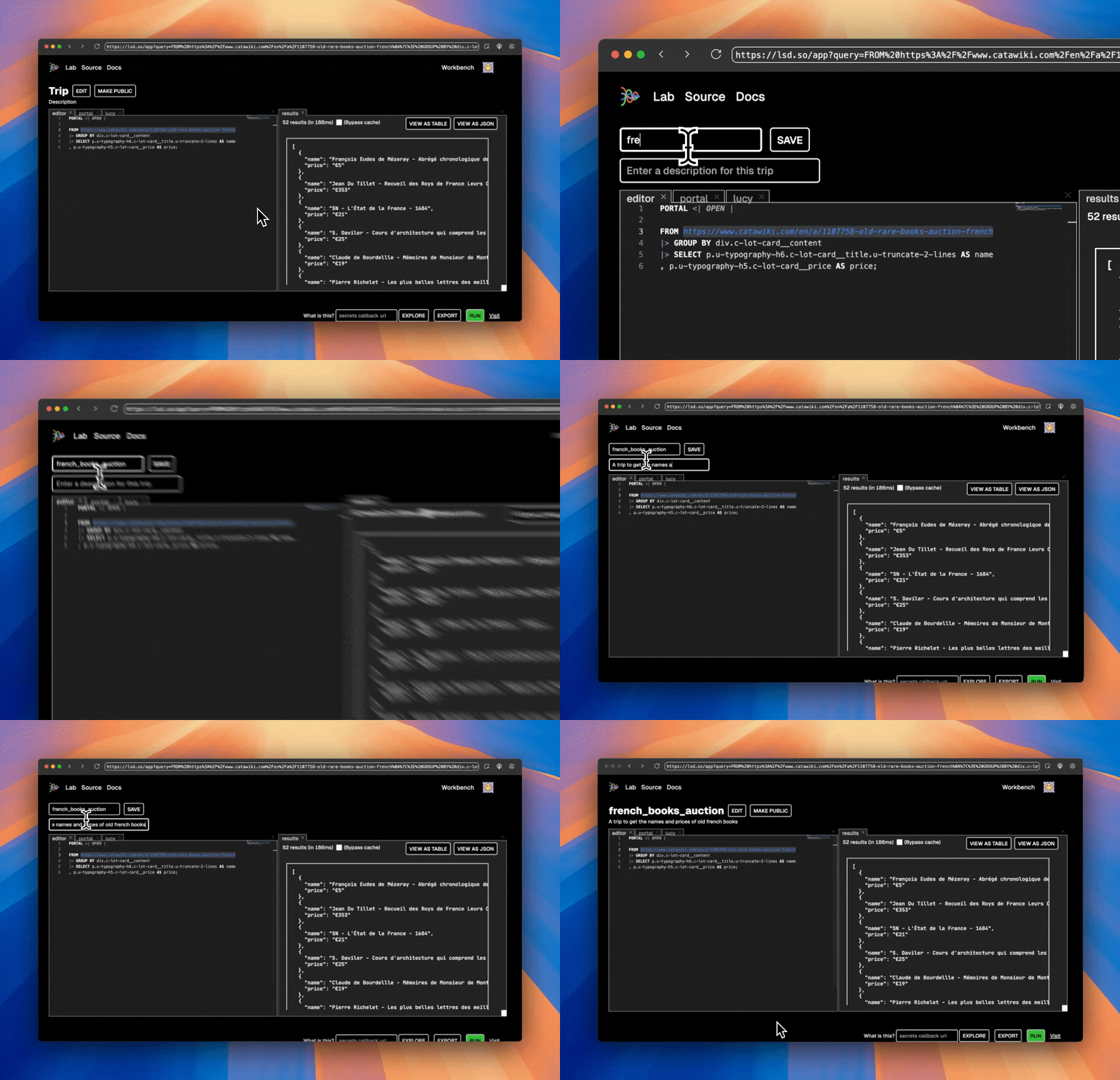
Using the language
From the workbench, simply edit to publish a trip.
Extending capabilities with TypeScript
Check out the internetdata SDK that's used under the hood to bridge with the web. Or, alternatively, get started using the create-your-internet shorthand.
$ yarn create your-internetOr, if you prefer npm
$ npm create your-internetAvailable Tools
3 toolsbrave_searchC
Search Brave for possibly relevant links to a query
| Name | Required | Description | Default |
|---|---|---|---|
| query | Yes |
TDQS
Does the description disclose side effects, auth requirements, rate limits, or destructive behavior?
With no annotations provided, the description carries the full burden of behavioral disclosure. It mentions the tool searches for 'possibly relevant links,' which implies it's a read-only operation that returns search results, but doesn't disclose critical behaviors like rate limits, authentication needs, result format, pagination, or error handling. For a search tool with zero annotation coverage, this is insufficient.
Agents need to know what a tool does to the world before calling it. Descriptions should go beyond structured annotations to explain consequences.
Is the description appropriately sized, front-loaded, and free of redundancy?
The description is extremely concise and front-loaded, consisting of a single sentence that directly states the tool's function. Every word earns its place with no wasted information, making it easy for an agent to parse quickly.
Shorter descriptions cost fewer tokens and are easier for agents to parse. Every sentence should earn its place.
Given the tool's complexity, does the description cover enough for an agent to succeed on first attempt?
Given the tool's complexity (a search operation with no output schema and no annotations), the description is incomplete. It lacks details on result structure, error cases, performance characteristics, or any behavioral context needed for effective use. The description alone doesn't provide enough information for reliable tool invocation.
Complex tools with many parameters or behaviors need more documentation. Simple tools need less. This dimension scales expectations accordingly.
Does the description clarify parameter syntax, constraints, interactions, or defaults beyond what the schema provides?
The description adds minimal meaning beyond the input schema. It implies the 'query' parameter is used to search Brave, but with 0% schema description coverage and only one parameter, the baseline is 4 for zero parameters; however, since there is one parameter and the description doesn't elaborate on its format, constraints, or examples, it doesn't fully compensate, warranting a score of 3.
Input schemas describe structure but not intent. Descriptions should explain non-obvious parameter relationships and valid value ranges.
Does the description clearly state what the tool does and how it differs from similar tools?
The description clearly states the tool's purpose with a specific verb ('Search') and resource ('Brave'), and identifies the output ('links to a query'). It distinguishes the tool's function from its siblings (find_trips, run_lsd) by focusing on web search. However, it doesn't explicitly differentiate from potential alternative search tools, keeping it at a 4 rather than a 5.
Agents choose between tools based on descriptions. A clear purpose with a specific verb and resource helps agents select the right tool.
Does the description explain when to use this tool, when not to, or what alternatives exist?
The description provides no guidance on when to use this tool versus alternatives. It mentions 'possibly relevant links' but gives no context about when this search method is preferred over others, what types of queries it handles best, or any prerequisites for use. This leaves the agent without usage direction.
Agents often have multiple tools that could apply. Explicit usage guidance like "use X instead of Y when Z" prevents misuse.
find_tripsD
| Name | Required | Description | Default |
|---|---|---|---|
| query | Yes |
TDQS
Does the description disclose side effects, auth requirements, rate limits, or destructive behavior?
Tool has no description.
Agents need to know what a tool does to the world before calling it. Descriptions should go beyond structured annotations to explain consequences.
Is the description appropriately sized, front-loaded, and free of redundancy?
Tool has no description.
Shorter descriptions cost fewer tokens and are easier for agents to parse. Every sentence should earn its place.
Given the tool's complexity, does the description cover enough for an agent to succeed on first attempt?
Tool has no description.
Complex tools with many parameters or behaviors need more documentation. Simple tools need less. This dimension scales expectations accordingly.
Does the description clarify parameter syntax, constraints, interactions, or defaults beyond what the schema provides?
Tool has no description.
Input schemas describe structure but not intent. Descriptions should explain non-obvious parameter relationships and valid value ranges.
Does the description clearly state what the tool does and how it differs from similar tools?
Tool has no description.
Agents choose between tools based on descriptions. A clear purpose with a specific verb and resource helps agents select the right tool.
Does the description explain when to use this tool, when not to, or what alternatives exist?
Tool has no description.
Agents often have multiple tools that could apply. Explicit usage guidance like "use X instead of Y when Z" prevents misuse.
run_lsdD
| Name | Required | Description | Default |
|---|---|---|---|
| code | Yes |
TDQS
Does the description disclose side effects, auth requirements, rate limits, or destructive behavior?
Tool has no description.
Agents need to know what a tool does to the world before calling it. Descriptions should go beyond structured annotations to explain consequences.
Is the description appropriately sized, front-loaded, and free of redundancy?
Tool has no description.
Shorter descriptions cost fewer tokens and are easier for agents to parse. Every sentence should earn its place.
Given the tool's complexity, does the description cover enough for an agent to succeed on first attempt?
Tool has no description.
Complex tools with many parameters or behaviors need more documentation. Simple tools need less. This dimension scales expectations accordingly.
Does the description clarify parameter syntax, constraints, interactions, or defaults beyond what the schema provides?
Tool has no description.
Input schemas describe structure but not intent. Descriptions should explain non-obvious parameter relationships and valid value ranges.
Does the description clearly state what the tool does and how it differs from similar tools?
Tool has no description.
Agents choose between tools based on descriptions. A clear purpose with a specific verb and resource helps agents select the right tool.
Does the description explain when to use this tool, when not to, or what alternatives exist?
Tool has no description.
Agents often have multiple tools that could apply. Explicit usage guidance like "use X instead of Y when Z" prevents misuse.
Tool Schema Changelog
Recent tool additions, removals, and schema changes observed during successful MCP inspections. Dates show when Glama detected each change.
3 tool updates
- First observed
brave_search - First observed
find_trips - First observed
run_lsd
TDQS
The tools have unclear boundaries and overlapping purposes. 'brave_search' and 'find_trips' could both be interpreted as search tools, with the latter's lack of description making it ambiguous whether it searches for trips or performs another function. 'run_lsd' is completely opaque without a description, potentially overlapping with execution or processing roles.
The naming is mixed but readable. 'brave_search' and 'find_trips' follow a verb_noun pattern, while 'run_lsd' uses a verb_prefix style. There is no chaotic mixing of cases, but the conventions are not fully consistent across all tools.
With only 3 tools, the server feels thin for a general-purpose 'LSD MCP Server', suggesting an incomplete surface. The lack of descriptions for two tools makes it hard to assess scope, but the count is borderline too few for meaningful coverage of any substantial domain.
The server is severely incomplete. Based on the tool names, it appears to cover search and execution, but with no descriptions for 'find_trips' and 'run_lsd', there are significant gaps. It lacks any CRUD operations, lifecycle management, or clear domain coverage, making it impossible for agents to perform coherent workflows.
Maintenance
Resources
Unclaimed servers have limited discoverability.
Looking for Admin?
If you are the server author, to access and configure the admin panel.
Related MCP Connectors
Driflyte MCP server which lets AI assistants query topic-specific knowledge from web and GitHub.
The Remote MCP server acts as a standardized bridge between LLM applications (like Claude, ChatGPT, and Cursor) and external services, enabling AI agents to access external tools and resources. Its primary capability is providing a centralized search tool to discover other MCP servers and their respective tools. Unlike local implementations, it runs remotely with OAuth authentication and permission controls for security.
- UnifAPIOAuthcom.unifapi
Hosted MCP server for live public-data APIs and Skills for AI agents.
Related MCP Servers
- FlicenseNot gradedqualityDmaintenanceAn MCP server that enables web search and document retrieval capabilities through Tavily API and LangConnect vector database, supporting AI agents in gathering information for comprehensive report generation.22-
- AlicenseAqualityDmaintenanceAn MCP server that provides real-time web search to AI agents via a pay-per-search USDC microtransaction system.5671MIT
- FlicenseNot gradedqualityCmaintenanceAn MCP server that enables deep internet research through natural language, supporting stdio and HTTP/SSE modes for flexible integration.3-
- AlicenseNot gradedqualityFmaintenanceMCP tool server that gives any AI agent the ability to search, scrape, and analyze content across the internet.42MIT
Latest Blog Posts
- Who's Calling? MCP Hosts Are an Identity Blind Spot (And the Spec Knows It)By Om-Shree-0709 on .mcpAgent IdentityOAuth 2.1
- Your AI Chatbot Just Exposed Your CEO's Salary to an InternBy Om-Shree-0709 on .Agent IdentityMCP SecurityOAuth Delegation
- Why MCP Servers Need Execution Sandboxing (And Why Your Current Stack Isn't Enough)By Om-Shree-0709 on .Agentic AiPrompt InjectionWebAssembly
MCP directory API
We provide all the information about MCP servers via our MCP API.
curl -X GET 'https://glama.ai/api/mcp/v1/servers/lsd-so/internetdata-mcp'
If you have feedback or need assistance with the MCP directory API, please join our Discord server