MCPunk
MCPunk🤖
通过提供 LLM 工具来智能搜索您的代码,无需嵌入即可与您的代码库进行聊天。
MCPunk 让你通过对话探索和理解代码库。它的工作原理如下:
将文件分解为逻辑块(函数、类、markdown 部分)
为 LLM 提供搜索和查询这些块的工具
让法学硕士找到回答你的问题所需的具体代码
无需嵌入,无需复杂配置——只需清晰、可审计的搜索,即可直观查看并进行引导。它可与 Claude Desktop 或任何其他MCP客户端完美兼容。
构建时考虑了以下因素
背景为王——法学硕士 (LLM) 可以很棒,但只有提供适当的背景才行。
上下文至关重要——LLM 需要上下文,但他们无法处理太多。真是可笑!MCPunk 是一个 RAG,它本身就为 LLM 提供了上下文提示,让 LLM 能够真正缩小范围,只选择相关的内容。
人机交互-您可以准确地看到 LLM 考虑了哪些数据以及它是如何找到这些数据的,您可以进入聊天并将事情直接引导到您想要的任何地方。
设置
这些是针对 Claude Desktop 的说明,但 MCPunk 可以在任何使用 MCP 的地方使用。
将下面的代码片段放入您的
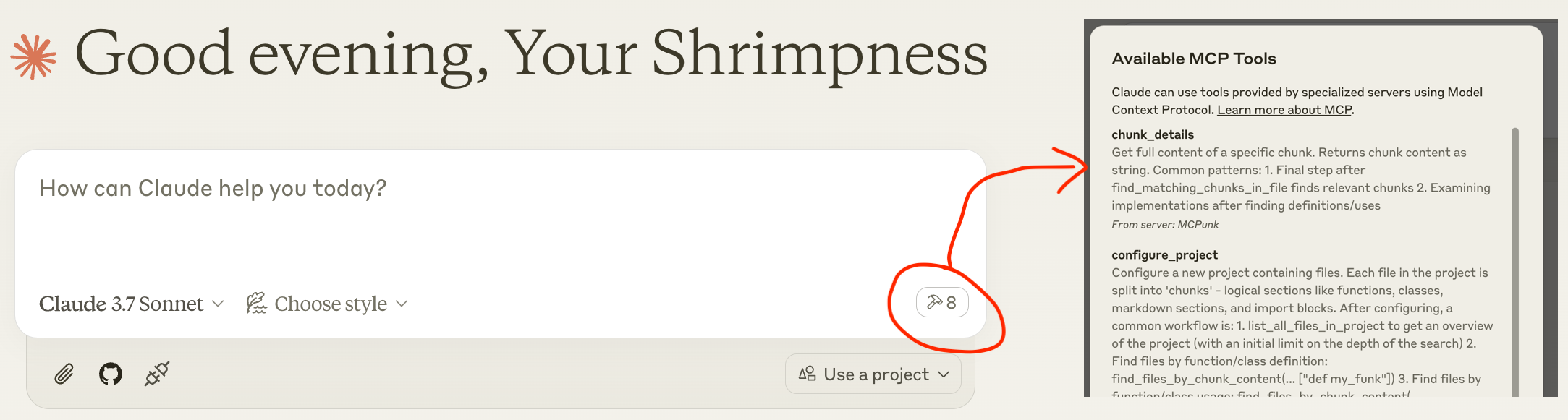
claude_desktop_config.json中( 有关claude_desktop_config.json的详细信息,包括位置)重新启动 Claude Desktop ,稍等片刻后,您就会看到可用的工具,如下面的屏幕截图所示
聊天:“嘿,伙计,你能设置一下~/git/mcpunk 项目并告诉我 python 文件是如何分块的吗?”
( "command": "uvx",可能不起作用,您可能需要使用例如"command": "/Users/michael/.local/bin/uvx", )
{
"mcpServers": {
"MCPunk": {
"command": "uvx",
"args": ["mcpunk"]
}
}
}
使用示例
回答有关您的代码库的问题
**[用户]**嘿,伙计,你能设置一下 ~/git/mcpunk 仓库吗?然后帮我理解一下 mcpunk 用户如何在他们使用 mcpunk 配置的仓库中获取当前签出分支的 git diff。
**[Claude]**调用
configure_project**[Claude]**调用
list_all_files_in_project**[Claude]**调用
find_files_by_chunk_content[Claude] ... 使用 MCPunk 总共进行了 21 次工具调用。
**[Claude]**现在我明白了 mcpunk 中 git diff 功能的工作原理。让我总结一下用户如何获取当前已检出分支的 git diff:要获取配置了 mcpunk 的仓库中当前已检出分支的 git diff,请执行以下操作:
首先,用户需要使用 configure_project 工具配置 mcpunk 以配合他们的项目
查看最近检出的分支(以确定要比较的内容)
然后,获取当前分支 (HEAD) 与参考分支之间的差异。这将显示当前分支 (HEAD) 与指定参考分支之间的差异。ref 参数应为要比较的基础分支的名称(例如“main”或“develop”)。
**[用户]**干得好,伙计!
公关评论
**[用户]**嘿,伙计,你能设置一下 ~/git/mcpunk 仓库,然后看看当前分支与
scratch/1.5对比情况吗?**[Claude]**设置 ~/git/mcpunk 并调用
diff_with_ref来引用scratch/1.5**[Claude]**我看到您做了一些更改,主要是添加了一个新的测试文件
tests/test_git_analysis.py...**[用户]**这与代码库的其余部分有什么关系?
**[Claude]**调用 5 个工具来按块列出文件、列出块、获取块详细信息
**[Claude]**我明白了——这段代码解析了 git reflog 的输出,以追踪最近检出的分支。主函数 get_recent_branches 接收一个仓库路径,并返回最近检出的 N 个分支,并使用 _branches_from_reflog 作为辅助函数来解析原始的 reflog 输出。
**[用户]**如果你很着急,需要安排人来审阅这项工作,你会让他们看什么?请概述一下具体的工作内容
[克劳德]
_branches_from_reflog 中的
split("to ")[-1]看起来很脆弱测试数据仅显示简单的分支名称,那么空格/特殊字符呢?
example_reflog 是否代表真实的 git reflog 输出?
我们是否针对实际的 git 行为进行测试?
**[用户]**你是最棒的!
跨多个代码库工作
你可以让你的 LLM 设置多个项目,它就可以自由地在它们之间查询。如果一个项目依赖于另一个项目,并且它们位于不同的代码库中,这很方便。在这种情况下,LLM 应该通过导入来识别这种情况。
什么是 MCPunk 及其他背景
MCPunk 是一个 MCP 服务器,提供以下工具:
配置一个项目,它是一个文件目录。配置完成后,文件将被拆分成逻辑块。MCPunk 是为代码构建的,但实际上它可以应用于任何文档,甚至图像(如果你愿意的话)。
在项目中搜索包含特定文本的文件
在包含特定文本的文件中搜索块
查看特定块的完整内容
除此之外,它还提供了一些内置的分块器。最成熟的是 Python 分块器。
MCPunk 不一定非要用于对话。例如,它可以作为 CI 流程中代码审查的一部分。它实际上是一种通用的 RAG。
sequenceDiagram
participant User
participant Claude as Claude Desktop
participant MCPunk as MCPunk Server
participant Files as File System
Note over User,Files: Setup Phase
User->>Claude: Ask question about codebase
Claude->>MCPunk: configure_project(root_path, project_name)
MCPunk->>Files: Scan files in root directory
Note over MCPunk,Files: Chunking Process
MCPunk->>MCPunk: For each file, apply appropriate chunker:
MCPunk->>MCPunk: - PythonChunker: functions, classes, imports
MCPunk->>MCPunk: - MarkdownChunker: sections by headings
MCPunk->>MCPunk: - VueChunker: template/script/style sections
MCPunk->>MCPunk: - WholeFileChunker: fallback
MCPunk->>MCPunk: Split chunks >10K chars into parts
MCPunk-->>Claude: Project configured with N files
Note over User,Files: Navigation Phase<br>(LLM freely uses all these tools repeatedly to drill in)
Claude->>MCPunk: list_all_files_in_project(project_name)
MCPunk-->>Claude: File tree structure
Claude->>MCPunk: find_files_by_chunk_content(project_name, "search term")
MCPunk-->>Claude: Files containing matching chunks
Claude->>MCPunk: find_matching_chunks_in_file(project_name, file_path, "search term")
MCPunk-->>Claude: List of matching chunk IDs in file
Claude->>MCPunk: chunk_details(chunk_id)
MCPunk-->>Claude: Full content of specific chunk
Claude->>User: Answer based on relevant code chunks
Note over User,Files: Optional Git Analysis
Claude->>MCPunk: list_most_recently_checked_out_branches(project_name)
MCPunk->>Files: Parse git reflog
MCPunk-->>Claude: List of recent branches
Claude->>MCPunk: diff_with_ref(project_name, "main")
MCPunk->>Files: Generate git diff
MCPunk-->>Claude: Diff between HEAD and reference漫游RAG速成课程
看
漫游 RAG 的要点是
将内容(代码库、PDF 文件等)分解成“块”。每个块都是一个“小”的逻辑项,例如一个函数、Markdown 文档中的一个部分,或者代码文件中的所有导入。
提供 LLM 工具来搜索块。MCPunk 通过提供工具来搜索包含特定文本块的文件,并列出特定块的完整内容。
与更传统的“矢量搜索” RAG 相比:
LLM 必须深入挖掘才能找到块,并且自然而然地意识到它们的更广泛的背景(比如它们在哪个文件中)
各个部分应该始终保持连贯性,就像一个完整的函数一样。
您可以准确地看到 LLM 正在搜索的内容,并且如果搜索效果不佳,通常会很明显,您可以通过建议改进的搜索词来帮助它。
需要精确搜索匹配。MCPunk 不提供任何类型的模糊搜索。
块
块是文件的一部分。例如,
单个 Python 函数
Markdown 部分
所有来自 Python 文件的导入
块由chunkers从文件创建,MCPunk 内置了一些块。
在 MCPunk 中设置项目后,它会遍历所有文件,并应用第一个适用的分块器。然后,LLM 可以使用工具执行以下操作:(1) 查询包含特定文本分块的文件;(2) 查询特定文件中的所有分块;(3) 获取某个分块的完整内容。
通过这个基本基础,Claude 可以有效地浏览相对较大的代码库,首先广泛搜索相关文件,然后缩小范围到相关区域。
内置分块器:
PythonChunker将内容拆分成类、函数、文件级导入和文件级语句(例如全局变量)。适用于以.py结尾的文件。VueChunker会将文件拆分成“模板”、“脚本”、“样式”等块,或任何存在的顶层<blah>....</blah>项。适用于以.vue结尾的文件。MarkdownChunker将内容按标题分块成 Markdown 部分。适用于以.md结尾的文件。WholeFileChunker是一个后备分块器,它会为整个文件创建一个单独的分块。适用于任何文件。
任何超过 10k 个字符(可配置)的块都会自动拆分为多个块,名称后缀为part1 、 part2等。这有助于避免上下文中断,同时仍允许合理地导航块。
定制 Chunker
每种类型的文件(例如 Python 和 C)都需要一个自定义的分块器。MCPunk 自带了一些内置的分块器。如果没有特定的分块器匹配文件,则会使用默认的分块器,将整个文件拆分成一个块。
目前建议的添加块的方法是 fork 这个项目并添加它们,然后按照Development运行 MCPunk。要添加一个块处理器
在file_chunkers.py中添加它,继承自
BaseChunker将其添加到file_breakdown.py中的
ALL_CHUNKERS
可以为模块实现某种插件系统,以宣传它们具有可供 MCPunk 使用的自定义分块器,就像 pytest 的插件系统一样,但目前还没有计划实现这一点(除非有人愿意这样做)。
限制
有时 LLM 的搜索功能很差。例如,搜索“dependency”,会漏掉“dependencies”这个词。可以考虑添加词干。
有时 LLM 会尝试查找特定的关键代码但未能找到,然后继续而不承认其上下文感知有限。
“大型”项目通常没有经过充分测试。一个包含约 1000 个 Python 文件、总共约 25 万行代码的项目运行良好。项目设置大约需要 5 秒。随着代码库规模的扩大,执行初始分块的时间也会增加,并且可能需要更复杂的搜索。代码通常不会考虑海量代码库——你会看到诸如所有数据存储在内存中、通过迭代所有数据进行搜索等各种情况,这些都迫切需要进行基本的优化。
小型项目最好将所有代码串联起来并放在上下文中。MCPunk 只适用于这种做法不切实际的情况。
在某些情况下,让 LLM 抓取整个文件显然比让它一次挑选出一个块更好。MCPunk 没有这方面的机制。实践中,我发现这没什么大问题。
配置
可以通过以MCPUNK_为前缀的环境变量来配置各种内容。有关可用选项,请参阅settings.py —— 这些选项是通过Pydantic Settings从环境变量加载的。
例如,配置include_chars_in_response选项:
{
"mcpServers": {
"MCPunk": {
"command": "uvx",
"args": ["mcpunk"],
"env": {
"MCPUNK_INCLUDE_CHARS_IN_RESPONSE": "false"
}
}
}
}路线图和发展状况
MCPunk 的功能已接近完善。目前尚未被广泛使用,作为用户,您很可能会遇到 bug 或不完善的地方。欢迎在https://github.com/jurasofish/mcpunk/issues上报告 bug。
路线图构想
添加一些提示来帮助使用 MCPunk。如果没有像“向外星人解释如何做煎饼”那样的提示,事情确实会变得有点平淡。
提取 python 模块级语句时包含模块级注释。
可能用于搜索
将整个“项目”概念更改为不需要文件实际存在 - 这导致允许项目内部存在“虚拟”文件。
考虑将文件从具有路径更改为具有 URI,因此可以像
file://.../http[s]:///gitdiff:/// 等任意 URI
git diff 的分块。目前,有一个工具可以获取整个 diff。这可能会非常大。您可以将该工具更改为
add_diff_to_project,并将文件放在gitdiff://URI 或某个虚拟路径下。项目缓存,这样每次重启 MCP 客户端时就无需重新解析所有文件。这可能比较棘手,因为更改分块器的代码会导致缓存失效。可能不会优先考虑,因为对于我的用例来说,它的速度并不算太慢。
用户可以提供自定义代码来执行分块,可能类似于pytest 插件
类似 tree sitter 的东西可能可以用作更通用的 chunker
跟踪发送/接收的字符,最好通过聊天。
通过聊天记录状态、日志等
发展
如果您像下面这样设置了 claude 桌面,那么您可以重新启动它来查看最新的更改,就像您在本地版本的 repo 上处理 MCPunk 一样。
{
"mcpServers": {
"MCPunk": {
"command": "/Users/michael/.local/bin/uvx",
"args": [
"--from",
"/Users/michael/git/mcpunk",
"--no-cache",
"mcpunk"
]
}
}
}测试、Linting、CI
查看Makefile和 github 操作工作流程。
Available Tools
8 toolschunk_detailsA
Get full content of a specific chunk.
Returns chunk content as string.
Common patterns:
1. Final step after find_matching_chunks_in_file finds relevant chunks
2. Examining implementations after finding definitions/uses
| Name | Required | Description | Default |
|---|---|---|---|
| chunk_id | Yes |
TDQS
Does the description disclose side effects, auth requirements, rate limits, or destructive behavior?
No annotations provided, but description states it returns chunk content as string, indicating a read-only operation. Usage patterns imply safe behavior. Could add error cases but sufficient for a simple tool.
Agents need to know what a tool does to the world before calling it. Descriptions should go beyond structured annotations to explain consequences.
Is the description appropriately sized, front-loaded, and free of redundancy?
Three concise sentences: purpose, return type, usage patterns. No wasted words, front-loaded with key information.
Shorter descriptions cost fewer tokens and are easier for agents to parse. Every sentence should earn its place.
Given the tool's complexity, does the description cover enough for an agent to succeed on first attempt?
For a simple tool with one parameter and no output schema, the description is largely complete. Mentions common patterns to aid understanding. Could add a note on where chunk_id comes from.
Complex tools with many parameters or behaviors need more documentation. Simple tools need less. This dimension scales expectations accordingly.
Does the description clarify parameter syntax, constraints, interactions, or defaults beyond what the schema provides?
Schema has one parameter 'chunk_id' with 0% description coverage. Description does not explain what chunk_id is or how to get it, so the agent must infer from context.
Input schemas describe structure but not intent. Descriptions should explain non-obvious parameter relationships and valid value ranges.
Does the description clearly state what the tool does and how it differs from similar tools?
The description clearly states 'Get full content of a specific chunk' with a verb and resource. It distinguishes from sibling tools like find_matching_chunks_in_file by focusing on retrieval rather than search.
Agents choose between tools based on descriptions. A clear purpose with a specific verb and resource helps agents select the right tool.
Does the description explain when to use this tool, when not to, or what alternatives exist?
Explicitly lists common patterns: final step after find_matching_chunks_in_file, examining implementations. This gives clear guidance on when to use and contrasts with alternatives.
Agents often have multiple tools that could apply. Explicit usage guidance like "use X instead of Y when Z" prevents misuse.
configure_projectA
Configure a new project containing files.
Each file in the project is split into 'chunks' - logical sections like functions,
classes, markdown sections, and import blocks.
After configuring, a common workflow is:
1. list_all_files_in_project to get an overview of the project (with
an initial limit on the depth of the search)
2. Find files by function/class definition:
find_files_by_chunk_content(... ["def my_funk"])
3. Find files by function/class usage:
find_files_by_chunk_content(... ["my_funk"])
4. Determine which chunks in the found files are relevant:
find_matching_chunks_in_file(...)
5. Get details about the chunks:
chunk_details(...)
Use ~ (tilde) literally if the user specifies it in paths.
| Name | Required | Description | Default |
|---|---|---|---|
| root_path | Yes | Root path of the project | |
| project_name | Yes | Name of the project, for you to pick buddy, something short and sweet and memorable and unique |
TDQS
Does the description disclose side effects, auth requirements, rate limits, or destructive behavior?
No annotations provided. Description explains chunking but lacks details on idempotency, side effects, permissions, or error handling. It is moderately transparent but leaves gaps.
Agents need to know what a tool does to the world before calling it. Descriptions should go beyond structured annotations to explain consequences.
Is the description appropriately sized, front-loaded, and free of redundancy?
Description is front-loaded with purpose and includes a structured workflow list. Could be slightly more concise, but the flow is helpful and not overly verbose.
Shorter descriptions cost fewer tokens and are easier for agents to parse. Every sentence should earn its place.
Given the tool's complexity, does the description cover enough for an agent to succeed on first attempt?
No output schema; description does not explain what the tool returns (e.g., project ID, success status). The workflow suggests integration but lacks completeness for an agent to fully understand the tool's output.
Complex tools with many parameters or behaviors need more documentation. Simple tools need less. This dimension scales expectations accordingly.
Does the description clarify parameter syntax, constraints, interactions, or defaults beyond what the schema provides?
Schema has 100% coverage. Description adds informal guidance for project_name ('short, sweet, memorable') and notes on tilde path handling, providing extra context beyond schema.
Input schemas describe structure but not intent. Descriptions should explain non-obvious parameter relationships and valid value ranges.
Does the description clearly state what the tool does and how it differs from similar tools?
The description clearly states 'Configure a new project containing files' and explains chunks. It distinguishes from sibling tools like list_all_files_in_project or find_files_by_chunk_content as the initial setup.
Agents choose between tools based on descriptions. A clear purpose with a specific verb and resource helps agents select the right tool.
Does the description explain when to use this tool, when not to, or what alternatives exist?
Provides a common workflow listing steps after configuration, and mentions handling tilde in paths. However, does not explicitly state when not to use or compare to alternatives.
Agents often have multiple tools that could apply. Explicit usage guidance like "use X instead of Y when Z" prevents misuse.
diff_with_refA
Return a summary of the diff between HEAD and the given ref.
You probably want the ref to be the 'base' branch like develop or main, off which PRs are made - and you can likely determine this by viewing the most recently checked out branches.
| Name | Required | Description | Default |
|---|---|---|---|
| project_name | Yes | ||
| ref | Yes |
TDQS
Does the description disclose side effects, auth requirements, rate limits, or destructive behavior?
No annotations are provided, so the description must carry the full burden. It states the tool returns a summary, implying no side effects, and describes the scope (HEAD vs ref). However, it does not explicitly declare read-only behavior or describe what the summary includes, leaving some behavioral traits undisclosed.
Agents need to know what a tool does to the world before calling it. Descriptions should go beyond structured annotations to explain consequences.
Is the description appropriately sized, front-loaded, and free of redundancy?
Two efficient sentences: the first states the core purpose, the second provides usage guidance. No wasted words, and the key information is front-loaded.
Shorter descriptions cost fewer tokens and are easier for agents to parse. Every sentence should earn its place.
Given the tool's complexity, does the description cover enough for an agent to succeed on first attempt?
For a simple diff tool with two parameters and no output schema, the description is mostly complete: it explains the action, the ref choice, and how to infer the ref. Missing details on output format and project_name, but overall adequate given the tool's simplicity.
Complex tools with many parameters or behaviors need more documentation. Simple tools need less. This dimension scales expectations accordingly.
Does the description clarify parameter syntax, constraints, interactions, or defaults beyond what the schema provides?
With 0% schema description coverage, the description must compensate. It discusses the ref parameter with context ('base branch') but does not explain the project_name parameter beyond its name. The tool would benefit from clarifying how project_name is resolved or its format.
Input schemas describe structure but not intent. Descriptions should explain non-obvious parameter relationships and valid value ranges.
Does the description clearly state what the tool does and how it differs from similar tools?
Clearly states the tool returns a diff summary between HEAD and a given ref. The verb 'Return' and resource 'diff between HEAD and ref' are specific. Sibling tools like chunk_details or list_most_recently_checked_out_branches are clearly distinct in functionality.
Agents choose between tools based on descriptions. A clear purpose with a specific verb and resource helps agents select the right tool.
Does the description explain when to use this tool, when not to, or what alternatives exist?
Explicitly advises using a base branch (e.g., develop, main) as the ref and suggests viewing recently checked out branches to determine it. This provides clear guidance on when to use the tool, though it does not explicitly state when not to use it.
Agents often have multiple tools that could apply. Explicit usage guidance like "use X instead of Y when Z" prevents misuse.
find_files_by_chunk_contentA
Step 1: Find files containing chunks with matching text.
Returns file tree only showing which files contain matches.
You must use find_matching_chunks_in_file on each relevant file
to see the actual matches.
Example workflow:
1. Find files:
files = find_files_by_chunk_content(project, ["MyClass"])
2. For each file, find actual matches:
matches = find_matching_chunks_in_file(file, ["MyClass"])
3. Get content:
content = chunk_details(file, match_id)
| Name | Required | Description | Default |
|---|---|---|---|
| project_name | Yes | ||
| chunk_contents_filter | Yes | Match if any of these strings appear. Match all if None/null. Single empty string or empty list will match all. |
TDQS
Does the description disclose side effects, auth requirements, rate limits, or destructive behavior?
The description discloses that the tool only returns a file tree, not the matches themselves, and that follow-up steps are required. This adds behavioral context beyond the input schema, though it does not cover error handling or permissions. With no annotations provided, the description carries the full burden and does so adequately.
Agents need to know what a tool does to the world before calling it. Descriptions should go beyond structured annotations to explain consequences.
Is the description appropriately sized, front-loaded, and free of redundancy?
The description is well-structured with a step-by-step workflow and code example, making it easy to follow. While it is not extremely concise, every sentence adds value and is front-loaded with the core purpose. Minor redundancy in the workflow explanation.
Shorter descriptions cost fewer tokens and are easier for agents to parse. Every sentence should earn its place.
Given the tool's complexity, does the description cover enough for an agent to succeed on first attempt?
The description lacks an explicit return value structure, stating only 'file tree' without details on its format. Given no output schema, more specificity would help. However, it does provide the workflow context and example, making it partially complete for a simple search tool.
Complex tools with many parameters or behaviors need more documentation. Simple tools need less. This dimension scales expectations accordingly.
Does the description clarify parameter syntax, constraints, interactions, or defaults beyond what the schema provides?
The input schema has 50% description coverage (only chunk_contents_filter has a description). The description does not elaborate on parameters beyond the example and workflow, adding marginal value. Baseline is 3 due to moderate schema coverage, and the description compensates only slightly.
Input schemas describe structure but not intent. Descriptions should explain non-obvious parameter relationships and valid value ranges.
Does the description clearly state what the tool does and how it differs from similar tools?
The description clearly states the tool finds files containing chunks with matching text and returns only the file tree. It distinguishes from sibling tools like find_matching_chunks_in_file which show actual matches, making the purpose specific and differentiated.
Agents choose between tools based on descriptions. A clear purpose with a specific verb and resource helps agents select the right tool.
Does the description explain when to use this tool, when not to, or what alternatives exist?
The description explicitly outlines a three-step workflow, instructing when to use this tool first, then to use find_matching_chunks_in_file for actual matches, and finally chunk_details for content. This provides clear usage guidance and differentiates from alternatives.
Agents often have multiple tools that could apply. Explicit usage guidance like "use X instead of Y when Z" prevents misuse.
find_matching_chunks_in_fileA
Step 2: Find the actual matching chunks in a specific file.
Required after find_files_by_chunk_content or list_all_files_in_project to see
matches, as those tools only show files, not their contents.
This can be used for things like:
- Finding all chunks in a file that make reference to a specific function
(e.g. find_matching_chunks_in_file(..., ["my_funk"])
- Finding a chunk where a specific function is defined
(e.g. find_matching_chunks_in_file(..., ["def my_funk"])
Some chunks are split into multiple parts, because they are too large. This
will look like 'chunkx_part1', 'chunkx_part2', ...
| Name | Required | Description | Default |
|---|---|---|---|
| project_name | Yes | ||
| rel_path | Yes | Relative to project root | |
| filter_ | Yes | Match if any of these strings appear. Match all if None/null. Single empty string or empty list will match all. |
TDQS
Does the description disclose side effects, auth requirements, rate limits, or destructive behavior?
No annotations provided, so description carries full burden. It adds behavioral context about chunk splitting into multiple parts, which is important. However, it does not disclose any side effects or permissions.
Agents need to know what a tool does to the world before calling it. Descriptions should go beyond structured annotations to explain consequences.
Is the description appropriately sized, front-loaded, and free of redundancy?
The description is concise, well-structured with bullet points and examples. Every sentence adds value without redundancy.
Shorter descriptions cost fewer tokens and are easier for agents to parse. Every sentence should earn its place.
Given the tool's complexity, does the description cover enough for an agent to succeed on first attempt?
Given no output schema and no annotations, the description covers purpose, usage flow, and chunk splitting. Minor gap: does not explain the return format beyond chunk naming pattern.
Complex tools with many parameters or behaviors need more documentation. Simple tools need less. This dimension scales expectations accordingly.
Does the description clarify parameter syntax, constraints, interactions, or defaults beyond what the schema provides?
Schema coverage is 67% (project_name missing). The description adds value by explaining filter_ behavior with examples and clarifying that empty string or list matches all. However, project_name remains unexplained.
Input schemas describe structure but not intent. Descriptions should explain non-obvious parameter relationships and valid value ranges.
Does the description clearly state what the tool does and how it differs from similar tools?
The description clearly states it is 'Step 2' for finding matching chunks in a specific file, and distinguishes from sibling tools like 'find_files_by_chunk_content' which only show files. It uses specific verbs and resources.
Agents choose between tools based on descriptions. A clear purpose with a specific verb and resource helps agents select the right tool.
Does the description explain when to use this tool, when not to, or what alternatives exist?
The description explicitly says when to use this tool (after find_files_by_chunk_content or list_all_files_in_project) and gives usage examples. However, it does not mention when not to use it or provide alternative tools.
Agents often have multiple tools that could apply. Explicit usage guidance like "use X instead of Y when Z" prevents misuse.
get_a_jokeD
Get a really funny joke! For testing :)
| Name | Required | Description | Default |
|---|---|---|---|
| animal | Yes |
TDQS
Does the description disclose side effects, auth requirements, rate limits, or destructive behavior?
No annotations are provided, so the description carries the full burden. It indicates a read operation ('Get'), but does not disclose any behavioral traits such as rate limits, side effects, or whether it is safe. Minimal information beyond the verb.
Agents need to know what a tool does to the world before calling it. Descriptions should go beyond structured annotations to explain consequences.
Is the description appropriately sized, front-loaded, and free of redundancy?
The description is very short (one sentence), which could be concise, but it is under-specified. It sacrifices completeness for brevity without adding value.
Shorter descriptions cost fewer tokens and are easier for agents to parse. Every sentence should earn its place.
Given the tool's complexity, does the description cover enough for an agent to succeed on first attempt?
Given the tool's simplicity and lack of output schema, the description fails to cover essential context: meaning of the animal parameter, return value format, or any constraints. It is inadequate for proper tool invocation.
Complex tools with many parameters or behaviors need more documentation. Simple tools need less. This dimension scales expectations accordingly.
Does the description clarify parameter syntax, constraints, interactions, or defaults beyond what the schema provides?
Schema description coverage is 0%, and the description makes no mention of the 'animal' parameter. The purpose of the parameter is completely undocumented, leaving the agent unable to use it correctly.
Input schemas describe structure but not intent. Descriptions should explain non-obvious parameter relationships and valid value ranges.
Does the description clearly state what the tool does and how it differs from similar tools?
The description states 'Get a really funny joke!' which indicates a joke retrieval tool, but it does not specify the resource (e.g., type of joke or source) and is vague. The animal parameter is not linked in the description, leaving ambiguity about the tool's function.
Agents choose between tools based on descriptions. A clear purpose with a specific verb and resource helps agents select the right tool.
Does the description explain when to use this tool, when not to, or what alternatives exist?
No guidance on when to use this tool versus alternatives. The phrase 'For testing :)' loosely suggests it might be a test tool, but no explicit usage context or exclusions are provided.
Agents often have multiple tools that could apply. Explicit usage guidance like "use X instead of Y when Z" prevents misuse.
list_all_files_in_projectA
List all files in a project, returning a file tree.
This is useful for getting an overview of the project, or specific subdirectories of the project.
A project may have many files, so you are suggested to start with a depth limit to get an overview, and then continue increasing the depth limit with a filter to look at specific subdirectories.
| Name | Required | Description | Default |
|---|---|---|---|
| project_name | Yes | ||
| path_filter | No | Match if any of these strings appear. Match all if None/null. Single empty string or empty list will match all. | |
| limit_depth_from_root | No | Limit the depth of the search to this many directories from the root. Typically,start with 1 to get an overview of the project.If None, search all directories from the root. |
TDQS
Does the description disclose side effects, auth requirements, rate limits, or destructive behavior?
No annotations are provided, so the description must carry the behavioral context. It mentions returning a file tree but does not disclose performance implications, error handling, or how the tree is structured. For a tool with no annotations, more details would be expected.
Agents need to know what a tool does to the world before calling it. Descriptions should go beyond structured annotations to explain consequences.
Is the description appropriately sized, front-loaded, and free of redundancy?
The description is concise with three short paragraphs. It front-loads the purpose and provides actionable advice without unnecessary verbosity.
Shorter descriptions cost fewer tokens and are easier for agents to parse. Every sentence should earn its place.
Given the tool's complexity, does the description cover enough for an agent to succeed on first attempt?
Given the tool's moderate complexity, the description covers the basic purpose and usage guidance. However, with no output schema or annotations, it could benefit from describing the output format, error scenarios, or access requirements.
Complex tools with many parameters or behaviors need more documentation. Simple tools need less. This dimension scales expectations accordingly.
Does the description clarify parameter syntax, constraints, interactions, or defaults beyond what the schema provides?
Two of three parameters have descriptions in the schema (67% coverage), so the description adds moderate value by suggesting the usage sequence (start with depth limit). It does not add new parameter-specific semantics beyond what the schema provides.
Input schemas describe structure but not intent. Descriptions should explain non-obvious parameter relationships and valid value ranges.
Does the description clearly state what the tool does and how it differs from similar tools?
The description clearly states the action (list), resource (all files in a project), and output (file tree). It distinguishes from sibling tools that focus on searching or details, making the tool's purpose unambiguous.
Agents choose between tools based on descriptions. A clear purpose with a specific verb and resource helps agents select the right tool.
Does the description explain when to use this tool, when not to, or what alternatives exist?
Provides explicit advice on when to use the tool, suggesting to start with a depth limit for overview and then increase depth with filters. However, it does not mention when not to use or compare to alternatives, so it's slightly incomplete.
Agents often have multiple tools that could apply. Explicit usage guidance like "use X instead of Y when Z" prevents misuse.
list_most_recently_checked_out_branchesB
List the n most recently checked out branches in the project
| Name | Required | Description | Default |
|---|---|---|---|
| project_name | Yes | ||
| n | No |
TDQS
Does the description disclose side effects, auth requirements, rate limits, or destructive behavior?
Without annotations, the description carries full burden for behavioral disclosure. It does not mention read-only nature, error handling, or ordering direction (e.g., descending). Only the basic action is stated.
Agents need to know what a tool does to the world before calling it. Descriptions should go beyond structured annotations to explain consequences.
Is the description appropriately sized, front-loaded, and free of redundancy?
A single sentence with no unnecessary words. It is front-loaded with the action and resource, making it efficient for an agent to parse.
Shorter descriptions cost fewer tokens and are easier for agents to parse. Every sentence should earn its place.
Given the tool's complexity, does the description cover enough for an agent to succeed on first attempt?
For a simple listing tool, the description covers the core purpose. However, it lacks details on output format, ordering direction, and edge cases like missing project. Adequate but with gaps.
Complex tools with many parameters or behaviors need more documentation. Simple tools need less. This dimension scales expectations accordingly.
Does the description clarify parameter syntax, constraints, interactions, or defaults beyond what the schema provides?
The schema has 0% description coverage, and the description adds no meaning to the parameters. Although the parameter names are self-explanatory, the description should clarify constraints like 'n' range or project_name format.
Input schemas describe structure but not intent. Descriptions should explain non-obvious parameter relationships and valid value ranges.
Does the description clearly state what the tool does and how it differs from similar tools?
The description uses a specific verb 'List' and specifies the resource 'most recently checked out branches' in the project. It clearly distinguishes the tool from siblings, which focus on files and chunks, not branches.
Agents choose between tools based on descriptions. A clear purpose with a specific verb and resource helps agents select the right tool.
Does the description explain when to use this tool, when not to, or what alternatives exist?
No guidance is provided on when to use this tool versus alternatives or when not to use it. The description simply states what it does without any context for selection.
Agents often have multiple tools that could apply. Explicit usage guidance like "use X instead of Y when Z" prevents misuse.
Tool Schema Changelog
Recent tool additions, removals, and schema changes observed during successful MCP inspections.
8 tool updates
v1.0.0- First observed
chunk_details - First observed
configure_project - First observed
diff_with_ref - First observed
find_files_by_chunk_content - First observed
find_matching_chunks_in_file - First observed
get_a_joke - First observed
list_all_files_in_project - First observed
list_most_recently_checked_out_branches
TDQS
Scored across 8 tools
Each tool has a clearly distinct purpose: project configuration, file listing, content search, chunk details, diff, branch listing, and a joke tool. No overlapping functionalities.
All tools use a consistent snake_case naming pattern with descriptive verb_noun structure (e.g., `list_all_files_in_project`, `configure_project`). No mixing of conventions.
8 tools is well-scoped for a code analysis server. Each tool serves a necessary role in the typical workflow, and there are no redundant or missing core tools.
Covers the main analysis workflow: configure, list files, search, get details, diff, and branch info. However, lacks modification tools (e.g., update/delete project or chunks), which is a minor gap for a full lifecycle.
Maintenance
Related MCP Connectors
Code intelligence for LLMs. Analyze, search, and retrieve code from any public git repository.
Shared memory for coding agents. Stop re-explaining your codebase every session.
Code intelligence for coding agents: semantic, AST, graph, and full-text search. 279+ languages.
Search indexed code, trace dependencies, assess change impact, and recall repository memory.
Related MCP Servers
- AlicenseNot gradedqualityAmaintenanceProvides AI-powered code intelligence for any codebase using local LLMs and vector search, enabling semantic code search, pattern analysis, and context-optimized code generation with 90% token savings.2MIT
- AlicenseBqualityDmaintenanceEnables token-efficient semantic search and analysis over any directory of files through hybrid search, directory overview, structural analysis, and dependency graphs.14MIT
- AlicenseNot gradedqualityCmaintenanceAdds semantic code search to AI coding agents, enabling natural language queries across entire codebases to retrieve relevant code chunks, saving tokens and providing deep context.10 npm1MIT
- AlicenseNot gradedqualityDmaintenanceEnables semantic code search and AI-powered chat for local codebases, with support for multiple AI providers and a plugin system.7 npmMIT