MCPunk
MCPunk 🤖
LLM ツールを使用してコードをインテリジェントに検索することで、埋め込みなしでコードベースとチャットできます。
MCPunk は、会話を通してコードベースを探索し、理解することを可能にします。その仕組みは以下のとおりです。
ファイルを論理的なチャンク(関数、クラス、マークダウンセクション)に分割する
LLMにこれらのチャンクを検索およびクエリするツールを提供する
LLMが質問に答えるために必要な特定のコードを見つけられるようにする
埋め込みや複雑な設定は一切不要。明確で監査可能な検索機能で、操作も分かりやすく、ガイドも簡単です。Claude Desktop やその他のMCPクライアントと連携して動作します。
以下の点を念頭に置いて構築
コンテキストが重要です- LLM は優れたものになり得ますが、適切なコンテキストが提供された場合のみです。
コンテキストは貴重です- LLMはコンテキストを必要としますが、多すぎると処理できません。これは悲劇です!MCPunkは、LLMにコンテキストヒントを提供することでLLMが関連コンテンツのみに絞り込むことを可能にするRAGです。
人間が関与- LLM が検討したデータとそのデータをどのように見つけたかを正確に確認できます。チャットに参加し、好きなように指示することができます。
設定
これらは Claude Desktop に関する手順ですが、MCPunk は MCP が使用されている場所であればどこでも使用できます。
以下のスニペットを
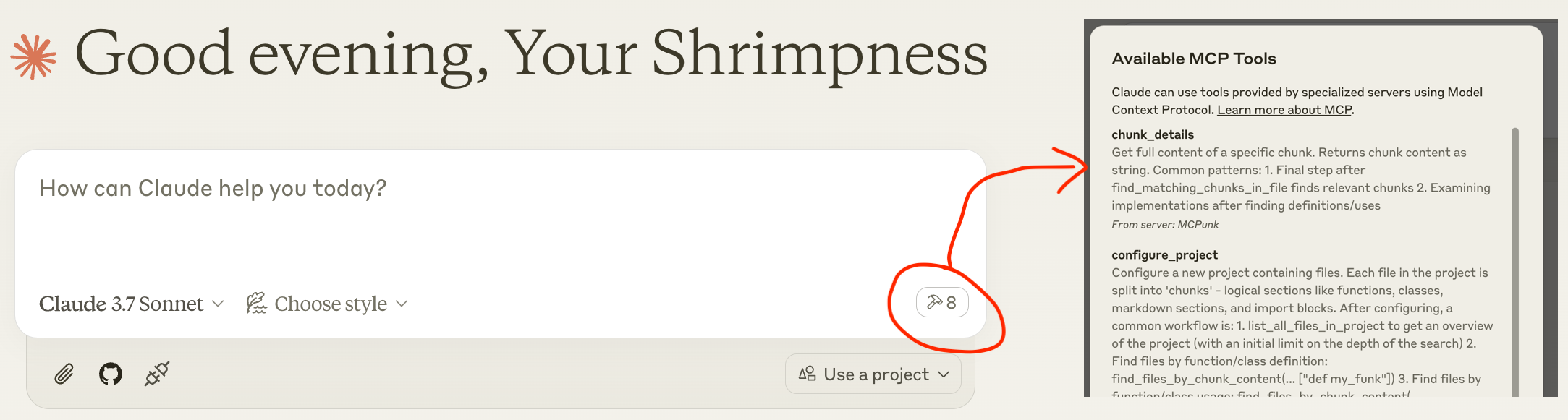
claude_desktop_config.jsonに挿入します( 場所を含むclaude_desktop_config.jsonの詳細)Claude Desktopを再起動すると、下のスクリーンショットのように、少し遅れて利用可能なツールが表示されます。
チャットで: 「ねえ、~/git/mcpunk プロジェクトを設定して、Python ファイルがどのようにチャンク化されるか教えてくれませんか」
( "command": "uvx",機能しない可能性があり、例えば"command": "/Users/michael/.local/bin/uvx",を使用する必要があるかもしれません)
{
"mcpServers": {
"MCPunk": {
"command": "uvx",
"args": ["mcpunk"]
}
}
}
使用例
コードベースに関する質問に答える
**[ユーザー]**ちょっと、~/git/mcpunk リポジトリを設定してくれませんか。それから、mcpunk のユーザーが、mcpunk で設定したリポジトリ内の現在チェックアウトされているブランチの git diff を取得する方法を教えてください。
[クロード]
configure_projectを呼び出す[クロード]
list_all_files_in_projectを呼び出す[クロード]
find_files_by_chunk_contentを呼び出す[クロード] ... MCPunk で合計 21 回のツール呼び出しを行います。
[クロード] mcpunk の git diff 機能の仕組みが分かりました。現在チェックアウトされているブランチの git diff を取得する方法をまとめます。mcpunk が設定されたリポジトリで、現在チェックアウトされているブランチの git diff を取得するには、以下の手順を実行します。
まず、ユーザーはconfigure_projectツールを使用して、プロジェクトで動作するようにmcpunkを設定する必要があります。
最近チェックアウトされたブランチを確認する(何と比較するかを識別するため)
次に、現在のブランチ(HEAD)と参照ブランチの差分を取得します。これにより、現在のブランチ(HEAD)と指定した参照ブランチの差分が表示されます。refパラメータには、比較対象となるベースブランチの名前(「main」や「develop」など)を指定します。
**[ユーザー]**素晴らしい仕事だよ!
PRレビュー
**[ユーザー]**ねえ、~/git/mcpunk リポジトリを設定して、現在のブランチと
scratch/1.5比較してもらえませんか?[Claude] ~/git/mcpunk をセットアップし、
scratch/1.5のdiff_with_refを呼び出します。**[Claude]**いくつかの変更が加えられ、主に新しいテスト ファイル
tests/test_git_analysis.pyが追加されました...**[ユーザー]**これはコードベースの残りの部分にどのように適合するのでしょうか?
**[クロード]**チャンクごとにファイルをリストし、チャンクをリストし、チャンクの詳細を取得するための 5 つのツール呼び出しを実行します。
**[クロード]**なるほど。このコードはgit reflogの出力を解析して、最近チェックアウトされたブランチを追跡しているんですね。メイン関数のget_recent_branchesはリポジトリパスを受け取り、チェックアウトされた最後のN個のブランチを返します。その際に、_branches_from_reflogをヘルパーとして使い、生のreflog出力を解析しています。
**[ユーザー]**もし急いでいて、誰かにこの作品をレビューするよう指示しなければならない場合、何を見るように指示しますか? 作業内容の概要を具体的に教えてください。
[クロード]
_branches_from_reflog の
split("to ")[-1]脆弱に見えるテスト データには単純なブランチ名のみが表示されますが、スペースや特殊文字はどうなりますか?
example_reflog は実際の git reflog 出力を表していますか?
実際の git の動作に対してテストしていますか?
**[ユーザー]**君は最高だよ!
複数のコードベースで作業する
LLMに複数のプロジェクトを設定するよう指示するだけで、LLMはそれらのプロジェクト間を自由にクエリできます。あるプロジェクトが別のプロジェクトに依存していて、それらが異なるリポジトリにある場合に便利です。この場合、LLMはインポートを通じてこれを認識するはずです。
MCPunkとその他の背景とは
MCPunkは、ツールを提供するMCPサーバーです。
プロジェクト(ファイルのディレクトリ)を設定します。設定すると、ファイルは論理的なチャンクに分割されます。MCPunkはコード用に構築されていますが、実際にはあらゆるドキュメント、さらには必要に応じて画像にも適用できます。
プロジェクト内の特定のテキストを含むファイルを検索する
特定のテキストを含むファイル内のチャンクを検索する
特定のチャンクの完全な内容を表示する
これに加えて、いくつかのチャンカーが組み込まれています。最も成熟しているのは Python チャンカーです。
MCPunkは会話に使う必要はありません。例えば、CIパイプラインのコードレビューの一部として使うこともできます。まさに汎用的なRAGです。
sequenceDiagram
participant User
participant Claude as Claude Desktop
participant MCPunk as MCPunk Server
participant Files as File System
Note over User,Files: Setup Phase
User->>Claude: Ask question about codebase
Claude->>MCPunk: configure_project(root_path, project_name)
MCPunk->>Files: Scan files in root directory
Note over MCPunk,Files: Chunking Process
MCPunk->>MCPunk: For each file, apply appropriate chunker:
MCPunk->>MCPunk: - PythonChunker: functions, classes, imports
MCPunk->>MCPunk: - MarkdownChunker: sections by headings
MCPunk->>MCPunk: - VueChunker: template/script/style sections
MCPunk->>MCPunk: - WholeFileChunker: fallback
MCPunk->>MCPunk: Split chunks >10K chars into parts
MCPunk-->>Claude: Project configured with N files
Note over User,Files: Navigation Phase<br>(LLM freely uses all these tools repeatedly to drill in)
Claude->>MCPunk: list_all_files_in_project(project_name)
MCPunk-->>Claude: File tree structure
Claude->>MCPunk: find_files_by_chunk_content(project_name, "search term")
MCPunk-->>Claude: Files containing matching chunks
Claude->>MCPunk: find_matching_chunks_in_file(project_name, file_path, "search term")
MCPunk-->>Claude: List of matching chunk IDs in file
Claude->>MCPunk: chunk_details(chunk_id)
MCPunk-->>Claude: Full content of specific chunk
Claude->>User: Answer based on relevant code chunks
Note over User,Files: Optional Git Analysis
Claude->>MCPunk: list_most_recently_checked_out_branches(project_name)
MCPunk->>Files: Parse git reflog
MCPunk-->>Claude: List of recent branches
Claude->>MCPunk: diff_with_ref(project_name, "main")
MCPunk->>Files: Generate git diff
MCPunk-->>Claude: Diff between HEAD and referenceローミングRAGクラッシュコース
見る
ローミングRAGの要点は
コンテンツ(コードベース、PDFファイルなど)を「チャンク」に分割します。各チャンクは、関数、マークダウンドキュメントのセクション、コードファイル内のすべてのインポートなど、論理的に「小さな」項目です。
チャンクを検索するためのLLMツールを提供します。MCPunkは、特定のテキストを含むチャンクを含むファイルを検索し、特定のチャンクの完全な内容を一覧表示するツールを提供することでこれを実現します。
従来の「ベクトル検索」RAG と比較すると、次のようになります。
LLM はチャンクを見つけるためにドリルダウンする必要があり、当然ながらチャンクのより広いコンテキスト(どのファイルにあるかなど)を認識しています。
チャンクは常に一貫性を保たなければなりません。完全な関数のように。
LLM が何を検索しているかを正確に把握でき、検索がうまくいかない場合はそれが一般的に明らかであり、改善された検索用語を提案することで LLM を支援できます。
正確な検索一致が必要です。MCPunk はあいまい検索を一切提供していません。
チャンク
チャンクとはファイルのサブセクションです。例えば、
単一のPython関数
マークダウンセクション
Pythonファイルからのすべてのインポート
チャンクはチャンカーによってファイルから作成され、MCPunk にはいくつかのチャンクが組み込まれています。
MCPunkでプロジェクトがセットアップされると、すべてのファイルを調べ、最初に適用可能なチャンカーを適用します。LLMはツールを使用して、(1) 特定のテキストを含むチャンクを含むファイルのクエリ、(2) 特定のファイル内のすべてのチャンクのクエリ、(3) チャンクの完全な内容の取得を行うことができます。
この基本的な基盤により、claude は、関連するファイルの広範な検索から始めて関連する領域を絞り込むことで、比較的大規模なコードベースを効果的にナビゲートできるようになります。
組み込みチャンカー:
PythonChunker、クラス、関数、ファイルレベルのインポート、ファイルレベルのステートメント(例:グローバル)に分割します.pyで終わるファイルに適用できます。VueChunker、「テンプレート」、「スクリプト」、「スタイル」、あるいはトップレベルの<blah>....</blah>項目に分割します.vueで終わるファイルに適用可能です。MarkdownChunker、見出しごとにMarkdownセクションに分割します.mdで終わるファイルに適用できます。WholeFileChunker、ファイル全体を単一のチャンクとして作成するフォールバックチャンカーです。任意のファイルに適用できます。
10,000 文字を超えるチャンク (設定可能) は、自動的に複数のチャンクに分割され、名前にpart1 、 part2などの接尾辞が付きます。これにより、コンテキストが無視されることを防ぎながら、チャンクの適切なナビゲーションが可能になります。
カスタムチャンカー
ファイルの種類(例:PythonとC)ごとにカスタムチャンカーが必要です。MCPunkには組み込みのチャンカーが付属しています。特定のチャンカーがファイルに一致しない場合は、ファイル全体を1つのチャンクにまとめるデフォルトのチャンカーが使用されます。
現在推奨されているチャンク追加方法は、このプロジェクトをフォークしてチャンクを追加し、開発ごとにMCPunkを実行することです。チャンカーを追加するには
BaseChunkerから継承して、 file_chunkers.pyに追加します。file_breakdown.pyの
ALL_CHUNKERSに追加します。
pytest のプラグイン システムのように、MCPunk が使用できるカスタム チャンカーがあることをモジュールに通知するための何らかのプラグイン システムを実装することは可能ですが、現在これを実装する予定はありません (誰かがそれをやりたい場合を除く)。
制限事項
LLMは検索が苦手な場合があります。例えば、「dependency」を検索すると「dependencies」という用語が見つかりません。検索語を絞り込む余地があります。
LLM は、重要なコードの特定の部分を見つけようとしますが、見つけられず、コンテキスト認識が限られていることを認識せずに続行することがあります。
「大規模」プロジェクトは十分にテストされていません。約1000個のPythonファイルと合計約25万行のコードで構成されるプロジェクトは問題なく動作します。プロジェクトのセットアップには約5秒かかります。コードベースのサイズが大きくなるにつれて、初期のチャンク化にかかる時間が増加し、より高度な検索が必要になる可能性があります。コードは一般的に大規模なコードベースを想定して記述されていません。すべてのデータがメモリに保存され、すべてのデータを反復処理して検索が行われるなど、基本的な最適化が求められる様々な点が見られます。
小規模なプロジェクトでは、すべてのコードを連結してコンテキストに組み込む方がおそらく効果的です。MCPunkは、それが現実的でない場合にのみ適しています。
場合によっては、LLMがチャンクを一つずつ取り出すよりも、ファイル全体を取得できるようにした方が明らかに良いでしょう。MCPunkにはそのための仕組みがありません。実際には、これが大きな問題になることはありませんでした。
構成
MCPUNK_で始まる環境変数を使って、様々な設定を行うことができます。利用可能なオプションについては、 settings.py を参照してください。これらのオプションは、 Pydantic Settingsを介して環境変数から読み込まれます。
たとえば、 include_chars_in_responseオプションを構成するには、次のようにします。
{
"mcpServers": {
"MCPunk": {
"command": "uvx",
"args": ["mcpunk"],
"env": {
"MCPUNK_INCLUDE_CHARS_IN_RESPONSE": "false"
}
}
}
}ロードマップと開発状況
MCPunkはほぼ機能が完成していると考えられています。まだ広く利用されていないため、ユーザーとしてバグや粗い部分に遭遇する可能性があります。バグ報告はhttps://github.com/jurasofish/mcpunk/issuesまで歓迎いたします。
ロードマップのアイデア
MCPunkの使い方をサポートするプロンプトをいくつか追加してください。「エイリアンにパンケーキの作り方を説明する」といった類のプロンプトがないと、少し物足りなく感じます。
Python モジュール レベルのステートメントを抽出するときに、モジュール レベルのコメントを含めます。
検索のための語幹処理の可能性あり
「プロジェクト」の概念全体を変更して、ファイルが実際に存在する必要がないようにします。これにより、プロジェクト内で「仮想」ファイルが許可されるようになります。
ファイルのパスをURIに変更することを検討してください。たとえば
file://.../http[s]:///gitdiff:/// などの任意のURIです。
Gitの差分をチャンク化します。現在、差分全体を取得するツールがありますが、これは非常に大きくなる可能性があります。代わりに、このツールを
add_diff_to_projectに変更し、gitdiff://URIまたは何らかの偽のパスの下にファイルを配置することができます。プロジェクトのキャッシュ。MCPクライアントを再起動するたびにすべてのファイルを再解析する必要がなくなります。チャンカー内のコードを変更するとキャッシュが無効になるため、これは難しいかもしれません。私のユースケースではそれほど遅くないので、優先順位は高くないかもしれません。
ユーザーがチャンクを実行するためのカスタムコードを提供できる機能(おそらくpytestプラグインに似ている)
ツリーシッターのようなものは、より一般的なチャンカーとして使用できる可能性があります
理想的にはチャットで送受信された文字を追跡します。
チャットによる状態、ログなど
発達
claude デスクトップを以下のように設定すると、リポジトリのローカル バージョンから MCPunk を操作するときに、再起動して最新の変更を確認できます。
{
"mcpServers": {
"MCPunk": {
"command": "/Users/michael/.local/bin/uvx",
"args": [
"--from",
"/Users/michael/git/mcpunk",
"--no-cache",
"mcpunk"
]
}
}
}テスト、リンティング、CI
Makefileと github アクションのワークフローを参照してください。
Available Tools
8 toolschunk_detailsA
Get full content of a specific chunk.
Returns chunk content as string.
Common patterns:
1. Final step after find_matching_chunks_in_file finds relevant chunks
2. Examining implementations after finding definitions/uses
| Name | Required | Description | Default |
|---|---|---|---|
| chunk_id | Yes |
TDQS
Does the description disclose side effects, auth requirements, rate limits, or destructive behavior?
No annotations provided, but description states it returns chunk content as string, indicating a read-only operation. Usage patterns imply safe behavior. Could add error cases but sufficient for a simple tool.
Agents need to know what a tool does to the world before calling it. Descriptions should go beyond structured annotations to explain consequences.
Is the description appropriately sized, front-loaded, and free of redundancy?
Three concise sentences: purpose, return type, usage patterns. No wasted words, front-loaded with key information.
Shorter descriptions cost fewer tokens and are easier for agents to parse. Every sentence should earn its place.
Given the tool's complexity, does the description cover enough for an agent to succeed on first attempt?
For a simple tool with one parameter and no output schema, the description is largely complete. Mentions common patterns to aid understanding. Could add a note on where chunk_id comes from.
Complex tools with many parameters or behaviors need more documentation. Simple tools need less. This dimension scales expectations accordingly.
Does the description clarify parameter syntax, constraints, interactions, or defaults beyond what the schema provides?
Schema has one parameter 'chunk_id' with 0% description coverage. Description does not explain what chunk_id is or how to get it, so the agent must infer from context.
Input schemas describe structure but not intent. Descriptions should explain non-obvious parameter relationships and valid value ranges.
Does the description clearly state what the tool does and how it differs from similar tools?
The description clearly states 'Get full content of a specific chunk' with a verb and resource. It distinguishes from sibling tools like find_matching_chunks_in_file by focusing on retrieval rather than search.
Agents choose between tools based on descriptions. A clear purpose with a specific verb and resource helps agents select the right tool.
Does the description explain when to use this tool, when not to, or what alternatives exist?
Explicitly lists common patterns: final step after find_matching_chunks_in_file, examining implementations. This gives clear guidance on when to use and contrasts with alternatives.
Agents often have multiple tools that could apply. Explicit usage guidance like "use X instead of Y when Z" prevents misuse.
configure_projectA
Configure a new project containing files.
Each file in the project is split into 'chunks' - logical sections like functions,
classes, markdown sections, and import blocks.
After configuring, a common workflow is:
1. list_all_files_in_project to get an overview of the project (with
an initial limit on the depth of the search)
2. Find files by function/class definition:
find_files_by_chunk_content(... ["def my_funk"])
3. Find files by function/class usage:
find_files_by_chunk_content(... ["my_funk"])
4. Determine which chunks in the found files are relevant:
find_matching_chunks_in_file(...)
5. Get details about the chunks:
chunk_details(...)
Use ~ (tilde) literally if the user specifies it in paths.
| Name | Required | Description | Default |
|---|---|---|---|
| root_path | Yes | Root path of the project | |
| project_name | Yes | Name of the project, for you to pick buddy, something short and sweet and memorable and unique |
TDQS
Does the description disclose side effects, auth requirements, rate limits, or destructive behavior?
No annotations provided. Description explains chunking but lacks details on idempotency, side effects, permissions, or error handling. It is moderately transparent but leaves gaps.
Agents need to know what a tool does to the world before calling it. Descriptions should go beyond structured annotations to explain consequences.
Is the description appropriately sized, front-loaded, and free of redundancy?
Description is front-loaded with purpose and includes a structured workflow list. Could be slightly more concise, but the flow is helpful and not overly verbose.
Shorter descriptions cost fewer tokens and are easier for agents to parse. Every sentence should earn its place.
Given the tool's complexity, does the description cover enough for an agent to succeed on first attempt?
No output schema; description does not explain what the tool returns (e.g., project ID, success status). The workflow suggests integration but lacks completeness for an agent to fully understand the tool's output.
Complex tools with many parameters or behaviors need more documentation. Simple tools need less. This dimension scales expectations accordingly.
Does the description clarify parameter syntax, constraints, interactions, or defaults beyond what the schema provides?
Schema has 100% coverage. Description adds informal guidance for project_name ('short, sweet, memorable') and notes on tilde path handling, providing extra context beyond schema.
Input schemas describe structure but not intent. Descriptions should explain non-obvious parameter relationships and valid value ranges.
Does the description clearly state what the tool does and how it differs from similar tools?
The description clearly states 'Configure a new project containing files' and explains chunks. It distinguishes from sibling tools like list_all_files_in_project or find_files_by_chunk_content as the initial setup.
Agents choose between tools based on descriptions. A clear purpose with a specific verb and resource helps agents select the right tool.
Does the description explain when to use this tool, when not to, or what alternatives exist?
Provides a common workflow listing steps after configuration, and mentions handling tilde in paths. However, does not explicitly state when not to use or compare to alternatives.
Agents often have multiple tools that could apply. Explicit usage guidance like "use X instead of Y when Z" prevents misuse.
diff_with_refA
Return a summary of the diff between HEAD and the given ref.
You probably want the ref to be the 'base' branch like develop or main, off which PRs are made - and you can likely determine this by viewing the most recently checked out branches.
| Name | Required | Description | Default |
|---|---|---|---|
| project_name | Yes | ||
| ref | Yes |
TDQS
Does the description disclose side effects, auth requirements, rate limits, or destructive behavior?
No annotations are provided, so the description must carry the full burden. It states the tool returns a summary, implying no side effects, and describes the scope (HEAD vs ref). However, it does not explicitly declare read-only behavior or describe what the summary includes, leaving some behavioral traits undisclosed.
Agents need to know what a tool does to the world before calling it. Descriptions should go beyond structured annotations to explain consequences.
Is the description appropriately sized, front-loaded, and free of redundancy?
Two efficient sentences: the first states the core purpose, the second provides usage guidance. No wasted words, and the key information is front-loaded.
Shorter descriptions cost fewer tokens and are easier for agents to parse. Every sentence should earn its place.
Given the tool's complexity, does the description cover enough for an agent to succeed on first attempt?
For a simple diff tool with two parameters and no output schema, the description is mostly complete: it explains the action, the ref choice, and how to infer the ref. Missing details on output format and project_name, but overall adequate given the tool's simplicity.
Complex tools with many parameters or behaviors need more documentation. Simple tools need less. This dimension scales expectations accordingly.
Does the description clarify parameter syntax, constraints, interactions, or defaults beyond what the schema provides?
With 0% schema description coverage, the description must compensate. It discusses the ref parameter with context ('base branch') but does not explain the project_name parameter beyond its name. The tool would benefit from clarifying how project_name is resolved or its format.
Input schemas describe structure but not intent. Descriptions should explain non-obvious parameter relationships and valid value ranges.
Does the description clearly state what the tool does and how it differs from similar tools?
Clearly states the tool returns a diff summary between HEAD and a given ref. The verb 'Return' and resource 'diff between HEAD and ref' are specific. Sibling tools like chunk_details or list_most_recently_checked_out_branches are clearly distinct in functionality.
Agents choose between tools based on descriptions. A clear purpose with a specific verb and resource helps agents select the right tool.
Does the description explain when to use this tool, when not to, or what alternatives exist?
Explicitly advises using a base branch (e.g., develop, main) as the ref and suggests viewing recently checked out branches to determine it. This provides clear guidance on when to use the tool, though it does not explicitly state when not to use it.
Agents often have multiple tools that could apply. Explicit usage guidance like "use X instead of Y when Z" prevents misuse.
find_files_by_chunk_contentA
Step 1: Find files containing chunks with matching text.
Returns file tree only showing which files contain matches.
You must use find_matching_chunks_in_file on each relevant file
to see the actual matches.
Example workflow:
1. Find files:
files = find_files_by_chunk_content(project, ["MyClass"])
2. For each file, find actual matches:
matches = find_matching_chunks_in_file(file, ["MyClass"])
3. Get content:
content = chunk_details(file, match_id)
| Name | Required | Description | Default |
|---|---|---|---|
| project_name | Yes | ||
| chunk_contents_filter | Yes | Match if any of these strings appear. Match all if None/null. Single empty string or empty list will match all. |
TDQS
Does the description disclose side effects, auth requirements, rate limits, or destructive behavior?
The description discloses that the tool only returns a file tree, not the matches themselves, and that follow-up steps are required. This adds behavioral context beyond the input schema, though it does not cover error handling or permissions. With no annotations provided, the description carries the full burden and does so adequately.
Agents need to know what a tool does to the world before calling it. Descriptions should go beyond structured annotations to explain consequences.
Is the description appropriately sized, front-loaded, and free of redundancy?
The description is well-structured with a step-by-step workflow and code example, making it easy to follow. While it is not extremely concise, every sentence adds value and is front-loaded with the core purpose. Minor redundancy in the workflow explanation.
Shorter descriptions cost fewer tokens and are easier for agents to parse. Every sentence should earn its place.
Given the tool's complexity, does the description cover enough for an agent to succeed on first attempt?
The description lacks an explicit return value structure, stating only 'file tree' without details on its format. Given no output schema, more specificity would help. However, it does provide the workflow context and example, making it partially complete for a simple search tool.
Complex tools with many parameters or behaviors need more documentation. Simple tools need less. This dimension scales expectations accordingly.
Does the description clarify parameter syntax, constraints, interactions, or defaults beyond what the schema provides?
The input schema has 50% description coverage (only chunk_contents_filter has a description). The description does not elaborate on parameters beyond the example and workflow, adding marginal value. Baseline is 3 due to moderate schema coverage, and the description compensates only slightly.
Input schemas describe structure but not intent. Descriptions should explain non-obvious parameter relationships and valid value ranges.
Does the description clearly state what the tool does and how it differs from similar tools?
The description clearly states the tool finds files containing chunks with matching text and returns only the file tree. It distinguishes from sibling tools like find_matching_chunks_in_file which show actual matches, making the purpose specific and differentiated.
Agents choose between tools based on descriptions. A clear purpose with a specific verb and resource helps agents select the right tool.
Does the description explain when to use this tool, when not to, or what alternatives exist?
The description explicitly outlines a three-step workflow, instructing when to use this tool first, then to use find_matching_chunks_in_file for actual matches, and finally chunk_details for content. This provides clear usage guidance and differentiates from alternatives.
Agents often have multiple tools that could apply. Explicit usage guidance like "use X instead of Y when Z" prevents misuse.
find_matching_chunks_in_fileA
Step 2: Find the actual matching chunks in a specific file.
Required after find_files_by_chunk_content or list_all_files_in_project to see
matches, as those tools only show files, not their contents.
This can be used for things like:
- Finding all chunks in a file that make reference to a specific function
(e.g. find_matching_chunks_in_file(..., ["my_funk"])
- Finding a chunk where a specific function is defined
(e.g. find_matching_chunks_in_file(..., ["def my_funk"])
Some chunks are split into multiple parts, because they are too large. This
will look like 'chunkx_part1', 'chunkx_part2', ...
| Name | Required | Description | Default |
|---|---|---|---|
| project_name | Yes | ||
| rel_path | Yes | Relative to project root | |
| filter_ | Yes | Match if any of these strings appear. Match all if None/null. Single empty string or empty list will match all. |
TDQS
Does the description disclose side effects, auth requirements, rate limits, or destructive behavior?
No annotations provided, so description carries full burden. It adds behavioral context about chunk splitting into multiple parts, which is important. However, it does not disclose any side effects or permissions.
Agents need to know what a tool does to the world before calling it. Descriptions should go beyond structured annotations to explain consequences.
Is the description appropriately sized, front-loaded, and free of redundancy?
The description is concise, well-structured with bullet points and examples. Every sentence adds value without redundancy.
Shorter descriptions cost fewer tokens and are easier for agents to parse. Every sentence should earn its place.
Given the tool's complexity, does the description cover enough for an agent to succeed on first attempt?
Given no output schema and no annotations, the description covers purpose, usage flow, and chunk splitting. Minor gap: does not explain the return format beyond chunk naming pattern.
Complex tools with many parameters or behaviors need more documentation. Simple tools need less. This dimension scales expectations accordingly.
Does the description clarify parameter syntax, constraints, interactions, or defaults beyond what the schema provides?
Schema coverage is 67% (project_name missing). The description adds value by explaining filter_ behavior with examples and clarifying that empty string or list matches all. However, project_name remains unexplained.
Input schemas describe structure but not intent. Descriptions should explain non-obvious parameter relationships and valid value ranges.
Does the description clearly state what the tool does and how it differs from similar tools?
The description clearly states it is 'Step 2' for finding matching chunks in a specific file, and distinguishes from sibling tools like 'find_files_by_chunk_content' which only show files. It uses specific verbs and resources.
Agents choose between tools based on descriptions. A clear purpose with a specific verb and resource helps agents select the right tool.
Does the description explain when to use this tool, when not to, or what alternatives exist?
The description explicitly says when to use this tool (after find_files_by_chunk_content or list_all_files_in_project) and gives usage examples. However, it does not mention when not to use it or provide alternative tools.
Agents often have multiple tools that could apply. Explicit usage guidance like "use X instead of Y when Z" prevents misuse.
get_a_jokeD
Get a really funny joke! For testing :)
| Name | Required | Description | Default |
|---|---|---|---|
| animal | Yes |
TDQS
Does the description disclose side effects, auth requirements, rate limits, or destructive behavior?
No annotations are provided, so the description carries the full burden. It indicates a read operation ('Get'), but does not disclose any behavioral traits such as rate limits, side effects, or whether it is safe. Minimal information beyond the verb.
Agents need to know what a tool does to the world before calling it. Descriptions should go beyond structured annotations to explain consequences.
Is the description appropriately sized, front-loaded, and free of redundancy?
The description is very short (one sentence), which could be concise, but it is under-specified. It sacrifices completeness for brevity without adding value.
Shorter descriptions cost fewer tokens and are easier for agents to parse. Every sentence should earn its place.
Given the tool's complexity, does the description cover enough for an agent to succeed on first attempt?
Given the tool's simplicity and lack of output schema, the description fails to cover essential context: meaning of the animal parameter, return value format, or any constraints. It is inadequate for proper tool invocation.
Complex tools with many parameters or behaviors need more documentation. Simple tools need less. This dimension scales expectations accordingly.
Does the description clarify parameter syntax, constraints, interactions, or defaults beyond what the schema provides?
Schema description coverage is 0%, and the description makes no mention of the 'animal' parameter. The purpose of the parameter is completely undocumented, leaving the agent unable to use it correctly.
Input schemas describe structure but not intent. Descriptions should explain non-obvious parameter relationships and valid value ranges.
Does the description clearly state what the tool does and how it differs from similar tools?
The description states 'Get a really funny joke!' which indicates a joke retrieval tool, but it does not specify the resource (e.g., type of joke or source) and is vague. The animal parameter is not linked in the description, leaving ambiguity about the tool's function.
Agents choose between tools based on descriptions. A clear purpose with a specific verb and resource helps agents select the right tool.
Does the description explain when to use this tool, when not to, or what alternatives exist?
No guidance on when to use this tool versus alternatives. The phrase 'For testing :)' loosely suggests it might be a test tool, but no explicit usage context or exclusions are provided.
Agents often have multiple tools that could apply. Explicit usage guidance like "use X instead of Y when Z" prevents misuse.
list_all_files_in_projectA
List all files in a project, returning a file tree.
This is useful for getting an overview of the project, or specific subdirectories of the project.
A project may have many files, so you are suggested to start with a depth limit to get an overview, and then continue increasing the depth limit with a filter to look at specific subdirectories.
| Name | Required | Description | Default |
|---|---|---|---|
| project_name | Yes | ||
| path_filter | No | Match if any of these strings appear. Match all if None/null. Single empty string or empty list will match all. | |
| limit_depth_from_root | No | Limit the depth of the search to this many directories from the root. Typically,start with 1 to get an overview of the project.If None, search all directories from the root. |
TDQS
Does the description disclose side effects, auth requirements, rate limits, or destructive behavior?
No annotations are provided, so the description must carry the behavioral context. It mentions returning a file tree but does not disclose performance implications, error handling, or how the tree is structured. For a tool with no annotations, more details would be expected.
Agents need to know what a tool does to the world before calling it. Descriptions should go beyond structured annotations to explain consequences.
Is the description appropriately sized, front-loaded, and free of redundancy?
The description is concise with three short paragraphs. It front-loads the purpose and provides actionable advice without unnecessary verbosity.
Shorter descriptions cost fewer tokens and are easier for agents to parse. Every sentence should earn its place.
Given the tool's complexity, does the description cover enough for an agent to succeed on first attempt?
Given the tool's moderate complexity, the description covers the basic purpose and usage guidance. However, with no output schema or annotations, it could benefit from describing the output format, error scenarios, or access requirements.
Complex tools with many parameters or behaviors need more documentation. Simple tools need less. This dimension scales expectations accordingly.
Does the description clarify parameter syntax, constraints, interactions, or defaults beyond what the schema provides?
Two of three parameters have descriptions in the schema (67% coverage), so the description adds moderate value by suggesting the usage sequence (start with depth limit). It does not add new parameter-specific semantics beyond what the schema provides.
Input schemas describe structure but not intent. Descriptions should explain non-obvious parameter relationships and valid value ranges.
Does the description clearly state what the tool does and how it differs from similar tools?
The description clearly states the action (list), resource (all files in a project), and output (file tree). It distinguishes from sibling tools that focus on searching or details, making the tool's purpose unambiguous.
Agents choose between tools based on descriptions. A clear purpose with a specific verb and resource helps agents select the right tool.
Does the description explain when to use this tool, when not to, or what alternatives exist?
Provides explicit advice on when to use the tool, suggesting to start with a depth limit for overview and then increase depth with filters. However, it does not mention when not to use or compare to alternatives, so it's slightly incomplete.
Agents often have multiple tools that could apply. Explicit usage guidance like "use X instead of Y when Z" prevents misuse.
list_most_recently_checked_out_branchesB
List the n most recently checked out branches in the project
| Name | Required | Description | Default |
|---|---|---|---|
| project_name | Yes | ||
| n | No |
TDQS
Does the description disclose side effects, auth requirements, rate limits, or destructive behavior?
Without annotations, the description carries full burden for behavioral disclosure. It does not mention read-only nature, error handling, or ordering direction (e.g., descending). Only the basic action is stated.
Agents need to know what a tool does to the world before calling it. Descriptions should go beyond structured annotations to explain consequences.
Is the description appropriately sized, front-loaded, and free of redundancy?
A single sentence with no unnecessary words. It is front-loaded with the action and resource, making it efficient for an agent to parse.
Shorter descriptions cost fewer tokens and are easier for agents to parse. Every sentence should earn its place.
Given the tool's complexity, does the description cover enough for an agent to succeed on first attempt?
For a simple listing tool, the description covers the core purpose. However, it lacks details on output format, ordering direction, and edge cases like missing project. Adequate but with gaps.
Complex tools with many parameters or behaviors need more documentation. Simple tools need less. This dimension scales expectations accordingly.
Does the description clarify parameter syntax, constraints, interactions, or defaults beyond what the schema provides?
The schema has 0% description coverage, and the description adds no meaning to the parameters. Although the parameter names are self-explanatory, the description should clarify constraints like 'n' range or project_name format.
Input schemas describe structure but not intent. Descriptions should explain non-obvious parameter relationships and valid value ranges.
Does the description clearly state what the tool does and how it differs from similar tools?
The description uses a specific verb 'List' and specifies the resource 'most recently checked out branches' in the project. It clearly distinguishes the tool from siblings, which focus on files and chunks, not branches.
Agents choose between tools based on descriptions. A clear purpose with a specific verb and resource helps agents select the right tool.
Does the description explain when to use this tool, when not to, or what alternatives exist?
No guidance is provided on when to use this tool versus alternatives or when not to use it. The description simply states what it does without any context for selection.
Agents often have multiple tools that could apply. Explicit usage guidance like "use X instead of Y when Z" prevents misuse.
Tool Schema Changelog
Recent tool additions, removals, and schema changes observed during successful MCP inspections.
8 tool updates
v1.0.0- First observed
chunk_details - First observed
configure_project - First observed
diff_with_ref - First observed
find_files_by_chunk_content - First observed
find_matching_chunks_in_file - First observed
get_a_joke - First observed
list_all_files_in_project - First observed
list_most_recently_checked_out_branches
TDQS
Scored across 8 tools
Each tool has a clearly distinct purpose: project configuration, file listing, content search, chunk details, diff, branch listing, and a joke tool. No overlapping functionalities.
All tools use a consistent snake_case naming pattern with descriptive verb_noun structure (e.g., `list_all_files_in_project`, `configure_project`). No mixing of conventions.
8 tools is well-scoped for a code analysis server. Each tool serves a necessary role in the typical workflow, and there are no redundant or missing core tools.
Covers the main analysis workflow: configure, list files, search, get details, diff, and branch info. However, lacks modification tools (e.g., update/delete project or chunks), which is a minor gap for a full lifecycle.
Maintenance
Related MCP Connectors
Code intelligence for LLMs. Analyze, search, and retrieve code from any public git repository.
Shared memory for coding agents. Stop re-explaining your codebase every session.
Code intelligence for coding agents: semantic, AST, graph, and full-text search. 279+ languages.
Search indexed code, trace dependencies, assess change impact, and recall repository memory.
Related MCP Servers
- AlicenseNot gradedqualityAmaintenanceProvides AI-powered code intelligence for any codebase using local LLMs and vector search, enabling semantic code search, pattern analysis, and context-optimized code generation with 90% token savings.2MIT
- AlicenseBqualityDmaintenanceEnables token-efficient semantic search and analysis over any directory of files through hybrid search, directory overview, structural analysis, and dependency graphs.14MIT
- AlicenseNot gradedqualityCmaintenanceAdds semantic code search to AI coding agents, enabling natural language queries across entire codebases to retrieve relevant code chunks, saving tokens and providing deep context.10 npm1MIT
- AlicenseNot gradedqualityDmaintenanceEnables semantic code search and AI-powered chat for local codebases, with support for multiple AI providers and a plugin system.7 npmMIT