MCPunk
MCPunk 🤖
Chatea con tu base de código sin incrustaciones brindándole a LLM herramientas para buscar tu código de manera inteligente.
MCPunk te permite explorar y comprender bases de código mediante la conversación. Funciona de la siguiente manera:
Dividir archivos en fragmentos lógicos (funciones, clases, secciones de rebajas)
Proporcionar al LLM herramientas para buscar y consultar estos fragmentos
Permitir que el LLM encuentre el código específico que necesita para responder a sus preguntas
Sin incrustaciones ni configuraciones complejas: solo una búsqueda clara y auditable que puedes ver y guiar. Funciona a la perfección con Claude Desktop o cualquier otro cliente MCP .
Creado con lo siguiente en mente
El contexto es el rey : los LLM pueden ser excelentes, pero solo si se proporcionan con el contexto apropiado.
El contexto es valioso : los LLM necesitan contexto, pero no pueden abarcar demasiado. ¡Una farsa! MCPunk es un RAG que proporciona inherentemente pistas contextuales al LLM, lo que le permite centrarse únicamente en el contenido relevante.
Human in the Loop : puedes ver exactamente qué datos ha considerado el LLM y cómo los encontró. Puedes ingresar al chat y dirigir las cosas a donde quieras.
Configuración
Estas son instrucciones para Claude Desktop, pero MCPunk se puede utilizar en cualquier lugar donde se utilice MCP.
Coloque el siguiente fragmento en su
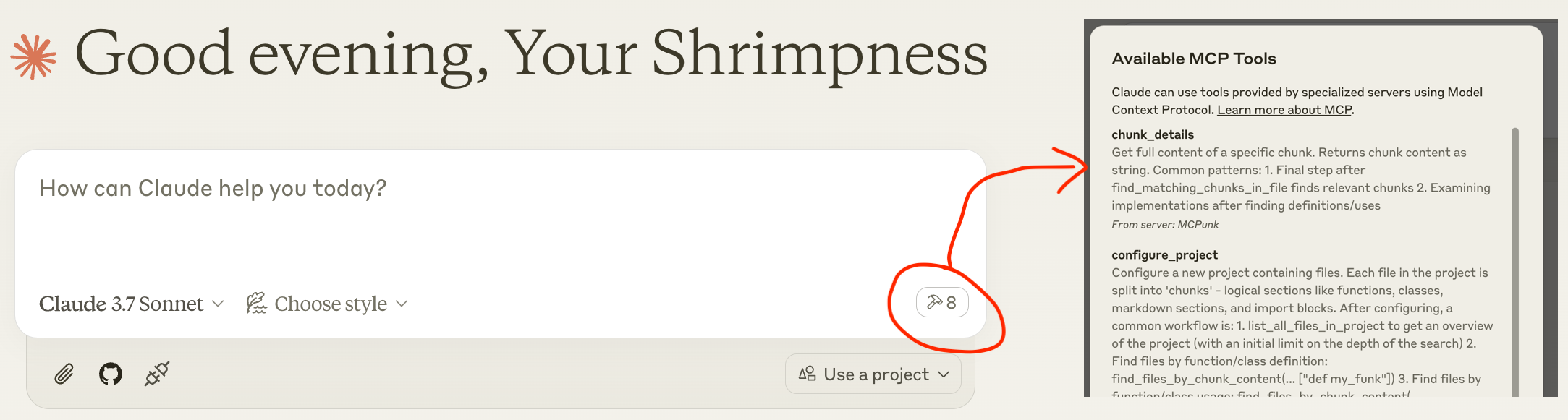
claude_desktop_config.json( detalles sobreclaude_desktop_config.jsonincluida la ubicación )Reinicie Claude Desktop y debería ver las herramientas disponibles después de un pequeño retraso, como la captura de pantalla a continuación.
Charla : "Hola amigo, ¿puedes configurar el proyecto ~/git/mcpunk y decirme cómo se fragmentan los archivos de Python?"
( "command": "uvx", podría no funcionar y es posible que tengas que usar, por ejemplo "command": "/Users/michael/.local/bin/uvx", )
{
"mcpServers": {
"MCPunk": {
"command": "uvx",
"args": ["mcpunk"]
}
}
}
Ejemplos de uso
Responda preguntas sobre su base de código
[Usuario] Hola amigo, ¿puedes configurar el repositorio ~/git/mcpunk y luego ayudarme a entender cómo un usuario de mcpunk obtendría la diferencia de git de la rama actualmente extraída en el repositorio que ha configurado con mcpunk?
[Claude] Llamar
configure_project[Claude] Llamar
list_all_files_in_project[Claude] Llamar
find_files_by_chunk_content[Claude] ... realiza un total de 21 llamadas de herramientas con MCPunk.
[Claude] Ahora entiendo cómo funciona la función de diff de Git en McPunk. Resumo cómo un usuario obtendría el diff de Git de la rama actualmente extraída: Para obtener el diff de Git de la rama actualmente extraída en un repositorio configurado con McPunk:
Primero, el usuario debe configurar mcpunk para que funcione con su proyecto utilizando la herramienta configure_project
Para ver qué ramas se han verificado recientemente (para identificar con qué comparar)
Luego, para obtener la diferencia entre la rama actual (HEAD) y una rama de referencia, se mostrarán las diferencias entre la rama actual (HEAD) y la rama de referencia especificada. El parámetro "ref" debe ser el nombre de la rama base (como "main" o "develop") con la que se desea comparar.
[Usuario] ¡Buen trabajo amigo!
Revisión de relaciones públicas
[usuario] Hola amigo, ¿puedes configurar el repositorio ~/git/mcpunk y echar un vistazo a la rama actual en comparación con
scratch/1.5[Claude] Configura ~/git/mcpunk y llama a
diff_with_refpara la referenciascratch/1.5[Claude] Veo que has realizado varios cambios, principalmente agregando un nuevo archivo de prueba
tests/test_git_analysis.py...[usuario] ¿Cómo encaja esto en el resto del código base?
[Claude] Realiza 5 llamadas a herramientas para listar archivos por fragmentos, listar fragmentos y obtener detalles de los fragmentos
[Claude] Ya veo: el código analiza la salida de reflog de Git para rastrear las ramas extraídas recientemente. La función principal get_recent_branches toma la ruta del repositorio y devuelve las últimas N ramas extraídas, usando _branches_from_reflog como ayuda para analizar la salida de reflog sin procesar.
[Usuario] Si tuviera prisa y tuviera que pedirle a alguien que revisara este trabajo, ¿qué le pediría que revisara? Por favor, describa fragmentos de trabajo específicos.
[Claude]
La
split("to ")[-1]en _branches_from_reflog parece frágilLos datos de prueba solo muestran nombres de ramas simples, ¿qué pasa con los espacios/caracteres especiales?
¿Es example_reflog representativo de la salida real de reflog de Git?
¿Estamos probando contra el comportamiento real de Git?
[Usuario] ¡Eres el mejor!
Trabajar en múltiples bases de código
Puedes pedirle a tu LLM que configure varios proyectos y podrá consultarlos libremente. Esto es útil si uno depende del otro y se encuentran en repositorios diferentes. En este caso, el LLM debería reconocerlo mediante importaciones.
¿Qué es MCPunk y otros antecedentes?
MCPunk es un servidor MCP que proporciona herramientas para
Configura un proyecto, que es un directorio de archivos. Al configurarlo, los archivos se dividirán en fragmentos lógicos. MCPunk está diseñado para código, pero en realidad se puede aplicar a cualquier documento, incluso imágenes si se desea.
Buscar archivos en un proyecto que contengan texto específico
Buscar fragmentos en un archivo que contengan texto específico
Ver el contenido completo de un fragmento específico
Además de esto, proporciona algunos fragmentos integrados. El más maduro es el fragmento de Python.
MCPunk no tiene por qué usarse para conversaciones. Puede usarse, por ejemplo, como parte de la revisión de código en una canalización de integración continua (CI). Es un RAG bastante general.
sequenceDiagram
participant User
participant Claude as Claude Desktop
participant MCPunk as MCPunk Server
participant Files as File System
Note over User,Files: Setup Phase
User->>Claude: Ask question about codebase
Claude->>MCPunk: configure_project(root_path, project_name)
MCPunk->>Files: Scan files in root directory
Note over MCPunk,Files: Chunking Process
MCPunk->>MCPunk: For each file, apply appropriate chunker:
MCPunk->>MCPunk: - PythonChunker: functions, classes, imports
MCPunk->>MCPunk: - MarkdownChunker: sections by headings
MCPunk->>MCPunk: - VueChunker: template/script/style sections
MCPunk->>MCPunk: - WholeFileChunker: fallback
MCPunk->>MCPunk: Split chunks >10K chars into parts
MCPunk-->>Claude: Project configured with N files
Note over User,Files: Navigation Phase<br>(LLM freely uses all these tools repeatedly to drill in)
Claude->>MCPunk: list_all_files_in_project(project_name)
MCPunk-->>Claude: File tree structure
Claude->>MCPunk: find_files_by_chunk_content(project_name, "search term")
MCPunk-->>Claude: Files containing matching chunks
Claude->>MCPunk: find_matching_chunks_in_file(project_name, file_path, "search term")
MCPunk-->>Claude: List of matching chunk IDs in file
Claude->>MCPunk: chunk_details(chunk_id)
MCPunk-->>Claude: Full content of specific chunk
Claude->>User: Answer based on relevant code chunks
Note over User,Files: Optional Git Analysis
Claude->>MCPunk: list_most_recently_checked_out_branches(project_name)
MCPunk->>Files: Parse git reflog
MCPunk-->>Claude: List of recent branches
Claude->>MCPunk: diff_with_ref(project_name, "main")
MCPunk->>Files: Generate git diff
MCPunk-->>Claude: Diff between HEAD and referenceCurso intensivo de Roaming RAG
Ver
La esencia del roaming RAG es
Divide el contenido (una base de código, archivos PDF, etc.) en fragmentos. Cada fragmento es un elemento lógico pequeño, como una función, una sección en un documento de Markdown o todas las importaciones en un archivo de código.
Proporcionar las herramientas LLM para buscar fragmentos. MCPunk lo hace proporcionando herramientas para buscar archivos que contengan fragmentos con texto específico y para listar el contenido completo de un fragmento específico.
En comparación con el RAG de "búsqueda vectorial" más tradicional:
El LLM tiene que profundizar para encontrar fragmentos y, naturalmente, es consciente de su contexto más amplio (como en qué archivo se encuentran).
Los fragmentos siempre deben ser coherentes. Como una función completa.
Puede ver exactamente lo que está buscando el LLM y, en general, es obvio si está buscando deficientemente y puede ayudarlo sugiriendo términos de búsqueda mejorados.
Requiere una búsqueda exacta. MCPunk no ofrece búsquedas difusas de ningún tipo.
Trozos
Un fragmento es una subsección de un archivo. Por ejemplo,
Una sola función de Python
Una sección de rebajas
Todas las importaciones desde un archivo Python
Los fragmentos se crean a partir de un archivo mediante fragmentadores , y MCPunk viene con unos cuantos incorporados.
Al configurar un proyecto en MCPunk, este revisa todos los archivos y le aplica el primer fragmento correspondiente. El LLM puede entonces usar herramientas para (1) consultar archivos que contengan fragmentos con texto específico, (2) consultar todos los fragmentos de un archivo específico y (3) obtener el contenido completo de un fragmento.
Esta base permite a Claude navegar de manera efectiva por bases de código relativamente grandes, comenzando con una búsqueda amplia de archivos relevantes y concentrándose en las áreas relevantes.
Fragmentos incorporados:
PythonChunkerfragmenta los datos en clases, funciones, importaciones a nivel de archivo y sentencias a nivel de archivo (p. ej., globales). Aplicable a archivos con extensión.pyVueChunkerdivide el contenido en fragmentos de "plantilla", "script", "estilo" o cualquier elemento de nivel superior<blah>....</blah>Aplicable a archivos que terminan en.vueMarkdownChunkerfragmenta los elementos en secciones de Markdown (por encabezado). Aplicable a archivos con extensión.mdWholeFileChunkerfragmentador de respaldo que crea un único fragmento para todo el archivo. Aplicable a cualquier archivo.
Cualquier fragmento de más de 10 000 caracteres (configurable) se divide automáticamente en varios fragmentos, con nombres con el sufijo part1 , part2 , etc. Esto ayuda a evitar la pérdida de contexto y, al mismo tiempo, permite una navegación razonable de los fragmentos.
Trozos personalizados
Cada tipo de archivo (p. ej., Python vs. C) necesita un fragmentador personalizado. MCPunk viene con algunos integrados . Si ningún fragmentador específico coincide con un archivo, se utiliza un fragmentador predeterminado que simplemente lo integra en un solo fragmento.
La forma sugerida actual de agregar fragmentos es bifurcar este proyecto, agregarlos y ejecutar MCPunk según Development . Para agregar un fragmento
Agréguelo en file_chunkers.py , heredando de
BaseChunkerAgréguelo a
ALL_CHUNKERSen file_breakdown.py
Sería posible implementar algún tipo de sistema de complementos para que los módulos anuncien que tienen fragmentos personalizados para que MCPunk los use, como el sistema de complementos de Pytest, pero actualmente no hay planes para implementar esto (a menos que alguien quiera hacerlo).
Limitaciones
A veces, LLM no es eficaz en la búsqueda. Por ejemplo, al buscar "dependencia", se omite el término "dependencias". Hay espacio para la búsqueda de elementos.
A veces, LLM intentará encontrar una pieza específica de código crítico pero no lo encontrará y luego continuará sin reconocer que tiene un conocimiento contextual limitado.
Los proyectos "grandes" no están bien probados. Un proyecto con unos 1000 archivos Python que contienen un total de unos 250 000 LoC funciona bien. Su configuración tarda unos 5 s. A medida que aumenta el tamaño de la base de código, aumenta el tiempo de fragmentación inicial y probablemente se requieran búsquedas más sofisticadas. El código no suele escribirse pensando en bases de código masivas; verás cosas como todos los datos almacenados en memoria, búsquedas iteradas sobre todos los datos y varios aspectos que requieren una optimización básica.
Los proyectos pequeños probablemente funcionen mejor con todo el código concatenado y contextualizado. MCPunk solo es apropiado cuando esto no es práctico.
En algunos casos, sería mejor permitir que LLM capture un archivo completo en lugar de que seleccione fragmentos uno a uno. MCPunk no cuenta con un mecanismo para esto. En la práctica, no he encontrado que esto sea un problema grave.
Configuración
Se pueden configurar varias opciones mediante variables de entorno con el prefijo MCPUNK_ . Para ver las opciones disponibles, consulte settings.py ; estas se cargan desde las variables de entorno mediante Pydantic Settings .
Por ejemplo, para configurar la opción include_chars_in_response :
{
"mcpServers": {
"MCPunk": {
"command": "uvx",
"args": ["mcpunk"],
"env": {
"MCPUNK_INCLUDE_CHARS_IN_RESPONSE": "false"
}
}
}
}Hoja de ruta y estado del desarrollo
MCPunk se considera casi completo. No se ha utilizado ampliamente, y como usuario, es probable que encuentre errores o imperfecciones. Se agradecen los informes de errores en https://github.com/jurasofish/mcpunk/issues.
Ideas para la hoja de ruta
Añade varias indicaciones para ayudarte a usar MCPunk. Sin indicaciones reales del tipo "explícale cómo hacer un panqueque a un extraterrestre", el juego se queda un poco corto.
Incluya comentarios a nivel de módulo al extraer declaraciones a nivel de módulo de Python.
Posiblemente derivado de una búsqueda
Cambiar todo el concepto de "proyecto" para no necesitar que los archivos realmente existan: esto lleva a permitir archivos "virtuales" dentro del proyecto.
Considere cambiar los archivos que tienen una ruta a que tengan un URI, por lo que podría ser algo como
file://.../http[s]:///gitdiff:/// etc. URI arbitrarios
Fragmentación de diffs de Git. Actualmente, existe una herramienta para obtener un diff completo. Este podría ser muy grande. En su lugar, se podría cambiar la herramienta a
add_diff_to_project, que coloca los archivos bajo la URIgitdiff://o en una ruta falsa.Almacenamiento en caché de un proyecto, para que no sea necesario volver a analizar todos los archivos cada vez que se reinicia el cliente MCP. Esto puede ser complicado, ya que los cambios en el código de un chunker invalidarán la caché. Probablemente no se priorice, ya que no es tan lento para mis casos de uso.
Capacidad de los usuarios de proporcionar código personalizado para realizar fragmentación, tal vez similar a los complementos de PyTest
Algo como Tree Sitter podría usarse para un chunker más genérico.
Seguimiento de caracteres enviados/recibidos, idealmente por chat.
Estado, registro, etc. por chat
Desarrollo
Si configura Claude Desktop como se muestra a continuación, puede reiniciarlo para ver los últimos cambios mientras trabaja en MCPunk desde su versión local del repositorio.
{
"mcpServers": {
"MCPunk": {
"command": "/Users/michael/.local/bin/uvx",
"args": [
"--from",
"/Users/michael/git/mcpunk",
"--no-cache",
"mcpunk"
]
}
}
}Pruebas, pelusas, CI
Vea los flujos de trabajo de Makefile y acciones de Github.
Available Tools
8 toolschunk_detailsA
Get full content of a specific chunk.
Returns chunk content as string.
Common patterns:
1. Final step after find_matching_chunks_in_file finds relevant chunks
2. Examining implementations after finding definitions/uses
| Name | Required | Description | Default |
|---|---|---|---|
| chunk_id | Yes |
TDQS
Does the description disclose side effects, auth requirements, rate limits, or destructive behavior?
No annotations provided, but description states it returns chunk content as string, indicating a read-only operation. Usage patterns imply safe behavior. Could add error cases but sufficient for a simple tool.
Agents need to know what a tool does to the world before calling it. Descriptions should go beyond structured annotations to explain consequences.
Is the description appropriately sized, front-loaded, and free of redundancy?
Three concise sentences: purpose, return type, usage patterns. No wasted words, front-loaded with key information.
Shorter descriptions cost fewer tokens and are easier for agents to parse. Every sentence should earn its place.
Given the tool's complexity, does the description cover enough for an agent to succeed on first attempt?
For a simple tool with one parameter and no output schema, the description is largely complete. Mentions common patterns to aid understanding. Could add a note on where chunk_id comes from.
Complex tools with many parameters or behaviors need more documentation. Simple tools need less. This dimension scales expectations accordingly.
Does the description clarify parameter syntax, constraints, interactions, or defaults beyond what the schema provides?
Schema has one parameter 'chunk_id' with 0% description coverage. Description does not explain what chunk_id is or how to get it, so the agent must infer from context.
Input schemas describe structure but not intent. Descriptions should explain non-obvious parameter relationships and valid value ranges.
Does the description clearly state what the tool does and how it differs from similar tools?
The description clearly states 'Get full content of a specific chunk' with a verb and resource. It distinguishes from sibling tools like find_matching_chunks_in_file by focusing on retrieval rather than search.
Agents choose between tools based on descriptions. A clear purpose with a specific verb and resource helps agents select the right tool.
Does the description explain when to use this tool, when not to, or what alternatives exist?
Explicitly lists common patterns: final step after find_matching_chunks_in_file, examining implementations. This gives clear guidance on when to use and contrasts with alternatives.
Agents often have multiple tools that could apply. Explicit usage guidance like "use X instead of Y when Z" prevents misuse.
configure_projectA
Configure a new project containing files.
Each file in the project is split into 'chunks' - logical sections like functions,
classes, markdown sections, and import blocks.
After configuring, a common workflow is:
1. list_all_files_in_project to get an overview of the project (with
an initial limit on the depth of the search)
2. Find files by function/class definition:
find_files_by_chunk_content(... ["def my_funk"])
3. Find files by function/class usage:
find_files_by_chunk_content(... ["my_funk"])
4. Determine which chunks in the found files are relevant:
find_matching_chunks_in_file(...)
5. Get details about the chunks:
chunk_details(...)
Use ~ (tilde) literally if the user specifies it in paths.
| Name | Required | Description | Default |
|---|---|---|---|
| root_path | Yes | Root path of the project | |
| project_name | Yes | Name of the project, for you to pick buddy, something short and sweet and memorable and unique |
TDQS
Does the description disclose side effects, auth requirements, rate limits, or destructive behavior?
No annotations provided. Description explains chunking but lacks details on idempotency, side effects, permissions, or error handling. It is moderately transparent but leaves gaps.
Agents need to know what a tool does to the world before calling it. Descriptions should go beyond structured annotations to explain consequences.
Is the description appropriately sized, front-loaded, and free of redundancy?
Description is front-loaded with purpose and includes a structured workflow list. Could be slightly more concise, but the flow is helpful and not overly verbose.
Shorter descriptions cost fewer tokens and are easier for agents to parse. Every sentence should earn its place.
Given the tool's complexity, does the description cover enough for an agent to succeed on first attempt?
No output schema; description does not explain what the tool returns (e.g., project ID, success status). The workflow suggests integration but lacks completeness for an agent to fully understand the tool's output.
Complex tools with many parameters or behaviors need more documentation. Simple tools need less. This dimension scales expectations accordingly.
Does the description clarify parameter syntax, constraints, interactions, or defaults beyond what the schema provides?
Schema has 100% coverage. Description adds informal guidance for project_name ('short, sweet, memorable') and notes on tilde path handling, providing extra context beyond schema.
Input schemas describe structure but not intent. Descriptions should explain non-obvious parameter relationships and valid value ranges.
Does the description clearly state what the tool does and how it differs from similar tools?
The description clearly states 'Configure a new project containing files' and explains chunks. It distinguishes from sibling tools like list_all_files_in_project or find_files_by_chunk_content as the initial setup.
Agents choose between tools based on descriptions. A clear purpose with a specific verb and resource helps agents select the right tool.
Does the description explain when to use this tool, when not to, or what alternatives exist?
Provides a common workflow listing steps after configuration, and mentions handling tilde in paths. However, does not explicitly state when not to use or compare to alternatives.
Agents often have multiple tools that could apply. Explicit usage guidance like "use X instead of Y when Z" prevents misuse.
diff_with_refA
Return a summary of the diff between HEAD and the given ref.
You probably want the ref to be the 'base' branch like develop or main, off which PRs are made - and you can likely determine this by viewing the most recently checked out branches.
| Name | Required | Description | Default |
|---|---|---|---|
| project_name | Yes | ||
| ref | Yes |
TDQS
Does the description disclose side effects, auth requirements, rate limits, or destructive behavior?
No annotations are provided, so the description must carry the full burden. It states the tool returns a summary, implying no side effects, and describes the scope (HEAD vs ref). However, it does not explicitly declare read-only behavior or describe what the summary includes, leaving some behavioral traits undisclosed.
Agents need to know what a tool does to the world before calling it. Descriptions should go beyond structured annotations to explain consequences.
Is the description appropriately sized, front-loaded, and free of redundancy?
Two efficient sentences: the first states the core purpose, the second provides usage guidance. No wasted words, and the key information is front-loaded.
Shorter descriptions cost fewer tokens and are easier for agents to parse. Every sentence should earn its place.
Given the tool's complexity, does the description cover enough for an agent to succeed on first attempt?
For a simple diff tool with two parameters and no output schema, the description is mostly complete: it explains the action, the ref choice, and how to infer the ref. Missing details on output format and project_name, but overall adequate given the tool's simplicity.
Complex tools with many parameters or behaviors need more documentation. Simple tools need less. This dimension scales expectations accordingly.
Does the description clarify parameter syntax, constraints, interactions, or defaults beyond what the schema provides?
With 0% schema description coverage, the description must compensate. It discusses the ref parameter with context ('base branch') but does not explain the project_name parameter beyond its name. The tool would benefit from clarifying how project_name is resolved or its format.
Input schemas describe structure but not intent. Descriptions should explain non-obvious parameter relationships and valid value ranges.
Does the description clearly state what the tool does and how it differs from similar tools?
Clearly states the tool returns a diff summary between HEAD and a given ref. The verb 'Return' and resource 'diff between HEAD and ref' are specific. Sibling tools like chunk_details or list_most_recently_checked_out_branches are clearly distinct in functionality.
Agents choose between tools based on descriptions. A clear purpose with a specific verb and resource helps agents select the right tool.
Does the description explain when to use this tool, when not to, or what alternatives exist?
Explicitly advises using a base branch (e.g., develop, main) as the ref and suggests viewing recently checked out branches to determine it. This provides clear guidance on when to use the tool, though it does not explicitly state when not to use it.
Agents often have multiple tools that could apply. Explicit usage guidance like "use X instead of Y when Z" prevents misuse.
find_files_by_chunk_contentA
Step 1: Find files containing chunks with matching text.
Returns file tree only showing which files contain matches.
You must use find_matching_chunks_in_file on each relevant file
to see the actual matches.
Example workflow:
1. Find files:
files = find_files_by_chunk_content(project, ["MyClass"])
2. For each file, find actual matches:
matches = find_matching_chunks_in_file(file, ["MyClass"])
3. Get content:
content = chunk_details(file, match_id)
| Name | Required | Description | Default |
|---|---|---|---|
| project_name | Yes | ||
| chunk_contents_filter | Yes | Match if any of these strings appear. Match all if None/null. Single empty string or empty list will match all. |
TDQS
Does the description disclose side effects, auth requirements, rate limits, or destructive behavior?
The description discloses that the tool only returns a file tree, not the matches themselves, and that follow-up steps are required. This adds behavioral context beyond the input schema, though it does not cover error handling or permissions. With no annotations provided, the description carries the full burden and does so adequately.
Agents need to know what a tool does to the world before calling it. Descriptions should go beyond structured annotations to explain consequences.
Is the description appropriately sized, front-loaded, and free of redundancy?
The description is well-structured with a step-by-step workflow and code example, making it easy to follow. While it is not extremely concise, every sentence adds value and is front-loaded with the core purpose. Minor redundancy in the workflow explanation.
Shorter descriptions cost fewer tokens and are easier for agents to parse. Every sentence should earn its place.
Given the tool's complexity, does the description cover enough for an agent to succeed on first attempt?
The description lacks an explicit return value structure, stating only 'file tree' without details on its format. Given no output schema, more specificity would help. However, it does provide the workflow context and example, making it partially complete for a simple search tool.
Complex tools with many parameters or behaviors need more documentation. Simple tools need less. This dimension scales expectations accordingly.
Does the description clarify parameter syntax, constraints, interactions, or defaults beyond what the schema provides?
The input schema has 50% description coverage (only chunk_contents_filter has a description). The description does not elaborate on parameters beyond the example and workflow, adding marginal value. Baseline is 3 due to moderate schema coverage, and the description compensates only slightly.
Input schemas describe structure but not intent. Descriptions should explain non-obvious parameter relationships and valid value ranges.
Does the description clearly state what the tool does and how it differs from similar tools?
The description clearly states the tool finds files containing chunks with matching text and returns only the file tree. It distinguishes from sibling tools like find_matching_chunks_in_file which show actual matches, making the purpose specific and differentiated.
Agents choose between tools based on descriptions. A clear purpose with a specific verb and resource helps agents select the right tool.
Does the description explain when to use this tool, when not to, or what alternatives exist?
The description explicitly outlines a three-step workflow, instructing when to use this tool first, then to use find_matching_chunks_in_file for actual matches, and finally chunk_details for content. This provides clear usage guidance and differentiates from alternatives.
Agents often have multiple tools that could apply. Explicit usage guidance like "use X instead of Y when Z" prevents misuse.
find_matching_chunks_in_fileA
Step 2: Find the actual matching chunks in a specific file.
Required after find_files_by_chunk_content or list_all_files_in_project to see
matches, as those tools only show files, not their contents.
This can be used for things like:
- Finding all chunks in a file that make reference to a specific function
(e.g. find_matching_chunks_in_file(..., ["my_funk"])
- Finding a chunk where a specific function is defined
(e.g. find_matching_chunks_in_file(..., ["def my_funk"])
Some chunks are split into multiple parts, because they are too large. This
will look like 'chunkx_part1', 'chunkx_part2', ...
| Name | Required | Description | Default |
|---|---|---|---|
| project_name | Yes | ||
| rel_path | Yes | Relative to project root | |
| filter_ | Yes | Match if any of these strings appear. Match all if None/null. Single empty string or empty list will match all. |
TDQS
Does the description disclose side effects, auth requirements, rate limits, or destructive behavior?
No annotations provided, so description carries full burden. It adds behavioral context about chunk splitting into multiple parts, which is important. However, it does not disclose any side effects or permissions.
Agents need to know what a tool does to the world before calling it. Descriptions should go beyond structured annotations to explain consequences.
Is the description appropriately sized, front-loaded, and free of redundancy?
The description is concise, well-structured with bullet points and examples. Every sentence adds value without redundancy.
Shorter descriptions cost fewer tokens and are easier for agents to parse. Every sentence should earn its place.
Given the tool's complexity, does the description cover enough for an agent to succeed on first attempt?
Given no output schema and no annotations, the description covers purpose, usage flow, and chunk splitting. Minor gap: does not explain the return format beyond chunk naming pattern.
Complex tools with many parameters or behaviors need more documentation. Simple tools need less. This dimension scales expectations accordingly.
Does the description clarify parameter syntax, constraints, interactions, or defaults beyond what the schema provides?
Schema coverage is 67% (project_name missing). The description adds value by explaining filter_ behavior with examples and clarifying that empty string or list matches all. However, project_name remains unexplained.
Input schemas describe structure but not intent. Descriptions should explain non-obvious parameter relationships and valid value ranges.
Does the description clearly state what the tool does and how it differs from similar tools?
The description clearly states it is 'Step 2' for finding matching chunks in a specific file, and distinguishes from sibling tools like 'find_files_by_chunk_content' which only show files. It uses specific verbs and resources.
Agents choose between tools based on descriptions. A clear purpose with a specific verb and resource helps agents select the right tool.
Does the description explain when to use this tool, when not to, or what alternatives exist?
The description explicitly says when to use this tool (after find_files_by_chunk_content or list_all_files_in_project) and gives usage examples. However, it does not mention when not to use it or provide alternative tools.
Agents often have multiple tools that could apply. Explicit usage guidance like "use X instead of Y when Z" prevents misuse.
get_a_jokeD
Get a really funny joke! For testing :)
| Name | Required | Description | Default |
|---|---|---|---|
| animal | Yes |
TDQS
Does the description disclose side effects, auth requirements, rate limits, or destructive behavior?
No annotations are provided, so the description carries the full burden. It indicates a read operation ('Get'), but does not disclose any behavioral traits such as rate limits, side effects, or whether it is safe. Minimal information beyond the verb.
Agents need to know what a tool does to the world before calling it. Descriptions should go beyond structured annotations to explain consequences.
Is the description appropriately sized, front-loaded, and free of redundancy?
The description is very short (one sentence), which could be concise, but it is under-specified. It sacrifices completeness for brevity without adding value.
Shorter descriptions cost fewer tokens and are easier for agents to parse. Every sentence should earn its place.
Given the tool's complexity, does the description cover enough for an agent to succeed on first attempt?
Given the tool's simplicity and lack of output schema, the description fails to cover essential context: meaning of the animal parameter, return value format, or any constraints. It is inadequate for proper tool invocation.
Complex tools with many parameters or behaviors need more documentation. Simple tools need less. This dimension scales expectations accordingly.
Does the description clarify parameter syntax, constraints, interactions, or defaults beyond what the schema provides?
Schema description coverage is 0%, and the description makes no mention of the 'animal' parameter. The purpose of the parameter is completely undocumented, leaving the agent unable to use it correctly.
Input schemas describe structure but not intent. Descriptions should explain non-obvious parameter relationships and valid value ranges.
Does the description clearly state what the tool does and how it differs from similar tools?
The description states 'Get a really funny joke!' which indicates a joke retrieval tool, but it does not specify the resource (e.g., type of joke or source) and is vague. The animal parameter is not linked in the description, leaving ambiguity about the tool's function.
Agents choose between tools based on descriptions. A clear purpose with a specific verb and resource helps agents select the right tool.
Does the description explain when to use this tool, when not to, or what alternatives exist?
No guidance on when to use this tool versus alternatives. The phrase 'For testing :)' loosely suggests it might be a test tool, but no explicit usage context or exclusions are provided.
Agents often have multiple tools that could apply. Explicit usage guidance like "use X instead of Y when Z" prevents misuse.
list_all_files_in_projectA
List all files in a project, returning a file tree.
This is useful for getting an overview of the project, or specific subdirectories of the project.
A project may have many files, so you are suggested to start with a depth limit to get an overview, and then continue increasing the depth limit with a filter to look at specific subdirectories.
| Name | Required | Description | Default |
|---|---|---|---|
| project_name | Yes | ||
| path_filter | No | Match if any of these strings appear. Match all if None/null. Single empty string or empty list will match all. | |
| limit_depth_from_root | No | Limit the depth of the search to this many directories from the root. Typically,start with 1 to get an overview of the project.If None, search all directories from the root. |
TDQS
Does the description disclose side effects, auth requirements, rate limits, or destructive behavior?
No annotations are provided, so the description must carry the behavioral context. It mentions returning a file tree but does not disclose performance implications, error handling, or how the tree is structured. For a tool with no annotations, more details would be expected.
Agents need to know what a tool does to the world before calling it. Descriptions should go beyond structured annotations to explain consequences.
Is the description appropriately sized, front-loaded, and free of redundancy?
The description is concise with three short paragraphs. It front-loads the purpose and provides actionable advice without unnecessary verbosity.
Shorter descriptions cost fewer tokens and are easier for agents to parse. Every sentence should earn its place.
Given the tool's complexity, does the description cover enough for an agent to succeed on first attempt?
Given the tool's moderate complexity, the description covers the basic purpose and usage guidance. However, with no output schema or annotations, it could benefit from describing the output format, error scenarios, or access requirements.
Complex tools with many parameters or behaviors need more documentation. Simple tools need less. This dimension scales expectations accordingly.
Does the description clarify parameter syntax, constraints, interactions, or defaults beyond what the schema provides?
Two of three parameters have descriptions in the schema (67% coverage), so the description adds moderate value by suggesting the usage sequence (start with depth limit). It does not add new parameter-specific semantics beyond what the schema provides.
Input schemas describe structure but not intent. Descriptions should explain non-obvious parameter relationships and valid value ranges.
Does the description clearly state what the tool does and how it differs from similar tools?
The description clearly states the action (list), resource (all files in a project), and output (file tree). It distinguishes from sibling tools that focus on searching or details, making the tool's purpose unambiguous.
Agents choose between tools based on descriptions. A clear purpose with a specific verb and resource helps agents select the right tool.
Does the description explain when to use this tool, when not to, or what alternatives exist?
Provides explicit advice on when to use the tool, suggesting to start with a depth limit for overview and then increase depth with filters. However, it does not mention when not to use or compare to alternatives, so it's slightly incomplete.
Agents often have multiple tools that could apply. Explicit usage guidance like "use X instead of Y when Z" prevents misuse.
list_most_recently_checked_out_branchesB
List the n most recently checked out branches in the project
| Name | Required | Description | Default |
|---|---|---|---|
| project_name | Yes | ||
| n | No |
TDQS
Does the description disclose side effects, auth requirements, rate limits, or destructive behavior?
Without annotations, the description carries full burden for behavioral disclosure. It does not mention read-only nature, error handling, or ordering direction (e.g., descending). Only the basic action is stated.
Agents need to know what a tool does to the world before calling it. Descriptions should go beyond structured annotations to explain consequences.
Is the description appropriately sized, front-loaded, and free of redundancy?
A single sentence with no unnecessary words. It is front-loaded with the action and resource, making it efficient for an agent to parse.
Shorter descriptions cost fewer tokens and are easier for agents to parse. Every sentence should earn its place.
Given the tool's complexity, does the description cover enough for an agent to succeed on first attempt?
For a simple listing tool, the description covers the core purpose. However, it lacks details on output format, ordering direction, and edge cases like missing project. Adequate but with gaps.
Complex tools with many parameters or behaviors need more documentation. Simple tools need less. This dimension scales expectations accordingly.
Does the description clarify parameter syntax, constraints, interactions, or defaults beyond what the schema provides?
The schema has 0% description coverage, and the description adds no meaning to the parameters. Although the parameter names are self-explanatory, the description should clarify constraints like 'n' range or project_name format.
Input schemas describe structure but not intent. Descriptions should explain non-obvious parameter relationships and valid value ranges.
Does the description clearly state what the tool does and how it differs from similar tools?
The description uses a specific verb 'List' and specifies the resource 'most recently checked out branches' in the project. It clearly distinguishes the tool from siblings, which focus on files and chunks, not branches.
Agents choose between tools based on descriptions. A clear purpose with a specific verb and resource helps agents select the right tool.
Does the description explain when to use this tool, when not to, or what alternatives exist?
No guidance is provided on when to use this tool versus alternatives or when not to use it. The description simply states what it does without any context for selection.
Agents often have multiple tools that could apply. Explicit usage guidance like "use X instead of Y when Z" prevents misuse.
Tool Schema Changelog
Recent tool additions, removals, and schema changes observed during successful MCP inspections.
8 tool updates
v1.0.0- First observed
chunk_details - First observed
configure_project - First observed
diff_with_ref - First observed
find_files_by_chunk_content - First observed
find_matching_chunks_in_file - First observed
get_a_joke - First observed
list_all_files_in_project - First observed
list_most_recently_checked_out_branches
TDQS
Scored across 8 tools
Each tool has a clearly distinct purpose: project configuration, file listing, content search, chunk details, diff, branch listing, and a joke tool. No overlapping functionalities.
All tools use a consistent snake_case naming pattern with descriptive verb_noun structure (e.g., `list_all_files_in_project`, `configure_project`). No mixing of conventions.
8 tools is well-scoped for a code analysis server. Each tool serves a necessary role in the typical workflow, and there are no redundant or missing core tools.
Covers the main analysis workflow: configure, list files, search, get details, diff, and branch info. However, lacks modification tools (e.g., update/delete project or chunks), which is a minor gap for a full lifecycle.
Maintenance
Related MCP Connectors
Code intelligence for LLMs. Analyze, search, and retrieve code from any public git repository.
Shared memory for coding agents. Stop re-explaining your codebase every session.
Code intelligence for coding agents: semantic, AST, graph, and full-text search. 279+ languages.
Search indexed code, trace dependencies, assess change impact, and recall repository memory.
Related MCP Servers
- AlicenseNot gradedqualityAmaintenanceProvides AI-powered code intelligence for any codebase using local LLMs and vector search, enabling semantic code search, pattern analysis, and context-optimized code generation with 90% token savings.2MIT
- AlicenseBqualityDmaintenanceEnables token-efficient semantic search and analysis over any directory of files through hybrid search, directory overview, structural analysis, and dependency graphs.14MIT
- AlicenseNot gradedqualityCmaintenanceAdds semantic code search to AI coding agents, enabling natural language queries across entire codebases to retrieve relevant code chunks, saving tokens and providing deep context.10 npm1MIT
- AlicenseNot gradedqualityDmaintenanceEnables semantic code search and AI-powered chat for local codebases, with support for multiple AI providers and a plugin system.7 npmMIT