MCPunk
맥펑크 🤖
LLM 도구를 사용하여 코드를 지능적으로 검색하여 임베딩 없이 코드베이스와 채팅하세요.
MCPunk를 사용하면 대화를 통해 코드베이스를 탐색하고 이해할 수 있습니다. 작동 방식은 다음과 같습니다.
파일을 논리적인 덩어리(함수, 클래스, 마크다운 섹션)로 나누기
이러한 청크를 검색하고 쿼리하기 위한 LLM 도구 제공
LLM이 귀하의 질문에 답변하는 데 필요한 특정 코드를 찾도록 합니다.
임베딩이나 복잡한 구성 없이, 명확하고 감사 가능한 검색 기능을 통해 사용자가 직접 확인하고 관리할 수 있습니다. Claude Desktop이나 다른 MCP 클라이언트와도 완벽하게 호환됩니다.
다음 사항을 염두에 두고 구축되었습니다.
맥락이 가장 중요합니다 . LLM은 적절한 맥락이 제공되어야만 훌륭할 수 있습니다.
맥락은 소중합니다 - LLM은 맥락이 필요하지만, 너무 많은 것을 다룰 수는 없습니다. 정말 어처구니없죠! MCPunk는 LLM에 맥락적 힌트를 제공하는 RAG(학습 도구)로, LLM이 관련 있는 내용만 집중적으로 다룰 수 있도록 해줍니다.
Human in the Loop - LLM이 어떤 데이터를 고려했고 어떻게 찾았는지 정확히 볼 수 있습니다 . 채팅에 참여하여 원하는 곳 어디에서나 업무를 지시할 수 있습니다 .
설정
이는 Claude Desktop에 대한 지침이지만, MCPunk는 MCP가 사용되는 모든 곳에서 사용할 수 있습니다.
아래 스니펫을
claude_desktop_config.json에 넣으세요 ( 위치를 포함한claude_desktop_config.json에 대한 세부 정보 )Claude Desktop을 다시 시작하면 아래 스크린샷과 같이 약간의 지연 후 사용 가능한 도구가 표시됩니다.
채팅하기 : "안녕 친구야 ~/git/mcpunk 프로젝트를 설정하고 파이썬 파일을 어떻게 청크화할지 알려줄 수 있어?"
( "command": "uvx", 작동하지 않을 수 있으며, 예를 들어 "command": "/Users/michael/.local/bin/uvx", )
지엑스피1
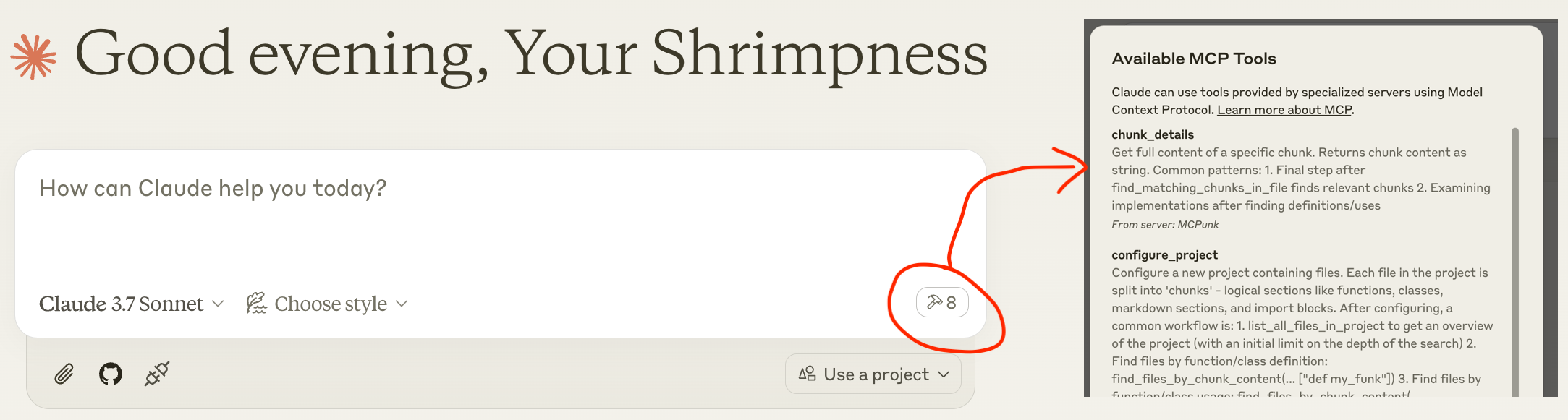
사용 예
코드베이스에 대한 질문에 답하세요
[사용자] 친구야, ~/git/mcpunk 저장소를 설정해 줄 수 있어? 그러면 mcpunk 사용자가 mcpunk로 구성한 저장소에서 현재 체크아웃된 브랜치의 git diff를 어떻게 얻을 수 있는지 알려줄 수 있어?
[Claude]
configure_project호출합니다.[클로드]
list_all_files_in_project호출합니다.[클로드]
find_files_by_chunk_content호출합니다.[Claude] ... MCPunk를 사용하여 총 21개의 도구 호출을 수행합니다.
[Claude] 이제 mcpunk에서 git diff 기능이 어떻게 작동하는지 이해했습니다. 사용자가 현재 체크아웃된 브랜치의 git diff 파일을 가져오는 방법을 간략히 설명해 보겠습니다. mcpunk로 구성된 저장소에서 현재 체크아웃된 브랜치의 git diff 파일을 가져오려면 다음과 같이 합니다.
먼저 사용자는 configure_project 도구를 사용하여 mcpunk가 자신의 프로젝트와 함께 작동하도록 구성해야 합니다.
최근에 어떤 브랜치가 체크아웃되었는지 확인하려면(어떤 것을 비교해야 할지 식별하기 위해)
그런 다음 현재 브랜치(HEAD)와 참조 브랜치 간의 차이점을 가져옵니다. 이렇게 하면 현재 브랜치(HEAD)와 지정된 참조 브랜치 간의 차이점이 표시됩니다. 참조 매개변수는 비교할 기준 브랜치의 이름(예: "main" 또는 "develop")이어야 합니다.
[사용자] 잘했어요 친구!
홍보 검토
[사용자] 안녕하세요 친구님, ~/git/mcpunk 저장소를 설정하여 현재 브랜치와
scratch/1.5비교해 주시겠어요?[Claude] ~/git/mcpunk를 설정하고
scratch/1.5참조를 위해diff_with_ref호출합니다.[클로드] 여러 가지 변경 사항을 만든 것 같습니다. 주로 새로운 테스트 파일
tests/test_git_analysis.py추가하는 것 같습니다.[사용자] 이게 나머지 코드베이스와 어떻게 맞아떨어지나요?
[Claude] 청크별 파일 나열, 청크 나열, 청크 세부 정보 가져오기를 위한 5개의 도구 호출을 수행합니다.
[Claude] 알겠습니다. 이 코드는 git reflog 출력을 파싱하여 최근 체크아웃된 브랜치를 추적합니다. 메인 함수 get_recent_branches는 저장소 경로를 받아서 마지막으로 체크아웃된 N개의 브랜치를 반환하며, _branches_from_reflog를 헬퍼로 사용하여 원시 reflog 출력을 파싱합니다.
[사용자] 만약 당신이 서두르고 있어서 누군가에게 이 작품을 검토해 달라고 지시해야 한다면, 무엇을 살펴보라고 지시하시겠습니까? 각 작품의 개요를 작성해 주세요.
[클로드]
_branches_from_reflog의
split("to ")[-1]이 취약해 보입니다.테스트 데이터는 간단한 지점 이름만 보여주는데, 공백이나 특수 문자는 어떨까요?
example_reflog가 실제 git reflog 출력을 대표합니까?
실제 git 동작에 대해 테스트를 하고 있나요?
[사용자] 당신은 최고예요!
여러 코드베이스에서 작업
LLM에 여러 프로젝트를 설정해 달라고 요청하면, LLM이 자유롭게 여러 프로젝트에 대해 쿼리를 실행할 수 있습니다. 한 프로젝트가 다른 프로젝트에 의존하고 서로 다른 저장소에 있는 경우 유용합니다. 이 경우 LLM은 가져오기를 통해 이를 인식해야 합니다.
MCPunk & Other Background란 무엇인가요?
MCPunk는 도구를 제공하는 MCP 서버입니다.
파일 디렉터리인 프로젝트를 구성하세요. 구성되면 파일은 논리적인 단위로 분할됩니다. MCPunk는 코드용으로 제작되었지만, 원하는 경우 이미지를 포함한 모든 문서에 적용할 수 있습니다.
특정 텍스트가 포함된 프로젝트에서 파일 검색
특정 텍스트가 포함된 파일에서 청크 검색
특정 청크의 전체 내용 보기
이와 함께 몇 가지 청커가 내장되어 있습니다. 가장 성숙한 것은 Python 청커입니다.
MCPunk는 대화에 꼭 사용할 필요는 없습니다. 예를 들어 CI 파이프라인의 코드 검토에 활용할 수 있습니다. 정말 일반적인 RAG입니다.
sequenceDiagram
participant User
participant Claude as Claude Desktop
participant MCPunk as MCPunk Server
participant Files as File System
Note over User,Files: Setup Phase
User->>Claude: Ask question about codebase
Claude->>MCPunk: configure_project(root_path, project_name)
MCPunk->>Files: Scan files in root directory
Note over MCPunk,Files: Chunking Process
MCPunk->>MCPunk: For each file, apply appropriate chunker:
MCPunk->>MCPunk: - PythonChunker: functions, classes, imports
MCPunk->>MCPunk: - MarkdownChunker: sections by headings
MCPunk->>MCPunk: - VueChunker: template/script/style sections
MCPunk->>MCPunk: - WholeFileChunker: fallback
MCPunk->>MCPunk: Split chunks >10K chars into parts
MCPunk-->>Claude: Project configured with N files
Note over User,Files: Navigation Phase<br>(LLM freely uses all these tools repeatedly to drill in)
Claude->>MCPunk: list_all_files_in_project(project_name)
MCPunk-->>Claude: File tree structure
Claude->>MCPunk: find_files_by_chunk_content(project_name, "search term")
MCPunk-->>Claude: Files containing matching chunks
Claude->>MCPunk: find_matching_chunks_in_file(project_name, file_path, "search term")
MCPunk-->>Claude: List of matching chunk IDs in file
Claude->>MCPunk: chunk_details(chunk_id)
MCPunk-->>Claude: Full content of specific chunk
Claude->>User: Answer based on relevant code chunks
Note over User,Files: Optional Git Analysis
Claude->>MCPunk: list_most_recently_checked_out_branches(project_name)
MCPunk->>Files: Parse git reflog
MCPunk-->>Claude: List of recent branches
Claude->>MCPunk: diff_with_ref(project_name, "main")
MCPunk->>Files: Generate git diff
MCPunk-->>Claude: Diff between HEAD and reference로밍 RAG 크래쉬 코스
보다
로밍 RAG의 요점은 다음과 같습니다.
콘텐츠(코드베이스, PDF 파일 등)를 "덩어리"로 나눕니다. 각 덩어리는 함수, 마크다운 문서의 섹션, 코드 파일의 모든 import와 같이 "작은" 논리적 항목입니다.
청크를 검색할 수 있는 LLM 도구를 제공합니다. MCPunk는 특정 텍스트가 포함된 청크가 포함된 파일을 검색하고 특정 청크의 전체 내용을 나열하는 도구를 제공하여 이를 수행합니다.
보다 전통적인 "벡터 검색" RAG와 비교:
LLM은 청크를 찾기 위해 드릴다운해야 하며 자연스럽게 더 광범위한 컨텍스트(예: 청크가 있는 파일)를 알고 있습니다.
청크는 항상 일관성을 유지해야 합니다. 마치 완전한 함수처럼요.
LLM이 무엇을 검색하고 있는지 정확히 알 수 있으며, 검색 결과가 좋지 않은 경우 일반적으로 명확하게 알 수 있으므로 더 나은 검색어를 제안하여 도움을 줄 수 있습니다.
정확한 검색 결과가 필요합니다. MCPunk는 어떤 종류의 퍼지 검색도 제공하지 않습니다.
덩어리
청크는 파일의 하위 섹션입니다. 예를 들어,
단일 파이썬 함수
마크다운 섹션
Python 파일의 모든 가져오기
청크는 chunkers 에 의해 파일에서 생성되며, MCPunk에는 여러 가지가 내장되어 있습니다.
MCPunk에서 프로젝트를 설정하면 모든 파일을 검토하여 적용 가능한 첫 번째 청커를 적용합니다. LLM은 도구를 사용하여 (1) 특정 텍스트가 포함된 청크가 포함된 파일을 쿼리하고, (2) 특정 파일의 모든 청크를 쿼리하고, (3) 청크의 전체 내용을 가져올 수 있습니다.
이러한 기본 토대를 통해 클로드는 관련 파일에 대한 광범위한 검색을 시작하여 관련 영역을 좁혀가며 비교적 대규모 코드베이스를 효과적으로 탐색할 수 있습니다.
내장된 청커:
PythonChunker클래스, 함수, 파일 수준 import, 파일 수준 명령문(예: 전역)으로 객체를 분할합니다..py로 끝나는 파일에 적용됩니다.VueChunker'템플릿', '스크립트', '스타일' 청크 등 최상위 항목으로 분할합니다<blah>....</blah>``.vue로 끝나는 파일에 적용됩니다.MarkdownChunker제목별로 마크다운 섹션으로 분류합니다..md로 끝나는 파일에 적용 가능합니다.WholeFileChunker전체 파일에 대해 단일 청크를 생성하는 대체 청커입니다. 모든 파일에 적용 가능합니다.
10,000자를 넘는 모든 청크(구성 가능)는 자동으로 여러 청크로 분할되며, 이름에는 part1 , part2 등이 접미사로 붙습니다. 이렇게 하면 청크를 합리적으로 탐색하는 동시에 컨텍스트가 깨지는 것을 방지할 수 있습니다.
커스텀 청커
각 파일 유형(예: Python 대 C)에는 사용자 정의 청커가 필요합니다. MCPunk에는 몇 가지 기본 청커가 내장되어 있습니다. 파일과 일치하는 특정 청커가 없으면 전체 파일을 하나의 청크로 분할하는 기본 청커가 사용됩니다.
현재 제안된 청크 추가 방법은 이 프로젝트를 포크하여 청크를 추가하고, Development 에서 MCPunk를 실행하는 것입니다. 청크를 추가하려면
BaseChunker에서 상속하여 file_chunkers.py 에 추가합니다.file_breakdown.py 의
ALL_CHUNKERS에 추가하세요
MCPunk에서 사용할 사용자 정의 청커가 있다는 것을 모듈에 알리기 위한 일종의 플러그인 시스템을 구현하는 것도 pytest의 플러그인 시스템과 유사하지만, 현재로서는 이를 구현할 계획이 없습니다(누군가가 하려고 하지 않는 한).
제한 사항
LLM은 검색 기능이 부족한 경우가 있습니다. 예를 들어 "종속성"으로 검색하면 "종속성"이라는 용어가 누락되는 경우가 있습니다. 문제를 해결할 여지를 남겨두세요.
때때로 LLM은 중요한 코드의 특정한 부분을 찾으려고 시도하지만 찾지 못하고, 해당 코드의 문맥 인식이 제한적이라는 사실을 인정하지 않고 작업을 계속합니다.
"대형" 프로젝트는 제대로 테스트되지 않습니다. 총 25만 개의 LoC를 포함하는 약 1,000개의 Python 파일로 구성된 프로젝트는 잘 작동합니다. 프로젝트 설정에는 약 5초가 걸립니다. 코드베이스 크기가 커질수록 초기 청킹(chunking) 시간이 늘어나고 더 정교한 검색이 필요할 가능성이 높습니다. 코드는 일반적으로 대규모 코드베이스를 염두에 두고 작성되지 않습니다. 모든 데이터가 메모리에 저장되고, 모든 데이터를 반복하여 검색하는 등 기본적인 최적화가 필요한 다양한 요소들이 있습니다.
작은 프로젝트라면 모든 코드를 연결하고 맥락에 맞게 배치하는 것이 더 나을 것입니다. MCPunk는 이것이 비현실적인 경우에만 적합합니다.
어떤 경우에는 LLM이 한 번에 하나씩 파일을 가져오는 것보다 전체 파일을 가져오도록 허용하는 것이 분명히 더 나을 것입니다. MCPunk에는 이를 위한 메커니즘이 없습니다. 실제로 저는 이것이 큰 문제라고 생각하지 않았습니다.
구성
MCPUNK_ 접두사가 붙은 환경 변수를 통해 다양한 설정을 할 수 있습니다. 사용 가능한 옵션은 settings.py를 참조하세요. Pydantic Settings를 통해 환경 변수에서 로드됩니다.
예를 들어, include_chars_in_response 옵션을 구성하려면 다음을 수행합니다.
{
"mcpServers": {
"MCPunk": {
"command": "uvx",
"args": ["mcpunk"],
"env": {
"MCPUNK_INCLUDE_CHARS_IN_RESPONSE": "false"
}
}
}
}로드맵 및 개발 현황
MCPunk는 거의 기능 완성 단계에 있는 것으로 평가됩니다. 아직 널리 사용되지는 않았으며, 사용자 입장에서는 버그나 부족한 부분을 발견할 가능성이 높습니다. 버그 신고는 https://github.com/jurasofish/mcpunk/issues 에서 환영합니다.
로드맵 아이디어
MCPunk 사용에 도움이 되는 프롬프트를 여러 개 추가했습니다. "외계인에게 팬케이크 만드는 법 설명해 줘" 같은 실질적인 프롬프트가 없으면 좀 지루해지죠.
Python 모듈 수준 명령문을 추출할 때 모듈 수준 주석을 포함합니다.
아마도 검색을 위한 것일 수도 있습니다
"프로젝트" 개념 전체를 변경하여 파일이 실제로 존재하지 않아도 되도록 합니다. 이를 통해 프로젝트 내부에 "가상" 파일을 허용하게 됩니다.
경로가 있는 파일을 URI로 변경하는 것을 고려하세요. 예를 들어
file://.../http[s]:///gitdiff:/// 등 임의의 URI가 될 수 있습니다.
git diff 파일 청킹. 현재 전체 diff 파일을 가져오는 도구가 있습니다. 이 도구는 용량이 매우 클 수 있습니다. 대신, 이 도구를
add_diff_to_project로 변경하여 파일을gitdiff://URI 또는 다른 가짜 경로에 저장할 수 있습니다.프로젝트를 캐싱하여 MCP 클라이언트를 재시작할 때마다 모든 파일을 다시 파싱할 필요가 없도록 합니다. 청커의 코드를 변경하면 캐시가 무효화되므로 까다로울 수 있습니다. 제 사용 사례에서는 속도가 그렇게 느리지 않기 때문에 우선순위가 높지 않을 것 같습니다.
사용자가 청킹을 수행하기 위해 사용자 정의 코드를 제공할 수 있는 기능(아마도 PyTest 플러그인 과 유사)
Tree Sitter와 같은 것이 보다 일반적인 청커에 사용될 수 있습니다.
이상적으로는 채팅을 통해 전송/수신된 문자를 추적합니다.
채팅을 통한 상태, 로깅 등
개발
run_mcp_server.py를 참조하세요.
아래와 같이 Claude Desktop을 설정하면 로컬 버전의 저장소에서 MCPunk 작업을 하면서 최신 변경 사항을 확인하기 위해 다시 시작할 수 있습니다.
{
"mcpServers": {
"MCPunk": {
"command": "/Users/michael/.local/bin/uvx",
"args": [
"--from",
"/Users/michael/git/mcpunk",
"--no-cache",
"mcpunk"
]
}
}
}테스트, 린팅, CI
Makefile 과 github 작업 워크플로를 확인하세요.
Available Tools
8 toolschunk_detailsA
Get full content of a specific chunk.
Returns chunk content as string.
Common patterns:
1. Final step after find_matching_chunks_in_file finds relevant chunks
2. Examining implementations after finding definitions/uses
| Name | Required | Description | Default |
|---|---|---|---|
| chunk_id | Yes |
TDQS
Does the description disclose side effects, auth requirements, rate limits, or destructive behavior?
No annotations provided, but description states it returns chunk content as string, indicating a read-only operation. Usage patterns imply safe behavior. Could add error cases but sufficient for a simple tool.
Agents need to know what a tool does to the world before calling it. Descriptions should go beyond structured annotations to explain consequences.
Is the description appropriately sized, front-loaded, and free of redundancy?
Three concise sentences: purpose, return type, usage patterns. No wasted words, front-loaded with key information.
Shorter descriptions cost fewer tokens and are easier for agents to parse. Every sentence should earn its place.
Given the tool's complexity, does the description cover enough for an agent to succeed on first attempt?
For a simple tool with one parameter and no output schema, the description is largely complete. Mentions common patterns to aid understanding. Could add a note on where chunk_id comes from.
Complex tools with many parameters or behaviors need more documentation. Simple tools need less. This dimension scales expectations accordingly.
Does the description clarify parameter syntax, constraints, interactions, or defaults beyond what the schema provides?
Schema has one parameter 'chunk_id' with 0% description coverage. Description does not explain what chunk_id is or how to get it, so the agent must infer from context.
Input schemas describe structure but not intent. Descriptions should explain non-obvious parameter relationships and valid value ranges.
Does the description clearly state what the tool does and how it differs from similar tools?
The description clearly states 'Get full content of a specific chunk' with a verb and resource. It distinguishes from sibling tools like find_matching_chunks_in_file by focusing on retrieval rather than search.
Agents choose between tools based on descriptions. A clear purpose with a specific verb and resource helps agents select the right tool.
Does the description explain when to use this tool, when not to, or what alternatives exist?
Explicitly lists common patterns: final step after find_matching_chunks_in_file, examining implementations. This gives clear guidance on when to use and contrasts with alternatives.
Agents often have multiple tools that could apply. Explicit usage guidance like "use X instead of Y when Z" prevents misuse.
configure_projectA
Configure a new project containing files.
Each file in the project is split into 'chunks' - logical sections like functions,
classes, markdown sections, and import blocks.
After configuring, a common workflow is:
1. list_all_files_in_project to get an overview of the project (with
an initial limit on the depth of the search)
2. Find files by function/class definition:
find_files_by_chunk_content(... ["def my_funk"])
3. Find files by function/class usage:
find_files_by_chunk_content(... ["my_funk"])
4. Determine which chunks in the found files are relevant:
find_matching_chunks_in_file(...)
5. Get details about the chunks:
chunk_details(...)
Use ~ (tilde) literally if the user specifies it in paths.
| Name | Required | Description | Default |
|---|---|---|---|
| root_path | Yes | Root path of the project | |
| project_name | Yes | Name of the project, for you to pick buddy, something short and sweet and memorable and unique |
TDQS
Does the description disclose side effects, auth requirements, rate limits, or destructive behavior?
No annotations provided. Description explains chunking but lacks details on idempotency, side effects, permissions, or error handling. It is moderately transparent but leaves gaps.
Agents need to know what a tool does to the world before calling it. Descriptions should go beyond structured annotations to explain consequences.
Is the description appropriately sized, front-loaded, and free of redundancy?
Description is front-loaded with purpose and includes a structured workflow list. Could be slightly more concise, but the flow is helpful and not overly verbose.
Shorter descriptions cost fewer tokens and are easier for agents to parse. Every sentence should earn its place.
Given the tool's complexity, does the description cover enough for an agent to succeed on first attempt?
No output schema; description does not explain what the tool returns (e.g., project ID, success status). The workflow suggests integration but lacks completeness for an agent to fully understand the tool's output.
Complex tools with many parameters or behaviors need more documentation. Simple tools need less. This dimension scales expectations accordingly.
Does the description clarify parameter syntax, constraints, interactions, or defaults beyond what the schema provides?
Schema has 100% coverage. Description adds informal guidance for project_name ('short, sweet, memorable') and notes on tilde path handling, providing extra context beyond schema.
Input schemas describe structure but not intent. Descriptions should explain non-obvious parameter relationships and valid value ranges.
Does the description clearly state what the tool does and how it differs from similar tools?
The description clearly states 'Configure a new project containing files' and explains chunks. It distinguishes from sibling tools like list_all_files_in_project or find_files_by_chunk_content as the initial setup.
Agents choose between tools based on descriptions. A clear purpose with a specific verb and resource helps agents select the right tool.
Does the description explain when to use this tool, when not to, or what alternatives exist?
Provides a common workflow listing steps after configuration, and mentions handling tilde in paths. However, does not explicitly state when not to use or compare to alternatives.
Agents often have multiple tools that could apply. Explicit usage guidance like "use X instead of Y when Z" prevents misuse.
diff_with_refA
Return a summary of the diff between HEAD and the given ref.
You probably want the ref to be the 'base' branch like develop or main, off which PRs are made - and you can likely determine this by viewing the most recently checked out branches.
| Name | Required | Description | Default |
|---|---|---|---|
| project_name | Yes | ||
| ref | Yes |
TDQS
Does the description disclose side effects, auth requirements, rate limits, or destructive behavior?
No annotations are provided, so the description must carry the full burden. It states the tool returns a summary, implying no side effects, and describes the scope (HEAD vs ref). However, it does not explicitly declare read-only behavior or describe what the summary includes, leaving some behavioral traits undisclosed.
Agents need to know what a tool does to the world before calling it. Descriptions should go beyond structured annotations to explain consequences.
Is the description appropriately sized, front-loaded, and free of redundancy?
Two efficient sentences: the first states the core purpose, the second provides usage guidance. No wasted words, and the key information is front-loaded.
Shorter descriptions cost fewer tokens and are easier for agents to parse. Every sentence should earn its place.
Given the tool's complexity, does the description cover enough for an agent to succeed on first attempt?
For a simple diff tool with two parameters and no output schema, the description is mostly complete: it explains the action, the ref choice, and how to infer the ref. Missing details on output format and project_name, but overall adequate given the tool's simplicity.
Complex tools with many parameters or behaviors need more documentation. Simple tools need less. This dimension scales expectations accordingly.
Does the description clarify parameter syntax, constraints, interactions, or defaults beyond what the schema provides?
With 0% schema description coverage, the description must compensate. It discusses the ref parameter with context ('base branch') but does not explain the project_name parameter beyond its name. The tool would benefit from clarifying how project_name is resolved or its format.
Input schemas describe structure but not intent. Descriptions should explain non-obvious parameter relationships and valid value ranges.
Does the description clearly state what the tool does and how it differs from similar tools?
Clearly states the tool returns a diff summary between HEAD and a given ref. The verb 'Return' and resource 'diff between HEAD and ref' are specific. Sibling tools like chunk_details or list_most_recently_checked_out_branches are clearly distinct in functionality.
Agents choose between tools based on descriptions. A clear purpose with a specific verb and resource helps agents select the right tool.
Does the description explain when to use this tool, when not to, or what alternatives exist?
Explicitly advises using a base branch (e.g., develop, main) as the ref and suggests viewing recently checked out branches to determine it. This provides clear guidance on when to use the tool, though it does not explicitly state when not to use it.
Agents often have multiple tools that could apply. Explicit usage guidance like "use X instead of Y when Z" prevents misuse.
find_files_by_chunk_contentA
Step 1: Find files containing chunks with matching text.
Returns file tree only showing which files contain matches.
You must use find_matching_chunks_in_file on each relevant file
to see the actual matches.
Example workflow:
1. Find files:
files = find_files_by_chunk_content(project, ["MyClass"])
2. For each file, find actual matches:
matches = find_matching_chunks_in_file(file, ["MyClass"])
3. Get content:
content = chunk_details(file, match_id)
| Name | Required | Description | Default |
|---|---|---|---|
| project_name | Yes | ||
| chunk_contents_filter | Yes | Match if any of these strings appear. Match all if None/null. Single empty string or empty list will match all. |
TDQS
Does the description disclose side effects, auth requirements, rate limits, or destructive behavior?
The description discloses that the tool only returns a file tree, not the matches themselves, and that follow-up steps are required. This adds behavioral context beyond the input schema, though it does not cover error handling or permissions. With no annotations provided, the description carries the full burden and does so adequately.
Agents need to know what a tool does to the world before calling it. Descriptions should go beyond structured annotations to explain consequences.
Is the description appropriately sized, front-loaded, and free of redundancy?
The description is well-structured with a step-by-step workflow and code example, making it easy to follow. While it is not extremely concise, every sentence adds value and is front-loaded with the core purpose. Minor redundancy in the workflow explanation.
Shorter descriptions cost fewer tokens and are easier for agents to parse. Every sentence should earn its place.
Given the tool's complexity, does the description cover enough for an agent to succeed on first attempt?
The description lacks an explicit return value structure, stating only 'file tree' without details on its format. Given no output schema, more specificity would help. However, it does provide the workflow context and example, making it partially complete for a simple search tool.
Complex tools with many parameters or behaviors need more documentation. Simple tools need less. This dimension scales expectations accordingly.
Does the description clarify parameter syntax, constraints, interactions, or defaults beyond what the schema provides?
The input schema has 50% description coverage (only chunk_contents_filter has a description). The description does not elaborate on parameters beyond the example and workflow, adding marginal value. Baseline is 3 due to moderate schema coverage, and the description compensates only slightly.
Input schemas describe structure but not intent. Descriptions should explain non-obvious parameter relationships and valid value ranges.
Does the description clearly state what the tool does and how it differs from similar tools?
The description clearly states the tool finds files containing chunks with matching text and returns only the file tree. It distinguishes from sibling tools like find_matching_chunks_in_file which show actual matches, making the purpose specific and differentiated.
Agents choose between tools based on descriptions. A clear purpose with a specific verb and resource helps agents select the right tool.
Does the description explain when to use this tool, when not to, or what alternatives exist?
The description explicitly outlines a three-step workflow, instructing when to use this tool first, then to use find_matching_chunks_in_file for actual matches, and finally chunk_details for content. This provides clear usage guidance and differentiates from alternatives.
Agents often have multiple tools that could apply. Explicit usage guidance like "use X instead of Y when Z" prevents misuse.
find_matching_chunks_in_fileA
Step 2: Find the actual matching chunks in a specific file.
Required after find_files_by_chunk_content or list_all_files_in_project to see
matches, as those tools only show files, not their contents.
This can be used for things like:
- Finding all chunks in a file that make reference to a specific function
(e.g. find_matching_chunks_in_file(..., ["my_funk"])
- Finding a chunk where a specific function is defined
(e.g. find_matching_chunks_in_file(..., ["def my_funk"])
Some chunks are split into multiple parts, because they are too large. This
will look like 'chunkx_part1', 'chunkx_part2', ...
| Name | Required | Description | Default |
|---|---|---|---|
| project_name | Yes | ||
| rel_path | Yes | Relative to project root | |
| filter_ | Yes | Match if any of these strings appear. Match all if None/null. Single empty string or empty list will match all. |
TDQS
Does the description disclose side effects, auth requirements, rate limits, or destructive behavior?
No annotations provided, so description carries full burden. It adds behavioral context about chunk splitting into multiple parts, which is important. However, it does not disclose any side effects or permissions.
Agents need to know what a tool does to the world before calling it. Descriptions should go beyond structured annotations to explain consequences.
Is the description appropriately sized, front-loaded, and free of redundancy?
The description is concise, well-structured with bullet points and examples. Every sentence adds value without redundancy.
Shorter descriptions cost fewer tokens and are easier for agents to parse. Every sentence should earn its place.
Given the tool's complexity, does the description cover enough for an agent to succeed on first attempt?
Given no output schema and no annotations, the description covers purpose, usage flow, and chunk splitting. Minor gap: does not explain the return format beyond chunk naming pattern.
Complex tools with many parameters or behaviors need more documentation. Simple tools need less. This dimension scales expectations accordingly.
Does the description clarify parameter syntax, constraints, interactions, or defaults beyond what the schema provides?
Schema coverage is 67% (project_name missing). The description adds value by explaining filter_ behavior with examples and clarifying that empty string or list matches all. However, project_name remains unexplained.
Input schemas describe structure but not intent. Descriptions should explain non-obvious parameter relationships and valid value ranges.
Does the description clearly state what the tool does and how it differs from similar tools?
The description clearly states it is 'Step 2' for finding matching chunks in a specific file, and distinguishes from sibling tools like 'find_files_by_chunk_content' which only show files. It uses specific verbs and resources.
Agents choose between tools based on descriptions. A clear purpose with a specific verb and resource helps agents select the right tool.
Does the description explain when to use this tool, when not to, or what alternatives exist?
The description explicitly says when to use this tool (after find_files_by_chunk_content or list_all_files_in_project) and gives usage examples. However, it does not mention when not to use it or provide alternative tools.
Agents often have multiple tools that could apply. Explicit usage guidance like "use X instead of Y when Z" prevents misuse.
get_a_jokeD
Get a really funny joke! For testing :)
| Name | Required | Description | Default |
|---|---|---|---|
| animal | Yes |
TDQS
Does the description disclose side effects, auth requirements, rate limits, or destructive behavior?
No annotations are provided, so the description carries the full burden. It indicates a read operation ('Get'), but does not disclose any behavioral traits such as rate limits, side effects, or whether it is safe. Minimal information beyond the verb.
Agents need to know what a tool does to the world before calling it. Descriptions should go beyond structured annotations to explain consequences.
Is the description appropriately sized, front-loaded, and free of redundancy?
The description is very short (one sentence), which could be concise, but it is under-specified. It sacrifices completeness for brevity without adding value.
Shorter descriptions cost fewer tokens and are easier for agents to parse. Every sentence should earn its place.
Given the tool's complexity, does the description cover enough for an agent to succeed on first attempt?
Given the tool's simplicity and lack of output schema, the description fails to cover essential context: meaning of the animal parameter, return value format, or any constraints. It is inadequate for proper tool invocation.
Complex tools with many parameters or behaviors need more documentation. Simple tools need less. This dimension scales expectations accordingly.
Does the description clarify parameter syntax, constraints, interactions, or defaults beyond what the schema provides?
Schema description coverage is 0%, and the description makes no mention of the 'animal' parameter. The purpose of the parameter is completely undocumented, leaving the agent unable to use it correctly.
Input schemas describe structure but not intent. Descriptions should explain non-obvious parameter relationships and valid value ranges.
Does the description clearly state what the tool does and how it differs from similar tools?
The description states 'Get a really funny joke!' which indicates a joke retrieval tool, but it does not specify the resource (e.g., type of joke or source) and is vague. The animal parameter is not linked in the description, leaving ambiguity about the tool's function.
Agents choose between tools based on descriptions. A clear purpose with a specific verb and resource helps agents select the right tool.
Does the description explain when to use this tool, when not to, or what alternatives exist?
No guidance on when to use this tool versus alternatives. The phrase 'For testing :)' loosely suggests it might be a test tool, but no explicit usage context or exclusions are provided.
Agents often have multiple tools that could apply. Explicit usage guidance like "use X instead of Y when Z" prevents misuse.
list_all_files_in_projectA
List all files in a project, returning a file tree.
This is useful for getting an overview of the project, or specific subdirectories of the project.
A project may have many files, so you are suggested to start with a depth limit to get an overview, and then continue increasing the depth limit with a filter to look at specific subdirectories.
| Name | Required | Description | Default |
|---|---|---|---|
| project_name | Yes | ||
| path_filter | No | Match if any of these strings appear. Match all if None/null. Single empty string or empty list will match all. | |
| limit_depth_from_root | No | Limit the depth of the search to this many directories from the root. Typically,start with 1 to get an overview of the project.If None, search all directories from the root. |
TDQS
Does the description disclose side effects, auth requirements, rate limits, or destructive behavior?
No annotations are provided, so the description must carry the behavioral context. It mentions returning a file tree but does not disclose performance implications, error handling, or how the tree is structured. For a tool with no annotations, more details would be expected.
Agents need to know what a tool does to the world before calling it. Descriptions should go beyond structured annotations to explain consequences.
Is the description appropriately sized, front-loaded, and free of redundancy?
The description is concise with three short paragraphs. It front-loads the purpose and provides actionable advice without unnecessary verbosity.
Shorter descriptions cost fewer tokens and are easier for agents to parse. Every sentence should earn its place.
Given the tool's complexity, does the description cover enough for an agent to succeed on first attempt?
Given the tool's moderate complexity, the description covers the basic purpose and usage guidance. However, with no output schema or annotations, it could benefit from describing the output format, error scenarios, or access requirements.
Complex tools with many parameters or behaviors need more documentation. Simple tools need less. This dimension scales expectations accordingly.
Does the description clarify parameter syntax, constraints, interactions, or defaults beyond what the schema provides?
Two of three parameters have descriptions in the schema (67% coverage), so the description adds moderate value by suggesting the usage sequence (start with depth limit). It does not add new parameter-specific semantics beyond what the schema provides.
Input schemas describe structure but not intent. Descriptions should explain non-obvious parameter relationships and valid value ranges.
Does the description clearly state what the tool does and how it differs from similar tools?
The description clearly states the action (list), resource (all files in a project), and output (file tree). It distinguishes from sibling tools that focus on searching or details, making the tool's purpose unambiguous.
Agents choose between tools based on descriptions. A clear purpose with a specific verb and resource helps agents select the right tool.
Does the description explain when to use this tool, when not to, or what alternatives exist?
Provides explicit advice on when to use the tool, suggesting to start with a depth limit for overview and then increase depth with filters. However, it does not mention when not to use or compare to alternatives, so it's slightly incomplete.
Agents often have multiple tools that could apply. Explicit usage guidance like "use X instead of Y when Z" prevents misuse.
list_most_recently_checked_out_branchesB
List the n most recently checked out branches in the project
| Name | Required | Description | Default |
|---|---|---|---|
| project_name | Yes | ||
| n | No |
TDQS
Does the description disclose side effects, auth requirements, rate limits, or destructive behavior?
Without annotations, the description carries full burden for behavioral disclosure. It does not mention read-only nature, error handling, or ordering direction (e.g., descending). Only the basic action is stated.
Agents need to know what a tool does to the world before calling it. Descriptions should go beyond structured annotations to explain consequences.
Is the description appropriately sized, front-loaded, and free of redundancy?
A single sentence with no unnecessary words. It is front-loaded with the action and resource, making it efficient for an agent to parse.
Shorter descriptions cost fewer tokens and are easier for agents to parse. Every sentence should earn its place.
Given the tool's complexity, does the description cover enough for an agent to succeed on first attempt?
For a simple listing tool, the description covers the core purpose. However, it lacks details on output format, ordering direction, and edge cases like missing project. Adequate but with gaps.
Complex tools with many parameters or behaviors need more documentation. Simple tools need less. This dimension scales expectations accordingly.
Does the description clarify parameter syntax, constraints, interactions, or defaults beyond what the schema provides?
The schema has 0% description coverage, and the description adds no meaning to the parameters. Although the parameter names are self-explanatory, the description should clarify constraints like 'n' range or project_name format.
Input schemas describe structure but not intent. Descriptions should explain non-obvious parameter relationships and valid value ranges.
Does the description clearly state what the tool does and how it differs from similar tools?
The description uses a specific verb 'List' and specifies the resource 'most recently checked out branches' in the project. It clearly distinguishes the tool from siblings, which focus on files and chunks, not branches.
Agents choose between tools based on descriptions. A clear purpose with a specific verb and resource helps agents select the right tool.
Does the description explain when to use this tool, when not to, or what alternatives exist?
No guidance is provided on when to use this tool versus alternatives or when not to use it. The description simply states what it does without any context for selection.
Agents often have multiple tools that could apply. Explicit usage guidance like "use X instead of Y when Z" prevents misuse.
Tool Schema Changelog
Recent tool additions, removals, and schema changes observed during successful MCP inspections.
8 tool updates
v1.0.0- First observed
chunk_details - First observed
configure_project - First observed
diff_with_ref - First observed
find_files_by_chunk_content - First observed
find_matching_chunks_in_file - First observed
get_a_joke - First observed
list_all_files_in_project - First observed
list_most_recently_checked_out_branches
TDQS
Scored across 8 tools
Each tool has a clearly distinct purpose: project configuration, file listing, content search, chunk details, diff, branch listing, and a joke tool. No overlapping functionalities.
All tools use a consistent snake_case naming pattern with descriptive verb_noun structure (e.g., `list_all_files_in_project`, `configure_project`). No mixing of conventions.
8 tools is well-scoped for a code analysis server. Each tool serves a necessary role in the typical workflow, and there are no redundant or missing core tools.
Covers the main analysis workflow: configure, list files, search, get details, diff, and branch info. However, lacks modification tools (e.g., update/delete project or chunks), which is a minor gap for a full lifecycle.
Maintenance
Related MCP Connectors
Code intelligence for LLMs. Analyze, search, and retrieve code from any public git repository.
Shared memory for coding agents. Stop re-explaining your codebase every session.
Code intelligence for coding agents: semantic, AST, graph, and full-text search. 279+ languages.
Search indexed code, trace dependencies, assess change impact, and recall repository memory.
Related MCP Servers
- AlicenseNot gradedqualityAmaintenanceProvides AI-powered code intelligence for any codebase using local LLMs and vector search, enabling semantic code search, pattern analysis, and context-optimized code generation with 90% token savings.2MIT
- AlicenseBqualityDmaintenanceEnables token-efficient semantic search and analysis over any directory of files through hybrid search, directory overview, structural analysis, and dependency graphs.14MIT
- AlicenseNot gradedqualityCmaintenanceAdds semantic code search to AI coding agents, enabling natural language queries across entire codebases to retrieve relevant code chunks, saving tokens and providing deep context.10 npm1MIT
- AlicenseNot gradedqualityDmaintenanceEnables semantic code search and AI-powered chat for local codebases, with support for multiple AI providers and a plugin system.7 npmMIT