Glama

MCPunk 🤖

Chat with your codebase without embeddings by giving the LLM tools to search your code intelligently.

MCPunk lets you explore and understand codebases through conversation. It works by:

  1. Breaking files into logical chunks (functions, classes, markdown sections)

  2. Giving the LLM tools to search and query these chunks

  3. Letting the LLM find the specific code it needs to answer your questions

No embeddings, no complex configuration - just clear, auditable searching that you can see and guide. It works great with Claude Desktop, or any other MCP client.

GitHub Repository

Built with the following in mind

  • Context is King - LLMs can be great but only if provided with appropriate context.

  • Context is Precious - LLMs need context, but they can't handle too much. A travesty! MCPunk is RAG that inherently provides the LLM contextual hints, allowing the LLM to really narrow in on only the relevant content.

  • Human in the Loop - You can see exactly what data the LLM has considered and how it found it, You can jump into chat and direct things wherever you want.

Setup

These are instructions for Claude Desktop, but MCPunk can be used anywhere MCP is used.

  1. Install uv

  2. Put the snippet below in your claude_desktop_config.json (Details about claude_desktop_config.json including location)

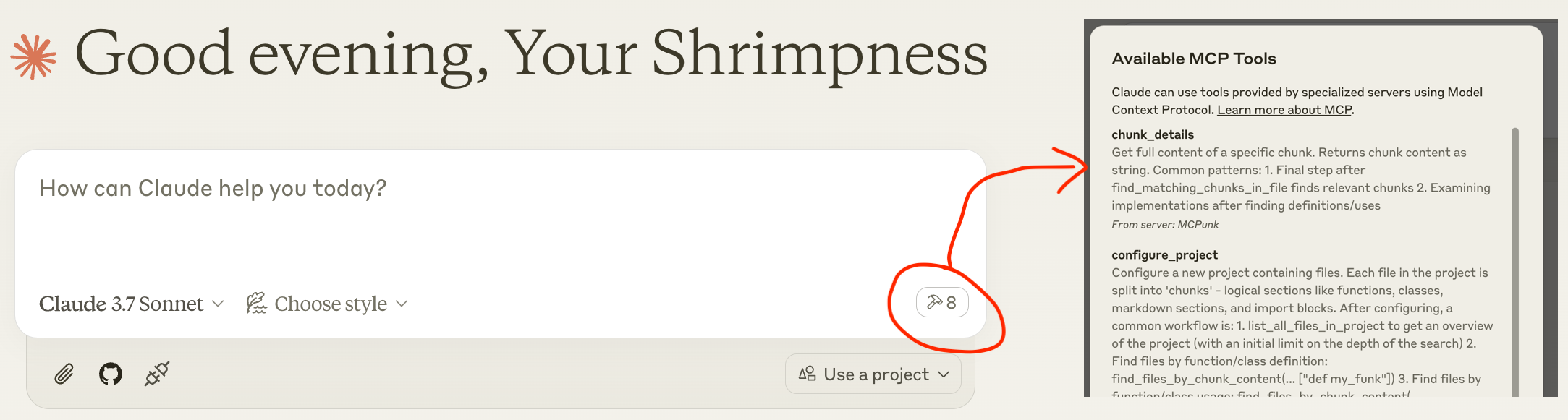
  3. Restart Claude Desktop and you should see the tools available after a small delay, like the screengrab below

  4. Chat away: "hey pal can you set up the ~/git/mcpunk project and tell me how python files are chunked"

("command": "uvx", might not work, and you may need to use e.g. "command": "/Users/michael/.local/bin/uvx",)

{
  "mcpServers": {
    "MCPunk": {
      "command": "uvx",
      "args": ["mcpunk"]
    }
  }
}
Usage Examples

Answer Questions About Your Codebase

  • [User] Hey pal can you please set up the ~/git/mcpunk repo, then help me understand how a user of mcpunk would get the git diff of the currently checked out branch in the repo that they have configured with mcpunk

  • [Claude] Call configure_project

  • [Claude] Call list_all_files_in_project

  • [Claude] Call find_files_by_chunk_content

  • [Claude] ... makes a total of 21 tool calls with MCPunk.

  • [Claude] Now I understand how the git diff functionality works in mcpunk. Let me summarize how a user would get the git diff of the currently checked out branch: To get a git diff of the currently checked out branch in a repo configured with mcpunk:

    1. First, the user needs to configure mcpunk to work with their project by using the configure_project tool

    2. To see what branches were recently checked out (to identify what to diff against)

    3. Then, to get the diff between the current branch (HEAD) and a reference branch This will display the differences between the current branch (HEAD) and the specified reference branch. The ref parameter should be the name of the base branch (like "main" or "develop") that you want to compare against.

  • [User] Great job pal!

PR Review

  • [user] Hey pal can you please set up the ~/git/mcpunk repo and have a look at the current branch versus scratch/1.5

  • [Claude] Sets up ~/git/mcpunk and calls diff_with_ref for ref scratch/1.5

  • [Claude] I see you've made several changes, primarily adding a new test file tests/test_git_analysis.py...

  • [user] how does this fit into the rest of the codebase?

  • [Claude] Makes 5 tool calls for listing files by chunks, listing chunks, fetching chunk details

  • [Claude] I see - the code parses git reflog output to track recently checked out branches. The main function get_recent_branches takes a repo path and returns the last N branches that were checked out, using _branches_from_reflog as a helper to parse the raw reflog output.

  • [User] If you were in a rush and had to direct someone to review this work, what would you direct them to look at? Please outline discrete pieces of work

  • [Claude]

    • The split("to ")[-1] in _branches_from_reflog looks fragile

    • Test data only shows simple branch names, what about spaces/special chars?

    • Is example_reflog representative of real git reflog output?

    • Are we testing against actual git behavior?

  • [User] You're the best!

Work across multiple codebases

You can just ask your LLM to set up multiple projects, and it can freely query across them. Handy if one depends on the other, and they're in different repos. In this case the LLM should recognise this via imports.

What is MCPunk & Other Background

MCPunk is an MCP server that provides tools to

  • Configure a project, which is a directory of files. When configured, the files will be split into logical chunks. MCPunk is built for code, but really it could be applied to any documents, even images if you want to.

  • Search for files in a project containing specific text

  • Search for chunks in a file containing specific text

  • View the full contents of a specific chunk

Along with this, it provides a few chunkers built in. The most mature is the Python chunker.

MCPunk doesn't have to be used for conversation. It can be used as part of code review in a CI pipeline, for example. It's really general RAG.

sequenceDiagram
    participant User
    participant Claude as Claude Desktop
    participant MCPunk as MCPunk Server
    participant Files as File System

    Note over User,Files: Setup Phase
    User->>Claude: Ask question about codebase
    Claude->>MCPunk: configure_project(root_path, project_name)
    MCPunk->>Files: Scan files in root directory

    Note over MCPunk,Files: Chunking Process
    MCPunk->>MCPunk: For each file, apply appropriate chunker:
    MCPunk->>MCPunk: - PythonChunker: functions, classes, imports
    MCPunk->>MCPunk: - MarkdownChunker: sections by headings
    MCPunk->>MCPunk: - VueChunker: template/script/style sections
    MCPunk->>MCPunk: - WholeFileChunker: fallback
    MCPunk->>MCPunk: Split chunks >10K chars into parts

    MCPunk-->>Claude: Project configured with N files

    Note over User,Files: Navigation Phase<br>(LLM freely uses all these tools repeatedly to drill in)
    Claude->>MCPunk: list_all_files_in_project(project_name)
    MCPunk-->>Claude: File tree structure

    Claude->>MCPunk: find_files_by_chunk_content(project_name, "search term")
    MCPunk-->>Claude: Files containing matching chunks

    Claude->>MCPunk: find_matching_chunks_in_file(project_name, file_path, "search term")
    MCPunk-->>Claude: List of matching chunk IDs in file

    Claude->>MCPunk: chunk_details(chunk_id)
    MCPunk-->>Claude: Full content of specific chunk

    Claude->>User: Answer based on relevant code chunks

    Note over User,Files: Optional Git Analysis
    Claude->>MCPunk: list_most_recently_checked_out_branches(project_name)
    MCPunk->>Files: Parse git reflog
    MCPunk-->>Claude: List of recent branches

    Claude->>MCPunk: diff_with_ref(project_name, "main")
    MCPunk->>Files: Generate git diff
    MCPunk-->>Claude: Diff between HEAD and reference

Roaming RAG Crash Course

See

The gist of roaming RAG is

  1. Break down content (a codebase, pdf files, whatever) into "chunks". Each chunk is a "small" logical item like a function, a section in a markdown document, or all imports in a code file.

  2. Provide the LLM tools to search chunks. MCPunk does this by providing tools to search for files containing chunks with specific text, and to list the full contents of a specific chunk.

Compared to more traditional "vector search" RAG:

  • The LLM has to drill down to find chunks, and naturally is aware of their broader context (like what file they're in)

  • Chunks should always be coherent. Like a full function.

  • You can see exactly what the LLM is searching for, and it's generally obvious if it's searching poorly and you can help it out by suggesting improved search terms.

  • Requires exact search matching. MCPunk is NOT providing fuzzy search of any kind.

Chunks

A chunk is a subsection of a file. For example,

  • A single python function

  • A markdown section

  • All the imports from a Python file

Chunks are created from a file by chunkers, and MCPunk comes with a handful built in.

When a project is set up in MCPunk, it goes through all files and applies the first applicable chunker to it. The LLM can then use tools to (1) query for files containing chunks with specific text in them, (2) query all chunks in a specific file, and (3) fetch the full contents of a chunk.

This basic foundation enables claude to effectively navigate relatively large codebases by starting with a broad search for relevant files and narrowing in on relevant areas.

Built-in chunkers:

  • PythonChunker chunks things into classes, functions, file-level imports, and file-level statements (e.g. globals). Applicable to files ending in .py

  • VueChunker chunks into 'template', 'script', 'style' chunks - or whatever top-level <blah>....</blah> items exist. Applicable to files ending in .vue

  • MarkdownChunker chunks things into markdown sections (by heading). Applicable to files ending in .md

  • WholeFileChunker fallback chunker that creates a single chunk for the entire file. Applicable to any file.

Any chunk over 10k characters long (configurable) is automatically split into multiple chunks, with names suffixed with part1, part2, etc. This helps avoid blowing out context while still allowing reasonable navigation of chunks.

Custom Chunkers

Each type of file (e.g. Python vs C) needs a custom chunker. MCPunk comes with some built in. If no specific chunker matches a file, a default chunker that just slaps the whole file into one chunk is used.

The current suggested way to add chunks is to fork this project and add them, and run MCPunk per Development. To add a chunker

It would be possible to implement some kind of plugin system for modules to advertise that they have custom chunkers for MCPunk to use, like pytest's plugin system, but there are currently no plans to implement this (unless someone wants to do it).

Limitations

  • Sometimes LLM is poor at searching. e.g. search for "dependency", missing terms "dependencies". Room to stem things.

  • Sometimes LLM will try to find a specific piece of critical code but fail to find it, then continue without acknowledging it has limited contextual awareness.

  • "Large" projects are not well tested. A project with ~1000 Python files containing in total ~250k LoC works well. Takes ~5s to setup the project. As codebase size increases, time to perform initial chunking will increase, and likely more sophisticated searching will be required. The code is generally not written with massive codebases in mind - you will see things like all data stored in memory, searching done by iterating over all data, various things that are screaming out for basic optimisation.

  • Small projects are probably better off with all the code concatenated and thrown into context. MCPunk is really only appropriate where this is impractical.

  • In some cases it would obviously be better to allow the LLM to grab an entire file rather than have it pick out chunks one at a time. MCPunk has no mechanism for this. In practice, I have not found this to be a big issue.

Configuration

Various things can be configured via environment variables prefixed with MCPUNK_. For available options, see settings.py - these are loaded from env vars via Pydantic Settings.

For example, to configure the include_chars_in_response option:

{
  "mcpServers": {
    "MCPunk": {
      "command": "uvx",
      "args": ["mcpunk"],
      "env": {
        "MCPUNK_INCLUDE_CHARS_IN_RESPONSE": "false"
      }
    }
  }
}

Roadmap & State of Development

MCPunk is considered near feature complete. It has not had broad use, and as a user it is likely you will run into bugs or rough edges. Bug reports welcomed at https://github.com/jurasofish/mcpunk/issues

Roadmap Ideas

  • Add a bunch of prompts to help with using MCPunk. Without real "explain how to make a pancake to an alien"-type prompts things do fall a little flat.

  • Include module-level comments when extracting python module-level statements.

  • Possibly stemming for search

  • Change the whole "project" concept to not need files to actually exist - this leads to allowing "virtual" files inside the project.

    • Consider changing files from having a path to having a URI, so coule be like file://... / http[s]:// / gitdiff:// / etc arbitrary URIs

  • Chunking of git diffs. Currently, there's a tool to fetch an entire diff. This might be very large. Instead, the tool could be changed to add_diff_to_project and it puts files under the gitdiff:// URI or under some fake path

  • Caching of a project, so it doesn't need to re-parse all files every time you restart MCP client. This may be tricky as changes to the code in a chunker will make cache invalid. Likely not to be prioritised, since it's not that slow for my use cases.

  • Ability for users to provide custom code to perform chunking, perhaps similar to pytest plugins

  • Something like tree sitter could possibly be used for a more generic chunker

  • Tracking of characters sent/received, ideally by chat.

  • State, logging, etc by chat

Development

see run_mcp_server.py.

If you set up claude desktop like below then you can restart it to see latest changes as you work on MCPunk from your local version of the repo.

{
  "mcpServers": {
    "MCPunk": {
      "command": "/Users/michael/.local/bin/uvx",
      "args": [
        "--from",
        "/Users/michael/git/mcpunk",
        "--no-cache",
        "mcpunk"
      ]
    }
  }
}

Testing, Linting, CI

See the Makefile and github actions workflows.

Available Tools

8 tools
chunk_detailsA

Get full content of a specific chunk.

Returns chunk content as string.

Common patterns:
1. Final step after find_matching_chunks_in_file finds relevant chunks
2. Examining implementations after finding definitions/uses
ParametersJSON Schema
NameRequiredDescriptionDefault
chunk_idYes

TDQS

A4.3/5.0
Behavior4/5

Does the description disclose side effects, auth requirements, rate limits, or destructive behavior?

No annotations provided, but description states it returns chunk content as string, indicating a read-only operation. Usage patterns imply safe behavior. Could add error cases but sufficient for a simple tool.

Agents need to know what a tool does to the world before calling it. Descriptions should go beyond structured annotations to explain consequences.

Conciseness5/5

Is the description appropriately sized, front-loaded, and free of redundancy?

Three concise sentences: purpose, return type, usage patterns. No wasted words, front-loaded with key information.

Shorter descriptions cost fewer tokens and are easier for agents to parse. Every sentence should earn its place.

Completeness4/5

Given the tool's complexity, does the description cover enough for an agent to succeed on first attempt?

For a simple tool with one parameter and no output schema, the description is largely complete. Mentions common patterns to aid understanding. Could add a note on where chunk_id comes from.

Complex tools with many parameters or behaviors need more documentation. Simple tools need less. This dimension scales expectations accordingly.

Parameters2/5

Does the description clarify parameter syntax, constraints, interactions, or defaults beyond what the schema provides?

Schema has one parameter 'chunk_id' with 0% description coverage. Description does not explain what chunk_id is or how to get it, so the agent must infer from context.

Input schemas describe structure but not intent. Descriptions should explain non-obvious parameter relationships and valid value ranges.

Purpose5/5

Does the description clearly state what the tool does and how it differs from similar tools?

The description clearly states 'Get full content of a specific chunk' with a verb and resource. It distinguishes from sibling tools like find_matching_chunks_in_file by focusing on retrieval rather than search.

Agents choose between tools based on descriptions. A clear purpose with a specific verb and resource helps agents select the right tool.

Usage Guidelines5/5

Does the description explain when to use this tool, when not to, or what alternatives exist?

Explicitly lists common patterns: final step after find_matching_chunks_in_file, examining implementations. This gives clear guidance on when to use and contrasts with alternatives.

Agents often have multiple tools that could apply. Explicit usage guidance like "use X instead of Y when Z" prevents misuse.

configure_projectA

Configure a new project containing files.

Each file in the project is split into 'chunks' - logical sections like functions,
classes, markdown sections, and import blocks.

After configuring, a common workflow is:
1. list_all_files_in_project to get an overview of the project (with
   an initial limit on the depth of the search)
2. Find files by function/class definition:
   find_files_by_chunk_content(... ["def my_funk"])
3. Find files by function/class usage:
   find_files_by_chunk_content(... ["my_funk"])
4. Determine which chunks in the found files are relevant:
    find_matching_chunks_in_file(...)
5. Get details about the chunks:
   chunk_details(...)

Use ~ (tilde) literally if the user specifies it in paths.
ParametersJSON Schema
NameRequiredDescriptionDefault
root_pathYesRoot path of the project
project_nameYesName of the project, for you to pick buddy, something short and sweet and memorable and unique

TDQS

A3.9/5.0
Behavior3/5

Does the description disclose side effects, auth requirements, rate limits, or destructive behavior?

No annotations provided. Description explains chunking but lacks details on idempotency, side effects, permissions, or error handling. It is moderately transparent but leaves gaps.

Agents need to know what a tool does to the world before calling it. Descriptions should go beyond structured annotations to explain consequences.

Conciseness4/5

Is the description appropriately sized, front-loaded, and free of redundancy?

Description is front-loaded with purpose and includes a structured workflow list. Could be slightly more concise, but the flow is helpful and not overly verbose.

Shorter descriptions cost fewer tokens and are easier for agents to parse. Every sentence should earn its place.

Completeness2/5

Given the tool's complexity, does the description cover enough for an agent to succeed on first attempt?

No output schema; description does not explain what the tool returns (e.g., project ID, success status). The workflow suggests integration but lacks completeness for an agent to fully understand the tool's output.

Complex tools with many parameters or behaviors need more documentation. Simple tools need less. This dimension scales expectations accordingly.

Parameters4/5

Does the description clarify parameter syntax, constraints, interactions, or defaults beyond what the schema provides?

Schema has 100% coverage. Description adds informal guidance for project_name ('short, sweet, memorable') and notes on tilde path handling, providing extra context beyond schema.

Input schemas describe structure but not intent. Descriptions should explain non-obvious parameter relationships and valid value ranges.

Purpose5/5

Does the description clearly state what the tool does and how it differs from similar tools?

The description clearly states 'Configure a new project containing files' and explains chunks. It distinguishes from sibling tools like list_all_files_in_project or find_files_by_chunk_content as the initial setup.

Agents choose between tools based on descriptions. A clear purpose with a specific verb and resource helps agents select the right tool.

Usage Guidelines4/5

Does the description explain when to use this tool, when not to, or what alternatives exist?

Provides a common workflow listing steps after configuration, and mentions handling tilde in paths. However, does not explicitly state when not to use or compare to alternatives.

Agents often have multiple tools that could apply. Explicit usage guidance like "use X instead of Y when Z" prevents misuse.

diff_with_refA

Return a summary of the diff between HEAD and the given ref.

You probably want the ref to be the 'base' branch like develop or main, off which PRs are made - and you can likely determine this by viewing the most recently checked out branches.

ParametersJSON Schema
NameRequiredDescriptionDefault
project_nameYes
refYes

TDQS

A3.9/5.0
Behavior3/5

Does the description disclose side effects, auth requirements, rate limits, or destructive behavior?

No annotations are provided, so the description must carry the full burden. It states the tool returns a summary, implying no side effects, and describes the scope (HEAD vs ref). However, it does not explicitly declare read-only behavior or describe what the summary includes, leaving some behavioral traits undisclosed.

Agents need to know what a tool does to the world before calling it. Descriptions should go beyond structured annotations to explain consequences.

Conciseness5/5

Is the description appropriately sized, front-loaded, and free of redundancy?

Two efficient sentences: the first states the core purpose, the second provides usage guidance. No wasted words, and the key information is front-loaded.

Shorter descriptions cost fewer tokens and are easier for agents to parse. Every sentence should earn its place.

Completeness4/5

Given the tool's complexity, does the description cover enough for an agent to succeed on first attempt?

For a simple diff tool with two parameters and no output schema, the description is mostly complete: it explains the action, the ref choice, and how to infer the ref. Missing details on output format and project_name, but overall adequate given the tool's simplicity.

Complex tools with many parameters or behaviors need more documentation. Simple tools need less. This dimension scales expectations accordingly.

Parameters2/5

Does the description clarify parameter syntax, constraints, interactions, or defaults beyond what the schema provides?

With 0% schema description coverage, the description must compensate. It discusses the ref parameter with context ('base branch') but does not explain the project_name parameter beyond its name. The tool would benefit from clarifying how project_name is resolved or its format.

Input schemas describe structure but not intent. Descriptions should explain non-obvious parameter relationships and valid value ranges.

Purpose5/5

Does the description clearly state what the tool does and how it differs from similar tools?

Clearly states the tool returns a diff summary between HEAD and a given ref. The verb 'Return' and resource 'diff between HEAD and ref' are specific. Sibling tools like chunk_details or list_most_recently_checked_out_branches are clearly distinct in functionality.

Agents choose between tools based on descriptions. A clear purpose with a specific verb and resource helps agents select the right tool.

Usage Guidelines4/5

Does the description explain when to use this tool, when not to, or what alternatives exist?

Explicitly advises using a base branch (e.g., develop, main) as the ref and suggests viewing recently checked out branches to determine it. This provides clear guidance on when to use the tool, though it does not explicitly state when not to use it.

Agents often have multiple tools that could apply. Explicit usage guidance like "use X instead of Y when Z" prevents misuse.

find_files_by_chunk_contentA

Step 1: Find files containing chunks with matching text.

Returns file tree only showing which files contain matches.
You must use find_matching_chunks_in_file on each relevant file
to see the actual matches.

Example workflow:
1. Find files:
   files = find_files_by_chunk_content(project, ["MyClass"])
2. For each file, find actual matches:
   matches = find_matching_chunks_in_file(file, ["MyClass"])
3. Get content:
   content = chunk_details(file, match_id)
ParametersJSON Schema
NameRequiredDescriptionDefault
project_nameYes
chunk_contents_filterYesMatch if any of these strings appear. Match all if None/null. Single empty string or empty list will match all.

TDQS

A4.2/5.0
Behavior4/5

Does the description disclose side effects, auth requirements, rate limits, or destructive behavior?

The description discloses that the tool only returns a file tree, not the matches themselves, and that follow-up steps are required. This adds behavioral context beyond the input schema, though it does not cover error handling or permissions. With no annotations provided, the description carries the full burden and does so adequately.

Agents need to know what a tool does to the world before calling it. Descriptions should go beyond structured annotations to explain consequences.

Conciseness4/5

Is the description appropriately sized, front-loaded, and free of redundancy?

The description is well-structured with a step-by-step workflow and code example, making it easy to follow. While it is not extremely concise, every sentence adds value and is front-loaded with the core purpose. Minor redundancy in the workflow explanation.

Shorter descriptions cost fewer tokens and are easier for agents to parse. Every sentence should earn its place.

Completeness3/5

Given the tool's complexity, does the description cover enough for an agent to succeed on first attempt?

The description lacks an explicit return value structure, stating only 'file tree' without details on its format. Given no output schema, more specificity would help. However, it does provide the workflow context and example, making it partially complete for a simple search tool.

Complex tools with many parameters or behaviors need more documentation. Simple tools need less. This dimension scales expectations accordingly.

Parameters3/5

Does the description clarify parameter syntax, constraints, interactions, or defaults beyond what the schema provides?

The input schema has 50% description coverage (only chunk_contents_filter has a description). The description does not elaborate on parameters beyond the example and workflow, adding marginal value. Baseline is 3 due to moderate schema coverage, and the description compensates only slightly.

Input schemas describe structure but not intent. Descriptions should explain non-obvious parameter relationships and valid value ranges.

Purpose5/5

Does the description clearly state what the tool does and how it differs from similar tools?

The description clearly states the tool finds files containing chunks with matching text and returns only the file tree. It distinguishes from sibling tools like find_matching_chunks_in_file which show actual matches, making the purpose specific and differentiated.

Agents choose between tools based on descriptions. A clear purpose with a specific verb and resource helps agents select the right tool.

Usage Guidelines5/5

Does the description explain when to use this tool, when not to, or what alternatives exist?

The description explicitly outlines a three-step workflow, instructing when to use this tool first, then to use find_matching_chunks_in_file for actual matches, and finally chunk_details for content. This provides clear usage guidance and differentiates from alternatives.

Agents often have multiple tools that could apply. Explicit usage guidance like "use X instead of Y when Z" prevents misuse.

find_matching_chunks_in_fileA

Step 2: Find the actual matching chunks in a specific file.

Required after find_files_by_chunk_content or list_all_files_in_project to see
matches, as those tools only show files, not their contents.

This can be used for things like:
  - Finding all chunks in a file that make reference to a specific function
    (e.g. find_matching_chunks_in_file(..., ["my_funk"])
  - Finding a chunk where a specific function is defined
    (e.g. find_matching_chunks_in_file(..., ["def my_funk"])

Some chunks are split into multiple parts, because they are too large. This
will look like 'chunkx_part1', 'chunkx_part2', ...
ParametersJSON Schema
NameRequiredDescriptionDefault
project_nameYes
rel_pathYesRelative to project root
filter_YesMatch if any of these strings appear. Match all if None/null. Single empty string or empty list will match all.

TDQS

A4.4/5.0
Behavior4/5

Does the description disclose side effects, auth requirements, rate limits, or destructive behavior?

No annotations provided, so description carries full burden. It adds behavioral context about chunk splitting into multiple parts, which is important. However, it does not disclose any side effects or permissions.

Agents need to know what a tool does to the world before calling it. Descriptions should go beyond structured annotations to explain consequences.

Conciseness5/5

Is the description appropriately sized, front-loaded, and free of redundancy?

The description is concise, well-structured with bullet points and examples. Every sentence adds value without redundancy.

Shorter descriptions cost fewer tokens and are easier for agents to parse. Every sentence should earn its place.

Completeness4/5

Given the tool's complexity, does the description cover enough for an agent to succeed on first attempt?

Given no output schema and no annotations, the description covers purpose, usage flow, and chunk splitting. Minor gap: does not explain the return format beyond chunk naming pattern.

Complex tools with many parameters or behaviors need more documentation. Simple tools need less. This dimension scales expectations accordingly.

Parameters4/5

Does the description clarify parameter syntax, constraints, interactions, or defaults beyond what the schema provides?

Schema coverage is 67% (project_name missing). The description adds value by explaining filter_ behavior with examples and clarifying that empty string or list matches all. However, project_name remains unexplained.

Input schemas describe structure but not intent. Descriptions should explain non-obvious parameter relationships and valid value ranges.

Purpose5/5

Does the description clearly state what the tool does and how it differs from similar tools?

The description clearly states it is 'Step 2' for finding matching chunks in a specific file, and distinguishes from sibling tools like 'find_files_by_chunk_content' which only show files. It uses specific verbs and resources.

Agents choose between tools based on descriptions. A clear purpose with a specific verb and resource helps agents select the right tool.

Usage Guidelines4/5

Does the description explain when to use this tool, when not to, or what alternatives exist?

The description explicitly says when to use this tool (after find_files_by_chunk_content or list_all_files_in_project) and gives usage examples. However, it does not mention when not to use it or provide alternative tools.

Agents often have multiple tools that could apply. Explicit usage guidance like "use X instead of Y when Z" prevents misuse.

get_a_jokeD

Get a really funny joke! For testing :)

ParametersJSON Schema
NameRequiredDescriptionDefault
animalYes

TDQS

D1.6/5.0
Behavior2/5

Does the description disclose side effects, auth requirements, rate limits, or destructive behavior?

No annotations are provided, so the description carries the full burden. It indicates a read operation ('Get'), but does not disclose any behavioral traits such as rate limits, side effects, or whether it is safe. Minimal information beyond the verb.

Agents need to know what a tool does to the world before calling it. Descriptions should go beyond structured annotations to explain consequences.

Conciseness2/5

Is the description appropriately sized, front-loaded, and free of redundancy?

The description is very short (one sentence), which could be concise, but it is under-specified. It sacrifices completeness for brevity without adding value.

Shorter descriptions cost fewer tokens and are easier for agents to parse. Every sentence should earn its place.

Completeness1/5

Given the tool's complexity, does the description cover enough for an agent to succeed on first attempt?

Given the tool's simplicity and lack of output schema, the description fails to cover essential context: meaning of the animal parameter, return value format, or any constraints. It is inadequate for proper tool invocation.

Complex tools with many parameters or behaviors need more documentation. Simple tools need less. This dimension scales expectations accordingly.

Parameters1/5

Does the description clarify parameter syntax, constraints, interactions, or defaults beyond what the schema provides?

Schema description coverage is 0%, and the description makes no mention of the 'animal' parameter. The purpose of the parameter is completely undocumented, leaving the agent unable to use it correctly.

Input schemas describe structure but not intent. Descriptions should explain non-obvious parameter relationships and valid value ranges.

Purpose2/5

Does the description clearly state what the tool does and how it differs from similar tools?

The description states 'Get a really funny joke!' which indicates a joke retrieval tool, but it does not specify the resource (e.g., type of joke or source) and is vague. The animal parameter is not linked in the description, leaving ambiguity about the tool's function.

Agents choose between tools based on descriptions. A clear purpose with a specific verb and resource helps agents select the right tool.

Usage Guidelines1/5

Does the description explain when to use this tool, when not to, or what alternatives exist?

No guidance on when to use this tool versus alternatives. The phrase 'For testing :)' loosely suggests it might be a test tool, but no explicit usage context or exclusions are provided.

Agents often have multiple tools that could apply. Explicit usage guidance like "use X instead of Y when Z" prevents misuse.

list_all_files_in_projectA

List all files in a project, returning a file tree.

This is useful for getting an overview of the project, or specific subdirectories of the project.

A project may have many files, so you are suggested to start with a depth limit to get an overview, and then continue increasing the depth limit with a filter to look at specific subdirectories.

ParametersJSON Schema
NameRequiredDescriptionDefault
project_nameYes
path_filterNoMatch if any of these strings appear. Match all if None/null. Single empty string or empty list will match all.
limit_depth_from_rootNoLimit the depth of the search to this many directories from the root. Typically,start with 1 to get an overview of the project.If None, search all directories from the root.

TDQS

A3.8/5.0
Behavior3/5

Does the description disclose side effects, auth requirements, rate limits, or destructive behavior?

No annotations are provided, so the description must carry the behavioral context. It mentions returning a file tree but does not disclose performance implications, error handling, or how the tree is structured. For a tool with no annotations, more details would be expected.

Agents need to know what a tool does to the world before calling it. Descriptions should go beyond structured annotations to explain consequences.

Conciseness4/5

Is the description appropriately sized, front-loaded, and free of redundancy?

The description is concise with three short paragraphs. It front-loads the purpose and provides actionable advice without unnecessary verbosity.

Shorter descriptions cost fewer tokens and are easier for agents to parse. Every sentence should earn its place.

Completeness3/5

Given the tool's complexity, does the description cover enough for an agent to succeed on first attempt?

Given the tool's moderate complexity, the description covers the basic purpose and usage guidance. However, with no output schema or annotations, it could benefit from describing the output format, error scenarios, or access requirements.

Complex tools with many parameters or behaviors need more documentation. Simple tools need less. This dimension scales expectations accordingly.

Parameters3/5

Does the description clarify parameter syntax, constraints, interactions, or defaults beyond what the schema provides?

Two of three parameters have descriptions in the schema (67% coverage), so the description adds moderate value by suggesting the usage sequence (start with depth limit). It does not add new parameter-specific semantics beyond what the schema provides.

Input schemas describe structure but not intent. Descriptions should explain non-obvious parameter relationships and valid value ranges.

Purpose5/5

Does the description clearly state what the tool does and how it differs from similar tools?

The description clearly states the action (list), resource (all files in a project), and output (file tree). It distinguishes from sibling tools that focus on searching or details, making the tool's purpose unambiguous.

Agents choose between tools based on descriptions. A clear purpose with a specific verb and resource helps agents select the right tool.

Usage Guidelines4/5

Does the description explain when to use this tool, when not to, or what alternatives exist?

Provides explicit advice on when to use the tool, suggesting to start with a depth limit for overview and then increase depth with filters. However, it does not mention when not to use or compare to alternatives, so it's slightly incomplete.

Agents often have multiple tools that could apply. Explicit usage guidance like "use X instead of Y when Z" prevents misuse.

list_most_recently_checked_out_branchesB

List the n most recently checked out branches in the project

ParametersJSON Schema
NameRequiredDescriptionDefault
project_nameYes
nNo

TDQS

B3.2/5.0
Behavior2/5

Does the description disclose side effects, auth requirements, rate limits, or destructive behavior?

Without annotations, the description carries full burden for behavioral disclosure. It does not mention read-only nature, error handling, or ordering direction (e.g., descending). Only the basic action is stated.

Agents need to know what a tool does to the world before calling it. Descriptions should go beyond structured annotations to explain consequences.

Conciseness5/5

Is the description appropriately sized, front-loaded, and free of redundancy?

A single sentence with no unnecessary words. It is front-loaded with the action and resource, making it efficient for an agent to parse.

Shorter descriptions cost fewer tokens and are easier for agents to parse. Every sentence should earn its place.

Completeness3/5

Given the tool's complexity, does the description cover enough for an agent to succeed on first attempt?

For a simple listing tool, the description covers the core purpose. However, it lacks details on output format, ordering direction, and edge cases like missing project. Adequate but with gaps.

Complex tools with many parameters or behaviors need more documentation. Simple tools need less. This dimension scales expectations accordingly.

Parameters2/5

Does the description clarify parameter syntax, constraints, interactions, or defaults beyond what the schema provides?

The schema has 0% description coverage, and the description adds no meaning to the parameters. Although the parameter names are self-explanatory, the description should clarify constraints like 'n' range or project_name format.

Input schemas describe structure but not intent. Descriptions should explain non-obvious parameter relationships and valid value ranges.

Purpose5/5

Does the description clearly state what the tool does and how it differs from similar tools?

The description uses a specific verb 'List' and specifies the resource 'most recently checked out branches' in the project. It clearly distinguishes the tool from siblings, which focus on files and chunks, not branches.

Agents choose between tools based on descriptions. A clear purpose with a specific verb and resource helps agents select the right tool.

Usage Guidelines2/5

Does the description explain when to use this tool, when not to, or what alternatives exist?

No guidance is provided on when to use this tool versus alternatives or when not to use it. The description simply states what it does without any context for selection.

Agents often have multiple tools that could apply. Explicit usage guidance like "use X instead of Y when Z" prevents misuse.

Tool Schema Changelog

Recent tool additions, removals, and schema changes observed during successful MCP inspections. Dates show when Glama detected each change.

  1. 8 tool updatesv1.0.0
    • First observedchunk_details
    • First observedconfigure_project
    • First observeddiff_with_ref
    • First observedfind_files_by_chunk_content
    • First observedfind_matching_chunks_in_file
    • First observedget_a_joke
    • First observedlist_all_files_in_project
    • First observedlist_most_recently_checked_out_branches

TDQS

A3.5/5.0
Disambiguation5/5

Each tool has a clearly distinct purpose: project configuration, file listing, content search, chunk details, diff, branch listing, and a joke tool. No overlapping functionalities.

Naming Consistency5/5

All tools use a consistent snake_case naming pattern with descriptive verb_noun structure (e.g., `list_all_files_in_project`, `configure_project`). No mixing of conventions.

Tool Count5/5

8 tools is well-scoped for a code analysis server. Each tool serves a necessary role in the typical workflow, and there are no redundant or missing core tools.

Completeness4/5

Covers the main analysis workflow: configure, list files, search, get details, diff, and branch info. However, lacks modification tools (e.g., update/delete project or chunks), which is a minor gap for a full lifecycle.

Maintenance

ActivityInactive
ResponsivenessNo issues

Resources

Unclaimed servers have limited discoverability.

Looking for Admin?

If you are the server author, to access and configure the admin panel.

Related MCP Connectors

Related MCP Servers

  • A
    license
    Not graded
    quality
    C
    maintenance
    Provides AI-powered code intelligence for any codebase using local LLMs and vector search, enabling semantic code search, pattern analysis, and context-optimized code generation with 90% token savings.
    2
    MIT
  • A
    license
    B
    quality
    C
    maintenance
    Enables token-efficient semantic search and analysis over any directory of files through hybrid search, directory overview, structural analysis, and dependency graphs.
    14
    MIT
  • F
    license
    Not graded
    quality
    D
    maintenance
    Enables AI agents to semantically search and navigate code repositories using natural language, with support for multiple repos, incremental indexing, and no local install needed.
    -

Latest Blog Posts

MCP directory API

We provide all the information about MCP servers via our MCP API.

curl -X GET 'https://glama.ai/api/mcp/v1/servers/jurasofish/mcpunk'

If you have feedback or need assistance with the MCP directory API, please join our Discord server