IP2Location IP Geolocation MCP Server
OfficialMCP-сервер IP2Location.io
Это простая реализация сервера протокола Model Context Protocol (MCP) для API IP2Location.io. Он возвращает подробную информацию о геолокации для любого заданного IPv4 или IPv6-адреса.
Возможности
Комплексные данные о геолокации: Получение широкого спектра информации, включая страну, регион, город, широту, долготу, почтовый индекс, часовой пояс и многое другое.
Сведения о сети: Предоставление данных, связанных с сетью, таких как ASN, ISP, домен и скорость сети.
Анализ безопасности: Обнаружение информации о прокси, включая тип прокси и провайдера.
Простая интеграция: Создан как инструмент
FastMCP, что позволяет легко интегрировать его в совместимые системы.Асинхронность: Использует
httpxдля неблокирующих асинхронных API-запросов.
Требования
Этот MCP-сервер поддерживает запросы без API-ключа с ограничением в 1000 запросов в день. Вы также можете зарегистрироваться для получения бесплатного API-ключа и использовать до 50 000 запросов в месяц.
Для настройки также используется uv, который можно установить, следуя руководству.
Настройка
Выполните следующие шаги, чтобы использовать этот MCP-сервер с Claude Desktop:
Скачайте репозиторий на свой локальный компьютер.
Настройте менеджер пакетов
uv, вы можете снова обратиться к руководству для этого.Убедитесь, что у вас установлен Claude Desktop. Если нет, скачайте его отсюда для пользователей Windows и MacOS или следуйте этому руководству для пользователей Linux.
Откройте
claude_desktop_config.jsonв выбранном вами редакторе. Если у вас его еще нет, следуйте этому руководству, чтобы создать его.Добавьте следующее в ваш
claude_desktop_config.json:
{
"mcpServers": {
"ip2locationio": {
"command": "uv",
"args": [
"--directory",
"/path/to/ip2locationio/src",
"run",
"server.py"
],
"env": {
"IP2LOCATION_API_KEY": "<YOUR API key HERE>"
}
}
}
}Не забудьте заменить путь
/path/to/ip2locationioна ваш фактический путь к MCP-серверу IP2Location.io на локальном компьютере.Чтобы получить API-ключ, просто войдите в свою панель управления и скопируйте его оттуда. Замените
<YOUR API key HERE>выше на ваш фактический API-ключ.Перезапустите Claude Desktop после сохранения изменений, и он должен появиться в меню
Connectors.
Использование
Просто введите запрос об IP-адресе в чате Claude Desktop. Примеры запросов:
Где находится (IP)?
Каково местоположение (IP)?
Каковы координаты (IP)?
Например, ниже приведен результат для IP 8.8.8.8:
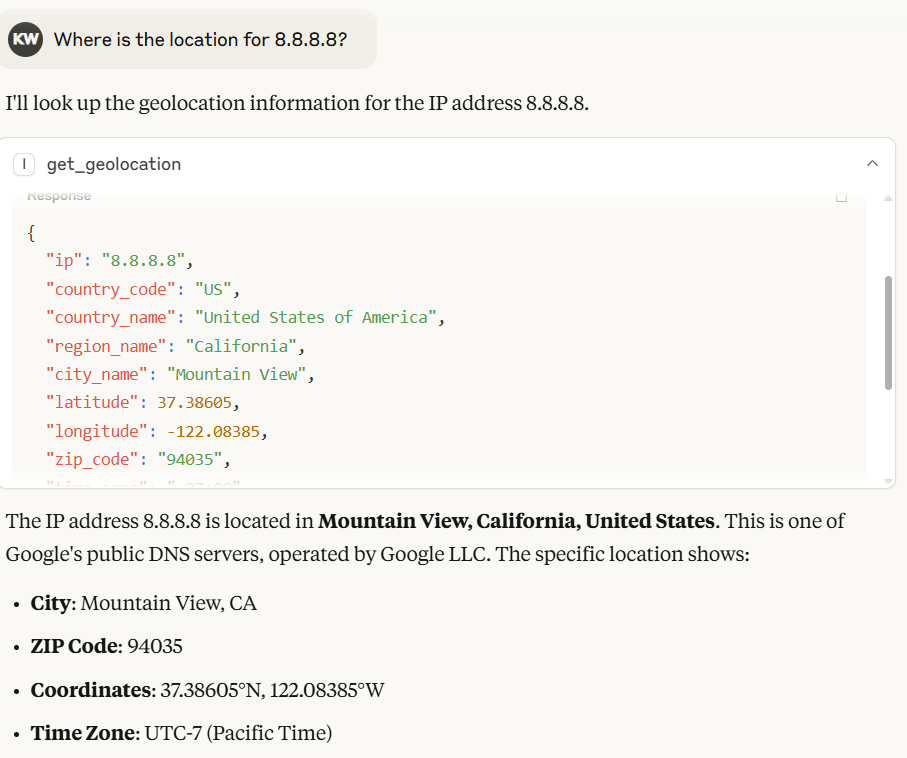
В Claude Desktop модель автоматически сгенерирует вывод на основе результата, возвращенного MCP-сервером IP2Location.io.
Вы также можете использовать API массовой геолокации IP2Location.io для запроса нескольких IP-адресов. Просто введите все IP-адреса через пробел. Например, 8.8.8.8 8.8.6.6.
[!NOTE] API массовой геолокации IP2Location.io требует платного тарифа для работы.
Переменная окружения
IP2LOCATION_API_KEY
API-ключ IP2Location.io, который позволяет выполнять до 50 000 запросов в месяц и получать более подробную информацию об IP-адресе. Вы можете зарегистрироваться для получения бесплатного API-ключа или подписаться на тарифный план, чтобы получить больше преимуществ.
Инструмент
get_geolocation
Описание Получение геолокации для заданного IP-адреса или пакета IP-адресов. Помогает пользователям получать подробную информацию, такую как страна, регион, город, широта, долгота, почтовый индекс, часовой пояс, ASN и информация о прокси для любого IPv4 или IPv6-адреса. Автоматически направляет запросы к Bulk API IP2Location.io для эффективной обработки при обнаружении нескольких IP-адресов.
Аргументы
ip(str): IP-адрес (IPv4 или IPv6) для анализа. Вы можете запросить несколько IP-адресов одновременно, передав их одной строкой, разделенной запятыми, пробелами или символами новой строки (например,"1.1.1.1, 2.2.2.2").
Возвращаемые значения JSON-строка, содержащая данные о геолокации. Если запрашивается несколько IP-адресов, возвращается JSON-объект, где каждый ключ — это IP-адрес, сопоставленный с соответствующими данными. Результат может включать следующие поля, в зависимости от вашего тарифного плана:
Местоположение и география: Страна, регион, район, город, почтовый индекс, широта и долгота, часовой пояс.
Сеть и подключение: ASN (номер автономной системы), ISP (интернет-провайдер), домен, скорость сети, IDD-код, код зоны, тип адреса, тип использования.
Мобильная информация: MNC (код мобильной сети), MCC (мобильный код страны), бренд мобильной связи.
Валюта и язык: код валюты, название валюты, символ валюты, код языка, название языка.
Прокси и безопасность: тип прокси, время последнего обнаружения, уровень/тип угрозы, провайдер прокси, оценка мошенничества.
Прочее: категория IAB, погода, высота над уровнем моря, население и многое другое.
Если запрос для одного IP-адреса не удался или IP-адрес недействителен, инструмент возвращает сообщение об ошибке в виде строки. Для массовых запросов любые отдельные неудачные IP-адреса вернут объект ошибки, сопоставленный с этим конкретным IP-адресом, без сбоя всей пакетной обработки.
Лицензия
См. файл LICENSE.
Available Tools
1 toolget_geolocationA
Fetch geolocation for the given IP address(es).
CRITICAL INSTRUCTION FOR AI AGENT: If the user provides multiple IP addresses in their prompt, DO NOT call this tool multiple times sequentially. You MUST batch all IP addresses together into a single comma-separated string and make exactly ONE tool call.
It helps users to retrieve detailed information such as country, region, city, latitude, longitude, ZIP code, time zone, ASN, and proxy information for any IPv4 or IPv6 address.
Args: ip: The IP address to analyze (IPv4 or IPv6). For multiple IPs, you MUST combine them into a single string separated by commas (e.g., "1.1.1.1, 2.2.2.2").
Returns: A JSON string result includes:
Location & Geography:
Country, region, district, city, ZIP code, latitude & longitude, time zone.
Network & Connectivity
ASN (Autonomous System Number), ISP (Internet Service Provider), domain, net speed, IDD code, area code, address type, usage type.
Mobile Information
MNC (Mobile Network Code), MCC (Mobile Country Code), Mobile Brand.
Currency & Language
currency code, currency name, currency symbol, language code, language name.
Proxy & Security
proxy type, last seen, threat level/type, proxy provider, fraud score.
Others
IAB category, weather, elevation, population and more.
Note that some information may only available in paid plan. Learn more on this in https://www.ip2location.io/pricing.
| Name | Required | Description | Default |
|---|---|---|---|
| ip | Yes |
Output Schema
| Name | Required | Description |
|---|---|---|
| result | Yes |
TDQS
Does the description disclose side effects, auth requirements, rate limits, or destructive behavior?
Describes the return structure in detail and notes that some information may be limited to paid plans. No annotations exist, so the description carries the burden; it discloses the tool is a read operation but lacks info on error handling or rate limits.
Agents need to know what a tool does to the world before calling it. Descriptions should go beyond structured annotations to explain consequences.
Is the description appropriately sized, front-loaded, and free of redundancy?
Well-structured with headings, critical instruction upfront, and detailed return breakdown. Slightly verbose but each section adds clear value.
Shorter descriptions cost fewer tokens and are easier for agents to parse. Every sentence should earn its place.
Given the tool's complexity, does the description cover enough for an agent to succeed on first attempt?
Given one required parameter, no annotations, and presence of an output schema, the description provides extensive return field details and notes on plan limitations, making it complete for effective use.
Complex tools with many parameters or behaviors need more documentation. Simple tools need less. This dimension scales expectations accordingly.
Does the description clarify parameter syntax, constraints, interactions, or defaults beyond what the schema provides?
The input schema provides no description for the 'ip' parameter (0% coverage), but the description compensates fully by explaining it accepts IPv4/IPv6 and can be comma-separated for multiple IPs.
Input schemas describe structure but not intent. Descriptions should explain non-obvious parameter relationships and valid value ranges.
Does the description clearly state what the tool does and how it differs from similar tools?
Clearly states the tool fetches geolocation for IP addresses, specifying the range of detailed data returned. No sibling tools exist, but it distinguishes itself as a geolocation lookup tool.
Agents choose between tools based on descriptions. A clear purpose with a specific verb and resource helps agents select the right tool.
Does the description explain when to use this tool, when not to, or what alternatives exist?
Provides explicit critical instruction to batch multiple IPs into a single comma-separated string to avoid multiple calls. Does not mention when not to use or alternatives, but this is adequate given the single-purpose tool.
Agents often have multiple tools that could apply. Explicit usage guidance like "use X instead of Y when Z" prevents misuse.
Tool Schema Changelog
Recent tool additions, removals, and schema changes observed during successful MCP inspections.
1 tool update
v1.0.1- Changed
get_geolocation1 field changed- changed
Output schema / (root)Previous value: -nullNew value: +{ + "properties": { + "result": { + "anyOf": [ + { + "additionalProperties": true, + "type": "object" + }, + { + "type": "string" + } + ], + "title": "Result" + } + }, + "required": [ + "result" + ], + "title": "get_geolocationOutput", + "type": "object" +}
1 tool update
- First observed
get_geolocation
TDQS
Scored across 1 tool
With only one tool, there is no possibility of confusion or overlap. The tool's purpose is clearly defined and distinct.
The single tool 'get_geolocation' follows a clear verb_noun pattern, which is consistent and predictable.
While the server has only one tool, it is sufficient for its focused purpose of IP geolocation. The count is slightly below the typical 3-15 range but still reasonable.
The tool provides comprehensive geolocation data covering location, network, security, and more. No obvious gaps exist for a read-only service of this nature.
Maintenance
Related MCP Connectors
Official IPinfo MCP Server - IP intelligence tools for AI assistants
IPInfo MCP — wraps ipinfo.io (free tier, no auth required for basic usage)
Geo-based flight search MCP server. Find more flights between any two places on earth
Related MCP Servers
- AlicenseNot gradedqualityCmaintenanceAn MCP server that provides IP geolocation services using MaxMind's GeoIP2 databases, allowing users to retrieve geographical information for single or multiple IP addresses including country, city, coordinates, and ASN details.GPL 3.0
- AlicenseBqualityDmaintenanceAn MCP server that provides access to the Netdetective API for querying information about IP addresses. It enables users to retrieve metadata for a specified IP address or the connecting client's default IP address.1MIT
- AlicenseAqualityAmaintenanceOfficial MCP server for ipgeolocation.io APIs. IP geolocation, VPN/proxy detection, timezone, astronomy, user-agent parsing, ASN, company, and IP abuse contact tools for AI assistants.1676 npm4MIT
- AlicenseNot gradedqualityFmaintenanceMCP server for IP geolocation lookups using ipinfo.io, with single, own, and batch queries.1MIT