IP2Location IP Geolocation MCP Server
OfficialServidor MCP de IP2Location.io
Esta es una implementación sencilla de servidor del Protocolo de Contexto de Modelo (MCP) para la API de IP2Location.io. Devolverá información detallada de geolocalización para cualquier dirección IPv4 o IPv6 proporcionada.
Características
Datos de geolocalización completos: Recupera una amplia gama de información, incluyendo país, región, ciudad, latitud, longitud, código postal, zona horaria y más.
Detalles de red: Proporciona datos relacionados con la red, como ASN, ISP, dominio y velocidad de red.
Información de seguridad: Detecta información de proxy, incluyendo el tipo de proxy y el proveedor.
Integración sencilla: Creado como una herramienta
FastMCP, lo que permite una fácil integración en sistemas compatibles.Asíncrono: Utiliza
httpxpara solicitudes de API asíncronas no bloqueantes.
Requisitos
Este servidor MCP permite realizar consultas sin una clave de API, con una limitación de 1.000 consultas por día. También puede registrarse para obtener una clave de API gratuita y disfrutar de hasta 50.000 consultas al mes.
La configuración también utiliza uv, que se puede instalar siguiendo la guía.
Configuración
Siga los pasos para utilizar este servidor MCP con Claude Desktop:
Descargue el repositorio en su equipo local.
Configure el gestor de paquetes
uv; puede consultar de nuevo la guía para hacerlo.Asegúrese de haber instalado Claude Desktop; si no lo ha hecho, descárguelo desde aquí para usuarios de Windows y MacOS, o siga esta guía para usuarios de Linux.
Abra el archivo
claude_desktop_config.jsonen el editor de su elección; si aún no tiene uno, siga esta guía para crear uno.Añada lo siguiente a su
claude_desktop_config.json:
{
"mcpServers": {
"ip2locationio": {
"command": "uv",
"args": [
"--directory",
"/path/to/ip2locationio/src",
"run",
"server.py"
],
"env": {
"IP2LOCATION_API_KEY": "<YOUR API key HERE>"
}
}
}
}Recuerde reemplazar la ruta
/path/to/ip2locationiocon su ruta real al servidor MCP de IP2Location.io en su equipo local.Para obtener su clave de API, simplemente inicie sesión en su panel de control y obténgala desde allí. Reemplace
<YOUR API key HERE>en el texto anterior con su clave de API real.Reinicie Claude Desktop después de guardar los cambios y debería verlo aparecer en el menú
Connectors.
Uso
Simplemente introduzca su consulta sobre la IP en un chat en Claude Desktop. Algunos ejemplos de consultas serían:
¿Cuál es la ubicación de (IP)?
¿Dónde se encuentra (IP)?
¿Cuáles son las coordenadas de (IP)?
Por ejemplo, a continuación se muestra el resultado para la IP 8.8.8.8:
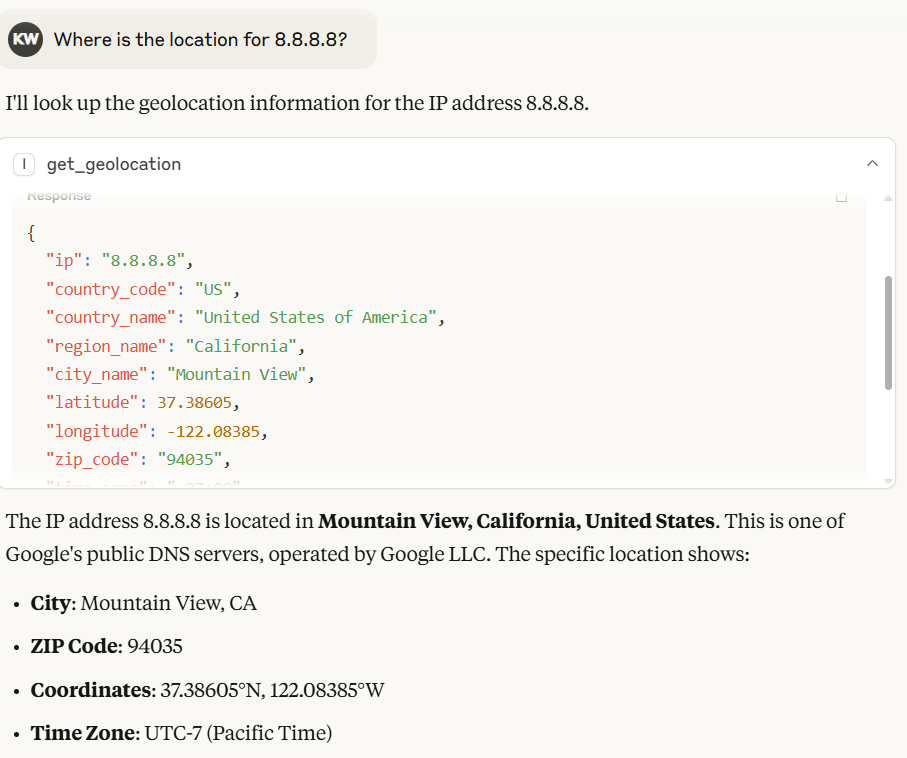
En Claude Desktop, el modelo generará automáticamente el resultado basado en la información devuelta por el servidor MCP de IP2Location.io.
También puede utilizar la API de geolocalización IP masiva de IP2Location.io para consultar múltiples direcciones IP. Simplemente introduzca todas las direcciones IP con un espacio entre cada una. Por ejemplo 8.8.8.8 8.8.6.6.
[!NOTE] La API de geolocalización IP masiva de IP2Location.io requiere un plan de pago para funcionar.
Variable de entorno
IP2LOCATION_API_KEY
La clave de API de IP2Location.io, que le permite realizar hasta 50.000 consultas al mes y obtener más detalles de la dirección IP. Puede registrarse para obtener una clave de API gratuita o suscribirse a un plan para disfrutar de más beneficios.
Herramienta
get_geolocation
Descripción Obtiene la geolocalización para la dirección IP proporcionada o un lote de direcciones IP. Ayuda a los usuarios a recuperar información detallada como país, región, ciudad, latitud, longitud, código postal, zona horaria, ASN e información de proxy para cualquier dirección IPv4 o IPv6. Dirige automáticamente las solicitudes a la API masiva de IP2Location.io para un procesamiento eficiente cuando se detectan múltiples IPs.
Argumentos
ip(str): La dirección IP (IPv4 o IPv6) a analizar. Puede consultar múltiples IPs a la vez pasándolas como una sola cadena separada por comas, espacios o saltos de línea (p. ej.,"1.1.1.1, 2.2.2.2").
Retorno Una cadena JSON que contiene los datos de geolocalización. Si se consultan múltiples IPs, devuelve un objeto JSON donde cada clave es una dirección IP asignada a sus respectivos datos. El resultado puede incluir los siguientes campos, dependiendo de su plan de API:
Ubicación y geografía: País, región, distrito, ciudad, código postal, latitud y longitud, zona horaria.
Red y conectividad: ASN (Número de Sistema Autónomo), ISP (Proveedor de Servicios de Internet), dominio, velocidad de red, código IDD, código de área, tipo de dirección, tipo de uso.
Información móvil: MNC (Código de Red Móvil), MCC (Código de País Móvil), Marca móvil.
Moneda e idioma: código de moneda, nombre de moneda, símbolo de moneda, código de idioma, nombre de idioma.
Proxy y seguridad: tipo de proxy, última vez visto, nivel/tipo de amenaza, proveedor de proxy, puntuación de fraude.
Otros: categoría IAB, clima, elevación, población y más.
Si una solicitud de una sola IP falla o la IP no es válida, la herramienta devuelve un mensaje de error como cadena. Para solicitudes masivas, cualquier IP individual que falle devolverá un objeto de error asignado a esa dirección IP específica sin hacer que falle todo el lote.
Licencia
Consulte el archivo LICENSE.
Available Tools
1 toolget_geolocationA
Fetch geolocation for the given IP address(es).
CRITICAL INSTRUCTION FOR AI AGENT: If the user provides multiple IP addresses in their prompt, DO NOT call this tool multiple times sequentially. You MUST batch all IP addresses together into a single comma-separated string and make exactly ONE tool call.
It helps users to retrieve detailed information such as country, region, city, latitude, longitude, ZIP code, time zone, ASN, and proxy information for any IPv4 or IPv6 address.
Args: ip: The IP address to analyze (IPv4 or IPv6). For multiple IPs, you MUST combine them into a single string separated by commas (e.g., "1.1.1.1, 2.2.2.2").
Returns: A JSON string result includes:
Location & Geography:
Country, region, district, city, ZIP code, latitude & longitude, time zone.
Network & Connectivity
ASN (Autonomous System Number), ISP (Internet Service Provider), domain, net speed, IDD code, area code, address type, usage type.
Mobile Information
MNC (Mobile Network Code), MCC (Mobile Country Code), Mobile Brand.
Currency & Language
currency code, currency name, currency symbol, language code, language name.
Proxy & Security
proxy type, last seen, threat level/type, proxy provider, fraud score.
Others
IAB category, weather, elevation, population and more.
Note that some information may only available in paid plan. Learn more on this in https://www.ip2location.io/pricing.
| Name | Required | Description | Default |
|---|---|---|---|
| ip | Yes |
Output Schema
| Name | Required | Description |
|---|---|---|
| result | Yes |
TDQS
Does the description disclose side effects, auth requirements, rate limits, or destructive behavior?
Describes the return structure in detail and notes that some information may be limited to paid plans. No annotations exist, so the description carries the burden; it discloses the tool is a read operation but lacks info on error handling or rate limits.
Agents need to know what a tool does to the world before calling it. Descriptions should go beyond structured annotations to explain consequences.
Is the description appropriately sized, front-loaded, and free of redundancy?
Well-structured with headings, critical instruction upfront, and detailed return breakdown. Slightly verbose but each section adds clear value.
Shorter descriptions cost fewer tokens and are easier for agents to parse. Every sentence should earn its place.
Given the tool's complexity, does the description cover enough for an agent to succeed on first attempt?
Given one required parameter, no annotations, and presence of an output schema, the description provides extensive return field details and notes on plan limitations, making it complete for effective use.
Complex tools with many parameters or behaviors need more documentation. Simple tools need less. This dimension scales expectations accordingly.
Does the description clarify parameter syntax, constraints, interactions, or defaults beyond what the schema provides?
The input schema provides no description for the 'ip' parameter (0% coverage), but the description compensates fully by explaining it accepts IPv4/IPv6 and can be comma-separated for multiple IPs.
Input schemas describe structure but not intent. Descriptions should explain non-obvious parameter relationships and valid value ranges.
Does the description clearly state what the tool does and how it differs from similar tools?
Clearly states the tool fetches geolocation for IP addresses, specifying the range of detailed data returned. No sibling tools exist, but it distinguishes itself as a geolocation lookup tool.
Agents choose between tools based on descriptions. A clear purpose with a specific verb and resource helps agents select the right tool.
Does the description explain when to use this tool, when not to, or what alternatives exist?
Provides explicit critical instruction to batch multiple IPs into a single comma-separated string to avoid multiple calls. Does not mention when not to use or alternatives, but this is adequate given the single-purpose tool.
Agents often have multiple tools that could apply. Explicit usage guidance like "use X instead of Y when Z" prevents misuse.
Tool Schema Changelog
Recent tool additions, removals, and schema changes observed during successful MCP inspections.
1 tool update
v1.0.1- Changed
get_geolocation1 field changed- changed
Output schema / (root)Previous value: -nullNew value: +{ + "properties": { + "result": { + "anyOf": [ + { + "additionalProperties": true, + "type": "object" + }, + { + "type": "string" + } + ], + "title": "Result" + } + }, + "required": [ + "result" + ], + "title": "get_geolocationOutput", + "type": "object" +}
1 tool update
- First observed
get_geolocation
TDQS
Scored across 1 tool
With only one tool, there is no possibility of confusion or overlap. The tool's purpose is clearly defined and distinct.
The single tool 'get_geolocation' follows a clear verb_noun pattern, which is consistent and predictable.
While the server has only one tool, it is sufficient for its focused purpose of IP geolocation. The count is slightly below the typical 3-15 range but still reasonable.
The tool provides comprehensive geolocation data covering location, network, security, and more. No obvious gaps exist for a read-only service of this nature.
Maintenance
Related MCP Connectors
Official IPinfo MCP Server - IP intelligence tools for AI assistants
IPInfo MCP — wraps ipinfo.io (free tier, no auth required for basic usage)
Geo-based flight search MCP server. Find more flights between any two places on earth
Related MCP Servers
- AlicenseNot gradedqualityCmaintenanceAn MCP server that provides IP geolocation services using MaxMind's GeoIP2 databases, allowing users to retrieve geographical information for single or multiple IP addresses including country, city, coordinates, and ASN details.GPL 3.0
- AlicenseBqualityDmaintenanceAn MCP server that provides access to the Netdetective API for querying information about IP addresses. It enables users to retrieve metadata for a specified IP address or the connecting client's default IP address.1MIT
- AlicenseAqualityAmaintenanceOfficial MCP server for ipgeolocation.io APIs. IP geolocation, VPN/proxy detection, timezone, astronomy, user-agent parsing, ASN, company, and IP abuse contact tools for AI assistants.1676 npm4MIT
- AlicenseNot gradedqualityFmaintenanceMCP server for IP geolocation lookups using ipinfo.io, with single, own, and batch queries.1MIT