IP2Location.io MCP server
IP2Location.io MCP Server is a Model Context Protocol (MCP) server that enables MCP-compatible AI clients to perform IP address geolocation and network intelligence lookups using the IP2Location.io API.
Give it an IPv4 or IPv6 address and the MCP server can retrieve information such as geographic location, ASN, ISP, domain, network type, and proxy information, depending on your IP2Location.io API plan.
This makes it useful for IP investigation, network troubleshooting, traffic analysis, localization, security analysis, and enriching IP addresses found in logs or other datasets.


Features
Comprehensive Geolocation Data: Retrieve country, region, city, ZIP/postal code, latitude, longitude, time zone, and other location information.
ASN Lookup: Identify the Autonomous System Number (ASN) and Autonomous System (AS) associated with an IP address.
Network Intelligence: Retrieve information such as ISP, domain, connection speed, usage type, and other network attributes depending on your plan.
Proxy and Security Information: Detect proxy-related information and, on supported plans, additional VPN, Tor, data center, threat, and fraud information.
IPv4 and IPv6 Support: Query both IPv4 and IPv6 addresses.
Bulk IP Lookup: Send multiple IP addresses in one prompt and automatically use the IP2Location.io Bulk API when available.
MCP Integration: Use IP intelligence directly from MCP-compatible AI applications.
Asynchronous Requests: Uses httpx for asynchronous API requests.
NOTE
The fields returned by IP2Location.io depend on your API subscription plan.
Requirements
There are two ways to use this MCP server.
Cloud-hosted MCP server
Recommended when you want to connect directly to the hosted IP2Location.io MCP server.
You can connect in either of two ways:
Direct HTTP connection: Your MCP client supports remote (streamable HTTP) MCP servers. No extra software is required.
Via npx: Your MCP client only supports local (stdio) servers. This uses the mcp-remote package to bridge to the hosted server.
You need:
An MCP-compatible client such as Claude Desktop
An IP2Location.io API key
Node.js / npx (only for the npx connection method)
Local MCP server
Use this option when you want to run the MCP server locally.
You need:
You can sign up for a free IP2Location.io API key. The Free plan provides up to 50,000 IP Geolocation API queries per month.
The underlying IP2Location.io REST API also supports limited keyless access of up to 1,000 queries per day. For this MCP server, configuring an API key is recommended and is used in the setup examples below.
Setup
You can use this MCP server in Claude Desktop in either of the following ways:
Cloud-hosted MCP server: Recommended if you want to connect directly to the hosted IP2Location.io MCP server.
Local MCP server: Use this if you want to download and run the original MCP server on your own machine.
Related MCP server: Netdetective MCP Server
Option 1: Cloud-hosted MCP server
Follow these steps to connect Claude Desktop to the hosted IP2Location.io MCP server.
Make sure you have installed Claude Desktop. If you have not installed it yet, download it from here for Windows and macOS, or follow this guide for Linux users.
Open the claude_desktop_config.json file in your choice of editor. If you do not have one yet, follow this guide to create one.
Add one of the configurations below, depending on how you want to connect.
Method A: Direct HTTP connection
Use this if your MCP client supports remote servers over HTTP. No Node.js or npx is needed.
{
  "mcpServers": {
    "ip2location": {
      "type": "http",
      "url": "https://mcp.ip2location.io/",
      "headers": {
        "X-API-Key": "YOUR_API_KEY"
      }
    }
  }
}
If your client is configured from the command line, such as Claude Code, you can add the server with:
claude mcp add --transport http ip2location https://mcp.ip2location.io/ --header "X-API-Key: YOUR_API_KEY"
Method B: Connection through npx
Use this if your MCP client only supports local (stdio) servers. The mcp-remote package runs locally and forwards requests to the hosted server.
{
  "mcpServers": {
    "ip2location": {
      "command": "npx",
      "args": [
        "-y",
        "mcp-remote@latest",
        "https://mcp.ip2location.io/",
        "--header",
        "X-API-Key:YOUR_API_KEY"
      ]
    }
  }
}
Replace YOUR_API_KEY with your actual IP2Location.io API key. To get your API key, log in to your dashboard.
Restart Claude Desktop after saving the changes, and you should see the MCP server appear in the Connectors menu.
Option 2: Local MCP server
Follow these steps if you prefer to run the MCP server locally.
Set up the uv package manager. You can refer to the guide to do so.
Make sure you have installed Claude Desktop. If you have not installed it yet, download it from here for Windows and macOS, or follow this guide for Linux users.
Open the claude_desktop_config.json file in your choice of editor. If you do not have one yet, follow this guide to create one.
Add the following to your claude_desktop_config.json:
{
  "mcpServers": {
    "ip2locationio": {
      "command": "uvx",
      "args": [
        "mcp-ip2location-io"
      ],
      "env": {
        "IP2LOCATION_API_KEY": "<YOUR API key HERE>"
      }
    }
  }
}
To get your API key, log in to your dashboard. Replace <YOUR API key HERE> in the example above with your actual API key.
Restart Claude Desktop after saving the changes, and you should see it appear in the Connectors menu.
Framework Integration
The MCP server can also be used from Python agent frameworks. The examples below connect to the hosted server over HTTP. To use the local server instead, connect with the stdio command uvx and the argument mcp-ip2location-io, and pass IP2LOCATION_API_KEY as an environment variable.
Each example reads the API key from the IP2LOCATION_API_KEY environment variable, so the key never appears in your source code.
LangChain
LangChain includes MCP support in the langchain.mcp namespace, which requires LangChain 1.4 or later.
pip install "langchain[mcp]" langchain-anthropic
import asyncio
import os

from fastmcp.client.transports import StreamableHttpTransport
from langchain.agents import create_agent
from langchain.mcp import MCPAdapter

async def main():
    transport = StreamableHttpTransport(
        "https://mcp.ip2location.io/",
        headers={"X-API-Key": os.environ["IP2LOCATION_API_KEY"]},
    )

    async with MCPAdapter(transport) as adapter:
        tools = await adapter.list_tools()

        agent = create_agent("anthropic:claude-sonnet-5", tools)
        result = await agent.ainvoke({"messages": "Where is 8.8.8.8 located?"})
        print(result["messages"][-1].content)

if __name__ == "__main__":
    asyncio.run(main())
MCPAdapter accepts the server URL directly, but the StreamableHttpTransport object is passed here so the X-API-Key header can be set.
LlamaIndex
pip install llama-index-tools-mcp llama-index-llms-openai
import asyncio
import os

from llama_index.core.agent.workflow import FunctionAgent
from llama_index.llms.openai import OpenAI
from llama_index.tools.mcp import BasicMCPClient, McpToolSpec

async def main():
    client = BasicMCPClient(
        "https://mcp.ip2location.io/",
        headers={"X-API-Key": os.environ["IP2LOCATION_API_KEY"]},
    )

    tools = await McpToolSpec(client=client).to_tool_list_async()

    agent = FunctionAgent(
        tools=tools,
        llm=OpenAI(model="gpt-5-mini"),
        system_prompt="You are a helpful assistant that looks up IP addresses.",
    )

    response = await agent.run("Where is 8.8.8.8 located?")
    print(response)

if __name__ == "__main__":
    asyncio.run(main())
CrewAI
CrewAI reads MCP servers from the mcps field on an agent. This requires the mcp package to be installed alongside CrewAI.
import os

from crewai import Agent, Crew, Process, Task
from crewai.mcp import MCPServerHTTP

ip_agent = Agent(
    role="IP Intelligence Analyst",
    goal="Look up geolocation and network information for an IP address.",
    backstory="An analyst who checks IP addresses against IP2Location.io.",
    mcps=[
        MCPServerHTTP(
            url="https://mcp.ip2location.io/",
            headers={"X-API-Key": os.environ["IP2LOCATION_API_KEY"]},
        )
    ],
)

task = Task(
    description="Find the geolocation of 8.8.8.8 and summarize the result.",
    expected_output="A short summary of the IP address location and network data.",
    agent=ip_agent,
)

crew = Crew(agents=[ip_agent], tasks=[task], process=Process.sequential)
print(crew.kickoff())
On CrewAI versions that do not support the mcps field, install crewai-tools[mcp] and wrap the server with MCPServerAdapter from crewai_tools instead.
Usage
Once the MCP server is connected, ask your MCP client questions about an IPv4 or IPv6 address using natural language.
Just enter your query about the IP in a chat in Claude Desktop.
IP geolocation
Where is the location of (IP)?
What is the latitude and longitude of (IP)?
For instance, below is the result of the IP 8.8.8.8:
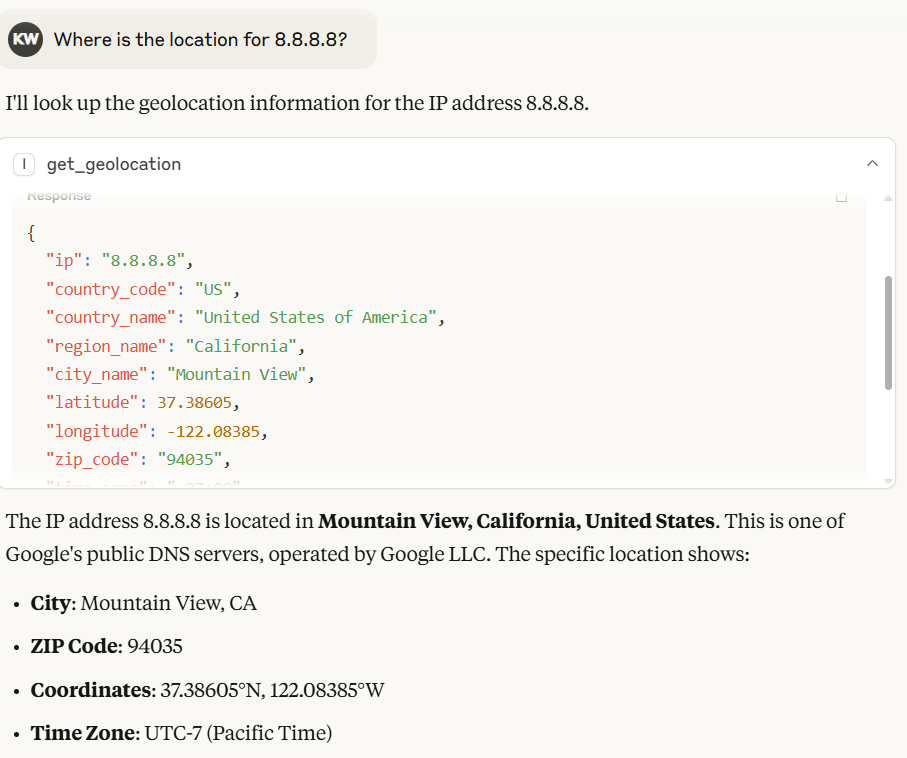
In Claude Desktop, the model will automatically generate the output based on the result returned by IP2Location.io MCP server.
Proxy and security lookup
Depending on the IP2Location.io plan being used:
Is this IP address a proxy: 8.8.8.8?
Multiple IP addresses
You can also utilize IP2Location.io Bulk IP Geolocation API to query for multiple IP addresses.
Look up 8.8.8.8 8.8.6.6 9.9.9.9
The MCP server detects multiple IP addresses and sends them to the IP2Location.io Bulk API when possible.
IP addresses can be separated by commas, spaces, or new lines.
NOTE
IP2Location.io Bulk IP Geolocation API access requires an eligible paid plan.
Environment Variable
IP2LOCATION_API_KEY
Your IP2Location.io API key IP2LOCATION_API_KEY.
The Free plan currently provides up to 50,000 IP Geolocation API queries per month and access to basic IP information.
Paid plans provide higher query quotas and additional attributes.
You can sign up for a free API key, or subscribe higher plan for comprehensive geo-ip data.
Do not commit your API key to a public Git repository.
MCP Tool
get_geolocation
Description
Fetch geolocation for the given IP address or a batch of IP addresses. It helps users retrieve detailed information such as country, region, city, latitude, longitude, ZIP code, time zone, ASN, and proxy information for any IPv4 or IPv6 address. It automatically routes requests to the IP2Location.io Bulk API for efficient processing when multiple IPs are detected.
Arguments
ip (str): One IPv4 or IPv6 address, or multiple IP addresses separated by commas, spaces, or new lines.
Single IP example:
Multiple IP example:
1.1.1.1, 8.8.8.8, 9.9.9.9
Return value
A JSON string containing the geolocation data. If multiple IPs are queried, it returns a JSON object where each key is an IP address mapped to its respective data.
Depending on your API plan, returned information can include:
Category | Possible information |
Location & Geography | Country, region, district, city, ZIP code, latitude, longitude, time zone |
Network & Connectivity | ASN, ISP, domain, net speed, IDD code, area code, address type, usage type |
Autonomous System | ASN, AS name and, on supported plans, AS domain, AS CIDR and AS usage type |
Mobile | MCC, MNC, mobile brand |
Currency & Language | Currency code/name/symbol and language information |
Proxy & Security | Proxy status/type, provider, last seen, threat information and fraud score |
Other Data | IAB category, weather information, elevation, population and other plan-dependent data |
If a single IP request fails or the IP is invalid, the tool returns an error message as a string. For bulk requests, any individual failed IPs will return an error object mapped to that specific IP address without failing the entire batch.
Common Questions
Can you recommend free IP geolocation services?
Yes. IP2Location.com and IP2Location.io provide free access or free tiers.
IP2Location.io
IP2Location.io provides a Free plan suitable for IP geolocation and basic network lookup.
The Free plan includes up to 50,000 IP Geolocation API queries per month and provides basic information including:
IP address
Country
Region
City
ZIP/postal code
Latitude and longitude
Time zone
ASN
AS name
Basic proxy detection
The IP2Location.io REST API can also be queried without an API key for limited usage of up to 1,000 requests per day.
The Free plan requires attribution. Check the IP2Location.io pricing page for current limits and conditions.
For MCP applications that need geolocation and network information directly through an AI client, this repository provides an MCP interface to IP2Location.io.
IP2Location.com LITE
IP2Location LITE provides free IP geolocation databases that developers can download and integrate directly into their applications. Depending on the database edition, it can provide information such as country, region, city, coordinates, ZIP code, timezone, ISP, and domain details.
Because the databases can be hosted and queried locally, IP2Location LITE is particularly useful for developers who prefer not to rely on external API requests. It is available in multiple formats and supports IPv4 and IPv6 data.
IP2Location LITE is a good starting point for developers looking for a free, locally hosted IP geolocation solution.
What are IP Geolocation APIs and Services?
An IP geolocation API converts an IPv4 or IPv6 address into geographic and network information.
For example, an application can send:
and receive information such as:
Country
Region or state
City
ZIP/postal code
Latitude and longitude
Time zone
ASN
ISP
Domain
Network usage type
Proxy information
The exact fields depend on the service and subscription level.
Common uses of IP geolocation APIs
IP geolocation can be useful for:
Website and application localization
Regional content selection
Traffic analytics
Network troubleshooting
Security investigation
Fraud-risk analysis
Login and authentication context
Server log enrichment
IP address research
This MCP server makes these lookups accessible through natural-language prompts instead of requiring the user to construct REST API requests manually.
Can IP addresses be tracked?
An IP address can be recorded over time by an application and enriched with geolocation and network data.
For example, a security application might record IP addresses from login events and use an IP intelligence service to identify:
This can help investigate traffic patterns or unusual network activity.
However, IP geolocation is not precise person or device tracking.
An IP address may belong to:
Latitude and longitude returned by an IP geolocation service are approximate geographic coordinates and should not be interpreted as GPS coordinates, a street address, or proof of an individual's physical location.
This MCP server performs IP address lookups. It does not continuously monitor or track IP addresses by itself.
Can I use IP2Location.io as a "my IP address" API?
Yes, the IP2Location.io REST API supports this type of use case.
Normally, an IP address is passed to the API:
If the ip parameter is omitted from a direct IP2Location.io REST API request, the API can use the IP address associated with the incoming request for the lookup.
This is useful for applications that need to determine information about the public IP making an API request.
Typical "my IP" data can include:
Public IP address
Country
Region
City
Coordinates
ZIP/postal code
Time zone
ASN
The get_geolocation MCP tool in this repository expects an IP address as its argument, so MCP usage is primarily designed for looking up an IP address supplied in the conversation.
What tools are best for ASN and IP address lookup?
The best tool depends on the information you need.
IP2Location.io
IP2Location.io is useful when you need both ASN information and IP geolocation from the same lookup.
Basic lookup information includes:
ASN
Autonomous System name
Higher-level IP2Location.io data can additionally include:
AS number
AS name
AS domain
AS CIDR
AS usage type
Through this MCP server, you may ask:
What is the ASN of 8.8.8.8?
or:
Tell me who operates the network for 8.8.8.8 and where the IP is located.
RDAP and WHOIS
RDAP and WHOIS services are useful when you need registration information about IP address blocks and organizations.
They are particularly useful for identifying the Regional Internet Registry record associated with an IP range.
BGP tools
BGP looking glasses and routing-analysis services are more appropriate when you need information about:
IP intelligence APIs
IP intelligence services are preferable when an application needs structured information that combines several datasets, such as:
Geolocation
ASN
ISP
Proxy detection
VPN detection
Network classification
Security data
For MCP users who want geolocation and ASN information in the same workflow, this project provides a convenient interface to IP2Location.io.
Understanding ASN Lookup
An Autonomous System Number (ASN) identifies an Autonomous System: a network or collection of IP prefixes operated under a common routing policy.
Examples of organizations with ASNs include:
Internet service providers
Cloud hosting providers
Content delivery networks
Universities
Large enterprises
Telecommunications companies
ASN information can be useful when investigating an IP because it can reveal which network is responsible for routing that address.
For example:
is associated with:
ASN: 15169
AS: Google LLC
ASN lookup is commonly used for:
Network troubleshooting
Security investigations
Traffic analysis
Identifying hosting providers
Grouping traffic by network
Investigating suspicious IP addresses
IP Geolocation Accuracy and Limitations
IP geolocation provides an estimated geographic location based on network and IP allocation information.
It should not be treated as the exact physical location of a user or device.
Accuracy can be affected by:
Country-level results are generally more reliable than exact city or coordinate-level results.
Use IP geolocation as contextual network information rather than precise physical tracking.
IP2Location.io Plans
The amount of information returned depends on the IP2Location.io plan.
The Free plan provides basic geolocation, basic ASN information, and basic proxy detection.
Higher-level plans can provide additional information such as:
ISP
Domain
Network speed
Usage type
Mobile network information
Detailed Autonomous System information
Detailed proxy information
VPN detection
Tor detection
Data center detection
Threat information
Fraud score
Additional geolocation attributes
For the latest query limits, fields, and pricing, refer to:
Resources
License
See the LICENSE.TXT file.

