Glama
ip2location

IP2Location IP Geolocation MCP Server

Official

IP2Location.io MCP 서버

이것은 IP2Location.io API를 위한 간단한 MCP(Model Context Protocol) 서버 구현입니다. 주어진 IPv4 또는 IPv6 주소에 대한 상세한 지리적 위치 정보를 반환합니다.

기능

  • 포괄적인 지리적 위치 데이터: 국가, 지역, 도시, 위도, 경도, 우편번호, 시간대 등을 포함한 광범위한 정보를 검색합니다.

  • 네트워크 세부 정보: ASN, ISP, 도메인, 네트워크 속도와 같은 네트워크 관련 데이터를 제공합니다.

  • 보안 통찰력: 프록시 유형 및 제공업체를 포함한 프록시 정보를 감지합니다.

  • 간편한 통합: FastMCP 도구로 구축되어 호환되는 시스템에 쉽게 통합할 수 있습니다.

  • 비동기: 비차단 비동기 API 요청을 위해 httpx를 활용합니다.

요구 사항

이 MCP 서버는 API 키 없이도 쿼리할 수 있으며, 하루 1,000회 쿼리로 제한됩니다. 또한 가입하여 무료 API 키를 받으면 월 최대 50,000회까지 쿼리할 수 있습니다.

설정에는 uv가 사용되며, 가이드에 따라 설치할 수 있습니다.

설정

Claude Desktop에서 이 MCP 서버를 사용하려면 다음 단계를 따르세요:

  1. 저장소를 로컬로 다운로드합니다.

  2. uv 패키지 관리자를 설정합니다. 가이드를 다시 참조할 수 있습니다.

  3. Claude Desktop이 설치되어 있는지 확인합니다. 설치하지 않았다면 Windows 및 MacOS 사용자는 여기에서 다운로드하고, Linux 사용자는 이 가이드를 따르세요.

  4. 원하는 편집기에서 claude_desktop_config.json을 엽니다. 아직 없다면 이 가이드를 따라 생성하세요.

  5. claude_desktop_config.json에 다음을 추가합니다:

{
  "mcpServers": {
    "ip2locationio": {
      "command": "uv",
      "args": [
        "--directory",
        "/path/to/ip2locationio/src",
        "run",
        "server.py"
      ],
      "env": {
        "IP2LOCATION_API_KEY": "<YOUR API key HERE>"
      }
    }
  }
}
  1. /path/to/ip2locationio 경로를 로컬의 IP2Location.io MCP 서버 실제 경로로 바꾸는 것을 잊지 마세요.

  2. API 키를 얻으려면 대시보드에 로그인하여 키를 가져오세요. 위 코드의 <YOUR API key HERE>를 실제 API 키로 교체하세요.

  3. 변경 사항을 저장한 후 Claude Desktop을 다시 시작하면 Connectors 메뉴에 나타날 것입니다.

사용법

Claude Desktop 채팅에서 IP에 대한 쿼리를 입력하기만 하면 됩니다. 몇 가지 예시 쿼리는 다음과 같습니다:

  • (IP)의 위치는 어디인가요?

  • (IP)는 어디에 위치해 있나요?

  • (IP)의 좌표는 무엇인가요?

예를 들어, IP 8.8.8.8에 대한 결과는 다음과 같습니다:
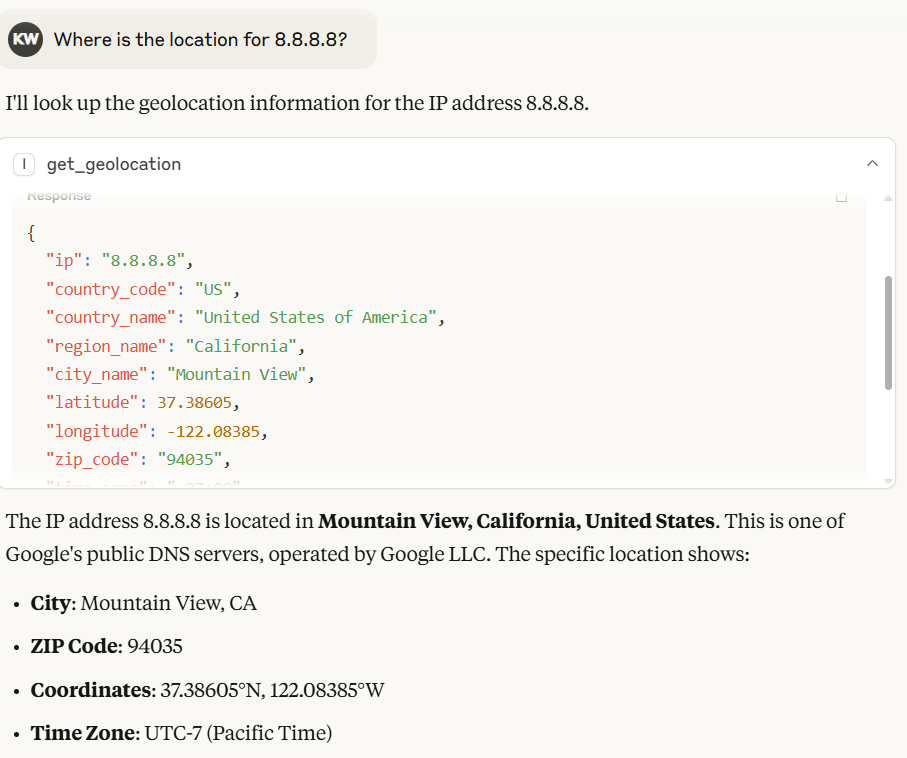
IP 8.8.8.8의 출력

Claude Desktop에서 모델은 IP2Location.io MCP 서버가 반환한 결과를 바탕으로 자동으로 출력을 생성합니다.

IP2Location.io 대량 IP 지리적 위치 API를 활용하여 여러 IP 주소를 쿼리할 수도 있습니다. 각 IP 주소 사이에 공백을 넣어 입력하세요. 예: 8.8.8.8 8.8.6.6.

[!NOTE] IP2Location.io 대량 IP 지리적 위치 API는 유료 플랜이 필요합니다.

환경 변수

IP2LOCATION_API_KEY

월 최대 50,000회 쿼리와 더 자세한 IP 주소 정보를 확인할 수 있게 해주는 IP2Location.io API 키입니다. 가입하여 무료 API 키를 받거나, 구독하여 더 많은 혜택을 누릴 수 있습니다.

도구

get_geolocation

설명 주어진 IP 주소 또는 IP 주소 배치에 대한 지리적 위치를 가져옵니다. 사용자가 IPv4 또는 IPv6 주소에 대해 국가, 지역, 도시, 위도, 경도, 우편번호, 시간대, ASN 및 프록시 정보와 같은 상세 정보를 검색할 수 있도록 돕습니다. 여러 IP가 감지되면 효율적인 처리를 위해 자동으로 IP2Location.io 대량 API로 요청을 라우팅합니다.

인수

  • ip (str): 분석할 IP 주소(IPv4 또는 IPv6). 쉼표, 공백 또는 줄바꿈으로 구분된 단일 문자열로 전달하여 여러 IP를 한 번에 쿼리할 수 있습니다(예: "1.1.1.1, 2.2.2.2").

반환값 지리적 위치 데이터가 포함된 JSON 문자열입니다. 여러 IP를 쿼리한 경우, 각 키가 IP 주소이고 해당 데이터에 매핑된 JSON 객체를 반환합니다. 결과에는 API 플랜에 따라 다음 필드가 포함될 수 있습니다:

  • 위치 및 지리: 국가, 지역, 구역, 도시, 우편번호, 위도 및 경도, 시간대.

  • 네트워크 및 연결: ASN(자율 시스템 번호), ISP(인터넷 서비스 제공업체), 도메인, 네트워크 속도, IDD 코드, 지역 코드, 주소 유형, 사용 유형.

  • 모바일 정보: MNC(모바일 네트워크 코드), MCC(모바일 국가 코드), 모바일 브랜드.

  • 통화 및 언어: 통화 코드, 통화 이름, 통화 기호, 언어 코드, 언어 이름.

  • 프록시 및 보안: 프록시 유형, 마지막 확인 시간, 위협 수준/유형, 프록시 제공업체, 사기 점수.

  • 기타: IAB 카테고리, 날씨, 고도, 인구 등.

단일 IP 요청이 실패하거나 IP가 유효하지 않은 경우, 도구는 오류 메시지를 문자열로 반환합니다. 대량 요청의 경우, 실패한 개별 IP는 전체 배치를 실패시키지 않고 해당 특정 IP 주소에 매핑된 오류 객체를 반환합니다.

라이선스

LICENSE 파일을 참조하세요.

Available Tools

1 tool
get_geolocationA

Fetch geolocation for the given IP address(es).

CRITICAL INSTRUCTION FOR AI AGENT: If the user provides multiple IP addresses in their prompt, DO NOT call this tool multiple times sequentially. You MUST batch all IP addresses together into a single comma-separated string and make exactly ONE tool call.

It helps users to retrieve detailed information such as country, region, city, latitude, longitude, ZIP code, time zone, ASN, and proxy information for any IPv4 or IPv6 address.

Args: ip: The IP address to analyze (IPv4 or IPv6). For multiple IPs, you MUST combine them into a single string separated by commas (e.g., "1.1.1.1, 2.2.2.2").

Returns: A JSON string result includes:

Location & Geography:
Country, region, district, city, ZIP code, latitude & longitude, time zone.

Network & Connectivity
ASN (Autonomous System Number), ISP (Internet Service Provider), domain, net speed, IDD code, area code, address type, usage type.

Mobile Information
MNC (Mobile Network Code), MCC (Mobile Country Code), Mobile Brand.

Currency & Language
currency code, currency name, currency symbol, language code, language name.

Proxy & Security
proxy type, last seen, threat level/type, proxy provider, fraud score.

Others
IAB category, weather, elevation, population and more.

Note that some information may only available in paid plan. Learn more on this in https://www.ip2location.io/pricing.
ParametersJSON Schema
NameRequiredDescriptionDefault
ipYes

Output Schema

ParametersJSON Schema
NameRequiredDescription
resultYes

TDQS

A4.5/5.0
Behavior4/5

Does the description disclose side effects, auth requirements, rate limits, or destructive behavior?

Describes the return structure in detail and notes that some information may be limited to paid plans. No annotations exist, so the description carries the burden; it discloses the tool is a read operation but lacks info on error handling or rate limits.

Agents need to know what a tool does to the world before calling it. Descriptions should go beyond structured annotations to explain consequences.

Conciseness4/5

Is the description appropriately sized, front-loaded, and free of redundancy?

Well-structured with headings, critical instruction upfront, and detailed return breakdown. Slightly verbose but each section adds clear value.

Shorter descriptions cost fewer tokens and are easier for agents to parse. Every sentence should earn its place.

Completeness5/5

Given the tool's complexity, does the description cover enough for an agent to succeed on first attempt?

Given one required parameter, no annotations, and presence of an output schema, the description provides extensive return field details and notes on plan limitations, making it complete for effective use.

Complex tools with many parameters or behaviors need more documentation. Simple tools need less. This dimension scales expectations accordingly.

Parameters5/5

Does the description clarify parameter syntax, constraints, interactions, or defaults beyond what the schema provides?

The input schema provides no description for the 'ip' parameter (0% coverage), but the description compensates fully by explaining it accepts IPv4/IPv6 and can be comma-separated for multiple IPs.

Input schemas describe structure but not intent. Descriptions should explain non-obvious parameter relationships and valid value ranges.

Purpose5/5

Does the description clearly state what the tool does and how it differs from similar tools?

Clearly states the tool fetches geolocation for IP addresses, specifying the range of detailed data returned. No sibling tools exist, but it distinguishes itself as a geolocation lookup tool.

Agents choose between tools based on descriptions. A clear purpose with a specific verb and resource helps agents select the right tool.

Usage Guidelines4/5

Does the description explain when to use this tool, when not to, or what alternatives exist?

Provides explicit critical instruction to batch multiple IPs into a single comma-separated string to avoid multiple calls. Does not mention when not to use or alternatives, but this is adequate given the single-purpose tool.

Agents often have multiple tools that could apply. Explicit usage guidance like "use X instead of Y when Z" prevents misuse.

Tool Schema Changelog

Recent tool additions, removals, and schema changes observed during successful MCP inspections.

  1. 1 tool updatev1.0.1
    • Changedget_geolocation1 field changed
      • changedOutput schema / (root)
        Previous value: -nullNew value: +{
        +  "properties": {
        +    "result": {
        +      "anyOf": [
        +        {
        +          "additionalProperties": true,
        +          "type": "object"
        +        },
        +        {
        +          "type": "string"
        +        }
        +      ],
        +      "title": "Result"
        +    }
        +  },
        +  "required": [
        +    "result"
        +  ],
        +  "title": "get_geolocationOutput",
        +  "type": "object"
        +}
  2. 1 tool update
    • First observedget_geolocation

TDQS

A4.6/5.0

Scored across 1 tool

Disambiguation5/5

With only one tool, there is no possibility of confusion or overlap. The tool's purpose is clearly defined and distinct.

Naming Consistency5/5

The single tool 'get_geolocation' follows a clear verb_noun pattern, which is consistent and predictable.

Tool Count4/5

While the server has only one tool, it is sufficient for its focused purpose of IP geolocation. The count is slightly below the typical 3-15 range but still reasonable.

Completeness5/5

The tool provides comprehensive geolocation data covering location, network, security, and more. No obvious gaps exist for a read-only service of this nature.

Maintenance

ActivitySlowing
ResponsivenessUnresponsive

Related MCP Connectors

Related MCP Servers

  • A
    license
    Not graded
    quality
    C
    maintenance
    An MCP server that provides IP geolocation services using MaxMind's GeoIP2 databases, allowing users to retrieve geographical information for single or multiple IP addresses including country, city, coordinates, and ASN details.
    GPL 3.0
  • A
    license
    B
    quality
    D
    maintenance
    An MCP server that provides access to the Netdetective API for querying information about IP addresses. It enables users to retrieve metadata for a specified IP address or the connecting client's default IP address.
    1
    MIT
  • A
    license
    Not graded
    quality
    F
    maintenance
    MCP server for IP geolocation lookups using ipinfo.io, with single, own, and batch queries.
    1
    MIT