Glama
ip2location

IP2Location IP Geolocation MCP Server

Official

IP2Location.io MCP サーバー

これは IP2Location.io API 用のシンプルな Model Context Protocol (MCP) サーバーの実装です。指定された IPv4 または IPv6 アドレスの詳細な地理位置情報を返します。

特徴

  • 包括的な地理位置データ: 国、地域、都市、緯度、経度、郵便番号、タイムゾーンなど、幅広い情報を取得します。

  • ネットワーク詳細: ASN、ISP、ドメイン、ネットワーク速度などのネットワーク関連データを提供します。

  • セキュリティインサイト: プロキシタイプやプロバイダーを含むプロキシ情報を検出します。

  • シンプルな統合: FastMCP ツールとして構築されており、互換性のあるシステムへの統合が容易です。

  • 非同期: httpx を利用して、ノンブロッキングな非同期 API リクエストを行います。

要件

この MCP サーバーは API キーなしでのクエリをサポートしていますが、1 日あたり 1,000 クエリの制限があります。サインアップして無料の API キーを取得すると、月間最大 50,000 クエリまで利用可能です。

セットアップには uv を使用します。インストール方法はガイドに従ってください。

セットアップ

Claude Desktop でこの MCP サーバーを使用するには、以下の手順に従ってください。

  1. リポジトリをローカルにダウンロードします。

  2. uv パッケージマネージャーをセットアップします。再度ガイドを参照してください。

  3. Claude Desktop がインストールされていることを確認してください。インストールされていない場合は、Windows および MacOS ユーザーはこちらからダウンロードするか、Linux ユーザーはこのガイドに従ってください。

  4. 任意のエディタで claude_desktop_config.json を開きます。まだ作成していない場合は、このガイドに従って作成してください。

  5. claude_desktop_config.json に以下を追加します。

{
  "mcpServers": {
    "ip2locationio": {
      "command": "uv",
      "args": [
        "--directory",
        "/path/to/ip2locationio/src",
        "run",
        "server.py"
      ],
      "env": {
        "IP2LOCATION_API_KEY": "<YOUR API key HERE>"
      }
    }
  }
}
  1. /path/to/ip2locationio のパスを、ローカルにある IP2Location.io MCP サーバーの実際のパスに置き換えてください。

  2. API キーを取得するには、ダッシュボードにログインして取得してください。上記の <YOUR API key HERE> を実際の API キーに置き換えてください。

  3. 変更を保存した後、Claude Desktop を再起動すると、Connectors メニューに表示されるはずです。

使用方法

Claude Desktop のチャットで IP に関するクエリを入力するだけです。クエリの例をいくつか挙げます。

  • (IP) の場所はどこですか?

  • (IP) はどこにありますか?

  • (IP) の座標は何ですか?

例えば、IP 8.8.8.8 の結果は以下の通りです。
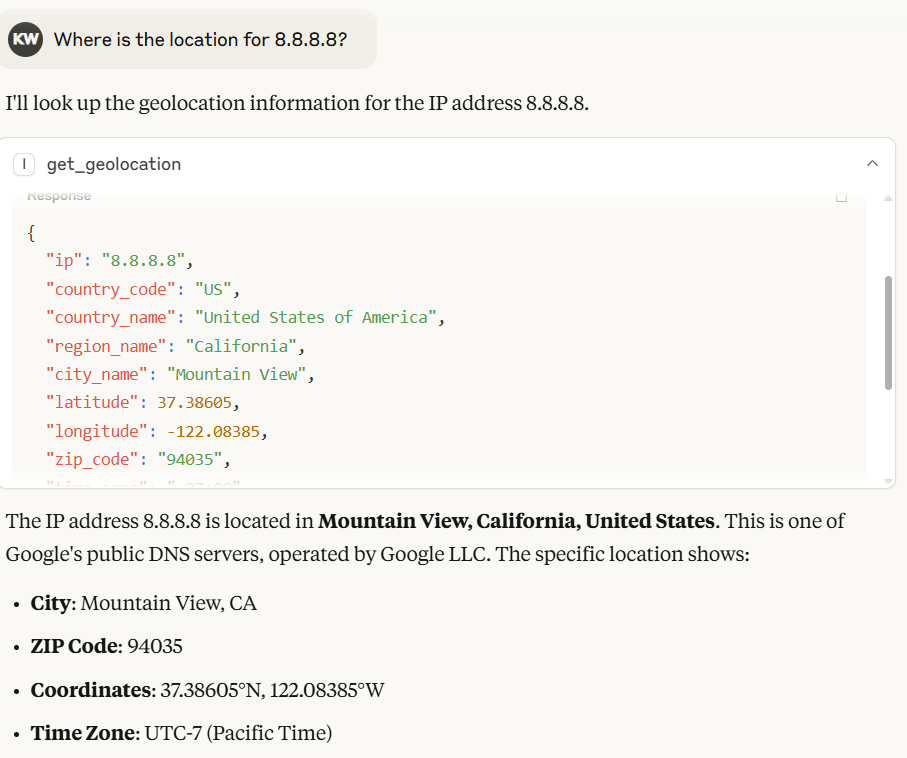
IP 8.8.8.8 の出力

Claude Desktop では、モデルが IP2Location.io MCP サーバーから返された結果に基づいて自動的に出力を生成します。

IP2Location.io Bulk IP Geolocation API を利用して、複数の IP アドレスをクエリすることもできます。各 IP アドレスの間にスペースを入れて入力してください。例: 8.8.8.8 8.8.6.6。

[!NOTE] IP2Location.io Bulk IP Geolocation API を使用するには有料プランが必要です。

環境変数

IP2LOCATION_API_KEY

IP2Location.io API キー。月間最大 50,000 クエリまで可能で、IP アドレスの詳細情報を取得できます。サインアップして無料の API キーを取得するか、プランを購読してさらなる特典をご利用ください。

ツール

get_geolocation

説明 指定された IP アドレスまたは IP アドレスのバッチの地理位置情報を取得します。国、地域、都市、緯度、経度、郵便番号、タイムゾーン、ASN、プロキシ情報などの詳細情報を IPv4 または IPv6 アドレスから取得するのに役立ちます。複数の IP が検出された場合、効率的な処理のために自動的に IP2Location.io Bulk API にリクエストをルーティングします。

引数

  • ip (str): 分析する IP アドレス (IPv4 または IPv6)。カンマ、スペース、または改行で区切られた単一の文字列として渡すことで、一度に複数の IP をクエリできます (例: "1.1.1.1, 2.2.2.2")。

戻り値 地理位置データを含む JSON 文字列。複数の IP がクエリされた場合、各キーが IP アドレスで、それぞれのデータにマッピングされた JSON オブジェクトを返します。API プランに応じて、以下のフィールドが含まれる場合があります。

  • 場所と地理: 国、地域、地区、都市、郵便番号、緯度と経度、タイムゾーン。

  • ネットワークと接続: ASN (自律システム番号)、ISP (インターネットサービスプロバイダー)、ドメイン、ネット速度、IDD コード、エリアコード、アドレスタイプ、使用タイプ。

  • モバイル情報: MNC (モバイルネットワークコード)、MCC (モバイル国コード)、モバイルブランド。

  • 通貨と言語: 通貨コード、通貨名、通貨記号、言語コード、言語名。

  • プロキシとセキュリティ: プロキシタイプ、最終確認日時、脅威レベル/タイプ、プロキシプロバイダー、不正スコア。

  • その他: IAB カテゴリ、天気、標高、人口など。

単一の IP リクエストが失敗した場合や IP が無効な場合、ツールはエラーメッセージを文字列として返します。一括リクエストの場合、失敗した個々の IP は、バッチ全体を失敗させることなく、その特定の IP アドレスにマッピングされたエラーオブジェクトを返します。

ライセンス

LICENSE ファイルを参照してください。

Available Tools

1 tool
get_geolocationA

Fetch geolocation for the given IP address(es).

CRITICAL INSTRUCTION FOR AI AGENT: If the user provides multiple IP addresses in their prompt, DO NOT call this tool multiple times sequentially. You MUST batch all IP addresses together into a single comma-separated string and make exactly ONE tool call.

It helps users to retrieve detailed information such as country, region, city, latitude, longitude, ZIP code, time zone, ASN, and proxy information for any IPv4 or IPv6 address.

Args: ip: The IP address to analyze (IPv4 or IPv6). For multiple IPs, you MUST combine them into a single string separated by commas (e.g., "1.1.1.1, 2.2.2.2").

Returns: A JSON string result includes:

Location & Geography:
Country, region, district, city, ZIP code, latitude & longitude, time zone.

Network & Connectivity
ASN (Autonomous System Number), ISP (Internet Service Provider), domain, net speed, IDD code, area code, address type, usage type.

Mobile Information
MNC (Mobile Network Code), MCC (Mobile Country Code), Mobile Brand.

Currency & Language
currency code, currency name, currency symbol, language code, language name.

Proxy & Security
proxy type, last seen, threat level/type, proxy provider, fraud score.

Others
IAB category, weather, elevation, population and more.

Note that some information may only available in paid plan. Learn more on this in https://www.ip2location.io/pricing.
ParametersJSON Schema
NameRequiredDescriptionDefault
ipYes

Output Schema

ParametersJSON Schema
NameRequiredDescription
resultYes

TDQS

A4.5/5.0
Behavior4/5

Does the description disclose side effects, auth requirements, rate limits, or destructive behavior?

Describes the return structure in detail and notes that some information may be limited to paid plans. No annotations exist, so the description carries the burden; it discloses the tool is a read operation but lacks info on error handling or rate limits.

Agents need to know what a tool does to the world before calling it. Descriptions should go beyond structured annotations to explain consequences.

Conciseness4/5

Is the description appropriately sized, front-loaded, and free of redundancy?

Well-structured with headings, critical instruction upfront, and detailed return breakdown. Slightly verbose but each section adds clear value.

Shorter descriptions cost fewer tokens and are easier for agents to parse. Every sentence should earn its place.

Completeness5/5

Given the tool's complexity, does the description cover enough for an agent to succeed on first attempt?

Given one required parameter, no annotations, and presence of an output schema, the description provides extensive return field details and notes on plan limitations, making it complete for effective use.

Complex tools with many parameters or behaviors need more documentation. Simple tools need less. This dimension scales expectations accordingly.

Parameters5/5

Does the description clarify parameter syntax, constraints, interactions, or defaults beyond what the schema provides?

The input schema provides no description for the 'ip' parameter (0% coverage), but the description compensates fully by explaining it accepts IPv4/IPv6 and can be comma-separated for multiple IPs.

Input schemas describe structure but not intent. Descriptions should explain non-obvious parameter relationships and valid value ranges.

Purpose5/5

Does the description clearly state what the tool does and how it differs from similar tools?

Clearly states the tool fetches geolocation for IP addresses, specifying the range of detailed data returned. No sibling tools exist, but it distinguishes itself as a geolocation lookup tool.

Agents choose between tools based on descriptions. A clear purpose with a specific verb and resource helps agents select the right tool.

Usage Guidelines4/5

Does the description explain when to use this tool, when not to, or what alternatives exist?

Provides explicit critical instruction to batch multiple IPs into a single comma-separated string to avoid multiple calls. Does not mention when not to use or alternatives, but this is adequate given the single-purpose tool.

Agents often have multiple tools that could apply. Explicit usage guidance like "use X instead of Y when Z" prevents misuse.

Tool Schema Changelog

Recent tool additions, removals, and schema changes observed during successful MCP inspections.

  1. 1 tool updatev1.0.1
    • Changedget_geolocation1 field changed
      • changedOutput schema / (root)
        Previous value: -nullNew value: +{
        +  "properties": {
        +    "result": {
        +      "anyOf": [
        +        {
        +          "additionalProperties": true,
        +          "type": "object"
        +        },
        +        {
        +          "type": "string"
        +        }
        +      ],
        +      "title": "Result"
        +    }
        +  },
        +  "required": [
        +    "result"
        +  ],
        +  "title": "get_geolocationOutput",
        +  "type": "object"
        +}
  2. 1 tool update
    • First observedget_geolocation

TDQS

A4.6/5.0

Scored across 1 tool

Disambiguation5/5

With only one tool, there is no possibility of confusion or overlap. The tool's purpose is clearly defined and distinct.

Naming Consistency5/5

The single tool 'get_geolocation' follows a clear verb_noun pattern, which is consistent and predictable.

Tool Count4/5

While the server has only one tool, it is sufficient for its focused purpose of IP geolocation. The count is slightly below the typical 3-15 range but still reasonable.

Completeness5/5

The tool provides comprehensive geolocation data covering location, network, security, and more. No obvious gaps exist for a read-only service of this nature.

Maintenance

ActivitySlowing
ResponsivenessUnresponsive

Related MCP Connectors

Related MCP Servers

  • A
    license
    Not graded
    quality
    C
    maintenance
    An MCP server that provides IP geolocation services using MaxMind's GeoIP2 databases, allowing users to retrieve geographical information for single or multiple IP addresses including country, city, coordinates, and ASN details.
    GPL 3.0
  • A
    license
    B
    quality
    D
    maintenance
    An MCP server that provides access to the Netdetective API for querying information about IP addresses. It enables users to retrieve metadata for a specified IP address or the connecting client's default IP address.
    1
    MIT
  • A
    license
    Not graded
    quality
    F
    maintenance
    MCP server for IP geolocation lookups using ipinfo.io, with single, own, and batch queries.
    1
    MIT