Glama
hardik-id

Azure Resource Graph MCP Server

by hardik-id

Демо

Демонстрация сервера MCP

Поток

Запрос потока

Сервер MCP Azure Resource Graph

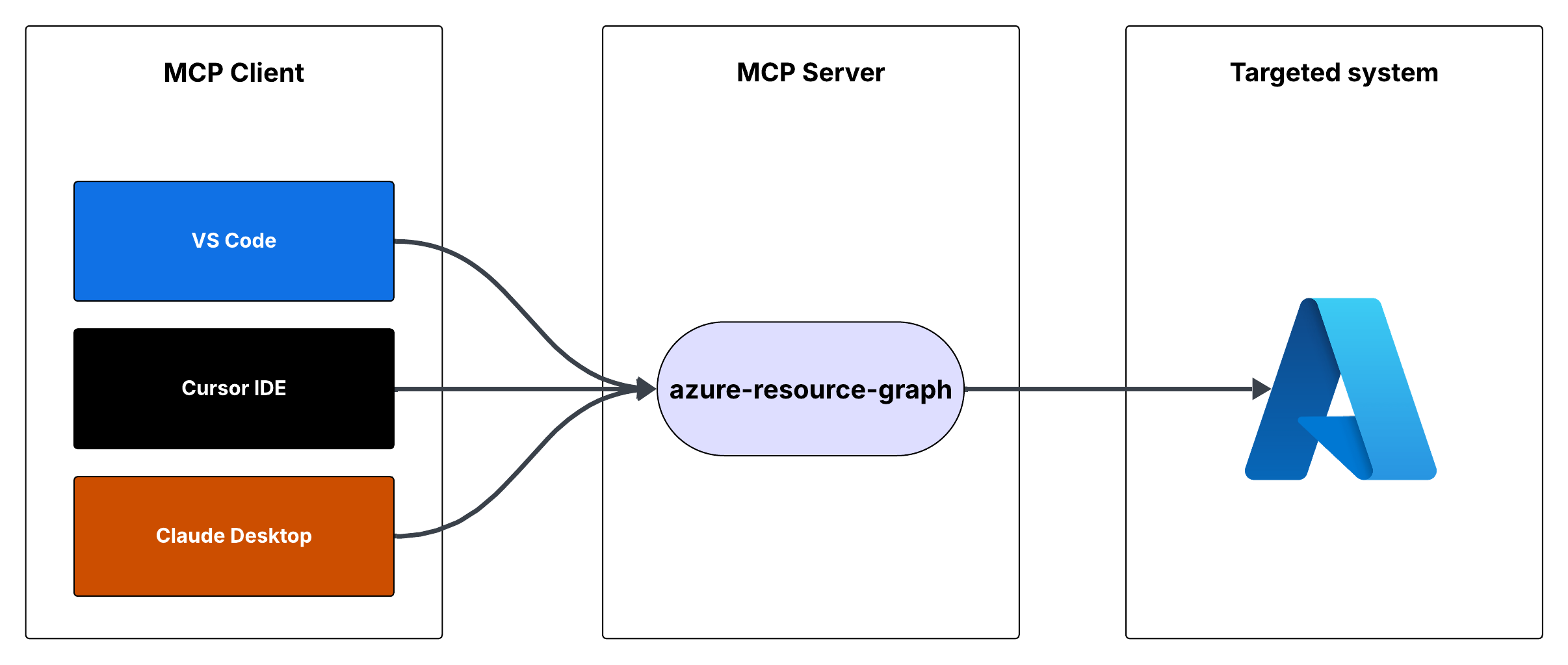
Это сервер Model Context Protocol (MCP), который обеспечивает доступ к запросам Azure Resource Graph. Он позволяет вам получать информацию о ресурсах Azure по всем вашим подпискам с помощью запросов Resource Graph.

Функции

  • Запрос ресурсов Azure с помощью запросов Resource Graph

  • Запрос по умолчанию возвращает идентификатор ресурса, имя, тип и местоположение.

  • Поддерживает пользовательские запросы Resource Graph

  • Использует Azure DefaultAzureCredential для аутентификации

Related MCP server: Azure DevOps MCP Server

Предпосылки

  • Node.js установлен

  • Подписка на Azure

  • Azure CLI установлен и выполнен вход в систему, или настроены другие учетные данные Azure

Запуск сервера MCP

Вы можете запустить сервер MCP с помощью Cursor IDE или Visual Studio Code.

Вариант 1: Интеграция курсора IDE

Чтобы интегрировать сервер MCP с Cursor IDE:

  1. Клонируйте этот репозиторий на локальный компьютер (например, C:\YOUR_WORKSPACE\azure-resource-graph-mcp-server )

  2. Создайте проект:

npm install
npm run build
  1. Откройте настройки курсора (JSON) и добавьте следующую конфигурацию:

{
  "mcpServers": {
    "azure-resource-graph-mcp-server": {
      "command": "node",
      "args": [
        "C:\\YOUR_WORKSPACE\\azure-resource-graph-mcp-server\\build\\index.js"
      ],
      "env": {
        "SUBSCRIPTION_ID": "xxxxxx-xx-xx-xx-xxxxxx"
      },
    }
  }
}

Примечание : обязательно обновите путь в соответствии с расположением вашего локального репозитория.

  1. Перезапустите Cursor IDE, чтобы применить изменения.

Вариант 2: Интеграция VS Code

Чтобы интегрировать сервер MCP с Visual Studio Code:

  1. Клонируйте этот репозиторий на свой локальный компьютер.

  2. Создайте проект:

npm install
npm run build
  1. Откройте настройки VS Code (JSON), нажав Ctrl+Shift+P , введите «Настройки (JSON)» и выберите «Настройки: Открыть настройки пользователя (JSON)».

  2. Добавьте следующую конфигурацию:

{
    "mcp": {
        "servers": {
            "azure-resource-graph": {
                "type": "stdio",
                "command": "node",
                "args": [
                    "C:\\YOUR_WORKSPACE\\azure-resource-graph-mcp-server\\build\\index.js"
                ],
                "env": {
                  "SUBSCRIPTION_ID": "xxxxxx-xx-xx-xx-xxxxxx"
                },
            }
        }
    }
}

Примечание : обязательно обновите путь в соответствии с расположением вашего локального репозитория.

  1. Сохраните файл settings.json

  2. Перезапустите VS Code, чтобы применить изменения.

Сервер MCP теперь будет доступен для использования в VS Code с интеграцией курсора.

Использование

Сервер предоставляет следующий инструмент:

запрос-ресурсы

Извлекает ресурсы и их сведения из Azure Resource Graph.

Параметры:

  • subscriptionId (необязательно): идентификатор подписки Azure (по умолчанию настроенный идентификатор)

  • query (необязательно): Пользовательский запрос графика ресурсов (по умолчанию «Ресурсы | идентификатор проекта, имя, тип, местоположение»)

Настройка среды

  1. Сначала убедитесь, что вы вошли в Azure CLI, выполнив следующую команду:

    az login

    Этот шаг имеет решающее значение для локальной разработки, поскольку DefaultAzureCredential будет автоматически использовать ваши учетные данные Azure CLI.

  2. Настройте переменные среды:

    • Копировать .env.example в .env

    • Обновите AZURE_SUBSCRIPTION_ID в .env указав ваш фактический идентификатор подписки.

    • Другие переменные ( AZURE_TENANT_ID , AZURE_CLIENT_ID , AZURE_CLIENT_SECRET ) являются необязательными при использовании аутентификации Azure CLI.

  3. Убедитесь, что у вас настроены правильные учетные данные Azure. Сервер использует DefaultAzureCredential, который поддерживает:

    • Azure-интерфейс командной строки

    • Управляемая идентификация

    • Учетные данные Visual Studio Code

    • Переменные среды

  4. При использовании переменных среды настройте:

    • AZURE_SUBSCRIPTION_ID

    • AZURE_TENANT_ID

    • AZURE_CLIENT_ID

    • AZURE_CLIENT_SECRET

Обработка ошибок

Сервер включает в себя надежную обработку ошибок для:

  • Ошибки инициализации клиента Azure

  • Ошибки выполнения запроса

  • Неверные запросы или параметры

Разработка

Для работы над этим проектом:

  1. Внесите изменения в каталог src

  2. Сборка с использованием npm run build

  3. Проверьте свои изменения, запустив сервер.

Лицензия

Этот проект лицензирован по лицензии MIT. Подробности см. в файле LICENSE .

Available Tools

1 tool
query-resourcesB

Retrieves resources and their details from Azure Resource Graph. Use this tool to search, filter, and analyze Azure resources across subscriptions. It supports Kusto Query Language (KQL) for complex queries to find resources by type, location, tags, or properties. Useful for infrastructure auditing, resource inventory, compliance checking, and understanding your Azure environment's current state.

ParametersJSON Schema
NameRequiredDescriptionDefault
subscriptionIdNoAzure subscription ID
queryNoResource Graph query, defaults to listing all resources

TDQS

B3.4/5.0
Behavior2/5

Does the description disclose side effects, auth requirements, rate limits, or destructive behavior?

No annotations are provided, so the description carries the full burden of behavioral disclosure. It mentions the tool retrieves details and supports KQL for queries, but it does not disclose critical behavioral traits such as whether it's read-only or destructive, authentication requirements, rate limits, or pagination behavior. This leaves significant gaps for an agent to understand how to invoke it safely and effectively.

Agents need to know what a tool does to the world before calling it. Descriptions should go beyond structured annotations to explain consequences.

Conciseness4/5

Is the description appropriately sized, front-loaded, and free of redundancy?

The description is appropriately sized and front-loaded, starting with the core purpose and usage. Each sentence adds value, such as explaining KQL support and use cases, with no redundant information. However, it could be slightly more concise by integrating the use cases more tightly with the main description.

Shorter descriptions cost fewer tokens and are easier for agents to parse. Every sentence should earn its place.

Completeness3/5

Given the tool's complexity, does the description cover enough for an agent to succeed on first attempt?

Given the complexity of querying Azure resources with KQL and no annotations or output schema, the description is moderately complete. It covers the purpose, usage context, and parameter hints, but it lacks details on behavioral aspects like safety, response format, and error handling, which are important for an agent to use the tool effectively in this context.

Complex tools with many parameters or behaviors need more documentation. Simple tools need less. This dimension scales expectations accordingly.

Parameters3/5

Does the description clarify parameter syntax, constraints, interactions, or defaults beyond what the schema provides?

The schema description coverage is 100%, so the schema already documents both parameters (subscriptionId and query) adequately. The description adds some context by mentioning KQL for complex queries and default behavior, but it does not provide additional semantic details beyond what the schema offers, such as query format examples or subscription ID usage nuances.

Input schemas describe structure but not intent. Descriptions should explain non-obvious parameter relationships and valid value ranges.

Purpose5/5

Does the description clearly state what the tool does and how it differs from similar tools?

The description clearly states the tool's purpose with specific verbs ('retrieves', 'search, filter, and analyze') and resources ('Azure resources'), and it distinguishes its scope by mentioning Azure Resource Graph and KQL. It provides concrete use cases like infrastructure auditing and compliance checking, making the purpose highly specific and actionable.

Agents choose between tools based on descriptions. A clear purpose with a specific verb and resource helps agents select the right tool.

Usage Guidelines3/5

Does the description explain when to use this tool, when not to, or what alternatives exist?

The description implies usage through phrases like 'Use this tool to search, filter, and analyze' and lists scenarios such as auditing and inventory, but it does not explicitly state when to use this tool versus alternatives or provide exclusions. With no sibling tools, the lack of comparative guidance is less critical, but it still lacks explicit when/when-not instructions.

Agents often have multiple tools that could apply. Explicit usage guidance like "use X instead of Y when Z" prevents misuse.

Tool Schema Changelog

Recent tool additions, removals, and schema changes observed during successful MCP inspections.

  1. 1 tool update
    • First observedquery-resources

TDQS

B3.4/5.0

Scored across 1 tool

Disambiguation5/5

With only one tool, there is no possibility of ambiguity or overlap in purpose. The tool 'query-resources' has a clearly defined and singular function, making it impossible for an agent to confuse it with another tool.

Naming Consistency5/5

Since there is only one tool, naming consistency is inherently perfect. The tool name 'query-resources' follows a clear verb_noun pattern, and there are no other tools to create inconsistency.

Tool Count2/5

A single tool for an Azure Resource Graph server feels thin and under-scoped. While the tool is powerful, typical MCP servers for cloud resource management offer multiple operations (e.g., list, get, filter, aggregate), making one tool insufficient for comprehensive coverage and likely to limit agent workflows.

Completeness2/5

The tool surface is severely incomplete for the domain of Azure resource management. It only provides a generic query function, missing essential operations like listing resource types, getting specific resources by ID, aggregating metrics, or managing tags, which are common in such systems and necessary for full agent functionality.

Maintenance

ActivityInactive
ResponsivenessUnresponsive

Related MCP Connectors

Related MCP Servers

  • -
    license
    Not graded
    quality
    Not graded
    maintenance
    A reference server implementation for the Model Context Protocol that enables AI assistants to interact with Azure DevOps resources and perform operations such as project management, work item tracking, repository operations, and code search programmatically.
    7
    -
  • A
    license
    C
    quality
    A
    maintenance
    A Model Context Protocol server that enables interaction with Microsoft 365 services (Excel, Calendar, Mail, OneDrive, Teams, etc.) through the Graph API, allowing AI assistants to manage Microsoft 365 resources via natural language.
    188
    49,666 npm
    996
    MIT
  • A
    license
    A
    quality
    A
    maintenance
    A Model Context Protocol server that provides AI assistants with access to Microsoft Teams, enabling interaction with teams, channels, chats, and organizational data through Microsoft Graph APIs.
    19
    3,386 npm
    139
    MIT