Azure Resource Graph MCP Server
The Azure Resource Graph MCP Server allows you to query and analyze Azure resources across multiple subscriptions using Resource Graph queries. With this server, you can:
Query Azure resources: Retrieve resource details like ID, name, type, and location using Kusto Query Language (KQL)
Create custom queries: Filter and search resources by various properties including type, location, and tags
Perform infrastructure auditing: Analyze your Azure environment for compliance, resource inventory, and understanding current state
Work across subscriptions: Query resources spanning multiple Azure subscriptions
Use robust authentication: Connect via Azure CLI, Managed Identity, Visual Studio Code credentials, or environment variables through DefaultAzureCredential
Handle errors: Benefit from built-in handling for initialization failures, query execution errors, and invalid parameters
Uses environment variables loaded from .env files to configure the Azure Resource Graph MCP server, particularly for setting up authentication credentials.
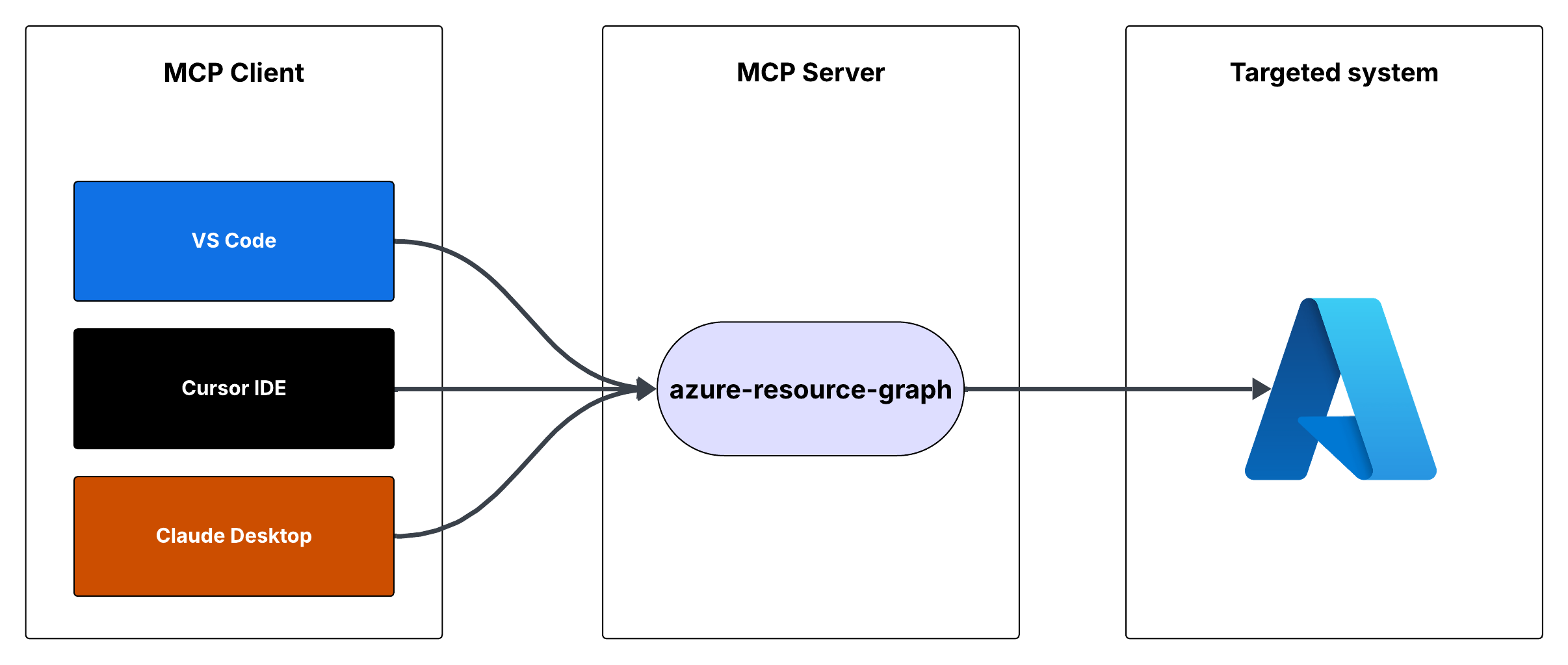
Serves as the runtime environment for the Azure Resource Graph MCP server, allowing it to execute Azure Resource Graph queries from within Cursor IDE or VS Code.
Used for package management and build process for the Azure Resource Graph MCP server.
Click on "Install Server".
Wait a few minutes for the server to deploy. Once ready, it will show a "Started" state.
In the chat, type
@followed by the MCP server name and your instructions, e.g., "@Azure Resource Graph MCP Serverlist all virtual machines in my subscription"
That's it! The server will respond to your query, and you can continue using it as needed.
Here is a step-by-step guide with screenshots.
Demo

Flow

Azure Resource Graph MCP Server
This is a Model Context Protocol (MCP) server that provides access to Azure Resource Graph queries. It allows you to retrieve information about Azure resources across your subscriptions using Resource Graph queries.
Features
Query Azure resources using Resource Graph queries
Default query returns resource ID, name, type, and location
Supports custom Resource Graph queries
Uses Azure DefaultAzureCredential for authentication
Related MCP server: Azure DevOps MCP Server
Prerequisites
Node.js installed
Azure subscription
Azure CLI installed and logged in, or other Azure credentials configured
Running the MCP Server
You can run the MCP server using either Cursor IDE or Visual Studio Code.
Option 1: Cursor IDE Integration
To integrate the MCP server with Cursor IDE:
Clone this repository to your local machine (e.g.,
C:\YOUR_WORKSPACE\azure-resource-graph-mcp-server)Build the project:
npm install
npm run buildOpen Cursor Settings (JSON) and add the following configuration:
{
"mcpServers": {
"azure-resource-graph-mcp-server": {
"command": "node",
"args": [
"C:\\YOUR_WORKSPACE\\azure-resource-graph-mcp-server\\build\\index.js"
],
"env": {
"SUBSCRIPTION_ID": "xxxxxx-xx-xx-xx-xxxxxx"
},
}
}
}Note: Make sure to update the path to match your local repository location.
Restart Cursor IDE to apply the changes
Option 2: VS Code Integration
To integrate the MCP server with Visual Studio Code:
Clone this repository to your local machine
Build the project:
npm install
npm run buildOpen VS Code Settings (JSON) by pressing
Ctrl+Shift+P, type "Settings (JSON)" and select "Preferences: Open User Settings (JSON)"Add the following configuration:
{
"mcp": {
"servers": {
"azure-resource-graph": {
"type": "stdio",
"command": "node",
"args": [
"C:\\YOUR_WORKSPACE\\azure-resource-graph-mcp-server\\build\\index.js"
],
"env": {
"SUBSCRIPTION_ID": "xxxxxx-xx-xx-xx-xxxxxx"
},
}
}
}
}Note: Make sure to update the path to match your local repository location.
Save the settings.json file
Restart VS Code to apply the changes
The MCP server will now be available to use within VS Code with cursor integration.
Usage
The server provides the following tool:
query-resources
Retrieves resources and their details from Azure Resource Graph.
Parameters:
subscriptionId(optional): Azure subscription ID (defaults to configured ID)query(optional): Custom Resource Graph query (defaults to "Resources | project id, name, type, location")
Environment Setup
First, make sure you're logged in to Azure CLI by running:
az loginThis step is crucial for local development as the DefaultAzureCredential will automatically use your Azure CLI credentials.
Set up your environment variables:
Copy
.env.exampleto.envUpdate
AZURE_SUBSCRIPTION_IDin.envwith your actual subscription IDOther variables (
AZURE_TENANT_ID,AZURE_CLIENT_ID,AZURE_CLIENT_SECRET) are optional when using Azure CLI authentication
Make sure you have proper Azure credentials configured. The server uses DefaultAzureCredential which supports:
Azure CLI
Managed Identity
Visual Studio Code credentials
Environment variables
If using environment variables, set up:
AZURE_SUBSCRIPTION_ID
AZURE_TENANT_ID
AZURE_CLIENT_ID
AZURE_CLIENT_SECRET
Error Handling
The server includes robust error handling for:
Azure client initialization failures
Query execution errors
Invalid queries or parameters
Development
To work on this project:
Make changes in the
srcdirectoryBuild using
npm run buildTest your changes by running the server
License
This project is licensed under the MIT License. See the LICENSE file for details.
Available Tools
1 toolquery-resourcesB
Retrieves resources and their details from Azure Resource Graph. Use this tool to search, filter, and analyze Azure resources across subscriptions. It supports Kusto Query Language (KQL) for complex queries to find resources by type, location, tags, or properties. Useful for infrastructure auditing, resource inventory, compliance checking, and understanding your Azure environment's current state.
| Name | Required | Description | Default |
|---|---|---|---|
| subscriptionId | No | Azure subscription ID | |
| query | No | Resource Graph query, defaults to listing all resources |
TDQS
Does the description disclose side effects, auth requirements, rate limits, or destructive behavior?
No annotations are provided, so the description carries the full burden of behavioral disclosure. It mentions the tool retrieves details and supports KQL for queries, but it does not disclose critical behavioral traits such as whether it's read-only or destructive, authentication requirements, rate limits, or pagination behavior. This leaves significant gaps for an agent to understand how to invoke it safely and effectively.
Agents need to know what a tool does to the world before calling it. Descriptions should go beyond structured annotations to explain consequences.
Is the description appropriately sized, front-loaded, and free of redundancy?
The description is appropriately sized and front-loaded, starting with the core purpose and usage. Each sentence adds value, such as explaining KQL support and use cases, with no redundant information. However, it could be slightly more concise by integrating the use cases more tightly with the main description.
Shorter descriptions cost fewer tokens and are easier for agents to parse. Every sentence should earn its place.
Given the tool's complexity, does the description cover enough for an agent to succeed on first attempt?
Given the complexity of querying Azure resources with KQL and no annotations or output schema, the description is moderately complete. It covers the purpose, usage context, and parameter hints, but it lacks details on behavioral aspects like safety, response format, and error handling, which are important for an agent to use the tool effectively in this context.
Complex tools with many parameters or behaviors need more documentation. Simple tools need less. This dimension scales expectations accordingly.
Does the description clarify parameter syntax, constraints, interactions, or defaults beyond what the schema provides?
The schema description coverage is 100%, so the schema already documents both parameters (subscriptionId and query) adequately. The description adds some context by mentioning KQL for complex queries and default behavior, but it does not provide additional semantic details beyond what the schema offers, such as query format examples or subscription ID usage nuances.
Input schemas describe structure but not intent. Descriptions should explain non-obvious parameter relationships and valid value ranges.
Does the description clearly state what the tool does and how it differs from similar tools?
The description clearly states the tool's purpose with specific verbs ('retrieves', 'search, filter, and analyze') and resources ('Azure resources'), and it distinguishes its scope by mentioning Azure Resource Graph and KQL. It provides concrete use cases like infrastructure auditing and compliance checking, making the purpose highly specific and actionable.
Agents choose between tools based on descriptions. A clear purpose with a specific verb and resource helps agents select the right tool.
Does the description explain when to use this tool, when not to, or what alternatives exist?
The description implies usage through phrases like 'Use this tool to search, filter, and analyze' and lists scenarios such as auditing and inventory, but it does not explicitly state when to use this tool versus alternatives or provide exclusions. With no sibling tools, the lack of comparative guidance is less critical, but it still lacks explicit when/when-not instructions.
Agents often have multiple tools that could apply. Explicit usage guidance like "use X instead of Y when Z" prevents misuse.
TDQS
With only one tool, there is no possibility of ambiguity or overlap in purpose. The tool 'query-resources' has a clearly defined and singular function, making it impossible for an agent to confuse it with another tool.
Since there is only one tool, naming consistency is inherently perfect. The tool name 'query-resources' follows a clear verb_noun pattern, and there are no other tools to create inconsistency.
A single tool for an Azure Resource Graph server feels thin and under-scoped. While the tool is powerful, typical MCP servers for cloud resource management offer multiple operations (e.g., list, get, filter, aggregate), making one tool insufficient for comprehensive coverage and likely to limit agent workflows.
The tool surface is severely incomplete for the domain of Azure resource management. It only provides a generic query function, missing essential operations like listing resource types, getting specific resources by ID, aggregating metrics, or managing tags, which are common in such systems and necessary for full agent functionality.
Maintenance
Resources
Unclaimed servers have limited discoverability.
Looking for Admin?
If you are the server author, to access and configure the admin panel.
Related MCP Connectors
A comprehensive Model Context Protocol (MCP) server that enables AI assistants to interact with yo…
A Model Context Protocol server for Wix AI tools
The Cortex MCP server provides read-only access to real-time engineering context from the Cortex developer portal, allowing AI coding assistants to answer natural language questions about your organization's catalog (microservices, libraries, domains, teams, infrastructure), scorecards (engineering standards and best practices), initiatives (goals and deadlines), and Engineering Intelligence metrics. It includes tools for querying documentation, tracking personal entities, and accessing AI-assisted insights across the entire Cortex ecosystem.
Official Microsoft MCP Server to query Microsoft Entra data using natural language
Related MCP Servers
- AlicenseBqualityAmaintenanceA Model Context Protocol server that enables AI assistants to interact with Azure DevOps resources including projects, work items, repositories, pull requests, branches, and pipelines through a standardized protocol.463,142383MIT
- -licenseNot gradedqualityNot gradedmaintenanceA reference server implementation for the Model Context Protocol that enables AI assistants to interact with Azure DevOps resources and perform operations such as project management, work item tracking, repository operations, and code search programmatically.7
- AlicenseBqualityAmaintenanceA Model Context Protocol server that enables interaction with Microsoft 365 services (Excel, Calendar, Mail, OneDrive, Teams, etc.) through the Graph API, allowing AI assistants to manage Microsoft 365 resources via natural language.18847,489945MIT
- AlicenseAqualityDmaintenanceA Model Context Protocol server that provides AI assistants with access to Microsoft Teams, enabling interaction with teams, channels, chats, and organizational data through Microsoft Graph APIs.191,373133MIT
Latest Blog Posts
- Who's Calling? MCP Hosts Are an Identity Blind Spot (And the Spec Knows It)By Om-Shree-0709 on .mcpAgent IdentityOAuth 2.1
- Your AI Chatbot Just Exposed Your CEO's Salary to an InternBy Om-Shree-0709 on .Agent IdentityMCP SecurityOAuth Delegation
- Why MCP Servers Need Execution Sandboxing (And Why Your Current Stack Isn't Enough)By Om-Shree-0709 on .Agentic AiPrompt InjectionWebAssembly
MCP directory API
We provide all the information about MCP servers via our MCP API.
curl -X GET 'https://glama.ai/api/mcp/v1/servers/hardik-id/azure-resource-graph-mcp-server'
If you have feedback or need assistance with the MCP directory API, please join our Discord server