Azure Resource Graph MCP Server
데모

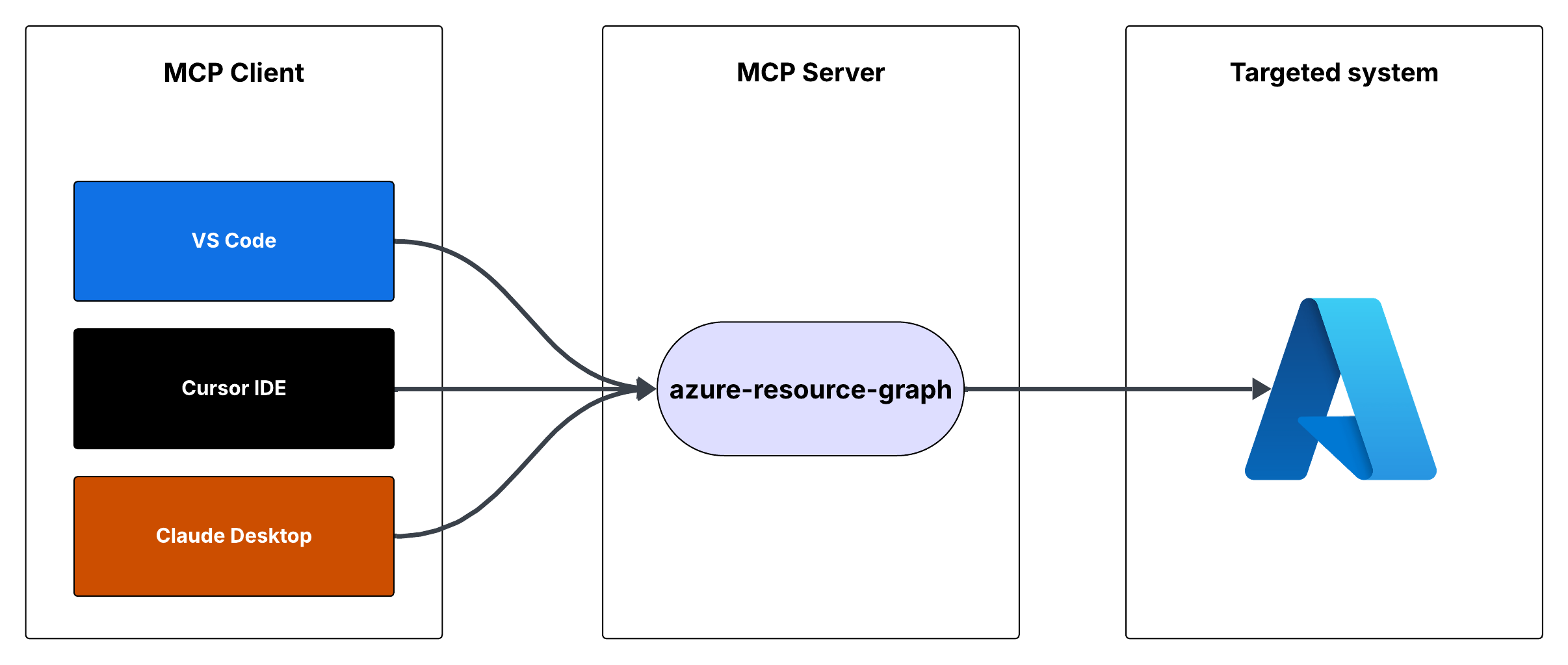
흐름

Azure 리소스 그래프 MCP 서버
Azure 리소스 그래프 쿼리에 대한 액세스를 제공하는 MCP(모델 컨텍스트 프로토콜) 서버입니다. 리소스 그래프 쿼리를 사용하여 구독 전반의 Azure 리소스 정보를 검색할 수 있습니다.
특징
Resource Graph 쿼리를 사용하여 Azure 리소스 쿼리
기본 쿼리는 리소스 ID, 이름, 유형 및 위치를 반환합니다.
사용자 정의 리소스 그래프 쿼리를 지원합니다.
인증을 위해 Azure DefaultAzureCredential을 사용합니다.
Related MCP server: Azure DevOps MCP Server
필수 조건
Node.js가 설치됨
Azure 구독
Azure CLI가 설치되고 로그인되었거나 다른 Azure 자격 증명이 구성됨
MCP 서버 실행
커서 IDE나 Visual Studio Code를 사용하여 MCP 서버를 실행할 수 있습니다.
옵션 1: 커서 IDE 통합
MCP 서버를 Cursor IDE와 통합하려면:
이 저장소를 로컬 머신(예:
C:\YOUR_WORKSPACE\azure-resource-graph-mcp-server)에 복제합니다.프로젝트를 빌드하세요:
지엑스피1
커서 설정(JSON)을 열고 다음 구성을 추가합니다.
{
"mcpServers": {
"azure-resource-graph-mcp-server": {
"command": "node",
"args": [
"C:\\YOUR_WORKSPACE\\azure-resource-graph-mcp-server\\build\\index.js"
],
"env": {
"SUBSCRIPTION_ID": "xxxxxx-xx-xx-xx-xxxxxx"
},
}
}
}참고 : 로컬 저장소 위치와 일치하도록 경로를 업데이트해야 합니다.
변경 사항을 적용하려면 Cursor IDE를 다시 시작하세요.
옵션 2: VS 코드 통합
MCP 서버를 Visual Studio Code와 통합하려면:
이 저장소를 로컬 머신에 복제하세요
프로젝트를 빌드하세요:
npm install
npm run buildCtrl+Shift+P눌러 VS Code 설정(JSON)을 열고 "설정(JSON)"을 입력한 후 "환경 설정: 사용자 설정 열기(JSON)"를 선택합니다.다음 구성을 추가합니다.
{
"mcp": {
"servers": {
"azure-resource-graph": {
"type": "stdio",
"command": "node",
"args": [
"C:\\YOUR_WORKSPACE\\azure-resource-graph-mcp-server\\build\\index.js"
],
"env": {
"SUBSCRIPTION_ID": "xxxxxx-xx-xx-xx-xxxxxx"
},
}
}
}
}참고 : 로컬 저장소 위치와 일치하도록 경로를 업데이트해야 합니다.
settings.json 파일을 저장합니다.
변경 사항을 적용하려면 VS Code를 다시 시작하세요.
이제 커서 통합을 통해 VS Code 내에서 MCP 서버를 사용할 수 있습니다.
용법
서버는 다음과 같은 도구를 제공합니다.
쿼리 리소스
Azure Resource Graph에서 리소스와 해당 세부 정보를 검색합니다.
매개변수:
subscriptionId(선택 사항): Azure 구독 ID(기본값은 구성된 ID)query(선택 사항): 사용자 정의 리소스 그래프 쿼리(기본값은 "리소스 | 프로젝트 ID, 이름, 유형, 위치")
환경 설정
먼저, 다음을 실행하여 Azure CLI에 로그인했는지 확인하세요.
az login이 단계는 DefaultAzureCredential이 자동으로 Azure CLI 자격 증명을 사용하므로 로컬 개발에 매우 중요합니다.
환경 변수를 설정하세요.
.env.example``.env로 복사합니다..env에서AZURE_SUBSCRIPTION_ID실제 구독 ID로 업데이트합니다.Azure CLI 인증을 사용할 때 다른 변수(
AZURE_TENANT_ID,AZURE_CLIENT_ID,AZURE_CLIENT_SECRET)는 선택 사항입니다.
적절한 Azure 자격 증명이 구성되어 있는지 확인하세요. 서버는 다음을 지원하는 DefaultAzureCredential을 사용합니다.
Azure CLI
관리형 ID
Visual Studio Code 자격 증명
환경 변수
환경 변수를 사용하는 경우 다음을 설정합니다.
AZURE_구독_ID
AZURE_TENANT_ID
AZURE_CLIENT_ID
AZURE_CLIENT_SECRET
오류 처리
서버에는 다음에 대한 강력한 오류 처리 기능이 포함되어 있습니다.
Azure 클라이언트 초기화 실패
쿼리 실행 오류
잘못된 쿼리 또는 매개변수
개발
이 프로젝트를 진행하려면:
src디렉토리에서 변경 사항을 만듭니다.npm run build사용하여 빌드하세요서버를 실행하여 변경 사항을 테스트하세요.
특허
이 프로젝트는 MIT 라이선스에 따라 라이선스가 부여됩니다. 자세한 내용은 라이선스 파일을 참조하세요.
Available Tools
1 toolquery-resourcesB
Retrieves resources and their details from Azure Resource Graph. Use this tool to search, filter, and analyze Azure resources across subscriptions. It supports Kusto Query Language (KQL) for complex queries to find resources by type, location, tags, or properties. Useful for infrastructure auditing, resource inventory, compliance checking, and understanding your Azure environment's current state.
| Name | Required | Description | Default |
|---|---|---|---|
| subscriptionId | No | Azure subscription ID | |
| query | No | Resource Graph query, defaults to listing all resources |
TDQS
Does the description disclose side effects, auth requirements, rate limits, or destructive behavior?
No annotations are provided, so the description carries the full burden of behavioral disclosure. It mentions the tool retrieves details and supports KQL for queries, but it does not disclose critical behavioral traits such as whether it's read-only or destructive, authentication requirements, rate limits, or pagination behavior. This leaves significant gaps for an agent to understand how to invoke it safely and effectively.
Agents need to know what a tool does to the world before calling it. Descriptions should go beyond structured annotations to explain consequences.
Is the description appropriately sized, front-loaded, and free of redundancy?
The description is appropriately sized and front-loaded, starting with the core purpose and usage. Each sentence adds value, such as explaining KQL support and use cases, with no redundant information. However, it could be slightly more concise by integrating the use cases more tightly with the main description.
Shorter descriptions cost fewer tokens and are easier for agents to parse. Every sentence should earn its place.
Given the tool's complexity, does the description cover enough for an agent to succeed on first attempt?
Given the complexity of querying Azure resources with KQL and no annotations or output schema, the description is moderately complete. It covers the purpose, usage context, and parameter hints, but it lacks details on behavioral aspects like safety, response format, and error handling, which are important for an agent to use the tool effectively in this context.
Complex tools with many parameters or behaviors need more documentation. Simple tools need less. This dimension scales expectations accordingly.
Does the description clarify parameter syntax, constraints, interactions, or defaults beyond what the schema provides?
The schema description coverage is 100%, so the schema already documents both parameters (subscriptionId and query) adequately. The description adds some context by mentioning KQL for complex queries and default behavior, but it does not provide additional semantic details beyond what the schema offers, such as query format examples or subscription ID usage nuances.
Input schemas describe structure but not intent. Descriptions should explain non-obvious parameter relationships and valid value ranges.
Does the description clearly state what the tool does and how it differs from similar tools?
The description clearly states the tool's purpose with specific verbs ('retrieves', 'search, filter, and analyze') and resources ('Azure resources'), and it distinguishes its scope by mentioning Azure Resource Graph and KQL. It provides concrete use cases like infrastructure auditing and compliance checking, making the purpose highly specific and actionable.
Agents choose between tools based on descriptions. A clear purpose with a specific verb and resource helps agents select the right tool.
Does the description explain when to use this tool, when not to, or what alternatives exist?
The description implies usage through phrases like 'Use this tool to search, filter, and analyze' and lists scenarios such as auditing and inventory, but it does not explicitly state when to use this tool versus alternatives or provide exclusions. With no sibling tools, the lack of comparative guidance is less critical, but it still lacks explicit when/when-not instructions.
Agents often have multiple tools that could apply. Explicit usage guidance like "use X instead of Y when Z" prevents misuse.
Tool Schema Changelog
Recent tool additions, removals, and schema changes observed during successful MCP inspections.
1 tool update
- First observed
query-resources
TDQS
Scored across 1 tool
With only one tool, there is no possibility of ambiguity or overlap in purpose. The tool 'query-resources' has a clearly defined and singular function, making it impossible for an agent to confuse it with another tool.
Since there is only one tool, naming consistency is inherently perfect. The tool name 'query-resources' follows a clear verb_noun pattern, and there are no other tools to create inconsistency.
A single tool for an Azure Resource Graph server feels thin and under-scoped. While the tool is powerful, typical MCP servers for cloud resource management offer multiple operations (e.g., list, get, filter, aggregate), making one tool insufficient for comprehensive coverage and likely to limit agent workflows.
The tool surface is severely incomplete for the domain of Azure resource management. It only provides a generic query function, missing essential operations like listing resource types, getting specific resources by ID, aggregating metrics, or managing tags, which are common in such systems and necessary for full agent functionality.
Maintenance
Related MCP Connectors
A comprehensive Model Context Protocol (MCP) server that enables AI assistants to interact with yo…
A Model Context Protocol server for Wix AI tools
The Cortex MCP server provides read-only access to real-time engineering context from the Cortex developer portal, allowing AI coding assistants to answer natural language questions about your organization's catalog (microservices, libraries, domains, teams, infrastructure), scorecards (engineering standards and best practices), initiatives (goals and deadlines), and Engineering Intelligence metrics. It includes tools for querying documentation, tracking personal entities, and accessing AI-assisted insights across the entire Cortex ecosystem.
Official Microsoft MCP Server to query Microsoft Entra data using natural language
Related MCP Servers
- AlicenseCqualityAmaintenanceA Model Context Protocol server that enables AI assistants to interact with Azure DevOps resources including projects, work items, repositories, pull requests, branches, and pipelines through a standardized protocol.4910,155 npm393MIT
- -licenseNot gradedqualityNot gradedmaintenanceA reference server implementation for the Model Context Protocol that enables AI assistants to interact with Azure DevOps resources and perform operations such as project management, work item tracking, repository operations, and code search programmatically.7-
- AlicenseCqualityAmaintenanceA Model Context Protocol server that enables interaction with Microsoft 365 services (Excel, Calendar, Mail, OneDrive, Teams, etc.) through the Graph API, allowing AI assistants to manage Microsoft 365 resources via natural language.18849,666 npm996MIT
- AlicenseAqualityAmaintenanceA Model Context Protocol server that provides AI assistants with access to Microsoft Teams, enabling interaction with teams, channels, chats, and organizational data through Microsoft Graph APIs.193,386 npm139MIT