Glama
hardik-id

Azure Resource Graph MCP Server

by hardik-id

デモ

MCP サーバーデモ

流れ

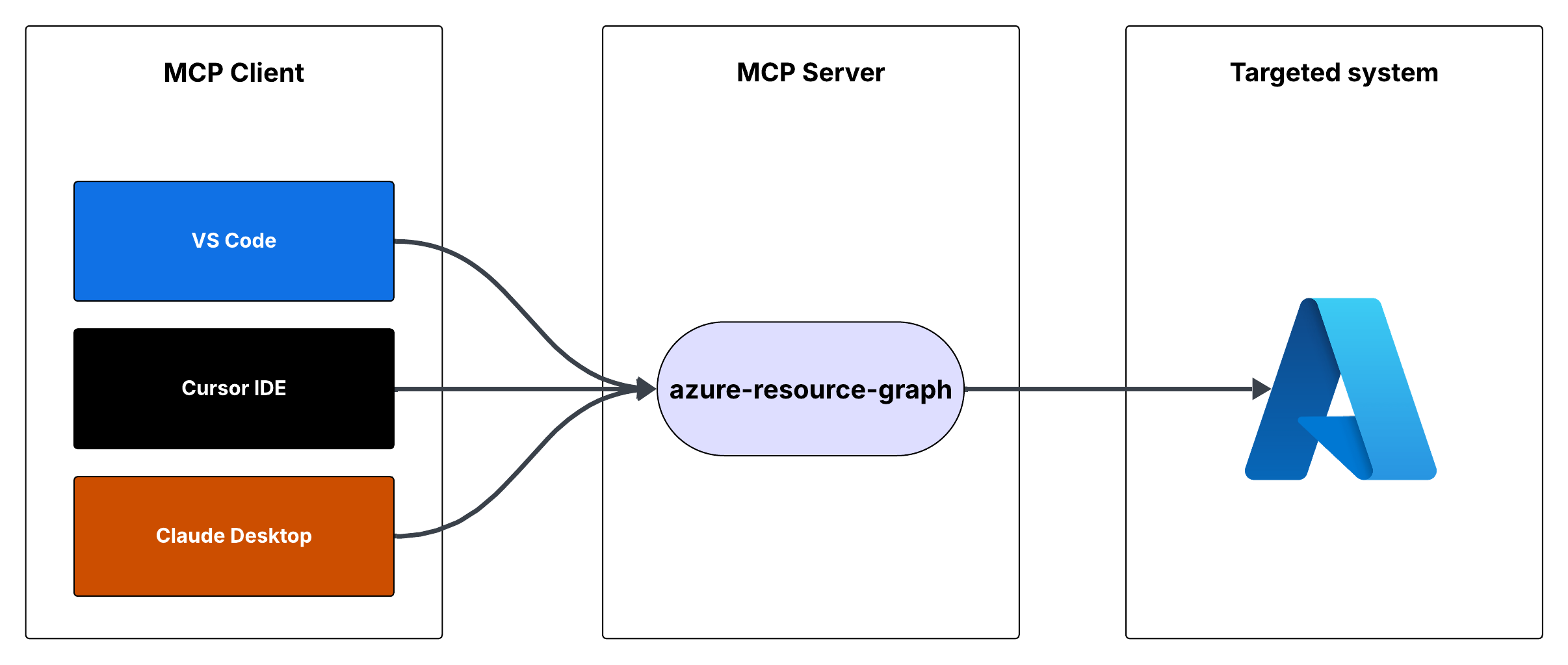
リクエストフロー

Azure リソース グラフ MCP サーバー

これは、Azure Resource Graph クエリへのアクセスを提供するモデルコンテキストプロトコル (MCP) サーバーです。これにより、Resource Graph クエリを使用して、サブスクリプション全体の Azure リソースに関する情報を取得できます。

特徴

  • Resource Graph クエリを使用して Azure リソースをクエリする

  • デフォルトのクエリはリソースID、名前、タイプ、場所を返します

  • カスタムリソースグラフクエリをサポート

  • 認証にはAzure DefaultAzureCredentialを使用します

Related MCP server: Azure DevOps MCP Server

前提条件

  • Node.jsがインストールされている

  • Azureサブスクリプション

  • Azure CLI がインストールされログインしているか、その他の Azure 資格情報が構成されている

MCPサーバーの実行

MCP サーバーは、Cursor IDE または Visual Studio Code を使用して実行できます。

オプション1: カーソルIDE統合

MCP サーバーを Cursor IDE と統合するには:

  1. このリポジトリをローカル マシンにクローンします (例: C:\YOUR_WORKSPACE\azure-resource-graph-mcp-server )

  2. プロジェクトをビルドします。

npm install
npm run build
  1. カーソル設定 (JSON) を開き、次の構成を追加します。

{
  "mcpServers": {
    "azure-resource-graph-mcp-server": {
      "command": "node",
      "args": [
        "C:\\YOUR_WORKSPACE\\azure-resource-graph-mcp-server\\build\\index.js"
      ],
      "env": {
        "SUBSCRIPTION_ID": "xxxxxx-xx-xx-xx-xxxxxx"
      },
    }
  }
}

注: ローカル リポジトリの場所と一致するようにパスを更新してください。

  1. 変更を適用するには、カーソル IDE を再起動します。

オプション2: VS Code統合

MCP サーバーを Visual Studio Code と統合するには:

  1. このリポジトリをローカルマシンにクローンします

  2. プロジェクトをビルドします。

npm install
npm run build
  1. Ctrl+Shift+Pを押して VS Code 設定 (JSON) を開き、「設定 (JSON)」と入力して、「設定: ユーザー設定 (JSON) を開く」を選択します。

  2. 次の構成を追加します。

{
    "mcp": {
        "servers": {
            "azure-resource-graph": {
                "type": "stdio",
                "command": "node",
                "args": [
                    "C:\\YOUR_WORKSPACE\\azure-resource-graph-mcp-server\\build\\index.js"
                ],
                "env": {
                  "SUBSCRIPTION_ID": "xxxxxx-xx-xx-xx-xxxxxx"
                },
            }
        }
    }
}

注: ローカル リポジトリの場所と一致するようにパスを更新してください。

  1. 設定.jsonファイルを保存する

  2. 変更を適用するにはVS Codeを再起動してください。

MCP サーバーは、カーソル統合により VS Code 内で使用できるようになります。

使用法

サーバーは次のツールを提供します。

クエリリソース

Azure Resource Graph からリソースとその詳細を取得します。

パラメータ:

  • subscriptionId (オプション): Azure サブスクリプション ID (デフォルトは構成された ID)

  • query (オプション): カスタム リソース グラフ クエリ (デフォルトは「リソース | プロジェクト ID、名前、タイプ、場所」)

環境設定

  1. まず、次のコマンドを実行して、Azure CLI にログインしていることを確認します。

    az login

    DefaultAzureCredential によって Azure CLI 資格情報が自動的に使用されるため、この手順はローカル開発にとって重要です。

  2. 環境変数を設定します。

    • .env.exampleを.envにコピーする

    • .envのAZURE_SUBSCRIPTION_ID実際のサブスクリプション ID に更新します。

    • Azure CLI 認証を使用する場合、その他の変数 ( AZURE_TENANT_ID 、 AZURE_CLIENT_ID 、 AZURE_CLIENT_SECRET ) はオプションです。

  3. 適切なAzure認証情報が設定されていることを確認してください。サーバーはDefaultAzureCredentialを使用しており、以下をサポートしています。

    • Azure CLI

    • マネージドID

    • Visual Studio Code の資格情報

    • 環境変数

  4. 環境変数を使用する場合は、以下を設定します。

    • AZURE_サブスクリプション_ID

    • AZURE_テナント_ID

    • AZURE_クライアントID

    • AZURE_クライアント_シークレット

エラー処理

サーバーには、次の堅牢なエラー処理機能が含まれています。

  • Azure クライアントの初期化エラー

  • クエリ実行エラー

  • 無効なクエリまたはパラメータ

発達

このプロジェクトに取り組むには:

  1. srcディレクトリに変更を加える

  2. npm run buildを使用してビルドする

  3. サーバーを実行して変更をテストします

ライセンス

このプロジェクトはMITライセンスの下で提供されています。詳細はLICENSEファイルをご覧ください。

Available Tools

1 tool
query-resourcesB

Retrieves resources and their details from Azure Resource Graph. Use this tool to search, filter, and analyze Azure resources across subscriptions. It supports Kusto Query Language (KQL) for complex queries to find resources by type, location, tags, or properties. Useful for infrastructure auditing, resource inventory, compliance checking, and understanding your Azure environment's current state.

ParametersJSON Schema
NameRequiredDescriptionDefault
subscriptionIdNoAzure subscription ID
queryNoResource Graph query, defaults to listing all resources

TDQS

B3.4/5.0
Behavior2/5

Does the description disclose side effects, auth requirements, rate limits, or destructive behavior?

No annotations are provided, so the description carries the full burden of behavioral disclosure. It mentions the tool retrieves details and supports KQL for queries, but it does not disclose critical behavioral traits such as whether it's read-only or destructive, authentication requirements, rate limits, or pagination behavior. This leaves significant gaps for an agent to understand how to invoke it safely and effectively.

Agents need to know what a tool does to the world before calling it. Descriptions should go beyond structured annotations to explain consequences.

Conciseness4/5

Is the description appropriately sized, front-loaded, and free of redundancy?

The description is appropriately sized and front-loaded, starting with the core purpose and usage. Each sentence adds value, such as explaining KQL support and use cases, with no redundant information. However, it could be slightly more concise by integrating the use cases more tightly with the main description.

Shorter descriptions cost fewer tokens and are easier for agents to parse. Every sentence should earn its place.

Completeness3/5

Given the tool's complexity, does the description cover enough for an agent to succeed on first attempt?

Given the complexity of querying Azure resources with KQL and no annotations or output schema, the description is moderately complete. It covers the purpose, usage context, and parameter hints, but it lacks details on behavioral aspects like safety, response format, and error handling, which are important for an agent to use the tool effectively in this context.

Complex tools with many parameters or behaviors need more documentation. Simple tools need less. This dimension scales expectations accordingly.

Parameters3/5

Does the description clarify parameter syntax, constraints, interactions, or defaults beyond what the schema provides?

The schema description coverage is 100%, so the schema already documents both parameters (subscriptionId and query) adequately. The description adds some context by mentioning KQL for complex queries and default behavior, but it does not provide additional semantic details beyond what the schema offers, such as query format examples or subscription ID usage nuances.

Input schemas describe structure but not intent. Descriptions should explain non-obvious parameter relationships and valid value ranges.

Purpose5/5

Does the description clearly state what the tool does and how it differs from similar tools?

The description clearly states the tool's purpose with specific verbs ('retrieves', 'search, filter, and analyze') and resources ('Azure resources'), and it distinguishes its scope by mentioning Azure Resource Graph and KQL. It provides concrete use cases like infrastructure auditing and compliance checking, making the purpose highly specific and actionable.

Agents choose between tools based on descriptions. A clear purpose with a specific verb and resource helps agents select the right tool.

Usage Guidelines3/5

Does the description explain when to use this tool, when not to, or what alternatives exist?

The description implies usage through phrases like 'Use this tool to search, filter, and analyze' and lists scenarios such as auditing and inventory, but it does not explicitly state when to use this tool versus alternatives or provide exclusions. With no sibling tools, the lack of comparative guidance is less critical, but it still lacks explicit when/when-not instructions.

Agents often have multiple tools that could apply. Explicit usage guidance like "use X instead of Y when Z" prevents misuse.

Tool Schema Changelog

Recent tool additions, removals, and schema changes observed during successful MCP inspections.

  1. 1 tool update
    • First observedquery-resources

TDQS

B3.4/5.0

Scored across 1 tool

Disambiguation5/5

With only one tool, there is no possibility of ambiguity or overlap in purpose. The tool 'query-resources' has a clearly defined and singular function, making it impossible for an agent to confuse it with another tool.

Naming Consistency5/5

Since there is only one tool, naming consistency is inherently perfect. The tool name 'query-resources' follows a clear verb_noun pattern, and there are no other tools to create inconsistency.

Tool Count2/5

A single tool for an Azure Resource Graph server feels thin and under-scoped. While the tool is powerful, typical MCP servers for cloud resource management offer multiple operations (e.g., list, get, filter, aggregate), making one tool insufficient for comprehensive coverage and likely to limit agent workflows.

Completeness2/5

The tool surface is severely incomplete for the domain of Azure resource management. It only provides a generic query function, missing essential operations like listing resource types, getting specific resources by ID, aggregating metrics, or managing tags, which are common in such systems and necessary for full agent functionality.

Maintenance

ActivityInactive
ResponsivenessUnresponsive

Related MCP Connectors

Related MCP Servers

  • -
    license
    Not graded
    quality
    Not graded
    maintenance
    A reference server implementation for the Model Context Protocol that enables AI assistants to interact with Azure DevOps resources and perform operations such as project management, work item tracking, repository operations, and code search programmatically.
    7
    -
  • A
    license
    C
    quality
    A
    maintenance
    A Model Context Protocol server that enables interaction with Microsoft 365 services (Excel, Calendar, Mail, OneDrive, Teams, etc.) through the Graph API, allowing AI assistants to manage Microsoft 365 resources via natural language.
    188
    49,666 npm
    996
    MIT
  • A
    license
    A
    quality
    A
    maintenance
    A Model Context Protocol server that provides AI assistants with access to Microsoft Teams, enabling interaction with teams, channels, chats, and organizational data through Microsoft Graph APIs.
    19
    3,386 npm
    139
    MIT