Glama
chargebee

@chargebee/mcp

Official
by chargebee

Chargebee 모델 컨텍스트 프로토콜(MCP) 서버

MCP 차지비 npm 버전

모델 컨텍스트 프로토콜(MCP)은 대규모 언어 모델(LLM)과 외부 시스템 간의 컨텍스트를 관리하도록 설계된 표준화된 프로토콜 입니다.

Chargebee MCP 서버는 개발자의 효율성을 향상시키는 강력한 도구 세트를 제공합니다. Cursor, Windsurf, Cline과 같은 AI 기반 코드 편집기는 물론 Claude Desktop과 같은 범용 도구와도 통합됩니다. 모든 MCP 클라이언트와 호환됩니다.

이 MCP 서버를 사용하면 다음을 수행할 수 있습니다.

  • Chargebee 제품과 API 서비스에 대한 즉각적인 답변을 받아보세요.

  • 귀하의 통합 요구 사항에 맞춰 컨텍스트 인식 코드 조각을 받으세요.

  • 다음을 포함한 Chargebee의 지식 기반에 액세스하세요.

    • 선적 서류 비치

    • 자주 묻는 질문

    • 릴리스 노트

    • 그리고 훨씬 더 많은 것들

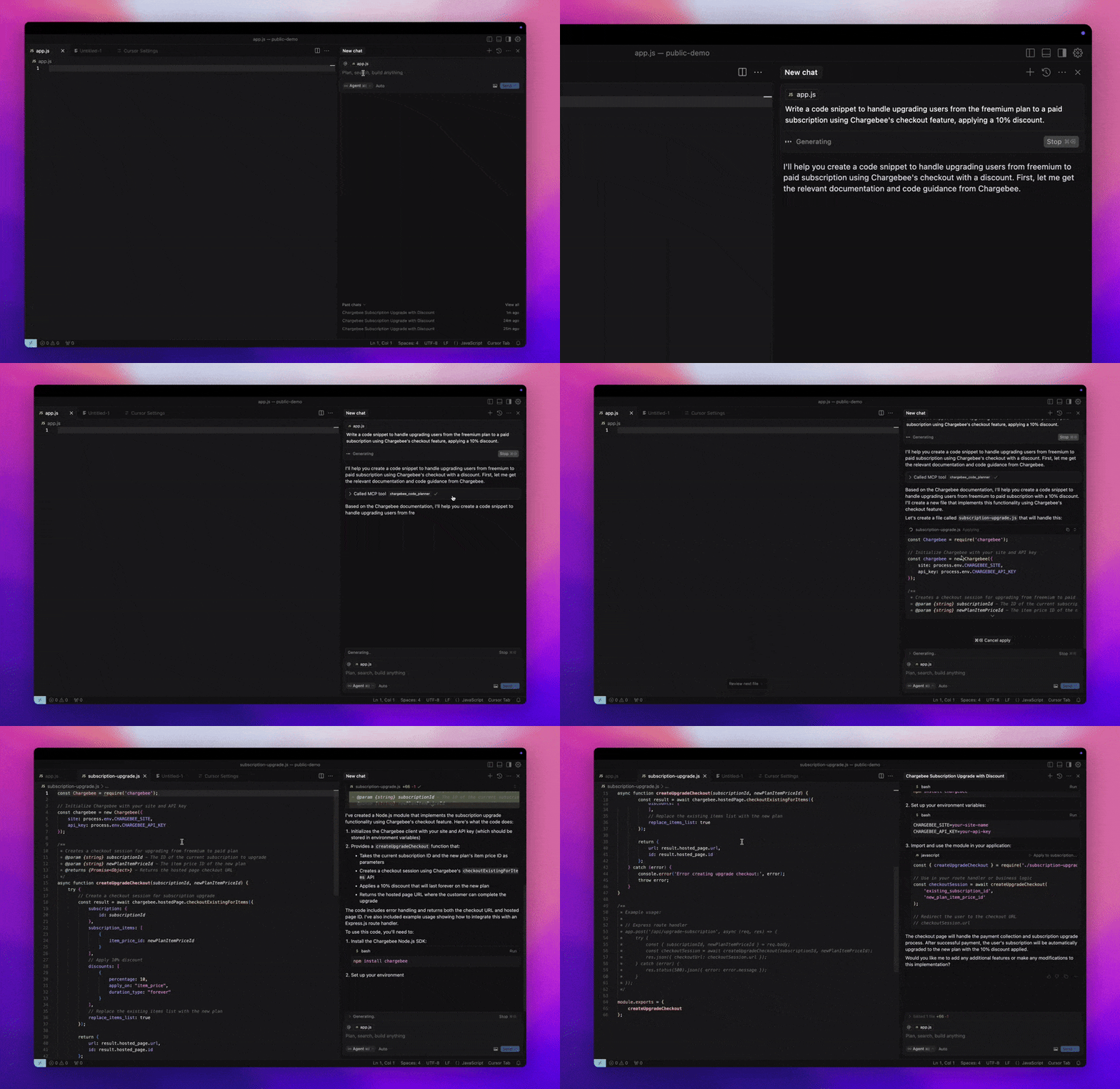
MCP 데모

필수 조건

  • Node.js LTS - Chargebee MCP 서버가 올바르게 작동하려면 Node.js LTS 버전이 필요합니다.

Related MCP server: Codinfy MCP

설정

Node.js npx를 사용하여 Chargebee MCP 서버를 실행하려면 다음 명령을 실행하세요.

지엑스피1

사용 가능한 도구

도구

설명

chargebee_documentation_search

Chargebee 문서를 검색하여 자세한 정보와 사용 안내서를 찾아보세요.

chargebee_code_planner

Chargebee의 API와 기능을 통합하기 위한 구조화된 코드 개요와 샘플 코드를 생성합니다.

설치

커서

이 서버를 Cursor IDE에 추가하려면:

  1. Cursor Settings > MCP 로 이동합니다.

  2. + Add new Global MCP Server 클릭합니다.

  3. 글로벌 .cursor/mcp.json 파일에 다음 구성을 추가합니다.

{
  "mcpServers": {
    "chargebee": {
      "command": "npx",
      "args": [
          "-y",
          "@chargebee/mcp"
      ]
    }
  }
}

자세한 내용은 커서 문서를 참조하세요. 참고: 프로젝트별 커서 구성(커서 0.46 이상에서 지원)에 이 기능을 추가할 수도 있습니다.

윈드서핑

Cascade로 MCP를 설정하려면:

  1. Windsurf를 열고 Settings > Advanced Settings 으로 이동하거나 명령 팔레트 > Open Windsurf Settings Page 사용하세요.

  2. Cascade 섹션으로 스크롤하여 새로운 서버를 추가하거나, 기존 서버를 보거나, mcp_config.json 에서 원시 JSON 구성 파일에 액세스하세요.

  3. "사용자 정의 서버 추가 +"를 클릭하여 mcp_config.json 에 Chargebee MCP 서버를 직접 포함합니다.

{
  "mcpServers": {
    "chargebee": {
      "command": "npx",
      "args": [
          "-y",
          "@chargebee/mcp"
      ]
    }
  }
}

자세한 내용은 Windsurf 문서를 참조하세요.

클라인

Cline MCP 서버 설정을 통해 다음 JSON을 cline_mcp_settings.json 파일에 수동으로 추가합니다.

{
  "mcpServers": {
    "chargebee": {
      "command": "npx",
      "args": [
          "-y",
          "@chargebee/mcp"
      ]
    }
  }
}

루 코드

Roo Code 설정에서 Edit MCP Settings 선택하거나 VS Code 명령 팔레트에서 Roo Code: Open MCP Config 명령을 사용하여 MCP 설정에 액세스합니다.

{
  "mcpServers": {
    "chargebee": {
      "command": "npx",
      "args": [
          "-y",
          "@chargebee/mcp"
      ]
    }
  }
}

클로드

claude_desktop_config.json 파일에 다음 구성을 추가하세요. 자세한 내용은 Claude Desktop 설명서를 참조하세요.

{
  "mcpServers": {
    "chargebee": {
      "command": "npx",
      "args": [
          "-y",
          "@chargebee/mcp"
      ]
    }
  }
}

CLI

다음 명령을 실행하여 CLI로 서버를 실행할 수도 있습니다.

npx -y @chargebee/mcp@latest

기부금

이 프로젝트에 기여하려면 기여 가이드를 참조하세요.

특허

MIT

Available Tools

2 tools
chargebee_code_plannerA

Use this tool for any Chargebee integration questions or implementation needs.

Always use this tool to get the accurate integration code guide for Chargebee. This is the main tool developers need when asking about implementing Chargebee functionality (like "how to update billing address", "how to create subscription", "how to handle webhooks", etc.).

This tool will take in parameters about integrating with Chargebee in their application and generates an integration workflow along with the code snippets.

It takes the following arguments:

  • goal (string): What is the user's goal?

  • language (enum): Programming language the code to be generated in. Check the user's application language.

ParametersJSON Schema
NameRequiredDescriptionDefault
goalYesWhat is the user's goal?
languageNoProgramming language the code to be generated in. Check the user's application language.

TDQS

A3.5/5.0
Behavior2/5

Does the description disclose side effects, auth requirements, rate limits, or destructive behavior?

No annotations are provided, so the description must disclose behavioral traits. It only describes the tool as generating code but does not clarify that it is a read-only operation with no side effects or data mutations. Such information is essential for safe invocation.

Agents need to know what a tool does to the world before calling it. Descriptions should go beyond structured annotations to explain consequences.

Conciseness3/5

Is the description appropriately sized, front-loaded, and free of redundancy?

The description contains redundant phrasing (e.g., 'Use this tool' and 'Always use this tool') and could be more streamlined. However, it is not excessively long and includes necessary details.

Shorter descriptions cost fewer tokens and are easier for agents to parse. Every sentence should earn its place.

Completeness3/5

Given the tool's complexity, does the description cover enough for an agent to succeed on first attempt?

The description covers the tool's inputs and high-level output (workflow and code snippets) but lacks details on the output structure, error handling, or limitations. With no output schema, more specifics would improve completeness.

Complex tools with many parameters or behaviors need more documentation. Simple tools need less. This dimension scales expectations accordingly.

Parameters3/5

Does the description clarify parameter syntax, constraints, interactions, or defaults beyond what the schema provides?

Schema coverage is 100%, and the descriptions in the schema are adequate. The tool description reiterates the parameter meanings without adding new context or examples, meeting the baseline for high coverage.

Input schemas describe structure but not intent. Descriptions should explain non-obvious parameter relationships and valid value ranges.

Purpose5/5

Does the description clearly state what the tool does and how it differs from similar tools?

The description clearly states the tool's purpose: generating integration workflows and code snippets for Chargebee. It explicitly differentiates from the sibling tool 'chargebee_documentation_search' by positioning itself as the main tool for implementation questions.

Agents choose between tools based on descriptions. A clear purpose with a specific verb and resource helps agents select the right tool.

Usage Guidelines4/5

Does the description explain when to use this tool, when not to, or what alternatives exist?

The description advises to use this tool for Chargebee integration needs and to check the user's language. It implies a context for use but does not explicitly exclude scenarios or mention alternatives beyond the sibling.

Agents often have multiple tools that could apply. Explicit usage guidance like "use X instead of Y when Z" prevents misuse.

Tool Schema Changelog

Recent tool additions, removals, and schema changes observed during successful MCP inspections.

  1. 2 tool updates
    • First observedchargebee_code_planner
    • First observedchargebee_documentation_search

TDQS

A4.1/5.0

Scored across 2 tools

Disambiguation5/5

The two tools have explicitly distinct purposes: one for implementation guidance and code generation, the other for general documentation queries. Descriptions clearly separate their use cases, eliminating ambiguity.

Naming Consistency5/5

Both tools follow a consistent 'chargebee_<descriptive_noun>' pattern, making it easy to infer their roles. The naming is uniform and predictable.

Tool Count4/5

With only two tools, the server is very focused, but that matches its specific purpose of handling integration assistance and documentation search. While minimal, the count is reasonable for the intended scope.

Completeness5/5

The tool set covers both implementation needs (code planner) and conceptual understanding (documentation search), leaving no obvious gaps for its stated goal of answering Chargebee integration questions.

Maintenance

ActivityInactive
ResponsivenessNo issues

Related MCP Connectors

Related MCP Servers

  • A
    license
    A
    quality
    D
    maintenance
    MCP server that connects AI agents to Codinfy platform APIs for validating licenses, creating checkouts, listing products, tracking analytics, managing OAuth identity, and handling ad placements.
    17
    MIT
  • F
    license
    A
    quality
    D
    maintenance
    MCP server for RevenueCat that lets AI agents query subscriber data, check entitlements, fetch offerings, and manage subscriptions via natural language.
    6
    -
  • A
    license
    B
    quality
    B
    maintenance
    MCP server that connects AI assistants to the Conexa business management system, enabling CRUD operations on sales, customers, plans, contracts, charges, and more via 83 tools.
    83
    121 npm
    1
    MIT