
A
licenseNot graded
qualityD
maintenanceA Model Context Protocol server that enables AI assistants to interact with iOS simulators, perform accessibility testing, manage apps, and automate complex iOS workflows.
32
Apache 2.0

这是一个为 iOS 模拟器实现模型上下文协议(MCP)的服务器,构建于 appium-ios-simulator 之上,并利用了 MCP TypeScript SDK。
本项目提供了 iOS 模拟器与模型上下文协议之间的桥梁,允许与 iOS 模拟器实例进行标准化通信。它在实现对 iOS 模拟器进行程序化控制的同时,利用 MCP 协议在不同环境中保持接口的一致性。该服务器使用 stdio 作为其传输机制,非常适合与 Claude Desktop 及其他兼容 MCP 的客户端集成。
Related MCP server: Simulator MCP
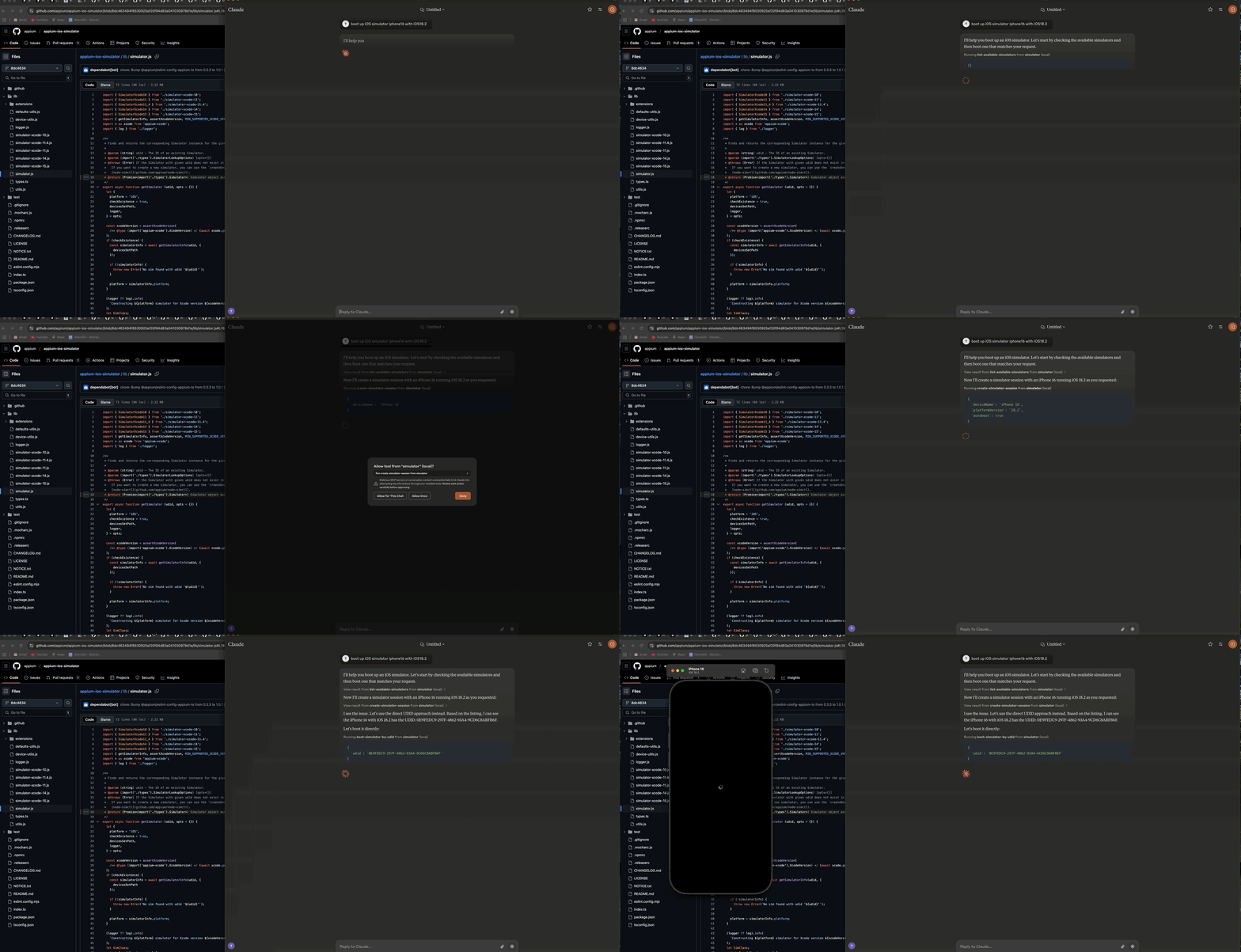
演示如何使用 Claude AI Desktop 启动 iOS 模拟器
该服务器由三个主要组件组成:
🔄 模拟器管理层 - 处理 iOS 模拟器的生命周期和交互
🔌 MCP 协议实现 - 使用 TypeScript SDK 和 stdio 传输实现模型上下文协议
📊 日志组件 - 提供基于文件的日志记录,且不会干扰 stdio 传输
┌─────────────────┐     ┌─────────────────┐     ┌─────────────────┐
│  MCP Protocol   │     │     Stdio       │     │    Simulator    │
│  Implementation │◄────┤    Transport    │◄────┤   Management    │
│                 │     │                 │     │      Layer      │
└─────────────────┘     └─────────────────┘     └─────────────────┘
        ▲                                                ▲
        │                                                │
        ▼                                                ▼
┌─────────────────┐                             ┌─────────────────┐
│   MCP Client    │                             │  iOS Simulator  │
│  (e.g. Claude)  │                             │                 │
└─────────────────┘ └─────────────────┘🚀 启动、停止和管理 iOS 模拟器实例
🔌 引导和关闭模拟器
📲 在模拟器上安装和启动应用程序
📸 对模拟器屏幕进行截图
👆 在指定坐标执行点击操作
🔄 支持多个并发模拟器会话
📝 全面的基于文件的日志记录,无控制台输出
🛡️ 具备容错能力的运行机制
🟢 Node.js (v16 或更高版本)
🍎 macOS (iOS 模拟器必需)
🛠️ 已安装 iOS 模拟器的 Xcode
📜 TypeScript 4.5+
要通过 Smithery 自动为 Claude Desktop 安装 iOS 模拟器控制服务器:
npx -y @smithery/cli install @atom2ueki/mcp-server-ios-simulator --client claude# Clone the repository
git clone https://github.com/atom2ueki/mcp-server-ios-simulator.git
cd mcp-server-ios-simulator
# Install dependencies
npm install提供了 Dockerfile,以便将服务器打包用于 Glama MCP 目录 及其他容器主机。
docker build -t mcp-server-ios-simulator .
docker run --rm -i mcp-server-ios-simulator
注意: iOS 模拟器仅在 macOS 上运行,因此 Linux 容器可以托管 MCP 进程并通过 stdio 响应,但无法驱动真实的模拟器。该容器旨在用于可移植性检查以及连接到 macOS 主机的远程 MCP 环境。
配置通过 src/config.ts 文件进行处理:
const config = {
  simulator: {
    defaultDevice: process.env.SIMULATOR_DEFAULT_DEVICE || 'iPhone 16',
    defaultOS: process.env.SIMULATOR_DEFAULT_OS || '18.2',
    timeout: parseInt(process.env.SIMULATOR_TIMEOUT || '30000', 10),
  }
};
您可以通过设置环境变量来自定义这些设置:
SIMULATOR_DEFAULT_DEVICE=iPhone 16
SIMULATOR_DEFAULT_OS=18.2
SIMULATOR_TIMEOUT=30000# Build the project
npm run build
# Start the server
npm start该服务器提供了两种不同的方法来控制 iOS 模拟器:
这些工具直接使用模拟器的 UDID,无需维护会话:
📋 list-available-simulators - 列出所有可用模拟器及其 UDID
▶️ boot-simulator-by-udid - 使用 UDID 直接启动模拟器
⏹️ shutdown-simulator-by-udid - 使用 UDID 直接关闭模拟器
📊 list-booted-simulators - 列出所有当前已启动的模拟器
使用场景: 当您只想直接启动、使用和关闭模拟器时。
这些工具使用会话层,通过自定义会话 ID 来跟踪模拟器:
📋 list-simulator-sessions - 列出所有活动的模拟器会话
➕ create-simulator-session - 创建一个新的模拟器会话
❌ terminate-simulator-session - 终止会话(关闭模拟器并清理)
🔄 create-and-boot-simulator - 创建一个新的模拟器会话并启动它
▶️ boot-simulator - 为现有会话启动模拟器
⏹️ shutdown-simulator - 为现有会话关闭模拟器
使用场景: 当您需要跟踪模拟器元数据、通过自定义 ID 引用模拟器或使用更高级的管理功能时。
📥 install-app - 在模拟器上安装应用程序
🚀 launch-app - 在模拟器上启动应用程序
🛑 terminate-app - 终止模拟器上正在运行的应用程序
📷 take-screenshot - 对模拟器屏幕进行截图
👆 tap-coordinate - 在指定坐标执行点击
配置 Claude Desktop 使用此服务器作为 MCP 工具:
打开 Claude Desktop
进入 Settings > Advanced
在 "MCP Servers" 部分添加以下配置:
{
  "mcpServers": {
    "simulator": {
      "command": "node",
      "args": [
        "/path/to/your/mcp-server-ios-simulator/dist/index.js"
      ]
    }
  }
}
将 /path/to/your 替换为您安装此仓库的实际路径
保存设置并重启 Claude Desktop
使用提供的工具直接从 Claude Desktop 控制 iOS 模拟器:
直接 UDID 方法(推荐):
首先,让 Claude 列出可用模拟器:
"Show me all available iOS simulators"然后使用 UDID 启动特定的模拟器:
"Boot the iOS simulator with UDID 5272EA61-5796-4372-86FE-3B33831D5CC1"完成后,使用相同的 UDID 将其关闭:
"Shut down the simulator with UDID 5272EA61-5796-4372-86FE-3B33831D5CC1"对于大多数用例,直接 UDID 方法更简单且更可靠。
基于会话的方法(高级): 仅在需要会话跟踪的高级功能时使用此方法:
"Create a new simulator session for iPhone 16 Pro with iOS 18.2"
"Boot the simulator for session abc-123"
"Take a screenshot of the simulator for session abc-123"
"Terminate the simulator session abc-123"src/
├── simulator/ # Simulator management layer
├── mcp/ # MCP protocol implementation
├── bridge/ # Bridge component
├── utils/ # Utility functions including logger
├── config.ts # Configuration handling
└── index.ts # Entry point# Install development dependencies
npm install
# Run TypeScript compiler
npm run build本项目采用 MIT 许可证授权 - 详情请参阅 LICENSE 文件。
📱 appium-ios-simulator 提供 iOS 模拟器交互功能
🔌 Model Context Protocol 提供协议规范和 TypeScript SDK
| Name | Required | Description | Default |
|---|---|---|---|
| udid | Yes |
Does the description disclose side effects, auth requirements, rate limits, or destructive behavior?
Tool has no description.
Agents need to know what a tool does to the world before calling it. Descriptions should go beyond structured annotations to explain consequences.
Is the description appropriately sized, front-loaded, and free of redundancy?
Tool has no description.
Shorter descriptions cost fewer tokens and are easier for agents to parse. Every sentence should earn its place.
Given the tool's complexity, does the description cover enough for an agent to succeed on first attempt?
Tool has no description.
Complex tools with many parameters or behaviors need more documentation. Simple tools need less. This dimension scales expectations accordingly.
Does the description clarify parameter syntax, constraints, interactions, or defaults beyond what the schema provides?
Tool has no description.
Input schemas describe structure but not intent. Descriptions should explain non-obvious parameter relationships and valid value ranges.
Does the description clearly state what the tool does and how it differs from similar tools?
Tool has no description.
Agents choose between tools based on descriptions. A clear purpose with a specific verb and resource helps agents select the right tool.
Does the description explain when to use this tool, when not to, or what alternatives exist?
Tool has no description.
Agents often have multiple tools that could apply. Explicit usage guidance like "use X instead of Y when Z" prevents misuse.
| Name | Required | Description | Default |
|---|---|---|---|
| autoboot | No | ||
| deviceName | No | ||
| platformVersion | No | ||
| timeout | No |
Does the description disclose side effects, auth requirements, rate limits, or destructive behavior?
Tool has no description.
Agents need to know what a tool does to the world before calling it. Descriptions should go beyond structured annotations to explain consequences.
Is the description appropriately sized, front-loaded, and free of redundancy?
Tool has no description.
Shorter descriptions cost fewer tokens and are easier for agents to parse. Every sentence should earn its place.
Given the tool's complexity, does the description cover enough for an agent to succeed on first attempt?
Tool has no description.
Complex tools with many parameters or behaviors need more documentation. Simple tools need less. This dimension scales expectations accordingly.
Does the description clarify parameter syntax, constraints, interactions, or defaults beyond what the schema provides?
Tool has no description.
Input schemas describe structure but not intent. Descriptions should explain non-obvious parameter relationships and valid value ranges.
Does the description clearly state what the tool does and how it differs from similar tools?
Tool has no description.
Agents choose between tools based on descriptions. A clear purpose with a specific verb and resource helps agents select the right tool.
Does the description explain when to use this tool, when not to, or what alternatives exist?
Tool has no description.
Agents often have multiple tools that could apply. Explicit usage guidance like "use X instead of Y when Z" prevents misuse.
| Name | Required | Description | Default |
|---|---|---|---|
| appPath | Yes | ||
| sessionId | Yes |
Does the description disclose side effects, auth requirements, rate limits, or destructive behavior?
Tool has no description.
Agents need to know what a tool does to the world before calling it. Descriptions should go beyond structured annotations to explain consequences.
Is the description appropriately sized, front-loaded, and free of redundancy?
Tool has no description.
Shorter descriptions cost fewer tokens and are easier for agents to parse. Every sentence should earn its place.
Given the tool's complexity, does the description cover enough for an agent to succeed on first attempt?
Tool has no description.
Complex tools with many parameters or behaviors need more documentation. Simple tools need less. This dimension scales expectations accordingly.
Does the description clarify parameter syntax, constraints, interactions, or defaults beyond what the schema provides?
Tool has no description.
Input schemas describe structure but not intent. Descriptions should explain non-obvious parameter relationships and valid value ranges.
Does the description clearly state what the tool does and how it differs from similar tools?
Tool has no description.
Agents choose between tools based on descriptions. A clear purpose with a specific verb and resource helps agents select the right tool.
Does the description explain when to use this tool, when not to, or what alternatives exist?
Tool has no description.
Agents often have multiple tools that could apply. Explicit usage guidance like "use X instead of Y when Z" prevents misuse.
| Name | Required | Description | Default |
|---|---|---|---|
| bundleId | Yes | ||
| sessionId | Yes |
Does the description disclose side effects, auth requirements, rate limits, or destructive behavior?
Tool has no description.
Agents need to know what a tool does to the world before calling it. Descriptions should go beyond structured annotations to explain consequences.
Is the description appropriately sized, front-loaded, and free of redundancy?
Tool has no description.
Shorter descriptions cost fewer tokens and are easier for agents to parse. Every sentence should earn its place.
Given the tool's complexity, does the description cover enough for an agent to succeed on first attempt?
Tool has no description.
Complex tools with many parameters or behaviors need more documentation. Simple tools need less. This dimension scales expectations accordingly.
Does the description clarify parameter syntax, constraints, interactions, or defaults beyond what the schema provides?
Tool has no description.
Input schemas describe structure but not intent. Descriptions should explain non-obvious parameter relationships and valid value ranges.
Does the description clearly state what the tool does and how it differs from similar tools?
Tool has no description.
Agents choose between tools based on descriptions. A clear purpose with a specific verb and resource helps agents select the right tool.
Does the description explain when to use this tool, when not to, or what alternatives exist?
Tool has no description.
Agents often have multiple tools that could apply. Explicit usage guidance like "use X instead of Y when Z" prevents misuse.
| Name | Required | Description | Default |
|---|---|---|---|
No parameters | |||
Does the description disclose side effects, auth requirements, rate limits, or destructive behavior?
Tool has no description.
Agents need to know what a tool does to the world before calling it. Descriptions should go beyond structured annotations to explain consequences.
Is the description appropriately sized, front-loaded, and free of redundancy?
Tool has no description.
Shorter descriptions cost fewer tokens and are easier for agents to parse. Every sentence should earn its place.
Given the tool's complexity, does the description cover enough for an agent to succeed on first attempt?
Tool has no description.
Complex tools with many parameters or behaviors need more documentation. Simple tools need less. This dimension scales expectations accordingly.
Does the description clarify parameter syntax, constraints, interactions, or defaults beyond what the schema provides?
Tool has no description.
Input schemas describe structure but not intent. Descriptions should explain non-obvious parameter relationships and valid value ranges.
Does the description clearly state what the tool does and how it differs from similar tools?
Tool has no description.
Agents choose between tools based on descriptions. A clear purpose with a specific verb and resource helps agents select the right tool.
Does the description explain when to use this tool, when not to, or what alternatives exist?
Tool has no description.
Agents often have multiple tools that could apply. Explicit usage guidance like "use X instead of Y when Z" prevents misuse.
| Name | Required | Description | Default |
|---|---|---|---|
No parameters | |||
Does the description disclose side effects, auth requirements, rate limits, or destructive behavior?
Tool has no description.
Agents need to know what a tool does to the world before calling it. Descriptions should go beyond structured annotations to explain consequences.
Is the description appropriately sized, front-loaded, and free of redundancy?
Tool has no description.
Shorter descriptions cost fewer tokens and are easier for agents to parse. Every sentence should earn its place.
Given the tool's complexity, does the description cover enough for an agent to succeed on first attempt?
Tool has no description.
Complex tools with many parameters or behaviors need more documentation. Simple tools need less. This dimension scales expectations accordingly.
Does the description clarify parameter syntax, constraints, interactions, or defaults beyond what the schema provides?
Tool has no description.
Input schemas describe structure but not intent. Descriptions should explain non-obvious parameter relationships and valid value ranges.
Does the description clearly state what the tool does and how it differs from similar tools?
Tool has no description.
Agents choose between tools based on descriptions. A clear purpose with a specific verb and resource helps agents select the right tool.
Does the description explain when to use this tool, when not to, or what alternatives exist?
Tool has no description.
Agents often have multiple tools that could apply. Explicit usage guidance like "use X instead of Y when Z" prevents misuse.
| Name | Required | Description | Default |
|---|---|---|---|
No parameters | |||
Does the description disclose side effects, auth requirements, rate limits, or destructive behavior?
Tool has no description.
Agents need to know what a tool does to the world before calling it. Descriptions should go beyond structured annotations to explain consequences.
Is the description appropriately sized, front-loaded, and free of redundancy?
Tool has no description.
Shorter descriptions cost fewer tokens and are easier for agents to parse. Every sentence should earn its place.
Given the tool's complexity, does the description cover enough for an agent to succeed on first attempt?
Tool has no description.
Complex tools with many parameters or behaviors need more documentation. Simple tools need less. This dimension scales expectations accordingly.
Does the description clarify parameter syntax, constraints, interactions, or defaults beyond what the schema provides?
Tool has no description.
Input schemas describe structure but not intent. Descriptions should explain non-obvious parameter relationships and valid value ranges.
Does the description clearly state what the tool does and how it differs from similar tools?
Tool has no description.
Agents choose between tools based on descriptions. A clear purpose with a specific verb and resource helps agents select the right tool.
Does the description explain when to use this tool, when not to, or what alternatives exist?
Tool has no description.
Agents often have multiple tools that could apply. Explicit usage guidance like "use X instead of Y when Z" prevents misuse.
| Name | Required | Description | Default |
|---|---|---|---|
| sessionId | Yes |
Does the description disclose side effects, auth requirements, rate limits, or destructive behavior?
Tool has no description.
Agents need to know what a tool does to the world before calling it. Descriptions should go beyond structured annotations to explain consequences.
Is the description appropriately sized, front-loaded, and free of redundancy?
Tool has no description.
Shorter descriptions cost fewer tokens and are easier for agents to parse. Every sentence should earn its place.
Given the tool's complexity, does the description cover enough for an agent to succeed on first attempt?
Tool has no description.
Complex tools with many parameters or behaviors need more documentation. Simple tools need less. This dimension scales expectations accordingly.
Does the description clarify parameter syntax, constraints, interactions, or defaults beyond what the schema provides?
Tool has no description.
Input schemas describe structure but not intent. Descriptions should explain non-obvious parameter relationships and valid value ranges.
Does the description clearly state what the tool does and how it differs from similar tools?
Tool has no description.
Agents choose between tools based on descriptions. A clear purpose with a specific verb and resource helps agents select the right tool.
Does the description explain when to use this tool, when not to, or what alternatives exist?
Tool has no description.
Agents often have multiple tools that could apply. Explicit usage guidance like "use X instead of Y when Z" prevents misuse.
| Name | Required | Description | Default |
|---|---|---|---|
| udid | Yes |
Does the description disclose side effects, auth requirements, rate limits, or destructive behavior?
Tool has no description.
Agents need to know what a tool does to the world before calling it. Descriptions should go beyond structured annotations to explain consequences.
Is the description appropriately sized, front-loaded, and free of redundancy?
Tool has no description.
Shorter descriptions cost fewer tokens and are easier for agents to parse. Every sentence should earn its place.
Given the tool's complexity, does the description cover enough for an agent to succeed on first attempt?
Tool has no description.
Complex tools with many parameters or behaviors need more documentation. Simple tools need less. This dimension scales expectations accordingly.
Does the description clarify parameter syntax, constraints, interactions, or defaults beyond what the schema provides?
Tool has no description.
Input schemas describe structure but not intent. Descriptions should explain non-obvious parameter relationships and valid value ranges.
Does the description clearly state what the tool does and how it differs from similar tools?
Tool has no description.
Agents choose between tools based on descriptions. A clear purpose with a specific verb and resource helps agents select the right tool.
Does the description explain when to use this tool, when not to, or what alternatives exist?
Tool has no description.
Agents often have multiple tools that could apply. Explicit usage guidance like "use X instead of Y when Z" prevents misuse.
| Name | Required | Description | Default |
|---|---|---|---|
| sessionId | Yes | ||
| x | Yes | ||
| y | Yes |
Does the description disclose side effects, auth requirements, rate limits, or destructive behavior?
Tool has no description.
Agents need to know what a tool does to the world before calling it. Descriptions should go beyond structured annotations to explain consequences.
Is the description appropriately sized, front-loaded, and free of redundancy?
Tool has no description.
Shorter descriptions cost fewer tokens and are easier for agents to parse. Every sentence should earn its place.
Given the tool's complexity, does the description cover enough for an agent to succeed on first attempt?
Tool has no description.
Complex tools with many parameters or behaviors need more documentation. Simple tools need less. This dimension scales expectations accordingly.
Does the description clarify parameter syntax, constraints, interactions, or defaults beyond what the schema provides?
Tool has no description.
Input schemas describe structure but not intent. Descriptions should explain non-obvious parameter relationships and valid value ranges.
Does the description clearly state what the tool does and how it differs from similar tools?
Tool has no description.
Agents choose between tools based on descriptions. A clear purpose with a specific verb and resource helps agents select the right tool.
Does the description explain when to use this tool, when not to, or what alternatives exist?
Tool has no description.
Agents often have multiple tools that could apply. Explicit usage guidance like "use X instead of Y when Z" prevents misuse.
| Name | Required | Description | Default |
|---|---|---|---|
| bundleId | Yes | ||
| sessionId | Yes |
Does the description disclose side effects, auth requirements, rate limits, or destructive behavior?
Tool has no description.
Agents need to know what a tool does to the world before calling it. Descriptions should go beyond structured annotations to explain consequences.
Is the description appropriately sized, front-loaded, and free of redundancy?
Tool has no description.
Shorter descriptions cost fewer tokens and are easier for agents to parse. Every sentence should earn its place.
Given the tool's complexity, does the description cover enough for an agent to succeed on first attempt?
Tool has no description.
Complex tools with many parameters or behaviors need more documentation. Simple tools need less. This dimension scales expectations accordingly.
Does the description clarify parameter syntax, constraints, interactions, or defaults beyond what the schema provides?
Tool has no description.
Input schemas describe structure but not intent. Descriptions should explain non-obvious parameter relationships and valid value ranges.
Does the description clearly state what the tool does and how it differs from similar tools?
Tool has no description.
Agents choose between tools based on descriptions. A clear purpose with a specific verb and resource helps agents select the right tool.
Does the description explain when to use this tool, when not to, or what alternatives exist?
Tool has no description.
Agents often have multiple tools that could apply. Explicit usage guidance like "use X instead of Y when Z" prevents misuse.
| Name | Required | Description | Default |
|---|---|---|---|
| sessionId | Yes |
Does the description disclose side effects, auth requirements, rate limits, or destructive behavior?
Tool has no description.
Agents need to know what a tool does to the world before calling it. Descriptions should go beyond structured annotations to explain consequences.
Is the description appropriately sized, front-loaded, and free of redundancy?
Tool has no description.
Shorter descriptions cost fewer tokens and are easier for agents to parse. Every sentence should earn its place.
Given the tool's complexity, does the description cover enough for an agent to succeed on first attempt?
Tool has no description.
Complex tools with many parameters or behaviors need more documentation. Simple tools need less. This dimension scales expectations accordingly.
Does the description clarify parameter syntax, constraints, interactions, or defaults beyond what the schema provides?
Tool has no description.
Input schemas describe structure but not intent. Descriptions should explain non-obvious parameter relationships and valid value ranges.
Does the description clearly state what the tool does and how it differs from similar tools?
Tool has no description.
Agents choose between tools based on descriptions. A clear purpose with a specific verb and resource helps agents select the right tool.
Does the description explain when to use this tool, when not to, or what alternatives exist?
Tool has no description.
Agents often have multiple tools that could apply. Explicit usage guidance like "use X instead of Y when Z" prevents misuse.
Recent tool additions, removals, and schema changes observed during successful MCP inspections.
v1.0.0boot-simulator-by-udidcreate-simulator-sessioninstall-applaunch-applist-available-simulatorslist-booted-simulatorslist-simulator-sessionsshutdown-simulatorshutdown-simulator-by-udidtapterminate-appterminate-simulator-sessionScored across 12 tools
Every tool has a clearly distinct purpose targeting specific simulator operations like booting, listing, installing apps, launching, tapping, and terminating. There is no ambiguity between tools - each handles a unique action on a specific resource (simulator, app, or session).
All tools follow a consistent verb_noun or verb_noun_by_udid pattern with hyphen-separated lowercase words. The naming is perfectly predictable throughout the set, making it easy to understand each tool's function at a glance.
With 12 tools, this server provides comprehensive coverage for iOS simulator management. The count is well-scoped for the domain, offering essential operations without being overwhelming or insufficient for typical automation workflows.
The toolset provides complete lifecycle coverage for iOS simulator operations: discovery (list-available/list-booted), control (boot/shutdown), app management (install/launch/terminate), session handling (create/terminate), and interaction (tap). No obvious gaps exist for the stated purpose.
Build, run, and inspect iOS apps in disposable hosted Simulators from cloud coding agents.
Cloud iOS simulators and Android emulators your agent can create, drive, and throw away.
A Model Context Protocol server for Wix AI tools
Model Context Protocol server for Studex tools, notifications, and profile integrations