
A
licenseNot graded
qualityD
maintenanceA Model Context Protocol server that enables AI assistants to interact with iOS simulators, perform accessibility testing, manage apps, and automate complex iOS workflows.
32
Apache 2.0

appium-ios-simulatorをベースに構築され、MCP TypeScript SDKを利用した、iOSシミュレーター用のModel Context Protocol(MCP)実装サーバーです。
本プロジェクトは、iOSシミュレーターとModel Context Protocolの間のブリッジを提供し、iOSシミュレーターインスタンスとの標準化された通信を可能にします。MCPプロトコルを活用することで、異なる環境間で一貫したインターフェースを維持しながら、iOSシミュレーターをプログラムで制御できます。サーバーはトランスポートメカニズムとしてstdioを使用しており、Claude Desktopやその他のMCP互換クライアントとの統合に最適です。
Related MCP server: Simulator MCP
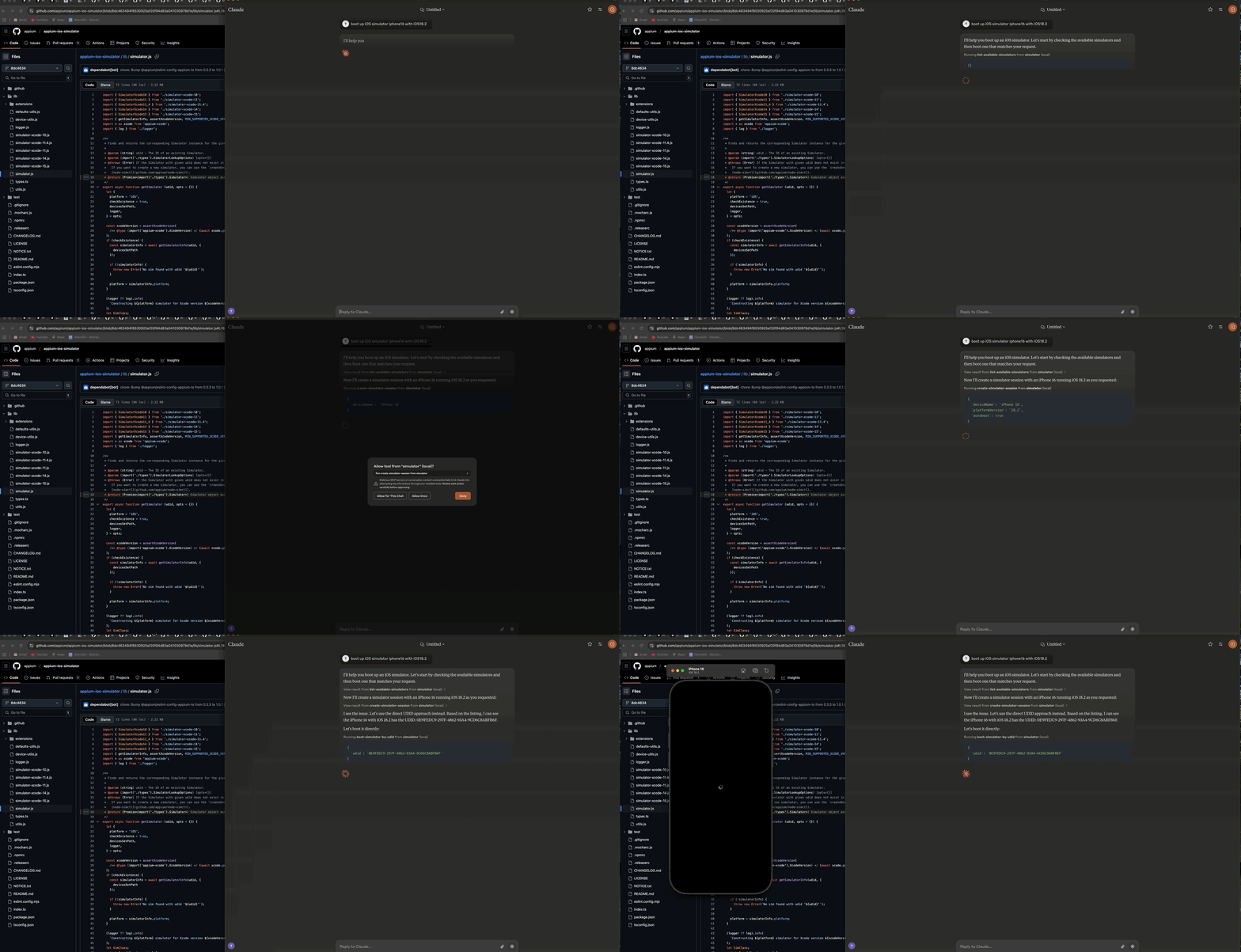
Claude AI Desktopを使用してiOSシミュレーターを起動するデモ
サーバーは主に3つのコンポーネントで構成されています:
🔄 シミュレーター管理レイヤー - iOSシミュレーターのライフサイクルと対話を処理
🔌 MCPプロトコル実装 - TypeScript SDKとstdioトランスポートを使用したModel Context Protocolの実装
📊 ロガーコンポーネント - stdioトランスポートを妨げないファイルベースのログ出力機能
┌─────────────────┐     ┌─────────────────┐     ┌─────────────────┐
│  MCP Protocol   │     │     Stdio       │     │    Simulator    │
│  Implementation │◄────┤    Transport    │◄────┤   Management    │
│                 │     │                 │     │      Layer      │
└─────────────────┘     └─────────────────┘     └─────────────────┘
        ▲                                                ▲
        │                                                │
        ▼                                                ▼
┌─────────────────┐                             ┌─────────────────┐
│   MCP Client    │                             │  iOS Simulator  │
│  (e.g. Claude)  │                             │                 │
└─────────────────┘ └─────────────────┘🚀 iOSシミュレーターインスタンスの起動、停止、管理
🔌 シミュレーターのブートおよびシャットダウン
📲 シミュレーターへのアプリインストールおよび起動
📸 シミュレーター画面のスクリーンショット撮影
👆 指定座標のタップ操作
🔄 複数のシミュレーターセッションの同時実行サポート
📝 コンソール出力を行わない包括的なファイルベースのログ出力
🛡️ エラー耐性のある動作
🟢 Node.js (v16以上)
🍎 macOS (iOSシミュレーターに必須)
🛠️ Xcode (iOSシミュレーターがインストールされていること)
📜 TypeScript 4.5+
Smithery経由でClaude Desktop用のiOSシミュレーター制御サーバーを自動インストールするには:
npx -y @smithery/cli install @atom2ueki/mcp-server-ios-simulator --client claude# Clone the repository
git clone https://github.com/atom2ueki/mcp-server-ios-simulator.git
cd mcp-server-ios-simulator
# Install dependencies
npm installGlama MCPディレクトリやその他のコンテナホスト向けにパッケージ化できるよう、Dockerfileが提供されています。
docker build -t mcp-server-ios-simulator .
docker run --rm -i mcp-server-ios-simulator
注意: iOSシミュレーターはmacOS上でのみ動作するため、LinuxコンテナはMCPプロセスをホストしてstdioで応答することは可能ですが、実際のシミュレーターを駆動することはできません。このコンテナは、移植性の確認や、macOSホストにブリッジするリモートMCP環境を目的としています。
設定はsrc/config.tsファイルを通じて行います:
const config = {
  simulator: {
    defaultDevice: process.env.SIMULATOR_DEFAULT_DEVICE || 'iPhone 16',
    defaultOS: process.env.SIMULATOR_DEFAULT_OS || '18.2',
    timeout: parseInt(process.env.SIMULATOR_TIMEOUT || '30000', 10),
  }
};
環境変数を設定することで、これらの設定をカスタマイズできます:
SIMULATOR_DEFAULT_DEVICE=iPhone 16
SIMULATOR_DEFAULT_OS=18.2
SIMULATOR_TIMEOUT=30000# Build the project
npm run build
# Start the server
npm start本サーバーは、iOSシミュレーターを制御するために2つの異なるアプローチを提供します:
これらのツールはシミュレーターのUDIDを直接操作するため、セッションを維持する必要はありません:
📋 list-available-simulators - 利用可能なすべてのシミュレーターをUDID付きで一覧表示
▶️ boot-simulator-by-udid - UDIDを使用してシミュレーターを直接起動
⏹️ shutdown-simulator-by-udid - UDIDを使用してシミュレーターを直接シャットダウン
📊 list-booted-simulators - 現在起動中のすべてのシミュレーターを一覧表示
このアプローチを使用する場合: シミュレーターを直接起動、使用、シャットダウンしたい場合に適しています。
これらのツールは、カスタムセッションIDでシミュレーターを追跡するセッションレイヤーを使用します:
📋 list-simulator-sessions - アクティブなすべてのシミュレーターセッションを一覧表示
➕ create-simulator-session - 新しいシミュレーターセッションを作成
❌ terminate-simulator-session - セッションを終了(シミュレーターのシャットダウンとクリーンアップを実行)
🔄 create-and-boot-simulator - 新しいシミュレーターセッションを作成して起動
▶️ boot-simulator - 既存セッションのシミュレーターを起動
⏹️ shutdown-simulator - 既存セッションのシミュレーターをシャットダウン
このアプローチを使用する場合: シミュレーターのメタデータを追跡したり、カスタムIDでシミュレーターを参照したり、より高度な管理機能を使用する必要がある場合に適しています。
📥 install-app - シミュレーターにアプリケーションをインストール
🚀 launch-app - シミュレーターでアプリケーションを起動
🛑 terminate-app - シミュレーターで実行中のアプリケーションを終了
📷 take-screenshot - シミュレーター画面のスクリーンショットを撮影
👆 tap-coordinate - 指定された座標をタップ
Claude DesktopがこのサーバーをMCPツールとして使用するように設定します:
Claude Desktopを開く
設定 > 詳細設定 に移動
「MCP Servers」セクションに以下の設定を追加:
{
  "mcpServers": {
    "simulator": {
      "command": "node",
      "args": [
        "/path/to/your/mcp-server-ios-simulator/dist/index.js"
      ]
    }
  }
}
/path/to/your を、このリポジトリをインストールした実際のパスに置き換えてください
設定を保存し、Claude Desktopを再起動します
提供されたツールを使用して、Claude Desktopから直接iOSシミュレーターを制御します:
直接UDIDアプローチ(推奨):
まず、Claudeに利用可能なシミュレーターを一覧表示させます:
"Show me all available iOS simulators"次に、UDIDを使用して特定のシミュレーターを起動します:
"Boot the iOS simulator with UDID 5272EA61-5796-4372-86FE-3B33831D5CC1"終了したら、同じUDIDを使用してシャットダウンします:
"Shut down the simulator with UDID 5272EA61-5796-4372-86FE-3B33831D5CC1"直接UDIDアプローチは、ほとんどのユースケースにおいてよりシンプルで信頼性が高いです。
セッションベースのアプローチ(高度): セッション追跡の高度な機能が必要な場合にのみ、このアプローチを使用してください:
"Create a new simulator session for iPhone 16 Pro with iOS 18.2"
"Boot the simulator for session abc-123"
"Take a screenshot of the simulator for session abc-123"
"Terminate the simulator session abc-123"src/
├── simulator/ # Simulator management layer
├── mcp/ # MCP protocol implementation
├── bridge/ # Bridge component
├── utils/ # Utility functions including logger
├── config.ts # Configuration handling
└── index.ts # Entry point# Install development dependencies
npm install
# Run TypeScript compiler
npm run build本プロジェクトはMITライセンスの下でライセンスされています。詳細はLICENSEファイルを参照してください。
📱 appium-ios-simulator - iOSシミュレーターの対話機能を提供
🔌 Model Context Protocol - プロトコル仕様およびTypeScript SDKを提供
| Name | Required | Description | Default |
|---|---|---|---|
| udid | Yes |
Does the description disclose side effects, auth requirements, rate limits, or destructive behavior?
Tool has no description.
Agents need to know what a tool does to the world before calling it. Descriptions should go beyond structured annotations to explain consequences.
Is the description appropriately sized, front-loaded, and free of redundancy?
Tool has no description.
Shorter descriptions cost fewer tokens and are easier for agents to parse. Every sentence should earn its place.
Given the tool's complexity, does the description cover enough for an agent to succeed on first attempt?
Tool has no description.
Complex tools with many parameters or behaviors need more documentation. Simple tools need less. This dimension scales expectations accordingly.
Does the description clarify parameter syntax, constraints, interactions, or defaults beyond what the schema provides?
Tool has no description.
Input schemas describe structure but not intent. Descriptions should explain non-obvious parameter relationships and valid value ranges.
Does the description clearly state what the tool does and how it differs from similar tools?
Tool has no description.
Agents choose between tools based on descriptions. A clear purpose with a specific verb and resource helps agents select the right tool.
Does the description explain when to use this tool, when not to, or what alternatives exist?
Tool has no description.
Agents often have multiple tools that could apply. Explicit usage guidance like "use X instead of Y when Z" prevents misuse.
| Name | Required | Description | Default |
|---|---|---|---|
| autoboot | No | ||
| deviceName | No | ||
| platformVersion | No | ||
| timeout | No |
Does the description disclose side effects, auth requirements, rate limits, or destructive behavior?
Tool has no description.
Agents need to know what a tool does to the world before calling it. Descriptions should go beyond structured annotations to explain consequences.
Is the description appropriately sized, front-loaded, and free of redundancy?
Tool has no description.
Shorter descriptions cost fewer tokens and are easier for agents to parse. Every sentence should earn its place.
Given the tool's complexity, does the description cover enough for an agent to succeed on first attempt?
Tool has no description.
Complex tools with many parameters or behaviors need more documentation. Simple tools need less. This dimension scales expectations accordingly.
Does the description clarify parameter syntax, constraints, interactions, or defaults beyond what the schema provides?
Tool has no description.
Input schemas describe structure but not intent. Descriptions should explain non-obvious parameter relationships and valid value ranges.
Does the description clearly state what the tool does and how it differs from similar tools?
Tool has no description.
Agents choose between tools based on descriptions. A clear purpose with a specific verb and resource helps agents select the right tool.
Does the description explain when to use this tool, when not to, or what alternatives exist?
Tool has no description.
Agents often have multiple tools that could apply. Explicit usage guidance like "use X instead of Y when Z" prevents misuse.
| Name | Required | Description | Default |
|---|---|---|---|
| appPath | Yes | ||
| sessionId | Yes |
Does the description disclose side effects, auth requirements, rate limits, or destructive behavior?
Tool has no description.
Agents need to know what a tool does to the world before calling it. Descriptions should go beyond structured annotations to explain consequences.
Is the description appropriately sized, front-loaded, and free of redundancy?
Tool has no description.
Shorter descriptions cost fewer tokens and are easier for agents to parse. Every sentence should earn its place.
Given the tool's complexity, does the description cover enough for an agent to succeed on first attempt?
Tool has no description.
Complex tools with many parameters or behaviors need more documentation. Simple tools need less. This dimension scales expectations accordingly.
Does the description clarify parameter syntax, constraints, interactions, or defaults beyond what the schema provides?
Tool has no description.
Input schemas describe structure but not intent. Descriptions should explain non-obvious parameter relationships and valid value ranges.
Does the description clearly state what the tool does and how it differs from similar tools?
Tool has no description.
Agents choose between tools based on descriptions. A clear purpose with a specific verb and resource helps agents select the right tool.
Does the description explain when to use this tool, when not to, or what alternatives exist?
Tool has no description.
Agents often have multiple tools that could apply. Explicit usage guidance like "use X instead of Y when Z" prevents misuse.
| Name | Required | Description | Default |
|---|---|---|---|
| bundleId | Yes | ||
| sessionId | Yes |
Does the description disclose side effects, auth requirements, rate limits, or destructive behavior?
Tool has no description.
Agents need to know what a tool does to the world before calling it. Descriptions should go beyond structured annotations to explain consequences.
Is the description appropriately sized, front-loaded, and free of redundancy?
Tool has no description.
Shorter descriptions cost fewer tokens and are easier for agents to parse. Every sentence should earn its place.
Given the tool's complexity, does the description cover enough for an agent to succeed on first attempt?
Tool has no description.
Complex tools with many parameters or behaviors need more documentation. Simple tools need less. This dimension scales expectations accordingly.
Does the description clarify parameter syntax, constraints, interactions, or defaults beyond what the schema provides?
Tool has no description.
Input schemas describe structure but not intent. Descriptions should explain non-obvious parameter relationships and valid value ranges.
Does the description clearly state what the tool does and how it differs from similar tools?
Tool has no description.
Agents choose between tools based on descriptions. A clear purpose with a specific verb and resource helps agents select the right tool.
Does the description explain when to use this tool, when not to, or what alternatives exist?
Tool has no description.
Agents often have multiple tools that could apply. Explicit usage guidance like "use X instead of Y when Z" prevents misuse.
| Name | Required | Description | Default |
|---|---|---|---|
No parameters | |||
Does the description disclose side effects, auth requirements, rate limits, or destructive behavior?
Tool has no description.
Agents need to know what a tool does to the world before calling it. Descriptions should go beyond structured annotations to explain consequences.
Is the description appropriately sized, front-loaded, and free of redundancy?
Tool has no description.
Shorter descriptions cost fewer tokens and are easier for agents to parse. Every sentence should earn its place.
Given the tool's complexity, does the description cover enough for an agent to succeed on first attempt?
Tool has no description.
Complex tools with many parameters or behaviors need more documentation. Simple tools need less. This dimension scales expectations accordingly.
Does the description clarify parameter syntax, constraints, interactions, or defaults beyond what the schema provides?
Tool has no description.
Input schemas describe structure but not intent. Descriptions should explain non-obvious parameter relationships and valid value ranges.
Does the description clearly state what the tool does and how it differs from similar tools?
Tool has no description.
Agents choose between tools based on descriptions. A clear purpose with a specific verb and resource helps agents select the right tool.
Does the description explain when to use this tool, when not to, or what alternatives exist?
Tool has no description.
Agents often have multiple tools that could apply. Explicit usage guidance like "use X instead of Y when Z" prevents misuse.
| Name | Required | Description | Default |
|---|---|---|---|
No parameters | |||
Does the description disclose side effects, auth requirements, rate limits, or destructive behavior?
Tool has no description.
Agents need to know what a tool does to the world before calling it. Descriptions should go beyond structured annotations to explain consequences.
Is the description appropriately sized, front-loaded, and free of redundancy?
Tool has no description.
Shorter descriptions cost fewer tokens and are easier for agents to parse. Every sentence should earn its place.
Given the tool's complexity, does the description cover enough for an agent to succeed on first attempt?
Tool has no description.
Complex tools with many parameters or behaviors need more documentation. Simple tools need less. This dimension scales expectations accordingly.
Does the description clarify parameter syntax, constraints, interactions, or defaults beyond what the schema provides?
Tool has no description.
Input schemas describe structure but not intent. Descriptions should explain non-obvious parameter relationships and valid value ranges.
Does the description clearly state what the tool does and how it differs from similar tools?
Tool has no description.
Agents choose between tools based on descriptions. A clear purpose with a specific verb and resource helps agents select the right tool.
Does the description explain when to use this tool, when not to, or what alternatives exist?
Tool has no description.
Agents often have multiple tools that could apply. Explicit usage guidance like "use X instead of Y when Z" prevents misuse.
| Name | Required | Description | Default |
|---|---|---|---|
No parameters | |||
Does the description disclose side effects, auth requirements, rate limits, or destructive behavior?
Tool has no description.
Agents need to know what a tool does to the world before calling it. Descriptions should go beyond structured annotations to explain consequences.
Is the description appropriately sized, front-loaded, and free of redundancy?
Tool has no description.
Shorter descriptions cost fewer tokens and are easier for agents to parse. Every sentence should earn its place.
Given the tool's complexity, does the description cover enough for an agent to succeed on first attempt?
Tool has no description.
Complex tools with many parameters or behaviors need more documentation. Simple tools need less. This dimension scales expectations accordingly.
Does the description clarify parameter syntax, constraints, interactions, or defaults beyond what the schema provides?
Tool has no description.
Input schemas describe structure but not intent. Descriptions should explain non-obvious parameter relationships and valid value ranges.
Does the description clearly state what the tool does and how it differs from similar tools?
Tool has no description.
Agents choose between tools based on descriptions. A clear purpose with a specific verb and resource helps agents select the right tool.
Does the description explain when to use this tool, when not to, or what alternatives exist?
Tool has no description.
Agents often have multiple tools that could apply. Explicit usage guidance like "use X instead of Y when Z" prevents misuse.
| Name | Required | Description | Default |
|---|---|---|---|
| sessionId | Yes |
Does the description disclose side effects, auth requirements, rate limits, or destructive behavior?
Tool has no description.
Agents need to know what a tool does to the world before calling it. Descriptions should go beyond structured annotations to explain consequences.
Is the description appropriately sized, front-loaded, and free of redundancy?
Tool has no description.
Shorter descriptions cost fewer tokens and are easier for agents to parse. Every sentence should earn its place.
Given the tool's complexity, does the description cover enough for an agent to succeed on first attempt?
Tool has no description.
Complex tools with many parameters or behaviors need more documentation. Simple tools need less. This dimension scales expectations accordingly.
Does the description clarify parameter syntax, constraints, interactions, or defaults beyond what the schema provides?
Tool has no description.
Input schemas describe structure but not intent. Descriptions should explain non-obvious parameter relationships and valid value ranges.
Does the description clearly state what the tool does and how it differs from similar tools?
Tool has no description.
Agents choose between tools based on descriptions. A clear purpose with a specific verb and resource helps agents select the right tool.
Does the description explain when to use this tool, when not to, or what alternatives exist?
Tool has no description.
Agents often have multiple tools that could apply. Explicit usage guidance like "use X instead of Y when Z" prevents misuse.
| Name | Required | Description | Default |
|---|---|---|---|
| udid | Yes |
Does the description disclose side effects, auth requirements, rate limits, or destructive behavior?
Tool has no description.
Agents need to know what a tool does to the world before calling it. Descriptions should go beyond structured annotations to explain consequences.
Is the description appropriately sized, front-loaded, and free of redundancy?
Tool has no description.
Shorter descriptions cost fewer tokens and are easier for agents to parse. Every sentence should earn its place.
Given the tool's complexity, does the description cover enough for an agent to succeed on first attempt?
Tool has no description.
Complex tools with many parameters or behaviors need more documentation. Simple tools need less. This dimension scales expectations accordingly.
Does the description clarify parameter syntax, constraints, interactions, or defaults beyond what the schema provides?
Tool has no description.
Input schemas describe structure but not intent. Descriptions should explain non-obvious parameter relationships and valid value ranges.
Does the description clearly state what the tool does and how it differs from similar tools?
Tool has no description.
Agents choose between tools based on descriptions. A clear purpose with a specific verb and resource helps agents select the right tool.
Does the description explain when to use this tool, when not to, or what alternatives exist?
Tool has no description.
Agents often have multiple tools that could apply. Explicit usage guidance like "use X instead of Y when Z" prevents misuse.
| Name | Required | Description | Default |
|---|---|---|---|
| sessionId | Yes | ||
| x | Yes | ||
| y | Yes |
Does the description disclose side effects, auth requirements, rate limits, or destructive behavior?
Tool has no description.
Agents need to know what a tool does to the world before calling it. Descriptions should go beyond structured annotations to explain consequences.
Is the description appropriately sized, front-loaded, and free of redundancy?
Tool has no description.
Shorter descriptions cost fewer tokens and are easier for agents to parse. Every sentence should earn its place.
Given the tool's complexity, does the description cover enough for an agent to succeed on first attempt?
Tool has no description.
Complex tools with many parameters or behaviors need more documentation. Simple tools need less. This dimension scales expectations accordingly.
Does the description clarify parameter syntax, constraints, interactions, or defaults beyond what the schema provides?
Tool has no description.
Input schemas describe structure but not intent. Descriptions should explain non-obvious parameter relationships and valid value ranges.
Does the description clearly state what the tool does and how it differs from similar tools?
Tool has no description.
Agents choose between tools based on descriptions. A clear purpose with a specific verb and resource helps agents select the right tool.
Does the description explain when to use this tool, when not to, or what alternatives exist?
Tool has no description.
Agents often have multiple tools that could apply. Explicit usage guidance like "use X instead of Y when Z" prevents misuse.
| Name | Required | Description | Default |
|---|---|---|---|
| bundleId | Yes | ||
| sessionId | Yes |
Does the description disclose side effects, auth requirements, rate limits, or destructive behavior?
Tool has no description.
Agents need to know what a tool does to the world before calling it. Descriptions should go beyond structured annotations to explain consequences.
Is the description appropriately sized, front-loaded, and free of redundancy?
Tool has no description.
Shorter descriptions cost fewer tokens and are easier for agents to parse. Every sentence should earn its place.
Given the tool's complexity, does the description cover enough for an agent to succeed on first attempt?
Tool has no description.
Complex tools with many parameters or behaviors need more documentation. Simple tools need less. This dimension scales expectations accordingly.
Does the description clarify parameter syntax, constraints, interactions, or defaults beyond what the schema provides?
Tool has no description.
Input schemas describe structure but not intent. Descriptions should explain non-obvious parameter relationships and valid value ranges.
Does the description clearly state what the tool does and how it differs from similar tools?
Tool has no description.
Agents choose between tools based on descriptions. A clear purpose with a specific verb and resource helps agents select the right tool.
Does the description explain when to use this tool, when not to, or what alternatives exist?
Tool has no description.
Agents often have multiple tools that could apply. Explicit usage guidance like "use X instead of Y when Z" prevents misuse.
| Name | Required | Description | Default |
|---|---|---|---|
| sessionId | Yes |
Does the description disclose side effects, auth requirements, rate limits, or destructive behavior?
Tool has no description.
Agents need to know what a tool does to the world before calling it. Descriptions should go beyond structured annotations to explain consequences.
Is the description appropriately sized, front-loaded, and free of redundancy?
Tool has no description.
Shorter descriptions cost fewer tokens and are easier for agents to parse. Every sentence should earn its place.
Given the tool's complexity, does the description cover enough for an agent to succeed on first attempt?
Tool has no description.
Complex tools with many parameters or behaviors need more documentation. Simple tools need less. This dimension scales expectations accordingly.
Does the description clarify parameter syntax, constraints, interactions, or defaults beyond what the schema provides?
Tool has no description.
Input schemas describe structure but not intent. Descriptions should explain non-obvious parameter relationships and valid value ranges.
Does the description clearly state what the tool does and how it differs from similar tools?
Tool has no description.
Agents choose between tools based on descriptions. A clear purpose with a specific verb and resource helps agents select the right tool.
Does the description explain when to use this tool, when not to, or what alternatives exist?
Tool has no description.
Agents often have multiple tools that could apply. Explicit usage guidance like "use X instead of Y when Z" prevents misuse.
Recent tool additions, removals, and schema changes observed during successful MCP inspections.
v1.0.0boot-simulator-by-udidcreate-simulator-sessioninstall-applaunch-applist-available-simulatorslist-booted-simulatorslist-simulator-sessionsshutdown-simulatorshutdown-simulator-by-udidtapterminate-appterminate-simulator-sessionScored across 12 tools
Every tool has a clearly distinct purpose targeting specific simulator operations like booting, listing, installing apps, launching, tapping, and terminating. There is no ambiguity between tools - each handles a unique action on a specific resource (simulator, app, or session).
All tools follow a consistent verb_noun or verb_noun_by_udid pattern with hyphen-separated lowercase words. The naming is perfectly predictable throughout the set, making it easy to understand each tool's function at a glance.
With 12 tools, this server provides comprehensive coverage for iOS simulator management. The count is well-scoped for the domain, offering essential operations without being overwhelming or insufficient for typical automation workflows.
The toolset provides complete lifecycle coverage for iOS simulator operations: discovery (list-available/list-booted), control (boot/shutdown), app management (install/launch/terminate), session handling (create/terminate), and interaction (tap). No obvious gaps exist for the stated purpose.
Build, run, and inspect iOS apps in disposable hosted Simulators from cloud coding agents.
Cloud iOS simulators and Android emulators your agent can create, drive, and throw away.
A Model Context Protocol server for Wix AI tools
Model Context Protocol server for Studex tools, notifications, and profile integrations