A
licenseNot graded
qualityD
maintenanceA Model Context Protocol server that enables AI assistants to interact with iOS simulators, perform accessibility testing, manage apps, and automate complex iOS workflows.
32
Apache 2.0

Ein Server, der das Model Context Protocol (MCP) für iOS-Simulatoren implementiert, basierend auf appium-ios-simulator und unter Verwendung des MCP TypeScript SDK.
Dieses Projekt bietet eine Brücke zwischen iOS-Simulatoren und dem Model Context Protocol, was eine standardisierte Kommunikation mit iOS-Simulator-Instanzen ermöglicht. Es erlaubt die programmgesteuerte Kontrolle von iOS-Simulatoren und nutzt dabei das MCP-Protokoll für konsistente Schnittstellen über verschiedene Umgebungen hinweg. Der Server verwendet stdio als Transportmechanismus, was ihn ideal für die Integration mit Claude Desktop und anderen MCP-kompatiblen Clients macht.
Related MCP server: Simulator MCP
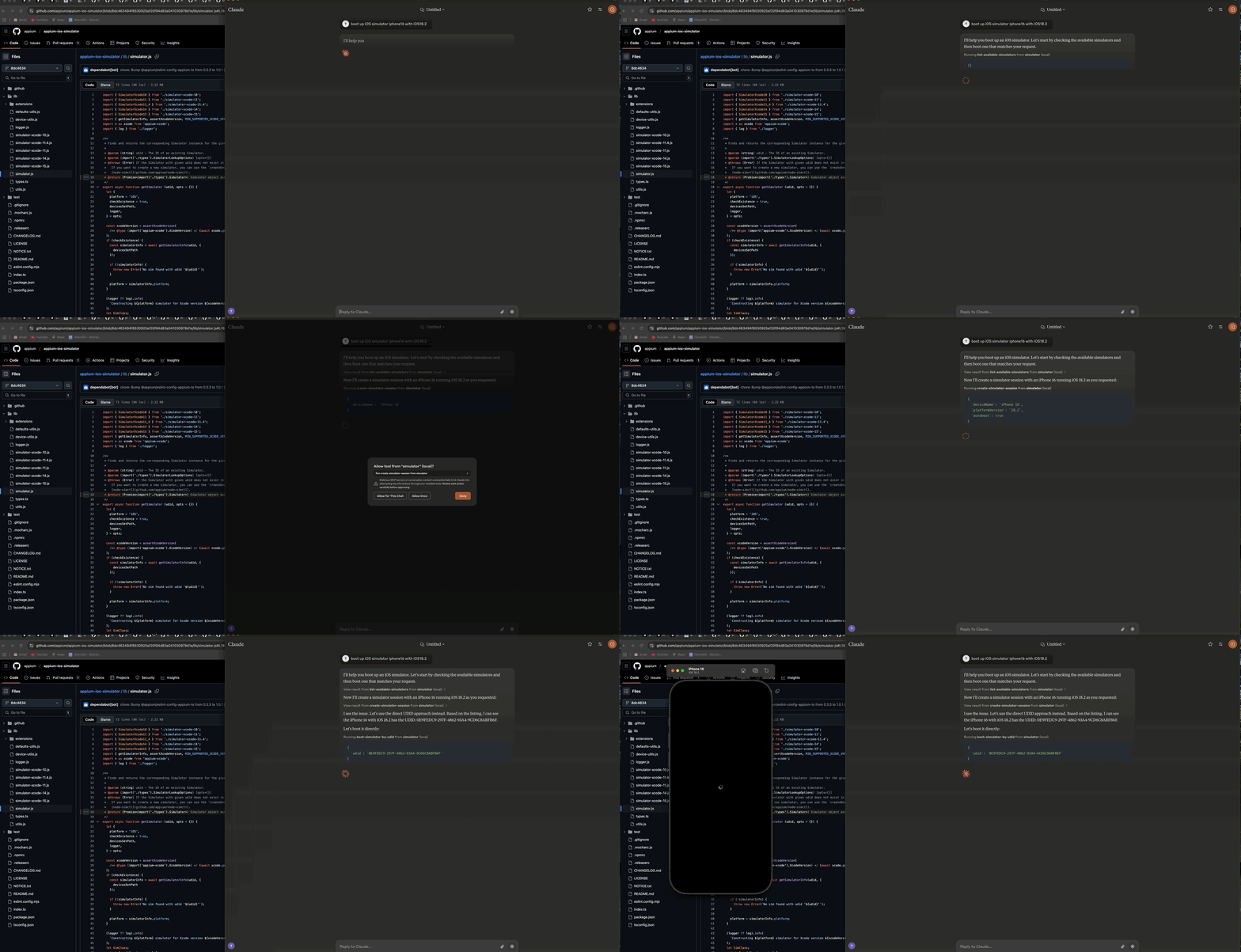
Demo, die zeigt, wie man einen iOS-Simulator über Claude AI Desktop startet
Der Server besteht aus drei Hauptkomponenten:
🔄 Simulator-Management-Ebene - Verwaltet den Lebenszyklus und die Interaktionen des iOS-Simulators
🔌 MCP-Protokoll-Implementierung - Implementiert das Model Context Protocol unter Verwendung des TypeScript SDK mit stdio-Transport
📊 Logger-Komponente - Bietet dateibasierte Protokollierung, ohne den stdio-Transport zu stören
┌─────────────────┐     ┌─────────────────┐     ┌─────────────────┐
│  MCP Protocol   │     │     Stdio       │     │    Simulator    │
│  Implementation │◄────┤    Transport    │◄────┤   Management    │
│                 │     │                 │     │      Layer      │
└─────────────────┘     └─────────────────┘     └─────────────────┘
        ▲                                                ▲
        │                                                │
        ▼                                                ▼
┌─────────────────┐                             ┌─────────────────┐
│   MCP Client    │                             │  iOS Simulator  │
│  (e.g. Claude)  │                             │                 │
└─────────────────┘ └─────────────────┘🚀 Starten, Stoppen und Verwalten von iOS-Simulator-Instanzen
🔌 Booten und Herunterfahren von Simulatoren
📲 Installieren und Starten von Anwendungen auf Simulatoren
📸 Erstellen von Screenshots der Simulator-Bildschirme
👆 Ausführen von Tipp-Gesten auf Koordinaten
🔄 Unterstützung für mehrere gleichzeitige Simulator-Sitzungen
📝 Umfassende dateibasierte Protokollierung ohne Konsolenausgabe
🛡️ Fehlerresistenter Betrieb
🟢 Node.js (v16 oder neuer)
🍎 macOS (erforderlich für iOS-Simulatoren)
🛠️ Xcode mit installierten iOS-Simulatoren
📜 TypeScript 4.5+
Um den iOS Simulator Control Server automatisch für Claude Desktop via Smithery zu installieren:
npx -y @smithery/cli install @atom2ueki/mcp-server-ios-simulator --client claude# Clone the repository
git clone https://github.com/atom2ueki/mcp-server-ios-simulator.git
cd mcp-server-ios-simulator
# Install dependencies
npm installEin Dockerfile wird bereitgestellt, damit der Server für das Glama MCP-Verzeichnis und andere Container-Hosts verpackt werden kann.
docker build -t mcp-server-ios-simulator .
docker run --rm -i mcp-server-ios-simulator
Hinweis: iOS-Simulatoren laufen nur auf macOS. Ein Linux-Container kann den MCP-Prozess hosten und über stdio antworten, aber keinen echten Simulator steuern. Der Container ist für Portabilitätsprüfungen und entfernte MCP-Umgebungen gedacht, die eine Brücke zu einem macOS-Host schlagen.
Die Konfiguration erfolgt über die Datei src/config.ts:
const config = {
  simulator: {
    defaultDevice: process.env.SIMULATOR_DEFAULT_DEVICE || 'iPhone 16',
    defaultOS: process.env.SIMULATOR_DEFAULT_OS || '18.2',
    timeout: parseInt(process.env.SIMULATOR_TIMEOUT || '30000', 10),
  }
};
Sie können diese Einstellungen durch das Setzen von Umgebungsvariablen anpassen:
SIMULATOR_DEFAULT_DEVICE=iPhone 16
SIMULATOR_DEFAULT_OS=18.2
SIMULATOR_TIMEOUT=30000# Build the project
npm run build
# Start the server
npm startDer Server bietet zwei verschiedene Ansätze zur Steuerung von iOS-Simulatoren:
Diese Tools arbeiten direkt mit Simulator-UDIDs und erfordern keine Sitzungsverwaltung:
📋 list-available-simulators - Listet alle verfügbaren Simulatoren mit ihren UDIDs auf
▶️ boot-simulator-by-udid - Bootet einen Simulator direkt über seine UDID
⏹️ shutdown-simulator-by-udid - Fährt einen Simulator direkt über seine UDID herunter
📊 list-booted-simulators - Listet alle aktuell gebooteten Simulatoren auf
Verwenden Sie diesen Ansatz, wenn: Sie Simulatoren einfach direkt booten, verwenden und herunterfahren möchten.
Diese Tools verwenden eine Sitzungsebene, die Simulatoren mit benutzerdefinierten Sitzungs-IDs verfolgt:
📋 list-simulator-sessions - Listet alle aktiven Simulator-Sitzungen auf
➕ create-simulator-session - Erstellt eine neue Simulator-Sitzung
❌ terminate-simulator-session - Beendet eine Sitzung (fährt den Simulator herunter und räumt auf)
🔄 create-and-boot-simulator - Erstellt eine neue Simulator-Sitzung und bootet sie
▶️ boot-simulator - Bootet einen Simulator für eine bestehende Sitzung
⏹️ shutdown-simulator - Fährt einen Simulator für eine bestehende Sitzung herunter
Verwenden Sie diesen Ansatz, wenn: Sie Simulator-Metadaten verfolgen, Simulatoren über benutzerdefinierte IDs referenzieren oder die fortgeschritteneren Management-Funktionen nutzen müssen.
📥 install-app - Installiert eine Anwendung auf einem Simulator
🚀 launch-app - Startet eine Anwendung auf einem Simulator
🛑 terminate-app - Beendet eine laufende Anwendung auf einem Simulator
📷 take-screenshot - Erstellt einen Screenshot des Simulator-Bildschirms
👆 tap-coordinate - Führt einen Tipp-Vorgang an den angegebenen Koordinaten aus
Konfigurieren Sie Claude Desktop so, dass dieser Server als MCP-Tool verwendet wird:
Öffnen Sie Claude Desktop
Gehen Sie zu Einstellungen > Erweitert
Fügen Sie die folgende Konfiguration zum Abschnitt "MCP Servers" hinzu:
{
  "mcpServers": {
    "simulator": {
      "command": "node",
      "args": [
        "/path/to/your/mcp-server-ios-simulator/dist/index.js"
      ]
    }
  }
}
Ersetzen Sie /path/to/your durch den tatsächlichen Pfad, in dem Sie dieses Repository installiert haben
Speichern Sie die Einstellungen und starten Sie Claude Desktop neu
Verwenden Sie die bereitgestellten Tools, um iOS-Simulatoren direkt von Claude Desktop aus zu steuern:
Direkter UDID-Ansatz (Empfohlen):
Bitten Sie Claude zuerst, die verfügbaren Simulatoren aufzulisten:
"Show me all available iOS simulators"Verwenden Sie dann die UDID, um einen bestimmten Simulator zu booten:
"Boot the iOS simulator with UDID 5272EA61-5796-4372-86FE-3B33831D5CC1"Wenn Sie fertig sind, fahren Sie ihn mit derselben UDID herunter:
"Shut down the simulator with UDID 5272EA61-5796-4372-86FE-3B33831D5CC1"Der direkte UDID-Ansatz ist für die meisten Anwendungsfälle einfacher und zuverlässiger.
**Sitzungsbasierter Ansatz (Fortgeschritten): Verwenden Sie diesen Ansatz nur, wenn Sie die erweiterten Funktionen der Sitzungsverfolgung benötigen:
"Create a new simulator session for iPhone 16 Pro with iOS 18.2"
"Boot the simulator for session abc-123"
"Take a screenshot of the simulator for session abc-123"
"Terminate the simulator session abc-123"src/
├── simulator/ # Simulator management layer
├── mcp/ # MCP protocol implementation
├── bridge/ # Bridge component
├── utils/ # Utility functions including logger
├── config.ts # Configuration handling
└── index.ts # Entry point# Install development dependencies
npm install
# Run TypeScript compiler
npm run buildDieses Projekt ist unter der MIT-Lizenz lizenziert - siehe die Datei LICENSE für Details.
📱 appium-ios-simulator für die Bereitstellung der Interaktionsmöglichkeiten mit dem iOS-Simulator
🔌 Model Context Protocol für die Protokollspezifikation und das TypeScript SDK
| Name | Required | Description | Default |
|---|---|---|---|
| udid | Yes |
Does the description disclose side effects, auth requirements, rate limits, or destructive behavior?
Tool has no description.
Agents need to know what a tool does to the world before calling it. Descriptions should go beyond structured annotations to explain consequences.
Is the description appropriately sized, front-loaded, and free of redundancy?
Tool has no description.
Shorter descriptions cost fewer tokens and are easier for agents to parse. Every sentence should earn its place.
Given the tool's complexity, does the description cover enough for an agent to succeed on first attempt?
Tool has no description.
Complex tools with many parameters or behaviors need more documentation. Simple tools need less. This dimension scales expectations accordingly.
Does the description clarify parameter syntax, constraints, interactions, or defaults beyond what the schema provides?
Tool has no description.
Input schemas describe structure but not intent. Descriptions should explain non-obvious parameter relationships and valid value ranges.
Does the description clearly state what the tool does and how it differs from similar tools?
Tool has no description.
Agents choose between tools based on descriptions. A clear purpose with a specific verb and resource helps agents select the right tool.
Does the description explain when to use this tool, when not to, or what alternatives exist?
Tool has no description.
Agents often have multiple tools that could apply. Explicit usage guidance like "use X instead of Y when Z" prevents misuse.
| Name | Required | Description | Default |
|---|---|---|---|
| autoboot | No | ||
| deviceName | No | ||
| platformVersion | No | ||
| timeout | No |
Does the description disclose side effects, auth requirements, rate limits, or destructive behavior?
Tool has no description.
Agents need to know what a tool does to the world before calling it. Descriptions should go beyond structured annotations to explain consequences.
Is the description appropriately sized, front-loaded, and free of redundancy?
Tool has no description.
Shorter descriptions cost fewer tokens and are easier for agents to parse. Every sentence should earn its place.
Given the tool's complexity, does the description cover enough for an agent to succeed on first attempt?
Tool has no description.
Complex tools with many parameters or behaviors need more documentation. Simple tools need less. This dimension scales expectations accordingly.
Does the description clarify parameter syntax, constraints, interactions, or defaults beyond what the schema provides?
Tool has no description.
Input schemas describe structure but not intent. Descriptions should explain non-obvious parameter relationships and valid value ranges.
Does the description clearly state what the tool does and how it differs from similar tools?
Tool has no description.
Agents choose between tools based on descriptions. A clear purpose with a specific verb and resource helps agents select the right tool.
Does the description explain when to use this tool, when not to, or what alternatives exist?
Tool has no description.
Agents often have multiple tools that could apply. Explicit usage guidance like "use X instead of Y when Z" prevents misuse.
| Name | Required | Description | Default |
|---|---|---|---|
| appPath | Yes | ||
| sessionId | Yes |
Does the description disclose side effects, auth requirements, rate limits, or destructive behavior?
Tool has no description.
Agents need to know what a tool does to the world before calling it. Descriptions should go beyond structured annotations to explain consequences.
Is the description appropriately sized, front-loaded, and free of redundancy?
Tool has no description.
Shorter descriptions cost fewer tokens and are easier for agents to parse. Every sentence should earn its place.
Given the tool's complexity, does the description cover enough for an agent to succeed on first attempt?
Tool has no description.
Complex tools with many parameters or behaviors need more documentation. Simple tools need less. This dimension scales expectations accordingly.
Does the description clarify parameter syntax, constraints, interactions, or defaults beyond what the schema provides?
Tool has no description.
Input schemas describe structure but not intent. Descriptions should explain non-obvious parameter relationships and valid value ranges.
Does the description clearly state what the tool does and how it differs from similar tools?
Tool has no description.
Agents choose between tools based on descriptions. A clear purpose with a specific verb and resource helps agents select the right tool.
Does the description explain when to use this tool, when not to, or what alternatives exist?
Tool has no description.
Agents often have multiple tools that could apply. Explicit usage guidance like "use X instead of Y when Z" prevents misuse.
| Name | Required | Description | Default |
|---|---|---|---|
| bundleId | Yes | ||
| sessionId | Yes |
Does the description disclose side effects, auth requirements, rate limits, or destructive behavior?
Tool has no description.
Agents need to know what a tool does to the world before calling it. Descriptions should go beyond structured annotations to explain consequences.
Is the description appropriately sized, front-loaded, and free of redundancy?
Tool has no description.
Shorter descriptions cost fewer tokens and are easier for agents to parse. Every sentence should earn its place.
Given the tool's complexity, does the description cover enough for an agent to succeed on first attempt?
Tool has no description.
Complex tools with many parameters or behaviors need more documentation. Simple tools need less. This dimension scales expectations accordingly.
Does the description clarify parameter syntax, constraints, interactions, or defaults beyond what the schema provides?
Tool has no description.
Input schemas describe structure but not intent. Descriptions should explain non-obvious parameter relationships and valid value ranges.
Does the description clearly state what the tool does and how it differs from similar tools?
Tool has no description.
Agents choose between tools based on descriptions. A clear purpose with a specific verb and resource helps agents select the right tool.
Does the description explain when to use this tool, when not to, or what alternatives exist?
Tool has no description.
Agents often have multiple tools that could apply. Explicit usage guidance like "use X instead of Y when Z" prevents misuse.
| Name | Required | Description | Default |
|---|---|---|---|
No parameters | |||
Does the description disclose side effects, auth requirements, rate limits, or destructive behavior?
Tool has no description.
Agents need to know what a tool does to the world before calling it. Descriptions should go beyond structured annotations to explain consequences.
Is the description appropriately sized, front-loaded, and free of redundancy?
Tool has no description.
Shorter descriptions cost fewer tokens and are easier for agents to parse. Every sentence should earn its place.
Given the tool's complexity, does the description cover enough for an agent to succeed on first attempt?
Tool has no description.
Complex tools with many parameters or behaviors need more documentation. Simple tools need less. This dimension scales expectations accordingly.
Does the description clarify parameter syntax, constraints, interactions, or defaults beyond what the schema provides?
Tool has no description.
Input schemas describe structure but not intent. Descriptions should explain non-obvious parameter relationships and valid value ranges.
Does the description clearly state what the tool does and how it differs from similar tools?
Tool has no description.
Agents choose between tools based on descriptions. A clear purpose with a specific verb and resource helps agents select the right tool.
Does the description explain when to use this tool, when not to, or what alternatives exist?
Tool has no description.
Agents often have multiple tools that could apply. Explicit usage guidance like "use X instead of Y when Z" prevents misuse.
| Name | Required | Description | Default |
|---|---|---|---|
No parameters | |||
Does the description disclose side effects, auth requirements, rate limits, or destructive behavior?
Tool has no description.
Agents need to know what a tool does to the world before calling it. Descriptions should go beyond structured annotations to explain consequences.
Is the description appropriately sized, front-loaded, and free of redundancy?
Tool has no description.
Shorter descriptions cost fewer tokens and are easier for agents to parse. Every sentence should earn its place.
Given the tool's complexity, does the description cover enough for an agent to succeed on first attempt?
Tool has no description.
Complex tools with many parameters or behaviors need more documentation. Simple tools need less. This dimension scales expectations accordingly.
Does the description clarify parameter syntax, constraints, interactions, or defaults beyond what the schema provides?
Tool has no description.
Input schemas describe structure but not intent. Descriptions should explain non-obvious parameter relationships and valid value ranges.
Does the description clearly state what the tool does and how it differs from similar tools?
Tool has no description.
Agents choose between tools based on descriptions. A clear purpose with a specific verb and resource helps agents select the right tool.
Does the description explain when to use this tool, when not to, or what alternatives exist?
Tool has no description.
Agents often have multiple tools that could apply. Explicit usage guidance like "use X instead of Y when Z" prevents misuse.
| Name | Required | Description | Default |
|---|---|---|---|
No parameters | |||
Does the description disclose side effects, auth requirements, rate limits, or destructive behavior?
Tool has no description.
Agents need to know what a tool does to the world before calling it. Descriptions should go beyond structured annotations to explain consequences.
Is the description appropriately sized, front-loaded, and free of redundancy?
Tool has no description.
Shorter descriptions cost fewer tokens and are easier for agents to parse. Every sentence should earn its place.
Given the tool's complexity, does the description cover enough for an agent to succeed on first attempt?
Tool has no description.
Complex tools with many parameters or behaviors need more documentation. Simple tools need less. This dimension scales expectations accordingly.
Does the description clarify parameter syntax, constraints, interactions, or defaults beyond what the schema provides?
Tool has no description.
Input schemas describe structure but not intent. Descriptions should explain non-obvious parameter relationships and valid value ranges.
Does the description clearly state what the tool does and how it differs from similar tools?
Tool has no description.
Agents choose between tools based on descriptions. A clear purpose with a specific verb and resource helps agents select the right tool.
Does the description explain when to use this tool, when not to, or what alternatives exist?
Tool has no description.
Agents often have multiple tools that could apply. Explicit usage guidance like "use X instead of Y when Z" prevents misuse.
| Name | Required | Description | Default |
|---|---|---|---|
| sessionId | Yes |
Does the description disclose side effects, auth requirements, rate limits, or destructive behavior?
Tool has no description.
Agents need to know what a tool does to the world before calling it. Descriptions should go beyond structured annotations to explain consequences.
Is the description appropriately sized, front-loaded, and free of redundancy?
Tool has no description.
Shorter descriptions cost fewer tokens and are easier for agents to parse. Every sentence should earn its place.
Given the tool's complexity, does the description cover enough for an agent to succeed on first attempt?
Tool has no description.
Complex tools with many parameters or behaviors need more documentation. Simple tools need less. This dimension scales expectations accordingly.
Does the description clarify parameter syntax, constraints, interactions, or defaults beyond what the schema provides?
Tool has no description.
Input schemas describe structure but not intent. Descriptions should explain non-obvious parameter relationships and valid value ranges.
Does the description clearly state what the tool does and how it differs from similar tools?
Tool has no description.
Agents choose between tools based on descriptions. A clear purpose with a specific verb and resource helps agents select the right tool.
Does the description explain when to use this tool, when not to, or what alternatives exist?
Tool has no description.
Agents often have multiple tools that could apply. Explicit usage guidance like "use X instead of Y when Z" prevents misuse.
| Name | Required | Description | Default |
|---|---|---|---|
| udid | Yes |
Does the description disclose side effects, auth requirements, rate limits, or destructive behavior?
Tool has no description.
Agents need to know what a tool does to the world before calling it. Descriptions should go beyond structured annotations to explain consequences.
Is the description appropriately sized, front-loaded, and free of redundancy?
Tool has no description.
Shorter descriptions cost fewer tokens and are easier for agents to parse. Every sentence should earn its place.
Given the tool's complexity, does the description cover enough for an agent to succeed on first attempt?
Tool has no description.
Complex tools with many parameters or behaviors need more documentation. Simple tools need less. This dimension scales expectations accordingly.
Does the description clarify parameter syntax, constraints, interactions, or defaults beyond what the schema provides?
Tool has no description.
Input schemas describe structure but not intent. Descriptions should explain non-obvious parameter relationships and valid value ranges.
Does the description clearly state what the tool does and how it differs from similar tools?
Tool has no description.
Agents choose between tools based on descriptions. A clear purpose with a specific verb and resource helps agents select the right tool.
Does the description explain when to use this tool, when not to, or what alternatives exist?
Tool has no description.
Agents often have multiple tools that could apply. Explicit usage guidance like "use X instead of Y when Z" prevents misuse.
| Name | Required | Description | Default |
|---|---|---|---|
| sessionId | Yes | ||
| x | Yes | ||
| y | Yes |
Does the description disclose side effects, auth requirements, rate limits, or destructive behavior?
Tool has no description.
Agents need to know what a tool does to the world before calling it. Descriptions should go beyond structured annotations to explain consequences.
Is the description appropriately sized, front-loaded, and free of redundancy?
Tool has no description.
Shorter descriptions cost fewer tokens and are easier for agents to parse. Every sentence should earn its place.
Given the tool's complexity, does the description cover enough for an agent to succeed on first attempt?
Tool has no description.
Complex tools with many parameters or behaviors need more documentation. Simple tools need less. This dimension scales expectations accordingly.
Does the description clarify parameter syntax, constraints, interactions, or defaults beyond what the schema provides?
Tool has no description.
Input schemas describe structure but not intent. Descriptions should explain non-obvious parameter relationships and valid value ranges.
Does the description clearly state what the tool does and how it differs from similar tools?
Tool has no description.
Agents choose between tools based on descriptions. A clear purpose with a specific verb and resource helps agents select the right tool.
Does the description explain when to use this tool, when not to, or what alternatives exist?
Tool has no description.
Agents often have multiple tools that could apply. Explicit usage guidance like "use X instead of Y when Z" prevents misuse.
| Name | Required | Description | Default |
|---|---|---|---|
| bundleId | Yes | ||
| sessionId | Yes |
Does the description disclose side effects, auth requirements, rate limits, or destructive behavior?
Tool has no description.
Agents need to know what a tool does to the world before calling it. Descriptions should go beyond structured annotations to explain consequences.
Is the description appropriately sized, front-loaded, and free of redundancy?
Tool has no description.
Shorter descriptions cost fewer tokens and are easier for agents to parse. Every sentence should earn its place.
Given the tool's complexity, does the description cover enough for an agent to succeed on first attempt?
Tool has no description.
Complex tools with many parameters or behaviors need more documentation. Simple tools need less. This dimension scales expectations accordingly.
Does the description clarify parameter syntax, constraints, interactions, or defaults beyond what the schema provides?
Tool has no description.
Input schemas describe structure but not intent. Descriptions should explain non-obvious parameter relationships and valid value ranges.
Does the description clearly state what the tool does and how it differs from similar tools?
Tool has no description.
Agents choose between tools based on descriptions. A clear purpose with a specific verb and resource helps agents select the right tool.
Does the description explain when to use this tool, when not to, or what alternatives exist?
Tool has no description.
Agents often have multiple tools that could apply. Explicit usage guidance like "use X instead of Y when Z" prevents misuse.
| Name | Required | Description | Default |
|---|---|---|---|
| sessionId | Yes |
Does the description disclose side effects, auth requirements, rate limits, or destructive behavior?
Tool has no description.
Agents need to know what a tool does to the world before calling it. Descriptions should go beyond structured annotations to explain consequences.
Is the description appropriately sized, front-loaded, and free of redundancy?
Tool has no description.
Shorter descriptions cost fewer tokens and are easier for agents to parse. Every sentence should earn its place.
Given the tool's complexity, does the description cover enough for an agent to succeed on first attempt?
Tool has no description.
Complex tools with many parameters or behaviors need more documentation. Simple tools need less. This dimension scales expectations accordingly.
Does the description clarify parameter syntax, constraints, interactions, or defaults beyond what the schema provides?
Tool has no description.
Input schemas describe structure but not intent. Descriptions should explain non-obvious parameter relationships and valid value ranges.
Does the description clearly state what the tool does and how it differs from similar tools?
Tool has no description.
Agents choose between tools based on descriptions. A clear purpose with a specific verb and resource helps agents select the right tool.
Does the description explain when to use this tool, when not to, or what alternatives exist?
Tool has no description.
Agents often have multiple tools that could apply. Explicit usage guidance like "use X instead of Y when Z" prevents misuse.
Recent tool additions, removals, and schema changes observed during successful MCP inspections.
v1.0.0boot-simulator-by-udidcreate-simulator-sessioninstall-applaunch-applist-available-simulatorslist-booted-simulatorslist-simulator-sessionsshutdown-simulatorshutdown-simulator-by-udidtapterminate-appterminate-simulator-sessionScored across 12 tools
Every tool has a clearly distinct purpose targeting specific simulator operations like booting, listing, installing apps, launching, tapping, and terminating. There is no ambiguity between tools - each handles a unique action on a specific resource (simulator, app, or session).
All tools follow a consistent verb_noun or verb_noun_by_udid pattern with hyphen-separated lowercase words. The naming is perfectly predictable throughout the set, making it easy to understand each tool's function at a glance.
With 12 tools, this server provides comprehensive coverage for iOS simulator management. The count is well-scoped for the domain, offering essential operations without being overwhelming or insufficient for typical automation workflows.
The toolset provides complete lifecycle coverage for iOS simulator operations: discovery (list-available/list-booted), control (boot/shutdown), app management (install/launch/terminate), session handling (create/terminate), and interaction (tap). No obvious gaps exist for the stated purpose.
A Model Context Protocol server for Wix AI tools
Model Context Protocol server for Studex tools, notifications, and profile integrations
A comprehensive Model Context Protocol (MCP) server that enables AI assistants to interact with yo…
A Model Context Protocol (MCP) application for automated GitHub PR analysis and issue management.…