
A
licenseNot graded
qualityD
maintenanceA Model Context Protocol server that enables AI assistants to interact with iOS simulators, perform accessibility testing, manage apps, and automate complex iOS workflows.
32
Apache 2.0

Un servidor que implementa el Protocolo de Contexto de Modelo (MCP) para simuladores de iOS, construido sobre appium-ios-simulator y utilizando el SDK de TypeScript de MCP.
Este proyecto proporciona un puente entre los simuladores de iOS y el Protocolo de Contexto de Modelo, permitiendo una comunicación estandarizada con instancias de simuladores de iOS. Permite el control programático de los simuladores de iOS mientras aprovecha el protocolo MCP para obtener interfaces consistentes en diferentes entornos. El servidor utiliza stdio como mecanismo de transporte, lo que lo hace ideal para la integración con Claude Desktop y otros clientes compatibles con MCP.
Related MCP server: Simulator MCP
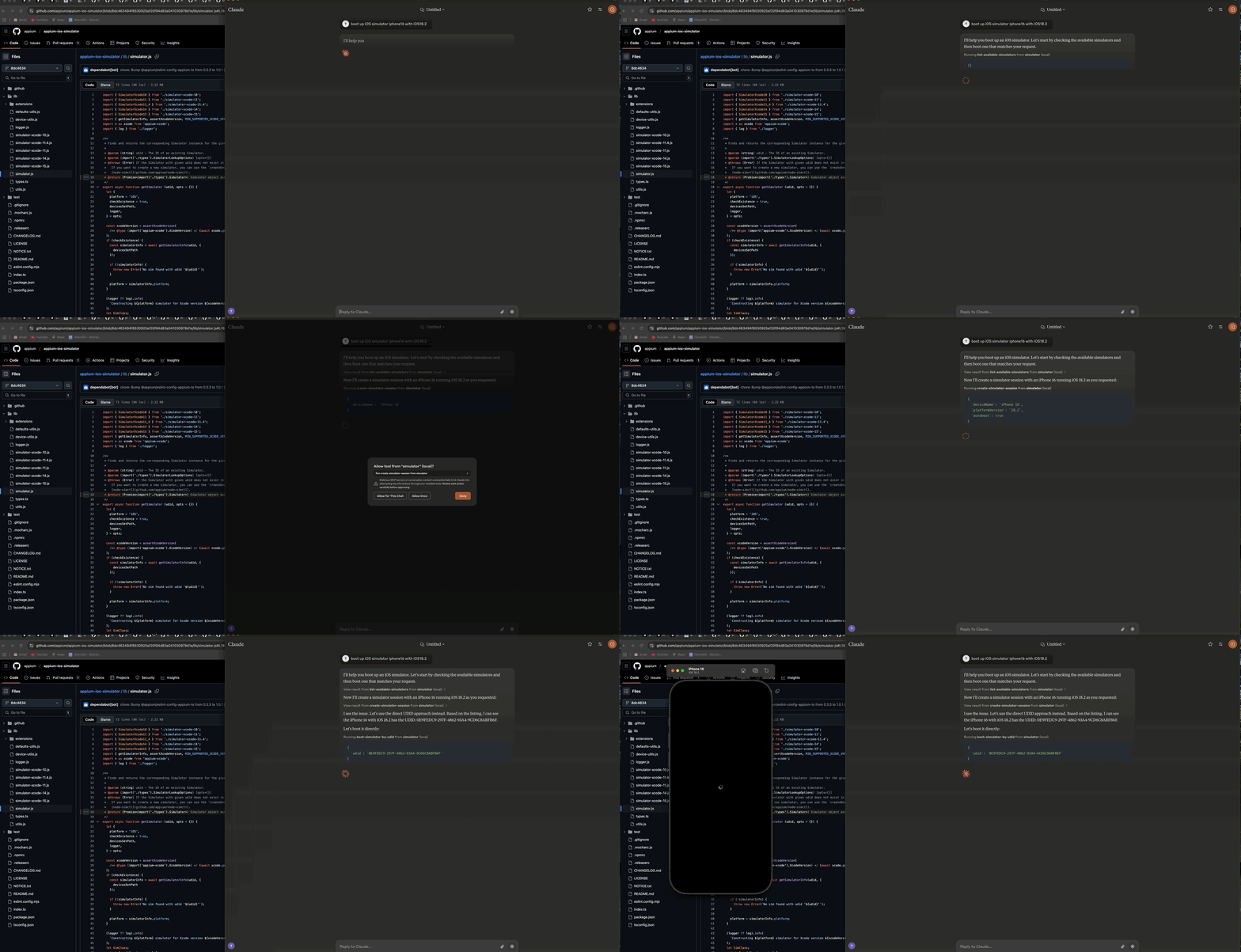
Demostración que muestra cómo iniciar un simulador de iOS usando Claude AI Desktop
El servidor consta de tres componentes principales:
🔄 Capa de gestión del simulador - Maneja el ciclo de vida y las interacciones del simulador de iOS
🔌 Implementación del protocolo MCP - Implementa el Protocolo de Contexto de Modelo utilizando el SDK de TypeScript con transporte stdio
📊 Componente de registro (Logger) - Proporciona registro basado en archivos sin interferir con el transporte stdio
┌─────────────────┐     ┌─────────────────┐     ┌─────────────────┐
│  MCP Protocol   │     │     Stdio       │     │    Simulator    │
│  Implementation │◄────┤    Transport    │◄────┤   Management    │
│                 │     │                 │     │      Layer      │
└─────────────────┘     └─────────────────┘     └─────────────────┘
        ▲                                                ▲
        │                                                │
        ▼                                                ▼
┌─────────────────┐                             ┌─────────────────┐
│   MCP Client    │                             │  iOS Simulator  │
│  (e.g. Claude)  │                             │                 │
└─────────────────┘ └─────────────────┘🚀 Iniciar, detener y gestionar instancias de simuladores de iOS
🔌 Arrancar y apagar simuladores
📲 Instalar y ejecutar aplicaciones en simuladores
📸 Tomar capturas de pantalla de las pantallas del simulador
👆 Realizar toques en coordenadas
🔄 Soporte para múltiples sesiones de simulador simultáneas
📝 Registro completo basado en archivos sin salida de consola
🛡️ Operación resistente a errores
🟢 Node.js (v16 o posterior)
🍎 macOS (requerido para simuladores de iOS)
🛠️ Xcode con simuladores de iOS instalados
📜 TypeScript 4.5+
Para instalar el Servidor de Control de Simulador de iOS para Claude Desktop automáticamente a través de Smithery:
npx -y @smithery/cli install @atom2ueki/mcp-server-ios-simulator --client claude# Clone the repository
git clone https://github.com/atom2ueki/mcp-server-ios-simulator.git
cd mcp-server-ios-simulator
# Install dependencies
npm installSe proporciona un Dockerfile para que el servidor pueda empaquetarse para el directorio Glama MCP y otros hosts de contenedores.
docker build -t mcp-server-ios-simulator .
docker run --rm -i mcp-server-ios-simulator
Nota: Los simuladores de iOS solo se ejecutan en macOS, por lo que un contenedor de Linux puede alojar el proceso MCP y responder en stdio, pero no puede controlar un simulador real. El contenedor está destinado a comprobaciones de portabilidad y entornos MCP remotos que se conectan a un host macOS.
La configuración se gestiona a través del archivo src/config.ts:
const config = {
  simulator: {
    defaultDevice: process.env.SIMULATOR_DEFAULT_DEVICE || 'iPhone 16',
    defaultOS: process.env.SIMULATOR_DEFAULT_OS || '18.2',
    timeout: parseInt(process.env.SIMULATOR_TIMEOUT || '30000', 10),
  }
};
Puede personalizar estos ajustes configurando variables de entorno:
SIMULATOR_DEFAULT_DEVICE=iPhone 16
SIMULATOR_DEFAULT_OS=18.2
SIMULATOR_TIMEOUT=30000# Build the project
npm run build
# Start the server
npm startEl servidor proporciona dos enfoques distintos para controlar los simuladores de iOS:
Estas herramientas funcionan directamente con los UDID del simulador y no requieren mantener sesiones:
📋 list-available-simulators - Listar todos los simuladores disponibles con sus UDID
▶️ boot-simulator-by-udid - Arrancar un simulador directamente usando su UDID
⏹️ shutdown-simulator-by-udid - Apagar un simulador directamente usando su UDID
📊 list-booted-simulators - Listar todos los simuladores arrancados actualmente
Use este enfoque cuando: Solo desee arrancar, usar y apagar simuladores directamente.
Estas herramientas utilizan una capa de sesión que rastrea los simuladores con ID de sesión personalizados:
📋 list-simulator-sessions - Listar todas las sesiones de simulador activas
➕ create-simulator-session - Crear una nueva sesión de simulador
❌ terminate-simulator-session - Terminar una sesión (apaga el simulador y limpia)
🔄 create-and-boot-simulator - Crear una nueva sesión de simulador y arrancarla
▶️ boot-simulator - Arrancar un simulador para una sesión existente
⏹️ shutdown-simulator - Apagar un simulador para una sesión existente
Use este enfoque cuando: Necesite rastrear metadatos del simulador, hacer referencia a simuladores mediante ID personalizados o utilizar las funciones de gestión más avanzadas.
📥 install-app - Instalar una aplicación en un simulador
🚀 launch-app - Ejecutar una aplicación en un simulador
🛑 terminate-app - Terminar una aplicación en ejecución en un simulador
📷 take-screenshot - Tomar una captura de pantalla de la pantalla del simulador
👆 tap-coordinate - Realizar un toque en las coordenadas especificadas
Configure Claude Desktop para usar este servidor como una herramienta MCP:
Abra Claude Desktop
Vaya a Configuración > Avanzado
Agregue la siguiente configuración a la sección "MCP Servers":
{
  "mcpServers": {
    "simulator": {
      "command": "node",
      "args": [
        "/path/to/your/mcp-server-ios-simulator/dist/index.js"
      ]
    }
  }
}
Reemplace /path/to/your con la ruta real donde ha instalado este repositorio
Guarde la configuración y reinicie Claude Desktop
Use las herramientas proporcionadas para controlar los simuladores de iOS directamente desde Claude Desktop:
Enfoque de UDID directo (Recomendado):
Primero, pídale a Claude que liste los simuladores disponibles:
"Show me all available iOS simulators"Luego use el UDID para arrancar un simulador específico:
"Boot the iOS simulator with UDID 5272EA61-5796-4372-86FE-3B33831D5CC1"Cuando termine, apáguelo usando el mismo UDID:
"Shut down the simulator with UDID 5272EA61-5796-4372-86FE-3B33831D5CC1"El enfoque de UDID directo es más simple y confiable para la mayoría de los casos de uso.
**Enfoque basado en sesiones (Avanzado): Solo use este enfoque si necesita las funciones avanzadas de seguimiento de sesiones:
"Create a new simulator session for iPhone 16 Pro with iOS 18.2"
"Boot the simulator for session abc-123"
"Take a screenshot of the simulator for session abc-123"
"Terminate the simulator session abc-123"src/
├── simulator/ # Simulator management layer
├── mcp/ # MCP protocol implementation
├── bridge/ # Bridge component
├── utils/ # Utility functions including logger
├── config.ts # Configuration handling
└── index.ts # Entry point# Install development dependencies
npm install
# Run TypeScript compiler
npm run buildEste proyecto está bajo la Licencia MIT - consulte el archivo LICENSE para obtener más detalles.
📱 appium-ios-simulator por proporcionar las capacidades de interacción con el simulador de iOS
🔌 Protocolo de Contexto de Modelo por la especificación del protocolo y el SDK de TypeScript
| Name | Required | Description | Default |
|---|---|---|---|
| udid | Yes |
Does the description disclose side effects, auth requirements, rate limits, or destructive behavior?
Tool has no description.
Agents need to know what a tool does to the world before calling it. Descriptions should go beyond structured annotations to explain consequences.
Is the description appropriately sized, front-loaded, and free of redundancy?
Tool has no description.
Shorter descriptions cost fewer tokens and are easier for agents to parse. Every sentence should earn its place.
Given the tool's complexity, does the description cover enough for an agent to succeed on first attempt?
Tool has no description.
Complex tools with many parameters or behaviors need more documentation. Simple tools need less. This dimension scales expectations accordingly.
Does the description clarify parameter syntax, constraints, interactions, or defaults beyond what the schema provides?
Tool has no description.
Input schemas describe structure but not intent. Descriptions should explain non-obvious parameter relationships and valid value ranges.
Does the description clearly state what the tool does and how it differs from similar tools?
Tool has no description.
Agents choose between tools based on descriptions. A clear purpose with a specific verb and resource helps agents select the right tool.
Does the description explain when to use this tool, when not to, or what alternatives exist?
Tool has no description.
Agents often have multiple tools that could apply. Explicit usage guidance like "use X instead of Y when Z" prevents misuse.
| Name | Required | Description | Default |
|---|---|---|---|
| autoboot | No | ||
| deviceName | No | ||
| platformVersion | No | ||
| timeout | No |
Does the description disclose side effects, auth requirements, rate limits, or destructive behavior?
Tool has no description.
Agents need to know what a tool does to the world before calling it. Descriptions should go beyond structured annotations to explain consequences.
Is the description appropriately sized, front-loaded, and free of redundancy?
Tool has no description.
Shorter descriptions cost fewer tokens and are easier for agents to parse. Every sentence should earn its place.
Given the tool's complexity, does the description cover enough for an agent to succeed on first attempt?
Tool has no description.
Complex tools with many parameters or behaviors need more documentation. Simple tools need less. This dimension scales expectations accordingly.
Does the description clarify parameter syntax, constraints, interactions, or defaults beyond what the schema provides?
Tool has no description.
Input schemas describe structure but not intent. Descriptions should explain non-obvious parameter relationships and valid value ranges.
Does the description clearly state what the tool does and how it differs from similar tools?
Tool has no description.
Agents choose between tools based on descriptions. A clear purpose with a specific verb and resource helps agents select the right tool.
Does the description explain when to use this tool, when not to, or what alternatives exist?
Tool has no description.
Agents often have multiple tools that could apply. Explicit usage guidance like "use X instead of Y when Z" prevents misuse.
| Name | Required | Description | Default |
|---|---|---|---|
| appPath | Yes | ||
| sessionId | Yes |
Does the description disclose side effects, auth requirements, rate limits, or destructive behavior?
Tool has no description.
Agents need to know what a tool does to the world before calling it. Descriptions should go beyond structured annotations to explain consequences.
Is the description appropriately sized, front-loaded, and free of redundancy?
Tool has no description.
Shorter descriptions cost fewer tokens and are easier for agents to parse. Every sentence should earn its place.
Given the tool's complexity, does the description cover enough for an agent to succeed on first attempt?
Tool has no description.
Complex tools with many parameters or behaviors need more documentation. Simple tools need less. This dimension scales expectations accordingly.
Does the description clarify parameter syntax, constraints, interactions, or defaults beyond what the schema provides?
Tool has no description.
Input schemas describe structure but not intent. Descriptions should explain non-obvious parameter relationships and valid value ranges.
Does the description clearly state what the tool does and how it differs from similar tools?
Tool has no description.
Agents choose between tools based on descriptions. A clear purpose with a specific verb and resource helps agents select the right tool.
Does the description explain when to use this tool, when not to, or what alternatives exist?
Tool has no description.
Agents often have multiple tools that could apply. Explicit usage guidance like "use X instead of Y when Z" prevents misuse.
| Name | Required | Description | Default |
|---|---|---|---|
| bundleId | Yes | ||
| sessionId | Yes |
Does the description disclose side effects, auth requirements, rate limits, or destructive behavior?
Tool has no description.
Agents need to know what a tool does to the world before calling it. Descriptions should go beyond structured annotations to explain consequences.
Is the description appropriately sized, front-loaded, and free of redundancy?
Tool has no description.
Shorter descriptions cost fewer tokens and are easier for agents to parse. Every sentence should earn its place.
Given the tool's complexity, does the description cover enough for an agent to succeed on first attempt?
Tool has no description.
Complex tools with many parameters or behaviors need more documentation. Simple tools need less. This dimension scales expectations accordingly.
Does the description clarify parameter syntax, constraints, interactions, or defaults beyond what the schema provides?
Tool has no description.
Input schemas describe structure but not intent. Descriptions should explain non-obvious parameter relationships and valid value ranges.
Does the description clearly state what the tool does and how it differs from similar tools?
Tool has no description.
Agents choose between tools based on descriptions. A clear purpose with a specific verb and resource helps agents select the right tool.
Does the description explain when to use this tool, when not to, or what alternatives exist?
Tool has no description.
Agents often have multiple tools that could apply. Explicit usage guidance like "use X instead of Y when Z" prevents misuse.
| Name | Required | Description | Default |
|---|---|---|---|
No parameters | |||
Does the description disclose side effects, auth requirements, rate limits, or destructive behavior?
Tool has no description.
Agents need to know what a tool does to the world before calling it. Descriptions should go beyond structured annotations to explain consequences.
Is the description appropriately sized, front-loaded, and free of redundancy?
Tool has no description.
Shorter descriptions cost fewer tokens and are easier for agents to parse. Every sentence should earn its place.
Given the tool's complexity, does the description cover enough for an agent to succeed on first attempt?
Tool has no description.
Complex tools with many parameters or behaviors need more documentation. Simple tools need less. This dimension scales expectations accordingly.
Does the description clarify parameter syntax, constraints, interactions, or defaults beyond what the schema provides?
Tool has no description.
Input schemas describe structure but not intent. Descriptions should explain non-obvious parameter relationships and valid value ranges.
Does the description clearly state what the tool does and how it differs from similar tools?
Tool has no description.
Agents choose between tools based on descriptions. A clear purpose with a specific verb and resource helps agents select the right tool.
Does the description explain when to use this tool, when not to, or what alternatives exist?
Tool has no description.
Agents often have multiple tools that could apply. Explicit usage guidance like "use X instead of Y when Z" prevents misuse.
| Name | Required | Description | Default |
|---|---|---|---|
No parameters | |||
Does the description disclose side effects, auth requirements, rate limits, or destructive behavior?
Tool has no description.
Agents need to know what a tool does to the world before calling it. Descriptions should go beyond structured annotations to explain consequences.
Is the description appropriately sized, front-loaded, and free of redundancy?
Tool has no description.
Shorter descriptions cost fewer tokens and are easier for agents to parse. Every sentence should earn its place.
Given the tool's complexity, does the description cover enough for an agent to succeed on first attempt?
Tool has no description.
Complex tools with many parameters or behaviors need more documentation. Simple tools need less. This dimension scales expectations accordingly.
Does the description clarify parameter syntax, constraints, interactions, or defaults beyond what the schema provides?
Tool has no description.
Input schemas describe structure but not intent. Descriptions should explain non-obvious parameter relationships and valid value ranges.
Does the description clearly state what the tool does and how it differs from similar tools?
Tool has no description.
Agents choose between tools based on descriptions. A clear purpose with a specific verb and resource helps agents select the right tool.
Does the description explain when to use this tool, when not to, or what alternatives exist?
Tool has no description.
Agents often have multiple tools that could apply. Explicit usage guidance like "use X instead of Y when Z" prevents misuse.
| Name | Required | Description | Default |
|---|---|---|---|
No parameters | |||
Does the description disclose side effects, auth requirements, rate limits, or destructive behavior?
Tool has no description.
Agents need to know what a tool does to the world before calling it. Descriptions should go beyond structured annotations to explain consequences.
Is the description appropriately sized, front-loaded, and free of redundancy?
Tool has no description.
Shorter descriptions cost fewer tokens and are easier for agents to parse. Every sentence should earn its place.
Given the tool's complexity, does the description cover enough for an agent to succeed on first attempt?
Tool has no description.
Complex tools with many parameters or behaviors need more documentation. Simple tools need less. This dimension scales expectations accordingly.
Does the description clarify parameter syntax, constraints, interactions, or defaults beyond what the schema provides?
Tool has no description.
Input schemas describe structure but not intent. Descriptions should explain non-obvious parameter relationships and valid value ranges.
Does the description clearly state what the tool does and how it differs from similar tools?
Tool has no description.
Agents choose between tools based on descriptions. A clear purpose with a specific verb and resource helps agents select the right tool.
Does the description explain when to use this tool, when not to, or what alternatives exist?
Tool has no description.
Agents often have multiple tools that could apply. Explicit usage guidance like "use X instead of Y when Z" prevents misuse.
| Name | Required | Description | Default |
|---|---|---|---|
| sessionId | Yes |
Does the description disclose side effects, auth requirements, rate limits, or destructive behavior?
Tool has no description.
Agents need to know what a tool does to the world before calling it. Descriptions should go beyond structured annotations to explain consequences.
Is the description appropriately sized, front-loaded, and free of redundancy?
Tool has no description.
Shorter descriptions cost fewer tokens and are easier for agents to parse. Every sentence should earn its place.
Given the tool's complexity, does the description cover enough for an agent to succeed on first attempt?
Tool has no description.
Complex tools with many parameters or behaviors need more documentation. Simple tools need less. This dimension scales expectations accordingly.
Does the description clarify parameter syntax, constraints, interactions, or defaults beyond what the schema provides?
Tool has no description.
Input schemas describe structure but not intent. Descriptions should explain non-obvious parameter relationships and valid value ranges.
Does the description clearly state what the tool does and how it differs from similar tools?
Tool has no description.
Agents choose between tools based on descriptions. A clear purpose with a specific verb and resource helps agents select the right tool.
Does the description explain when to use this tool, when not to, or what alternatives exist?
Tool has no description.
Agents often have multiple tools that could apply. Explicit usage guidance like "use X instead of Y when Z" prevents misuse.
| Name | Required | Description | Default |
|---|---|---|---|
| udid | Yes |
Does the description disclose side effects, auth requirements, rate limits, or destructive behavior?
Tool has no description.
Agents need to know what a tool does to the world before calling it. Descriptions should go beyond structured annotations to explain consequences.
Is the description appropriately sized, front-loaded, and free of redundancy?
Tool has no description.
Shorter descriptions cost fewer tokens and are easier for agents to parse. Every sentence should earn its place.
Given the tool's complexity, does the description cover enough for an agent to succeed on first attempt?
Tool has no description.
Complex tools with many parameters or behaviors need more documentation. Simple tools need less. This dimension scales expectations accordingly.
Does the description clarify parameter syntax, constraints, interactions, or defaults beyond what the schema provides?
Tool has no description.
Input schemas describe structure but not intent. Descriptions should explain non-obvious parameter relationships and valid value ranges.
Does the description clearly state what the tool does and how it differs from similar tools?
Tool has no description.
Agents choose between tools based on descriptions. A clear purpose with a specific verb and resource helps agents select the right tool.
Does the description explain when to use this tool, when not to, or what alternatives exist?
Tool has no description.
Agents often have multiple tools that could apply. Explicit usage guidance like "use X instead of Y when Z" prevents misuse.
| Name | Required | Description | Default |
|---|---|---|---|
| sessionId | Yes | ||
| x | Yes | ||
| y | Yes |
Does the description disclose side effects, auth requirements, rate limits, or destructive behavior?
Tool has no description.
Agents need to know what a tool does to the world before calling it. Descriptions should go beyond structured annotations to explain consequences.
Is the description appropriately sized, front-loaded, and free of redundancy?
Tool has no description.
Shorter descriptions cost fewer tokens and are easier for agents to parse. Every sentence should earn its place.
Given the tool's complexity, does the description cover enough for an agent to succeed on first attempt?
Tool has no description.
Complex tools with many parameters or behaviors need more documentation. Simple tools need less. This dimension scales expectations accordingly.
Does the description clarify parameter syntax, constraints, interactions, or defaults beyond what the schema provides?
Tool has no description.
Input schemas describe structure but not intent. Descriptions should explain non-obvious parameter relationships and valid value ranges.
Does the description clearly state what the tool does and how it differs from similar tools?
Tool has no description.
Agents choose between tools based on descriptions. A clear purpose with a specific verb and resource helps agents select the right tool.
Does the description explain when to use this tool, when not to, or what alternatives exist?
Tool has no description.
Agents often have multiple tools that could apply. Explicit usage guidance like "use X instead of Y when Z" prevents misuse.
| Name | Required | Description | Default |
|---|---|---|---|
| bundleId | Yes | ||
| sessionId | Yes |
Does the description disclose side effects, auth requirements, rate limits, or destructive behavior?
Tool has no description.
Agents need to know what a tool does to the world before calling it. Descriptions should go beyond structured annotations to explain consequences.
Is the description appropriately sized, front-loaded, and free of redundancy?
Tool has no description.
Shorter descriptions cost fewer tokens and are easier for agents to parse. Every sentence should earn its place.
Given the tool's complexity, does the description cover enough for an agent to succeed on first attempt?
Tool has no description.
Complex tools with many parameters or behaviors need more documentation. Simple tools need less. This dimension scales expectations accordingly.
Does the description clarify parameter syntax, constraints, interactions, or defaults beyond what the schema provides?
Tool has no description.
Input schemas describe structure but not intent. Descriptions should explain non-obvious parameter relationships and valid value ranges.
Does the description clearly state what the tool does and how it differs from similar tools?
Tool has no description.
Agents choose between tools based on descriptions. A clear purpose with a specific verb and resource helps agents select the right tool.
Does the description explain when to use this tool, when not to, or what alternatives exist?
Tool has no description.
Agents often have multiple tools that could apply. Explicit usage guidance like "use X instead of Y when Z" prevents misuse.
| Name | Required | Description | Default |
|---|---|---|---|
| sessionId | Yes |
Does the description disclose side effects, auth requirements, rate limits, or destructive behavior?
Tool has no description.
Agents need to know what a tool does to the world before calling it. Descriptions should go beyond structured annotations to explain consequences.
Is the description appropriately sized, front-loaded, and free of redundancy?
Tool has no description.
Shorter descriptions cost fewer tokens and are easier for agents to parse. Every sentence should earn its place.
Given the tool's complexity, does the description cover enough for an agent to succeed on first attempt?
Tool has no description.
Complex tools with many parameters or behaviors need more documentation. Simple tools need less. This dimension scales expectations accordingly.
Does the description clarify parameter syntax, constraints, interactions, or defaults beyond what the schema provides?
Tool has no description.
Input schemas describe structure but not intent. Descriptions should explain non-obvious parameter relationships and valid value ranges.
Does the description clearly state what the tool does and how it differs from similar tools?
Tool has no description.
Agents choose between tools based on descriptions. A clear purpose with a specific verb and resource helps agents select the right tool.
Does the description explain when to use this tool, when not to, or what alternatives exist?
Tool has no description.
Agents often have multiple tools that could apply. Explicit usage guidance like "use X instead of Y when Z" prevents misuse.
Recent tool additions, removals, and schema changes observed during successful MCP inspections.
v1.0.0boot-simulator-by-udidcreate-simulator-sessioninstall-applaunch-applist-available-simulatorslist-booted-simulatorslist-simulator-sessionsshutdown-simulatorshutdown-simulator-by-udidtapterminate-appterminate-simulator-sessionScored across 12 tools
Every tool has a clearly distinct purpose targeting specific simulator operations like booting, listing, installing apps, launching, tapping, and terminating. There is no ambiguity between tools - each handles a unique action on a specific resource (simulator, app, or session).
All tools follow a consistent verb_noun or verb_noun_by_udid pattern with hyphen-separated lowercase words. The naming is perfectly predictable throughout the set, making it easy to understand each tool's function at a glance.
With 12 tools, this server provides comprehensive coverage for iOS simulator management. The count is well-scoped for the domain, offering essential operations without being overwhelming or insufficient for typical automation workflows.
The toolset provides complete lifecycle coverage for iOS simulator operations: discovery (list-available/list-booted), control (boot/shutdown), app management (install/launch/terminate), session handling (create/terminate), and interaction (tap). No obvious gaps exist for the stated purpose.
Build, run, and inspect iOS apps in disposable hosted Simulators from cloud coding agents.
Cloud iOS simulators and Android emulators your agent can create, drive, and throw away.
A Model Context Protocol server for Wix AI tools
Model Context Protocol server for Studex tools, notifications, and profile integrations