Supabase MCP Server
쿼리 | Supabase용 MCP 서버
🌅 pypi를 통해 17,000회 이상 설치되었고 Smithery.ai에서 30,000회에 가까운 다운로드를 기록했습니다. 정말 즐거웠습니다! 🥳 지난 몇 달 동안 이 서버를 이용해 주신 모든 분들께 감사드리며, 도움이 되었기를 바랍니다. Supabase에서 공식 MCP 서버를 출시했기 때문에 더 이상 이 서버를 적극적으로 관리하지 않기로 결정했습니다. 공식 MCP 서버는 기능이 풍부하며, 앞으로 더 많은 기능이 추가될 예정입니다. 확인해 보세요!
목차
Related MCP server: Self-Hosted Supabase MCP Server
✨ 주요 특징
💻
stdio프로토콜을 지원하는 Cursor, Windsurf, Cline 및 기타 MCP 클라이언트와 호환됩니다.🔐 SQL 쿼리 실행의 읽기 전용 및 읽기-쓰기 모드를 제어합니다.
🔍 위험 수준 평가를 통한 런타임 SQL 쿼리 검증
🛡️ SQL 작업을 위한 3단계 안전 시스템: 안전, 쓰기, 파괴
🔄 직접 및 풀링된 데이터베이스 연결 모두에 대한 강력한 트랜잭션 처리
📝 데이터베이스 스키마 변경 사항의 자동 버전 관리
💻 Supabase 관리 API를 사용하여 Supabase 프로젝트를 관리하세요
🧑💻 Python SDK를 통해 Supabase Auth Admin 메서드를 사용하여 사용자를 관리하세요
🔨 Cursor & Windsurf가 MCP와 더욱 효과적으로 작동하도록 돕는 사전 구축 도구
📦 패키지 관리자(uv, pipx 등)를 통한 매우 간단한 설치 및 설정
시작하기
필수 조건
서버를 설치하려면 시스템에 다음이 필요합니다.
파이썬 3.12+
uv 를 통해 설치할 계획이라면, uv가 설치되어 있는지 확인하세요.
PostgreSQL 설치
MCP 서버 자체에는 더 이상 PostgreSQL 설치가 필요하지 않습니다. 이제 PostgreSQL 개발 라이브러리에 의존하지 않는 asyncpg를 사용하기 때문입니다.
하지만 로컬 Supabase 인스턴스를 실행하는 경우에는 여전히 PostgreSQL이 필요합니다.
맥OS
지엑스피1
윈도우
https://www.postgresql.org/download/windows/ 에서 PostgreSQL 16+를 다운로드하고 설치하세요.
설치 중에 "PostgreSQL 서버" 및 "명령줄 도구"가 선택되었는지 확인하세요.
1단계. 설치
v0.2.0부터 패키지 설치 기능을 지원하게 되었습니다. 선호하는 Python 패키지 관리자를 사용하여 서버를 설치할 수 있습니다.
# if pipx is installed (recommended)
pipx install supabase-mcp-server
# if uv is installed
uv pip install supabase-mcp-serverpipx 각 패키지에 대해 격리된 환경을 생성하므로 권장됩니다.
저장소를 복제하고 루트 디렉토리에서 pipx install -e . 실행하여 서버를 수동으로 설치할 수도 있습니다.
소스에서 설치
예를 들어 로컬 개발을 위해 소스에서 설치하려는 경우:
uv venv
# On Mac
source .venv/bin/activate
# On Windows
.venv\Scripts\activate
# Install package in editable mode
uv pip install -e .Smithery.ai를 통해 설치
Smithery.ai를 사용하여 이 MCP 서버에 연결하는 방법에 대한 전체 지침은 여기에서 확인할 수 있습니다.
2단계. 구성
Supabase MCP 서버를 사용하려면 Supabase 데이터베이스 연결, 관리 API 접근, 그리고 Auth Admin SDK 사용을 위한 구성이 필요합니다. 이 섹션에서는 사용 가능한 모든 구성 옵션과 설정 방법을 설명합니다.
🔑 중요 : v0.4 MCP 서버부터는 이 MCP 서버를 사용하려면 API 키가 필요하며, 이 키는 thequery.dev 에서 무료로 받을 수 있습니다.
환경 변수
서버는 다음과 같은 환경 변수를 사용합니다.
변하기 쉬운 | 필수의 | 기본 | 설명 |
| 예 |
| Supabase 프로젝트 참조 ID(또는 로컬 호스트:포트) |
| 예 |
| 귀하의 데이터베이스 비밀번호 |
| 예* |
| Supabase 프로젝트가 호스팅되는 AWS 지역 |
| 아니요 | 없음 | Supabase 관리 API에 대한 개인 액세스 토큰 |
| 아니요 | 없음 | Auth Admin SDK의 서비스 역할 키 |
| 예 | 없음 | thequery.dev의 API 키(모든 작업에 필요) |
참고 : 기본값은 로컬 Supabase 개발용으로 구성되어 있습니다. 원격 Supabase 프로젝트의 경우
SUPABASE_PROJECT_REF및SUPABASE_DB_PASSWORD값을 직접 입력해야 합니다.
🚨 중요 구성 참고 : 원격 Supabase 프로젝트의 경우,
SUPABASE_REGION사용하여 프로젝트가 호스팅되는 정확한 리전을 지정해야 합니다. "테넌트 또는 사용자를 찾을 수 없습니다" 오류가 발생하는 경우, 리전 설정이 프로젝트의 실제 리전과 일치하지 않기 때문일 가능성이 높습니다. Supabase 대시보드의 프로젝트 설정에서 프로젝트의 리전을 확인할 수 있습니다.
연결 유형
데이터베이스 연결
서버는 트랜잭션 풀러 엔드포인트를 사용하여 Supabase PostgreSQL 데이터베이스에 연결합니다.
로컬 개발에서는
127.0.0.1:54322에 직접 연결을 사용합니다.원격 프로젝트는
postgresql://postgres.[project_ref]:[password]@aws-0-[region].pooler.supabase.com:6543/postgres형식을 사용합니다.
⚠️ 중요 : 세션 풀링 연결은 지원되지 않습니다. 이 서버는 MCP 서버 아키텍처와의 호환성 향상을 위해 트랜잭션 풀링만 사용합니다.
관리 API 연결
SUPABASE_ACCESS_TOKEN설정해야 합니다.https://api.supabase.com에서 Supabase 관리 API에 연결합니다.원격 Supabase 프로젝트에서만 작동합니다(로컬 개발 아님)
인증 관리자 SDK 연결
SUPABASE_SERVICE_ROLE_KEY설정해야 합니다.로컬 개발을 위해
http://127.0.0.1:54321에 연결합니다.원격 프로젝트의 경우
https://[project_ref].supabase.co에 연결합니다.
구성 방법
서버는 다음 순서로 구성을 찾습니다(우선순위가 가장 높은 것부터 가장 낮은 것까지).
환경 변수 : 사용자 환경에 직접 설정된 값
로컬
.env파일 : 현재 작업 디렉토리에 있는.env파일(소스에서 실행할 때만 작동)글로벌 구성 파일 :
윈도우:
%APPDATA%\supabase-mcp\.envmacOS/Linux:
~/.config/supabase-mcp/.env
기본 설정 : 로컬 개발 기본값(다른 구성을 찾을 수 없는 경우)
⚠️ 중요 : pipx 또는 uv를 통해 설치된 패키지를 사용할 경우, 프로젝트 디렉터리의 로컬
.env파일은 감지되지 않습니다 . 환경 변수 또는 전역 설정 파일을 사용해야 합니다.
구성 설정
옵션 1: 클라이언트별 구성(권장)
MCP 클라이언트 구성에서 직접 환경 변수를 설정하세요(3단계의 클라이언트별 설정 지침 참조). 대부분의 MCP 클라이언트는 이 방식을 지원하므로 클라이언트 설정과 구성을 그대로 유지할 수 있습니다.
옵션 2: 글로벌 구성
모든 MCP 서버 인스턴스에 사용될 글로벌 .env 구성 파일을 만듭니다.
# Create config directory
# On macOS/Linux
mkdir -p ~/.config/supabase-mcp
# On Windows (PowerShell)
mkdir -Force "$env:APPDATA\supabase-mcp"
# Create and edit .env file
# On macOS/Linux
nano ~/.config/supabase-mcp/.env
# On Windows (PowerShell)
notepad "$env:APPDATA\supabase-mcp\.env"구성 값을 파일에 추가합니다.
QUERY_API_KEY=your-api-key
SUPABASE_PROJECT_REF=your-project-ref
SUPABASE_DB_PASSWORD=your-db-password
SUPABASE_REGION=us-east-1
SUPABASE_ACCESS_TOKEN=your-access-token
SUPABASE_SERVICE_ROLE_KEY=your-service-role-key옵션 3: 프로젝트별 구성(소스 설치 전용)
패키지를 통해서가 아니라 소스에서 서버를 실행하는 경우, 위와 같은 형식으로 프로젝트 디렉토리에 .env 파일을 만들 수 있습니다.
Supabase 프로젝트 정보 찾기
프로젝트 참조 : Supabase 프로젝트 URL에서 찾을 수 있습니다:
https://supabase.com/dashboard/project/<project-ref>데이터베이스 비밀번호 : 프로젝트 생성 중 설정하거나 프로젝트 설정 → 데이터베이스에서 찾을 수 있습니다.
액세스 토큰 : https://supabase.com/dashboard/account/tokens 에서 생성
서비스 역할 키 : 프로젝트 설정 → API → 프로젝트 API 키에서 찾을 수 있습니다.
지원되는 지역
이 서버는 모든 Supabase 지역을 지원합니다.
us-west-1- 미국 서부(북부 캘리포니아)us-east-1- 미국 동부(버지니아 북부) - 기본값us-east-2- 미국 동부(오하이오)ca-central-1- 캐나다(중부)eu-west-1- 서부 EU(아일랜드)eu-west-2- 서유럽(런던)eu-west-3- 서부 EU(파리)eu-central-1- 중앙 EU(프랑크푸르트)eu-central-2- 중부 유럽(취리히)eu-north-1- 북부 EU(스톡홀름)ap-south-1- 남아시아(뭄바이)ap-southeast-1- 동남아시아(싱가포르)ap-northeast-1- 동북아시아(도쿄)ap-northeast-2- 동북아시아(서울)ap-southeast-2- 오세아니아(시드니)sa-east-1- 남아메리카(상파울루)
제한 사항
자체 호스팅 지원 없음 : 서버는 공식 Supabase.com 호스팅 프로젝트 및 로컬 개발만 지원합니다.
연결 문자열 지원 없음 : 사용자 지정 연결 문자열이 지원되지 않습니다.
세션 풀링 없음 : 데이터베이스 연결에 대해 트랜잭션 풀링만 지원됩니다.
API 및 SDK 기능 : 관리 API 및 인증 관리 SDK 기능은 로컬 개발이 아닌 원격 Supabase 프로젝트에서만 작동합니다.
3단계. 사용법
일반적으로 stdio 프로토콜을 지원하는 모든 MCP 클라이언트는 이 MCP 서버와 호환됩니다. 이 서버는 다음 클라이언트와 호환되도록 명시적으로 테스트되었습니다.
커서
윈드서핑
클라인
클로드 데스크탑
또한, smithery.ai를 사용하면 위에 언급한 클라이언트를 포함하여 여러 클라이언트를 이 서버에 설치할 수도 있습니다.
아래 가이드에 따라 클라이언트에 MCP 서버를 설치하세요.
커서
설정 -> 기능 -> MCP 서버로 이동하여 다음 구성으로 새 서버를 추가합니다.
# can be set to any name
name: supabase
type: command
# if you installed with pipx
command: supabase-mcp-server
# if you installed with uv
command: uv run supabase-mcp-server
# if the above doesn't work, use the full path (recommended)
command: /full/path/to/supabase-mcp-server # Find with 'which supabase-mcp-server' (macOS/Linux) or 'where supabase-mcp-server' (Windows)구성이 올바르면 녹색 점 표시기와 서버에서 노출된 도구 수가 표시됩니다.
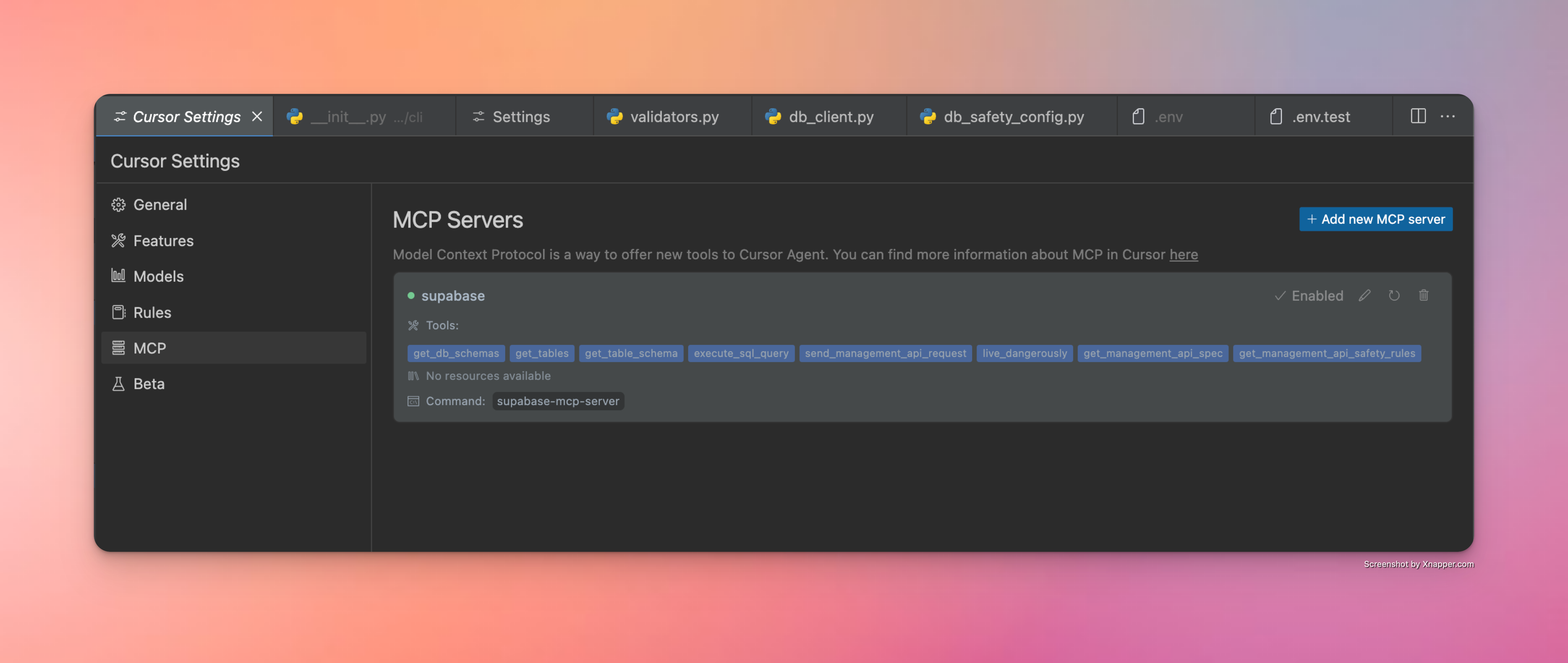
윈드서핑
Cascade로 이동 -> 망치 아이콘을 클릭 -> 구성 -> 구성을 입력합니다.
{
"mcpServers": {
"supabase": {
"command": "/Users/username/.local/bin/supabase-mcp-server", // update path
"env": {
"QUERY_API_KEY": "your-api-key", // Required - get your API key at thequery.dev
"SUPABASE_PROJECT_REF": "your-project-ref",
"SUPABASE_DB_PASSWORD": "your-db-password",
"SUPABASE_REGION": "us-east-1", // optional, defaults to us-east-1
"SUPABASE_ACCESS_TOKEN": "your-access-token", // optional, for management API
"SUPABASE_SERVICE_ROLE_KEY": "your-service-role-key" // optional, for Auth Admin SDK
}
}
}
}구성이 올바르면 사용 가능한 서버 목록에서 녹색 점 표시기와 클릭 가능한 supabase 서버를 볼 수 있습니다.
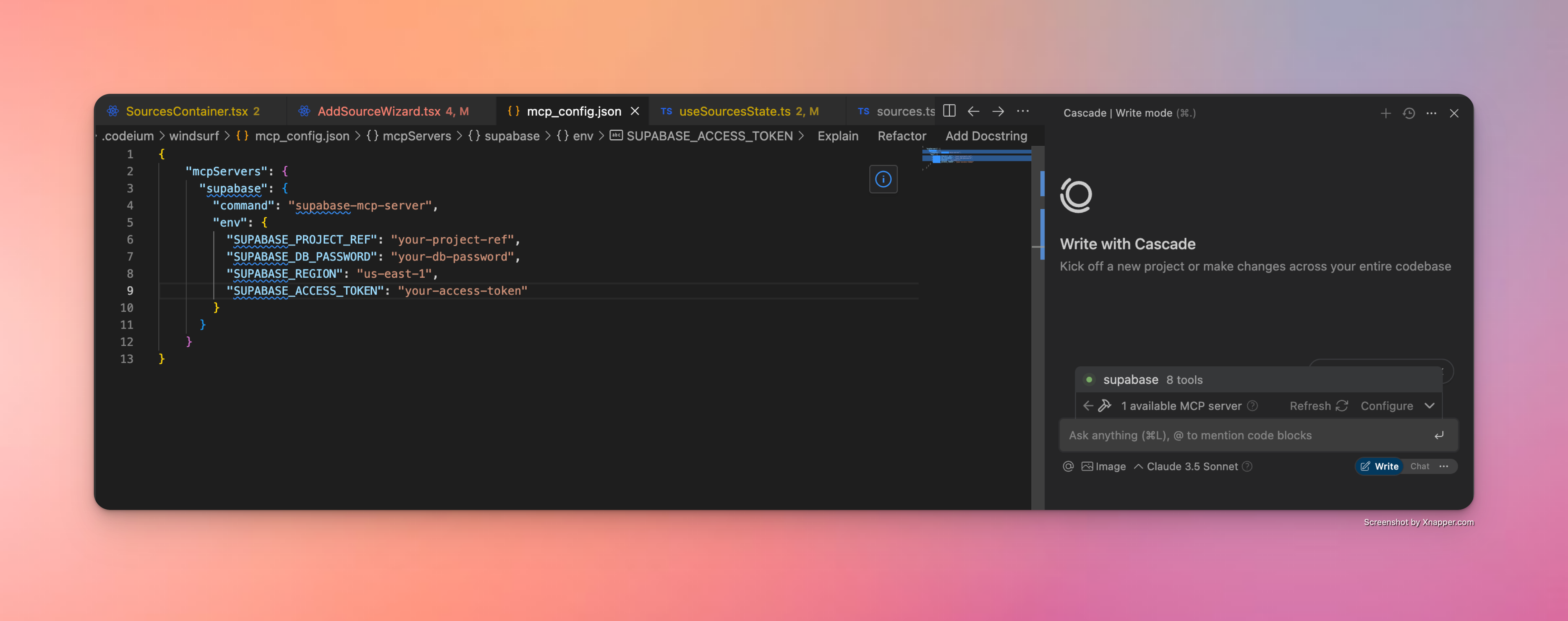
클로드 데스크탑
Claude Desktop은 JSON 구성을 통해 MCP 서버도 지원합니다. Supabase MCP 서버를 설정하려면 다음 단계를 따르세요.
실행 파일의 전체 경로를 찾으세요 (이 단계는 매우 중요합니다).
# On macOS/Linux which supabase-mcp-server # On Windows where supabase-mcp-server반환된 전체 경로를 복사합니다(예:
/Users/username/.local/bin/supabase-mcp-server).Claude Desktop에서 MCP 서버를 구성하세요 .
클로드 데스크톱 열기
설정 → 개발자 -> MCP 서버 구성 편집으로 이동하세요.
다음 JSON으로 새로운 구성을 추가합니다.
{ "mcpServers": { "supabase": { "command": "/full/path/to/supabase-mcp-server", // Replace with the actual path from step 1 "env": { "QUERY_API_KEY": "your-api-key", // Required - get your API key at thequery.dev "SUPABASE_PROJECT_REF": "your-project-ref", "SUPABASE_DB_PASSWORD": "your-db-password", "SUPABASE_REGION": "us-east-1", // optional, defaults to us-east-1 "SUPABASE_ACCESS_TOKEN": "your-access-token", // optional, for management API "SUPABASE_SERVICE_ROLE_KEY": "your-service-role-key" // optional, for Auth Admin SDK } } } }
⚠️ 중요 : Windsurf 및 Cursor와 달리 Claude Desktop은 실행 파일의 전체 절대 경로를 요구합니다. 명령 이름(
supabase-mcp-server)만 사용하면 "spawn ENOENT" 오류가 발생합니다.
구성이 올바르면 Claude Desktop에 Supabase MCP 서버가 사용 가능한 것으로 표시됩니다.
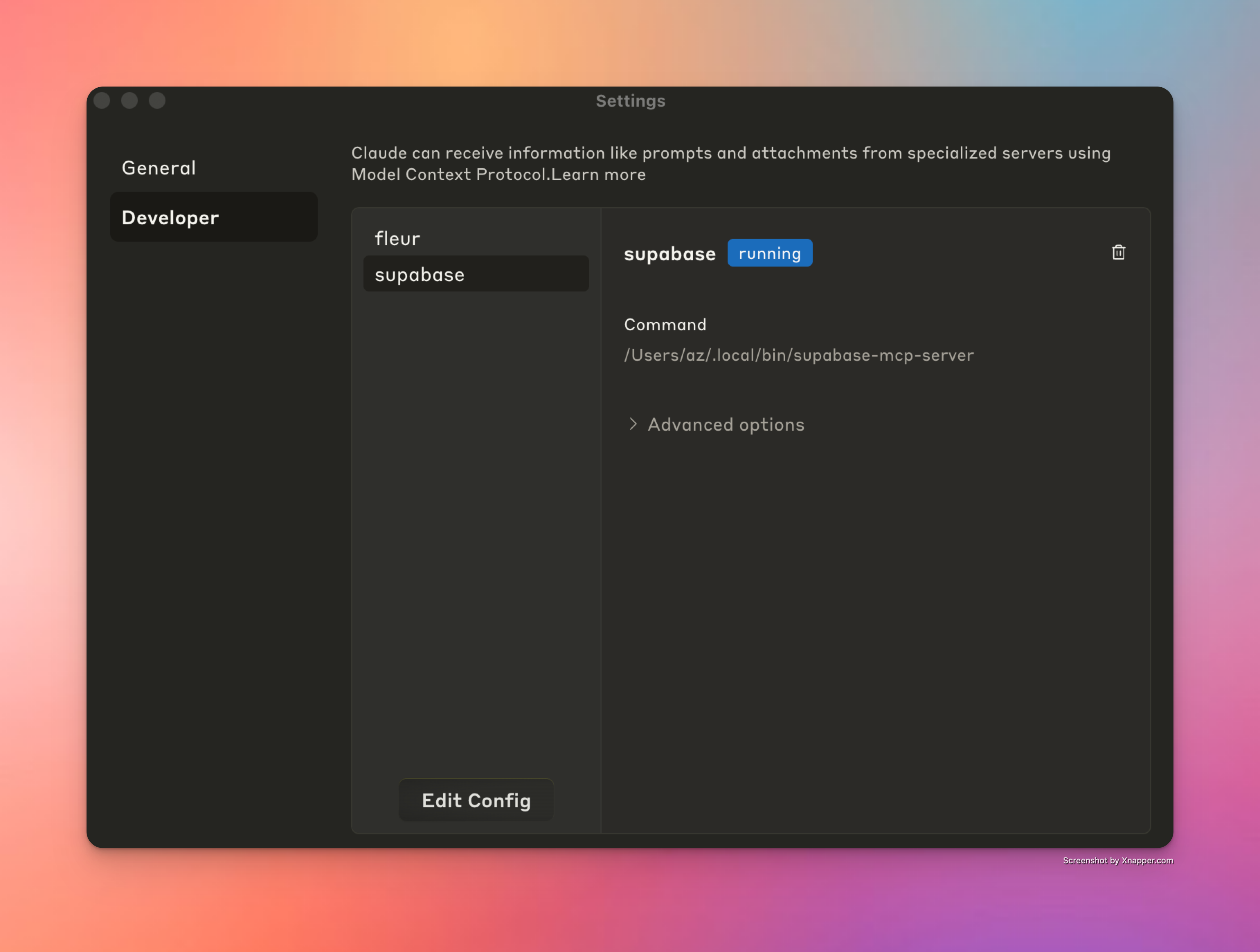
클라인
Cline은 유사한 JSON 구성을 통해 MCP 서버도 지원합니다. Supabase MCP 서버를 설정하려면 다음 단계를 따르세요.
실행 파일의 전체 경로를 찾으세요 (이 단계는 매우 중요합니다).
# On macOS/Linux which supabase-mcp-server # On Windows where supabase-mcp-server반환된 전체 경로를 복사합니다(예:
/Users/username/.local/bin/supabase-mcp-server).Cline에서 MCP 서버를 구성하세요 .
VS Code에서 Cline 열기
Cline 사이드바에서 "MCP 서버" 탭을 클릭하세요.
"MCP 서버 구성"을 클릭하세요.
이렇게 하면
cline_mcp_settings.json파일이 열립니다.다음 구성을 추가합니다.
{ "mcpServers": { "supabase": { "command": "/full/path/to/supabase-mcp-server", // Replace with the actual path from step 1 "env": { "QUERY_API_KEY": "your-api-key", // Required - get your API key at thequery.dev "SUPABASE_PROJECT_REF": "your-project-ref", "SUPABASE_DB_PASSWORD": "your-db-password", "SUPABASE_REGION": "us-east-1", // optional, defaults to us-east-1 "SUPABASE_ACCESS_TOKEN": "your-access-token", // optional, for management API "SUPABASE_SERVICE_ROLE_KEY": "your-service-role-key" // optional, for Auth Admin SDK } } } }
구성이 올바르면 Cline MCP 서버 목록에서 Supabase MCP 서버 옆에 녹색 표시기가 표시되고, 패널 하단에 "supabase MCP 서버 연결됨"을 확인하는 메시지가 표시됩니다.
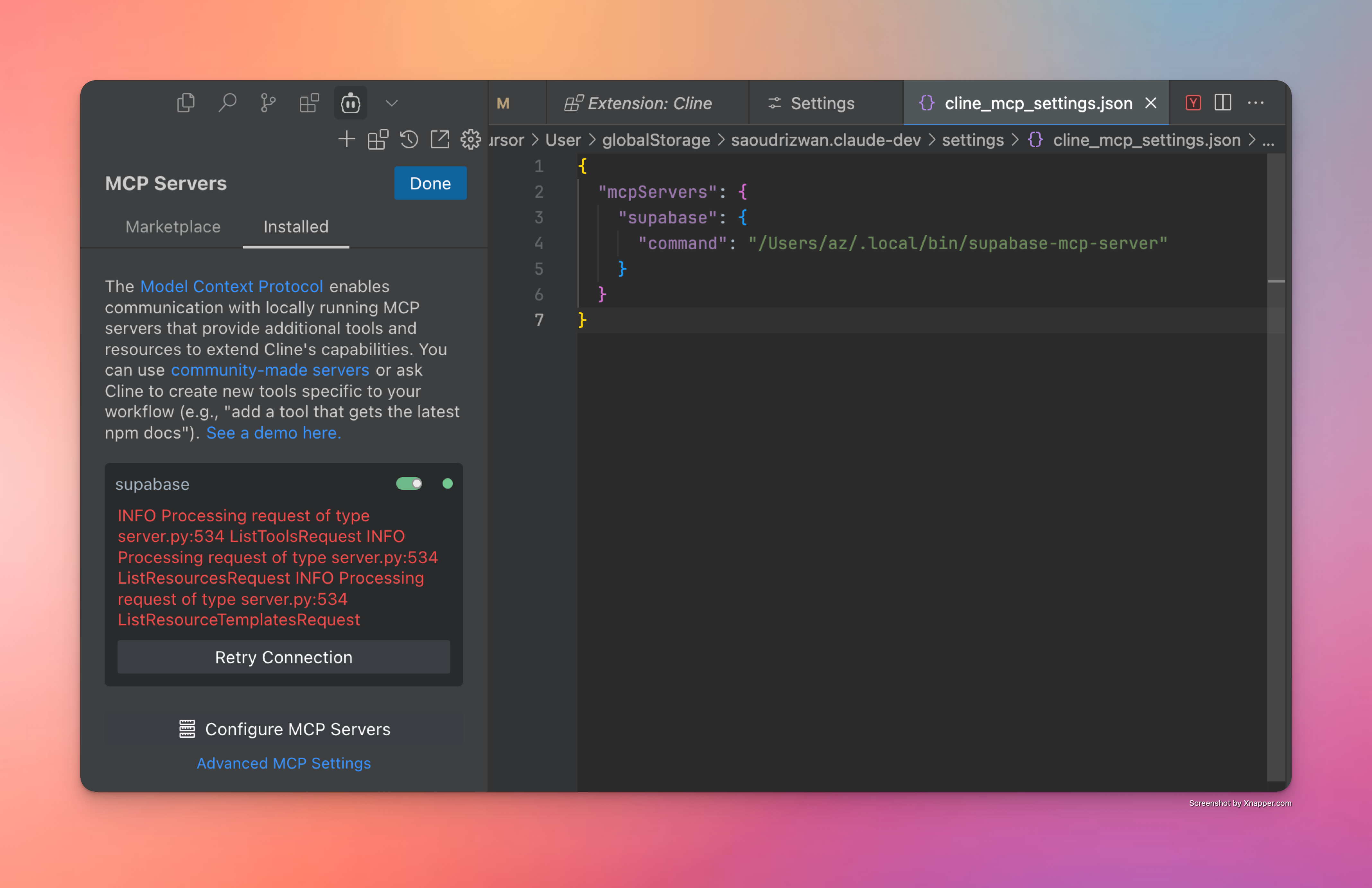
문제 해결
도움이 될 만한 몇 가지 팁과 요령은 다음과 같습니다.
디버그 설치 - 터미널에서
supabase-mcp-server직접 실행하여 제대로 작동하는지 확인하세요. 작동하지 않으면 설치에 문제가 있을 수 있습니다.MCP 서버 구성 - 위 단계가 제대로 작동하면 서버가 올바르게 설치 및 구성된 것입니다. 올바른 명령을 입력하면 IDE에서 연결할 수 있습니다. 서버 실행 파일의 경로를 정확하게 입력해야 합니다.
"도구를 찾을 수 없음" 오류 - 패키지가 설치되었는데도 커서에 "클라이언트가 닫혔습니다. 도구를 사용할 수 없습니다"라는 메시지가 표시되는 경우:
which supabase-mcp-server(macOS/Linux) 또는where supabase-mcp-server(Windows)를 실행하여 실행 파일의 전체 경로를 찾으세요.supabase-mcp-server대신 MCP 서버 구성에서 전체 경로를 사용하세요.예:
/Users/username/.local/bin/supabase-mcp-server또는C:\Users\username\.local\bin\supabase-mcp-server.exe
환경 변수 - 올바른 데이터베이스에 연결하려면
mcp_config.json이나 글로벌 구성 디렉토리(macOS/Linux에서는~/.config/supabase-mcp/.env, Windows에서는%APPDATA%\supabase-mcp\.env)에 있는.env파일에 환경 변수를 설정해야 합니다.로그 액세스 - MCP 서버는 자세한 로그를 파일에 기록합니다.
로그 파일 위치:
macOS/Linux:
~/.local/share/supabase-mcp/mcp_server.logWindows:
%USERPROFILE%\.local\share\supabase-mcp\mcp_server.log
로그에는 연결 상태, 구성 세부 정보 및 작업 결과가 포함됩니다.
텍스트 편집기나 터미널 명령을 사용하여 로그를 확인하세요.
# On macOS/Linux cat ~/.local/share/supabase-mcp/mcp_server.log # On Windows (PowerShell) Get-Content "$env:USERPROFILE\.local\share\supabase-mcp\mcp_server.log"
문제가 발생하거나 위의 지침이 올바르지 않은 경우 문제를 제기해 주세요.
MCP 검사관
MCP 서버 문제 디버깅에 매우 유용한 도구는 MCP Inspector입니다. 소스에서 설치한 경우, 프로젝트 저장소에서 supabase-mcp-inspector 실행하면 Inspector 인스턴스가 실행됩니다. 로그와 함께 서버에서 발생하는 상황을 전체적으로 파악할 수 있습니다.
📝 패키지에서 설치한 경우
supabase-mcp-inspector실행하면 제대로 작동하지 않습니다. 다음 릴리스에서 검증하고 수정하겠습니다.
기능 개요
데이터베이스 쿼리 도구
v0.3+ 서버는 내장된 안전 제어 기능을 통해 포괄적인 데이터베이스 관리 기능을 제공합니다.
SQL 쿼리 실행 : 위험 평가를 통해 PostgreSQL 쿼리 실행
3단계 안전 시스템 :
safe: 읽기 전용 작업(SELECT) - 항상 허용됨write: 데이터 수정(INSERT, UPDATE, DELETE) - 안전하지 않은 모드가 필요합니다.destructive: 스키마 변경(DROP, CREATE) - 안전하지 않은 모드 + 확인이 필요합니다.
SQL 구문 분석 및 검증 :
정확한 분석을 위해 PostgreSQL의 파서(pglast)를 사용하고 안전 요구 사항에 대한 명확한 피드백을 제공합니다.
자동 마이그레이션 버전 관리 :
데이터베이스 변경 작업은 자동으로 버전이 지정됩니다.
작업 유형 및 대상을 기반으로 설명적 이름을 생성합니다.
안전 제어 :
기본 SAFE 모드에서는 읽기 전용 작업만 허용됩니다.
모든 명령문은
asyncpg통해 트랜잭션 모드에서 실행됩니다.고위험 작업에 대한 2단계 확인
사용 가능한 도구 :
get_schemas: 크기와 테이블 수를 포함한 스키마를 나열합니다.get_tables: 메타데이터가 포함된 테이블, 외부 테이블 및 뷰를 나열합니다.get_table_schema: 자세한 테이블 구조(열, 키, 관계)를 가져옵니다.execute_postgresql: 데이터베이스에 대해 SQL 문을 실행합니다.confirm_destructive_operation: 확인 후 고위험 작업을 실행합니다.retrieve_migrations: 필터링 및 페이지 매김 옵션을 사용하여 마이그레이션을 가져옵니다.live_dangerously: 안전 모드와 안전하지 않은 모드 사이를 전환합니다.
관리 API 도구
v0.3.0 서버는 내장된 안전 제어 기능을 통해 Supabase 관리 API에 대한 안전한 액세스를 제공합니다.
사용 가능한 도구 :
send_management_api_request: 프로젝트 참조 자동 주입을 통해 Supabase 관리 API에 임의의 요청을 보냅니다.get_management_api_spec: 안전 정보가 포함된 강화된 API 사양을 가져옵니다.도메인별, 특정 경로/방법별 또는 모든 경로별 등 다양한 쿼리 모드를 지원합니다.
각 종료점에 대한 위험 평가 정보가 포함되어 있습니다.
자세한 매개변수 요구 사항 및 응답 형식을 제공합니다.
LLM이 Supabase 관리 API의 전체 기능을 이해하도록 돕습니다.
get_management_api_safety_rules: 사람이 읽을 수 있는 설명과 함께 모든 안전 규칙을 가져옵니다.live_dangerously: 안전 및 안전하지 않은 작업 모드 간을 전환합니다.
안전 제어 :
일관된 위험 관리를 위해 데이터베이스 작업과 동일한 안전 관리자를 사용합니다.
위험 수준별로 분류된 작업:
safe: 읽기 전용 작업(GET) - 항상 허용됨unsafe: 상태 변경 작업(POST, PUT, PATCH, DELETE) - 안전하지 않음 모드가 필요합니다.blocked: 파괴적인 작업(프로젝트 삭제 등) - 절대 허용되지 않음
기본 안전 모드는 실수로 상태가 변경되는 것을 방지합니다.
정확한 안전 규칙을 위한 경로 기반 패턴 매칭
참고 : 관리 API 도구는 원격 Supabase 인스턴스에서만 작동하며 로컬 Supabase 개발 설정과 호환되지 않습니다.
인증 관리 도구
MCP 서버에 Python SDK 메서드 지원을 추가할 계획이었습니다. 테스트 사용자를 수동으로 생성하는 경우가 많았고, 이로 인해 오류가 발생하고 시간이 많이 소요되었기 때문에, 검토 후 Auth 관리자 메서드 지원만 추가하기로 결정했습니다. 이제 Cursor에 테스트 사용자를 생성해 달라고 요청하기만 하면 됩니다. Auth 관리자 SDK 메서드의 전체 기능을 확인하려면 해당 메서드의 전체 문서를 확인하세요.
v0.3.6 서버는 Python SDK를 통해 Supabase Auth Admin 메서드에 직접 액세스할 수 있도록 지원합니다.
다음 도구가 포함되어 있습니다.
get_auth_admin_methods_spec사용하여 사용 가능한 모든 인증 관리 방법에 대한 문서를 검색합니다.call_auth_admin_method하여 적절한 매개변수 처리를 통해 Auth Admin 메서드를 직접 호출합니다.
지원되는 방법:
get_user_by_id: ID로 사용자를 검색합니다.list_users: 페이지 번호가 있는 모든 사용자 나열create_user: 새로운 사용자를 생성합니다delete_user: ID로 사용자를 삭제합니다.invite_user_by_email: 사용자의 이메일로 초대 링크를 보냅니다.generate_link: 다양한 인증 목적으로 이메일 링크를 생성합니다.update_user_by_id: ID로 사용자 속성 업데이트delete_factor: 사용자의 요소를 삭제합니다(현재 SDK에 구현되어 있지 않음)
원시 SQL 쿼리 대신 Auth Admin SDK를 사용하는 이유는 무엇입니까?
Auth Admin SDK는 직접적인 SQL 조작에 비해 여러 가지 주요 이점을 제공합니다.
기능 : SQL만으로는 불가능한 작업(초대, 매직 링크, MFA)을 가능하게 합니다.
정확도 : 인증 스키마에 대한 원시 SQL 쿼리를 생성하고 실행하는 것보다 더 안정적입니다.
단순성 : 적절한 검증 및 오류 처리를 통해 명확한 방법을 제공합니다.
응답 형식:
모든 메서드는 원시 사전 대신 구조화된 Python 객체를 반환합니다.
객체 속성은 점 표기법을 사용하여 액세스할 수 있습니다(예:
user["id"]대신user.id).
예외 사례 및 제한 사항:
UUID 유효성 검사: 많은 메서드에서 사용자 ID에 대한 유효한 UUID 형식이 필요하며 특정 유효성 검사 오류가 반환됩니다.
이메일 구성:
invite_user_by_email및generate_link와 같은 방법을 사용하려면 Supabase 프로젝트에서 이메일 전송을 구성해야 합니다.링크 유형: 링크를 생성할 때, 다양한 링크 유형에는 각기 다른 요구 사항이 있습니다.
signup링크는 사용자가 존재하지 않아도 됩니다.magiclink및recovery링크를 사용하려면 사용자가 시스템에 이미 존재해야 합니다.
오류 처리: 서버는 Supabase API에서 자세한 오류 메시지를 제공하며 이는 대시보드 인터페이스와 다를 수 있습니다.
메서드 가용성:
delete_factor와 같은 일부 메서드는 API에 노출되어 있지만 SDK에는 완전히 구현되어 있지 않습니다.
로그 및 분석
이 서버는 Supabase 로그 및 분석 데이터에 대한 액세스를 제공하여 애플리케이션을 더 쉽게 모니터링하고 문제를 해결할 수 있도록 해줍니다.
사용 가능한 도구 :
retrieve_logs- 모든 Supabase 서비스의 로그에 액세스로그 수집 :
postgres: 데이터베이스 서버 로그api_gateway: API 게이트웨이 요청auth: 인증 이벤트postgrest: RESTful API 서비스 로그pooler: 연결 풀링 로그storage: 객체 저장 작업realtime: WebSocket 구독 로그edge_functions: 서버리스 함수 실행cron: 예약된 작업 로그pgbouncer: 연결 풀러 로그
기능 : 시간별 필터링, 텍스트 검색, 필드 필터 적용 또는 사용자 정의 SQL 쿼리 사용
복잡한 쿼리를 작성하거나 인터페이스를 전환하지 않고도 Supabase 스택 전체에서 디버깅을 간소화합니다.
데이터베이스 변경 사항의 자동 버전 관리
"큰 힘에는 큰 책임이 따른다." execute_postgresql 도구와 live_dangerously 라는 이름의 도구를 함께 사용하면 Supabase 데이터베이스를 강력하고 간편하게 관리할 수 있을 뿐만 아니라, 채팅 메시지 한 통으로 테이블을 삭제하거나 수정할 수도 있습니다. 되돌릴 수 없는 변경 사항의 위험을 줄이기 위해 v0.3.8부터 서버는 다음을 지원합니다.
데이터베이스에서 실행되는 모든 쓰기 및 파괴적 SQL 작업에 대한 마이그레이션 스크립트 자동 생성
모든 쿼리가 다음과 같이 분류되는 쿼리 실행의 개선된 안전 모드:
safe유형: 항상 허용됩니다. 모든 읽기 전용 작업을 포함합니다.write유형: 사용자가write모드를 활성화해야 합니다.destructive유형: 사용자가write모드를 활성화해야 하며 도구를 자동으로 실행하지 않는 클라이언트의 경우 쿼리 실행을 2단계로 확인해야 합니다.
범용 안전 모드
v0.3.8부터 안전 모드는 모든 서비스(데이터베이스, API, SDK)에서 범용 안전 관리자를 사용하여 표준화되었습니다. 이를 통해 일관된 위험 관리와 전체 MCP 서버에서 안전 설정을 제어할 수 있는 통합 인터페이스가 제공됩니다.
모든 작업(SQL 쿼리, API 요청, SDK 메서드)은 위험 수준에 따라 분류됩니다.
Low위험: 데이터나 구조를 수정하지 않는 읽기 전용 작업(SELECT 쿼리, GET API 요청)Medium위험: 데이터는 수정하지만 구조는 수정하지 않는 작업 작성(INSERT/UPDATE/DELETE, 대부분의 POST/PUT API 요청)High위험: 데이터베이스 구조를 수정하거나 데이터 손실을 일으킬 수 있는 파괴적인 작업(DROP/TRUNCATE, DELETE API 엔드포인트)Extreme위험: 심각한 결과를 초래하여 완전히 차단되는 작업(프로젝트 삭제)
안전 통제는 위험 수준에 따라 적용됩니다.
위험도가 낮은 작업은 항상 허용됩니다.
중간 위험 작업에는 안전하지 않은 모드를 활성화해야 합니다.
고위험 작업에는 안전하지 않은 모드와 명시적 확인이 필요합니다.
극단적인 위험 작업은 절대 허용되지 않습니다.
확인 흐름이 작동하는 방식
unsafe 모드에서도 고위험 작업(PostgreSQL이나 API 요청)은 차단됩니다. 모든 고위험 작업은 실행하기 위해 명확하게 확인하고 승인해야 합니다.
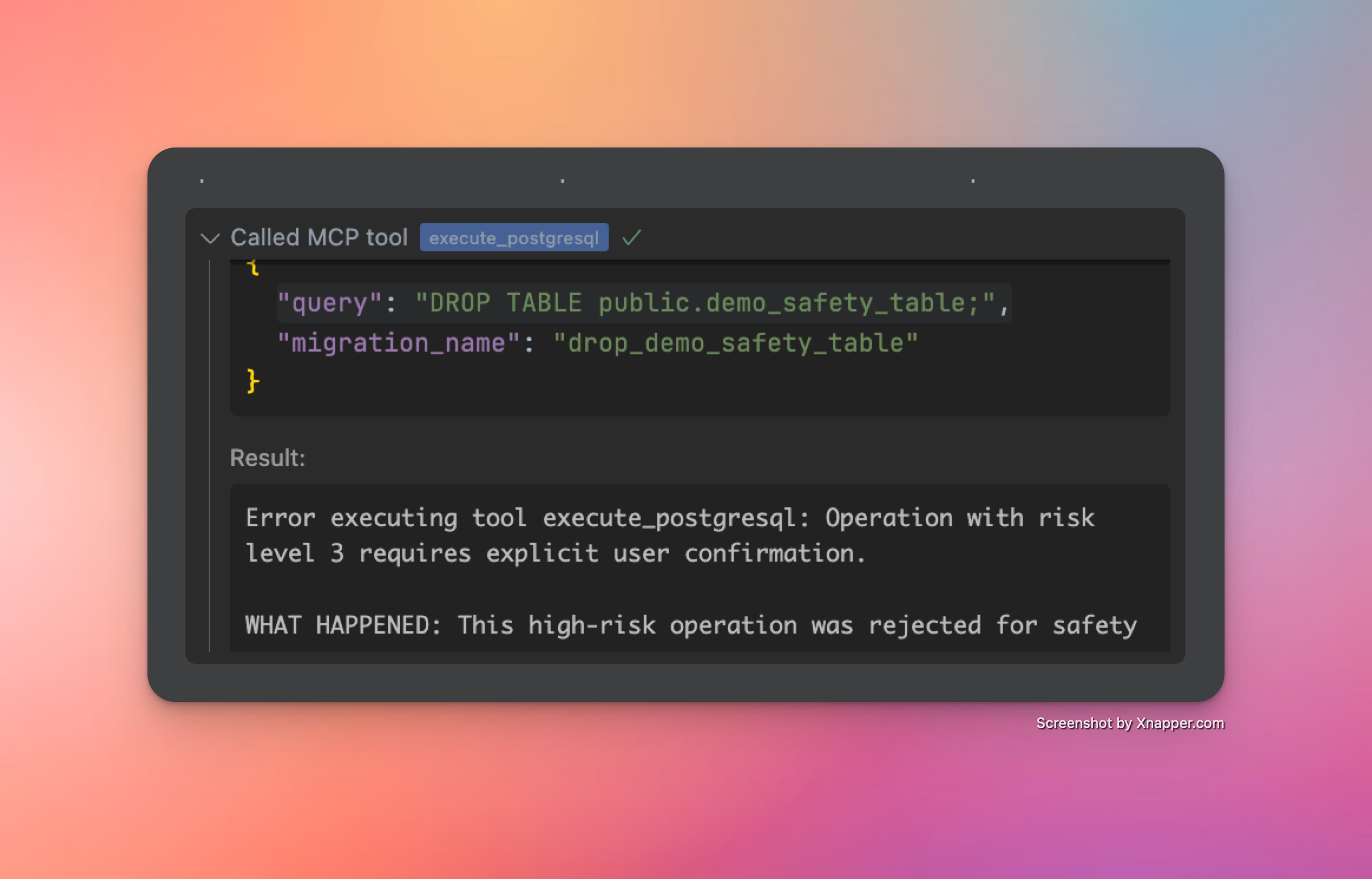
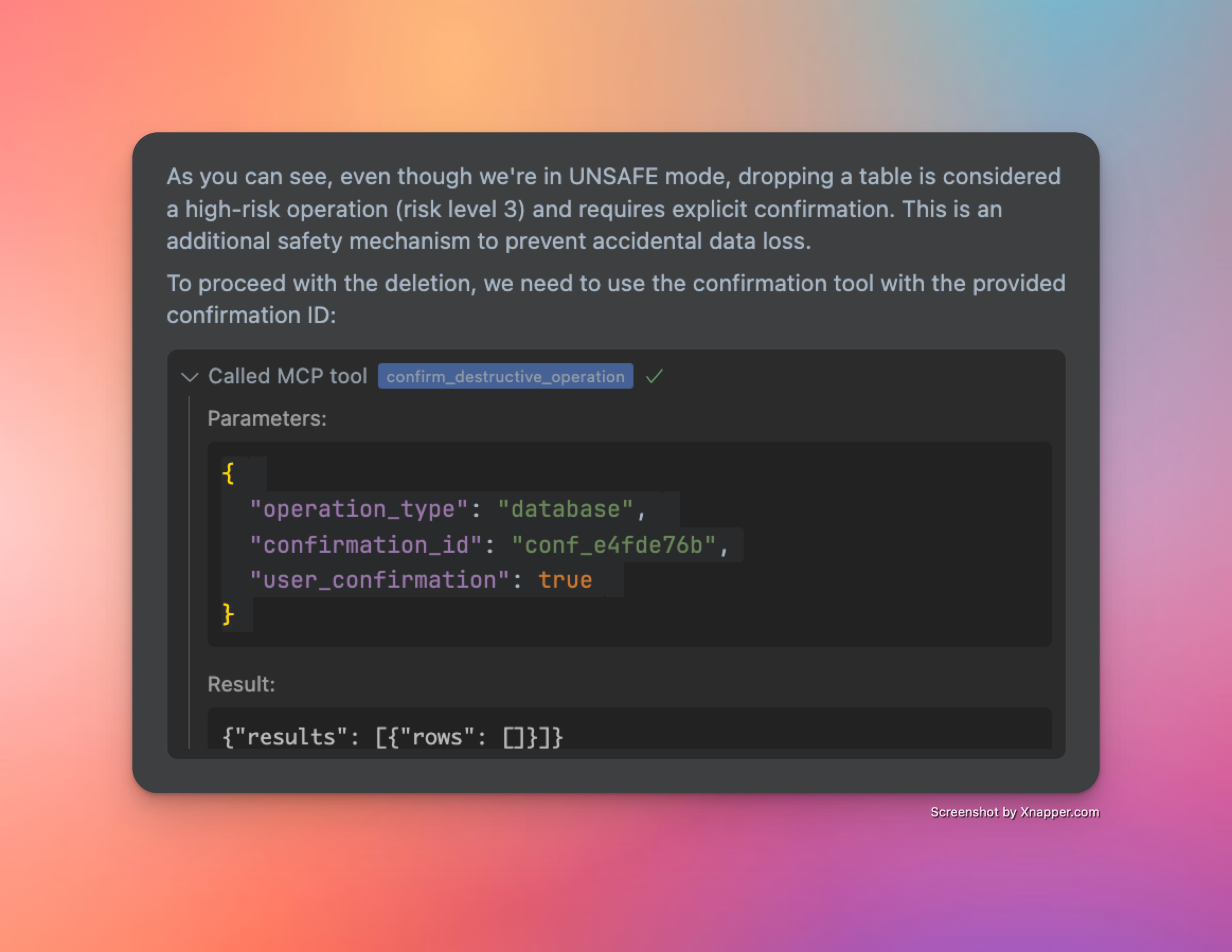
변경 사항
📦 패키지 관리자를 통한 간소화된 설치 - ✅ (v0.2.0)
🌎 다양한 Supabase 지역 지원 - ✅ (v0.2.2)
🎮 안전 제어 기능을 갖춘 Supabase 관리 API에 대한 프로그래밍 방식 액세스 - ✅ (v0.3.0)
👷♂️ 안전 제어 기능을 갖춘 읽기 및 읽기-쓰기 데이터베이스 SQL 쿼리 - ✅ (v0.3.0)
🔄 직접 연결과 풀 연결 모두에 대한 강력한 트랜잭션 처리 - ✅ (v0.3.2)
🐍 네이티브 Python SDK에서 사용 가능한 메서드 및 객체 지원 - ✅ (v0.3.6)
🔍 더욱 강력한 SQL 쿼리 검증 ✅ (v0.3.8)
📝 데이터베이스 변경 사항의 자동 버전 관리 ✅ (v0.3.8)
📖 API 사양에 대한 지식과 도구가 대폭 개선되었습니다 ✅ (v0.3.8)
✍️ 보다 체계적인 데이터베이스 VCS를 위한 마이그레이션 관련 도구의 일관성이 개선되었습니다. ✅ (v0.3.10)
🥳 쿼리 MCP가 출시되었습니다(v0.4.0)
더 자세한 로드맵은 GitHub의 토론을 참조하세요.
스타 역사
즐겨보세요! ☺️
Available Tools
12 toolscall_auth_admin_methodA
Call an Auth Admin method from Supabase Python SDK.
This tool provides a safe, validated interface to the Supabase Auth Admin SDK, allowing you to:
Manage users (create, update, delete)
List and search users
Generate authentication links
Manage multi-factor authentication
And more
IMPORTANT NOTES:
Request bodies must adhere to the Python SDK specification
Some methods may have nested parameter structures
The tool validates all parameters against Pydantic models
Extra fields not defined in the models will be rejected
AVAILABLE METHODS:
get_user_by_id: Retrieve a user by their ID
list_users: List all users with pagination
create_user: Create a new user
delete_user: Delete a user by their ID
invite_user_by_email: Send an invite link to a user's email
generate_link: Generate an email link for various authentication purposes
update_user_by_id: Update user attributes by ID
delete_factor: Delete a factor on a user
EXAMPLES:
Get user by ID: method: "get_user_by_id" params: {"uid": "user-uuid-here"}
Create user: method: "create_user" params: { "email": "user@example.com", "password": "secure-password" }
Update user by ID: method: "update_user_by_id" params: { "uid": "user-uuid-here", "attributes": { "email": "new@email.com" } }
For complete documentation of all methods and their parameters, use the get_auth_admin_methods_spec tool.
| Name | Required | Description | Default |
|---|---|---|---|
| method | Yes | ||
| params | Yes |
TDQS
Does the description disclose side effects, auth requirements, rate limits, or destructive behavior?
With no annotations provided, the description carries the full burden of behavioral disclosure. It effectively describes key traits: it's a 'safe, validated interface' that validates parameters against Pydantic models and rejects extra fields. It mentions that 'some methods may have nested parameter structures' and provides examples of destructive operations (delete_user, delete_factor). However, it doesn't cover rate limits, authentication requirements, or error handling.
Agents need to know what a tool does to the world before calling it. Descriptions should go beyond structured annotations to explain consequences.
Is the description appropriately sized, front-loaded, and free of redundancy?
The description is appropriately front-loaded with the core purpose and key capabilities, but it includes extensive lists and examples that could be streamlined. The 'AVAILABLE METHODS' section and multiple examples add value but make the description lengthy. Every sentence earns its place, but the structure could be more concise by integrating examples more tightly or referencing external documentation earlier.
Shorter descriptions cost fewer tokens and are easier for agents to parse. Every sentence should earn its place.
Given the tool's complexity, does the description cover enough for an agent to succeed on first attempt?
Given the complexity (2 parameters with nested objects, no output schema, no annotations), the description is largely complete. It covers purpose, usage, behavioral traits, and parameter semantics thoroughly. However, it lacks details on return values (since no output schema exists) and doesn't mention authentication or error scenarios. The reference to 'get_auth_admin_methods_spec' for full documentation helps mitigate gaps.
Complex tools with many parameters or behaviors need more documentation. Simple tools need less. This dimension scales expectations accordingly.
Does the description clarify parameter syntax, constraints, interactions, or defaults beyond what the schema provides?
The input schema has 0% description coverage and only defines 'method' (string) and 'params' (object) without semantic details. The description compensates fully by listing all available methods with brief explanations (e.g., 'get_user_by_id: Retrieve a user by their ID'), providing detailed examples with parameter structures, and explaining that parameters must adhere to Python SDK specifications. This adds substantial meaning beyond the minimal schema.
Input schemas describe structure but not intent. Descriptions should explain non-obvious parameter relationships and valid value ranges.
Does the description clearly state what the tool does and how it differs from similar tools?
The description clearly states the tool's purpose: 'Call an Auth Admin method from Supabase Python SDK' with a specific verb ('call') and resource ('Auth Admin method'). It distinguishes from siblings like 'get_auth_admin_methods_spec' (which retrieves documentation) and 'send_management_api_request' (which handles different API types). The bullet points further clarify capabilities like user management and authentication tasks.
Agents choose between tools based on descriptions. A clear purpose with a specific verb and resource helps agents select the right tool.
Does the description explain when to use this tool, when not to, or what alternatives exist?
The description provides explicit guidance on when to use this tool vs alternatives. It states to 'use the get_auth_admin_methods_spec tool' for complete documentation of methods and parameters, distinguishing it from that sibling. The 'IMPORTANT NOTES' section also outlines prerequisites like adhering to Python SDK specifications and validation rules, though it doesn't explicitly mention when not to use it.
Agents often have multiple tools that could apply. Explicit usage guidance like "use X instead of Y when Z" prevents misuse.
confirm_destructive_operationA
Execute a destructive database or API operation after confirmation. Use this only after reviewing the risks with the user.
HOW IT WORKS:
This tool executes a previously rejected high-risk operation using its confirmation ID
The operation will be exactly the same as the one that generated the ID
No need to retype the query or api request params - the system remembers it
STEPS:
Explain the risks to the user and get their approval
Use this tool with the confirmation ID from the error message
The original query will be executed as-is
PARAMETERS:
operation_type: Type of operation ("api" or "database")
confirmation_id: The ID provided in the error message (required)
user_confirmation: Set to true to confirm execution (default: false)
NOTE: Confirmation IDs expire after 5 minutes for security
| Name | Required | Description | Default |
|---|---|---|---|
| confirmation_id | Yes | ||
| operation_type | Yes | ||
| user_confirmation | No |
TDQS
Does the description disclose side effects, auth requirements, rate limits, or destructive behavior?
With no annotations provided, the description carries the full burden of behavioral disclosure. It effectively describes key traits: it's for executing high-risk operations, requires user confirmation, uses a confirmation ID from a previous error, executes the original query as-is, and includes a security note about 5-minute expiration. However, it doesn't detail potential side effects (e.g., data loss specifics) or error handling, leaving some gaps in full transparency.
Agents need to know what a tool does to the world before calling it. Descriptions should go beyond structured annotations to explain consequences.
Is the description appropriately sized, front-loaded, and free of redundancy?
The description is well-structured with clear sections (HOW IT WORKS, STEPS, PARAMETERS, NOTE), making it easy to scan. Each sentence adds value, such as explaining the confirmation process and security constraints. It could be slightly more concise by integrating some details (e.g., merging the STEPS and PARAMETERS sections), but overall, it's efficient and front-loaded with the core purpose.
Shorter descriptions cost fewer tokens and are easier for agents to parse. Every sentence should earn its place.
Given the tool's complexity, does the description cover enough for an agent to succeed on first attempt?
Given the tool's complexity (destructive operations, confirmation flow) and lack of annotations or output schema, the description does a good job of covering essential context: purpose, usage steps, parameters, and security notes. It addresses the high-risk nature and user interaction requirements. However, it doesn't specify what happens after execution (e.g., success/failure responses or side effects), which is a minor gap for such a critical tool.
Complex tools with many parameters or behaviors need more documentation. Simple tools need less. This dimension scales expectations accordingly.
Does the description clarify parameter syntax, constraints, interactions, or defaults beyond what the schema provides?
Schema description coverage is 0%, so the description must compensate. It adds meaningful context for all three parameters: 'operation_type' is explained as 'Type of operation ("api" or "database")', 'confirmation_id' as 'The ID provided in the error message (required)', and 'user_confirmation' as 'Set to true to confirm execution (default: false)'. This goes beyond the schema's basic titles and enums, clarifying usage and requirements. A point is deducted because it doesn't elaborate on the implications of each operation_type choice.
Input schemas describe structure but not intent. Descriptions should explain non-obvious parameter relationships and valid value ranges.
Does the description clearly state what the tool does and how it differs from similar tools?
The description clearly states the tool's purpose: 'Execute a destructive database or API operation after confirmation.' It specifies the verb ('execute'), resource ('destructive database or API operation'), and the key condition ('after confirmation'). The title 'confirm_destructive_operation' reinforces this, and it distinguishes itself from siblings like 'live_dangerously' or 'execute_postgresql' by focusing on confirmation of previously rejected high-risk operations.
Agents choose between tools based on descriptions. A clear purpose with a specific verb and resource helps agents select the right tool.
Does the description explain when to use this tool, when not to, or what alternatives exist?
The description provides explicit guidance on when to use this tool: 'Use this only after reviewing the risks with the user.' It outlines a clear process (explain risks, get approval, use confirmation ID) and specifies prerequisites (confirmation ID from an error message). It also distinguishes usage from alternatives by noting that no retyping of queries is needed, which sets it apart from tools like 'execute_postgresql' or 'send_management_api_request' that might require full parameter input.
Agents often have multiple tools that could apply. Explicit usage guidance like "use X instead of Y when Z" prevents misuse.
execute_postgresqlA
Execute PostgreSQL statements against your Supabase database.
IMPORTANT: All SQL statements must end with a semicolon (;).
OPERATION TYPES AND REQUIREMENTS:
READ Operations (SELECT, EXPLAIN, etc.):
Can be executed directly without special requirements
Example: SELECT * FROM public.users LIMIT 10;
WRITE Operations (INSERT, UPDATE, DELETE):
Require UNSAFE mode (use live_dangerously('database', True) first)
Example: INSERT INTO public.users (email) VALUES ('user@example.com');
SCHEMA Operations (CREATE, ALTER, DROP):
Require UNSAFE mode (use live_dangerously('database', True) first)
Destructive operations (DROP, TRUNCATE) require additional confirmation
Example: CREATE TABLE public.test_table (id SERIAL PRIMARY KEY, name TEXT);
MIGRATION HANDLING: All queries that modify the database will be automatically version controlled by the server. You can provide optional migration name, if you want to name the migration.
Respect the following format: verb_noun_detail. Be descriptive and concise.
Examples:
create_users_table
add_email_to_profiles
enable_rls_on_users
If you don't provide a migration name, the server will generate one based on the SQL statement
The system will sanitize your provided name to ensure compatibility with database systems
Migration names are prefixed with a timestamp in the format YYYYMMDDHHMMSS
SAFETY SYSTEM: Operations are categorized by risk level:
LOW RISK: Read operations (SELECT, EXPLAIN) - allowed in SAFE mode
MEDIUM RISK: Write operations (INSERT, UPDATE, DELETE) - require UNSAFE mode
HIGH RISK: Schema operations (CREATE, ALTER) - require UNSAFE mode
EXTREME RISK: Destructive operations (DROP, TRUNCATE) - require UNSAFE mode and confirmation
TRANSACTION HANDLING:
DO NOT use transaction control statements (BEGIN, COMMIT, ROLLBACK)
The database client automatically wraps queries in transactions
The SQL validator will reject queries containing transaction control statements
This ensures atomicity and provides rollback capability for data modifications
MULTIPLE STATEMENTS:
You can send multiple SQL statements in a single query
Each statement will be executed in order within the same transaction
Example: CREATE TABLE public.test_table (id SERIAL PRIMARY KEY, name TEXT); INSERT INTO public.test_table (name) VALUES ('test');
CONFIRMATION FLOW FOR HIGH-RISK OPERATIONS:
High-risk operations (DROP TABLE, TRUNCATE, etc.) will be rejected with a confirmation ID
The error message will explain what happened and provide a confirmation ID
Review the risks with the user before proceeding
Use the confirm_destructive_operation tool with the provided ID to execute the operation
IMPORTANT GUIDELINES:
The database client starts in SAFE mode by default for safety
Only enable UNSAFE mode when you need to modify data or schema
Never mix READ and WRITE operations in the same transaction
For destructive operations, be prepared to confirm with the confirm_destructive_operation tool
WHEN TO USE OTHER TOOLS INSTEAD:
For Auth operations (users, authentication, etc.): Use call_auth_admin_method instead of direct SQL The Auth Admin SDK provides safer, validated methods for user management
For project configuration, functions, storage, etc.: Use send_management_api_request The Management API handles Supabase platform features that aren't directly in the database
Note: This tool operates on the PostgreSQL database only. API operations use separate safety controls.
| Name | Required | Description | Default |
|---|---|---|---|
| migration_name | No | ||
| query | Yes |
TDQS
Does the description disclose side effects, auth requirements, rate limits, or destructive behavior?
With no annotations provided, the description carries the full burden of behavioral disclosure and does so comprehensively. It details safety modes (SAFE/UNSAFE), risk categorization (LOW/MEDIUM/HIGH/EXTREME), transaction handling restrictions, migration version control, confirmation flows for destructive operations, and important operational guidelines. This provides rich behavioral context beyond basic functionality.
Agents need to know what a tool does to the world before calling it. Descriptions should go beyond structured annotations to explain consequences.
Is the description appropriately sized, front-loaded, and free of redundancy?
The description is well-structured with clear sections (OPERATION TYPES, MIGRATION HANDLING, SAFETY SYSTEM, etc.) but is quite lengthy. While most content is valuable, some redundancy exists (e.g., multiple mentions of UNSAFE mode requirements). The front-loading is good with purpose and immediate requirements, but the length may challenge quick comprehension.
Shorter descriptions cost fewer tokens and are easier for agents to parse. Every sentence should earn its place.
Given the tool's complexity, does the description cover enough for an agent to succeed on first attempt?
Given the complexity of a database execution tool with 2 parameters, no annotations, and no output schema, the description provides exceptional completeness. It covers purpose, usage guidelines, behavioral traits, parameter semantics, safety systems, transaction handling, migration control, confirmation flows, and sibling tool relationships. This fully compensates for the lack of structured metadata.
Complex tools with many parameters or behaviors need more documentation. Simple tools need less. This dimension scales expectations accordingly.
Does the description clarify parameter syntax, constraints, interactions, or defaults beyond what the schema provides?
With 0% schema description coverage for the 2 parameters, the description compensates well by explaining both parameters' semantics. It describes 'migration_name' in detail (format requirements, examples, what happens if not provided, sanitization, timestamp prefixing) and 'query' through extensive examples and requirements (semicolon termination, operation types). While comprehensive, it doesn't explicitly map all schema properties like the default value for migration_name.
Input schemas describe structure but not intent. Descriptions should explain non-obvious parameter relationships and valid value ranges.
Does the description clearly state what the tool does and how it differs from similar tools?
The description clearly states the tool's purpose: 'Execute PostgreSQL statements against your Supabase database.' It specifies the exact action (execute) and resource (PostgreSQL statements/Supabase database), distinguishing it from sibling tools like call_auth_admin_method or send_management_api_request that handle different aspects of the system.
Agents choose between tools based on descriptions. A clear purpose with a specific verb and resource helps agents select the right tool.
Does the description explain when to use this tool, when not to, or what alternatives exist?
The description provides explicit guidance on when to use this tool versus alternatives. It includes a dedicated section 'WHEN TO USE OTHER TOOLS INSTEAD' that names specific sibling tools (call_auth_admin_method, send_management_api_request) and explains what operations they handle instead. It also provides detailed context about different operation types and their requirements.
Agents often have multiple tools that could apply. Explicit usage guidance like "use X instead of Y when Z" prevents misuse.
get_auth_admin_methods_specA
Get Python SDK methods specification for Auth Admin.
Returns a comprehensive dictionary of all Auth Admin methods available in the Supabase Python SDK, including:
Method names and descriptions
Required and optional parameters for each method
Parameter types and constraints
Return value information
This tool is useful for exploring the capabilities of the Auth Admin SDK and understanding how to properly format parameters for the call_auth_admin_method tool.
No parameters required.
| Name | Required | Description | Default |
|---|---|---|---|
No parameters | |||
TDQS
Does the description disclose side effects, auth requirements, rate limits, or destructive behavior?
With no annotations provided, the description carries the full burden. It describes what the tool returns ('comprehensive dictionary' with method details) and clarifies it requires no parameters, which is helpful. However, it doesn't mention behavioral aspects like whether this is a read-only operation, if it makes external API calls, potential rate limits, or error conditions.
Agents need to know what a tool does to the world before calling it. Descriptions should go beyond structured annotations to explain consequences.
Is the description appropriately sized, front-loaded, and free of redundancy?
The description is well-structured and front-loaded with the core purpose. Every sentence adds value: the first states what it does, the second details the return content, the third explains usage context, and the fourth clarifies no parameters needed. There is no wasted text.
Shorter descriptions cost fewer tokens and are easier for agents to parse. Every sentence should earn its place.
Given the tool's complexity, does the description cover enough for an agent to succeed on first attempt?
Given the tool has 0 parameters, no annotations, and no output schema, the description does a good job explaining the purpose, return format, and usage context. However, it could be more complete by specifying the exact structure of the returned dictionary or any prerequisites, though the lack of output schema lowers the bar.
Complex tools with many parameters or behaviors need more documentation. Simple tools need less. This dimension scales expectations accordingly.
Does the description clarify parameter syntax, constraints, interactions, or defaults beyond what the schema provides?
The tool has 0 parameters with 100% schema description coverage, so the baseline is 4. The description explicitly states 'No parameters required,' which reinforces this clearly and adds value by preventing parameter confusion.
Input schemas describe structure but not intent. Descriptions should explain non-obvious parameter relationships and valid value ranges.
Does the description clearly state what the tool does and how it differs from similar tools?
The description clearly states the specific action ('Get Python SDK methods specification for Auth Admin') and resource ('Auth Admin methods available in the Supabase Python SDK'). It distinguishes from sibling tools by focusing exclusively on Auth Admin SDK methods, unlike broader tools like get_management_api_spec or get_schemas.
Agents choose between tools based on descriptions. A clear purpose with a specific verb and resource helps agents select the right tool.
Does the description explain when to use this tool, when not to, or what alternatives exist?
The description explicitly states when to use this tool ('useful for exploring the capabilities of the Auth Admin SDK and understanding how to properly format parameters for the call_auth_admin_method tool'), providing clear context and naming the specific alternative tool (call_auth_admin_method) it prepares for.
Agents often have multiple tools that could apply. Explicit usage guidance like "use X instead of Y when Z" prevents misuse.
get_management_api_specA
Get the complete Supabase Management API specification.
Returns the full OpenAPI specification for the Supabase Management API, including:
All available endpoints and operations
Required and optional parameters for each operation
Request and response schemas
Authentication requirements
Safety information for each operation
This tool can be used in four different ways:
Without parameters: Returns all domains (default)
With path and method: Returns the full specification for a specific API endpoint
With domain only: Returns all paths and methods within that domain
With all_paths=True: Returns all paths and methods
Parameters:
params: Dictionary containing optional parameters:
path: Optional API path (e.g., "/v1/projects/{ref}/functions")
method: Optional HTTP method (e.g., "GET", "POST")
domain: Optional domain/tag name (e.g., "Auth", "Storage")
all_paths: Optional boolean, if True returns all paths and methods
Available domains:
Analytics: Analytics-related endpoints
Auth: Authentication and authorization endpoints
Database: Database management endpoints
Domains: Custom domain configuration endpoints
Edge Functions: Serverless function management endpoints
Environments: Environment configuration endpoints
OAuth: OAuth integration endpoints
Organizations: Organization management endpoints
Projects: Project management endpoints
Rest: RESTful API endpoints
Secrets: Secret management endpoints
Storage: Storage management endpoints
This specification is useful for understanding:
What operations are available through the Management API
How to properly format requests for each endpoint
Which operations require unsafe mode
What data structures to expect in responses
SAFETY: This is a low-risk read operation that can be executed in SAFE mode.
| Name | Required | Description | Default |
|---|---|---|---|
| params | No |
TDQS
Does the description disclose side effects, auth requirements, rate limits, or destructive behavior?
With no annotations provided, the description carries full burden and does an excellent job disclosing behavioral traits. It explicitly states this is a 'low-risk read operation that can be executed in SAFE mode,' describes what information is returned (endpoints, parameters, schemas, auth requirements, safety info), and explains the four different usage patterns. The only minor gap is lack of information about rate limits or pagination, but overall it provides comprehensive behavioral context.
Agents need to know what a tool does to the world before calling it. Descriptions should go beyond structured annotations to explain consequences.
Is the description appropriately sized, front-loaded, and free of redundancy?
The description is well-structured and appropriately sized, with clear sections for purpose, usage patterns, parameters, domains, and utility. While comprehensive, every sentence earns its place by adding value. The only minor issue is some redundancy in the safety statement at the end, but overall it's front-loaded with the core purpose and efficiently organized.
Shorter descriptions cost fewer tokens and are easier for agents to parse. Every sentence should earn its place.
Given the tool's complexity, does the description cover enough for an agent to succeed on first attempt?
Given the complexity of a tool that returns API specifications with multiple usage patterns, and with no annotations and no output schema, the description provides complete context. It explains what the tool does, how to use it in different scenarios, what parameters mean, what domains are available, what information the specification contains, and safety considerations. This fully compensates for the lack of structured metadata.
Complex tools with many parameters or behaviors need more documentation. Simple tools need less. This dimension scales expectations accordingly.
Does the description clarify parameter syntax, constraints, interactions, or defaults beyond what the schema provides?
With 0% schema description coverage (the schema only shows 'params' as an object with no properties documented), the description fully compensates by providing detailed parameter semantics. It explains all four optional parameters (path, method, domain, all_paths) with examples and clear descriptions of what each does. It also lists available domain values with explanations, effectively documenting what would normally be in the schema's enum or property descriptions.
Input schemas describe structure but not intent. Descriptions should explain non-obvious parameter relationships and valid value ranges.
Does the description clearly state what the tool does and how it differs from similar tools?
The description clearly states the tool's purpose: 'Get the complete Supabase Management API specification' with specific details about what it returns (OpenAPI spec including endpoints, parameters, schemas, auth requirements, safety info). It distinguishes from sibling tools like 'get_auth_admin_methods_spec' by covering the entire Management API rather than just auth methods, and from 'send_management_api_request' by providing documentation rather than executing requests.
Agents choose between tools based on descriptions. A clear purpose with a specific verb and resource helps agents select the right tool.
Does the description explain when to use this tool, when not to, or what alternatives exist?
The description provides explicit usage guidelines with four distinct scenarios: 1) without parameters returns all domains, 2) with path and method returns specific endpoint spec, 3) with domain only returns all paths/methods in that domain, 4) with all_paths=True returns all paths/methods. It also explains when this tool is useful (understanding available operations, request formatting, unsafe mode requirements, response structures), giving clear context for when to use it versus alternatives.
Agents often have multiple tools that could apply. Explicit usage guidance like "use X instead of Y when Z" prevents misuse.
get_schemasB
List all database schemas with their sizes and table counts.
| Name | Required | Description | Default |
|---|---|---|---|
No parameters | |||
TDQS
Does the description disclose side effects, auth requirements, rate limits, or destructive behavior?
With no annotations provided, the description carries the full burden of behavioral disclosure. It states this is a read operation ('List'), implying it's non-destructive, but doesn't cover other important aspects like authentication requirements, rate limits, error handling, or what the output format looks like. For a tool with zero annotation coverage, this is insufficient.
Agents need to know what a tool does to the world before calling it. Descriptions should go beyond structured annotations to explain consequences.
Is the description appropriately sized, front-loaded, and free of redundancy?
The description is a single, efficient sentence that states exactly what the tool does with zero wasted words. It's front-loaded with the core purpose and includes key details (sizes and table counts) without unnecessary elaboration.
Shorter descriptions cost fewer tokens and are easier for agents to parse. Every sentence should earn its place.
Given the tool's complexity, does the description cover enough for an agent to succeed on first attempt?
Given the tool's simplicity (0 parameters, no output schema, no annotations), the description is adequate but has clear gaps. It explains what the tool returns (schemas with sizes and table counts), but without annotations or output schema, it doesn't specify the return format, data types, or any behavioral constraints. This is a minimal viable description.
Complex tools with many parameters or behaviors need more documentation. Simple tools need less. This dimension scales expectations accordingly.
Does the description clarify parameter syntax, constraints, interactions, or defaults beyond what the schema provides?
The tool has 0 parameters, and the schema description coverage is 100% (though empty). The description doesn't need to add parameter semantics, so it meets the baseline of 4 for tools with no parameters. It appropriately doesn't mention any parameters.
Input schemas describe structure but not intent. Descriptions should explain non-obvious parameter relationships and valid value ranges.
Does the description clearly state what the tool does and how it differs from similar tools?
The description clearly states the tool's purpose with a specific verb ('List') and resource ('database schemas'), along with what information is included ('sizes and table counts'). It distinguishes from siblings like 'get_tables' and 'get_table_schema' by focusing on schemas rather than tables. However, it doesn't explicitly differentiate from all siblings, so it's not a perfect 5.
Agents choose between tools based on descriptions. A clear purpose with a specific verb and resource helps agents select the right tool.
Does the description explain when to use this tool, when not to, or what alternatives exist?
The description provides no guidance on when to use this tool versus alternatives. It doesn't mention when to choose this over 'get_tables' or 'get_table_schema', nor does it specify any prerequisites or exclusions. The agent must infer usage from the purpose alone.
Agents often have multiple tools that could apply. Explicit usage guidance like "use X instead of Y when Z" prevents misuse.
get_tablesA
List all tables, foreign tables, and views in a schema with their sizes, row counts, and metadata.
Provides detailed information about all database objects in the specified schema:
Table/view names
Object types (table, view, foreign table)
Row counts
Size on disk
Column counts
Index information
Last vacuum/analyze times
Parameters:
schema_name: Name of the schema to inspect (e.g., 'public', 'auth', etc.)
SAFETY: This is a low-risk read operation that can be executed in SAFE mode.
| Name | Required | Description | Default |
|---|---|---|---|
| schema_name | Yes |
TDQS
Does the description disclose side effects, auth requirements, rate limits, or destructive behavior?
With no annotations provided, the description carries the full burden. It discloses that this is a 'low-risk read operation' and can be executed in 'SAFE mode', which clarifies safety and behavioral traits. However, it lacks details on rate limits, permissions needed, or potential performance impacts.
Agents need to know what a tool does to the world before calling it. Descriptions should go beyond structured annotations to explain consequences.
Is the description appropriately sized, front-loaded, and free of redundancy?
The description is well-structured with a clear summary, bulleted details, and a dedicated safety note. It is appropriately sized, but could be slightly more concise by integrating the safety note into the main text.
Shorter descriptions cost fewer tokens and are easier for agents to parse. Every sentence should earn its place.
Given the tool's complexity, does the description cover enough for an agent to succeed on first attempt?
Given no annotations and no output schema, the description does a good job explaining the tool's purpose, parameters, and safety. It lists the information returned (e.g., row counts, sizes), but could benefit from clarifying the output format or any limitations.
Complex tools with many parameters or behaviors need more documentation. Simple tools need less. This dimension scales expectations accordingly.
Does the description clarify parameter syntax, constraints, interactions, or defaults beyond what the schema provides?
The schema description coverage is 0%, so the description must compensate. It explicitly defines the single parameter 'schema_name' with meaning ('Name of the schema to inspect') and examples ('public', 'auth'), adding significant value beyond the bare schema.
Input schemas describe structure but not intent. Descriptions should explain non-obvious parameter relationships and valid value ranges.
Does the description clearly state what the tool does and how it differs from similar tools?
The description clearly states the verb ('List') and resource ('all tables, foreign tables, and views in a schema') with specific attributes ('sizes, row counts, and metadata'). It distinguishes from siblings like get_schemas (which lists schemas) and get_table_schema (which provides schema details for a single table).
Agents choose between tools based on descriptions. A clear purpose with a specific verb and resource helps agents select the right tool.
Does the description explain when to use this tool, when not to, or what alternatives exist?
The description implies usage for inspecting database objects in a schema, but does not explicitly state when to use this tool versus alternatives like get_schemas or get_table_schema. No exclusions or prerequisites are mentioned, leaving some ambiguity in context.
Agents often have multiple tools that could apply. Explicit usage guidance like "use X instead of Y when Z" prevents misuse.
get_table_schemaA
Get detailed table structure including columns, keys, and relationships.
Returns comprehensive information about a specific table's structure:
Column definitions (names, types, constraints)
Primary key information
Foreign key relationships
Indexes
Constraints
Triggers
Parameters:
schema_name: Name of the schema (e.g., 'public', 'auth')
table: Name of the table to inspect
SAFETY: This is a low-risk read operation that can be executed in SAFE mode.
| Name | Required | Description | Default |
|---|---|---|---|
| schema_name | Yes | ||
| table | Yes |
TDQS
Does the description disclose side effects, auth requirements, rate limits, or destructive behavior?
With no annotations provided, the description carries full burden and does well by explicitly stating 'This is a low-risk read operation that can be executed in SAFE mode.' It discloses safety profile and operational mode, though it could add more about rate limits, permissions needed, or response format.
Agents need to know what a tool does to the world before calling it. Descriptions should go beyond structured annotations to explain consequences.
Is the description appropriately sized, front-loaded, and free of redundancy?
Perfectly structured with purpose statement, bulleted return details, parameter section, and safety note. Every sentence earns its place, and information is front-loaded with the core purpose first.
Shorter descriptions cost fewer tokens and are easier for agents to parse. Every sentence should earn its place.
Given the tool's complexity, does the description cover enough for an agent to succeed on first attempt?
For a read operation with 2 parameters and no output schema, the description provides good coverage of purpose, parameters, and safety. It could benefit from more detail about the return format or example output, but given the context signals, it's mostly complete.
Complex tools with many parameters or behaviors need more documentation. Simple tools need less. This dimension scales expectations accordingly.
Does the description clarify parameter syntax, constraints, interactions, or defaults beyond what the schema provides?
Schema description coverage is 0%, so the description must compensate. It provides clear semantic meaning for both parameters with examples (schema_name: 'public', 'auth') and clarifies that 'table' is the specific table to inspect. This adds significant value beyond the bare schema.
Input schemas describe structure but not intent. Descriptions should explain non-obvious parameter relationships and valid value ranges.
Does the description clearly state what the tool does and how it differs from similar tools?
The description clearly states the verb 'Get' and resource 'detailed table structure', specifying what information is returned (columns, keys, relationships). It distinguishes from sibling tools like get_schemas and get_tables by focusing on detailed structural metadata rather than lists of objects.
Agents choose between tools based on descriptions. A clear purpose with a specific verb and resource helps agents select the right tool.
Does the description explain when to use this tool, when not to, or what alternatives exist?
The description implies usage context through the parameter descriptions and safety note, but doesn't explicitly state when to use this tool versus alternatives like get_tables or execute_postgresql. It provides clear context for inspecting table structure but lacks explicit exclusions or named alternatives.
Agents often have multiple tools that could apply. Explicit usage guidance like "use X instead of Y when Z" prevents misuse.
live_dangerouslyA
Toggle unsafe mode for either Management API or Database operations.
WHAT THIS TOOL DOES: This tool switches between safe (default) and unsafe operation modes for either the Management API or Database operations.
SAFETY MODES EXPLAINED:
Database Safety Modes:
SAFE mode (default): Only low-risk operations like SELECT queries are allowed
UNSAFE mode: Higher-risk operations including INSERT, UPDATE, DELETE, and schema changes are permitted
API Safety Modes:
SAFE mode (default): Only low-risk operations that don't modify state are allowed
UNSAFE mode: Higher-risk state-changing operations are permitted (except those explicitly blocked for safety)
OPERATION RISK LEVELS: The system categorizes operations by risk level:
LOW: Safe read operations with minimal impact
MEDIUM: Write operations that modify data but don't change structure
HIGH: Operations that modify database structure or important system settings
EXTREME: Destructive operations that could cause data loss or service disruption
WHEN TO USE THIS TOOL:
Use this tool BEFORE attempting write operations or schema changes
Enable unsafe mode only when you need to perform data modifications
Always return to safe mode after completing write operations
USAGE GUIDELINES:
Start in safe mode by default for exploration and analysis
Switch to unsafe mode only when you need to make changes
Be specific about which service you're enabling unsafe mode for
Consider the risks before enabling unsafe mode, especially for database operations
For database operations requiring schema changes, you'll need to enable unsafe mode first
Parameters:
service: Which service to toggle ("api" or "database")
enable_unsafe_mode: True to enable unsafe mode, False for safe mode (default: False)
Examples:
Enable database unsafe mode: live_dangerously(service="database", enable_unsafe_mode=True)
Return to safe mode after operations: live_dangerously(service="database", enable_unsafe_mode=False)
Enable API unsafe mode: live_dangerously(service="api", enable_unsafe_mode=True)
Note: This tool affects ALL subsequent operations for the specified service until changed again.
| Name | Required | Description | Default |
|---|---|---|---|
| enable_unsafe_mode | No | ||
| service | Yes |
TDQS
Does the description disclose side effects, auth requirements, rate limits, or destructive behavior?
With no annotations provided, the description carries the full burden of behavioral disclosure and does so comprehensively. It explains the safety modes in detail (SAFE vs. UNSAFE for both Database and API), describes risk levels (LOW, MEDIUM, HIGH, EXTREME), and explicitly states that the tool 'affects ALL subsequent operations for the specified service until changed again,' which is crucial behavioral context not evident from the schema alone.
Agents need to know what a tool does to the world before calling it. Descriptions should go beyond structured annotations to explain consequences.
Is the description appropriately sized, front-loaded, and free of redundancy?
The description is well-structured with clear sections (WHAT THIS TOOL DOES, SAFETY MODES EXPLAINED, etc.) and front-loads the core purpose. While comprehensive, some sections like OPERATION RISK LEVELS could be slightly more concise, but every sentence adds valuable context for a safety-critical tool.
Shorter descriptions cost fewer tokens and are easier for agents to parse. Every sentence should earn its place.
Given the tool's complexity, does the description cover enough for an agent to succeed on first attempt?
For a tool with 2 parameters, 0% schema description coverage, no annotations, and no output schema, the description provides complete context. It explains what the tool does, when to use it, detailed behavioral implications, parameter meanings, examples, and important notes about persistence of the mode change. No additional information is needed for an agent to use this tool correctly.
Complex tools with many parameters or behaviors need more documentation. Simple tools need less. This dimension scales expectations accordingly.
Does the description clarify parameter syntax, constraints, interactions, or defaults beyond what the schema provides?
With 0% schema description coverage, the description fully compensates by explaining both parameters in detail. It defines 'service' as 'api' or 'database' with clear explanations of what each service controls, and explains 'enable_unsafe_mode' as a boolean with default False, including specific examples of how to use both parameters together in different scenarios.
Input schemas describe structure but not intent. Descriptions should explain non-obvious parameter relationships and valid value ranges.
Does the description clearly state what the tool does and how it differs from similar tools?
The description clearly states the tool 'switches between safe (default) and unsafe operation modes for either the Management API or Database operations,' providing a specific verb ('toggle'/'switch') and resources (API/Database). It distinguishes from siblings by focusing on safety mode configuration rather than direct operations like execute_postgresql or send_management_api_request.
Agents choose between tools based on descriptions. A clear purpose with a specific verb and resource helps agents select the right tool.
Does the description explain when to use this tool, when not to, or what alternatives exist?
The description explicitly states when to use this tool ('BEFORE attempting write operations or schema changes'), when not to use it ('Start in safe mode by default for exploration and analysis'), and provides clear alternatives (safe vs. unsafe modes). It also gives specific guidance on risk considerations and returning to safe mode after operations.
Agents often have multiple tools that could apply. Explicit usage guidance like "use X instead of Y when Z" prevents misuse.
retrieve_logsA
Retrieve logs from your Supabase project's services for debugging and monitoring.
Returns log entries from various Supabase services with timestamps, messages, and metadata. This tool provides access to the same logs available in the Supabase dashboard's Logs & Analytics section.
AVAILABLE LOG COLLECTIONS:
postgres: Database server logs including queries, errors, warnings, and system messages
api_gateway: API requests, responses, and errors processed by the Kong API gateway
auth: Authentication and authorization logs for sign-ups, logins, and token operations
postgrest: Logs from the RESTful API service that exposes your PostgreSQL database
pooler: Connection pooling logs from pgbouncer and supavisor services
storage: Object storage service logs for file uploads, downloads, and permissions
realtime: Logs from the real-time subscription service for WebSocket connections
edge_functions: Serverless function execution logs including invocations and errors
cron: Scheduled job logs (can be queried through postgres logs with specific filters)
pgbouncer: Connection pooler logs
PARAMETERS:
collection: The log collection to query (required, one of the values listed above)
limit: Maximum number of log entries to return (default: 20)
hours_ago: Retrieve logs from the last N hours (default: 1)
filters: List of filter objects with field, operator, and value (default: []) Format: [{"field": "field_name", "operator": "=", "value": "value"}]
search: Text to search for in event messages (default: "")
custom_query: Complete custom SQL query to execute instead of the pre-built queries (default: "")
HOW IT WORKS: This tool makes a request to the Supabase Management API endpoint for logs, sending either a pre-built optimized query for the selected collection or your custom query. Each log collection has a specific table structure and metadata format that requires appropriate CROSS JOIN UNNEST operations to access nested fields.
EXAMPLES:
Using pre-built parameters: collection: "postgres" limit: 20 hours_ago: 24 filters: [{"field": "parsed.error_severity", "operator": "=", "value": "ERROR"}] search: "connection"
Using a custom query: collection: "edge_functions" custom_query: "SELECT id, timestamp, event_message, m.function_id, m.execution_time_ms FROM function_edge_logs CROSS JOIN unnest(metadata) AS m WHERE m.execution_time_ms > 1000 ORDER BY timestamp DESC LIMIT 10"
METADATA STRUCTURE: The metadata structure is important because it determines how to access nested fields in filters:
postgres_logs: Use "parsed.field_name" for fields like error_severity, query, application_name
edge_logs: Use "request.field_name" or "response.field_name" for HTTP details
function_edge_logs: Use "function_id", "execution_time_ms" for function metrics
NOTE FOR LLM CLIENTS: When encountering errors with field access, examine the error message to see what fields are actually available in the structure. Start with basic fields before accessing nested metadata.
SAFETY CONSIDERATIONS:
This is a low-risk read operation that can be executed in SAFE mode
Requires a valid Supabase Personal Access Token to be configured
Not available for local Supabase instances (requires cloud deployment)
| Name | Required | Description | Default |
|---|---|---|---|
| collection | Yes | ||
| custom_query | No | ||
| filters | No | ||
| hours_ago | No | ||
| limit | No | ||
| search | No |
TDQS
Does the description disclose side effects, auth requirements, rate limits, or destructive behavior?
With no annotations provided, the description carries the full burden of behavioral disclosure and does so comprehensively. It explains the tool's operation ('makes a request to the Supabase Management API endpoint'), includes safety considerations (low-risk read operation, requires Personal Access Token, not available for local instances), and provides metadata structure details crucial for effective use. The 'HOW IT WORKS' and 'SAFETY CONSIDERATIONS' sections add significant value beyond basic functionality.
Agents need to know what a tool does to the world before calling it. Descriptions should go beyond structured annotations to explain consequences.
Is the description appropriately sized, front-loaded, and free of redundancy?
The description is well-structured with clear sections (PARAMETERS, HOW IT WORKS, EXAMPLES, METADATA STRUCTURE, SAFETY CONSIDERATIONS) that make information easy to find. While comprehensive, some sections like the detailed log collection list (10 items) could be more concise, though each serves a purpose in helping users select the right collection. The front-loaded purpose statement is clear and effective.
Shorter descriptions cost fewer tokens and are easier for agents to parse. Every sentence should earn its place.
Given the tool's complexity, does the description cover enough for an agent to succeed on first attempt?
For a tool with 6 parameters, 0% schema coverage, no annotations, and no output schema, the description provides complete contextual information. It covers purpose, parameters with semantics, usage examples, operational mechanics, metadata structure, safety considerations, and even troubleshooting guidance ('NOTE FOR LLM CLIENTS'). This fully compensates for the lack of structured documentation elsewhere.
Complex tools with many parameters or behaviors need more documentation. Simple tools need less. This dimension scales expectations accordingly.
Does the description clarify parameter syntax, constraints, interactions, or defaults beyond what the schema provides?
Given 0% schema description coverage for 6 parameters, the description compensates exceptionally well. It provides detailed explanations for each parameter including required status, default values, format specifications (especially for the complex 'filters' array), and practical examples showing how to use them. The 'AVAILABLE LOG COLLECTIONS' section effectively documents the valid values for the 'collection' parameter despite no enum in the schema.
Input schemas describe structure but not intent. Descriptions should explain non-obvious parameter relationships and valid value ranges.
Does the description clearly state what the tool does and how it differs from similar tools?
The description clearly states the tool's purpose as 'Retrieve logs from your Supabase project's services for debugging and monitoring' with specific verb ('retrieve') and resource ('logs'), and distinguishes it from siblings like 'execute_postgresql' or 'retrieve_migrations' by focusing on log retrieval across multiple services rather than database queries or migration history.
Agents choose between tools based on descriptions. A clear purpose with a specific verb and resource helps agents select the right tool.
Does the description explain when to use this tool, when not to, or what alternatives exist?
The description provides clear context for when to use this tool (debugging and monitoring Supabase services) and mentions it provides 'access to the same logs available in the Supabase dashboard's Logs & Analytics section,' giving users a familiar reference point. However, it doesn't explicitly state when not to use it or name specific alternatives among the sibling tools.
Agents often have multiple tools that could apply. Explicit usage guidance like "use X instead of Y when Z" prevents misuse.
retrieve_migrationsA
Retrieve a list of all migrations a user has from Supabase.
Returns a list of migrations with the following information:
Version (timestamp)
Name
SQL statements (if requested)
Statement count
Version type (named or numbered)
Parameters:
limit: Maximum number of migrations to return (default: 50, max: 100)
offset: Number of migrations to skip for pagination (default: 0)
name_pattern: Optional pattern to filter migrations by name. Uses SQL ILIKE pattern matching (case-insensitive). The pattern is automatically wrapped with '%' wildcards, so "users" will match "create_users_table", "add_email_to_users", etc. To search for an exact match, use the complete name.
include_full_queries: Whether to include the full SQL statements in the result (default: false)
SAFETY: This is a low-risk read operation that can be executed in SAFE mode.
| Name | Required | Description | Default |
|---|---|---|---|
| include_full_queries | No | ||
| limit | No | ||
| name_pattern | No | ||
| offset | No |
TDQS
Does the description disclose side effects, auth requirements, rate limits, or destructive behavior?
With no annotations provided, the description carries full burden and does well by disclosing the SAFE mode operation, pagination behavior (limit/offset defaults), and pattern matching behavior for name_pattern. It doesn't mention rate limits, authentication needs, or error conditions, but provides solid behavioral context.
Agents need to know what a tool does to the world before calling it. Descriptions should go beyond structured annotations to explain consequences.
Is the description appropriately sized, front-loaded, and free of redundancy?
Well-structured with purpose statement, return format details, parameter explanations, and safety note. Every sentence earns its place with no redundancy. The information is front-loaded with the core purpose first.
Shorter descriptions cost fewer tokens and are easier for agents to parse. Every sentence should earn its place.
Given the tool's complexity, does the description cover enough for an agent to succeed on first attempt?
For a read operation with no annotations and no output schema, the description provides good completeness: clear purpose, detailed parameter semantics, safety context, and return format details. It could mention authentication requirements or error scenarios, but covers the essential context well.
Complex tools with many parameters or behaviors need more documentation. Simple tools need less. This dimension scales expectations accordingly.
Does the description clarify parameter syntax, constraints, interactions, or defaults beyond what the schema provides?
With 0% schema description coverage, the description fully compensates by explaining all 4 parameters in detail: default values, constraints (max: 100), and behavioral semantics (especially the ILIKE pattern matching with automatic wildcards for name_pattern). This adds significant value beyond the bare schema.
Input schemas describe structure but not intent. Descriptions should explain non-obvious parameter relationships and valid value ranges.
Does the description clearly state what the tool does and how it differs from similar tools?
The description clearly states the verb ('Retrieve') and resource ('list of all migrations a user has from Supabase'), with specific details about what information is returned. It distinguishes itself from sibling tools like 'retrieve_logs' or 'get_tables' by focusing specifically on migrations.
Agents choose between tools based on descriptions. A clear purpose with a specific verb and resource helps agents select the right tool.
Does the description explain when to use this tool, when not to, or what alternatives exist?
The description implies usage through the SAFE mode note and parameter explanations, but doesn't explicitly state when to use this tool versus alternatives like 'retrieve_logs' or 'get_schemas'. No explicit when-not-to-use guidance or named alternatives are provided.
Agents often have multiple tools that could apply. Explicit usage guidance like "use X instead of Y when Z" prevents misuse.
send_management_api_requestA
Execute a Supabase Management API request.
This tool allows you to make direct calls to the Supabase Management API, which provides programmatic access to manage your Supabase project settings, resources, and configurations.
REQUEST FORMATTING:
Use paths exactly as defined in the API specification
The {ref} parameter will be automatically injected from settings
Format request bodies according to the API specification
PARAMETERS:
method: HTTP method (GET, POST, PUT, PATCH, DELETE)
path: API path (e.g. /v1/projects/{ref}/functions)
path_params: Path parameters as dict (e.g. {"function_slug": "my-function"}) - use empty dict {} if not needed
request_params: Query parameters as dict (e.g. {"key": "value"}) - use empty dict {} if not needed
request_body: Request body as dict (e.g. {"name": "test"}) - use empty dict {} if not needed
PATH PARAMETERS HANDLING:
The {ref} placeholder (project reference) is automatically injected - you don't need to provide it
All other path placeholders must be provided in the path_params dictionary
Common placeholders include:
{function_slug}: For Edge Functions operations
{id}: For operations on specific resources (API keys, auth providers, etc.)
{slug}: For organization operations
{branch_id}: For database branch operations
{provider_id}: For SSO provider operations
{tpa_id}: For third-party auth operations
EXAMPLES:
GET request with path and query parameters: method: "GET" path: "/v1/projects/{ref}/functions/{function_slug}" path_params: {"function_slug": "my-function"} request_params: {"version": "1"} request_body: {}
POST request with body: method: "POST" path: "/v1/projects/{ref}/functions" path_params: {} request_params: {} request_body: {"name": "test-function", "slug": "test-function"}
SAFETY SYSTEM: API operations are categorized by risk level:
LOW RISK: Read operations (GET) - allowed in SAFE mode
MEDIUM/HIGH RISK: Write operations (POST, PUT, PATCH, DELETE) - require UNSAFE mode
EXTREME RISK: Destructive operations - require UNSAFE mode and confirmation
BLOCKED: Some operations are completely blocked for safety reasons
SAFETY CONSIDERATIONS:
By default, the API client starts in SAFE mode, allowing only read operations
To perform write operations, first use live_dangerously(service="api", enable=True)
High-risk operations will be rejected with a confirmation ID
Use confirm_destructive_operation with the provided ID after reviewing risks
Some operations may be completely blocked for safety reasons
For a complete list of available API endpoints and their parameters, use the get_management_api_spec tool. For details on safety rules, use the get_management_api_safety_rules tool.
| Name | Required | Description | Default |
|---|---|---|---|
| method | Yes | ||
| path | Yes | ||
| path_params | Yes | ||
| request_body | Yes | ||
| request_params | Yes |
TDQS
Does the description disclose side effects, auth requirements, rate limits, or destructive behavior?
With no annotations provided, the description carries the full burden of behavioral disclosure and does so comprehensively. It details the safety system with risk categories (LOW, MEDIUM/HIGH, EXTREME, BLOCKED), explains the default SAFE mode, specifies that write operations require UNSAFE mode, describes confirmation requirements for destructive operations, and mentions automatic injection of the {ref} parameter.
Agents need to know what a tool does to the world before calling it. Descriptions should go beyond structured annotations to explain consequences.
Is the description appropriately sized, front-loaded, and free of redundancy?
The description is well-structured with clear sections (REQUEST FORMATTING, PARAMETERS, PATH PARAMETERS HANDLING, EXAMPLES, SAFETY SYSTEM, SAFETY CONSIDERATIONS) but is quite lengthy. While every section adds value, it could be more concise by integrating some safety information more tightly with usage guidance.
Shorter descriptions cost fewer tokens and are easier for agents to parse. Every sentence should earn its place.
Given the tool's complexity, does the description cover enough for an agent to succeed on first attempt?
Given the complexity of a 5-parameter API request tool with no annotations and no output schema, the description provides complete context. It covers purpose, usage, parameters, safety considerations, examples, and references to related tools, leaving no significant gaps for an agent to understand and use this tool correctly.
Complex tools with many parameters or behaviors need more documentation. Simple tools need less. This dimension scales expectations accordingly.
Does the description clarify parameter syntax, constraints, interactions, or defaults beyond what the schema provides?
With 0% schema description coverage for 5 parameters, the description fully compensates by providing detailed parameter explanations. It defines each parameter's purpose, provides examples of valid values, explains how path parameters work with placeholders, and gives concrete usage examples showing all parameters in action.
Input schemas describe structure but not intent. Descriptions should explain non-obvious parameter relationships and valid value ranges.
Does the description clearly state what the tool does and how it differs from similar tools?
The description clearly states the tool's purpose as 'Execute a Supabase Management API request' and specifies it provides 'programmatic access to manage your Supabase project settings, resources, and configurations.' This is a specific verb+resource combination that distinguishes it from sibling tools like execute_postgresql or get_management_api_spec.
Agents choose between tools based on descriptions. A clear purpose with a specific verb and resource helps agents select the right tool.
Does the description explain when to use this tool, when not to, or what alternatives exist?
The description provides explicit guidance on when to use this tool versus alternatives, directing users to 'use the get_management_api_spec tool' for endpoint details and 'use the get_management_api_safety_rules tool' for safety specifics. It also clearly explains when write operations require enabling UNSAFE mode via live_dangerously.
Agents often have multiple tools that could apply. Explicit usage guidance like "use X instead of Y when Z" prevents misuse.
Tool Schema Changelog
Recent tool additions, removals, and schema changes observed during successful MCP inspections.
12 tool updates
v1.0.0- First observed
call_auth_admin_method - First observed
confirm_destructive_operation - First observed
execute_postgresql - First observed
get_auth_admin_methods_spec - First observed
get_management_api_spec - First observed
get_schemas - First observed
get_table_schema - First observed
get_tables - First observed
live_dangerously - First observed
retrieve_logs - First observed
retrieve_migrations - First observed
send_management_api_request
TDQS
Scored across 12 tools
Most tools have distinct purposes, such as call_auth_admin_method for auth operations, execute_postgresql for SQL queries, and send_management_api_request for API calls. However, get_auth_admin_methods_spec and get_management_api_spec are both specification-fetching tools that could be confused, and confirm_destructive_operation overlaps with safety mechanisms in other tools like execute_postgresql and send_management_api_request, causing minor ambiguity.
The naming is mixed with some consistent patterns (e.g., get_* for read operations like get_schemas, get_tables) but deviations like call_auth_admin_method (verb_noun_noun), live_dangerously (phrase), and confirm_destructive_operation (verb_adjective_noun). While readable, the lack of a uniform verb_noun convention across all tools reduces consistency.
With 12 tools, the count is well-scoped for a Supabase server covering database operations, auth management, API requests, logs, migrations, and safety controls. Each tool serves a clear purpose, such as execute_postgresql for SQL and retrieve_logs for monitoring, making the set comprehensive without being overwhelming.
The tool set provides broad coverage for Supabase domains, including CRUD for auth (via call_auth_admin_method), database queries, API management, and monitoring. Minor gaps exist, such as no direct tool for managing storage or edge functions beyond API requests, but agents can work around this using send_management_api_request with specifications from get_management_api_spec.
Maintenance
Related MCP Connectors
- SupabaseOAuthcom.supabase
MCP server for interacting with the Supabase platform
Your Supabase account in natural language: run SQL, apply migrations, manage tables, storage, edge f
- XataOAuthio.github.xataio
Xata MCP server lets AI agents interact with your Xata projects, and Postgres database branches.
Related MCP Servers
- FlicenseAqualityDmaintenanceA protocol server that enables interaction with self-hosted Supabase instances directly from development environments, allowing database introspection, management of migrations, auth users, and storage through MCP clients like IDE extensions.21138-
- FlicenseAqualityDmaintenanceA Model Context Protocol server that enables interaction with self-hosted Supabase instances, allowing developers to query database schemas, manage migrations, inspect statistics, and interact with Supabase features directly from MCP-compatible development environments.211-
- AlicenseNot gradedqualityDmaintenanceA general-purpose PostgreSQL MCP server with full read-write SQL access, atomic multi-statement transactions, and schema inspection. Works with any PostgreSQL instance — local, Supabase, AWS RDS, or self-hosted — and connects to Claude, Cursor, Windsurf, or any MCP-compatible AI client.202 npm3ISC
- AlicenseNot gradedqualityFmaintenanceMCP server for self-hosted Supabase with RLS-aware PostgreSQL and PostgREST layers, enabling safe database introspection, SQL queries, and PostgREST access via natural language.MIT