Glama
alexander-zuev

Supabase MCP Server

Abfrage | MCP-Server für Supabase

🌅 Mehr als 17.000 Installationen über pypi und fast 30.000 Downloads auf Smithery.ai – kurz gesagt, es hat Spaß gemacht! 🥳 Vielen Dank an alle, die diesen Server in den letzten Monaten genutzt haben. Ich hoffe, er war hilfreich für euch. Da Supabase einen eigenen offiziellen MCP-Server veröffentlicht hat, habe ich beschlossen, diesen nicht mehr aktiv zu pflegen. Der offizielle MCP-Server bietet genauso viele Funktionen, und in Zukunft werden viele weitere hinzugefügt. Schaut mal rein!

Inhaltsverzeichnis

Related MCP server: Self-Hosted Supabase MCP Server

✨ Hauptmerkmale

  • 💻 Kompatibel mit Cursor, Windsurf, Cline und anderen MCP-Clients, die stdio unterstützen

  • 🔐 Steuern Sie den Nur-Lese- und Lese-/Schreibmodus der SQL-Abfrageausführung

  • 🔍 Laufzeitvalidierung von SQL-Abfragen mit Risikobewertung

  • 🛡️ Dreistufiges Sicherheitssystem für SQL-Operationen: sicher, schreibend und destruktiv

  • 🔄 Robuste Transaktionsverarbeitung für direkte und gepoolte Datenbankverbindungen

  • 📝 Automatische Versionierung von Datenbankschemaänderungen

  • 💻 Verwalten Sie Ihre Supabase-Projekte mit der Supabase Management API

  • 🧑‍💻 Verwalten Sie Benutzer mit Supabase Auth Admin-Methoden über das Python SDK

  • 🔨 Vorgefertigte Tools, die Cursor und Windsurf dabei helfen, effektiver mit MCP zusammenzuarbeiten

  • 📦 Kinderleichte Installation und Einrichtung über den Paketmanager (uv, pipx usw.)

Erste Schritte

Voraussetzungen

Für die Installation des Servers ist Folgendes auf Ihrem System erforderlich:

  • Python 3.12+

Wenn Sie die Installation über uv planen, stellen Sie sicher, dass es installiert ist.

PostgreSQL-Installation

Für den MCP-Server selbst ist keine PostgreSQL-Installation mehr erforderlich, da dieser jetzt asyncpg verwendet, das nicht von PostgreSQL-Entwicklungsbibliotheken abhängig ist.

Sie benötigen jedoch weiterhin PostgreSQL, wenn Sie eine lokale Supabase-Instanz ausführen:

macOS

brew install postgresql@16

Windows

  • Laden Sie PostgreSQL 16+ von https://www.postgresql.org/download/windows/ herunter und installieren Sie es

  • Stellen Sie sicher, dass während der Installation „PostgreSQL Server“ und „Command Line Tools“ ausgewählt sind

Schritt 1. Installation

Seit v0.2.0 ist die Paketinstallation möglich. Sie können den Server mit Ihrem bevorzugten Python-Paketmanager wie folgt installieren:

# if pipx is installed (recommended)
pipx install supabase-mcp-server

# if uv is installed
uv pip install supabase-mcp-server

pipx wird empfohlen, da es isolierte Umgebungen für jedes Paket erstellt.

Sie können den Server auch manuell installieren, indem Sie das Repository klonen und pipx install -e . aus dem Stammverzeichnis ausführen.

Installation von der Quelle

Wenn Sie aus der Quelle installieren möchten, beispielsweise für die lokale Entwicklung:

uv venv
# On Mac
source .venv/bin/activate
# On Windows
.venv\Scripts\activate
# Install package in editable mode
uv pip install -e .

Installation über Smithery.ai

Die vollständigen Anweisungen zur Verwendung von Smithery.ai zum Herstellen einer Verbindung mit diesem MCP-Server finden Sie hier .

Schritt 2. Konfiguration

Der Supabase MCP-Server erfordert eine Konfiguration, um eine Verbindung zu Ihrer Supabase-Datenbank herzustellen, auf die Management-API zuzugreifen und das Auth Admin SDK zu verwenden. Dieser Abschnitt erläutert alle verfügbaren Konfigurationsoptionen und deren Einrichtung.

🔑 Wichtig : Seit v0.4 benötigt der MCP-Server einen API-Schlüssel, den Sie kostenlos bei thequery.dev erhalten, um diesen MCP-Server zu verwenden.

Umgebungsvariablen

Der Server verwendet die folgenden Umgebungsvariablen:

Variable

Erforderlich

Standard

Beschreibung

SUPABASE_PROJECT_REF

Ja

127.0.0.1:54322

Ihre Supabase-Projektreferenz-ID (oder lokaler Host:Port)

SUPABASE_DB_PASSWORD

Ja

postgres

Ihr Datenbankpasswort

SUPABASE_REGION

Ja*

us-east-1

AWS-Region, in der Ihr Supabase-Projekt gehostet wird

SUPABASE_ACCESS_TOKEN

NEIN

Keiner

Persönlicher Zugriffstoken für die Supabase Management API

SUPABASE_SERVICE_ROLE_KEY

NEIN

Keiner

Servicerollenschlüssel für Auth Admin SDK

QUERY_API_KEY

Ja

Keiner

API-Schlüssel von thequery.dev (für alle Vorgänge erforderlich)

Hinweis : Die Standardwerte sind für die lokale Supabase-Entwicklung konfiguriert. Für Remote-Supabase-Projekte müssen Sie eigene Werte für SUPABASE_PROJECT_REF und SUPABASE_DB_PASSWORD angeben.

🚨 WICHTIGER KONFIGURATIONSHINWEIS : Für Remote-Supabase-Projekte MÜSSEN Sie die korrekte Region angeben, in der Ihr Projekt gehostet wird ( SUPABASE_REGION . Wenn die Fehlermeldung „Mandant oder Benutzer nicht gefunden“ auftritt, liegt dies höchstwahrscheinlich daran, dass Ihre Regionseinstellung nicht mit der tatsächlichen Region Ihres Projekts übereinstimmt. Sie finden die Region Ihres Projekts im Supabase-Dashboard unter „Projekteinstellungen“.

Verbindungstypen

Datenbankverbindung
  • Der Server verbindet sich mit Ihrer Supabase PostgreSQL-Datenbank über den Transaktionspooler-Endpunkt

  • Die lokale Entwicklung verwendet eine direkte Verbindung zu 127.0.0.1:54322

  • Remote-Projekte verwenden das Format: postgresql://postgres.[project_ref]:[password]@aws-0-[region].pooler.supabase.com:6543/postgres

⚠️ Wichtig : Session-Pooling-Verbindungen werden nicht unterstützt. Der Server verwendet ausschließlich Transaktionspooling für eine bessere Kompatibilität mit der MCP-Serverarchitektur.

Management-API-Verbindung
  • Erfordert die Festlegung SUPABASE_ACCESS_TOKEN

  • Verbindet sich mit der Supabase Management API unter https://api.supabase.com

  • Funktioniert nur mit Remote-Supabase-Projekten (keine lokale Entwicklung)

Auth Admin SDK-Verbindung
  • Erfordert die Festlegung SUPABASE_SERVICE_ROLE_KEY

  • Für die lokale Entwicklung wird eine Verbindung zu http://127.0.0.1:54321 hergestellt.

  • Für Remote-Projekte wird eine Verbindung zu https://[project_ref].supabase.co hergestellt.

Konfigurationsmethoden

Der Server sucht in dieser Reihenfolge nach Konfigurationen (von der höchsten zur niedrigsten Priorität):

  1. Umgebungsvariablen : Werte, die direkt in Ihrer Umgebung festgelegt werden

  2. Lokale .env Datei : Eine .env Datei in Ihrem aktuellen Arbeitsverzeichnis (funktioniert nur beim Ausführen aus der Quelle)

  3. Globale Konfigurationsdatei :

    • Windows: %APPDATA%\supabase-mcp\.env

    • macOS/Linux: ~/.config/supabase-mcp/.env

  4. Standardeinstellungen : Lokale Entwicklungsstandards (wenn keine andere Konfiguration gefunden wird)

⚠️ Wichtig : Bei Verwendung des über pipx oder uv installierten Pakets werden lokale .env Dateien in Ihrem Projektverzeichnis nicht erkannt. Sie müssen entweder Umgebungsvariablen oder die globale Konfigurationsdatei verwenden.

Einrichten der Konfiguration

Option 1: Clientspezifische Konfiguration (empfohlen)

Legen Sie Umgebungsvariablen direkt in Ihrer MCP-Clientkonfiguration fest (siehe clientspezifische Einrichtungsanweisungen in Schritt 3). Die meisten MCP-Clients unterstützen diesen Ansatz, sodass Ihre Konfiguration mit Ihren Clienteinstellungen übereinstimmt.

Option 2: Globale Konfiguration

Erstellen Sie eine globale .env -Konfigurationsdatei, die für alle MCP-Serverinstanzen verwendet wird:

# Create config directory
# On macOS/Linux
mkdir -p ~/.config/supabase-mcp
# On Windows (PowerShell)
mkdir -Force "$env:APPDATA\supabase-mcp"

# Create and edit .env file
# On macOS/Linux
nano ~/.config/supabase-mcp/.env
# On Windows (PowerShell)
notepad "$env:APPDATA\supabase-mcp\.env"

Fügen Sie Ihre Konfigurationseinstellungen zur Datei hinzu:

QUERY_API_KEY=your-api-key
SUPABASE_PROJECT_REF=your-project-ref
SUPABASE_DB_PASSWORD=your-db-password
SUPABASE_REGION=us-east-1
SUPABASE_ACCESS_TOKEN=your-access-token
SUPABASE_SERVICE_ROLE_KEY=your-service-role-key
Option 3: Projektspezifische Konfiguration (nur Quellinstallation)

Wenn Sie den Server aus der Quelle ausführen (nicht über ein Paket), können Sie in Ihrem Projektverzeichnis eine .env Datei im gleichen Format wie oben erstellen.

So finden Sie Ihre Supabase-Projektinformationen

  • Projektreferenz : Gefunden in Ihrer Supabase-Projekt-URL: https://supabase.com/dashboard/project/<project-ref>

  • Datenbankkennwort : Wird während der Projekterstellung festgelegt oder unter „Projekteinstellungen“ → „Datenbank“ gefunden.

  • Zugriffstoken : Generieren Sie unter https://supabase.com/dashboard/account/tokens

  • Servicerollenschlüssel : Zu finden in Projekteinstellungen → API → Projekt-API-Schlüssel

Unterstützte Regionen

Der Server unterstützt alle Supabase-Regionen:

  • us-west-1 – Westen der USA (Nordkalifornien)

  • us-east-1 – Osten der USA (Nord-Virginia) – Standard

  • us-east-2 – Osten der USA (Ohio)

  • ca-central-1 – Kanada (Zentral)

  • eu-west-1 – West-EU (Irland)

  • eu-west-2 – Westeuropa (London)

  • eu-west-3 – West-EU (Paris)

  • eu-central-1 – Zentrale EU (Frankfurt)

  • eu-central-2 - Mitteleuropa (Zürich)

  • eu-north-1 – Nord-EU (Stockholm)

  • ap-south-1 – Südasien (Mumbai)

  • ap-southeast-1 – Südostasien (Singapur)

  • ap-northeast-1 – Nordostasien (Tokio)

  • ap-northeast-2 – Nordostasien (Seoul)

  • ap-southeast-2 – Ozeanien (Sydney)

  • sa-east-1 – Südamerika (São Paulo)

Einschränkungen

  • Kein Self-Hosted-Support : Der Server unterstützt nur offizielle Supabase.com-gehostete Projekte und lokale Entwicklung

  • Keine Unterstützung für Verbindungszeichenfolgen : Benutzerdefinierte Verbindungszeichenfolgen werden nicht unterstützt

  • Kein Sitzungspooling : Für Datenbankverbindungen wird nur Transaktionspooling unterstützt

  • API- und SDK-Funktionen : Die Management-API und die Auth Admin SDK-Funktionen funktionieren nur mit Remote-Supabase-Projekten, nicht mit lokaler Entwicklung

Schritt 3. Verwendung

Generell sollte jeder MCP-Client, der stdio -Protokoll unterstützt, mit diesem MCP-Server funktionieren. Dieser Server wurde explizit für die Zusammenarbeit mit folgenden Servern getestet:

  • Cursor

  • Windsurf

  • Cline

  • Claude Desktop

Darüber hinaus können Sie mit smithery.ai auch eine Reihe von Clients auf diesem Server installieren, darunter die oben genannten.

Befolgen Sie die nachstehenden Anleitungen, um diesen MCP-Server auf Ihrem Client zu installieren.

Cursor

Gehen Sie zu Einstellungen -> Funktionen -> MCP-Server und fügen Sie einen neuen Server mit dieser Konfiguration hinzu:

# can be set to any name
name: supabase
type: command
# if you installed with pipx
command: supabase-mcp-server
# if you installed with uv
command: uv run supabase-mcp-server
# if the above doesn't work, use the full path (recommended)
command: /full/path/to/supabase-mcp-server  # Find with 'which supabase-mcp-server' (macOS/Linux) or 'where supabase-mcp-server' (Windows)

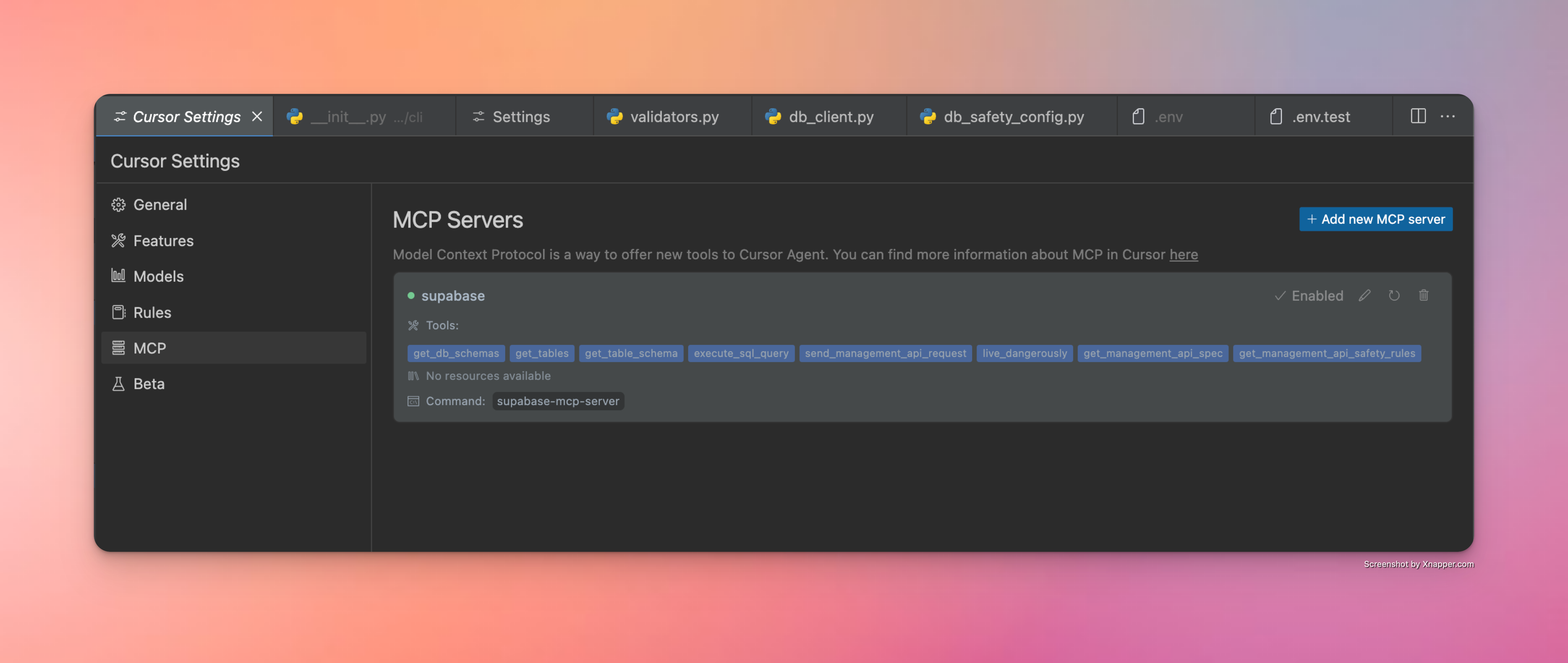
Wenn die Konfiguration korrekt ist, sollten Sie einen grünen Punkt und die Anzahl der vom Server bereitgestellten Tools sehen. So sieht eine erfolgreiche Cursorkonfiguration aus
Windsurf

Gehen Sie zu Cascade -> Klicken Sie auf das Hammersymbol -> Konfigurieren -> Füllen Sie die Konfiguration aus:

{
    "mcpServers": {
      "supabase": {
        "command": "/Users/username/.local/bin/supabase-mcp-server",  // update path
        "env": {
          "QUERY_API_KEY": "your-api-key",  // Required - get your API key at thequery.dev
          "SUPABASE_PROJECT_REF": "your-project-ref",
          "SUPABASE_DB_PASSWORD": "your-db-password",
          "SUPABASE_REGION": "us-east-1",  // optional, defaults to us-east-1
          "SUPABASE_ACCESS_TOKEN": "your-access-token",  // optional, for management API
          "SUPABASE_SERVICE_ROLE_KEY": "your-service-role-key"  // optional, for Auth Admin SDK
        }
      }
    }
}

Wenn die Konfiguration korrekt ist, sollten Sie in der Liste der verfügbaren Server einen grünen Punktindikator und einen anklickbaren Supabase-Server sehen.
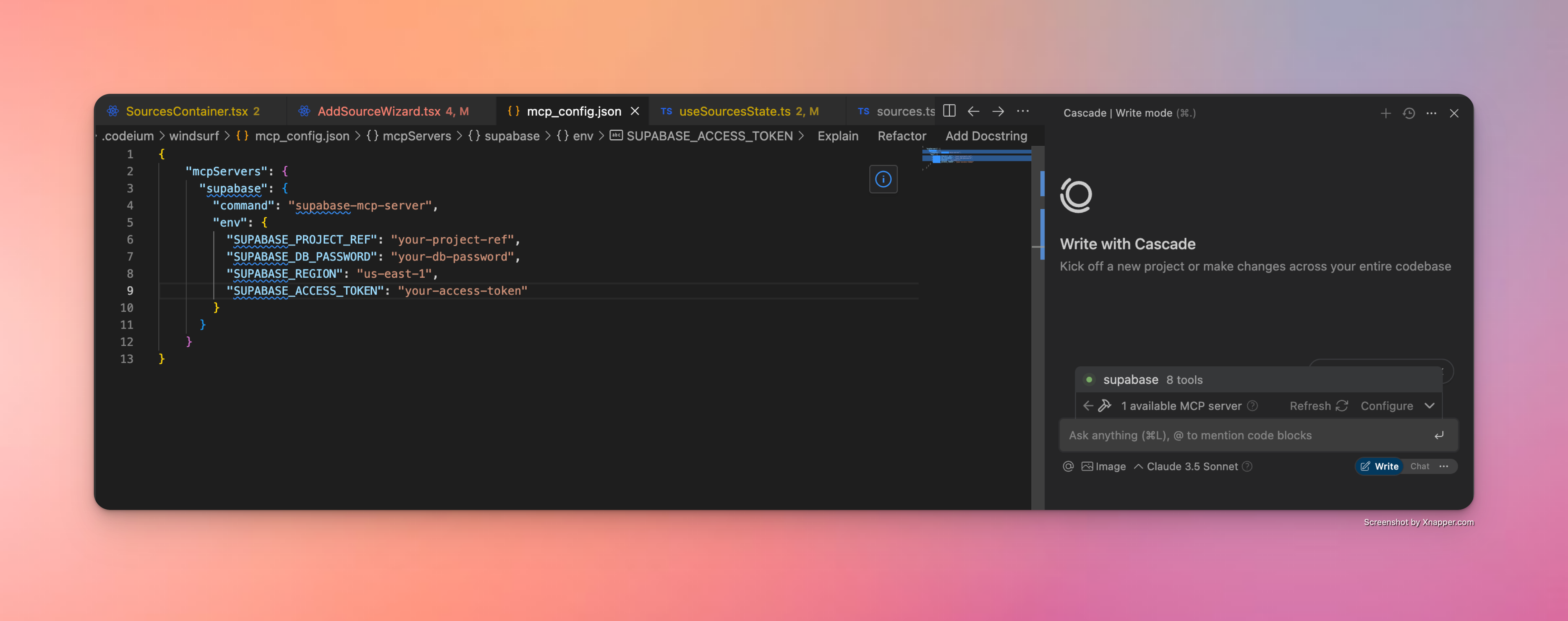
So sieht eine erfolgreiche Windsurf-Konfiguration aus

Claude Desktop

Claude Desktop unterstützt auch MCP-Server über eine JSON-Konfiguration. Befolgen Sie diese Schritte, um den Supabase MCP-Server einzurichten:

  1. Suchen Sie den vollständigen Pfad zur ausführbaren Datei (dieser Schritt ist entscheidend):

    # On macOS/Linux
    which supabase-mcp-server
    
    # On Windows
    where supabase-mcp-server

    Kopieren Sie den vollständigen zurückgegebenen Pfad (z. B. /Users/username/.local/bin/supabase-mcp-server ).

  2. Konfigurieren Sie den MCP-Server in Claude Desktop:

    • Öffnen Sie Claude Desktop

    • Gehen Sie zu Einstellungen → Entwickler -> Konfiguration MCP-Server bearbeiten

    • Fügen Sie eine neue Konfiguration mit dem folgenden JSON hinzu:

    {
      "mcpServers": {
        "supabase": {
          "command": "/full/path/to/supabase-mcp-server",  // Replace with the actual path from step 1
          "env": {
            "QUERY_API_KEY": "your-api-key",  // Required - get your API key at thequery.dev
            "SUPABASE_PROJECT_REF": "your-project-ref",
            "SUPABASE_DB_PASSWORD": "your-db-password",
            "SUPABASE_REGION": "us-east-1",  // optional, defaults to us-east-1
            "SUPABASE_ACCESS_TOKEN": "your-access-token",  // optional, for management API
            "SUPABASE_SERVICE_ROLE_KEY": "your-service-role-key"  // optional, for Auth Admin SDK
          }
        }
      }
    }

⚠️ Wichtig : Im Gegensatz zu Windsurf und Cursor benötigt Claude Desktop den vollständigen absoluten Pfad zur ausführbaren Datei. Die Verwendung nur des Befehlsnamens ( supabase-mcp-server ) führt zu einem „spawn ENOENT“-Fehler.

Wenn die Konfiguration korrekt ist, sollte der Supabase MCP-Server in Claude Desktop als verfügbar aufgeführt sein.
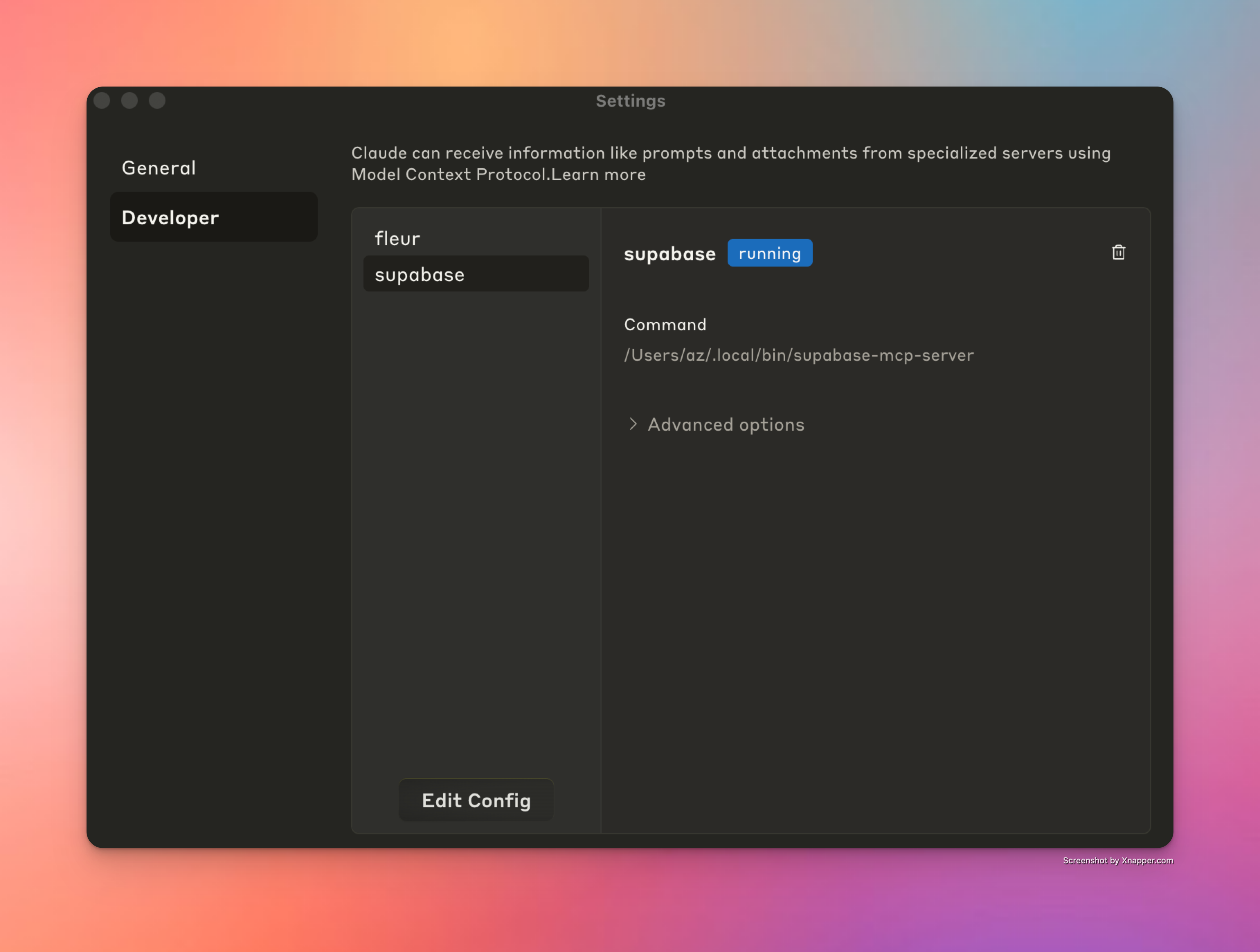
So sieht eine erfolgreiche Windsurf-Konfiguration aus

Cline

Cline unterstützt auch MCP-Server über eine ähnliche JSON-Konfiguration. Befolgen Sie diese Schritte, um den Supabase MCP-Server einzurichten:

  1. Suchen Sie den vollständigen Pfad zur ausführbaren Datei (dieser Schritt ist entscheidend):

    # On macOS/Linux
    which supabase-mcp-server
    
    # On Windows
    where supabase-mcp-server

    Kopieren Sie den vollständigen zurückgegebenen Pfad (z. B. /Users/username/.local/bin/supabase-mcp-server ).

  2. Konfigurieren Sie den MCP-Server in Cline:

    • Öffnen Sie Cline in VS Code

    • Klicken Sie in der Cline-Seitenleiste auf die Registerkarte „MCP-Server“.

    • Klicken Sie auf „MCP-Server konfigurieren“.

    • Dadurch wird die Datei cline_mcp_settings.json geöffnet

    • Fügen Sie die folgende Konfiguration hinzu:

    {
      "mcpServers": {
        "supabase": {
          "command": "/full/path/to/supabase-mcp-server",  // Replace with the actual path from step 1
          "env": {
            "QUERY_API_KEY": "your-api-key",  // Required - get your API key at thequery.dev
            "SUPABASE_PROJECT_REF": "your-project-ref",
            "SUPABASE_DB_PASSWORD": "your-db-password",
            "SUPABASE_REGION": "us-east-1",  // optional, defaults to us-east-1
            "SUPABASE_ACCESS_TOKEN": "your-access-token",  // optional, for management API
            "SUPABASE_SERVICE_ROLE_KEY": "your-service-role-key"  // optional, for Auth Admin SDK
          }
        }
      }
    }

Wenn die Konfiguration korrekt ist, sollten Sie neben dem Supabase MCP-Server in der Liste der Cline MCP-Server eine grüne Anzeige und unten im Fenster eine Bestätigungsmeldung „Supabase MCP-Server verbunden“ sehen.
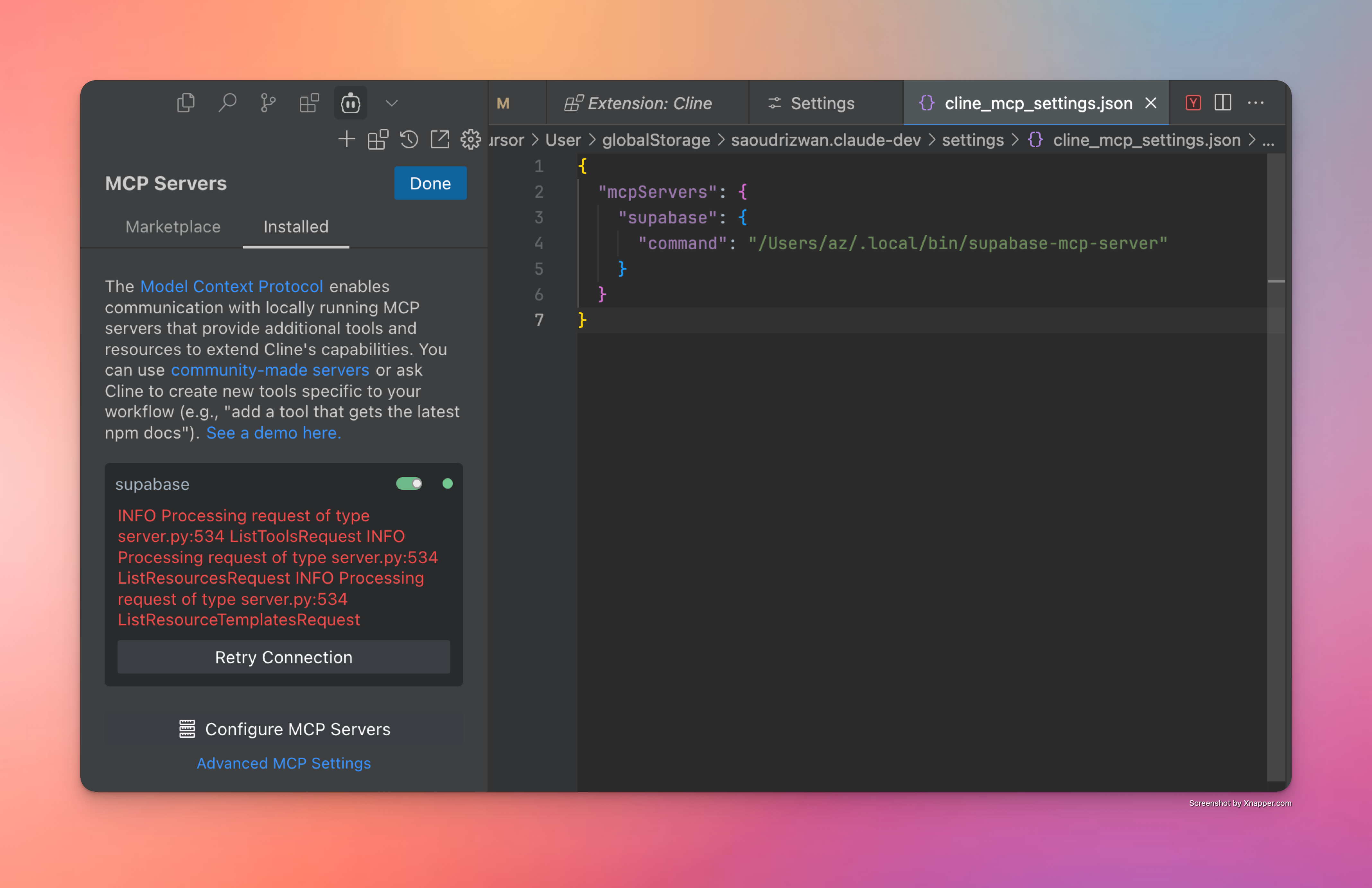
So sieht eine erfolgreiche Konfiguration in Cline aus

Fehlerbehebung

Hier sind einige Tipps und Tricks, die Ihnen helfen könnten:

  • Debug-Installation : Führen Sie supabase-mcp-server direkt vom Terminal aus aus, um zu prüfen, ob es funktioniert. Falls nicht, liegt möglicherweise ein Problem mit der Installation vor.

  • MCP-Serverkonfiguration – Wenn der obige Schritt funktioniert, ist der Server korrekt installiert und konfiguriert. Sofern Sie den richtigen Befehl angegeben haben, sollte die IDE eine Verbindung herstellen können. Stellen Sie sicher, dass Sie den richtigen Pfad zur ausführbaren Serverdatei angeben.

  • Fehler „Keine Tools gefunden“ – Wenn im Cursor „Client geschlossen – keine Tools verfügbar“ angezeigt wird, obwohl das Paket installiert ist:

    • Finden Sie den vollständigen Pfad zur ausführbaren Datei, indem Sie which supabase-mcp-server (macOS/Linux) oder where supabase-mcp-server (Windows) ausführen.

    • Verwenden Sie den vollständigen Pfad in Ihrer MCP-Serverkonfiguration anstelle von nur supabase-mcp-server

    • Beispiel: /Users/username/.local/bin/supabase-mcp-server oder C:\Users\username\.local\bin\supabase-mcp-server.exe

  • Umgebungsvariablen – Um eine Verbindung mit der richtigen Datenbank herzustellen, stellen Sie sicher, dass Sie entweder Umgebungsvariablen in mcp_config.json oder in .env Datei in einem globalen Konfigurationsverzeichnis ( ~/.config/supabase-mcp/.env unter macOS/Linux oder %APPDATA%\supabase-mcp\.env unter Windows) festlegen.

  • Zugriff auf Protokolle – Der MCP-Server schreibt detaillierte Protokolle in eine Datei:

    • Speicherort der Protokolldatei:

      • macOS/Linux: ~/.local/share/supabase-mcp/mcp_server.log

      • Windows: %USERPROFILE%\.local\share\supabase-mcp\mcp_server.log

    • Protokolle enthalten Verbindungsstatus, Konfigurationsdetails und Betriebsergebnisse

    • Zeigen Sie Protokolle mit einem beliebigen Texteditor oder Terminalbefehlen an:

      # On macOS/Linux
      cat ~/.local/share/supabase-mcp/mcp_server.log
      
      # On Windows (PowerShell)
      Get-Content "$env:USERPROFILE\.local\share\supabase-mcp\mcp_server.log"

Wenn Sie nicht weiterkommen oder eine der oben aufgeführten Anweisungen falsch ist, melden Sie dies bitte.

MCP-Inspektor

Ein äußerst nützliches Tool zur Fehlerbehebung bei MCP-Serverproblemen ist MCP Inspector. Wenn Sie die Software aus der Quelle installiert haben, können Sie supabase-mcp-inspector aus dem Projektrepo ausführen. Dadurch wird die Inspector-Instanz ausgeführt. Zusammen mit den Protokollen erhalten Sie einen vollständigen Überblick über die Vorgänge auf dem Server.

📝 Das Ausführen supabase-mcp-inspector funktioniert nicht richtig, wenn es aus einem Paket installiert wurde. Ich werde das Problem in der nächsten Version überprüfen und beheben.

Funktionsübersicht

Datenbankabfragetools

Seit v0.3+ bietet der Server umfassende Datenbankverwaltungsfunktionen mit integrierten Sicherheitskontrollen:

  • Ausführung von SQL-Abfragen : Führen Sie PostgreSQL-Abfragen mit Risikobewertung aus

    • Dreistufiges Sicherheitssystem :

      • safe : Nur-Lese-Operationen (SELECT) – immer erlaubt

      • write : Datenänderungen (INSERT, UPDATE, DELETE) – erfordern unsicheren Modus

      • destructive : Schemaänderungen (DROP, CREATE) – erfordern unsicheren Modus + Bestätigung

  • SQL-Parsing und -Validierung :

    • Verwendet den Parser von PostgreSQL (pglast) für eine genaue Analyse und liefert klares Feedback zu Sicherheitsanforderungen

  • Automatische Migrationsversionierung :

    • Datenbankverändernde Operationen werden automatisch versioniert

    • Generiert beschreibende Namen basierend auf Operationstyp und Ziel

  • Sicherheitskontrollen :

    • Der Standard-SAFE-Modus erlaubt nur schreibgeschützte Vorgänge

    • Alle Anweisungen werden im Transaktionsmodus über asyncpg ausgeführt

    • 2-stufige Bestätigung für Hochrisikovorgänge

  • Verfügbare Tools :

    • get_schemas : Listet Schemata mit Größen und Tabellenanzahl auf

    • get_tables : Listet Tabellen, Fremdtabellen und Ansichten mit Metadaten auf

    • get_table_schema : Ruft die detaillierte Tabellenstruktur ab (Spalten, Schlüssel, Beziehungen)

    • execute_postgresql : Führt SQL-Anweisungen für Ihre Datenbank aus

    • confirm_destructive_operation : Führt Operationen mit hohem Risiko nach der Bestätigung aus

    • retrieve_migrations : Ruft Migrationen mit Filter- und Paginierungsoptionen ab

    • live_dangerously : Schaltet zwischen sicherem und unsicherem Modus um

Verwaltungs-API-Tools

Seit v0.3.0 bietet der Server sicheren Zugriff auf die Supabase Management API mit integrierten Sicherheitskontrollen:

  • Verfügbare Tools :

    • send_management_api_request : Sendet beliebige Anfragen an die Supabase Management API mit automatischer Einfügung der Projektreferenz

    • get_management_api_spec : Ruft die erweiterte API-Spezifikation mit Sicherheitsinformationen ab

      • Unterstützt mehrere Abfragemodi: nach Domäne, nach bestimmtem Pfad/Methode oder nach allen Pfaden

      • Enthält Informationen zur Risikobewertung für jeden Endpunkt

      • Bietet detaillierte Parameteranforderungen und Antwortformate

      • Hilft LLMs, die vollen Fähigkeiten der Supabase Management API zu verstehen

    • get_management_api_safety_rules : Ruft alle Sicherheitsregeln mit menschenlesbaren Erklärungen ab

    • live_dangerously : Schaltet zwischen sicheren und unsicheren Betriebsmodi um

  • Sicherheitskontrollen :

    • Verwendet denselben Sicherheitsmanager wie Datenbankoperationen für ein konsistentes Risikomanagement

    • Nach Risikostufe kategorisierte Vorgänge:

      • safe : Nur-Lese-Operationen (GET) – immer erlaubt

      • unsafe : Statusändernde Vorgänge (POST, PUT, PATCH, DELETE) – erfordern unsicheren Modus

      • blocked : Destruktive Operationen (Projekt löschen usw.) – niemals erlaubt

    • Der standardmäßige abgesicherte Modus verhindert versehentliche Statusänderungen

    • Pfadbasierter Musterabgleich für präzise Sicherheitsregeln

Hinweis : Management-API-Tools funktionieren nur mit Remote-Supabase-Instanzen und sind nicht mit lokalen Supabase-Entwicklungs-Setups kompatibel.

Auth-Admin-Tools

Ich hatte geplant, dem MCP-Server Unterstützung für Python-SDK-Methoden hinzuzufügen. Nach reiflicher Überlegung habe ich mich entschieden, nur Auth-Admin-Methoden zu unterstützen, da ich oft Testbenutzer manuell erstellt habe, was fehleranfällig und zeitaufwändig war. Jetzt kann ich Cursor einfach bitten, einen Testbenutzer zu erstellen, und es wird nahtlos erledigt. Lesen Sie die vollständige Dokumentation zur Auth-Admin-SDK-Methode, um mehr über ihre Funktionen zu erfahren.

Seit v0.3.6 unterstützt der Server den direkten Zugriff auf Supabase Auth Admin-Methoden über das Python SDK:

  • Enthält die folgenden Werkzeuge:

    • get_auth_admin_methods_spec zum Abrufen der Dokumentation für alle verfügbaren Auth-Admin-Methoden

    • call_auth_admin_method zum direkten Aufrufen von Auth-Admin-Methoden mit korrekter Parameterbehandlung

  • Unterstützte Methoden:

    • get_user_by_id : Ruft einen Benutzer anhand seiner ID ab

    • list_users : Listet alle Benutzer mit Seitennummerierung auf

    • create_user : Einen neuen Benutzer erstellen

    • delete_user : Löscht einen Benutzer anhand seiner ID

    • invite_user_by_email : Senden Sie einen Einladungslink an die E-Mail-Adresse eines Benutzers

    • generate_link : Generiert einen E-Mail-Link für verschiedene Authentifizierungszwecke

    • update_user_by_id : Benutzerattribute nach ID aktualisieren

    • delete_factor : Löscht einen Faktor für einen Benutzer (derzeit nicht im SDK implementiert)

Warum Auth Admin SDK anstelle von einfachen SQL-Abfragen verwenden?

Das Auth Admin SDK bietet gegenüber der direkten SQL-Manipulation mehrere wichtige Vorteile:

  • Funktionalität : Ermöglicht Vorgänge, die mit SQL allein nicht möglich sind (Einladungen, Magic Links, MFA)

  • Genauigkeit : Zuverlässiger als das Erstellen und Ausführen von Roh-SQL-Abfragen auf Authentifizierungsschemata

  • Einfachheit : Bietet klare Methoden mit ordnungsgemäßer Validierung und Fehlerbehandlung

    • Antwortformat:

      • Alle Methoden geben strukturierte Python-Objekte anstelle von Rohwörterbüchern zurück

      • Auf Objektattribute kann mit der Punktnotation zugegriffen werden (z. B. user.id anstelle von user["id"] )

    • Randfälle und Einschränkungen:

      • UUID-Validierung: Viele Methoden erfordern ein gültiges UUID-Format für Benutzer-IDs und geben spezifische Validierungsfehler zurück

      • E-Mail-Konfiguration: Methoden wie invite_user_by_email und generate_link erfordern die Konfiguration des E-Mail-Versands in Ihrem Supabase-Projekt.

      • Linktypen: Bei der Linkgenerierung gelten für unterschiedliche Linktypen unterschiedliche Anforderungen:

        • Für signup ist die Existenz des Benutzers nicht erforderlich

        • Für magiclink und recovery muss der Benutzer bereits im System vorhanden sein

      • Fehlerbehandlung: Der Server liefert detaillierte Fehlermeldungen der Supabase-API, die von der Dashboard-Oberfläche abweichen können

      • Methodenverfügbarkeit: Einige Methoden wie delete_factor werden in der API bereitgestellt, sind jedoch im SDK nicht vollständig implementiert

Protokolle und Analysen

Der Server bietet Zugriff auf Supabase-Protokolle und Analysedaten und erleichtert so die Überwachung und Fehlerbehebung Ihrer Anwendungen:

  • Verfügbares Tool : retrieve_logs - Zugriff auf Protokolle von jedem Supabase-Dienst

  • Protokollsammlungen :

    • postgres : Datenbankserverprotokolle

    • api_gateway : API-Gateway-Anfragen

    • auth : Authentifizierungsereignisse

    • postgrest : RESTful API-Dienstprotokolle

    • pooler : Verbindungspooling-Protokolle

    • storage : Objektspeichervorgänge

    • realtime : WebSocket-Abonnementprotokolle

    • edge_functions : Serverlose Funktionsausführungen

    • cron : Geplante Jobprotokolle

    • pgbouncer : Verbindungspooler-Protokolle

  • Funktionen : Filtern Sie nach Zeit, suchen Sie nach Text, wenden Sie Feldfilter an oder verwenden Sie benutzerdefinierte SQL-Abfragen

Vereinfacht das Debuggen in Ihrem Supabase-Stack, ohne zwischen Schnittstellen wechseln oder komplexe Abfragen schreiben zu müssen.

Automatische Versionierung von Datenbankänderungen

„Mit großer Macht geht große Verantwortung einher.“ Das Tool execute_postgresql in Verbindung mit dem treffend benannten Tool live_dangerously bietet eine leistungsstarke und einfache Möglichkeit zur Verwaltung Ihrer Supabase-Datenbank. Gleichzeitig bedeutet es, dass das Löschen oder Ändern einer Tabelle nur eine Chat-Nachricht entfernt ist. Um das Risiko irreversibler Änderungen zu reduzieren, unterstützt der Server seit Version 0.3.8:

  • Automatische Erstellung von Migrationsskripten für alle Schreib- und destruktiven SQL-Operationen, die auf der Datenbank ausgeführt werden

  • Verbesserter Sicherheitsmodus der Abfrageausführung, in dem alle Abfragen kategorisiert werden in:

    • safe Typ: immer zulässig. Schließt alle schreibgeschützten Operationen ein.

    • write : erfordert, dass write vom Benutzer aktiviert wird.

    • destructive Typ: erfordert, dass write vom Benutzer aktiviert wird UND eine zweistufige Bestätigung der Abfrageausführung für Clients, die Tools nicht automatisch ausführen.

Universeller Sicherheitsmodus

Seit v0.3.8 ist der Sicherheitsmodus über alle Dienste (Datenbank, API, SDK) hinweg mithilfe eines universellen Sicherheitsmanagers standardisiert. Dies ermöglicht ein konsistentes Risikomanagement und eine einheitliche Schnittstelle zur Steuerung der Sicherheitseinstellungen auf dem gesamten MCP-Server.

Alle Vorgänge (SQL-Abfragen, API-Anfragen, SDK-Methoden) werden in Risikostufen eingeteilt:

  • Low Risiko: Nur-Lese-Operationen, die weder Daten noch Struktur ändern (SELECT-Abfragen, GET-API-Anfragen)

  • Medium Risiko: Schreibvorgänge, die Daten, aber nicht die Struktur ändern (INSERT/UPDATE/DELETE, die meisten POST/PUT-API-Anfragen)

  • High Risiko: Destruktive Operationen, die die Datenbankstruktur verändern oder zu Datenverlust führen können (DROP/TRUNCATE, DELETE-API-Endpunkte)

  • Extreme Risiko: Operationen mit schwerwiegenden Folgen, die vollständig blockiert werden (Löschen von Projekten)

Sicherheitskontrollen werden je nach Risikostufe angewendet:

  • Operationen mit geringem Risiko sind immer erlaubt

  • Bei Vorgängen mit mittlerem Risiko muss der unsichere Modus aktiviert werden

  • Hochrisikovorgänge erfordern den unsicheren Modus UND eine ausdrückliche Bestätigung

  • Extrem riskante Operationen sind niemals erlaubt

So funktioniert der Bestätigungsablauf

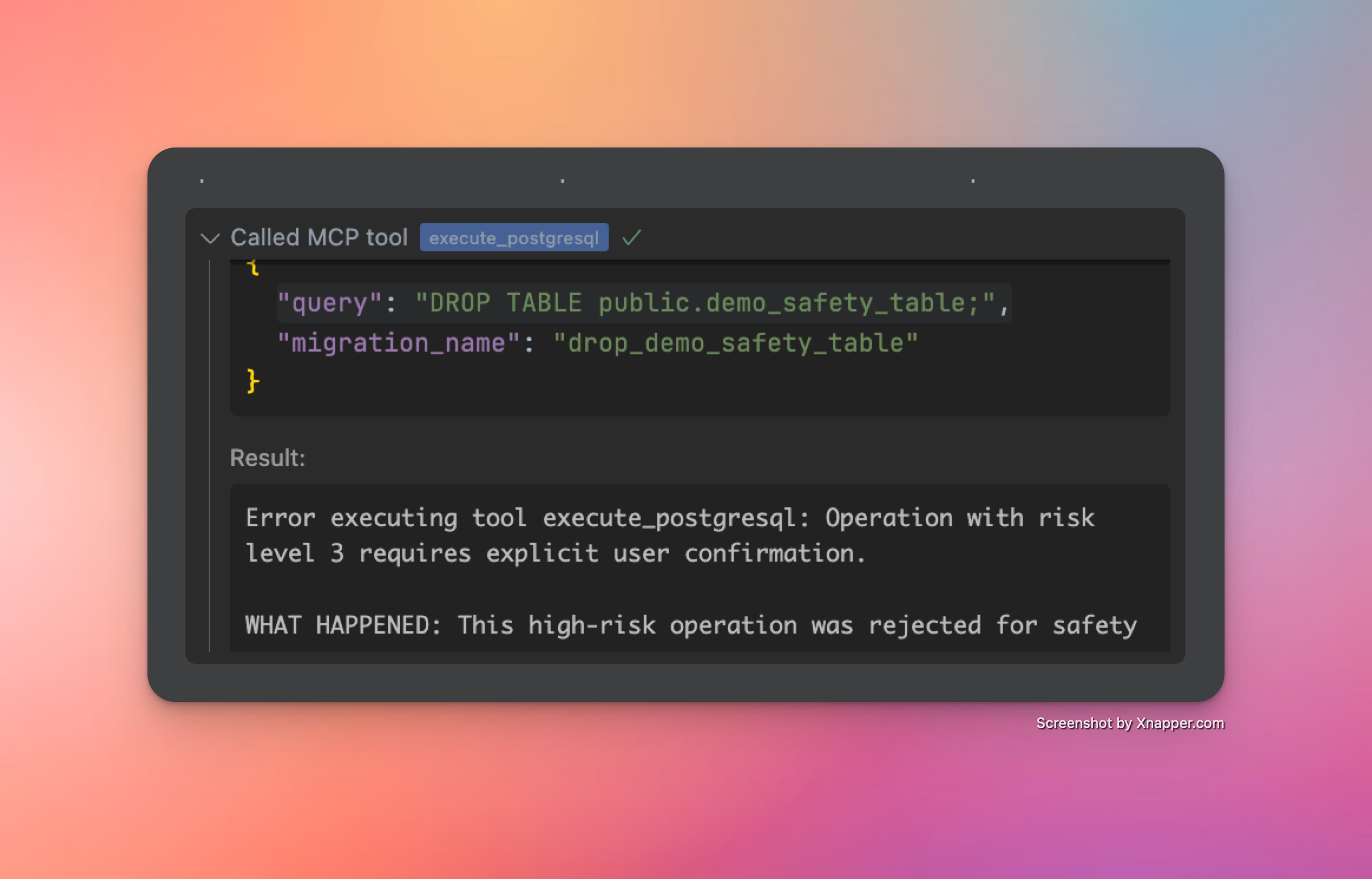
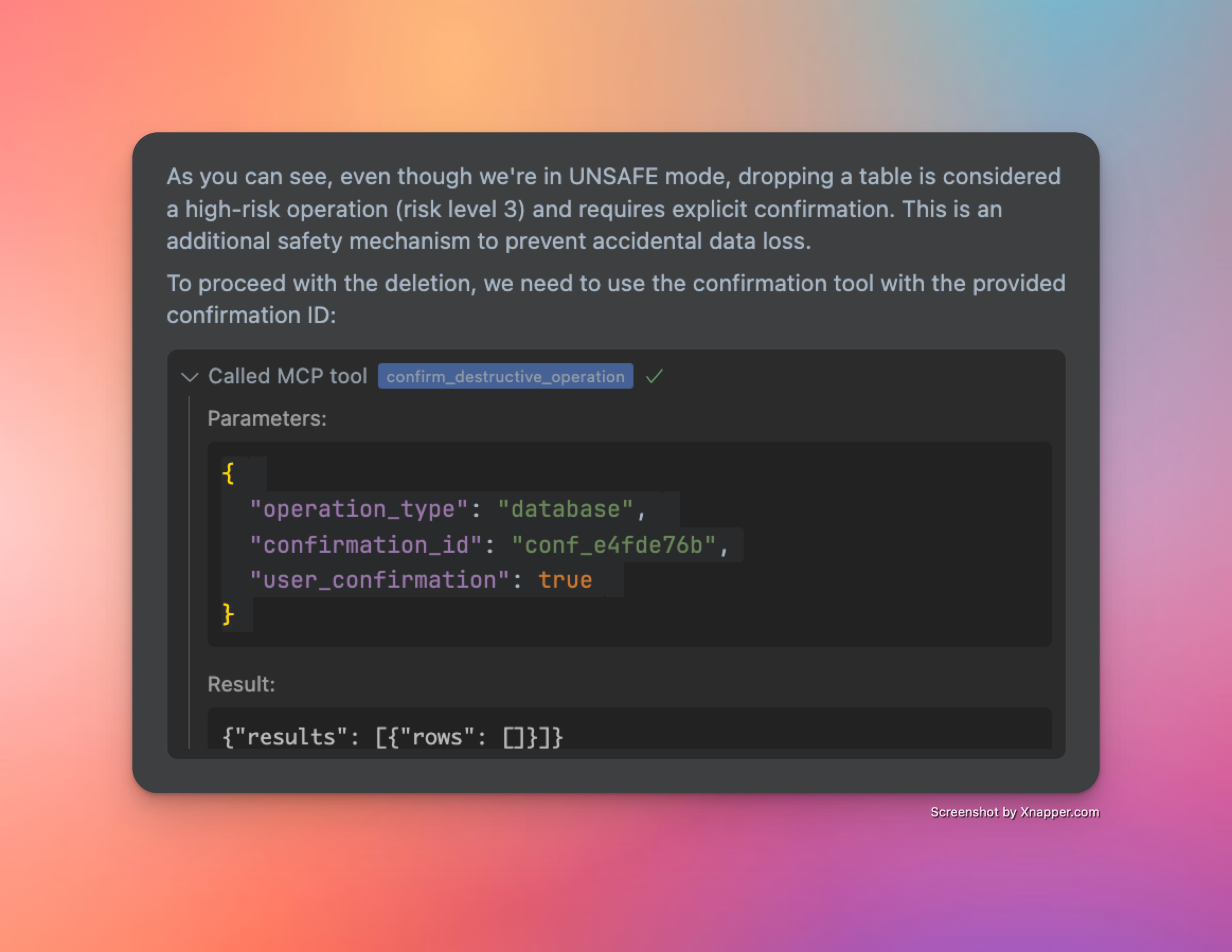
Alle Vorgänge mit hohem Risiko (sei es eine PostgreSQL- oder API-Anfrage) werden auch im unsafe Modus blockiert. Jede Operation mit hohem Risiko wird blockiert Sie müssen jede Operation mit hohem Risiko ausdrücklich bestätigen und genehmigen, damit sie ausgeführt werden kann. Eine ausdrückliche Genehmigung ist immer erforderlich
Änderungsprotokoll

  • 📦 Vereinfachte Installation über den Paketmanager - ✅ (v0.2.0)

  • 🌎 Unterstützung für verschiedene Supabase-Regionen - ✅ (v0.2.2)

  • 🎮 Programmatischer Zugriff auf die Supabase-Verwaltungs-API mit Sicherheitskontrollen - ✅ (v0.3.0)

  • 👷‍♂️ SQL-Abfragen für Datenbanken lesen und lesen/schreiben mit Sicherheitskontrollen - ✅ (v0.3.0)

  • 🔄 Robuste Transaktionsverarbeitung für direkte und gepoolte Verbindungen - ✅ (v0.3.2)

  • 🐍 Unterstützte Methoden und Objekte, die im nativen Python SDK verfügbar sind – ✅ (v0.3.6)

  • 🔍 Stärkere SQL-Abfragevalidierung ✅ (v0.3.8)

  • 📝 Automatische Versionierung von Datenbankänderungen ✅ (v0.3.8)

  • 📖 Radikal verbesserte Kenntnisse und Tools der API-Spezifikation ✅ (v0.3.8)

  • ✍️ Verbesserte Konsistenz der Migrationstools für ein besser organisiertes Datenbank-VCS ✅ (v0.3.10)

  • 🥳 Query MCP ist veröffentlicht (v0.4.0)

Eine detailliertere Roadmap finden Sie in dieser Diskussion auf GitHub.

Sternengeschichte

Sternenverlaufsdiagramm


Viel Spaß! ☺️

Available Tools

12 tools
call_auth_admin_methodA

Call an Auth Admin method from Supabase Python SDK.

This tool provides a safe, validated interface to the Supabase Auth Admin SDK, allowing you to:

  • Manage users (create, update, delete)

  • List and search users

  • Generate authentication links

  • Manage multi-factor authentication

  • And more

IMPORTANT NOTES:

  • Request bodies must adhere to the Python SDK specification

  • Some methods may have nested parameter structures

  • The tool validates all parameters against Pydantic models

  • Extra fields not defined in the models will be rejected

AVAILABLE METHODS:

  • get_user_by_id: Retrieve a user by their ID

  • list_users: List all users with pagination

  • create_user: Create a new user

  • delete_user: Delete a user by their ID

  • invite_user_by_email: Send an invite link to a user's email

  • generate_link: Generate an email link for various authentication purposes

  • update_user_by_id: Update user attributes by ID

  • delete_factor: Delete a factor on a user

EXAMPLES:

  1. Get user by ID: method: "get_user_by_id" params: {"uid": "user-uuid-here"}

  2. Create user: method: "create_user" params: { "email": "user@example.com", "password": "secure-password" }

  3. Update user by ID: method: "update_user_by_id" params: { "uid": "user-uuid-here", "attributes": { "email": "new@email.com" } }

For complete documentation of all methods and their parameters, use the get_auth_admin_methods_spec tool.

ParametersJSON Schema
NameRequiredDescriptionDefault
methodYes
paramsYes

TDQS

A4.5/5.0
Behavior4/5

Does the description disclose side effects, auth requirements, rate limits, or destructive behavior?

With no annotations provided, the description carries the full burden of behavioral disclosure. It effectively describes key traits: it's a 'safe, validated interface' that validates parameters against Pydantic models and rejects extra fields. It mentions that 'some methods may have nested parameter structures' and provides examples of destructive operations (delete_user, delete_factor). However, it doesn't cover rate limits, authentication requirements, or error handling.

Agents need to know what a tool does to the world before calling it. Descriptions should go beyond structured annotations to explain consequences.

Conciseness3/5

Is the description appropriately sized, front-loaded, and free of redundancy?

The description is appropriately front-loaded with the core purpose and key capabilities, but it includes extensive lists and examples that could be streamlined. The 'AVAILABLE METHODS' section and multiple examples add value but make the description lengthy. Every sentence earns its place, but the structure could be more concise by integrating examples more tightly or referencing external documentation earlier.

Shorter descriptions cost fewer tokens and are easier for agents to parse. Every sentence should earn its place.

Completeness4/5

Given the tool's complexity, does the description cover enough for an agent to succeed on first attempt?

Given the complexity (2 parameters with nested objects, no output schema, no annotations), the description is largely complete. It covers purpose, usage, behavioral traits, and parameter semantics thoroughly. However, it lacks details on return values (since no output schema exists) and doesn't mention authentication or error scenarios. The reference to 'get_auth_admin_methods_spec' for full documentation helps mitigate gaps.

Complex tools with many parameters or behaviors need more documentation. Simple tools need less. This dimension scales expectations accordingly.

Parameters5/5

Does the description clarify parameter syntax, constraints, interactions, or defaults beyond what the schema provides?

The input schema has 0% description coverage and only defines 'method' (string) and 'params' (object) without semantic details. The description compensates fully by listing all available methods with brief explanations (e.g., 'get_user_by_id: Retrieve a user by their ID'), providing detailed examples with parameter structures, and explaining that parameters must adhere to Python SDK specifications. This adds substantial meaning beyond the minimal schema.

Input schemas describe structure but not intent. Descriptions should explain non-obvious parameter relationships and valid value ranges.

Purpose5/5

Does the description clearly state what the tool does and how it differs from similar tools?

The description clearly states the tool's purpose: 'Call an Auth Admin method from Supabase Python SDK' with a specific verb ('call') and resource ('Auth Admin method'). It distinguishes from siblings like 'get_auth_admin_methods_spec' (which retrieves documentation) and 'send_management_api_request' (which handles different API types). The bullet points further clarify capabilities like user management and authentication tasks.

Agents choose between tools based on descriptions. A clear purpose with a specific verb and resource helps agents select the right tool.

Usage Guidelines5/5

Does the description explain when to use this tool, when not to, or what alternatives exist?

The description provides explicit guidance on when to use this tool vs alternatives. It states to 'use the get_auth_admin_methods_spec tool' for complete documentation of methods and parameters, distinguishing it from that sibling. The 'IMPORTANT NOTES' section also outlines prerequisites like adhering to Python SDK specifications and validation rules, though it doesn't explicitly mention when not to use it.

Agents often have multiple tools that could apply. Explicit usage guidance like "use X instead of Y when Z" prevents misuse.

confirm_destructive_operationA

Execute a destructive database or API operation after confirmation. Use this only after reviewing the risks with the user.

HOW IT WORKS:

  • This tool executes a previously rejected high-risk operation using its confirmation ID

  • The operation will be exactly the same as the one that generated the ID

  • No need to retype the query or api request params - the system remembers it

STEPS:

  1. Explain the risks to the user and get their approval

  2. Use this tool with the confirmation ID from the error message

  3. The original query will be executed as-is

PARAMETERS:

  • operation_type: Type of operation ("api" or "database")

  • confirmation_id: The ID provided in the error message (required)

  • user_confirmation: Set to true to confirm execution (default: false)

NOTE: Confirmation IDs expire after 5 minutes for security

ParametersJSON Schema
NameRequiredDescriptionDefault
confirmation_idYes
operation_typeYes
user_confirmationNo

TDQS

A4.5/5.0
Behavior4/5

Does the description disclose side effects, auth requirements, rate limits, or destructive behavior?

With no annotations provided, the description carries the full burden of behavioral disclosure. It effectively describes key traits: it's for executing high-risk operations, requires user confirmation, uses a confirmation ID from a previous error, executes the original query as-is, and includes a security note about 5-minute expiration. However, it doesn't detail potential side effects (e.g., data loss specifics) or error handling, leaving some gaps in full transparency.

Agents need to know what a tool does to the world before calling it. Descriptions should go beyond structured annotations to explain consequences.

Conciseness4/5

Is the description appropriately sized, front-loaded, and free of redundancy?

The description is well-structured with clear sections (HOW IT WORKS, STEPS, PARAMETERS, NOTE), making it easy to scan. Each sentence adds value, such as explaining the confirmation process and security constraints. It could be slightly more concise by integrating some details (e.g., merging the STEPS and PARAMETERS sections), but overall, it's efficient and front-loaded with the core purpose.

Shorter descriptions cost fewer tokens and are easier for agents to parse. Every sentence should earn its place.

Completeness4/5

Given the tool's complexity, does the description cover enough for an agent to succeed on first attempt?

Given the tool's complexity (destructive operations, confirmation flow) and lack of annotations or output schema, the description does a good job of covering essential context: purpose, usage steps, parameters, and security notes. It addresses the high-risk nature and user interaction requirements. However, it doesn't specify what happens after execution (e.g., success/failure responses or side effects), which is a minor gap for such a critical tool.

Complex tools with many parameters or behaviors need more documentation. Simple tools need less. This dimension scales expectations accordingly.

Parameters4/5

Does the description clarify parameter syntax, constraints, interactions, or defaults beyond what the schema provides?

Schema description coverage is 0%, so the description must compensate. It adds meaningful context for all three parameters: 'operation_type' is explained as 'Type of operation ("api" or "database")', 'confirmation_id' as 'The ID provided in the error message (required)', and 'user_confirmation' as 'Set to true to confirm execution (default: false)'. This goes beyond the schema's basic titles and enums, clarifying usage and requirements. A point is deducted because it doesn't elaborate on the implications of each operation_type choice.

Input schemas describe structure but not intent. Descriptions should explain non-obvious parameter relationships and valid value ranges.

Purpose5/5

Does the description clearly state what the tool does and how it differs from similar tools?

The description clearly states the tool's purpose: 'Execute a destructive database or API operation after confirmation.' It specifies the verb ('execute'), resource ('destructive database or API operation'), and the key condition ('after confirmation'). The title 'confirm_destructive_operation' reinforces this, and it distinguishes itself from siblings like 'live_dangerously' or 'execute_postgresql' by focusing on confirmation of previously rejected high-risk operations.

Agents choose between tools based on descriptions. A clear purpose with a specific verb and resource helps agents select the right tool.

Usage Guidelines5/5

Does the description explain when to use this tool, when not to, or what alternatives exist?

The description provides explicit guidance on when to use this tool: 'Use this only after reviewing the risks with the user.' It outlines a clear process (explain risks, get approval, use confirmation ID) and specifies prerequisites (confirmation ID from an error message). It also distinguishes usage from alternatives by noting that no retyping of queries is needed, which sets it apart from tools like 'execute_postgresql' or 'send_management_api_request' that might require full parameter input.

Agents often have multiple tools that could apply. Explicit usage guidance like "use X instead of Y when Z" prevents misuse.

execute_postgresqlA

Execute PostgreSQL statements against your Supabase database.

IMPORTANT: All SQL statements must end with a semicolon (;).

OPERATION TYPES AND REQUIREMENTS:

  1. READ Operations (SELECT, EXPLAIN, etc.):

    • Can be executed directly without special requirements

    • Example: SELECT * FROM public.users LIMIT 10;

  2. WRITE Operations (INSERT, UPDATE, DELETE):

    • Require UNSAFE mode (use live_dangerously('database', True) first)

    • Example: INSERT INTO public.users (email) VALUES ('user@example.com');

  3. SCHEMA Operations (CREATE, ALTER, DROP):

    • Require UNSAFE mode (use live_dangerously('database', True) first)

    • Destructive operations (DROP, TRUNCATE) require additional confirmation

    • Example: CREATE TABLE public.test_table (id SERIAL PRIMARY KEY, name TEXT);

MIGRATION HANDLING: All queries that modify the database will be automatically version controlled by the server. You can provide optional migration name, if you want to name the migration.

  • Respect the following format: verb_noun_detail. Be descriptive and concise.

  • Examples:

    • create_users_table

    • add_email_to_profiles

    • enable_rls_on_users

  • If you don't provide a migration name, the server will generate one based on the SQL statement

  • The system will sanitize your provided name to ensure compatibility with database systems

  • Migration names are prefixed with a timestamp in the format YYYYMMDDHHMMSS

SAFETY SYSTEM: Operations are categorized by risk level:

  • LOW RISK: Read operations (SELECT, EXPLAIN) - allowed in SAFE mode

  • MEDIUM RISK: Write operations (INSERT, UPDATE, DELETE) - require UNSAFE mode

  • HIGH RISK: Schema operations (CREATE, ALTER) - require UNSAFE mode

  • EXTREME RISK: Destructive operations (DROP, TRUNCATE) - require UNSAFE mode and confirmation

TRANSACTION HANDLING:

  • DO NOT use transaction control statements (BEGIN, COMMIT, ROLLBACK)

  • The database client automatically wraps queries in transactions

  • The SQL validator will reject queries containing transaction control statements

  • This ensures atomicity and provides rollback capability for data modifications

MULTIPLE STATEMENTS:

  • You can send multiple SQL statements in a single query

  • Each statement will be executed in order within the same transaction

  • Example: CREATE TABLE public.test_table (id SERIAL PRIMARY KEY, name TEXT); INSERT INTO public.test_table (name) VALUES ('test');

CONFIRMATION FLOW FOR HIGH-RISK OPERATIONS:

  • High-risk operations (DROP TABLE, TRUNCATE, etc.) will be rejected with a confirmation ID

  • The error message will explain what happened and provide a confirmation ID

  • Review the risks with the user before proceeding

  • Use the confirm_destructive_operation tool with the provided ID to execute the operation

IMPORTANT GUIDELINES:

  • The database client starts in SAFE mode by default for safety

  • Only enable UNSAFE mode when you need to modify data or schema

  • Never mix READ and WRITE operations in the same transaction

  • For destructive operations, be prepared to confirm with the confirm_destructive_operation tool

WHEN TO USE OTHER TOOLS INSTEAD:

  • For Auth operations (users, authentication, etc.): Use call_auth_admin_method instead of direct SQL The Auth Admin SDK provides safer, validated methods for user management

  • For project configuration, functions, storage, etc.: Use send_management_api_request The Management API handles Supabase platform features that aren't directly in the database

Note: This tool operates on the PostgreSQL database only. API operations use separate safety controls.

ParametersJSON Schema
NameRequiredDescriptionDefault
migration_nameNo
queryYes

TDQS

A4.7/5.0
Behavior5/5

Does the description disclose side effects, auth requirements, rate limits, or destructive behavior?

With no annotations provided, the description carries the full burden of behavioral disclosure and does so comprehensively. It details safety modes (SAFE/UNSAFE), risk categorization (LOW/MEDIUM/HIGH/EXTREME), transaction handling restrictions, migration version control, confirmation flows for destructive operations, and important operational guidelines. This provides rich behavioral context beyond basic functionality.

Agents need to know what a tool does to the world before calling it. Descriptions should go beyond structured annotations to explain consequences.

Conciseness3/5

Is the description appropriately sized, front-loaded, and free of redundancy?

The description is well-structured with clear sections (OPERATION TYPES, MIGRATION HANDLING, SAFETY SYSTEM, etc.) but is quite lengthy. While most content is valuable, some redundancy exists (e.g., multiple mentions of UNSAFE mode requirements). The front-loading is good with purpose and immediate requirements, but the length may challenge quick comprehension.

Shorter descriptions cost fewer tokens and are easier for agents to parse. Every sentence should earn its place.

Completeness5/5

Given the tool's complexity, does the description cover enough for an agent to succeed on first attempt?

Given the complexity of a database execution tool with 2 parameters, no annotations, and no output schema, the description provides exceptional completeness. It covers purpose, usage guidelines, behavioral traits, parameter semantics, safety systems, transaction handling, migration control, confirmation flows, and sibling tool relationships. This fully compensates for the lack of structured metadata.

Complex tools with many parameters or behaviors need more documentation. Simple tools need less. This dimension scales expectations accordingly.

Parameters4/5

Does the description clarify parameter syntax, constraints, interactions, or defaults beyond what the schema provides?

With 0% schema description coverage for the 2 parameters, the description compensates well by explaining both parameters' semantics. It describes 'migration_name' in detail (format requirements, examples, what happens if not provided, sanitization, timestamp prefixing) and 'query' through extensive examples and requirements (semicolon termination, operation types). While comprehensive, it doesn't explicitly map all schema properties like the default value for migration_name.

Input schemas describe structure but not intent. Descriptions should explain non-obvious parameter relationships and valid value ranges.

Purpose5/5

Does the description clearly state what the tool does and how it differs from similar tools?

The description clearly states the tool's purpose: 'Execute PostgreSQL statements against your Supabase database.' It specifies the exact action (execute) and resource (PostgreSQL statements/Supabase database), distinguishing it from sibling tools like call_auth_admin_method or send_management_api_request that handle different aspects of the system.

Agents choose between tools based on descriptions. A clear purpose with a specific verb and resource helps agents select the right tool.

Usage Guidelines5/5

Does the description explain when to use this tool, when not to, or what alternatives exist?

The description provides explicit guidance on when to use this tool versus alternatives. It includes a dedicated section 'WHEN TO USE OTHER TOOLS INSTEAD' that names specific sibling tools (call_auth_admin_method, send_management_api_request) and explains what operations they handle instead. It also provides detailed context about different operation types and their requirements.

Agents often have multiple tools that could apply. Explicit usage guidance like "use X instead of Y when Z" prevents misuse.

get_auth_admin_methods_specA

Get Python SDK methods specification for Auth Admin.

Returns a comprehensive dictionary of all Auth Admin methods available in the Supabase Python SDK, including:

  • Method names and descriptions

  • Required and optional parameters for each method

  • Parameter types and constraints

  • Return value information

This tool is useful for exploring the capabilities of the Auth Admin SDK and understanding how to properly format parameters for the call_auth_admin_method tool.

No parameters required.

ParametersJSON Schema
NameRequiredDescriptionDefault

No parameters

TDQS

A4.4/5.0
Behavior3/5

Does the description disclose side effects, auth requirements, rate limits, or destructive behavior?

With no annotations provided, the description carries the full burden. It describes what the tool returns ('comprehensive dictionary' with method details) and clarifies it requires no parameters, which is helpful. However, it doesn't mention behavioral aspects like whether this is a read-only operation, if it makes external API calls, potential rate limits, or error conditions.

Agents need to know what a tool does to the world before calling it. Descriptions should go beyond structured annotations to explain consequences.

Conciseness5/5

Is the description appropriately sized, front-loaded, and free of redundancy?

The description is well-structured and front-loaded with the core purpose. Every sentence adds value: the first states what it does, the second details the return content, the third explains usage context, and the fourth clarifies no parameters needed. There is no wasted text.

Shorter descriptions cost fewer tokens and are easier for agents to parse. Every sentence should earn its place.

Completeness4/5

Given the tool's complexity, does the description cover enough for an agent to succeed on first attempt?

Given the tool has 0 parameters, no annotations, and no output schema, the description does a good job explaining the purpose, return format, and usage context. However, it could be more complete by specifying the exact structure of the returned dictionary or any prerequisites, though the lack of output schema lowers the bar.

Complex tools with many parameters or behaviors need more documentation. Simple tools need less. This dimension scales expectations accordingly.

Parameters4/5

Does the description clarify parameter syntax, constraints, interactions, or defaults beyond what the schema provides?

The tool has 0 parameters with 100% schema description coverage, so the baseline is 4. The description explicitly states 'No parameters required,' which reinforces this clearly and adds value by preventing parameter confusion.

Input schemas describe structure but not intent. Descriptions should explain non-obvious parameter relationships and valid value ranges.

Purpose5/5

Does the description clearly state what the tool does and how it differs from similar tools?

The description clearly states the specific action ('Get Python SDK methods specification for Auth Admin') and resource ('Auth Admin methods available in the Supabase Python SDK'). It distinguishes from sibling tools by focusing exclusively on Auth Admin SDK methods, unlike broader tools like get_management_api_spec or get_schemas.

Agents choose between tools based on descriptions. A clear purpose with a specific verb and resource helps agents select the right tool.

Usage Guidelines5/5

Does the description explain when to use this tool, when not to, or what alternatives exist?

The description explicitly states when to use this tool ('useful for exploring the capabilities of the Auth Admin SDK and understanding how to properly format parameters for the call_auth_admin_method tool'), providing clear context and naming the specific alternative tool (call_auth_admin_method) it prepares for.

Agents often have multiple tools that could apply. Explicit usage guidance like "use X instead of Y when Z" prevents misuse.

get_management_api_specA

Get the complete Supabase Management API specification.

Returns the full OpenAPI specification for the Supabase Management API, including:

  • All available endpoints and operations

  • Required and optional parameters for each operation

  • Request and response schemas

  • Authentication requirements

  • Safety information for each operation

This tool can be used in four different ways:

  1. Without parameters: Returns all domains (default)

  2. With path and method: Returns the full specification for a specific API endpoint

  3. With domain only: Returns all paths and methods within that domain

  4. With all_paths=True: Returns all paths and methods

Parameters:

  • params: Dictionary containing optional parameters:

    • path: Optional API path (e.g., "/v1/projects/{ref}/functions")

    • method: Optional HTTP method (e.g., "GET", "POST")

    • domain: Optional domain/tag name (e.g., "Auth", "Storage")

    • all_paths: Optional boolean, if True returns all paths and methods

Available domains:

  • Analytics: Analytics-related endpoints

  • Auth: Authentication and authorization endpoints

  • Database: Database management endpoints

  • Domains: Custom domain configuration endpoints

  • Edge Functions: Serverless function management endpoints

  • Environments: Environment configuration endpoints

  • OAuth: OAuth integration endpoints

  • Organizations: Organization management endpoints

  • Projects: Project management endpoints

  • Rest: RESTful API endpoints

  • Secrets: Secret management endpoints

  • Storage: Storage management endpoints

This specification is useful for understanding:

  • What operations are available through the Management API

  • How to properly format requests for each endpoint

  • Which operations require unsafe mode

  • What data structures to expect in responses

SAFETY: This is a low-risk read operation that can be executed in SAFE mode.

ParametersJSON Schema
NameRequiredDescriptionDefault
paramsNo

TDQS

A4.7/5.0
Behavior4/5

Does the description disclose side effects, auth requirements, rate limits, or destructive behavior?

With no annotations provided, the description carries full burden and does an excellent job disclosing behavioral traits. It explicitly states this is a 'low-risk read operation that can be executed in SAFE mode,' describes what information is returned (endpoints, parameters, schemas, auth requirements, safety info), and explains the four different usage patterns. The only minor gap is lack of information about rate limits or pagination, but overall it provides comprehensive behavioral context.

Agents need to know what a tool does to the world before calling it. Descriptions should go beyond structured annotations to explain consequences.

Conciseness4/5

Is the description appropriately sized, front-loaded, and free of redundancy?

The description is well-structured and appropriately sized, with clear sections for purpose, usage patterns, parameters, domains, and utility. While comprehensive, every sentence earns its place by adding value. The only minor issue is some redundancy in the safety statement at the end, but overall it's front-loaded with the core purpose and efficiently organized.

Shorter descriptions cost fewer tokens and are easier for agents to parse. Every sentence should earn its place.

Completeness5/5

Given the tool's complexity, does the description cover enough for an agent to succeed on first attempt?

Given the complexity of a tool that returns API specifications with multiple usage patterns, and with no annotations and no output schema, the description provides complete context. It explains what the tool does, how to use it in different scenarios, what parameters mean, what domains are available, what information the specification contains, and safety considerations. This fully compensates for the lack of structured metadata.

Complex tools with many parameters or behaviors need more documentation. Simple tools need less. This dimension scales expectations accordingly.

Parameters5/5

Does the description clarify parameter syntax, constraints, interactions, or defaults beyond what the schema provides?

With 0% schema description coverage (the schema only shows 'params' as an object with no properties documented), the description fully compensates by providing detailed parameter semantics. It explains all four optional parameters (path, method, domain, all_paths) with examples and clear descriptions of what each does. It also lists available domain values with explanations, effectively documenting what would normally be in the schema's enum or property descriptions.

Input schemas describe structure but not intent. Descriptions should explain non-obvious parameter relationships and valid value ranges.

Purpose5/5

Does the description clearly state what the tool does and how it differs from similar tools?

The description clearly states the tool's purpose: 'Get the complete Supabase Management API specification' with specific details about what it returns (OpenAPI spec including endpoints, parameters, schemas, auth requirements, safety info). It distinguishes from sibling tools like 'get_auth_admin_methods_spec' by covering the entire Management API rather than just auth methods, and from 'send_management_api_request' by providing documentation rather than executing requests.

Agents choose between tools based on descriptions. A clear purpose with a specific verb and resource helps agents select the right tool.

Usage Guidelines5/5

Does the description explain when to use this tool, when not to, or what alternatives exist?

The description provides explicit usage guidelines with four distinct scenarios: 1) without parameters returns all domains, 2) with path and method returns specific endpoint spec, 3) with domain only returns all paths/methods in that domain, 4) with all_paths=True returns all paths/methods. It also explains when this tool is useful (understanding available operations, request formatting, unsafe mode requirements, response structures), giving clear context for when to use it versus alternatives.

Agents often have multiple tools that could apply. Explicit usage guidance like "use X instead of Y when Z" prevents misuse.

get_schemasB

List all database schemas with their sizes and table counts.

ParametersJSON Schema
NameRequiredDescriptionDefault

No parameters

TDQS

B3.2/5.0
Behavior2/5

Does the description disclose side effects, auth requirements, rate limits, or destructive behavior?

With no annotations provided, the description carries the full burden of behavioral disclosure. It states this is a read operation ('List'), implying it's non-destructive, but doesn't cover other important aspects like authentication requirements, rate limits, error handling, or what the output format looks like. For a tool with zero annotation coverage, this is insufficient.

Agents need to know what a tool does to the world before calling it. Descriptions should go beyond structured annotations to explain consequences.

Conciseness5/5

Is the description appropriately sized, front-loaded, and free of redundancy?

The description is a single, efficient sentence that states exactly what the tool does with zero wasted words. It's front-loaded with the core purpose and includes key details (sizes and table counts) without unnecessary elaboration.

Shorter descriptions cost fewer tokens and are easier for agents to parse. Every sentence should earn its place.

Completeness3/5

Given the tool's complexity, does the description cover enough for an agent to succeed on first attempt?

Given the tool's simplicity (0 parameters, no output schema, no annotations), the description is adequate but has clear gaps. It explains what the tool returns (schemas with sizes and table counts), but without annotations or output schema, it doesn't specify the return format, data types, or any behavioral constraints. This is a minimal viable description.

Complex tools with many parameters or behaviors need more documentation. Simple tools need less. This dimension scales expectations accordingly.

Parameters4/5

Does the description clarify parameter syntax, constraints, interactions, or defaults beyond what the schema provides?

The tool has 0 parameters, and the schema description coverage is 100% (though empty). The description doesn't need to add parameter semantics, so it meets the baseline of 4 for tools with no parameters. It appropriately doesn't mention any parameters.

Input schemas describe structure but not intent. Descriptions should explain non-obvious parameter relationships and valid value ranges.

Purpose4/5

Does the description clearly state what the tool does and how it differs from similar tools?

The description clearly states the tool's purpose with a specific verb ('List') and resource ('database schemas'), along with what information is included ('sizes and table counts'). It distinguishes from siblings like 'get_tables' and 'get_table_schema' by focusing on schemas rather than tables. However, it doesn't explicitly differentiate from all siblings, so it's not a perfect 5.

Agents choose between tools based on descriptions. A clear purpose with a specific verb and resource helps agents select the right tool.

Usage Guidelines2/5

Does the description explain when to use this tool, when not to, or what alternatives exist?

The description provides no guidance on when to use this tool versus alternatives. It doesn't mention when to choose this over 'get_tables' or 'get_table_schema', nor does it specify any prerequisites or exclusions. The agent must infer usage from the purpose alone.

Agents often have multiple tools that could apply. Explicit usage guidance like "use X instead of Y when Z" prevents misuse.

get_tablesA

List all tables, foreign tables, and views in a schema with their sizes, row counts, and metadata.

Provides detailed information about all database objects in the specified schema:

  • Table/view names

  • Object types (table, view, foreign table)

  • Row counts

  • Size on disk

  • Column counts

  • Index information

  • Last vacuum/analyze times

Parameters:

  • schema_name: Name of the schema to inspect (e.g., 'public', 'auth', etc.)

SAFETY: This is a low-risk read operation that can be executed in SAFE mode.

ParametersJSON Schema
NameRequiredDescriptionDefault
schema_nameYes

TDQS

A4.2/5.0
Behavior4/5

Does the description disclose side effects, auth requirements, rate limits, or destructive behavior?

With no annotations provided, the description carries the full burden. It discloses that this is a 'low-risk read operation' and can be executed in 'SAFE mode', which clarifies safety and behavioral traits. However, it lacks details on rate limits, permissions needed, or potential performance impacts.

Agents need to know what a tool does to the world before calling it. Descriptions should go beyond structured annotations to explain consequences.

Conciseness4/5

Is the description appropriately sized, front-loaded, and free of redundancy?

The description is well-structured with a clear summary, bulleted details, and a dedicated safety note. It is appropriately sized, but could be slightly more concise by integrating the safety note into the main text.

Shorter descriptions cost fewer tokens and are easier for agents to parse. Every sentence should earn its place.

Completeness4/5

Given the tool's complexity, does the description cover enough for an agent to succeed on first attempt?

Given no annotations and no output schema, the description does a good job explaining the tool's purpose, parameters, and safety. It lists the information returned (e.g., row counts, sizes), but could benefit from clarifying the output format or any limitations.

Complex tools with many parameters or behaviors need more documentation. Simple tools need less. This dimension scales expectations accordingly.

Parameters5/5

Does the description clarify parameter syntax, constraints, interactions, or defaults beyond what the schema provides?

The schema description coverage is 0%, so the description must compensate. It explicitly defines the single parameter 'schema_name' with meaning ('Name of the schema to inspect') and examples ('public', 'auth'), adding significant value beyond the bare schema.

Input schemas describe structure but not intent. Descriptions should explain non-obvious parameter relationships and valid value ranges.

Purpose5/5

Does the description clearly state what the tool does and how it differs from similar tools?

The description clearly states the verb ('List') and resource ('all tables, foreign tables, and views in a schema') with specific attributes ('sizes, row counts, and metadata'). It distinguishes from siblings like get_schemas (which lists schemas) and get_table_schema (which provides schema details for a single table).

Agents choose between tools based on descriptions. A clear purpose with a specific verb and resource helps agents select the right tool.

Usage Guidelines3/5

Does the description explain when to use this tool, when not to, or what alternatives exist?

The description implies usage for inspecting database objects in a schema, but does not explicitly state when to use this tool versus alternatives like get_schemas or get_table_schema. No exclusions or prerequisites are mentioned, leaving some ambiguity in context.

Agents often have multiple tools that could apply. Explicit usage guidance like "use X instead of Y when Z" prevents misuse.

get_table_schemaA

Get detailed table structure including columns, keys, and relationships.

Returns comprehensive information about a specific table's structure:

  • Column definitions (names, types, constraints)

  • Primary key information

  • Foreign key relationships

  • Indexes

  • Constraints

  • Triggers

Parameters:

  • schema_name: Name of the schema (e.g., 'public', 'auth')

  • table: Name of the table to inspect

SAFETY: This is a low-risk read operation that can be executed in SAFE mode.

ParametersJSON Schema
NameRequiredDescriptionDefault
schema_nameYes
tableYes

TDQS

A4.4/5.0
Behavior4/5

Does the description disclose side effects, auth requirements, rate limits, or destructive behavior?

With no annotations provided, the description carries full burden and does well by explicitly stating 'This is a low-risk read operation that can be executed in SAFE mode.' It discloses safety profile and operational mode, though it could add more about rate limits, permissions needed, or response format.

Agents need to know what a tool does to the world before calling it. Descriptions should go beyond structured annotations to explain consequences.

Conciseness5/5

Is the description appropriately sized, front-loaded, and free of redundancy?

Perfectly structured with purpose statement, bulleted return details, parameter section, and safety note. Every sentence earns its place, and information is front-loaded with the core purpose first.

Shorter descriptions cost fewer tokens and are easier for agents to parse. Every sentence should earn its place.

Completeness4/5

Given the tool's complexity, does the description cover enough for an agent to succeed on first attempt?

For a read operation with 2 parameters and no output schema, the description provides good coverage of purpose, parameters, and safety. It could benefit from more detail about the return format or example output, but given the context signals, it's mostly complete.

Complex tools with many parameters or behaviors need more documentation. Simple tools need less. This dimension scales expectations accordingly.

Parameters4/5

Does the description clarify parameter syntax, constraints, interactions, or defaults beyond what the schema provides?

Schema description coverage is 0%, so the description must compensate. It provides clear semantic meaning for both parameters with examples (schema_name: 'public', 'auth') and clarifies that 'table' is the specific table to inspect. This adds significant value beyond the bare schema.

Input schemas describe structure but not intent. Descriptions should explain non-obvious parameter relationships and valid value ranges.

Purpose5/5

Does the description clearly state what the tool does and how it differs from similar tools?

The description clearly states the verb 'Get' and resource 'detailed table structure', specifying what information is returned (columns, keys, relationships). It distinguishes from sibling tools like get_schemas and get_tables by focusing on detailed structural metadata rather than lists of objects.

Agents choose between tools based on descriptions. A clear purpose with a specific verb and resource helps agents select the right tool.

Usage Guidelines4/5

Does the description explain when to use this tool, when not to, or what alternatives exist?

The description implies usage context through the parameter descriptions and safety note, but doesn't explicitly state when to use this tool versus alternatives like get_tables or execute_postgresql. It provides clear context for inspecting table structure but lacks explicit exclusions or named alternatives.

Agents often have multiple tools that could apply. Explicit usage guidance like "use X instead of Y when Z" prevents misuse.

live_dangerouslyA

Toggle unsafe mode for either Management API or Database operations.

WHAT THIS TOOL DOES: This tool switches between safe (default) and unsafe operation modes for either the Management API or Database operations.

SAFETY MODES EXPLAINED:

  1. Database Safety Modes:

    • SAFE mode (default): Only low-risk operations like SELECT queries are allowed

    • UNSAFE mode: Higher-risk operations including INSERT, UPDATE, DELETE, and schema changes are permitted

  2. API Safety Modes:

    • SAFE mode (default): Only low-risk operations that don't modify state are allowed

    • UNSAFE mode: Higher-risk state-changing operations are permitted (except those explicitly blocked for safety)

OPERATION RISK LEVELS: The system categorizes operations by risk level:

  • LOW: Safe read operations with minimal impact

  • MEDIUM: Write operations that modify data but don't change structure

  • HIGH: Operations that modify database structure or important system settings

  • EXTREME: Destructive operations that could cause data loss or service disruption

WHEN TO USE THIS TOOL:

  • Use this tool BEFORE attempting write operations or schema changes

  • Enable unsafe mode only when you need to perform data modifications

  • Always return to safe mode after completing write operations

USAGE GUIDELINES:

  • Start in safe mode by default for exploration and analysis

  • Switch to unsafe mode only when you need to make changes

  • Be specific about which service you're enabling unsafe mode for

  • Consider the risks before enabling unsafe mode, especially for database operations

  • For database operations requiring schema changes, you'll need to enable unsafe mode first

Parameters:

  • service: Which service to toggle ("api" or "database")

  • enable_unsafe_mode: True to enable unsafe mode, False for safe mode (default: False)

Examples:

  1. Enable database unsafe mode: live_dangerously(service="database", enable_unsafe_mode=True)

  2. Return to safe mode after operations: live_dangerously(service="database", enable_unsafe_mode=False)

  3. Enable API unsafe mode: live_dangerously(service="api", enable_unsafe_mode=True)

Note: This tool affects ALL subsequent operations for the specified service until changed again.

ParametersJSON Schema
NameRequiredDescriptionDefault
enable_unsafe_modeNo
serviceYes

TDQS

A4.9/5.0
Behavior5/5

Does the description disclose side effects, auth requirements, rate limits, or destructive behavior?

With no annotations provided, the description carries the full burden of behavioral disclosure and does so comprehensively. It explains the safety modes in detail (SAFE vs. UNSAFE for both Database and API), describes risk levels (LOW, MEDIUM, HIGH, EXTREME), and explicitly states that the tool 'affects ALL subsequent operations for the specified service until changed again,' which is crucial behavioral context not evident from the schema alone.

Agents need to know what a tool does to the world before calling it. Descriptions should go beyond structured annotations to explain consequences.

Conciseness4/5

Is the description appropriately sized, front-loaded, and free of redundancy?

The description is well-structured with clear sections (WHAT THIS TOOL DOES, SAFETY MODES EXPLAINED, etc.) and front-loads the core purpose. While comprehensive, some sections like OPERATION RISK LEVELS could be slightly more concise, but every sentence adds valuable context for a safety-critical tool.

Shorter descriptions cost fewer tokens and are easier for agents to parse. Every sentence should earn its place.

Completeness5/5

Given the tool's complexity, does the description cover enough for an agent to succeed on first attempt?

For a tool with 2 parameters, 0% schema description coverage, no annotations, and no output schema, the description provides complete context. It explains what the tool does, when to use it, detailed behavioral implications, parameter meanings, examples, and important notes about persistence of the mode change. No additional information is needed for an agent to use this tool correctly.

Complex tools with many parameters or behaviors need more documentation. Simple tools need less. This dimension scales expectations accordingly.

Parameters5/5

Does the description clarify parameter syntax, constraints, interactions, or defaults beyond what the schema provides?

With 0% schema description coverage, the description fully compensates by explaining both parameters in detail. It defines 'service' as 'api' or 'database' with clear explanations of what each service controls, and explains 'enable_unsafe_mode' as a boolean with default False, including specific examples of how to use both parameters together in different scenarios.

Input schemas describe structure but not intent. Descriptions should explain non-obvious parameter relationships and valid value ranges.

Purpose5/5

Does the description clearly state what the tool does and how it differs from similar tools?

The description clearly states the tool 'switches between safe (default) and unsafe operation modes for either the Management API or Database operations,' providing a specific verb ('toggle'/'switch') and resources (API/Database). It distinguishes from siblings by focusing on safety mode configuration rather than direct operations like execute_postgresql or send_management_api_request.

Agents choose between tools based on descriptions. A clear purpose with a specific verb and resource helps agents select the right tool.

Usage Guidelines5/5

Does the description explain when to use this tool, when not to, or what alternatives exist?

The description explicitly states when to use this tool ('BEFORE attempting write operations or schema changes'), when not to use it ('Start in safe mode by default for exploration and analysis'), and provides clear alternatives (safe vs. unsafe modes). It also gives specific guidance on risk considerations and returning to safe mode after operations.

Agents often have multiple tools that could apply. Explicit usage guidance like "use X instead of Y when Z" prevents misuse.

retrieve_logsA

Retrieve logs from your Supabase project's services for debugging and monitoring.

Returns log entries from various Supabase services with timestamps, messages, and metadata. This tool provides access to the same logs available in the Supabase dashboard's Logs & Analytics section.

AVAILABLE LOG COLLECTIONS:

  • postgres: Database server logs including queries, errors, warnings, and system messages

  • api_gateway: API requests, responses, and errors processed by the Kong API gateway

  • auth: Authentication and authorization logs for sign-ups, logins, and token operations

  • postgrest: Logs from the RESTful API service that exposes your PostgreSQL database

  • pooler: Connection pooling logs from pgbouncer and supavisor services

  • storage: Object storage service logs for file uploads, downloads, and permissions

  • realtime: Logs from the real-time subscription service for WebSocket connections

  • edge_functions: Serverless function execution logs including invocations and errors

  • cron: Scheduled job logs (can be queried through postgres logs with specific filters)

  • pgbouncer: Connection pooler logs

PARAMETERS:

  • collection: The log collection to query (required, one of the values listed above)

  • limit: Maximum number of log entries to return (default: 20)

  • hours_ago: Retrieve logs from the last N hours (default: 1)

  • filters: List of filter objects with field, operator, and value (default: []) Format: [{"field": "field_name", "operator": "=", "value": "value"}]

  • search: Text to search for in event messages (default: "")

  • custom_query: Complete custom SQL query to execute instead of the pre-built queries (default: "")

HOW IT WORKS: This tool makes a request to the Supabase Management API endpoint for logs, sending either a pre-built optimized query for the selected collection or your custom query. Each log collection has a specific table structure and metadata format that requires appropriate CROSS JOIN UNNEST operations to access nested fields.

EXAMPLES:

  1. Using pre-built parameters: collection: "postgres" limit: 20 hours_ago: 24 filters: [{"field": "parsed.error_severity", "operator": "=", "value": "ERROR"}] search: "connection"

  2. Using a custom query: collection: "edge_functions" custom_query: "SELECT id, timestamp, event_message, m.function_id, m.execution_time_ms FROM function_edge_logs CROSS JOIN unnest(metadata) AS m WHERE m.execution_time_ms > 1000 ORDER BY timestamp DESC LIMIT 10"

METADATA STRUCTURE: The metadata structure is important because it determines how to access nested fields in filters:

  • postgres_logs: Use "parsed.field_name" for fields like error_severity, query, application_name

  • edge_logs: Use "request.field_name" or "response.field_name" for HTTP details

  • function_edge_logs: Use "function_id", "execution_time_ms" for function metrics

NOTE FOR LLM CLIENTS: When encountering errors with field access, examine the error message to see what fields are actually available in the structure. Start with basic fields before accessing nested metadata.

SAFETY CONSIDERATIONS:

  • This is a low-risk read operation that can be executed in SAFE mode

  • Requires a valid Supabase Personal Access Token to be configured

  • Not available for local Supabase instances (requires cloud deployment)

ParametersJSON Schema
NameRequiredDescriptionDefault
collectionYes
custom_queryNo
filtersNo
hours_agoNo
limitNo
searchNo

TDQS

A4.7/5.0
Behavior5/5

Does the description disclose side effects, auth requirements, rate limits, or destructive behavior?

With no annotations provided, the description carries the full burden of behavioral disclosure and does so comprehensively. It explains the tool's operation ('makes a request to the Supabase Management API endpoint'), includes safety considerations (low-risk read operation, requires Personal Access Token, not available for local instances), and provides metadata structure details crucial for effective use. The 'HOW IT WORKS' and 'SAFETY CONSIDERATIONS' sections add significant value beyond basic functionality.

Agents need to know what a tool does to the world before calling it. Descriptions should go beyond structured annotations to explain consequences.

Conciseness4/5

Is the description appropriately sized, front-loaded, and free of redundancy?

The description is well-structured with clear sections (PARAMETERS, HOW IT WORKS, EXAMPLES, METADATA STRUCTURE, SAFETY CONSIDERATIONS) that make information easy to find. While comprehensive, some sections like the detailed log collection list (10 items) could be more concise, though each serves a purpose in helping users select the right collection. The front-loaded purpose statement is clear and effective.

Shorter descriptions cost fewer tokens and are easier for agents to parse. Every sentence should earn its place.

Completeness5/5

Given the tool's complexity, does the description cover enough for an agent to succeed on first attempt?

For a tool with 6 parameters, 0% schema coverage, no annotations, and no output schema, the description provides complete contextual information. It covers purpose, parameters with semantics, usage examples, operational mechanics, metadata structure, safety considerations, and even troubleshooting guidance ('NOTE FOR LLM CLIENTS'). This fully compensates for the lack of structured documentation elsewhere.

Complex tools with many parameters or behaviors need more documentation. Simple tools need less. This dimension scales expectations accordingly.

Parameters5/5

Does the description clarify parameter syntax, constraints, interactions, or defaults beyond what the schema provides?

Given 0% schema description coverage for 6 parameters, the description compensates exceptionally well. It provides detailed explanations for each parameter including required status, default values, format specifications (especially for the complex 'filters' array), and practical examples showing how to use them. The 'AVAILABLE LOG COLLECTIONS' section effectively documents the valid values for the 'collection' parameter despite no enum in the schema.

Input schemas describe structure but not intent. Descriptions should explain non-obvious parameter relationships and valid value ranges.

Purpose5/5

Does the description clearly state what the tool does and how it differs from similar tools?

The description clearly states the tool's purpose as 'Retrieve logs from your Supabase project's services for debugging and monitoring' with specific verb ('retrieve') and resource ('logs'), and distinguishes it from siblings like 'execute_postgresql' or 'retrieve_migrations' by focusing on log retrieval across multiple services rather than database queries or migration history.

Agents choose between tools based on descriptions. A clear purpose with a specific verb and resource helps agents select the right tool.

Usage Guidelines4/5

Does the description explain when to use this tool, when not to, or what alternatives exist?

The description provides clear context for when to use this tool (debugging and monitoring Supabase services) and mentions it provides 'access to the same logs available in the Supabase dashboard's Logs & Analytics section,' giving users a familiar reference point. However, it doesn't explicitly state when not to use it or name specific alternatives among the sibling tools.

Agents often have multiple tools that could apply. Explicit usage guidance like "use X instead of Y when Z" prevents misuse.

retrieve_migrationsA

Retrieve a list of all migrations a user has from Supabase.

Returns a list of migrations with the following information:

  • Version (timestamp)

  • Name

  • SQL statements (if requested)

  • Statement count

  • Version type (named or numbered)

Parameters:

  • limit: Maximum number of migrations to return (default: 50, max: 100)

  • offset: Number of migrations to skip for pagination (default: 0)

  • name_pattern: Optional pattern to filter migrations by name. Uses SQL ILIKE pattern matching (case-insensitive). The pattern is automatically wrapped with '%' wildcards, so "users" will match "create_users_table", "add_email_to_users", etc. To search for an exact match, use the complete name.

  • include_full_queries: Whether to include the full SQL statements in the result (default: false)

SAFETY: This is a low-risk read operation that can be executed in SAFE mode.

ParametersJSON Schema
NameRequiredDescriptionDefault
include_full_queriesNo
limitNo
name_patternNo
offsetNo

TDQS

A4.3/5.0
Behavior4/5

Does the description disclose side effects, auth requirements, rate limits, or destructive behavior?

With no annotations provided, the description carries full burden and does well by disclosing the SAFE mode operation, pagination behavior (limit/offset defaults), and pattern matching behavior for name_pattern. It doesn't mention rate limits, authentication needs, or error conditions, but provides solid behavioral context.

Agents need to know what a tool does to the world before calling it. Descriptions should go beyond structured annotations to explain consequences.

Conciseness5/5

Is the description appropriately sized, front-loaded, and free of redundancy?

Well-structured with purpose statement, return format details, parameter explanations, and safety note. Every sentence earns its place with no redundancy. The information is front-loaded with the core purpose first.

Shorter descriptions cost fewer tokens and are easier for agents to parse. Every sentence should earn its place.

Completeness4/5

Given the tool's complexity, does the description cover enough for an agent to succeed on first attempt?

For a read operation with no annotations and no output schema, the description provides good completeness: clear purpose, detailed parameter semantics, safety context, and return format details. It could mention authentication requirements or error scenarios, but covers the essential context well.

Complex tools with many parameters or behaviors need more documentation. Simple tools need less. This dimension scales expectations accordingly.

Parameters5/5

Does the description clarify parameter syntax, constraints, interactions, or defaults beyond what the schema provides?

With 0% schema description coverage, the description fully compensates by explaining all 4 parameters in detail: default values, constraints (max: 100), and behavioral semantics (especially the ILIKE pattern matching with automatic wildcards for name_pattern). This adds significant value beyond the bare schema.

Input schemas describe structure but not intent. Descriptions should explain non-obvious parameter relationships and valid value ranges.

Purpose5/5

Does the description clearly state what the tool does and how it differs from similar tools?

The description clearly states the verb ('Retrieve') and resource ('list of all migrations a user has from Supabase'), with specific details about what information is returned. It distinguishes itself from sibling tools like 'retrieve_logs' or 'get_tables' by focusing specifically on migrations.

Agents choose between tools based on descriptions. A clear purpose with a specific verb and resource helps agents select the right tool.

Usage Guidelines3/5

Does the description explain when to use this tool, when not to, or what alternatives exist?

The description implies usage through the SAFE mode note and parameter explanations, but doesn't explicitly state when to use this tool versus alternatives like 'retrieve_logs' or 'get_schemas'. No explicit when-not-to-use guidance or named alternatives are provided.

Agents often have multiple tools that could apply. Explicit usage guidance like "use X instead of Y when Z" prevents misuse.

send_management_api_requestA

Execute a Supabase Management API request.

This tool allows you to make direct calls to the Supabase Management API, which provides programmatic access to manage your Supabase project settings, resources, and configurations.

REQUEST FORMATTING:

  • Use paths exactly as defined in the API specification

  • The {ref} parameter will be automatically injected from settings

  • Format request bodies according to the API specification

PARAMETERS:

  • method: HTTP method (GET, POST, PUT, PATCH, DELETE)

  • path: API path (e.g. /v1/projects/{ref}/functions)

  • path_params: Path parameters as dict (e.g. {"function_slug": "my-function"}) - use empty dict {} if not needed

  • request_params: Query parameters as dict (e.g. {"key": "value"}) - use empty dict {} if not needed

  • request_body: Request body as dict (e.g. {"name": "test"}) - use empty dict {} if not needed

PATH PARAMETERS HANDLING:

  • The {ref} placeholder (project reference) is automatically injected - you don't need to provide it

  • All other path placeholders must be provided in the path_params dictionary

  • Common placeholders include:

    • {function_slug}: For Edge Functions operations

    • {id}: For operations on specific resources (API keys, auth providers, etc.)

    • {slug}: For organization operations

    • {branch_id}: For database branch operations

    • {provider_id}: For SSO provider operations

    • {tpa_id}: For third-party auth operations

EXAMPLES:

  1. GET request with path and query parameters: method: "GET" path: "/v1/projects/{ref}/functions/{function_slug}" path_params: {"function_slug": "my-function"} request_params: {"version": "1"} request_body: {}

  2. POST request with body: method: "POST" path: "/v1/projects/{ref}/functions" path_params: {} request_params: {} request_body: {"name": "test-function", "slug": "test-function"}

SAFETY SYSTEM: API operations are categorized by risk level:

  • LOW RISK: Read operations (GET) - allowed in SAFE mode

  • MEDIUM/HIGH RISK: Write operations (POST, PUT, PATCH, DELETE) - require UNSAFE mode

  • EXTREME RISK: Destructive operations - require UNSAFE mode and confirmation

  • BLOCKED: Some operations are completely blocked for safety reasons

SAFETY CONSIDERATIONS:

  • By default, the API client starts in SAFE mode, allowing only read operations

  • To perform write operations, first use live_dangerously(service="api", enable=True)

  • High-risk operations will be rejected with a confirmation ID

  • Use confirm_destructive_operation with the provided ID after reviewing risks

  • Some operations may be completely blocked for safety reasons

For a complete list of available API endpoints and their parameters, use the get_management_api_spec tool. For details on safety rules, use the get_management_api_safety_rules tool.

ParametersJSON Schema
NameRequiredDescriptionDefault
methodYes
pathYes
path_paramsYes
request_bodyYes
request_paramsYes

TDQS

A4.9/5.0
Behavior5/5

Does the description disclose side effects, auth requirements, rate limits, or destructive behavior?

With no annotations provided, the description carries the full burden of behavioral disclosure and does so comprehensively. It details the safety system with risk categories (LOW, MEDIUM/HIGH, EXTREME, BLOCKED), explains the default SAFE mode, specifies that write operations require UNSAFE mode, describes confirmation requirements for destructive operations, and mentions automatic injection of the {ref} parameter.

Agents need to know what a tool does to the world before calling it. Descriptions should go beyond structured annotations to explain consequences.

Conciseness4/5

Is the description appropriately sized, front-loaded, and free of redundancy?

The description is well-structured with clear sections (REQUEST FORMATTING, PARAMETERS, PATH PARAMETERS HANDLING, EXAMPLES, SAFETY SYSTEM, SAFETY CONSIDERATIONS) but is quite lengthy. While every section adds value, it could be more concise by integrating some safety information more tightly with usage guidance.

Shorter descriptions cost fewer tokens and are easier for agents to parse. Every sentence should earn its place.

Completeness5/5

Given the tool's complexity, does the description cover enough for an agent to succeed on first attempt?

Given the complexity of a 5-parameter API request tool with no annotations and no output schema, the description provides complete context. It covers purpose, usage, parameters, safety considerations, examples, and references to related tools, leaving no significant gaps for an agent to understand and use this tool correctly.

Complex tools with many parameters or behaviors need more documentation. Simple tools need less. This dimension scales expectations accordingly.

Parameters5/5

Does the description clarify parameter syntax, constraints, interactions, or defaults beyond what the schema provides?

With 0% schema description coverage for 5 parameters, the description fully compensates by providing detailed parameter explanations. It defines each parameter's purpose, provides examples of valid values, explains how path parameters work with placeholders, and gives concrete usage examples showing all parameters in action.

Input schemas describe structure but not intent. Descriptions should explain non-obvious parameter relationships and valid value ranges.

Purpose5/5

Does the description clearly state what the tool does and how it differs from similar tools?

The description clearly states the tool's purpose as 'Execute a Supabase Management API request' and specifies it provides 'programmatic access to manage your Supabase project settings, resources, and configurations.' This is a specific verb+resource combination that distinguishes it from sibling tools like execute_postgresql or get_management_api_spec.

Agents choose between tools based on descriptions. A clear purpose with a specific verb and resource helps agents select the right tool.

Usage Guidelines5/5

Does the description explain when to use this tool, when not to, or what alternatives exist?

The description provides explicit guidance on when to use this tool versus alternatives, directing users to 'use the get_management_api_spec tool' for endpoint details and 'use the get_management_api_safety_rules tool' for safety specifics. It also clearly explains when write operations require enabling UNSAFE mode via live_dangerously.

Agents often have multiple tools that could apply. Explicit usage guidance like "use X instead of Y when Z" prevents misuse.

Tool Schema Changelog

Recent tool additions, removals, and schema changes observed during successful MCP inspections.

  1. 12 tool updatesv1.0.0
    • First observedcall_auth_admin_method
    • First observedconfirm_destructive_operation
    • First observedexecute_postgresql
    • First observedget_auth_admin_methods_spec
    • First observedget_management_api_spec
    • First observedget_schemas
    • First observedget_table_schema
    • First observedget_tables
    • First observedlive_dangerously
    • First observedretrieve_logs
    • First observedretrieve_migrations
    • First observedsend_management_api_request

TDQS

A4/5.0

Scored across 12 tools

Disambiguation4/5

Most tools have distinct purposes, such as call_auth_admin_method for auth operations, execute_postgresql for SQL queries, and send_management_api_request for API calls. However, get_auth_admin_methods_spec and get_management_api_spec are both specification-fetching tools that could be confused, and confirm_destructive_operation overlaps with safety mechanisms in other tools like execute_postgresql and send_management_api_request, causing minor ambiguity.

Naming Consistency3/5

The naming is mixed with some consistent patterns (e.g., get_* for read operations like get_schemas, get_tables) but deviations like call_auth_admin_method (verb_noun_noun), live_dangerously (phrase), and confirm_destructive_operation (verb_adjective_noun). While readable, the lack of a uniform verb_noun convention across all tools reduces consistency.

Tool Count5/5

With 12 tools, the count is well-scoped for a Supabase server covering database operations, auth management, API requests, logs, migrations, and safety controls. Each tool serves a clear purpose, such as execute_postgresql for SQL and retrieve_logs for monitoring, making the set comprehensive without being overwhelming.

Completeness4/5

The tool set provides broad coverage for Supabase domains, including CRUD for auth (via call_auth_admin_method), database queries, API management, and monitoring. Minor gaps exist, such as no direct tool for managing storage or edge functions beyond API requests, but agents can work around this using send_management_api_request with specifications from get_management_api_spec.

Maintenance

ActivityInactive
ResponsivenessNo issues

Related MCP Connectors

Related MCP Servers

  • F
    license
    A
    quality
    D
    maintenance
    A protocol server that enables interaction with self-hosted Supabase instances directly from development environments, allowing database introspection, management of migrations, auth users, and storage through MCP clients like IDE extensions.
    21
    138
    -
  • F
    license
    A
    quality
    D
    maintenance
    A Model Context Protocol server that enables interaction with self-hosted Supabase instances, allowing developers to query database schemas, manage migrations, inspect statistics, and interact with Supabase features directly from MCP-compatible development environments.
    21
    1
    -
  • A
    license
    Not graded
    quality
    D
    maintenance
    A general-purpose PostgreSQL MCP server with full read-write SQL access, atomic multi-statement transactions, and schema inspection. Works with any PostgreSQL instance — local, Supabase, AWS RDS, or self-hosted — and connects to Claude, Cursor, Windsurf, or any MCP-compatible AI client.
    202 npm
    3
    ISC
  • A
    license
    Not graded
    quality
    F
    maintenance
    MCP server for self-hosted Supabase with RLS-aware PostgreSQL and PostgREST layers, enabling safe database introspection, SQL queries, and PostgREST access via natural language.
    MIT