Glama
alexander-zuev

Supabase MCP Server

Consulta | Servidor MCP para Supabase

🌅 Más de 17 mil instalaciones vía pypi y cerca de 30 mil descargas en Smithery.ai. En resumen, ¡fue divertido! 🥳 Gracias a todos los que han usado este servidor durante los últimos meses, y espero que les haya sido útil. Dado que Supabase lanzó su propio servidor MCP oficial , he decidido dejar de mantenerlo activamente. El servidor MCP oficial tiene la misma cantidad de funciones y se añadirán muchas más en el futuro. ¡Échenle un vistazo!

Tabla de contenido

Related MCP server: Self-Hosted Supabase MCP Server

✨ Características principales

  • 💻 Compatible con Cursor, Windsurf, Cline y otros clientes MCP que admiten el protocolo stdio

  • 🔐 Controlar los modos de solo lectura y lectura-escritura de ejecución de consultas SQL

  • 🔍 Validación de consultas SQL en tiempo de ejecución con evaluación del nivel de riesgo

  • 🛡️ Sistema de seguridad de tres niveles para operaciones SQL: seguro, de escritura y destructivo

  • 🔄 Manejo robusto de transacciones tanto para conexiones de bases de datos directas como agrupadas

  • 📝 Versionado automático de cambios en el esquema de la base de datos

  • 💻 Administra tus proyectos de Supabase con la API de administración de Supabase

  • 🧑‍💻 Administrar usuarios con métodos de administración de Supabase Auth a través del SDK de Python

  • 🔨 Herramientas prediseñadas para ayudar a Cursor y Windsurf a trabajar con MCP de manera más efectiva

  • 📦 Instalación y configuración extremadamente sencilla a través del administrador de paquetes (uv, pipx, etc.)

Empezando

Prerrequisitos

Para instalar el servidor se requiere lo siguiente en su sistema:

  • Python 3.12+

Si planea instalarlo mediante uv , asegúrese de que esté instalado .

Instalación de PostgreSQL

La instalación de PostgreSQL ya no es necesaria para el servidor MCP, ya que ahora utiliza asyncpg, que no depende de las bibliotecas de desarrollo de PostgreSQL.

Sin embargo, aún necesitarás PostgreSQL si estás ejecutando una instancia local de Supabase:

Sistema operativo Mac

brew install postgresql@16

Ventanas

Paso 1. Instalación

Desde la versión v0.2.0, introduje la compatibilidad con la instalación de paquetes. Puedes usar tu gestor de paquetes de Python preferido para instalar el servidor mediante:

# if pipx is installed (recommended)
pipx install supabase-mcp-server

# if uv is installed
uv pip install supabase-mcp-server

Se recomienda pipx porque crea entornos aislados para cada paquete.

También puede instalar el servidor manualmente clonando el repositorio y ejecutando pipx install -e . desde el directorio raíz.

Instalación desde la fuente

Si desea instalar desde la fuente, por ejemplo para desarrollo local:

uv venv
# On Mac
source .venv/bin/activate
# On Windows
.venv\Scripts\activate
# Install package in editable mode
uv pip install -e .

Instalación mediante Smithery.ai

Puede encontrar las instrucciones completas sobre cómo usar Smithery.ai para conectarse a este servidor MCP aquí .

Paso 2. Configuración

El servidor MCP de Supabase requiere configuración para conectarse a su base de datos de Supabase, acceder a la API de administración y usar el SDK de autenticación de administrador. Esta sección explica todas las opciones de configuración disponibles y cómo configurarlas.

🔑 Importante : desde la versión v0.4, el servidor MCP requiere una clave API que puede obtener de forma gratuita en thequery.dev para usar este servidor MCP.

Variables de entorno

El servidor utiliza las siguientes variables de entorno:

Variable

Requerido

Por defecto

Descripción

SUPABASE_PROJECT_REF

127.0.0.1:54322

Su ID de referencia del proyecto Supabase (o host: puerto local)

SUPABASE_DB_PASSWORD

postgres

Su contraseña de base de datos

SUPABASE_REGION

*

us-east-1

Región de AWS donde está alojado su proyecto Supabase

SUPABASE_ACCESS_TOKEN

No

Ninguno

Token de acceso personal para la API de administración de Supabase

SUPABASE_SERVICE_ROLE_KEY

No

Ninguno

Clave de rol de servicio para el SDK de Auth Admin

QUERY_API_KEY

Ninguno

Clave API de thequery.dev (necesaria para todas las operaciones)

Nota : Los valores predeterminados están configurados para el desarrollo local de Supabase. Para proyectos remotos de Supabase, debe proporcionar sus propios valores para SUPABASE_PROJECT_REF y SUPABASE_DB_PASSWORD .

NOTA IMPORTANTE DE CONFIGURACIÓN : Para proyectos remotos de Supabase, DEBE especificar la región correcta donde se aloja su proyecto mediante SUPABASE_REGION . Si aparece el error "No se encontró el inquilino o usuario", es casi seguro que la configuración de su región no coincide con la región real de su proyecto. Puede encontrar la región de su proyecto en el panel de control de Supabase, en la sección "Configuración del proyecto".

Tipos de conexión

Conexión a la base de datos
  • El servidor se conecta a su base de datos Supabase PostgreSQL mediante el punto final del agrupador de transacciones

  • El desarrollo local utiliza una conexión directa a 127.0.0.1:54322

  • Los proyectos remotos utilizan el formato: postgresql://postgres.[project_ref]:[password]@aws-0-[region].pooler.supabase.com:6543/postgres

⚠️ Importante : No se admiten conexiones con agrupación de sesiones. El servidor utiliza exclusivamente agrupación de transacciones para una mejor compatibilidad con la arquitectura del servidor MCP.

Conexión API de gestión
  • Requiere que SUPABASE_ACCESS_TOKEN esté configurado

  • Se conecta a la API de administración de Supabase en https://api.supabase.com

  • Solo funciona con proyectos remotos de Supabase (no desarrollo local)

Conexión del SDK de administración de autenticación
  • Requiere que SUPABASE_SERVICE_ROLE_KEY esté configurado

  • Para el desarrollo local, se conecta a http://127.0.0.1:54321

  • Para proyectos remotos, conéctese a https://[project_ref].supabase.co

Métodos de configuración

El servidor busca la configuración en este orden (de mayor a menor prioridad):

  1. Variables de entorno : Valores establecidos directamente en su entorno

  2. Archivo .env local : un archivo .env en su directorio de trabajo actual (solo funciona cuando se ejecuta desde la fuente)

  3. Archivo de configuración global :

    • Ventanas: %APPDATA%\supabase-mcp\.env

    • macOS/Linux: ~/.config/supabase-mcp/.env

  4. Configuración predeterminada : valores predeterminados de desarrollo local (si no se encuentra otra configuración)

⚠️ Importante : Al usar el paquete instalado mediante pipx o uv, no se detectan los archivos .env locales del directorio del proyecto. Debe usar variables de entorno o el archivo de configuración global.

Configuración de la configuración

Opción 1: Configuración específica del cliente (recomendada)

Establezca las variables de entorno directamente en la configuración de su cliente MCP (consulte las instrucciones de configuración específicas del cliente en el paso 3). La mayoría de los clientes MCP admiten este método, que conserva la configuración del cliente.

Opción 2: Configuración global

Cree un archivo de configuración .env global que se utilizará para todas las instancias del servidor MCP:

# Create config directory
# On macOS/Linux
mkdir -p ~/.config/supabase-mcp
# On Windows (PowerShell)
mkdir -Force "$env:APPDATA\supabase-mcp"

# Create and edit .env file
# On macOS/Linux
nano ~/.config/supabase-mcp/.env
# On Windows (PowerShell)
notepad "$env:APPDATA\supabase-mcp\.env"

Añade tus valores de configuración al archivo:

QUERY_API_KEY=your-api-key
SUPABASE_PROJECT_REF=your-project-ref
SUPABASE_DB_PASSWORD=your-db-password
SUPABASE_REGION=us-east-1
SUPABASE_ACCESS_TOKEN=your-access-token
SUPABASE_SERVICE_ROLE_KEY=your-service-role-key
Opción 3: Configuración específica del proyecto (solo instalación de origen)

Si está ejecutando el servidor desde la fuente (no a través del paquete), puede crear un archivo .env en el directorio de su proyecto con el mismo formato que el anterior.

Cómo encontrar la información de su proyecto Supabase

  • Referencia del proyecto : se encuentra en la URL de su proyecto Supabase: https://supabase.com/dashboard/project/<project-ref>

  • Contraseña de la base de datos : se establece durante la creación del proyecto o se encuentra en Configuración del proyecto → Base de datos

  • Token de acceso : generar en https://subabase.com/dashboard/account/tokens

  • Clave de rol de servicio : se encuentra en Configuración del proyecto → API → Claves de API del proyecto

Regiones compatibles

El servidor admite todas las regiones de Supabase:

  • us-west-1 - Oeste de EE. UU. (Norte de California)

  • us-east-1 - Este de EE. UU. (Virginia del Norte) - predeterminado

  • us-east-2 - Este de EE. UU. (Ohio)

  • ca-central-1 - Canadá (Central)

  • eu-west-1 - Oeste de la UE (Irlanda)

  • eu-west-2 - Europa Occidental (Londres)

  • eu-west-3 - Oeste de la UE (París)

  • eu-central-1 - UE central (Frankfurt)

  • eu-central-2 - Europa Central (Zúrich)

  • eu-north-1 - Norte de la UE (Estocolmo)

  • ap-south-1 - Sur de Asia (Bombay)

  • ap-southeast-1 - Sudeste Asiático (Singapur)

  • ap-northeast-1 - Noreste Asiático (Tokio)

  • ap-northeast-2 - Noreste Asiático (Seúl)

  • ap-southeast-2 - Oceanía (Sídney)

  • sa-east-1 - América del Sur (São Paulo)

Limitaciones

  • Sin soporte autohospedado : el servidor solo admite proyectos alojados oficialmente en Supabase.com y desarrollo local.

  • Sin soporte de cadena de conexión : No se admiten cadenas de conexión personalizadas

  • Sin agrupación de sesiones : solo se admite la agrupación de transacciones para las conexiones de bases de datos

  • Características de API y SDK : Las funciones de API de administración y SDK de autenticación solo funcionan con proyectos Supabase remotos, no con desarrollo local.

Paso 3. Uso

En general, cualquier cliente MCP compatible con el protocolo stdio debería funcionar con este servidor MCP. Este servidor se probó explícitamente para funcionar con:

  • Cursor

  • Windsurf

  • Cline

  • Escritorio de Claude

Además, también puedes usar smithery.ai para instalar en este servidor una serie de clientes, incluidos los mencionados anteriormente.

Siga las guías a continuación para instalar este servidor MCP en su cliente.

Cursor

Vaya a Configuración -> Características -> Servidores MCP y agregue un nuevo servidor con esta configuración:

# can be set to any name
name: supabase
type: command
# if you installed with pipx
command: supabase-mcp-server
# if you installed with uv
command: uv run supabase-mcp-server
# if the above doesn't work, use the full path (recommended)
command: /full/path/to/supabase-mcp-server  # Find with 'which supabase-mcp-server' (macOS/Linux) or 'where supabase-mcp-server' (Windows)

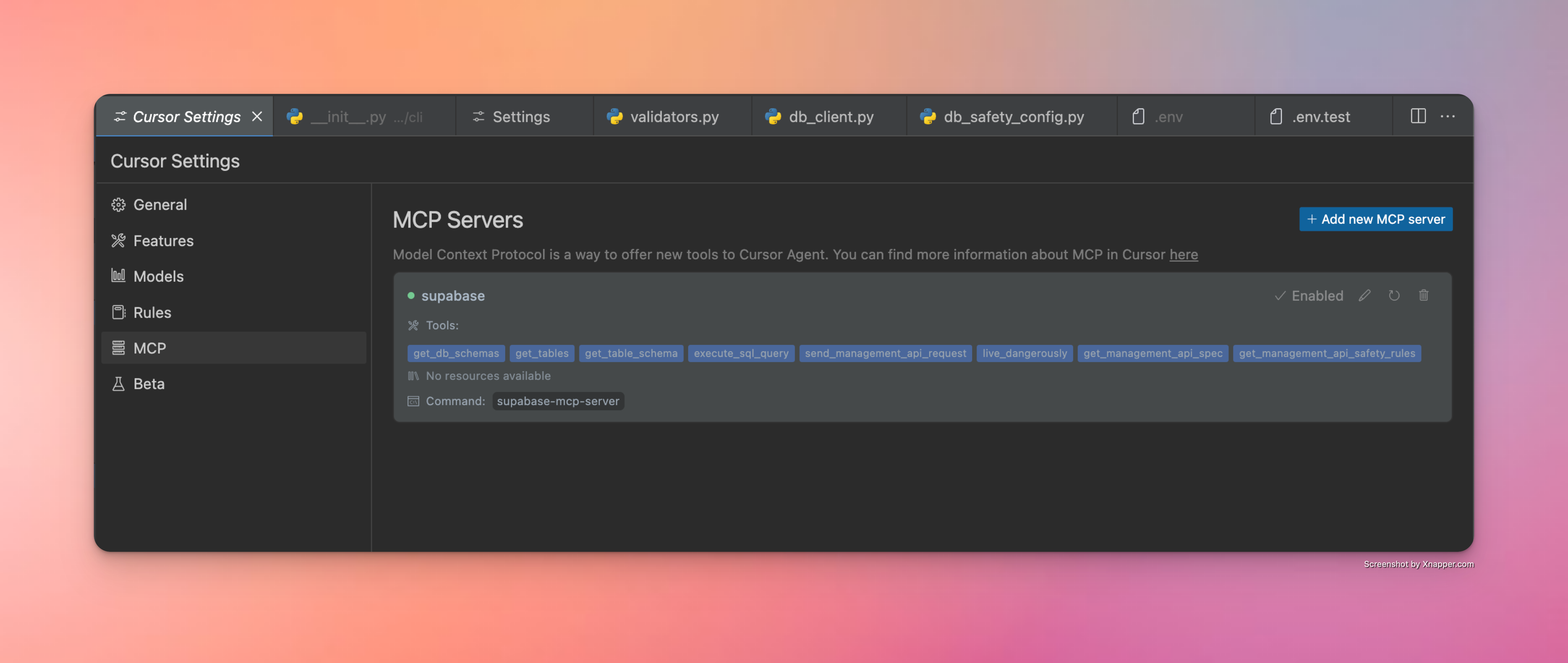
Si la configuración es correcta, debería ver un indicador de punto verde y la cantidad de herramientas expuestas por el servidor. Cómo se ve una configuración de Cursor exitosa
Windsurf

Vaya a Cascade -> Haga clic en el icono del martillo -> Configurar -> Complete la configuración:

{
    "mcpServers": {
      "supabase": {
        "command": "/Users/username/.local/bin/supabase-mcp-server",  // update path
        "env": {
          "QUERY_API_KEY": "your-api-key",  // Required - get your API key at thequery.dev
          "SUPABASE_PROJECT_REF": "your-project-ref",
          "SUPABASE_DB_PASSWORD": "your-db-password",
          "SUPABASE_REGION": "us-east-1",  // optional, defaults to us-east-1
          "SUPABASE_ACCESS_TOKEN": "your-access-token",  // optional, for management API
          "SUPABASE_SERVICE_ROLE_KEY": "your-service-role-key"  // optional, for Auth Admin SDK
        }
      }
    }
}

Si la configuración es correcta, debería ver un indicador de punto verde y un servidor supabase en el que se pueda hacer clic en la lista de servidores disponibles.
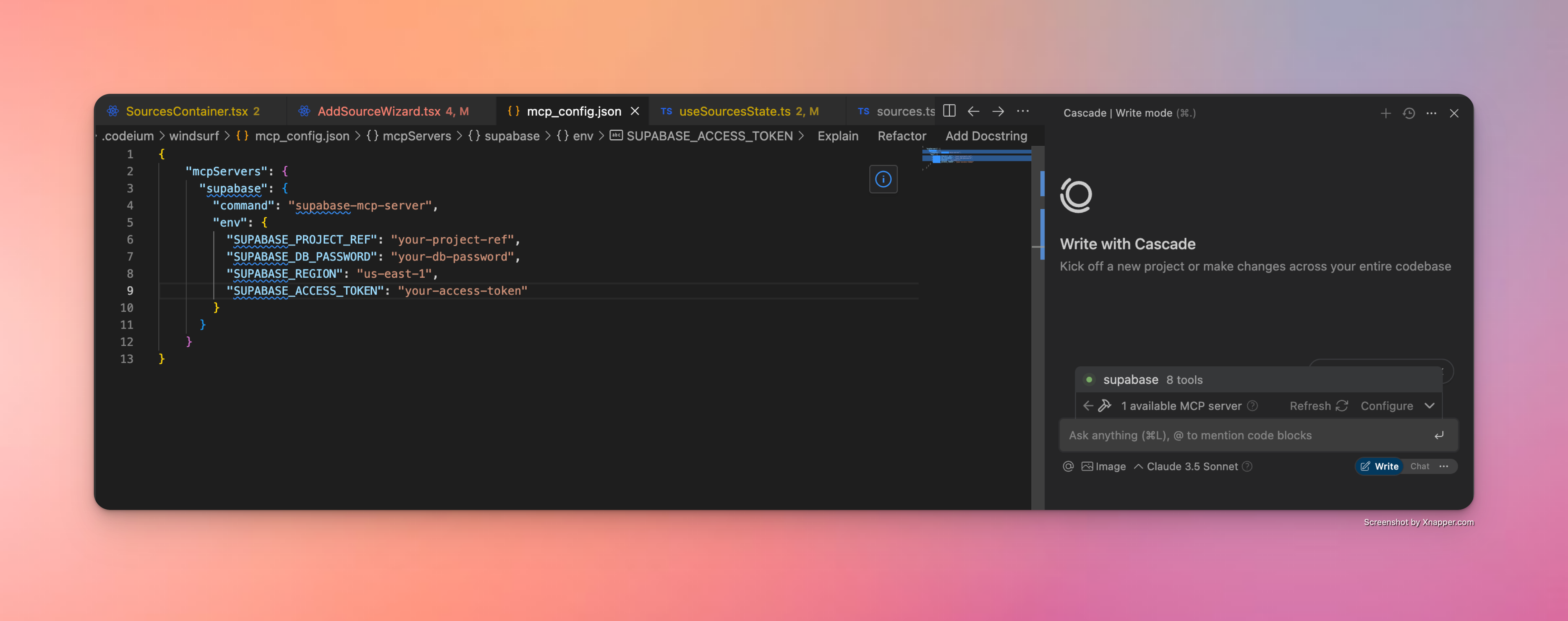
Cómo luce una configuración exitosa de Windsurf

Escritorio de Claude

Claude Desktop también admite servidores MCP mediante una configuración JSON. Siga estos pasos para configurar el servidor MCP de Supabase:

  1. Encuentre la ruta completa al ejecutable (este paso es fundamental):

    # On macOS/Linux
    which supabase-mcp-server
    
    # On Windows
    where supabase-mcp-server

    Copie la ruta completa que se devuelve (por ejemplo, /Users/username/.local/bin/supabase-mcp-server ).

  2. Configurar el servidor MCP en Claude Desktop:

    • Abra Claude Desktop

    • Vaya a Configuración → Desarrollador -> Editar configuración de servidores MCP

    • Agregue una nueva configuración con el siguiente JSON:

    {
      "mcpServers": {
        "supabase": {
          "command": "/full/path/to/supabase-mcp-server",  // Replace with the actual path from step 1
          "env": {
            "QUERY_API_KEY": "your-api-key",  // Required - get your API key at thequery.dev
            "SUPABASE_PROJECT_REF": "your-project-ref",
            "SUPABASE_DB_PASSWORD": "your-db-password",
            "SUPABASE_REGION": "us-east-1",  // optional, defaults to us-east-1
            "SUPABASE_ACCESS_TOKEN": "your-access-token",  // optional, for management API
            "SUPABASE_SERVICE_ROLE_KEY": "your-service-role-key"  // optional, for Auth Admin SDK
          }
        }
      }
    }

⚠️ Importante : A diferencia de Windsurf y Cursor, Claude Desktop requiere la ruta absoluta completa del ejecutable. Usar solo el nombre del comando ( supabase-mcp-server ) generará un error "spawn ENOENT".

Si la configuración es correcta, debería ver el servidor Supabase MCP listado como disponible en Claude Desktop.
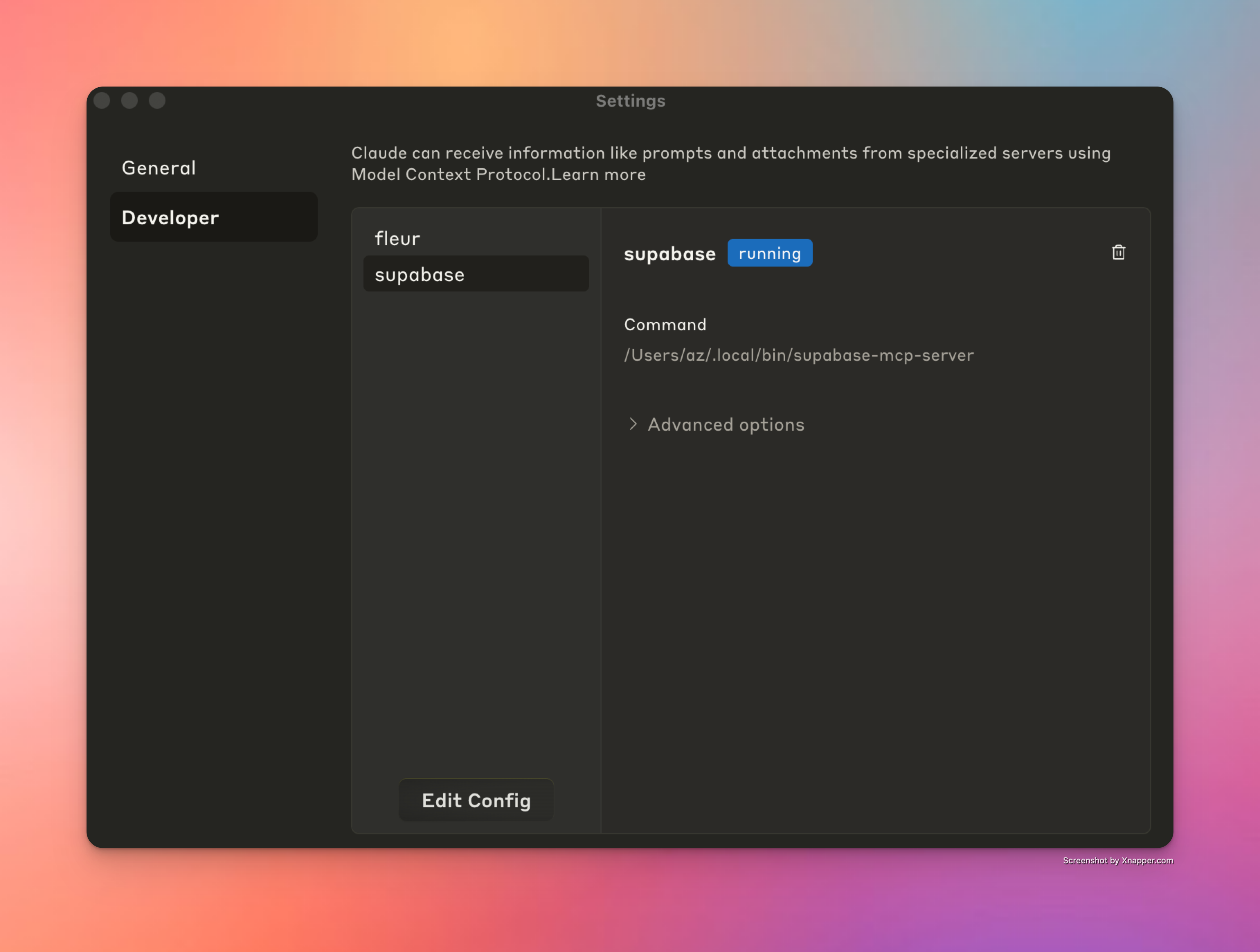
Cómo luce una configuración exitosa de Windsurf

Cline

Cline también admite servidores MCP mediante una configuración JSON similar. Siga estos pasos para configurar el servidor MCP de Supabase:

  1. Encuentre la ruta completa al ejecutable (este paso es fundamental):

    # On macOS/Linux
    which supabase-mcp-server
    
    # On Windows
    where supabase-mcp-server

    Copie la ruta completa que se devuelve (por ejemplo, /Users/username/.local/bin/supabase-mcp-server ).

  2. Configurar el servidor MCP en Cline:

    • Abrir Cline en VS Code

    • Haga clic en la pestaña "Servidores MCP" en la barra lateral de Cline

    • Haga clic en "Configurar servidores MCP"

    • Esto abrirá el archivo cline_mcp_settings.json

    • Agregue la siguiente configuración:

    {
      "mcpServers": {
        "supabase": {
          "command": "/full/path/to/supabase-mcp-server",  // Replace with the actual path from step 1
          "env": {
            "QUERY_API_KEY": "your-api-key",  // Required - get your API key at thequery.dev
            "SUPABASE_PROJECT_REF": "your-project-ref",
            "SUPABASE_DB_PASSWORD": "your-db-password",
            "SUPABASE_REGION": "us-east-1",  // optional, defaults to us-east-1
            "SUPABASE_ACCESS_TOKEN": "your-access-token",  // optional, for management API
            "SUPABASE_SERVICE_ROLE_KEY": "your-service-role-key"  // optional, for Auth Admin SDK
          }
        }
      }
    }

Si la configuración es correcta, debería ver un indicador verde junto al servidor Supabase MCP en la lista de servidores Cline MCP y un mensaje que confirma "servidor Supabase MCP conectado" en la parte inferior del panel.
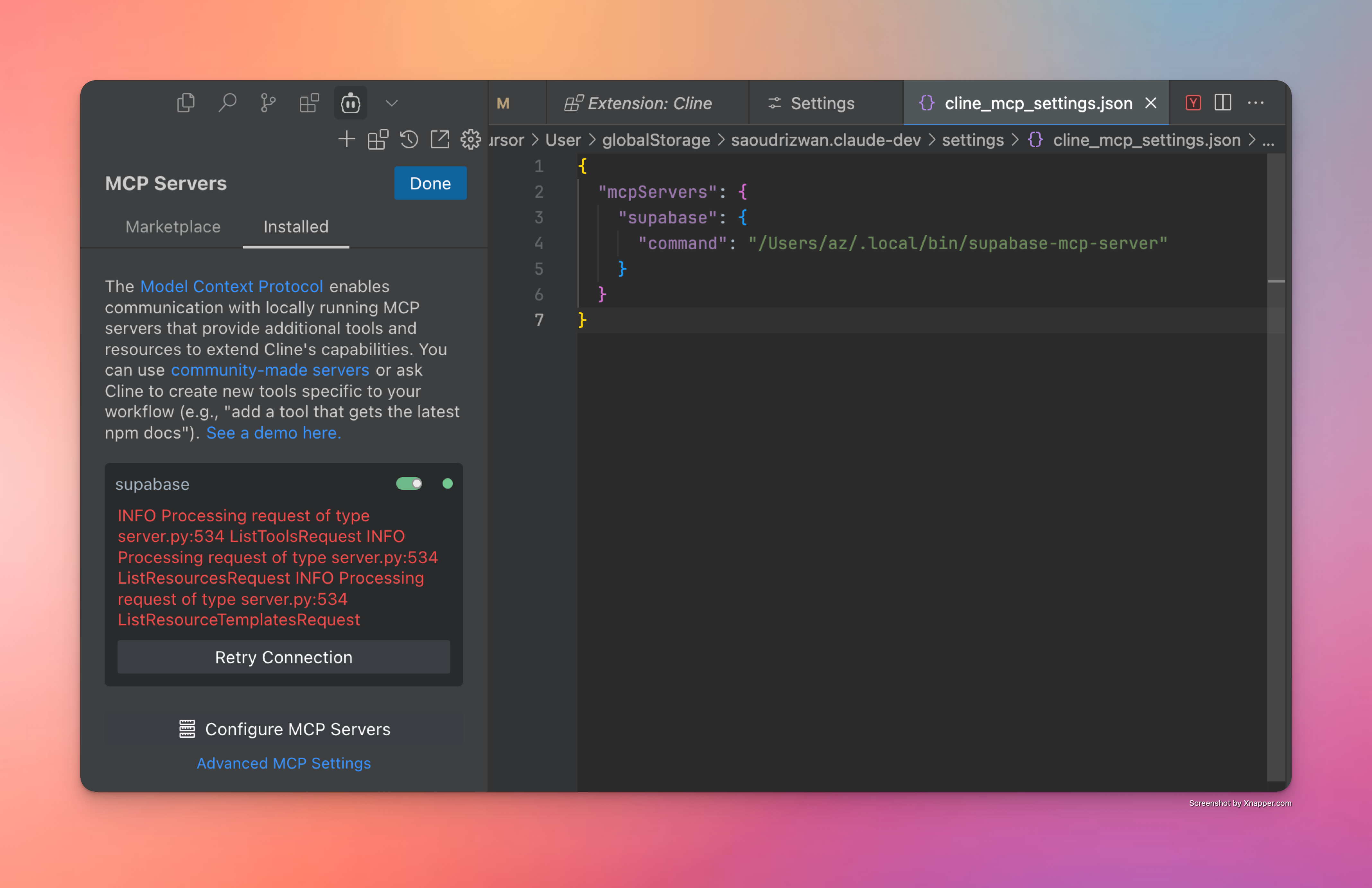
Cómo se ve una configuración exitosa en Cline

Solución de problemas

Aquí hay algunos consejos y trucos que podrían ayudarle:

  • Instalación de depuración : ejecute supabase-mcp-server directamente desde la terminal para comprobar si funciona. Si no funciona, podría haber un problema con la instalación.

  • Configuración del servidor MCP : si el paso anterior funciona correctamente, significa que el servidor está instalado y configurado correctamente. Siempre que haya proporcionado el comando correcto, el IDE debería poder conectarse. Asegúrese de proporcionar la ruta correcta al ejecutable del servidor.

  • Error "No se encontraron herramientas" : si ve "Cliente cerrado - no hay herramientas disponibles" en el Cursor a pesar de que el paquete está instalado:

    • Encuentre la ruta completa al ejecutable ejecutando which supabase-mcp-server (macOS/Linux) o where supabase-mcp-server (Windows)

    • Utilice la ruta completa en la configuración de su servidor MCP en lugar de solo supabase-mcp-server

    • Por ejemplo: /Users/username/.local/bin/supabase-mcp-server o C:\Users\username\.local\bin\supabase-mcp-server.exe

  • Variables de entorno : para conectarse a la base de datos correcta, asegúrese de configurar las variables de entorno en mcp_config.json o en el archivo .env ubicado en un directorio de configuración global ( ~/.config/supabase-mcp/.env en macOS/Linux o %APPDATA%\supabase-mcp\.env en Windows).

  • Acceso a registros : el servidor MCP escribe registros detallados en un archivo:

    • Ubicación del archivo de registro:

      • macOS/Linux: ~/.local/share/supabase-mcp/mcp_server.log

      • Windows: %USERPROFILE%\.local\share\supabase-mcp\mcp_server.log

    • Los registros incluyen el estado de la conexión, los detalles de configuración y los resultados de la operación.

    • Ver registros usando cualquier editor de texto o comandos de terminal:

      # On macOS/Linux
      cat ~/.local/share/supabase-mcp/mcp_server.log
      
      # On Windows (PowerShell)
      Get-Content "$env:USERPROFILE\.local\share\supabase-mcp\mcp_server.log"

Si está atascado o alguna de las instrucciones anteriores es incorrecta, plantee un problema.

Inspector de MCP

Una herramienta muy útil para depurar problemas del servidor MCP es MCP Inspector. Si lo instalaste desde el código fuente, puedes ejecutar supabase-mcp-inspector desde el repositorio del proyecto, lo que ejecutará la instancia del inspector. Junto con los registros, esto te dará una visión general completa de lo que sucede en el servidor.

📝 Ejecutar supabase-mcp-inspector , si está instalado desde el paquete, no funciona correctamente. Lo validaré y lo solucionaré en la próxima versión.

Descripción general de las funciones

Herramientas de consulta de bases de datos

Desde la versión v0.3+, el servidor ofrece capacidades integrales de administración de bases de datos con controles de seguridad integrados:

  • Ejecución de consultas SQL : Ejecute consultas PostgreSQL con evaluación de riesgos

    • Sistema de seguridad de tres niveles :

      • safe : Operaciones de solo lectura (SELECT): siempre permitidas

      • write : Modificaciones de datos (INSERTAR, ACTUALIZAR, ELIMINAR) - requieren modo inseguro

      • destructive : cambios de esquema (DROP, CREATE): requieren modo inseguro + confirmación

  • Análisis y validación de SQL :

    • Utiliza el analizador de PostgreSQL (pglast) para un análisis preciso y proporciona comentarios claros sobre los requisitos de seguridad.

  • Control de versiones de migración automática :

    • Las operaciones que alteran la base de datos se versionan automáticamente

    • Genera nombres descriptivos según el tipo de operación y el objetivo.

  • Controles de seguridad :

    • El modo SEGURO predeterminado solo permite operaciones de solo lectura

    • Todas las declaraciones se ejecutan en modo de transacción a través de asyncpg

    • Confirmación de dos pasos para operaciones de alto riesgo

  • Herramientas disponibles :

    • get_schemas : enumera esquemas con tamaños y recuentos de tablas

    • get_tables : enumera tablas, tablas externas y vistas con metadatos

    • get_table_schema : obtiene la estructura detallada de la tabla (columnas, claves, relaciones)

    • execute_postgresql : ejecuta sentencias SQL en su base de datos

    • confirm_destructive_operation : ejecuta operaciones de alto riesgo después de la confirmación

    • retrieve_migrations : Obtiene migraciones con opciones de filtrado y paginación

    • live_dangerously : alterna entre los modos seguro e inseguro

Herramientas de API de gestión

Desde la versión v0.3.0, el servidor proporciona acceso seguro a la API de administración de Supabase con controles de seguridad integrados:

  • Herramientas disponibles :

    • send_management_api_request : envía solicitudes arbitrarias a la API de administración de Supabase con inyección automática de referencia de proyecto

    • get_management_api_spec : obtiene la especificación de API enriquecida con información de seguridad

      • Admite múltiples modos de consulta: por dominio, por ruta/método específico o todas las rutas

      • Incluye información de evaluación de riesgos para cada punto final

      • Proporciona requisitos de parámetros detallados y formatos de respuesta.

      • Ayuda a los LLM a comprender todas las capacidades de la API de administración de Supabase

    • get_management_api_safety_rules : obtiene todas las reglas de seguridad con explicaciones legibles para humanos

    • live_dangerously : alterna entre los modos de operación seguros e inseguros

  • Controles de seguridad :

    • Utiliza el mismo administrador de seguridad que las operaciones de base de datos para una gestión de riesgos consistente

    • Operaciones categorizadas por nivel de riesgo:

      • safe : Operaciones de solo lectura (GET): siempre permitidas

      • unsafe : operaciones de cambio de estado (POST, PUT, PATCH, DELETE): requieren modo inseguro

      • blocked : Operaciones destructivas (eliminar proyecto, etc.) - nunca permitidas

    • El modo seguro predeterminado evita cambios de estado accidentales

    • Coincidencia de patrones basada en rutas para reglas de seguridad precisas

Nota : Las herramientas de API de administración solo funcionan con instancias remotas de Supabase y no son compatibles con configuraciones de desarrollo de Supabase locales.

Herramientas de administración de autenticación

Planeaba añadir compatibilidad con los métodos del SDK de Python al servidor MCP. Tras considerarlo, decidí añadir solo compatibilidad con los métodos de administración de autenticación, ya que a menudo me encontraba creando manualmente usuarios de prueba, lo cual era propenso a errores y consumía mucho tiempo. Ahora puedo simplemente pedirle a Cursor que cree un usuario de prueba y lo hará sin problemas. Consulta la documentación completa de los métodos del SDK de administración de autenticación para saber qué puede hacer.

Desde la versión v0.3.6, el servidor admite el acceso directo a los métodos de administración de autenticación de Supabase a través del SDK de Python:

  • Incluye las siguientes herramientas:

    • get_auth_admin_methods_spec para recuperar la documentación de todos los métodos de autenticación de administrador disponibles

    • call_auth_admin_method para invocar directamente los métodos de Auth Admin con un manejo adecuado de los parámetros

  • Métodos admitidos:

    • get_user_by_id : recupera un usuario por su ID

    • list_users : Lista todos los usuarios con paginación

    • create_user : Crea un nuevo usuario

    • delete_user : Eliminar un usuario por su ID

    • invite_user_by_email : Envía un enlace de invitación al correo electrónico de un usuario

    • generate_link : Genera un enlace de correo electrónico para diversos fines de autenticación

    • update_user_by_id : Actualizar los atributos del usuario por ID

    • delete_factor : elimina un factor en un usuario (actualmente no implementado en el SDK)

¿Por qué utilizar Auth Admin SDK en lugar de consultas SQL sin procesar?

El SDK de administración de autenticación ofrece varias ventajas clave sobre la manipulación directa de SQL:

  • Funcionalidad : Permite operaciones que no son posibles solo con SQL (invitaciones, enlaces mágicos, MFA)

  • Precisión : Más confiable que crear y ejecutar consultas SQL sin procesar en esquemas de autenticación

  • Simplicidad : ofrece métodos claros con validación adecuada y manejo de errores.

    • Formato de respuesta:

      • Todos los métodos devuelven objetos estructurados de Python en lugar de diccionarios sin formato

      • Se puede acceder a los atributos de objeto mediante la notación de puntos (por ejemplo, user.id en lugar de user["id"] )

    • Casos extremos y limitaciones:

      • Validación de UUID: muchos métodos requieren un formato UUID válido para los ID de usuario y devolverán errores de validación específicos

      • Configuración de correo electrónico: métodos como invite_user_by_email y generate_link requieren que el envío de correo electrónico esté configurado en su proyecto Supabase

      • Tipos de enlaces: al generar enlaces, los diferentes tipos de enlaces tienen diferentes requisitos:

        • Los enlaces signup no requieren que el usuario exista

        • Los enlaces magiclink y recovery requieren que el usuario ya exista en el sistema

      • Manejo de errores: El servidor proporciona mensajes de error detallados de la API de Supabase, que pueden diferir de la interfaz del panel de control

      • Disponibilidad del método: algunos métodos como delete_factor están expuestos en la API pero no están completamente implementados en el SDK

Registros y análisis

El servidor proporciona acceso a los registros y datos analíticos de Supabase, lo que facilita la supervisión y la resolución de problemas de sus aplicaciones:

  • Herramienta disponible : retrieve_logs : acceda a los registros desde cualquier servicio de Supabase

  • Colecciones de registros :

    • postgres : registros del servidor de base de datos

    • api_gateway : solicitudes de puerta de enlace API

    • auth : Eventos de autenticación

    • postgrest : registros del servicio API RESTful

    • pooler : registros de agrupación de conexiones

    • storage : Operaciones de almacenamiento de objetos

    • realtime : registros de suscripción de WebSocket

    • edge_functions : Ejecuciones de funciones sin servidor

    • cron : registros de trabajos programados

    • pgbouncer : registros del agrupador de conexiones

  • Características : Filtrar por tiempo, buscar texto, aplicar filtros de campo o utilizar consultas SQL personalizadas

Simplifica la depuración en toda la pila Supabase sin cambiar entre interfaces ni escribir consultas complejas.

Control automático de versiones de los cambios en la base de datos

Un gran poder conlleva una gran responsabilidad. Si bien la herramienta execute_postgresql , junto con la herramienta live_dangerously , proporciona una forma potente y sencilla de administrar su base de datos Supabase, también significa que eliminar una tabla o modificarla está a solo un mensaje de chat. Para reducir el riesgo de cambios irreversibles, desde la versión v0.3.8 el servidor admite:

  • Creación automática de scripts de migración para todas las operaciones de escritura y destrucción de SQL ejecutadas en la base de datos.

  • Modo de seguridad mejorado de ejecución de consultas, en el que todas las consultas se clasifican en:

    • Tipo safe : siempre permitido. Incluye todas las operaciones de solo lectura.

    • Tipo write : requiere que el usuario habilite el modo write .

    • tipo destructive : requiere que el usuario habilite el modo write Y una confirmación de 2 pasos de la ejecución de la consulta para los clientes que no ejecutan herramientas automáticamente.

Modo de seguridad universal

Desde la versión v0.3.8, el Modo de Seguridad se ha estandarizado en todos los servicios (base de datos, API, SDK) mediante un gestor de seguridad universal. Esto proporciona una gestión de riesgos consistente y una interfaz unificada para controlar la configuración de seguridad en todo el servidor MCP.

Todas las operaciones (consultas SQL, solicitudes de API, métodos SDK) se clasifican en niveles de riesgo:

  • Riesgo Low : Operaciones de solo lectura que no modifican datos ni estructura (consultas SELECT, solicitudes API GET)

  • Riesgo Medium : operaciones de escritura que modifican datos pero no la estructura (INSERTAR/ACTUALIZAR/ELIMINAR, la mayoría de las solicitudes API POST/PUT)

  • High riesgo: Operaciones destructivas que modifican la estructura de la base de datos o podrían causar pérdida de datos (puntos finales de API DROP/TRUNCATE, DELETE)

  • Riesgo Extreme : Operaciones con consecuencias graves que se bloquean por completo (eliminación de proyectos)

Los controles de seguridad se aplican en función del nivel de riesgo:

  • Las operaciones de bajo riesgo siempre están permitidas

  • Las operaciones de riesgo medio requieren que el modo inseguro esté habilitado

  • Las operaciones de alto riesgo requieren un modo inseguro Y una confirmación explícita

  • Nunca se permiten operaciones de riesgo extremo

Cómo funciona el flujo de confirmación

Cualquier operación de alto riesgo (ya sea una solicitud de PostgreSQL o de API) se bloqueará incluso en modo unsafe . Toda operación de alto riesgo está bloqueada Necesitarás confirmar y aprobar explícitamente cada operación de alto riesgo para que se ejecute. Siempre se requiere aprobación explícita
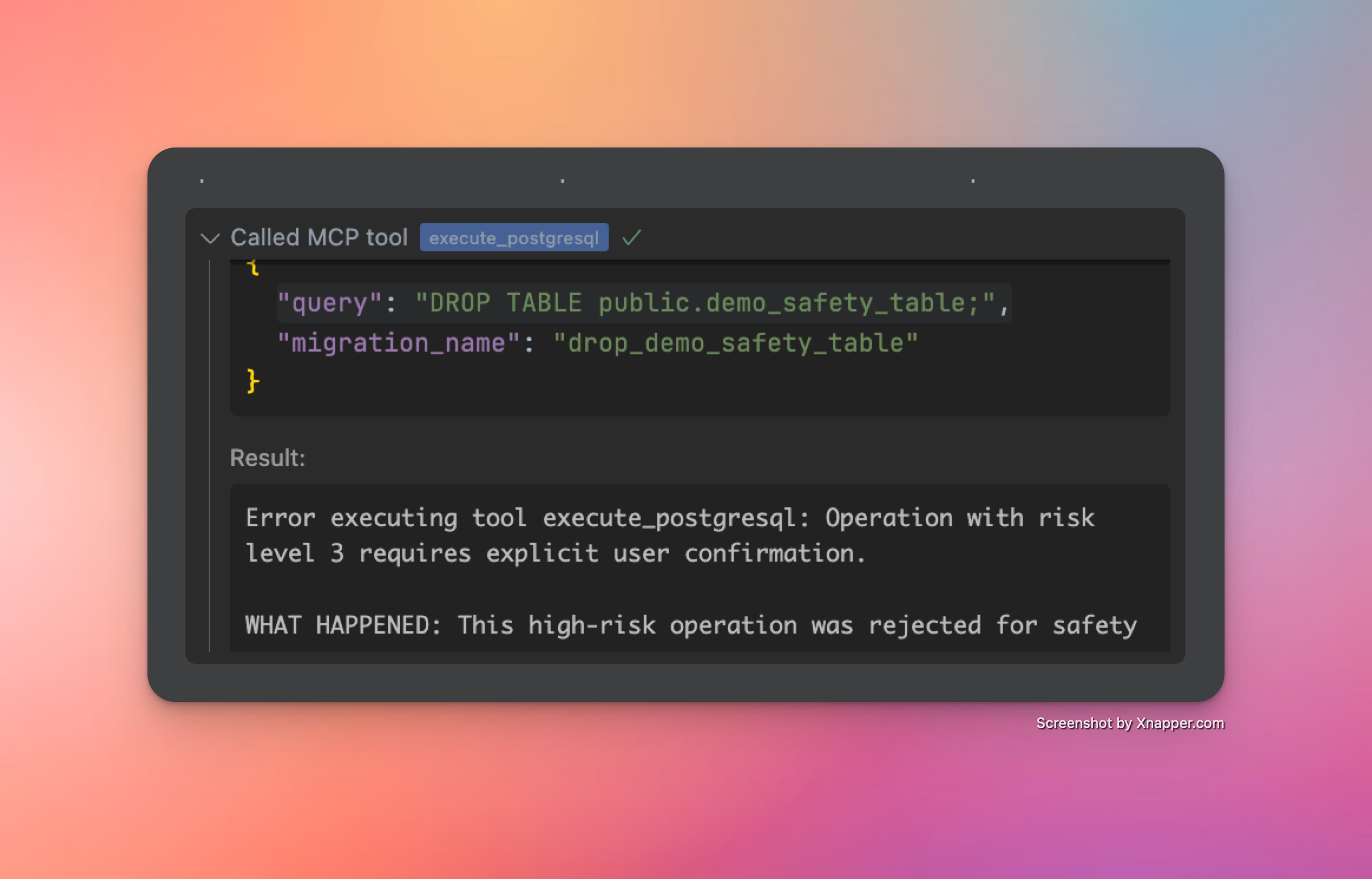
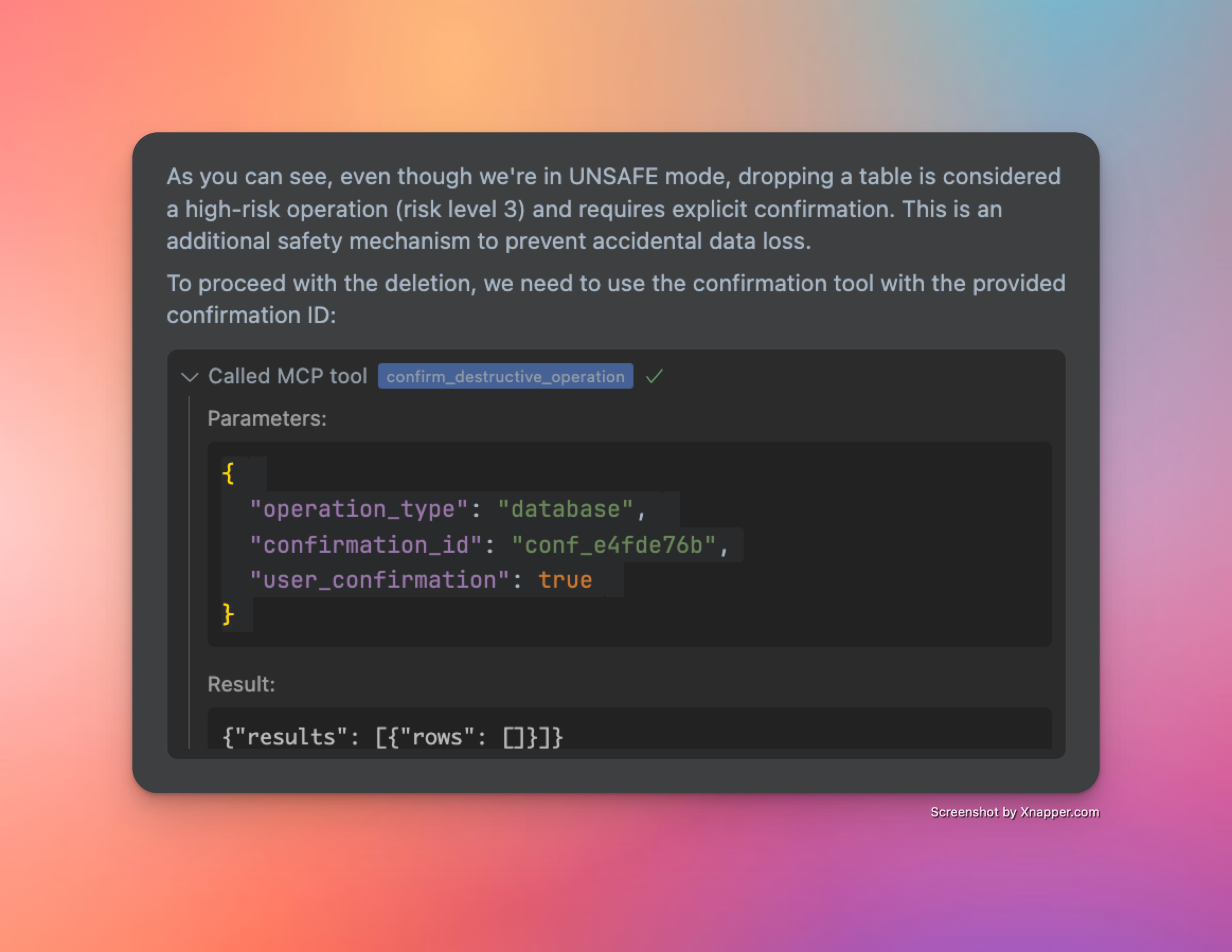
Registro de cambios

  • 📦 Instalación simplificada a través del administrador de paquetes - ✅ (v0.2.0)

  • 🌎 Soporte para diferentes regiones de Supabase - ✅ (v0.2.2)

  • 🎮 Acceso programático a la API de gestión de Supabase con controles de seguridad - ✅ (v0.3.0)

  • 👷‍♂️ Consultas SQL de bases de datos de lectura y escritura con controles de seguridad - ✅ (v0.3.0)

  • 🔄 Manejo robusto de transacciones tanto para conexiones directas como agrupadas - ✅ (v0.3.2)

  • 🐍 Métodos y objetos de soporte disponibles en el SDK nativo de Python - ✅ (v0.3.6)

  • 🔍 Validación de consultas SQL más sólida ✅ (v0.3.8)

  • 📝 Versionado automático de cambios en la base de datos ✅ (v0.3.8)

  • 📖 Conocimientos y herramientas de especificación de API radicalmente mejorados ✅ (v0.3.8)

  • ✍️ Se mejoró la consistencia de las herramientas relacionadas con la migración para un vcs de base de datos más organizado ✅ (v0.3.10)

  • 🥳 Se lanzó Query MCP (v0.4.0)

Para obtener una hoja de ruta más detallada, consulte esta discusión en GitHub.

Historia de las estrellas

Gráfico de la historia de las estrellas


¡Que lo disfrutes! ☺️

Available Tools

12 tools
call_auth_admin_methodA

Call an Auth Admin method from Supabase Python SDK.

This tool provides a safe, validated interface to the Supabase Auth Admin SDK, allowing you to:

  • Manage users (create, update, delete)

  • List and search users

  • Generate authentication links

  • Manage multi-factor authentication

  • And more

IMPORTANT NOTES:

  • Request bodies must adhere to the Python SDK specification

  • Some methods may have nested parameter structures

  • The tool validates all parameters against Pydantic models

  • Extra fields not defined in the models will be rejected

AVAILABLE METHODS:

  • get_user_by_id: Retrieve a user by their ID

  • list_users: List all users with pagination

  • create_user: Create a new user

  • delete_user: Delete a user by their ID

  • invite_user_by_email: Send an invite link to a user's email

  • generate_link: Generate an email link for various authentication purposes

  • update_user_by_id: Update user attributes by ID

  • delete_factor: Delete a factor on a user

EXAMPLES:

  1. Get user by ID: method: "get_user_by_id" params: {"uid": "user-uuid-here"}

  2. Create user: method: "create_user" params: { "email": "user@example.com", "password": "secure-password" }

  3. Update user by ID: method: "update_user_by_id" params: { "uid": "user-uuid-here", "attributes": { "email": "new@email.com" } }

For complete documentation of all methods and their parameters, use the get_auth_admin_methods_spec tool.

ParametersJSON Schema
NameRequiredDescriptionDefault
methodYes
paramsYes

TDQS

A4.5/5.0
Behavior4/5

Does the description disclose side effects, auth requirements, rate limits, or destructive behavior?

With no annotations provided, the description carries the full burden of behavioral disclosure. It effectively describes key traits: it's a 'safe, validated interface' that validates parameters against Pydantic models and rejects extra fields. It mentions that 'some methods may have nested parameter structures' and provides examples of destructive operations (delete_user, delete_factor). However, it doesn't cover rate limits, authentication requirements, or error handling.

Agents need to know what a tool does to the world before calling it. Descriptions should go beyond structured annotations to explain consequences.

Conciseness3/5

Is the description appropriately sized, front-loaded, and free of redundancy?

The description is appropriately front-loaded with the core purpose and key capabilities, but it includes extensive lists and examples that could be streamlined. The 'AVAILABLE METHODS' section and multiple examples add value but make the description lengthy. Every sentence earns its place, but the structure could be more concise by integrating examples more tightly or referencing external documentation earlier.

Shorter descriptions cost fewer tokens and are easier for agents to parse. Every sentence should earn its place.

Completeness4/5

Given the tool's complexity, does the description cover enough for an agent to succeed on first attempt?

Given the complexity (2 parameters with nested objects, no output schema, no annotations), the description is largely complete. It covers purpose, usage, behavioral traits, and parameter semantics thoroughly. However, it lacks details on return values (since no output schema exists) and doesn't mention authentication or error scenarios. The reference to 'get_auth_admin_methods_spec' for full documentation helps mitigate gaps.

Complex tools with many parameters or behaviors need more documentation. Simple tools need less. This dimension scales expectations accordingly.

Parameters5/5

Does the description clarify parameter syntax, constraints, interactions, or defaults beyond what the schema provides?

The input schema has 0% description coverage and only defines 'method' (string) and 'params' (object) without semantic details. The description compensates fully by listing all available methods with brief explanations (e.g., 'get_user_by_id: Retrieve a user by their ID'), providing detailed examples with parameter structures, and explaining that parameters must adhere to Python SDK specifications. This adds substantial meaning beyond the minimal schema.

Input schemas describe structure but not intent. Descriptions should explain non-obvious parameter relationships and valid value ranges.

Purpose5/5

Does the description clearly state what the tool does and how it differs from similar tools?

The description clearly states the tool's purpose: 'Call an Auth Admin method from Supabase Python SDK' with a specific verb ('call') and resource ('Auth Admin method'). It distinguishes from siblings like 'get_auth_admin_methods_spec' (which retrieves documentation) and 'send_management_api_request' (which handles different API types). The bullet points further clarify capabilities like user management and authentication tasks.

Agents choose between tools based on descriptions. A clear purpose with a specific verb and resource helps agents select the right tool.

Usage Guidelines5/5

Does the description explain when to use this tool, when not to, or what alternatives exist?

The description provides explicit guidance on when to use this tool vs alternatives. It states to 'use the get_auth_admin_methods_spec tool' for complete documentation of methods and parameters, distinguishing it from that sibling. The 'IMPORTANT NOTES' section also outlines prerequisites like adhering to Python SDK specifications and validation rules, though it doesn't explicitly mention when not to use it.

Agents often have multiple tools that could apply. Explicit usage guidance like "use X instead of Y when Z" prevents misuse.

confirm_destructive_operationA

Execute a destructive database or API operation after confirmation. Use this only after reviewing the risks with the user.

HOW IT WORKS:

  • This tool executes a previously rejected high-risk operation using its confirmation ID

  • The operation will be exactly the same as the one that generated the ID

  • No need to retype the query or api request params - the system remembers it

STEPS:

  1. Explain the risks to the user and get their approval

  2. Use this tool with the confirmation ID from the error message

  3. The original query will be executed as-is

PARAMETERS:

  • operation_type: Type of operation ("api" or "database")

  • confirmation_id: The ID provided in the error message (required)

  • user_confirmation: Set to true to confirm execution (default: false)

NOTE: Confirmation IDs expire after 5 minutes for security

ParametersJSON Schema
NameRequiredDescriptionDefault
confirmation_idYes
operation_typeYes
user_confirmationNo

TDQS

A4.5/5.0
Behavior4/5

Does the description disclose side effects, auth requirements, rate limits, or destructive behavior?

With no annotations provided, the description carries the full burden of behavioral disclosure. It effectively describes key traits: it's for executing high-risk operations, requires user confirmation, uses a confirmation ID from a previous error, executes the original query as-is, and includes a security note about 5-minute expiration. However, it doesn't detail potential side effects (e.g., data loss specifics) or error handling, leaving some gaps in full transparency.

Agents need to know what a tool does to the world before calling it. Descriptions should go beyond structured annotations to explain consequences.

Conciseness4/5

Is the description appropriately sized, front-loaded, and free of redundancy?

The description is well-structured with clear sections (HOW IT WORKS, STEPS, PARAMETERS, NOTE), making it easy to scan. Each sentence adds value, such as explaining the confirmation process and security constraints. It could be slightly more concise by integrating some details (e.g., merging the STEPS and PARAMETERS sections), but overall, it's efficient and front-loaded with the core purpose.

Shorter descriptions cost fewer tokens and are easier for agents to parse. Every sentence should earn its place.

Completeness4/5

Given the tool's complexity, does the description cover enough for an agent to succeed on first attempt?

Given the tool's complexity (destructive operations, confirmation flow) and lack of annotations or output schema, the description does a good job of covering essential context: purpose, usage steps, parameters, and security notes. It addresses the high-risk nature and user interaction requirements. However, it doesn't specify what happens after execution (e.g., success/failure responses or side effects), which is a minor gap for such a critical tool.

Complex tools with many parameters or behaviors need more documentation. Simple tools need less. This dimension scales expectations accordingly.

Parameters4/5

Does the description clarify parameter syntax, constraints, interactions, or defaults beyond what the schema provides?

Schema description coverage is 0%, so the description must compensate. It adds meaningful context for all three parameters: 'operation_type' is explained as 'Type of operation ("api" or "database")', 'confirmation_id' as 'The ID provided in the error message (required)', and 'user_confirmation' as 'Set to true to confirm execution (default: false)'. This goes beyond the schema's basic titles and enums, clarifying usage and requirements. A point is deducted because it doesn't elaborate on the implications of each operation_type choice.

Input schemas describe structure but not intent. Descriptions should explain non-obvious parameter relationships and valid value ranges.

Purpose5/5

Does the description clearly state what the tool does and how it differs from similar tools?

The description clearly states the tool's purpose: 'Execute a destructive database or API operation after confirmation.' It specifies the verb ('execute'), resource ('destructive database or API operation'), and the key condition ('after confirmation'). The title 'confirm_destructive_operation' reinforces this, and it distinguishes itself from siblings like 'live_dangerously' or 'execute_postgresql' by focusing on confirmation of previously rejected high-risk operations.

Agents choose between tools based on descriptions. A clear purpose with a specific verb and resource helps agents select the right tool.

Usage Guidelines5/5

Does the description explain when to use this tool, when not to, or what alternatives exist?

The description provides explicit guidance on when to use this tool: 'Use this only after reviewing the risks with the user.' It outlines a clear process (explain risks, get approval, use confirmation ID) and specifies prerequisites (confirmation ID from an error message). It also distinguishes usage from alternatives by noting that no retyping of queries is needed, which sets it apart from tools like 'execute_postgresql' or 'send_management_api_request' that might require full parameter input.

Agents often have multiple tools that could apply. Explicit usage guidance like "use X instead of Y when Z" prevents misuse.

execute_postgresqlA

Execute PostgreSQL statements against your Supabase database.

IMPORTANT: All SQL statements must end with a semicolon (;).

OPERATION TYPES AND REQUIREMENTS:

  1. READ Operations (SELECT, EXPLAIN, etc.):

    • Can be executed directly without special requirements

    • Example: SELECT * FROM public.users LIMIT 10;

  2. WRITE Operations (INSERT, UPDATE, DELETE):

    • Require UNSAFE mode (use live_dangerously('database', True) first)

    • Example: INSERT INTO public.users (email) VALUES ('user@example.com');

  3. SCHEMA Operations (CREATE, ALTER, DROP):

    • Require UNSAFE mode (use live_dangerously('database', True) first)

    • Destructive operations (DROP, TRUNCATE) require additional confirmation

    • Example: CREATE TABLE public.test_table (id SERIAL PRIMARY KEY, name TEXT);

MIGRATION HANDLING: All queries that modify the database will be automatically version controlled by the server. You can provide optional migration name, if you want to name the migration.

  • Respect the following format: verb_noun_detail. Be descriptive and concise.

  • Examples:

    • create_users_table

    • add_email_to_profiles

    • enable_rls_on_users

  • If you don't provide a migration name, the server will generate one based on the SQL statement

  • The system will sanitize your provided name to ensure compatibility with database systems

  • Migration names are prefixed with a timestamp in the format YYYYMMDDHHMMSS

SAFETY SYSTEM: Operations are categorized by risk level:

  • LOW RISK: Read operations (SELECT, EXPLAIN) - allowed in SAFE mode

  • MEDIUM RISK: Write operations (INSERT, UPDATE, DELETE) - require UNSAFE mode

  • HIGH RISK: Schema operations (CREATE, ALTER) - require UNSAFE mode

  • EXTREME RISK: Destructive operations (DROP, TRUNCATE) - require UNSAFE mode and confirmation

TRANSACTION HANDLING:

  • DO NOT use transaction control statements (BEGIN, COMMIT, ROLLBACK)

  • The database client automatically wraps queries in transactions

  • The SQL validator will reject queries containing transaction control statements

  • This ensures atomicity and provides rollback capability for data modifications

MULTIPLE STATEMENTS:

  • You can send multiple SQL statements in a single query

  • Each statement will be executed in order within the same transaction

  • Example: CREATE TABLE public.test_table (id SERIAL PRIMARY KEY, name TEXT); INSERT INTO public.test_table (name) VALUES ('test');

CONFIRMATION FLOW FOR HIGH-RISK OPERATIONS:

  • High-risk operations (DROP TABLE, TRUNCATE, etc.) will be rejected with a confirmation ID

  • The error message will explain what happened and provide a confirmation ID

  • Review the risks with the user before proceeding

  • Use the confirm_destructive_operation tool with the provided ID to execute the operation

IMPORTANT GUIDELINES:

  • The database client starts in SAFE mode by default for safety

  • Only enable UNSAFE mode when you need to modify data or schema

  • Never mix READ and WRITE operations in the same transaction

  • For destructive operations, be prepared to confirm with the confirm_destructive_operation tool

WHEN TO USE OTHER TOOLS INSTEAD:

  • For Auth operations (users, authentication, etc.): Use call_auth_admin_method instead of direct SQL The Auth Admin SDK provides safer, validated methods for user management

  • For project configuration, functions, storage, etc.: Use send_management_api_request The Management API handles Supabase platform features that aren't directly in the database

Note: This tool operates on the PostgreSQL database only. API operations use separate safety controls.

ParametersJSON Schema
NameRequiredDescriptionDefault
migration_nameNo
queryYes

TDQS

A4.7/5.0
Behavior5/5

Does the description disclose side effects, auth requirements, rate limits, or destructive behavior?

With no annotations provided, the description carries the full burden of behavioral disclosure and does so comprehensively. It details safety modes (SAFE/UNSAFE), risk categorization (LOW/MEDIUM/HIGH/EXTREME), transaction handling restrictions, migration version control, confirmation flows for destructive operations, and important operational guidelines. This provides rich behavioral context beyond basic functionality.

Agents need to know what a tool does to the world before calling it. Descriptions should go beyond structured annotations to explain consequences.

Conciseness3/5

Is the description appropriately sized, front-loaded, and free of redundancy?

The description is well-structured with clear sections (OPERATION TYPES, MIGRATION HANDLING, SAFETY SYSTEM, etc.) but is quite lengthy. While most content is valuable, some redundancy exists (e.g., multiple mentions of UNSAFE mode requirements). The front-loading is good with purpose and immediate requirements, but the length may challenge quick comprehension.

Shorter descriptions cost fewer tokens and are easier for agents to parse. Every sentence should earn its place.

Completeness5/5

Given the tool's complexity, does the description cover enough for an agent to succeed on first attempt?

Given the complexity of a database execution tool with 2 parameters, no annotations, and no output schema, the description provides exceptional completeness. It covers purpose, usage guidelines, behavioral traits, parameter semantics, safety systems, transaction handling, migration control, confirmation flows, and sibling tool relationships. This fully compensates for the lack of structured metadata.

Complex tools with many parameters or behaviors need more documentation. Simple tools need less. This dimension scales expectations accordingly.

Parameters4/5

Does the description clarify parameter syntax, constraints, interactions, or defaults beyond what the schema provides?

With 0% schema description coverage for the 2 parameters, the description compensates well by explaining both parameters' semantics. It describes 'migration_name' in detail (format requirements, examples, what happens if not provided, sanitization, timestamp prefixing) and 'query' through extensive examples and requirements (semicolon termination, operation types). While comprehensive, it doesn't explicitly map all schema properties like the default value for migration_name.

Input schemas describe structure but not intent. Descriptions should explain non-obvious parameter relationships and valid value ranges.

Purpose5/5

Does the description clearly state what the tool does and how it differs from similar tools?

The description clearly states the tool's purpose: 'Execute PostgreSQL statements against your Supabase database.' It specifies the exact action (execute) and resource (PostgreSQL statements/Supabase database), distinguishing it from sibling tools like call_auth_admin_method or send_management_api_request that handle different aspects of the system.

Agents choose between tools based on descriptions. A clear purpose with a specific verb and resource helps agents select the right tool.

Usage Guidelines5/5

Does the description explain when to use this tool, when not to, or what alternatives exist?

The description provides explicit guidance on when to use this tool versus alternatives. It includes a dedicated section 'WHEN TO USE OTHER TOOLS INSTEAD' that names specific sibling tools (call_auth_admin_method, send_management_api_request) and explains what operations they handle instead. It also provides detailed context about different operation types and their requirements.

Agents often have multiple tools that could apply. Explicit usage guidance like "use X instead of Y when Z" prevents misuse.

get_auth_admin_methods_specA

Get Python SDK methods specification for Auth Admin.

Returns a comprehensive dictionary of all Auth Admin methods available in the Supabase Python SDK, including:

  • Method names and descriptions

  • Required and optional parameters for each method

  • Parameter types and constraints

  • Return value information

This tool is useful for exploring the capabilities of the Auth Admin SDK and understanding how to properly format parameters for the call_auth_admin_method tool.

No parameters required.

ParametersJSON Schema
NameRequiredDescriptionDefault

No parameters

TDQS

A4.4/5.0
Behavior3/5

Does the description disclose side effects, auth requirements, rate limits, or destructive behavior?

With no annotations provided, the description carries the full burden. It describes what the tool returns ('comprehensive dictionary' with method details) and clarifies it requires no parameters, which is helpful. However, it doesn't mention behavioral aspects like whether this is a read-only operation, if it makes external API calls, potential rate limits, or error conditions.

Agents need to know what a tool does to the world before calling it. Descriptions should go beyond structured annotations to explain consequences.

Conciseness5/5

Is the description appropriately sized, front-loaded, and free of redundancy?

The description is well-structured and front-loaded with the core purpose. Every sentence adds value: the first states what it does, the second details the return content, the third explains usage context, and the fourth clarifies no parameters needed. There is no wasted text.

Shorter descriptions cost fewer tokens and are easier for agents to parse. Every sentence should earn its place.

Completeness4/5

Given the tool's complexity, does the description cover enough for an agent to succeed on first attempt?

Given the tool has 0 parameters, no annotations, and no output schema, the description does a good job explaining the purpose, return format, and usage context. However, it could be more complete by specifying the exact structure of the returned dictionary or any prerequisites, though the lack of output schema lowers the bar.

Complex tools with many parameters or behaviors need more documentation. Simple tools need less. This dimension scales expectations accordingly.

Parameters4/5

Does the description clarify parameter syntax, constraints, interactions, or defaults beyond what the schema provides?

The tool has 0 parameters with 100% schema description coverage, so the baseline is 4. The description explicitly states 'No parameters required,' which reinforces this clearly and adds value by preventing parameter confusion.

Input schemas describe structure but not intent. Descriptions should explain non-obvious parameter relationships and valid value ranges.

Purpose5/5

Does the description clearly state what the tool does and how it differs from similar tools?

The description clearly states the specific action ('Get Python SDK methods specification for Auth Admin') and resource ('Auth Admin methods available in the Supabase Python SDK'). It distinguishes from sibling tools by focusing exclusively on Auth Admin SDK methods, unlike broader tools like get_management_api_spec or get_schemas.

Agents choose between tools based on descriptions. A clear purpose with a specific verb and resource helps agents select the right tool.

Usage Guidelines5/5

Does the description explain when to use this tool, when not to, or what alternatives exist?

The description explicitly states when to use this tool ('useful for exploring the capabilities of the Auth Admin SDK and understanding how to properly format parameters for the call_auth_admin_method tool'), providing clear context and naming the specific alternative tool (call_auth_admin_method) it prepares for.

Agents often have multiple tools that could apply. Explicit usage guidance like "use X instead of Y when Z" prevents misuse.

get_management_api_specA

Get the complete Supabase Management API specification.

Returns the full OpenAPI specification for the Supabase Management API, including:

  • All available endpoints and operations

  • Required and optional parameters for each operation

  • Request and response schemas

  • Authentication requirements

  • Safety information for each operation

This tool can be used in four different ways:

  1. Without parameters: Returns all domains (default)

  2. With path and method: Returns the full specification for a specific API endpoint

  3. With domain only: Returns all paths and methods within that domain

  4. With all_paths=True: Returns all paths and methods

Parameters:

  • params: Dictionary containing optional parameters:

    • path: Optional API path (e.g., "/v1/projects/{ref}/functions")

    • method: Optional HTTP method (e.g., "GET", "POST")

    • domain: Optional domain/tag name (e.g., "Auth", "Storage")

    • all_paths: Optional boolean, if True returns all paths and methods

Available domains:

  • Analytics: Analytics-related endpoints

  • Auth: Authentication and authorization endpoints

  • Database: Database management endpoints

  • Domains: Custom domain configuration endpoints

  • Edge Functions: Serverless function management endpoints

  • Environments: Environment configuration endpoints

  • OAuth: OAuth integration endpoints

  • Organizations: Organization management endpoints

  • Projects: Project management endpoints

  • Rest: RESTful API endpoints

  • Secrets: Secret management endpoints

  • Storage: Storage management endpoints

This specification is useful for understanding:

  • What operations are available through the Management API

  • How to properly format requests for each endpoint

  • Which operations require unsafe mode

  • What data structures to expect in responses

SAFETY: This is a low-risk read operation that can be executed in SAFE mode.

ParametersJSON Schema
NameRequiredDescriptionDefault
paramsNo

TDQS

A4.7/5.0
Behavior4/5

Does the description disclose side effects, auth requirements, rate limits, or destructive behavior?

With no annotations provided, the description carries full burden and does an excellent job disclosing behavioral traits. It explicitly states this is a 'low-risk read operation that can be executed in SAFE mode,' describes what information is returned (endpoints, parameters, schemas, auth requirements, safety info), and explains the four different usage patterns. The only minor gap is lack of information about rate limits or pagination, but overall it provides comprehensive behavioral context.

Agents need to know what a tool does to the world before calling it. Descriptions should go beyond structured annotations to explain consequences.

Conciseness4/5

Is the description appropriately sized, front-loaded, and free of redundancy?

The description is well-structured and appropriately sized, with clear sections for purpose, usage patterns, parameters, domains, and utility. While comprehensive, every sentence earns its place by adding value. The only minor issue is some redundancy in the safety statement at the end, but overall it's front-loaded with the core purpose and efficiently organized.

Shorter descriptions cost fewer tokens and are easier for agents to parse. Every sentence should earn its place.

Completeness5/5

Given the tool's complexity, does the description cover enough for an agent to succeed on first attempt?

Given the complexity of a tool that returns API specifications with multiple usage patterns, and with no annotations and no output schema, the description provides complete context. It explains what the tool does, how to use it in different scenarios, what parameters mean, what domains are available, what information the specification contains, and safety considerations. This fully compensates for the lack of structured metadata.

Complex tools with many parameters or behaviors need more documentation. Simple tools need less. This dimension scales expectations accordingly.

Parameters5/5

Does the description clarify parameter syntax, constraints, interactions, or defaults beyond what the schema provides?

With 0% schema description coverage (the schema only shows 'params' as an object with no properties documented), the description fully compensates by providing detailed parameter semantics. It explains all four optional parameters (path, method, domain, all_paths) with examples and clear descriptions of what each does. It also lists available domain values with explanations, effectively documenting what would normally be in the schema's enum or property descriptions.

Input schemas describe structure but not intent. Descriptions should explain non-obvious parameter relationships and valid value ranges.

Purpose5/5

Does the description clearly state what the tool does and how it differs from similar tools?

The description clearly states the tool's purpose: 'Get the complete Supabase Management API specification' with specific details about what it returns (OpenAPI spec including endpoints, parameters, schemas, auth requirements, safety info). It distinguishes from sibling tools like 'get_auth_admin_methods_spec' by covering the entire Management API rather than just auth methods, and from 'send_management_api_request' by providing documentation rather than executing requests.

Agents choose between tools based on descriptions. A clear purpose with a specific verb and resource helps agents select the right tool.

Usage Guidelines5/5

Does the description explain when to use this tool, when not to, or what alternatives exist?

The description provides explicit usage guidelines with four distinct scenarios: 1) without parameters returns all domains, 2) with path and method returns specific endpoint spec, 3) with domain only returns all paths/methods in that domain, 4) with all_paths=True returns all paths/methods. It also explains when this tool is useful (understanding available operations, request formatting, unsafe mode requirements, response structures), giving clear context for when to use it versus alternatives.

Agents often have multiple tools that could apply. Explicit usage guidance like "use X instead of Y when Z" prevents misuse.

get_schemasB

List all database schemas with their sizes and table counts.

ParametersJSON Schema
NameRequiredDescriptionDefault

No parameters

TDQS

B3.2/5.0
Behavior2/5

Does the description disclose side effects, auth requirements, rate limits, or destructive behavior?

With no annotations provided, the description carries the full burden of behavioral disclosure. It states this is a read operation ('List'), implying it's non-destructive, but doesn't cover other important aspects like authentication requirements, rate limits, error handling, or what the output format looks like. For a tool with zero annotation coverage, this is insufficient.

Agents need to know what a tool does to the world before calling it. Descriptions should go beyond structured annotations to explain consequences.

Conciseness5/5

Is the description appropriately sized, front-loaded, and free of redundancy?

The description is a single, efficient sentence that states exactly what the tool does with zero wasted words. It's front-loaded with the core purpose and includes key details (sizes and table counts) without unnecessary elaboration.

Shorter descriptions cost fewer tokens and are easier for agents to parse. Every sentence should earn its place.

Completeness3/5

Given the tool's complexity, does the description cover enough for an agent to succeed on first attempt?

Given the tool's simplicity (0 parameters, no output schema, no annotations), the description is adequate but has clear gaps. It explains what the tool returns (schemas with sizes and table counts), but without annotations or output schema, it doesn't specify the return format, data types, or any behavioral constraints. This is a minimal viable description.

Complex tools with many parameters or behaviors need more documentation. Simple tools need less. This dimension scales expectations accordingly.

Parameters4/5

Does the description clarify parameter syntax, constraints, interactions, or defaults beyond what the schema provides?

The tool has 0 parameters, and the schema description coverage is 100% (though empty). The description doesn't need to add parameter semantics, so it meets the baseline of 4 for tools with no parameters. It appropriately doesn't mention any parameters.

Input schemas describe structure but not intent. Descriptions should explain non-obvious parameter relationships and valid value ranges.

Purpose4/5

Does the description clearly state what the tool does and how it differs from similar tools?

The description clearly states the tool's purpose with a specific verb ('List') and resource ('database schemas'), along with what information is included ('sizes and table counts'). It distinguishes from siblings like 'get_tables' and 'get_table_schema' by focusing on schemas rather than tables. However, it doesn't explicitly differentiate from all siblings, so it's not a perfect 5.

Agents choose between tools based on descriptions. A clear purpose with a specific verb and resource helps agents select the right tool.

Usage Guidelines2/5

Does the description explain when to use this tool, when not to, or what alternatives exist?

The description provides no guidance on when to use this tool versus alternatives. It doesn't mention when to choose this over 'get_tables' or 'get_table_schema', nor does it specify any prerequisites or exclusions. The agent must infer usage from the purpose alone.

Agents often have multiple tools that could apply. Explicit usage guidance like "use X instead of Y when Z" prevents misuse.

get_tablesA

List all tables, foreign tables, and views in a schema with their sizes, row counts, and metadata.

Provides detailed information about all database objects in the specified schema:

  • Table/view names

  • Object types (table, view, foreign table)

  • Row counts

  • Size on disk

  • Column counts

  • Index information

  • Last vacuum/analyze times

Parameters:

  • schema_name: Name of the schema to inspect (e.g., 'public', 'auth', etc.)

SAFETY: This is a low-risk read operation that can be executed in SAFE mode.

ParametersJSON Schema
NameRequiredDescriptionDefault
schema_nameYes

TDQS

A4.2/5.0
Behavior4/5

Does the description disclose side effects, auth requirements, rate limits, or destructive behavior?

With no annotations provided, the description carries the full burden. It discloses that this is a 'low-risk read operation' and can be executed in 'SAFE mode', which clarifies safety and behavioral traits. However, it lacks details on rate limits, permissions needed, or potential performance impacts.

Agents need to know what a tool does to the world before calling it. Descriptions should go beyond structured annotations to explain consequences.

Conciseness4/5

Is the description appropriately sized, front-loaded, and free of redundancy?

The description is well-structured with a clear summary, bulleted details, and a dedicated safety note. It is appropriately sized, but could be slightly more concise by integrating the safety note into the main text.

Shorter descriptions cost fewer tokens and are easier for agents to parse. Every sentence should earn its place.

Completeness4/5

Given the tool's complexity, does the description cover enough for an agent to succeed on first attempt?

Given no annotations and no output schema, the description does a good job explaining the tool's purpose, parameters, and safety. It lists the information returned (e.g., row counts, sizes), but could benefit from clarifying the output format or any limitations.

Complex tools with many parameters or behaviors need more documentation. Simple tools need less. This dimension scales expectations accordingly.

Parameters5/5

Does the description clarify parameter syntax, constraints, interactions, or defaults beyond what the schema provides?

The schema description coverage is 0%, so the description must compensate. It explicitly defines the single parameter 'schema_name' with meaning ('Name of the schema to inspect') and examples ('public', 'auth'), adding significant value beyond the bare schema.

Input schemas describe structure but not intent. Descriptions should explain non-obvious parameter relationships and valid value ranges.

Purpose5/5

Does the description clearly state what the tool does and how it differs from similar tools?

The description clearly states the verb ('List') and resource ('all tables, foreign tables, and views in a schema') with specific attributes ('sizes, row counts, and metadata'). It distinguishes from siblings like get_schemas (which lists schemas) and get_table_schema (which provides schema details for a single table).

Agents choose between tools based on descriptions. A clear purpose with a specific verb and resource helps agents select the right tool.

Usage Guidelines3/5

Does the description explain when to use this tool, when not to, or what alternatives exist?

The description implies usage for inspecting database objects in a schema, but does not explicitly state when to use this tool versus alternatives like get_schemas or get_table_schema. No exclusions or prerequisites are mentioned, leaving some ambiguity in context.

Agents often have multiple tools that could apply. Explicit usage guidance like "use X instead of Y when Z" prevents misuse.

get_table_schemaA

Get detailed table structure including columns, keys, and relationships.

Returns comprehensive information about a specific table's structure:

  • Column definitions (names, types, constraints)

  • Primary key information

  • Foreign key relationships

  • Indexes

  • Constraints

  • Triggers

Parameters:

  • schema_name: Name of the schema (e.g., 'public', 'auth')

  • table: Name of the table to inspect

SAFETY: This is a low-risk read operation that can be executed in SAFE mode.

ParametersJSON Schema
NameRequiredDescriptionDefault
schema_nameYes
tableYes

TDQS

A4.4/5.0
Behavior4/5

Does the description disclose side effects, auth requirements, rate limits, or destructive behavior?

With no annotations provided, the description carries full burden and does well by explicitly stating 'This is a low-risk read operation that can be executed in SAFE mode.' It discloses safety profile and operational mode, though it could add more about rate limits, permissions needed, or response format.

Agents need to know what a tool does to the world before calling it. Descriptions should go beyond structured annotations to explain consequences.

Conciseness5/5

Is the description appropriately sized, front-loaded, and free of redundancy?

Perfectly structured with purpose statement, bulleted return details, parameter section, and safety note. Every sentence earns its place, and information is front-loaded with the core purpose first.

Shorter descriptions cost fewer tokens and are easier for agents to parse. Every sentence should earn its place.

Completeness4/5

Given the tool's complexity, does the description cover enough for an agent to succeed on first attempt?

For a read operation with 2 parameters and no output schema, the description provides good coverage of purpose, parameters, and safety. It could benefit from more detail about the return format or example output, but given the context signals, it's mostly complete.

Complex tools with many parameters or behaviors need more documentation. Simple tools need less. This dimension scales expectations accordingly.

Parameters4/5

Does the description clarify parameter syntax, constraints, interactions, or defaults beyond what the schema provides?

Schema description coverage is 0%, so the description must compensate. It provides clear semantic meaning for both parameters with examples (schema_name: 'public', 'auth') and clarifies that 'table' is the specific table to inspect. This adds significant value beyond the bare schema.

Input schemas describe structure but not intent. Descriptions should explain non-obvious parameter relationships and valid value ranges.

Purpose5/5

Does the description clearly state what the tool does and how it differs from similar tools?

The description clearly states the verb 'Get' and resource 'detailed table structure', specifying what information is returned (columns, keys, relationships). It distinguishes from sibling tools like get_schemas and get_tables by focusing on detailed structural metadata rather than lists of objects.

Agents choose between tools based on descriptions. A clear purpose with a specific verb and resource helps agents select the right tool.

Usage Guidelines4/5

Does the description explain when to use this tool, when not to, or what alternatives exist?

The description implies usage context through the parameter descriptions and safety note, but doesn't explicitly state when to use this tool versus alternatives like get_tables or execute_postgresql. It provides clear context for inspecting table structure but lacks explicit exclusions or named alternatives.

Agents often have multiple tools that could apply. Explicit usage guidance like "use X instead of Y when Z" prevents misuse.

live_dangerouslyA

Toggle unsafe mode for either Management API or Database operations.

WHAT THIS TOOL DOES: This tool switches between safe (default) and unsafe operation modes for either the Management API or Database operations.

SAFETY MODES EXPLAINED:

  1. Database Safety Modes:

    • SAFE mode (default): Only low-risk operations like SELECT queries are allowed

    • UNSAFE mode: Higher-risk operations including INSERT, UPDATE, DELETE, and schema changes are permitted

  2. API Safety Modes:

    • SAFE mode (default): Only low-risk operations that don't modify state are allowed

    • UNSAFE mode: Higher-risk state-changing operations are permitted (except those explicitly blocked for safety)

OPERATION RISK LEVELS: The system categorizes operations by risk level:

  • LOW: Safe read operations with minimal impact

  • MEDIUM: Write operations that modify data but don't change structure

  • HIGH: Operations that modify database structure or important system settings

  • EXTREME: Destructive operations that could cause data loss or service disruption

WHEN TO USE THIS TOOL:

  • Use this tool BEFORE attempting write operations or schema changes

  • Enable unsafe mode only when you need to perform data modifications

  • Always return to safe mode after completing write operations

USAGE GUIDELINES:

  • Start in safe mode by default for exploration and analysis

  • Switch to unsafe mode only when you need to make changes

  • Be specific about which service you're enabling unsafe mode for

  • Consider the risks before enabling unsafe mode, especially for database operations

  • For database operations requiring schema changes, you'll need to enable unsafe mode first

Parameters:

  • service: Which service to toggle ("api" or "database")

  • enable_unsafe_mode: True to enable unsafe mode, False for safe mode (default: False)

Examples:

  1. Enable database unsafe mode: live_dangerously(service="database", enable_unsafe_mode=True)

  2. Return to safe mode after operations: live_dangerously(service="database", enable_unsafe_mode=False)

  3. Enable API unsafe mode: live_dangerously(service="api", enable_unsafe_mode=True)

Note: This tool affects ALL subsequent operations for the specified service until changed again.

ParametersJSON Schema
NameRequiredDescriptionDefault
enable_unsafe_modeNo
serviceYes

TDQS

A4.9/5.0
Behavior5/5

Does the description disclose side effects, auth requirements, rate limits, or destructive behavior?

With no annotations provided, the description carries the full burden of behavioral disclosure and does so comprehensively. It explains the safety modes in detail (SAFE vs. UNSAFE for both Database and API), describes risk levels (LOW, MEDIUM, HIGH, EXTREME), and explicitly states that the tool 'affects ALL subsequent operations for the specified service until changed again,' which is crucial behavioral context not evident from the schema alone.

Agents need to know what a tool does to the world before calling it. Descriptions should go beyond structured annotations to explain consequences.

Conciseness4/5

Is the description appropriately sized, front-loaded, and free of redundancy?

The description is well-structured with clear sections (WHAT THIS TOOL DOES, SAFETY MODES EXPLAINED, etc.) and front-loads the core purpose. While comprehensive, some sections like OPERATION RISK LEVELS could be slightly more concise, but every sentence adds valuable context for a safety-critical tool.

Shorter descriptions cost fewer tokens and are easier for agents to parse. Every sentence should earn its place.

Completeness5/5

Given the tool's complexity, does the description cover enough for an agent to succeed on first attempt?

For a tool with 2 parameters, 0% schema description coverage, no annotations, and no output schema, the description provides complete context. It explains what the tool does, when to use it, detailed behavioral implications, parameter meanings, examples, and important notes about persistence of the mode change. No additional information is needed for an agent to use this tool correctly.

Complex tools with many parameters or behaviors need more documentation. Simple tools need less. This dimension scales expectations accordingly.

Parameters5/5

Does the description clarify parameter syntax, constraints, interactions, or defaults beyond what the schema provides?

With 0% schema description coverage, the description fully compensates by explaining both parameters in detail. It defines 'service' as 'api' or 'database' with clear explanations of what each service controls, and explains 'enable_unsafe_mode' as a boolean with default False, including specific examples of how to use both parameters together in different scenarios.

Input schemas describe structure but not intent. Descriptions should explain non-obvious parameter relationships and valid value ranges.

Purpose5/5

Does the description clearly state what the tool does and how it differs from similar tools?

The description clearly states the tool 'switches between safe (default) and unsafe operation modes for either the Management API or Database operations,' providing a specific verb ('toggle'/'switch') and resources (API/Database). It distinguishes from siblings by focusing on safety mode configuration rather than direct operations like execute_postgresql or send_management_api_request.

Agents choose between tools based on descriptions. A clear purpose with a specific verb and resource helps agents select the right tool.

Usage Guidelines5/5

Does the description explain when to use this tool, when not to, or what alternatives exist?

The description explicitly states when to use this tool ('BEFORE attempting write operations or schema changes'), when not to use it ('Start in safe mode by default for exploration and analysis'), and provides clear alternatives (safe vs. unsafe modes). It also gives specific guidance on risk considerations and returning to safe mode after operations.

Agents often have multiple tools that could apply. Explicit usage guidance like "use X instead of Y when Z" prevents misuse.

retrieve_logsA

Retrieve logs from your Supabase project's services for debugging and monitoring.

Returns log entries from various Supabase services with timestamps, messages, and metadata. This tool provides access to the same logs available in the Supabase dashboard's Logs & Analytics section.

AVAILABLE LOG COLLECTIONS:

  • postgres: Database server logs including queries, errors, warnings, and system messages

  • api_gateway: API requests, responses, and errors processed by the Kong API gateway

  • auth: Authentication and authorization logs for sign-ups, logins, and token operations

  • postgrest: Logs from the RESTful API service that exposes your PostgreSQL database

  • pooler: Connection pooling logs from pgbouncer and supavisor services

  • storage: Object storage service logs for file uploads, downloads, and permissions

  • realtime: Logs from the real-time subscription service for WebSocket connections

  • edge_functions: Serverless function execution logs including invocations and errors

  • cron: Scheduled job logs (can be queried through postgres logs with specific filters)

  • pgbouncer: Connection pooler logs

PARAMETERS:

  • collection: The log collection to query (required, one of the values listed above)

  • limit: Maximum number of log entries to return (default: 20)

  • hours_ago: Retrieve logs from the last N hours (default: 1)

  • filters: List of filter objects with field, operator, and value (default: []) Format: [{"field": "field_name", "operator": "=", "value": "value"}]

  • search: Text to search for in event messages (default: "")

  • custom_query: Complete custom SQL query to execute instead of the pre-built queries (default: "")

HOW IT WORKS: This tool makes a request to the Supabase Management API endpoint for logs, sending either a pre-built optimized query for the selected collection or your custom query. Each log collection has a specific table structure and metadata format that requires appropriate CROSS JOIN UNNEST operations to access nested fields.

EXAMPLES:

  1. Using pre-built parameters: collection: "postgres" limit: 20 hours_ago: 24 filters: [{"field": "parsed.error_severity", "operator": "=", "value": "ERROR"}] search: "connection"

  2. Using a custom query: collection: "edge_functions" custom_query: "SELECT id, timestamp, event_message, m.function_id, m.execution_time_ms FROM function_edge_logs CROSS JOIN unnest(metadata) AS m WHERE m.execution_time_ms > 1000 ORDER BY timestamp DESC LIMIT 10"

METADATA STRUCTURE: The metadata structure is important because it determines how to access nested fields in filters:

  • postgres_logs: Use "parsed.field_name" for fields like error_severity, query, application_name

  • edge_logs: Use "request.field_name" or "response.field_name" for HTTP details

  • function_edge_logs: Use "function_id", "execution_time_ms" for function metrics

NOTE FOR LLM CLIENTS: When encountering errors with field access, examine the error message to see what fields are actually available in the structure. Start with basic fields before accessing nested metadata.

SAFETY CONSIDERATIONS:

  • This is a low-risk read operation that can be executed in SAFE mode

  • Requires a valid Supabase Personal Access Token to be configured

  • Not available for local Supabase instances (requires cloud deployment)

ParametersJSON Schema
NameRequiredDescriptionDefault
collectionYes
custom_queryNo
filtersNo
hours_agoNo
limitNo
searchNo

TDQS

A4.7/5.0
Behavior5/5

Does the description disclose side effects, auth requirements, rate limits, or destructive behavior?

With no annotations provided, the description carries the full burden of behavioral disclosure and does so comprehensively. It explains the tool's operation ('makes a request to the Supabase Management API endpoint'), includes safety considerations (low-risk read operation, requires Personal Access Token, not available for local instances), and provides metadata structure details crucial for effective use. The 'HOW IT WORKS' and 'SAFETY CONSIDERATIONS' sections add significant value beyond basic functionality.

Agents need to know what a tool does to the world before calling it. Descriptions should go beyond structured annotations to explain consequences.

Conciseness4/5

Is the description appropriately sized, front-loaded, and free of redundancy?

The description is well-structured with clear sections (PARAMETERS, HOW IT WORKS, EXAMPLES, METADATA STRUCTURE, SAFETY CONSIDERATIONS) that make information easy to find. While comprehensive, some sections like the detailed log collection list (10 items) could be more concise, though each serves a purpose in helping users select the right collection. The front-loaded purpose statement is clear and effective.

Shorter descriptions cost fewer tokens and are easier for agents to parse. Every sentence should earn its place.

Completeness5/5

Given the tool's complexity, does the description cover enough for an agent to succeed on first attempt?

For a tool with 6 parameters, 0% schema coverage, no annotations, and no output schema, the description provides complete contextual information. It covers purpose, parameters with semantics, usage examples, operational mechanics, metadata structure, safety considerations, and even troubleshooting guidance ('NOTE FOR LLM CLIENTS'). This fully compensates for the lack of structured documentation elsewhere.

Complex tools with many parameters or behaviors need more documentation. Simple tools need less. This dimension scales expectations accordingly.

Parameters5/5

Does the description clarify parameter syntax, constraints, interactions, or defaults beyond what the schema provides?

Given 0% schema description coverage for 6 parameters, the description compensates exceptionally well. It provides detailed explanations for each parameter including required status, default values, format specifications (especially for the complex 'filters' array), and practical examples showing how to use them. The 'AVAILABLE LOG COLLECTIONS' section effectively documents the valid values for the 'collection' parameter despite no enum in the schema.

Input schemas describe structure but not intent. Descriptions should explain non-obvious parameter relationships and valid value ranges.

Purpose5/5

Does the description clearly state what the tool does and how it differs from similar tools?

The description clearly states the tool's purpose as 'Retrieve logs from your Supabase project's services for debugging and monitoring' with specific verb ('retrieve') and resource ('logs'), and distinguishes it from siblings like 'execute_postgresql' or 'retrieve_migrations' by focusing on log retrieval across multiple services rather than database queries or migration history.

Agents choose between tools based on descriptions. A clear purpose with a specific verb and resource helps agents select the right tool.

Usage Guidelines4/5

Does the description explain when to use this tool, when not to, or what alternatives exist?

The description provides clear context for when to use this tool (debugging and monitoring Supabase services) and mentions it provides 'access to the same logs available in the Supabase dashboard's Logs & Analytics section,' giving users a familiar reference point. However, it doesn't explicitly state when not to use it or name specific alternatives among the sibling tools.

Agents often have multiple tools that could apply. Explicit usage guidance like "use X instead of Y when Z" prevents misuse.

retrieve_migrationsA

Retrieve a list of all migrations a user has from Supabase.

Returns a list of migrations with the following information:

  • Version (timestamp)

  • Name

  • SQL statements (if requested)

  • Statement count

  • Version type (named or numbered)

Parameters:

  • limit: Maximum number of migrations to return (default: 50, max: 100)

  • offset: Number of migrations to skip for pagination (default: 0)

  • name_pattern: Optional pattern to filter migrations by name. Uses SQL ILIKE pattern matching (case-insensitive). The pattern is automatically wrapped with '%' wildcards, so "users" will match "create_users_table", "add_email_to_users", etc. To search for an exact match, use the complete name.

  • include_full_queries: Whether to include the full SQL statements in the result (default: false)

SAFETY: This is a low-risk read operation that can be executed in SAFE mode.

ParametersJSON Schema
NameRequiredDescriptionDefault
include_full_queriesNo
limitNo
name_patternNo
offsetNo

TDQS

A4.3/5.0
Behavior4/5

Does the description disclose side effects, auth requirements, rate limits, or destructive behavior?

With no annotations provided, the description carries full burden and does well by disclosing the SAFE mode operation, pagination behavior (limit/offset defaults), and pattern matching behavior for name_pattern. It doesn't mention rate limits, authentication needs, or error conditions, but provides solid behavioral context.

Agents need to know what a tool does to the world before calling it. Descriptions should go beyond structured annotations to explain consequences.

Conciseness5/5

Is the description appropriately sized, front-loaded, and free of redundancy?

Well-structured with purpose statement, return format details, parameter explanations, and safety note. Every sentence earns its place with no redundancy. The information is front-loaded with the core purpose first.

Shorter descriptions cost fewer tokens and are easier for agents to parse. Every sentence should earn its place.

Completeness4/5

Given the tool's complexity, does the description cover enough for an agent to succeed on first attempt?

For a read operation with no annotations and no output schema, the description provides good completeness: clear purpose, detailed parameter semantics, safety context, and return format details. It could mention authentication requirements or error scenarios, but covers the essential context well.

Complex tools with many parameters or behaviors need more documentation. Simple tools need less. This dimension scales expectations accordingly.

Parameters5/5

Does the description clarify parameter syntax, constraints, interactions, or defaults beyond what the schema provides?

With 0% schema description coverage, the description fully compensates by explaining all 4 parameters in detail: default values, constraints (max: 100), and behavioral semantics (especially the ILIKE pattern matching with automatic wildcards for name_pattern). This adds significant value beyond the bare schema.

Input schemas describe structure but not intent. Descriptions should explain non-obvious parameter relationships and valid value ranges.

Purpose5/5

Does the description clearly state what the tool does and how it differs from similar tools?

The description clearly states the verb ('Retrieve') and resource ('list of all migrations a user has from Supabase'), with specific details about what information is returned. It distinguishes itself from sibling tools like 'retrieve_logs' or 'get_tables' by focusing specifically on migrations.

Agents choose between tools based on descriptions. A clear purpose with a specific verb and resource helps agents select the right tool.

Usage Guidelines3/5

Does the description explain when to use this tool, when not to, or what alternatives exist?

The description implies usage through the SAFE mode note and parameter explanations, but doesn't explicitly state when to use this tool versus alternatives like 'retrieve_logs' or 'get_schemas'. No explicit when-not-to-use guidance or named alternatives are provided.

Agents often have multiple tools that could apply. Explicit usage guidance like "use X instead of Y when Z" prevents misuse.

send_management_api_requestA

Execute a Supabase Management API request.

This tool allows you to make direct calls to the Supabase Management API, which provides programmatic access to manage your Supabase project settings, resources, and configurations.

REQUEST FORMATTING:

  • Use paths exactly as defined in the API specification

  • The {ref} parameter will be automatically injected from settings

  • Format request bodies according to the API specification

PARAMETERS:

  • method: HTTP method (GET, POST, PUT, PATCH, DELETE)

  • path: API path (e.g. /v1/projects/{ref}/functions)

  • path_params: Path parameters as dict (e.g. {"function_slug": "my-function"}) - use empty dict {} if not needed

  • request_params: Query parameters as dict (e.g. {"key": "value"}) - use empty dict {} if not needed

  • request_body: Request body as dict (e.g. {"name": "test"}) - use empty dict {} if not needed

PATH PARAMETERS HANDLING:

  • The {ref} placeholder (project reference) is automatically injected - you don't need to provide it

  • All other path placeholders must be provided in the path_params dictionary

  • Common placeholders include:

    • {function_slug}: For Edge Functions operations

    • {id}: For operations on specific resources (API keys, auth providers, etc.)

    • {slug}: For organization operations

    • {branch_id}: For database branch operations

    • {provider_id}: For SSO provider operations

    • {tpa_id}: For third-party auth operations

EXAMPLES:

  1. GET request with path and query parameters: method: "GET" path: "/v1/projects/{ref}/functions/{function_slug}" path_params: {"function_slug": "my-function"} request_params: {"version": "1"} request_body: {}

  2. POST request with body: method: "POST" path: "/v1/projects/{ref}/functions" path_params: {} request_params: {} request_body: {"name": "test-function", "slug": "test-function"}

SAFETY SYSTEM: API operations are categorized by risk level:

  • LOW RISK: Read operations (GET) - allowed in SAFE mode

  • MEDIUM/HIGH RISK: Write operations (POST, PUT, PATCH, DELETE) - require UNSAFE mode

  • EXTREME RISK: Destructive operations - require UNSAFE mode and confirmation

  • BLOCKED: Some operations are completely blocked for safety reasons

SAFETY CONSIDERATIONS:

  • By default, the API client starts in SAFE mode, allowing only read operations

  • To perform write operations, first use live_dangerously(service="api", enable=True)

  • High-risk operations will be rejected with a confirmation ID

  • Use confirm_destructive_operation with the provided ID after reviewing risks

  • Some operations may be completely blocked for safety reasons

For a complete list of available API endpoints and their parameters, use the get_management_api_spec tool. For details on safety rules, use the get_management_api_safety_rules tool.

ParametersJSON Schema
NameRequiredDescriptionDefault
methodYes
pathYes
path_paramsYes
request_bodyYes
request_paramsYes

TDQS

A4.9/5.0
Behavior5/5

Does the description disclose side effects, auth requirements, rate limits, or destructive behavior?

With no annotations provided, the description carries the full burden of behavioral disclosure and does so comprehensively. It details the safety system with risk categories (LOW, MEDIUM/HIGH, EXTREME, BLOCKED), explains the default SAFE mode, specifies that write operations require UNSAFE mode, describes confirmation requirements for destructive operations, and mentions automatic injection of the {ref} parameter.

Agents need to know what a tool does to the world before calling it. Descriptions should go beyond structured annotations to explain consequences.

Conciseness4/5

Is the description appropriately sized, front-loaded, and free of redundancy?

The description is well-structured with clear sections (REQUEST FORMATTING, PARAMETERS, PATH PARAMETERS HANDLING, EXAMPLES, SAFETY SYSTEM, SAFETY CONSIDERATIONS) but is quite lengthy. While every section adds value, it could be more concise by integrating some safety information more tightly with usage guidance.

Shorter descriptions cost fewer tokens and are easier for agents to parse. Every sentence should earn its place.

Completeness5/5

Given the tool's complexity, does the description cover enough for an agent to succeed on first attempt?

Given the complexity of a 5-parameter API request tool with no annotations and no output schema, the description provides complete context. It covers purpose, usage, parameters, safety considerations, examples, and references to related tools, leaving no significant gaps for an agent to understand and use this tool correctly.

Complex tools with many parameters or behaviors need more documentation. Simple tools need less. This dimension scales expectations accordingly.

Parameters5/5

Does the description clarify parameter syntax, constraints, interactions, or defaults beyond what the schema provides?

With 0% schema description coverage for 5 parameters, the description fully compensates by providing detailed parameter explanations. It defines each parameter's purpose, provides examples of valid values, explains how path parameters work with placeholders, and gives concrete usage examples showing all parameters in action.

Input schemas describe structure but not intent. Descriptions should explain non-obvious parameter relationships and valid value ranges.

Purpose5/5

Does the description clearly state what the tool does and how it differs from similar tools?

The description clearly states the tool's purpose as 'Execute a Supabase Management API request' and specifies it provides 'programmatic access to manage your Supabase project settings, resources, and configurations.' This is a specific verb+resource combination that distinguishes it from sibling tools like execute_postgresql or get_management_api_spec.

Agents choose between tools based on descriptions. A clear purpose with a specific verb and resource helps agents select the right tool.

Usage Guidelines5/5

Does the description explain when to use this tool, when not to, or what alternatives exist?

The description provides explicit guidance on when to use this tool versus alternatives, directing users to 'use the get_management_api_spec tool' for endpoint details and 'use the get_management_api_safety_rules tool' for safety specifics. It also clearly explains when write operations require enabling UNSAFE mode via live_dangerously.

Agents often have multiple tools that could apply. Explicit usage guidance like "use X instead of Y when Z" prevents misuse.

Tool Schema Changelog

Recent tool additions, removals, and schema changes observed during successful MCP inspections.

  1. 12 tool updatesv1.0.0
    • First observedcall_auth_admin_method
    • First observedconfirm_destructive_operation
    • First observedexecute_postgresql
    • First observedget_auth_admin_methods_spec
    • First observedget_management_api_spec
    • First observedget_schemas
    • First observedget_table_schema
    • First observedget_tables
    • First observedlive_dangerously
    • First observedretrieve_logs
    • First observedretrieve_migrations
    • First observedsend_management_api_request

TDQS

A4/5.0

Scored across 12 tools

Disambiguation4/5

Most tools have distinct purposes, such as call_auth_admin_method for auth operations, execute_postgresql for SQL queries, and send_management_api_request for API calls. However, get_auth_admin_methods_spec and get_management_api_spec are both specification-fetching tools that could be confused, and confirm_destructive_operation overlaps with safety mechanisms in other tools like execute_postgresql and send_management_api_request, causing minor ambiguity.

Naming Consistency3/5

The naming is mixed with some consistent patterns (e.g., get_* for read operations like get_schemas, get_tables) but deviations like call_auth_admin_method (verb_noun_noun), live_dangerously (phrase), and confirm_destructive_operation (verb_adjective_noun). While readable, the lack of a uniform verb_noun convention across all tools reduces consistency.

Tool Count5/5

With 12 tools, the count is well-scoped for a Supabase server covering database operations, auth management, API requests, logs, migrations, and safety controls. Each tool serves a clear purpose, such as execute_postgresql for SQL and retrieve_logs for monitoring, making the set comprehensive without being overwhelming.

Completeness4/5

The tool set provides broad coverage for Supabase domains, including CRUD for auth (via call_auth_admin_method), database queries, API management, and monitoring. Minor gaps exist, such as no direct tool for managing storage or edge functions beyond API requests, but agents can work around this using send_management_api_request with specifications from get_management_api_spec.

Maintenance

ActivityInactive
ResponsivenessNo issues

Related MCP Connectors

Related MCP Servers

  • F
    license
    A
    quality
    D
    maintenance
    A protocol server that enables interaction with self-hosted Supabase instances directly from development environments, allowing database introspection, management of migrations, auth users, and storage through MCP clients like IDE extensions.
    21
    138
    -
  • F
    license
    A
    quality
    D
    maintenance
    A Model Context Protocol server that enables interaction with self-hosted Supabase instances, allowing developers to query database schemas, manage migrations, inspect statistics, and interact with Supabase features directly from MCP-compatible development environments.
    21
    1
    -
  • A
    license
    Not graded
    quality
    D
    maintenance
    A general-purpose PostgreSQL MCP server with full read-write SQL access, atomic multi-statement transactions, and schema inspection. Works with any PostgreSQL instance — local, Supabase, AWS RDS, or self-hosted — and connects to Claude, Cursor, Windsurf, or any MCP-compatible AI client.
    202 npm
    3
    ISC
  • A
    license
    Not graded
    quality
    F
    maintenance
    MCP server for self-hosted Supabase with RLS-aware PostgreSQL and PostgREST layers, enabling safe database introspection, SQL queries, and PostgREST access via natural language.
    MIT