Glama
alexander-zuev

Supabase MCP Server

クエリ | Supabase の MCP サーバー

🌅 pypi経由で17,000件以上のインストールと、Smithery.aiで30,000件近くのダウンロードがありました。とにかく楽しかったです!🥳 ここ数ヶ月、このサーバーをご利用いただいた皆様、ありがとうございました。お役に立てたことを願っています。Supabaseが公式MCPサーバーをリリースしたため、このサーバーのメンテナンスは行わないことにしました。公式MCPサーバーは機能が豊富で、今後もさらに多くの機能が追加される予定です。ぜひチェックしてみてください!

目次

Related MCP server: Self-Hosted Supabase MCP Server

✨ 主な機能

  • 💻 Cursor、Windsurf、Cline、その他stdioプロトコルをサポートするMCPクライアントと互換性があります

  • 🔐 SQLクエリ実行の読み取り専用モードと読み取り/書き込みモードを制御する

  • 🔍 リスクレベル評価によるランタイムSQLクエリ検証

  • 🛡️ SQL 操作の 3 層安全システム: 安全、書き込み、破壊的

  • 🔄 直接接続とプールされたデータベース接続の両方に対する堅牢なトランザクション処理

  • 📝 データベース スキーマ変更の自動バージョン管理

  • 💻 Supabase管理APIでSupabaseプロジェクトを管理する

  • 🧑‍💻 Python SDK 経由で Supabase Auth Admin メソッドを使用してユーザーを管理する

  • 🔨 Cursor と Windsurf が MCP とより効果的に連携できるようにするための事前構築済みツール

  • 📦 パッケージ マネージャー (uv、pipx など) による非常に簡単なインストールとセットアップ

はじめる

前提条件

サーバーをインストールするには、システムに次のものが必要です。

  • Python 3.12以上

uv経由でインストールする予定の場合は、それがインストールされていることを確認してください。

PostgreSQLのインストール

MCP サーバー自体では、PostgreSQL 開発ライブラリに依存しない asyncpg が使用されるようになったため、PostgreSQL のインストールは不要になりました。

ただし、ローカルの Supabase インスタンスを実行している場合は、PostgreSQL が必要になります。

macOS

brew install postgresql@16

ウィンドウズ

  • https://www.postgresql.org/download/windows/から PostgreSQL 16 以降をダウンロードしてインストールします。

  • インストール中に「PostgreSQLサーバー」と「コマンドラインツール」が選択されていることを確認してください。

ステップ1. インストール

v0.2.0以降、パッケージインストールのサポートを導入しました。お好みのPythonパッケージマネージャーを使って、以下のコマンドでサーバーをインストールできます。

# if pipx is installed (recommended)
pipx install supabase-mcp-server

# if uv is installed
uv pip install supabase-mcp-server

pipxパッケージごとに分離された環境を作成するため推奨されます。

リポジトリのクローンを作成し、ルート ディレクトリからpipx install -e .実行して、サーバーを手動でインストールすることもできます。

ソースからインストールする

たとえばローカル開発のためにソースからインストールする場合:

uv venv
# On Mac
source .venv/bin/activate
# On Windows
.venv\Scripts\activate
# Install package in editable mode
uv pip install -e .

Smithery.ai経由でインストール

Smithery.ai を使用してこの MCP サーバーに接続する方法の詳細な手順については、こちらをご覧ください。

ステップ2. 構成

Supabase MCPサーバーは、Supabaseデータベースへの接続、管理APIへのアクセス、Auth Admin SDKの使用に必要な設定が必要です。このセクションでは、利用可能なすべての設定オプションとその設定方法について説明します。

🔑重要: v0.4 以降、MCP サーバーには API キーが必要です。この MCP サーバーを使用するには、 thequery.devから無料で取得できます。

環境変数

サーバーは次の環境変数を使用します。

変数

必須

デフォルト

説明

SUPABASE_PROJECT_REF

はい

127.0.0.1:54322

Supabaseプロジェクト参照ID(またはローカルホスト:ポート)

SUPABASE_DB_PASSWORD

はい

postgres

データベースのパスワード

SUPABASE_REGION

はい*

us-east-1

Supabase プロジェクトがホストされている AWS リージョン

SUPABASE_ACCESS_TOKEN

いいえ

なし

Supabase 管理 API の個人アクセス トークン

SUPABASE_SERVICE_ROLE_KEY

いいえ

なし

Auth Admin SDK のサービス ロール キー

QUERY_API_KEY

はい

なし

thequery.dev からの API キー (すべての操作に必要)

:デフォルト値はローカルのSupabase開発用に設定されています。リモートのSupabaseプロジェクトの場合は、 SUPABASE_PROJECT_REFSUPABASE_DB_PASSWORDに独自の値を指定する必要があります。

🚨重要な設定に関する注意:リモート Supabase プロジェクトの場合、 SUPABASE_REGIONを使用してプロジェクトがホストされている正しいリージョンを指定する必要があります。「テナントまたはユーザーが見つかりません」というエラーが発生した場合、リージョン設定がプロジェクトの実際のリージョンと一致していないことが原因である可能性が高くなります。プロジェクトのリージョンは、Supabase ダッシュボードのプロジェクト設定で確認できます。

接続タイプ

データベース接続
  • サーバーはトランザクションプーラーエンドポイントを使用してSupabase PostgreSQLデータベースに接続します。

  • ローカル開発では127.0.0.1:54322への直接接続を使用します

  • リモート プロジェクトでは、次の形式を使用します: postgresql://postgres.[project_ref]:[password]@aws-0-[region].pooler.supabase.com:6543/postgres

⚠️重要:セッションプーリング接続はサポートされていません。MCPサーバーアーキテクチャとの互換性を高めるため、サーバーはトランザクションプーリングのみを使用します。

管理API接続
  • SUPABASE_ACCESS_TOKENを設定する必要があります

  • https://api.supabase.comの Supabase 管理 API に接続します。

  • リモート Supabase プロジェクトでのみ動作します (ローカル開発ではありません)

認証管理 SDK 接続
  • SUPABASE_SERVICE_ROLE_KEYを設定する必要があります

  • ローカル開発の場合は、 http://127.0.0.1:54321 54321 に接続します。

  • リモート プロジェクトの場合は、 https://[project_ref].supabase.coに接続します。

設定方法

サーバーは、次の順序 (最高優先度から最低優先度) で構成を検索します。

  1. 環境変数: 環境内で直接設定される値

  2. ローカル.envファイル: 現在の作業ディレクトリにある.envファイル (ソースから実行している場合にのみ機能します)

  3. グローバル設定ファイル:

    • Windows: %APPDATA%\supabase-mcp\.env

    • macOS/Linux: ~/.config/supabase-mcp/.env

  4. デフォルト設定: ローカル開発のデフォルト (他の設定が見つからない場合)

⚠️重要:pipxまたはuv経由でインストールされたパッケージを使用する場合、プロジェクトディレクトリ内のローカルの.envファイルは検出されません。環境変数またはグローバル設定ファイルのいずれかを使用する必要があります。

設定のセットアップ

オプション 1: クライアント固有の構成 (推奨)

MCPクライアント設定で環境変数を直接設定します(手順3のクライアント固有の設定手順を参照)。ほとんどのMCPクライアントはこの方法をサポートしており、クライアントの設定がクライアントの設定と同期されます。

オプション2: グローバル構成

すべての MCP サーバー インスタンスに使用されるグローバル.env構成ファイルを作成します。

# Create config directory
# On macOS/Linux
mkdir -p ~/.config/supabase-mcp
# On Windows (PowerShell)
mkdir -Force "$env:APPDATA\supabase-mcp"

# Create and edit .env file
# On macOS/Linux
nano ~/.config/supabase-mcp/.env
# On Windows (PowerShell)
notepad "$env:APPDATA\supabase-mcp\.env"

設定値をファイルに追加します。

QUERY_API_KEY=your-api-key
SUPABASE_PROJECT_REF=your-project-ref
SUPABASE_DB_PASSWORD=your-db-password
SUPABASE_REGION=us-east-1
SUPABASE_ACCESS_TOKEN=your-access-token
SUPABASE_SERVICE_ROLE_KEY=your-service-role-key
オプション 3: プロジェクト固有の構成 (ソース インストールのみ)

サーバーをソースから(パッケージ経由ではなく)実行している場合は、上記と同じ形式でプロジェクト ディレクトリに.envファイルを作成できます。

Supabaseプロジェクト情報の検索

  • プロジェクト参照: Supabase プロジェクト URL で見つかります: https://supabase.com/dashboard/project/<project-ref>

  • データベースパスワード: プロジェクト作成時に設定、またはプロジェクト設定→データベースで確認

  • アクセストークン: https://supabase.com/dashboard/account/tokensで生成します

  • サービスロールキー: プロジェクト設定 → API → プロジェクトAPIキーにあります

サポートされている地域

サーバーはすべての Supabase リージョンをサポートします。

  • us-west-1 - 米国西部(北カリフォルニア)

  • us-east-1 - 米国東部(バージニア州北部) - デフォルト

  • us-east-2 - 米国東部(オハイオ州)

  • ca-central-1 - カナダ(中部)

  • eu-west-1 - 西EU(アイルランド)

  • eu-west-2 - 西ヨーロッパ(ロンドン)

  • eu-west-3 - 西EU(パリ)

  • eu-central-1 - 中央 EU (フランクフルト)

  • eu-central-2 - 中央ヨーロッパ(チューリッヒ)

  • eu-north-1 - 北EU(ストックホルム)

  • ap-south-1 - 南アジア(ムンバイ)

  • ap-southeast-1 - 東南アジア(シンガポール)

  • ap-northeast-1 - 北東アジア(東京)

  • ap-northeast-2 - 北東アジア(ソウル)

  • ap-southeast-2 - オセアニア(シドニー)

  • sa-east-1 - 南アメリカ (サンパウロ)

制限事項

  • セルフホストサポートなし: サーバーは、Supabase.com が公式にホストするプロジェクトとローカル開発のみをサポートします。

  • 接続文字列のサポートなし: カスタム接続文字列はサポートされていません

  • セッション プーリングなし: データベース接続ではトランザクション プーリングのみがサポートされます

  • API と SDK の機能: 管理 API と Auth Admin SDK の機能は、ローカル開発ではなく、リモート Supabase プロジェクトでのみ機能します。

ステップ3. 使用方法

一般的に、 stdioプロトコルをサポートするMCPクライアントであれば、このMCPサーバーで動作するはずです。このサーバーは、以下の環境で動作することが明示的にテストされています。

  • カーソル

  • ウィンドサーフィン

  • クライン

  • クロードデスクトップ

さらに、smithery.ai を使用して、上記を含む複数のクライアントをこのサーバーにインストールすることもできます。

この MCP サーバーをクライアントにインストールするには、以下のガイドに従ってください。

カーソル

[設定] -> [機能] -> [MCP サーバー] に移動し、次の構成で新しいサーバーを追加します。

# can be set to any name
name: supabase
type: command
# if you installed with pipx
command: supabase-mcp-server
# if you installed with uv
command: uv run supabase-mcp-server
# if the above doesn't work, use the full path (recommended)
command: /full/path/to/supabase-mcp-server  # Find with 'which supabase-mcp-server' (macOS/Linux) or 'where supabase-mcp-server' (Windows)

構成が正しい場合は、緑色のドットのインジケーターと、サーバーによって公開されているツールの数が表示されます。 カーソル設定の成功例
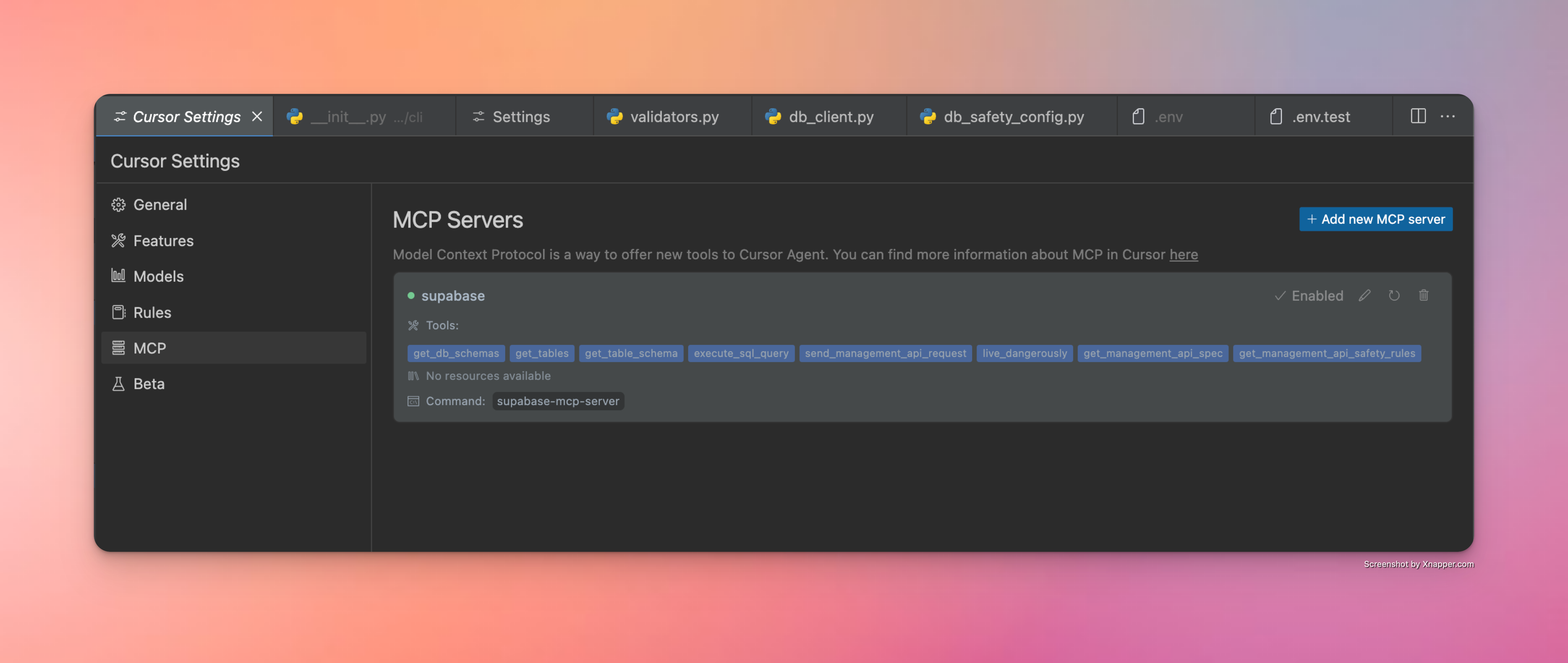
ウィンドサーフィン

Cascade に移動 -> ハンマーアイコンをクリック -> 構成 -> 構成を入力します。

{
    "mcpServers": {
      "supabase": {
        "command": "/Users/username/.local/bin/supabase-mcp-server",  // update path
        "env": {
          "QUERY_API_KEY": "your-api-key",  // Required - get your API key at thequery.dev
          "SUPABASE_PROJECT_REF": "your-project-ref",
          "SUPABASE_DB_PASSWORD": "your-db-password",
          "SUPABASE_REGION": "us-east-1",  // optional, defaults to us-east-1
          "SUPABASE_ACCESS_TOKEN": "your-access-token",  // optional, for management API
          "SUPABASE_SERVICE_ROLE_KEY": "your-service-role-key"  // optional, for Auth Admin SDK
        }
      }
    }
}

設定が正しい場合、利用可能なサーバーのリストに緑色のドット インジケーターとクリック可能な supabase サーバーが表示されます。
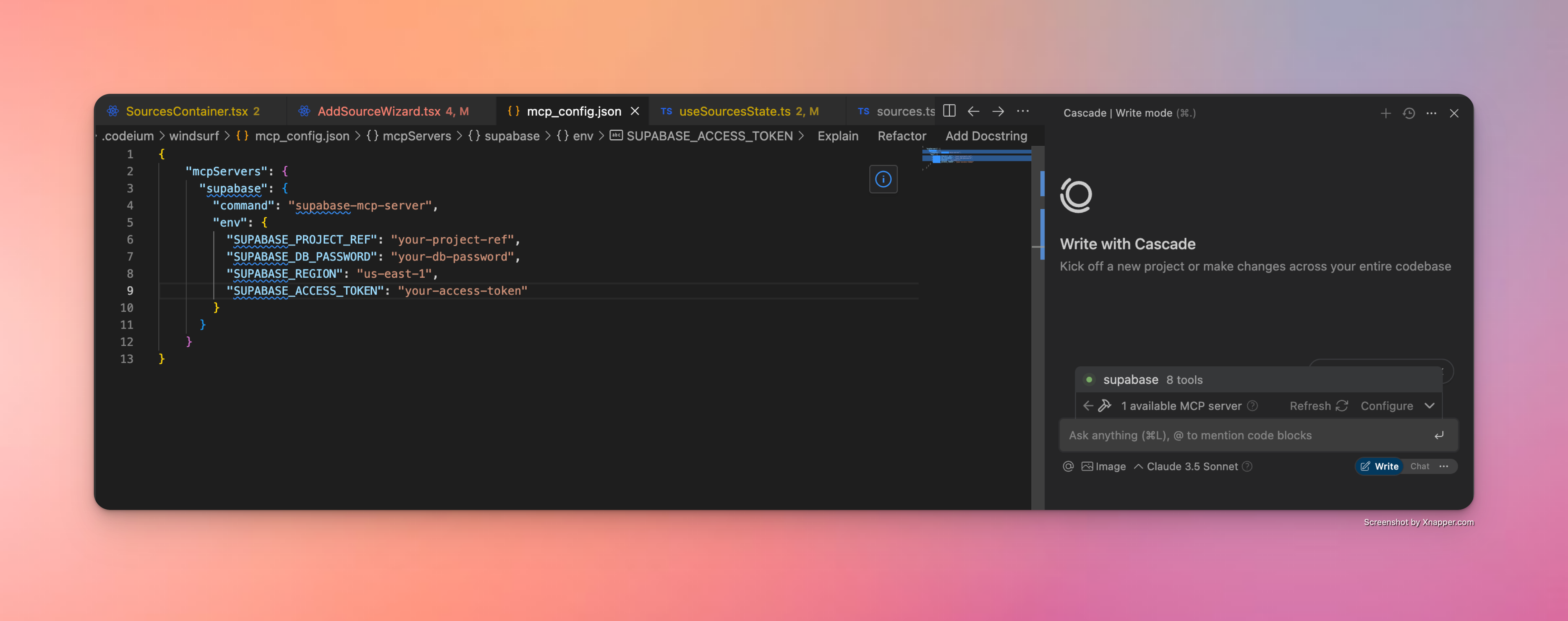
成功したWindsurf構成とは

クロードデスクトップ

Claude Desktopは、JSON設定を通じてMCPサーバーもサポートしています。Supabase MCPサーバーを設定するには、以下の手順に従ってください。

  1. 実行可能ファイルへの完全なパスを見つけます(この手順は重要です)。

    # On macOS/Linux
    which supabase-mcp-server
    
    # On Windows
    where supabase-mcp-server

    返される完全なパス (例: /Users/username/.local/bin/supabase-mcp-server ) をコピーします。

  2. Claude Desktop でMCP サーバーを構成します

    • クロードデスクトップを開く

    • 設定→開発者→MCPサーバーの設定編集に移動します。

    • 次の JSON を使用して新しい構成を追加します。

    {
      "mcpServers": {
        "supabase": {
          "command": "/full/path/to/supabase-mcp-server",  // Replace with the actual path from step 1
          "env": {
            "QUERY_API_KEY": "your-api-key",  // Required - get your API key at thequery.dev
            "SUPABASE_PROJECT_REF": "your-project-ref",
            "SUPABASE_DB_PASSWORD": "your-db-password",
            "SUPABASE_REGION": "us-east-1",  // optional, defaults to us-east-1
            "SUPABASE_ACCESS_TOKEN": "your-access-token",  // optional, for management API
            "SUPABASE_SERVICE_ROLE_KEY": "your-service-role-key"  // optional, for Auth Admin SDK
          }
        }
      }
    }

⚠️重要:WindsurfやCursorとは異なり、Claude Desktopでは実行ファイルへの絶対パスが必要です。コマンド名( supabase-mcp-server )のみを使用すると、「spawn ENOENT」エラーが発生します。

設定が正しい場合は、Claude Desktop で Supabase MCP サーバーが使用可能として表示されます。
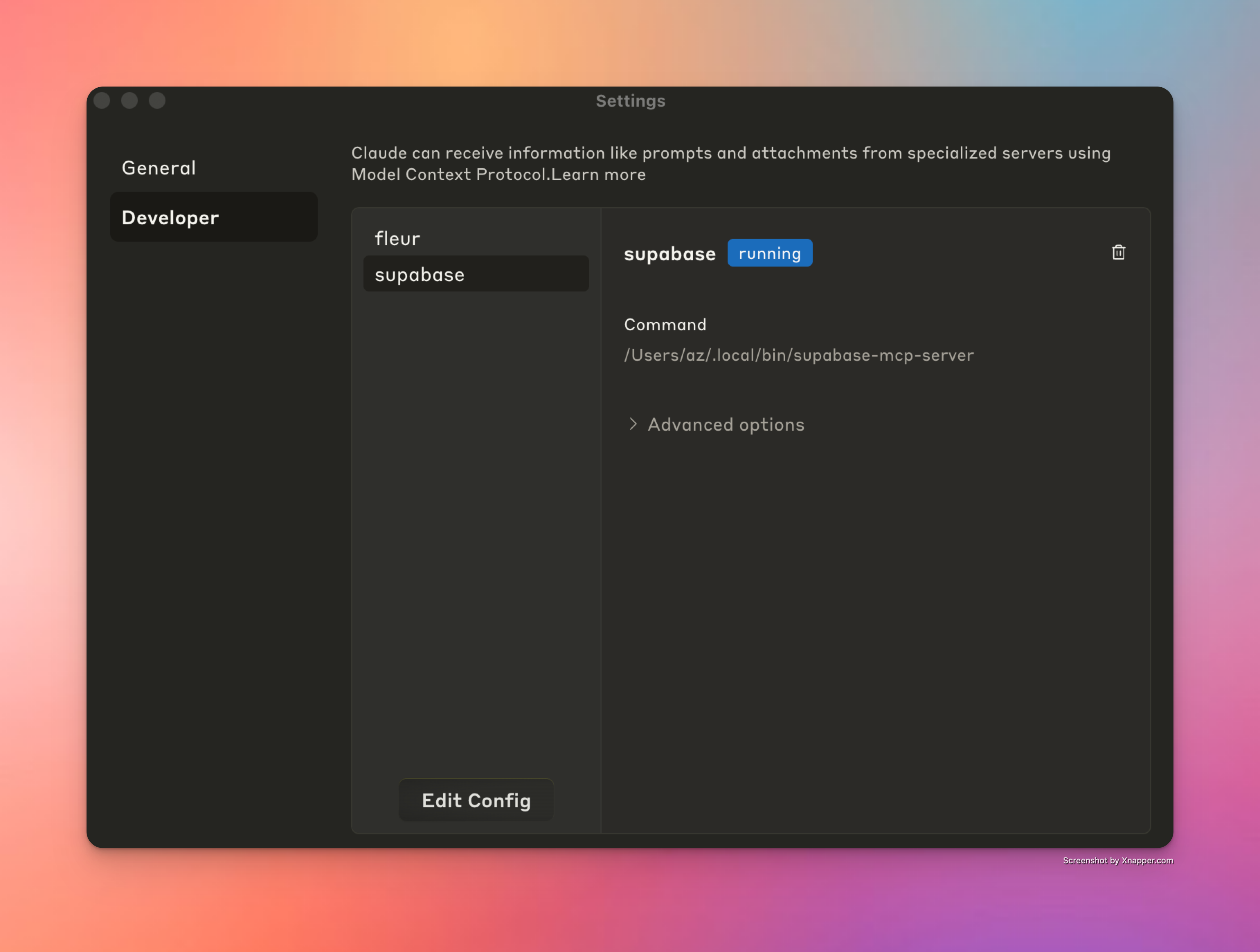
成功したWindsurf構成とは

クライン

Clineは同様のJSON設定を通じてMCPサーバーもサポートしています。Supabase MCPサーバーをセットアップするには、以下の手順に従ってください。

  1. 実行可能ファイルへの完全なパスを見つけます(この手順は重要です)。

    # On macOS/Linux
    which supabase-mcp-server
    
    # On Windows
    where supabase-mcp-server

    返される完全なパス (例: /Users/username/.local/bin/supabase-mcp-server ) をコピーします。

  2. Cline でMCP サーバーを構成します

    • VS CodeでClineを開く

    • Clineサイドバーの「MCPサーバー」タブをクリックします。

    • 「MCPサーバーの構成」をクリックします

    • cline_mcp_settings.jsonファイルが開きます。

    • 次の構成を追加します。

    {
      "mcpServers": {
        "supabase": {
          "command": "/full/path/to/supabase-mcp-server",  // Replace with the actual path from step 1
          "env": {
            "QUERY_API_KEY": "your-api-key",  // Required - get your API key at thequery.dev
            "SUPABASE_PROJECT_REF": "your-project-ref",
            "SUPABASE_DB_PASSWORD": "your-db-password",
            "SUPABASE_REGION": "us-east-1",  // optional, defaults to us-east-1
            "SUPABASE_ACCESS_TOKEN": "your-access-token",  // optional, for management API
            "SUPABASE_SERVICE_ROLE_KEY": "your-service-role-key"  // optional, for Auth Admin SDK
          }
        }
      }
    }

設定が正しい場合、Cline MCP サーバー リストの Supabase MCP サーバーの横に緑色のインジケーターが表示され、パネルの下部に「supabase MCP サーバーが接続されました」という確認メッセージが表示されます。
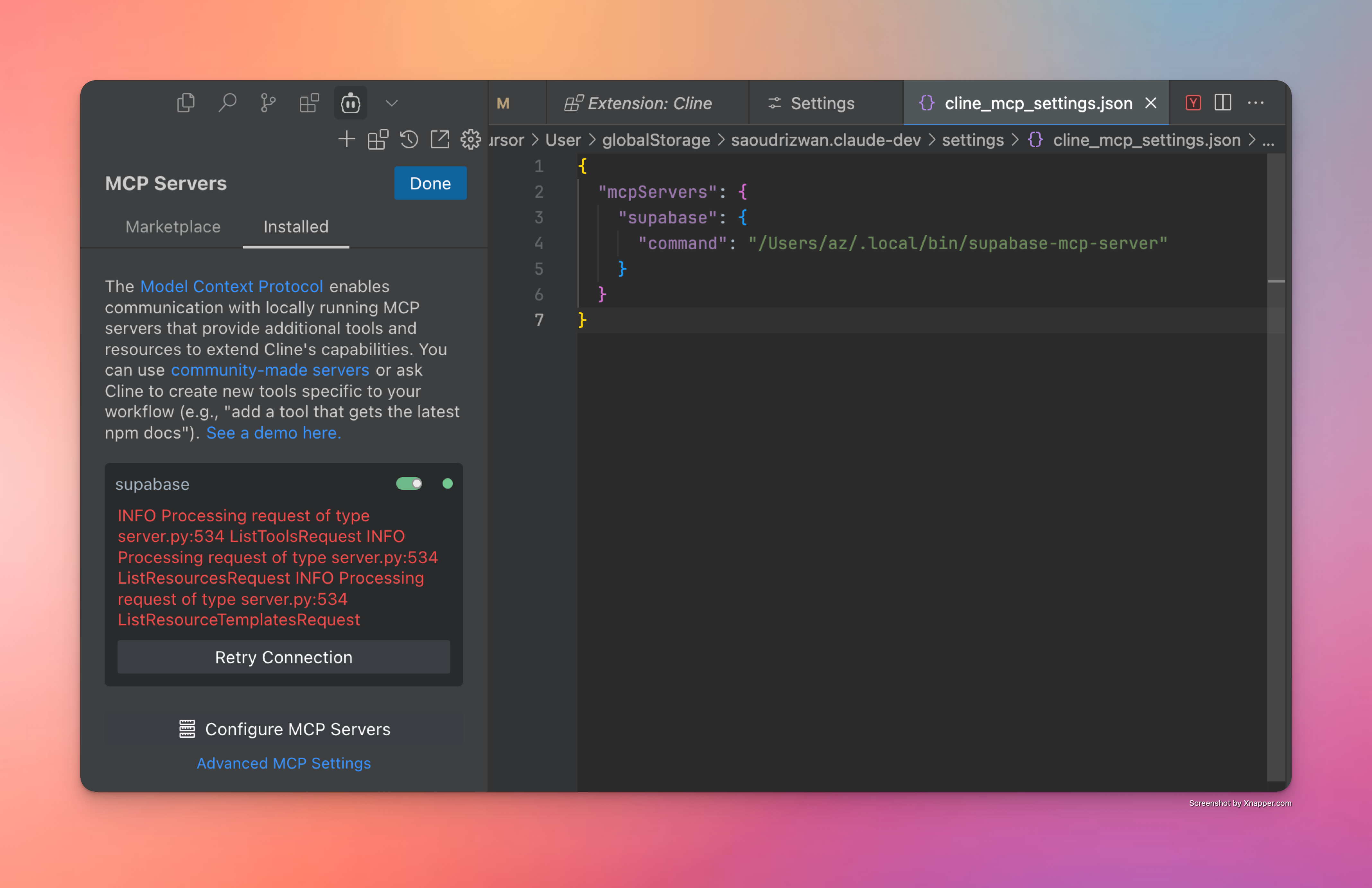
Cline での成功した構成の様子

トラブルシューティング

役立つヒントとコツをいくつか紹介します。

  • デバッグインストール- ターミナルからsupabase-mcp-serverを直接実行して、動作するかどうかを確認してください。動作しない場合は、インストールに問題がある可能性があります。

  • MCPサーバーの設定- 上記の手順がうまくいけば、サーバーは正しくインストールされ、設定されていることを意味します。正しいコマンドを入力していれば、IDEから接続できるはずです。サーバーの実行ファイルへの正しいパスを指定してください。

  • 「ツールが見つかりません」エラー- パッケージがインストールされているにもかかわらず、カーソルに「クライアントが閉じられています - 使用できるツールがありません」と表示される場合:

    • which supabase-mcp-server (macOS/Linux) またはwhere supabase-mcp-server (Windows) を実行して、実行可能ファイルへのフルパスを見つけます。

    • MCPサーバー構成ではsupabase-mcp-serverではなくフルパスを使用してください。

    • 例: /Users/username/.local/bin/supabase-mcp-serverまたはC:\Users\username\.local\bin\supabase-mcp-server.exe

  • 環境変数- 適切なデータベースに接続するには、 mcp_config.jsonまたはグローバル構成ディレクトリ (macOS/Linux の場合は~/.config/supabase-mcp/.env 、Windows .env場合は%APPDATA%\supabase-mcp\.env ) に配置された .env ファイルで環境変数を設定してください。

  • ログへのアクセス- MCP サーバーは詳細なログをファイルに書き込みます。

    • ログファイルの場所:

      • macOS/Linux: ~/.local/share/supabase-mcp/mcp_server.log

      • Windows: %USERPROFILE%\.local\share\supabase-mcp\mcp_server.log

    • ログには接続ステータス、構成の詳細、操作結果が含まれます

    • 任意のテキスト エディターまたはターミナル コマンドを使用してログを表示します。

      # On macOS/Linux
      cat ~/.local/share/supabase-mcp/mcp_server.log
      
      # On Windows (PowerShell)
      Get-Content "$env:USERPROFILE\.local\share\supabase-mcp\mcp_server.log"

行き詰まったり、上記の手順のいずれかが間違っていたりする場合は、問題を報告してください。

MCP検査官

MCPサーバーの問題をデバッグするのに非常に便利なツールがMCP Inspectorです。ソースコードからインストールした場合は、プロジェクトリポジトリからsupabase-mcp-inspector実行すると、インスペクターインスタンスが実行されます。ログと組み合わせることで、サーバーで何が起こっているかを完全に把握できます。

📝 パッケージからインストールされた場合、 supabase-mcp-inspector実行しても正常に動作しません。今後のリリースで検証して修正します。

機能の概要

データベースクエリツール

v0.3 以降のサーバーでは、安全制御が組み込まれた包括的なデータベース管理機能が提供されます。

  • SQLクエリ実行:リスク評価を伴うPostgreSQLクエリの実行

    • 3段階安全システム

      • safe : 読み取り専用操作 (SELECT) - 常に許可

      • write : データの変更 (INSERT、UPDATE、DELETE) - アンセーフモードが必要

      • destructive : スキーマの変更 (DROP、CREATE) - 安全でないモードと確認が必要

  • SQL 解析と検証:

    • 正確な分析のためにPostgreSQLのパーサー(pglast)を使用し、安全性要件に関する明確なフィードバックを提供します。

  • 自動移行バージョン管理:

    • データベースを変更する操作は自動的にバージョン管理されます

    • 操作の種類とターゲットに基づいて説明的な名前を生成します

  • 安全管理

    • デフォルトのSAFEモードでは読み取り専用操作のみが許可されます

    • すべてのステートメントはasyncpgを介してトランザクションモードで実行されます。

    • 高リスク操作のための2段階確認

  • 利用可能なツール:

    • get_schemas : サイズとテーブル数を含むスキーマを一覧表示します

    • get_tables : テーブル、外部テーブル、ビューをメタデータとともに一覧表示します

    • get_table_schema : 詳細なテーブル構造(列、キー、関係)を取得します。

    • execute_postgresql : データベースに対してSQL文を実行します

    • confirm_destructive_operation : 確認後に高リスク操作を実行する

    • retrieve_migrations : フィルタリングとページネーションのオプションを使用して移行を取得します

    • live_dangerously : 安全モードと非安全モードを切り替えます

管理APIツール

v0.3.0 以降、サーバーは安全制御を組み込んだ Supabase 管理 API への安全なアクセスを提供します。

  • 利用可能なツール:

    • send_management_api_request : プロジェクト参照の自動挿入により、Supabase Management API に任意のリクエストを送信します。

    • get_management_api_spec : 安全性情報を含む充実したAPI仕様を取得します。

      • 複数のクエリモードをサポート: ドメイン別、特定のパス/メソッド別、またはすべてのパス別

      • 各エンドポイントのリスク評価情報が含まれています

      • 詳細なパラメータ要件と応答形式を提供します

      • LLM が Supabase Management API の全機能を理解するのに役立ちます

    • get_management_api_safety_rules : 人間が読める説明付きのすべての安全ルールを取得します。

    • live_dangerously : 安全な操作モードと危険な操作モードを切り替えます

  • 安全管理

    • 一貫したリスク管理のためにデータベース操作と同じ安全マネージャを使用します

    • リスクレベル別に分類された操作:

      • safe : 読み取り専用操作 (GET) - 常に許可

      • unsafe : 状態を変更する操作 (POST、PUT、PATCH、DELETE) - unsafe モードが必要

      • blocked :破壊的な操作(プロジェクトの削除など) - 許可されません

    • デフォルトのセーフモードは、偶発的な状態の変更を防ぎます

    • 正確な安全ルールのためのパスベースのパターンマッチング

: 管理 API ツールはリモート Supabase インスタンスでのみ動作し、ローカル Supabase 開発セットアップとは互換性がありません。

認証管理ツール

MCPサーバーにPython SDKメソッドのサポートを追加する予定でした。検討の結果、テストユーザーを手動で作成することが多く、エラーが発生しやすく、時間がかかるため、Auth Adminメソッドのサポートのみを追加することにしました。これで、Cursorにテストユーザーの作成を依頼するだけで、シームレスに処理されます。Auth Admin SDKメソッドの機能について詳しくは、完全なドキュメントをご覧ください。

v0.3.6 以降、サーバーは Python SDK 経由で Supabase Auth Admin メソッドへの直接アクセスをサポートしています。

  • 次のツールが含まれています:

    • get_auth_admin_methods_spec 、利用可能なすべての Auth Admin メソッドのドキュメントを取得します。

    • call_auth_admin_method 、適切なパラメータ処理を使用して Auth Admin メソッドを直接呼び出します。

  • サポートされているメソッド:

    • get_user_by_id : IDでユーザーを取得する

    • list_users : ページ区切りですべてのユーザーを一覧表示する

    • create_user : 新しいユーザーを作成する

    • delete_user : IDでユーザーを削除する

    • invite_user_by_email : ユーザーのメールアドレスに招待リンクを送信する

    • generate_link : さまざまな認証目的でメールリンクを生成する

    • update_user_by_id : IDでユーザー属性を更新する

    • delete_factor : ユーザーの要素を削除します (現在 SDK では実装されていません)

生の SQL クエリの代わりに Auth Admin SDK を使用する理由は何ですか?

Auth Admin SDK には、直接 SQL を操作する場合に比べていくつかの重要な利点があります。

  • 機能: SQL だけでは不可能な操作 (招待、マジックリンク、MFA) を可能にします

  • 精度: 認証スキーマで生のSQLクエリを作成して実行するよりも信頼性が高い

  • シンプルさ: 適切な検証とエラー処理を備えた明確な方法を提供します

    • 応答形式:

      • すべてのメソッドは生の辞書ではなく構造化されたPythonオブジェクトを返します

      • オブジェクト属性にはドット表記を使用してアクセスできます(例: user["id"]ではなくuser.id

    • エッジケースと制限:

      • UUID検証: 多くのメソッドでは、ユーザーIDに有効なUUID形式が必要であり、特定の検証エラーが返されます。

      • メール設定: invite_user_by_emailgenerate_linkのようなメソッドでは、Supabaseプロジェクトでメール送信を設定する必要があります。

      • リンク タイプ: リンクを生成する場合、リンク タイプごとに要件が異なります。

        • signupリンクはユーザーの存在を必要としない

        • magiclinkrecoveryリンクでは、ユーザーがすでにシステムに存在している必要があります。

      • エラー処理: サーバーはSupabase APIからの詳細なエラーメッセージを提供しますが、ダッシュボードインターフェースとは異なる場合があります。

      • メソッドの可用性: delete_factorなどの一部のメソッドは API で公開されていますが、SDK では完全に実装されていません。

ログと分析

サーバーは Supabase のログと分析データへのアクセスを提供し、アプリケーションの監視とトラブルシューティングを容易にします。

  • 利用可能なツール: retrieve_logs - 任意のSupabaseサービスからのログにアクセスします

  • ログ収集:

    • postgres : データベースサーバのログ

    • api_gateway : APIゲートウェイリクエスト

    • auth : 認証イベント

    • postgrest : RESTful API サービスログ

    • pooler : 接続プールログ

    • storage : オブジェクトストレージ操作

    • realtime : WebSocketサブスクリプションログ

    • edge_functions : サーバーレス関数の実行

    • cron : スケジュールされたジョブのログ

    • pgbouncer : 接続プーラーログ

  • 機能: 時間によるフィルタリング、テキスト検索、フィールドフィルタの適用、カスタムSQLクエリの使用

インターフェイスを切り替えたり、複雑なクエリを記述したりすることなく、Supabase スタック全体のデバッグを簡素化します。

データベース変更の自動バージョン管理

「大いなる力には、大いなる責任が伴う。」 execute_postgresqlツールと、その名の通りlive_dangerouslyツールを組み合わせることで、Supabaseデータベースを強力かつシンプルに管理できるようになります。同時に、テーブルの削除や変更もチャットメッセージ一つで実行できます。不可逆的な変更のリスクを軽減するため、v0.3.8以降、サーバーは以下の機能をサポートしています。

  • データベース上で実行されるすべての書き込みおよび破壊的なSQL操作の移行スクリプトの自動作成

  • クエリ実行の安全モードが改善され、すべてのクエリが次のように分類されます。

    • safeタイプ: 常に許可されます。すべての読み取り専用操作が含まれます。

    • writeタイプ: ユーザーがwriteモードを有効にする必要があります。

    • destructive型: ユーザーがwriteモードを有効にし、ツールを自動的に実行しないクライアントに対してクエリ実行の 2 段階確認を行う必要があります。

ユニバーサルセーフティモード

v0.3.8以降、セーフティモードはユニバーサルセーフティマネージャーを用いてすべてのサービス(データベース、API、SDK)で標準化されています。これにより、一貫したリスク管理と、MCPサーバー全体のセーフティ設定を統一されたインターフェースで管理できるようになります。

すべての操作 (SQL クエリ、API リクエスト、SDK メソッド) は、リスク レベルに分類されます。

  • Lowリスク: データや構造を変更しない読み取り専用操作 (SELECT クエリ、GET API リクエスト)

  • Mediumリスク: データを変更するが構造を変更しない操作を記述する (INSERT/UPDATE/DELETE、ほとんどの POST/PUT API リクエスト)

  • Highリスク: データベース構造を変更したり、データ損失を引き起こす可能性のある破壊的な操作 (DROP/TRUNCATE、DELETE API エンドポイント)

  • Extremeリスク: 重大な結果をもたらす操作は完全にブロックされます (プロジェクトの削除)

安全管理はリスクレベルに基づいて適用されます。

  • 低リスクの操作は常に許可されます

  • 中程度のリスクの操作には、安全でないモードを有効にする必要があります

  • 高リスクの操作には、安全でないモードと明示的な確認が必要です

  • 極めてリスクの高い操作は決して許可されない

確認フローの仕組み

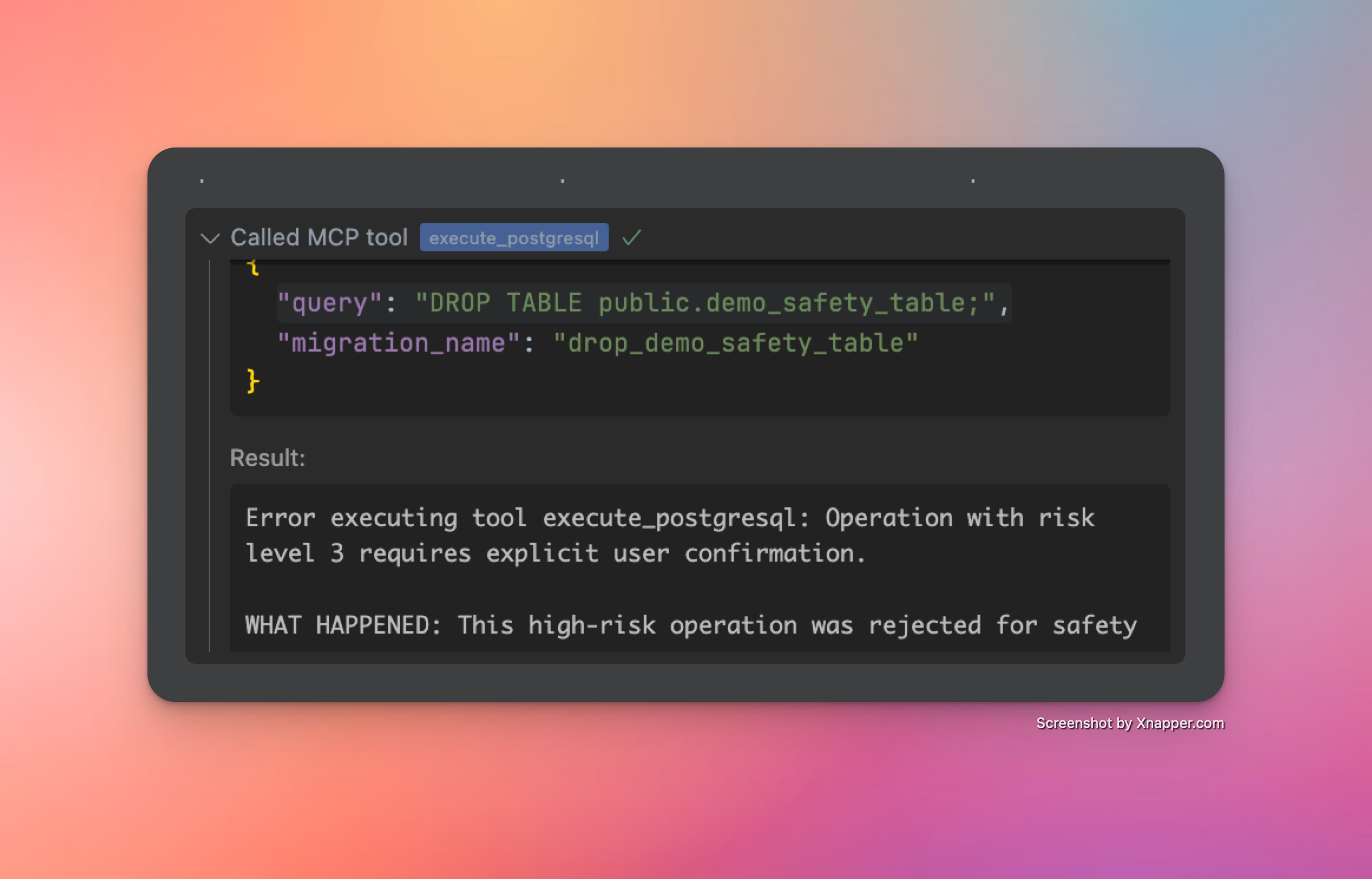
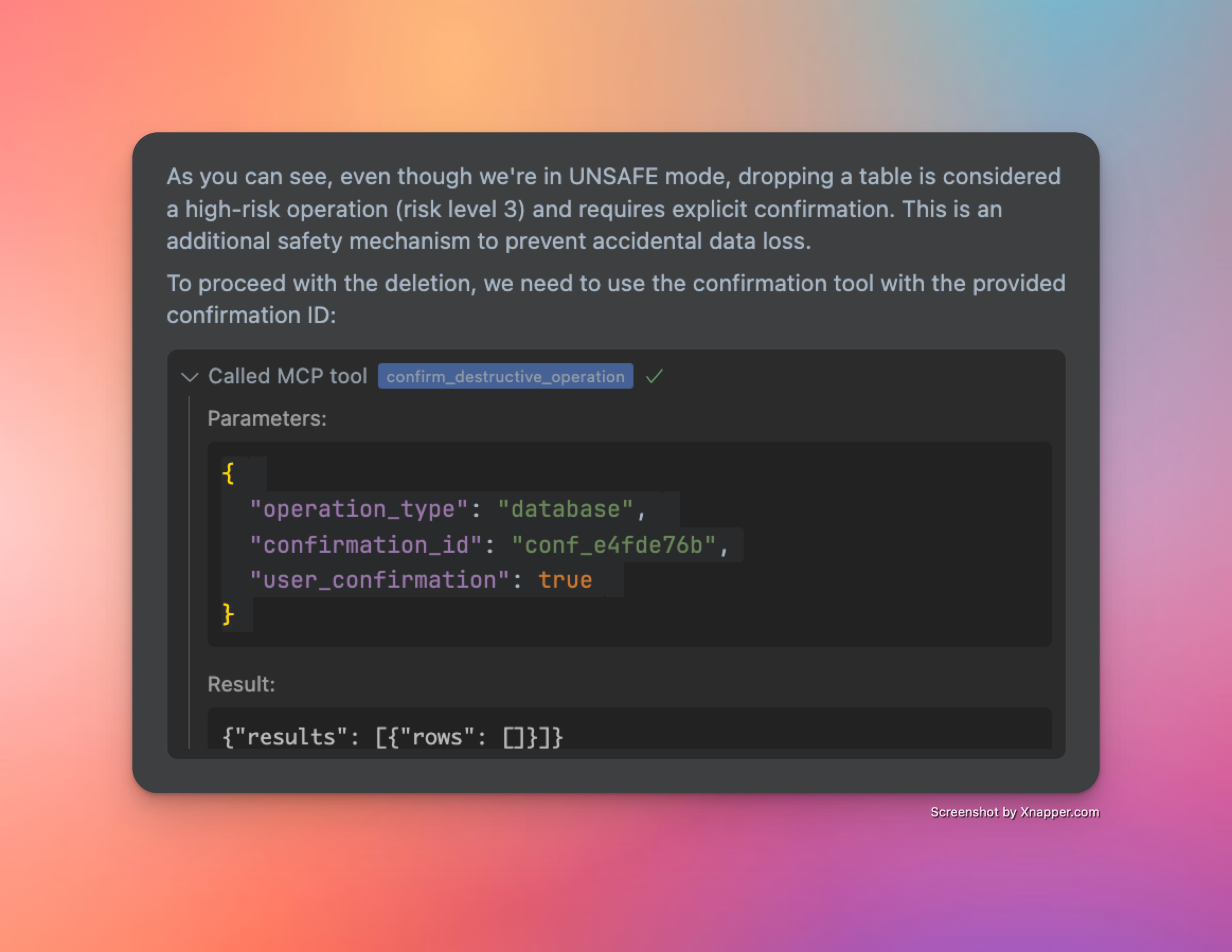
unsafeモードであっても、リスクの高い操作 (postgresql または api リクエスト) はブロックされます。 すべての高リスク操作はブロックされますリスクの高い操作を実行するには、それを明示的に確認して承認する必要があります。 明示的な承認は常に必要
変更履歴

  • 📦 パッケージマネージャーによるインストールの簡素化 - ✅ (v0.2.0)

  • 🌎 さまざまな Supabase リージョンのサポート - ✅ (v0.2.2)

  • 🎮 安全制御を備えた Supabase 管理 API へのプログラムによるアクセス - ✅ (v0.3.0)

  • 👷‍♂️ 安全制御を備えたデータベース SQL クエリの読み取りと読み取り/書き込み - ✅ (v0.3.0)

  • 🔄 直接接続とプール接続の両方に対する堅牢なトランザクション処理 - ✅ (v0.3.2)

  • 🐍 ネイティブ Python SDK で利用可能なメソッドとオブジェクトをサポート - ✅ (v0.3.6)

  • 🔍 より強力な SQL クエリ検証 ✅ (v0.3.8)

  • 📝 データベース変更の自動バージョン管理 ✅ (v0.3.8)

  • 📖 API 仕様に関する知識とツールが大幅に改善されました ✅ (v0.3.8)

  • ✍️ より整理されたデータベース vcs のための移行関連ツールの一貫性が向上しました ✅ (v0.3.10)

  • 🥳 クエリ MCP がリリースされました (v0.4.0)

より詳細なロードマップについては、GitHub のこのディスカッションを参照してください。

スターの歴史

星の歴史チャート


お楽しみください!☺️

Available Tools

12 tools
call_auth_admin_methodA

Call an Auth Admin method from Supabase Python SDK.

This tool provides a safe, validated interface to the Supabase Auth Admin SDK, allowing you to:

  • Manage users (create, update, delete)

  • List and search users

  • Generate authentication links

  • Manage multi-factor authentication

  • And more

IMPORTANT NOTES:

  • Request bodies must adhere to the Python SDK specification

  • Some methods may have nested parameter structures

  • The tool validates all parameters against Pydantic models

  • Extra fields not defined in the models will be rejected

AVAILABLE METHODS:

  • get_user_by_id: Retrieve a user by their ID

  • list_users: List all users with pagination

  • create_user: Create a new user

  • delete_user: Delete a user by their ID

  • invite_user_by_email: Send an invite link to a user's email

  • generate_link: Generate an email link for various authentication purposes

  • update_user_by_id: Update user attributes by ID

  • delete_factor: Delete a factor on a user

EXAMPLES:

  1. Get user by ID: method: "get_user_by_id" params: {"uid": "user-uuid-here"}

  2. Create user: method: "create_user" params: { "email": "user@example.com", "password": "secure-password" }

  3. Update user by ID: method: "update_user_by_id" params: { "uid": "user-uuid-here", "attributes": { "email": "new@email.com" } }

For complete documentation of all methods and their parameters, use the get_auth_admin_methods_spec tool.

ParametersJSON Schema
NameRequiredDescriptionDefault
methodYes
paramsYes

TDQS

A4.5/5.0
Behavior4/5

Does the description disclose side effects, auth requirements, rate limits, or destructive behavior?

With no annotations provided, the description carries the full burden of behavioral disclosure. It effectively describes key traits: it's a 'safe, validated interface' that validates parameters against Pydantic models and rejects extra fields. It mentions that 'some methods may have nested parameter structures' and provides examples of destructive operations (delete_user, delete_factor). However, it doesn't cover rate limits, authentication requirements, or error handling.

Agents need to know what a tool does to the world before calling it. Descriptions should go beyond structured annotations to explain consequences.

Conciseness3/5

Is the description appropriately sized, front-loaded, and free of redundancy?

The description is appropriately front-loaded with the core purpose and key capabilities, but it includes extensive lists and examples that could be streamlined. The 'AVAILABLE METHODS' section and multiple examples add value but make the description lengthy. Every sentence earns its place, but the structure could be more concise by integrating examples more tightly or referencing external documentation earlier.

Shorter descriptions cost fewer tokens and are easier for agents to parse. Every sentence should earn its place.

Completeness4/5

Given the tool's complexity, does the description cover enough for an agent to succeed on first attempt?

Given the complexity (2 parameters with nested objects, no output schema, no annotations), the description is largely complete. It covers purpose, usage, behavioral traits, and parameter semantics thoroughly. However, it lacks details on return values (since no output schema exists) and doesn't mention authentication or error scenarios. The reference to 'get_auth_admin_methods_spec' for full documentation helps mitigate gaps.

Complex tools with many parameters or behaviors need more documentation. Simple tools need less. This dimension scales expectations accordingly.

Parameters5/5

Does the description clarify parameter syntax, constraints, interactions, or defaults beyond what the schema provides?

The input schema has 0% description coverage and only defines 'method' (string) and 'params' (object) without semantic details. The description compensates fully by listing all available methods with brief explanations (e.g., 'get_user_by_id: Retrieve a user by their ID'), providing detailed examples with parameter structures, and explaining that parameters must adhere to Python SDK specifications. This adds substantial meaning beyond the minimal schema.

Input schemas describe structure but not intent. Descriptions should explain non-obvious parameter relationships and valid value ranges.

Purpose5/5

Does the description clearly state what the tool does and how it differs from similar tools?

The description clearly states the tool's purpose: 'Call an Auth Admin method from Supabase Python SDK' with a specific verb ('call') and resource ('Auth Admin method'). It distinguishes from siblings like 'get_auth_admin_methods_spec' (which retrieves documentation) and 'send_management_api_request' (which handles different API types). The bullet points further clarify capabilities like user management and authentication tasks.

Agents choose between tools based on descriptions. A clear purpose with a specific verb and resource helps agents select the right tool.

Usage Guidelines5/5

Does the description explain when to use this tool, when not to, or what alternatives exist?

The description provides explicit guidance on when to use this tool vs alternatives. It states to 'use the get_auth_admin_methods_spec tool' for complete documentation of methods and parameters, distinguishing it from that sibling. The 'IMPORTANT NOTES' section also outlines prerequisites like adhering to Python SDK specifications and validation rules, though it doesn't explicitly mention when not to use it.

Agents often have multiple tools that could apply. Explicit usage guidance like "use X instead of Y when Z" prevents misuse.

confirm_destructive_operationA

Execute a destructive database or API operation after confirmation. Use this only after reviewing the risks with the user.

HOW IT WORKS:

  • This tool executes a previously rejected high-risk operation using its confirmation ID

  • The operation will be exactly the same as the one that generated the ID

  • No need to retype the query or api request params - the system remembers it

STEPS:

  1. Explain the risks to the user and get their approval

  2. Use this tool with the confirmation ID from the error message

  3. The original query will be executed as-is

PARAMETERS:

  • operation_type: Type of operation ("api" or "database")

  • confirmation_id: The ID provided in the error message (required)

  • user_confirmation: Set to true to confirm execution (default: false)

NOTE: Confirmation IDs expire after 5 minutes for security

ParametersJSON Schema
NameRequiredDescriptionDefault
confirmation_idYes
operation_typeYes
user_confirmationNo

TDQS

A4.5/5.0
Behavior4/5

Does the description disclose side effects, auth requirements, rate limits, or destructive behavior?

With no annotations provided, the description carries the full burden of behavioral disclosure. It effectively describes key traits: it's for executing high-risk operations, requires user confirmation, uses a confirmation ID from a previous error, executes the original query as-is, and includes a security note about 5-minute expiration. However, it doesn't detail potential side effects (e.g., data loss specifics) or error handling, leaving some gaps in full transparency.

Agents need to know what a tool does to the world before calling it. Descriptions should go beyond structured annotations to explain consequences.

Conciseness4/5

Is the description appropriately sized, front-loaded, and free of redundancy?

The description is well-structured with clear sections (HOW IT WORKS, STEPS, PARAMETERS, NOTE), making it easy to scan. Each sentence adds value, such as explaining the confirmation process and security constraints. It could be slightly more concise by integrating some details (e.g., merging the STEPS and PARAMETERS sections), but overall, it's efficient and front-loaded with the core purpose.

Shorter descriptions cost fewer tokens and are easier for agents to parse. Every sentence should earn its place.

Completeness4/5

Given the tool's complexity, does the description cover enough for an agent to succeed on first attempt?

Given the tool's complexity (destructive operations, confirmation flow) and lack of annotations or output schema, the description does a good job of covering essential context: purpose, usage steps, parameters, and security notes. It addresses the high-risk nature and user interaction requirements. However, it doesn't specify what happens after execution (e.g., success/failure responses or side effects), which is a minor gap for such a critical tool.

Complex tools with many parameters or behaviors need more documentation. Simple tools need less. This dimension scales expectations accordingly.

Parameters4/5

Does the description clarify parameter syntax, constraints, interactions, or defaults beyond what the schema provides?

Schema description coverage is 0%, so the description must compensate. It adds meaningful context for all three parameters: 'operation_type' is explained as 'Type of operation ("api" or "database")', 'confirmation_id' as 'The ID provided in the error message (required)', and 'user_confirmation' as 'Set to true to confirm execution (default: false)'. This goes beyond the schema's basic titles and enums, clarifying usage and requirements. A point is deducted because it doesn't elaborate on the implications of each operation_type choice.

Input schemas describe structure but not intent. Descriptions should explain non-obvious parameter relationships and valid value ranges.

Purpose5/5

Does the description clearly state what the tool does and how it differs from similar tools?

The description clearly states the tool's purpose: 'Execute a destructive database or API operation after confirmation.' It specifies the verb ('execute'), resource ('destructive database or API operation'), and the key condition ('after confirmation'). The title 'confirm_destructive_operation' reinforces this, and it distinguishes itself from siblings like 'live_dangerously' or 'execute_postgresql' by focusing on confirmation of previously rejected high-risk operations.

Agents choose between tools based on descriptions. A clear purpose with a specific verb and resource helps agents select the right tool.

Usage Guidelines5/5

Does the description explain when to use this tool, when not to, or what alternatives exist?

The description provides explicit guidance on when to use this tool: 'Use this only after reviewing the risks with the user.' It outlines a clear process (explain risks, get approval, use confirmation ID) and specifies prerequisites (confirmation ID from an error message). It also distinguishes usage from alternatives by noting that no retyping of queries is needed, which sets it apart from tools like 'execute_postgresql' or 'send_management_api_request' that might require full parameter input.

Agents often have multiple tools that could apply. Explicit usage guidance like "use X instead of Y when Z" prevents misuse.

execute_postgresqlA

Execute PostgreSQL statements against your Supabase database.

IMPORTANT: All SQL statements must end with a semicolon (;).

OPERATION TYPES AND REQUIREMENTS:

  1. READ Operations (SELECT, EXPLAIN, etc.):

    • Can be executed directly without special requirements

    • Example: SELECT * FROM public.users LIMIT 10;

  2. WRITE Operations (INSERT, UPDATE, DELETE):

    • Require UNSAFE mode (use live_dangerously('database', True) first)

    • Example: INSERT INTO public.users (email) VALUES ('user@example.com');

  3. SCHEMA Operations (CREATE, ALTER, DROP):

    • Require UNSAFE mode (use live_dangerously('database', True) first)

    • Destructive operations (DROP, TRUNCATE) require additional confirmation

    • Example: CREATE TABLE public.test_table (id SERIAL PRIMARY KEY, name TEXT);

MIGRATION HANDLING: All queries that modify the database will be automatically version controlled by the server. You can provide optional migration name, if you want to name the migration.

  • Respect the following format: verb_noun_detail. Be descriptive and concise.

  • Examples:

    • create_users_table

    • add_email_to_profiles

    • enable_rls_on_users

  • If you don't provide a migration name, the server will generate one based on the SQL statement

  • The system will sanitize your provided name to ensure compatibility with database systems

  • Migration names are prefixed with a timestamp in the format YYYYMMDDHHMMSS

SAFETY SYSTEM: Operations are categorized by risk level:

  • LOW RISK: Read operations (SELECT, EXPLAIN) - allowed in SAFE mode

  • MEDIUM RISK: Write operations (INSERT, UPDATE, DELETE) - require UNSAFE mode

  • HIGH RISK: Schema operations (CREATE, ALTER) - require UNSAFE mode

  • EXTREME RISK: Destructive operations (DROP, TRUNCATE) - require UNSAFE mode and confirmation

TRANSACTION HANDLING:

  • DO NOT use transaction control statements (BEGIN, COMMIT, ROLLBACK)

  • The database client automatically wraps queries in transactions

  • The SQL validator will reject queries containing transaction control statements

  • This ensures atomicity and provides rollback capability for data modifications

MULTIPLE STATEMENTS:

  • You can send multiple SQL statements in a single query

  • Each statement will be executed in order within the same transaction

  • Example: CREATE TABLE public.test_table (id SERIAL PRIMARY KEY, name TEXT); INSERT INTO public.test_table (name) VALUES ('test');

CONFIRMATION FLOW FOR HIGH-RISK OPERATIONS:

  • High-risk operations (DROP TABLE, TRUNCATE, etc.) will be rejected with a confirmation ID

  • The error message will explain what happened and provide a confirmation ID

  • Review the risks with the user before proceeding

  • Use the confirm_destructive_operation tool with the provided ID to execute the operation

IMPORTANT GUIDELINES:

  • The database client starts in SAFE mode by default for safety

  • Only enable UNSAFE mode when you need to modify data or schema

  • Never mix READ and WRITE operations in the same transaction

  • For destructive operations, be prepared to confirm with the confirm_destructive_operation tool

WHEN TO USE OTHER TOOLS INSTEAD:

  • For Auth operations (users, authentication, etc.): Use call_auth_admin_method instead of direct SQL The Auth Admin SDK provides safer, validated methods for user management

  • For project configuration, functions, storage, etc.: Use send_management_api_request The Management API handles Supabase platform features that aren't directly in the database

Note: This tool operates on the PostgreSQL database only. API operations use separate safety controls.

ParametersJSON Schema
NameRequiredDescriptionDefault
migration_nameNo
queryYes

TDQS

A4.7/5.0
Behavior5/5

Does the description disclose side effects, auth requirements, rate limits, or destructive behavior?

With no annotations provided, the description carries the full burden of behavioral disclosure and does so comprehensively. It details safety modes (SAFE/UNSAFE), risk categorization (LOW/MEDIUM/HIGH/EXTREME), transaction handling restrictions, migration version control, confirmation flows for destructive operations, and important operational guidelines. This provides rich behavioral context beyond basic functionality.

Agents need to know what a tool does to the world before calling it. Descriptions should go beyond structured annotations to explain consequences.

Conciseness3/5

Is the description appropriately sized, front-loaded, and free of redundancy?

The description is well-structured with clear sections (OPERATION TYPES, MIGRATION HANDLING, SAFETY SYSTEM, etc.) but is quite lengthy. While most content is valuable, some redundancy exists (e.g., multiple mentions of UNSAFE mode requirements). The front-loading is good with purpose and immediate requirements, but the length may challenge quick comprehension.

Shorter descriptions cost fewer tokens and are easier for agents to parse. Every sentence should earn its place.

Completeness5/5

Given the tool's complexity, does the description cover enough for an agent to succeed on first attempt?

Given the complexity of a database execution tool with 2 parameters, no annotations, and no output schema, the description provides exceptional completeness. It covers purpose, usage guidelines, behavioral traits, parameter semantics, safety systems, transaction handling, migration control, confirmation flows, and sibling tool relationships. This fully compensates for the lack of structured metadata.

Complex tools with many parameters or behaviors need more documentation. Simple tools need less. This dimension scales expectations accordingly.

Parameters4/5

Does the description clarify parameter syntax, constraints, interactions, or defaults beyond what the schema provides?

With 0% schema description coverage for the 2 parameters, the description compensates well by explaining both parameters' semantics. It describes 'migration_name' in detail (format requirements, examples, what happens if not provided, sanitization, timestamp prefixing) and 'query' through extensive examples and requirements (semicolon termination, operation types). While comprehensive, it doesn't explicitly map all schema properties like the default value for migration_name.

Input schemas describe structure but not intent. Descriptions should explain non-obvious parameter relationships and valid value ranges.

Purpose5/5

Does the description clearly state what the tool does and how it differs from similar tools?

The description clearly states the tool's purpose: 'Execute PostgreSQL statements against your Supabase database.' It specifies the exact action (execute) and resource (PostgreSQL statements/Supabase database), distinguishing it from sibling tools like call_auth_admin_method or send_management_api_request that handle different aspects of the system.

Agents choose between tools based on descriptions. A clear purpose with a specific verb and resource helps agents select the right tool.

Usage Guidelines5/5

Does the description explain when to use this tool, when not to, or what alternatives exist?

The description provides explicit guidance on when to use this tool versus alternatives. It includes a dedicated section 'WHEN TO USE OTHER TOOLS INSTEAD' that names specific sibling tools (call_auth_admin_method, send_management_api_request) and explains what operations they handle instead. It also provides detailed context about different operation types and their requirements.

Agents often have multiple tools that could apply. Explicit usage guidance like "use X instead of Y when Z" prevents misuse.

get_auth_admin_methods_specA

Get Python SDK methods specification for Auth Admin.

Returns a comprehensive dictionary of all Auth Admin methods available in the Supabase Python SDK, including:

  • Method names and descriptions

  • Required and optional parameters for each method

  • Parameter types and constraints

  • Return value information

This tool is useful for exploring the capabilities of the Auth Admin SDK and understanding how to properly format parameters for the call_auth_admin_method tool.

No parameters required.

ParametersJSON Schema
NameRequiredDescriptionDefault

No parameters

TDQS

A4.4/5.0
Behavior3/5

Does the description disclose side effects, auth requirements, rate limits, or destructive behavior?

With no annotations provided, the description carries the full burden. It describes what the tool returns ('comprehensive dictionary' with method details) and clarifies it requires no parameters, which is helpful. However, it doesn't mention behavioral aspects like whether this is a read-only operation, if it makes external API calls, potential rate limits, or error conditions.

Agents need to know what a tool does to the world before calling it. Descriptions should go beyond structured annotations to explain consequences.

Conciseness5/5

Is the description appropriately sized, front-loaded, and free of redundancy?

The description is well-structured and front-loaded with the core purpose. Every sentence adds value: the first states what it does, the second details the return content, the third explains usage context, and the fourth clarifies no parameters needed. There is no wasted text.

Shorter descriptions cost fewer tokens and are easier for agents to parse. Every sentence should earn its place.

Completeness4/5

Given the tool's complexity, does the description cover enough for an agent to succeed on first attempt?

Given the tool has 0 parameters, no annotations, and no output schema, the description does a good job explaining the purpose, return format, and usage context. However, it could be more complete by specifying the exact structure of the returned dictionary or any prerequisites, though the lack of output schema lowers the bar.

Complex tools with many parameters or behaviors need more documentation. Simple tools need less. This dimension scales expectations accordingly.

Parameters4/5

Does the description clarify parameter syntax, constraints, interactions, or defaults beyond what the schema provides?

The tool has 0 parameters with 100% schema description coverage, so the baseline is 4. The description explicitly states 'No parameters required,' which reinforces this clearly and adds value by preventing parameter confusion.

Input schemas describe structure but not intent. Descriptions should explain non-obvious parameter relationships and valid value ranges.

Purpose5/5

Does the description clearly state what the tool does and how it differs from similar tools?

The description clearly states the specific action ('Get Python SDK methods specification for Auth Admin') and resource ('Auth Admin methods available in the Supabase Python SDK'). It distinguishes from sibling tools by focusing exclusively on Auth Admin SDK methods, unlike broader tools like get_management_api_spec or get_schemas.

Agents choose between tools based on descriptions. A clear purpose with a specific verb and resource helps agents select the right tool.

Usage Guidelines5/5

Does the description explain when to use this tool, when not to, or what alternatives exist?

The description explicitly states when to use this tool ('useful for exploring the capabilities of the Auth Admin SDK and understanding how to properly format parameters for the call_auth_admin_method tool'), providing clear context and naming the specific alternative tool (call_auth_admin_method) it prepares for.

Agents often have multiple tools that could apply. Explicit usage guidance like "use X instead of Y when Z" prevents misuse.

get_management_api_specA

Get the complete Supabase Management API specification.

Returns the full OpenAPI specification for the Supabase Management API, including:

  • All available endpoints and operations

  • Required and optional parameters for each operation

  • Request and response schemas

  • Authentication requirements

  • Safety information for each operation

This tool can be used in four different ways:

  1. Without parameters: Returns all domains (default)

  2. With path and method: Returns the full specification for a specific API endpoint

  3. With domain only: Returns all paths and methods within that domain

  4. With all_paths=True: Returns all paths and methods

Parameters:

  • params: Dictionary containing optional parameters:

    • path: Optional API path (e.g., "/v1/projects/{ref}/functions")

    • method: Optional HTTP method (e.g., "GET", "POST")

    • domain: Optional domain/tag name (e.g., "Auth", "Storage")

    • all_paths: Optional boolean, if True returns all paths and methods

Available domains:

  • Analytics: Analytics-related endpoints

  • Auth: Authentication and authorization endpoints

  • Database: Database management endpoints

  • Domains: Custom domain configuration endpoints

  • Edge Functions: Serverless function management endpoints

  • Environments: Environment configuration endpoints

  • OAuth: OAuth integration endpoints

  • Organizations: Organization management endpoints

  • Projects: Project management endpoints

  • Rest: RESTful API endpoints

  • Secrets: Secret management endpoints

  • Storage: Storage management endpoints

This specification is useful for understanding:

  • What operations are available through the Management API

  • How to properly format requests for each endpoint

  • Which operations require unsafe mode

  • What data structures to expect in responses

SAFETY: This is a low-risk read operation that can be executed in SAFE mode.

ParametersJSON Schema
NameRequiredDescriptionDefault
paramsNo

TDQS

A4.7/5.0
Behavior4/5

Does the description disclose side effects, auth requirements, rate limits, or destructive behavior?

With no annotations provided, the description carries full burden and does an excellent job disclosing behavioral traits. It explicitly states this is a 'low-risk read operation that can be executed in SAFE mode,' describes what information is returned (endpoints, parameters, schemas, auth requirements, safety info), and explains the four different usage patterns. The only minor gap is lack of information about rate limits or pagination, but overall it provides comprehensive behavioral context.

Agents need to know what a tool does to the world before calling it. Descriptions should go beyond structured annotations to explain consequences.

Conciseness4/5

Is the description appropriately sized, front-loaded, and free of redundancy?

The description is well-structured and appropriately sized, with clear sections for purpose, usage patterns, parameters, domains, and utility. While comprehensive, every sentence earns its place by adding value. The only minor issue is some redundancy in the safety statement at the end, but overall it's front-loaded with the core purpose and efficiently organized.

Shorter descriptions cost fewer tokens and are easier for agents to parse. Every sentence should earn its place.

Completeness5/5

Given the tool's complexity, does the description cover enough for an agent to succeed on first attempt?

Given the complexity of a tool that returns API specifications with multiple usage patterns, and with no annotations and no output schema, the description provides complete context. It explains what the tool does, how to use it in different scenarios, what parameters mean, what domains are available, what information the specification contains, and safety considerations. This fully compensates for the lack of structured metadata.

Complex tools with many parameters or behaviors need more documentation. Simple tools need less. This dimension scales expectations accordingly.

Parameters5/5

Does the description clarify parameter syntax, constraints, interactions, or defaults beyond what the schema provides?

With 0% schema description coverage (the schema only shows 'params' as an object with no properties documented), the description fully compensates by providing detailed parameter semantics. It explains all four optional parameters (path, method, domain, all_paths) with examples and clear descriptions of what each does. It also lists available domain values with explanations, effectively documenting what would normally be in the schema's enum or property descriptions.

Input schemas describe structure but not intent. Descriptions should explain non-obvious parameter relationships and valid value ranges.

Purpose5/5

Does the description clearly state what the tool does and how it differs from similar tools?

The description clearly states the tool's purpose: 'Get the complete Supabase Management API specification' with specific details about what it returns (OpenAPI spec including endpoints, parameters, schemas, auth requirements, safety info). It distinguishes from sibling tools like 'get_auth_admin_methods_spec' by covering the entire Management API rather than just auth methods, and from 'send_management_api_request' by providing documentation rather than executing requests.

Agents choose between tools based on descriptions. A clear purpose with a specific verb and resource helps agents select the right tool.

Usage Guidelines5/5

Does the description explain when to use this tool, when not to, or what alternatives exist?

The description provides explicit usage guidelines with four distinct scenarios: 1) without parameters returns all domains, 2) with path and method returns specific endpoint spec, 3) with domain only returns all paths/methods in that domain, 4) with all_paths=True returns all paths/methods. It also explains when this tool is useful (understanding available operations, request formatting, unsafe mode requirements, response structures), giving clear context for when to use it versus alternatives.

Agents often have multiple tools that could apply. Explicit usage guidance like "use X instead of Y when Z" prevents misuse.

get_schemasB

List all database schemas with their sizes and table counts.

ParametersJSON Schema
NameRequiredDescriptionDefault

No parameters

TDQS

B3.2/5.0
Behavior2/5

Does the description disclose side effects, auth requirements, rate limits, or destructive behavior?

With no annotations provided, the description carries the full burden of behavioral disclosure. It states this is a read operation ('List'), implying it's non-destructive, but doesn't cover other important aspects like authentication requirements, rate limits, error handling, or what the output format looks like. For a tool with zero annotation coverage, this is insufficient.

Agents need to know what a tool does to the world before calling it. Descriptions should go beyond structured annotations to explain consequences.

Conciseness5/5

Is the description appropriately sized, front-loaded, and free of redundancy?

The description is a single, efficient sentence that states exactly what the tool does with zero wasted words. It's front-loaded with the core purpose and includes key details (sizes and table counts) without unnecessary elaboration.

Shorter descriptions cost fewer tokens and are easier for agents to parse. Every sentence should earn its place.

Completeness3/5

Given the tool's complexity, does the description cover enough for an agent to succeed on first attempt?

Given the tool's simplicity (0 parameters, no output schema, no annotations), the description is adequate but has clear gaps. It explains what the tool returns (schemas with sizes and table counts), but without annotations or output schema, it doesn't specify the return format, data types, or any behavioral constraints. This is a minimal viable description.

Complex tools with many parameters or behaviors need more documentation. Simple tools need less. This dimension scales expectations accordingly.

Parameters4/5

Does the description clarify parameter syntax, constraints, interactions, or defaults beyond what the schema provides?

The tool has 0 parameters, and the schema description coverage is 100% (though empty). The description doesn't need to add parameter semantics, so it meets the baseline of 4 for tools with no parameters. It appropriately doesn't mention any parameters.

Input schemas describe structure but not intent. Descriptions should explain non-obvious parameter relationships and valid value ranges.

Purpose4/5

Does the description clearly state what the tool does and how it differs from similar tools?

The description clearly states the tool's purpose with a specific verb ('List') and resource ('database schemas'), along with what information is included ('sizes and table counts'). It distinguishes from siblings like 'get_tables' and 'get_table_schema' by focusing on schemas rather than tables. However, it doesn't explicitly differentiate from all siblings, so it's not a perfect 5.

Agents choose between tools based on descriptions. A clear purpose with a specific verb and resource helps agents select the right tool.

Usage Guidelines2/5

Does the description explain when to use this tool, when not to, or what alternatives exist?

The description provides no guidance on when to use this tool versus alternatives. It doesn't mention when to choose this over 'get_tables' or 'get_table_schema', nor does it specify any prerequisites or exclusions. The agent must infer usage from the purpose alone.

Agents often have multiple tools that could apply. Explicit usage guidance like "use X instead of Y when Z" prevents misuse.

get_tablesA

List all tables, foreign tables, and views in a schema with their sizes, row counts, and metadata.

Provides detailed information about all database objects in the specified schema:

  • Table/view names

  • Object types (table, view, foreign table)

  • Row counts

  • Size on disk

  • Column counts

  • Index information

  • Last vacuum/analyze times

Parameters:

  • schema_name: Name of the schema to inspect (e.g., 'public', 'auth', etc.)

SAFETY: This is a low-risk read operation that can be executed in SAFE mode.

ParametersJSON Schema
NameRequiredDescriptionDefault
schema_nameYes

TDQS

A4.2/5.0
Behavior4/5

Does the description disclose side effects, auth requirements, rate limits, or destructive behavior?

With no annotations provided, the description carries the full burden. It discloses that this is a 'low-risk read operation' and can be executed in 'SAFE mode', which clarifies safety and behavioral traits. However, it lacks details on rate limits, permissions needed, or potential performance impacts.

Agents need to know what a tool does to the world before calling it. Descriptions should go beyond structured annotations to explain consequences.

Conciseness4/5

Is the description appropriately sized, front-loaded, and free of redundancy?

The description is well-structured with a clear summary, bulleted details, and a dedicated safety note. It is appropriately sized, but could be slightly more concise by integrating the safety note into the main text.

Shorter descriptions cost fewer tokens and are easier for agents to parse. Every sentence should earn its place.

Completeness4/5

Given the tool's complexity, does the description cover enough for an agent to succeed on first attempt?

Given no annotations and no output schema, the description does a good job explaining the tool's purpose, parameters, and safety. It lists the information returned (e.g., row counts, sizes), but could benefit from clarifying the output format or any limitations.

Complex tools with many parameters or behaviors need more documentation. Simple tools need less. This dimension scales expectations accordingly.

Parameters5/5

Does the description clarify parameter syntax, constraints, interactions, or defaults beyond what the schema provides?

The schema description coverage is 0%, so the description must compensate. It explicitly defines the single parameter 'schema_name' with meaning ('Name of the schema to inspect') and examples ('public', 'auth'), adding significant value beyond the bare schema.

Input schemas describe structure but not intent. Descriptions should explain non-obvious parameter relationships and valid value ranges.

Purpose5/5

Does the description clearly state what the tool does and how it differs from similar tools?

The description clearly states the verb ('List') and resource ('all tables, foreign tables, and views in a schema') with specific attributes ('sizes, row counts, and metadata'). It distinguishes from siblings like get_schemas (which lists schemas) and get_table_schema (which provides schema details for a single table).

Agents choose between tools based on descriptions. A clear purpose with a specific verb and resource helps agents select the right tool.

Usage Guidelines3/5

Does the description explain when to use this tool, when not to, or what alternatives exist?

The description implies usage for inspecting database objects in a schema, but does not explicitly state when to use this tool versus alternatives like get_schemas or get_table_schema. No exclusions or prerequisites are mentioned, leaving some ambiguity in context.

Agents often have multiple tools that could apply. Explicit usage guidance like "use X instead of Y when Z" prevents misuse.

get_table_schemaA

Get detailed table structure including columns, keys, and relationships.

Returns comprehensive information about a specific table's structure:

  • Column definitions (names, types, constraints)

  • Primary key information

  • Foreign key relationships

  • Indexes

  • Constraints

  • Triggers

Parameters:

  • schema_name: Name of the schema (e.g., 'public', 'auth')

  • table: Name of the table to inspect

SAFETY: This is a low-risk read operation that can be executed in SAFE mode.

ParametersJSON Schema
NameRequiredDescriptionDefault
schema_nameYes
tableYes

TDQS

A4.4/5.0
Behavior4/5

Does the description disclose side effects, auth requirements, rate limits, or destructive behavior?

With no annotations provided, the description carries full burden and does well by explicitly stating 'This is a low-risk read operation that can be executed in SAFE mode.' It discloses safety profile and operational mode, though it could add more about rate limits, permissions needed, or response format.

Agents need to know what a tool does to the world before calling it. Descriptions should go beyond structured annotations to explain consequences.

Conciseness5/5

Is the description appropriately sized, front-loaded, and free of redundancy?

Perfectly structured with purpose statement, bulleted return details, parameter section, and safety note. Every sentence earns its place, and information is front-loaded with the core purpose first.

Shorter descriptions cost fewer tokens and are easier for agents to parse. Every sentence should earn its place.

Completeness4/5

Given the tool's complexity, does the description cover enough for an agent to succeed on first attempt?

For a read operation with 2 parameters and no output schema, the description provides good coverage of purpose, parameters, and safety. It could benefit from more detail about the return format or example output, but given the context signals, it's mostly complete.

Complex tools with many parameters or behaviors need more documentation. Simple tools need less. This dimension scales expectations accordingly.

Parameters4/5

Does the description clarify parameter syntax, constraints, interactions, or defaults beyond what the schema provides?

Schema description coverage is 0%, so the description must compensate. It provides clear semantic meaning for both parameters with examples (schema_name: 'public', 'auth') and clarifies that 'table' is the specific table to inspect. This adds significant value beyond the bare schema.

Input schemas describe structure but not intent. Descriptions should explain non-obvious parameter relationships and valid value ranges.

Purpose5/5

Does the description clearly state what the tool does and how it differs from similar tools?

The description clearly states the verb 'Get' and resource 'detailed table structure', specifying what information is returned (columns, keys, relationships). It distinguishes from sibling tools like get_schemas and get_tables by focusing on detailed structural metadata rather than lists of objects.

Agents choose between tools based on descriptions. A clear purpose with a specific verb and resource helps agents select the right tool.

Usage Guidelines4/5

Does the description explain when to use this tool, when not to, or what alternatives exist?

The description implies usage context through the parameter descriptions and safety note, but doesn't explicitly state when to use this tool versus alternatives like get_tables or execute_postgresql. It provides clear context for inspecting table structure but lacks explicit exclusions or named alternatives.

Agents often have multiple tools that could apply. Explicit usage guidance like "use X instead of Y when Z" prevents misuse.

live_dangerouslyA

Toggle unsafe mode for either Management API or Database operations.

WHAT THIS TOOL DOES: This tool switches between safe (default) and unsafe operation modes for either the Management API or Database operations.

SAFETY MODES EXPLAINED:

  1. Database Safety Modes:

    • SAFE mode (default): Only low-risk operations like SELECT queries are allowed

    • UNSAFE mode: Higher-risk operations including INSERT, UPDATE, DELETE, and schema changes are permitted

  2. API Safety Modes:

    • SAFE mode (default): Only low-risk operations that don't modify state are allowed

    • UNSAFE mode: Higher-risk state-changing operations are permitted (except those explicitly blocked for safety)

OPERATION RISK LEVELS: The system categorizes operations by risk level:

  • LOW: Safe read operations with minimal impact

  • MEDIUM: Write operations that modify data but don't change structure

  • HIGH: Operations that modify database structure or important system settings

  • EXTREME: Destructive operations that could cause data loss or service disruption

WHEN TO USE THIS TOOL:

  • Use this tool BEFORE attempting write operations or schema changes

  • Enable unsafe mode only when you need to perform data modifications

  • Always return to safe mode after completing write operations

USAGE GUIDELINES:

  • Start in safe mode by default for exploration and analysis

  • Switch to unsafe mode only when you need to make changes

  • Be specific about which service you're enabling unsafe mode for

  • Consider the risks before enabling unsafe mode, especially for database operations

  • For database operations requiring schema changes, you'll need to enable unsafe mode first

Parameters:

  • service: Which service to toggle ("api" or "database")

  • enable_unsafe_mode: True to enable unsafe mode, False for safe mode (default: False)

Examples:

  1. Enable database unsafe mode: live_dangerously(service="database", enable_unsafe_mode=True)

  2. Return to safe mode after operations: live_dangerously(service="database", enable_unsafe_mode=False)

  3. Enable API unsafe mode: live_dangerously(service="api", enable_unsafe_mode=True)

Note: This tool affects ALL subsequent operations for the specified service until changed again.

ParametersJSON Schema
NameRequiredDescriptionDefault
enable_unsafe_modeNo
serviceYes

TDQS

A4.9/5.0
Behavior5/5

Does the description disclose side effects, auth requirements, rate limits, or destructive behavior?

With no annotations provided, the description carries the full burden of behavioral disclosure and does so comprehensively. It explains the safety modes in detail (SAFE vs. UNSAFE for both Database and API), describes risk levels (LOW, MEDIUM, HIGH, EXTREME), and explicitly states that the tool 'affects ALL subsequent operations for the specified service until changed again,' which is crucial behavioral context not evident from the schema alone.

Agents need to know what a tool does to the world before calling it. Descriptions should go beyond structured annotations to explain consequences.

Conciseness4/5

Is the description appropriately sized, front-loaded, and free of redundancy?

The description is well-structured with clear sections (WHAT THIS TOOL DOES, SAFETY MODES EXPLAINED, etc.) and front-loads the core purpose. While comprehensive, some sections like OPERATION RISK LEVELS could be slightly more concise, but every sentence adds valuable context for a safety-critical tool.

Shorter descriptions cost fewer tokens and are easier for agents to parse. Every sentence should earn its place.

Completeness5/5

Given the tool's complexity, does the description cover enough for an agent to succeed on first attempt?

For a tool with 2 parameters, 0% schema description coverage, no annotations, and no output schema, the description provides complete context. It explains what the tool does, when to use it, detailed behavioral implications, parameter meanings, examples, and important notes about persistence of the mode change. No additional information is needed for an agent to use this tool correctly.

Complex tools with many parameters or behaviors need more documentation. Simple tools need less. This dimension scales expectations accordingly.

Parameters5/5

Does the description clarify parameter syntax, constraints, interactions, or defaults beyond what the schema provides?

With 0% schema description coverage, the description fully compensates by explaining both parameters in detail. It defines 'service' as 'api' or 'database' with clear explanations of what each service controls, and explains 'enable_unsafe_mode' as a boolean with default False, including specific examples of how to use both parameters together in different scenarios.

Input schemas describe structure but not intent. Descriptions should explain non-obvious parameter relationships and valid value ranges.

Purpose5/5

Does the description clearly state what the tool does and how it differs from similar tools?

The description clearly states the tool 'switches between safe (default) and unsafe operation modes for either the Management API or Database operations,' providing a specific verb ('toggle'/'switch') and resources (API/Database). It distinguishes from siblings by focusing on safety mode configuration rather than direct operations like execute_postgresql or send_management_api_request.

Agents choose between tools based on descriptions. A clear purpose with a specific verb and resource helps agents select the right tool.

Usage Guidelines5/5

Does the description explain when to use this tool, when not to, or what alternatives exist?

The description explicitly states when to use this tool ('BEFORE attempting write operations or schema changes'), when not to use it ('Start in safe mode by default for exploration and analysis'), and provides clear alternatives (safe vs. unsafe modes). It also gives specific guidance on risk considerations and returning to safe mode after operations.

Agents often have multiple tools that could apply. Explicit usage guidance like "use X instead of Y when Z" prevents misuse.

retrieve_logsA

Retrieve logs from your Supabase project's services for debugging and monitoring.

Returns log entries from various Supabase services with timestamps, messages, and metadata. This tool provides access to the same logs available in the Supabase dashboard's Logs & Analytics section.

AVAILABLE LOG COLLECTIONS:

  • postgres: Database server logs including queries, errors, warnings, and system messages

  • api_gateway: API requests, responses, and errors processed by the Kong API gateway

  • auth: Authentication and authorization logs for sign-ups, logins, and token operations

  • postgrest: Logs from the RESTful API service that exposes your PostgreSQL database

  • pooler: Connection pooling logs from pgbouncer and supavisor services

  • storage: Object storage service logs for file uploads, downloads, and permissions

  • realtime: Logs from the real-time subscription service for WebSocket connections

  • edge_functions: Serverless function execution logs including invocations and errors

  • cron: Scheduled job logs (can be queried through postgres logs with specific filters)

  • pgbouncer: Connection pooler logs

PARAMETERS:

  • collection: The log collection to query (required, one of the values listed above)

  • limit: Maximum number of log entries to return (default: 20)

  • hours_ago: Retrieve logs from the last N hours (default: 1)

  • filters: List of filter objects with field, operator, and value (default: []) Format: [{"field": "field_name", "operator": "=", "value": "value"}]

  • search: Text to search for in event messages (default: "")

  • custom_query: Complete custom SQL query to execute instead of the pre-built queries (default: "")

HOW IT WORKS: This tool makes a request to the Supabase Management API endpoint for logs, sending either a pre-built optimized query for the selected collection or your custom query. Each log collection has a specific table structure and metadata format that requires appropriate CROSS JOIN UNNEST operations to access nested fields.

EXAMPLES:

  1. Using pre-built parameters: collection: "postgres" limit: 20 hours_ago: 24 filters: [{"field": "parsed.error_severity", "operator": "=", "value": "ERROR"}] search: "connection"

  2. Using a custom query: collection: "edge_functions" custom_query: "SELECT id, timestamp, event_message, m.function_id, m.execution_time_ms FROM function_edge_logs CROSS JOIN unnest(metadata) AS m WHERE m.execution_time_ms > 1000 ORDER BY timestamp DESC LIMIT 10"

METADATA STRUCTURE: The metadata structure is important because it determines how to access nested fields in filters:

  • postgres_logs: Use "parsed.field_name" for fields like error_severity, query, application_name

  • edge_logs: Use "request.field_name" or "response.field_name" for HTTP details

  • function_edge_logs: Use "function_id", "execution_time_ms" for function metrics

NOTE FOR LLM CLIENTS: When encountering errors with field access, examine the error message to see what fields are actually available in the structure. Start with basic fields before accessing nested metadata.

SAFETY CONSIDERATIONS:

  • This is a low-risk read operation that can be executed in SAFE mode

  • Requires a valid Supabase Personal Access Token to be configured

  • Not available for local Supabase instances (requires cloud deployment)

ParametersJSON Schema
NameRequiredDescriptionDefault
collectionYes
custom_queryNo
filtersNo
hours_agoNo
limitNo
searchNo

TDQS

A4.7/5.0
Behavior5/5

Does the description disclose side effects, auth requirements, rate limits, or destructive behavior?

With no annotations provided, the description carries the full burden of behavioral disclosure and does so comprehensively. It explains the tool's operation ('makes a request to the Supabase Management API endpoint'), includes safety considerations (low-risk read operation, requires Personal Access Token, not available for local instances), and provides metadata structure details crucial for effective use. The 'HOW IT WORKS' and 'SAFETY CONSIDERATIONS' sections add significant value beyond basic functionality.

Agents need to know what a tool does to the world before calling it. Descriptions should go beyond structured annotations to explain consequences.

Conciseness4/5

Is the description appropriately sized, front-loaded, and free of redundancy?

The description is well-structured with clear sections (PARAMETERS, HOW IT WORKS, EXAMPLES, METADATA STRUCTURE, SAFETY CONSIDERATIONS) that make information easy to find. While comprehensive, some sections like the detailed log collection list (10 items) could be more concise, though each serves a purpose in helping users select the right collection. The front-loaded purpose statement is clear and effective.

Shorter descriptions cost fewer tokens and are easier for agents to parse. Every sentence should earn its place.

Completeness5/5

Given the tool's complexity, does the description cover enough for an agent to succeed on first attempt?

For a tool with 6 parameters, 0% schema coverage, no annotations, and no output schema, the description provides complete contextual information. It covers purpose, parameters with semantics, usage examples, operational mechanics, metadata structure, safety considerations, and even troubleshooting guidance ('NOTE FOR LLM CLIENTS'). This fully compensates for the lack of structured documentation elsewhere.

Complex tools with many parameters or behaviors need more documentation. Simple tools need less. This dimension scales expectations accordingly.

Parameters5/5

Does the description clarify parameter syntax, constraints, interactions, or defaults beyond what the schema provides?

Given 0% schema description coverage for 6 parameters, the description compensates exceptionally well. It provides detailed explanations for each parameter including required status, default values, format specifications (especially for the complex 'filters' array), and practical examples showing how to use them. The 'AVAILABLE LOG COLLECTIONS' section effectively documents the valid values for the 'collection' parameter despite no enum in the schema.

Input schemas describe structure but not intent. Descriptions should explain non-obvious parameter relationships and valid value ranges.

Purpose5/5

Does the description clearly state what the tool does and how it differs from similar tools?

The description clearly states the tool's purpose as 'Retrieve logs from your Supabase project's services for debugging and monitoring' with specific verb ('retrieve') and resource ('logs'), and distinguishes it from siblings like 'execute_postgresql' or 'retrieve_migrations' by focusing on log retrieval across multiple services rather than database queries or migration history.

Agents choose between tools based on descriptions. A clear purpose with a specific verb and resource helps agents select the right tool.

Usage Guidelines4/5

Does the description explain when to use this tool, when not to, or what alternatives exist?

The description provides clear context for when to use this tool (debugging and monitoring Supabase services) and mentions it provides 'access to the same logs available in the Supabase dashboard's Logs & Analytics section,' giving users a familiar reference point. However, it doesn't explicitly state when not to use it or name specific alternatives among the sibling tools.

Agents often have multiple tools that could apply. Explicit usage guidance like "use X instead of Y when Z" prevents misuse.

retrieve_migrationsA

Retrieve a list of all migrations a user has from Supabase.

Returns a list of migrations with the following information:

  • Version (timestamp)

  • Name

  • SQL statements (if requested)

  • Statement count

  • Version type (named or numbered)

Parameters:

  • limit: Maximum number of migrations to return (default: 50, max: 100)

  • offset: Number of migrations to skip for pagination (default: 0)

  • name_pattern: Optional pattern to filter migrations by name. Uses SQL ILIKE pattern matching (case-insensitive). The pattern is automatically wrapped with '%' wildcards, so "users" will match "create_users_table", "add_email_to_users", etc. To search for an exact match, use the complete name.

  • include_full_queries: Whether to include the full SQL statements in the result (default: false)

SAFETY: This is a low-risk read operation that can be executed in SAFE mode.

ParametersJSON Schema
NameRequiredDescriptionDefault
include_full_queriesNo
limitNo
name_patternNo
offsetNo

TDQS

A4.3/5.0
Behavior4/5

Does the description disclose side effects, auth requirements, rate limits, or destructive behavior?

With no annotations provided, the description carries full burden and does well by disclosing the SAFE mode operation, pagination behavior (limit/offset defaults), and pattern matching behavior for name_pattern. It doesn't mention rate limits, authentication needs, or error conditions, but provides solid behavioral context.

Agents need to know what a tool does to the world before calling it. Descriptions should go beyond structured annotations to explain consequences.

Conciseness5/5

Is the description appropriately sized, front-loaded, and free of redundancy?

Well-structured with purpose statement, return format details, parameter explanations, and safety note. Every sentence earns its place with no redundancy. The information is front-loaded with the core purpose first.

Shorter descriptions cost fewer tokens and are easier for agents to parse. Every sentence should earn its place.

Completeness4/5

Given the tool's complexity, does the description cover enough for an agent to succeed on first attempt?

For a read operation with no annotations and no output schema, the description provides good completeness: clear purpose, detailed parameter semantics, safety context, and return format details. It could mention authentication requirements or error scenarios, but covers the essential context well.

Complex tools with many parameters or behaviors need more documentation. Simple tools need less. This dimension scales expectations accordingly.

Parameters5/5

Does the description clarify parameter syntax, constraints, interactions, or defaults beyond what the schema provides?

With 0% schema description coverage, the description fully compensates by explaining all 4 parameters in detail: default values, constraints (max: 100), and behavioral semantics (especially the ILIKE pattern matching with automatic wildcards for name_pattern). This adds significant value beyond the bare schema.

Input schemas describe structure but not intent. Descriptions should explain non-obvious parameter relationships and valid value ranges.

Purpose5/5

Does the description clearly state what the tool does and how it differs from similar tools?

The description clearly states the verb ('Retrieve') and resource ('list of all migrations a user has from Supabase'), with specific details about what information is returned. It distinguishes itself from sibling tools like 'retrieve_logs' or 'get_tables' by focusing specifically on migrations.

Agents choose between tools based on descriptions. A clear purpose with a specific verb and resource helps agents select the right tool.

Usage Guidelines3/5

Does the description explain when to use this tool, when not to, or what alternatives exist?

The description implies usage through the SAFE mode note and parameter explanations, but doesn't explicitly state when to use this tool versus alternatives like 'retrieve_logs' or 'get_schemas'. No explicit when-not-to-use guidance or named alternatives are provided.

Agents often have multiple tools that could apply. Explicit usage guidance like "use X instead of Y when Z" prevents misuse.

send_management_api_requestA

Execute a Supabase Management API request.

This tool allows you to make direct calls to the Supabase Management API, which provides programmatic access to manage your Supabase project settings, resources, and configurations.

REQUEST FORMATTING:

  • Use paths exactly as defined in the API specification

  • The {ref} parameter will be automatically injected from settings

  • Format request bodies according to the API specification

PARAMETERS:

  • method: HTTP method (GET, POST, PUT, PATCH, DELETE)

  • path: API path (e.g. /v1/projects/{ref}/functions)

  • path_params: Path parameters as dict (e.g. {"function_slug": "my-function"}) - use empty dict {} if not needed

  • request_params: Query parameters as dict (e.g. {"key": "value"}) - use empty dict {} if not needed

  • request_body: Request body as dict (e.g. {"name": "test"}) - use empty dict {} if not needed

PATH PARAMETERS HANDLING:

  • The {ref} placeholder (project reference) is automatically injected - you don't need to provide it

  • All other path placeholders must be provided in the path_params dictionary

  • Common placeholders include:

    • {function_slug}: For Edge Functions operations

    • {id}: For operations on specific resources (API keys, auth providers, etc.)

    • {slug}: For organization operations

    • {branch_id}: For database branch operations

    • {provider_id}: For SSO provider operations

    • {tpa_id}: For third-party auth operations

EXAMPLES:

  1. GET request with path and query parameters: method: "GET" path: "/v1/projects/{ref}/functions/{function_slug}" path_params: {"function_slug": "my-function"} request_params: {"version": "1"} request_body: {}

  2. POST request with body: method: "POST" path: "/v1/projects/{ref}/functions" path_params: {} request_params: {} request_body: {"name": "test-function", "slug": "test-function"}

SAFETY SYSTEM: API operations are categorized by risk level:

  • LOW RISK: Read operations (GET) - allowed in SAFE mode

  • MEDIUM/HIGH RISK: Write operations (POST, PUT, PATCH, DELETE) - require UNSAFE mode

  • EXTREME RISK: Destructive operations - require UNSAFE mode and confirmation

  • BLOCKED: Some operations are completely blocked for safety reasons

SAFETY CONSIDERATIONS:

  • By default, the API client starts in SAFE mode, allowing only read operations

  • To perform write operations, first use live_dangerously(service="api", enable=True)

  • High-risk operations will be rejected with a confirmation ID

  • Use confirm_destructive_operation with the provided ID after reviewing risks

  • Some operations may be completely blocked for safety reasons

For a complete list of available API endpoints and their parameters, use the get_management_api_spec tool. For details on safety rules, use the get_management_api_safety_rules tool.

ParametersJSON Schema
NameRequiredDescriptionDefault
methodYes
pathYes
path_paramsYes
request_bodyYes
request_paramsYes

TDQS

A4.9/5.0
Behavior5/5

Does the description disclose side effects, auth requirements, rate limits, or destructive behavior?

With no annotations provided, the description carries the full burden of behavioral disclosure and does so comprehensively. It details the safety system with risk categories (LOW, MEDIUM/HIGH, EXTREME, BLOCKED), explains the default SAFE mode, specifies that write operations require UNSAFE mode, describes confirmation requirements for destructive operations, and mentions automatic injection of the {ref} parameter.

Agents need to know what a tool does to the world before calling it. Descriptions should go beyond structured annotations to explain consequences.

Conciseness4/5

Is the description appropriately sized, front-loaded, and free of redundancy?

The description is well-structured with clear sections (REQUEST FORMATTING, PARAMETERS, PATH PARAMETERS HANDLING, EXAMPLES, SAFETY SYSTEM, SAFETY CONSIDERATIONS) but is quite lengthy. While every section adds value, it could be more concise by integrating some safety information more tightly with usage guidance.

Shorter descriptions cost fewer tokens and are easier for agents to parse. Every sentence should earn its place.

Completeness5/5

Given the tool's complexity, does the description cover enough for an agent to succeed on first attempt?

Given the complexity of a 5-parameter API request tool with no annotations and no output schema, the description provides complete context. It covers purpose, usage, parameters, safety considerations, examples, and references to related tools, leaving no significant gaps for an agent to understand and use this tool correctly.

Complex tools with many parameters or behaviors need more documentation. Simple tools need less. This dimension scales expectations accordingly.

Parameters5/5

Does the description clarify parameter syntax, constraints, interactions, or defaults beyond what the schema provides?

With 0% schema description coverage for 5 parameters, the description fully compensates by providing detailed parameter explanations. It defines each parameter's purpose, provides examples of valid values, explains how path parameters work with placeholders, and gives concrete usage examples showing all parameters in action.

Input schemas describe structure but not intent. Descriptions should explain non-obvious parameter relationships and valid value ranges.

Purpose5/5

Does the description clearly state what the tool does and how it differs from similar tools?

The description clearly states the tool's purpose as 'Execute a Supabase Management API request' and specifies it provides 'programmatic access to manage your Supabase project settings, resources, and configurations.' This is a specific verb+resource combination that distinguishes it from sibling tools like execute_postgresql or get_management_api_spec.

Agents choose between tools based on descriptions. A clear purpose with a specific verb and resource helps agents select the right tool.

Usage Guidelines5/5

Does the description explain when to use this tool, when not to, or what alternatives exist?

The description provides explicit guidance on when to use this tool versus alternatives, directing users to 'use the get_management_api_spec tool' for endpoint details and 'use the get_management_api_safety_rules tool' for safety specifics. It also clearly explains when write operations require enabling UNSAFE mode via live_dangerously.

Agents often have multiple tools that could apply. Explicit usage guidance like "use X instead of Y when Z" prevents misuse.

Tool Schema Changelog

Recent tool additions, removals, and schema changes observed during successful MCP inspections.

  1. 12 tool updatesv1.0.0
    • First observedcall_auth_admin_method
    • First observedconfirm_destructive_operation
    • First observedexecute_postgresql
    • First observedget_auth_admin_methods_spec
    • First observedget_management_api_spec
    • First observedget_schemas
    • First observedget_table_schema
    • First observedget_tables
    • First observedlive_dangerously
    • First observedretrieve_logs
    • First observedretrieve_migrations
    • First observedsend_management_api_request

TDQS

A4/5.0

Scored across 12 tools

Disambiguation4/5

Most tools have distinct purposes, such as call_auth_admin_method for auth operations, execute_postgresql for SQL queries, and send_management_api_request for API calls. However, get_auth_admin_methods_spec and get_management_api_spec are both specification-fetching tools that could be confused, and confirm_destructive_operation overlaps with safety mechanisms in other tools like execute_postgresql and send_management_api_request, causing minor ambiguity.

Naming Consistency3/5

The naming is mixed with some consistent patterns (e.g., get_* for read operations like get_schemas, get_tables) but deviations like call_auth_admin_method (verb_noun_noun), live_dangerously (phrase), and confirm_destructive_operation (verb_adjective_noun). While readable, the lack of a uniform verb_noun convention across all tools reduces consistency.

Tool Count5/5

With 12 tools, the count is well-scoped for a Supabase server covering database operations, auth management, API requests, logs, migrations, and safety controls. Each tool serves a clear purpose, such as execute_postgresql for SQL and retrieve_logs for monitoring, making the set comprehensive without being overwhelming.

Completeness4/5

The tool set provides broad coverage for Supabase domains, including CRUD for auth (via call_auth_admin_method), database queries, API management, and monitoring. Minor gaps exist, such as no direct tool for managing storage or edge functions beyond API requests, but agents can work around this using send_management_api_request with specifications from get_management_api_spec.

Maintenance

ActivityInactive
ResponsivenessNo issues

Related MCP Connectors

Related MCP Servers

  • F
    license
    A
    quality
    D
    maintenance
    A protocol server that enables interaction with self-hosted Supabase instances directly from development environments, allowing database introspection, management of migrations, auth users, and storage through MCP clients like IDE extensions.
    21
    138
    -
  • F
    license
    A
    quality
    D
    maintenance
    A Model Context Protocol server that enables interaction with self-hosted Supabase instances, allowing developers to query database schemas, manage migrations, inspect statistics, and interact with Supabase features directly from MCP-compatible development environments.
    21
    1
    -
  • A
    license
    Not graded
    quality
    D
    maintenance
    A general-purpose PostgreSQL MCP server with full read-write SQL access, atomic multi-statement transactions, and schema inspection. Works with any PostgreSQL instance — local, Supabase, AWS RDS, or self-hosted — and connects to Claude, Cursor, Windsurf, or any MCP-compatible AI client.
    202 npm
    3
    ISC
  • A
    license
    Not graded
    quality
    F
    maintenance
    MCP server for self-hosted Supabase with RLS-aware PostgreSQL and PostgREST layers, enabling safe database introspection, SQL queries, and PostgREST access via natural language.
    MIT