AWS Cost Explorer MCP Server
AWS Cost Explorer 和 Amazon Bedrock 模型调用日志 MCP 服务器和客户端
一个 MCP 服务器,用于通过 Cost Explorer 获取 AWS 支出数据,并通过Anthropic 的 MCP(模型控制协议)在 Amazon Cloud Watch 中通过Model invocation logs获取 Amazon Bedrock 使用情况数据。请参阅“安全”远程 MCP 服务器部分,了解如何通过 HTTPS 运行 MCP 服务器。
flowchart LR
User([User]) --> UserApp[User Application]
UserApp --> |Queries| Host[Host]
subgraph "Claude Desktop"
Host --> MCPClient[MCP Client]
end
MCPClient --> |MCP Protocol over HTTPS| MCPServer[AWS Cost Explorer MCP Server]
subgraph "AWS Services"
MCPServer --> |API Calls| CostExplorer[(AWS Cost Explorer)]
MCPServer --> |API Calls| CloudWatchLogs[(AWS CloudWatch Logs)]
end您可以在本地运行 MCP 服务器并通过 Claude Desktop 访问它,或者您也可以在 Amazon EC2 上运行远程 MCP 服务器并通过 LangGraph Agent 内置的 MCP 客户端访问它。
🚨您还可以使用此 MCP 服务器从其他帐户获取 AWS 支出信息,只要 MCP 服务器使用的 IAM 角色可以承担其他帐户中的角色即可🚨
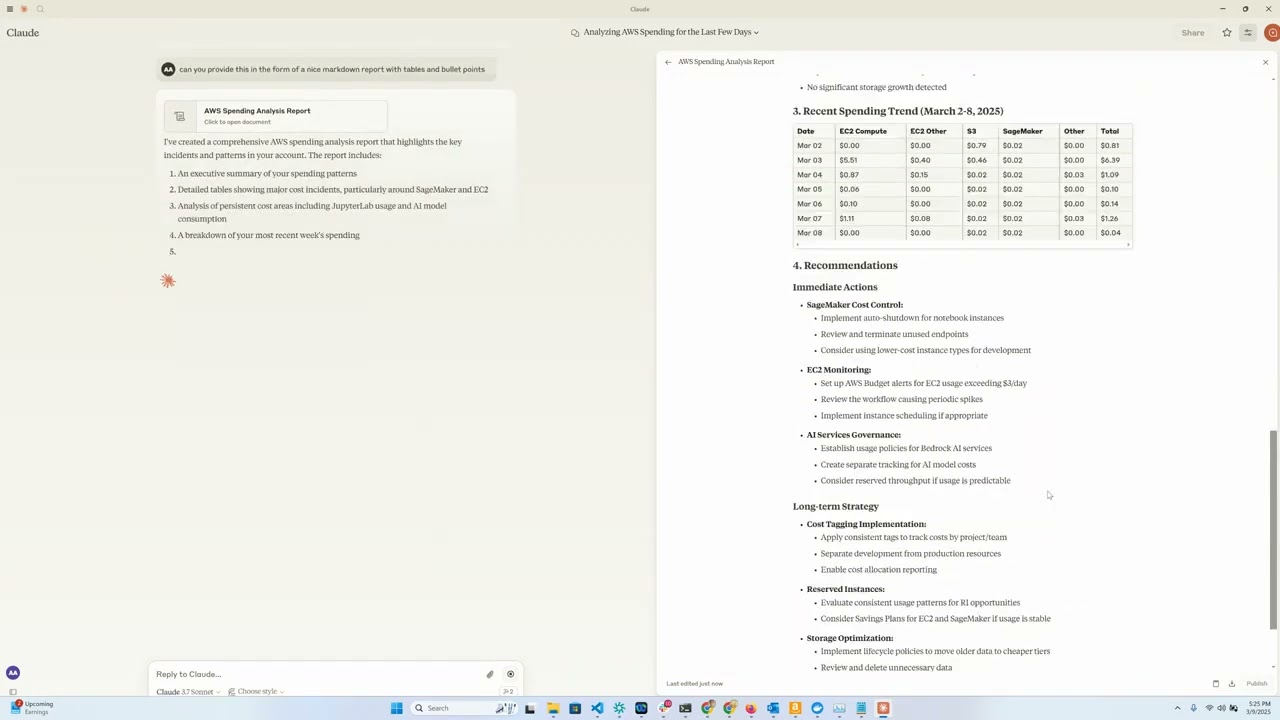
演示视频
概述
此工具使用 Anthropic 的 Claude 模型作为交互界面,提供了一种便捷的 AWS 云支出数据分析和可视化方法。它充当 MCP 服务器,将 AWS Cost Explorer API 功能公开给 Claude Desktop,让您能够使用自然语言咨询 AWS 支出相关问题。
Related MCP server: AWS FinOps MCP Server
特征
Amazon EC2 支出分析:查看过去一天 EC2 支出的详细明细
Amazon Bedrock 支出分析:查看过去 30 天内按地区、用户和型号细分的数据
服务支出报告:分析过去 30 天所有 AWS 服务的支出
详细成本明细:按天、区域、服务和实例类型获取详细成本数据
交互界面:使用 Claude 通过自然语言查询您的成本数据
要求
Python 3.12
具有 Cost Explorer 访问权限的 AWS 凭证
Anthropic API 访问(用于 Claude 集成)
[可选] Amazon Bedrock 访问权限(用于 LangGraph Agent)
[可选] 用于运行远程 MCP 服务器的 Amazon EC2
安装
安装
uv:# On macOS and Linux curl -LsSf https://astral.sh/uv/install.sh | sh# On Windows powershell -ExecutionPolicy ByPass -c "irm https://astral.sh/uv/install.ps1 | iex"其他安装选项请参见此处
克隆此存储库:(假设这将更新为指向 aws-samples?)
git clone https://github.com/aarora79/aws-cost-explorer-mcp.git cd aws-cost-explorer-mcp设置Python虚拟环境并安装依赖项:
uv venv --python 3.12 && source .venv/bin/activate && uv pip install --requirement pyproject.toml配置您的 AWS 凭证:
mkdir -p ~/.aws # Set up your credentials in ~/.aws/credentials and ~/.aws/config如果您使用 AWS IAM Identity Center,请按照文档配置您的短期凭证
用法
先决条件
在 Amazon CloudWatch 中设置模型调用日志。
确保所使用的 IAM 用户/角色拥有对 Amazon Cost Explorer 和 Amazon CloudWatch 的完全只读访问权限,这是 MCP 服务器从这些服务检索数据所必需的。请参阅此处和此处的示例策略示例,您可以根据需求使用和修改这些示例。
为了允许您的 MCP 服务器访问其他帐户的 AWS 支出信息,请在启动服务器时设置
CROSS_ACCOUNT_ROLE_NAME参数,现在您可以在与代理交互时为另一个帐户提供帐户 AWS 帐户 ID,然后代理将帐户 ID 传递给服务器。
本地设置
使用stdio作为 MCP 的传输,MCP 服务器和客户端都在您的本地机器上运行。
启动服务器(本地)
使用以下命令运行服务器:
export MCP_TRANSPORT=stdio
export BEDROCK_LOG_GROUP_NAME=YOUR_BEDROCK_CW_LOG_GROUP_NAME
export CROSS_ACCOUNT_ROLE_NAME=ROLE_NAME_FOR_THE_ROLE_TO_ASSUME_IN_OTHER_ACCOUNTS # can be ignored if you do not want AWS spend info from other accounts
python server.pyClaude桌面配置
有两种方法可以使用 Claude Desktop 配置此工具:
选项 1:使用 Docker
将以下内容添加到您的 Claude Desktop 配置文件中。该文件位于以下路径中,具体取决于您的操作系统。
macOS:~/Library/Application Support/Claude/claude_desktop_config.json。
Windows:%APPDATA%\Claude\claude_desktop_config.json。
Linux:~/.config/Claude/claude_desktop_config.json。
{
"mcpServers": {
"aws-cost-explorer": {
"command": "docker",
"args": [ "run", "-i", "--rm", "-e", "AWS_ACCESS_KEY_ID", "-e", "AWS_SECRET_ACCESS_KEY", "-e", "AWS_REGION", "-e", "BEDROCK_LOG_GROUP_NAME", "-e", "MCP_TRANSPORT", "-e", "CROSS_ACCOUNT_ROLE_NAME", "aws-cost-explorer-mcp:latest" ],
"env": {
"AWS_ACCESS_KEY_ID": "YOUR_ACCESS_KEY_ID",
"AWS_SECRET_ACCESS_KEY": "YOUR_SECRET_ACCESS_KEY",
"AWS_REGION": "us-east-1",
"BEDROCK_LOG_GROUP_NAME": "YOUR_CLOUDWATCH_BEDROCK_MODEL_INVOCATION_LOG_GROUP_NAME",
"CROSS_ACCOUNT_ROLE_NAME": "ROLE_NAME_FOR_THE_ROLE_TO_ASSUME_IN_OTHER_ACCOUNTS",
"MCP_TRANSPORT": "stdio"
}
}
}
}重要提示:请将
YOUR_ACCESS_KEY_ID和YOUR_SECRET_ACCESS_KEY替换为您的实际 AWS 凭证。切勿将实际凭证提交到版本控制中。
选项 2:使用 UV(不使用 Docker)
如果您希望不使用 Docker 直接运行服务器,则可以使用 UV:
{
"mcpServers": {
"aws_cost_explorer": {
"command": "uv",
"args": [
"--directory",
"/path/to/aws-cost-explorer-mcp-server",
"run",
"server.py"
],
"env": {
"AWS_ACCESS_KEY_ID": "YOUR_ACCESS_KEY_ID",
"AWS_SECRET_ACCESS_KEY": "YOUR_SECRET_ACCESS_KEY",
"AWS_REGION": "us-east-1",
"BEDROCK_LOG_GROUP_NAME": "YOUR_CLOUDWATCH_BEDROCK_MODEL_INVOCATION_LOG_GROUP_NAME",
"CROSS_ACCOUNT_ROLE_NAME": "ROLE_NAME_FOR_THE_ROLE_TO_ASSUME_IN_OTHER_ACCOUNTS",
"MCP_TRANSPORT": "stdio"
}
}
}
}确保将目录路径替换为系统上存储库的实际路径。
远程设置
使用sse作为 MCP 的传输协议,MCP 服务器位于 EC2 上,客户端则运行在您的本地计算机上。请注意,Claude Desktop 目前不支持远程 MCP 服务器(请参阅此GitHub 问题)。
启动服务器(远程)
您可以按照上述相同的步骤在 Amazon EC2 上启动远程 MCP 服务器。请确保将MCP_TRANSPORT设置为sse (服务器端事件),如下所示。请注意,MCP 使用 JSON-RPC 2.0 作为其传输格式,因此协议本身不包含授权和身份验证(请参阅此 GitHub 问题),请勿通过 MCP 发送或接收敏感数据。
使用以下命令运行服务器:
export MCP_TRANSPORT=sse
export BEDROCK_LOG_GROUP_NAME=YOUR_BEDROCK_CW_LOG_GROUP_NAME
export CROSS_ACCOUNT_ROLE_NAME=ROLE_NAME_FOR_THE_ROLE_TO_ASSUME_IN_OTHER_ACCOUNTS # can be ignored if you do not want AWS spend info from other accounts
python server.pyMCP 服务器将开始监听 TCP 端口 8000。
在与您的 EC2 实例关联的安全组中配置入口规则,以允许从您的本地计算机(运行 MCP 客户端/基于 LangGraph 的应用程序的位置)访问您的 EC2 实例的 TCP 端口 8000。
另请参阅有关运行“安全”远程 MCP 服务器的部分,即您的 MCP 客户端可以通过 HTTPS 连接的服务器。
使用 CLI MCP 客户端进行测试
您可以使用mcp_sse_client.py脚本测试您的远程 MCP 服务器。运行此脚本将打印 MCP 服务器中可用的工具列表以及get_bedrock_daily_usage_stats工具的输出。
# set the hostname for your MCP server
MCP_SERVER_HOSTNAME=YOUR_MCP_SERVER_EC2_HOSTNAME
# or localhost if your MCP server is running locally
# MCP_SERVER_HOSTNAME=localhost
AWS_ACCOUNT_ID=AWS_ACCOUNT_ID_TO_GET_INFO_ABOUT # if set to empty or if the --aws-account-id switch is not specified then it gets the info about the AWS account MCP server is running in
python mcp_sse_client.py --host $MCP_SERVER_HOSTNAME --aws-account-id $AWS_ACCOUNT_ID使用 Chainlit 应用程序进行测试
此代码库中的app.py文件提供了一个 Chainlit 应用(聊天机器人),它创建了一个 LangGraph 代理,该代理使用LangChain MCP Adapter将 MCP 服务器提供的工具导入到 LangGraph 代理中。然后,该代理可以使用 LLM 来回答用户问题,并根据需要使用可用的工具。因此,如果用户提出诸如“过去一周我的 Bedrock 使用情况如何? ”之类的问题,该代理将使用远程 MCP 服务器提供的工具来回答该问题。我们使用 Amazon Bedrock 提供的 Claude 3.5 Haiku 模型来支持该代理。
使用以下方式运行 Chainlit 应用程序:
chainlit run app.py --port 8080 浏览器窗口应该在localhost:8080上打开,您应该能够使用聊天机器人获取有关您的 AWS 支出的详细信息。
可用工具
服务器公开了 Claude 可以使用的以下工具:
get_ec2_spend_last_day():检索前一天的 EC2 支出数据get_detailed_breakdown_by_day(days=7):提供按区域、服务和实例类型划分的全面成本分析get_bedrock_daily_usage_stats(days=7, region='us-east-1', log_group_name='BedrockModelInvocationLogGroup'):提供按地区和用户划分的模型使用情况的每日明细。get_bedrock_hourly_usage_stats(days=7, region='us-east-1', log_group_name='BedrockModelInvocationLogGroup'):提供按地区和用户划分的模型使用情况的每日每小时细分。
示例查询
一旦通过支持 MCP 的界面连接到 Claude,您就可以提出以下问题:
“帮助我了解过去几周我的 Bedrock 支出情况”
“我昨天的 EC2 支出是多少?”
“按成本显示我上个月使用最多的 5 项 AWS 服务”
“按地区分析我过去 14 天的支出”
“哪些实例类型花费我最多的钱?”
“哪些服务的月度成本增幅最高?”
Docker 支持
包含一个用于容器化部署的 Dockerfile:
docker build -t aws-cost-explorer-mcp .
docker run -v ~/.aws:/root/.aws aws-cost-explorer-mcp发展
项目结构
server.py:使用 MCP 工具实现的主服务器pyproject.toml:项目依赖项和元数据Dockerfile:部署的容器定义
添加新的成本分析工具
扩展功能:
向
server.py添加新功能使用
@mcp.tool()注释它们实施 AWS Cost Explorer API 调用
格式化结果以便于阅读
安全的“远程” MCP 服务器
我们可以使用nginx作为反向代理,以便它能够提供用于连接到 MCP 服务器的 HTTPS 端点。远程 MCP 客户端可以通过 HTTPS 连接到nginx ,然后 nginx 可以将内部流量代理到http://localhost:8000 。以下步骤描述了如何操作。
在与您的 EC2 实例关联的安全组中的入站规则中,启用从 MCP 客户端(您的笔记本电脑或任何地方)的 IP 地址访问 TCP 端口 443。
您需要拥有 HTTPS 证书和私钥才能继续。假设您使用
your-mcp-server-domain-name.com作为 MCP 服务器的域名,那么您将需要为your-mcp-server-domain-name.com创建一个 SSL 证书,以便 MCP 客户端可以通过https://your-mcp-server-domain-name.com/sse访问它。虽然您可以使用自签名证书,但这需要在 MCP 客户端上禁用 SSL 验证,我们不建议您这样做。如果您将 MCP 服务器托管在 EC2 上,那么您可以使用no-ip 、 Let' Encrypt或其他类似服务生成 SSL 证书。将 SSL 证书和私钥文件分别放在 EC2 计算机上的/etc/ssl/certs和/etc/ssl/privatekey文件夹中。使用以下命令在您的 EC2 机器上安装
nginx。sudo apt-get install nginx sudo nginx -t sudo systemctl reload nginx获取您的 EC2 实例的主机名,这对于配置
nginx反向代理是必需的。TOKEN=$(curl -X PUT "http://169.254.169.254/latest/api/token" -H "X-aws-ec2-metadata-token-ttl-seconds: 21600") && curl -H "X-aws-ec2-metadata-token: $TOKEN" -s http://169.254.169.254/latest/meta-data/public-hostname将以下内容复制到新文件
/etc/nginx/conf.d/ec2.conf中。将YOUR_EC2_HOSTNAME、/etc/ssl/certs/cert.pem和/etc/ssl/privatekey/privkey.pem替换为适合您设置的值。server { listen 80; server_name YOUR_EC2_HOSTNAME; # Optional: Redirect HTTP to HTTPS return 301 https://$host$request_uri; } server { listen 443 ssl; server_name YOUR_EC2_HOSTNAME; # Self-signed certificate paths ssl_certificate /etc/ssl/certs/cert.pem; ssl_certificate_key /etc/ssl/privatekey/privkey.pem; # Optional: Good practice ssl_protocols TLSv1.2 TLSv1.3; ssl_ciphers HIGH:!aNULL:!MD5; location / { # Reverse proxy to your local app (e.g., port 8000) proxy_pass http://127.0.0.1:8000; proxy_http_version 1.1; proxy_set_header Host $host; proxy_set_header X-Real-IP $remote_addr; proxy_set_header X-Forwarded-For $proxy_add_x_forwarded_for; } }重新启动
nginx。sudo systemctl start nginx按照远程设置部分所述,照常启动您的 MCP 服务器。
您的 MCP 服务器现在可以通过 HTTPS 访问,地址为
https://your-mcp-server-domain-name.com/sse,供您的 MCP 客户端使用。现在在客户端(比如在您的笔记本电脑或代理中)配置您的 MCP 客户端以便与您的 MCP 服务器进行通信,如下所示。
MCP_SERVER_HOSTNAME=YOUR_MCP_SERVER_DOMAIN_NAME AWS_ACCOUNT_ID=AWS_ACCOUNT_ID_TO_GET_INFO_ABOUT # if set to empty or if the --aws-account-id switch is not specified then it gets the info about the AWS account MCP server is running in python mcp_sse_client.py --host $MCP_SERVER_HOSTNAME --port 443 --aws-account-id $AWS_ACCOUNT_ID类似地,您可以运行 chainlit 应用程序通过 HTTPS 与远程 MCP 服务器通信。
export MCP_SERVER_URL=YOUR_MCP_SERVER_DOMAIN_NAME export MCP_SERVER_PORT=443 chainlit run app.py --port 8080类似地,您可以运行 LangGraph Agent 通过 HTTPS 与远程 MCP 服务器通信。
python langgraph_agent_mcp_sse_client.py --host $MCP_SERVER_HOSTNAME --port 443 --aws-account-id $AWS_ACCOUNT_ID
执照
致谢
Available Tools
4 toolsget_bedrock_daily_usage_statsC
Get daily usage statistics with detailed breakdowns.
Args:
params: Parameters specifying the number of days to look back and region
Returns:
str: Formatted string representation of daily usage statistics
| Name | Required | Description | Default |
|---|---|---|---|
| params | Yes |
TDQS
Does the description disclose side effects, auth requirements, rate limits, or destructive behavior?
No annotations are provided, so the description carries full burden. It mentions 'detailed breakdowns' and that it returns a 'formatted string representation,' but doesn't disclose important behavioral traits like whether this is a read-only operation, requires specific AWS permissions, has rate limits, or what format the string output takes. For a tool with no annotation coverage, this leaves significant gaps in understanding how it behaves.
Agents need to know what a tool does to the world before calling it. Descriptions should go beyond structured annotations to explain consequences.
Is the description appropriately sized, front-loaded, and free of redundancy?
The description is appropriately concise with three sentences that are front-loaded: the first states the purpose, followed by Args and Returns sections. There's minimal waste, though the parameter explanation could be more informative. The structure is clear but could better integrate parameter details into the flow.
Shorter descriptions cost fewer tokens and are easier for agents to parse. Every sentence should earn its place.
Given the tool's complexity, does the description cover enough for an agent to succeed on first attempt?
Given the complexity (4 nested parameters, no annotations, no output schema), the description is incomplete. It doesn't adequately explain the parameters, behavioral aspects, or output format. For a tool that likely interacts with AWS Bedrock and returns usage statistics, more context on permissions, data scope, and result interpretation is needed to be fully helpful.
Complex tools with many parameters or behaviors need more documentation. Simple tools need less. This dimension scales expectations accordingly.
Does the description clarify parameter syntax, constraints, interactions, or defaults beyond what the schema provides?
The schema description coverage is 0%, meaning parameters are undocumented in the schema. The description only vaguely mentions 'Parameters specifying the number of days to look back and region,' but doesn't explain the actual parameters (days, region, log_group_name, aws_account_id) or their purposes. It fails to compensate for the schema's lack of descriptions, leaving most parameters semantically unclear.
Input schemas describe structure but not intent. Descriptions should explain non-obvious parameter relationships and valid value ranges.
Does the description clearly state what the tool does and how it differs from similar tools?
The description clearly states the tool's purpose: 'Get daily usage statistics with detailed breakdowns.' It specifies the verb ('Get') and resource ('daily usage statistics'), and distinguishes from the hourly sibling tool by emphasizing 'daily' usage. However, it doesn't explicitly differentiate from 'get_detailed_breakdown_by_day' which might provide similar functionality.
Agents choose between tools based on descriptions. A clear purpose with a specific verb and resource helps agents select the right tool.
Does the description explain when to use this tool, when not to, or what alternatives exist?
The description provides no guidance on when to use this tool versus alternatives. It doesn't mention the sibling tools (get_bedrock_hourly_usage_stats, get_detailed_breakdown_by_day, get_ec2_spend_last_day) or explain when daily statistics are preferred over hourly ones or other breakdowns. The only implied context is the need for 'daily' statistics, but no explicit usage rules are provided.
Agents often have multiple tools that could apply. Explicit usage guidance like "use X instead of Y when Z" prevents misuse.
get_bedrock_hourly_usage_statsC
Get hourly usage statistics with detailed breakdowns.
Args:
params: Parameters specifying the number of days to look back and region
Returns:
str: Formatted string representation of hourly usage statistics
| Name | Required | Description | Default |
|---|---|---|---|
| params | Yes |
TDQS
Does the description disclose side effects, auth requirements, rate limits, or destructive behavior?
No annotations are provided, so the description carries full burden. While it mentions the tool returns 'Formatted string representation of hourly usage statistics,' it doesn't disclose important behavioral traits like whether this is a read-only operation, authentication requirements, rate limits, data freshness, or what happens if parameters are invalid. The description is minimal and lacks operational context.
Agents need to know what a tool does to the world before calling it. Descriptions should go beyond structured annotations to explain consequences.
Is the description appropriately sized, front-loaded, and free of redundancy?
The description is brief (4 sentences) and front-loaded with the core purpose. However, the 'Args' and 'Returns' sections are redundant since they don't add value beyond the tool name and basic function. The structure is clear but includes unnecessary boilerplate that doesn't enhance understanding.
Shorter descriptions cost fewer tokens and are easier for agents to parse. Every sentence should earn its place.
Given the tool's complexity, does the description cover enough for an agent to succeed on first attempt?
Given the complexity (4 parameters with 0% schema coverage, no annotations, no output schema), the description is inadequate. It doesn't explain what 'hourly usage statistics' includes, how data is aggregated, what format the returned string uses, or provide context about the Bedrock service. For a tool with multiple parameters and no structured documentation, the description should do much more to compensate.
Complex tools with many parameters or behaviors need more documentation. Simple tools need less. This dimension scales expectations accordingly.
Does the description clarify parameter syntax, constraints, interactions, or defaults beyond what the schema provides?
The description states 'Parameters specifying the number of days to look back and region,' but the actual input schema shows 4 parameters (days, region, log_group_name, aws_account_id) with 0% schema description coverage. The description fails to mention two parameters entirely (log_group_name and aws_account_id) and provides no meaningful semantic context beyond what's minimally implied by parameter names.
Input schemas describe structure but not intent. Descriptions should explain non-obvious parameter relationships and valid value ranges.
Does the description clearly state what the tool does and how it differs from similar tools?
The description clearly states the tool's purpose: 'Get hourly usage statistics with detailed breakdowns.' It specifies the verb ('Get'), resource ('hourly usage statistics'), and scope ('detailed breakdowns'). However, it doesn't explicitly differentiate from sibling tools like 'get_bedrock_daily_usage_stats' or 'get_detailed_breakdown_by_day'.
Agents choose between tools based on descriptions. A clear purpose with a specific verb and resource helps agents select the right tool.
Does the description explain when to use this tool, when not to, or what alternatives exist?
No guidance is provided on when to use this tool versus alternatives. The description doesn't mention sibling tools, specify use cases, or provide any context about when this hourly breakdown is preferred over daily statistics or other available tools.
Agents often have multiple tools that could apply. Explicit usage guidance like "use X instead of Y when Z" prevents misuse.
get_detailed_breakdown_by_dayC
Retrieve daily spend breakdown by region, service, and instance type.
Args:
params: Parameters specifying the number of days to look back
Returns:
Dict[str, Any]: A tuple containing:
- A nested dictionary with cost data organized by date, region, and service
- A string containing the formatted output report
or (None, error_message) if an error occurs.
| Name | Required | Description | Default |
|---|---|---|---|
| params | Yes |
TDQS
Does the description disclose side effects, auth requirements, rate limits, or destructive behavior?
With no annotations provided, the description carries full burden. It mentions the tool retrieves cost data and returns a nested dictionary or error, but lacks critical behavioral details: authentication requirements, rate limits, whether it's read-only/destructive, or how errors manifest. This is inadequate for a tool with potential complexity.
Agents need to know what a tool does to the world before calling it. Descriptions should go beyond structured annotations to explain consequences.
Is the description appropriately sized, front-loaded, and free of redundancy?
The description is reasonably concise with three sections (purpose, args, returns) and no wasted sentences. However, the return value explanation is somewhat verbose and could be streamlined for better front-loading of key information.
Shorter descriptions cost fewer tokens and are easier for agents to parse. Every sentence should earn its place.
Given the tool's complexity, does the description cover enough for an agent to succeed on first attempt?
Given no annotations, 0% schema coverage, no output schema, and sibling tools with similar names, the description is incomplete. It doesn't explain the tool's scope (e.g., EC2-specific vs. general AWS costs), error handling details, or how results differ from siblings, leaving significant gaps for agent understanding.
Complex tools with many parameters or behaviors need more documentation. Simple tools need less. This dimension scales expectations accordingly.
Does the description clarify parameter syntax, constraints, interactions, or defaults beyond what the schema provides?
Schema description coverage is 0%, so the description must compensate. It mentions 'Parameters specifying the number of days to look back', which partially explains the 'params' object but omits details about 'region' and 'aws_account_id' sub-parameters. This adds some value but doesn't fully bridge the coverage gap.
Input schemas describe structure but not intent. Descriptions should explain non-obvious parameter relationships and valid value ranges.
Does the description clearly state what the tool does and how it differs from similar tools?
The description clearly states the verb ('Retrieve') and resource ('daily spend breakdown') with specific dimensions (region, service, instance type). However, it doesn't explicitly differentiate from sibling tools like 'get_ec2_spend_last_day' which might overlap in purpose, preventing a perfect score.
Agents choose between tools based on descriptions. A clear purpose with a specific verb and resource helps agents select the right tool.
Does the description explain when to use this tool, when not to, or what alternatives exist?
The description provides no guidance on when to use this tool versus alternatives like 'get_ec2_spend_last_day' or 'get_bedrock_daily_usage_stats'. There's no mention of prerequisites, context, or exclusions, leaving the agent to guess based on tool names alone.
Agents often have multiple tools that could apply. Explicit usage guidance like "use X instead of Y when Z" prevents misuse.
get_ec2_spend_last_dayC
Retrieve EC2 spend for the last day using standard AWS Cost Explorer API.
Returns:
Dict[str, Any]: The raw response from the AWS Cost Explorer API, or None if an error occurs.
| Name | Required | Description | Default |
|---|---|---|---|
| params | Yes |
TDQS
Does the description disclose side effects, auth requirements, rate limits, or destructive behavior?
With no annotations, the description carries the full burden of behavioral disclosure. It mentions the API used and error handling (returns None on error), but lacks details on permissions, rate limits, cost implications, or what 'last day' means precisely (e.g., UTC day, rolling 24h). This is inadequate for a tool that likely requires AWS credentials and has financial implications.
Agents need to know what a tool does to the world before calling it. Descriptions should go beyond structured annotations to explain consequences.
Is the description appropriately sized, front-loaded, and free of redundancy?
The description is front-loaded with the core purpose in the first sentence, followed by a concise return value note. It's appropriately sized with no wasted words, though the return type detail could be more integrated.
Shorter descriptions cost fewer tokens and are easier for agents to parse. Every sentence should earn its place.
Given the tool's complexity, does the description cover enough for an agent to succeed on first attempt?
Given no annotations, no output schema, and 0% schema description coverage, the description is incomplete. It covers the basic purpose and error handling but misses critical context like authentication needs, cost behavior, and sibling tool differentiation, making it only minimally viable for this AWS cost tool.
Complex tools with many parameters or behaviors need more documentation. Simple tools need less. This dimension scales expectations accordingly.
Does the description clarify parameter syntax, constraints, interactions, or defaults beyond what the schema provides?
Schema description coverage is 0%, so the description must compensate, but it provides no parameter information. The baseline is 3 because the schema fully documents the single 'params' object with its nested fields (days, region, aws_account_id), including defaults and constraints, making the description's lack of param details less critical.
Input schemas describe structure but not intent. Descriptions should explain non-obvious parameter relationships and valid value ranges.
Does the description clearly state what the tool does and how it differs from similar tools?
The description clearly states the verb 'Retrieve' and resource 'EC2 spend for the last day', specifying the AWS Cost Explorer API as the method. It distinguishes from siblings by focusing on EC2 spend rather than Bedrock usage or detailed breakdowns, though it doesn't explicitly contrast them.
Agents choose between tools based on descriptions. A clear purpose with a specific verb and resource helps agents select the right tool.
Does the description explain when to use this tool, when not to, or what alternatives exist?
No guidance on when to use this tool versus alternatives is provided. The description doesn't mention sibling tools or suggest scenarios for choosing this tool over others, leaving the agent without usage context.
Agents often have multiple tools that could apply. Explicit usage guidance like "use X instead of Y when Z" prevents misuse.
Tool Schema Changelog
Recent tool additions, removals, and schema changes observed during successful MCP inspections.
4 tool updates
- First observed
get_bedrock_daily_usage_stats - First observed
get_bedrock_hourly_usage_stats - First observed
get_detailed_breakdown_by_day - First observed
get_ec2_spend_last_day
TDQS
Scored across 4 tools
The tools have some overlap in purpose, particularly between the two Bedrock usage tools and the daily breakdown tool, which all involve daily cost/usage data. However, the descriptions clarify distinctions: get_bedrock_daily_usage_stats and get_bedrock_hourly_usage_stats focus on Bedrock service usage (daily vs. hourly), while get_detailed_breakdown_by_day covers broader cost breakdowns across services. The EC2 tool is distinct but limited to a single day.
The naming follows a consistent verb_noun pattern (get_*_*) throughout, with clear action-object structure. Minor deviations exist, such as get_detailed_breakdown_by_day using 'by_day' instead of a noun like 'daily_breakdown', but overall the pattern is predictable and readable.
With only 4 tools, the server feels under-scoped for an 'AWS Cost Explorer' purpose, which typically involves querying costs across multiple services, time ranges, and dimensions. The tools are narrowly focused on Bedrock and EC2, lacking coverage for other AWS services or flexible time-range queries, making the set feel incomplete for general cost exploration.
There are significant gaps in the tool surface for cost exploration. The server lacks tools for querying costs by service, region, or account over custom time periods, and it misses core operations like filtering, grouping, or forecasting. The tools are limited to specific services (Bedrock, EC2) and fixed time frames, which will cause agent failures when broader cost analysis is needed.
Maintenance
Related MCP Connectors
AWS Cost Explorer cost, forecast, and anomaly reporting through user-connected IAM credentials.
FinOps agent MCP: allocated AWS, GCP, Azure, Kubernetes, SaaS & AI cost for Claude or any agent
Ask about AWS, Azure, GCP, OpenAI, Anthropic and Snowflake costs, budgets, and anomalies.
Query cloud, AI and SaaS spend across 25+ providers: costs, budgets, anomalies, unit economics.
Related MCP Servers
- FlicenseNot gradedqualityDmaintenanceEnables users to analyze AWS costs, track spending trends, and detect anomalies directly within Claude Desktop using the AWS Cost Explorer API. It provides tools to identify major cost drivers and compare usage across different time periods through natural language queries.-
- AlicenseNot gradedqualityCmaintenanceEnables natural language analysis of AWS costs, automated FinOps waste audits, and budget monitoring across multiple profiles and regions while keeping credentials secure locally.183MIT
- AlicenseAqualityCmaintenanceEnables analyzing AWS cloud costs through natural language queries, providing cost summaries, anomaly detection, idle resource identification, rightsizing recommendations, and tagging compliance via Claude.1022 npmMIT
- AlicenseCqualityDmaintenanceEnables analyzing AWS cloud spending and Bedrock usage through natural language queries using Claude.414MIT No Attribution
