AWS Cost Explorer MCP Server
AWS Cost Explorer 및 Amazon Bedrock 모델 호출 로그 MCP 서버 및 클라이언트
Anthropic의 MCP(모델 제어 프로토콜)를 통해 Cost Explorer를 통해 AWS 지출 데이터를 가져오고, Amazon Cloud Watch의 Model invocation logs 통해 Amazon Bedrock 사용 데이터를 가져오는 MCP 서버입니다. HTTPS를 통해 MCP 서버를 실행하는 방법은 "보안" 원격 MCP 서버 섹션을 참조하십시오.
지엑스피1
MCP 서버를 로컬에서 실행하고 Claude Desktop을 통해 액세스할 수 있습니다. 또는 Amazon EC2에서 원격 MCP 서버를 실행하고 LangGraph Agent에 내장된 MCP 클라이언트를 통해 액세스할 수도 있습니다.
🚨MCP 서버에서 사용하는 IAM 역할이 다른 계정에서 역할을 수행할 수 있는 한, 이 MCP 서버를 사용하여 다른 계정에서 AWS 지출 정보를 가져올 수도 있습니다.🚨
데모 비디오
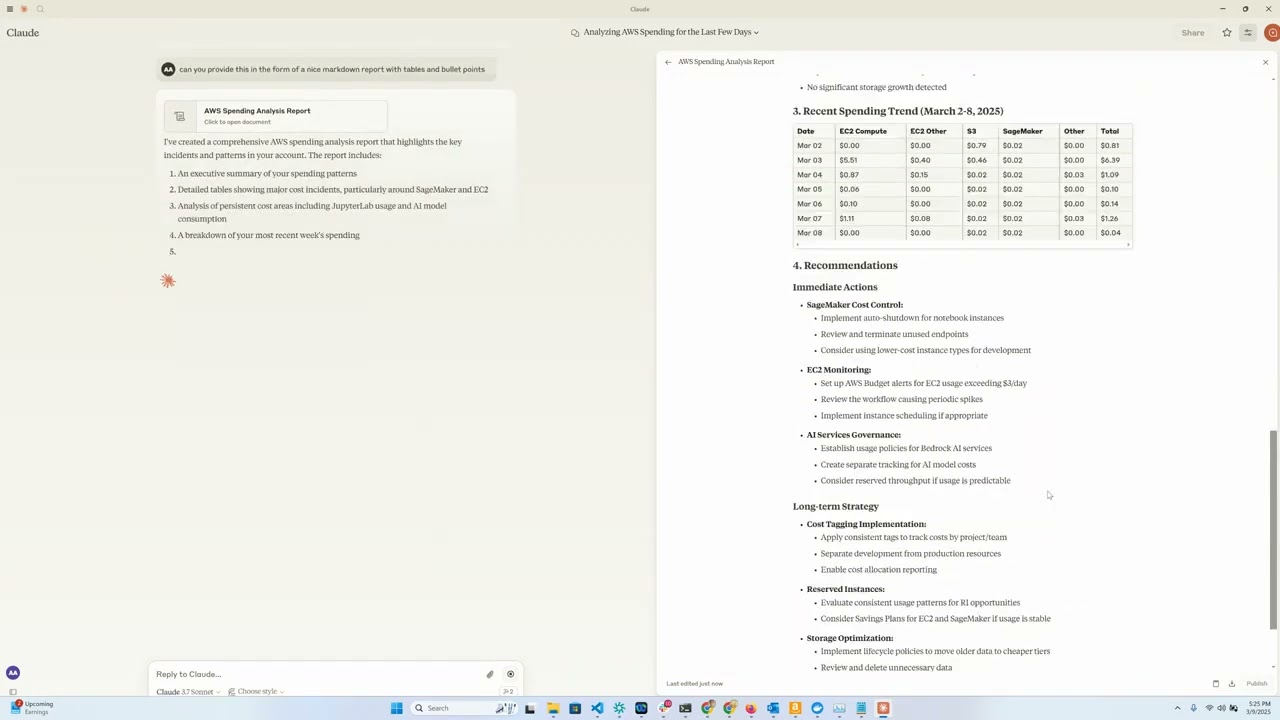
개요
이 도구는 Anthropic의 Claude 모델을 대화형 인터페이스로 사용하여 AWS 클라우드 지출 데이터를 편리하게 분석하고 시각화할 수 있는 방법을 제공합니다. AWS Cost Explorer API 기능을 Claude Desktop에 제공하는 MCP 서버 역할을 하며, 이를 통해 AWS 지출에 대한 질문을 자연어로 작성할 수 있습니다.
Related MCP server: AWS FinOps MCP Server
특징
Amazon EC2 지출 분석 : 지난 하루 동안의 EC2 지출에 대한 자세한 분석을 확인하세요.
Amazon Bedrock 지출 분석 : 지난 30일 동안 지역, 사용자 및 모델별 세부 내역 보기
서비스 지출 보고서 : 지난 30일 동안 모든 AWS 서비스의 지출을 분석합니다.
자세한 비용 분석 : 일, 지역, 서비스 및 인스턴스 유형별로 세부적인 비용 데이터를 가져옵니다.
대화형 인터페이스 : Claude를 사용하여 자연어로 비용 데이터를 쿼리합니다.
요구 사항
파이썬 3.12
Cost Explorer 액세스 권한이 있는 AWS 자격 증명
Anthropic API 액세스(Claude 통합용)
[선택 사항] Amazon Bedrock 액세스(LangGraph Agent용)
[선택 사항] 원격 MCP 서버를 실행하기 위한 Amazon EC2
설치
uv설치 :# On macOS and Linux curl -LsSf https://astral.sh/uv/install.sh | sh# On Windows powershell -ExecutionPolicy ByPass -c "irm https://astral.sh/uv/install.ps1 | iex"추가 설치 옵션은 여기에 문서화되어 있습니다.
이 저장소를 복제합니다. (aws-samples를 가리키도록 업데이트된다고 가정하고요?)
git clone https://github.com/aarora79/aws-cost-explorer-mcp.git cd aws-cost-explorer-mcpPython 가상 환경을 설정하고 종속성을 설치합니다.
uv venv --python 3.12 && source .venv/bin/activate && uv pip install --requirement pyproject.tomlAWS 자격 증명을 구성하세요.
mkdir -p ~/.aws # Set up your credentials in ~/.aws/credentials and ~/.aws/configAWS IAM Identity Center를 사용하는 경우 문서 에 따라 단기 자격 증명을 구성하세요.
용법
필수 조건
Amazon CloudWatch에서 모델 호출 로그를 설정합니다.
사용 중인 IAM 사용자/역할에 Amazon Cost Explorer 및 Amazon CloudWatch에 대한 전체 읽기 전용 권한이 있는지 확인하세요. 이는 MCP 서버가 해당 서비스에서 데이터를 검색하는 데 필수적입니다. 요구 사항에 따라 사용 및 수정할 수 있는 정책 샘플은 여기 와 여기를 참조하세요.
MCP 서버가 다른 계정의 AWS 지출 정보에 액세스할 수 있도록 하려면 서버를 시작하는 동안
CROSS_ACCOUNT_ROLE_NAME매개변수를 설정합니다. 그러면 에이전트와 상호 작용하는 동안 다른 계정에 대한 AWS 계정 ID를 제공할 수 있으며, 에이전트는 해당 계정 ID를 서버에 전달합니다.
로컬 설정
MCP의 전송 수단으로 stdio 사용합니다. MCP 서버와 클라이언트는 모두 로컬 머신에서 실행됩니다.
서버 시작(로컬)
다음을 사용하여 서버를 실행합니다.
export MCP_TRANSPORT=stdio
export BEDROCK_LOG_GROUP_NAME=YOUR_BEDROCK_CW_LOG_GROUP_NAME
export CROSS_ACCOUNT_ROLE_NAME=ROLE_NAME_FOR_THE_ROLE_TO_ASSUME_IN_OTHER_ACCOUNTS # can be ignored if you do not want AWS spend info from other accounts
python server.py클로드 데스크톱 구성
Claude Desktop으로 이 도구를 구성하는 방법은 두 가지가 있습니다.
옵션 1: Docker 사용
Claude Desktop 설정 파일에 다음을 추가하세요. 운영 체제에 따라 다음 경로에서 파일을 찾을 수 있습니다.
macOS: ~/라이브러리/애플리케이션 지원/클로드/클로드_데스크탑_config.json.
윈도우: %APPDATA%\Claude\claude_desktop_config.json.
리눅스: ~/.config/Claude/claude_desktop_config.json.
{
"mcpServers": {
"aws-cost-explorer": {
"command": "docker",
"args": [ "run", "-i", "--rm", "-e", "AWS_ACCESS_KEY_ID", "-e", "AWS_SECRET_ACCESS_KEY", "-e", "AWS_REGION", "-e", "BEDROCK_LOG_GROUP_NAME", "-e", "MCP_TRANSPORT", "-e", "CROSS_ACCOUNT_ROLE_NAME", "aws-cost-explorer-mcp:latest" ],
"env": {
"AWS_ACCESS_KEY_ID": "YOUR_ACCESS_KEY_ID",
"AWS_SECRET_ACCESS_KEY": "YOUR_SECRET_ACCESS_KEY",
"AWS_REGION": "us-east-1",
"BEDROCK_LOG_GROUP_NAME": "YOUR_CLOUDWATCH_BEDROCK_MODEL_INVOCATION_LOG_GROUP_NAME",
"CROSS_ACCOUNT_ROLE_NAME": "ROLE_NAME_FOR_THE_ROLE_TO_ASSUME_IN_OTHER_ACCOUNTS",
"MCP_TRANSPORT": "stdio"
}
}
}
}중요 :
YOUR_ACCESS_KEY_ID와YOUR_SECRET_ACCESS_KEY실제 AWS 자격 증명으로 바꾸세요. 실제 자격 증명을 버전 관리 시스템에 커밋하지 마세요.
옵션 2: UV 사용(Docker 없이)
Docker 없이 서버를 직접 실행하려면 UV를 사용할 수 있습니다.
{
"mcpServers": {
"aws_cost_explorer": {
"command": "uv",
"args": [
"--directory",
"/path/to/aws-cost-explorer-mcp-server",
"run",
"server.py"
],
"env": {
"AWS_ACCESS_KEY_ID": "YOUR_ACCESS_KEY_ID",
"AWS_SECRET_ACCESS_KEY": "YOUR_SECRET_ACCESS_KEY",
"AWS_REGION": "us-east-1",
"BEDROCK_LOG_GROUP_NAME": "YOUR_CLOUDWATCH_BEDROCK_MODEL_INVOCATION_LOG_GROUP_NAME",
"CROSS_ACCOUNT_ROLE_NAME": "ROLE_NAME_FOR_THE_ROLE_TO_ASSUME_IN_OTHER_ACCOUNTS",
"MCP_TRANSPORT": "stdio"
}
}
}
}디렉토리 경로를 시스템의 저장소에 대한 실제 경로로 바꿔야 합니다.
원격 설정
MCP의 전송 수단으로 sse 사용하며, EC2의 MCP 서버와 클라이언트는 로컬 머신에서 실행됩니다. Claude Desktop은 현재 원격 MCP 서버를 지원하지 않습니다(GitHub 이슈 참조 ).
서버 시작(원격)
위와 동일한 지침에 따라 Amazon EC2에서 원격 MCP 서버를 시작할 수 있습니다. 아래와 같이 MCP_TRANSPORT sse (서버 측 이벤트)로 설정해야 합니다. MCP는 JSON-RPC 2.0을 와이어 형식으로 사용하므로 프로토콜 자체에는 권한 부여 및 인증 기능이 포함되어 있지 않습니다( GitHub 이슈 참조). MCP를 통해 민감한 데이터를 주고받지 마십시오 .
다음을 사용하여 서버를 실행합니다.
export MCP_TRANSPORT=sse
export BEDROCK_LOG_GROUP_NAME=YOUR_BEDROCK_CW_LOG_GROUP_NAME
export CROSS_ACCOUNT_ROLE_NAME=ROLE_NAME_FOR_THE_ROLE_TO_ASSUME_IN_OTHER_ACCOUNTS # can be ignored if you do not want AWS spend info from other accounts
python server.pyMCP 서버는 TCP 포트 8000에서 수신을 시작합니다.
로컬 머신(MCP 클라이언트/LangGraph 기반 앱을 실행 중인 곳)에서 EC2 인스턴스로의 TCP 포트 8000에 대한 액세스를 허용하도록 EC2 인스턴스와 연결된 보안 그룹에서 수신 규칙을 구성합니다.
또한 "보안" 원격 MCP 서버 (즉, MCP 클라이언트가 HTTPS를 통해 연결할 수 있는 서버)를 실행하는 방법에 대한 섹션도 참조하세요.
CLI MCP 클라이언트로 테스트
mcp_sse_client.py 스크립트를 사용하여 원격 MCP 서버를 테스트할 수 있습니다. 이 스크립트를 실행하면 MCP 서버에서 사용 가능한 도구 목록과 get_bedrock_daily_usage_stats 도구의 출력이 출력됩니다.
# set the hostname for your MCP server
MCP_SERVER_HOSTNAME=YOUR_MCP_SERVER_EC2_HOSTNAME
# or localhost if your MCP server is running locally
# MCP_SERVER_HOSTNAME=localhost
AWS_ACCOUNT_ID=AWS_ACCOUNT_ID_TO_GET_INFO_ABOUT # if set to empty or if the --aws-account-id switch is not specified then it gets the info about the AWS account MCP server is running in
python mcp_sse_client.py --host $MCP_SERVER_HOSTNAME --aws-account-id $AWS_ACCOUNT_IDChainlit 앱으로 테스트
이 저장소의 app.py 파일은 LangChain MCP Adapter 사용하여 MCP 서버에서 제공하는 도구를 LangGraph 에이전트의 도구로 가져오는 LangGraph 에이전트를 생성하는 Chainlit 앱(챗봇)을 제공합니다. 에이전트는 LLM을 사용하여 사용자 질문에 답변하고 필요에 따라 사용 가능한 도구를 사용할 수 있습니다. 사용자가 " 지난 일주일 동안 내 Bedrock 사용량은 어땠나요? "와 같은 질문을 하면 에이전트는 원격 MCP 서버를 통해 사용 가능한 도구를 사용하여 해당 질문에 답변합니다. 이 에이전트는 Amazon Bedrock에서 제공하는 Claude 3.5 Haiku 모델을 사용합니다.
다음을 사용하여 Chainlit 앱을 실행합니다.
chainlit run app.py --port 8080 localhost:8080 에서 브라우저 창이 열리고 챗봇을 사용하여 AWS 지출에 대한 세부 정보를 얻을 수 있습니다.
사용 가능한 도구
서버는 Claude가 사용할 수 있는 다음 도구를 제공합니다.
get_ec2_spend_last_day(): 전날의 EC2 지출 데이터를 검색합니다.get_detailed_breakdown_by_day(days=7): 지역, 서비스 및 인스턴스 유형별 비용에 대한 포괄적인 분석을 제공합니다.get_bedrock_daily_usage_stats(days=7, region='us-east-1', log_group_name='BedrockModelInvocationLogGroup'): 지역 및 사용자별 모델 사용에 대한 일별 세부 정보를 제공합니다.get_bedrock_hourly_usage_stats(days=7, region='us-east-1', log_group_name='BedrockModelInvocationLogGroup'): 지역 및 사용자별 모델 사용에 대한 일별, 시간별 세부 정보를 제공합니다.
예제 쿼리
MCP 지원 인터페이스를 통해 Claude에 연결하면 다음과 같은 질문을 할 수 있습니다.
"지난 몇 주 동안의 Bedrock 지출을 이해하도록 도와주세요"
"어제 내 EC2 지출은 얼마였나요?"
"지난 달 비용별 상위 5개 AWS 서비스를 보여주세요"
"지난 14일 동안 지역별 지출을 분석해 보세요"
"어떤 인스턴스 유형이 가장 비용이 많이 드나요?"
"어떤 서비스의 비용이 전월 대비 가장 크게 증가했습니까?"
도커 지원
컨테이너화된 배포를 위해 Dockerfile이 포함되어 있습니다.
docker build -t aws-cost-explorer-mcp .
docker run -v ~/.aws:/root/.aws aws-cost-explorer-mcp개발
프로젝트 구조
server.py: MCP 도구를 사용한 메인 서버 구현pyproject.toml: 프로젝트 종속성 및 메타데이터Dockerfile: 배포를 위한 컨테이너 정의
새로운 비용 분석 도구 추가
기능을 확장하려면:
server.py에 새로운 기능 추가@mcp.tool()로 주석을 달아주세요.AWS Cost Explorer API 호출 구현
읽기 쉬운 형식으로 결과를 포맷하세요
보안 "원격" MCP 서버
nginx 역방향 프록시로 사용하여 MCP 서버 연결에 HTTPS 엔드포인트를 제공할 수 있습니다. 원격 MCP 클라이언트는 HTTPS를 통해 nginx 에 연결할 수 있으며, nginx는 내부적으로 http://localhost:8000 으로 트래픽을 프록시할 수 있습니다. 다음 단계에서는 이 작업을 수행하는 방법을 설명합니다.
EC2 인스턴스와 연결된 보안 그룹의 인바운드 규칙에서 MCP 클라이언트(노트북이나 다른 곳)의 IP 주소에서 TCP 포트 443에 대한 액세스를 활성화합니다.
계속하려면 HTTPS 인증서와 개인 키가 필요합니다. 예를 들어
your-mcp-server-domain-name.comMCP 서버의 도메인으로 사용하는 경우your-mcp-server-domain-name.com에 대한 SSL 인증서가 필요하며, MCP 클라이언트는https://your-mcp-server-domain-name.com/sse로 해당 도메인에 액세스할 수 있습니다. 자체 서명된 인증서를 사용할 수도 있지만, MCP 클라이언트에서 SSL 검증을 비활성화해야 하므로 권장하지 않습니다 . EC2에서 MCP 서버를 호스팅하는 경우 no-ip , Let'Encrypt 또는 이와 유사한 서비스를 사용하여 SSL 인증서를 생성할 수 있습니다. SSL 인증서 파일과 개인 키 파일을 EC2 머신의/etc/ssl/certs및/etc/ssl/privatekey폴더에 각각 저장하세요.다음 명령을 사용하여 EC2 머신에
nginx설치합니다.sudo apt-get install nginx sudo nginx -t sudo systemctl reload nginxEC2 인스턴스의 호스트 이름을 가져옵니다. 이는
nginx역방향 프록시를 구성하는 데 필요합니다.TOKEN=$(curl -X PUT "http://169.254.169.254/latest/api/token" -H "X-aws-ec2-metadata-token-ttl-seconds: 21600") && curl -H "X-aws-ec2-metadata-token: $TOKEN" -s http://169.254.169.254/latest/meta-data/public-hostname다음 내용을 새 파일
/etc/nginx/conf.d/ec2.conf에 복사합니다.YOUR_EC2_HOSTNAME,/etc/ssl/certs/cert.pem,/etc/ssl/privatekey/privkey.pem설정에 맞는 값으로 바꾸세요.server { listen 80; server_name YOUR_EC2_HOSTNAME; # Optional: Redirect HTTP to HTTPS return 301 https://$host$request_uri; } server { listen 443 ssl; server_name YOUR_EC2_HOSTNAME; # Self-signed certificate paths ssl_certificate /etc/ssl/certs/cert.pem; ssl_certificate_key /etc/ssl/privatekey/privkey.pem; # Optional: Good practice ssl_protocols TLSv1.2 TLSv1.3; ssl_ciphers HIGH:!aNULL:!MD5; location / { # Reverse proxy to your local app (e.g., port 8000) proxy_pass http://127.0.0.1:8000; proxy_http_version 1.1; proxy_set_header Host $host; proxy_set_header X-Real-IP $remote_addr; proxy_set_header X-Forwarded-For $proxy_add_x_forwarded_for; } }nginx다시 시작합니다.sudo systemctl start nginx원격 설정 섹션에 설명된 대로 평소처럼 MCP 서버를 시작합니다.
이제
https://your-mcp-server-domain-name.com/sse를 통해 MCP 클라이언트에서 HTTPS를 통해 MCP 서버에 접근할 수 있습니다.이제 클라이언트 측(노트북이나 에이전트)에서 다음과 같이 MCP 클라이언트가 MCP 서버와 통신하도록 구성합니다.
MCP_SERVER_HOSTNAME=YOUR_MCP_SERVER_DOMAIN_NAME AWS_ACCOUNT_ID=AWS_ACCOUNT_ID_TO_GET_INFO_ABOUT # if set to empty or if the --aws-account-id switch is not specified then it gets the info about the AWS account MCP server is running in python mcp_sse_client.py --host $MCP_SERVER_HOSTNAME --port 443 --aws-account-id $AWS_ACCOUNT_ID마찬가지로 HTTPS를 통해 원격 MCP 서버와 통신하기 위해 Chainlit 앱을 실행할 수 있습니다.
export MCP_SERVER_URL=YOUR_MCP_SERVER_DOMAIN_NAME export MCP_SERVER_PORT=443 chainlit run app.py --port 8080마찬가지로 LangGraph 에이전트를 실행하여 HTTPS를 통해 원격 MCP 서버와 통신할 수 있습니다.
python langgraph_agent_mcp_sse_client.py --host $MCP_SERVER_HOSTNAME --port 443 --aws-account-id $AWS_ACCOUNT_ID
특허
감사의 말
Available Tools
4 toolsget_bedrock_daily_usage_statsC
Get daily usage statistics with detailed breakdowns.
Args:
params: Parameters specifying the number of days to look back and region
Returns:
str: Formatted string representation of daily usage statistics
| Name | Required | Description | Default |
|---|---|---|---|
| params | Yes |
TDQS
Does the description disclose side effects, auth requirements, rate limits, or destructive behavior?
No annotations are provided, so the description carries full burden. It mentions 'detailed breakdowns' and that it returns a 'formatted string representation,' but doesn't disclose important behavioral traits like whether this is a read-only operation, requires specific AWS permissions, has rate limits, or what format the string output takes. For a tool with no annotation coverage, this leaves significant gaps in understanding how it behaves.
Agents need to know what a tool does to the world before calling it. Descriptions should go beyond structured annotations to explain consequences.
Is the description appropriately sized, front-loaded, and free of redundancy?
The description is appropriately concise with three sentences that are front-loaded: the first states the purpose, followed by Args and Returns sections. There's minimal waste, though the parameter explanation could be more informative. The structure is clear but could better integrate parameter details into the flow.
Shorter descriptions cost fewer tokens and are easier for agents to parse. Every sentence should earn its place.
Given the tool's complexity, does the description cover enough for an agent to succeed on first attempt?
Given the complexity (4 nested parameters, no annotations, no output schema), the description is incomplete. It doesn't adequately explain the parameters, behavioral aspects, or output format. For a tool that likely interacts with AWS Bedrock and returns usage statistics, more context on permissions, data scope, and result interpretation is needed to be fully helpful.
Complex tools with many parameters or behaviors need more documentation. Simple tools need less. This dimension scales expectations accordingly.
Does the description clarify parameter syntax, constraints, interactions, or defaults beyond what the schema provides?
The schema description coverage is 0%, meaning parameters are undocumented in the schema. The description only vaguely mentions 'Parameters specifying the number of days to look back and region,' but doesn't explain the actual parameters (days, region, log_group_name, aws_account_id) or their purposes. It fails to compensate for the schema's lack of descriptions, leaving most parameters semantically unclear.
Input schemas describe structure but not intent. Descriptions should explain non-obvious parameter relationships and valid value ranges.
Does the description clearly state what the tool does and how it differs from similar tools?
The description clearly states the tool's purpose: 'Get daily usage statistics with detailed breakdowns.' It specifies the verb ('Get') and resource ('daily usage statistics'), and distinguishes from the hourly sibling tool by emphasizing 'daily' usage. However, it doesn't explicitly differentiate from 'get_detailed_breakdown_by_day' which might provide similar functionality.
Agents choose between tools based on descriptions. A clear purpose with a specific verb and resource helps agents select the right tool.
Does the description explain when to use this tool, when not to, or what alternatives exist?
The description provides no guidance on when to use this tool versus alternatives. It doesn't mention the sibling tools (get_bedrock_hourly_usage_stats, get_detailed_breakdown_by_day, get_ec2_spend_last_day) or explain when daily statistics are preferred over hourly ones or other breakdowns. The only implied context is the need for 'daily' statistics, but no explicit usage rules are provided.
Agents often have multiple tools that could apply. Explicit usage guidance like "use X instead of Y when Z" prevents misuse.
get_bedrock_hourly_usage_statsC
Get hourly usage statistics with detailed breakdowns.
Args:
params: Parameters specifying the number of days to look back and region
Returns:
str: Formatted string representation of hourly usage statistics
| Name | Required | Description | Default |
|---|---|---|---|
| params | Yes |
TDQS
Does the description disclose side effects, auth requirements, rate limits, or destructive behavior?
No annotations are provided, so the description carries full burden. While it mentions the tool returns 'Formatted string representation of hourly usage statistics,' it doesn't disclose important behavioral traits like whether this is a read-only operation, authentication requirements, rate limits, data freshness, or what happens if parameters are invalid. The description is minimal and lacks operational context.
Agents need to know what a tool does to the world before calling it. Descriptions should go beyond structured annotations to explain consequences.
Is the description appropriately sized, front-loaded, and free of redundancy?
The description is brief (4 sentences) and front-loaded with the core purpose. However, the 'Args' and 'Returns' sections are redundant since they don't add value beyond the tool name and basic function. The structure is clear but includes unnecessary boilerplate that doesn't enhance understanding.
Shorter descriptions cost fewer tokens and are easier for agents to parse. Every sentence should earn its place.
Given the tool's complexity, does the description cover enough for an agent to succeed on first attempt?
Given the complexity (4 parameters with 0% schema coverage, no annotations, no output schema), the description is inadequate. It doesn't explain what 'hourly usage statistics' includes, how data is aggregated, what format the returned string uses, or provide context about the Bedrock service. For a tool with multiple parameters and no structured documentation, the description should do much more to compensate.
Complex tools with many parameters or behaviors need more documentation. Simple tools need less. This dimension scales expectations accordingly.
Does the description clarify parameter syntax, constraints, interactions, or defaults beyond what the schema provides?
The description states 'Parameters specifying the number of days to look back and region,' but the actual input schema shows 4 parameters (days, region, log_group_name, aws_account_id) with 0% schema description coverage. The description fails to mention two parameters entirely (log_group_name and aws_account_id) and provides no meaningful semantic context beyond what's minimally implied by parameter names.
Input schemas describe structure but not intent. Descriptions should explain non-obvious parameter relationships and valid value ranges.
Does the description clearly state what the tool does and how it differs from similar tools?
The description clearly states the tool's purpose: 'Get hourly usage statistics with detailed breakdowns.' It specifies the verb ('Get'), resource ('hourly usage statistics'), and scope ('detailed breakdowns'). However, it doesn't explicitly differentiate from sibling tools like 'get_bedrock_daily_usage_stats' or 'get_detailed_breakdown_by_day'.
Agents choose between tools based on descriptions. A clear purpose with a specific verb and resource helps agents select the right tool.
Does the description explain when to use this tool, when not to, or what alternatives exist?
No guidance is provided on when to use this tool versus alternatives. The description doesn't mention sibling tools, specify use cases, or provide any context about when this hourly breakdown is preferred over daily statistics or other available tools.
Agents often have multiple tools that could apply. Explicit usage guidance like "use X instead of Y when Z" prevents misuse.
get_detailed_breakdown_by_dayC
Retrieve daily spend breakdown by region, service, and instance type.
Args:
params: Parameters specifying the number of days to look back
Returns:
Dict[str, Any]: A tuple containing:
- A nested dictionary with cost data organized by date, region, and service
- A string containing the formatted output report
or (None, error_message) if an error occurs.
| Name | Required | Description | Default |
|---|---|---|---|
| params | Yes |
TDQS
Does the description disclose side effects, auth requirements, rate limits, or destructive behavior?
With no annotations provided, the description carries full burden. It mentions the tool retrieves cost data and returns a nested dictionary or error, but lacks critical behavioral details: authentication requirements, rate limits, whether it's read-only/destructive, or how errors manifest. This is inadequate for a tool with potential complexity.
Agents need to know what a tool does to the world before calling it. Descriptions should go beyond structured annotations to explain consequences.
Is the description appropriately sized, front-loaded, and free of redundancy?
The description is reasonably concise with three sections (purpose, args, returns) and no wasted sentences. However, the return value explanation is somewhat verbose and could be streamlined for better front-loading of key information.
Shorter descriptions cost fewer tokens and are easier for agents to parse. Every sentence should earn its place.
Given the tool's complexity, does the description cover enough for an agent to succeed on first attempt?
Given no annotations, 0% schema coverage, no output schema, and sibling tools with similar names, the description is incomplete. It doesn't explain the tool's scope (e.g., EC2-specific vs. general AWS costs), error handling details, or how results differ from siblings, leaving significant gaps for agent understanding.
Complex tools with many parameters or behaviors need more documentation. Simple tools need less. This dimension scales expectations accordingly.
Does the description clarify parameter syntax, constraints, interactions, or defaults beyond what the schema provides?
Schema description coverage is 0%, so the description must compensate. It mentions 'Parameters specifying the number of days to look back', which partially explains the 'params' object but omits details about 'region' and 'aws_account_id' sub-parameters. This adds some value but doesn't fully bridge the coverage gap.
Input schemas describe structure but not intent. Descriptions should explain non-obvious parameter relationships and valid value ranges.
Does the description clearly state what the tool does and how it differs from similar tools?
The description clearly states the verb ('Retrieve') and resource ('daily spend breakdown') with specific dimensions (region, service, instance type). However, it doesn't explicitly differentiate from sibling tools like 'get_ec2_spend_last_day' which might overlap in purpose, preventing a perfect score.
Agents choose between tools based on descriptions. A clear purpose with a specific verb and resource helps agents select the right tool.
Does the description explain when to use this tool, when not to, or what alternatives exist?
The description provides no guidance on when to use this tool versus alternatives like 'get_ec2_spend_last_day' or 'get_bedrock_daily_usage_stats'. There's no mention of prerequisites, context, or exclusions, leaving the agent to guess based on tool names alone.
Agents often have multiple tools that could apply. Explicit usage guidance like "use X instead of Y when Z" prevents misuse.
get_ec2_spend_last_dayC
Retrieve EC2 spend for the last day using standard AWS Cost Explorer API.
Returns:
Dict[str, Any]: The raw response from the AWS Cost Explorer API, or None if an error occurs.
| Name | Required | Description | Default |
|---|---|---|---|
| params | Yes |
TDQS
Does the description disclose side effects, auth requirements, rate limits, or destructive behavior?
With no annotations, the description carries the full burden of behavioral disclosure. It mentions the API used and error handling (returns None on error), but lacks details on permissions, rate limits, cost implications, or what 'last day' means precisely (e.g., UTC day, rolling 24h). This is inadequate for a tool that likely requires AWS credentials and has financial implications.
Agents need to know what a tool does to the world before calling it. Descriptions should go beyond structured annotations to explain consequences.
Is the description appropriately sized, front-loaded, and free of redundancy?
The description is front-loaded with the core purpose in the first sentence, followed by a concise return value note. It's appropriately sized with no wasted words, though the return type detail could be more integrated.
Shorter descriptions cost fewer tokens and are easier for agents to parse. Every sentence should earn its place.
Given the tool's complexity, does the description cover enough for an agent to succeed on first attempt?
Given no annotations, no output schema, and 0% schema description coverage, the description is incomplete. It covers the basic purpose and error handling but misses critical context like authentication needs, cost behavior, and sibling tool differentiation, making it only minimally viable for this AWS cost tool.
Complex tools with many parameters or behaviors need more documentation. Simple tools need less. This dimension scales expectations accordingly.
Does the description clarify parameter syntax, constraints, interactions, or defaults beyond what the schema provides?
Schema description coverage is 0%, so the description must compensate, but it provides no parameter information. The baseline is 3 because the schema fully documents the single 'params' object with its nested fields (days, region, aws_account_id), including defaults and constraints, making the description's lack of param details less critical.
Input schemas describe structure but not intent. Descriptions should explain non-obvious parameter relationships and valid value ranges.
Does the description clearly state what the tool does and how it differs from similar tools?
The description clearly states the verb 'Retrieve' and resource 'EC2 spend for the last day', specifying the AWS Cost Explorer API as the method. It distinguishes from siblings by focusing on EC2 spend rather than Bedrock usage or detailed breakdowns, though it doesn't explicitly contrast them.
Agents choose between tools based on descriptions. A clear purpose with a specific verb and resource helps agents select the right tool.
Does the description explain when to use this tool, when not to, or what alternatives exist?
No guidance on when to use this tool versus alternatives is provided. The description doesn't mention sibling tools or suggest scenarios for choosing this tool over others, leaving the agent without usage context.
Agents often have multiple tools that could apply. Explicit usage guidance like "use X instead of Y when Z" prevents misuse.
Tool Schema Changelog
Recent tool additions, removals, and schema changes observed during successful MCP inspections.
4 tool updates
- First observed
get_bedrock_daily_usage_stats - First observed
get_bedrock_hourly_usage_stats - First observed
get_detailed_breakdown_by_day - First observed
get_ec2_spend_last_day
TDQS
Scored across 4 tools
The tools have some overlap in purpose, particularly between the two Bedrock usage tools and the daily breakdown tool, which all involve daily cost/usage data. However, the descriptions clarify distinctions: get_bedrock_daily_usage_stats and get_bedrock_hourly_usage_stats focus on Bedrock service usage (daily vs. hourly), while get_detailed_breakdown_by_day covers broader cost breakdowns across services. The EC2 tool is distinct but limited to a single day.
The naming follows a consistent verb_noun pattern (get_*_*) throughout, with clear action-object structure. Minor deviations exist, such as get_detailed_breakdown_by_day using 'by_day' instead of a noun like 'daily_breakdown', but overall the pattern is predictable and readable.
With only 4 tools, the server feels under-scoped for an 'AWS Cost Explorer' purpose, which typically involves querying costs across multiple services, time ranges, and dimensions. The tools are narrowly focused on Bedrock and EC2, lacking coverage for other AWS services or flexible time-range queries, making the set feel incomplete for general cost exploration.
There are significant gaps in the tool surface for cost exploration. The server lacks tools for querying costs by service, region, or account over custom time periods, and it misses core operations like filtering, grouping, or forecasting. The tools are limited to specific services (Bedrock, EC2) and fixed time frames, which will cause agent failures when broader cost analysis is needed.
Maintenance
Related MCP Connectors
AWS Cost Explorer cost, forecast, and anomaly reporting through user-connected IAM credentials.
FinOps agent MCP: allocated AWS, GCP, Azure, Kubernetes, SaaS & AI cost for Claude or any agent
Ask about AWS, Azure, GCP, OpenAI, Anthropic and Snowflake costs, budgets, and anomalies.
Query cloud, AI and SaaS spend across 25+ providers: costs, budgets, anomalies, unit economics.
Related MCP Servers
- FlicenseNot gradedqualityDmaintenanceEnables users to analyze AWS costs, track spending trends, and detect anomalies directly within Claude Desktop using the AWS Cost Explorer API. It provides tools to identify major cost drivers and compare usage across different time periods through natural language queries.-
- AlicenseNot gradedqualityCmaintenanceEnables natural language analysis of AWS costs, automated FinOps waste audits, and budget monitoring across multiple profiles and regions while keeping credentials secure locally.183MIT
- AlicenseAqualityCmaintenanceEnables analyzing AWS cloud costs through natural language queries, providing cost summaries, anomaly detection, idle resource identification, rightsizing recommendations, and tagging compliance via Claude.1022 npmMIT
- AlicenseCqualityDmaintenanceEnables analyzing AWS cloud spending and Bedrock usage through natural language queries using Claude.414MIT No Attribution
