AWS Cost Explorer MCP Server
AWS コストエクスプローラーと Amazon Bedrock モデル呼び出しログ MCP サーバーとクライアント
Cost Explorer経由でAWS支出データを取得し、 AnthropicのMCP(モデル制御プロトコル)を介してAmazon Cloud WatchのModel invocation logs経由でAmazon Bedrockの使用状況データを取得するためのMCPサーバー。HTTPS経由でMCPサーバーを実行する方法については、 「安全な」リモートMCPサーバーのセクションを参照してください。
flowchart LR
User([User]) --> UserApp[User Application]
UserApp --> |Queries| Host[Host]
subgraph "Claude Desktop"
Host --> MCPClient[MCP Client]
end
MCPClient --> |MCP Protocol over HTTPS| MCPServer[AWS Cost Explorer MCP Server]
subgraph "AWS Services"
MCPServer --> |API Calls| CostExplorer[(AWS Cost Explorer)]
MCPServer --> |API Calls| CloudWatchLogs[(AWS CloudWatch Logs)]
endMCP サーバーをローカルで実行し、Claude デスクトップ経由でアクセスすることもできますし、Amazon EC2 上でリモート MCP サーバーを実行し、LangGraph エージェントに組み込まれた MCP クライアント経由でアクセスすることもできます。
🚨MCP サーバーが使用する IAM ロールが他のアカウントでロールを引き受けることができる限り、この MCP サーバーを使用して他のアカウントから AWS 支出情報を取得することもできます🚨
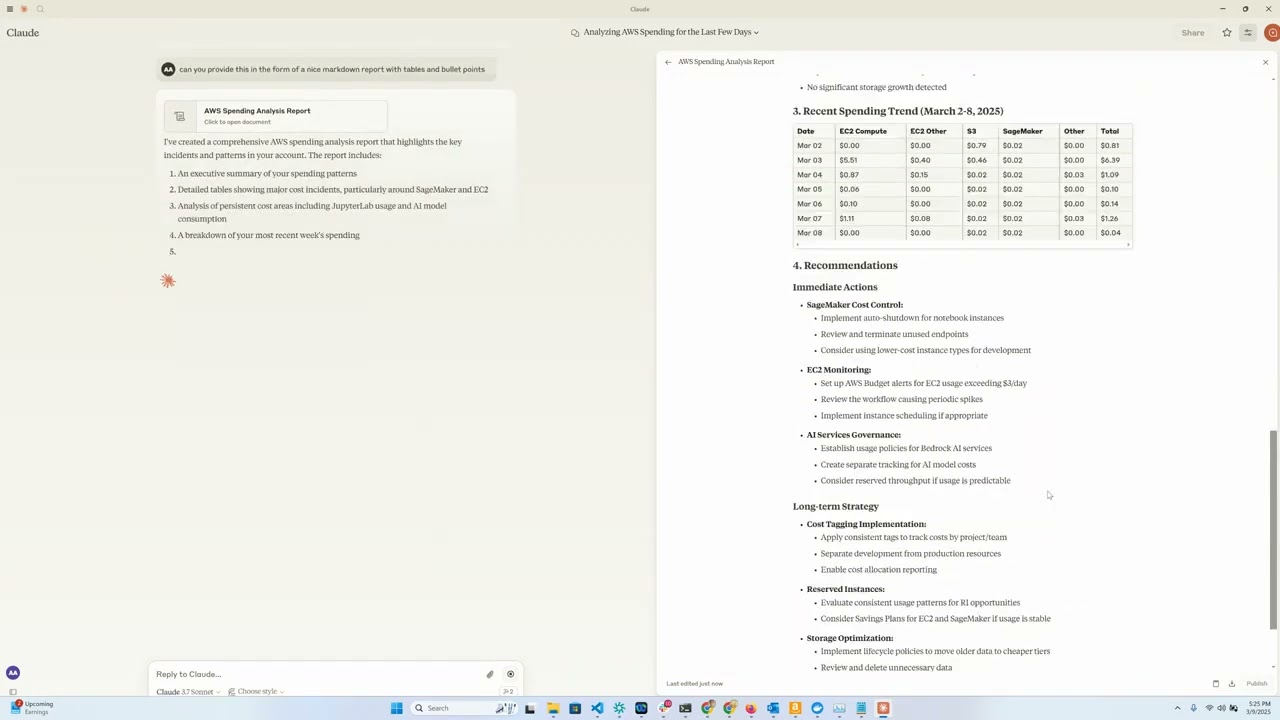
デモビデオ
概要
このツールは、AnthropicのClaudeモデルをインタラクティブなインターフェースとして利用し、AWSクラウド支出データを分析・可視化する便利な方法を提供します。MCPサーバーとして機能し、AWS Cost Explorer API機能をClaude Desktopに公開することで、AWS支出に関する自然言語での質問が可能になります。
Related MCP server: AWS FinOps MCP Server
特徴
Amazon EC2 支出分析: 過去 1 日間の EC2 支出の詳細な内訳を表示します。
Amazon Bedrock 支出分析: 過去 30 日間の地域、ユーザー、モデル別の内訳を表示
サービス支出レポート: 過去 30 日間のすべての AWS サービスでの支出を分析します
詳細なコストの内訳: 日、地域、サービス、インスタンスタイプごとに詳細なコストデータを取得します
インタラクティブインターフェース: Claude を使用して、自然言語でコストデータを照会します。
要件
Python 3.12
Cost Explorer へのアクセス権限を持つ AWS 認証情報
Anthropic API アクセス (Claude 統合用)
[オプション] Amazon Bedrock アクセス (LangGraph Agent 用)
[オプション] リモート MCP サーバーを実行するための Amazon EC2
インストール
uvをインストールします:# On macOS and Linux curl -LsSf https://astral.sh/uv/install.sh | sh# On Windows powershell -ExecutionPolicy ByPass -c "irm https://astral.sh/uv/install.ps1 | iex"追加のインストールオプションについては、ここを参照してください。
このリポジトリをクローンします: (これが aws-samples を指すように更新されると想定しています)
git clone https://github.com/aarora79/aws-cost-explorer-mcp.git cd aws-cost-explorer-mcpPython 仮想環境をセットアップし、依存関係をインストールします。
uv venv --python 3.12 && source .venv/bin/activate && uv pip install --requirement pyproject.tomlAWS 認証情報を設定します。
mkdir -p ~/.aws # Set up your credentials in ~/.aws/credentials and ~/.aws/configAWS IAM Identity Centerを使用する場合は、ドキュメントに従って短期認証情報を設定してください。
使用法
前提条件
Amazon CloudWatch でモデル呼び出しログを設定します。
使用するIAMユーザー/ロールに、Amazon Cost ExplorerとAmazon CloudWatchへの完全な読み取り専用アクセス権があることを確認してください。これは、MCPサーバーがこれらのサービスからデータを取得するために必要です。要件に応じて使用および変更できるサンプルポリシーの例については、 こちらとこちらを参照してください。
MCP サーバーが他のアカウントの AWS 支出情報にアクセスできるようにするには、サーバーの起動時に
CROSS_ACCOUNT_ROLE_NAMEパラメータを設定します。これで、エージェントと対話するときに別のアカウントの AWS アカウント ID を指定できるようになり、エージェントはアカウント ID をサーバーに渡します。
ローカルセットアップ
MCP のトランスポートとしてstdio使用し、MCP サーバーとクライアントの両方がローカル マシン上で実行されます。
サーバーの起動(ローカル)
次を使用してサーバーを実行します。
export MCP_TRANSPORT=stdio
export BEDROCK_LOG_GROUP_NAME=YOUR_BEDROCK_CW_LOG_GROUP_NAME
export CROSS_ACCOUNT_ROLE_NAME=ROLE_NAME_FOR_THE_ROLE_TO_ASSUME_IN_OTHER_ACCOUNTS # can be ignored if you do not want AWS spend info from other accounts
python server.pyクロードデスクトップ構成
Claude Desktop でこのツールを構成するには、次の 2 つの方法があります。
オプション1: Dockerを使用する
Claude Desktop の設定ファイルに以下の行を追加してください。ファイルは、オペレーティングシステムに応じて以下のパスから見つかります。
macOS: ~/Library/Application Support/Claude/claude_desktop_config.json。
Windows: %APPDATA%\Claude\claude_desktop_config.json。
Linux: ~/.config/Claude/claude_desktop_config.json。
{
"mcpServers": {
"aws-cost-explorer": {
"command": "docker",
"args": [ "run", "-i", "--rm", "-e", "AWS_ACCESS_KEY_ID", "-e", "AWS_SECRET_ACCESS_KEY", "-e", "AWS_REGION", "-e", "BEDROCK_LOG_GROUP_NAME", "-e", "MCP_TRANSPORT", "-e", "CROSS_ACCOUNT_ROLE_NAME", "aws-cost-explorer-mcp:latest" ],
"env": {
"AWS_ACCESS_KEY_ID": "YOUR_ACCESS_KEY_ID",
"AWS_SECRET_ACCESS_KEY": "YOUR_SECRET_ACCESS_KEY",
"AWS_REGION": "us-east-1",
"BEDROCK_LOG_GROUP_NAME": "YOUR_CLOUDWATCH_BEDROCK_MODEL_INVOCATION_LOG_GROUP_NAME",
"CROSS_ACCOUNT_ROLE_NAME": "ROLE_NAME_FOR_THE_ROLE_TO_ASSUME_IN_OTHER_ACCOUNTS",
"MCP_TRANSPORT": "stdio"
}
}
}
}重要:
YOUR_ACCESS_KEY_IDとYOUR_SECRET_ACCESS_KEYを実際のAWS認証情報に置き換えてください。実際の認証情報をバージョン管理にコミットしないでください。
オプション2: UVを使用する(Dockerなし)
Docker を使用せずにサーバーを直接実行したい場合は、UV を使用できます。
{
"mcpServers": {
"aws_cost_explorer": {
"command": "uv",
"args": [
"--directory",
"/path/to/aws-cost-explorer-mcp-server",
"run",
"server.py"
],
"env": {
"AWS_ACCESS_KEY_ID": "YOUR_ACCESS_KEY_ID",
"AWS_SECRET_ACCESS_KEY": "YOUR_SECRET_ACCESS_KEY",
"AWS_REGION": "us-east-1",
"BEDROCK_LOG_GROUP_NAME": "YOUR_CLOUDWATCH_BEDROCK_MODEL_INVOCATION_LOG_GROUP_NAME",
"CROSS_ACCOUNT_ROLE_NAME": "ROLE_NAME_FOR_THE_ROLE_TO_ASSUME_IN_OTHER_ACCOUNTS",
"MCP_TRANSPORT": "stdio"
}
}
}
}ディレクトリ パスをシステム上のリポジトリへの実際のパスに置き換えてください。
リモートセットアップ
MCPのトランスポートとしてsseを使用します。MCPサーバーはEC2上にあり、クライアントはローカルマシン上で実行されます。Claude Desktopは現時点ではリモートMCPサーバーをサポートしていないことに注意してください(GitHubのissueをご覧ください)。
サーバーの起動(リモート)
上記と同じ手順で、Amazon EC2 上でリモート MCP サーバーを起動できます。MCP_TRANSPORT MCP_TRANSPORT sse (サーバー側イベント)に設定してください(以下を参照)。MCPは JSON-RPC 2.0 をワイヤフォーマットとして使用するため、プロトコル自体には認可と認証が含まれません( GitHub の問題を参照)。MCP 経由で機密データを送受信しないでください。
次を使用してサーバーを実行します。
export MCP_TRANSPORT=sse
export BEDROCK_LOG_GROUP_NAME=YOUR_BEDROCK_CW_LOG_GROUP_NAME
export CROSS_ACCOUNT_ROLE_NAME=ROLE_NAME_FOR_THE_ROLE_TO_ASSUME_IN_OTHER_ACCOUNTS # can be ignored if you do not want AWS spend info from other accounts
python server.pyMCP サーバーは TCP ポート 8000 でリッスンを開始します。
EC2 インスタンスに関連付けられたセキュリティ グループでイングレス ルールを構成して、ローカル マシン (MCP クライアント/LangGraph ベースのアプリを実行している場所) から EC2 インスタンスへの TCP ポート 8000 へのアクセスを許可します。
また、 「安全な」リモート MCP サーバー(つまり、MCP クライアントが HTTPS 経由で接続できるサーバー) の実行に関するセクションも参照してください。
CLI MCPクライアントによるテスト
mcp_sse_client.pyスクリプトを使用して、リモート MCP サーバーをテストできます。このスクリプトを実行すると、MCP サーバーで利用可能なツールのリストと、 get_bedrock_daily_usage_statsツールの出力が表示されます。
# set the hostname for your MCP server
MCP_SERVER_HOSTNAME=YOUR_MCP_SERVER_EC2_HOSTNAME
# or localhost if your MCP server is running locally
# MCP_SERVER_HOSTNAME=localhost
AWS_ACCOUNT_ID=AWS_ACCOUNT_ID_TO_GET_INFO_ABOUT # if set to empty or if the --aws-account-id switch is not specified then it gets the info about the AWS account MCP server is running in
python mcp_sse_client.py --host $MCP_SERVER_HOSTNAME --aws-account-id $AWS_ACCOUNT_IDChainlitアプリでテスト
このリポジトリのapp.pyファイルは、Chainlit アプリ(チャットボット)を提供します。このアプリはLangChain MCP Adapterを使用して、MCP サーバーが提供するツールを LangGraph エージェントのツールとしてインポートする LangGraph エージェントを作成します。エージェントは LLM を使用してユーザーの質問に回答し、必要に応じて利用可能なツールを使用します。例えば、ユーザーが「過去 1 週間の Bedrock の使用状況はどうでしたか? 」といった質問をした場合、エージェントはリモート MCP サーバー経由で利用可能なツールを使用してその質問に答えます。このエージェントの動作には、Amazon Bedrock から利用可能な Claude 3.5 Haiku モデルを使用しています。
次を使用して Chainlit アプリを実行します。
chainlit run app.py --port 8080 localhost:8080でブラウザ ウィンドウが開き、チャットボットを使用して AWS の支出に関する詳細を取得できるようになります。
利用可能なツール
サーバーは、Claude が使用できる次のツールを公開します。
get_ec2_spend_last_day(): 前日のEC2支出データを取得しますget_detailed_breakdown_by_day(days=7): リージョン、サービス、インスタンスタイプごとにコストの包括的な分析を提供します。get_bedrock_daily_usage_stats(days=7, region='us-east-1', log_group_name='BedrockModelInvocationLogGroup'): リージョンおよびユーザー別のモデル使用状況の 1 日あたりの内訳を提供します。get_bedrock_hourly_usage_stats(days=7, region='us-east-1', log_group_name='BedrockModelInvocationLogGroup'): リージョンおよびユーザー別のモデル使用状況の 1 日あたりおよび 1 時間あたりの内訳を提供します。
クエリの例
MCP 対応インターフェースを介して Claude に接続すると、次のような質問をすることができます。
「過去数週間のBedrockの支出について教えてください」
「昨日の EC2 の支出はいくらでしたか?」
「先月のコスト上位 5 つの AWS サービスを表示してください」
「過去14日間の地域別の支出を分析する」
「どのインスタンスタイプに最もコストがかかっていますか?」
「前月比で最もコストが増加したサービスはどれですか?」
Docker サポート
コンテナ化されたデプロイメント用の Dockerfile が含まれています。
docker build -t aws-cost-explorer-mcp .
docker run -v ~/.aws:/root/.aws aws-cost-explorer-mcp発達
プロジェクト構造
server.py: MCP ツールを使用したメインサーバーの実装pyproject.toml: プロジェクトの依存関係とメタデータDockerfile: デプロイメント用のコンテナ定義
新しいコスト分析ツールの追加
機能を拡張するには:
server.pyに新しい関数を追加する@mcp.tool()で注釈を付けるAWS Cost Explorer API呼び出しを実装する
読みやすいように結果をフォーマットする
安全な「リモート」MCPサーバー
nginxリバースプロキシとして使用することで、MCPサーバーへの接続にHTTPSエンドポイントを提供できます。リモートMCPクライアントはHTTPS経由でnginxに接続し、nginxはトラフィックを内部的にhttp://localhost:8000にプロキシします。以下の手順でその方法を解説します。
EC2 インスタンスに関連付けられたセキュリティ グループの受信ルールで、MCP クライアント (ラップトップ、または任意の場所) の IP アドレスからの TCP ポート 443 へのアクセスを有効にします。
続行するには、HTTPS証明書と秘密鍵が必要です。MCPサーバーのドメインとして
your-mcp-server-domain-name.comを使用するとします。この場合、your-mcp-server-domain-name.com用のSSL証明書が必要になり、MCPクライアントはhttps://your-mcp-server-domain-name.com/sseとしてアクセスできます。自己署名証明書を使用することもできますが、MCPクライアントでSSL検証を無効にする必要があります。これはお勧めしません。MCPサーバーをEC2でホストしている場合は、no-ip 、 Let' Encrypt 、またはその他の同様のサービスを使用してSSL証明書を生成できます。SSL証明書ファイルと秘密鍵ファイルを、EC2マシンの/etc/ssl/certsと/etc/ssl/privatekeyフォルダにそれぞれ配置してください。次のコマンドを使用して、EC2 マシンに
nginxをインストールします。sudo apt-get install nginx sudo nginx -t sudo systemctl reload nginxEC2 インスタンスのホスト名を取得します。これは、
nginxリバース プロキシを構成するために必要になります。TOKEN=$(curl -X PUT "http://169.254.169.254/latest/api/token" -H "X-aws-ec2-metadata-token-ttl-seconds: 21600") && curl -H "X-aws-ec2-metadata-token: $TOKEN" -s http://169.254.169.254/latest/meta-data/public-hostname以下の内容を新しいファイル
/etc/nginx/conf.d/ec2.conf``YOUR_EC2_HOSTNAMEコピーします。YOUR_EC2_HOSTNAME、/etc/ssl/certs/cert.pemcerts/cert.pem、/etc//etc/ssl/privatekey/privkey.pemを、設定に応じて適切な値に置き換えてください。server { listen 80; server_name YOUR_EC2_HOSTNAME; # Optional: Redirect HTTP to HTTPS return 301 https://$host$request_uri; } server { listen 443 ssl; server_name YOUR_EC2_HOSTNAME; # Self-signed certificate paths ssl_certificate /etc/ssl/certs/cert.pem; ssl_certificate_key /etc/ssl/privatekey/privkey.pem; # Optional: Good practice ssl_protocols TLSv1.2 TLSv1.3; ssl_ciphers HIGH:!aNULL:!MD5; location / { # Reverse proxy to your local app (e.g., port 8000) proxy_pass http://127.0.0.1:8000; proxy_http_version 1.1; proxy_set_header Host $host; proxy_set_header X-Real-IP $remote_addr; proxy_set_header X-Forwarded-For $proxy_add_x_forwarded_for; } }nginxを再起動します。sudo systemctl start nginxリモート セットアップセクションで説明されているように、通常どおり MCP サーバーを起動します。
これで、MCP クライアントから
https://your-mcp-server-domain-name.com/sseとして、MCP サーバーに HTTPS 経由でアクセスできるようになりました。次に、クライアント側 (ラップトップまたはエージェント内) で、次のように MCP クライアントが MCP サーバーと通信するように構成します。
MCP_SERVER_HOSTNAME=YOUR_MCP_SERVER_DOMAIN_NAME AWS_ACCOUNT_ID=AWS_ACCOUNT_ID_TO_GET_INFO_ABOUT # if set to empty or if the --aws-account-id switch is not specified then it gets the info about the AWS account MCP server is running in python mcp_sse_client.py --host $MCP_SERVER_HOSTNAME --port 443 --aws-account-id $AWS_ACCOUNT_ID同様に、chainlit アプリを実行して、HTTPS 経由でリモート MCP サーバーと通信することもできます。
export MCP_SERVER_URL=YOUR_MCP_SERVER_DOMAIN_NAME export MCP_SERVER_PORT=443 chainlit run app.py --port 8080同様に、LangGraph エージェントを実行して、HTTPS 経由でリモート MCP サーバーと通信することもできます。
python langgraph_agent_mcp_sse_client.py --host $MCP_SERVER_HOSTNAME --port 443 --aws-account-id $AWS_ACCOUNT_ID
ライセンス
謝辞
Available Tools
4 toolsget_bedrock_daily_usage_statsC
Get daily usage statistics with detailed breakdowns.
Args:
params: Parameters specifying the number of days to look back and region
Returns:
str: Formatted string representation of daily usage statistics
| Name | Required | Description | Default |
|---|---|---|---|
| params | Yes |
TDQS
Does the description disclose side effects, auth requirements, rate limits, or destructive behavior?
No annotations are provided, so the description carries full burden. It mentions 'detailed breakdowns' and that it returns a 'formatted string representation,' but doesn't disclose important behavioral traits like whether this is a read-only operation, requires specific AWS permissions, has rate limits, or what format the string output takes. For a tool with no annotation coverage, this leaves significant gaps in understanding how it behaves.
Agents need to know what a tool does to the world before calling it. Descriptions should go beyond structured annotations to explain consequences.
Is the description appropriately sized, front-loaded, and free of redundancy?
The description is appropriately concise with three sentences that are front-loaded: the first states the purpose, followed by Args and Returns sections. There's minimal waste, though the parameter explanation could be more informative. The structure is clear but could better integrate parameter details into the flow.
Shorter descriptions cost fewer tokens and are easier for agents to parse. Every sentence should earn its place.
Given the tool's complexity, does the description cover enough for an agent to succeed on first attempt?
Given the complexity (4 nested parameters, no annotations, no output schema), the description is incomplete. It doesn't adequately explain the parameters, behavioral aspects, or output format. For a tool that likely interacts with AWS Bedrock and returns usage statistics, more context on permissions, data scope, and result interpretation is needed to be fully helpful.
Complex tools with many parameters or behaviors need more documentation. Simple tools need less. This dimension scales expectations accordingly.
Does the description clarify parameter syntax, constraints, interactions, or defaults beyond what the schema provides?
The schema description coverage is 0%, meaning parameters are undocumented in the schema. The description only vaguely mentions 'Parameters specifying the number of days to look back and region,' but doesn't explain the actual parameters (days, region, log_group_name, aws_account_id) or their purposes. It fails to compensate for the schema's lack of descriptions, leaving most parameters semantically unclear.
Input schemas describe structure but not intent. Descriptions should explain non-obvious parameter relationships and valid value ranges.
Does the description clearly state what the tool does and how it differs from similar tools?
The description clearly states the tool's purpose: 'Get daily usage statistics with detailed breakdowns.' It specifies the verb ('Get') and resource ('daily usage statistics'), and distinguishes from the hourly sibling tool by emphasizing 'daily' usage. However, it doesn't explicitly differentiate from 'get_detailed_breakdown_by_day' which might provide similar functionality.
Agents choose between tools based on descriptions. A clear purpose with a specific verb and resource helps agents select the right tool.
Does the description explain when to use this tool, when not to, or what alternatives exist?
The description provides no guidance on when to use this tool versus alternatives. It doesn't mention the sibling tools (get_bedrock_hourly_usage_stats, get_detailed_breakdown_by_day, get_ec2_spend_last_day) or explain when daily statistics are preferred over hourly ones or other breakdowns. The only implied context is the need for 'daily' statistics, but no explicit usage rules are provided.
Agents often have multiple tools that could apply. Explicit usage guidance like "use X instead of Y when Z" prevents misuse.
get_bedrock_hourly_usage_statsC
Get hourly usage statistics with detailed breakdowns.
Args:
params: Parameters specifying the number of days to look back and region
Returns:
str: Formatted string representation of hourly usage statistics
| Name | Required | Description | Default |
|---|---|---|---|
| params | Yes |
TDQS
Does the description disclose side effects, auth requirements, rate limits, or destructive behavior?
No annotations are provided, so the description carries full burden. While it mentions the tool returns 'Formatted string representation of hourly usage statistics,' it doesn't disclose important behavioral traits like whether this is a read-only operation, authentication requirements, rate limits, data freshness, or what happens if parameters are invalid. The description is minimal and lacks operational context.
Agents need to know what a tool does to the world before calling it. Descriptions should go beyond structured annotations to explain consequences.
Is the description appropriately sized, front-loaded, and free of redundancy?
The description is brief (4 sentences) and front-loaded with the core purpose. However, the 'Args' and 'Returns' sections are redundant since they don't add value beyond the tool name and basic function. The structure is clear but includes unnecessary boilerplate that doesn't enhance understanding.
Shorter descriptions cost fewer tokens and are easier for agents to parse. Every sentence should earn its place.
Given the tool's complexity, does the description cover enough for an agent to succeed on first attempt?
Given the complexity (4 parameters with 0% schema coverage, no annotations, no output schema), the description is inadequate. It doesn't explain what 'hourly usage statistics' includes, how data is aggregated, what format the returned string uses, or provide context about the Bedrock service. For a tool with multiple parameters and no structured documentation, the description should do much more to compensate.
Complex tools with many parameters or behaviors need more documentation. Simple tools need less. This dimension scales expectations accordingly.
Does the description clarify parameter syntax, constraints, interactions, or defaults beyond what the schema provides?
The description states 'Parameters specifying the number of days to look back and region,' but the actual input schema shows 4 parameters (days, region, log_group_name, aws_account_id) with 0% schema description coverage. The description fails to mention two parameters entirely (log_group_name and aws_account_id) and provides no meaningful semantic context beyond what's minimally implied by parameter names.
Input schemas describe structure but not intent. Descriptions should explain non-obvious parameter relationships and valid value ranges.
Does the description clearly state what the tool does and how it differs from similar tools?
The description clearly states the tool's purpose: 'Get hourly usage statistics with detailed breakdowns.' It specifies the verb ('Get'), resource ('hourly usage statistics'), and scope ('detailed breakdowns'). However, it doesn't explicitly differentiate from sibling tools like 'get_bedrock_daily_usage_stats' or 'get_detailed_breakdown_by_day'.
Agents choose between tools based on descriptions. A clear purpose with a specific verb and resource helps agents select the right tool.
Does the description explain when to use this tool, when not to, or what alternatives exist?
No guidance is provided on when to use this tool versus alternatives. The description doesn't mention sibling tools, specify use cases, or provide any context about when this hourly breakdown is preferred over daily statistics or other available tools.
Agents often have multiple tools that could apply. Explicit usage guidance like "use X instead of Y when Z" prevents misuse.
get_detailed_breakdown_by_dayC
Retrieve daily spend breakdown by region, service, and instance type.
Args:
params: Parameters specifying the number of days to look back
Returns:
Dict[str, Any]: A tuple containing:
- A nested dictionary with cost data organized by date, region, and service
- A string containing the formatted output report
or (None, error_message) if an error occurs.
| Name | Required | Description | Default |
|---|---|---|---|
| params | Yes |
TDQS
Does the description disclose side effects, auth requirements, rate limits, or destructive behavior?
With no annotations provided, the description carries full burden. It mentions the tool retrieves cost data and returns a nested dictionary or error, but lacks critical behavioral details: authentication requirements, rate limits, whether it's read-only/destructive, or how errors manifest. This is inadequate for a tool with potential complexity.
Agents need to know what a tool does to the world before calling it. Descriptions should go beyond structured annotations to explain consequences.
Is the description appropriately sized, front-loaded, and free of redundancy?
The description is reasonably concise with three sections (purpose, args, returns) and no wasted sentences. However, the return value explanation is somewhat verbose and could be streamlined for better front-loading of key information.
Shorter descriptions cost fewer tokens and are easier for agents to parse. Every sentence should earn its place.
Given the tool's complexity, does the description cover enough for an agent to succeed on first attempt?
Given no annotations, 0% schema coverage, no output schema, and sibling tools with similar names, the description is incomplete. It doesn't explain the tool's scope (e.g., EC2-specific vs. general AWS costs), error handling details, or how results differ from siblings, leaving significant gaps for agent understanding.
Complex tools with many parameters or behaviors need more documentation. Simple tools need less. This dimension scales expectations accordingly.
Does the description clarify parameter syntax, constraints, interactions, or defaults beyond what the schema provides?
Schema description coverage is 0%, so the description must compensate. It mentions 'Parameters specifying the number of days to look back', which partially explains the 'params' object but omits details about 'region' and 'aws_account_id' sub-parameters. This adds some value but doesn't fully bridge the coverage gap.
Input schemas describe structure but not intent. Descriptions should explain non-obvious parameter relationships and valid value ranges.
Does the description clearly state what the tool does and how it differs from similar tools?
The description clearly states the verb ('Retrieve') and resource ('daily spend breakdown') with specific dimensions (region, service, instance type). However, it doesn't explicitly differentiate from sibling tools like 'get_ec2_spend_last_day' which might overlap in purpose, preventing a perfect score.
Agents choose between tools based on descriptions. A clear purpose with a specific verb and resource helps agents select the right tool.
Does the description explain when to use this tool, when not to, or what alternatives exist?
The description provides no guidance on when to use this tool versus alternatives like 'get_ec2_spend_last_day' or 'get_bedrock_daily_usage_stats'. There's no mention of prerequisites, context, or exclusions, leaving the agent to guess based on tool names alone.
Agents often have multiple tools that could apply. Explicit usage guidance like "use X instead of Y when Z" prevents misuse.
get_ec2_spend_last_dayC
Retrieve EC2 spend for the last day using standard AWS Cost Explorer API.
Returns:
Dict[str, Any]: The raw response from the AWS Cost Explorer API, or None if an error occurs.
| Name | Required | Description | Default |
|---|---|---|---|
| params | Yes |
TDQS
Does the description disclose side effects, auth requirements, rate limits, or destructive behavior?
With no annotations, the description carries the full burden of behavioral disclosure. It mentions the API used and error handling (returns None on error), but lacks details on permissions, rate limits, cost implications, or what 'last day' means precisely (e.g., UTC day, rolling 24h). This is inadequate for a tool that likely requires AWS credentials and has financial implications.
Agents need to know what a tool does to the world before calling it. Descriptions should go beyond structured annotations to explain consequences.
Is the description appropriately sized, front-loaded, and free of redundancy?
The description is front-loaded with the core purpose in the first sentence, followed by a concise return value note. It's appropriately sized with no wasted words, though the return type detail could be more integrated.
Shorter descriptions cost fewer tokens and are easier for agents to parse. Every sentence should earn its place.
Given the tool's complexity, does the description cover enough for an agent to succeed on first attempt?
Given no annotations, no output schema, and 0% schema description coverage, the description is incomplete. It covers the basic purpose and error handling but misses critical context like authentication needs, cost behavior, and sibling tool differentiation, making it only minimally viable for this AWS cost tool.
Complex tools with many parameters or behaviors need more documentation. Simple tools need less. This dimension scales expectations accordingly.
Does the description clarify parameter syntax, constraints, interactions, or defaults beyond what the schema provides?
Schema description coverage is 0%, so the description must compensate, but it provides no parameter information. The baseline is 3 because the schema fully documents the single 'params' object with its nested fields (days, region, aws_account_id), including defaults and constraints, making the description's lack of param details less critical.
Input schemas describe structure but not intent. Descriptions should explain non-obvious parameter relationships and valid value ranges.
Does the description clearly state what the tool does and how it differs from similar tools?
The description clearly states the verb 'Retrieve' and resource 'EC2 spend for the last day', specifying the AWS Cost Explorer API as the method. It distinguishes from siblings by focusing on EC2 spend rather than Bedrock usage or detailed breakdowns, though it doesn't explicitly contrast them.
Agents choose between tools based on descriptions. A clear purpose with a specific verb and resource helps agents select the right tool.
Does the description explain when to use this tool, when not to, or what alternatives exist?
No guidance on when to use this tool versus alternatives is provided. The description doesn't mention sibling tools or suggest scenarios for choosing this tool over others, leaving the agent without usage context.
Agents often have multiple tools that could apply. Explicit usage guidance like "use X instead of Y when Z" prevents misuse.
Tool Schema Changelog
Recent tool additions, removals, and schema changes observed during successful MCP inspections.
4 tool updates
- First observed
get_bedrock_daily_usage_stats - First observed
get_bedrock_hourly_usage_stats - First observed
get_detailed_breakdown_by_day - First observed
get_ec2_spend_last_day
TDQS
Scored across 4 tools
The tools have some overlap in purpose, particularly between the two Bedrock usage tools and the daily breakdown tool, which all involve daily cost/usage data. However, the descriptions clarify distinctions: get_bedrock_daily_usage_stats and get_bedrock_hourly_usage_stats focus on Bedrock service usage (daily vs. hourly), while get_detailed_breakdown_by_day covers broader cost breakdowns across services. The EC2 tool is distinct but limited to a single day.
The naming follows a consistent verb_noun pattern (get_*_*) throughout, with clear action-object structure. Minor deviations exist, such as get_detailed_breakdown_by_day using 'by_day' instead of a noun like 'daily_breakdown', but overall the pattern is predictable and readable.
With only 4 tools, the server feels under-scoped for an 'AWS Cost Explorer' purpose, which typically involves querying costs across multiple services, time ranges, and dimensions. The tools are narrowly focused on Bedrock and EC2, lacking coverage for other AWS services or flexible time-range queries, making the set feel incomplete for general cost exploration.
There are significant gaps in the tool surface for cost exploration. The server lacks tools for querying costs by service, region, or account over custom time periods, and it misses core operations like filtering, grouping, or forecasting. The tools are limited to specific services (Bedrock, EC2) and fixed time frames, which will cause agent failures when broader cost analysis is needed.
Maintenance
Related MCP Connectors
AWS Cost Explorer cost, forecast, and anomaly reporting through user-connected IAM credentials.
FinOps agent MCP: allocated AWS, GCP, Azure, Kubernetes, SaaS & AI cost for Claude or any agent
Ask about AWS, Azure, GCP, OpenAI, Anthropic and Snowflake costs, budgets, and anomalies.
Query cloud, AI and SaaS spend across 25+ providers: costs, budgets, anomalies, unit economics.
Related MCP Servers
- FlicenseNot gradedqualityDmaintenanceEnables users to analyze AWS costs, track spending trends, and detect anomalies directly within Claude Desktop using the AWS Cost Explorer API. It provides tools to identify major cost drivers and compare usage across different time periods through natural language queries.-
- AlicenseNot gradedqualityCmaintenanceEnables natural language analysis of AWS costs, automated FinOps waste audits, and budget monitoring across multiple profiles and regions while keeping credentials secure locally.183MIT
- AlicenseAqualityCmaintenanceEnables analyzing AWS cloud costs through natural language queries, providing cost summaries, anomaly detection, idle resource identification, rightsizing recommendations, and tagging compliance via Claude.1022 npmMIT
- AlicenseCqualityDmaintenanceEnables analyzing AWS cloud spending and Bedrock usage through natural language queries using Claude.414MIT No Attribution
