MCP Sentry
mcp-sentry: Sentry MCP 서버
개요
Sentry.io에서 문제를 검색하고 분석하기 위한 모델 컨텍스트 프로토콜 서버입니다. 이 서버는 Sentry 계정에서 오류 보고서, 스택 추적 및 기타 디버깅 정보를 검사할 수 있는 도구를 제공합니다.
도구
get_sentry_issueID 또는 URL로 Sentry 문제 검색 및 분석
입력:
issue_id_or_url(문자열): 분석할 Sentry 문제 ID 또는 URL
반품: 문제 세부 정보 포함:
제목
문제 ID
상태
수준
처음 본 타임스탬프
마지막으로 본 타임스탬프
이벤트 수
전체 스택 추적
get_list_issues프로젝트 슬러그별로 Sentry 문제를 검색하고 분석합니다.
입력:
project_slug(문자열): 분석할 Sentry 프로젝트 슬러그organization_slug(문자열): 분석할 Sentry 조직 슬러그
반환: 다음을 포함한 세부 정보가 포함된 문제 목록:
제목
문제 ID
상태
수준
처음 본 타임스탬프
마지막으로 본 타임스탬프
이벤트 수
기본 문제 정보
프롬프트
sentry-issueSentry에서 문제 세부 정보 검색
입력:
issue_id_or_url(문자열): Sentry 문제 ID 또는 URL
반환: 대화 맥락으로 포맷된 문제 세부 정보
Related MCP server: MCP Server Sentry
설치
Smithery를 통해 설치
Smithery를 통해 Claude Desktop에 mcp-sentry를 자동으로 설치하려면:
지엑스피1
uv 사용(권장)
uv 사용하면 별도의 설치가 필요하지 않습니다. uvx 사용하여 mcp-sentry를 직접 실행합니다.
PIP 사용
또는 pip를 통해 mcp-sentry 설치할 수 있습니다.
pip install mcp-sentry또는 uv를 사용하세요
uv pip install -e .설치 후 다음을 사용하여 스크립트로 실행할 수 있습니다.
python -m mcp_sentry구성
Claude Desktop과 함께 사용
claude_desktop_config.json 에 다음을 추가하세요:
"mcpServers": {
"sentry": {
"command": "uvx",
"args": ["mcp-sentry", "--auth-token", "YOUR_SENTRY_TOKEN","--project-slug" ,"YOUR_PROJECT_SLUG", "--organization-slug","YOUR_ORGANIZATION_SLUG"]
}
}"mcpServers": {
"sentry": {
"command": "docker",
"args": ["run", "-i", "--rm", "mcp/sentry", "--auth-token", "YOUR_SENTRY_TOKEN","--project-slug" ,"YOUR_PROJECT_SLUG", "--organization-slug","YOUR_ORGANIZATION_SLUG"]
}
}"mcpServers": {
"sentry": {
"command": "python",
"args": ["-m", "mcp_sentry", "--auth-token", "YOUR_SENTRY_TOKEN","--project-slug" ,"YOUR_PROJECT_SLUG", "--organization-slug","YOUR_ORGANIZATION_SLUG"]
}
}Zed 와 함께 사용
Zed settings.json에 다음을 추가합니다.
예를 들어 Curson
"context_servers": [
"mcp-sentry": {
"command": {
"path": "uvx",
"args": ["mcp-sentry", "--auth-token", "YOUR_SENTRY_TOKEN","--project-slug" ,"YOUR_PROJECT_SLUG", "--organization-slug","YOUR_ORGANIZATION_SLUG"]
}
}
],"context_servers": {
"mcp-sentry": {
"command": "python",
"args": ["-m", "mcp_sentry", "--auth-token", "YOUR_SENTRY_TOKEN","--project-slug" ,"YOUR_PROJECT_SLUG", "--organization-slug","YOUR_ORGANIZATION_SLUG"]
}
},"context_servers": {
"sentry": {
"command": "python",
"args": [
"-m",
"mcp_sentry",
"--auth-token",
"YOUR_SENTRY_TOKEN",
"--project-slug",
"YOUR_PROJECT_SLUG",
"--organization-slug",
"YOUR_ORGANIZATION_SLUG"
],
"env": {
"PYTHONPATH": "path/to/mcp-sentry/src"
}
}
},디버깅
MCP 검사기를 사용하여 서버를 디버깅할 수 있습니다. UVX 설치의 경우:
npx @modelcontextprotocol/inspector uvx mcp-sentry --auth-token YOUR_SENTRY_TOKEN --project-slug YOUR_PROJECT_SLUG --organization-slug YOUR_ORGANIZATION_SLUG또는 특정 디렉토리에 패키지를 설치했거나 해당 디렉토리에서 개발 중인 경우:
cd path/to/servers/src/sentry
npx @modelcontextprotocol/inspector uv run mcp-sentry --auth-token YOUR_SENTRY_TOKEN --project-slug YOUR_PROJECT_SLUG --organization-slug YOUR_ORGANIZATION_SLUG 또는 용어로
npx @modelcontextprotocol/inspector uv --directory /Volumes/ExtremeSSD/MCP/mcp-sentry/src run mcp_sentry --auth-token YOUR_SENTRY_TOKEN
--project-slug YOUR_PROJECT_SLUG --organization-slug YOUR_ORGANIZATION_SLUG
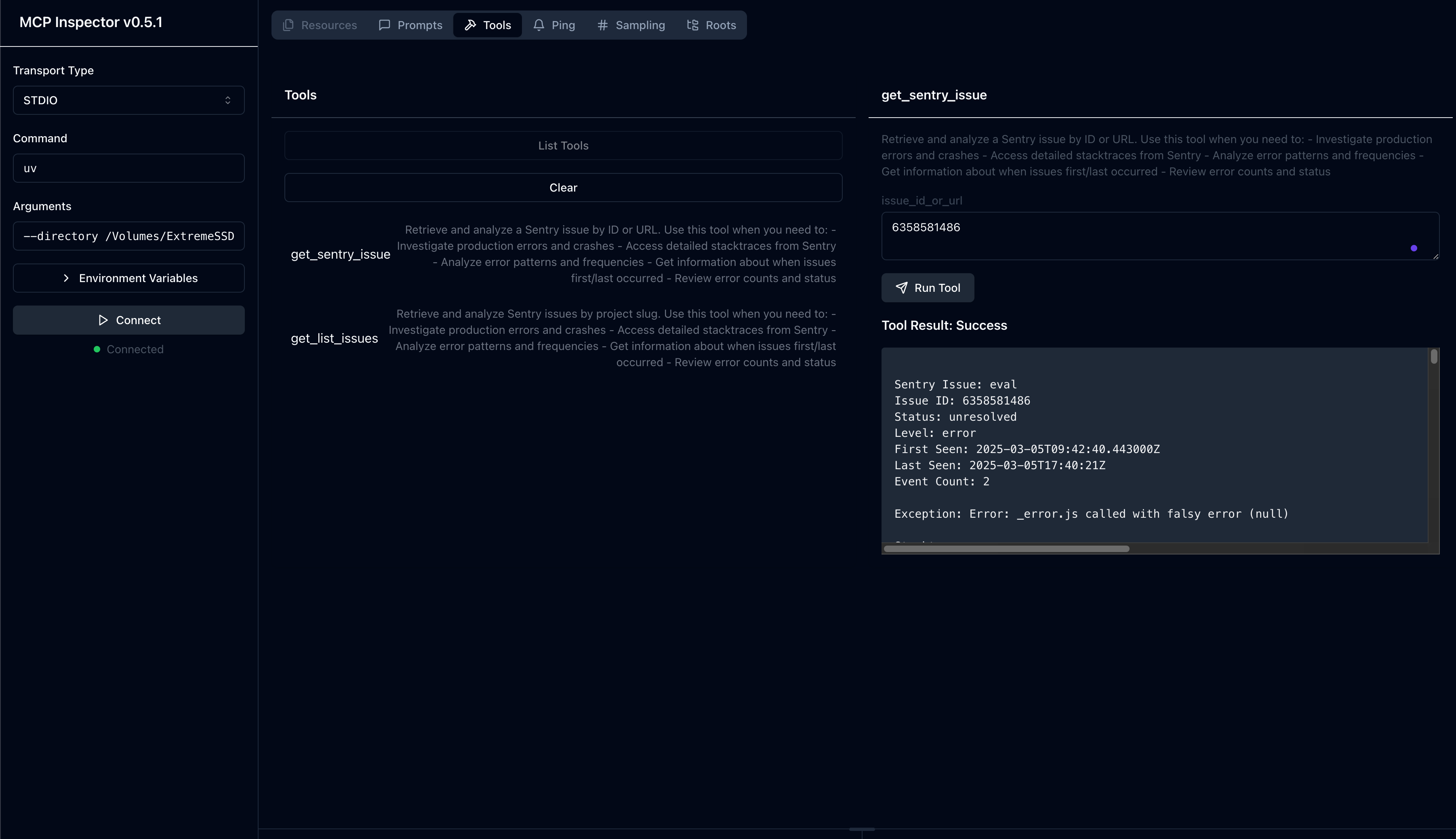
포크에서
특허
이 MCP 서버는 MIT 라이선스에 따라 라이선스가 부여됩니다. 즉, MIT 라이선스의 조건에 따라 소프트웨어를 자유롭게 사용, 수정 및 배포할 수 있습니다. 자세한 내용은 프로젝트 저장소의 LICENSE 파일을 참조하세요.
Available Tools
2 toolsget_list_issuesA
Retrieve and analyze Sentry issues by project slug. Use this tool when you need to: - Investigate production errors and crashes - Access detailed stacktraces from Sentry - Analyze error patterns and frequencies - Get information about when issues first/last occurred - Review error counts and status
| Name | Required | Description | Default |
|---|---|---|---|
| project_slug | No | Sentry project slug to analyze | |
| organization_slug | No | Sentry organization slug to analyze |
TDQS
Does the description disclose side effects, auth requirements, rate limits, or destructive behavior?
No annotations provided, so description carries full burden. Details what the tool retrieves (stacktraces, error patterns, frequencies, timestamps, counts, status). Does not mention side effects, rate limits, or pagination, but for a read-like operation, it is sufficiently transparent.
Agents need to know what a tool does to the world before calling it. Descriptions should go beyond structured annotations to explain consequences.
Is the description appropriately sized, front-loaded, and free of redundancy?
Single sentence followed by bullet list that is easy to scan. No extraneous information. Well front-loaded with main purpose.
Shorter descriptions cost fewer tokens and are easier for agents to parse. Every sentence should earn its place.
Given the tool's complexity, does the description cover enough for an agent to succeed on first attempt?
Tool has 2 optional parameters, no output schema. Description covers functionality well but does not explain what happens if parameters are omitted or describe return value format. Minor gaps.
Complex tools with many parameters or behaviors need more documentation. Simple tools need less. This dimension scales expectations accordingly.
Does the description clarify parameter syntax, constraints, interactions, or defaults beyond what the schema provides?
Schema covers 100% of parameters with descriptions. Description does not add extra meaning beyond the schema. Baseline of 3 is appropriate as schema is adequate.
Input schemas describe structure but not intent. Descriptions should explain non-obvious parameter relationships and valid value ranges.
Does the description clearly state what the tool does and how it differs from similar tools?
Description clearly states 'Retrieve and analyze Sentry issues by project slug' and lists specific use cases like investigating errors and accessing stacktraces. Effectively distinguishes from sibling 'get_sentry_issue' by implying this tool returns a list.
Agents choose between tools based on descriptions. A clear purpose with a specific verb and resource helps agents select the right tool.
Does the description explain when to use this tool, when not to, or what alternatives exist?
Provides explicit scenarios for when to use the tool via bullet points. Does not explicitly state when not to use, but the contrast with the sibling tool is implicit. Good guidance overall.
Agents often have multiple tools that could apply. Explicit usage guidance like "use X instead of Y when Z" prevents misuse.
get_sentry_issueA
Retrieve and analyze a Sentry issue by ID or URL. Use this tool when you need to: - Investigate production errors and crashes - Access detailed stacktraces from Sentry - Analyze error patterns and frequencies - Get information about when issues first/last occurred - Review error counts and status
| Name | Required | Description | Default |
|---|---|---|---|
| issue_id_or_url | Yes | Sentry issue ID or URL to analyze |
TDQS
Does the description disclose side effects, auth requirements, rate limits, or destructive behavior?
No annotations are provided, so the description carries full burden. It discloses what information the tool returns (stacktraces, first/last occurred, counts, status), which is helpful, but does not mention potential rate limits, authentication requirements, or data freshness. Adequate but not comprehensive.
Agents need to know what a tool does to the world before calling it. Descriptions should go beyond structured annotations to explain consequences.
Is the description appropriately sized, front-loaded, and free of redundancy?
The description is concise with two sentences plus a bullet list, front-loading the purpose. The bullet list could be slightly more compact, but overall well structured and easy to scan.
Shorter descriptions cost fewer tokens and are easier for agents to parse. Every sentence should earn its place.
Given the tool's complexity, does the description cover enough for an agent to succeed on first attempt?
For a simple retrieval tool with one parameter, no output schema, and no annotations, the description covers key use cases and return information. However, it lacks behavioral details (e.g., error handling, data freshness) that would make it fully complete for an agent.
Complex tools with many parameters or behaviors need more documentation. Simple tools need less. This dimension scales expectations accordingly.
Does the description clarify parameter syntax, constraints, interactions, or defaults beyond what the schema provides?
Schema coverage for the single parameter is 100%, and the schema already describes 'Sentry issue ID or URL'. The description repeats 'by ID or URL' in the first sentence, adding minimal additional meaning beyond the schema. Baseline 3 is appropriate.
Input schemas describe structure but not intent. Descriptions should explain non-obvious parameter relationships and valid value ranges.
Does the description clearly state what the tool does and how it differs from similar tools?
The description clearly states 'Retrieve and analyze a Sentry issue by ID or URL' and lists specific use cases (investigate errors, access stacktraces, etc.), which distinguishes it from the sibling tool 'get_list_issues' that deals with multiple issues.
Agents choose between tools based on descriptions. A clear purpose with a specific verb and resource helps agents select the right tool.
Does the description explain when to use this tool, when not to, or what alternatives exist?
The description explicitly says 'Use this tool when you need to:' followed by a list of scenarios, providing clear usage context. However, it does not explicitly state when not to use it or mention the sibling tool as an alternative, though the sibling context from the environment suggests differentiation.
Agents often have multiple tools that could apply. Explicit usage guidance like "use X instead of Y when Z" prevents misuse.
Tool Schema Changelog
Recent tool additions, removals, and schema changes observed during successful MCP inspections.
2 tool updates
v0.6.2- First observed
get_list_issues - First observed
get_sentry_issue
TDQS
Scored across 2 tools
The two tools are essentially indistinguishable in purpose. Both descriptions are identical, listing the exact same use cases (investigate errors, access stacktraces, analyze patterns, get timing info, review counts). An agent would have no way to determine when to use get_list_issues versus get_sentry_issue since they appear to serve the same function.
Both tools follow a similar get_ prefix pattern, which provides some consistency. However, the naming is confusingly similar (get_list_issues vs get_sentry_issue) rather than clearly differentiated, and the verb-noun structure is mixed (list_issues vs sentry_issue).
With only 2 tools, this feels severely under-scoped for a Sentry integration. A production error monitoring system would typically need tools for creating issues, updating statuses, searching/filtering, accessing events, or managing projects. Two tools is too few to cover meaningful workflows.
The tool surface is severely incomplete for Sentry's domain. There are no tools for creating issues, updating issue status (resolve/ignore), searching across projects, accessing event details, managing alerts, or any administrative functions. The two existing tools appear redundant rather than complementary.
Maintenance
Related MCP Connectors
Enable secure connectivity between Sentry issues and debugging data, and LLM clients, using a Model Context Protocol (MCP) server.
MCP server for Sentry - error monitoring, issue tracking, and debugging for AI assistants
A Model Context Protocol (MCP) application for automated GitHub PR analysis and issue management.…
A comprehensive Model Context Protocol (MCP) server that enables AI assistants to interact with yo…
Related MCP Servers
- AlicenseBqualityFmaintenanceA Model Context Protocol server that enables AI assistants to interact with Sentry for error tracking and monitoring, allowing retrieval and analysis of error data, project management, and performance monitoring through the Sentry API.1121ISC
- AlicenseNot gradedqualityDmaintenanceA TypeScript implementation of a Model Context Protocol server that connects to Sentry error tracking service, allowing AI models to query and analyze error reports and events.11 npmMIT
- FlicenseNot gradedqualityDmaintenanceAn MCP server that connects to Sentry.io or self-hosted Sentry instances to retrieve and analyze error reports, stack traces, and debugging information.3-

Sentry MCP Serverofficial
AlicenseBqualityDmaintenanceA Model Context Protocol server that lets AI assistants interact with the Sentry API to retrieve and analyze error data, manage projects, and monitor application performance.1112ISC
