Glama
MCP-100

MCP Sentry

by MCP-100

mcp-sentry: Sentry MCP サーバー

鍛冶屋のバッジ

概要

Sentry.ioから問題を取得・分析するためのモデルコンテキストプロトコルサーバーです。このサーバーは、Sentryアカウントからエラーレポート、スタックトレース、その他のデバッグ情報を検査するためのツールを提供します。

ツール

  1. get_sentry_issue

    • IDまたはURLでSentryの問題を取得して分析する

    • 入力:

      • issue_id_or_url (文字列): 分析する Sentry の問題 ID または URL

    • 返品: 問題の詳細には以下が含まれます:

      • タイトル

      • 問題ID

      • 状態

      • レベル

      • 初回表示タイムスタンプ

      • 最終閲覧タイムスタンプ

      • イベント数

      • 完全なスタックトレース

  2. get_list_issues

    • プロジェクトスラッグで Sentry の問題を取得して分析する

    • 入力:

      • project_slug (文字列): 分析する Sentry プロジェクト スラッグ

      • organization_slug (文字列): 分析する Sentry 組織スラッグ

    • 返品: 問題のリストと詳細:

      • タイトル

      • 問題ID

      • 状態

      • レベル

      • 初回表示タイムスタンプ

      • 最終閲覧タイムスタンプ

      • イベント数

      • 基本的な発行情報

プロンプト

  1. sentry-issue

    • Sentryから問題の詳細を取得する

    • 入力:

      • issue_id_or_url (文字列): Sentry の問題 ID または URL

    • 戻り値: 会話のコンテキストとしてフォーマットされた問題の詳細

Related MCP server: MCP Server Sentry

インストール

Smithery経由でインストール

Smithery経由で Claude Desktop 用の mcp-sentry を自動的にインストールするには:

npx -y @smithery/cli install @qianniuspace/mcp-sentry --client claude

uvの使用(推奨)

uvを使用する場合、特別なインストールは必要ありません。uvx uvx使用してmcp-sentryを直接実行します。

PIPの使用

あるいは、pip 経由でmcp-sentryをインストールすることもできます。

pip install mcp-sentry

またはUVを使用する

uv pip install -e .

インストール後、次のコマンドを使用してスクリプトとして実行できます。

python -m mcp_sentry

構成

Claude Desktopでの使用

これをclaude_desktop_config.jsonに追加します:

"mcpServers": {
  "sentry": {
    "command": "uvx",
    "args": ["mcp-sentry", "--auth-token", "YOUR_SENTRY_TOKEN","--project-slug" ,"YOUR_PROJECT_SLUG", "--organization-slug","YOUR_ORGANIZATION_SLUG"]
  }
}
"mcpServers": {
  "sentry": {
    "command": "docker",
    "args": ["run", "-i", "--rm", "mcp/sentry", "--auth-token", "YOUR_SENTRY_TOKEN","--project-slug" ,"YOUR_PROJECT_SLUG", "--organization-slug","YOUR_ORGANIZATION_SLUG"]
  }
}
"mcpServers": {
  "sentry": {
    "command": "python",
    "args": ["-m", "mcp_sentry", "--auth-token", "YOUR_SENTRY_TOKEN","--project-slug" ,"YOUR_PROJECT_SLUG", "--organization-slug","YOUR_ORGANIZATION_SLUG"]
  }
}

Zedでの使用

Zed のsettings.jsonに追加します:

例えばCursonmcp.json

"context_servers": [
  "mcp-sentry": {
    "command": {
      "path": "uvx",
      "args": ["mcp-sentry", "--auth-token", "YOUR_SENTRY_TOKEN","--project-slug" ,"YOUR_PROJECT_SLUG", "--organization-slug","YOUR_ORGANIZATION_SLUG"]
    }
  }
],
"context_servers": {
  "mcp-sentry": {
    "command": "python",
    "args": ["-m", "mcp_sentry", "--auth-token", "YOUR_SENTRY_TOKEN","--project-slug" ,"YOUR_PROJECT_SLUG", "--organization-slug","YOUR_ORGANIZATION_SLUG"]
  }
},
"context_servers": {
  "sentry": {
      "command": "python",
      "args": [
        "-m",
        "mcp_sentry",
        "--auth-token",
        "YOUR_SENTRY_TOKEN",
        "--project-slug",
        "YOUR_PROJECT_SLUG",
        "--organization-slug",
        "YOUR_ORGANIZATION_SLUG"
      ],
      "env": {
        "PYTHONPATH": "path/to/mcp-sentry/src"
      }
    }
},

デバッグ

MCPインスペクタを使用してサーバーをデバッグできます。UVXインストールの場合:

npx @modelcontextprotocol/inspector uvx mcp-sentry --auth-token YOUR_SENTRY_TOKEN --project-slug YOUR_PROJECT_SLUG --organization-slug YOUR_ORGANIZATION_SLUG

または、パッケージを特定のディレクトリにインストールした場合や、そのディレクトリで開発している場合は、次のようにします。

cd path/to/servers/src/sentry
npx @modelcontextprotocol/inspector uv run mcp-sentry --auth-token YOUR_SENTRY_TOKEN --project-slug YOUR_PROJECT_SLUG --organization-slug YOUR_ORGANIZATION_SLUG  

または期限内に

npx @modelcontextprotocol/inspector uv --directory /Volumes/ExtremeSSD/MCP/mcp-sentry/src run mcp_sentry --auth-token YOUR_SENTRY_TOKEN
--project-slug YOUR_PROJECT_SLUG --organization-slug YOUR_ORGANIZATION_SLUG
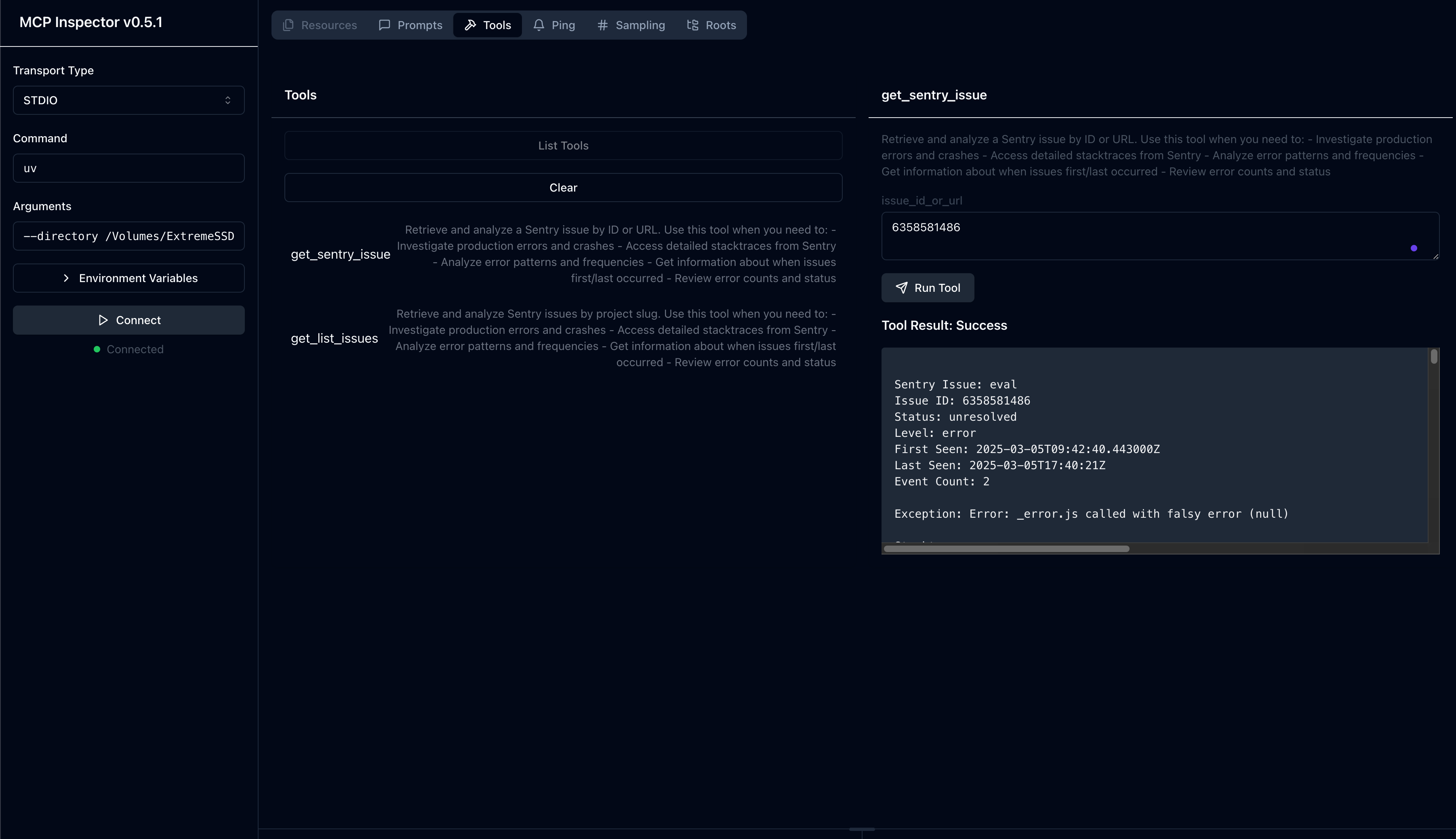
インスペクターツール

フォークから

ライセンス

このMCPサーバーはMITライセンスに基づいてライセンスされています。つまり、MITライセンスの条件に従って、ソフトウェアを自由に使用、改変、配布することができます。詳細については、プロジェクトリポジトリのLICENSEファイルをご覧ください。

Available Tools

2 tools
get_list_issuesA

Retrieve and analyze Sentry issues by project slug. Use this tool when you need to: - Investigate production errors and crashes - Access detailed stacktraces from Sentry - Analyze error patterns and frequencies - Get information about when issues first/last occurred - Review error counts and status

ParametersJSON Schema
NameRequiredDescriptionDefault
project_slugNoSentry project slug to analyze
organization_slugNoSentry organization slug to analyze

TDQS

A3.9/5.0
Behavior3/5

Does the description disclose side effects, auth requirements, rate limits, or destructive behavior?

With no annotations provided, the description carries the full disclosure burden. It successfully describes the data accessed (stacktraces, counts, first/last occurrence dates) but omits safety classification (read-only vs. destructive), authentication requirements, or rate limiting constraints.

Agents need to know what a tool does to the world before calling it. Descriptions should go beyond structured annotations to explain consequences.

Conciseness4/5

Is the description appropriately sized, front-loaded, and free of redundancy?

Well-structured with the core purpose front-loaded in the first sentence, followed by actionable bullet points. Each of the five use-case bullets earns its place by clarifying distinct capabilities. Slightly verbose but efficiently organized.

Shorter descriptions cost fewer tokens and are easier for agents to parse. Every sentence should earn its place.

Completeness4/5

Given the tool's complexity, does the description cover enough for an agent to succeed on first attempt?

Given the simple 2-parameter schema and lack of output schema, the description adequately compensates by detailing the returned information (stacktraces, status, counts) within the text. Missing only safety/permission context which would normally appear in annotations.

Complex tools with many parameters or behaviors need more documentation. Simple tools need less. This dimension scales expectations accordingly.

Parameters3/5

Does the description clarify parameter syntax, constraints, interactions, or defaults beyond what the schema provides?

Schema description coverage is 100% for both 'project_slug' and 'organization_slug', establishing a baseline of 3. The description references 'by project slug' confirming the primary filter, but does not add format constraints, examples, or explain the optional nature of parameters (required: [] in schema).

Input schemas describe structure but not intent. Descriptions should explain non-obvious parameter relationships and valid value ranges.

Purpose5/5

Does the description clearly state what the tool does and how it differs from similar tools?

The description opens with a specific verb-resource combination ('Retrieve and analyze Sentry issues') and scopes it to 'by project slug'. It distinguishes from sibling 'get_sentry_issue' by emphasizing aggregate capabilities like 'patterns and frequencies' and 'error counts' vs. single-issue retrieval.

Agents choose between tools based on descriptions. A clear purpose with a specific verb and resource helps agents select the right tool.

Usage Guidelines4/5

Does the description explain when to use this tool, when not to, or what alternatives exist?

The 'Use this tool when you need to:' preamble followed by five specific scenarios (investigate crashes, access stacktraces, analyze patterns, etc.) provides excellent contextual guidance. Lacks an explicit pointer to sibling 'get_sentry_issue' for single-issue lookups, preventing a perfect score.

Agents often have multiple tools that could apply. Explicit usage guidance like "use X instead of Y when Z" prevents misuse.

get_sentry_issueA

Retrieve and analyze a Sentry issue by ID or URL. Use this tool when you need to: - Investigate production errors and crashes - Access detailed stacktraces from Sentry - Analyze error patterns and frequencies - Get information about when issues first/last occurred - Review error counts and status

ParametersJSON Schema
NameRequiredDescriptionDefault
issue_id_or_urlYesSentry issue ID or URL to analyze

TDQS

A3.9/5.0
Behavior3/5

Does the description disclose side effects, auth requirements, rate limits, or destructive behavior?

No annotations provided, so description carries full burden. Discloses what data is returned (stacktraces, frequencies, first/last occurrence, status) but omits operational concerns: authentication requirements, rate limits, error handling for invalid IDs, or privacy implications of accessing production errors.

Agents need to know what a tool does to the world before calling it. Descriptions should go beyond structured annotations to explain consequences.

Conciseness4/5

Is the description appropriately sized, front-loaded, and free of redundancy?

Well-structured with purpose front-loaded in the first sentence, followed by explicit usage guidelines. Bullet points are specific and non-redundant. Slightly verbose compared to minimalist ideal, but every sentence serves distinct selection or invocation guidance.

Shorter descriptions cost fewer tokens and are easier for agents to parse. Every sentence should earn its place.

Completeness4/5

Given the tool's complexity, does the description cover enough for an agent to succeed on first attempt?

For a single-parameter retrieval tool without output schema, description adequately hints at return value structure by listing accessible data types (stacktraces, error patterns, temporal metadata). Missing only operational edge cases; sufficient for agent to understand tool capabilities and expected output richness.

Complex tools with many parameters or behaviors need more documentation. Simple tools need less. This dimension scales expectations accordingly.

Parameters3/5

Does the description clarify parameter syntax, constraints, interactions, or defaults beyond what the schema provides?

Schema description coverage is 100% (single parameter 'issue_id_or_url' fully documented). Description mentions 'by ID or URL' which aligns with schema but adds no additional semantic value such as format examples, validation rules, or distinction between ID vs URL input behavior. Baseline 3 appropriate for complete schema coverage.

Input schemas describe structure but not intent. Descriptions should explain non-obvious parameter relationships and valid value ranges.

Purpose5/5

Does the description clearly state what the tool does and how it differs from similar tools?

Opens with specific verb+noun combination ('Retrieve and analyze a Sentry issue') and clearly identifies the lookup method ('by ID or URL'). Effectively distinguishes from sibling 'get_list_issues' by emphasizing singular issue retrieval versus listing.

Agents choose between tools based on descriptions. A clear purpose with a specific verb and resource helps agents select the right tool.

Usage Guidelines4/5

Does the description explain when to use this tool, when not to, or what alternatives exist?

Explicitly prefixes usage scenarios with 'Use this tool when you need to:' followed by five specific bulleted contexts (production errors, stacktraces, error patterns, temporal data, counts/status). Lacks explicit 'when not to use' or named alternative, but sibling tool name provides clear contrast.

Agents often have multiple tools that could apply. Explicit usage guidance like "use X instead of Y when Z" prevents misuse.

Tool Schema Changelog

Recent tool additions, removals, and schema changes observed during successful MCP inspections. Dates show when Glama detected each change.

  1. 2 tool updatesv0.6.2
    • First observedget_list_issues
    • First observedget_sentry_issue

TDQS

B3.3/5.0
Disambiguation1/5

The two tools are essentially indistinguishable in purpose. Both descriptions are identical, listing the exact same use cases (investigate errors, access stacktraces, analyze patterns, get timing info, review counts). An agent would have no way to determine when to use get_list_issues versus get_sentry_issue since they appear to serve the same function.

Naming Consistency3/5

Both tools follow a similar get_ prefix pattern, which provides some consistency. However, the naming is confusingly similar (get_list_issues vs get_sentry_issue) rather than clearly differentiated, and the verb-noun structure is mixed (list_issues vs sentry_issue).

Tool Count2/5

With only 2 tools, this feels severely under-scoped for a Sentry integration. A production error monitoring system would typically need tools for creating issues, updating statuses, searching/filtering, accessing events, or managing projects. Two tools is too few to cover meaningful workflows.

Completeness1/5

The tool surface is severely incomplete for Sentry's domain. There are no tools for creating issues, updating issue status (resolve/ignore), searching across projects, accessing event details, managing alerts, or any administrative functions. The two existing tools appear redundant rather than complementary.

Maintenance

ActivityInactive
ResponsivenessNo issues

Resources

Unclaimed servers have limited discoverability.

Looking for Admin?

If you are the server author, to access and configure the admin panel.

Related MCP Connectors

Related MCP Servers

  • F
    license
    B
    quality
    F
    maintenance
    A Model Context Protocol server that enables AI assistants to interact with Sentry for error tracking and monitoring, allowing retrieval and analysis of error data, project management, and performance monitoring through the Sentry API.
    11
    21
    -
  • F
    license
    Not graded
    quality
    D
    maintenance
    A TypeScript implementation of a Model Context Protocol server that connects to Sentry error tracking service, allowing AI models to query and analyze error reports and events.
    31
    -
  • F
    license
    Not graded
    quality
    D
    maintenance
    An MCP server that connects to Sentry.io or self-hosted Sentry instances to retrieve and analyze error reports, stack traces, and debugging information.
    2
    -
  • F
    license
    B
    quality
    F
    maintenance
    A Model Context Protocol server that lets AI assistants interact with the Sentry API to retrieve and analyze error data, manage projects, and monitor application performance.
    11
    11
    -

Latest Blog Posts

MCP directory API

We provide all the information about MCP servers via our MCP API.

curl -X GET 'https://glama.ai/api/mcp/v1/servers/MCP-100/mcp-sentry'

If you have feedback or need assistance with the MCP directory API, please join our Discord server