

A
licenseNot graded
qualityD
maintenanceProduction-ready MCP server for secure Python code execution with artifact capture, virtual environment support, and LM Studio integration.
11
Apache 2.0

The Modal MCP Toolbox server extends LLM capabilities by providing two main tools:
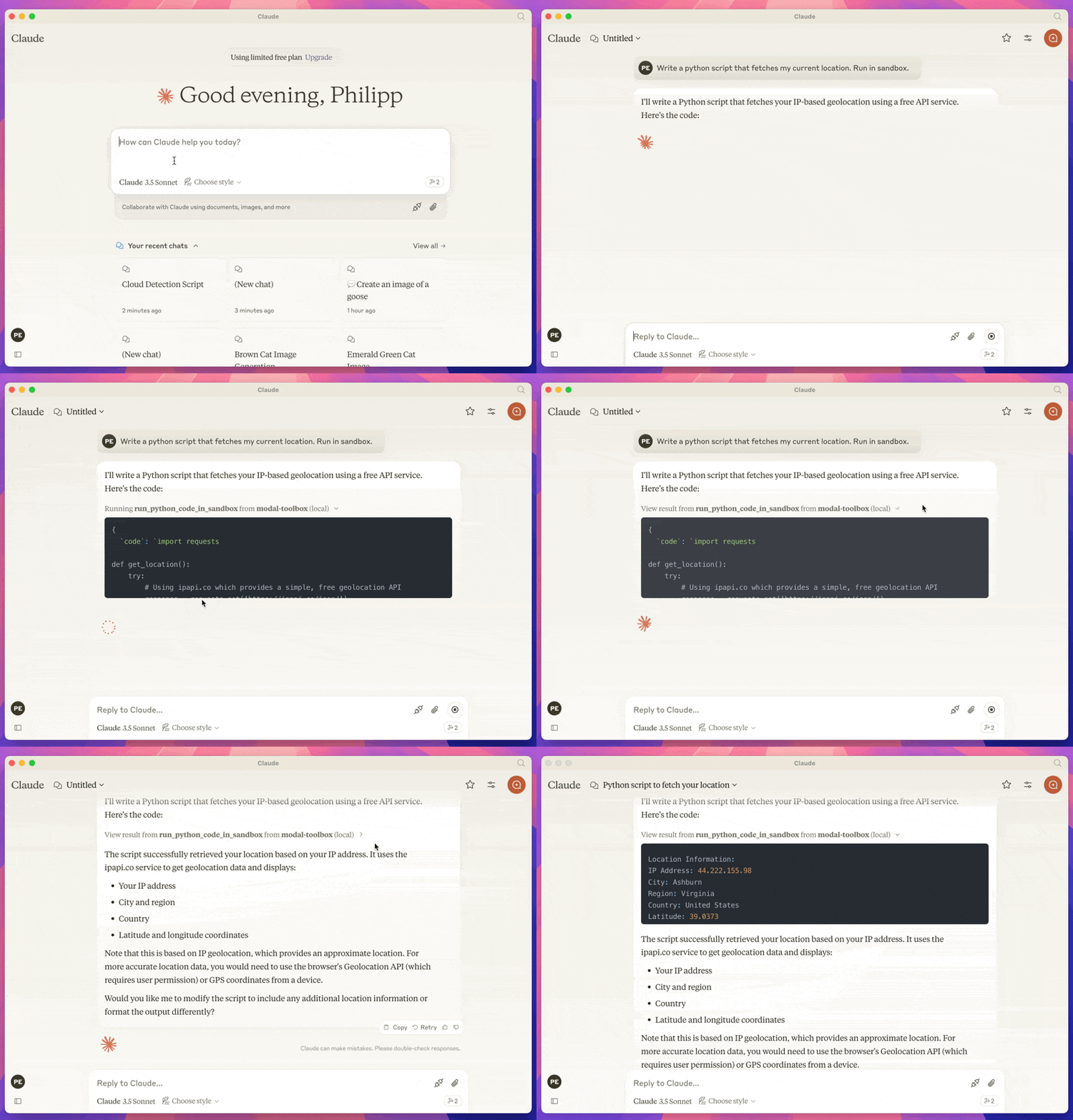
Run Python Code in a Sandbox: Execute Python code in a safe, isolated environment. Supports installing packages, specifying Python versions, and handling file operations.
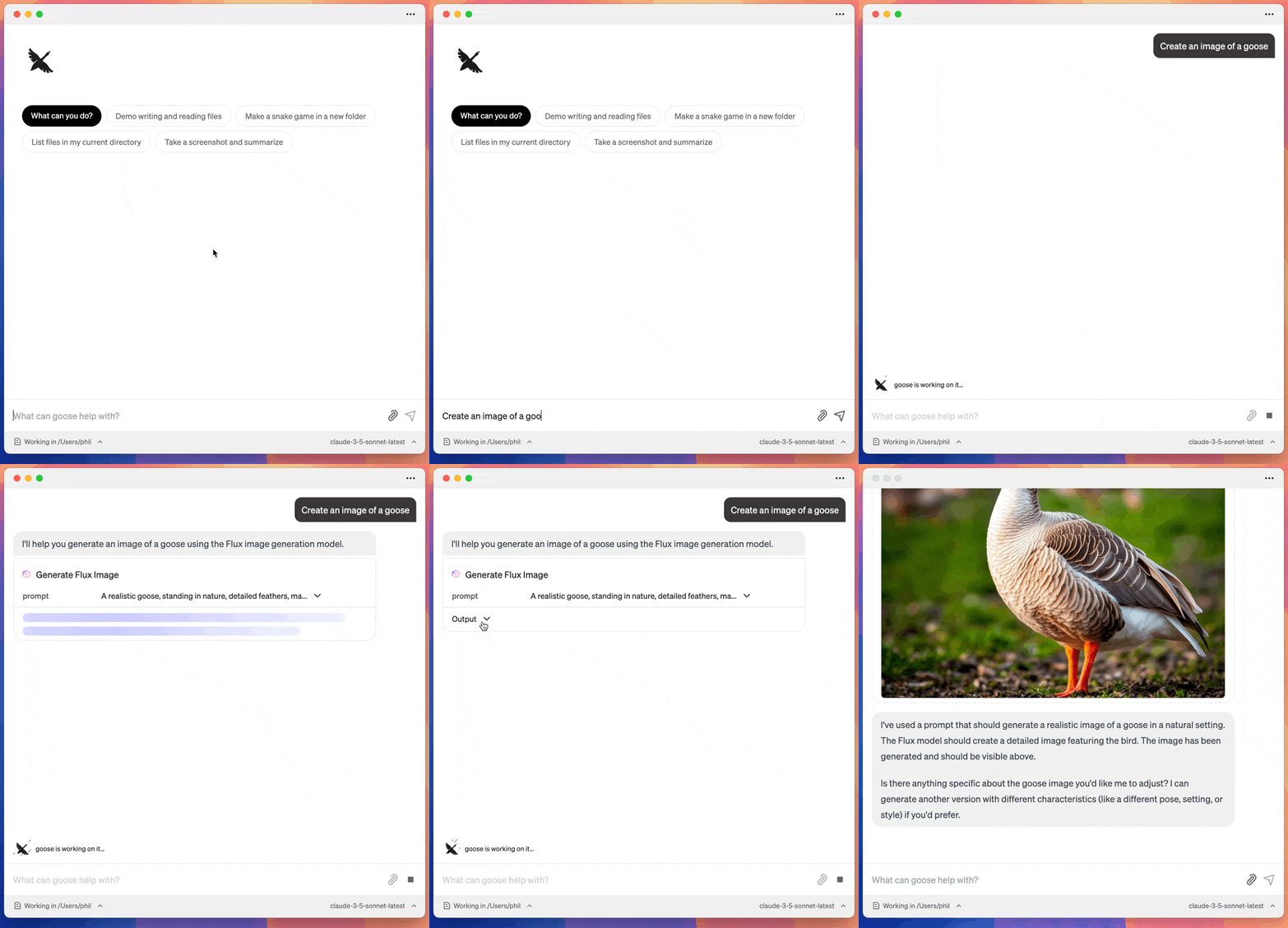
Generate Images: Create images based on textual prompts using the Flux model.
Click on "Install Server".
Wait a few minutes for the server to deploy. Once ready, it will show a "Started" state.
In the chat, type @ followed by the MCP server name and your instructions, e.g., "@Modal MCP Toolbox generate an image of a futuristic city skyline at sunset"
That's it! The server will respond to your query, and you can continue using it as needed.
Here is a step-by-step guide with screenshots.
A collection of Model Context Protocol (MCP) tools that run on Modal. This let's you extend the capabilities of your LLM in tools such as Goose or the Claude Desktop App.
run_python_code_in_sandbox: Let's you run python code in a sandboxed environment.
generate_flux_image: Generate an image using the FLUX model.
Related MCP server: MCP Code Mode
A modal account and a configured modal CLI.
A client that supports MCP. Such as the Claude Desktop App or Goose
This runs against your modal account, so you will need to have a modal account and be logged in.
Installation depends on the client that uses the MCP. Here is instructions for Claude and Goose.
Got to Settings > Developer in the Claude Desktop App. And click on Edit Config.
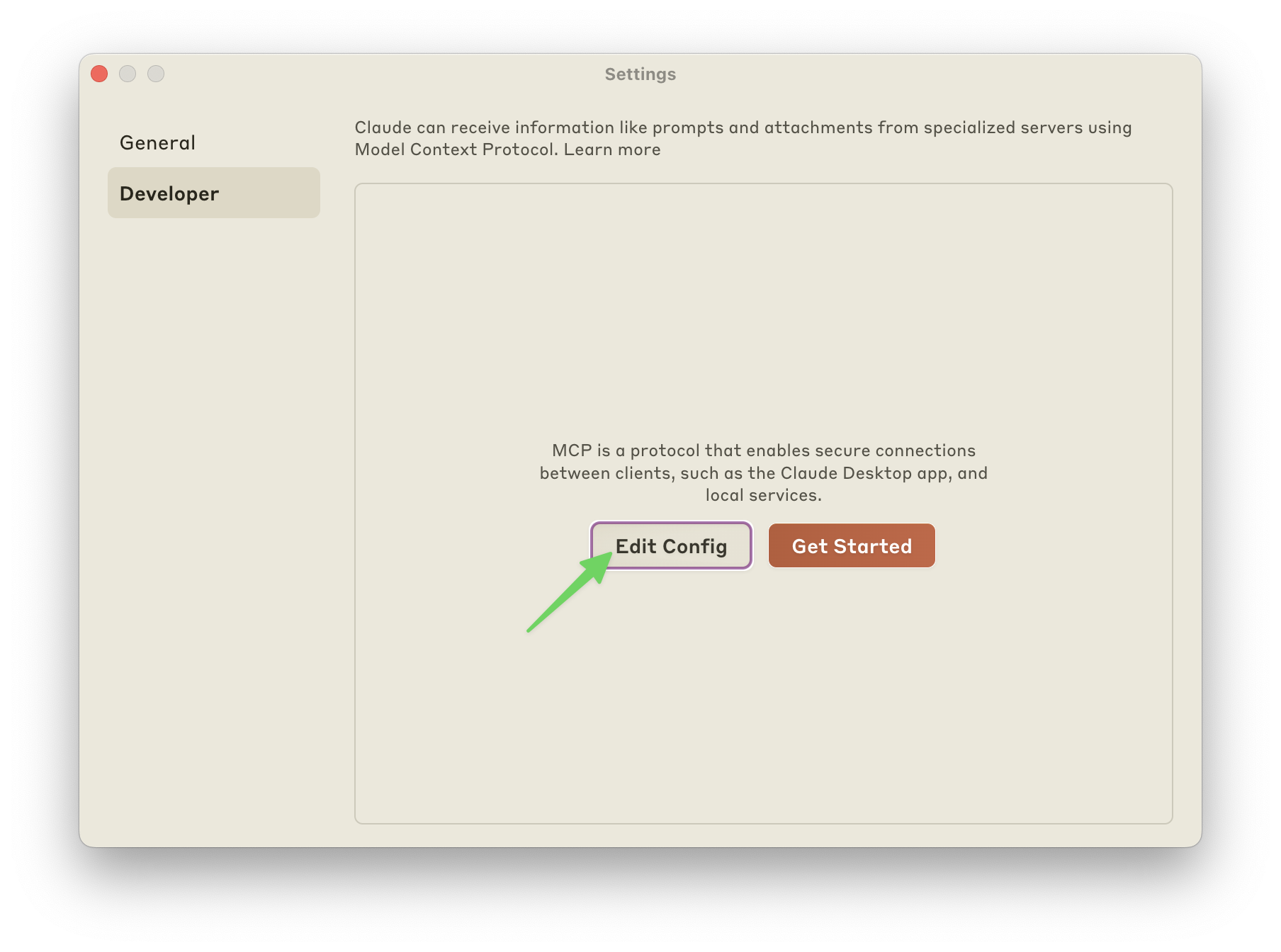
Add the config for the mcp server. My config looks like this:
{
  "mcpServers": {
    "modal-toolbox": {
      "command": "uvx",
      "args": ["modal-mcp-toolbox"]
    }
  }
}Go to Settings and Click on Add.
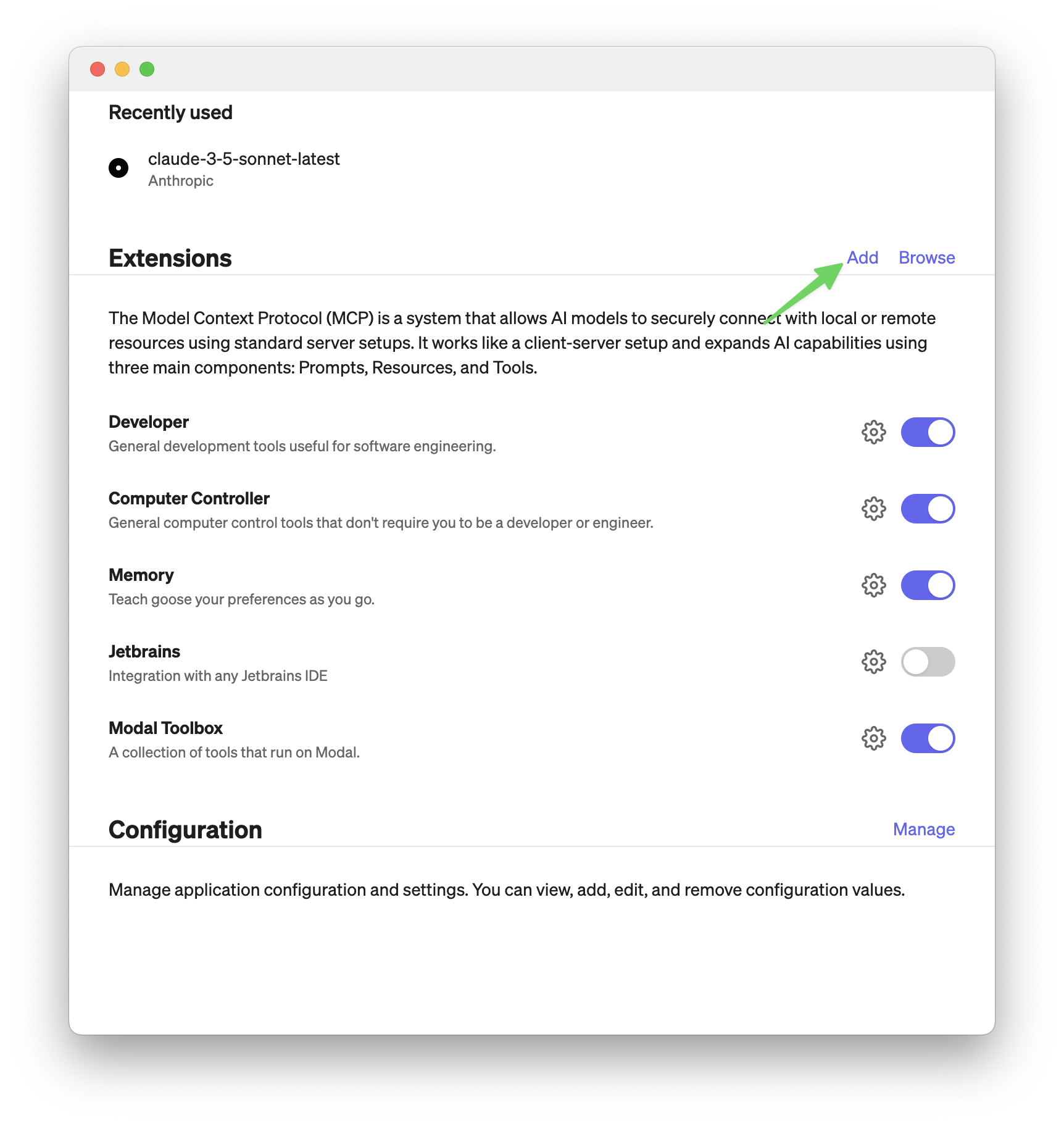
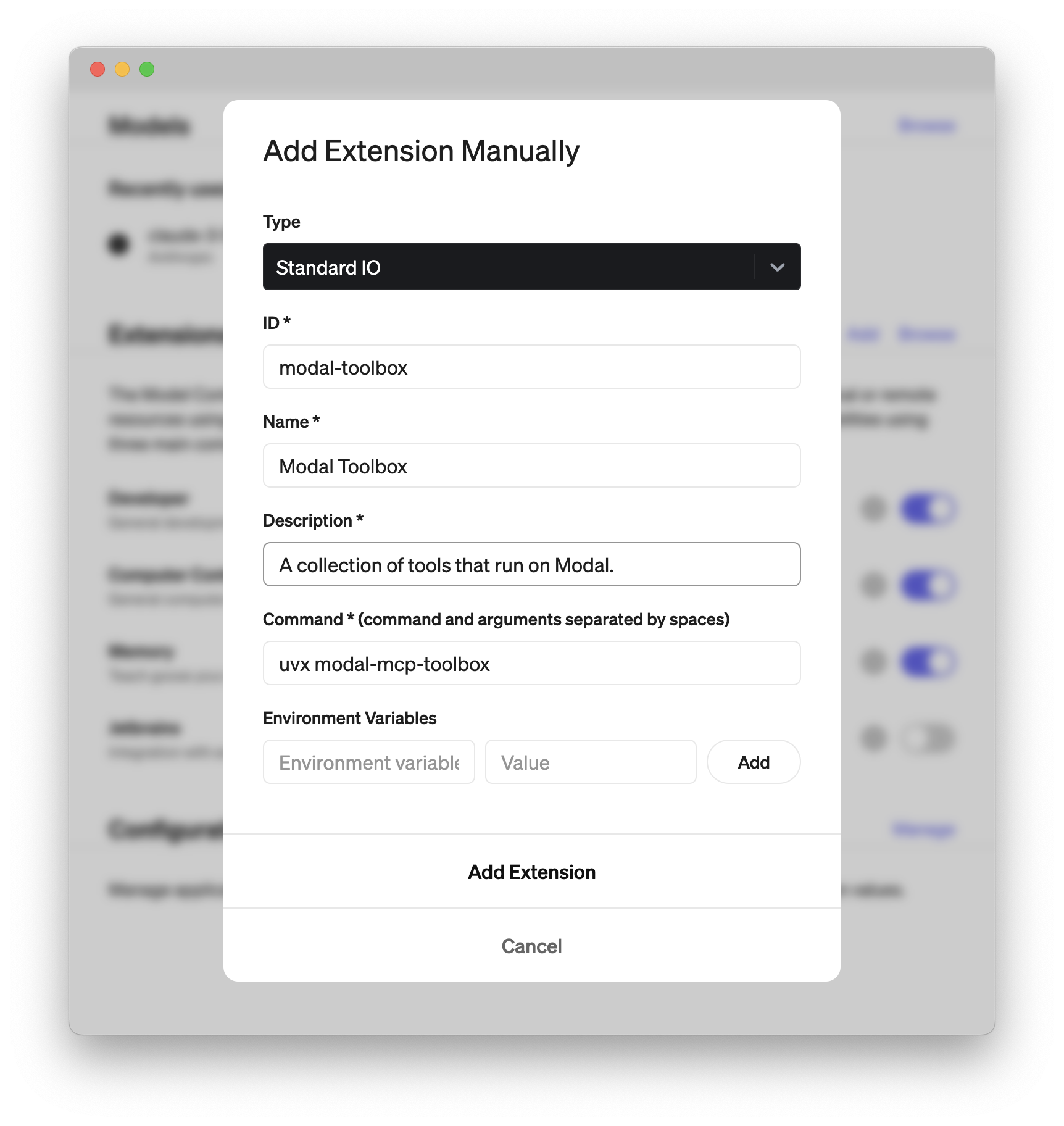
Then add an extension like in the screenshot below. The important part is to set command to:
uvx modal-mcp-toolboxThe rest you can fill in as you like.
To install Modal MCP Toolbox for Claude Desktop automatically via Smithery:
npx -y @smithery/cli install @philipp-eisen/modal-mcp-toolbox --client claudeLet's you generate an image using the Flux model.
| Name | Required | Description | Default |
|---|---|---|---|
| prompt | Yes | The prompt to generate an image for |
Does the description disclose side effects, auth requirements, rate limits, or destructive behavior?
No annotations are provided, so the description carries the full burden of behavioral disclosure. It states the tool generates an image but doesn't disclose any behavioral traits such as rate limits, authentication needs, output format, or potential side effects. This leaves significant gaps for an AI agent to understand how to invoke it correctly.
Agents need to know what a tool does to the world before calling it. Descriptions should go beyond structured annotations to explain consequences.
Is the description appropriately sized, front-loaded, and free of redundancy?
The description is a single, efficient sentence that directly states the tool's purpose without unnecessary words. It is appropriately sized and front-loaded, though it could be slightly more structured by including key details like output type or usage context.
Shorter descriptions cost fewer tokens and are easier for agents to parse. Every sentence should earn its place.
Given the tool's complexity, does the description cover enough for an agent to succeed on first attempt?
Given the tool's complexity (image generation with no annotations and no output schema), the description is incomplete. It lacks information on behavioral aspects, output format, and usage guidelines. Without annotations or an output schema, the description should provide more context to be fully helpful for an AI agent.
Complex tools with many parameters or behaviors need more documentation. Simple tools need less. This dimension scales expectations accordingly.
Does the description clarify parameter syntax, constraints, interactions, or defaults beyond what the schema provides?
The input schema has 100% description coverage, with the single parameter 'prompt' well-documented. The description doesn't add any meaning beyond what the schema provides, as it doesn't elaborate on prompt formatting or constraints. With high schema coverage, the baseline score of 3 is appropriate.
Input schemas describe structure but not intent. Descriptions should explain non-obvious parameter relationships and valid value ranges.
Does the description clearly state what the tool does and how it differs from similar tools?
The description clearly states the tool's purpose: 'generate an image using the Flux model.' It specifies the action (generate) and resource (image) with the specific model (Flux). However, it doesn't explicitly differentiate from the sibling tool 'run_python_code_in_sandbox,' which appears unrelated but could potentially be used for similar image generation tasks, so it lacks sibling differentiation.
Agents choose between tools based on descriptions. A clear purpose with a specific verb and resource helps agents select the right tool.
Does the description explain when to use this tool, when not to, or what alternatives exist?
The description provides no guidance on when to use this tool versus alternatives. It doesn't mention any context, prerequisites, or exclusions, nor does it reference the sibling tool. Usage is implied only by the purpose statement, with no explicit when/when-not instructions.
Agents often have multiple tools that could apply. Explicit usage guidance like "use X instead of Y when Z" prevents misuse.
Runs python code in a safe environment and returns the output.

Usage:
   run_python_code_in_sandbox("print('Hello, world!')")
   run_python_code_in_sandbox("import requests
print(requests.get('https://icanhazip.com').text)", requirements=["requests"])
| Name | Required | Description | Default |
|---|---|---|---|
| code | Yes | The python code to run. | |
| mount_directory | No | Allows you to make a local directory available at `/mounted-dir` for the code in `code`. Needs to be an absolute path. Writes to this directory will NOT be reflected in the local directory. | |
| pull_files | No | List of tuples (absolut_path_sandbox_file, absolute_path_local_file). When provided downloads the file(s) from the sandbox to the local file(s). | |
| python_version | No | The python version to use. If not provided defaults to 3.13 | 3.13 |
| requirements | No | The requirements to install. |
Does the description disclose side effects, auth requirements, rate limits, or destructive behavior?
No annotations are provided, so the description carries the full burden of behavioral disclosure. It mentions 'safe environment' and shows examples, but lacks details on constraints like time limits, memory limits, allowed libraries, network access, or error handling. For a tool that executes arbitrary code, this is a significant gap in transparency about its operational boundaries and safety mechanisms.
Agents need to know what a tool does to the world before calling it. Descriptions should go beyond structured annotations to explain consequences.
Is the description appropriately sized, front-loaded, and free of redundancy?
The description is appropriately sized and front-loaded: it starts with a clear purpose statement, followed by usage examples. The examples are relevant and illustrate key parameters. However, the second example is split across lines, which slightly affects readability but doesn't significantly impact conciseness. Overall, it's efficient with minimal waste.
Shorter descriptions cost fewer tokens and are easier for agents to parse. Every sentence should earn its place.
Given the tool's complexity, does the description cover enough for an agent to succeed on first attempt?
Given the complexity of executing arbitrary code in a sandbox, the lack of annotations, and no output schema, the description is incomplete. It doesn't explain what 'safe environment' entails, potential risks, return formats, or error conditions. For a tool with 5 parameters and significant behavioral implications, more context is needed to guide an AI agent effectively.
Complex tools with many parameters or behaviors need more documentation. Simple tools need less. This dimension scales expectations accordingly.
Does the description clarify parameter syntax, constraints, interactions, or defaults beyond what the schema provides?
The input schema has 100% description coverage, so the baseline is 3. The description doesn't add any parameter semantics beyond what the schema provides; it only shows usage examples with 'code' and 'requirements' parameters. No additional context or clarification is given for parameters like 'mount_directory' or 'pull_files', which have detailed schema descriptions.
Input schemas describe structure but not intent. Descriptions should explain non-obvious parameter relationships and valid value ranges.
Does the description clearly state what the tool does and how it differs from similar tools?
The description clearly states the tool's purpose: 'Runs python code in a safe environment and returns the output.' It specifies the verb ('runs'), resource ('python code'), and key constraint ('safe environment'). However, it doesn't differentiate from the only sibling tool 'generate_flux_image', which is unrelated to code execution, so it doesn't need sibling differentiation but also doesn't explicitly contrast with potential alternatives.
Agents choose between tools based on descriptions. A clear purpose with a specific verb and resource helps agents select the right tool.
Does the description explain when to use this tool, when not to, or what alternatives exist?
The description provides usage examples that imply when to use this tool (for executing Python code in a sandboxed environment), but it doesn't explicitly state when to use it versus alternatives or when not to use it. The examples show basic and network-related code, suggesting general-purpose use, but no explicit guidance on context or exclusions is given.
Agents often have multiple tools that could apply. Explicit usage guidance like "use X instead of Y when Z" prevents misuse.
The two tools have completely distinct purposes: one generates images using a specific AI model, while the other executes Python code in a sandboxed environment. There is no overlap in functionality, and an agent would never confuse these tools.
Both tools follow a consistent verb_noun pattern with snake_case naming: generate_flux_image and run_python_code_in_sandbox. The naming is clear, descriptive, and follows the same convention throughout.
With only 2 tools, this server feels extremely thin for a 'Toolbox' name that suggests broader utility. The tools are unrelated (image generation vs. code execution), making the server feel like two separate utilities bundled together rather than a coherent toolbox.
As a 'Toolbox,' there are significant gaps in coverage. The server lacks tools for common utility tasks like file operations, data processing, or other AI models. Even within the narrow domains represented, there are no complementary operations (e.g., no image manipulation tools to accompany generation, no code analysis tools to accompany execution).
Unclaimed servers have limited discoverability.
If you are the server author, to access and configure the admin panel.
MCP server for Flux AI image generation
Hosted MCP server connecting claude.ai, ChatGPT and other AI apps to your own computer
Focused MCP server for OpenAI image/audio generation (v2.0.0). Wraps endpoints via HAPI CLI.
Use AI models for chat, image, and video generation from Claude Code and other MCP hosts.
We provide all the information about MCP servers via our MCP API.
curl -X GET 'https://glama.ai/api/mcp/v1/servers/philipp-eisen/modal-mcp-toolbox'
If you have feedback or need assistance with the MCP directory API, please join our Discord server