# MCP Jenkins

[](https://pepy.tech/projects/mcp-jenkins)
[](https://github.com/lanbaoshen/mcp-jenkins/actions/workflows/test.yml/badge.svg)

The Model Context Protocol (MCP) is an open-source implementation that bridges Jenkins with AI language models following Anthropic's MCP specification. This project enables secure, contextual AI interactions with Jenkins tools while maintaining data privacy and security.
## Installation
Choose one of these installation methods:
```
# Using uv (recommended)
pip install uv
uvx mcp-jenkins
# Using pip
pip install mcp-jenkins
mcp-jenkins
# Docker
docker pull ghcr.io/lanbaoshen/mcp-jenkins:latest
docker run -p 9887:9887 --rm ghcr.io/lanbaoshen/mcp-jenkins:latest --transport streamable-http
```
## Line Arguments
When using command line arguments, you can specify the Jenkins server details as follows:
```shell
# Simple streamable-http example
uvx mcp-jenkins --transport streamable-http
```
| Argument | Description | Required |
|--------------------------------------------------------------|-----------------------------------------------------------------------------------------------------------------|----------|
| `--jenkins-url` | The URL of the Jenkins server. (Http app can set it via headers `x-jenkins-url`) | No |
| `--jenkins-username` | The username for Jenkins authentication. (Http app can set it via headers `x-jenkins-username`) | No |
| `--jenkins-password` | The password or API token for Jenkins authentication. (Http app can set it via headers `x-jenkins-password`) | No |
| `--jenkins-timeout` | Timeout for Jenkins API requests in seconds. Default is `5` seconds. | No |
| `--jenkins-verify-ssl/--no-jenkins-verify-ssl` | Whether to verify SSL certificates when connecting to Jenkins. Default is to verify. | No |
| `--jenkins-session-singleton/--no-jenkins-session-singleton` | Whether to use a singleton Jenkins client for all requests in the same session. Default is True. | No |
| `--read-only` | Whether to enable read-only mode. Default is False | No |
| `--tool-regex` | A regex pattern to filter available tools. Default is to allow all tools. | No |
| `--transport` | Transport method to use for communication. Options are `stdio`, `sse` or `streamable-http`. Default is `stdio`. | No |
| `--host` | Host address for `streamable-http` transport. Default is `0.0.0.0` | No |
| `--port` | Port number for `streamable-http` transport. Default is `9887`. | No |
## Configuration and Usage
### Jetbrains Github Copilot
1. Open Jetbrains Settings
2. Navigate to Github Copilot > MCP > Configure
3. Add the following configuration:
```json
{
"servers": {
"my-mcp-server": {
"type": "stdio",
"command": "uvx",
"args": [
"mcp-jenkins",
"--jenkins-url=xxx",
"--jenkins-username=xxx",
"--jenkins-password=xxx"
]
}
}
}
```
### VSCode Copilot Chat
1. Create `.vscode` folder with `mcp.json` file in you workspace for local setup or edit `settings.json` trough settings menu.
2. Insert the following configuration:
- SSE mode
```json
{
"servers": {
"jenkins": {
"url": "http://localhost:9887/sse",
"type": "sse"
}
}
}
```
- Streamable-Http mode
```json
{
"servers": {
"mcp-jenkins-mcp": {
"autoApprove": [],
"disabled": false,
"timeout": 60,
"type": "streamableHttp",
"url": "http://localhost:9887/mcp"
}
}
}
```
Run the Jenkins MCP server with the following command:
```shell
uvx mcp-jenkins \
--jenkins-url xxx \
--jenkins-username xxx \
--jenkins-password xxx \
--transport sse
```
## Available Tools
| Tool | Description |
|----------------------------|-----------------------------------------------------|
| `get_item` | Get a specific item by name. |
| `get_item_config` | Get the configuration of a specific item. |
| `get_all_items` | Get all items in Jenkins. |
| `query_items` | Query items based on pattern. |
| `build_item` | Build a item. |
| `get_all_nodes` | Get all nodes in Jenkins. |
| `get_node` | Get a specific node by name. |
| `get_node_config` | Get the configuration of a specific node. |
| `get_all_queue_items` | Get all queue items in Jenkins. |
| `get_queue_item` | Get a specific queue item by ID. |
| `cancel_queue_item` | Cancel a specific queue item by ID. |
| `get_build` | Get a specific build by job name and build number. |
| `get_build_scripts` | Get scripts associated with a specific build. |
| `get_build_console_output` | Get the console output of a specific build. |
| `get_build_test_report` | Get the test report of a specific build. |
| `get_running_builds` | Get all currently running builds in Jenkins. |
| `stop_build` | Stop a specific build by job name and build number. |
## Contributing
[CONTRIBUTING.md](CONTRIBUTING.md)
## License
Licensed under MIT - see [LICENSE](LICENSE) file. This is not an official Jenkins product.
## Star History
[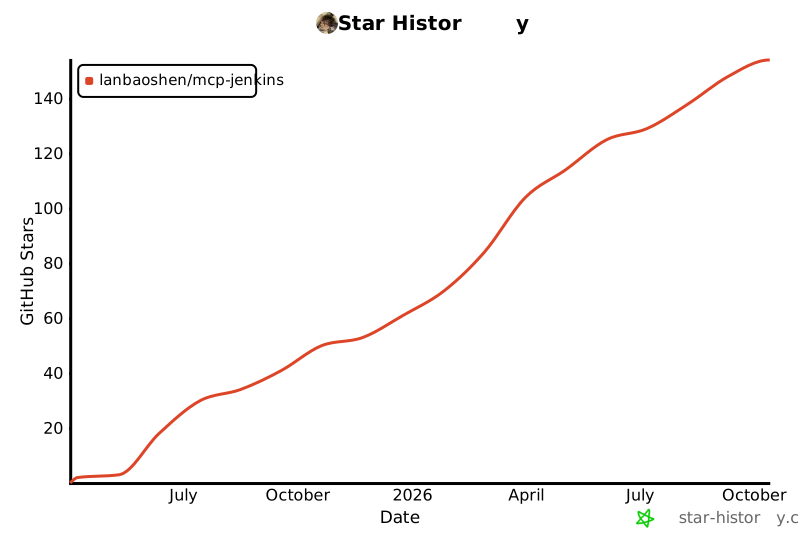](https://www.star-history.com/#lanbaoshen/mcp-jenkins&Date)
