
A
licenseA
qualityNot graded
maintenanceEnables interaction with MiniMax AI APIs for text-to-speech, voice cloning, video generation, image generation, and music creation through MCP clients like Claude Desktop and Cursor.
9
-

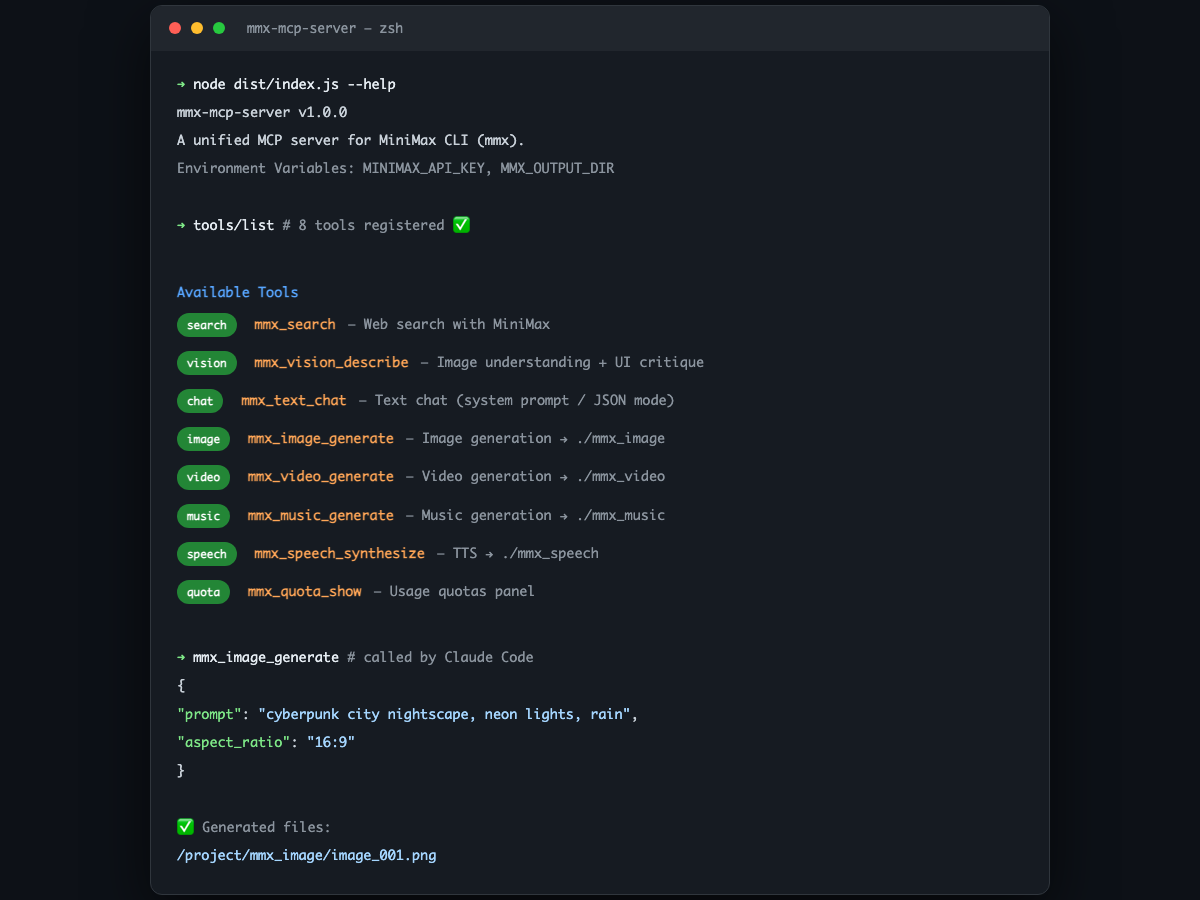
一个统一的 MiniMax 全模态 MCP Server,基于 mmx CLI 封装,支持文本、搜索、图像理解、图像生成、语音合成、视频生成、音乐生成和配额查询。
如果你使用的是 Claude Code、OpenCode 或其他支持 MCP 的 AI CLI 工具,直接把下面这段话丢给 AI:
帮我安装并配置 mmx-mcp-server:
全局安装 mmx-cli(
npm install -g mmx-cli)克隆 https://github.com/zth0828/mmx-mcp-server 到任意目录,执行
npm install && npm run build在我的 MCP 配置文件(如
~/.claude/settings.json)里添加mmxserver,指向构建产物dist/index.js向我要 MiniMax API Key,并通过
env.MINIMAX_API_KEY注入完成后告诉我配置结果
Related MCP server: MiniMax Unified MCP
npm install -g mmx-cli验证安装:
mmx --versiongit clone https://github.com/zth0828/mmx-mcp-server.git
cd mmx-mcp-server
npm install
npm run build在 MCP 客户端配置(如 ~/.claude/settings.json)中添加:
{
  "mcpServers": {
    "mmx": {
      "command": "node",
      "args": ["/path/to/mmx-mcp-server/dist/index.js"],
      "env": {
        "MINIMAX_API_KEY": "sk-xxxxx"
      }
    }
  }
}适合不方便写 env 的 MCP 客户端:
{
  "mcpServers": {
    "mmx": {
      "command": "node",
      "args": [
        "/path/to/mmx-mcp-server/dist/index.js",
        "--api-key",
        "sk-xxxxx"
      ]
    }
  }
}mmx CLI 本地登录如果前两种方式都没配,Server 会自动回退到 mmx CLI 自身的认证状态(需提前执行 mmx auth login --api-key sk-xxxxx)。这种方式仅适合本机使用。
默认情况下,生成的图片、视频、音乐、语音会自动保存到 当前工作目录 下的子文件夹:
mmx_image/ — 图片
mmx_video/ — 视频
mmx_music/ — 音乐
mmx_speech/ — 语音
如果你希望统一放到其他位置,可以通过环境变量 MMX_OUTPUT_DIR 修改:
{
  "mcpServers": {
    "mmx": {
      "command": "node",
      "args": ["/path/to/mmx-mcp-server/dist/index.js"],
      "env": {
        "MINIMAX_API_KEY": "sk-xxxxx",
        "MMX_OUTPUT_DIR": "/Users/xxx/Downloads/mmx-output"
      }
    }
  }
}
不配置
MMX_OUTPUT_DIR也完全不影响使用,文件会自动落在当前项目目录下。
每次调用时也可以通过 out 参数指定单个文件的输出路径。
Tool | 说明 |
| 网页搜索 |
| 图像理解(支持自定义分析指令,如 UI critique) |
| 文本对话(支持 system prompt、JSON 模式) |
| 图像生成(支持 |
| 语音合成 TTS(支持 |
| 视频生成(支持 |
| 音乐生成(支持 |
| 查看配额 |
配置完成后,你可以在 Claude Code 中直接说:
"帮我搜索 MiniMax 的最新新闻"
"分析一下这个 UI 设计图,给出优化建议"
"生成一张赛博朋克风格的城市夜景图"
"把这段文字转成语音"
Recent tool additions, removals, and schema changes observed during successful MCP inspections. Dates show when Glama detected each change.
No tool schema history has been recorded yet.
This server cannot be installed
Unclaimed servers have limited discoverability.
If you are the server author, to access and configure the admin panel.
MCP server for MiniMax H3 multimodal video generation
MCP server for Hailuo (MiniMax) AI video generation
AI image, video, voice and music generation over MCP, routed to Veo 3.1, Seedance 2.0 and more.
MCP server for Wan AI video generation
We provide all the information about MCP servers via our MCP API.
curl -X GET 'https://glama.ai/api/mcp/v1/servers/zth0828/mmx-mcp-server'
If you have feedback or need assistance with the MCP directory API, please join our Discord server