

A
licenseA
qualityA
maintenanceMCP server for querying the Shodan API and Shodan CVEDB. This server provides tools for IP lookups, device searches, DNS lookups, vulnerability queries, CPE lookups, and more.
7
362 npm
174
MIT

クエリ条件に基づいてネットワーク資産情報を提供するモデルコンテキストプロトコル(MCP)サーバー。このサーバーにより、大規模言語モデル(LLM)は、dorksやその他の検索パラメータを使用してZoomEyeにクエリを実行し、ネットワーク資産情報を取得できます。
この MCP サーバーは、Claude Desktop、Cursor、Windsurf、Cline、Continue、Zed などの AI アシスタントや開発環境と統合され、自然言語による対話を通じてインターネットに接続されたデバイス、サービス、脆弱性を検索および分析できるようになります。
dorksを使用してZoomEyeにネットワーク資産情報を照会する
パフォーマンスを向上させ、API呼び出しを削減するキャッシュメカニズム
失敗したAPIリクエストの自動再試行メカニズム
包括的なエラー処理とログ記録
Related MCP server: Shodan-MCP-Server
zoomeye_search - クエリ条件に基づいてネットワーク資産情報を取得します。
必須パラメータ:
qbase64 (文字列): ZoomEye検索用のBase64エンコードされたクエリ文字列
オプションパラメータ:
page (整数): ビューアセットのページ番号。デフォルトは 1
pagesize (整数): ページあたりのレコード数。デフォルトは 10、最大値は 1000
fields (文字列): 返されるフィールド(カンマ区切り)
sub_type (文字列): データ型。v4、v6、web をサポートします。デフォルトは v4 です。
facets (文字列):統計項目。複数ある場合はカンマで区切る。
ignore_cache (boolean): キャッシュを無視するかどうか
サーバーが起動したら、AIアシスタントや開発環境からサーバーとやり取りできるようになります。使い方は以下のとおりです。
上記のインストール方法のいずれかを使用してサーバーを起動します
AIアシスタント(Claude Desktop、Cursor、Windsurf、Cline、Continue、Zedなど)をサーバーを使用するように設定します
自然言語を使用してネットワーク情報を照会する
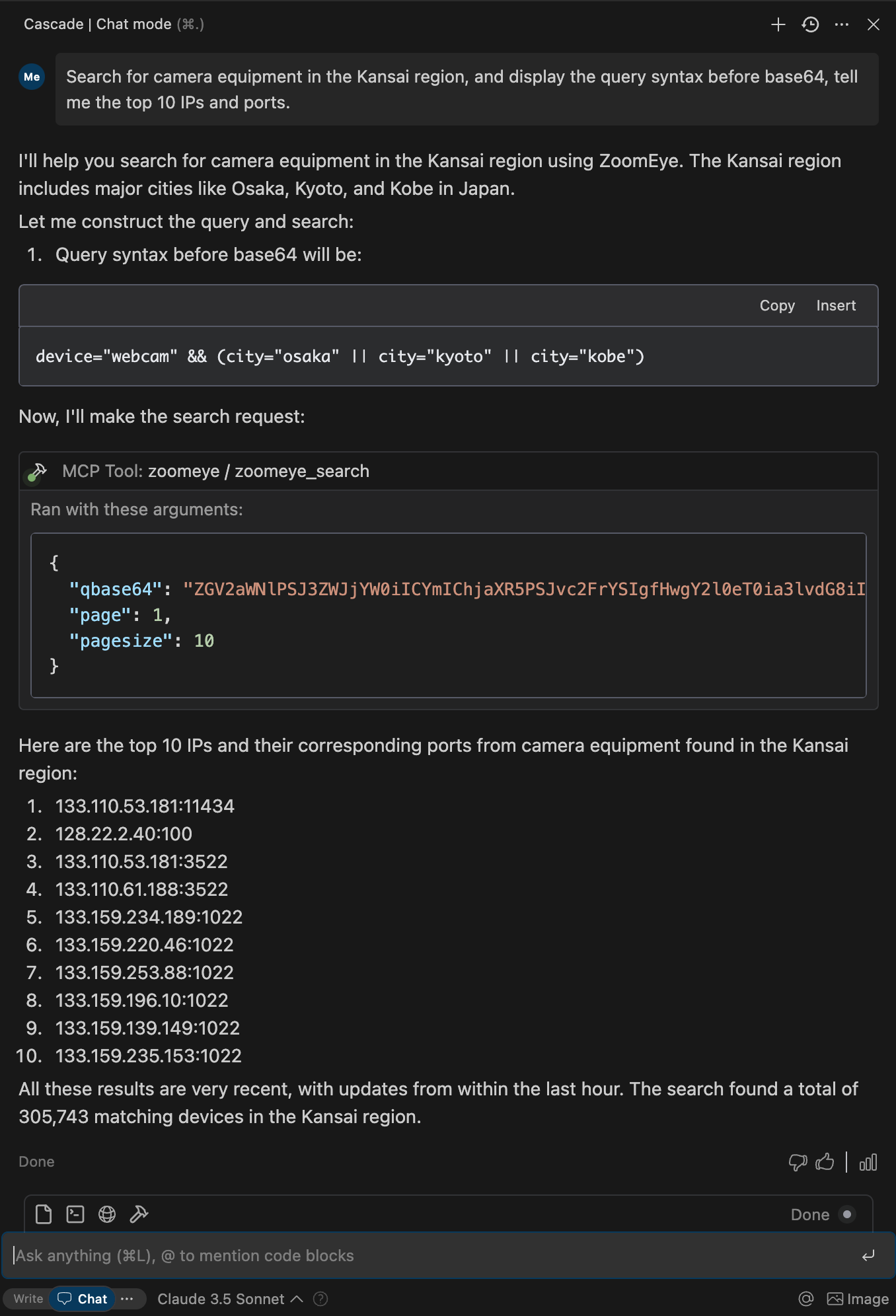
検索範囲はデバイス (IPv4、IPv6) と Web サイト (ドメイン) をカバーします。
検索文字列を入力すると、システムは、HTTP、SSH、FTP などのさまざまなプロトコルのコンテンツ (HTTP/HTTPS プロトコル ヘッダー、本文、SSL、タイトル、その他のプロトコル バナーなど) を含むキーワードを「グローバル」モードで照合します。
検索文字列は大文字と小文字を区別せず、一致のために分割されます(検索結果ページには「分割」テスト機能があります)。== を使用した検索では、大文字と小文字を区別した厳密な構文による一致が強制されます。
検索文字列には引用符を使用してください(例:"Cisco System" または 'Cisco System')。検索文字列に引用符が含まれている場合は、エスケープ文字を使用してください(例:,"a"b)。検索文字列に括弧が含まれている場合は、エスケープ文字を使用してください(例:portinfo())。
より詳細な検索構文ルールについてはprompts.pyで確認できます。
ZoomEye 検索 API の詳細については、 ZoomEye API v2 ドキュメントを参照してください。
ZoomEye APIキー
ZoomEyeでアカウントを登録する
アカウント設定からAPIキーを取得します
APIキーはZoomEye APIへのリクエストを認証するために使用されます
Python環境
Python 3.10以上が必要です
あるいは、PythonをインストールせずにDockerを使用してサーバーを実行することもできます。
あるいは、pip 経由でmcp-server-zoomeyeをインストールすることもできます。
pip install mcp-server-zoomeyeインストール後、次のコマンドを使用してスクリプトとして実行できます。
python -m mcp_server_zoomeyeDocker を使用して ZoomEye MCP サーバーを実行することもできます。
# Pull the latest image
docker pull zoomeyeteam/mcp-server-zoomeye:latest

# Run the container with your API key
docker run -i --rm -e ZOOMEYE_API_KEY=your_api_key_here zoomeyeteam/mcp-server-zoomeye:latest注:
linux/amd64およびlinux/arm64プラットフォームをサポートし、Intel/AMD および ARM (Apple Silicon など) プロセッサで実行できるマルチアーキテクチャ Docker イメージを提供します。
あるいは、ソースから Docker イメージをビルドすることもできます。
# Clone the repository
git clone https://github.com/zoomeye-ai/mcp_zoomeye.git
cd mcp_zoomeye

# Build the Docker image
docker build -t zoomeyeteam/mcp-server-zoomeye:local .

# Run the container
docker run -i --rm -e ZOOMEYE_API_KEY=your_api_key_here zoomeyeteam/mcp-server-zoomeye:local
uvはRustで書かれた高速なPythonパッケージインストーラー兼リゾルバーです。pipの現代的な代替手段であり、大幅なパフォーマンス向上を実現します。
# Install uv using curl (macOS/Linux)
curl -LsSf https://astral.sh/uv/install.sh | sh

# Or using PowerShell (Windows)
irm https://astral.sh/uv/install.ps1 | iex

# Or using Homebrew (macOS)
brew install uvuvxを使用する場合、特別なインストールは必要ありません。これにより、Python パッケージを直接実行できます。
あるいは、uv を使用してパッケージをインストールすることもできます。
# Install in the current environment
uv pip install mcp-server-zoomeye

# Or create and install in a new virtual environment
uv venv
uv pip install mcp-server-zoomeyeZoomEye MCP サーバーには次の環境変数が必要です。
ZOOMEYE_API_KEY : 認証用のZoomEye APIキー
この環境変数はいくつかの方法で設定できます。
シェルセッションでエクスポートします:
export ZOOMEYE_API_KEY="your_api_key_here"コンテナを実行するときに直接渡します(Docker の場合):
docker run -i --rm -e ZOOMEYE_API_KEY=your_api_key_here zoomeyeteam/mcp-server-zoomeye:latestClaude 設定に以下を追加します。
"mcpServers": {
  "zoomeye": {
    "command": "uvx",
    "args": ["mcp-server-zoomeye"],
    "env": {
        "ZOOMEYE_API_KEY": "your_api_key_here"
    }
  }
}
"mcpServers": {
"zoomeye": {
"command": "docker",
"args": ["run", "-i", "--rm", "-e", "ZOOMEYE_API_KEY=your_api_key_here", "zoomeyeteam/mcp-server-zoomeye:latest"],
"env": {
"ZOOMEYE_API_KEY": "your_api_key_here"
}
}
}"mcpServers": {
"zoomeye": {
"command": "python",
"args": ["-m", "mcp_server_zoomeye"],
"env": {
"ZOOMEYE_API_KEY": "your_api_key_here"
}
}
}Zed のsettings.jsonに以下を追加します。
"context_servers": [
  "mcp-server-zoomeye": {
    "command": "uvx",
    "args": ["mcp-server-zoomeye"],
    "env": {
        "ZOOMEYE_API_KEY": "your_api_key_here"
    }
  }
],
"context_servers": {
"mcp-server-zoomeye": {
"command": "python",
"args": ["-m", "mcp_server_zoomeye"],
"env": {
"ZOOMEYE_API_KEY": "your_api_key_here"
}
}
},{
"name": "zoomeye_search",
"arguments": {
"qbase64": "app=\"Apache Tomcat\""
}
}応答:
{
  "code": 60000,
  "message": "success",
  "total": 163139107,
  "query": "title=\"cisco vpn\"",
  "data": [
    {
      "url": "https://1.1.1.1:443",
      "ssl.jarm": "29d29d15d29d29d00029d29d29d29dea0f89a2e5fb09e4d8e099befed92cfa",
      "ssl.ja3s": "45094d08156d110d8ee97b204143db14",
      "iconhash_md5": "f3418a443e7d841097c714d69ec4bcb8",
      "robots_md5": "0b5ce08db7fb8fffe4e14d05588d49d9",
      "security_md5": "0b5ce08db7fb8fffe4e14d05588d49d9",
      "ip": "1.1.1.1",
      "domain": "www.google.com",
      "hostname": "SPACEX",
      "os": "windows",
      "port": 443,
      "service": "https",
      "title": ["GoogleGoogle appsGoogle Search"],
      "version": "1.1.0",
      "device": "webcam",
      "rdns": "c01031-001.cust.wallcloud.ch",
      "product": "OpenSSD",
      "header": "HTTP/1.1 302 Found Location: https://www.google.com/?gws_rd=ssl Cache-Control: private...",
      "header_hash": "27f9973fe57298c3b63919259877a84d",
      "body": "HTTP/1.1 302 Found Location: https://www.google.com/?gws_rd=ssl Cache-Control: private...",
      "body_hash": "84a18166fde3ee7e7c974b8d1e7e21b4",
      "banner": "SSH-2.0-OpenSSH_7.6p1 Ubuntu-4ubuntu0.3",
      "update_time": "2024-07-03T14:34:10",
      "header.server.name": "nginx",
      "header.server.version": "1.8.1",
      "continent.name": "Europe",
      "country.name": "Germany",
      "province.name": "Hesse",
      "city.name": "Frankfurt",
      "lon": "118.753262",
      "lat": "32.064838",
      "isp.name": "aviel.ru",
      "organization.name": "SERVISFIRST BANK",
      "zipcode": "210003",
      "idc": 0,
      "honeypot": 0,
      "asn": 4837,
      "protocol": "tcp",
      "ssl": "SSL Certificate Version: TLS 1.2 CipherSuit: TLS_ECDHE_RSA_WITH_AES_128_GCM_SHA256...",
      "primary_industry": "Finance",
      "sub_industry": "bank",
      "rank": 60
    }
  ]
}モデルコンテキストプロトコルインスペクターは、クライアントとのやり取りをシミュレートすることでMCPサーバーのデバッグを支援するツールです。ZoomEye MCPサーバーのテストに使用できます。
# For uvx installation
npx @modelcontextprotocol/inspector uvx mcp-server-zoomeye

# If developing locally
cd path/to/servers/src/mcp_server_zoomeye
npx @modelcontextprotocol/inspector uv run mcp-server-zoomeye認証エラー
ZoomEye APIキーが正しく、環境変数として適切に設定されていることを確認してください。
APIキーの有効期限が切れていないか、取り消されていないか確認してください
接続の問題
インターネット接続を確認してください
ZoomEye API がダウンしていないか確認する
結果なし
クエリが具体的すぎるか、構文エラーが含まれている可能性があります
クエリを簡素化するか、別の検索語句を使用してみてください
レート制限
ZoomEye API にはアカウントの種類に応じたレート制限があります
リクエストの間隔をあけるか、アカウントをアップグレードして上限額を増やしましょう
ZoomEye MCP サーバーは、パフォーマンスを向上させ、API 呼び出しを削減するためにキャッシュを実装します。
レスポンスはクエリパラメータに基づいてキャッシュされます
キャッシュ期間は設定可能(デフォルト: 1 時間)
クエリでignore_cache``trueに設定することでキャッシュをバイパスできます。
fieldsパラメータを使用して、クエリ結果内の特定のフィールドをリクエストできます。
{
  "name": "zoomeye_search",
  "arguments": {
    "qbase64": "app=\"Apache\"",
    "fields": "ip,port,domain,service,os,country,city"
  }
}多くの結果を返すクエリの場合は、ページ分けすることができます。
{
  "name": "zoomeye_search",
  "arguments": {
    "qbase64": "app=\"Apache\"",
    "page": 2,
    "pagesize": 20
  }
}mcp-server-zoomeye の機能拡張と改善のため、皆様の貢献を歓迎いたします。新しい関連ツールの追加、既存機能の強化、ドキュメントの改善など、皆様からの貴重なご意見をお待ちしております。
他の MCP サーバーと実装パターンの例については、https: //github.com/modelcontextprotocol/serversを参照してください。
プルリクエストを歓迎します!mcp-server-zoomeye をより堅牢で実用的なものにするために、新しいアイデア、バグ修正、機能強化などをお気軽にご提供ください。
mcp-server-zoomeye は MIT ライセンスに基づきライセンスされています。つまり、MIT ライセンスの条件に従って、ソフトウェアを自由に使用、改変、配布できます。詳細については、プロジェクトリポジトリの LICENSE ファイルをご覧ください。
Search Scope covers devices (IPv4, IPv6) and websites (domains).
When entering a search string, the system will match keywords in "global" mode, including content from various protocols such as HTTP, SSH, FTP, etc. (e.g., HTTP/HTTPS protocol headers, body, SSL, title, and other protocol banners).
Search strings are case-insensitive and will be segmented for matching (the search results page provides a " segmentation" test feature). When using == for search, it enforces exact case-sensitive matching with strict syntax.
Please use quotes for search strings (e.g., "Cisco System" or 'Cisco System'). If the search string contains quotes, use the escape character, e.g.,"a"b". If the search string contains parentheses, use the escape character, e.g., portinfo().
=, Search for assets containing keywords title="knownsec" Search for websites with titles containing Knownsec's assets
==, Accurate search, indicating a complete match of keywords (case sensitive), can search for data with empty values title=="knownsec" Precise search, which means exact match of keywords (case sensitive), and can search for data with empty values Search for assets with the website title "Knownsec"
||, Enter "||" in the search box to indicate the logical operation of "or" service="ssh" || service="http" Search for SSH or HTTP data
&&, Enter "&&" in the search box to indicate the logical operation of "and" device="router" && after="2020-01-01" Search for routers after Jan 1, 2020
!=, Enter "!=" in the search box to indicate the logical operation of "not" country="US" && subdivisions!="new york" Search for data in united states excluding new york
(), Enter "()" in the search box to indicate the logical operation of "priority processing" (country="US" && port!=80) || (country="US" && title!="404 Not Found") Search excluding port 80 in US or "404 not found" in the US
*,Fuzzy search, use * for search title="*google" Fuzzy search, use * to search Search for assets containing Knowsec in the website title, and the title can start with any character
country="CN" Search for country assets Input country abbreviations or names, e.g. country="china"
subdivisions="beijing" Search for assets in the specified administrative region Input in English, e.g. subdivisions="beijing"
city="changsha" Search for city assets Input in English, e.g. city="changsha"
ssl="google" Search for assets with "google" string in ssl certificate Often used to search for corresponding targets by product name and company name
ssl.cert.fingerprint="F3C98F223D82CC41CF83D94671CCC6C69873FABF" Search for certificate-related fingerprint assets
ssl.chain_count=3 Search for SSL chain count assets
ssl.cert.alg="SHA256-RSA" Search for signature algorithms supported by certificates
ssl.cert.issuer.cn="pbx.wildix.com" Search for the common domain name of the user certificate issuer
ssl.cert.pubkey.rsa.bits=2048 Search for rsa_bits certificate public key bit number
ssl.cert.pubkey.ecdsa.bits=256 Search for ecdsa_bits certificate public key bit number
ssl.cert.pubkey.type="RSA" Search for the public key type of the certificate
ssl.cert.serial="18460192207935675900910674501" Search for certificate serial number
ssl.cipher.bits="128" Search for encryption suite bit number
ssl.cipher.name="TLS_AES_128_GCM_SHA256" Search for encryption suite name
ssl.cipher.version="TLSv1.3" Search for encryption suite version
ssl.version="TLSv1.3" Search for the SSL version of the certificate
ssl.cert.subject.cn="example.com" Search for the common domain name of the user certificate holder
ssl.jarm="29d29d15d29d29d00029d29d29d29dea0f89a2e5fb09e4d8e099befed92cfa" Search for assets related to Jarm Fingerprint content
ssl.ja3s=45094d08156d110d8ee97b204143db14 Find assets related to specific JA3S fingerprints
ip="8.8.8.8" Search for assets related to the specified IPv4 address ip="2600:3c00::f03c:91ff:fefc:574a" Search for assets related to specified IPv6 address
cidr="52.2.254.36/24" Search for C-class assets of IP cidr="52.2.254.36/16"is the B class of the IP, cidr="52.2.254.36/8"is the A class of the IP, e.g. cidr="52.2.254.36/16" cidr="52.2.254.36/8"
org="Stanford University" Search for assets of related organizations Used to locate IP assets corresponding to universities, structures, and large Internet companies
isp="China Mobile" Search for assets of related network service providers Can be supplemented with org data
asn=42893 Search for IP assets related to corresponding ASN (Autonomous system number)
port=80 Search for related port assets Currently does not support simultaneous open multi-port target search
hostname="google.com" Search for assets of related IP "hostname"
domain="baidu.com" Search for domain-related assets Used to search domain and subdomain data
banner="FTP" Search by protocol messages Used for searching HTTP response header data
http.header="http" Search by HTTP response header Used for searching HTTP response header data
http.header_hash="27f9973fe57298c3b63919259877a84d" Search by the hash values calculated from HTTP header.
http.header.server="Nginx" Search by server of the HTTP header Used for searching the server data in HTTP response headers
http.header.version="1.2" Search by version number in the HTTP header
http.header.status_code="200" Search by HTTP response status code Search for assets with HTTP response status code 200 or other status codes, such as 302, 404, etc.
http.body="document" Search by HTML body
http.body_hash="84a18166fde3ee7e7c974b8d1e7e21b4" Search by hash value calculated from HTML body
app="Cisco ASA SSL VPN" Search for Cisco ASA-SSL-VPN devices For more app rules, please refer to [object Object]. Entering keywords such as "Cisco" in the search box will display related app prompts
service="ssh" Search for assets related to the specified service protocol Common service protocols include: http, ftp, ssh, telnet, etc. (other services can be found in the domain name sidebar aggregation display of search results)
device="router" Search for router-related device types Common types include router, switch, storage-misc, etc. (other types can be found in the domain name sidebar aggregation display of search results)
os="RouterOS" Search for related operating systems Common systems include Linux, Windows, RouterOS, IOS, JUNOS, etc. ( other systems can be found in the domain name sidebar aggregation display of search results)
title="Cisco" Search for data with "Cisco" in the title of the HTML content
industry="government" Search for assets related to the specified industry type Common industry types include technology, energy, finance, manufacturing, etc. (other types can be supplemented with org data)
product="Cisco" Search for assets with "Cisco" in the component information Support mainstream asset component search
protocol="TCP" Search for assets with the transmission protocol as TCP Common transmission protocols include TCP, UDP, TCP6, SCTP
is_honeypot="True" Filter for honeypot assets
after="2020-01-01" && port="50050" Search for assets with an update time after Jan 1, 2020 and a port 50050 Time filters need to be combined with other filters
before="2020-01-01" && port="50050" Search for assets with an update time before Jan 1, 2020 and a port 50050 Time filters need to be combined with other filters
dig="baidu.com 220.181.38.148" Search for assets with related dig content
iconhash="f3418a443e7d841097c714d69ec4bcb8" Analyze the target data by MD5 and search for assets with related content based on the icon Search for assets with the "google" icon
iconhash="1941681276" Analyze the target data by MMH3 and search for assets with related content based on the icon Search for assets with the "amazon" icon
filehash="0b5ce08db7fb8fffe4e14d05588d49d9" Search for assets with related content based on the parsed file data Search for assets parsed with "Gitlab"
Search for all assets of China Merchants Group in Arabic org="مكتب التجار الصيني" || ssl="مكتب التجار الصيني"
Search for Starlink devices app=Starlink || device=Starlink
Search for network devices running http service on port 80 port=80 && service="http"
Search for network devices running ssl on port 443 in Nagoya city=nagoya && port=443 && service=ssl
Search for network devices running Windows operating system in the United States country=us && os=windows
Search for devices running Microsoft NTP application app="Microsoft NTP"
Search for webcams in Tokyo city=tokyo && device=webcam
Search for industrial control devices with component 6ES7 315-2EH14-0AB0 running on port 102 port=102 && module_id=6ES7 215-1BG40-0XB0
Search for assets indexed after 2020-01-01 with port 50050 open after="2020-01-01" && port=50050
Search for assets in Delta, Canada country=Canada && city=Delta
Search for assets in Poland with Linux system and port 22 os=linux && port=22 && country=PL
Search for FTP service with hostname example service=ftp && hostname=example
Search for IPv4 assets is_ipv4=true
Search for IPv6 assets is_ipv6=true
Search for IP assets containing "FreeBSD", including both IPv4 and IPv6 FreeBSD && (is_ipv4=true || is_ipv6=true)
Search for website assets containing FreeBSD FreeBSD && is_domain=true
Search for assets with "Knownsec" in the body http.body="Knownsec"
Search for specific Header hash http.header_hash="9763f6e29aa78e7ca2179ac82decbc25"
| Name | Required | Description | Default |
|---|---|---|---|
| page | No | View asset page number, default is 1 | |
| facets | No | Statistical items, separated by commas if there are multiple. Supports country, subdivisions, city, product, service, device, OS, and port | |
| fields | No | The fields to return, separated by commas. Default: ip, port, domain, update_time | |
| qbase64 | Yes | Base64 encoded query string for ZoomEye search | |
| pagesize | No | Number of records per page, default is 10, maximum is 1000 | |
| sub_type | No | Data type, supports v4, v6, and web. Default is v4 | |
| ignore_cache | No | Whether to ignore the cache. Supported by Business plan and above |
Does the description disclose side effects, auth requirements, rate limits, or destructive behavior?
With no annotations, the description carries full burden. It thoroughly explains search behavior (case-insensitivity, exact matching, operators, scopes), but omits details on rate limits, authentication, or side effects. For a read-like search tool, it is largely transparent.
Agents need to know what a tool does to the world before calling it. Descriptions should go beyond structured annotations to explain consequences.
Is the description appropriately sized, front-loaded, and free of redundancy?
The description is extremely long (multiple paragraphs of syntax manual), which is not concise. It lacks front-loading of key information and would overwhelm an AI agent.
Shorter descriptions cost fewer tokens and are easier for agents to parse. Every sentence should earn its place.
Given the tool's complexity, does the description cover enough for an agent to succeed on first attempt?
Despite detailed search syntax, the description lacks information on return format, pagination behavior beyond parameters, error handling, and output interpretation. With a complex tool and no output schema, more context is needed.
Complex tools with many parameters or behaviors need more documentation. Simple tools need less. This dimension scales expectations accordingly.
Does the description clarify parameter syntax, constraints, interactions, or defaults beyond what the schema provides?
Schema description coverage is 100%, so the baseline is 3. The description adds search syntax knowledge but does not provide additional meaning for the parameters themselves (e.g., how to construct qbase64 or interpret fields).
Input schemas describe structure but not intent. Descriptions should explain non-obvious parameter relationships and valid value ranges.
Does the description clearly state what the tool does and how it differs from similar tools?
The description clearly states that the tool searches for devices and websites on ZoomEye, and provides extensive search syntax. It distinguishes itself from sibling tools (vuldb tools) by focusing on asset search.
Agents choose between tools based on descriptions. A clear purpose with a specific verb and resource helps agents select the right tool.
Does the description explain when to use this tool, when not to, or what alternatives exist?
The description includes many search examples and syntax rules, implying usage scenarios, but it does not explicitly state when to use this tool versus alternatives, nor does it mention any prerequisites or exclusions.
Agents often have multiple tools that could apply. Explicit usage guidance like "use X instead of Y when Z" prevents misuse.
Search for detailed vulnerability information by vulnerability ID and return formatted results.
Use this tool to retrieve comprehensive security vulnerability details from the vulnerability
database using a vulnerability identifier (CVE, CNVD, CNNVD). Results include:| Name | Required | Description | Default |
|---|---|---|---|
| cve_id | Yes | A valid vulnerability identifier, eg: CVE-XXXX-XXXX,CNVD-XXXX-XXXX,CNNVD-XXXX-XXXX |
Does the description disclose side effects, auth requirements, rate limits, or destructive behavior?
With no annotations provided, the description must fully disclose behavioral traits. It indicates a read-only operation (search/retrieve), but fails to describe output format, pagination, rate limits, or any side effects. The abrupt end ('Results include:') leaves the agent guessing what the tool returns, which is a significant gap for transparency.
Agents need to know what a tool does to the world before calling it. Descriptions should go beyond structured annotations to explain consequences.
Is the description appropriately sized, front-loaded, and free of redundancy?
The description is short, but it is incomplete, ending with 'Results include:' without any continuation. This disrupts the structure and leaves the description unfinished. Every sentence should be complete and purposeful, and this one fails to deliver its intended content.
Shorter descriptions cost fewer tokens and are easier for agents to parse. Every sentence should earn its place.
Given the tool's complexity, does the description cover enough for an agent to succeed on first attempt?
Given no output schema, the description should explain the return values comprehensively. It starts listing results but cuts off, providing zero information about what the formatted results contain. This is a major omission for a tool that only has one parameter and no other documentation.
Complex tools with many parameters or behaviors need more documentation. Simple tools need less. This dimension scales expectations accordingly.
Does the description clarify parameter syntax, constraints, interactions, or defaults beyond what the schema provides?
The input schema has 100% coverage, with the parameter 'cve_id' described and examples given. The description repeats this information without adding substantial new meaning. Baseline is 3, and since no extra semantics are provided, the score remains at 3.
Input schemas describe structure but not intent. Descriptions should explain non-obvious parameter relationships and valid value ranges.
Does the description clearly state what the tool does and how it differs from similar tools?
The description clearly states 'Search for detailed vulnerability information by vulnerability ID', specifying the verb and resource. It lists the accepted ID formats (CVE, CNVD, CNNVD), which helps the agent understand the tool's scope. However, it does not differentiate from sibling tools like 'zoomeye_search' or 'zoomeye_vuldb_by_keyword', and the incomplete sentence 'Results include:' slightly reduces clarity.
Agents choose between tools based on descriptions. A clear purpose with a specific verb and resource helps agents select the right tool.
Does the description explain when to use this tool, when not to, or what alternatives exist?
The description says 'Use this tool to retrieve...' but provides no guidance on when to use it versus alternatives, such as the sibling tool 'zoomeye_vuldb_by_keyword'. There is no mention of prerequisites, limitations, or exclusions, leaving the agent to infer usage context without explicit advice.
Agents often have multiple tools that could apply. Explicit usage guidance like "use X instead of Y when Z" prevents misuse.
Search ZoomEye's vulnerability database for security vulnerabilities based on a specified keyword.
This function queries the ZoomEye vulnerability database to retrieve information about known security vulnerabilities associated with specific products, vendors. Results include vulnerability details such as CVE IDs, severity ratings, affected versions, and vulnerability descriptions.
| Name | Required | Description | Default |
|---|---|---|---|
| keyword | Yes | Search term to query the vulnerability database. This can be a product name, vendor name (e.g., "nginx", "mysql", "tomcat", "WordPress", "hikvision", "huawei"). | |
| page_size | No | Number of records per page, default is 10, maximum is 100. |
Does the description disclose side effects, auth requirements, rate limits, or destructive behavior?
No annotations are provided, but the description only lists output fields without behavioral disclosures like read-only guarantee, rate limits, or authentication needs.
Agents need to know what a tool does to the world before calling it. Descriptions should go beyond structured annotations to explain consequences.
Is the description appropriately sized, front-loaded, and free of redundancy?
The description is concise and front-loaded, though the second paragraph could be shortened without losing value.
Shorter descriptions cost fewer tokens and are easier for agents to parse. Every sentence should earn its place.
Given the tool's complexity, does the description cover enough for an agent to succeed on first attempt?
Given no output schema, the description reasonably explains return fields (CVE, severity, etc.) and implies pagination via page_size, though total count is omitted.
Complex tools with many parameters or behaviors need more documentation. Simple tools need less. This dimension scales expectations accordingly.
Does the description clarify parameter syntax, constraints, interactions, or defaults beyond what the schema provides?
Schema coverage is 100%, and the description enhances understanding by providing examples for keyword and clarifying page_size defaults/maximum.
Input schemas describe structure but not intent. Descriptions should explain non-obvious parameter relationships and valid value ranges.
Does the description clearly state what the tool does and how it differs from similar tools?
The description clearly states the tool searches ZoomEye's vulnerability database by keyword, and implicitly distinguishes it from siblings (search vs. by ID).
Agents choose between tools based on descriptions. A clear purpose with a specific verb and resource helps agents select the right tool.
Does the description explain when to use this tool, when not to, or what alternatives exist?
The description explains it retrieves vulnerability info for products/vendors but does not explicitly compare with zoomeye_search or zoomeye_vuldb_by_id.
Agents often have multiple tools that could apply. Explicit usage guidance like "use X instead of Y when Z" prevents misuse.
Recent tool additions, removals, and schema changes observed during successful MCP inspections.
v1.0.0zoomeye_searchzoomeye_vuldb_by_idzoomeye_vuldb_by_keywordScored across 3 tools
Each tool serves a distinct purpose: one for general asset search, one for vulnerability detail by ID, and one for vulnerability keyword search. There is no overlap in functionality.
All tools follow a consistent 'zoomeye_' prefix with snake_case naming: search, vuldb_by_id, vuldb_by_keyword. Pattern is uniform and predictable.
With 3 tools, the set is minimal but appropriate for the ZoomEye domain, covering asset search and vulnerability queries. Slightly thin but reasonable given the focused scope.
The tools cover basic search and vulnerability lookup, but lack features like retrieving detailed host info, filtering by specific fields, or obtaining result counts. Some operations are missing for full workflow coverage.
MCP server for Google search results via SERP API
MCP server for Riveter's enrichment, scraping, and monitoring API
An MCP server that exposes functionalities to use Zomato's services.