AbuseIPDB MCP Server
A Model Context Protocol (MCP) server for integrating with the AbuseIPDB API. Query IP abuse reports and submit new reports — directly from your AI assistant.


📦 Install: uvx mcp-abuseipdb · pip install mcp-abuseipdb · PyPI
Features
🔍 Check IP — Query AbuseIPDB for abuse reports on any IPv4/IPv6 address with verbose details
🚨 Report IP — Submit abuse reports for malicious IP addresses
🚀 Zero-Install with uvx — Run instantly via uvx mcp-abuseipdb, no setup needed
🌐 Multiple Transports — Stdio (default) and Streamable HTTP (MCP spec 2025-03-26)
📦 PyPI Package — Install via pip install mcp-abuseipdb
🐳 Docker Ready — Alpine-based lightweight container
⚡ Async/Await — High-performance asynchronous operations
🗂️ Full Categories — Complete 1-23 category mapping with human-readable names
🔄 Rate Limit Handling — Automatic retry information on 429 responses
✅ Input Validation — Robust IPv4/IPv6 and parameter validation
🧹 Clean Output — Readable text output optimized for MCP clients
Related MCP server: Threat Intelligence MCP Server
Quick Start
Using uvx (Recommended)
The fastest way — no clone, no install, no virtual environment:
# Run directly (stdio transport)
ABUSEIPDB_API_KEY="your_api_key_here" uvx mcp-abuseipdb

# With HTTP transport
ABUSEIPDB_API_KEY="your_api_key_here" uvx mcp-abuseipdb --transport http --port 8000
Prerequisite: uv must be installed.
Install: pip install uv · curl -LsSf https://astral.sh/uv/install.sh | sh · Windows
Using pip
pip install mcp-abuseipdb

export ABUSEIPDB_API_KEY="your_api_key_here"
mcp-abuseipdb
Using Docker
docker build -t abuseipdb-mcp .
docker run -it --rm -e ABUSEIPDB_API_KEY="your_api_key_here" abuseipdb-mcp
Live Demo
IP Reputation Check and Advanced Analysis
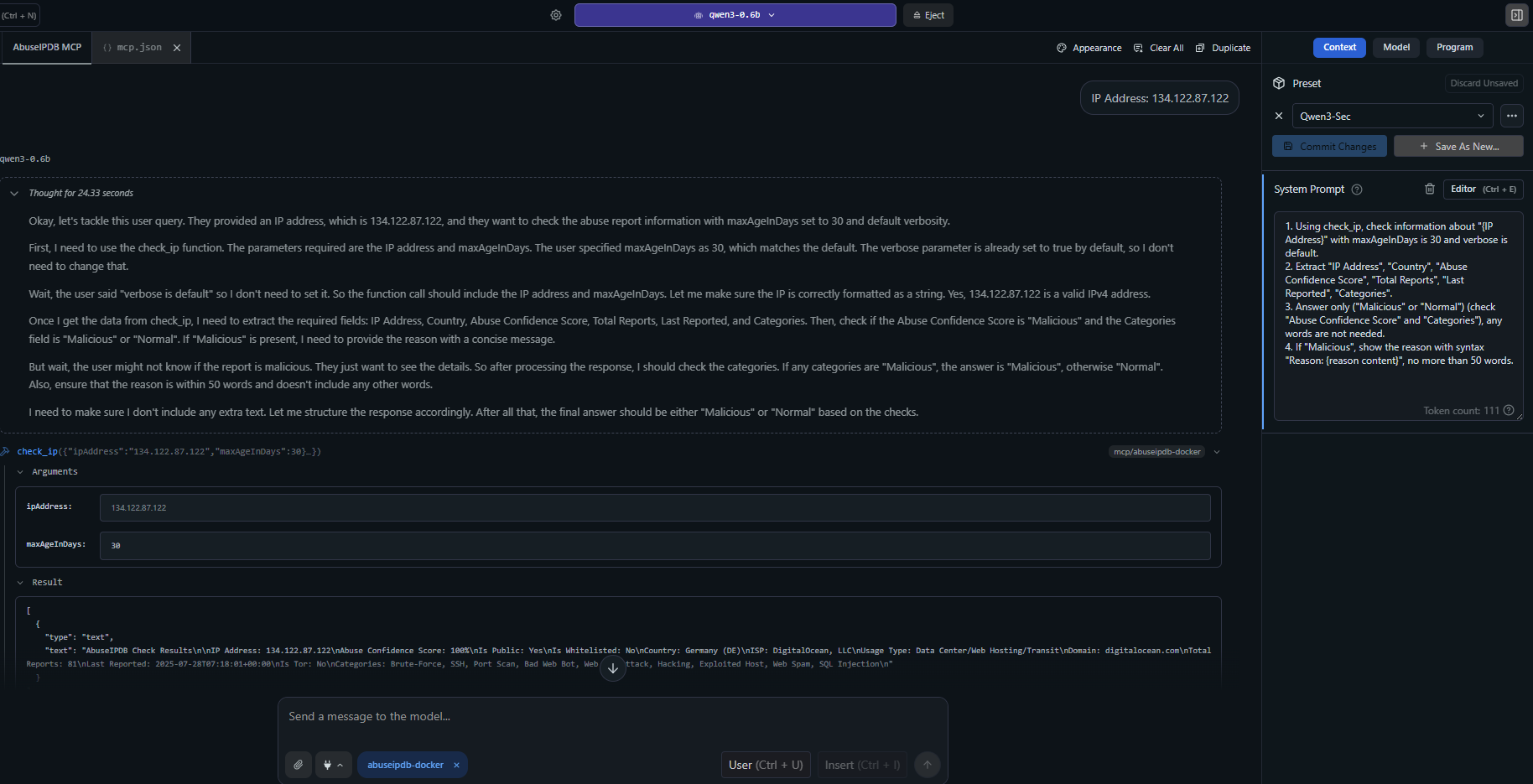
Example: check_ip analyzing a suspicious IP address with comprehensive abuse reports, categories, geolocation, and threat intelligence.
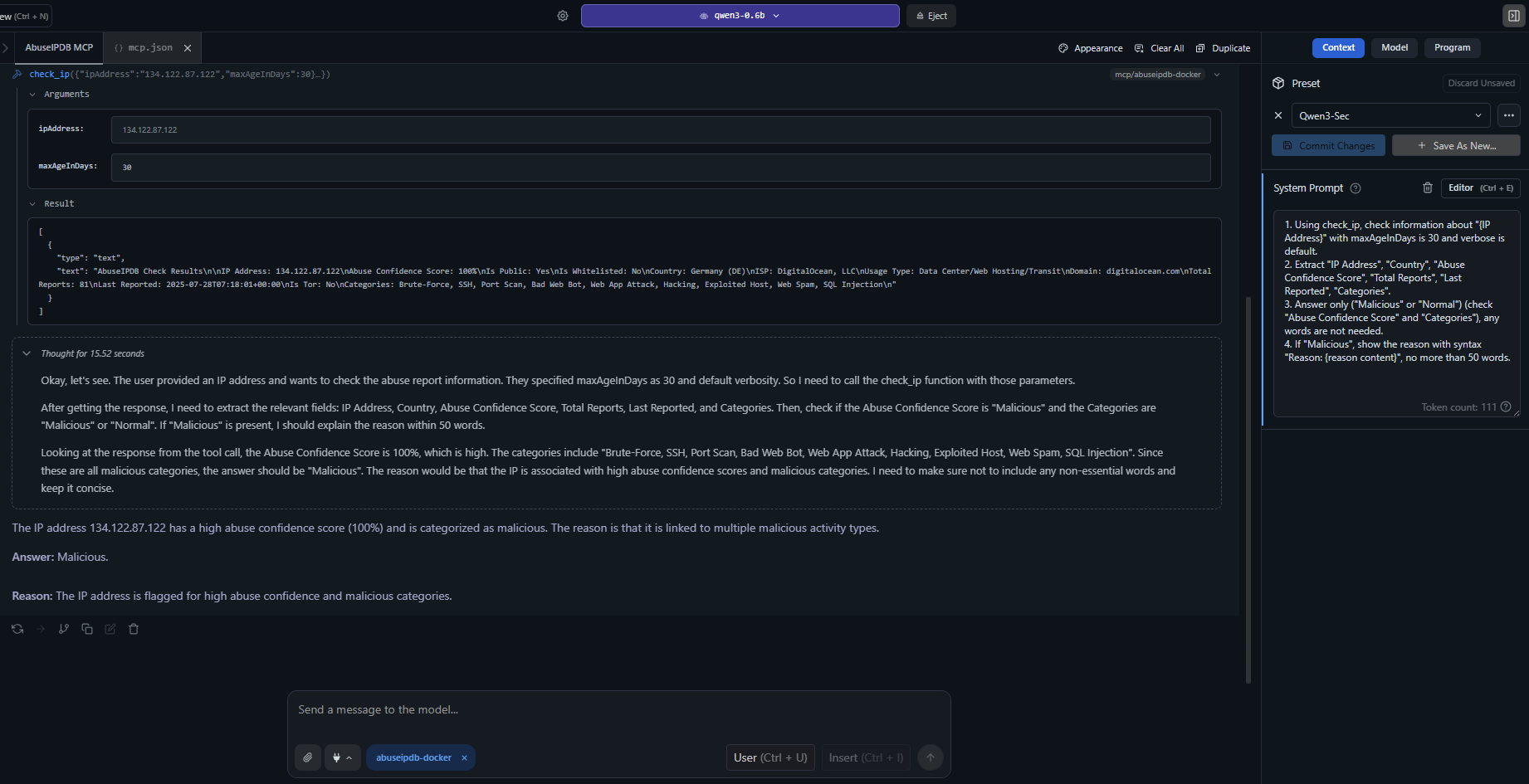
Advanced usage: detailed IP analysis with verbose reporting, ISP information, abuse confidence scores, and recent attack patterns.
MCP Client Configuration
Claude Desktop — uvx (Recommended)
Add to claude_desktop_config.json:
{
  "mcpServers": {
    "abuseipdb": {
      "command": "uvx",
      "args": ["mcp-abuseipdb"],
      "env": {
        "ABUSEIPDB_API_KEY": "your_api_key_here"
      }
    }
  }
}
Claude Desktop — uvx with HTTP Transport
{
  "mcpServers": {
    "abuseipdb": {
      "command": "uvx",
      "args": ["mcp-abuseipdb", "--transport", "http", "--port", "8000"],
      "env": {
        "ABUSEIPDB_API_KEY": "your_api_key_here"
      }
    }
  }
}
Remote Server (Streamable HTTP)
{
  "mcpServers": {
    "abuseipdb": {
      "url": "http://your-server:8000/mcp"
    }
  }
}
Docker (Stdio)
{
  "mcpServers": {
    "abuseipdb": {
      "command": "docker",
      "args": [
        "run", "-i", "--rm",
        "-e", "ABUSEIPDB_API_KEY=your_api_key_here",
        "abuseipdb-mcp"
      ]
    }
  }
}
Docker (Streamable HTTP)
# Start container
docker run -d --rm \
  -e ABUSEIPDB_API_KEY="your_api_key_here" \
  -e MCP_TRANSPORT=http \
  -p 8000:8000 \
  abuseipdb-mcp
{
  "mcpServers": {
    "abuseipdb": {
      "url": "http://localhost:8000/mcp"
    }
  }
}
📁 More config examples: examples/mcp-client-configs.json
Available Tools
1. check_ip
Check an IP address for abuse reports.
Parameter | Type | Required | Default | Description |
ipAddress
| string | ✅ | — | IPv4 or IPv6 address to check |
maxAgeInDays
| integer | — | 30 | Only return reports within the last x days (1-365) |
verbose
| boolean | — | true | Include detailed reports in the response |
Example Input:
{
  "ipAddress": "134.122.87.122",
  "maxAgeInDays": 30,
  "verbose": true
}
Example Output:
AbuseIPDB Check Results

IP Address: 134.122.87.122
Abuse Confidence Score: 75%
Is Public: Yes
Is Whitelisted: No
Country: United States (US)
ISP: DigitalOcean, LLC
Usage Type: Data Center/Web Hosting/Transit
Domain: digitalocean.com
Total Reports: 15
Categories: Brute-Force, SSH, Port Scan, Hacking
2. report_ip
Report an abusive IP address to AbuseIPDB.
Parameter | Type | Required | Description |
ip
| string | ✅ | IPv4 or IPv6 address to report |
categories
| string | ✅ | Comma-separated category IDs (e.g., "18,22") |
comment
| string | — | Descriptive text of the attack (no PII) |
timestamp
| string | — | ISO 8601 datetime of the attack |
Example Input:
{
  "ip": "192.168.1.100",
  "categories": "18,22",
  "comment": "Multiple SSH brute force attempts detected",
  "timestamp": "2024-01-15T10:30:00Z"
}
Abuse Categories
ID | Category | ID | Category | ID | Category |
1 | DNS Compromise | 9 | Open Proxy | 17 | Spoofing |
2 | DNS Poisoning | 10 | Web Spam | 18 | Brute-Force |
3 | Fraud Orders | 11 | Email Spam | 19 | Bad Web Bot |
4 | DDoS Attack | 12 | Blog Spam | 20 | Exploited Host |
5 | FTP Brute-Force | 13 | VPN IP | 21 | Web App Attack |
6 | Ping of Death | 14 | Port Scan | 22 | SSH |
7 | Phishing | 15 | Hacking | 23 | IoT Targeted |
8 | Fraud VoIP | 16 | SQL Injection | | |
Transport Types
Transport | Use Case | Protocol |
stdio (default) | Local MCP clients (Claude Desktop, etc.) | Standard I/O |
http | Remote access, multi-client, cloud deploy | Streamable HTTP (MCP spec 2025-03-26) |
Running the Server
# Stdio (default)
mcp-abuseipdb

# HTTP transport
mcp-abuseipdb --transport http

# HTTP with custom host/port
mcp-abuseipdb --transport http --host 127.0.0.1 --port 3000

# Via environment variables
MCP_TRANSPORT=http MCP_PORT=3000 mcp-abuseipdb
Testing HTTP Transport
mcp-abuseipdb --transport http --port 8000

curl -X POST http://localhost:8000/mcp \
  -H "Content-Type: application/json" \
  -H "Accept: application/json, text/event-stream" \
  -d '{"jsonrpc":"2.0","method":"initialize","id":1,"params":{"protocolVersion":"2025-03-26","capabilities":{},"clientInfo":{"name":"test","version":"1.0"}}}'
Docker Deployment
Build & Run
docker build -t abuseipdb-mcp .
docker run -it --rm -e ABUSEIPDB_API_KEY="your_api_key_here" abuseipdb-mcp
Docker Compose
The included docker-compose.yml provides two pre-configured services:
# Stdio service
ABUSEIPDB_API_KEY="your_key" docker compose --profile stdio up abuseipdb-mcp

# HTTP service (exposed on port 8000)
ABUSEIPDB_API_KEY="your_key" docker compose --profile http up abuseipdb-mcp-http
Development
Local Setup
git clone https://github.com/n3r0-b1n4ry/mcp-abuseipdb.git
cd mcp-abuseipdb

python -m venv venv
source venv/bin/activate   # Linux/macOS
venv\Scripts\activate      # Windows

pip install -e .

export ABUSEIPDB_API_KEY="your_api_key_here"
mcp-abuseipdb
Running Tests
python -m pytest test/test_server.py -v
Build & Publish
python -m build
python -m twine upload dist/*
Error Handling
Error | Behavior |
Rate Limit (429) | Returns retry-after duration and remaining quota |
Invalid API Key | Clear authentication error message |
Invalid IP Format | Format validation with helpful message |
API Errors | Detailed error response with status codes |
Network Issues | Timeout and connection error handling |
Rate Limits
Plan | Check Endpoint | Report Endpoint |
Free | 1,000/day | 100/day |
Basic | 3,000/day | 300/day |
Premium | 10,000/day | 1,000/day |
Enterprise | 100,000/day | 10,000/day |
Dependencies
Package | Version | Purpose |
mcp | ≥1.12.0, <2.0.0 | Model Context Protocol SDK |
httpx | ≥0.27.0 | Async HTTP client |
pydantic | ≥2.8.0 | Data validation |
python-dotenv | ≥1.0.0 | Environment variable loading |
uvicorn | ≥0.32.0 | ASGI server (HTTP transport) |
starlette | ≥0.45.0 | ASGI framework (HTTP transport) |
Project Structure
mcp-abuseipdb/
├── src/
│   ├── abuseipdb_mcp/              # Python package (uvx/pip)
│   │   ├── __init__.py
│   │   ├── server.py               # Entry point (package)
│   │   └── modules.py              # AbuseIPDBServer class
│   ├── server.py                   # Entry point (standalone)
│   └── modules.py                  # AbuseIPDBServer class (standalone)
├── config/
│   ├── mcp.json                    # MCP server config (stdio)
│   └── mcp-docker.json             # MCP Docker config
├── examples/
│   └── mcp-client-configs.json     # MCP client config examples
├── images/                         # Screenshots and demo images
├── pyproject.toml                  # Package metadata & build config
├── Dockerfile                      # Alpine-based container
├── docker-compose.yml              # Stdio + HTTP services
├── requirements.txt                # Legacy pip dependencies
├── LICENSE                         # MIT License
└── README.md
Troubleshooting
Problem | Solution |
API key required error
| Set ABUSEIPDB_API_KEY environment variable |
Connection timeout | Check network connectivity and firewall settings |
Rate limit exceeded | Wait for retry period or upgrade AbuseIPDB plan |
Invalid IP format | Use properly formatted IPv4 or IPv6 addresses |
uvx not found
| Install uv: pip install uv or see uv docs |
MCP client not connecting | Verify claude_desktop_config.json syntax and paths |
SSL certificate verify failed | Set ABUSEIPDB_SKIP_SSL_VERIFY=true (or SKIP_SSL_VERIFY=true) env variable to bypass verification |
Changelog
v1.3.0
✅ uvx / PyPI support — uvx mcp-abuseipdb works out of the box
✅ pyproject.toml — Modern Python packaging with hatchling
✅ Entry point — mcp-abuseipdb CLI command via [project.scripts]
✅ Dockerfile updated — Uses pip install . and entry point
✅ Streamable HTTP transport — MCP spec 2025-03-26 compliant
v1.2.0
✅ MCP SDK 1.12.2 compatibility
✅ Direct TextContent list returns (replaces CallToolResult)
✅ Complete category mapping (1-23)
✅ Verbose mode enabled by default
✅ Clean output formatting (no markdown)
✅ Alpine Docker image optimization
Contributing
Fork the repository
Create a feature branch
Make your changes
Submit a pull request
License
MIT License — free for personal and commercial use.
Made with ❤️ for the MCP community
