AbuseIPDB MCP 서버
AbuseIPDB API와 통합하기 위한 MCP(Model Context Protocol) 서버입니다. AI 어시스턴트에서 직접 IP 악용 보고서를 조회하고 새로운 보고서를 제출하세요.


📦 설치: uvx mcp-abuseipdb · pip install mcp-abuseipdb · PyPI
기능
🔍 IP 확인 — 모든 IPv4/IPv6 주소에 대한 AbuseIPDB 악용 보고서를 상세 정보와 함께 조회
🚨 IP 신고 — 악성 IP 주소에 대한 악용 보고서 제출
🚀 uvx를 통한 무설치 실행 — uvx mcp-abuseipdb를 통해 즉시 실행, 별도 설정 불필요
🌐 다중 전송 방식 — Stdio(기본값) 및 Streamable HTTP (MCP 사양 2025-03-26)
📦 PyPI 패키지 — pip install mcp-abuseipdb를 통해 설치
🐳 Docker 지원 — Alpine 기반의 경량 컨테이너
⚡ Async/Await — 고성능 비동기 작업
🗂️ 전체 카테고리 — 사람이 읽을 수 있는 이름이 포함된 1-23번 카테고리 매핑
🔄 속도 제한 처리 — 429 응답 시 자동 재시도 정보 제공
✅ 입력 유효성 검사 — 강력한 IPv4/IPv6 및 매개변수 검사
🧹 깔끔한 출력 — MCP 클라이언트에 최적화된 읽기 쉬운 텍스트 출력
Related MCP server: Threat Intelligence MCP Server
빠른 시작
uvx 사용 (권장)
가장 빠른 방법 — 복제, 설치, 가상 환경 설정이 필요 없습니다:
# Run directly (stdio transport)
ABUSEIPDB_API_KEY="your_api_key_here" uvx mcp-abuseipdb

# With HTTP transport
ABUSEIPDB_API_KEY="your_api_key_here" uvx mcp-abuseipdb --transport http --port 8000
전제 조건: uv가 설치되어 있어야 합니다.
설치: pip install uv · curl -LsSf https://astral.sh/uv/install.sh | sh · Windows
pip 사용
pip install mcp-abuseipdb

export ABUSEIPDB_API_KEY="your_api_key_here"
mcp-abuseipdb
Docker 사용
docker build -t abuseipdb-mcp .
docker run -it --rm -e ABUSEIPDB_API_KEY="your_api_key_here" abuseipdb-mcp
라이브 데모
IP 평판 확인 및 고급 분석
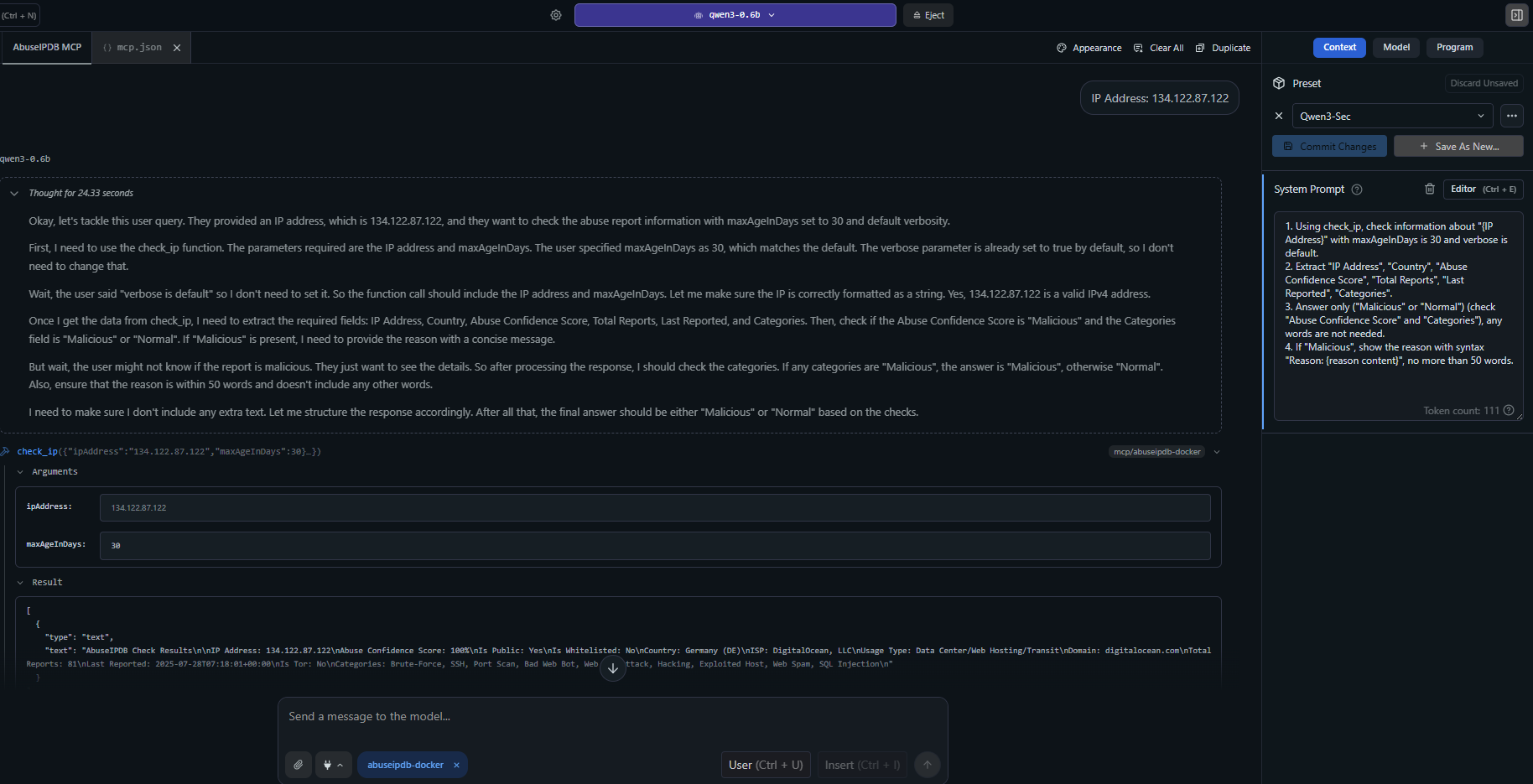
예시: check_ip가 포괄적인 악용 보고서, 카테고리, 지리적 위치 및 위협 인텔리전스를 사용하여 의심스러운 IP 주소를 분석하는 모습.
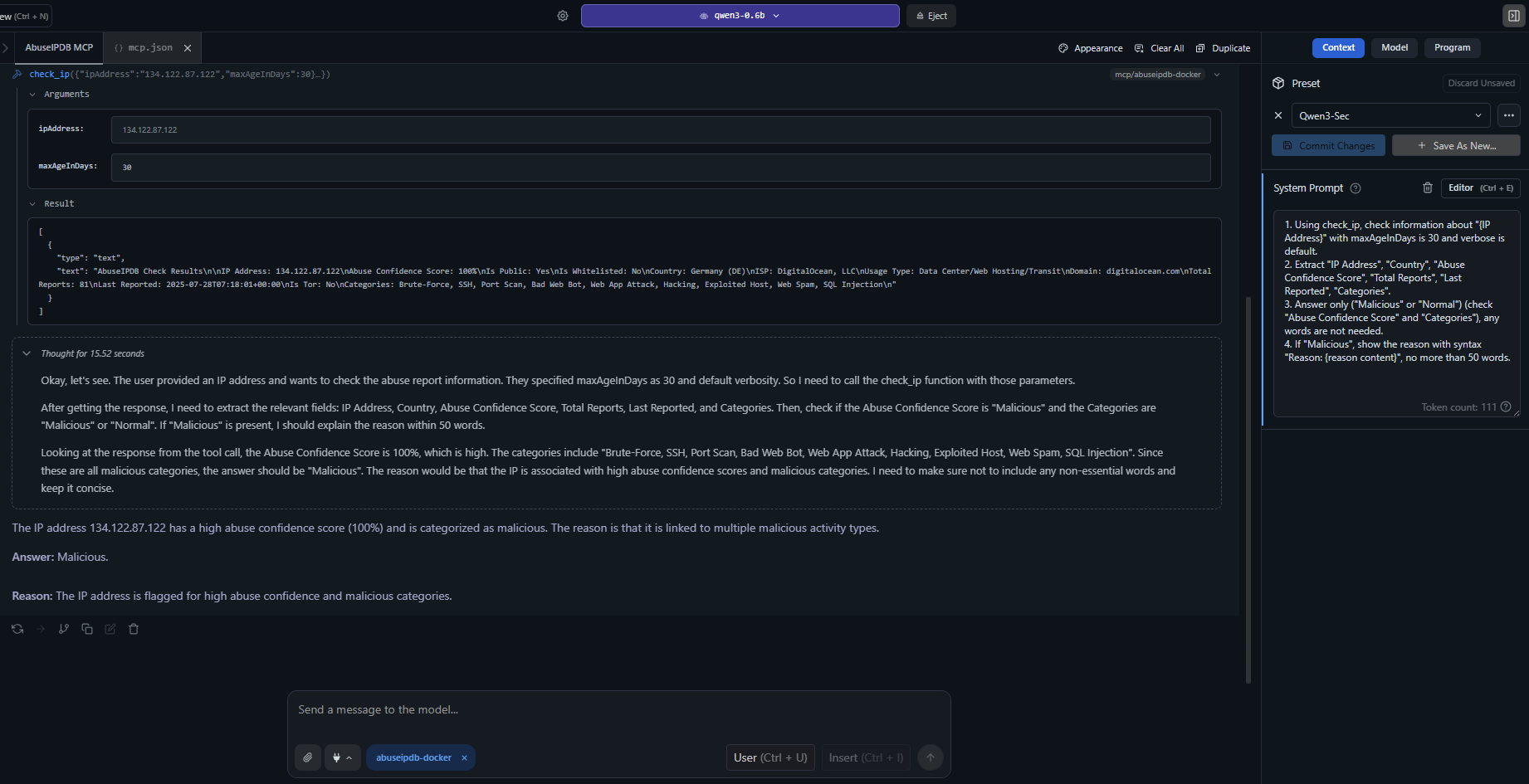
고급 사용법: 상세 보고서, ISP 정보, 악용 신뢰 점수 및 최근 공격 패턴을 포함한 상세 IP 분석.
MCP 클라이언트 설정
Claude Desktop — uvx (권장)
claude_desktop_config.json에 추가하세요:
{
  "mcpServers": {
    "abuseipdb": {
      "command": "uvx",
      "args": ["mcp-abuseipdb"],
      "env": {
        "ABUSEIPDB_API_KEY": "your_api_key_here"
      }
    }
  }
}
Claude Desktop — HTTP 전송을 사용하는 uvx
{
  "mcpServers": {
    "abuseipdb": {
      "command": "uvx",
      "args": ["mcp-abuseipdb", "--transport", "http", "--port", "8000"],
      "env": {
        "ABUSEIPDB_API_KEY": "your_api_key_here"
      }
    }
  }
}
원격 서버 (Streamable HTTP)
{
  "mcpServers": {
    "abuseipdb": {
      "url": "http://your-server:8000/mcp"
    }
  }
}
Docker (Stdio)
{
  "mcpServers": {
    "abuseipdb": {
      "command": "docker",
      "args": [
        "run", "-i", "--rm",
        "-e", "ABUSEIPDB_API_KEY=your_api_key_here",
        "abuseipdb-mcp"
      ]
    }
  }
}
Docker (Streamable HTTP)
# Start container
docker run -d --rm \
  -e ABUSEIPDB_API_KEY="your_api_key_here" \
  -e MCP_TRANSPORT=http \
  -p 8000:8000 \
  abuseipdb-mcp
{
  "mcpServers": {
    "abuseipdb": {
      "url": "http://localhost:8000/mcp"
    }
  }
}
📁 추가 설정 예시: examples/mcp-client-configs.json
사용 가능한 도구
1. check_ip
IP 주소의 악용 보고서를 확인합니다.
매개변수 | 유형 | 필수 | 기본값 | 설명 |
ipAddress
| string | ✅ | — | 확인할 IPv4 또는 IPv6 주소 |
maxAgeInDays
| integer | — | 30 | 최근 x일 이내의 보고서만 반환 (1-365) |
verbose
| boolean | — | true | 응답에 상세 보고서 포함 |
입력 예시:
{
  "ipAddress": "134.122.87.122",
  "maxAgeInDays": 30,
  "verbose": true
}
출력 예시:
AbuseIPDB Check Results

IP Address: 134.122.87.122
Abuse Confidence Score: 75%
Is Public: Yes
Is Whitelisted: No
Country: United States (US)
ISP: DigitalOcean, LLC
Usage Type: Data Center/Web Hosting/Transit
Domain: digitalocean.com
Total Reports: 15
Categories: Brute-Force, SSH, Port Scan, Hacking
2. report_ip
악성 IP 주소를 AbuseIPDB에 신고합니다.
매개변수 | 유형 | 필수 | 설명 |
ip
| string | ✅ | 신고할 IPv4 또는 IPv6 주소 |
categories
| string | ✅ | 쉼표로 구분된 카테고리 ID (예: "18,22") |
comment
| string | — | 공격에 대한 설명 텍스트 (개인정보 제외) |
timestamp
| string | — | 공격 발생 시간 (ISO 8601) |
입력 예시:
{
  "ip": "192.168.1.100",
  "categories": "18,22",
  "comment": "Multiple SSH brute force attempts detected",
  "timestamp": "2024-01-15T10:30:00Z"
}
악용 카테고리
ID | 카테고리 | ID | 카테고리 | ID | 카테고리 |
1 | DNS 변조 | 9 | 오픈 프록시 | 17 | 스푸핑 |
2 | DNS 포이즈닝 | 10 | 웹 스팸 | 18 | 무차별 대입 공격 |
3 | 사기 주문 | 11 | 이메일 스팸 | 19 | 악성 웹 봇 |
4 | DDoS 공격 | 12 | 블로그 스팸 | 20 | 악용된 호스트 |
5 | FTP 무차별 대입 | 13 | VPN IP | 21 | 웹 앱 공격 |
6 | Ping of Death | 14 | 포트 스캔 | 22 | SSH |
7 | 피싱 | 15 | 해킹 | 23 | IoT 타겟팅 |
8 | VoIP 사기 | 16 | SQL 인젝션 | | |
전송 유형
전송 방식 | 사용 사례 | 프로토콜 |
stdio (기본값) | 로컬 MCP 클라이언트 (Claude Desktop 등) | 표준 I/O |
http | 원격 액세스, 다중 클라이언트, 클라우드 배포 | Streamable HTTP (MCP 사양 2025-03-26) |
서버 실행
# Stdio (default)
mcp-abuseipdb

# HTTP transport
mcp-abuseipdb --transport http

# HTTP with custom host/port
mcp-abuseipdb --transport http --host 127.0.0.1 --port 3000

# Via environment variables
MCP_TRANSPORT=http MCP_PORT=3000 mcp-abuseipdb
HTTP 전송 테스트
mcp-abuseipdb --transport http --port 8000

curl -X POST http://localhost:8000/mcp \
  -H "Content-Type: application/json" \
  -H "Accept: application/json, text/event-stream" \
  -d '{"jsonrpc":"2.0","method":"initialize","id":1,"params":{"protocolVersion":"2025-03-26","capabilities":{},"clientInfo":{"name":"test","version":"1.0"}}}'
Docker 배포
빌드 및 실행
docker build -t abuseipdb-mcp .
docker run -it --rm -e ABUSEIPDB_API_KEY="your_api_key_here" abuseipdb-mcp
Docker Compose
포함된 docker-compose.yml은 두 가지 사전 구성된 서비스를 제공합니다:
# Stdio service
ABUSEIPDB_API_KEY="your_key" docker compose --profile stdio up abuseipdb-mcp

# HTTP service (exposed on port 8000)
ABUSEIPDB_API_KEY="your_key" docker compose --profile http up abuseipdb-mcp-http
개발
로컬 설정
git clone https://github.com/n3r0-b1n4ry/mcp-abuseipdb.git
cd mcp-abuseipdb

python -m venv venv
source venv/bin/activate   # Linux/macOS
venv\Scripts\activate      # Windows

pip install -e .

export ABUSEIPDB_API_KEY="your_api_key_here"
mcp-abuseipdb
테스트 실행
python -m pytest test/test_server.py -v
빌드 및 배포
python -m build
python -m twine upload dist/*
오류 처리
오류 | 동작 |
속도 제한 (429) | 재시도 대기 시간 및 남은 할당량 반환 |
잘못된 API 키 | 명확한 인증 오류 메시지 |
잘못된 IP 형식 | 유용한 메시지와 함께 형식 검사 |
API 오류 | 상태 코드가 포함된 상세 오류 응답 |
네트워크 문제 | 타임아웃 및 연결 오류 처리 |
속도 제한
플랜 | 확인 엔드포인트 | 신고 엔드포인트 |
무료 | 1,000/일 | 100/일 |
기본 | 3,000/일 | 300/일 |
프리미엄 | 10,000/일 | 1,000/일 |
엔터프라이즈 | 100,000/일 | 10,000/일 |
의존성
프로젝트 구조
mcp-abuseipdb/
├── src/
│   ├── abuseipdb_mcp/              # Python package (uvx/pip)
│   │   ├── __init__.py
│   │   ├── server.py               # Entry point (package)
│   │   └── modules.py              # AbuseIPDBServer class
│   ├── server.py                   # Entry point (standalone)
│   └── modules.py                  # AbuseIPDBServer class (standalone)
├── config/
│   ├── mcp.json                    # MCP server config (stdio)
│   └── mcp-docker.json             # MCP Docker config
├── examples/
│   └── mcp-client-configs.json     # MCP client config examples
├── images/                         # Screenshots and demo images
├── pyproject.toml                  # Package metadata & build config
├── Dockerfile                      # Alpine-based container
├── docker-compose.yml              # Stdio + HTTP services
├── requirements.txt                # Legacy pip dependencies
├── LICENSE                         # MIT License
└── README.md
문제 해결
문제 | 해결책 |
API key required 오류
| ABUSEIPDB_API_KEY 환경 변수 설정
|
연결 타임아웃 | 네트워크 연결 및 방화벽 설정 확인 |
속도 제한 초과 | 재시도 기간까지 대기하거나 AbuseIPDB 플랜 업그레이드 |
잘못된 IP 형식 | 올바른 형식의 IPv4 또는 IPv6 주소 사용 |
uvx를 찾을 수 없음
| uv 설치: pip install uv 또는 uv 문서 참조 |
MCP 클라이언트 연결 안 됨 | claude_desktop_config.json 구문 및 경로 확인
|
변경 로그
v1.3.0
✅ uvx / PyPI 지원 — uvx mcp-abuseipdb 즉시 작동
✅ pyproject.toml — hatchling을 사용한 현대적인 Python 패키징
✅ 진입점 — [project.scripts]를 통한 mcp-abuseipdb CLI 명령어
✅ Dockerfile 업데이트 — pip install . 및 진입점 사용
✅ Streamable HTTP 전송 — MCP 사양 2025-03-26 준수
v1.2.0
기여
저장소 포크
기능 브랜치 생성
변경 사항 적용
풀 리퀘스트 제출
라이선스
MIT 라이선스 — 개인 및 상업적 용도로 무료 사용 가능.
MCP 커뮤니티를 위해 ❤️로 제작됨

