

A
licenseB
qualityD
maintenanceThis server allows users to perform web searches using Perplexity AI, providing a tool for retrieving search results through a simple API interface.
1
88 npm
3
Apache 2.0


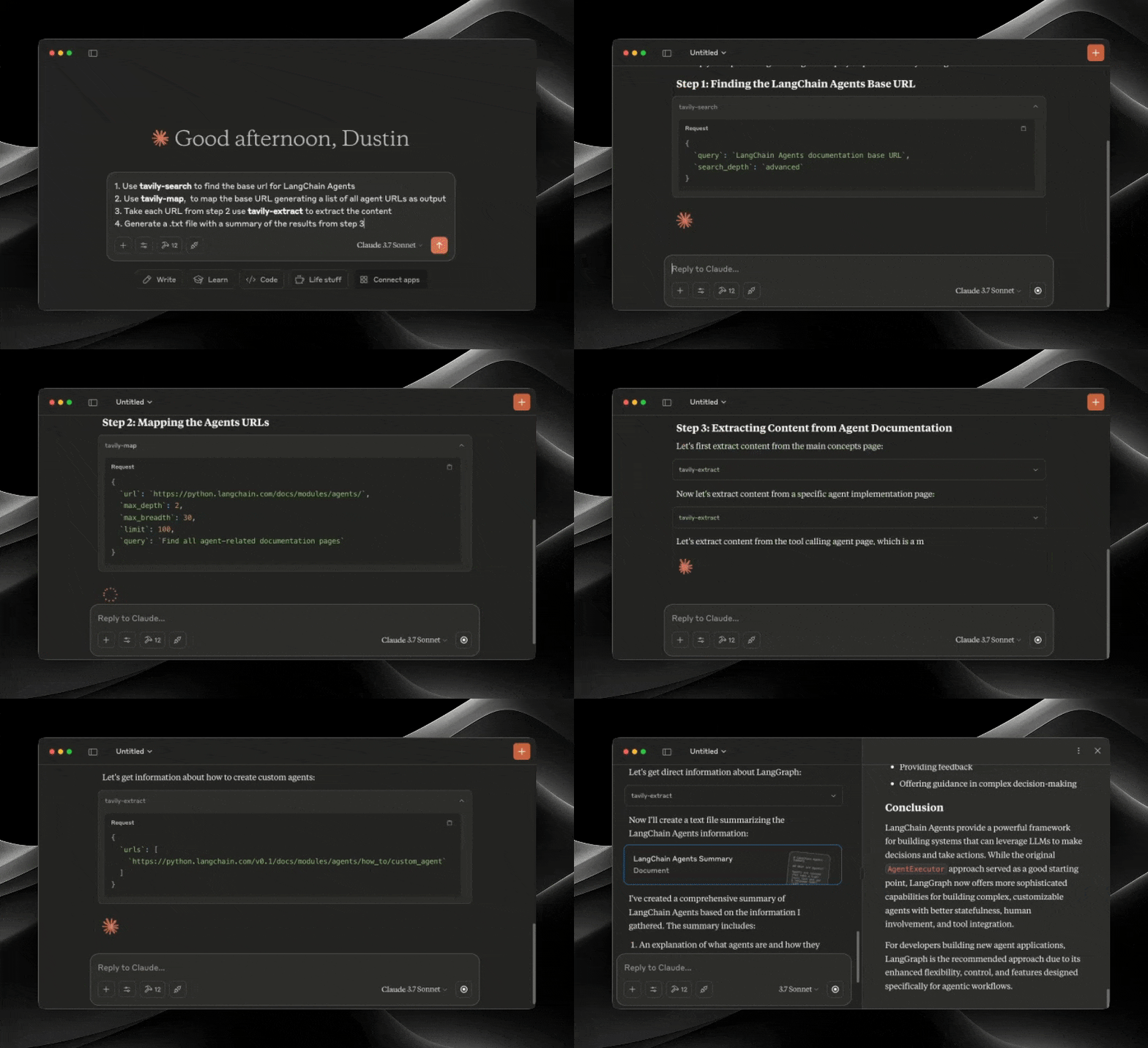
Протокол контекста модели (MCP) — это открытый стандарт, который позволяет системам искусственного интеллекта беспрепятственно взаимодействовать с различными источниками данных и инструментами, обеспечивая безопасные двусторонние соединения.
Разработанный Anthropic, протокол контекста модели (MCP) позволяет помощникам ИИ, таким как Клод, легко интегрироваться с расширенными возможностями поиска и извлечения данных Tavily. Эта интеграция обеспечивает моделям ИИ доступ к веб-информации в режиме реального времени, дополненный сложными опциями фильтрации и функциями поиска, специфичными для домена.
Сервер Tavily MCP обеспечивает:
инструменты поиска, извлечения, сопоставления, сканирования
Возможности веб-поиска в режиме реального времени с помощью инструмента tavily-search
Интеллектуальное извлечение данных с веб-страниц с помощью инструмента tavily-extract
Мощный инструмент веб-картографии, который создает структурированную карту веб-сайта.
Веб-сканер, который систематически исследует веб-сайты
Учебное пособие по объединению Tavily MCP с сервером Neo4j MCP
Учебник по интеграции Tavily MCP с Cline в VS Code
Related MCP server: Tavily MCP Server
Прежде чем начать, убедитесь, что у вас есть:
Если у вас нет ключа API Tavily, вы можете зарегистрировать бесплатную учетную запись здесь.
Node.js (v20 или выше)
Вы можете проверить установку Node.js, выполнив:
node --version
Установлен Git (требуется только при использовании метода установки Git)
На macOS: brew install git
В Linux:
Debian/Ubuntu: sudo apt install git
RedHat/CentOS: sudo yum install git
В Windows: Загрузите Git для Windows
npx -y tavily-mcp@0.2.1 Чтобы автоматически установить Tavily MCP Server для Claude Desktop через Smithery :
npx -y @smithery/cli install @tavily-ai/tavily-mcp --client claudeХотя вы можете запустить сервер сам по себе, он не особенно полезен в изоляции. Вместо этого вы должны интегрировать его в клиент MCP. Ниже приведен пример того, как настроить приложение Claude Desktop для работы с сервером tavily-mcp.
В этом репозитории объясняется, как настроить VS Code , Cursor и Claude Desktop для работы с сервером tavily-mcp.
Для установки в один клик нажмите одну из кнопок установки ниже:
Сначала проверьте, есть ли кнопки установки в верхней части этого раздела, которые соответствуют вашим потребностям. Если вы предпочитаете ручную установку, выполните следующие действия:
Добавьте следующий блок JSON в файл настроек пользователя (JSON) в VS Code. Это можно сделать, нажав Ctrl + Shift + P (или Cmd + Shift + P на macOS) и введя Preferences: Open User Settings (JSON) .
{
  "mcp": {
    "inputs": [
      {
        "type": "promptString",
        "id": "tavily_api_key",
        "description": "Tavily API Key",
        "password": true
      }
    ],
    "servers": {
      "tavily": {
        "command": "npx",
        "args": ["-y", "tavily-mcp@0.2.1"],
        "env": {
          "TAVILY_API_KEY": "${input:tavily_api_key}"
        }
      }
    }
  }
}
При желании вы можете добавить его в файл .vscode/mcp.json в своей рабочей области:
{
  "inputs": [
    {
      "type": "promptString",
      "id": "tavily_api_key",
      "description": "Tavily API Key",
      "password": true
    }
  ],
  "servers": {
    "tavily": {
      "command": "npx",
      "args": ["-y", "tavily-mcp@0.2.1"],
      "env": {
        "TAVILY_API_KEY": "${input:tavily_api_key}"
      }
    }
  }
}Самый простой способ настроить сервер Tavily MCP в Cline — через Marketplace одним щелчком мыши:
Откройте Cline в VS Code
Нажмите на значок Клайна на боковой панели.
Перейдите на вкладку «Серверы MCP» (4 квадрата).
Найдите «Tavily» и нажмите «установить».
При появлении запроса введите свой ключ API Tavily.
Кроме того, вы можете вручную настроить сервер Tavily MCP в Cline:
Откройте файл настроек Cline MCP:
# Using Visual Studio Code
code ~/Library/Application\ Support/Code/User/globalStorage/saoudrizwan.claude-dev/settings/cline_mcp_settings.json

# Or using TextEdit
open -e ~/Library/Application\ Support/Code/User/globalStorage/saoudrizwan.claude-dev/settings/cline_mcp_settings.jsoncode %APPDATA%\Code\User\globalStorage\saoudrizwan.claude-dev\settings\cline_mcp_settings.jsonДобавьте конфигурацию сервера Tavily в файл:
Замените your-api-key-here на ваш фактический ключ API Tavily .
{
  "mcpServers": {
    "tavily-mcp": {
      "command": "npx",
      "args": ["-y", "tavily-mcp@0.2.1"],
      "env": {
        "TAVILY_API_KEY": "your-api-key-here"
      },
      "disabled": false,
      "autoApprove": []
    }
  }
}
Сохраните файл и перезапустите Cline, если он уже запущен.
При использовании Cline вы теперь получите доступ к инструментам Tavily MCP. Вы можете попросить Cline использовать инструменты tavily-search и tavily-extract прямо в ваших разговорах.
Примечание : требуется версия Cursor 0.45.6 или выше.
Чтобы настроить сервер Tavily MCP в Cursor:
Открыть настройки курсора
Перейдите в раздел «Функции» > «Серверы MCP».
Нажмите кнопку «+ Добавить новый сервер MCP».
Заполните следующую информацию:
Имя : Введите псевдоним для сервера (например, «tavily-mcp»).
Тип : выберите «команда» в качестве типа.
Команда : Введите команду для запуска сервера:
env TAVILY_API_KEY=your-api-key npx -y tavily-mcp@0.2.1Важно : замените
your-api-keyна ваш ключ API Tavily. Вы можете получить его на app.tavily.com/home
После добавления сервера он должен появиться в списке серверов MCP. Возможно, вам придется вручную нажать кнопку обновления в правом верхнем углу сервера MCP, чтобы заполнить список инструментов.
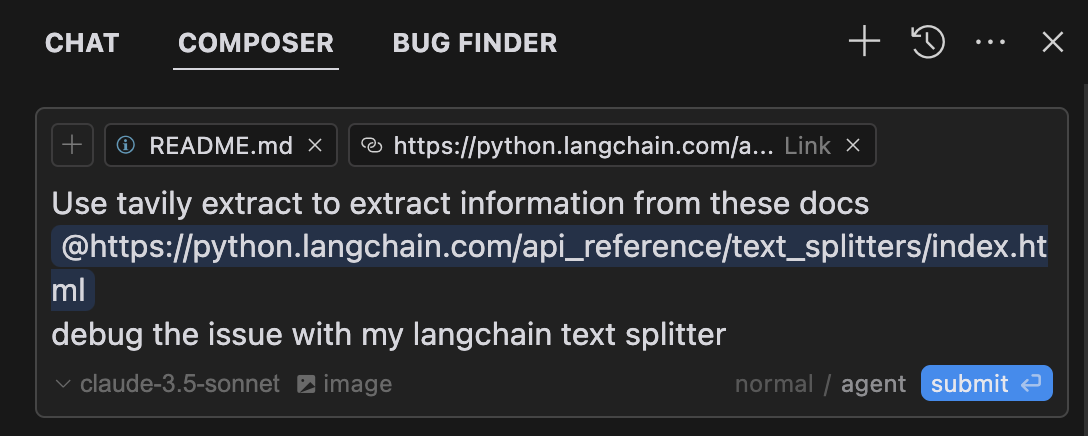
Composer Agent автоматически использует инструменты Tavily MCP, когда это релевантно вашим запросам. Лучше явно запросить использование инструментов, описав, что вы хотите сделать (например, «Пользователь tavily-search для поиска в Интернете последних новостей об ИИ»). На Mac нажмите command + L, чтобы открыть чат, выберите опцию composer в верхней части экрана, рядом с кнопкой отправки выберите agent и отправьте запрос, когда он будет готов.
# Create the config file if it doesn't exist
touch "$HOME/Library/Application Support/Claude/claude_desktop_config.json"

# Opens the config file in TextEdit
open -e "$HOME/Library/Application Support/Claude/claude_desktop_config.json"

# Alternative method using Visual Studio Code (requires VS Code to be installed)
code "$HOME/Library/Application Support/Claude/claude_desktop_config.json"code %APPDATA%\Claude\claude_desktop_config.jsonЗамените your-api-key-here на ваш фактический ключ API Tavily .
{
  "mcpServers": {
    "tavily-mcp": {
      "command": "npx",
      "args": ["-y", "tavily-mcp@0.2.1"],
      "env": {
        "TAVILY_API_KEY": "your-api-key-here"
      }
    }
  }
}Клонируйте репозиторий:
git clone https://github.com/tavily-ai/tavily-mcp.git
cd tavily-mcp
Установить зависимости:
npm installСоздайте проект:
npm run buildВыполните шаги настройки, описанные в разделе «Настройка приложения Claude Desktop» выше, используя приведенную ниже конфигурацию JSON.
Замените your-api-key-here на ваш фактический ключ API Tavily , а /path/to/tavily-mcp на фактический путь, по которому вы клонировали репозиторий в своей системе.
{
  "mcpServers": {
    "tavily": {
      "command": "npx",
      "args": ["/path/to/tavily-mcp/build/index.js"],
      "env": {
        "TAVILY_API_KEY": "your-api-key-here"
      }
    }
  }
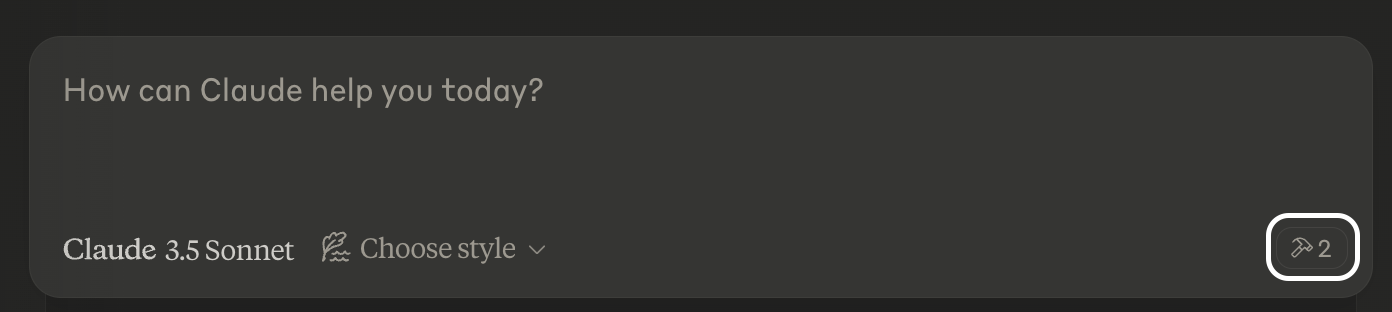
}После завершения установки и настройки приложения Claude для рабочего стола необходимо полностью закрыть и снова открыть приложение Claude для рабочего стола, чтобы увидеть сервер tavily-mcp. В левом нижнем углу приложения должен быть значок молотка, указывающий на доступные инструменты MCP. Вы можете нажать на значок молотка, чтобы увидеть больше подробностей об инструментах tavily-search и tavily-extract.
Теперь claude будет иметь полный доступ к серверу tavily-mcp, включая инструменты tavily-search и tavily-extract. Если вы вставите приведенные ниже примеры в приложение Claude для рабочего стола, вы должны увидеть инструменты сервера tavily-mcp в действии.
Общий поиск в Интернете :
Can you search for recent developments in quantum computing?Поиск новостей :
Search for news articles about AI startups from the last 7 days.Поиск по домену :
Search for climate change research on nature.com and sciencedirect.comИзвлечь содержание статьи :
Extract the main content from this article: https://example.com/articleВы также можете комбинировать инструменты tavily-search и tavily-extract для выполнения более сложных задач.
Search for news articles about AI startups from the last 7 days and extract the main content from each article to generate a detailed report.Сервер не найден
Проверьте установку npm, запустив npm --verison
Проверьте синтаксис конфигурации Claude Desktop, выполнив code ~/Library/Application\ Support/Claude/claude_desktop_config.json
Убедитесь, что Node.js установлен правильно, запустив node --version
Проблемы, связанные с NPX
Если вы столкнулись с ошибками, связанными с npx , вам может потребоваться использовать полный путь к исполняемому файлу npx.
Вы можете найти этот путь, запустив which npx в своем терминале, а затем заменив строку "command": "npx" на "command": "/full/path/to/npx" в своей конфигурации.
Проблемы с ключами API
Подтвердите, что ваш ключ API Tavily действителен
Проверьте правильность установки ключа API в конфигурации.
Убедитесь, что вокруг ключа API нет пробелов и кавычек.
Модель контекстного протокола для спецификации MCP
Антропный для Клода Десктопа
A powerful web crawler that initiates a structured web crawl starting from a specified base URL. The crawler expands from that point like a graph, following internal links across pages. You can control how deep and wide it goes, and guide it to focus on specific sections of the site.
| Name | Required | Description | Default |
|---|---|---|---|
| url | Yes | The root URL to begin the crawl | |
| max_depth | No | Max depth of the crawl. Defines how far from the base URL the crawler can explore. | |
| max_breadth | No | Max number of links to follow per level of the tree (i.e., per page) | |
| limit | No | Total number of links the crawler will process before stopping | |
| instructions | No | Natural language instructions for the crawler. Instructions specify which types of pages the crawler should return. | |
| select_paths | No | Regex patterns to select only URLs with specific path patterns (e.g., /docs/.*, /api/v1.*) | |
| select_domains | No | Regex patterns to restrict crawling to specific domains or subdomains (e.g., ^docs\.example\.com$) | |
| allow_external | No | Whether to return external links in the final response | |
| extract_depth | No | Advanced extraction retrieves more data, including tables and embedded content, with higher success but may increase latency | basic |
| format | No | The format of the extracted web page content. markdown returns content in markdown format. text returns plain text and may increase latency. | markdown |
| include_favicon | No | Whether to include the favicon URL for each result |
Does the description disclose side effects, auth requirements, rate limits, or destructive behavior?
No annotations are provided, so the description carries full burden. It explains the crawler's graph-like expansion and control over depth/breadth, but omits behavioral details such as asynchronicity, rate limits, or side effects. It provides adequate but not comprehensive transparency.
Agents need to know what a tool does to the world before calling it. Descriptions should go beyond structured annotations to explain consequences.
Is the description appropriately sized, front-loaded, and free of redundancy?
The description is three sentences long, front-loads the core purpose, and contains no redundant information. Every sentence contributes meaning.
Shorter descriptions cost fewer tokens and are easier for agents to parse. Every sentence should earn its place.
Given the tool's complexity, does the description cover enough for an agent to succeed on first attempt?
Despite 100% schema coverage and no output schema, the description is somewhat light for a complex 11-parameter tool. It does not mention the output format or any operational constraints (e.g., timeouts, error handling), leaving some gaps in completeness.
Complex tools with many parameters or behaviors need more documentation. Simple tools need less. This dimension scales expectations accordingly.
Does the description clarify parameter syntax, constraints, interactions, or defaults beyond what the schema provides?
Schema description coverage is 100%, so the baseline is 3. The description adds meaningful context beyond the schema by describing the crawler's graph expansion and ability to focus on sections, which enhances understanding of how parameters like max_depth and max_breadth work together.
Input schemas describe structure but not intent. Descriptions should explain non-obvious parameter relationships and valid value ranges.
Does the description clearly state what the tool does and how it differs from similar tools?
The description clearly states it is a web crawler that starts from a base URL and expands like a graph, distinguishing it from sibling tools like extract, map, and search. It specifies the core action (initiates a structured crawl) and the resource (URL).
Agents choose between tools based on descriptions. A clear purpose with a specific verb and resource helps agents select the right tool.
Does the description explain when to use this tool, when not to, or what alternatives exist?
The description implies usage for structured web crawling but does not explicitly state when to use it versus alternatives (e.g., tavily-search). It lacks explicit when-not or alternative suggestions.
Agents often have multiple tools that could apply. Explicit usage guidance like "use X instead of Y when Z" prevents misuse.
A powerful web content extraction tool that retrieves and processes raw content from specified URLs, ideal for data collection, content analysis, and research tasks.
| Name | Required | Description | Default |
|---|---|---|---|
| urls | Yes | List of URLs to extract content from | |
| extract_depth | No | Depth of extraction - 'basic' or 'advanced', if usrls are linkedin use 'advanced' or if explicitly told to use advanced | basic |
| include_images | No | Include a list of images extracted from the urls in the response | |
| format | No | The format of the extracted web page content. markdown returns content in markdown format. text returns plain text and may increase latency. | markdown |
| include_favicon | No | Whether to include the favicon URL for each result | |
| query | No | User intent query for reranking extracted chunks based on relevance |
Does the description disclose side effects, auth requirements, rate limits, or destructive behavior?
With no annotations provided, the description carries full burden for behavioral disclosure. It mentions the tool 'retrieves and processes raw content' but doesn't disclose critical behavioral traits: whether it requires authentication, rate limits, error handling, pagination, or what the response structure looks like. The description adds minimal context beyond the basic operation.
Agents need to know what a tool does to the world before calling it. Descriptions should go beyond structured annotations to explain consequences.
Is the description appropriately sized, front-loaded, and free of redundancy?
The description is appropriately sized with two concise sentences. The first sentence states the core functionality, and the second provides use cases. There's no wasted text, though it could be slightly more front-loaded with sibling differentiation.
Shorter descriptions cost fewer tokens and are easier for agents to parse. Every sentence should earn its place.
Given the tool's complexity, does the description cover enough for an agent to succeed on first attempt?
Given 6 parameters, no annotations, and no output schema, the description is incomplete. It doesn't explain what the tool returns, error conditions, or behavioral constraints. For a web extraction tool with multiple configuration options and no structured output documentation, the description should provide more context about the extraction results and limitations.
Complex tools with many parameters or behaviors need more documentation. Simple tools need less. This dimension scales expectations accordingly.
Does the description clarify parameter syntax, constraints, interactions, or defaults beyond what the schema provides?
Schema description coverage is 100%, so the schema already documents all 6 parameters thoroughly. The description doesn't add any parameter-specific information beyond what's in the schema. It mentions general purpose but no parameter semantics. Baseline 3 is appropriate when schema does the heavy lifting.
Input schemas describe structure but not intent. Descriptions should explain non-obvious parameter relationships and valid value ranges.
Does the description clearly state what the tool does and how it differs from similar tools?
The description clearly states the tool's purpose: 'retrieves and processes raw content from specified URLs' with specific verbs and resource. It mentions use cases like 'data collection, content analysis, and research tasks' which helps understanding. However, it doesn't explicitly differentiate from sibling tools like tavily-crawl or tavily-search, which likely have overlapping web-related functionality.
Agents choose between tools based on descriptions. A clear purpose with a specific verb and resource helps agents select the right tool.
Does the description explain when to use this tool, when not to, or what alternatives exist?
The description provides no guidance on when to use this tool versus its siblings (tavily-crawl, tavily-map, tavily-search). It mentions the tool is 'ideal for data collection, content analysis, and research tasks' but doesn't specify contexts where alternatives might be better. There's no explicit when/when-not guidance or named alternatives.
Agents often have multiple tools that could apply. Explicit usage guidance like "use X instead of Y when Z" prevents misuse.
A powerful web mapping tool that creates a structured map of website URLs, allowing you to discover and analyze site structure, content organization, and navigation paths. Perfect for site audits, content discovery, and understanding website architecture.
| Name | Required | Description | Default |
|---|---|---|---|
| url | Yes | The root URL to begin the mapping | |
| max_depth | No | Max depth of the mapping. Defines how far from the base URL the crawler can explore | |
| max_breadth | No | Max number of links to follow per level of the tree (i.e., per page) | |
| limit | No | Total number of links the crawler will process before stopping | |
| instructions | No | Natural language instructions for the crawler | |
| select_paths | No | Regex patterns to select only URLs with specific path patterns (e.g., /docs/.*, /api/v1.*) | |
| select_domains | No | Regex patterns to restrict crawling to specific domains or subdomains (e.g., ^docs\.example\.com$) | |
| allow_external | No | Whether to return external links in the final response |
Does the description disclose side effects, auth requirements, rate limits, or destructive behavior?
With no annotations, the description must cover behavioral traits. It mentions 'crawler' but does not disclose how it handles JavaScript, rate limits, robot.txt, or data retention. The description is insufficient for an agent to understand side effects or constraints.
Agents need to know what a tool does to the world before calling it. Descriptions should go beyond structured annotations to explain consequences.
Is the description appropriately sized, front-loaded, and free of redundancy?
The description is concise, consisting of two sentences that efficiently convey the tool's value. However, it could be structured to front-load the core action more clearly.
Shorter descriptions cost fewer tokens and are easier for agents to parse. Every sentence should earn its place.
Given the tool's complexity, does the description cover enough for an agent to succeed on first attempt?
Given 8 parameters, no output schema, and no annotations, the description should explain the output structure (e.g., tree vs. list) and how the map is presented. It omits these critical details, making it incomplete for effective use.
Complex tools with many parameters or behaviors need more documentation. Simple tools need less. This dimension scales expectations accordingly.
Does the description clarify parameter syntax, constraints, interactions, or defaults beyond what the schema provides?
Schema description coverage is 100%, so baseline is 3. The description adds no additional meaning beyond the schema, simply restating the overall purpose without elaborating on parameters.
Input schemas describe structure but not intent. Descriptions should explain non-obvious parameter relationships and valid value ranges.
Does the description clearly state what the tool does and how it differs from similar tools?
The description clearly states it creates a structured map of website URLs for discovering site structure, content organization, and navigation paths. It distinguishes from siblings (crawl, extract, search) by focusing on mapping and analysis.
Agents choose between tools based on descriptions. A clear purpose with a specific verb and resource helps agents select the right tool.
Does the description explain when to use this tool, when not to, or what alternatives exist?
The description provides some usage context ('Perfect for site audits, content discovery, and understanding website architecture') but lacks explicit guidance on when not to use or how it compares to siblings, leaving the agent to infer.
Agents often have multiple tools that could apply. Explicit usage guidance like "use X instead of Y when Z" prevents misuse.
A powerful web search tool that provides comprehensive, real-time results using Tavily's AI search engine. Returns relevant web content with customizable parameters for result count, content type, and domain filtering. Ideal for gathering current information, news, and detailed web content analysis.
| Name | Required | Description | Default |
|---|---|---|---|
| query | Yes | Search query | |
| search_depth | No | The depth of the search. It can be 'basic' or 'advanced' | basic |
| topic | No | The category of the search. This will determine which of our agents will be used for the search | general |
| days | No | The number of days back from the current date to include in the search results. This specifies the time frame of data to be retrieved. Please note that this feature is only available when using the 'news' search topic | |
| time_range | No | The time range back from the current date to include in the search results. This feature is available for both 'general' and 'news' search topics | |
| start_date | No | Will return all results after the specified start date. Required to be written in the format YYYY-MM-DD. | |
| end_date | No | Will return all results before the specified end date. Required to be written in the format YYYY-MM-DD | |
| max_results | No | The maximum number of search results to return | |
| include_images | No | Include a list of query-related images in the response | |
| include_image_descriptions | No | Include a list of query-related images and their descriptions in the response | |
| include_raw_content | No | Include the cleaned and parsed HTML content of each search result | |
| include_domains | No | A list of domains to specifically include in the search results, if the user asks to search on specific sites set this to the domain of the site | |
| exclude_domains | No | List of domains to specifically exclude, if the user asks to exclude a domain set this to the domain of the site | |
| country | No | Boost search results from a specific country. This will prioritize content from the selected country in the search results. Available only if topic is general. Country names MUST be written in lowercase, plain English, with spaces and no underscores. | |
| include_favicon | No | Whether to include the favicon URL for each result |
Does the description disclose side effects, auth requirements, rate limits, or destructive behavior?
With no annotations provided, the description carries the full burden. It mentions 'real-time results' and 'customizable parameters' but omits important behavioral traits such as rate limits, result count limits, pagination, or whether the operation is read-only. The description implies a read operation but does not explicitly state it.
Agents need to know what a tool does to the world before calling it. Descriptions should go beyond structured annotations to explain consequences.
Is the description appropriately sized, front-loaded, and free of redundancy?
The description is two sentences, front-loaded with the primary purpose, and each sentence contributes value without repetition or fluff.
Shorter descriptions cost fewer tokens and are easier for agents to parse. Every sentence should earn its place.
Given the tool's complexity, does the description cover enough for an agent to succeed on first attempt?
For a tool with 15 parameters and no output schema, the description is somewhat brief. It gives a high-level overview but lacks details on return format, result structure, or pagination behavior. The description is adequate but not comprehensive.
Complex tools with many parameters or behaviors need more documentation. Simple tools need less. This dimension scales expectations accordingly.
Does the description clarify parameter syntax, constraints, interactions, or defaults beyond what the schema provides?
Schema description coverage is 100%, so the schema already documents all parameters. The description adds general context by summarizing parameter categories (result count, content type, domain filtering), but does not provide additional meaning beyond what is in the schema.
Input schemas describe structure but not intent. Descriptions should explain non-obvious parameter relationships and valid value ranges.
Does the description clearly state what the tool does and how it differs from similar tools?
The description clearly identifies the tool as a web search tool with real-time results and customizable parameters. However, it does not distinguish it from sibling tools like tavily-crawl, tavily-extract, or tavily-map, which may also perform web content retrieval.
Agents choose between tools based on descriptions. A clear purpose with a specific verb and resource helps agents select the right tool.
Does the description explain when to use this tool, when not to, or what alternatives exist?
No explicit guidance on when to use this tool versus alternatives. The description states it is 'ideal for gathering current information, news, and detailed web content analysis,' but does not specify when to avoid it or mention any exclusions or prerequisites.
Agents often have multiple tools that could apply. Explicit usage guidance like "use X instead of Y when Z" prevents misuse.
Recent tool additions, removals, and schema changes observed during successful MCP inspections.
v1.0.0tavily-crawltavily-extracttavily-maptavily-searchScored across 4 tools
Each tool has a clearly distinct purpose: crawling (tavily-crawl) focuses on structured exploration from a base URL, extraction (tavily-extract) retrieves raw content from specific URLs, mapping (tavily-map) analyzes site structure, and search (tavily-search) provides real-time web results. There is no overlap in functionality, making tool selection straightforward for an agent.
All tool names follow a consistent 'tavily-' prefix with a descriptive action suffix (crawl, extract, map, search), using a uniform hyphenated style. This predictable pattern enhances readability and reduces confusion, with no deviations in naming conventions.
With 4 tools, the server is well-scoped for its web-related domain, covering key operations like crawling, extraction, mapping, and search without bloat. Each tool earns its place by addressing a distinct aspect of web interaction, making the count appropriate and manageable.
The tool set provides complete coverage for web-based tasks, including discovery (crawl, map), content retrieval (extract, search), and analysis. There are no obvious gaps; agents can perform end-to-end workflows from finding sites to extracting and analyzing content without dead ends.
The Octagon MCP server provides specialized AI-powered financial research and analysis by integrating with the Octagon Market Intelligence API. It enables users to analyze public market data (SEC filings, earnings transcripts, financial metrics, and stock data for 8000+ companies), private market data (3M+ companies, 500k+ funding rounds, 2M+ M&A/IPO transactions), and conduct deep research including web scraping capabilities. The server also features autonomous research agents that search hundreds of sources and return fully cited reports in approximately one minute.
Driflyte MCP server which lets AI assistants query topic-specific knowledge from web and GitHub.
Web search, browser automation, scraping, crawling and CAPTCHA solving for AI agents.
The Dappier MCP server connects LLMs and AI agents to real-time, rights-cleared, proprietary data from trusted sources across various domains. It provides specialized knowledge through real-time web search, financial stock market and crypto data access, AI-powered content recommendations from premium publishers, and structured outputs with sub-300ms response times, enabling AI systems to respond to current events and trends.