

A
licenseB
qualityD
maintenanceThis server allows users to perform web searches using Perplexity AI, providing a tool for retrieving search results through a simple API interface.
1
88 npm
3
Apache 2.0


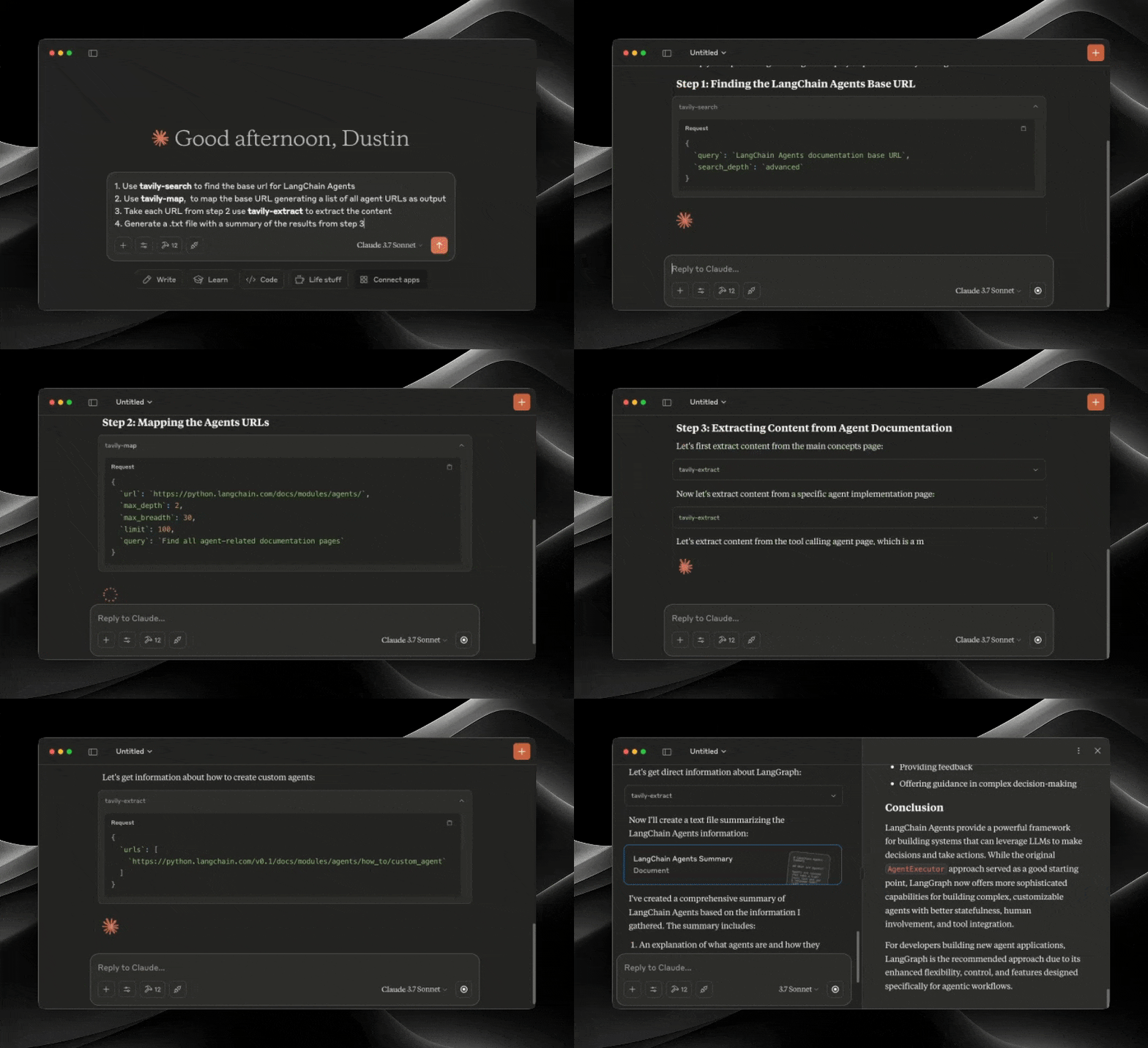
El Protocolo de Contexto de Modelo (MCP) es un estándar abierto que permite que los sistemas de IA interactúen sin problemas con diversas fuentes de datos y herramientas, lo que facilita conexiones bidireccionales seguras.
Desarrollado por Anthropic, el Protocolo de Contexto de Modelo (MCP) permite que asistentes de IA como Claude se integren a la perfección con las funciones avanzadas de búsqueda y extracción de datos de Tavily. Esta integración proporciona a los modelos de IA acceso en tiempo real a la información web, con sofisticadas opciones de filtrado y funciones de búsqueda específicas para cada dominio.
El servidor Tavily MCP proporciona:
herramientas de búsqueda, extracción, mapeo y rastreo
Capacidades de búsqueda web en tiempo real a través de la herramienta de búsqueda Tavily
Extracción inteligente de datos de páginas web mediante la herramienta tavily-extract
Potente herramienta de mapas web que crea un mapa estructurado del sitio web
Rastreador web que explora sitios web sistemáticamente
Tutorial sobre cómo combinar Tavily MCP con el servidor Neo4j MCP
Tutorial sobre la integración de Tavily MCP con Cline en VS Code
Related MCP server: Tavily MCP Server
Antes de comenzar, asegúrese de tener:
Si no tienes una clave API de Tavily, puedes registrarte para obtener una cuenta gratuita aquí
Escritorio o cursor de Claude
Node.js (v20 o superior)
Puede verificar su instalación de Node.js ejecutando:
node --version
Git instalado (solo es necesario si se utiliza el método de instalación Git)
En macOS: brew install git
En Linux:
Debian/Ubuntu: sudo apt install git
RedHat/CentOS: sudo yum install git
En Windows: Descargar Git para Windows
npx -y tavily-mcp@0.2.1 Para instalar Tavily MCP Server para Claude Desktop automáticamente a través de Smithery :
npx -y @smithery/cli install @tavily-ai/tavily-mcp --client claudeAunque puedes iniciar un servidor por sí solo, no es especialmente útil por sí solo. En su lugar, deberías integrarlo en un cliente MCP. A continuación, se muestra un ejemplo de cómo configurar la aplicación Claude Desktop para que funcione con el servidor tavily-mcp.
Este repositorio explicará cómo configurar VS Code , Cursor y Claude Desktop para que funcionen con el servidor tavily-mcp.
Para la instalación con un solo clic, haga clic en uno de los botones de instalación a continuación:
Primero, comprueba si hay botones de instalación en la parte superior de esta sección que se ajusten a tus necesidades. Si prefieres la instalación manual, sigue estos pasos:
Agrega el siguiente bloque JSON a tu archivo de configuración de usuario (JSON) en VS Code. Puedes hacerlo presionando Ctrl + Shift + P (o Cmd + Shift + P en macOS) y escribiendo Preferences: Open User Settings (JSON) .
{
  "mcp": {
    "inputs": [
      {
        "type": "promptString",
        "id": "tavily_api_key",
        "description": "Tavily API Key",
        "password": true
      }
    ],
    "servers": {
      "tavily": {
        "command": "npx",
        "args": ["-y", "tavily-mcp@0.2.1"],
        "env": {
          "TAVILY_API_KEY": "${input:tavily_api_key}"
        }
      }
    }
  }
}
Opcionalmente, puede agregarlo a un archivo llamado .vscode/mcp.json en su espacio de trabajo:
{
  "inputs": [
    {
      "type": "promptString",
      "id": "tavily_api_key",
      "description": "Tavily API Key",
      "password": true
    }
  ],
  "servers": {
    "tavily": {
      "command": "npx",
      "args": ["-y", "tavily-mcp@0.2.1"],
      "env": {
        "TAVILY_API_KEY": "${input:tavily_api_key}"
      }
    }
  }
}La forma más sencilla de configurar el servidor Tavily MCP en Cline es a través del mercado con un solo clic:
Abrir Cline en VS Code
Haga clic en el icono de Cline en la barra lateral
Vaya a la pestaña "Servidores MCP" (4 cuadrados)
Busca "Tavily" y haz clic en "instalar".
Cuando se le solicite, ingrese su clave API de Tavily
Alternativamente, puede configurar manualmente el servidor Tavily MCP en Cline:
Abra el archivo de configuración de Cline MCP:
# Using Visual Studio Code
code ~/Library/Application\ Support/Code/User/globalStorage/saoudrizwan.claude-dev/settings/cline_mcp_settings.json

# Or using TextEdit
open -e ~/Library/Application\ Support/Code/User/globalStorage/saoudrizwan.claude-dev/settings/cline_mcp_settings.jsoncode %APPDATA%\Code\User\globalStorage\saoudrizwan.claude-dev\settings\cline_mcp_settings.jsonAgregue la configuración del servidor Tavily al archivo:
Reemplace your-api-key-here con su clave API de Tavily real.
{
  "mcpServers": {
    "tavily-mcp": {
      "command": "npx",
      "args": ["-y", "tavily-mcp@0.2.1"],
      "env": {
        "TAVILY_API_KEY": "your-api-key-here"
      },
      "disabled": false,
      "autoApprove": []
    }
  }
}
Guarde el archivo y reinicie Cline si ya está ejecutándose.
Al usar Cline, ahora tendrás acceso a las herramientas de Tavily MCP. Puedes pedirle a Cline que use las herramientas de búsqueda y extracción de Tavily directamente en tus conversaciones.
Nota : Requiere la versión de Cursor 0.45.6 o superior
Para configurar el servidor Tavily MCP en Cursor:
Abrir configuración del cursor
Vaya a Características > Servidores MCP
Haga clic en el botón "+ Agregar nuevo servidor MCP"
Complete la siguiente información:
Nombre : Ingrese un apodo para el servidor (por ejemplo, "tavily-mcp")
Tipo : Seleccione "comando" como tipo
Comando : Ingrese el comando para ejecutar el servidor:
env TAVILY_API_KEY=your-api-key npx -y tavily-mcp@0.2.1Importante : Reemplace
your-api-keycon su clave API de Tavily. Puede obtenerla en app.tavily.com/home.
Después de agregar el servidor, debería aparecer en la lista de servidores MCP. Es posible que deba presionar manualmente el botón de actualización en la esquina superior derecha del servidor MCP para completar la lista de herramientas.
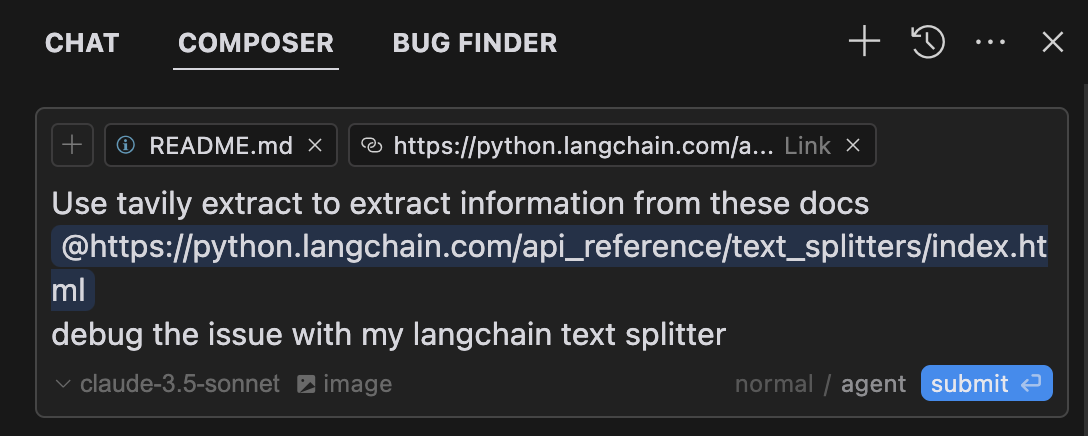
El Agente de Composer usará automáticamente las herramientas de Tavily MCP cuando sea relevante para sus consultas. Es mejor solicitar explícitamente el uso de las herramientas describiendo lo que desea hacer (por ejemplo, "Usar tavily-search para buscar en la web las últimas noticias sobre IA"). En Mac, presione Comando + L para abrir el chat, seleccione la opción de Composer en la parte superior de la pantalla, junto al botón de envío, seleccione el agente y envíe la consulta cuando esté lista.
# Create the config file if it doesn't exist
touch "$HOME/Library/Application Support/Claude/claude_desktop_config.json"

# Opens the config file in TextEdit
open -e "$HOME/Library/Application Support/Claude/claude_desktop_config.json"

# Alternative method using Visual Studio Code (requires VS Code to be installed)
code "$HOME/Library/Application Support/Claude/claude_desktop_config.json"code %APPDATA%\Claude\claude_desktop_config.jsonReemplace your-api-key-here con su clave API de Tavily real.
{
  "mcpServers": {
    "tavily-mcp": {
      "command": "npx",
      "args": ["-y", "tavily-mcp@0.2.1"],
      "env": {
        "TAVILY_API_KEY": "your-api-key-here"
      }
    }
  }
}Clonar el repositorio:
git clone https://github.com/tavily-ai/tavily-mcp.git
cd tavily-mcp
Instalar dependencias:
npm installConstruir el proyecto:
npm run buildSiga los pasos de configuración descritos en la sección Configuración de la aplicación Claude Desktop anterior, utilizando la siguiente configuración JSON.
Reemplace your-api-key-here con su clave API de Tavily real y /path/to/tavily-mcp con la ruta real donde clonó el repositorio en su sistema.
{
  "mcpServers": {
    "tavily": {
      "command": "npx",
      "args": ["/path/to/tavily-mcp/build/index.js"],
      "env": {
        "TAVILY_API_KEY": "your-api-key-here"
      }
    }
  }
}Una vez completada la instalación y configurada la aplicación de escritorio de Claude, debe cerrarla por completo y volver a abrirla para ver el servidor Tavily-MCP. Debería ver un icono de martillo en la esquina inferior izquierda de la aplicación, que indica las herramientas MCP disponibles. Puede hacer clic en él para obtener más información sobre las herramientas Tavily-search y Tavily-extract.
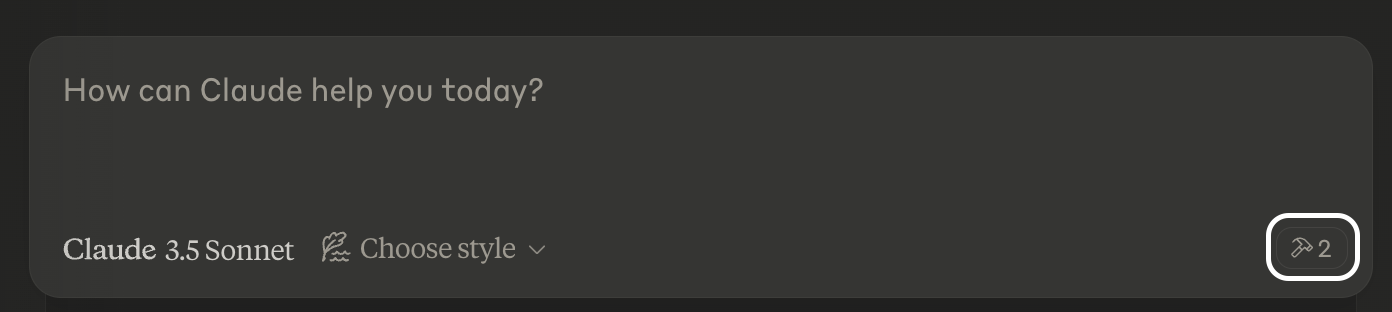
Ahora Claude tendrá acceso completo al servidor Tavily-MCP, incluyendo las herramientas Tavily-Search y Tavily-Extract. Si inserta los siguientes ejemplos en la aplicación de escritorio de Claude, debería ver las herramientas del servidor Tavily-MCP en acción.
Búsqueda web general :
Can you search for recent developments in quantum computing?Búsqueda de noticias :
Search for news articles about AI startups from the last 7 days.Búsqueda específica de dominio :
Search for climate change research on nature.com and sciencedirect.comExtraer el contenido del artículo :
Extract the main content from this article: https://example.com/articleTambién puede combinar las herramientas tavily-search y tavily-extract para realizar tareas más complejas.
Search for news articles about AI startups from the last 7 days and extract the main content from each article to generate a detailed report.Servidor no encontrado
Verifique la instalación de npm ejecutando npm --verison
Verifique la sintaxis de configuración de Claude Desktop ejecutando code ~/Library/Application\ Support/Claude/claude_desktop_config.json
Asegúrese de que Node.js esté instalado correctamente ejecutando node --version
Problemas relacionados con NPX
Si encuentra errores relacionados con npx , es posible que deba utilizar la ruta completa al ejecutable npx.
Puede encontrar esta ruta ejecutando which npx en su terminal, luego reemplace la línea "command": "npx" con "command": "/full/path/to/npx" en su configuración.
Problemas con la clave API
Confirme que su clave API de Tavily es válida
Compruebe que la clave API esté configurada correctamente en la configuración
Verifique que no haya espacios ni comillas alrededor de la clave API
Protocolo de contexto de modelo para la especificación MCP
Antrópico para Claude Desktop
A powerful web crawler that initiates a structured web crawl starting from a specified base URL. The crawler expands from that point like a graph, following internal links across pages. You can control how deep and wide it goes, and guide it to focus on specific sections of the site.
| Name | Required | Description | Default |
|---|---|---|---|
| url | Yes | The root URL to begin the crawl | |
| max_depth | No | Max depth of the crawl. Defines how far from the base URL the crawler can explore. | |
| max_breadth | No | Max number of links to follow per level of the tree (i.e., per page) | |
| limit | No | Total number of links the crawler will process before stopping | |
| instructions | No | Natural language instructions for the crawler. Instructions specify which types of pages the crawler should return. | |
| select_paths | No | Regex patterns to select only URLs with specific path patterns (e.g., /docs/.*, /api/v1.*) | |
| select_domains | No | Regex patterns to restrict crawling to specific domains or subdomains (e.g., ^docs\.example\.com$) | |
| allow_external | No | Whether to return external links in the final response | |
| extract_depth | No | Advanced extraction retrieves more data, including tables and embedded content, with higher success but may increase latency | basic |
| format | No | The format of the extracted web page content. markdown returns content in markdown format. text returns plain text and may increase latency. | markdown |
| include_favicon | No | Whether to include the favicon URL for each result |
Does the description disclose side effects, auth requirements, rate limits, or destructive behavior?
No annotations are provided, so the description carries full burden. It explains the crawler's graph-like expansion and control over depth/breadth, but omits behavioral details such as asynchronicity, rate limits, or side effects. It provides adequate but not comprehensive transparency.
Agents need to know what a tool does to the world before calling it. Descriptions should go beyond structured annotations to explain consequences.
Is the description appropriately sized, front-loaded, and free of redundancy?
The description is three sentences long, front-loads the core purpose, and contains no redundant information. Every sentence contributes meaning.
Shorter descriptions cost fewer tokens and are easier for agents to parse. Every sentence should earn its place.
Given the tool's complexity, does the description cover enough for an agent to succeed on first attempt?
Despite 100% schema coverage and no output schema, the description is somewhat light for a complex 11-parameter tool. It does not mention the output format or any operational constraints (e.g., timeouts, error handling), leaving some gaps in completeness.
Complex tools with many parameters or behaviors need more documentation. Simple tools need less. This dimension scales expectations accordingly.
Does the description clarify parameter syntax, constraints, interactions, or defaults beyond what the schema provides?
Schema description coverage is 100%, so the baseline is 3. The description adds meaningful context beyond the schema by describing the crawler's graph expansion and ability to focus on sections, which enhances understanding of how parameters like max_depth and max_breadth work together.
Input schemas describe structure but not intent. Descriptions should explain non-obvious parameter relationships and valid value ranges.
Does the description clearly state what the tool does and how it differs from similar tools?
The description clearly states it is a web crawler that starts from a base URL and expands like a graph, distinguishing it from sibling tools like extract, map, and search. It specifies the core action (initiates a structured crawl) and the resource (URL).
Agents choose between tools based on descriptions. A clear purpose with a specific verb and resource helps agents select the right tool.
Does the description explain when to use this tool, when not to, or what alternatives exist?
The description implies usage for structured web crawling but does not explicitly state when to use it versus alternatives (e.g., tavily-search). It lacks explicit when-not or alternative suggestions.
Agents often have multiple tools that could apply. Explicit usage guidance like "use X instead of Y when Z" prevents misuse.
A powerful web content extraction tool that retrieves and processes raw content from specified URLs, ideal for data collection, content analysis, and research tasks.
| Name | Required | Description | Default |
|---|---|---|---|
| urls | Yes | List of URLs to extract content from | |
| extract_depth | No | Depth of extraction - 'basic' or 'advanced', if usrls are linkedin use 'advanced' or if explicitly told to use advanced | basic |
| include_images | No | Include a list of images extracted from the urls in the response | |
| format | No | The format of the extracted web page content. markdown returns content in markdown format. text returns plain text and may increase latency. | markdown |
| include_favicon | No | Whether to include the favicon URL for each result | |
| query | No | User intent query for reranking extracted chunks based on relevance |
Does the description disclose side effects, auth requirements, rate limits, or destructive behavior?
With no annotations provided, the description carries full burden for behavioral disclosure. It mentions the tool 'retrieves and processes raw content' but doesn't disclose critical behavioral traits: whether it requires authentication, rate limits, error handling, pagination, or what the response structure looks like. The description adds minimal context beyond the basic operation.
Agents need to know what a tool does to the world before calling it. Descriptions should go beyond structured annotations to explain consequences.
Is the description appropriately sized, front-loaded, and free of redundancy?
The description is appropriately sized with two concise sentences. The first sentence states the core functionality, and the second provides use cases. There's no wasted text, though it could be slightly more front-loaded with sibling differentiation.
Shorter descriptions cost fewer tokens and are easier for agents to parse. Every sentence should earn its place.
Given the tool's complexity, does the description cover enough for an agent to succeed on first attempt?
Given 6 parameters, no annotations, and no output schema, the description is incomplete. It doesn't explain what the tool returns, error conditions, or behavioral constraints. For a web extraction tool with multiple configuration options and no structured output documentation, the description should provide more context about the extraction results and limitations.
Complex tools with many parameters or behaviors need more documentation. Simple tools need less. This dimension scales expectations accordingly.
Does the description clarify parameter syntax, constraints, interactions, or defaults beyond what the schema provides?
Schema description coverage is 100%, so the schema already documents all 6 parameters thoroughly. The description doesn't add any parameter-specific information beyond what's in the schema. It mentions general purpose but no parameter semantics. Baseline 3 is appropriate when schema does the heavy lifting.
Input schemas describe structure but not intent. Descriptions should explain non-obvious parameter relationships and valid value ranges.
Does the description clearly state what the tool does and how it differs from similar tools?
The description clearly states the tool's purpose: 'retrieves and processes raw content from specified URLs' with specific verbs and resource. It mentions use cases like 'data collection, content analysis, and research tasks' which helps understanding. However, it doesn't explicitly differentiate from sibling tools like tavily-crawl or tavily-search, which likely have overlapping web-related functionality.
Agents choose between tools based on descriptions. A clear purpose with a specific verb and resource helps agents select the right tool.
Does the description explain when to use this tool, when not to, or what alternatives exist?
The description provides no guidance on when to use this tool versus its siblings (tavily-crawl, tavily-map, tavily-search). It mentions the tool is 'ideal for data collection, content analysis, and research tasks' but doesn't specify contexts where alternatives might be better. There's no explicit when/when-not guidance or named alternatives.
Agents often have multiple tools that could apply. Explicit usage guidance like "use X instead of Y when Z" prevents misuse.
A powerful web mapping tool that creates a structured map of website URLs, allowing you to discover and analyze site structure, content organization, and navigation paths. Perfect for site audits, content discovery, and understanding website architecture.
| Name | Required | Description | Default |
|---|---|---|---|
| url | Yes | The root URL to begin the mapping | |
| max_depth | No | Max depth of the mapping. Defines how far from the base URL the crawler can explore | |
| max_breadth | No | Max number of links to follow per level of the tree (i.e., per page) | |
| limit | No | Total number of links the crawler will process before stopping | |
| instructions | No | Natural language instructions for the crawler | |
| select_paths | No | Regex patterns to select only URLs with specific path patterns (e.g., /docs/.*, /api/v1.*) | |
| select_domains | No | Regex patterns to restrict crawling to specific domains or subdomains (e.g., ^docs\.example\.com$) | |
| allow_external | No | Whether to return external links in the final response |
Does the description disclose side effects, auth requirements, rate limits, or destructive behavior?
With no annotations, the description must cover behavioral traits. It mentions 'crawler' but does not disclose how it handles JavaScript, rate limits, robot.txt, or data retention. The description is insufficient for an agent to understand side effects or constraints.
Agents need to know what a tool does to the world before calling it. Descriptions should go beyond structured annotations to explain consequences.
Is the description appropriately sized, front-loaded, and free of redundancy?
The description is concise, consisting of two sentences that efficiently convey the tool's value. However, it could be structured to front-load the core action more clearly.
Shorter descriptions cost fewer tokens and are easier for agents to parse. Every sentence should earn its place.
Given the tool's complexity, does the description cover enough for an agent to succeed on first attempt?
Given 8 parameters, no output schema, and no annotations, the description should explain the output structure (e.g., tree vs. list) and how the map is presented. It omits these critical details, making it incomplete for effective use.
Complex tools with many parameters or behaviors need more documentation. Simple tools need less. This dimension scales expectations accordingly.
Does the description clarify parameter syntax, constraints, interactions, or defaults beyond what the schema provides?
Schema description coverage is 100%, so baseline is 3. The description adds no additional meaning beyond the schema, simply restating the overall purpose without elaborating on parameters.
Input schemas describe structure but not intent. Descriptions should explain non-obvious parameter relationships and valid value ranges.
Does the description clearly state what the tool does and how it differs from similar tools?
The description clearly states it creates a structured map of website URLs for discovering site structure, content organization, and navigation paths. It distinguishes from siblings (crawl, extract, search) by focusing on mapping and analysis.
Agents choose between tools based on descriptions. A clear purpose with a specific verb and resource helps agents select the right tool.
Does the description explain when to use this tool, when not to, or what alternatives exist?
The description provides some usage context ('Perfect for site audits, content discovery, and understanding website architecture') but lacks explicit guidance on when not to use or how it compares to siblings, leaving the agent to infer.
Agents often have multiple tools that could apply. Explicit usage guidance like "use X instead of Y when Z" prevents misuse.
A powerful web search tool that provides comprehensive, real-time results using Tavily's AI search engine. Returns relevant web content with customizable parameters for result count, content type, and domain filtering. Ideal for gathering current information, news, and detailed web content analysis.
| Name | Required | Description | Default |
|---|---|---|---|
| query | Yes | Search query | |
| search_depth | No | The depth of the search. It can be 'basic' or 'advanced' | basic |
| topic | No | The category of the search. This will determine which of our agents will be used for the search | general |
| days | No | The number of days back from the current date to include in the search results. This specifies the time frame of data to be retrieved. Please note that this feature is only available when using the 'news' search topic | |
| time_range | No | The time range back from the current date to include in the search results. This feature is available for both 'general' and 'news' search topics | |
| start_date | No | Will return all results after the specified start date. Required to be written in the format YYYY-MM-DD. | |
| end_date | No | Will return all results before the specified end date. Required to be written in the format YYYY-MM-DD | |
| max_results | No | The maximum number of search results to return | |
| include_images | No | Include a list of query-related images in the response | |
| include_image_descriptions | No | Include a list of query-related images and their descriptions in the response | |
| include_raw_content | No | Include the cleaned and parsed HTML content of each search result | |
| include_domains | No | A list of domains to specifically include in the search results, if the user asks to search on specific sites set this to the domain of the site | |
| exclude_domains | No | List of domains to specifically exclude, if the user asks to exclude a domain set this to the domain of the site | |
| country | No | Boost search results from a specific country. This will prioritize content from the selected country in the search results. Available only if topic is general. Country names MUST be written in lowercase, plain English, with spaces and no underscores. | |
| include_favicon | No | Whether to include the favicon URL for each result |
Does the description disclose side effects, auth requirements, rate limits, or destructive behavior?
With no annotations provided, the description carries the full burden. It mentions 'real-time results' and 'customizable parameters' but omits important behavioral traits such as rate limits, result count limits, pagination, or whether the operation is read-only. The description implies a read operation but does not explicitly state it.
Agents need to know what a tool does to the world before calling it. Descriptions should go beyond structured annotations to explain consequences.
Is the description appropriately sized, front-loaded, and free of redundancy?
The description is two sentences, front-loaded with the primary purpose, and each sentence contributes value without repetition or fluff.
Shorter descriptions cost fewer tokens and are easier for agents to parse. Every sentence should earn its place.
Given the tool's complexity, does the description cover enough for an agent to succeed on first attempt?
For a tool with 15 parameters and no output schema, the description is somewhat brief. It gives a high-level overview but lacks details on return format, result structure, or pagination behavior. The description is adequate but not comprehensive.
Complex tools with many parameters or behaviors need more documentation. Simple tools need less. This dimension scales expectations accordingly.
Does the description clarify parameter syntax, constraints, interactions, or defaults beyond what the schema provides?
Schema description coverage is 100%, so the schema already documents all parameters. The description adds general context by summarizing parameter categories (result count, content type, domain filtering), but does not provide additional meaning beyond what is in the schema.
Input schemas describe structure but not intent. Descriptions should explain non-obvious parameter relationships and valid value ranges.
Does the description clearly state what the tool does and how it differs from similar tools?
The description clearly identifies the tool as a web search tool with real-time results and customizable parameters. However, it does not distinguish it from sibling tools like tavily-crawl, tavily-extract, or tavily-map, which may also perform web content retrieval.
Agents choose between tools based on descriptions. A clear purpose with a specific verb and resource helps agents select the right tool.
Does the description explain when to use this tool, when not to, or what alternatives exist?
No explicit guidance on when to use this tool versus alternatives. The description states it is 'ideal for gathering current information, news, and detailed web content analysis,' but does not specify when to avoid it or mention any exclusions or prerequisites.
Agents often have multiple tools that could apply. Explicit usage guidance like "use X instead of Y when Z" prevents misuse.
Recent tool additions, removals, and schema changes observed during successful MCP inspections.
v1.0.0tavily-crawltavily-extracttavily-maptavily-searchScored across 4 tools
Each tool has a clearly distinct purpose: crawling (tavily-crawl) focuses on structured exploration from a base URL, extraction (tavily-extract) retrieves raw content from specific URLs, mapping (tavily-map) analyzes site structure, and search (tavily-search) provides real-time web results. There is no overlap in functionality, making tool selection straightforward for an agent.
All tool names follow a consistent 'tavily-' prefix with a descriptive action suffix (crawl, extract, map, search), using a uniform hyphenated style. This predictable pattern enhances readability and reduces confusion, with no deviations in naming conventions.
With 4 tools, the server is well-scoped for its web-related domain, covering key operations like crawling, extraction, mapping, and search without bloat. Each tool earns its place by addressing a distinct aspect of web interaction, making the count appropriate and manageable.
The tool set provides complete coverage for web-based tasks, including discovery (crawl, map), content retrieval (extract, search), and analysis. There are no obvious gaps; agents can perform end-to-end workflows from finding sites to extracting and analyzing content without dead ends.
The Octagon MCP server provides specialized AI-powered financial research and analysis by integrating with the Octagon Market Intelligence API. It enables users to analyze public market data (SEC filings, earnings transcripts, financial metrics, and stock data for 8000+ companies), private market data (3M+ companies, 500k+ funding rounds, 2M+ M&A/IPO transactions), and conduct deep research including web scraping capabilities. The server also features autonomous research agents that search hundreds of sources and return fully cited reports in approximately one minute.
Driflyte MCP server which lets AI assistants query topic-specific knowledge from web and GitHub.
Web search, browser automation, scraping, crawling and CAPTCHA solving for AI agents.
The Dappier MCP server connects LLMs and AI agents to real-time, rights-cleared, proprietary data from trusted sources across various domains. It provides specialized knowledge through real-time web search, financial stock market and crypto data access, AI-powered content recommendations from premium publishers, and structured outputs with sub-300ms response times, enabling AI systems to respond to current events and trends.