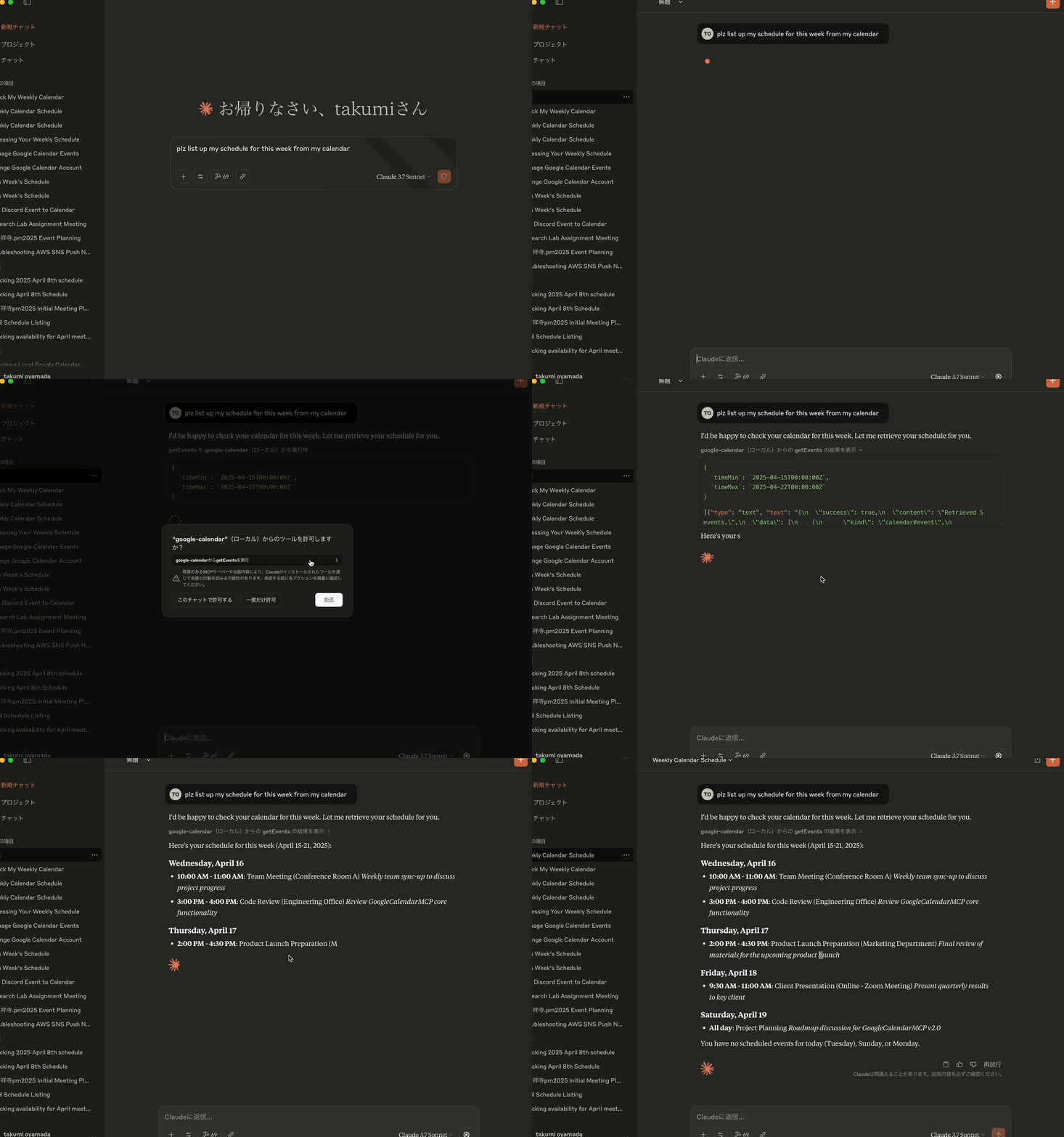
Google Calendar MCP Server
Google 캘린더 MCP 서버
🔔 버전 업데이트 공지 🔔
버전 1.0.5에서는createEvent및updateEvent도구 모두에서recurrence매개변수를 통해 반복 이벤트를 지원합니다. 이를 통해 반복 이벤트를 생성 후 수동으로 설정하지 않고도 직접 생성하고 수정할 수 있습니다.
프로젝트 개요
Google 캘린더 MCP 서버는 Google 캘린더와 Claude Desktop 간의 통합을 지원하는 MCP(Model Context Protocol) 서버 구현입니다. 이 프로젝트를 통해 Claude는 사용자의 Google 캘린더와 상호 작용하여 자연어 상호 작용을 통해 캘린더 일정을 표시, 생성, 업데이트 및 삭제할 수 있습니다.
핵심 기능
Google 캘린더 통합 : Claude Desktop과 Google 캘린더 API 간의 브리지를 제공합니다.
MCP 구현 : AI 어시스턴트 도구 통합을 위한 모델 컨텍스트 프로토콜 사양을 따릅니다.
OAuth2 인증 : Google API 인증 흐름을 안전하게 처리합니다.
이벤트 관리 : 포괄적인 캘린더 이벤트 작업(가져오기, 만들기, 업데이트, 삭제)을 지원합니다.
색상 지원 : colorId 매개변수를 사용하여 이벤트 색상을 설정하고 업데이트하는 기능
STDIO 전송 : Claude Desktop과의 통신을 위해 표준 입력/출력을 사용합니다.
Related MCP server: calendar-mcp
기술 아키텍처
이 프로젝트에서는 다음을 사용합니다.
TypeScript : 유형 안전한 코드 개발을 위해
MCP SDK : Claude Desktop과 통합하기 위해
@modelcontextprotocol/sdk사용합니다.Google API : Google 캘린더 API 액세스를 위해
googleapis사용합니다.Zod : 요청/응답 데이터에 대한 스키마 검증을 구현합니다.
환경 기반 구성 : 구성 관리를 위해 dotenv를 사용합니다.
Helmet.js : 보안 헤더용
AES-256-GCM : 토큰 암호화용
Jest : 단위 테스트 및 커버리지용
GitHub Actions : CI/CD용
주요 구성 요소
MCP 서버 : Claude Desktop과의 통신을 처리하는 핵심 서버 구현
Google 캘린더 도구 : 캘린더 작업(검색, 생성, 업데이트, 삭제)
인증 핸들러 : Google API를 사용한 OAuth2 흐름 관리
스키마 검증 : 모든 작업에서 데이터 무결성 보장
토큰 관리자 : 인증 토큰의 안전한 처리
사용 가능한 도구
이 MCP 서버는 Google 캘린더와 상호 작용하기 위한 다음과 같은 도구를 제공합니다.
1. 이벤트 가져오기
다양한 필터링 옵션을 사용하여 캘린더 이벤트를 검색합니다.
매개변수:
calendarId(선택 사항): 캘린더 ID(생략 시 기본 캘린더 사용)timeMin(선택 사항): 이벤트 검색 시작 시간(ISO 8601 형식, 예: "2025-03-01T00:00:00Z")timeMax(선택 사항): 이벤트 검색 종료 시간(ISO 8601 형식)maxResults(선택 사항): 검색할 최대 이벤트 수(기본값: 10)orderBy(선택 사항): 정렬 순서("startTime" 또는 "updated")
2. 이벤트 생성
새로운 캘린더 이벤트를 만듭니다.
매개변수:
calendarId(선택 사항): 캘린더 ID(생략 시 기본 캘린더 사용)event: 이벤트 세부 정보 객체에는 다음이 포함됩니다.summary(필수): 이벤트 제목description(선택 사항): 이벤트 설명location(선택 사항): 이벤트 위치start: 시작 시간 객체:dateTime(선택 사항): ISO 8601 형식(예: "2025-03-15T09:00:00+09:00")date(선택 사항): 종일 이벤트의 경우 YYYY-MM-DD 형식timeZone(선택 사항): 시간대(예: "Asia/Tokyo")
end: 종료 시간 객체(start와 동일한 형식)attendees(선택 사항): 이메일과 선택 사항인 displayName이 있는 참석자 배열colorId(선택 사항): 이벤트 색상 ID(1-11)recurrence(선택 사항): RFC5545 형식의 반복 규칙 배열(예: ["RRULE:FREQ=WEEKLY;BYDAY=MO,WE,FR"])
3. 업데이트 이벤트
기존 캘린더 이벤트를 업데이트합니다. 이 함수는 기존 이벤트 데이터를 먼저 가져와 업데이트 데이터와 병합하며, 업데이트 요청에 포함되지 않은 필드는 그대로 유지합니다.
매개변수:
calendarId(선택 사항): 캘린더 ID(생략 시 기본 캘린더 사용)eventId(필수): 업데이트할 이벤트의 IDevent: 업데이트할 필드가 포함된 이벤트 세부 정보 객체(createEvent와 동일한 구조, 모든 필드는 선택 사항)명시적으로 제공된 필드만 업데이트됩니다.
업데이트 요청에 포함되지 않은 필드는 기존 값을 유지합니다.
이를 통해 데이터 손실 없이 부분 업데이트가 가능합니다.
recurrence매개변수를 업데이트하여 반복 이벤트 패턴을 수정할 수 있습니다.
4. 이벤트 삭제
캘린더 이벤트를 삭제합니다.
매개변수:
calendarId(선택 사항): 캘린더 ID(생략 시 기본 캘린더 사용)eventId(필수): 삭제할 이벤트의 ID
5. 인증하다
Google 캘린더에 다시 인증합니다. Claude를 다시 시작하지 않고도 여러 Google 계정 간에 전환하고 싶을 때 유용합니다.
매개변수:
없음
개발 지침
새로운 기능을 추가하거나, 코드를 수정하거나, 버그를 수정할 때는 npm version 명령을 사용하여 각 변경 사항의 버전을 의미적으로 높여주세요. 또한, 코딩이 명확하고 객체 지향 프로그래밍(OOP)과 같은 모든 필수 코딩 규칙을 준수하는지 확인하세요. 버전이 업데이트되면 버전 스크립트가 자동으로 npm install 실행하지만, 제출하기 전에 코드를 빌드하고, lint를 실행하고, 테스트해야 합니다.
코드 구조
src/ : 소스 코드 디렉토리
auth/ : 인증 처리
config/ : 구성 설정
mcp/ : MCP 서버 구현
tools/ : Google 캘린더 도구 구현
utils/ : 유틸리티 함수 및 도우미
모범 사례
TypeScript 모범 사례에 따른 적절한 타이핑
포괄적인 오류 처리 유지
적절한 인증 흐름을 보장하세요
종속성을 최신 상태로 유지하세요
모든 기능에 대한 명확한 문서를 작성하세요
보안 모범 사례 구현
OAuth 2.1 인증 표준을 따르세요
모든 입력/출력 데이터에 스키마 검증을 사용합니다.
테스트
핵심 기능에 대한 단위 테스트 구현
인증 흐름을 철저히 테스트하세요
Google API에 대한 캘린더 조작 확인
커버리지 보고서로 테스트 실행
보안 테스트가 포함되어 있는지 확인하세요
전개
이 패키지는 npm에 @takumi0706/google-calendar-mcp 로 게시되었습니다.
지엑스피1
필수 조건
Google Cloud 프로젝트를 만들고 Google 캘린더 API를 활성화하세요.
Google Cloud Console에서 OAuth2 자격 증명 구성
환경 변수 설정:
# Create a .env file with your Google OAuth credentials
GOOGLE_CLIENT_ID=your_client_id
GOOGLE_CLIENT_SECRET=your_client_secret
GOOGLE_REDIRECT_URI=http://localhost:4153/oauth2callback
# Optional: Token encryption key (auto-generated if not provided)
TOKEN_ENCRYPTION_KEY=32-byte-hex-key
# Optional: Auth server port and host (default port: 4153, host: localhost)
AUTH_PORT=4153
AUTH_HOST=localhost
# Optional: MCP server port and host (default port: 3000, host: localhost)
PORT=3000
HOST=localhost
# Optional: Enable manual authentication (useful when localhost is not accessible)
USE_MANUAL_AUTH=true클로드 데스크톱 구성
claude_desktop_config.json 파일에 서버를 추가하세요. localhost에 접근할 수 없는 환경에서 실행 중인 경우 USE_MANUAL_AUTH 환경 변수를 "true"로 설정하세요.
{
"mcpServers": {
"google-calendar": {
"command": "npx",
"args": [
"-y",
"@takumi0706/google-calendar-mcp"
],
"env": {
"GOOGLE_CLIENT_ID": "your_client_id",
"GOOGLE_CLIENT_SECRET": "your_client_secret",
"GOOGLE_REDIRECT_URI": "http://localhost:4153/oauth2callback"
}
}
}
}보안 고려 사항
OAuth 토큰은 메모리에만 저장됩니다(파일 기반 저장소에는 저장되지 않음)
민감한 자격 증명은 환경 변수로 제공되어야 합니다.
안전한 저장을 위한 AES-256-GCM을 사용한 토큰 암호화
명시적 code_verifier 및 code_challenge 생성을 통한 PKCE 구현
CSRF 보호를 위한 상태 매개변수 검증
Helmet.js를 사용하여 적용된 보안 헤더
API 엔드포인트 보호를 위한 속도 제한
Zod 스키마를 사용한 입력 검증
자세한 내용은 SECURITY.md를 참조하세요.
유지
Google 캘린더 API와의 호환성을 유지하기 위한 정기 업데이트
버전 업데이트는 README.md에 기록되어 있습니다.
문제 해결
문제가 발생하면:
Google OAuth 자격 증명이 올바르게 구성되었는지 확인하세요.
Google 캘린더 API 액세스에 대한 충분한 권한이 있는지 확인하세요.
Claude Desktop 구성이 올바른지 확인하세요
일반적인 오류
JSON 구문 분석 오류 :
Unexpected non-whitespace character after JSON at position 4 (line 1 column 5)와 같은 오류가 발생하는 경우, 일반적으로 JSON-RPC 메시지 형식이 잘못되었기 때문입니다. 이 문제는 0.6.7 버전 이상에서 해결되었습니다. 이러한 오류가 계속 발생하는 경우 최신 버전으로 업데이트하세요.인증 오류 : Google OAuth 자격 증명을 확인하세요
잘못된 상태 매개변수 : 재인증 시
Authentication failed: Invalid state parameter메시지가 표시되면 OAuth 서버 수명 주기 관리 문제를 해결한 1.0.3 이상 버전으로 업데이트하세요. 이전 버전에서는 포트 4153을 닫고 애플리케이션을 다시 시작해야 할 수 있습니다.연결 오류 : 서버의 인스턴스가 하나만 실행되고 있는지 확인하세요.
연결 해제 문제 : 사용자 정의 TCP 소켓 없이 서버가 MCP 메시지를 제대로 처리하는지 확인하세요.
로컬호스트에 액세스할 수 없음 : 로컬호스트에 액세스할 수 없는 환경(원격 서버 또는 컨테이너 등)에서 애플리케이션을 실행하는 경우,
USE_MANUAL_AUTH=true설정하여 수동 인증을 활성화하세요. 이렇게 하면 애플리케이션 승인 후 Google에서 표시하는 승인 코드를 직접 입력할 수 있습니다.
버전 기록
버전 1.0.6 변경 사항
이 Google 캘린더 MCP 서버에서는 범위가 필요하지 않습니다.
버전 1.0.5 변경 사항
createEvent및updateEvent도구 모두에서recurrence매개변수를 통해 반복 이벤트에 대한 지원이 추가되었습니다.수동 설정 없이 반복 이벤트를 직접 생성하고 수정할 수 있습니다.
버전 1.0.4 변경 사항
버전 번호 업데이트가 포함된 유지 관리 릴리스
버전 1.0.3에서 기능 변경 사항 없음
최신 종속성과의 호환성을 보장합니다.
버전 1.0.3 변경 사항
Claude를 다시 시작하지 않고도 재인증을 허용하는 새로운
authenticate도구가 추가되었습니다.세션 중에 다른 Google 계정 간에 전환할 수 있게 되었습니다.
MCP 인터페이스를 통한 노출된 인증 기능
계정 전환 시 재시작이 필요 없어 사용자 경험이 향상되었습니다.
로컬호스트에 접근할 수 없는 환경에 대한 수동 인증 옵션이 추가되었습니다.
수동으로 인증 코드를 입력하기 위한 readline 인터페이스 구현
수동 인증을 활성화하기 위해 USE_MANUAL_AUTH 환경 변수가 추가되었습니다.
Zod 종속성을 최신 버전(3.24.2)으로 업데이트했습니다.
최신 Zod 기능으로 스키마 검증이 개선되었습니다.
향상된 코드 안정성 및 보안
재인증 중 "잘못된 상태 매개변수" 오류가 수정되었습니다.
인증 후 필요에 따라 시작하고 종료되도록 OAuth 서버를 수정했습니다.
포트 충돌을 방지하기 위한 향상된 서버 수명 주기 관리
인증 흐름에 대한 향상된 오류 처리
버전 1.0.2 변경 사항
부분 업데이트 수행 시 기존 이벤트 데이터를 보존하기 위해
updateEvent함수를 수정했습니다.업데이트하기 전에 기존 이벤트 데이터를 가져오기 위해
getEvent함수가 추가되었습니다.데이터 손실을 방지하기 위해 업데이트 데이터를 기존 데이터와 병합하도록
updateEvent수정했습니다.업데이트 요청에서 모든 필드를 선택 사항으로 만들기 위해 스키마 유효성 검사를 업데이트했습니다.
updateEvent함수에 대한 문서가 개선되었습니다.
버전 1.0.1 변경 사항
Node.js v20.9.0+ 및 'open' 패키지(v10+)와의 호환성 문제가 해결되었습니다.
ESM 전용 '열림' 패키지에 대한 정적 가져오기를 동적 가져오기로 교체했습니다.
OAuth 인증 중 브라우저 열기 오류 처리가 개선되었습니다.
더 나은 유지 관리를 위한 향상된 코드 주석
버전 1.0.0 변경 사항
주요 버전 출시로 생산 준비 완료
향상된 유지 관리를 위한 포괄적인 코드 리팩토링
모든 메시지와 댓글의 국제화(일본어에서 영어로 번역)
향상된 코드 일관성 및 가독성
더 나은 사용자 경험을 위해 오류 메시지가 개선되었습니다.
프로젝트의 현재 상태를 반영하기 위해 업데이트된 문서
코드베이스 전체에 걸쳐 표준화된 코딩 스타일
버전 0.8.0 변경 사항
새로 고침 토큰 문제를 처리하기 위한 향상된 OAuth 인증 흐름
Google에서 동의 화면을 표시하고 새 새로 고침 토큰을 제공하도록 강제하는
prompt: 'consent'새로 고침 토큰을 사용할 수 없는 경우 액세스 토큰만으로 작동하도록 수정된 인증 흐름
새로 고침 토큰이 없거나 새로 고침 토큰이 유효하지 않은 경우를 처리하기 위해 토큰 새로 고침 논리가 개선되었습니다.
더 나은 토큰 관리를 위해 새로 고침된 액세스 토큰을 저장하기 위해 토큰 저장소를 업데이트했습니다.
토큰 새로 고침 논리에서 잠재적 무한 루프가 수정되었습니다.
개발
이 프로젝트에 기여하려면:
# Clone the repository
git clone https://github.com/takumi0706/google-calendar-mcp.git
cd google-calendar-mcp
# Install dependencies
npm install
# Run in development mode
npm run dev테스트
테스트를 실행하려면:
# Run all tests
npm test
# Run tests with coverage report
npm test -- --coverage특허
MIT
Available Tools
5 toolsauthenticateA
Start the Google Calendar OAuth flow. Opens a browser window for consent and stores the resulting tokens in memory.
| Name | Required | Description | Default |
|---|---|---|---|
No parameters | |||
TDQS
Does the description disclose side effects, auth requirements, rate limits, or destructive behavior?
No annotations are provided, so the description carries the full burden. It goes beyond the name by disclosing the browser consent behavior and that tokens are stored in memory, which implies they are not persisted across sessions. It does not cover failure modes or re-authentication, but it is meaningfully transparent for a zero-parameter tool.
Agents need to know what a tool does to the world before calling it. Descriptions should go beyond structured annotations to explain consequences.
Is the description appropriately sized, front-loaded, and free of redundancy?
Two concise sentences with no filler. The action, side effect, and storage behavior are all included in minimal space, and the purpose is front-loaded.
Shorter descriptions cost fewer tokens and are easier for agents to parse. Every sentence should earn its place.
Given the tool's complexity, does the description cover enough for an agent to succeed on first attempt?
For a zero-parameter OAuth tool with no output schema, the description covers the purpose, the user-facing behavior, and the outcome (tokens in memory). An agent has enough information to invoke the tool and understand its effect; nothing essential is missing.
Complex tools with many parameters or behaviors need more documentation. Simple tools need less. This dimension scales expectations accordingly.
Does the description clarify parameter syntax, constraints, interactions, or defaults beyond what the schema provides?
The tool has no parameters, so the schema is trivially complete. The description adds nothing about parameters, but none are needed; the baseline of 4 applies.
Input schemas describe structure but not intent. Descriptions should explain non-obvious parameter relationships and valid value ranges.
Does the description clearly state what the tool does and how it differs from similar tools?
The description states a specific action ('Start the Google Calendar OAuth flow') and gives concrete behavioral details: it opens a browser window for consent and stores tokens in memory. This clearly distinguishes it from the event-related sibling tools.
Agents choose between tools based on descriptions. A clear purpose with a specific verb and resource helps agents select the right tool.
Does the description explain when to use this tool, when not to, or what alternatives exist?
The description makes it clear this is the authentication step for Google Calendar, which an agent can infer should precede getEvents, createEvent, and other calendar operations. It does not explicitly articulate when not to use it, but the context is unambiguous enough for tool selection.
Agents often have multiple tools that could apply. Explicit usage guidance like "use X instead of Y when Z" prevents misuse.
createEventA
Create an event on a Google Calendar. Supports all-day events, attendees, reminders and RFC5545 recurrence rules.
| Name | Required | Description | Default |
|---|---|---|---|
| event | Yes | ||
| calendarId | No | primary |
TDQS
Does the description disclose side effects, auth requirements, rate limits, or destructive behavior?
No annotations are provided, so the description carries the full burden of behavioral disclosure. It lists supported features but does not mention whether attendee invitations are sent, whether authentication is required, what the created event response looks like, or whether creation is reversible. 'Create' implies mutation, but little else is disclosed.
Agents need to know what a tool does to the world before calling it. Descriptions should go beyond structured annotations to explain consequences.
Is the description appropriately sized, front-loaded, and free of redundancy?
The description is one sentence with no filler. It front-loads the action and resource, then packs the key capability details into a short supporting clause. Every word earns its place.
Shorter descriptions cost fewer tokens and are easier for agents to parse. Every sentence should earn its place.
Given the tool's complexity, does the description cover enough for an agent to succeed on first attempt?
Given the complexity of the nested event schema, the absence of annotations, and no output schema, this short description leaves important operational gaps: authentication prerequisites, default calendar behavior, return shape, and side effects like attendee emails. The feature list is helpful but insufficient for safe, confident invocation of a mutation tool.
Complex tools with many parameters or behaviors need more documentation. Simple tools need less. This dimension scales expectations accordingly.
Does the description clarify parameter syntax, constraints, interactions, or defaults beyond what the schema provides?
Schema description coverage is reported as 0%, and the event object is large and nested. The description partially compensates by calling out all-day events, attendees, reminders, and RFC5545 recurrence rules, which map to schema properties. Still, it does not explain the required summary/start/end fields, the calendarId default of 'primary', or the overall structure of the event object.
Input schemas describe structure but not intent. Descriptions should explain non-obvious parameter relationships and valid value ranges.
Does the description clearly state what the tool does and how it differs from similar tools?
The description opens with a specific verb-resource pair: 'Create an event on a Google Calendar.' It also names supported features, which clarifies scope. This is clearly distinct from the sibling tools getEvents, updateEvent, deleteEvent, and authenticate without any ambiguity.
Agents choose between tools based on descriptions. A clear purpose with a specific verb and resource helps agents select the right tool.
Does the description explain when to use this tool, when not to, or what alternatives exist?
The imperative 'Create an event' provides clear, unambiguous context for when to use the tool. However, it gives no explicit exclusion like 'use updateEvent to modify an existing event' or 'call authenticate first,' so it stops short of fully explicit routing guidance.
Agents often have multiple tools that could apply. Explicit usage guidance like "use X instead of Y when Z" prevents misuse.
deleteEventC
Delete an event from a Google Calendar by its event ID.
| Name | Required | Description | Default |
|---|---|---|---|
| eventId | Yes | ||
| calendarId | No | primary |
TDQS
Does the description disclose side effects, auth requirements, rate limits, or destructive behavior?
No annotations are provided, so the description bears full responsibility for behavioral disclosure. While 'Delete' clearly implies a destructive mutation, it does not state whether the operation is permanent, whether confirmation or special permissions are required, or what side effects occur (e.g., removal from attendee calendars). The description is too thin to adequately characterize the risk.
Agents need to know what a tool does to the world before calling it. Descriptions should go beyond structured annotations to explain consequences.
Is the description appropriately sized, front-loaded, and free of redundancy?
The description is a single, front-loaded sentence with no filler. It conveys the core action and key parameter efficiently, though it sacrifices some essential detail for brevity.
Shorter descriptions cost fewer tokens and are easier for agents to parse. Every sentence should earn its place.
Given the tool's complexity, does the description cover enough for an agent to succeed on first attempt?
For a destructive tool with no annotations, no output schema, and 0% schema coverage, this description is insufficient. It does not cover the optional calendarId, authentication or permission expectations, undoing behavior, or any failure/response semantics. An agent cannot confidently invoke this tool correctly based on this definition alone.
Complex tools with many parameters or behaviors need more documentation. Simple tools need less. This dimension scales expectations accordingly.
Does the description clarify parameter syntax, constraints, interactions, or defaults beyond what the schema provides?
Schema description coverage is 0%, so the description must compensate by explaining parameters. It does identify eventId as the core identifier, but it completely omits calendarId, which is a parameter in the schema with a default of 'primary'. The vague phrase 'Google Calendar' doesn't clarify how the calendar is selected, leaving an agent uncertain about the optional parameter.
Input schemas describe structure but not intent. Descriptions should explain non-obvious parameter relationships and valid value ranges.
Does the description clearly state what the tool does and how it differs from similar tools?
The description uses a specific verb ('Delete'), a resource ('an event'), and a unique identifier ('event ID'), which clearly distinguishes this from siblings like createEvent, getEvents, and updateEvent. It unambiguously states the operation and object.
Agents choose between tools based on descriptions. A clear purpose with a specific verb and resource helps agents select the right tool.
Does the description explain when to use this tool, when not to, or what alternatives exist?
The description implies that the tool is used to delete an event, but provides no guidance on when this tool should be used over alternatives, no prerequisites (e.g., authentication), and no exclusions. It does not mention that calendarId is optional or defaulted, nor when a deletion might fail.
Agents often have multiple tools that could apply. Explicit usage guidance like "use X instead of Y when Z" prevents misuse.
getEventsA
List events from a Google Calendar within an optional time range.
| Name | Required | Description | Default |
|---|---|---|---|
| orderBy | No | Sort order for the returned events | |
| timeMax | No | Upper bound (exclusive) for an event's start time, in ISO 8601 format | |
| timeMin | No | Lower bound (inclusive) for an event's end time, in ISO 8601 format | |
| calendarId | No | Calendar ID (uses the primary calendar if omitted or empty) | |
| maxResults | No | Maximum number of events to return |
TDQS
Does the description disclose side effects, auth requirements, rate limits, or destructive behavior?
With no annotations, the description carries the behavioral burden. 'List' conveys a read-only, non-destructive operation and the time-range clause provides useful scoping, but the description omits any mention of auth needs, pagination behavior, or what happens with invalid calendar IDs.
Agents need to know what a tool does to the world before calling it. Descriptions should go beyond structured annotations to explain consequences.
Is the description appropriately sized, front-loaded, and free of redundancy?
The description is a single front-loaded sentence with no filler. Every word contributes to identifying the action, resource, and optional scope.
Shorter descriptions cost fewer tokens and are easier for agents to parse. Every sentence should earn its place.
Given the tool's complexity, does the description cover enough for an agent to succeed on first attempt?
For a straightforward list operation with a fully described schema, the description is minimally sufficient. It lacks an explicit statement about auth requirements and return shape, but the sibling set and parameter documentation provide enough context to avoid gross misuse.
Complex tools with many parameters or behaviors need more documentation. Simple tools need less. This dimension scales expectations accordingly.
Does the description clarify parameter syntax, constraints, interactions, or defaults beyond what the schema provides?
All five parameters are already documented in the schema (100% coverage), so the baseline applies. The description adds no parameter-level detail beyond noting the time range is optional, which is already encoded by the nullable timeMin/timeMax fields.
Input schemas describe structure but not intent. Descriptions should explain non-obvious parameter relationships and valid value ranges.
Does the description clearly state what the tool does and how it differs from similar tools?
The description states the exact action ('List'), the resource ('events from a Google Calendar'), and the optional time-range scope. This clearly differentiates it from the sibling mutation tools (createEvent, updateEvent, deleteEvent) and authenticate.
Agents choose between tools based on descriptions. A clear purpose with a specific verb and resource helps agents select the right tool.
Does the description explain when to use this tool, when not to, or what alternatives exist?
The description implies this is the read/query tool for calendar events, and the sibling names make the contrast obvious. However, it does not explicitly state when to prefer it over alternatives, nor does it mention prerequisites such as authentication or calendar ownership.
Agents often have multiple tools that could apply. Explicit usage guidance like "use X instead of Y when Z" prevents misuse.
updateEventA
Update an existing Google Calendar event. Omitted fields keep their current values.
| Name | Required | Description | Default |
|---|---|---|---|
| event | Yes | ||
| eventId | Yes | ||
| calendarId | No | primary |
TDQS
Does the description disclose side effects, auth requirements, rate limits, or destructive behavior?
With no annotations, the description carries the burden of behavioral disclosure. It usefully states partial-update semantics ('Omitted fields keep their current values'), but it does not mention side effects, permissions, or the irreversibility of the update. A 3 reflects that it adds some valuable behavior context while leaving significant gaps.
Agents need to know what a tool does to the world before calling it. Descriptions should go beyond structured annotations to explain consequences.
Is the description appropriately sized, front-loaded, and free of redundancy?
Two sentences with no fluff; the purpose is front-loaded and the second sentence adds essential behavioral nuance about field omission. Every word earns its place.
Shorter descriptions cost fewer tokens and are easier for agents to parse. Every sentence should earn its place.
Given the tool's complexity, does the description cover enough for an agent to succeed on first attempt?
Given the nested event object with complex date/reminder/recurrence schemas and no output schema or annotations, the description is too sparse. It omits how the update interacts with required fields, what happens to attendees on date changes, and any authentication or error behavior. An agent needs more context to invoke correctly.
Complex tools with many parameters or behaviors need more documentation. Simple tools need less. This dimension scales expectations accordingly.
Does the description clarify parameter syntax, constraints, interactions, or defaults beyond what the schema provides?
Schema description coverage is 0%, so the description must compensate for explaining eventId, event, and calendarId. It only generically refers to 'fields' and the partial-update behavior, giving no specific meaning for the parameters. It fails to clarify what eventId identifies or how calendarId scopes the operation.
Input schemas describe structure but not intent. Descriptions should explain non-obvious parameter relationships and valid value ranges.
Does the description clearly state what the tool does and how it differs from similar tools?
The description states a specific verb ('Update') and resource ('existing Google Calendar event'), which clearly differentiates it from siblings like createEvent and deleteEvent. The phrase 'existing' signals that it modifies rather than creates.
Agents choose between tools based on descriptions. A clear purpose with a specific verb and resource helps agents select the right tool.
Does the description explain when to use this tool, when not to, or what alternatives exist?
The description implies use for updating existing events by contrasting with creating, but it does not explicitly state when to prefer this tool over siblings, nor any exclusions. An agent can infer the use case from 'existing,' but no direct guidance is provided.
Agents often have multiple tools that could apply. Explicit usage guidance like "use X instead of Y when Z" prevents misuse.
Tool Schema Changelog
Recent tool additions, removals, and schema changes observed during successful MCP inspections.
5 tool updates
v2.0.0- First observed
authenticate - First observed
createEvent - First observed
deleteEvent - First observed
getEvents - First observed
updateEvent
TDQS
Scored across 5 tools
Each tool targets a distinct action on calendar events—listing, creating, updating, deleting—plus a separate authentication flow. There is no overlap or ambiguity between the tools.
Four tools follow a clear verb+Event pattern (getEvents, createEvent, updateEvent, deleteEvent), while authenticate is a necessary but non-parallel exception. Overall the naming is predictable and easy to infer.
Five tools is a well-scoped set for a Google Calendar event server: authentication plus full CRUD operations. Each tool serves a clear purpose without unnecessary bloat.
The server covers the full event lifecycle—list, create, update, delete—and includes OAuth authentication as a prerequisite. There are no obvious dead ends or critical missing operations for managing calendar events.
Maintenance
Related MCP Connectors
Hosted Google Calendar MCP server for AI agents. No self-hosting or Google Cloud setup.
A comprehensive Model Context Protocol (MCP) server that enables AI assistants to interact with yo…
A MCP server that works with Google Calendar to manage event listing, reading, and updates.
Model Context Protocol server for the Apideck Unified API. Connect any MCP-compatible agent framework to 100+ accounting systems, HRIS platforms, file storage providers, and more through one integration. More information https://www.apideck.com/mcp-server
Related MCP Servers
- AlicenseNot gradedqualityDmaintenanceA Model Context Protocol server that enables natural language interaction with Google Calendar, allowing users to view, create, update, and delete calendar events through context-aware operations.118 npm1MIT
- AlicenseAqualityAmaintenanceThis project implements a Python-based MCP (Model Context Protocol) server that acts as an interface between Large Language Models (LLMs) and the Google Calendar API. It enables LLMs to perform calendar operations via natural language requests.23181 PyPI26AGPL 3.0
- AlicenseNot gradedqualityDmaintenanceA Model Context Protocol server that enables Claude to fully manage Google Calendar, including events, calendars, sharing, and availability checks through natural language.1MIT
- AlicenseNot gradedqualityDmaintenanceA Model Context Protocol (MCP) server for Google Calendar integration in Claude Desktop, enabling AI assistants to manage Google Calendar events through natural language interactions.107 npm1ISC