Glama
takumi0706

Google Calendar MCP Server

by takumi0706

Google カレンダー MCP サーバー
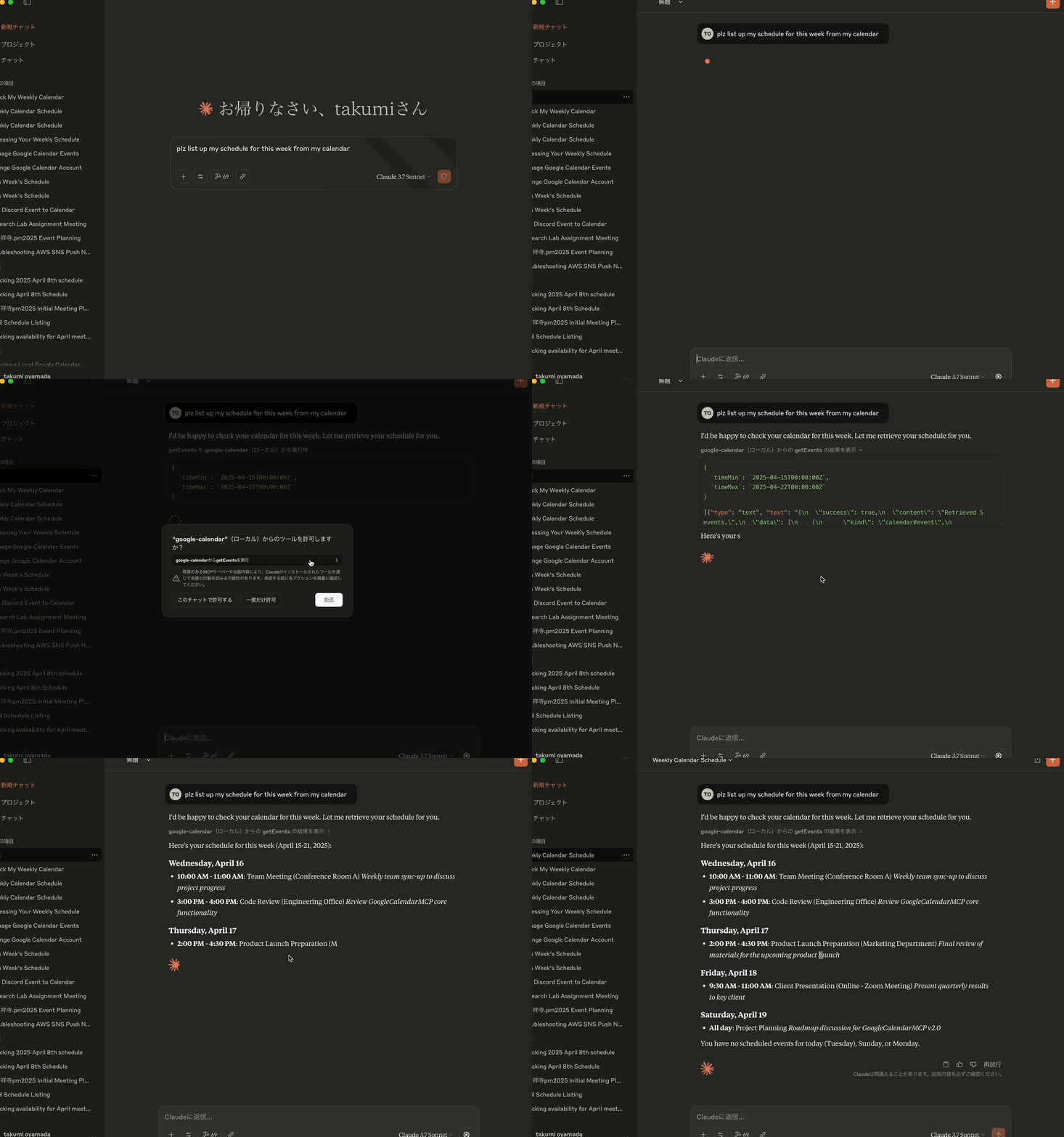
2025年4月15日 2008年12月17日

🔔 バージョンアップデートのお知らせ 🔔
バージョン1.0.5では、 createEventとupdateEventツールの両方で、 recurrenceパラメータを使用して定期的なイベントを作成できるようになりました。これにより、作成後に手動で設定する必要なく、定期的なイベントを直接作成および変更できるようになります。

バージョンライセンス

日本語英語

プロジェクト概要

Google カレンダー MCP サーバーは、Google カレンダーと Claude Desktop の連携を可能にする MCP(モデルコンテキストプロトコル)サーバー実装です。このプロジェクトにより、Claude はユーザーの Google カレンダーと連携し、自然言語による対話を通じてカレンダーイベントの表示、作成、更新、削除が可能になります。

コア機能

  • Google カレンダーの統合: Claude Desktop と Google カレンダー API 間の橋渡しを提供します

  • MCP実装: AIアシスタントツール統合のためのモデルコンテキストプロトコル仕様に準拠

  • OAuth2認証: Google API認証フローを安全に処理します

  • イベント管理: 包括的なカレンダー イベント操作 (取得、作成、更新、削除) をサポートします。

  • 色のサポート: colorIdパラメータを使用してイベントの色を設定および更新する機能

  • STDIOトランスポート:Claude Desktopとの通信に標準入出力を使用します

Related MCP server: calendar-mcp

技術アーキテクチャ

このプロジェクトでは以下を使用します:

  • TypeScript : 型安全なコード開発用

  • MCP SDK : Claude Desktop との統合には@modelcontextprotocol/sdkを使用します

  • Google API : Google カレンダー API アクセスにgoogleapis使用します

  • Zod : リクエスト/レスポンスデータのスキーマ検証を実装します

  • 環境ベースの構成:構成管理にdotenvを使用する

  • Helmet.js : セキュリティヘッダー用

  • AES-256-GCM : トークン暗号化用

  • Jest :ユニットテストとカバレッジ用

  • GitHub Actions :CI/CD向け

主なコンポーネント

  1. MCP サーバー: Claude Desktop との通信を処理するコア サーバーの実装

  2. Google カレンダー ツール: カレンダーの操作 (取得、作成、更新、削除)

  3. 認証ハンドラ: Google API を使用した OAuth2 フローの管理

  4. スキーマ検証: すべての操作におけるデータの整合性の確保

  5. トークンマネージャー:認証トークンの安全な取り扱い

利用可能なツール

この MCP サーバーは、Google カレンダーとやり取りするための次のツールを提供します。

1. getEvents

さまざまなフィルタリング オプションを使用してカレンダー イベントを取得します。

パラメータ:

  • calendarId (オプション): カレンダーID (省略した場合はプライマリカレンダーを使用)

  • timeMin (オプション): イベント取得の開始時刻 (ISO 8601 形式、例: "2025-03-01T00:00:00Z")

  • timeMax (オプション): イベント取得の終了時刻(ISO 8601形式)

  • maxResults (オプション): 取得するイベントの最大数 (デフォルト: 10)

  • orderBy (オプション): 並べ替え順序 ("startTime" または "updated")

2. イベントを作成する

新しいカレンダー イベントを作成します。

パラメータ:

  • calendarId (オプション): カレンダーID (省略した場合はプライマリカレンダーを使用)

  • event : 次の内容を含むイベント詳細オブジェクト:

    • summary (必須): イベントのタイトル

    • description (オプション): イベントの説明

    • location (オプション): イベントの場所

    • start : 開始時刻オブジェクト:

      • dateTime (オプション): ISO 8601形式(例:"2025-03-15T09:00:00+09:00")

      • date (オプション):終日イベントの場合はYYYY-MM-DD形式

      • timeZone (オプション): タイムゾーン (例: "Asia/Tokyo")

    • end : 終了時刻オブジェクト(startと同じ形式)

    • attendees (オプション): メールアドレスとオプションの表示名を持つ出席者の配列

    • colorId (オプション): イベントカラーID (1-11)

    • recurrence (オプション):RFC5545形式の繰り返しルールの配列(例:["RRULE:FREQ=WEEKLY;BYDAY=MO,WE,FR"])

3. 更新イベント

既存のカレンダーイベントを更新します。この関数はまず既存のイベントデータを取得し、更新リクエストに含まれていないフィールドを保持しながら更新データとマージします。

パラメータ:

  • calendarId (オプション): カレンダーID (省略した場合はプライマリカレンダーを使用)

  • eventId (必須): 更新するイベントのID

  • event : 更新するフィールドを含むイベント詳細オブジェクト(createEventと同じ構造、すべてのフィールドはオプション)

    • 明示的に指定されたフィールドのみが更新されます

    • 更新リクエストに含まれていないフィールドは既存の値を保持します

    • これにより、データを失うことなく部分的な更新が可能になります。

    • recurrenceパラメータを更新して、定期的なイベントパターンを変更できます。

4. イベントの削除

カレンダーイベントを削除します。

パラメータ:

  • calendarId (オプション): カレンダーID (省略した場合はプライマリカレンダーを使用)

  • eventId (必須): 削除するイベントのID

5. 認証する

Googleカレンダーの再認証を行います。これは、Claudeを再起動せずに複数のGoogleアカウントを切り替えたい場合に便利です。

パラメータ:

  • なし

開発ガイドライン

新しい機能を追加したり、コードを変更したり、バグを修正したりする際は、 npm versionコマンドを使用して、変更ごとにバージョン番号を明示的に増加させてください。また、コーディングが明確で、OOP などの必要なコーディングルールをすべて遵守していることを確認してください。バージョンが更新されると、バージョンスクリプトは自動的にnpm installを実行しますが、提出する前にコードをビルドし、lint を実行してテストする必要があります。

コード構造

  • src/ : ソースコードディレクトリ

    • auth/ : 認証処理

    • config/ : 構成設定

    • mcp/ : MCPサーバーの実装

    • tools/ : Google カレンダーツールの実装

    • utils/ : ユーティリティ関数とヘルパー

ベストプラクティス

  • TypeScriptのベストプラクティスに従った適切な型付け

  • 包括的なエラー処理の維持

  • 適切な認証フローを確保する

  • 依存関係を最新の状態に保つ

  • すべての機能について明確なドキュメントを作成する

  • セキュリティのベストプラクティスを実装する

  • OAuth 2.1認証標準に従う

  • すべての入出力データにスキーマ検証を使用する

テスト

  • コア機能のユニットテストを実装する

  • 認証フローを徹底的にテストする

  • Google API によるカレンダー操作の検証

  • カバレッジレポートを使用してテストを実行する

  • セキュリティテストが含まれていることを確認する

展開

このパッケージは、npm で@takumi0706/google-calendar-mcpとして公開されています。

npx @takumi0706/google-calendar-mcp@1.0.5

前提条件

  1. Google Cloud プロジェクトを作成し、Google カレンダー API を有効にする

  2. Google Cloud Console で OAuth2 認証情報を構成する

  3. 環境変数を設定します。

# Create a .env file with your Google OAuth credentials
GOOGLE_CLIENT_ID=your_client_id
GOOGLE_CLIENT_SECRET=your_client_secret
GOOGLE_REDIRECT_URI=http://localhost:4153/oauth2callback
# Optional: Token encryption key (auto-generated if not provided)
TOKEN_ENCRYPTION_KEY=32-byte-hex-key
# Optional: Auth server port and host (default port: 4153, host: localhost)
AUTH_PORT=4153
AUTH_HOST=localhost
# Optional: MCP server port and host (default port: 3000, host: localhost)
PORT=3000
HOST=localhost
# Optional: Enable manual authentication (useful when localhost is not accessible)
USE_MANUAL_AUTH=true

クロードデスクトップ構成

claude_desktop_config.jsonにサーバーを追加してください。localhost にアクセスできない環境で実行している場合は、 USE_MANUAL_AUTH環境変数を「true」に設定してください。

{
  "mcpServers": {
    "google-calendar": {
      "command": "npx",
      "args": [
        "-y",
        "@takumi0706/google-calendar-mcp"
      ],
      "env": {
        "GOOGLE_CLIENT_ID": "your_client_id",
        "GOOGLE_CLIENT_SECRET": "your_client_secret",
        "GOOGLE_REDIRECT_URI": "http://localhost:4153/oauth2callback"
      }
    }
  }
}

セキュリティに関する考慮事項

  • OAuth トークンはメモリにのみ保存されます(ファイルベースのストレージには保存されません)

  • 機密性の高い認証情報は環境変数として提供する必要があります

  • 安全な保管のためにAES-256-GCMを使用したトークン暗号化

  • 明示的な code_verifier と code_challenge 生成によるPKCE 実装

  • CSRF 保護のための状態パラメータ検証

  • Helmet.js を使用して適用されたセキュリティ ヘッダー

  • APIエンドポイント保護のレート制限

  • Zodスキーマによる入力検証

詳細については、 SECURITY.mdを参照してください。

メンテナンス

  • Google カレンダー API との互換性を維持するための定期的な更新

  • バージョンアップデートはREADME.mdに記載されています

トラブルシューティング

問題が発生した場合:

  1. Google OAuth認証情報が正しく設定されていることを確認してください

  2. Google カレンダー API アクセスに十分な権限があることを確認してください

  3. Claude Desktop の設定が正しいことを確認してください

よくあるエラー

  • JSON解析エラー: Unexpected non-whitespace character after JSON at position 4 (line 1 column 5)あります」といったエラーが表示される場合、通常はJSON-RPCメッセージの形式が不正です。この問題はバージョン0.6.7以降で修正されています。それでもこれらのエラーが発生する場合は、最新バージョンに更新してください。

  • 認証エラー: Google OAuth 認証情報を確認してください

  • 無効な状態パラメータ:再認証時にAuthentication failed: Invalid state parameter表示される場合は、OAuthサーバーのライフサイクル管理を修正したバージョン1.0.3以降にアップデートしてください。それより古いバージョンでは、ポート4153を閉じてアプリケーションを再起動する必要がある場合があります。

  • 接続エラー: サーバーのインスタンスが1つだけ実行されていることを確認してください

  • 切断の問題: カスタム TCP ソケットを使用せずにサーバーが MCP メッセージを適切に処理していることを確認します。

  • localhost にアクセスできません: localhost にアクセスできない環境(リモートサーバーやコンテナなど)でアプリケーションを実行している場合は、 USE_MANUAL_AUTH=trueを設定して手動認証を有効にしてください。これにより、アプリケーションの認証後に Google から表示される認証コードを手動で入力できるようになります。

バージョン履歴

バージョン1.0.6の変更点

  • この Google カレンダー MCP サーバーではスコープが必要ないことを修正しました

バージョン1.0.5の変更点

  • createEventおよびupdateEventツールの両方で、 recurrenceパラメータを通じて定期的なイベントのサポートを追加しました。

  • 手動設定なしで定期的なイベントを直接作成および変更できます

バージョン1.0.4の変更点

  • バージョン番号の更新を伴うメンテナンスリリース

  • バージョン1.0.3から機能変更はありません

  • 最新の依存関係との互換性を確保

バージョン1.0.3の変更点

  • Claude を再起動せずに再認証を可能にする新しいauthenticateツールを追加しました

  • セッション中に異なるGoogleアカウントを切り替えることが可能になりました

  • MCP インターフェースを通じて公開された認証機能

  • アカウント切り替え時に再起動する必要がなくなり、ユーザーエクスペリエンスが向上しました

  • ローカルホストにアクセスできない環境向けに手動認証オプションを追加しました

  • 認証コードを手動で入力するためのreadlineインターフェースを実装しました

  • 手動認証を有効にするために USE_MANUAL_AUTH 環境変数を追加しました

  • zod 依存関係を最新バージョン (3.24.2) に更新しました

  • 最新の zod 機能によるスキーマ検証の改善

  • コードの安定性とセキュリティの強化

  • 再認証中に発生する「無効な状態パラメータ」エラーを修正しました

  • OAuth サーバーをオンデマンドで起動し、認証後にシャットダウンするように変更しました

  • ポートの競合を防ぐためのサーバーライフサイクル管理の改善

  • 認証フローのエラー処理の強化

バージョン1.0.2の変更点

  • 部分的な更新を実行するときに既存のイベントデータを保持するようにupdateEvent関数を修正しました。

  • 更新前に既存のイベントデータを取得するためのgetEvent関数を追加しました

  • データの損失を防ぐために更新データと既存のデータをマージするようにupdateEventを変更しました

  • 更新リクエストのすべてのフィールドをオプションにするためにスキーマ検証を更新しました

  • updateEvent関数のドキュメントの改善

バージョン1.0.1の変更点

  • Node.js v20.9.0+ と 'open' パッケージ (v10+) との互換性の問題を修正しました

  • ESM のみの「オープン」パッケージの静的インポートを動的インポートに置き換えました

  • OAuth認証中にブラウザを開く際のエラー処理の改善

  • 保守性を向上させるためのコードコメントの強化

バージョン1.0.0の変更点

  • 生産準備完了を示すメジャーバージョンリリース

  • 保守性を向上させる包括的なコードリファクタリング

  • すべてのメッセージとコメントの国際化(日本語から英語への翻訳)

  • コードの一貫性と可読性の向上

  • ユーザーエクスペリエンスを向上させるためにエラーメッセージを改善しました

  • プロジェクトの現在の状態を反映するようにドキュメントを更新しました

  • コードベース全体で標準化されたコーディングスタイル

バージョン0.8.0の変更点

  • リフレッシュトークンの問題を処理するための強化された OAuth 認証フロー

  • Google に同意画面を表示させ、新しいリフレッシュ トークンを提供するよう強制するprompt: 'consent'パラメータを追加しました

  • リフレッシュトークンが利用できない場合はアクセストークンのみで動作するように認証フローを変更しました

  • リフレッシュ トークンがない場合やリフレッシュ トークンが無効な場合を処理するためにトークン リフレッシュ ロジックを改善しました

  • トークン管理を改善するために、更新されたアクセストークンを保存するトークンストレージを更新しました

  • トークン更新ロジックにおける潜在的な無限ループを修正しました

発達

このプロジェクトに貢献するには:

# Clone the repository
git clone https://github.com/takumi0706/google-calendar-mcp.git
cd google-calendar-mcp

# Install dependencies
npm install

# Run in development mode
npm run dev

テスト

テストを実行するには:

# Run all tests
npm test

# Run tests with coverage report
npm test -- --coverage

ライセンス

マサチューセッツ工科大学

Available Tools

5 tools
authenticateA

Start the Google Calendar OAuth flow. Opens a browser window for consent and stores the resulting tokens in memory.

ParametersJSON Schema
NameRequiredDescriptionDefault

No parameters

TDQS

A4.5/5.0
Behavior4/5

Does the description disclose side effects, auth requirements, rate limits, or destructive behavior?

No annotations are provided, so the description carries the full burden. It goes beyond the name by disclosing the browser consent behavior and that tokens are stored in memory, which implies they are not persisted across sessions. It does not cover failure modes or re-authentication, but it is meaningfully transparent for a zero-parameter tool.

Agents need to know what a tool does to the world before calling it. Descriptions should go beyond structured annotations to explain consequences.

Conciseness5/5

Is the description appropriately sized, front-loaded, and free of redundancy?

Two concise sentences with no filler. The action, side effect, and storage behavior are all included in minimal space, and the purpose is front-loaded.

Shorter descriptions cost fewer tokens and are easier for agents to parse. Every sentence should earn its place.

Completeness5/5

Given the tool's complexity, does the description cover enough for an agent to succeed on first attempt?

For a zero-parameter OAuth tool with no output schema, the description covers the purpose, the user-facing behavior, and the outcome (tokens in memory). An agent has enough information to invoke the tool and understand its effect; nothing essential is missing.

Complex tools with many parameters or behaviors need more documentation. Simple tools need less. This dimension scales expectations accordingly.

Parameters4/5

Does the description clarify parameter syntax, constraints, interactions, or defaults beyond what the schema provides?

The tool has no parameters, so the schema is trivially complete. The description adds nothing about parameters, but none are needed; the baseline of 4 applies.

Input schemas describe structure but not intent. Descriptions should explain non-obvious parameter relationships and valid value ranges.

Purpose5/5

Does the description clearly state what the tool does and how it differs from similar tools?

The description states a specific action ('Start the Google Calendar OAuth flow') and gives concrete behavioral details: it opens a browser window for consent and stores tokens in memory. This clearly distinguishes it from the event-related sibling tools.

Agents choose between tools based on descriptions. A clear purpose with a specific verb and resource helps agents select the right tool.

Usage Guidelines4/5

Does the description explain when to use this tool, when not to, or what alternatives exist?

The description makes it clear this is the authentication step for Google Calendar, which an agent can infer should precede getEvents, createEvent, and other calendar operations. It does not explicitly articulate when not to use it, but the context is unambiguous enough for tool selection.

Agents often have multiple tools that could apply. Explicit usage guidance like "use X instead of Y when Z" prevents misuse.

createEventA

Create an event on a Google Calendar. Supports all-day events, attendees, reminders and RFC5545 recurrence rules.

ParametersJSON Schema
NameRequiredDescriptionDefault
eventYes
calendarIdNoprimary

TDQS

A3.6/5.0
Behavior2/5

Does the description disclose side effects, auth requirements, rate limits, or destructive behavior?

No annotations are provided, so the description carries the full burden of behavioral disclosure. It lists supported features but does not mention whether attendee invitations are sent, whether authentication is required, what the created event response looks like, or whether creation is reversible. 'Create' implies mutation, but little else is disclosed.

Agents need to know what a tool does to the world before calling it. Descriptions should go beyond structured annotations to explain consequences.

Conciseness5/5

Is the description appropriately sized, front-loaded, and free of redundancy?

The description is one sentence with no filler. It front-loads the action and resource, then packs the key capability details into a short supporting clause. Every word earns its place.

Shorter descriptions cost fewer tokens and are easier for agents to parse. Every sentence should earn its place.

Completeness2/5

Given the tool's complexity, does the description cover enough for an agent to succeed on first attempt?

Given the complexity of the nested event schema, the absence of annotations, and no output schema, this short description leaves important operational gaps: authentication prerequisites, default calendar behavior, return shape, and side effects like attendee emails. The feature list is helpful but insufficient for safe, confident invocation of a mutation tool.

Complex tools with many parameters or behaviors need more documentation. Simple tools need less. This dimension scales expectations accordingly.

Parameters3/5

Does the description clarify parameter syntax, constraints, interactions, or defaults beyond what the schema provides?

Schema description coverage is reported as 0%, and the event object is large and nested. The description partially compensates by calling out all-day events, attendees, reminders, and RFC5545 recurrence rules, which map to schema properties. Still, it does not explain the required summary/start/end fields, the calendarId default of 'primary', or the overall structure of the event object.

Input schemas describe structure but not intent. Descriptions should explain non-obvious parameter relationships and valid value ranges.

Purpose5/5

Does the description clearly state what the tool does and how it differs from similar tools?

The description opens with a specific verb-resource pair: 'Create an event on a Google Calendar.' It also names supported features, which clarifies scope. This is clearly distinct from the sibling tools getEvents, updateEvent, deleteEvent, and authenticate without any ambiguity.

Agents choose between tools based on descriptions. A clear purpose with a specific verb and resource helps agents select the right tool.

Usage Guidelines4/5

Does the description explain when to use this tool, when not to, or what alternatives exist?

The imperative 'Create an event' provides clear, unambiguous context for when to use the tool. However, it gives no explicit exclusion like 'use updateEvent to modify an existing event' or 'call authenticate first,' so it stops short of fully explicit routing guidance.

Agents often have multiple tools that could apply. Explicit usage guidance like "use X instead of Y when Z" prevents misuse.

deleteEventC

Delete an event from a Google Calendar by its event ID.

ParametersJSON Schema
NameRequiredDescriptionDefault
eventIdYes
calendarIdNoprimary

TDQS

C2.7/5.0
Behavior2/5

Does the description disclose side effects, auth requirements, rate limits, or destructive behavior?

No annotations are provided, so the description bears full responsibility for behavioral disclosure. While 'Delete' clearly implies a destructive mutation, it does not state whether the operation is permanent, whether confirmation or special permissions are required, or what side effects occur (e.g., removal from attendee calendars). The description is too thin to adequately characterize the risk.

Agents need to know what a tool does to the world before calling it. Descriptions should go beyond structured annotations to explain consequences.

Conciseness4/5

Is the description appropriately sized, front-loaded, and free of redundancy?

The description is a single, front-loaded sentence with no filler. It conveys the core action and key parameter efficiently, though it sacrifices some essential detail for brevity.

Shorter descriptions cost fewer tokens and are easier for agents to parse. Every sentence should earn its place.

Completeness2/5

Given the tool's complexity, does the description cover enough for an agent to succeed on first attempt?

For a destructive tool with no annotations, no output schema, and 0% schema coverage, this description is insufficient. It does not cover the optional calendarId, authentication or permission expectations, undoing behavior, or any failure/response semantics. An agent cannot confidently invoke this tool correctly based on this definition alone.

Complex tools with many parameters or behaviors need more documentation. Simple tools need less. This dimension scales expectations accordingly.

Parameters2/5

Does the description clarify parameter syntax, constraints, interactions, or defaults beyond what the schema provides?

Schema description coverage is 0%, so the description must compensate by explaining parameters. It does identify eventId as the core identifier, but it completely omits calendarId, which is a parameter in the schema with a default of 'primary'. The vague phrase 'Google Calendar' doesn't clarify how the calendar is selected, leaving an agent uncertain about the optional parameter.

Input schemas describe structure but not intent. Descriptions should explain non-obvious parameter relationships and valid value ranges.

Purpose4/5

Does the description clearly state what the tool does and how it differs from similar tools?

The description uses a specific verb ('Delete'), a resource ('an event'), and a unique identifier ('event ID'), which clearly distinguishes this from siblings like createEvent, getEvents, and updateEvent. It unambiguously states the operation and object.

Agents choose between tools based on descriptions. A clear purpose with a specific verb and resource helps agents select the right tool.

Usage Guidelines2/5

Does the description explain when to use this tool, when not to, or what alternatives exist?

The description implies that the tool is used to delete an event, but provides no guidance on when this tool should be used over alternatives, no prerequisites (e.g., authentication), and no exclusions. It does not mention that calendarId is optional or defaulted, nor when a deletion might fail.

Agents often have multiple tools that could apply. Explicit usage guidance like "use X instead of Y when Z" prevents misuse.

getEventsA

List events from a Google Calendar within an optional time range.

ParametersJSON Schema
NameRequiredDescriptionDefault
orderByNoSort order for the returned events
timeMaxNoUpper bound (exclusive) for an event's start time, in ISO 8601 format
timeMinNoLower bound (inclusive) for an event's end time, in ISO 8601 format
calendarIdNoCalendar ID (uses the primary calendar if omitted or empty)
maxResultsNoMaximum number of events to return

TDQS

A3.7/5.0
Behavior3/5

Does the description disclose side effects, auth requirements, rate limits, or destructive behavior?

With no annotations, the description carries the behavioral burden. 'List' conveys a read-only, non-destructive operation and the time-range clause provides useful scoping, but the description omits any mention of auth needs, pagination behavior, or what happens with invalid calendar IDs.

Agents need to know what a tool does to the world before calling it. Descriptions should go beyond structured annotations to explain consequences.

Conciseness5/5

Is the description appropriately sized, front-loaded, and free of redundancy?

The description is a single front-loaded sentence with no filler. Every word contributes to identifying the action, resource, and optional scope.

Shorter descriptions cost fewer tokens and are easier for agents to parse. Every sentence should earn its place.

Completeness3/5

Given the tool's complexity, does the description cover enough for an agent to succeed on first attempt?

For a straightforward list operation with a fully described schema, the description is minimally sufficient. It lacks an explicit statement about auth requirements and return shape, but the sibling set and parameter documentation provide enough context to avoid gross misuse.

Complex tools with many parameters or behaviors need more documentation. Simple tools need less. This dimension scales expectations accordingly.

Parameters3/5

Does the description clarify parameter syntax, constraints, interactions, or defaults beyond what the schema provides?

All five parameters are already documented in the schema (100% coverage), so the baseline applies. The description adds no parameter-level detail beyond noting the time range is optional, which is already encoded by the nullable timeMin/timeMax fields.

Input schemas describe structure but not intent. Descriptions should explain non-obvious parameter relationships and valid value ranges.

Purpose5/5

Does the description clearly state what the tool does and how it differs from similar tools?

The description states the exact action ('List'), the resource ('events from a Google Calendar'), and the optional time-range scope. This clearly differentiates it from the sibling mutation tools (createEvent, updateEvent, deleteEvent) and authenticate.

Agents choose between tools based on descriptions. A clear purpose with a specific verb and resource helps agents select the right tool.

Usage Guidelines3/5

Does the description explain when to use this tool, when not to, or what alternatives exist?

The description implies this is the read/query tool for calendar events, and the sibling names make the contrast obvious. However, it does not explicitly state when to prefer it over alternatives, nor does it mention prerequisites such as authentication or calendar ownership.

Agents often have multiple tools that could apply. Explicit usage guidance like "use X instead of Y when Z" prevents misuse.

updateEventA

Update an existing Google Calendar event. Omitted fields keep their current values.

ParametersJSON Schema
NameRequiredDescriptionDefault
eventYes
eventIdYes
calendarIdNoprimary

TDQS

A3.5/5.0
Behavior3/5

Does the description disclose side effects, auth requirements, rate limits, or destructive behavior?

With no annotations, the description carries the burden of behavioral disclosure. It usefully states partial-update semantics ('Omitted fields keep their current values'), but it does not mention side effects, permissions, or the irreversibility of the update. A 3 reflects that it adds some valuable behavior context while leaving significant gaps.

Agents need to know what a tool does to the world before calling it. Descriptions should go beyond structured annotations to explain consequences.

Conciseness5/5

Is the description appropriately sized, front-loaded, and free of redundancy?

Two sentences with no fluff; the purpose is front-loaded and the second sentence adds essential behavioral nuance about field omission. Every word earns its place.

Shorter descriptions cost fewer tokens and are easier for agents to parse. Every sentence should earn its place.

Completeness2/5

Given the tool's complexity, does the description cover enough for an agent to succeed on first attempt?

Given the nested event object with complex date/reminder/recurrence schemas and no output schema or annotations, the description is too sparse. It omits how the update interacts with required fields, what happens to attendees on date changes, and any authentication or error behavior. An agent needs more context to invoke correctly.

Complex tools with many parameters or behaviors need more documentation. Simple tools need less. This dimension scales expectations accordingly.

Parameters2/5

Does the description clarify parameter syntax, constraints, interactions, or defaults beyond what the schema provides?

Schema description coverage is 0%, so the description must compensate for explaining eventId, event, and calendarId. It only generically refers to 'fields' and the partial-update behavior, giving no specific meaning for the parameters. It fails to clarify what eventId identifies or how calendarId scopes the operation.

Input schemas describe structure but not intent. Descriptions should explain non-obvious parameter relationships and valid value ranges.

Purpose5/5

Does the description clearly state what the tool does and how it differs from similar tools?

The description states a specific verb ('Update') and resource ('existing Google Calendar event'), which clearly differentiates it from siblings like createEvent and deleteEvent. The phrase 'existing' signals that it modifies rather than creates.

Agents choose between tools based on descriptions. A clear purpose with a specific verb and resource helps agents select the right tool.

Usage Guidelines3/5

Does the description explain when to use this tool, when not to, or what alternatives exist?

The description implies use for updating existing events by contrasting with creating, but it does not explicitly state when to prefer this tool over siblings, nor any exclusions. An agent can infer the use case from 'existing,' but no direct guidance is provided.

Agents often have multiple tools that could apply. Explicit usage guidance like "use X instead of Y when Z" prevents misuse.

Tool Schema Changelog

Recent tool additions, removals, and schema changes observed during successful MCP inspections.

  1. 5 tool updatesv2.0.0
    • First observedauthenticate
    • First observedcreateEvent
    • First observeddeleteEvent
    • First observedgetEvents
    • First observedupdateEvent

TDQS

A3.7/5.0

Scored across 5 tools

Disambiguation5/5

Each tool targets a distinct action on calendar events—listing, creating, updating, deleting—plus a separate authentication flow. There is no overlap or ambiguity between the tools.

Naming Consistency4/5

Four tools follow a clear verb+Event pattern (getEvents, createEvent, updateEvent, deleteEvent), while authenticate is a necessary but non-parallel exception. Overall the naming is predictable and easy to infer.

Tool Count5/5

Five tools is a well-scoped set for a Google Calendar event server: authentication plus full CRUD operations. Each tool serves a clear purpose without unnecessary bloat.

Completeness5/5

The server covers the full event lifecycle—list, create, update, delete—and includes OAuth authentication as a prerequisite. There are no obvious dead ends or critical missing operations for managing calendar events.

Maintenance

ActivitySlowing
ResponsivenessNo issues

Related MCP Connectors

Related MCP Servers

  • A
    license
    Not graded
    quality
    D
    maintenance
    A Model Context Protocol server that enables natural language interaction with Google Calendar, allowing users to view, create, update, and delete calendar events through context-aware operations.
    118 npm
    1
    MIT
  • A
    license
    A
    quality
    A
    maintenance
    This project implements a Python-based MCP (Model Context Protocol) server that acts as an interface between Large Language Models (LLMs) and the Google Calendar API. It enables LLMs to perform calendar operations via natural language requests.
    23
    181 PyPI
    26
    AGPL 3.0