Google Calendar MCP Server
Servidor MCP de Google Calendar
AVISO DE ACTUALIZACIÓN DE VERSIÓN
La versión 1.0.5 añade compatibilidad con eventos recurrentes mediante el parámetrorecurrenceen las herramientascreateEventyupdateEvent. Esto permite crear y modificar eventos recurrentes directamente sin tener que configurarlos manualmente tras su creación.
Descripción general del proyecto
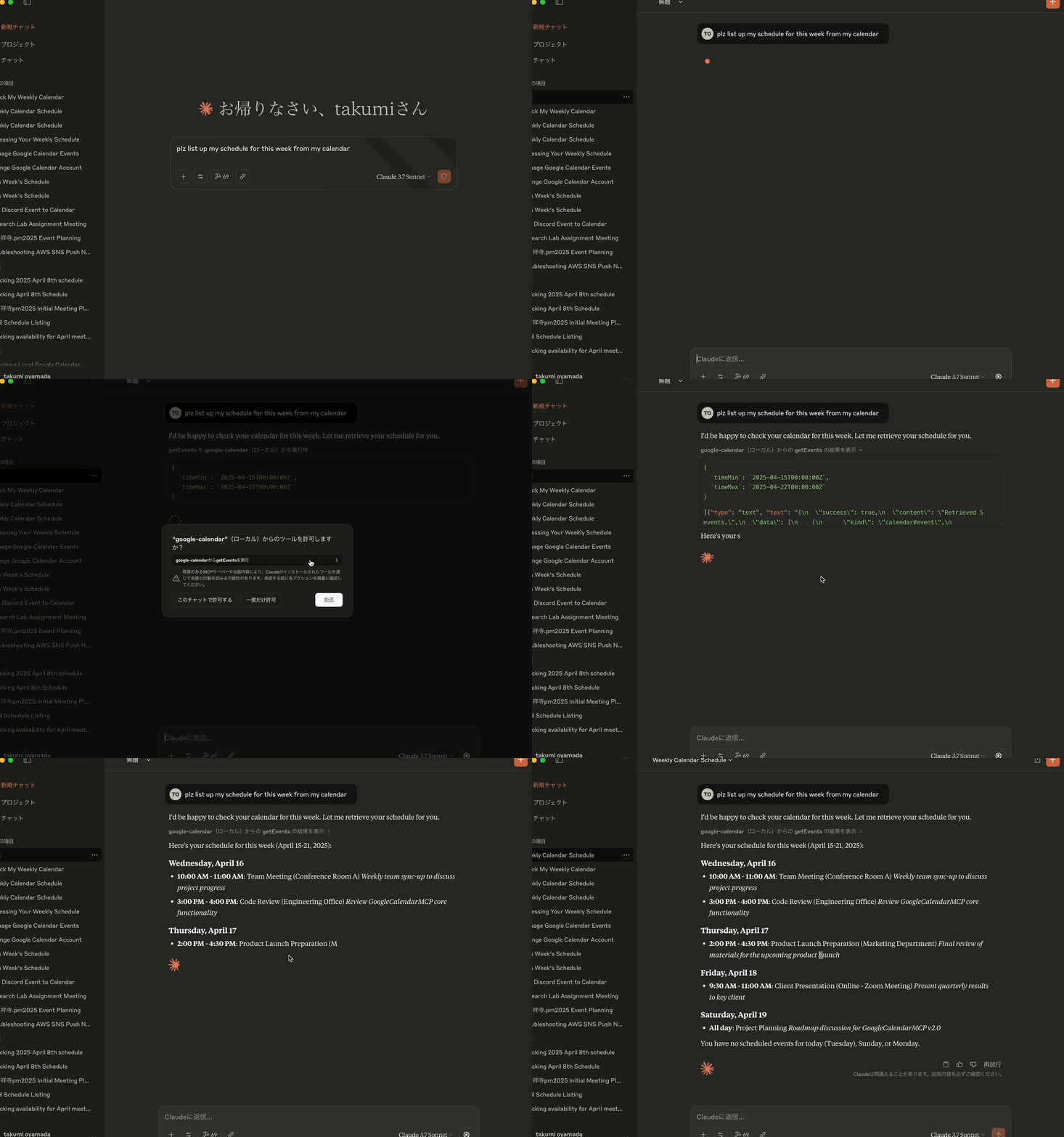
El servidor MCP de Google Calendar es una implementación de servidor MCP (Protocolo de Contexto de Modelo) que permite la integración entre Google Calendar y Claude Desktop. Este proyecto permite a Claude interactuar con el Google Calendar del usuario, ofreciendo la posibilidad de mostrar, crear, actualizar y eliminar eventos del calendario mediante interacción con lenguaje natural.
Características principales
Integración de Google Calendar : proporciona un puente entre Claude Desktop y la API de Google Calendar
Implementación de MCP : sigue la especificación del Protocolo de contexto de modelo para la integración de herramientas de asistente de IA
Autenticación OAuth2 : gestiona el flujo de autenticación de la API de Google de forma segura
Gestión de eventos : admite operaciones integrales de eventos de calendario (obtener, crear, actualizar, eliminar)
Compatibilidad de color : capacidad de establecer y actualizar colores de eventos mediante el parámetro colorId
Transporte STDIO : utiliza entrada/salida estándar para la comunicación con Claude Desktop
Related MCP server: calendar-mcp
Arquitectura técnica
Este proyecto utiliza:
TypeScript : para el desarrollo de código con seguridad de tipos
SDK de MCP : utiliza
@modelcontextprotocol/sdkpara la integración con Claude DesktopAPI de Google : utiliza
googleapispara acceder a la API de Google CalendarZod : Implementa la validación del esquema para datos de solicitud/respuesta
Configuración basada en el entorno : utiliza dotenv para la gestión de la configuración
Helmet.js : Para encabezados de seguridad
AES-256-GCM : para cifrado de tokens
Jest : para pruebas unitarias y cobertura
Acciones de GitHub : para CI/CD
Componentes principales
Servidor MCP : implementación del servidor central que maneja la comunicación con Claude Desktop
Herramientas de Google Calendar : Operaciones de calendario (recuperación, creación, actualización, eliminación)
Controlador de autenticación : gestión del flujo OAuth2 con la API de Google
Validación de esquemas : garantizar la integridad de los datos en todas las operaciones
Token Manager : gestión segura de tokens de autenticación
Herramientas disponibles
Este servidor MCP proporciona las siguientes herramientas para interactuar con Google Calendar:
1. obtenerEventos
Recupera eventos del calendario con varias opciones de filtrado.
Parámetros:
calendarId(opcional): ID del calendario (usa el calendario principal si se omite)timeMin(opcional): Hora de inicio para la recuperación del evento (formato ISO 8601, p. ej., "2025-03-01T00:00:00Z")timeMax(opcional): Hora de finalización para la recuperación del evento (formato ISO 8601)maxResults(opcional): Número máximo de eventos a recuperar (predeterminado: 10)orderBy(opcional): orden de clasificación ("startTime" o "updated")
2. crearEvento
Crea un nuevo evento de calendario.
Parámetros:
calendarId(opcional): ID del calendario (usa el calendario principal si se omite)event: objeto de detalles del evento que contiene:summary(obligatorio): Título del eventodescription(opcional): Descripción del eventolocation(opcional): Ubicación del eventostart: objeto de tiempo de inicio con:dateTime(opcional): formato ISO 8601 (p. ej., "2025-03-15T09:00:00+09:00")date(opcional): formato AAAA-MM-DD para eventos de todo el díatimeZone(opcional): zona horaria (p. ej., "Asia/Tokio")
end: objeto de hora de finalización (mismo formato que inicio)attendees(opcional): Matriz de asistentes con correo electrónico y nombre para mostrar opcionalcolorId(opcional): ID de color del evento (1-11)recurrence(opcional): Matriz de reglas de recurrencia en formato RFC5545 (por ejemplo, ["RRULE:FREQ=WEEKLY;BYDAY=MO,WE,FR"])
3. actualizaciónEvento
Actualiza un evento de calendario existente. La función obtiene primero los datos del evento existente y los fusiona con los datos de actualización, conservando los campos no incluidos en la solicitud de actualización.
Parámetros:
calendarId(opcional): ID del calendario (usa el calendario principal si se omite)eventId(obligatorio): ID del evento a actualizarevent: objeto de detalles del evento que contiene los campos a actualizar (la misma estructura que createEvent, todos los campos son opcionales)Sólo se actualizarán los campos que se proporcionen explícitamente
Los campos no incluidos en la solicitud de actualización conservarán sus valores existentes
Esto permite realizar actualizaciones parciales sin perder datos.
El parámetro
recurrencese puede actualizar para modificar patrones de eventos recurrentes
4. eliminarEvento
Elimina un evento del calendario.
Parámetros:
calendarId(opcional): ID del calendario (usa el calendario principal si se omite)eventId(obligatorio): ID del evento a eliminar
5. autenticar
Se vuelve a autenticar con Google Calendar. Esto es útil si quieres cambiar entre diferentes cuentas de Google sin tener que reiniciar Claude.
Parámetros:
Ninguno
Directrices de desarrollo
Al añadir nuevas funciones, modificar código o corregir errores, incremente semánticamente la versión con cada cambio mediante el comando npm version . Además, asegúrese de que su código sea claro y cumpla con todas las reglas de codificación necesarias, como la programación orientada a objetos. El script de versión ejecutará automáticamente npm install cuando se actualice la versión, pero aun así debe compilar, ejecutar lint y probar su código antes de enviarlo.
Estructura del código
src/ : Directorio del código fuente
auth/ : Manejo de autenticación
config/ : Ajustes de configuración
mcp/ : Implementación del servidor MCP
herramientas/ : Implementaciones de herramientas de Google Calendar
utils/ : Funciones de utilidad y ayudantes
Mejores prácticas
Escritura correcta según las mejores prácticas de TypeScript
Mantener un manejo integral de errores
Garantizar un flujo de autenticación adecuado
Mantenga las dependencias actualizadas
Redactar documentación clara para todas las funciones.
Implementar las mejores prácticas de seguridad
Siga los estándares de autenticación OAuth 2.1
Utilice la validación del esquema para todos los datos de entrada/salida
Pruebas
Implementar pruebas unitarias para la funcionalidad principal
Pruebe exhaustivamente el flujo de autenticación
Verificar la manipulación del calendario con la API de Google
Ejecutar pruebas con informes de cobertura
Asegúrese de que se incluyan pruebas de seguridad
Despliegue
Este paquete se publica en npm como @takumi0706/google-calendar-mcp :
npx @takumi0706/google-calendar-mcp@1.0.5Prerrequisitos
Cree un proyecto de Google Cloud y habilite la API de Google Calendar
Configurar las credenciales de OAuth2 en Google Cloud Console
Configurar variables de entorno:
# Create a .env file with your Google OAuth credentials
GOOGLE_CLIENT_ID=your_client_id
GOOGLE_CLIENT_SECRET=your_client_secret
GOOGLE_REDIRECT_URI=http://localhost:4153/oauth2callback
# Optional: Token encryption key (auto-generated if not provided)
TOKEN_ENCRYPTION_KEY=32-byte-hex-key
# Optional: Auth server port and host (default port: 4153, host: localhost)
AUTH_PORT=4153
AUTH_HOST=localhost
# Optional: MCP server port and host (default port: 3000, host: localhost)
PORT=3000
HOST=localhost
# Optional: Enable manual authentication (useful when localhost is not accessible)
USE_MANUAL_AUTH=trueConfiguración del escritorio de Claude
Añade el servidor a tu claude_desktop_config.json . Si estás trabajando en un entorno donde no se puede acceder a localhost, añade la variable de entorno USE_MANUAL_AUTH con el valor "true".
{
"mcpServers": {
"google-calendar": {
"command": "npx",
"args": [
"-y",
"@takumi0706/google-calendar-mcp"
],
"env": {
"GOOGLE_CLIENT_ID": "your_client_id",
"GOOGLE_CLIENT_SECRET": "your_client_secret",
"GOOGLE_REDIRECT_URI": "http://localhost:4153/oauth2callback"
}
}
}
}Consideraciones de seguridad
Los tokens OAuth se almacenan únicamente en la memoria (no se almacenan en un almacenamiento basado en archivos)
Las credenciales confidenciales deben proporcionarse como variables de entorno
Cifrado de tokens mediante AES-256-GCM para almacenamiento seguro
Implementación de PKCE con generación explícita de code_verifier y code_challenge
Validación de parámetros de estado para la protección CSRF
Encabezados de seguridad aplicados mediante Helmet.js
Limitación de velocidad para la protección de puntos finales de API
Validación de entrada con el esquema Zod
Para obtener más detalles, consulte SECURITY.md .
Mantenimiento
Actualizaciones periódicas para mantener la compatibilidad con la API de Google Calendar
Las actualizaciones de versiones están documentadas en README.md
Solución de problemas
Si encuentra algún problema:
Asegúrese de que sus credenciales de Google OAuth estén configuradas correctamente
Asegúrese de tener permisos suficientes para acceder a la API de Google Calendar
Verifique que la configuración de Claude Desktop sea correcta
Errores comunes
Errores de análisis de JSON : Si ve errores como
Unexpected non-whitespace character after JSON at position 4 (line 1 column 5), suele deberse a mensajes JSON-RPC mal formados. Este problema se ha solucionado en la versión 0.6.7 y posteriores. Si persiste, actualice a la última versión.Errores de autenticación : Verifique sus credenciales de Google OAuth
Parámetro de estado no válido : Si al volver a autenticarse ve
Authentication failed: Invalid state parameter, actualice a la versión 1.0.3 o posterior, que corrige la gestión del ciclo de vida del servidor OAuth. En versiones anteriores, es posible que deba cerrar el puerto 4153 y reiniciar la aplicación.Errores de conexión : asegúrese de que solo se esté ejecutando una instancia del servidor
Problemas de desconexión : asegúrese de que su servidor esté manejando correctamente los mensajes MCP sin sockets TCP personalizados
No se puede acceder a localhost : Si ejecuta la aplicación en un entorno donde no se puede acceder a localhost (como un servidor remoto o un contenedor), habilite la autenticación manual configurando
USE_MANUAL_AUTH=true. Esto le permitirá ingresar manualmente el código de autorización que muestra Google después de autorizar la aplicación.
Historial de versiones
Cambios de la versión 1.0.6
Se solucionó el problema de que el alcance no es necesario en este servidor MCP del calendario de Google.
Cambios de la versión 1.0.5
Se agregó soporte para eventos recurrentes a través del parámetro
recurrenceen las herramientascreateEventyupdateEventPermite la creación y modificación de eventos recurrentes directamente sin configuración manual
Cambios de la versión 1.0.4
Versión de mantenimiento con actualización del número de versión
Sin cambios funcionales desde la versión 1.0.3
Garantiza la compatibilidad con las últimas dependencias.
Cambios de la versión 1.0.3
Se agregó una nueva herramienta
authenticatepara permitir la reautenticación sin reiniciar ClaudeSe hizo posible cambiar entre diferentes cuentas de Google durante una sesión
Funcionalidad de autenticación expuesta a través de la interfaz MCP
Experiencia de usuario mejorada al eliminar la necesidad de reiniciar para cambiar de cuenta
Se agregó la opción de autenticación manual para entornos donde no se puede acceder al host local
Se implementó la interfaz readline para ingresar códigos de autorización manualmente
Se agregó la variable de entorno USE_MANUAL_AUTH para habilitar la autenticación manual
Dependencia de zod actualizada a la última versión (3.24.2)
Validación de esquema mejorada con las últimas funciones de zod
Mayor estabilidad y seguridad del código
Se corrigió el error "Parámetro de estado no válido" durante la reautenticación.
Servidor OAuth modificado para iniciarse a pedido y apagarse después de la autenticación
Gestión mejorada del ciclo de vida del servidor para evitar conflictos de puertos
Manejo mejorado de errores para el flujo de autenticación
Cambios de la versión 1.0.2
Se corrigió la función
updateEventpara preservar los datos de eventos existentes al realizar actualizaciones parcialesSe agregó la función
getEventpara obtener datos de eventos existentes antes de actualizarSe modificó
updateEventpara fusionar los datos de actualización con los datos existentes para evitar la pérdida de datos.Se actualizó la validación del esquema para que todos los campos sean opcionales en las solicitudes de actualización
Documentación mejorada para la función
updateEvent
Cambios de la versión 1.0.1
Se solucionó el problema de compatibilidad con Node.js v20.9.0+ y el paquete 'open' (v10+)
Se reemplazó la importación estática con la importación dinámica para el paquete "abierto" exclusivo de ESM
Manejo de errores mejorado al abrir el navegador durante la autenticación OAuth
Comentarios de código mejorados para un mejor mantenimiento
Cambios de la versión 1.0.0
Lanzamiento de la versión principal que marca la preparación para la producción
Refactorización integral del código para una mejor mantenibilidad
Internacionalización de todos los mensajes y comentarios (traducidos del japonés al inglés)
Mayor consistencia y legibilidad del código
Mensajes de error mejorados para una mejor experiencia del usuario
Documentación actualizada para reflejar el estado actual del proyecto.
Estilo de codificación estandarizado en todo el código base
Cambios de la versión 0.8.0
Flujo de autenticación OAuth mejorado para gestionar problemas de token de actualización
Se agregó
prompt: 'consent'para obligar a Google a mostrar la pantalla de consentimiento y proporcionar un nuevo token de actualización.Flujo de autenticación modificado para funcionar solo con un token de acceso si no hay un token de actualización disponible
Lógica de actualización de token mejorada para manejar casos en los que no hay un token de actualización o si el token de actualización no es válido
Almacenamiento de tokens actualizado para guardar tokens de acceso actualizados para una mejor gestión de tokens
Se solucionó un posible bucle infinito en la lógica de actualización del token.
Desarrollo
Para contribuir a este proyecto:
# Clone the repository
git clone https://github.com/takumi0706/google-calendar-mcp.git
cd google-calendar-mcp
# Install dependencies
npm install
# Run in development mode
npm run devPruebas
Para ejecutar las pruebas:
# Run all tests
npm test
# Run tests with coverage report
npm test -- --coverageLicencia
Instituto Tecnológico de Massachusetts (MIT)
Available Tools
5 toolsauthenticateA
Start the Google Calendar OAuth flow. Opens a browser window for consent and stores the resulting tokens in memory.
| Name | Required | Description | Default |
|---|---|---|---|
No parameters | |||
TDQS
Does the description disclose side effects, auth requirements, rate limits, or destructive behavior?
No annotations are provided, so the description carries the full burden. It goes beyond the name by disclosing the browser consent behavior and that tokens are stored in memory, which implies they are not persisted across sessions. It does not cover failure modes or re-authentication, but it is meaningfully transparent for a zero-parameter tool.
Agents need to know what a tool does to the world before calling it. Descriptions should go beyond structured annotations to explain consequences.
Is the description appropriately sized, front-loaded, and free of redundancy?
Two concise sentences with no filler. The action, side effect, and storage behavior are all included in minimal space, and the purpose is front-loaded.
Shorter descriptions cost fewer tokens and are easier for agents to parse. Every sentence should earn its place.
Given the tool's complexity, does the description cover enough for an agent to succeed on first attempt?
For a zero-parameter OAuth tool with no output schema, the description covers the purpose, the user-facing behavior, and the outcome (tokens in memory). An agent has enough information to invoke the tool and understand its effect; nothing essential is missing.
Complex tools with many parameters or behaviors need more documentation. Simple tools need less. This dimension scales expectations accordingly.
Does the description clarify parameter syntax, constraints, interactions, or defaults beyond what the schema provides?
The tool has no parameters, so the schema is trivially complete. The description adds nothing about parameters, but none are needed; the baseline of 4 applies.
Input schemas describe structure but not intent. Descriptions should explain non-obvious parameter relationships and valid value ranges.
Does the description clearly state what the tool does and how it differs from similar tools?
The description states a specific action ('Start the Google Calendar OAuth flow') and gives concrete behavioral details: it opens a browser window for consent and stores tokens in memory. This clearly distinguishes it from the event-related sibling tools.
Agents choose between tools based on descriptions. A clear purpose with a specific verb and resource helps agents select the right tool.
Does the description explain when to use this tool, when not to, or what alternatives exist?
The description makes it clear this is the authentication step for Google Calendar, which an agent can infer should precede getEvents, createEvent, and other calendar operations. It does not explicitly articulate when not to use it, but the context is unambiguous enough for tool selection.
Agents often have multiple tools that could apply. Explicit usage guidance like "use X instead of Y when Z" prevents misuse.
createEventA
Create an event on a Google Calendar. Supports all-day events, attendees, reminders and RFC5545 recurrence rules.
| Name | Required | Description | Default |
|---|---|---|---|
| event | Yes | ||
| calendarId | No | primary |
TDQS
Does the description disclose side effects, auth requirements, rate limits, or destructive behavior?
No annotations are provided, so the description carries the full burden of behavioral disclosure. It lists supported features but does not mention whether attendee invitations are sent, whether authentication is required, what the created event response looks like, or whether creation is reversible. 'Create' implies mutation, but little else is disclosed.
Agents need to know what a tool does to the world before calling it. Descriptions should go beyond structured annotations to explain consequences.
Is the description appropriately sized, front-loaded, and free of redundancy?
The description is one sentence with no filler. It front-loads the action and resource, then packs the key capability details into a short supporting clause. Every word earns its place.
Shorter descriptions cost fewer tokens and are easier for agents to parse. Every sentence should earn its place.
Given the tool's complexity, does the description cover enough for an agent to succeed on first attempt?
Given the complexity of the nested event schema, the absence of annotations, and no output schema, this short description leaves important operational gaps: authentication prerequisites, default calendar behavior, return shape, and side effects like attendee emails. The feature list is helpful but insufficient for safe, confident invocation of a mutation tool.
Complex tools with many parameters or behaviors need more documentation. Simple tools need less. This dimension scales expectations accordingly.
Does the description clarify parameter syntax, constraints, interactions, or defaults beyond what the schema provides?
Schema description coverage is reported as 0%, and the event object is large and nested. The description partially compensates by calling out all-day events, attendees, reminders, and RFC5545 recurrence rules, which map to schema properties. Still, it does not explain the required summary/start/end fields, the calendarId default of 'primary', or the overall structure of the event object.
Input schemas describe structure but not intent. Descriptions should explain non-obvious parameter relationships and valid value ranges.
Does the description clearly state what the tool does and how it differs from similar tools?
The description opens with a specific verb-resource pair: 'Create an event on a Google Calendar.' It also names supported features, which clarifies scope. This is clearly distinct from the sibling tools getEvents, updateEvent, deleteEvent, and authenticate without any ambiguity.
Agents choose between tools based on descriptions. A clear purpose with a specific verb and resource helps agents select the right tool.
Does the description explain when to use this tool, when not to, or what alternatives exist?
The imperative 'Create an event' provides clear, unambiguous context for when to use the tool. However, it gives no explicit exclusion like 'use updateEvent to modify an existing event' or 'call authenticate first,' so it stops short of fully explicit routing guidance.
Agents often have multiple tools that could apply. Explicit usage guidance like "use X instead of Y when Z" prevents misuse.
deleteEventC
Delete an event from a Google Calendar by its event ID.
| Name | Required | Description | Default |
|---|---|---|---|
| eventId | Yes | ||
| calendarId | No | primary |
TDQS
Does the description disclose side effects, auth requirements, rate limits, or destructive behavior?
No annotations are provided, so the description bears full responsibility for behavioral disclosure. While 'Delete' clearly implies a destructive mutation, it does not state whether the operation is permanent, whether confirmation or special permissions are required, or what side effects occur (e.g., removal from attendee calendars). The description is too thin to adequately characterize the risk.
Agents need to know what a tool does to the world before calling it. Descriptions should go beyond structured annotations to explain consequences.
Is the description appropriately sized, front-loaded, and free of redundancy?
The description is a single, front-loaded sentence with no filler. It conveys the core action and key parameter efficiently, though it sacrifices some essential detail for brevity.
Shorter descriptions cost fewer tokens and are easier for agents to parse. Every sentence should earn its place.
Given the tool's complexity, does the description cover enough for an agent to succeed on first attempt?
For a destructive tool with no annotations, no output schema, and 0% schema coverage, this description is insufficient. It does not cover the optional calendarId, authentication or permission expectations, undoing behavior, or any failure/response semantics. An agent cannot confidently invoke this tool correctly based on this definition alone.
Complex tools with many parameters or behaviors need more documentation. Simple tools need less. This dimension scales expectations accordingly.
Does the description clarify parameter syntax, constraints, interactions, or defaults beyond what the schema provides?
Schema description coverage is 0%, so the description must compensate by explaining parameters. It does identify eventId as the core identifier, but it completely omits calendarId, which is a parameter in the schema with a default of 'primary'. The vague phrase 'Google Calendar' doesn't clarify how the calendar is selected, leaving an agent uncertain about the optional parameter.
Input schemas describe structure but not intent. Descriptions should explain non-obvious parameter relationships and valid value ranges.
Does the description clearly state what the tool does and how it differs from similar tools?
The description uses a specific verb ('Delete'), a resource ('an event'), and a unique identifier ('event ID'), which clearly distinguishes this from siblings like createEvent, getEvents, and updateEvent. It unambiguously states the operation and object.
Agents choose between tools based on descriptions. A clear purpose with a specific verb and resource helps agents select the right tool.
Does the description explain when to use this tool, when not to, or what alternatives exist?
The description implies that the tool is used to delete an event, but provides no guidance on when this tool should be used over alternatives, no prerequisites (e.g., authentication), and no exclusions. It does not mention that calendarId is optional or defaulted, nor when a deletion might fail.
Agents often have multiple tools that could apply. Explicit usage guidance like "use X instead of Y when Z" prevents misuse.
getEventsA
List events from a Google Calendar within an optional time range.
| Name | Required | Description | Default |
|---|---|---|---|
| orderBy | No | Sort order for the returned events | |
| timeMax | No | Upper bound (exclusive) for an event's start time, in ISO 8601 format | |
| timeMin | No | Lower bound (inclusive) for an event's end time, in ISO 8601 format | |
| calendarId | No | Calendar ID (uses the primary calendar if omitted or empty) | |
| maxResults | No | Maximum number of events to return |
TDQS
Does the description disclose side effects, auth requirements, rate limits, or destructive behavior?
With no annotations, the description carries the behavioral burden. 'List' conveys a read-only, non-destructive operation and the time-range clause provides useful scoping, but the description omits any mention of auth needs, pagination behavior, or what happens with invalid calendar IDs.
Agents need to know what a tool does to the world before calling it. Descriptions should go beyond structured annotations to explain consequences.
Is the description appropriately sized, front-loaded, and free of redundancy?
The description is a single front-loaded sentence with no filler. Every word contributes to identifying the action, resource, and optional scope.
Shorter descriptions cost fewer tokens and are easier for agents to parse. Every sentence should earn its place.
Given the tool's complexity, does the description cover enough for an agent to succeed on first attempt?
For a straightforward list operation with a fully described schema, the description is minimally sufficient. It lacks an explicit statement about auth requirements and return shape, but the sibling set and parameter documentation provide enough context to avoid gross misuse.
Complex tools with many parameters or behaviors need more documentation. Simple tools need less. This dimension scales expectations accordingly.
Does the description clarify parameter syntax, constraints, interactions, or defaults beyond what the schema provides?
All five parameters are already documented in the schema (100% coverage), so the baseline applies. The description adds no parameter-level detail beyond noting the time range is optional, which is already encoded by the nullable timeMin/timeMax fields.
Input schemas describe structure but not intent. Descriptions should explain non-obvious parameter relationships and valid value ranges.
Does the description clearly state what the tool does and how it differs from similar tools?
The description states the exact action ('List'), the resource ('events from a Google Calendar'), and the optional time-range scope. This clearly differentiates it from the sibling mutation tools (createEvent, updateEvent, deleteEvent) and authenticate.
Agents choose between tools based on descriptions. A clear purpose with a specific verb and resource helps agents select the right tool.
Does the description explain when to use this tool, when not to, or what alternatives exist?
The description implies this is the read/query tool for calendar events, and the sibling names make the contrast obvious. However, it does not explicitly state when to prefer it over alternatives, nor does it mention prerequisites such as authentication or calendar ownership.
Agents often have multiple tools that could apply. Explicit usage guidance like "use X instead of Y when Z" prevents misuse.
updateEventA
Update an existing Google Calendar event. Omitted fields keep their current values.
| Name | Required | Description | Default |
|---|---|---|---|
| event | Yes | ||
| eventId | Yes | ||
| calendarId | No | primary |
TDQS
Does the description disclose side effects, auth requirements, rate limits, or destructive behavior?
With no annotations, the description carries the burden of behavioral disclosure. It usefully states partial-update semantics ('Omitted fields keep their current values'), but it does not mention side effects, permissions, or the irreversibility of the update. A 3 reflects that it adds some valuable behavior context while leaving significant gaps.
Agents need to know what a tool does to the world before calling it. Descriptions should go beyond structured annotations to explain consequences.
Is the description appropriately sized, front-loaded, and free of redundancy?
Two sentences with no fluff; the purpose is front-loaded and the second sentence adds essential behavioral nuance about field omission. Every word earns its place.
Shorter descriptions cost fewer tokens and are easier for agents to parse. Every sentence should earn its place.
Given the tool's complexity, does the description cover enough for an agent to succeed on first attempt?
Given the nested event object with complex date/reminder/recurrence schemas and no output schema or annotations, the description is too sparse. It omits how the update interacts with required fields, what happens to attendees on date changes, and any authentication or error behavior. An agent needs more context to invoke correctly.
Complex tools with many parameters or behaviors need more documentation. Simple tools need less. This dimension scales expectations accordingly.
Does the description clarify parameter syntax, constraints, interactions, or defaults beyond what the schema provides?
Schema description coverage is 0%, so the description must compensate for explaining eventId, event, and calendarId. It only generically refers to 'fields' and the partial-update behavior, giving no specific meaning for the parameters. It fails to clarify what eventId identifies or how calendarId scopes the operation.
Input schemas describe structure but not intent. Descriptions should explain non-obvious parameter relationships and valid value ranges.
Does the description clearly state what the tool does and how it differs from similar tools?
The description states a specific verb ('Update') and resource ('existing Google Calendar event'), which clearly differentiates it from siblings like createEvent and deleteEvent. The phrase 'existing' signals that it modifies rather than creates.
Agents choose between tools based on descriptions. A clear purpose with a specific verb and resource helps agents select the right tool.
Does the description explain when to use this tool, when not to, or what alternatives exist?
The description implies use for updating existing events by contrasting with creating, but it does not explicitly state when to prefer this tool over siblings, nor any exclusions. An agent can infer the use case from 'existing,' but no direct guidance is provided.
Agents often have multiple tools that could apply. Explicit usage guidance like "use X instead of Y when Z" prevents misuse.
Tool Schema Changelog
Recent tool additions, removals, and schema changes observed during successful MCP inspections.
5 tool updates
v2.0.0- First observed
authenticate - First observed
createEvent - First observed
deleteEvent - First observed
getEvents - First observed
updateEvent
TDQS
Scored across 5 tools
Each tool targets a distinct action on calendar events—listing, creating, updating, deleting—plus a separate authentication flow. There is no overlap or ambiguity between the tools.
Four tools follow a clear verb+Event pattern (getEvents, createEvent, updateEvent, deleteEvent), while authenticate is a necessary but non-parallel exception. Overall the naming is predictable and easy to infer.
Five tools is a well-scoped set for a Google Calendar event server: authentication plus full CRUD operations. Each tool serves a clear purpose without unnecessary bloat.
The server covers the full event lifecycle—list, create, update, delete—and includes OAuth authentication as a prerequisite. There are no obvious dead ends or critical missing operations for managing calendar events.
Maintenance
Related MCP Connectors
Hosted Google Calendar MCP server for AI agents. No self-hosting or Google Cloud setup.
A comprehensive Model Context Protocol (MCP) server that enables AI assistants to interact with yo…
A MCP server that works with Google Calendar to manage event listing, reading, and updates.
Model Context Protocol server for the Apideck Unified API. Connect any MCP-compatible agent framework to 100+ accounting systems, HRIS platforms, file storage providers, and more through one integration. More information https://www.apideck.com/mcp-server
Related MCP Servers
- AlicenseNot gradedqualityDmaintenanceA Model Context Protocol server that enables natural language interaction with Google Calendar, allowing users to view, create, update, and delete calendar events through context-aware operations.118 npm1MIT
- AlicenseAqualityAmaintenanceThis project implements a Python-based MCP (Model Context Protocol) server that acts as an interface between Large Language Models (LLMs) and the Google Calendar API. It enables LLMs to perform calendar operations via natural language requests.23181 PyPI26AGPL 3.0
- AlicenseNot gradedqualityDmaintenanceA Model Context Protocol server that enables Claude to fully manage Google Calendar, including events, calendars, sharing, and availability checks through natural language.1MIT
- AlicenseNot gradedqualityDmaintenanceA Model Context Protocol (MCP) server for Google Calendar integration in Claude Desktop, enabling AI assistants to manage Google Calendar events through natural language interactions.107 npm1ISC