Google Calendar MCP Server
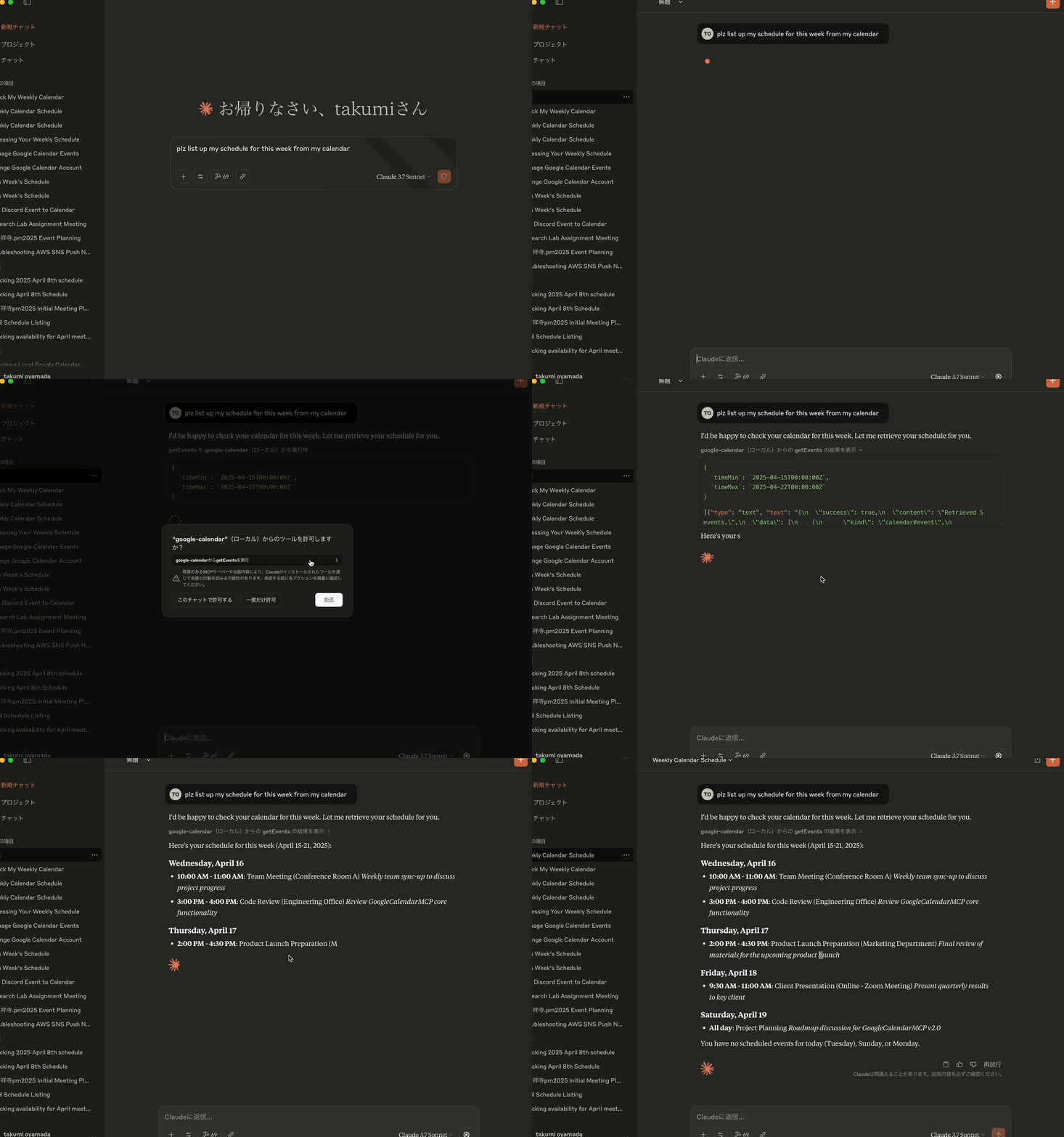
Provides event management capabilities for Google Calendar, allowing retrieval, creation, updating, and deletion of calendar events through the Google Calendar API with OAuth2 authentication
Click on "Install Server".
Wait a few minutes for the server to deploy. Once ready, it will show a "Started" state.
In the chat, type
@followed by the MCP server name and your instructions, e.g., "@Google Calendar MCP Servershow my meetings for tomorrow"
That's it! The server will respond to your query, and you can continue using it as needed.
Here is a step-by-step guide with screenshots.
Google Calendar MCP Server
🔔 VERSION UPDATE NOTICE 🔔
Version 2.0.0 moves to MCP protocol revision2026-07-28and implements PKCE on the OAuth flow. It requires Node.js 20 or newer. See the version history below for the full list of changes.
Project Overview
Google Calendar MCP Server is an MCP (Model Context Protocol) server implementation that enables integration between Google Calendar and Claude Desktop. This project enables Claude to interact with the user's Google Calendar, providing the ability to display, create, update, and delete calendar events through natural language interaction.
Core Features
Google Calendar integration: Provides a bridge between Claude Desktop and the Google Calendar API
MCP implementation: Follows the Model Context Protocol specification for AI assistant tool integration
OAuth2 authentication: Handles the Google API authentication flow securely
Event management: Supports comprehensive calendar event operations (get, create, update, delete)
Color support: Ability to set and update event colors using colorId parameter
STDIO transport: Uses standard input/output for communication with Claude Desktop
Related MCP server: calendar-mcp
Technical Architecture
This project uses:
TypeScript: For type-safe code development
MCP SDK: Uses
@modelcontextprotocol/serverv2 (protocol revision2026-07-28, with the 2025 revisions still served for older clients)Google API: Uses
googleapisfor Google Calendar API accessHono: Lightweight and fast web framework for the authentication server
google-auth-library: Drives the OAuth2 authorization code flow with PKCE (S256)
Zod: Implements schema validation for request/response data
Environment-based configuration: Uses dotenv for configuration management
AES-256-GCM: For token encryption using Node.js crypto module
Open: For automatic browser launching during authentication
Readline: For manual authentication input in server environments
Jest: For unit testing and coverage
GitHub Actions: For CI/CD
Main Components
MCP Server: Core server implementation that handles communication with Claude Desktop
Google Calendar Tools: Calendar operations (retrieval, creation, update, deletion)
Authentication Handler: Management of OAuth2 flow with Google API
Schema Validation: Ensuring data integrity in all operations
Token Manager: Secure handling of authentication tokens
Available Tools
This MCP server provides the following tools for interacting with Google Calendar:
1. getEvents
Retrieves calendar events with various filtering options.
Parameters:
calendarId(optional): Calendar ID (uses primary calendar if omitted, empty string, null, or undefined)timeMin(optional): Start time for event retrieval (ISO 8601 format, e.g., "2025-03-01T00:00:00Z"). Empty strings, null, or undefined values are ignoredtimeMax(optional): End time for event retrieval (ISO 8601 format). Empty strings, null, or undefined values are ignoredmaxResults(optional): Maximum number of events to retrieve (default: 10)orderBy(optional): Sort order ("startTime" or "updated"). Defaults to "startTime" if empty string, null, or undefined
2. createEvent
Creates a new calendar event.
Parameters:
calendarId(optional): Calendar ID (uses primary calendar if omitted)event: Event details object containing:summary(required): Event titledescription(optional): Event descriptionlocation(optional): Event locationstart: Start time object with:dateTime(optional): ISO 8601 format (e.g., "2025-03-15T09:00:00+09:00")date(optional): YYYY-MM-DD format for all-day eventstimeZone(optional): Time zone (e.g., "Asia/Tokyo")
end: End time object (same format as start)attendees(optional): Array of attendees with email and optional displayNamecolorId(optional): Event color ID (1-11)recurrence(optional): Array of recurrence rules in RFC5545 format (e.g., ["RRULE:FREQ=WEEKLY;BYDAY=MO,WE,FR"])
3. updateEvent
Updates an existing calendar event. The function fetches the existing event data first and merges it with the update data, preserving fields that are not included in the update request.
Parameters:
calendarId(optional): Calendar ID (uses primary calendar if omitted)eventId(required): ID of the event to updateevent: Event details object containing fields to update (same structure as createEvent, all fields optional)Only fields that are explicitly provided will be updated
Fields not included in the update request will retain their existing values
This allows for partial updates without losing data
recurrenceparameter can be updated to modify recurring event patterns
4. deleteEvent
Deletes a calendar event.
Parameters:
calendarId(optional): Calendar ID (uses primary calendar if omitted)eventId(required): ID of the event to delete
5. authenticate
Re-authenticates with Google Calendar. This is useful when you want to switch between different Google accounts without having to restart Claude.
Parameters:
None
Development Guidelines
When adding new functions, modifying code, or fixing bugs, please semantically increase the version for each change using npm version command.
Also, please make sure that your coding is clear and follows all the necessary coding rules, such as OOP.
The version script will automatically run npm install when the version is updated, but you should still build, run lint, and test your code before submitting it.
Code Structure
src/: Source code directory
auth/: Authentication handling (OAuth flow with PKCE, token storage)
calendar/: Google Calendar API integration
config/: Configuration settings and validation
mcp/: MCP server implementation
tools/: Google Calendar tool handlers
utils/: Utility functions and helpers
Best Practices
Proper typing according to TypeScript best practices
Maintaining comprehensive error handling
Ensure proper authentication flow
Keep dependencies up to date
Write clear documentation for all functions
Implement security best practices
Follow the OAuth 2.1 authentication standards
Use schema validation for all input/output data
Testing
Implement unit tests for core functionality
Thoroughly test authentication flow
Verify calendar manipulation against Google API
Run tests with coverage reports
Ensure security tests are included
Deployment
This package is published on npm as @takumi0706/google-calendar-mcp:
npx @takumi0706/google-calendar-mcp@2.0.0Prerequisites
Node.js 20 or newer
Create a Google Cloud Project and enable the Google Calendar API
Configure OAuth2 credentials in the Google Cloud Console
Set up environment variables:
# Create a .env file with your Google OAuth credentials
GOOGLE_CLIENT_ID=your_client_id
GOOGLE_CLIENT_SECRET=your_client_secret
GOOGLE_REDIRECT_URI=http://localhost:4153/oauth2callback
# Optional: Token encryption key (auto-generated if not provided)
TOKEN_ENCRYPTION_KEY=32-byte-hex-key
# Optional: Auth server port and host (default port: 4153, host: localhost)
AUTH_PORT=4153
AUTH_HOST=localhost
# Optional: MCP server port and host (default port: 3000, host: localhost)
PORT=3000
HOST=localhost
# Optional: Enable manual authentication (useful when localhost is not accessible)
USE_MANUAL_AUTH=trueClaude Desktop Configuration
Add the server to your claude_desktop_config.json. If you're running in an environment where localhost is not accessible, add the USE_MANUAL_AUTH environment variable set to "true".
{
"mcpServers": {
"google-calendar": {
"command": "npx",
"args": [
"-y",
"@takumi0706/google-calendar-mcp"
],
"env": {
"GOOGLE_CLIENT_ID": "your_client_id",
"GOOGLE_CLIENT_SECRET": "your_client_secret",
"GOOGLE_REDIRECT_URI": "http://localhost:4153/oauth2callback"
}
}
}
}Security Considerations
OAuth tokens are stored in memory only (not stored in a file-based storage). They are lost on restart, which means re-authentication is required after every restart.
Sensitive credentials must be provided as environment variables
Token encryption using AES-256-GCM while tokens sit in memory. Note that the key lives in the same process as the ciphertext, so this protects against casual inspection of process memory, not against an attacker who can already read this process's memory.
PKCE (S256) on the authorization code flow, with a
code_verifiergenerated per request and never sent to the authorization endpointState parameter validation for CSRF protection: 256-bit CSPRNG state, compared in constant time, single-use, and expiring after 10 minutes
Fixed redirect URI taken from configuration rather than from the request's
HostheaderInput validation with Zod schema
HTML escaping on every value interpolated into the OAuth result pages
For more details, see SECURITY.md.
Maintenance
Regular updates to maintain compatibility with the Google Calendar API
Version updates are documented in README.md
Troubleshooting
If you encounter any issues:
Make sure your Google OAuth credentials are correctly configured
Ensure you have sufficient permissions for Google Calendar API access
Verify your Claude Desktop configuration is correct
Common Errors
JSON Parsing Errors: If you see errors like
Unexpected non-whitespace character after JSON at position 4 (line 1 column 5), it's typically due to malformed JSON-RPC messages. This issue has been fixed in version 0.6.7 and later. If you're still experiencing these errors, please update to the latest version.Authentication Errors: Verify your Google OAuth credentials
Invalid state parameter: If you see
Authentication failed: Invalid state parameterwhen re-authenticating, update to version 1.0.3 or later which fixes the OAuth server lifecycle management. In older versions, you may need to close port 4153 and restart the application.Connection Errors: Make sure only one instance of the server is running
Disconnection Issues: Ensure your server is properly handling MCP messages without custom TCP sockets
Cannot access localhost: If you're running the application in an environment where localhost is not accessible (like a remote server or container), enable manual authentication by setting
USE_MANUAL_AUTH=true. This will allow you to manually enter the authorization code shown by Google after authorizing the application.MCP Parameter Validation Errors: If you see error -32602 with empty string parameters, update to version 1.0.7 or later which handles empty strings, null, and undefined values properly.
Version History
Version 2.0.0 Changes
Security
Implemented PKCE (S256) on the OAuth authorization code flow. Earlier versions documented PKCE but never sent a
code_challenge.The
stateparameter is now a 256-bit CSPRNG value, compared in constant time, single-use, and expiring after 10 minutes. It was previously generated withMath.random().Fixed a reflected XSS in the OAuth error page: error details are now logged instead of being interpolated into HTML, and every interpolated value is escaped.
redirect_uriis pinned to the configured value instead of being derived from the request'sHostheader.The local authorization server now aborts when its port is already taken, instead of assuming another instance is serving the flow.
TOKEN_ENCRYPTION_KEYmust now be exactly 64 hexadecimal characters; invalid and all-zero keys are rejected at startup.Resolved all known vulnerabilities in production dependencies.
Protocol
Migrated to
@modelcontextprotocol/serverv2 and protocol revision2026-07-28. The 2025 revisions are still served, so existing clients keep working.tools/listnow advertises the real schema, so nested objects such ascreateEvent'seventargument expose their properties. They were previously opaque.prompts/getis now implemented. The server advertised ten prompts that could not be fetched.resources/readnow returns the shape the specification requires.initializeno longer leaks Zod internals throughcapabilities.
Breaking
Requires Node.js 20 or newer.
Other
Migrated the toolchain to pnpm, upgraded
googleapis,honoandzod, and removed@hono/oauth-providers.Removed
anyand type assertions from the shipped code, enforced by lint.
Version 1.0.7 Changes
Enhanced parameter validation for MCP tools to properly handle empty strings, null, and undefined values
Fixed MCP error -32602 when empty string parameters were passed to getEvents tool
Improved preprocessArgs function to skip empty values, allowing Zod schema defaults to be applied correctly
Added comprehensive test coverage for empty parameter handling
Version 1.0.6 Changes
Fixed the scope is not needed in this google calendar mcp server
Version 1.0.5 Changes
Added support for recurring events through the
recurrenceparameter in bothcreateEventandupdateEventtoolsAllows creation and modification of recurring events directly without manual setup
Version 1.0.4 Changes
Maintenance release with version number update
No functional changes from version 1.0.3
Ensures compatibility with the latest dependencies
Version 1.0.3 Changes
Added new
authenticatetool to allow re-authentication without restarting ClaudeMade it possible to switch between different Google accounts during a session
Exposed authentication functionality through the MCP interface
Enhanced user experience by eliminating the need to restart for account switching
Added manual authentication option for environments where localhost is not accessible
Implemented readline interface for entering authorization codes manually
Added USE_MANUAL_AUTH environment variable to enable manual authentication
Updated zod dependency to the latest version (3.24.2)
Improved schema validation with the latest zod features
Enhanced code stability and security
Fixed "Invalid state parameter" error during re-authentication
Modified OAuth server to start on-demand and shut down after authentication
Improved server lifecycle management to prevent port conflicts
Enhanced error handling for authentication flow
Version 1.0.2 Changes
Fixed
updateEventfunction to preserve existing event data when performing partial updatesAdded
getEventfunction to fetch existing event data before updatingModified
updateEventto merge update data with existing data to prevent data lossUpdated schema validation to make all fields optional in update requests
Improved documentation for the
updateEventfunction
Version 1.0.1 Changes
Fixed compatibility issue with Node.js v20.9.0+ and the 'open' package (v10+)
Replaced static import with dynamic import for the ESM-only 'open' package
Improved error handling for browser opening during OAuth authentication
Enhanced code comments for better maintainability
Version 1.0.0 Changes
Major version release marking production readiness
Comprehensive code refactoring for improved maintainability
Internationalization of all messages and comments (translated Japanese to English)
Enhanced code consistency and readability
Improved error messages for better user experience
Updated documentation to reflect current state of the project
Standardized coding style throughout the codebase
Version 0.8.0 Changes
Enhanced OAuth authentication flow to handle refresh token issues
Added
prompt: 'consent'parameter to force Google to show the consent screen and provide a new refresh tokenModified authentication flow to work with just an access token if a refresh token is not available
Improved token refresh logic to handle cases where there's no refresh token or if the refresh token is invalid
Updated token storage to save refreshed access tokens for better token management
Fixed potential infinite loop in token refresh logic
Installation
Quick Start (Recommended)
Install directly from npm:
npm install -g @takumi0706/google-calendar-mcpManual Installation
For development or customization:
# Clone the repository
git clone https://github.com/takumi0706/google-calendar-mcp.git
cd google-calendar-mcp
# Install dependencies
npm install
# Build the project
npm run build
# Run the server
npm startProduction Deployment
For production use, the server requires valid Google OAuth credentials. The server will fail to start without proper credentials, ensuring security compliance.
Testing
To run the tests:
# Run all tests
npm test
# Run tests with coverage report
npm test -- --coverageLicense
MIT
Available Tools
5 toolsauthenticateA
Start the Google Calendar OAuth flow. Opens a browser window for consent and stores the resulting tokens in memory.
| Name | Required | Description | Default |
|---|---|---|---|
No parameters | |||
TDQS
Does the description disclose side effects, auth requirements, rate limits, or destructive behavior?
No annotations are provided, so the description carries the full burden. It goes beyond the name by disclosing the browser consent behavior and that tokens are stored in memory, which implies they are not persisted across sessions. It does not cover failure modes or re-authentication, but it is meaningfully transparent for a zero-parameter tool.
Agents need to know what a tool does to the world before calling it. Descriptions should go beyond structured annotations to explain consequences.
Is the description appropriately sized, front-loaded, and free of redundancy?
Two concise sentences with no filler. The action, side effect, and storage behavior are all included in minimal space, and the purpose is front-loaded.
Shorter descriptions cost fewer tokens and are easier for agents to parse. Every sentence should earn its place.
Given the tool's complexity, does the description cover enough for an agent to succeed on first attempt?
For a zero-parameter OAuth tool with no output schema, the description covers the purpose, the user-facing behavior, and the outcome (tokens in memory). An agent has enough information to invoke the tool and understand its effect; nothing essential is missing.
Complex tools with many parameters or behaviors need more documentation. Simple tools need less. This dimension scales expectations accordingly.
Does the description clarify parameter syntax, constraints, interactions, or defaults beyond what the schema provides?
The tool has no parameters, so the schema is trivially complete. The description adds nothing about parameters, but none are needed; the baseline of 4 applies.
Input schemas describe structure but not intent. Descriptions should explain non-obvious parameter relationships and valid value ranges.
Does the description clearly state what the tool does and how it differs from similar tools?
The description states a specific action ('Start the Google Calendar OAuth flow') and gives concrete behavioral details: it opens a browser window for consent and stores tokens in memory. This clearly distinguishes it from the event-related sibling tools.
Agents choose between tools based on descriptions. A clear purpose with a specific verb and resource helps agents select the right tool.
Does the description explain when to use this tool, when not to, or what alternatives exist?
The description makes it clear this is the authentication step for Google Calendar, which an agent can infer should precede getEvents, createEvent, and other calendar operations. It does not explicitly articulate when not to use it, but the context is unambiguous enough for tool selection.
Agents often have multiple tools that could apply. Explicit usage guidance like "use X instead of Y when Z" prevents misuse.
createEventA
Create an event on a Google Calendar. Supports all-day events, attendees, reminders and RFC5545 recurrence rules.
| Name | Required | Description | Default |
|---|---|---|---|
| event | Yes | ||
| calendarId | No | primary |
TDQS
Does the description disclose side effects, auth requirements, rate limits, or destructive behavior?
No annotations are provided, so the description carries the full burden of behavioral disclosure. It lists supported features but does not mention whether attendee invitations are sent, whether authentication is required, what the created event response looks like, or whether creation is reversible. 'Create' implies mutation, but little else is disclosed.
Agents need to know what a tool does to the world before calling it. Descriptions should go beyond structured annotations to explain consequences.
Is the description appropriately sized, front-loaded, and free of redundancy?
The description is one sentence with no filler. It front-loads the action and resource, then packs the key capability details into a short supporting clause. Every word earns its place.
Shorter descriptions cost fewer tokens and are easier for agents to parse. Every sentence should earn its place.
Given the tool's complexity, does the description cover enough for an agent to succeed on first attempt?
Given the complexity of the nested event schema, the absence of annotations, and no output schema, this short description leaves important operational gaps: authentication prerequisites, default calendar behavior, return shape, and side effects like attendee emails. The feature list is helpful but insufficient for safe, confident invocation of a mutation tool.
Complex tools with many parameters or behaviors need more documentation. Simple tools need less. This dimension scales expectations accordingly.
Does the description clarify parameter syntax, constraints, interactions, or defaults beyond what the schema provides?
Schema description coverage is reported as 0%, and the event object is large and nested. The description partially compensates by calling out all-day events, attendees, reminders, and RFC5545 recurrence rules, which map to schema properties. Still, it does not explain the required summary/start/end fields, the calendarId default of 'primary', or the overall structure of the event object.
Input schemas describe structure but not intent. Descriptions should explain non-obvious parameter relationships and valid value ranges.
Does the description clearly state what the tool does and how it differs from similar tools?
The description opens with a specific verb-resource pair: 'Create an event on a Google Calendar.' It also names supported features, which clarifies scope. This is clearly distinct from the sibling tools getEvents, updateEvent, deleteEvent, and authenticate without any ambiguity.
Agents choose between tools based on descriptions. A clear purpose with a specific verb and resource helps agents select the right tool.
Does the description explain when to use this tool, when not to, or what alternatives exist?
The imperative 'Create an event' provides clear, unambiguous context for when to use the tool. However, it gives no explicit exclusion like 'use updateEvent to modify an existing event' or 'call authenticate first,' so it stops short of fully explicit routing guidance.
Agents often have multiple tools that could apply. Explicit usage guidance like "use X instead of Y when Z" prevents misuse.
deleteEventC
Delete an event from a Google Calendar by its event ID.
| Name | Required | Description | Default |
|---|---|---|---|
| eventId | Yes | ||
| calendarId | No | primary |
TDQS
Does the description disclose side effects, auth requirements, rate limits, or destructive behavior?
No annotations are provided, so the description bears full responsibility for behavioral disclosure. While 'Delete' clearly implies a destructive mutation, it does not state whether the operation is permanent, whether confirmation or special permissions are required, or what side effects occur (e.g., removal from attendee calendars). The description is too thin to adequately characterize the risk.
Agents need to know what a tool does to the world before calling it. Descriptions should go beyond structured annotations to explain consequences.
Is the description appropriately sized, front-loaded, and free of redundancy?
The description is a single, front-loaded sentence with no filler. It conveys the core action and key parameter efficiently, though it sacrifices some essential detail for brevity.
Shorter descriptions cost fewer tokens and are easier for agents to parse. Every sentence should earn its place.
Given the tool's complexity, does the description cover enough for an agent to succeed on first attempt?
For a destructive tool with no annotations, no output schema, and 0% schema coverage, this description is insufficient. It does not cover the optional calendarId, authentication or permission expectations, undoing behavior, or any failure/response semantics. An agent cannot confidently invoke this tool correctly based on this definition alone.
Complex tools with many parameters or behaviors need more documentation. Simple tools need less. This dimension scales expectations accordingly.
Does the description clarify parameter syntax, constraints, interactions, or defaults beyond what the schema provides?
Schema description coverage is 0%, so the description must compensate by explaining parameters. It does identify eventId as the core identifier, but it completely omits calendarId, which is a parameter in the schema with a default of 'primary'. The vague phrase 'Google Calendar' doesn't clarify how the calendar is selected, leaving an agent uncertain about the optional parameter.
Input schemas describe structure but not intent. Descriptions should explain non-obvious parameter relationships and valid value ranges.
Does the description clearly state what the tool does and how it differs from similar tools?
The description uses a specific verb ('Delete'), a resource ('an event'), and a unique identifier ('event ID'), which clearly distinguishes this from siblings like createEvent, getEvents, and updateEvent. It unambiguously states the operation and object.
Agents choose between tools based on descriptions. A clear purpose with a specific verb and resource helps agents select the right tool.
Does the description explain when to use this tool, when not to, or what alternatives exist?
The description implies that the tool is used to delete an event, but provides no guidance on when this tool should be used over alternatives, no prerequisites (e.g., authentication), and no exclusions. It does not mention that calendarId is optional or defaulted, nor when a deletion might fail.
Agents often have multiple tools that could apply. Explicit usage guidance like "use X instead of Y when Z" prevents misuse.
getEventsA
List events from a Google Calendar within an optional time range.
| Name | Required | Description | Default |
|---|---|---|---|
| orderBy | No | Sort order for the returned events | |
| timeMax | No | Upper bound (exclusive) for an event's start time, in ISO 8601 format | |
| timeMin | No | Lower bound (inclusive) for an event's end time, in ISO 8601 format | |
| calendarId | No | Calendar ID (uses the primary calendar if omitted or empty) | |
| maxResults | No | Maximum number of events to return |
TDQS
Does the description disclose side effects, auth requirements, rate limits, or destructive behavior?
With no annotations, the description carries the behavioral burden. 'List' conveys a read-only, non-destructive operation and the time-range clause provides useful scoping, but the description omits any mention of auth needs, pagination behavior, or what happens with invalid calendar IDs.
Agents need to know what a tool does to the world before calling it. Descriptions should go beyond structured annotations to explain consequences.
Is the description appropriately sized, front-loaded, and free of redundancy?
The description is a single front-loaded sentence with no filler. Every word contributes to identifying the action, resource, and optional scope.
Shorter descriptions cost fewer tokens and are easier for agents to parse. Every sentence should earn its place.
Given the tool's complexity, does the description cover enough for an agent to succeed on first attempt?
For a straightforward list operation with a fully described schema, the description is minimally sufficient. It lacks an explicit statement about auth requirements and return shape, but the sibling set and parameter documentation provide enough context to avoid gross misuse.
Complex tools with many parameters or behaviors need more documentation. Simple tools need less. This dimension scales expectations accordingly.
Does the description clarify parameter syntax, constraints, interactions, or defaults beyond what the schema provides?
All five parameters are already documented in the schema (100% coverage), so the baseline applies. The description adds no parameter-level detail beyond noting the time range is optional, which is already encoded by the nullable timeMin/timeMax fields.
Input schemas describe structure but not intent. Descriptions should explain non-obvious parameter relationships and valid value ranges.
Does the description clearly state what the tool does and how it differs from similar tools?
The description states the exact action ('List'), the resource ('events from a Google Calendar'), and the optional time-range scope. This clearly differentiates it from the sibling mutation tools (createEvent, updateEvent, deleteEvent) and authenticate.
Agents choose between tools based on descriptions. A clear purpose with a specific verb and resource helps agents select the right tool.
Does the description explain when to use this tool, when not to, or what alternatives exist?
The description implies this is the read/query tool for calendar events, and the sibling names make the contrast obvious. However, it does not explicitly state when to prefer it over alternatives, nor does it mention prerequisites such as authentication or calendar ownership.
Agents often have multiple tools that could apply. Explicit usage guidance like "use X instead of Y when Z" prevents misuse.
updateEventA
Update an existing Google Calendar event. Omitted fields keep their current values.
| Name | Required | Description | Default |
|---|---|---|---|
| event | Yes | ||
| eventId | Yes | ||
| calendarId | No | primary |
TDQS
Does the description disclose side effects, auth requirements, rate limits, or destructive behavior?
With no annotations, the description carries the burden of behavioral disclosure. It usefully states partial-update semantics ('Omitted fields keep their current values'), but it does not mention side effects, permissions, or the irreversibility of the update. A 3 reflects that it adds some valuable behavior context while leaving significant gaps.
Agents need to know what a tool does to the world before calling it. Descriptions should go beyond structured annotations to explain consequences.
Is the description appropriately sized, front-loaded, and free of redundancy?
Two sentences with no fluff; the purpose is front-loaded and the second sentence adds essential behavioral nuance about field omission. Every word earns its place.
Shorter descriptions cost fewer tokens and are easier for agents to parse. Every sentence should earn its place.
Given the tool's complexity, does the description cover enough for an agent to succeed on first attempt?
Given the nested event object with complex date/reminder/recurrence schemas and no output schema or annotations, the description is too sparse. It omits how the update interacts with required fields, what happens to attendees on date changes, and any authentication or error behavior. An agent needs more context to invoke correctly.
Complex tools with many parameters or behaviors need more documentation. Simple tools need less. This dimension scales expectations accordingly.
Does the description clarify parameter syntax, constraints, interactions, or defaults beyond what the schema provides?
Schema description coverage is 0%, so the description must compensate for explaining eventId, event, and calendarId. It only generically refers to 'fields' and the partial-update behavior, giving no specific meaning for the parameters. It fails to clarify what eventId identifies or how calendarId scopes the operation.
Input schemas describe structure but not intent. Descriptions should explain non-obvious parameter relationships and valid value ranges.
Does the description clearly state what the tool does and how it differs from similar tools?
The description states a specific verb ('Update') and resource ('existing Google Calendar event'), which clearly differentiates it from siblings like createEvent and deleteEvent. The phrase 'existing' signals that it modifies rather than creates.
Agents choose between tools based on descriptions. A clear purpose with a specific verb and resource helps agents select the right tool.
Does the description explain when to use this tool, when not to, or what alternatives exist?
The description implies use for updating existing events by contrasting with creating, but it does not explicitly state when to prefer this tool over siblings, nor any exclusions. An agent can infer the use case from 'existing,' but no direct guidance is provided.
Agents often have multiple tools that could apply. Explicit usage guidance like "use X instead of Y when Z" prevents misuse.
TDQS
Each tool targets a distinct action on calendar events—listing, creating, updating, deleting—plus a separate authentication flow. There is no overlap or ambiguity between the tools.
Four tools follow a clear verb+Event pattern (getEvents, createEvent, updateEvent, deleteEvent), while authenticate is a necessary but non-parallel exception. Overall the naming is predictable and easy to infer.
Five tools is a well-scoped set for a Google Calendar event server: authentication plus full CRUD operations. Each tool serves a clear purpose without unnecessary bloat.
The server covers the full event lifecycle—list, create, update, delete—and includes OAuth authentication as a prerequisite. There are no obvious dead ends or critical missing operations for managing calendar events.
Maintenance
Resources
Unclaimed servers have limited discoverability.
Looking for Admin?
If you are the server author, to access and configure the admin panel.
Related MCP Connectors
Hosted Google Calendar MCP server for AI agents. No self-hosting or Google Cloud setup.
A comprehensive Model Context Protocol (MCP) server that enables AI assistants to interact with yo…
A MCP server that works with Google Calendar to manage event listing, reading, and updates.
Model Context Protocol server for the Apideck Unified API. Connect any MCP-compatible agent framework to 100+ accounting systems, HRIS platforms, file storage providers, and more through one integration. More information https://www.apideck.com/mcp-server
Related MCP Servers
- AlicenseNot gradedqualityDmaintenanceA Model Context Protocol server that enables natural language interaction with Google Calendar, allowing users to view, create, update, and delete calendar events through context-aware operations.1641MIT
- FlicenseNot gradedqualityDmaintenanceThis project implements a Python-based MCP (Model Context Protocol) server that acts as an interface between Large Language Models (LLMs) and the Google Calendar API. It enables LLMs to perform calendar operations via natural language requests.26
- AlicenseNot gradedqualityDmaintenanceA Model Context Protocol server that enables Claude to fully manage Google Calendar, including events, calendars, sharing, and availability checks through natural language.1MIT
- AlicenseNot gradedqualityDmaintenanceA Model Context Protocol (MCP) server for Google Calendar integration in Claude Desktop, enabling AI assistants to manage Google Calendar events through natural language interactions.181ISC
Latest Blog Posts
- Who's Calling? MCP Hosts Are an Identity Blind Spot (And the Spec Knows It)By Om-Shree-0709 on .mcpAgent IdentityOAuth 2.1
- Your AI Chatbot Just Exposed Your CEO's Salary to an InternBy Om-Shree-0709 on .Agent IdentityMCP SecurityOAuth Delegation
- Why MCP Servers Need Execution Sandboxing (And Why Your Current Stack Isn't Enough)By Om-Shree-0709 on .Agentic AiPrompt InjectionWebAssembly
MCP directory API
We provide all the information about MCP servers via our MCP API.
curl -X GET 'https://glama.ai/api/mcp/v1/servers/takumi0706/google-calendar-mcp'
If you have feedback or need assistance with the MCP directory API, please join our Discord server