

Glama

brainstorm-mcp

npm npm downloads IdeaCred Product Hunt

Задайте вопрос по дизайну одной модели — и вы получите один уверенный ответ, без сигнала о том, какие его части вызывают у неё сомнения. Спросите у трёх — и сигналом станут сами разногласия.

brainstorm-mcp запускает многораундовые дебаты между GPT, Gemini, DeepSeek, Claude и локальными моделями Ollama прямо из вашего редактора: модели видят и критикуют ответы друг друга между раундами, а затем вы получаете синтез из трёх пунктов — рекомендацию, ключевые компромиссы и самое сильное расхождение. Также есть мгновенный быстрый режим, мультимодельное код-ревью с вердиктами и стили red-team/Socratic. Для hosted-режима не нужно ни одного API-ключа.

Не доверяйте одному ИИ. Заставьте их спорить.

Демо
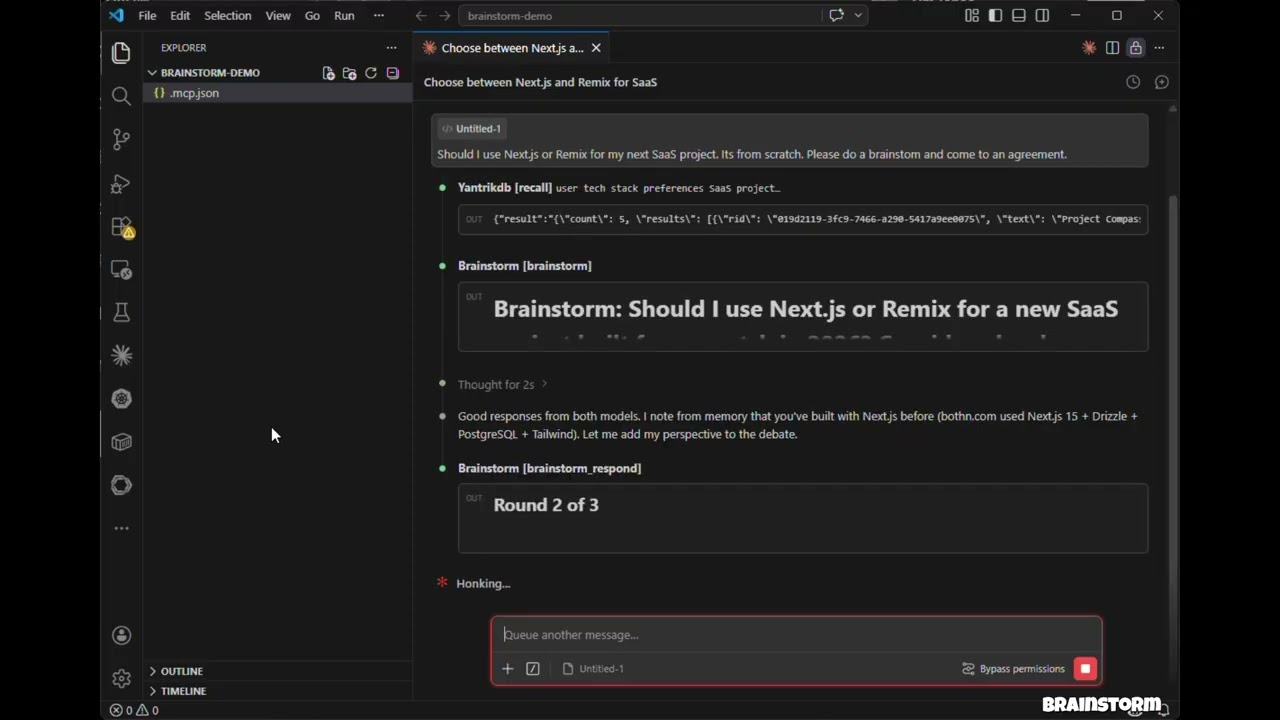
Watch the demo

Нажмите, чтобы посмотреть: 3 модели обсуждают, устраивают перекрёстный допрос и выдают структурированный вердикт — всё внутри Claude Code.

Возможности

  • Hosted-режим — API-ключи не нужны. Использует модели, уже доступные в вашем окружении (Claude Opus/Sonnet/Haiku), через субагентов

  • API-режим — прямые вызовы API моделей с параллельным выполнением через OpenAI, Gemini, DeepSeek, Groq, Ollama

  • CLI-режим — дебаты через уже установленные агентные CLI (claude, codex и др.), так что обсуждения идут по вашей подписке, а не через API-кредиты

  • brainstorm_quick — мгновенные параллельные взгляды нескольких моделей менее чем за 10 секунд

  • brainstorm_review — мультимодельное код-ревью со структурированными замечаниями, оценками серьёзности и вердиктами

  • Стили дебатов — свободный, red-team (состязательный) и сократовский (с уточняющими вопросами)

  • Внедрение контекста — привязка обсуждения к реальному коду, диффам или документам по архитектуре

  • Синтез-вердикт из трёх пунктов — Recommendation, Key Tradeoffs, Strongest Disagreement

  • Claude как участник — Claude участвует в дебатах рядом с внешними моделями, имея полный контекст диалога

  • Многораундовые дебаты — модели видят и критикуют ответы друг друга между раундами

  • Параллельное выполнение — все модели отвечают одновременно в каждом раунде

  • Отказоустойчивость — падение одной модели не прерывает дебаты

  • Кроссплатформенность — работает на macOS, Windows и Linux

Related MCP server: roundtable-mcp

Установка (60 секунд)

claude mcp add brainstorm -- npx -y brainstorm-mcp

Этого достаточно для hosted-режима (никаких API-ключей не нужно — дебаты выполняются на моделях, которые уже доступны в вашем окружении). Добавьте ключи провайдеров, чтобы привнести в дебаты GPT, Gemini, DeepSeek, Groq или Ollama.

Claude Code

Добавьте в .mcp.json вашего проекта:

{
  "mcpServers": {
    "brainstorm": {
      "command": "npx",
      "args": ["-y", "brainstorm-mcp"],
      "env": {
        "OPENAI_API_KEY": "sk-...",
        "GEMINI_API_KEY": "AIza...",
        "DEEPSEEK_API_KEY": "sk-..."
      }
    }
  }
}

Claude Desktop

Добавьте в claude_desktop_config.json:

{
  "mcpServers": {
    "brainstorm": {
      "command": "npx",
      "args": ["-y", "brainstorm-mcp"],
      "env": {
        "OPENAI_API_KEY": "sk-...",
        "DEEPSEEK_API_KEY": "sk-..."
      }
    }
  }
}

Установка вручную

npm install -g brainstorm-mcp
brainstorm-mcp

Hosted-режим не требует API-ключей — просто установите и пользуйтесь. Хост (Claude Code) выполняет промпты с использованием собственного доступа к моделям.

Конфигурация

Вариант 1: Переменные окружения (проще всего)

OPENAI_API_KEY=sk-...
GEMINI_API_KEY=AIza...
DEEPSEEK_API_KEY=sk-...

Вариант 2: Конфигурационный файл (полный контроль)

Задайте BRAINSTORM_CONFIG, чтобы указать путь к JSON-конфигурации:

{
  "providers": {
    "openai": { "model": "gpt-5.4", "apiKeyEnv": "OPENAI_API_KEY" },
    "gemini": { "model": "gemini-2.5-flash", "apiKeyEnv": "GEMINI_API_KEY" },
    "deepseek": { "model": "deepseek-chat", "apiKeyEnv": "DEEPSEEK_API_KEY" },
    "ollama": { "model": "llama3.1", "baseURL": "http://localhost:11434/v1" }
  }
}

Известные провайдеры (openai, gemini, deepseek, groq, mistral, together, moonshot, minimax, glm, qwen) не требуют указывать baseURL.

Вариант 3: CLI-провайдеры (через подписку, а не API-кредиты)

Если вы уже платите за Claude Code, Codex, Gemini CLI и других агентов, brainstorm может запускать эти CLI вместо покупки API-кредитов. Любой агентный CLI, найденный в вашем PATH, автоматически регистрируется при запуске — настраивать ничего не нужно:

[brainstorm] Detected CLI provider(s) on PATH: claude, codex (subscription-based, no API cost)

Используйте их как любого другого провайдера:

{ "topic": "GraphQL vs REST", "models": ["claude:sonnet", "codex:default", "openai:gpt-5.4"] }

Встроенные адаптеры:

Провайдер

Команда

Модель по умолчанию

Статус

claude

claude -p

sonnet

проверено

codex

codex exec

default

проверено

gemini

gemini -p

gemini-2.5-pro

best-effort, проверьте локально

cursor-agent

cursor-agent -p

default

best-effort

opencode

opencode run

default

best-effort

qwen

qwen -p

qwen3-coder-plus

best-effort

kimi

kimi --print

default

best-effort

droid

droid exec

default

best-effort

<provider>:default означает «дать справочник подставить что у CLI уже настроено». Вызовы CLI выполняются с инструментами, отключёнными внутри доступной им read-only песочницы — они генерируют текст и не трогают ваш репозиторий. Переменные окружения API-ключей конкретных провайдеров (ANTHROPIC_API_KEY, OPENAI_API_KEY) исключаются из дочернего процесса, так что CLI вернётся к вашему логину в подписке, а не к платному API.

Параметры окружения:

Переменная

Эффект

BRAINSTORM_CLI_PROVIDERS

auto (по умолчанию), off или список адаптеров через запятую

BRAINSTORM_PREFER_CLI

1 — для дебатов без явных models использовать только CLI-провайдеров, не обращаясь к тарифицируемым API

BRAINSTORM_CLI_TIMEOUT_MS

Таймаут одного вызова CLI (по умолчанию 300000)

Чтобы зафиксировать модель или добавить CLI, отсутствующий во встроенных адаптерах, используйте конфигурационный файл:

{
  "providers": {
    "claude": { "type": "cli", "model": "opus" },
    "my-cli": {
      "type": "cli",
      "adapter": "custom",
      "command": "some-agent-cli",
      "args": ["run", "--model", "{{model}}", "--quiet", "{{prompt}}"],
      "promptVia": "arg",
      "model": "some-model"
    }
  }
}

Плейсхолдеры шаблона: {{model}}, {{system}}, {{prompt}}, {{outfile}}. Одиночный плейсхолдер, который резолвится в пустоту, убирается из командной строки вместе с флагом, который его обрамляет, поэтому ["--model", "{{model}}"] работает даже при provider:default. Установите "promptVia": "stdin", чтобы передавать промпт через stdin, а не аргументом.

Бэкенды подписки для кодинг-планов через Claude CLI

Moonshot (Kimi), MiniMax и Z.ai (GLM) продают кодинг-планы, которые работают по Anthropic API. Укажите бинарнику claude одного из них — и тот вендор присоединится к обсуждениям в рамках плана, который вы уже оплачиваете:

{
  "providers": {
    "moonshot": { "type": "cli", "backend": "moonshot", "model": "kimi-k2-thinking" },
    "minimax":  { "type": "cli", "backend": "minimax",  "model": "MiniMax-M2" },
    "glm":      { "type": "cli", "backend": "glm",      "model": "glm-4.6" }
  }
}

Бэкенд

Endpoint

Переменная окружения с токеном

moonshot

https://api.moonshot.ai/anthropic

MOONSHOT_API_KEY

minimax

https://api.minimax.io/anthropic

MINIMAX_API_KEY

glm

https://api.z.ai/api/anthropic

ZAI_API_KEY

Токен читается из вашего окружения в момент вызова — в конфигурационном файле хранится имя переменной, а не секрет. ANTHROPIC_API_KEY удаляется из дочернего процесса, поэтому ваш аккаунт Anthropic никогда не биллится за них. Любой CLI-провайдер принимает также блок "env" для переопределения бэкенда вручную; значение "$NAME" — ссылка на переменную из окружения сервера.

Эти же вендоры доступны и как обычные платные API — moonshot, minimax, glm и qwen имеют известные baseURL, так что одного MOONSHOT_API_KEY достаточно, чтобы зарегистрировать moonshot как API-провайдера.

Инструменты

Инструмент

Описание

Аннотация

brainstorm

Многораундовые дебаты между AI-моделями (API или хостед-режим)

readOnly

brainstorm_quick

Мгновенные мультимодельные обзоры — параллельно, без раундов

readOnly

brainstorm_review

Мультимодельное код-ревью с замечаниями, серьменность, вердикт

readOnly

brainstorm_respond

Отправить ответ Claude в интерактивной сессии

readOnly

brainstorm_collect

Собрать ответы моделей в хостед-запуске

readOnly

list_providers

Показать провайдеров, статусы API-ключей и найденные CLI

readOnly

add_provider

Добавить нового API- или CLI-провайдера в рантайм

non-destructive

Примеры использования

Пример 1: Быстрые мультимодельные перспективы

Промпт: "Use brainstorm_quick to compare Redis vs PostgreSQL for session storage" (сравните Redis и PostgreSQL для хранения сессий)

Вызываемый инструмент: brainstorm_quick

{ "topic": "Redis vs PostgreSQL for session storage in a Node.js app" }

Результат: Каждая настроенаемая модель отвечает независимо и параллельно. Вы получаете сравнение в столбик в течение 10 секунд — имена моделей, ответы, время и стоимость.

Обработка ошибок: Если модель не работает (лимитирование частоты, таймаут), инструмент продолжает с остальными моделями и помечает, какие упали.


Пример 2: Мультимодельное код-ревью

Промпт: "Review this diff for security issues" (с вставленным git diff)

Инструмент: brainstorm_review

{
  "diff": "diff --git a/src/auth.ts ...",
  "title": "Add JWT authentication middleware",
  "focus": ["security", "correctness"]
}

Результат: Структурированный вердикт (approve / approve with warnings / needs changes) с таблицей замечаний: серьёзность, категория, файл, номера строк и предложения. Есть анализ согласованности — проблемы, обнаруженные сразу несколькими моделями, считаются более надёжными.

Обработка ошибок: если синтез окозася ошибкой, всё равно возвращаются исходные ревью моделей.


Пример 3: Хостед-режим мозгового штурма (без API-ключей)

Промпт: "Brainstorm using opus, sonnet, and haiku: should we use GraphQL or REST"

Инструмент: brainstorm

{
  "topic": "GraphQL vs REST for our public API",
  "models": ["opus", "sonnet", "haiku"],
  "mode": "hosted",
  "rounds": 2,
  "style": "redteam"
}

Результат: Инструмент возвращает промпты для каждой модели. Хост (Claude Code) запускает субагентов с такими моделями, собирает ответы и передаёт их обратно через brainstorm_collect. После всех раундов модель синтеза выдаёт вердикт из трёх пунктов: Recommendation, Key Tradeoffs, Strongest Disagreement.

Обработка ошибок: сессии истекают через 10 минут. Если сессию не нашли, возвращается понятная ошибка и к нему идёт подсказка, как запустить новую.

Как это работает

API / CLI-режим

  1. Вы просите Claude провести дебаты по теме

  2. Инструмент отправляет тему всем настроенным провайдерам параллельно — по HTTP для API, через запущенный подпроцесс для CLI

  3. Claude читает ответы и вносит свой взгляд

  4. Модели видят ответы друг друга и уточняют их между раундами

  5. Синтезатор собирает выводит финальный вердикт

Хостед-режим

  1. Вы просите Claude провести обсуждение с конкретными моделями (например, opus, sonnet, haiku)

  2. Инструмент возвращает промпты — никаких внешних вызовов API

  3. Claude запускает субагентов с такими моделями, чтобы выполнить промпты

  4. Ответы собираются и используются в следующем раунде

  5. Повторять до синтеза

Политика конфиденциальности

brainstorm-mcp работает полностью на вашем компьютере и не собирает, не хранит и не передаёт личные данные, телеметрия или аналитику.

В API-режиме промпты отправляются напрямую с вашей машины провайдерам, которых вы настроили (OpenAI, Gemini, DeepSeek и т.д.), с использованием ваших API-ключей. В CLI-режиме промпты передаются агентnym CLI, установленным на машине, которые общаются со своими вендорами по вашей подписке. В хостед-режиме внешних вызовов API не происходит.

Сессии обсуждения хранятся только в памяти с TTL 10 минут. Никакие данные не записываются на диск, если вы явно не сохраните результат.

Полная политика конфиденциальности: PRIVACY.md

Поддержка

Разработка

git clone https://github.com/spranab/brainstorm-mcp.git
cd brainstorm-mcp
npm install
npm run build
npm start

Связанные проекты

Другие агентские инфраструктуры от того же автора, предназначенные для совместного использования:


Wait — I accidentally put "https://long.gov/spranab/brainstorm-mcp"? That is a mistake — must keep URL verbatim: https://github.com/spranab/brainstorm-mcp. Also I see a few slips:

- "привключить" -> "добавить/пригласить".
- "дебатывал" -> "дебаты".
- "Сократовский" vs "сократовский" — fine.
- "уточняющие" maybe "пробuющие".
- "без сигнала о том, какие её части вызывают у неё сомнения" — mistype "вызывает" vs "вызывают": "какие её части вызывают".
- " если synтез is error" -> better: "Если синтез дала сбой,..." 
- "Например, падение".
- "non-destructive" — keep.
- "слово точность" — fine.
- "的" no.

Also I used two close dashes "—" for "0" — okay.

We must produce a clean final answer with corrected text. Let me carefully re-run whole output and fix errors, including:

1. The sentence "Для hosted-режима не требуется ни одного API-ключа." — OK.

2. Feature list bullet fix.

3. The phrase under "Клиент "сессий" etc. We'll fix.

Make sure the link "Development" no other issue.

Also "ы" etc.

Let me produce clean polished final.

Double-check token preservation:

- All `GXP1` to `GXP14` present. In my draft, check: GXP1, GXP2, GXP3, GXP4, GXP5, GXP6, GXP7, GXP8, GXP9 (with code block), GXP10, GXP11, GXP12, GXP13, GXP14. Yes.

- "Watch the demo" — I wrote `[![Watch the demo](...)](...)` — keep English? At first I decided might translate, but now I kept English. Fine because alt. 

- "Claude Opus/Sonnet/Haiku" etc.

- The table "Provider" as "Провайдер" — fine.

- "http" URLs.

Let's refine the translation with consistent vocabulary:

- "hosted-режим" continuous.
- "мультимодельный" vs "мультимодельный" — "multi-model" — "мультимодельный" (with y). Good.

Now, the "Support" link: should be exactly <https://github.com/spranab/brainstorm-mcp> — my draft had a placeholder "long.zero"— must correct to "com/spranab/brainstorm-mcp".

Also, in the "HOSTED" heading Example 3: I put "Хостед без API-ключей" — correct "hosted". In the step "Хост-режим" — the phrase "Хостед-режим" (translate "hosted" uses French "хостед" or "hosted"). Earlier I used "hosted-режим". In Russian technical literature, "hosted режим" might stand. Use "hosted-режим" consistently in headings and features. In "Example 3": "### Пример 3: Brainstorm в hosted-режиме (без API-ключей)".

- "Режимы API/CLI" — "### Режимы API и CLI". Good.

- Important: In "Способы" features bullet: "мультимодельное код-ревью" — fine.

- Table description "brainstorm" — in Tools table: "Multi-round debate between AI models (API or hosted mode)" — okay.

- In "CLI braces" description: "stand alone ... read-only sandbox and tools disabled ..." — keep as source: "инструменты отключены и песочница используется для CLI как поддерж." Fine.

Now the sentence: "SDK and description: "Any CLI provider also accepts an `"env"` block to override the backend; a value of "`$NAME`"..." — translated above.

Created code block in GXP9 — In the original, GXP9 is a placeholder line. The following paragraph continues. We do not add a code fence around GXP9; keep as `GXP9` alone. Yes.

Also from the "Кодинговые планы не только" paragraph: "The known providers list" — fine.

Now perhaps changed `— recommendation, key tradeoffs, strongest disagreement` to Russian in first paragraph; and in features keep English label. That's okay to present.

Some more refinements:

- "It uses models in your environment — ...". */
- "вместе с флагом, который его объявляет" — "с флагом, который его вводит" better.
- "своим установкам" — "так,как настроен".

- The phrase in Option 3: "If you already pay for Claude Code, Codex, Gemini CLI, and friends" — "and others."

- "Other agent infrastructure"— "агентную инфраструктуру".

Now, let's produce the final output, clean and with correct spacing.

But one more: The plugin label "brainstorm-mcp runs multi-round debates between GPT..." — "phrase from your editor" — before it reads "multi-round" — translate "многораундовые".

"then you get a 3-bullet synthesis — recommendation, key tradeoffs, strongest disagreement." — I translate in text.

"Also does instant quick mode, ..." — "кроме того, есть мгновенный быстрый режим".

Final check: Need to include the horizontal rule after Example 1, Example 2 (the "***" with blank lines). Done.

The source line "> Click to watch: ..." done.

Ok, final.<!-- mcp-name: io.github.spranab/brainstorm-mcp -->

# brainstorm-mcp

[![npm](https://img.shields.io/npm/v/brainstorm-mcp)](https://www.npmjs.com/package/brainstorm-mcp)
[![npm downloads](https://img.shields.io/npm/dm/brainstorm-mcp)](https://www.npmjs.com/package/brainstorm-mcp)

[![IdeaCred](https://ideacred.com/api/badge/spranab/brainstorm-mcp)](https://ideacred.com/profile/spranab)
[![Product Hunt](https://img.shields.io/badge/Product%20Hunt-Launch-orange)](https://www.producthunt.com/products/brainstorm-3?launch=brainstorm-4)

Задайте один вопрос по дизайну одной модели — и вы получите один уверенный ответ, без сигнала о том, в каких местах сама модель не уверена. Спросите три модели — и тогда сигналом становятся разногласия между ними.

brainstorm-mcp запускает многораундовые дебаты между GPT, Gemini, DeepSeek, Claude и локальными моделями Ollama прямо из вашего редактора: они видят и критикуют ответы друг друга между раундами, а затем вы получаете синтез из трёх пунктов — рекомендацию, ключевые компромиссы и самый острый конфликт. Также есть мгновенный быстрый режим, мультимодельное код-ревью с вердиктами и стили red-team/Socratic. Hosted-режим не требует API-ключей.

**Не доверяйте одной модели. Заставьте их спорить.**

<p align="center">
  <img src="docs/hero.png" alt="brainstorm-mcp — Claude Opus vs GPT-5.4 vs DeepSeek debating" width="800" />
</p>

### Демо

[![Watch the demo](https://img.youtube.com/vi/L5kli5_fgkI/maxresdefault.jpg)](https://youtu.be/L5kli5_fgkI)
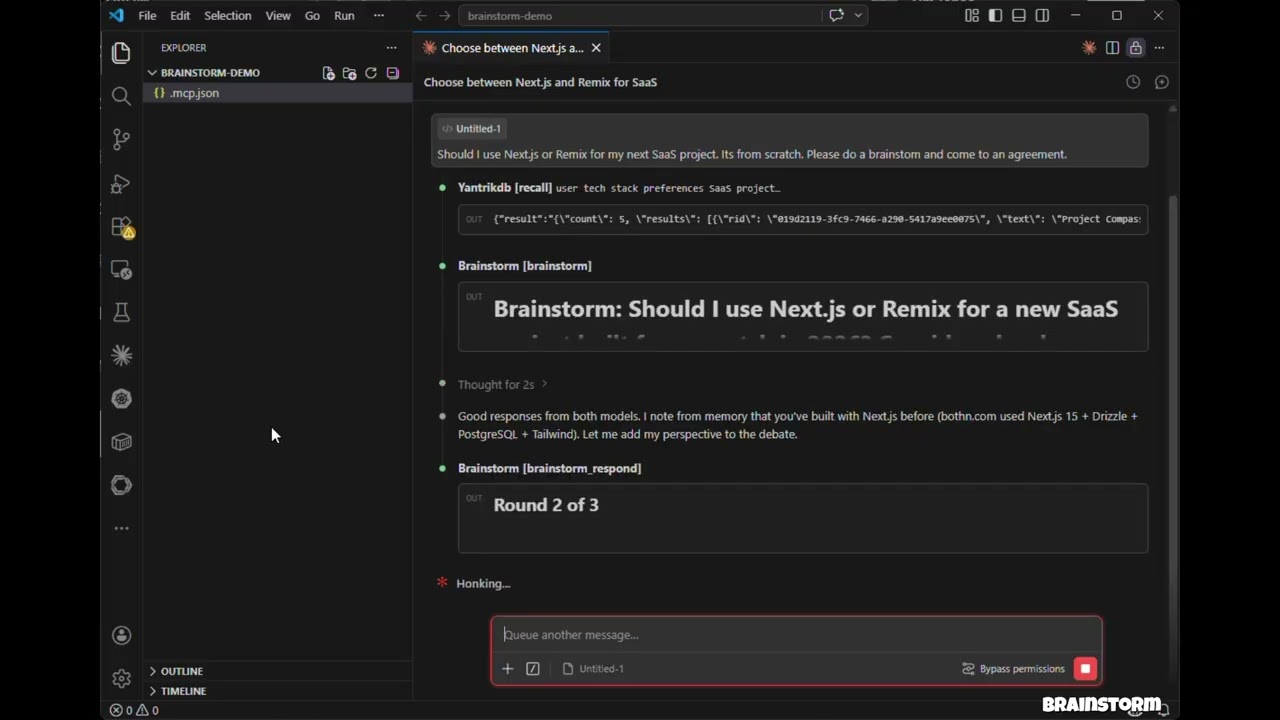
> Нажмите, чтобы посмотреть: три модели ведут дебаты, перекрёстно допрашивают друг друга и выдают структурированный вердикт — всё внутри Claude Code.

## Возможности

* **Hosted-режим** — API-ключи не нужны. Используются модели вашего окружения (Claude Opus/Sonnet/Haiku) через субагентов
* **API-режим** — прямые вызовы моделей с параллельным выполнением через OpenAI, Gemini, DeepSeek, Groq, Ollama
* **CLI-режим** — дебаты через агентские CLI, которые у вас уже есть (`claude`, `codex` и другие), работают по вашей **подписке, а не по API-кредитам**
* **brainstorm\_quick** — мгновенные мнения нескольких моделей за время меньше 10 секунд
* **brainstorm\_review** — мультимодельное код-ревью со структурированными выводами, оценками серьёзности и вердиктами
* **Стили дебатов** — свободный, red-team (атакующий) и сократический (задающий вопросы)
* **Загрузка контекста** — привязка дебатов к реальному коду, диффам или документам по архитектуре
* **Синтез-вердикт из трёх пунктов** — Рекомендация, Ключевые компромиссы, Наиболее сильное разногласие
* **Claude как участник** — Claude участвует в дебатах наряду с внешними моделями, имея полный контекст разговора
* **Многораундовые дебаты** — модели увили и критикуют ответы друг друга между раундами
* **Параллельное выполнение** — все модели отвечают одновременно в каждом раунде
* **Отказоустойчивость** — сбой одной модели не прерывает дебаты
* **Кроссплатформенность** — работает в macOS, Windows и на Linux

## Установка (60 секунд)

GXP1

Этого достаточно для hosted-режима (ни API-ключей не нужно — дебаты выполняются на моделях, уже доступных в вашей среде). Добавьте ключи провайдеров, чтобы подкосить в дебаты GPT, Gemini, DeepSeek, Groq или Ollama.

### Claude Code

Добавьте в файл `.mcp.json` вашего проекта:

GXP2

### Claude Desktop

Добавьте в `claude_desktop_config.json`:

GXP3

### Установка вручную

GXP4

> **Hosted-режим** не требует API-ключей — просто установите и работайте. Хост (Claude Code) выполняет промпты с помощью собственного доступа к моделям.

## Настройка

### Вариант 1: Переменные окружения (проще всего)

GXP5

### Вариант 2: Файл конфигурации (полный контроль)

Задайте `BRAINSTORM_CONFIG`, чтобы указать на JSON-конфигурацию:

GXP6

Хорошо известные провайдеры (`openai`, `gemini`, `deepseek`, `groq`, `mistral`, `together`, `moonshot`, `minimax`, `glm`, `qwen`) не требуют значения `baseURL`.

### Вариант 3: CLI-провайдеры (используйте подписку, а не API-кредиты)

Если вы уже платите за Claude Code, Codex, Gemini CLI и иные CLI, brainstorm может запускать эти CLI, а не покупать API-кредиты. **Любой агентный CLI, найденный в вашем `PATH`, автоматически регистрируется при запуске** — настраивать ничего не нужно:

GXP7

Используйте их как любого другого провайдера:

GXP8

Встроенные адаптеры:

| Провайдер       | Команда            | Модель по умолчанию | Статус                     |
| --------------- | ------------------ | ------------------- | -------------------------- |
| `claude`        | `claude -p`        | `sonnet`            | проверено                  |
| `codex`         | `codex exec`       | `default` | проверено                  |
| `gemini`        | `gemini -p`        | `gemini-2.5-pro`    | best-effort, требует проверки |
| `cursor-agent`  | `cursor-agent -p`  | `default`           | best-effort                |
| `opencode`      | `opencode run`     | `default`           | best-effort                |
| `qwen`          | `qwen -p`          | `qwen3-coder-plus`  | best-effort                |
| `kimi`          | `kimi --print`     | `default`           | best-effort                |
| `droid`         | `droid exec`       | `default`           | best-effort                |

`<provider>:default` означает "пусть CLI использовать ту модель по умолчанию, какая у него стоит". Вызовы CLI запускаются с отключенными инструментами и доступом только на чтение в песочнице, где CLI это поддерживает: они генерируют текст и не трогают ваш репозиторий. Специфичные для провайдеров переменные с API-ключами (`ANTHROPIC_API_KEY`, `OPENAI_API_KEY`) исключаются из дочернего процесса, чтобы CLI вернулся к вашей подписке.

Параметры окружения:

| Переменная                   | Эффект                                                                             |
| ---------------------------- | ---------------------------------------------------------------------------------- |
| `BRAINSTORM_CLI_PROVIDERS`   | `auto` (по умолчанию), `off` или разделённый запятыми список адаптеров для обнаружения |
| `BRAINSTORM_PREFER_CLI`      | `1` — для дебатов без явных `models` использовать только CLI-провайдера, не обращаясь к тарифицируемым API |
| `BRAINSTORM_CLI_TIMEOUT_MS`  | Таймаут вызова для CLI-провайдеров (по умолчанию 300000)          |

Чтобы закрепить модель или добавить CLI, которого нет в списке встроенных, используйте конфигурационный файл:

GXP9

Плейсхолдеры шаблона: `{{model}}`, `{{system}}`, `{{prompt}}`, `{{outfile}}`. Одиночный плейсхолдер, который преобразуется в ничего, исчезает из командной строки вместе с флагом, который его вводит, поэтому `["--model", "{{model}}"]` работает даже для `provider:default`. Задайте `"promptVia": "stdin"`, чтобы передавать промпт на stdin, а не аргументом.

#### Бэкенды подписки на код через CLI Claude

Moonshot (Kimi), MiniMax и Z.ai (GLM) продают подписки на разработку, которые говорят на Anthropic API. Направьте бинарный файл `claude` на одного из них, и этот вендор присоединится к дебатам за план, который вы уже оплачиваете:

GXP10

| Backend    | Endpoint                            | Переменная с токеном |
| ---------- | ----------------------------------- | -------------------- |
| `moonshot` | `https://api.moonshot.ai/anthropic` | `MOONSHOT_API_KEY`  |
| `minimax`  | `https://api.minimax.io/anthropic`  | `MINIMAX_API_KEY`   |
| `glm`      | `https://api.z.ai/api/anthropic`    | `ZAI_API_KEY`       |

Токен считывается из вашего окружения в момент вызова — в конфигурации хранится имя переменной, а не сам секрет. `ANTHROPIC_API_KEY` удаляется из дочернего, чтобы ваш аккаунт Anthropic никогда не оплачивал их вызовы. Любой CLI-провайдер также принимает блок `"env"` для ручного переноса на другой бэкенд; значение `"$NAME"` означает его переменную из окружения сервера.

Эти вендоры также доступны как обычные API — `moonshot`, `minimax`, `glm` и `qwen` имеют известные базовые URL, поэтому одного `MOONSHOT_API_KEY` достаточно, чтобы зарегистрировать `moonshot` как API-провайдера.

## Инструменты

| Инструмент           | Описание                                                     | Аннотация       |
| -------------------- | ------------------------------------------------------------ | --------------- |
| `brainstorm`         | Многораундовые дебаты между ИИ-моделями (API-режим или hosted) | readOnly        |
| `brainstorm_quick`   | Мгновенные мнения -- параллельно, без раундов                 | readOnly        |
| `brainstorm_review`  | Мультимодельное код-ревью с выводами, серьёзностью, вердиктом  | readOnly        |
| `brainstorm_respond` | Отправить ответ Claude в интерактивном сеансе                 | readOnly        |
| `brainstorm_collect` | Собрать ответы моделей в hosted-сессии                         | readOnly        |
| `list_providers`     | Показать настроенные провайдеров, состояния API-ключей и найденые CLI | readOnly        |
| `add_provider`       | Добавить нового API- или CLI-провайдера во время выполнения     | non-destructive  |

## Примеры использования

### Пример 1: Быстрые мнения разных моделей

**Промпт:** "Use brainstorm\_quick to compare Redis vs PostgreSQL for session storage"

**Инструмент:** `brainstorm_quick`

GXP11

**Результат:** Каждая настроенна модель самостоятельный параллельно. Вы получаете сравнение рядом за время меньше 10 секунд с именами моделей, ответами, временем и стоимостью.

**Обработка ошибок:**

* [saga-mcp](https://github.com/spranab/saga-mcp) — трекер проектов на базе SQLite: когда спор утихает, решение попадает в долговечное хранилище.
* [yantrikdb-mcp](https://github.com/yantrikos/yantrikdb-mcp) — постоянная когнитивная память, чтобы агент помнил, что вы решили и почему.
* [swarmcode](https://github.com/spranab/swarmcode) — канал в реальном времени между экземплярами Claude Code на разных машинах.
* [truenas-mcp](https://github.com/spranab/truenas-mcp) — 278 действий TrueNAS SCALE в одном иерархическом инструменте.
* [mcpier](https://github.com/spranab/mcpier) — самостоятельно размещаемая плоскость управления MCP, которая не допускает API-ключи к вашим клиентам.

## Лицензия

MIT

Available Tools

7 tools
add_providerA

Add a new AI provider for brainstorming. Supports any OpenAI-compatible API, or a locally installed agent CLI (kind='cli') that runs on an existing subscription instead of API credits.

ParametersJSON Schema
NameRequiredDescriptionDefault
argsNocli only ('custom' adapter): argv template. Placeholders: {{model}}, {{system}}, {{prompt}}, {{outfile}}.
kindNo'api' (default) for an OpenAI-compatible HTTP endpoint, 'cli' for a local agent CLI.
nameYesProvider name, e.g. 'groq', 'ollama', 'mistral', 'claude'
adapterNocli only: built-in adapter — claude, codex, gemini, qwen, kimi, cursor-agent, opencode, droid — or 'custom'. Defaults to the provider name.
backendNocli only: run the Claude CLI against another vendor's coding plan — moonshot, minimax, glm. Overrides 'adapter'.
baseURLNoapi only: base URL, e.g. 'http://localhost:11434/v1' for Ollama
commandNocli only: executable to run. Required for adapter 'custom'.
promptViaNocli only ('custom' adapter): how the prompt reaches the CLI.
apiKeyEnvVarNoapi only: environment variable holding the API key. Use 'NONE' if no key required.
defaultModelYesDefault model for this provider, e.g. 'llama3', 'sonnet'. Use 'default' to let a CLI pick its own.

TDQS

A4/5.0
Behavior3/5

Does the description disclose side effects, auth requirements, rate limits, or destructive behavior?

Annotations only provide destructiveHint=false, leaving the behavioral burden mostly on the description. The description usefully conveys that the tool supports API and CLI modes and that CLI mode uses an existing subscription instead of API credits. However, it doesn't disclose side effects like whether the provider is persisted, whether it overrides existing providers, or what happens on invalid configurations.

Agents need to know what a tool does to the world before calling it. Descriptions should go beyond structured annotations to explain consequences.

Conciseness5/5

Is the description appropriately sized, front-loaded, and free of redundancy?

The description is exactly two sentences and immediately states the purpose and the two supported modes. There is no redundancy, and the most valuable scope information is front-loaded.

Shorter descriptions cost fewer tokens and are easier for agents to parse. Every sentence should earn its place.

Completeness4/5

Given the tool's complexity, does the description cover enough for an agent to succeed on first attempt?

Given the high complexity (10 params, no output schema), the description provides a helpful high-level framing that complements the fully self-describing schema. The only clear gap is that the description doesn't cover return values or post-add confirmation behavior, but the schema details all parameters well.

Complex tools with many parameters or behaviors need more documentation. Simple tools need less. This dimension scales expectations accordingly.

Parameters3/5

Does the description clarify parameter syntax, constraints, interactions, or defaults beyond what the schema provides?

Schema description coverage is 100%, so the baseline is 3. The description doesn't add significant value beyond the schema; it merely echoes the CLI/API distinction already present in field descriptions. It does not clarify conditional requirements or the relationship between adapter, backend, and command beyond what the schema contains.

Input schemas describe structure but not intent. Descriptions should explain non-obvious parameter relationships and valid value ranges.

Purpose5/5

Does the description clearly state what the tool does and how it differs from similar tools?

The description uses a specific verb (Add) and explicit resource (new AI provider for brainstorming), and distinguishes this from siblings like list_providers and brainstorm tools. It clearly identifies both supported modes: OpenAI-compatible APIs and local CLI providers.

Agents choose between tools based on descriptions. A clear purpose with a specific verb and resource helps agents select the right tool.

Usage Guidelines4/5

Does the description explain when to use this tool, when not to, or what alternatives exist?

The description gives clear context for when to use the tool: adding a provider for brainstorming, with either API or CLI. It doesn't explicitly say when not to use it or name alternatives like list_providers, but the context is specific enough for an agent to select it over purely brainstorming or listing tools.

Agents often have multiple tools that could apply. Explicit usage guidance like "use X instead of Y when Z" prevents misuse.

brainstormA
Read-only

Run a multi-round brainstorming debate between multiple AI models. IMPORTANT: Before calling this tool, you MUST ask the user to choose a mode:

  1. API mode — Calls configured providers. These are either HTTP APIs billed per token (OpenAI, Gemini, DeepSeek, ...) or locally installed agent CLIs such as 'claude' and 'codex', which run on the user's existing subscription at no API cost. Call list_providers to see which of each are available.

  2. Hosted mode — No API keys needed. You execute prompts using sub-agents with models available in your environment (opus/sonnet/haiku, GPT, Gemini, etc.). Same model can be used multiple times — each run produces different perspectives.

Present these two options to the user with a one-liner explanation, then proceed based on their choice.

For API mode: set mode='api'. When participate=true (default), YOU also participate as a debater alongside external models via brainstorm_respond. For Hosted mode: set mode='hosted'. Ask the user which models to use, then spawn sub-agents for each model, collect responses, and call brainstorm_collect.

ParametersJSON Schema
NameRequiredDescriptionDefault
modeNoExecution mode. Must be provided — if not, the tool will return options for the user to choose. 'api' — MCP server calls model APIs directly using configured API keys. 'hosted' — No API keys needed. Returns prompts for the HOST to execute using sub-agents with models available in the environment (opus/sonnet/haiku, GPT, Gemini, etc.).
styleNoDebate style. 'freeform' (default): open brainstorming. 'redteam': adversarial — models find flaws, risks, and weaknesses. 'socratic': probing questions that expose assumptions and push for deeper understanding.freeform
topicYesThe topic, question, or prompt to brainstorm about
modelsNoOptional: specific models to use as 'provider:model' (e.g. 'openai:gpt-4o', or 'claude:sonnet' / 'codex:default' for subscription-backed CLI providers). If not provided, all configured providers are used with their default models.
roundsNoNumber of debate rounds (default: 3)
contextNoOptional context to ground the debate — code snippets, PR diffs, error logs, architecture docs, etc. Models will see this alongside the topic.
participateNoWhether Claude should actively participate as a debater in each round (default: true). Set to false for a non-interactive debate between external models only.
synthesizerNoOptional: model for final synthesis as 'provider:model'. Defaults to the first model.
systemPromptNoOptional system prompt to guide the brainstorming style or constraints

TDQS

A4.8/5.0
Behavior5/5

Does the description disclose side effects, auth requirements, rate limits, or destructive behavior?

The description discloses detailed side effects beyond annotations: API mode calls external APIs with billing implications, hosted mode spawns sub-agents with environment models, and participation behavior via brainstorm_respond when participate=true. It also notes that if mode is omitted, the tool returns options. This is far richer than the readOnlyHint alone.

Agents need to know what a tool does to the world before calling it. Descriptions should go beyond structured annotations to explain consequences.

Conciseness4/5

Is the description appropriately sized, front-loaded, and free of redundancy?

The description is long but well-structured with clear sections, bolding, and lists. Every sentence conveys required operational details—nothing is redundant. While it could arguably be trimmed, the complexity of the tool's dual modes justifies the length. It is not flabby; it is dense and purposeful.

Shorter descriptions cost fewer tokens and are easier for agents to parse. Every sentence should earn its place.

Completeness5/5

Given the tool's complexity, does the description cover enough for an agent to succeed on first attempt?

Given 9 parameters, no output schema, and complex branching (API vs hosted), the description covers prerequisites, alternatives, and step-by-step invocation guidance. It explains the full flow including how to use sibling tools (list_providers, brainstorm_respond, brainstorm_collect) and the host's role. It does not describe return values, but that is acceptable since no output schema is provided and the focus is on executing the tool properly.

Complex tools with many parameters or behaviors need more documentation. Simple tools need less. This dimension scales expectations accordingly.

Parameters4/5

Does the description clarify parameter syntax, constraints, interactions, or defaults beyond what the schema provides?

The schema already provides 100% coverage for all parameters, so the baseline is 3. The description adds extra meaning by explaining how mode interacts with user choice, prompts the use of list_providers, and clarifies the participate flag's role (via brainstorm_respond in API mode). It also clarifies the models format ('provider:model') implicitly through examples in the schema description. This elevates it above the baseline.

Input schemas describe structure but not intent. Descriptions should explain non-obvious parameter relationships and valid value ranges.

Purpose5/5

Does the description clearly state what the tool does and how it differs from similar tools?

The description clearly states the tool runs a multi-round brainstorming debate between multiple AI models. It specifies the verb (run), the resource (debate), and distinguishes itself from sibling tools like brainstorm_quick (presented as a quick version) and brainstorm_respond/collect (which are sub-components).

Agents choose between tools based on descriptions. A clear purpose with a specific verb and resource helps agents select the right tool.

Usage Guidelines5/5

Does the description explain when to use this tool, when not to, or what alternatives exist?

It explicitly instructs the agent to ask the user to choose a mode before calling, explains both modes with one-liners, and directs the agent to use list_providers for available providers. It also tells what to do in hosted mode (ask which models to use, spawn sub-agents) and clarifies when to set mode='api' vs 'hosted'. Clear guidance on when to use and how to proceed.

Agents often have multiple tools that could apply. Explicit usage guidance like "use X instead of Y when Z" prevents misuse.

brainstorm_collectA
Read-only

Submit collected model responses for a hosted brainstorm session. After receiving prompts from brainstorm (mode='hosted') or a previous brainstorm_collect call, execute each prompt by spawning a sub-agent for EACH model (use the model parameter to select the right model, e.g., model='sonnet' or model='haiku'). Collect all responses and submit them here. This tool returns either: (1) the next round's prompt to execute, (2) a synthesis prompt for a single model, or (3) the final formatted debate result when complete.

ParametersJSON Schema
NameRequiredDescriptionDefault
responsesYesArray of model responses collected by the host
session_idYesThe session ID from the brainstorm tool

TDQS

A4.6/5.0
Behavior4/5

Does the description disclose side effects, auth requirements, rate limits, or destructive behavior?

Annotations include readOnlyHint: true, which already signals a non-destructive operation. The description adds transparency by explaining the three return outcomes (next prompt, synthesis prompt, final result) and the nested structure of responses required, without conflicting with the annotation. It could mention whether the session state is updated, but the return-value description suffices.

Agents need to know what a tool does to the world before calling it. Descriptions should go beyond structured annotations to explain consequences.

Conciseness4/5

Is the description appropriately sized, front-loaded, and free of redundancy?

The description is verbose but appropriately detailed for a multi-step workflow. It avoids redundancy and clearly structures the steps and return types. Some minor redundancy exists (e.g., repeating 'brainstorm' mode), but it remains readable and direct.

Shorter descriptions cost fewer tokens and are easier for agents to parse. Every sentence should earn its place.

Completeness4/5

Given the tool's complexity, does the description cover enough for an agent to succeed on first attempt?

With readOnlyHint already provided, the description covers the tool's purpose, usage sequence, return types, and parameter details. It lacks mention of error conditions or session expiration, but for the tool's complexity, this is sufficient. Overall, it gives the agent enough context to use the tool correctly.

Complex tools with many parameters or behaviors need more documentation. Simple tools need less. This dimension scales expectations accordingly.

Parameters5/5

Does the description clarify parameter syntax, constraints, interactions, or defaults beyond what the schema provides?

All two required parameters (session_id and responses) are fully described in the schema with clear semantics. The description further clarifies the 'model' parameter by giving examples ('sonnet' or 'haiku') and emphasizes the requirement to collect responses for each model, enhancing the schema's clarity. Coverage is 100%.

Input schemas describe structure but not intent. Descriptions should explain non-obvious parameter relationships and valid value ranges.

Purpose5/5

Does the description clearly state what the tool does and how it differs from similar tools?

The description clearly states the tool's purpose: 'Submit collected model responses for a hosted brainstorm session.' It specifies the exact action (submit responses) and the resource (brainstorm session), and distinguishes it from siblings by referencing the workflow of the `brainstorm` tool.

Agents choose between tools based on descriptions. A clear purpose with a specific verb and resource helps agents select the right tool.

Usage Guidelines5/5

Does the description explain when to use this tool, when not to, or what alternatives exist?

The description provides explicit when-to-use guidance: after receiving prompts from `brainstorm` (mode='hosted') or a previous `brainstorm_collect` call. It also explains the required workflow (execute each prompt per model using the model parameter) and lists the three possible return types, giving clear context for invocation.

Agents often have multiple tools that could apply. Explicit usage guidance like "use X instead of Y when Z" prevents misuse.

brainstorm_quickA
Read-only

Get instant multi-model perspectives on any question — no debate rounds, no synthesis delay. Fires all models in parallel and returns a compact comparison. Under 10 seconds. Use this for quick second opinions, snap decisions, or when you want diverse perspectives fast. For deeper analysis with multiple rounds and synthesis, use the brainstorm tool instead.

ParametersJSON Schema
NameRequiredDescriptionDefault
styleNoPerspective style (default: freeform)freeform
topicYesThe question or topic to get quick perspectives on
modelsNoOptional: specific models as 'provider:model' (API providers, or CLI providers like 'claude:sonnet' that use a subscription instead of API credits). If not provided, all configured providers are used.
contextNoOptional context — code snippets, error logs, etc. Models will see this alongside the topic.

TDQS

A4.5/5.0
Behavior4/5

Does the description disclose side effects, auth requirements, rate limits, or destructive behavior?

Annotation `readOnlyHint: true` tells the agent this is a read operation. The description adds useful behavioral context: parallel model firing, compact comparison output, no debate rounds, no synthesis delay, and the under-10-second expectation. It does not mention potential rate limiting or model failure behavior, but this is beyond the essential disclosure for this tool.

Agents need to know what a tool does to the world before calling it. Descriptions should go beyond structured annotations to explain consequences.

Conciseness5/5

Is the description appropriately sized, front-loaded, and free of redundancy?

The description is three sentences, front-loaded with the core behavior, and each sentence earns its place: what it does, the key guarantees, and when to use it vs. the alternative.

Shorter descriptions cost fewer tokens and are easier for agents to parse. Every sentence should earn its place.

Completeness5/5

Given the tool's complexity, does the description cover enough for an agent to succeed on first attempt?

Given the 4-parameter schema, readOnlyHint annotation, and no output schema, this description is sufficiently complete. It covers the tool's behavior, timing, return format (compact comparison), and the sibling-tool boundary. No critical context for selection or invocation is missing.

Complex tools with many parameters or behaviors need more documentation. Simple tools need less. This dimension scales expectations accordingly.

Parameters3/5

Does the description clarify parameter syntax, constraints, interactions, or defaults beyond what the schema provides?

Schema description coverage is 100%, so all four parameters are already well-documented. The description adds little parameter-level meaning beyond what the schema states, though it indirectly emphasizes the default behavior of firing all models in parallel.

Input schemas describe structure but not intent. Descriptions should explain non-obvious parameter relationships and valid value ranges.

Purpose5/5

Does the description clearly state what the tool does and how it differs from similar tools?

The description clearly states the tool's purpose: getting instant multi-model perspectives via parallel calls. It explicitly distinguishes this from the `brainstorm` sibling tool by contrasting quick versus deep analysis with rounds and synthesis.

Agents choose between tools based on descriptions. A clear purpose with a specific verb and resource helps agents select the right tool.

Usage Guidelines5/5

Does the description explain when to use this tool, when not to, or what alternatives exist?

Provides explicit usage guidance: use for quick second opinions, snap decisions, or diverse perspectives fast. It also names the alternative `brainstorm` for deeper analysis, making the decision between siblings clear.

Agents often have multiple tools that could apply. Explicit usage guidance like "use X instead of Y when Z" prevents misuse.

brainstorm_respondA
Read-only

Submit YOUR (Claude's) response for the current round of an interactive brainstorm session. After the brainstorm tool returns external models' responses, call this tool with your substantive contribution. Read all responses carefully and engage with specific points — agree, disagree, build upon, or challenge ideas. Do not just summarize. After your response, the next round runs automatically (or synthesis if final round).

ParametersJSON Schema
NameRequiredDescriptionDefault
responseYesYour substantive contribution to this round of the debate. Engage deeply with the other models' responses. Minimum 50 characters.
session_idYesThe session ID returned by the brainstorm tool

TDQS

A3.7/5.0
Behavior1/5

Does the description disclose side effects, auth requirements, rate limits, or destructive behavior?

The description says 'Submit' and 'call' implying a write operation, but the annotation readOnlyHint: true indicates read-only. This contradiction makes the score 1 per instructions.

Agents need to know what a tool does to the world before calling it. Descriptions should go beyond structured annotations to explain consequences.

Conciseness4/5

Is the description appropriately sized, front-loaded, and free of redundancy?

The description is moderately concise, front-loads the main purpose, but includes instructional details (like 'Read all responses carefully') that could be trimmed without losing clarity.

Shorter descriptions cost fewer tokens and are easier for agents to parse. Every sentence should earn its place.

Completeness4/5

Given the tool's complexity, does the description cover enough for an agent to succeed on first attempt?

Given the schema descriptions, the description provides sufficient context on when to use the tool and what to do, though it does not address edge cases like multiple calls or error handling.

Complex tools with many parameters or behaviors need more documentation. Simple tools need less. This dimension scales expectations accordingly.

Parameters3/5

Does the description clarify parameter syntax, constraints, interactions, or defaults beyond what the schema provides?

The schema already provides descriptions for both session_id and response, and the description adds contextual flavor (e.g., 'substantive contribution') but no new semantic information beyond the schema.

Input schemas describe structure but not intent. Descriptions should explain non-obvious parameter relationships and valid value ranges.

Purpose5/5

Does the description clearly state what the tool does and how it differs from similar tools?

Clearly states the tool submits Claude's response for the current round, and distinguishes from siblings by referencing the brainstorm tool and the condition after external models return.

Agents choose between tools based on descriptions. A clear purpose with a specific verb and resource helps agents select the right tool.

Usage Guidelines5/5

Does the description explain when to use this tool, when not to, or what alternatives exist?

Explicitly says to call this tool after the brainstorm tool returns external models' responses, and provides guidance on what to do (read, engage, not summarize) and the automatic next-round behavior.

Agents often have multiple tools that could apply. Explicit usage guidance like "use X instead of Y when Z" prevents misuse.

brainstorm_reviewA
Read-only

Multi-model code review. Pass a diff and get structured findings with severity, file/line references, and a verdict (approve / approve with warnings / needs changes). Multiple models review independently, then findings are synthesized and deduplicated. Use this for PR reviews, code audits, or pre-commit checks.

ParametersJSON Schema
NameRequiredDescriptionDefault
diffYesThe unified diff to review (e.g., output of `git diff`)
focusNoOptional: focus areas for the review. Default: all categories.
titleNoOptional: PR title or change summary for context
modelsNoOptional: specific models as 'provider:model'. Default: all configured providers.
descriptionNoOptional: PR description or commit message
instructionsNoOptional: repo-specific review instructions (e.g., 'we use strict null checks', 'focus on SQL injection risks')

TDQS

A4.2/5.0
Behavior4/5

Does the description disclose side effects, auth requirements, rate limits, or destructive behavior?

Annotations already declare readOnlyHint: true, so the safety profile is clear. The description adds process transparency: multiple models review independently, findings are synthesized and deduplicated, and it states the output verdict types. This enriches understanding beyond the annotation without contradiction.

Agents need to know what a tool does to the world before calling it. Descriptions should go beyond structured annotations to explain consequences.

Conciseness5/5

Is the description appropriately sized, front-loaded, and free of redundancy?

The description is concise—three sentences with a clear front-loaded purpose. Each sentence adds value: what it does, how it works, and when to use it. No filler or redundancy.

Shorter descriptions cost fewer tokens and are easier for agents to parse. Every sentence should earn its place.

Completeness4/5

Given the tool's complexity, does the description cover enough for an agent to succeed on first attempt?

Without an output schema, the description compensates by outlining the output structure (severity, file/line refs, verdict). It covers the main workflow and use cases, leaving parameter specifics to the schema. Adequate for an agent to invoke correctly, though it could mention how to format the diff or handle errors.

Complex tools with many parameters or behaviors need more documentation. Simple tools need less. This dimension scales expectations accordingly.

Parameters3/5

Does the description clarify parameter syntax, constraints, interactions, or defaults beyond what the schema provides?

Schema description coverage is 100% with all six parameters explained. The description itself adds minimal parameter detail beyond stating 'Pass a diff' and mentioning the verdict values. Since the schema already covers parameter meaning, the description does not significantly enhance understanding, matching the baseline.

Input schemas describe structure but not intent. Descriptions should explain non-obvious parameter relationships and valid value ranges.

Purpose5/5

Does the description clearly state what the tool does and how it differs from similar tools?

The description clearly states 'Multi-model code review' and specifies the action: pass a diff and receive structured findings with severity, file/line references, and a verdict. It also lists concrete use cases (PR reviews, code audits, pre-commit checks), distinguishing it from sibling brainstorming tools.

Agents choose between tools based on descriptions. A clear purpose with a specific verb and resource helps agents select the right tool.

Usage Guidelines4/5

Does the description explain when to use this tool, when not to, or what alternatives exist?

The description explicitly says 'Use this for PR reviews, code audits, or pre-commit checks,' providing clear when-to-use guidance. It does not explicitly mention when not to use it or alternative tools, but the context is specific enough for typical scenarios.

Agents often have multiple tools that could apply. Explicit usage guidance like "use X instead of Y when Z" prevents misuse.

list_providersA
Read-only

List all configured AI providers and their default models for brainstorming. Includes locally installed agent CLIs (claude, codex, ...) which run on an existing subscription instead of metered API credits.

ParametersJSON Schema
NameRequiredDescriptionDefault

No parameters

TDQS

A4.2/5.0
Behavior3/5

Does the description disclose side effects, auth requirements, rate limits, or destructive behavior?

The annotations already declare readOnlyHint=true, so the read-only behavior is covered, leaving the description free to add detail about the inclusion of locally installed CLIs and their subscription-based billing, which is useful. It doesn't describe the response structure or pagination, but the absence of parameters suggests a simple listing, so this is adequate.

Agents need to know what a tool does to the world before calling it. Descriptions should go beyond structured annotations to explain consequences.

Conciseness5/5

Is the description appropriately sized, front-loaded, and free of redundancy?

Two sentences, no fluff. The first clearly states the primary purpose, and the second adds crucial context about the local CLIs and billing model. Every word earns its place, and it's front-loaded with the key action.

Shorter descriptions cost fewer tokens and are easier for agents to parse. Every sentence should earn its place.

Completeness4/5

Given the tool's complexity, does the description cover enough for an agent to succeed on first attempt?

The tool is simple (no params, no output schema), but the description covers the essential details: what is listed, the nuance of local CLIs versus API-based, and the billing context. It could mention that the output is in a structured format, but the lack of output schema and the simplicity of the task don't demand more.

Complex tools with many parameters or behaviors need more documentation. Simple tools need less. This dimension scales expectations accordingly.

Parameters4/5

Does the description clarify parameter syntax, constraints, interactions, or defaults beyond what the schema provides?

With zero parameters, the description's job is to clarify what the tool returns, which it does by specifying the content: providers, default models, and the local CLI variants. Since there are no parameters, it maximizes clarity about the output, making this a strong score.

Input schemas describe structure but not intent. Descriptions should explain non-obvious parameter relationships and valid value ranges.

Purpose5/5

Does the description clearly state what the tool does and how it differs from similar tools?

The description clearly states the tool lists configured AI providers and their default models, and it explicitly distinguishes its scope by including locally installed agent CLIs. This differentiates it from sibling tools like brainstorm (which likely generates ideas) and add_provider (which modifies providers).

Agents choose between tools based on descriptions. A clear purpose with a specific verb and resource helps agents select the right tool.

Usage Guidelines4/5

Does the description explain when to use this tool, when not to, or what alternatives exist?

It implies usage as a discovery tool for available providers, noting that some run on subscriptions rather than metered API credits, which helps in selecting providers for brainstorming. However, it doesn't explicitly state when not to use it or brand it as a read-only complement to add_provider; the context is clear but exclusions are absent.

Agents often have multiple tools that could apply. Explicit usage guidance like "use X instead of Y when Z" prevents misuse.

Tool Schema Changelog

Recent tool additions, removals, and schema changes observed during successful MCP inspections.

  1. 6 tool updatesv1.6.0
    • Changedadd_provider11 fields changed
      • addedInput schema / properties / adapter
        Added value: +{
        +  "description": "cli only: built-in adapter — claude, codex, gemini, qwen, kimi, cursor-agent, opencode, droid — or 'custom'. Defaults to the provider name.",
        +  "type": "string"
        +}
      • changedInput schema / properties / apiKeyEnvVar / description
        Previous value: -"Environment variable name for the API key. Use 'NONE' if no key required."New value: +"api only: environment variable holding the API key. Use 'NONE' if no key required."
      • addedInput schema / properties / args
        Added value: +{
        +  "description": "cli only ('custom' adapter): argv template. Placeholders: {{model}}, {{system}}, {{prompt}}, {{outfile}}.",
        +  "items": {
        +    "type": "string"
        +  },
        +  "type": "array"
        +}
      • addedInput schema / properties / backend
        Added value: +{
        +  "description": "cli only: run the Claude CLI against another vendor's coding plan — moonshot, minimax, glm. Overrides 'adapter'.",
        +  "type": "string"
        +}
      • changedInput schema / properties / baseURL / description
        Previous value: -"API base URL, e.g. 'http://localhost:11434/v1' for Ollama"New value: +"api only: base URL, e.g. 'http://localhost:11434/v1' for Ollama"
      • addedInput schema / properties / command
        Added value: +{
        +  "description": "cli only: executable to run. Required for adapter 'custom'.",
        +  "type": "string"
        +}
      • changedInput schema / properties / defaultModel / description
        Previous value: -"Default model to use for this provider, e.g. 'llama3', 'mixtral-8x7b-32768'"New value: +"Default model for this provider, e.g. 'llama3', 'sonnet'. Use 'default' to let a CLI pick its own."
      • addedInput schema / properties / kind
        Added value: +{
        +  "description": "'api' (default) for an OpenAI-compatible HTTP endpoint, 'cli' for a local agent CLI.",
        +  "enum": [
        +    "api",
        +    "cli"
        +  ],
        +  "type": "string"
        +}
      • changedInput schema / properties / name / description
        Previous value: -"Provider name, e.g. 'groq', 'ollama', 'mistral'"New value: +"Provider name, e.g. 'groq', 'ollama', 'mistral', 'claude'"
      • addedInput schema / properties / promptVia
        Added value: +{
        +  "description": "cli only ('custom' adapter): how the prompt reaches the CLI.",
        +  "enum": [
        +    "arg",
        +    "stdin"
        +  ],
        +  "type": "string"
        +}
      • changedInput schema / required
        Previous value: -[
        -  "name",
        -  "baseURL",
        -  "apiKeyEnvVar",
        -  "defaultModel"
        -]New value: +[
        +  "name",
        +  "defaultModel"
        +]
    • Changedbrainstorm5 fields changed
      • addedInput schema / properties / context
        Added value: +{
        +  "description": "Optional context to ground the debate — code snippets, PR diffs, error logs, architecture docs, etc. Models will see this alongside the topic.",
        +  "type": "string"
        +}
      • addedInput schema / properties / mode
        Added value: +{
        +  "description": "Execution mode. Must be provided — if not, the tool will return options for the user to choose.\n'api' — MCP server calls model APIs directly using configured API keys.\n'hosted' — No API keys needed. Returns prompts for the HOST to execute using sub-agents with models available in the environment (opus/sonnet/haiku, GPT, Gemini, etc.).",
        +  "enum": [
        +    "api",
        +    "hosted"
        +  ],
        +  "type": "string"
        +}
      • changedInput schema / properties / models / description
        Previous value: -"Optional: specific models to use as 'provider:model' (e.g. 'openai:gpt-4o'). If not provided, all configured providers are used with their default models."New value: +"Optional: specific models to use as 'provider:model' (e.g. 'openai:gpt-4o', or 'claude:sonnet' / 'codex:default' for subscription-backed CLI providers). If not provided, all configured providers are used with their default models."
      • addedInput schema / properties / participate
        Added value: +{
        +  "default": true,
        +  "description": "Whether Claude should actively participate as a debater in each round (default: true). Set to false for a non-interactive debate between external models only.",
        +  "type": "boolean"
        +}
      • addedInput schema / properties / style
        Added value: +{
        +  "default": "freeform",
        +  "description": "Debate style. 'freeform' (default): open brainstorming. 'redteam': adversarial — models find flaws, risks, and weaknesses. 'socratic': probing questions that expose assumptions and push for deeper understanding.",
        +  "enum": [
        +    "freeform",
        +    "redteam",
        +    "socratic"
        +  ],
        +  "type": "string"
        +}
    • Addedbrainstorm_collect
    • Addedbrainstorm_quick
    • Addedbrainstorm_respond
    • Addedbrainstorm_review
  2. 3 tool updatesv1.0.1
    • First observedadd_provider
    • First observedbrainstorm
    • First observedlist_providers

TDQS

A4.3/5.0

Scored across 7 tools

Disambiguation5/5

Each tool has a clearly distinct role: the main brainstorm tool handles debate setup, with dedicated helpers for API (brainstorm_respond) and hosted (brainstorm_collect) modes. Brainstorm_quick is a fast parallel mode, brainstorm_review is code-specific, and list/add_provider manage providers. No overlapping purposes.

Naming Consistency5/5

All tools follow a consistent snake_case verb_noun pattern. Core brainstorming actions are prefixed with 'brainstorm_', while provider management uses list_providers and add_provider. Naming is predictable and clear.

Tool Count5/5

Seven tools is well-scoped for a brainstorming server. It covers the core debate workflow (main, respond, collect), a quick alternative, a specialized code review mode, and provider management, without unnecessary bloat or missing essentials.

Completeness4/5

The surface covers the full brainstorming workflow—multi-round debate, quick requests, code review, and provider setup. Minor gaps exist in provider management (no update/delete) and no explicit session management, but these are non-critical and easily worked around.

Maintenance

ActivityActive
ResponsivenessNo issues

Related MCP Connectors

Related MCP Servers

  • F
    license
    Not graded
    quality
    Not graded
    maintenance
    Orchestrates multiple AI models (Gemini, OpenAI, Claude, local models) within a single conversation context, enabling collaborative workflows like multi-model code reviews, consensus building, and CLI-to-CLI bridging for specialized tasks.
    -
  • A
    license
    Not graded
    quality
    Not graded
    maintenance
    Enables Claude to orchestrate multi-model AI roundtable discussions between GPT-4o, Gemini, Grok, and DeepSeek through independent responses and cross-critique rounds. It supports various discussion presets such as debate, brainstorm, and consensus to facilitate diverse perspectives and synthesis.
    MIT
  • A
    license
    Not graded
    quality
    D
    maintenance
    Enables AI assistants to facilitate structured multi-model debates that synthesize multiple perspectives into clear categories like ground truths and blind spots. It provides tools for running real-time debates, checking model health, and managing history via the Model Context Protocol.
    58 npm
    1
    MIT
  • A
    license
    A
    quality
    C
    maintenance
    Facilitates structured multi-agent debates with arguments, rebuttals, and judgments across multiple rounds, enabling diverse AI personas to engage in formal debate and collaborative problem-solving.
    1
    19 npm
    17
    MIT