

brainstorm-mcp
brainstorm-mcp
Pregúntale a un modelo una pregunta de diseño y obtendrás una respuesta segura, sin señal sobre qué partes le generan dudas. Pregunta a tres y el desacuerdo es la señal.
brainstorm-mcp ejecuta debates de varias rondas entre GPT, Gemini, DeepSeek, Claude y modelos locales de Ollama desde tu editor: se ven y se critican mutuamente las respuestas a lo largo de las rondas, y luego obtienes una síntesis de 3 viñetas: recomendación, principales compensaciones y el desacuerdo más fuerte. También incluye modo rápido instantáneo, revisión de código multi-modelo con veredictos y estilos red-team/Socrático. El modo alojado no necesita claves API.
No confíes en una sola IA. Haz que discutan.
Demo
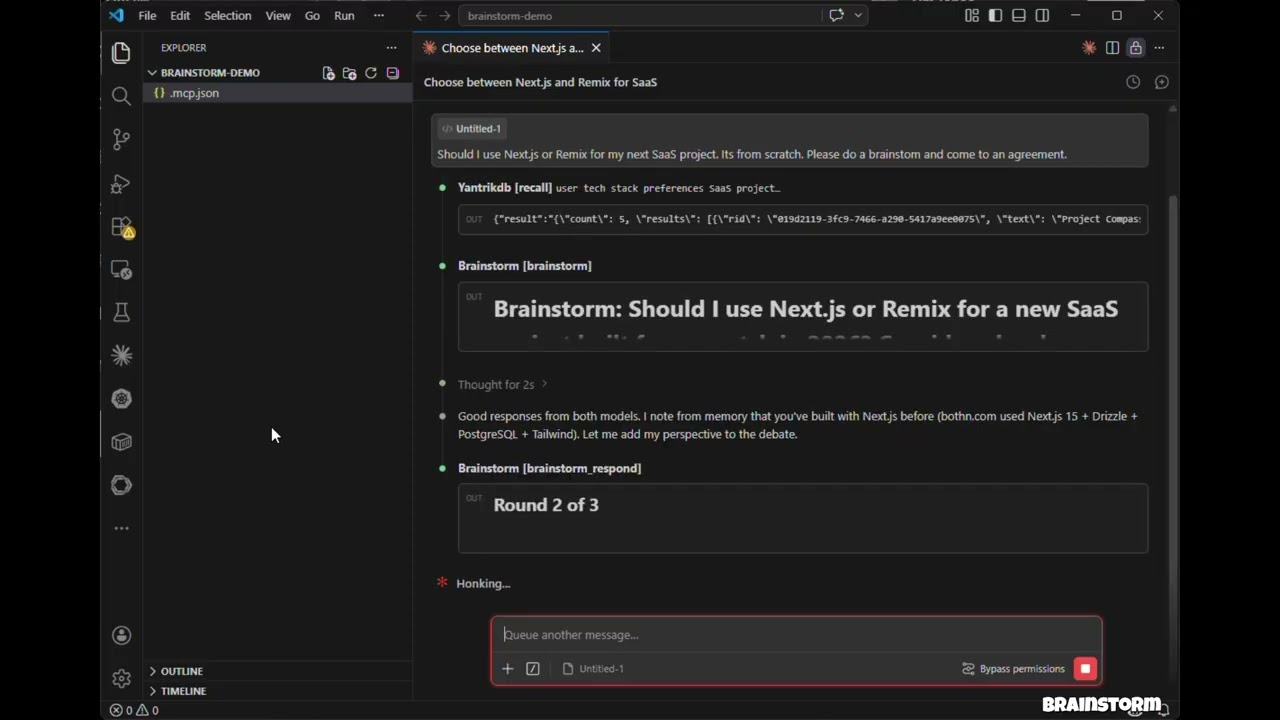
Haz clic para ver: 3 modelos debaten, se interrogan mutuamente y producen un veredicto estructurado, todo dentro de Claude Code.
Características
Modo alojado — No se necesitan claves API. Usa los modelos de tu entorno (Claude Opus/Sonnet/Haiku) mediante subagentes
Modo API — Llamadas directas a la API de modelos con ejecución en paralelo en OpenAI, Gemini, DeepSeek, Groq, Ollama
Modo CLI — Debate a través de los CLI de agentes que ya tienes (
claude,codexy más), de modo que los debates se ejecutan con tu suscripción en lugar de créditos APIbrainstorm_quick — Perspectivas multi-modelo instantáneas en menos de 10 segundos
brainstorm_review — Revisión de código multi-modelo con hallazgos estructurados, niveles de gravedad y veredictos
Estilos de debate — Libre, red-team (adversarial) y socrático (preguntas indagatorias)
Inyección de contexto — Fundamenta los debates en código real, diffs o documentación de arquitectura
Veredictos de síntesis en 3 viñetas — Recomendación, principales compensaciones, desacuerdo más fuerte
Claude como participante — Claude debate junto a modelos externos con contexto completo de conversación
Debates de varias rondas — Los modelos ven y critican las respuestas de los demás a lo largo de las rondas
Ejecución en paralelo — Todos los modelos responden simultáneamente en cada ronda
Resiliente — Que un modelo falle no aborta el debate
Multiplataforma — Funciona en macOS, Windows y Linux
Related MCP server: roundtable-mcp
Instalación (60 segundos)
claude mcp add brainstorm -- npx -y brainstorm-mcpEso es suficiente para el modo alojado (sin claves API: debate usando los modelos ya disponibles en tu entorno). Añade claves de proveedores para traer GPT, Gemini, DeepSeek, Groq u Ollama al debate.
Claude Code
Añade a tu .mcp.json del proyecto:
{
"mcpServers": {
"brainstorm": {
"command": "npx",
"args": ["-y", "brainstorm-mcp"],
"env": {
"OPENAI_API_KEY": "sk-...",
"GEMINI_API_KEY": "AIza...",
"DEEPSEEK_API_KEY": "sk-..."
}
}
}
}Claude Desktop
Añade a claude_desktop_config.json:
{
"mcpServers": {
"brainstorm": {
"command": "npx",
"args": ["-y", "brainstorm-mcp"],
"env": {
"OPENAI_API_KEY": "sk-...",
"DEEPSEEK_API_KEY": "sk-..."
}
}
}
}Instalación manual
npm install -g brainstorm-mcp
brainstorm-mcpEl modo alojado no requiere claves API: solo instala y listo. El anfitrión (Claude Code) ejecuta los prompts usando su propio acceso a modelos.
Configuración
Opción 1: Variables de entorno (la más sencilla)
OPENAI_API_KEY=sk-...
GEMINI_API_KEY=AIza...
DEEPSEEK_API_KEY=sk-...Opción 2: Archivo de configuración (control total)
Establece BRAINSTORM_CONFIG para apuntar a una configuración JSON:
{
"providers": {
"openai": { "model": "gpt-5.4", "apiKeyEnv": "OPENAI_API_KEY" },
"gemini": { "model": "gemini-2.5-flash", "apiKeyEnv": "GEMINI_API_KEY" },
"deepseek": { "model": "deepseek-chat", "apiKeyEnv": "DEEPSEEK_API_KEY" },
"ollama": { "model": "llama3.1", "baseURL": "http://localhost:11434/v1" }
}
}Los proveedores conocidos (openai, gemini, deepseek, groq, mistral, together, moonshot,
minimax, glm, qwen) no necesitan un baseURL.
Opción 3: Proveedores CLI (usa una suscripción, no créditos API)
Si ya pagas por Claude Code, Codex, Gemini CLI y similares, brainstorm puede ejecutar
esos CLI en lugar de comprar créditos API. Cualquier CLI de agente que se encuentre en tu PATH se registra
automáticamente al inicio — no se necesita configuración:
[brainstorm] Detected CLI provider(s) on PATH: claude, codex (subscription-based, no API cost)Úsalos como cualquier otro proveedor:
{ "topic": "GraphQL vs REST", "models": ["claude:sonnet", "codex:default", "openai:gpt-5.4"] }Adaptadores integrados:
Proveedor | Comando | Modelo por defecto | Estado |
|
|
| verificado |
|
|
| verificado |
|
|
| mejor esfuerzo, verificar localmente |
|
|
| mejor esfuerzo |
|
|
| mejor esfuerzo |
|
|
| mejor esfuerzo |
|
|
| mejor esfuerzo |
|
|
| mejor esfuerzo |
<provider>:default significa "deja que el CLI use el modelo con el que esté configurado". Las llamadas CLI se ejecutan
con las herramientas desactivadas y un sandbox de solo lectura cuando el CLI lo admite: generan texto, no
tocan tu repositorio. Las variables de entorno de claves API específicas del proveedor (ANTHROPIC_API_KEY, OPENAI_API_KEY)
se eliminan del proceso hijo para que el CLI recurra a tu inicio de sesión de suscripción.
Interruptores de entorno:
Variable | Efecto |
|
|
|
|
| Tiempo de espera por llamada para proveedores CLI (por defecto 300000) |
Para fijar un modelo o añadir un CLI que no esté integrado, usa el archivo de configuración:
{
"providers": {
"claude": { "type": "cli", "model": "opus" },
"my-cli": {
"type": "cli",
"adapter": "custom",
"command": "some-agent-cli",
"args": ["run", "--model", "{{model}}", "--quiet", "{{prompt}}"],
"promptVia": "arg",
"model": "some-model"
}
}
}Marcadores de plantilla: {{model}}, {{system}}, {{prompt}}, {{outfile}}. Un marcador solitario
que se resuelve a nada se elimina de la línea de comandos junto con la bandera que lo introduce, así que
["--model", "{{model}}"] funciona incluso para provider:default. Establece "promptVia": "stdin" para canalizar
el prompt en lugar de pasarlo como argumento.
Backends de planes de codificación a través del CLI de Claude
Moonshot (Kimi), MiniMax y Z.ai (GLM) venden suscripciones de planes de codificación que hablan la API
de Anthropic. Apunta el binario claude a uno de ellos y ese proveedor se une al debate con el plan
que ya pagas:
{
"providers": {
"moonshot": { "type": "cli", "backend": "moonshot", "model": "kimi-k2-thinking" },
"minimax": { "type": "cli", "backend": "minimax", "model": "MiniMax-M2" },
"glm": { "type": "cli", "backend": "glm", "model": "glm-4.6" }
}
}Backend | Endpoint | Variable de entorno de token |
|
|
|
|
|
|
|
|
|
El token se lee de tu entorno en el momento de la llamada: el archivo de configuración contiene el nombre de la variable,
nunca el secreto. ANTHROPIC_API_KEY se elimina del hijo para que tu cuenta de Anthropic nunca se facture
por estos. Cualquier proveedor CLI también acepta un bloque "env" para anular el backend
manualmente; un valor de "$NAME" se indirige a través del entorno del servidor.
Estos proveedores también son accesibles como APIs medidas normales: moonshot, minimax, glm y qwen
tienen URLs base conocidas, así que MOONSHOT_API_KEY por sí sola es suficiente para registrar moonshot como proveedor
de API.
Herramientas
Herramienta | Descripción | Anotación |
| Debate de varias rondas entre modelos de IA (modo API o alojado) | readOnly |
| Perspectivas multi-modelo instantáneas — en paralelo, sin rondas | readOnly |
| Revisión de código multi-modelo con hallazgos, gravedad, veredicto | readOnly |
| Envía la respuesta de Claude en una sesión interactiva | readOnly |
| Envía las respuestas de los modelos en una sesión alojada | readOnly |
| Muestra los proveedores configurados, el estado de las claves API y los CLI detectados | readOnly |
| Añade un nuevo proveedor de API o CLI en tiempo de ejecución | no destructivo |
Ejemplos de uso
Ejemplo 1: Perspectivas rápidas multi-modelo
Prompt: "Usa brainstorm_quick para comparar Redis vs PostgreSQL para almacenamiento de sesiones"
Herramienta llamada: brainstorm_quick
{ "topic": "Redis vs PostgreSQL for session storage in a Node.js app" }Salida: Cada modelo configurado responde de forma independiente en paralelo. Obtienes una comparación lado a lado en menos de 10 segundos con nombres de modelos, respuestas, tiempo y coste.
Manejo de errores: Si un modelo falla (límite de velocidad, tiempo de espera), la herramienta continúa con los modelos restantes y muestra cuáles fallaron.
Ejemplo 2: Revisión de código multi-modelo
Prompt: "Revisa este diff en busca de problemas de seguridad" (con un diff de git pegado)
Herramienta llamada: brainstorm_review
{
"diff": "diff --git a/src/auth.ts ...",
"title": "Add JWT authentication middleware",
"focus": ["security", "correctness"]
}Salida: Un veredicto estructurado (aprobar / aprobar con advertencias / necesita cambios) con una tabla de hallazgos que muestra gravedad, categoría, archivo, números de línea y sugerencias. Incluye análisis de acuerdo entre modelos: los problemas señalados por varios modelos tienen mayor confianza.
Manejo de errores: Si la síntesis falla, las revisiones de modelos en bruto se devuelven de todos modos.
Ejemplo 3: Brainstorm en modo alojado (sin claves API)
Prompt: "Brainstorm usando opus, sonnet y haiku sobre si deberíamos usar GraphQL o REST"
Herramienta llamada: brainstorm
{
"topic": "GraphQL vs REST for our public API",
"models": ["opus", "sonnet", "haiku"],
"mode": "hosted",
"rounds": 2,
"style": "redteam"
}Salida: La herramienta devuelve prompts para cada modelo. El anfitrión (Claude Code) genera subagentes con diferentes modelos, recopila las respuestas y las retroalimenta mediante brainstorm_collect. Después de todas las rondas, un modelo de síntesis produce un veredicto de 3 viñetas: Recomendación, Principales compensaciones, Desacuerdo más fuerte.
Manejo de errores: Las sesiones expiran después de 10 minutos. Si no se encuentra una sesión, se devuelve un mensaje de error claro con instrucciones para iniciar una nueva.
Cómo funciona
Modo API / CLI
Le pides a Claude que haga un brainstorm sobre un tema
La herramienta envía el tema a todos los proveedores configurados en paralelo — HTTP para proveedores de API, un subproceso generado para proveedores CLI
Claude lee sus respuestas y aporta su propia perspectiva
Los modelos ven las respuestas de los demás y refinan a lo largo de las rondas
Un sintetizador produce el veredicto final
Modo alojado
Le pides a Claude que haga un brainstorm con modelos específicos (p. ej., opus, sonnet, haiku)
La herramienta devuelve prompts — no se realizan llamadas API
Claude genera subagentes con diferentes modelos para ejecutar los prompts
Las respuestas se recopilan y se retroalimentan para la siguiente ronda
Repite hasta la síntesis
Política de privacidad
brainstorm-mcp se ejecuta completamente en tu máquina y no recopila, almacena ni transmite ningún dato personal, telemetría o análisis.
En modo API, los prompts se envían directamente desde tu máquina a los proveedores de modelos que configures (OpenAI, Gemini, DeepSeek, etc.) usando tus propias claves API. En modo CLI, los prompts se pasan a los CLI de agentes instalados en tu máquina, que hablan con sus propios proveedores bajo tu suscripción existente. En modo alojado, no se realizan llamadas API externas.
Las sesiones de debate se almacenan solo en memoria con un TTL de 10 minutos. No se escriben datos en el disco a menos que guardes explícitamente los resultados.
Política de privacidad completa: PRIVACY.md
Soporte
Correo electrónico: developer@pranab.co.in
Repositorio: https://github.com/spranab/brainstorm-mcp
Desarrollo
git clone https://github.com/spranab/brainstorm-mcp.git
cd brainstorm-mcp
npm install
npm run build
npm startProyectos relacionados
Otra infraestructura de agentes del mismo autor, construida para usarse en conjunto:
saga-mcp — Seguimiento de proyectos respaldado por SQLite: una vez que el debate se asienta, la decisión va a un lugar duradero.
yantrikdb-mcp — memoria cognitiva persistente para que el agente recuerde lo que decidiste y por qué.
swarmcode — canal en tiempo real entre instancias de Claude Code en diferentes máquinas.
truenas-mcp — 278 acciones de TrueNAS SCALE detrás de una herramienta jerárquica.
mcpier — plano de control MCP autoalojado que mantiene las claves de API fuera de tus clientes.
Licencia
MIT
Available Tools
7 toolsadd_providerA
Add a new AI provider for brainstorming. Supports any OpenAI-compatible API, or a locally installed agent CLI (kind='cli') that runs on an existing subscription instead of API credits.
| Name | Required | Description | Default |
|---|---|---|---|
| args | No | cli only ('custom' adapter): argv template. Placeholders: {{model}}, {{system}}, {{prompt}}, {{outfile}}. | |
| kind | No | 'api' (default) for an OpenAI-compatible HTTP endpoint, 'cli' for a local agent CLI. | |
| name | Yes | Provider name, e.g. 'groq', 'ollama', 'mistral', 'claude' | |
| adapter | No | cli only: built-in adapter — claude, codex, gemini, qwen, kimi, cursor-agent, opencode, droid — or 'custom'. Defaults to the provider name. | |
| backend | No | cli only: run the Claude CLI against another vendor's coding plan — moonshot, minimax, glm. Overrides 'adapter'. | |
| baseURL | No | api only: base URL, e.g. 'http://localhost:11434/v1' for Ollama | |
| command | No | cli only: executable to run. Required for adapter 'custom'. | |
| promptVia | No | cli only ('custom' adapter): how the prompt reaches the CLI. | |
| apiKeyEnvVar | No | api only: environment variable holding the API key. Use 'NONE' if no key required. | |
| defaultModel | Yes | Default model for this provider, e.g. 'llama3', 'sonnet'. Use 'default' to let a CLI pick its own. |
TDQS
Does the description disclose side effects, auth requirements, rate limits, or destructive behavior?
Annotations only provide destructiveHint=false, leaving the behavioral burden mostly on the description. The description usefully conveys that the tool supports API and CLI modes and that CLI mode uses an existing subscription instead of API credits. However, it doesn't disclose side effects like whether the provider is persisted, whether it overrides existing providers, or what happens on invalid configurations.
Agents need to know what a tool does to the world before calling it. Descriptions should go beyond structured annotations to explain consequences.
Is the description appropriately sized, front-loaded, and free of redundancy?
The description is exactly two sentences and immediately states the purpose and the two supported modes. There is no redundancy, and the most valuable scope information is front-loaded.
Shorter descriptions cost fewer tokens and are easier for agents to parse. Every sentence should earn its place.
Given the tool's complexity, does the description cover enough for an agent to succeed on first attempt?
Given the high complexity (10 params, no output schema), the description provides a helpful high-level framing that complements the fully self-describing schema. The only clear gap is that the description doesn't cover return values or post-add confirmation behavior, but the schema details all parameters well.
Complex tools with many parameters or behaviors need more documentation. Simple tools need less. This dimension scales expectations accordingly.
Does the description clarify parameter syntax, constraints, interactions, or defaults beyond what the schema provides?
Schema description coverage is 100%, so the baseline is 3. The description doesn't add significant value beyond the schema; it merely echoes the CLI/API distinction already present in field descriptions. It does not clarify conditional requirements or the relationship between adapter, backend, and command beyond what the schema contains.
Input schemas describe structure but not intent. Descriptions should explain non-obvious parameter relationships and valid value ranges.
Does the description clearly state what the tool does and how it differs from similar tools?
The description uses a specific verb (Add) and explicit resource (new AI provider for brainstorming), and distinguishes this from siblings like list_providers and brainstorm tools. It clearly identifies both supported modes: OpenAI-compatible APIs and local CLI providers.
Agents choose between tools based on descriptions. A clear purpose with a specific verb and resource helps agents select the right tool.
Does the description explain when to use this tool, when not to, or what alternatives exist?
The description gives clear context for when to use the tool: adding a provider for brainstorming, with either API or CLI. It doesn't explicitly say when not to use it or name alternatives like list_providers, but the context is specific enough for an agent to select it over purely brainstorming or listing tools.
Agents often have multiple tools that could apply. Explicit usage guidance like "use X instead of Y when Z" prevents misuse.
brainstormARead-only
Run a multi-round brainstorming debate between multiple AI models. IMPORTANT: Before calling this tool, you MUST ask the user to choose a mode:
API mode — Calls configured providers. These are either HTTP APIs billed per token (OpenAI, Gemini, DeepSeek, ...) or locally installed agent CLIs such as 'claude' and 'codex', which run on the user's existing subscription at no API cost. Call list_providers to see which of each are available.
Hosted mode — No API keys needed. You execute prompts using sub-agents with models available in your environment (opus/sonnet/haiku, GPT, Gemini, etc.). Same model can be used multiple times — each run produces different perspectives.
Present these two options to the user with a one-liner explanation, then proceed based on their choice.
For API mode: set mode='api'. When participate=true (default), YOU also participate as a debater alongside external models via brainstorm_respond. For Hosted mode: set mode='hosted'. Ask the user which models to use, then spawn sub-agents for each model, collect responses, and call brainstorm_collect.
| Name | Required | Description | Default |
|---|---|---|---|
| mode | No | Execution mode. Must be provided — if not, the tool will return options for the user to choose. 'api' — MCP server calls model APIs directly using configured API keys. 'hosted' — No API keys needed. Returns prompts for the HOST to execute using sub-agents with models available in the environment (opus/sonnet/haiku, GPT, Gemini, etc.). | |
| style | No | Debate style. 'freeform' (default): open brainstorming. 'redteam': adversarial — models find flaws, risks, and weaknesses. 'socratic': probing questions that expose assumptions and push for deeper understanding. | freeform |
| topic | Yes | The topic, question, or prompt to brainstorm about | |
| models | No | Optional: specific models to use as 'provider:model' (e.g. 'openai:gpt-4o', or 'claude:sonnet' / 'codex:default' for subscription-backed CLI providers). If not provided, all configured providers are used with their default models. | |
| rounds | No | Number of debate rounds (default: 3) | |
| context | No | Optional context to ground the debate — code snippets, PR diffs, error logs, architecture docs, etc. Models will see this alongside the topic. | |
| participate | No | Whether Claude should actively participate as a debater in each round (default: true). Set to false for a non-interactive debate between external models only. | |
| synthesizer | No | Optional: model for final synthesis as 'provider:model'. Defaults to the first model. | |
| systemPrompt | No | Optional system prompt to guide the brainstorming style or constraints |
TDQS
Does the description disclose side effects, auth requirements, rate limits, or destructive behavior?
The description discloses detailed side effects beyond annotations: API mode calls external APIs with billing implications, hosted mode spawns sub-agents with environment models, and participation behavior via brainstorm_respond when participate=true. It also notes that if mode is omitted, the tool returns options. This is far richer than the readOnlyHint alone.
Agents need to know what a tool does to the world before calling it. Descriptions should go beyond structured annotations to explain consequences.
Is the description appropriately sized, front-loaded, and free of redundancy?
The description is long but well-structured with clear sections, bolding, and lists. Every sentence conveys required operational details—nothing is redundant. While it could arguably be trimmed, the complexity of the tool's dual modes justifies the length. It is not flabby; it is dense and purposeful.
Shorter descriptions cost fewer tokens and are easier for agents to parse. Every sentence should earn its place.
Given the tool's complexity, does the description cover enough for an agent to succeed on first attempt?
Given 9 parameters, no output schema, and complex branching (API vs hosted), the description covers prerequisites, alternatives, and step-by-step invocation guidance. It explains the full flow including how to use sibling tools (list_providers, brainstorm_respond, brainstorm_collect) and the host's role. It does not describe return values, but that is acceptable since no output schema is provided and the focus is on executing the tool properly.
Complex tools with many parameters or behaviors need more documentation. Simple tools need less. This dimension scales expectations accordingly.
Does the description clarify parameter syntax, constraints, interactions, or defaults beyond what the schema provides?
The schema already provides 100% coverage for all parameters, so the baseline is 3. The description adds extra meaning by explaining how mode interacts with user choice, prompts the use of list_providers, and clarifies the participate flag's role (via brainstorm_respond in API mode). It also clarifies the models format ('provider:model') implicitly through examples in the schema description. This elevates it above the baseline.
Input schemas describe structure but not intent. Descriptions should explain non-obvious parameter relationships and valid value ranges.
Does the description clearly state what the tool does and how it differs from similar tools?
The description clearly states the tool runs a multi-round brainstorming debate between multiple AI models. It specifies the verb (run), the resource (debate), and distinguishes itself from sibling tools like brainstorm_quick (presented as a quick version) and brainstorm_respond/collect (which are sub-components).
Agents choose between tools based on descriptions. A clear purpose with a specific verb and resource helps agents select the right tool.
Does the description explain when to use this tool, when not to, or what alternatives exist?
It explicitly instructs the agent to ask the user to choose a mode before calling, explains both modes with one-liners, and directs the agent to use list_providers for available providers. It also tells what to do in hosted mode (ask which models to use, spawn sub-agents) and clarifies when to set mode='api' vs 'hosted'. Clear guidance on when to use and how to proceed.
Agents often have multiple tools that could apply. Explicit usage guidance like "use X instead of Y when Z" prevents misuse.
brainstorm_collectARead-only
Submit collected model responses for a hosted brainstorm session. After receiving prompts from brainstorm (mode='hosted') or a previous brainstorm_collect call, execute each prompt by spawning a sub-agent for EACH model (use the model parameter to select the right model, e.g., model='sonnet' or model='haiku'). Collect all responses and submit them here. This tool returns either: (1) the next round's prompt to execute, (2) a synthesis prompt for a single model, or (3) the final formatted debate result when complete.
| Name | Required | Description | Default |
|---|---|---|---|
| responses | Yes | Array of model responses collected by the host | |
| session_id | Yes | The session ID from the brainstorm tool |
TDQS
Does the description disclose side effects, auth requirements, rate limits, or destructive behavior?
Annotations include readOnlyHint: true, which already signals a non-destructive operation. The description adds transparency by explaining the three return outcomes (next prompt, synthesis prompt, final result) and the nested structure of responses required, without conflicting with the annotation. It could mention whether the session state is updated, but the return-value description suffices.
Agents need to know what a tool does to the world before calling it. Descriptions should go beyond structured annotations to explain consequences.
Is the description appropriately sized, front-loaded, and free of redundancy?
The description is verbose but appropriately detailed for a multi-step workflow. It avoids redundancy and clearly structures the steps and return types. Some minor redundancy exists (e.g., repeating 'brainstorm' mode), but it remains readable and direct.
Shorter descriptions cost fewer tokens and are easier for agents to parse. Every sentence should earn its place.
Given the tool's complexity, does the description cover enough for an agent to succeed on first attempt?
With readOnlyHint already provided, the description covers the tool's purpose, usage sequence, return types, and parameter details. It lacks mention of error conditions or session expiration, but for the tool's complexity, this is sufficient. Overall, it gives the agent enough context to use the tool correctly.
Complex tools with many parameters or behaviors need more documentation. Simple tools need less. This dimension scales expectations accordingly.
Does the description clarify parameter syntax, constraints, interactions, or defaults beyond what the schema provides?
All two required parameters (session_id and responses) are fully described in the schema with clear semantics. The description further clarifies the 'model' parameter by giving examples ('sonnet' or 'haiku') and emphasizes the requirement to collect responses for each model, enhancing the schema's clarity. Coverage is 100%.
Input schemas describe structure but not intent. Descriptions should explain non-obvious parameter relationships and valid value ranges.
Does the description clearly state what the tool does and how it differs from similar tools?
The description clearly states the tool's purpose: 'Submit collected model responses for a hosted brainstorm session.' It specifies the exact action (submit responses) and the resource (brainstorm session), and distinguishes it from siblings by referencing the workflow of the `brainstorm` tool.
Agents choose between tools based on descriptions. A clear purpose with a specific verb and resource helps agents select the right tool.
Does the description explain when to use this tool, when not to, or what alternatives exist?
The description provides explicit when-to-use guidance: after receiving prompts from `brainstorm` (mode='hosted') or a previous `brainstorm_collect` call. It also explains the required workflow (execute each prompt per model using the model parameter) and lists the three possible return types, giving clear context for invocation.
Agents often have multiple tools that could apply. Explicit usage guidance like "use X instead of Y when Z" prevents misuse.
brainstorm_quickARead-only
Get instant multi-model perspectives on any question — no debate rounds, no synthesis delay. Fires all models in parallel and returns a compact comparison. Under 10 seconds. Use this for quick second opinions, snap decisions, or when you want diverse perspectives fast. For deeper analysis with multiple rounds and synthesis, use the brainstorm tool instead.
| Name | Required | Description | Default |
|---|---|---|---|
| style | No | Perspective style (default: freeform) | freeform |
| topic | Yes | The question or topic to get quick perspectives on | |
| models | No | Optional: specific models as 'provider:model' (API providers, or CLI providers like 'claude:sonnet' that use a subscription instead of API credits). If not provided, all configured providers are used. | |
| context | No | Optional context — code snippets, error logs, etc. Models will see this alongside the topic. |
TDQS
Does the description disclose side effects, auth requirements, rate limits, or destructive behavior?
Annotation `readOnlyHint: true` tells the agent this is a read operation. The description adds useful behavioral context: parallel model firing, compact comparison output, no debate rounds, no synthesis delay, and the under-10-second expectation. It does not mention potential rate limiting or model failure behavior, but this is beyond the essential disclosure for this tool.
Agents need to know what a tool does to the world before calling it. Descriptions should go beyond structured annotations to explain consequences.
Is the description appropriately sized, front-loaded, and free of redundancy?
The description is three sentences, front-loaded with the core behavior, and each sentence earns its place: what it does, the key guarantees, and when to use it vs. the alternative.
Shorter descriptions cost fewer tokens and are easier for agents to parse. Every sentence should earn its place.
Given the tool's complexity, does the description cover enough for an agent to succeed on first attempt?
Given the 4-parameter schema, readOnlyHint annotation, and no output schema, this description is sufficiently complete. It covers the tool's behavior, timing, return format (compact comparison), and the sibling-tool boundary. No critical context for selection or invocation is missing.
Complex tools with many parameters or behaviors need more documentation. Simple tools need less. This dimension scales expectations accordingly.
Does the description clarify parameter syntax, constraints, interactions, or defaults beyond what the schema provides?
Schema description coverage is 100%, so all four parameters are already well-documented. The description adds little parameter-level meaning beyond what the schema states, though it indirectly emphasizes the default behavior of firing all models in parallel.
Input schemas describe structure but not intent. Descriptions should explain non-obvious parameter relationships and valid value ranges.
Does the description clearly state what the tool does and how it differs from similar tools?
The description clearly states the tool's purpose: getting instant multi-model perspectives via parallel calls. It explicitly distinguishes this from the `brainstorm` sibling tool by contrasting quick versus deep analysis with rounds and synthesis.
Agents choose between tools based on descriptions. A clear purpose with a specific verb and resource helps agents select the right tool.
Does the description explain when to use this tool, when not to, or what alternatives exist?
Provides explicit usage guidance: use for quick second opinions, snap decisions, or diverse perspectives fast. It also names the alternative `brainstorm` for deeper analysis, making the decision between siblings clear.
Agents often have multiple tools that could apply. Explicit usage guidance like "use X instead of Y when Z" prevents misuse.
brainstorm_respondARead-only
Submit YOUR (Claude's) response for the current round of an interactive brainstorm session. After the brainstorm tool returns external models' responses, call this tool with your substantive contribution. Read all responses carefully and engage with specific points — agree, disagree, build upon, or challenge ideas. Do not just summarize. After your response, the next round runs automatically (or synthesis if final round).
| Name | Required | Description | Default |
|---|---|---|---|
| response | Yes | Your substantive contribution to this round of the debate. Engage deeply with the other models' responses. Minimum 50 characters. | |
| session_id | Yes | The session ID returned by the brainstorm tool |
TDQS
Does the description disclose side effects, auth requirements, rate limits, or destructive behavior?
The description says 'Submit' and 'call' implying a write operation, but the annotation readOnlyHint: true indicates read-only. This contradiction makes the score 1 per instructions.
Agents need to know what a tool does to the world before calling it. Descriptions should go beyond structured annotations to explain consequences.
Is the description appropriately sized, front-loaded, and free of redundancy?
The description is moderately concise, front-loads the main purpose, but includes instructional details (like 'Read all responses carefully') that could be trimmed without losing clarity.
Shorter descriptions cost fewer tokens and are easier for agents to parse. Every sentence should earn its place.
Given the tool's complexity, does the description cover enough for an agent to succeed on first attempt?
Given the schema descriptions, the description provides sufficient context on when to use the tool and what to do, though it does not address edge cases like multiple calls or error handling.
Complex tools with many parameters or behaviors need more documentation. Simple tools need less. This dimension scales expectations accordingly.
Does the description clarify parameter syntax, constraints, interactions, or defaults beyond what the schema provides?
The schema already provides descriptions for both session_id and response, and the description adds contextual flavor (e.g., 'substantive contribution') but no new semantic information beyond the schema.
Input schemas describe structure but not intent. Descriptions should explain non-obvious parameter relationships and valid value ranges.
Does the description clearly state what the tool does and how it differs from similar tools?
Clearly states the tool submits Claude's response for the current round, and distinguishes from siblings by referencing the brainstorm tool and the condition after external models return.
Agents choose between tools based on descriptions. A clear purpose with a specific verb and resource helps agents select the right tool.
Does the description explain when to use this tool, when not to, or what alternatives exist?
Explicitly says to call this tool after the brainstorm tool returns external models' responses, and provides guidance on what to do (read, engage, not summarize) and the automatic next-round behavior.
Agents often have multiple tools that could apply. Explicit usage guidance like "use X instead of Y when Z" prevents misuse.
brainstorm_reviewARead-only
Multi-model code review. Pass a diff and get structured findings with severity, file/line references, and a verdict (approve / approve with warnings / needs changes). Multiple models review independently, then findings are synthesized and deduplicated. Use this for PR reviews, code audits, or pre-commit checks.
| Name | Required | Description | Default |
|---|---|---|---|
| diff | Yes | The unified diff to review (e.g., output of `git diff`) | |
| focus | No | Optional: focus areas for the review. Default: all categories. | |
| title | No | Optional: PR title or change summary for context | |
| models | No | Optional: specific models as 'provider:model'. Default: all configured providers. | |
| description | No | Optional: PR description or commit message | |
| instructions | No | Optional: repo-specific review instructions (e.g., 'we use strict null checks', 'focus on SQL injection risks') |
TDQS
Does the description disclose side effects, auth requirements, rate limits, or destructive behavior?
Annotations already declare readOnlyHint: true, so the safety profile is clear. The description adds process transparency: multiple models review independently, findings are synthesized and deduplicated, and it states the output verdict types. This enriches understanding beyond the annotation without contradiction.
Agents need to know what a tool does to the world before calling it. Descriptions should go beyond structured annotations to explain consequences.
Is the description appropriately sized, front-loaded, and free of redundancy?
The description is concise—three sentences with a clear front-loaded purpose. Each sentence adds value: what it does, how it works, and when to use it. No filler or redundancy.
Shorter descriptions cost fewer tokens and are easier for agents to parse. Every sentence should earn its place.
Given the tool's complexity, does the description cover enough for an agent to succeed on first attempt?
Without an output schema, the description compensates by outlining the output structure (severity, file/line refs, verdict). It covers the main workflow and use cases, leaving parameter specifics to the schema. Adequate for an agent to invoke correctly, though it could mention how to format the diff or handle errors.
Complex tools with many parameters or behaviors need more documentation. Simple tools need less. This dimension scales expectations accordingly.
Does the description clarify parameter syntax, constraints, interactions, or defaults beyond what the schema provides?
Schema description coverage is 100% with all six parameters explained. The description itself adds minimal parameter detail beyond stating 'Pass a diff' and mentioning the verdict values. Since the schema already covers parameter meaning, the description does not significantly enhance understanding, matching the baseline.
Input schemas describe structure but not intent. Descriptions should explain non-obvious parameter relationships and valid value ranges.
Does the description clearly state what the tool does and how it differs from similar tools?
The description clearly states 'Multi-model code review' and specifies the action: pass a diff and receive structured findings with severity, file/line references, and a verdict. It also lists concrete use cases (PR reviews, code audits, pre-commit checks), distinguishing it from sibling brainstorming tools.
Agents choose between tools based on descriptions. A clear purpose with a specific verb and resource helps agents select the right tool.
Does the description explain when to use this tool, when not to, or what alternatives exist?
The description explicitly says 'Use this for PR reviews, code audits, or pre-commit checks,' providing clear when-to-use guidance. It does not explicitly mention when not to use it or alternative tools, but the context is specific enough for typical scenarios.
Agents often have multiple tools that could apply. Explicit usage guidance like "use X instead of Y when Z" prevents misuse.
list_providersARead-only
List all configured AI providers and their default models for brainstorming. Includes locally installed agent CLIs (claude, codex, ...) which run on an existing subscription instead of metered API credits.
| Name | Required | Description | Default |
|---|---|---|---|
No parameters | |||
TDQS
Does the description disclose side effects, auth requirements, rate limits, or destructive behavior?
The annotations already declare readOnlyHint=true, so the read-only behavior is covered, leaving the description free to add detail about the inclusion of locally installed CLIs and their subscription-based billing, which is useful. It doesn't describe the response structure or pagination, but the absence of parameters suggests a simple listing, so this is adequate.
Agents need to know what a tool does to the world before calling it. Descriptions should go beyond structured annotations to explain consequences.
Is the description appropriately sized, front-loaded, and free of redundancy?
Two sentences, no fluff. The first clearly states the primary purpose, and the second adds crucial context about the local CLIs and billing model. Every word earns its place, and it's front-loaded with the key action.
Shorter descriptions cost fewer tokens and are easier for agents to parse. Every sentence should earn its place.
Given the tool's complexity, does the description cover enough for an agent to succeed on first attempt?
The tool is simple (no params, no output schema), but the description covers the essential details: what is listed, the nuance of local CLIs versus API-based, and the billing context. It could mention that the output is in a structured format, but the lack of output schema and the simplicity of the task don't demand more.
Complex tools with many parameters or behaviors need more documentation. Simple tools need less. This dimension scales expectations accordingly.
Does the description clarify parameter syntax, constraints, interactions, or defaults beyond what the schema provides?
With zero parameters, the description's job is to clarify what the tool returns, which it does by specifying the content: providers, default models, and the local CLI variants. Since there are no parameters, it maximizes clarity about the output, making this a strong score.
Input schemas describe structure but not intent. Descriptions should explain non-obvious parameter relationships and valid value ranges.
Does the description clearly state what the tool does and how it differs from similar tools?
The description clearly states the tool lists configured AI providers and their default models, and it explicitly distinguishes its scope by including locally installed agent CLIs. This differentiates it from sibling tools like brainstorm (which likely generates ideas) and add_provider (which modifies providers).
Agents choose between tools based on descriptions. A clear purpose with a specific verb and resource helps agents select the right tool.
Does the description explain when to use this tool, when not to, or what alternatives exist?
It implies usage as a discovery tool for available providers, noting that some run on subscriptions rather than metered API credits, which helps in selecting providers for brainstorming. However, it doesn't explicitly state when not to use it or brand it as a read-only complement to add_provider; the context is clear but exclusions are absent.
Agents often have multiple tools that could apply. Explicit usage guidance like "use X instead of Y when Z" prevents misuse.
Tool Schema Changelog
Recent tool additions, removals, and schema changes observed during successful MCP inspections.
6 tool updates
v1.6.0- Changed
add_provider11 fields changed- added
Input schema / properties / adapterAdded value: +{ + "description": "cli only: built-in adapter — claude, codex, gemini, qwen, kimi, cursor-agent, opencode, droid — or 'custom'. Defaults to the provider name.", + "type": "string" +} - changed
Input schema / properties / apiKeyEnvVar / descriptionPrevious value: -"Environment variable name for the API key. Use 'NONE' if no key required."New value: +"api only: environment variable holding the API key. Use 'NONE' if no key required." - added
Input schema / properties / argsAdded value: +{ + "description": "cli only ('custom' adapter): argv template. Placeholders: {{model}}, {{system}}, {{prompt}}, {{outfile}}.", + "items": { + "type": "string" + }, + "type": "array" +} - added
Input schema / properties / backendAdded value: +{ + "description": "cli only: run the Claude CLI against another vendor's coding plan — moonshot, minimax, glm. Overrides 'adapter'.", + "type": "string" +} - changed
Input schema / properties / baseURL / descriptionPrevious value: -"API base URL, e.g. 'http://localhost:11434/v1' for Ollama"New value: +"api only: base URL, e.g. 'http://localhost:11434/v1' for Ollama" - added
Input schema / properties / commandAdded value: +{ + "description": "cli only: executable to run. Required for adapter 'custom'.", + "type": "string" +} - changed
Input schema / properties / defaultModel / descriptionPrevious value: -"Default model to use for this provider, e.g. 'llama3', 'mixtral-8x7b-32768'"New value: +"Default model for this provider, e.g. 'llama3', 'sonnet'. Use 'default' to let a CLI pick its own." - added
Input schema / properties / kindAdded value: +{ + "description": "'api' (default) for an OpenAI-compatible HTTP endpoint, 'cli' for a local agent CLI.", + "enum": [ + "api", + "cli" + ], + "type": "string" +} - changed
Input schema / properties / name / descriptionPrevious value: -"Provider name, e.g. 'groq', 'ollama', 'mistral'"New value: +"Provider name, e.g. 'groq', 'ollama', 'mistral', 'claude'" - added
Input schema / properties / promptViaAdded value: +{ + "description": "cli only ('custom' adapter): how the prompt reaches the CLI.", + "enum": [ + "arg", + "stdin" + ], + "type": "string" +} - changed
Input schema / requiredPrevious value: -[ - "name", - "baseURL", - "apiKeyEnvVar", - "defaultModel" -]New value: +[ + "name", + "defaultModel" +]
- Changed
brainstorm5 fields changed- added
Input schema / properties / contextAdded value: +{ + "description": "Optional context to ground the debate — code snippets, PR diffs, error logs, architecture docs, etc. Models will see this alongside the topic.", + "type": "string" +} - added
Input schema / properties / modeAdded value: +{ + "description": "Execution mode. Must be provided — if not, the tool will return options for the user to choose.\n'api' — MCP server calls model APIs directly using configured API keys.\n'hosted' — No API keys needed. Returns prompts for the HOST to execute using sub-agents with models available in the environment (opus/sonnet/haiku, GPT, Gemini, etc.).", + "enum": [ + "api", + "hosted" + ], + "type": "string" +} - changed
Input schema / properties / models / descriptionPrevious value: -"Optional: specific models to use as 'provider:model' (e.g. 'openai:gpt-4o'). If not provided, all configured providers are used with their default models."New value: +"Optional: specific models to use as 'provider:model' (e.g. 'openai:gpt-4o', or 'claude:sonnet' / 'codex:default' for subscription-backed CLI providers). If not provided, all configured providers are used with their default models." - added
Input schema / properties / participateAdded value: +{ + "default": true, + "description": "Whether Claude should actively participate as a debater in each round (default: true). Set to false for a non-interactive debate between external models only.", + "type": "boolean" +} - added
Input schema / properties / styleAdded value: +{ + "default": "freeform", + "description": "Debate style. 'freeform' (default): open brainstorming. 'redteam': adversarial — models find flaws, risks, and weaknesses. 'socratic': probing questions that expose assumptions and push for deeper understanding.", + "enum": [ + "freeform", + "redteam", + "socratic" + ], + "type": "string" +}
- Added
brainstorm_collect - Added
brainstorm_quick - Added
brainstorm_respond - Added
brainstorm_review
3 tool updates
v1.0.1- First observed
add_provider - First observed
brainstorm - First observed
list_providers
TDQS
Scored across 7 tools
Each tool has a clearly distinct role: the main brainstorm tool handles debate setup, with dedicated helpers for API (brainstorm_respond) and hosted (brainstorm_collect) modes. Brainstorm_quick is a fast parallel mode, brainstorm_review is code-specific, and list/add_provider manage providers. No overlapping purposes.
All tools follow a consistent snake_case verb_noun pattern. Core brainstorming actions are prefixed with 'brainstorm_', while provider management uses list_providers and add_provider. Naming is predictable and clear.
Seven tools is well-scoped for a brainstorming server. It covers the core debate workflow (main, respond, collect), a quick alternative, a specialized code review mode, and provider management, without unnecessary bloat or missing essentials.
The surface covers the full brainstorming workflow—multi-round debate, quick requests, code review, and provider setup. Minor gaps exist in provider management (no update/delete) and no explicit session management, but these are non-critical and easily worked around.
Maintenance
Related MCP Connectors
Multi-model AI debates: GPT-4o, Claude, Gemini & 200+ models discuss, then synthesize insight.
Convene a panel of expert AI personas to debate any decision from every side.
- OctopadOAuthapp.octopad
The AI brain for builders: ChatGPT, Claude and your other AIs share one workspace and one method.
Fan out deep research across multiple AI providers, synthesize into one unified report.
Related MCP Servers
- FlicenseNot gradedqualityNot gradedmaintenanceOrchestrates multiple AI models (Gemini, OpenAI, Claude, local models) within a single conversation context, enabling collaborative workflows like multi-model code reviews, consensus building, and CLI-to-CLI bridging for specialized tasks.-
- AlicenseNot gradedqualityNot gradedmaintenanceEnables Claude to orchestrate multi-model AI roundtable discussions between GPT-4o, Gemini, Grok, and DeepSeek through independent responses and cross-critique rounds. It supports various discussion presets such as debate, brainstorm, and consensus to facilitate diverse perspectives and synthesis.MIT
- AlicenseNot gradedqualityDmaintenanceEnables AI assistants to facilitate structured multi-model debates that synthesize multiple perspectives into clear categories like ground truths and blind spots. It provides tools for running real-time debates, checking model health, and managing history via the Model Context Protocol.58 npm1MIT
- AlicenseAqualityCmaintenanceFacilitates structured multi-agent debates with arguments, rebuttals, and judgments across multiple rounds, enabling diverse AI personas to engage in formal debate and collaborative problem-solving.119 npm17MIT