

Glama

brainstorm-mcp

npm npm downloads IdeaCred Product Hunt

한 모델에게 디자인 질문을 하면 확신에 찬 답 하나를 얻지만, 어느 부분을 확신하지 못하는지에 대한 신호는 없습니다. 세 모델에게 물어보면 그 불일치가 바로 신호가 됩니다.

brainstorm-mcp는 에디터 안에서 GPT, Gemini, DeepSeek, Claude 및 로컬 Ollama 모델 간의 다중 라운드 토론을 실행합니다. 모델들은 서로의 답변을 보고 라운드에 걸쳐 비판하며, 그 후 3가지 요점으로 구성된 종합(추천, 주요 트레이드오프, 가장 강한 불일치)을 받게 됩니다. 또한 즉석 퀵 모드, 평결이 포함된 다중 모델 코드 리뷰, 레드팀/소크라테스 스타일도 지원합니다. 호스팅 모드는 API 키가 전혀 필요 없습니다.

하나의 AI를 믿지 마세요. 그들이 논쟁하게 하세요.

데모
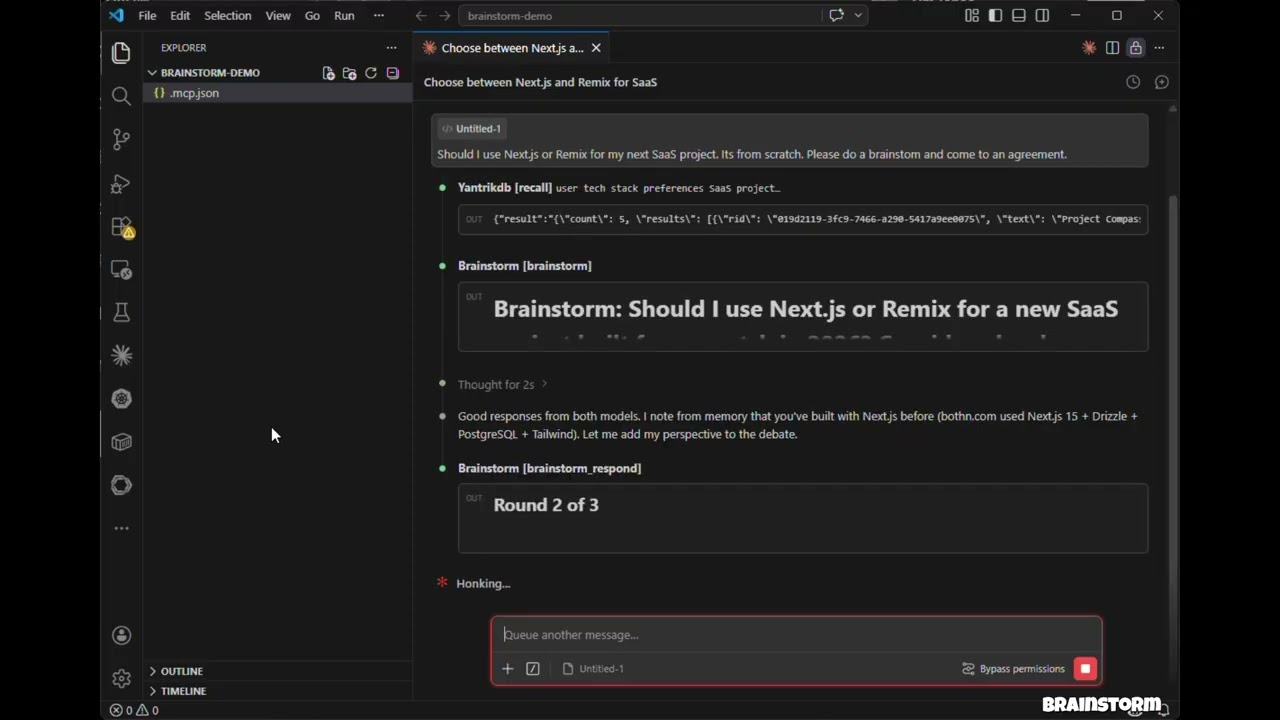
Watch the demo

클릭하여 시청하세요: 3개 모델이 토론하고, 상호 검증하며, 구조화된 평결을 생성합니다 — 모두 Claude Code 안에서.

기능

  • 호스팅 모드 — API 키 불필요. 환경의 모델(Claude Opus/Sonnet/Haiku)을 하위 에이전트로 사용

  • API 모드 — OpenAI, Gemini, DeepSeek, Groq, Ollama에서 병렬 실행되는 직접 모델 API 호출

  • CLI 모드 — 이미 보유한 에이전트 CLI(claude, codex 등)를 통해 토론 실행 — 토론이 API 크레딧 대신 구독으로 실행됨

  • brainstorm_quick — 10초 이내의 즉석 다중 모델 관점

  • brainstorm_review — 구조화된 결과, 심각도 등급, 평결이 포함된 다중 모델 코드 리뷰

  • 토론 스타일 — 자유 형식, 레드팀(적대적), 소크라테스(탐구 질문)

  • 컨텍스트 주입 — 실제 코드, diff, 아키텍처 문서에 토론 근거를 둠

  • 3-불릿 종합 평결 — 추천, 주요 트레이드오프, 가장 강한 불일치

  • Claude 참가자 — Claude가 전체 대화 컨텍스트로 외부 모델과 함께 토론

  • 다중 라운드 토론 — 모델들이 라운드에 걸쳐 서로의 응답을 보고 비판

  • 병렬 실행 — 각 라운드 내에서 모든 모델이 동시에 응답

  • 탄력성 — 한 모델의 실패가 토론을 중단시키지 않음

  • 크로스 플랫폼 — macOS, Windows, Linux에서 작동

Related MCP server: roundtable-mcp

설치 (60초)

claude mcp add brainstorm -- npx -y brainstorm-mcp

호스팅 모드에는 이것으로 충분합니다(API 키 불필요 — 환경에 이미 있는 모델을 사용하여 토론). GPT, Gemini, DeepSeek, Groq 또는 Ollama를 토론에 포함하려면 공급자 키를 추가하세요.

Claude Code

프로젝트의 .mcp.json에 추가:

{
  "mcpServers": {
    "brainstorm": {
      "command": "npx",
      "args": ["-y", "brainstorm-mcp"],
      "env": {
        "OPENAI_API_KEY": "sk-...",
        "GEMINI_API_KEY": "AIza...",
        "DEEPSEEK_API_KEY": "sk-..."
      }
    }
  }
}

Claude Desktop

claude_desktop_config.json에 추가:

{
  "mcpServers": {
    "brainstorm": {
      "command": "npx",
      "args": ["-y", "brainstorm-mcp"],
      "env": {
        "OPENAI_API_KEY": "sk-...",
        "DEEPSEEK_API_KEY": "sk-..."
      }
    }
  }
}

수동 설치

npm install -g brainstorm-mcp
brainstorm-mcp

호스팅 모드는 API 키가 필요 없습니다 — 설치하고 바로 사용하세요. 호스트(Claude Code)가 자체 모델 액세스를 사용하여 프롬프트를 실행합니다.

구성

옵션 1: 환경 변수 (가장 간단)

OPENAI_API_KEY=sk-...
GEMINI_API_KEY=AIza...
DEEPSEEK_API_KEY=sk-...

옵션 2: 구성 파일 (전체 제어)

BRAINSTORM_CONFIG를 JSON 구성 파일을 가리키도록 설정:

{
  "providers": {
    "openai": { "model": "gpt-5.4", "apiKeyEnv": "OPENAI_API_KEY" },
    "gemini": { "model": "gemini-2.5-flash", "apiKeyEnv": "GEMINI_API_KEY" },
    "deepseek": { "model": "deepseek-chat", "apiKeyEnv": "DEEPSEEK_API_KEY" },
    "ollama": { "model": "llama3.1", "baseURL": "http://localhost:11434/v1" }
  }
}

알려진 공급자(openai, gemini, deepseek, groq, mistral, together, moonshot, minimax, glm, qwen)는 baseURL이 필요 없습니다.

옵션 3: CLI 공급자 (API 크레딧이 아닌 구독 사용)

이미 Claude Code, Codex, Gemini CLI 등을 구독하고 있다면, brainstorm은 API 크레딧을 구매하는 대신 해당 CLI를 호출할 수 있습니다. PATH에서 발견된 모든 에이전트 CLI는 시작 시 자동으로 등록됩니다 — 구성 불필요:

[brainstorm] Detected CLI provider(s) on PATH: claude, codex (subscription-based, no API cost)

다른 공급자처럼 사용하세요:

{ "topic": "GraphQL vs REST", "models": ["claude:sonnet", "codex:default", "openai:gpt-5.4"] }

내장 어댑터:

공급자

명령어

기본 모델

상태

claude

claude -p

sonnet

검증됨

codex

codex exec

default

검증됨

gemini

gemini -p

gemini-2.5-pro

최선 노력, 로컬에서 확인

cursor-agent

cursor-agent -p

default

최선 노력

opencode

opencode run

default

최선 노력

qwen

qwen -p

qwen3-coder-plus

최선 노력

kimi

kimi --print

default

최선 노력

droid

droid exec

default

최선 노력

<provider>:default는 "CLI가 구성된 모델을 사용하게 하라"는 의미입니다. CLI 호출은 도구가 비활성화되고, CLI가 지원하는 경우 읽기 전용 샌드박스에서 실행됩니다 — 텍스트를 생성할 뿐, 저장소를 건드리지 않습니다. 공급자별 API 키 환경 변수(ANTHROPIC_API_KEY, OPENAI_API_KEY)는 하위 프로세스에서 제거되어 CLI가 구독 로그인으로 대체됩니다.

환경 변수:

변수

효과

BRAINSTORM_CLI_PROVIDERS

auto(기본값), off, 또는 감지할 어댑터의 쉼표로 구분된 목록

BRAINSTORM_PREFER_CLI

1 — 명시적 models가 없는 토론은 계량 API를 건너뛰고 CLI 공급자만 사용

BRAINSTORM_CLI_TIMEOUT_MS

CLI 공급자에 대한 호출당 시간 제한 (기본값 300000)

모델을 고정하거나 내장되지 않은 CLI를 추가하려면 구성 파일을 사용하세요:

{
  "providers": {
    "claude": { "type": "cli", "model": "opus" },
    "my-cli": {
      "type": "cli",
      "adapter": "custom",
      "command": "some-agent-cli",
      "args": ["run", "--model", "{{model}}", "--quiet", "{{prompt}}"],
      "promptVia": "arg",
      "model": "some-model"
    }
  }
}

템플릿 자리 표시자: {{model}}, {{system}}, {{prompt}}, {{outfile}}. 단독 자리 표시자가 아무것도 해석되지 않으면 해당 플래그와 함께 명령줄에서 제거되므로, ["--model", "{{model}}"]는 provider:default에서도 작동합니다. "promptVia": "stdin"을 설정하면 프롬프트를 인수로 전달하는 대신 파이프로 전달합니다.

Claude CLI를 통한 코딩 플랜 백엔드

Moonshot (Kimi), MiniMax, Z.ai (GLM)은 Anthropic API를 사용하는 코딩 플랜 구독을 판매합니다. claude 바이너리를 그 중 하나로 지정하면 해당 공급자가 이미 지불한 플랜으로 토론에 참여합니다:

{
  "providers": {
    "moonshot": { "type": "cli", "backend": "moonshot", "model": "kimi-k2-thinking" },
    "minimax":  { "type": "cli", "backend": "minimax",  "model": "MiniMax-M2" },
    "glm":      { "type": "cli", "backend": "glm",      "model": "glm-4.6" }
  }
}

백엔드

엔드포인트

토큰 환경 변수

moonshot

https://api.moonshot.ai/anthropic

MOONSHOT_API_KEY

minimax

https://api.minimax.io/anthropic

MINIMAX_API_KEY

glm

https://api.z.ai/api/anthropic

ZAI_API_KEY

토큰은 호출 시 환경에서 읽습니다 — 구성 파일에는 변수 이름만 있고 비밀번호는 없습니다. ANTHROPIC_API_KEY는 하위 프로세스에서 제거되어 Anthropic 계정이 청구되지 않습니다. 모든 CLI 공급자는 백엔드를 수동으로 재정의하는 "env" 블록도 허용합니다. "$NAME" 값은 서버 환경을 통해 간접 참조합니다.

이 공급자들은 일반 계량 API로도 접근 가능합니다 — moonshot, minimax, glm, qwen은 알려진 기본 URL이 있으므로 MOONSHOT_API_KEY만으로도 moonshot을 API 공급자로 등록할 수 있습니다.

도구

도구

설명

주석

brainstorm

AI 모델 간 다중 라운드 토론 (API 또는 호스팅 모드)

readOnly

brainstorm_quick

즉석 다중 모델 관점 — 병렬, 라운드 없음

readOnly

brainstorm_review

결과, 심각도, 평결이 포함된 다중 모델 코드 리뷰

readOnly

brainstorm_respond

대화형 세션에서 Claude의 응답 제출

readOnly

brainstorm_collect

호스팅 세션에서 모델 응답 제출

readOnly

list_providers

구성된 공급자, API 키 상태, 감지된 CLI 표시

readOnly

add_provider

런타임에 새 API 또는 CLI 공급자 추가

non-destructive

사용 예시

예시 1: 빠른 다중 모델 관점

프롬프트: "brainstorm_quick을 사용하여 세션 저장을 위해 Redis와 PostgreSQL을 비교하세요"

호출된 도구: brainstorm_quick

{ "topic": "Redis vs PostgreSQL for session storage in a Node.js app" }

출력: 각 구성된 모델이 병렬로 독립적으로 응답합니다. 모델 이름, 응답, 시간, 비용과 함께 10초 이내에 나란히 비교 결과를 얻습니다.

오류 처리: 모델이 실패하면(속도 제한, 시간 초과) 도구는 나머지 모델로 계속 진행하고 실패한 모델을 표시합니다.


예시 2: 다중 모델 코드 리뷰

프롬프트: "이 diff를 보안 문제로 리뷰하세요" (git diff 붙여넣기)

호출된 도구: brainstorm_review

{
  "diff": "diff --git a/src/auth.ts ...",
  "title": "Add JWT authentication middleware",
  "focus": ["security", "correctness"]
}

출력: 구조화된 평결(승인 / 경고와 함께 승인 / 변경 필요)과 심각도, 카테고리, 파일, 줄 번호, 제안 사항을 보여주는 결과 테이블. 모델 동의 분석 포함 — 여러 모델이 지적한 문제는 신뢰도가 더 높습니다.

오류 처리: 종합이 실패하면 원시 모델 리뷰가 여전히 반환됩니다.


예시 3: 호스팅 모드 브레인스토밍 (API 키 없음)

프롬프트: "opus, sonnet, haiku를 사용하여 GraphQL과 REST 중 무엇을 사용해야 하는지 브레인스토밍하세요"

호출된 도구: brainstorm

{
  "topic": "GraphQL vs REST for our public API",
  "models": ["opus", "sonnet", "haiku"],
  "mode": "hosted",
  "rounds": 2,
  "style": "redteam"
}

출력: 도구는 각 모델에 대한 프롬프트를 반환합니다. 호스트(Claude Code)가 다른 모델로 하위 에이전트를 생성하고, 응답을 수집하여 brainstorm_collect를 통해 다시 전달합니다. 모든 라운드 후 종합 모델이 3-불릿 평결(추천, 주요 트레이드오프, 가장 강한 불일치)을 생성합니다.

오류 처리: 세션은 10분 후 만료됩니다. 세션을 찾을 수 없으면 새 세션을 시작하라는 명확한 오류 메시지가 반환됩니다.

작동 방식

API / CLI 모드

  1. Claude에게 주제에 대해 브레인스토밍하도록 요청

  2. 도구가 주제를 모든 구성된 공급자에게 병렬로 전송 — API 공급자는 HTTP, CLI 공급자는 하위 프로세스 생성

  3. Claude가 응답을 읽고 자신의 관점을 기여

  4. 모델들이 서로의 응답을 보고 라운드에 걸쳐 개선

  5. 종합기가 최종 평결 생성

호스팅 모드

  1. Claude에게 특정 모델(예: opus, sonnet, haiku)로 브레인스토밍하도록 요청

  2. 도구가 프롬프트를 반환 — API 호출 없음

  3. Claude가 다른 모델로 하위 에이전트를 생성하여 프롬프트 실행

  4. 응답을 수집하여 다음 라운드에 다시 전달

  5. 종합까지 반복

개인정보 보호 정책

brainstorm-mcp는 전적으로 사용자 머신에서 실행되며 개인 데이터, 텔레메트리 또는 분석을 수집, 저장, 전송하지 않습니다.

API 모드에서는 프롬프트가 사용자 머신에서 구성한 모델 공급자(OpenAI, Gemini, DeepSeek 등)로 사용자 자신의 API 키를 사용하여 직접 전송됩니다. CLI 모드에서는 프롬프트가 사용자 머신에 설치된 에이전트 CLI에 전달되며, 이 CLI는 기존 구독으로 자체 공급자와 통신합니다. 호스팅 모드에서는 외부 API 호출이 이루어지지 않습니다.

토론 세션은 10분 TTL로 메모리에만 저장됩니다. 결과를 명시적으로 저장하지 않는 한 디스크에 데이터가 기록되지 않습니다.

전체 개인정보 보호 정책: PRIVACY.md

지원

개발

git clone https://github.com/spranab/brainstorm-mcp.git
cd brainstorm-mcp
npm install
npm run build
npm start

관련 프로젝트

같은 저자가 만든 다른 에이전트 인프라로, 함께 사용하도록 설계되었습니다:

  • saga-mcp — SQLite 기반 프로젝트 추적기: 논의가 끝나면 결정 사항이 영구적인 곳에 저장됩니다.

  • yantrikdb-mcp — 에이전트가 당신의 결정과 그 이유를 기억하도록 하는 영구적 인지 메모리.

  • swarmcode — 서로 다른 머신의 Claude Code 인스턴스 간 실시간 채널.

  • truenas-mcp — 하나의 계층적 도구 뒤에 있는 278개의 TrueNAS SCALE 작업.

  • mcpier — 클라이언트에서 API 키를 분리하는 자체 호스팅 MCP 컨트롤 플레인.

라이선스

MIT

Available Tools

7 tools
add_providerA

Add a new AI provider for brainstorming. Supports any OpenAI-compatible API, or a locally installed agent CLI (kind='cli') that runs on an existing subscription instead of API credits.

ParametersJSON Schema
NameRequiredDescriptionDefault
argsNocli only ('custom' adapter): argv template. Placeholders: {{model}}, {{system}}, {{prompt}}, {{outfile}}.
kindNo'api' (default) for an OpenAI-compatible HTTP endpoint, 'cli' for a local agent CLI.
nameYesProvider name, e.g. 'groq', 'ollama', 'mistral', 'claude'
adapterNocli only: built-in adapter — claude, codex, gemini, qwen, kimi, cursor-agent, opencode, droid — or 'custom'. Defaults to the provider name.
backendNocli only: run the Claude CLI against another vendor's coding plan — moonshot, minimax, glm. Overrides 'adapter'.
baseURLNoapi only: base URL, e.g. 'http://localhost:11434/v1' for Ollama
commandNocli only: executable to run. Required for adapter 'custom'.
promptViaNocli only ('custom' adapter): how the prompt reaches the CLI.
apiKeyEnvVarNoapi only: environment variable holding the API key. Use 'NONE' if no key required.
defaultModelYesDefault model for this provider, e.g. 'llama3', 'sonnet'. Use 'default' to let a CLI pick its own.

TDQS

A4/5.0
Behavior3/5

Does the description disclose side effects, auth requirements, rate limits, or destructive behavior?

Annotations only provide destructiveHint=false, leaving the behavioral burden mostly on the description. The description usefully conveys that the tool supports API and CLI modes and that CLI mode uses an existing subscription instead of API credits. However, it doesn't disclose side effects like whether the provider is persisted, whether it overrides existing providers, or what happens on invalid configurations.

Agents need to know what a tool does to the world before calling it. Descriptions should go beyond structured annotations to explain consequences.

Conciseness5/5

Is the description appropriately sized, front-loaded, and free of redundancy?

The description is exactly two sentences and immediately states the purpose and the two supported modes. There is no redundancy, and the most valuable scope information is front-loaded.

Shorter descriptions cost fewer tokens and are easier for agents to parse. Every sentence should earn its place.

Completeness4/5

Given the tool's complexity, does the description cover enough for an agent to succeed on first attempt?

Given the high complexity (10 params, no output schema), the description provides a helpful high-level framing that complements the fully self-describing schema. The only clear gap is that the description doesn't cover return values or post-add confirmation behavior, but the schema details all parameters well.

Complex tools with many parameters or behaviors need more documentation. Simple tools need less. This dimension scales expectations accordingly.

Parameters3/5

Does the description clarify parameter syntax, constraints, interactions, or defaults beyond what the schema provides?

Schema description coverage is 100%, so the baseline is 3. The description doesn't add significant value beyond the schema; it merely echoes the CLI/API distinction already present in field descriptions. It does not clarify conditional requirements or the relationship between adapter, backend, and command beyond what the schema contains.

Input schemas describe structure but not intent. Descriptions should explain non-obvious parameter relationships and valid value ranges.

Purpose5/5

Does the description clearly state what the tool does and how it differs from similar tools?

The description uses a specific verb (Add) and explicit resource (new AI provider for brainstorming), and distinguishes this from siblings like list_providers and brainstorm tools. It clearly identifies both supported modes: OpenAI-compatible APIs and local CLI providers.

Agents choose between tools based on descriptions. A clear purpose with a specific verb and resource helps agents select the right tool.

Usage Guidelines4/5

Does the description explain when to use this tool, when not to, or what alternatives exist?

The description gives clear context for when to use the tool: adding a provider for brainstorming, with either API or CLI. It doesn't explicitly say when not to use it or name alternatives like list_providers, but the context is specific enough for an agent to select it over purely brainstorming or listing tools.

Agents often have multiple tools that could apply. Explicit usage guidance like "use X instead of Y when Z" prevents misuse.

brainstormA
Read-only

Run a multi-round brainstorming debate between multiple AI models. IMPORTANT: Before calling this tool, you MUST ask the user to choose a mode:

  1. API mode — Calls configured providers. These are either HTTP APIs billed per token (OpenAI, Gemini, DeepSeek, ...) or locally installed agent CLIs such as 'claude' and 'codex', which run on the user's existing subscription at no API cost. Call list_providers to see which of each are available.

  2. Hosted mode — No API keys needed. You execute prompts using sub-agents with models available in your environment (opus/sonnet/haiku, GPT, Gemini, etc.). Same model can be used multiple times — each run produces different perspectives.

Present these two options to the user with a one-liner explanation, then proceed based on their choice.

For API mode: set mode='api'. When participate=true (default), YOU also participate as a debater alongside external models via brainstorm_respond. For Hosted mode: set mode='hosted'. Ask the user which models to use, then spawn sub-agents for each model, collect responses, and call brainstorm_collect.

ParametersJSON Schema
NameRequiredDescriptionDefault
modeNoExecution mode. Must be provided — if not, the tool will return options for the user to choose. 'api' — MCP server calls model APIs directly using configured API keys. 'hosted' — No API keys needed. Returns prompts for the HOST to execute using sub-agents with models available in the environment (opus/sonnet/haiku, GPT, Gemini, etc.).
styleNoDebate style. 'freeform' (default): open brainstorming. 'redteam': adversarial — models find flaws, risks, and weaknesses. 'socratic': probing questions that expose assumptions and push for deeper understanding.freeform
topicYesThe topic, question, or prompt to brainstorm about
modelsNoOptional: specific models to use as 'provider:model' (e.g. 'openai:gpt-4o', or 'claude:sonnet' / 'codex:default' for subscription-backed CLI providers). If not provided, all configured providers are used with their default models.
roundsNoNumber of debate rounds (default: 3)
contextNoOptional context to ground the debate — code snippets, PR diffs, error logs, architecture docs, etc. Models will see this alongside the topic.
participateNoWhether Claude should actively participate as a debater in each round (default: true). Set to false for a non-interactive debate between external models only.
synthesizerNoOptional: model for final synthesis as 'provider:model'. Defaults to the first model.
systemPromptNoOptional system prompt to guide the brainstorming style or constraints

TDQS

A4.8/5.0
Behavior5/5

Does the description disclose side effects, auth requirements, rate limits, or destructive behavior?

The description discloses detailed side effects beyond annotations: API mode calls external APIs with billing implications, hosted mode spawns sub-agents with environment models, and participation behavior via brainstorm_respond when participate=true. It also notes that if mode is omitted, the tool returns options. This is far richer than the readOnlyHint alone.

Agents need to know what a tool does to the world before calling it. Descriptions should go beyond structured annotations to explain consequences.

Conciseness4/5

Is the description appropriately sized, front-loaded, and free of redundancy?

The description is long but well-structured with clear sections, bolding, and lists. Every sentence conveys required operational details—nothing is redundant. While it could arguably be trimmed, the complexity of the tool's dual modes justifies the length. It is not flabby; it is dense and purposeful.

Shorter descriptions cost fewer tokens and are easier for agents to parse. Every sentence should earn its place.

Completeness5/5

Given the tool's complexity, does the description cover enough for an agent to succeed on first attempt?

Given 9 parameters, no output schema, and complex branching (API vs hosted), the description covers prerequisites, alternatives, and step-by-step invocation guidance. It explains the full flow including how to use sibling tools (list_providers, brainstorm_respond, brainstorm_collect) and the host's role. It does not describe return values, but that is acceptable since no output schema is provided and the focus is on executing the tool properly.

Complex tools with many parameters or behaviors need more documentation. Simple tools need less. This dimension scales expectations accordingly.

Parameters4/5

Does the description clarify parameter syntax, constraints, interactions, or defaults beyond what the schema provides?

The schema already provides 100% coverage for all parameters, so the baseline is 3. The description adds extra meaning by explaining how mode interacts with user choice, prompts the use of list_providers, and clarifies the participate flag's role (via brainstorm_respond in API mode). It also clarifies the models format ('provider:model') implicitly through examples in the schema description. This elevates it above the baseline.

Input schemas describe structure but not intent. Descriptions should explain non-obvious parameter relationships and valid value ranges.

Purpose5/5

Does the description clearly state what the tool does and how it differs from similar tools?

The description clearly states the tool runs a multi-round brainstorming debate between multiple AI models. It specifies the verb (run), the resource (debate), and distinguishes itself from sibling tools like brainstorm_quick (presented as a quick version) and brainstorm_respond/collect (which are sub-components).

Agents choose between tools based on descriptions. A clear purpose with a specific verb and resource helps agents select the right tool.

Usage Guidelines5/5

Does the description explain when to use this tool, when not to, or what alternatives exist?

It explicitly instructs the agent to ask the user to choose a mode before calling, explains both modes with one-liners, and directs the agent to use list_providers for available providers. It also tells what to do in hosted mode (ask which models to use, spawn sub-agents) and clarifies when to set mode='api' vs 'hosted'. Clear guidance on when to use and how to proceed.

Agents often have multiple tools that could apply. Explicit usage guidance like "use X instead of Y when Z" prevents misuse.

brainstorm_collectA
Read-only

Submit collected model responses for a hosted brainstorm session. After receiving prompts from brainstorm (mode='hosted') or a previous brainstorm_collect call, execute each prompt by spawning a sub-agent for EACH model (use the model parameter to select the right model, e.g., model='sonnet' or model='haiku'). Collect all responses and submit them here. This tool returns either: (1) the next round's prompt to execute, (2) a synthesis prompt for a single model, or (3) the final formatted debate result when complete.

ParametersJSON Schema
NameRequiredDescriptionDefault
responsesYesArray of model responses collected by the host
session_idYesThe session ID from the brainstorm tool

TDQS

A4.6/5.0
Behavior4/5

Does the description disclose side effects, auth requirements, rate limits, or destructive behavior?

Annotations include readOnlyHint: true, which already signals a non-destructive operation. The description adds transparency by explaining the three return outcomes (next prompt, synthesis prompt, final result) and the nested structure of responses required, without conflicting with the annotation. It could mention whether the session state is updated, but the return-value description suffices.

Agents need to know what a tool does to the world before calling it. Descriptions should go beyond structured annotations to explain consequences.

Conciseness4/5

Is the description appropriately sized, front-loaded, and free of redundancy?

The description is verbose but appropriately detailed for a multi-step workflow. It avoids redundancy and clearly structures the steps and return types. Some minor redundancy exists (e.g., repeating 'brainstorm' mode), but it remains readable and direct.

Shorter descriptions cost fewer tokens and are easier for agents to parse. Every sentence should earn its place.

Completeness4/5

Given the tool's complexity, does the description cover enough for an agent to succeed on first attempt?

With readOnlyHint already provided, the description covers the tool's purpose, usage sequence, return types, and parameter details. It lacks mention of error conditions or session expiration, but for the tool's complexity, this is sufficient. Overall, it gives the agent enough context to use the tool correctly.

Complex tools with many parameters or behaviors need more documentation. Simple tools need less. This dimension scales expectations accordingly.

Parameters5/5

Does the description clarify parameter syntax, constraints, interactions, or defaults beyond what the schema provides?

All two required parameters (session_id and responses) are fully described in the schema with clear semantics. The description further clarifies the 'model' parameter by giving examples ('sonnet' or 'haiku') and emphasizes the requirement to collect responses for each model, enhancing the schema's clarity. Coverage is 100%.

Input schemas describe structure but not intent. Descriptions should explain non-obvious parameter relationships and valid value ranges.

Purpose5/5

Does the description clearly state what the tool does and how it differs from similar tools?

The description clearly states the tool's purpose: 'Submit collected model responses for a hosted brainstorm session.' It specifies the exact action (submit responses) and the resource (brainstorm session), and distinguishes it from siblings by referencing the workflow of the `brainstorm` tool.

Agents choose between tools based on descriptions. A clear purpose with a specific verb and resource helps agents select the right tool.

Usage Guidelines5/5

Does the description explain when to use this tool, when not to, or what alternatives exist?

The description provides explicit when-to-use guidance: after receiving prompts from `brainstorm` (mode='hosted') or a previous `brainstorm_collect` call. It also explains the required workflow (execute each prompt per model using the model parameter) and lists the three possible return types, giving clear context for invocation.

Agents often have multiple tools that could apply. Explicit usage guidance like "use X instead of Y when Z" prevents misuse.

brainstorm_quickA
Read-only

Get instant multi-model perspectives on any question — no debate rounds, no synthesis delay. Fires all models in parallel and returns a compact comparison. Under 10 seconds. Use this for quick second opinions, snap decisions, or when you want diverse perspectives fast. For deeper analysis with multiple rounds and synthesis, use the brainstorm tool instead.

ParametersJSON Schema
NameRequiredDescriptionDefault
styleNoPerspective style (default: freeform)freeform
topicYesThe question or topic to get quick perspectives on
modelsNoOptional: specific models as 'provider:model' (API providers, or CLI providers like 'claude:sonnet' that use a subscription instead of API credits). If not provided, all configured providers are used.
contextNoOptional context — code snippets, error logs, etc. Models will see this alongside the topic.

TDQS

A4.5/5.0
Behavior4/5

Does the description disclose side effects, auth requirements, rate limits, or destructive behavior?

Annotation `readOnlyHint: true` tells the agent this is a read operation. The description adds useful behavioral context: parallel model firing, compact comparison output, no debate rounds, no synthesis delay, and the under-10-second expectation. It does not mention potential rate limiting or model failure behavior, but this is beyond the essential disclosure for this tool.

Agents need to know what a tool does to the world before calling it. Descriptions should go beyond structured annotations to explain consequences.

Conciseness5/5

Is the description appropriately sized, front-loaded, and free of redundancy?

The description is three sentences, front-loaded with the core behavior, and each sentence earns its place: what it does, the key guarantees, and when to use it vs. the alternative.

Shorter descriptions cost fewer tokens and are easier for agents to parse. Every sentence should earn its place.

Completeness5/5

Given the tool's complexity, does the description cover enough for an agent to succeed on first attempt?

Given the 4-parameter schema, readOnlyHint annotation, and no output schema, this description is sufficiently complete. It covers the tool's behavior, timing, return format (compact comparison), and the sibling-tool boundary. No critical context for selection or invocation is missing.

Complex tools with many parameters or behaviors need more documentation. Simple tools need less. This dimension scales expectations accordingly.

Parameters3/5

Does the description clarify parameter syntax, constraints, interactions, or defaults beyond what the schema provides?

Schema description coverage is 100%, so all four parameters are already well-documented. The description adds little parameter-level meaning beyond what the schema states, though it indirectly emphasizes the default behavior of firing all models in parallel.

Input schemas describe structure but not intent. Descriptions should explain non-obvious parameter relationships and valid value ranges.

Purpose5/5

Does the description clearly state what the tool does and how it differs from similar tools?

The description clearly states the tool's purpose: getting instant multi-model perspectives via parallel calls. It explicitly distinguishes this from the `brainstorm` sibling tool by contrasting quick versus deep analysis with rounds and synthesis.

Agents choose between tools based on descriptions. A clear purpose with a specific verb and resource helps agents select the right tool.

Usage Guidelines5/5

Does the description explain when to use this tool, when not to, or what alternatives exist?

Provides explicit usage guidance: use for quick second opinions, snap decisions, or diverse perspectives fast. It also names the alternative `brainstorm` for deeper analysis, making the decision between siblings clear.

Agents often have multiple tools that could apply. Explicit usage guidance like "use X instead of Y when Z" prevents misuse.

brainstorm_respondA
Read-only

Submit YOUR (Claude's) response for the current round of an interactive brainstorm session. After the brainstorm tool returns external models' responses, call this tool with your substantive contribution. Read all responses carefully and engage with specific points — agree, disagree, build upon, or challenge ideas. Do not just summarize. After your response, the next round runs automatically (or synthesis if final round).

ParametersJSON Schema
NameRequiredDescriptionDefault
responseYesYour substantive contribution to this round of the debate. Engage deeply with the other models' responses. Minimum 50 characters.
session_idYesThe session ID returned by the brainstorm tool

TDQS

A3.7/5.0
Behavior1/5

Does the description disclose side effects, auth requirements, rate limits, or destructive behavior?

The description says 'Submit' and 'call' implying a write operation, but the annotation readOnlyHint: true indicates read-only. This contradiction makes the score 1 per instructions.

Agents need to know what a tool does to the world before calling it. Descriptions should go beyond structured annotations to explain consequences.

Conciseness4/5

Is the description appropriately sized, front-loaded, and free of redundancy?

The description is moderately concise, front-loads the main purpose, but includes instructional details (like 'Read all responses carefully') that could be trimmed without losing clarity.

Shorter descriptions cost fewer tokens and are easier for agents to parse. Every sentence should earn its place.

Completeness4/5

Given the tool's complexity, does the description cover enough for an agent to succeed on first attempt?

Given the schema descriptions, the description provides sufficient context on when to use the tool and what to do, though it does not address edge cases like multiple calls or error handling.

Complex tools with many parameters or behaviors need more documentation. Simple tools need less. This dimension scales expectations accordingly.

Parameters3/5

Does the description clarify parameter syntax, constraints, interactions, or defaults beyond what the schema provides?

The schema already provides descriptions for both session_id and response, and the description adds contextual flavor (e.g., 'substantive contribution') but no new semantic information beyond the schema.

Input schemas describe structure but not intent. Descriptions should explain non-obvious parameter relationships and valid value ranges.

Purpose5/5

Does the description clearly state what the tool does and how it differs from similar tools?

Clearly states the tool submits Claude's response for the current round, and distinguishes from siblings by referencing the brainstorm tool and the condition after external models return.

Agents choose between tools based on descriptions. A clear purpose with a specific verb and resource helps agents select the right tool.

Usage Guidelines5/5

Does the description explain when to use this tool, when not to, or what alternatives exist?

Explicitly says to call this tool after the brainstorm tool returns external models' responses, and provides guidance on what to do (read, engage, not summarize) and the automatic next-round behavior.

Agents often have multiple tools that could apply. Explicit usage guidance like "use X instead of Y when Z" prevents misuse.

brainstorm_reviewA
Read-only

Multi-model code review. Pass a diff and get structured findings with severity, file/line references, and a verdict (approve / approve with warnings / needs changes). Multiple models review independently, then findings are synthesized and deduplicated. Use this for PR reviews, code audits, or pre-commit checks.

ParametersJSON Schema
NameRequiredDescriptionDefault
diffYesThe unified diff to review (e.g., output of `git diff`)
focusNoOptional: focus areas for the review. Default: all categories.
titleNoOptional: PR title or change summary for context
modelsNoOptional: specific models as 'provider:model'. Default: all configured providers.
descriptionNoOptional: PR description or commit message
instructionsNoOptional: repo-specific review instructions (e.g., 'we use strict null checks', 'focus on SQL injection risks')

TDQS

A4.2/5.0
Behavior4/5

Does the description disclose side effects, auth requirements, rate limits, or destructive behavior?

Annotations already declare readOnlyHint: true, so the safety profile is clear. The description adds process transparency: multiple models review independently, findings are synthesized and deduplicated, and it states the output verdict types. This enriches understanding beyond the annotation without contradiction.

Agents need to know what a tool does to the world before calling it. Descriptions should go beyond structured annotations to explain consequences.

Conciseness5/5

Is the description appropriately sized, front-loaded, and free of redundancy?

The description is concise—three sentences with a clear front-loaded purpose. Each sentence adds value: what it does, how it works, and when to use it. No filler or redundancy.

Shorter descriptions cost fewer tokens and are easier for agents to parse. Every sentence should earn its place.

Completeness4/5

Given the tool's complexity, does the description cover enough for an agent to succeed on first attempt?

Without an output schema, the description compensates by outlining the output structure (severity, file/line refs, verdict). It covers the main workflow and use cases, leaving parameter specifics to the schema. Adequate for an agent to invoke correctly, though it could mention how to format the diff or handle errors.

Complex tools with many parameters or behaviors need more documentation. Simple tools need less. This dimension scales expectations accordingly.

Parameters3/5

Does the description clarify parameter syntax, constraints, interactions, or defaults beyond what the schema provides?

Schema description coverage is 100% with all six parameters explained. The description itself adds minimal parameter detail beyond stating 'Pass a diff' and mentioning the verdict values. Since the schema already covers parameter meaning, the description does not significantly enhance understanding, matching the baseline.

Input schemas describe structure but not intent. Descriptions should explain non-obvious parameter relationships and valid value ranges.

Purpose5/5

Does the description clearly state what the tool does and how it differs from similar tools?

The description clearly states 'Multi-model code review' and specifies the action: pass a diff and receive structured findings with severity, file/line references, and a verdict. It also lists concrete use cases (PR reviews, code audits, pre-commit checks), distinguishing it from sibling brainstorming tools.

Agents choose between tools based on descriptions. A clear purpose with a specific verb and resource helps agents select the right tool.

Usage Guidelines4/5

Does the description explain when to use this tool, when not to, or what alternatives exist?

The description explicitly says 'Use this for PR reviews, code audits, or pre-commit checks,' providing clear when-to-use guidance. It does not explicitly mention when not to use it or alternative tools, but the context is specific enough for typical scenarios.

Agents often have multiple tools that could apply. Explicit usage guidance like "use X instead of Y when Z" prevents misuse.

list_providersA
Read-only

List all configured AI providers and their default models for brainstorming. Includes locally installed agent CLIs (claude, codex, ...) which run on an existing subscription instead of metered API credits.

ParametersJSON Schema
NameRequiredDescriptionDefault

No parameters

TDQS

A4.2/5.0
Behavior3/5

Does the description disclose side effects, auth requirements, rate limits, or destructive behavior?

The annotations already declare readOnlyHint=true, so the read-only behavior is covered, leaving the description free to add detail about the inclusion of locally installed CLIs and their subscription-based billing, which is useful. It doesn't describe the response structure or pagination, but the absence of parameters suggests a simple listing, so this is adequate.

Agents need to know what a tool does to the world before calling it. Descriptions should go beyond structured annotations to explain consequences.

Conciseness5/5

Is the description appropriately sized, front-loaded, and free of redundancy?

Two sentences, no fluff. The first clearly states the primary purpose, and the second adds crucial context about the local CLIs and billing model. Every word earns its place, and it's front-loaded with the key action.

Shorter descriptions cost fewer tokens and are easier for agents to parse. Every sentence should earn its place.

Completeness4/5

Given the tool's complexity, does the description cover enough for an agent to succeed on first attempt?

The tool is simple (no params, no output schema), but the description covers the essential details: what is listed, the nuance of local CLIs versus API-based, and the billing context. It could mention that the output is in a structured format, but the lack of output schema and the simplicity of the task don't demand more.

Complex tools with many parameters or behaviors need more documentation. Simple tools need less. This dimension scales expectations accordingly.

Parameters4/5

Does the description clarify parameter syntax, constraints, interactions, or defaults beyond what the schema provides?

With zero parameters, the description's job is to clarify what the tool returns, which it does by specifying the content: providers, default models, and the local CLI variants. Since there are no parameters, it maximizes clarity about the output, making this a strong score.

Input schemas describe structure but not intent. Descriptions should explain non-obvious parameter relationships and valid value ranges.

Purpose5/5

Does the description clearly state what the tool does and how it differs from similar tools?

The description clearly states the tool lists configured AI providers and their default models, and it explicitly distinguishes its scope by including locally installed agent CLIs. This differentiates it from sibling tools like brainstorm (which likely generates ideas) and add_provider (which modifies providers).

Agents choose between tools based on descriptions. A clear purpose with a specific verb and resource helps agents select the right tool.

Usage Guidelines4/5

Does the description explain when to use this tool, when not to, or what alternatives exist?

It implies usage as a discovery tool for available providers, noting that some run on subscriptions rather than metered API credits, which helps in selecting providers for brainstorming. However, it doesn't explicitly state when not to use it or brand it as a read-only complement to add_provider; the context is clear but exclusions are absent.

Agents often have multiple tools that could apply. Explicit usage guidance like "use X instead of Y when Z" prevents misuse.

Tool Schema Changelog

Recent tool additions, removals, and schema changes observed during successful MCP inspections.

  1. 6 tool updatesv1.6.0
    • Changedadd_provider11 fields changed
      • addedInput schema / properties / adapter
        Added value: +{
        +  "description": "cli only: built-in adapter — claude, codex, gemini, qwen, kimi, cursor-agent, opencode, droid — or 'custom'. Defaults to the provider name.",
        +  "type": "string"
        +}
      • changedInput schema / properties / apiKeyEnvVar / description
        Previous value: -"Environment variable name for the API key. Use 'NONE' if no key required."New value: +"api only: environment variable holding the API key. Use 'NONE' if no key required."
      • addedInput schema / properties / args
        Added value: +{
        +  "description": "cli only ('custom' adapter): argv template. Placeholders: {{model}}, {{system}}, {{prompt}}, {{outfile}}.",
        +  "items": {
        +    "type": "string"
        +  },
        +  "type": "array"
        +}
      • addedInput schema / properties / backend
        Added value: +{
        +  "description": "cli only: run the Claude CLI against another vendor's coding plan — moonshot, minimax, glm. Overrides 'adapter'.",
        +  "type": "string"
        +}
      • changedInput schema / properties / baseURL / description
        Previous value: -"API base URL, e.g. 'http://localhost:11434/v1' for Ollama"New value: +"api only: base URL, e.g. 'http://localhost:11434/v1' for Ollama"
      • addedInput schema / properties / command
        Added value: +{
        +  "description": "cli only: executable to run. Required for adapter 'custom'.",
        +  "type": "string"
        +}
      • changedInput schema / properties / defaultModel / description
        Previous value: -"Default model to use for this provider, e.g. 'llama3', 'mixtral-8x7b-32768'"New value: +"Default model for this provider, e.g. 'llama3', 'sonnet'. Use 'default' to let a CLI pick its own."
      • addedInput schema / properties / kind
        Added value: +{
        +  "description": "'api' (default) for an OpenAI-compatible HTTP endpoint, 'cli' for a local agent CLI.",
        +  "enum": [
        +    "api",
        +    "cli"
        +  ],
        +  "type": "string"
        +}
      • changedInput schema / properties / name / description
        Previous value: -"Provider name, e.g. 'groq', 'ollama', 'mistral'"New value: +"Provider name, e.g. 'groq', 'ollama', 'mistral', 'claude'"
      • addedInput schema / properties / promptVia
        Added value: +{
        +  "description": "cli only ('custom' adapter): how the prompt reaches the CLI.",
        +  "enum": [
        +    "arg",
        +    "stdin"
        +  ],
        +  "type": "string"
        +}
      • changedInput schema / required
        Previous value: -[
        -  "name",
        -  "baseURL",
        -  "apiKeyEnvVar",
        -  "defaultModel"
        -]New value: +[
        +  "name",
        +  "defaultModel"
        +]
    • Changedbrainstorm5 fields changed
      • addedInput schema / properties / context
        Added value: +{
        +  "description": "Optional context to ground the debate — code snippets, PR diffs, error logs, architecture docs, etc. Models will see this alongside the topic.",
        +  "type": "string"
        +}
      • addedInput schema / properties / mode
        Added value: +{
        +  "description": "Execution mode. Must be provided — if not, the tool will return options for the user to choose.\n'api' — MCP server calls model APIs directly using configured API keys.\n'hosted' — No API keys needed. Returns prompts for the HOST to execute using sub-agents with models available in the environment (opus/sonnet/haiku, GPT, Gemini, etc.).",
        +  "enum": [
        +    "api",
        +    "hosted"
        +  ],
        +  "type": "string"
        +}
      • changedInput schema / properties / models / description
        Previous value: -"Optional: specific models to use as 'provider:model' (e.g. 'openai:gpt-4o'). If not provided, all configured providers are used with their default models."New value: +"Optional: specific models to use as 'provider:model' (e.g. 'openai:gpt-4o', or 'claude:sonnet' / 'codex:default' for subscription-backed CLI providers). If not provided, all configured providers are used with their default models."
      • addedInput schema / properties / participate
        Added value: +{
        +  "default": true,
        +  "description": "Whether Claude should actively participate as a debater in each round (default: true). Set to false for a non-interactive debate between external models only.",
        +  "type": "boolean"
        +}
      • addedInput schema / properties / style
        Added value: +{
        +  "default": "freeform",
        +  "description": "Debate style. 'freeform' (default): open brainstorming. 'redteam': adversarial — models find flaws, risks, and weaknesses. 'socratic': probing questions that expose assumptions and push for deeper understanding.",
        +  "enum": [
        +    "freeform",
        +    "redteam",
        +    "socratic"
        +  ],
        +  "type": "string"
        +}
    • Addedbrainstorm_collect
    • Addedbrainstorm_quick
    • Addedbrainstorm_respond
    • Addedbrainstorm_review
  2. 3 tool updatesv1.0.1
    • First observedadd_provider
    • First observedbrainstorm
    • First observedlist_providers

TDQS

A4.3/5.0

Scored across 7 tools

Disambiguation5/5

Each tool has a clearly distinct role: the main brainstorm tool handles debate setup, with dedicated helpers for API (brainstorm_respond) and hosted (brainstorm_collect) modes. Brainstorm_quick is a fast parallel mode, brainstorm_review is code-specific, and list/add_provider manage providers. No overlapping purposes.

Naming Consistency5/5

All tools follow a consistent snake_case verb_noun pattern. Core brainstorming actions are prefixed with 'brainstorm_', while provider management uses list_providers and add_provider. Naming is predictable and clear.

Tool Count5/5

Seven tools is well-scoped for a brainstorming server. It covers the core debate workflow (main, respond, collect), a quick alternative, a specialized code review mode, and provider management, without unnecessary bloat or missing essentials.

Completeness4/5

The surface covers the full brainstorming workflow—multi-round debate, quick requests, code review, and provider setup. Minor gaps exist in provider management (no update/delete) and no explicit session management, but these are non-critical and easily worked around.

Maintenance

ActivityActive
ResponsivenessNo issues

Related MCP Connectors

Related MCP Servers

  • F
    license
    Not graded
    quality
    Not graded
    maintenance
    Orchestrates multiple AI models (Gemini, OpenAI, Claude, local models) within a single conversation context, enabling collaborative workflows like multi-model code reviews, consensus building, and CLI-to-CLI bridging for specialized tasks.
    -
  • A
    license
    Not graded
    quality
    Not graded
    maintenance
    Enables Claude to orchestrate multi-model AI roundtable discussions between GPT-4o, Gemini, Grok, and DeepSeek through independent responses and cross-critique rounds. It supports various discussion presets such as debate, brainstorm, and consensus to facilitate diverse perspectives and synthesis.
    MIT
  • A
    license
    Not graded
    quality
    D
    maintenance
    Enables AI assistants to facilitate structured multi-model debates that synthesize multiple perspectives into clear categories like ground truths and blind spots. It provides tools for running real-time debates, checking model health, and managing history via the Model Context Protocol.
    58 npm
    1
    MIT
  • A
    license
    A
    quality
    C
    maintenance
    Facilitates structured multi-agent debates with arguments, rebuttals, and judgments across multiple rounds, enabling diverse AI personas to engage in formal debate and collaborative problem-solving.
    1
    19 npm
    17
    MIT