A
licenseC
qualityF
maintenanceA TypeScript-based MCP server that provides integration with the Qase test management platform, allowing you to manage projects, test cases, runs, results, plans, suites, and shared steps.
26
12
MIT

This server provides comprehensive access to Cisco Support APIs through the Model Context Protocol (MCP), enabling AI assistants to search and analyze Cisco product bugs, security vulnerabilities, lifecycle information, and support cases.
Core Capabilities:
Bug Search & Analysis: Search bugs by keyword, specific bug ID, product ID, product series, product name, and software releases with filtering by severity (1-6), status (Open, Fixed, Terminated), and modification date
Enhanced Analysis Tools: Smart search strategy recommendations, progressive multi-strategy searches, multi-severity searches, comprehensive product assessments combining bugs with lifecycle guidance, and version comparison for stability and security analysis
Product Information: Resolve product IDs to full names, serial number lookups for coverage and warranty info, and automatic version normalization (17.09.06 → 17.9.6)
Security & Lifecycle: Access PSIRT vulnerability data, security advisories, and End-of-Life (EoX) information for planning
Support Case Management: Create, update, and manage support cases with investigation tools
Software Recommendations: Get software suggestions, releases, and upgrade recommendations
Product Autocomplete: Search Cisco's internal product catalog using MCP Resources (requires browser session cookies)
Smart Bonding Integration: Experimental ticket management and problem code classification (requires special credentials)
Key Features:
8 Core Cisco Support APIs: Bug, Case, EoX, PSIRT, Product, Software, Serial, RMA with 46 implemented tools
10+ Specialized Prompts: Guided workflows for incident investigation, upgrade planning, security advisory research, and more with dynamic user elicitation support
Multiple Authentication Modes: stdio (no auth), Bearer token, OAuth 2.1 with PKCE and scope-based access control
Dual Transport Support: stdio mode for local clients (Claude Desktop) and HTTP mode for remote access
Production-Ready: Docker deployment, health monitoring, comprehensive logging, automatic OAuth2 token management, security headers (Helmet), CORS, input validation, and Server-Sent Events (SSE) for real-time updates
Provides access to Cisco Support APIs including Bug Search, Case Management, End-of-Life information, PSIRT security vulnerability data, Product information, and Software recommendations through 33 tools across 6 different Cisco APIs.
Offers alternative endpoint compatibility for N8N integration, allowing the MCP server to be used with N8N automation workflows.
Click on "Deploy Server".
Wait a few minutes for the server to deploy. Once ready, it will show a "Started" state.
In the chat, type @ followed by the MCP server name and your instructions, e.g., "@mcp-cisco-support search for bugs affecting Cisco Catalyst 9300 switches"
That's it! The server will respond to your query, and you can continue using it as needed.
Here is a step-by-step guide with screenshots.





A production-ready TypeScript MCP (Model Context Protocol) server for Cisco Support APIs with comprehensive security and dual transport support. This extensible server provides access to multiple Cisco Support APIs including Bug Search, Case Management, and End-of-Life information.
Multi-API Support: 8 Cisco Support APIs fully implemented (46 total tools)
OAuth 2.1 Server: ✨ Production-grade authentication with fine-grained scope-based access control
ElicitationRequest Support: Dynamic user interaction for gathering missing parameters
Triple Auth Modes: stdio (no auth), Bearer token (simple), OAuth 2.1 (production)
Configurable API Access: Enable only the Cisco Support APIs you have access to
Specialized Prompts: 9 workflow prompts for guided Cisco support scenarios
Dual Transport: stdio (local MCP clients) and HTTP (remote server with auth)
OAuth2 Authentication: Automatic token management with Cisco API
Real-time Updates: Server-Sent Events for HTTP mode
TypeScript: Full type safety and MCP SDK integration
Production Security: Helmet, CORS, input validation, PKCE, scope validation
Docker Support: Containerized deployment with OAuth config volume mounts
Comprehensive Logging: Structured logging with timestamps
Related MCP server: Sloot MCP Server
The server supports the following Cisco Support APIs (configurable via SUPPORT_API environment variable):
API | Status | Tools | Description |
Enhanced Analysis ( | ⭐ RECOMMENDED | 6 tools | Advanced analysis tools for comprehensive product assessment |
Bug ( | ✅ Complete | 14 tools | Bug Search, Details, Product-specific searches + Enhanced tools |
Case ( | ✅ Complete | 4 tools | Support case management and operations |
EoX ( | ✅ Complete | 4 tools | End of Life/Sale information and lifecycle planning |
PSIRT ( | ✅ Complete | 8 tools | Product Security Incident Response Team vulnerability data |
Product ( | ✅ Complete | 3 tools | Product details, specifications, and technical information |
Software ( | ✅ Complete | 6 tools | Software suggestions, releases, and upgrade recommendations |
Serial ( | ✅ Complete | 3 tools | Serial number to coverage, warranty, and product information |
RMA ( | ✅ Complete | 3 tools | Return Merchandise Authorization tracking and management |
Smart Bonding ( | ⚠️ EXPERIMENTAL | 8 tools | Complete ticket lifecycle management and TSP codes (UNTESTED - requires special credentials) |
Implementation Status: 8/8 Core APIs complete (100%) with 46 total tools + 1 experimental API (8 tools)
Configuration Examples:
SUPPORT_API=enhanced_analysis - Enhanced analysis tools only (6 tools) ← RECOMMENDED for most users
SUPPORT_API=bug - All Bug API tools including enhanced analysis (14 tools)
SUPPORT_API=bug,case,eox,psirt - Core support APIs (28 tools)
SUPPORT_API=bug,case,eox,psirt,product,software - All implemented APIs (39 tools)
SUPPORT_API=all - All available APIs (includes 2 placeholder APIs)
Start in stdio mode for Claude Desktop:
npx mcp-cisco-supportStart HTTP server with authentication:
npx mcp-cisco-support --http
# Token displayed in console for authentication
Generate Bearer token for HTTP mode:
npx mcp-cisco-support --generate-tokenGet help and see all options:
npx mcp-cisco-support --helpGenerate authentication token (for HTTP mode):
npx mcp-cisco-support --generate-token
export MCP_BEARER_TOKEN=<generated_token>
Set Cisco API credentials:
export CISCO_CLIENT_ID=your_client_id_here
export CISCO_CLIENT_SECRET=your_client_secret_here
export SUPPORT_API=bug,case,eox,psirt,product,software  # All implemented APIs (recommended)
Start the server:
# For Claude Desktop (stdio mode)
npx mcp-cisco-support

# For HTTP access (with authentication)
npx mcp-cisco-support --httpgit clone https://github.com/sieteunoseis/mcp-cisco-support.git
cd mcp-cisco-support
npm install
npm run build
npm startGet Cisco API Credentials:
Visit Cisco API Console
Create an application and get your Client ID and Secret
Ensure the application has access to the Bug API
Install Claude Desktop:
Download from Claude.ai
Make sure you're using a recent version that supports MCP
Locate Claude Desktop Config File:
macOS: ~/Library/Application Support/Claude/claude_desktop_config.json
Windows: %APPDATA%\Claude\claude_desktop_config.json
Create or Edit the Config File:
{
  "mcpServers": {
    "cisco-support": {
      "command": "npx",
      "args": ["-y", "mcp-cisco-support"],
      "env": {
        "CISCO_CLIENT_ID": "your_client_id_here",
        "CISCO_CLIENT_SECRET": "your_client_secret_here",
        "SUPPORT_API": "bug,product"
      }
    }
  }
}
Note: The
-yflag automatically accepts package installation, which is required for Claude Desktop since it runs in the background without user interaction.
Optional Environment Variables:
Configure which APIs to enable with SUPPORT_API:
"enhanced_analysis" - Enhanced analysis tools only (recommended for most users)
"bug" - Bug API only (default)
"bug,product" - Bug + Product APIs (enables product autocomplete)
"all" - All available APIs
"bug,case,eox" - Multiple specific APIs
Product Autocomplete (optional, requires SUPPORT_API to include product):
"env": {
  "CISCO_CLIENT_ID": "your_client_id_here",
  "CISCO_CLIENT_SECRET": "your_client_secret_here",
  "SUPPORT_API": "bug,product",
  "CISCO_WEB_COOKIE": "JSESSIONID=...; OptanonConsent=..."
}
See the Product Autocomplete section for setup instructions.
Replace Your Credentials:
Replace your_client_id_here with your actual Cisco Client ID
Replace your_client_secret_here with your actual Cisco Client Secret
Restart Claude Desktop:
Close Claude Desktop completely
Reopen the application
The MCP server will be automatically loaded
After setup, you should be able to:
Ask Claude about Cisco bugs:
"Search for bugs related to memory leaks in Cisco switches"Get specific bug details:
"Get details for Cisco bug CSCab12345"Search by product:
"Find bugs affecting Cisco Catalyst 3560 switches"Once configured, you can ask Claude questions like:
Basic Bug Search:
"Search for recent bugs related to 'crash' in Cisco products"
"Find open bugs with severity 1 or 2"
"Show me bugs modified in the last 30 days"
Product-Specific Searches:
"Find bugs for product ID C9200-24P"
"Search for bugs in Cisco Catalyst 9200 Series affecting release 17.5.1"
"Show bugs fixed in software release 17.5.2"
Bug Details:
"Get full details for bug CSCab12345"
"Show me information about bugs CSCab12345,CSCcd67890"
Advanced Filtering:
"Find resolved bugs with severity 3 modified after 2023-01-01"
"Search for bugs in 'Cisco ASR 9000 Series' sorted by severity"
"Can you show me all the cisco bugs in the last 30 days for the product Cisco Unified Communications Manager (CallManager)?" (uses keyword search)
"Find bugs for Cisco Unified Communications Manager affecting releases 14.0 and 15.0" (uses product series search)
Claude will use the appropriate MCP tools to fetch real-time data from Cisco's Bug API and provide comprehensive responses with the latest information.
The server includes 10+ specialized prompts for guided Cisco support workflows:
🔍 cisco-high-severity-search - Search high-severity bugs by product or serial number
🚨 cisco-incident-investigation - Investigate symptoms and errors
🔄 cisco-upgrade-planning - Research issues before upgrades
🔧 cisco-maintenance-prep - Prepare for maintenance windows
🔒 cisco-security-advisory - Research security vulnerabilities
⚠️ cisco-known-issues - Check for software release issues
📋 cisco-case-investigation - Investigate support cases
⏰ cisco-lifecycle-planning - End-of-life planning
🎯 cisco-smart-search - Intelligent search with automatic refinement
✨ cisco-interactive-search - Interactive search with elicitation
Serial Number Support: Most prompts now accept either a product name OR a serial number. When you provide a serial number (e.g., "SAL09232Q0Z"), the server automatically looks up the product details and uses them for the search. This makes it easy to investigate issues when you have a device serial number but don't know the exact product model.
Each prompt provides structured investigation plans and expert recommendations.
The cisco-interactive-search prompt demonstrates MCP's elicitation feature, allowing the server to dynamically request additional information from users during tool execution. This makes searches more natural and helps gather missing parameters without restarting requests.
Example Usage:
Use the "cisco-interactive-search" prompt with:
- initial_query: "memory leak"
- use_elicitation: true
See examples/elicitation-example.md for detailed usage examples and ⚡ MCP Prompts for complete prompt documentation.
The server exposes Cisco data as MCP Resources for direct client access. This includes a new Product Autocomplete feature that lets you search Cisco's internal product catalog using your browser session cookie.
When SUPPORT_API includes product, the following resources are available:
Resource Templates (dynamic URIs):
cisco://products/{product_id} - Get product details by ID (e.g., C9300-24P, ISR4431)
cisco://products/autocomplete/{search_term} - ✨ NEW: Search product catalog by name or model
Static Resources:
cisco://products/catalog - Product catalog overview
cisco://products/autocomplete-help - ✨ NEW: Setup instructions for product autocomplete
The product autocomplete feature requires your Cisco.com session cookie to access Cisco's internal API.
Quick Setup:
Log in to Cisco:
Log in with your Cisco account
Extract Your Cookie:
Open browser DevTools (F12)
Go to Application/Storage > Cookies
Select https://bst.cloudapps.cisco.com
Copy all cookie values
Set Environment Variable:
export CISCO_WEB_COOKIE="JSESSIONID=...; OptanonConsent=...; ..."Query Products:
cisco://products/autocomplete/4431
cisco://products/autocomplete/catalyst
cisco://products/autocomplete/ASA
Cookie Lifecycle:
Typical Validity: 24 hours
Recommended Refresh: Daily before heavy use
Expiration Signs: 401/403 errors, "Cookie expired" messages
For detailed setup instructions, query the help resource:
cisco://products/autocomplete-helpQuery: cisco://products/autocomplete/4431
{
  "autoPopulateHMPProductDetails": [{
    "parentMdfConceptId": 286281708,
    "parentMdfConceptName": "Cisco 4000 Series Integrated Services Routers",
    "mdfConceptId": 284358776,
    "mdfConceptName": "Cisco 4431 Integrated Services Router",
    "mdfMetaclass": "Model"
  }]
}✅ Never commit cookies - they're like passwords
✅ Use .env file - already in .gitignore
✅ Refresh regularly - cookies expire after ~24 hours
✅ Monitor activity - check your Cisco account
✅ Use dedicated account - not your primary login
Ask Claude:
"Show me the help for product autocomplete"
"Search for Cisco product 4431 using autocomplete"
"What is the full name of product ISR4431?"
"Find products matching 'catalyst switch'"
See docs/PRODUCT_AUTOCOMPLETE_SOLUTIONS.md for implementation details and docs/CISCO_COOKIE_ANALYSIS.md for cookie lifecycle information.
The server includes experimental support for Cisco's Smart Bonding Customer API for ticket management and problem code classification. This feature is UNTESTED and requires special credentials obtained through your Cisco Account Manager.
Available Tools (8 total):
get_smart_bonding_tsp_codes - Retrieve TSP (Technology, Sub-Technology, Problem Code) details for ticket classification
pull_smart_bonding_tickets - Retrieve ticket updates from Cisco that haven't been pulled yet
create_smart_bonding_ticket - Create a new support ticket (returns upload credentials in response)
update_smart_bonding_ticket - Add work notes and update ticket status
upload_file_to_smart_bonding_ticket - Upload files using credentials from ticket creation (HTTPS PUT to cxd.cisco.com)
escalate_smart_bonding_ticket - Escalate critical issues to Cisco
resolve_smart_bonding_ticket - Mark tickets as resolved with resolution notes
close_smart_bonding_ticket - Close completed tickets with diagnosis and solution
Smart Bonding uses a separate upload mechanism from the REST API:
Create ticket → Response includes upload credentials (Field80-82)
Save credentials → Cannot be retrieved later!
Upload files → Use upload_file_to_smart_bonding_ticket tool or curl
72-day expiration → Token expires 72 days after creation
Upload credentials provided in ticket creation response:
Field80: Upload domain (e.g., cxd.cisco.com)
Field81: Authentication token (password)
Field82: Token expiration timestamp
Files cannot be modified after upload - submit new files for corrections.
Smart Bonding API uses a different authentication system than standard Cisco Support APIs:
Feature | Standard Support APIs | Smart Bonding API |
OAuth2 Endpoint |
|
|
Token Validity | 12 hours | 1 hour |
Credentials | Self-service via Cisco Developer Portal | Contact Cisco Account Manager |
Environment Variables |
|
|
Obtain Credentials - Contact your Cisco Account Manager to request Smart Bonding API access
Set Environment Variables:
export SMART_BONDING_CLIENT_ID=your_smart_bonding_client_id
export SMART_BONDING_CLIENT_SECRET=your_smart_bonding_client_secret
export SMART_BONDING_ENV=production  # or 'staging' for test environment
export SUPPORT_API=smart_bonding     # Enable Smart Bonding API
Use Smart Bonding Tools:
Get TSP codes for ticket classification
Pull new ticket updates
Create/update tickets with standardized problem categorization
⚠️ EXPERIMENTAL/UNTESTED - This implementation has not been tested with live Smart Bonding credentials
⚠️ Separate Credentials Required - Smart Bonding uses different OAuth2 credentials than standard Support APIs
⚠️ Not Included in SUPPORT_API=all - Must be explicitly enabled with SUPPORT_API=smart_bonding
⚠️ Special Access Required - Contact Cisco Account Manager for credential provisioning
Base URLs differ for staging vs production environments
Supports correlation IDs for end-to-end request traceability
# With Claude Desktop - add to claude_desktop_config.json
{
  "mcpServers": {
    "cisco-smart-bonding": {
      "command": "npx",
      "args": ["-y", "mcp-cisco-support"],
      "env": {
        "SMART_BONDING_CLIENT_ID": "your_id",
        "SMART_BONDING_CLIENT_SECRET": "your_secret",
        "SMART_BONDING_ENV": "production",
        "SUPPORT_API": "smart_bonding"
      }
    }
  }
}
For complete implementation details and API architecture, see SMART_BONDING_IMPLEMENTATION.md.
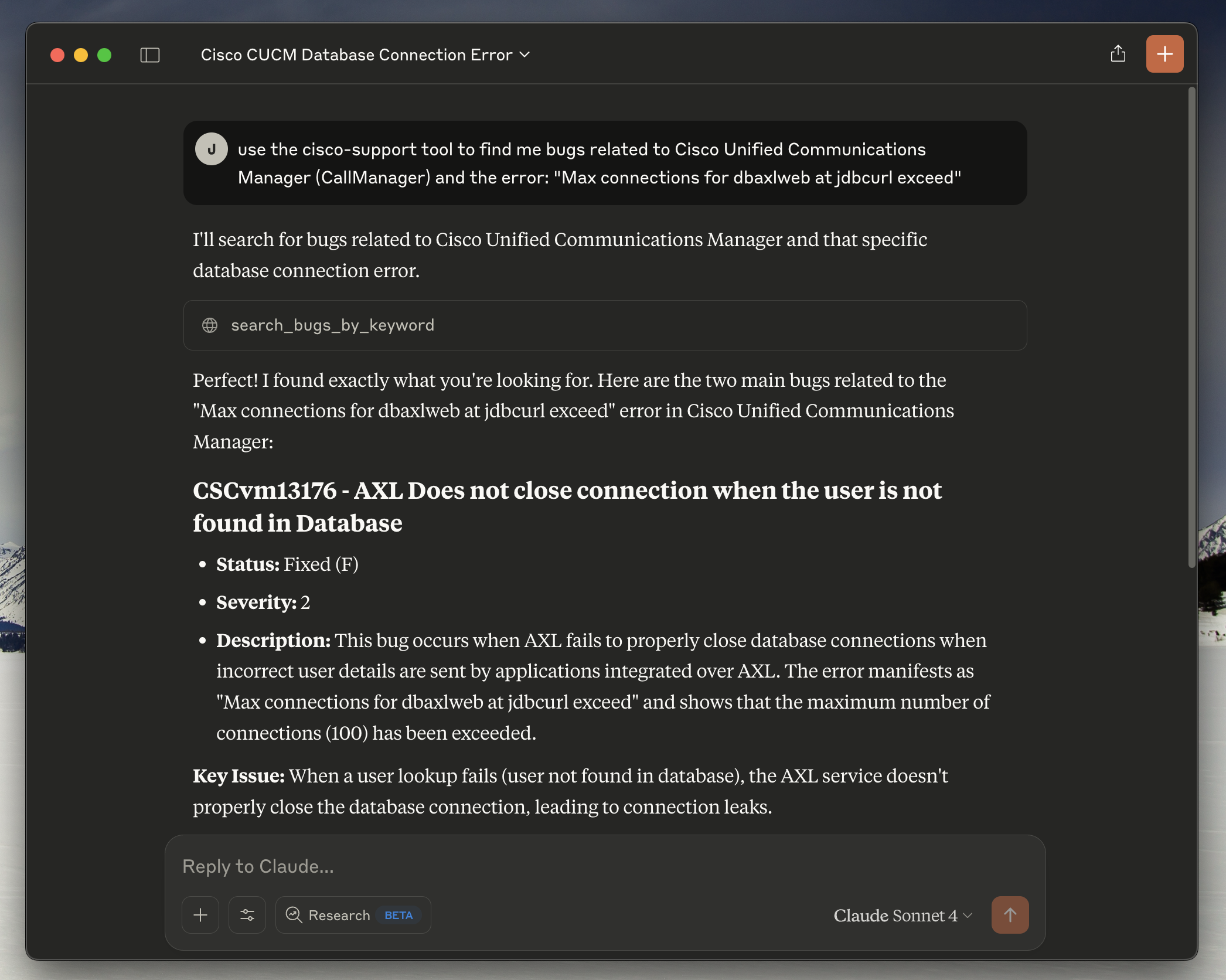
Claude Desktop successfully connected to the Cisco Support MCP server, demonstrating the bug search functionality with real-time responses from Cisco's Bug API.
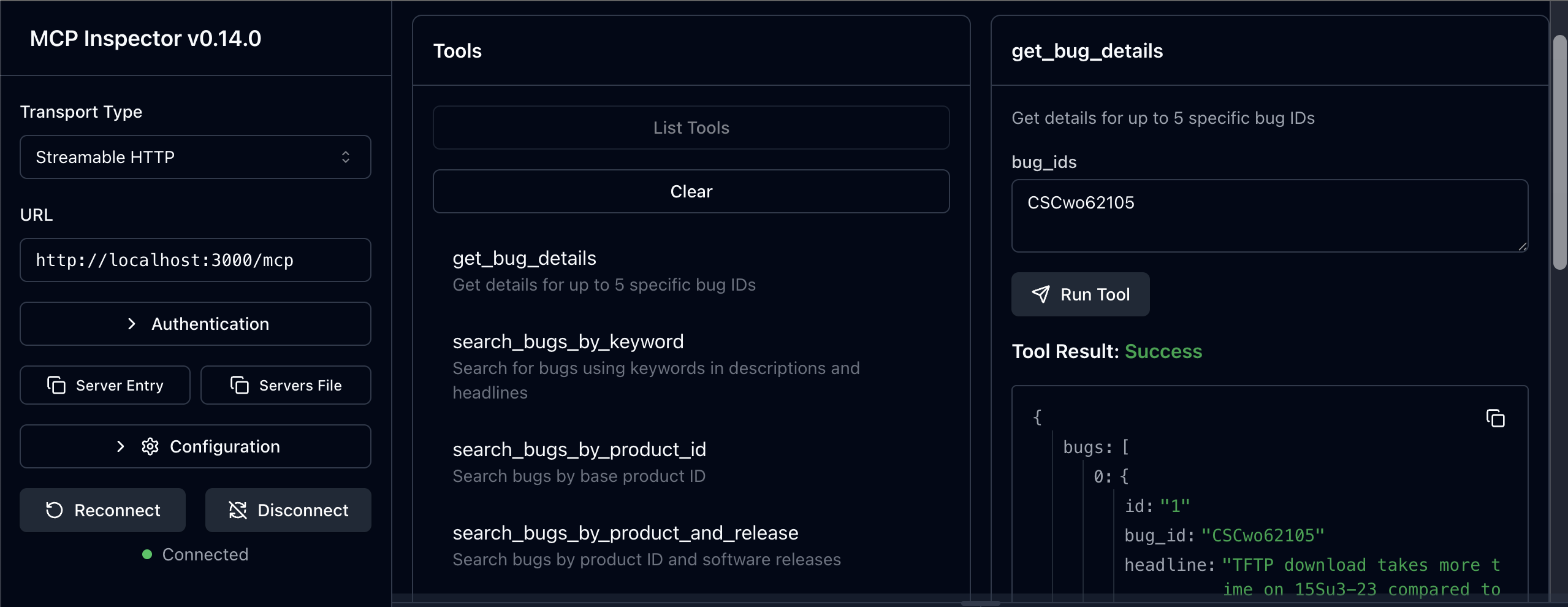
MCP Inspector v0.14.0+ showing the available tools and server connectivity testing capabilities.
If you prefer to install globally instead of using npx:
npm install -g mcp-cisco-supportThen use this config:
{
  "mcpServers": {
    "cisco-support": {
      "command": "mcp-cisco-support",
      "env": {
        "CISCO_CLIENT_ID": "your_client_id_here",
        "CISCO_CLIENT_SECRET": "your_client_secret_here",
        "SUPPORT_API": "bug"
      }
    }
  }
}For development or custom setups:
git clone https://github.com/sieteunoseis/mcp-cisco-support.git
cd mcp-cisco-support
npm install
npm run build
Then use this config:
{
  "mcpServers": {
    "cisco-support": {
      "command": "node",
      "args": ["/path/to/mcp-cisco-support/dist/index.js"],
      "env": {
        "CISCO_CLIENT_ID": "your_client_id_here",
        "CISCO_CLIENT_SECRET": "your_client_secret_here",
        "SUPPORT_API": "bug"
      }
    }
  }
}"Command not found" errors:
Ensure Node.js 18+ is installed
Try global installation: npm install -g mcp-cisco-support
Verify the path in your config file
Authentication failures:
Double-check your Client ID and Secret
Ensure your Cisco API app has Bug API access
Check for typos in the config file
MCP server not loading:
Restart Claude Desktop completely
Check the config file syntax with a JSON validator
Look for Claude Desktop logs/error messages
Permission errors:
Ensure the config file is readable
On macOS/Linux, check file permissions: chmod 644 claude_desktop_config.json
Test the server manually:
npx mcp-cisco-supportThis should start the server in stdio mode without errors.
Validate your config: Use a JSON validator to ensure your config file is properly formatted.
Check Claude Desktop logs:
Look for MCP-related error messages in Claude Desktop
The app usually shows connection status for MCP servers
Monitor logs in real-time (macOS):
# Follow logs in real-time
tail -n 20 -F ~/Library/Logs/Claude/mcp*.log
On Windows:
# Check logs directory
%APPDATA%\Claude\logs\Issues: GitHub Issues
Cisco API: Cisco Developer Documentation
MCP Protocol: Model Context Protocol
# Use pre-built image
docker pull ghcr.io/sieteunoseis/mcp-cisco-support:latest
docker run -p 3000:3000 \
  -e CISCO_CLIENT_ID=your_id \
  -e CISCO_CLIENT_SECRET=your_secret \
  -e SUPPORT_API=bug \
  ghcr.io/sieteunoseis/mcp-cisco-support:latest --http

# Or build locally
docker-compose up -dstdio mode: No authentication (Claude Desktop, local clients)
HTTP mode: Bearer token authentication required
# Generate secure token
npx mcp-cisco-support --generate-token

# Use token for HTTP mode
export MCP_BEARER_TOKEN=your_token
npx mcp-cisco-support --http
See 🔒 Security Guide for complete security documentation.
Create a .env file with your configuration:
# 🔑 Cisco API OAuth2 Configuration (REQUIRED)
CISCO_CLIENT_ID=your_client_id_here
CISCO_CLIENT_SECRET=your_client_secret_here

# 🌐 Server Configuration
PORT=3000
NODE_ENV=development

# 🚀 API Support Configuration
# Enable specific Cisco Support APIs you have access to
# Options: bug, case, eox (plus planned: product, serial, rma, software, asd)
SUPPORT_API=bug,case,eox              # Multiple APIs
# SUPPORT_API=all                     # All available APIs
# SUPPORT_API=bug                     # Single API (default)

# 🔐 HTTP Authentication Configuration (HTTP mode only)
# Custom Bearer token for HTTP authentication (optional - generates random if not set)
MCP_BEARER_TOKEN=your_custom_secure_token_here

# ⚠️ SECURITY WARNING: Only use in development/testing
# DANGEROUSLY_OMIT_AUTH=true # Disables HTTP authentication entirelyFor production-grade authentication with fine-grained access control, use OAuth 2.1 mode:
# 1. Copy example configuration files
cp config/oauth-clients.example.json config/oauth-clients.json
cp config/oauth-secrets.example.json config/oauth-secrets.json

# 2. Edit config/oauth-clients.json to configure your clients
# 3. Add client secrets to config/oauth-secrets.json (optional, for confidential clients)

# 4. Start server in OAuth 2.1 mode
AUTH_TYPE=oauth2.1 npm run oauth:start
# or for development with hot reload:
npm run oauth:devconfig/oauth-clients.json - Client configuration (can be version controlled):
{
  "clients": [
    {
      "client_id": "mcp_inspector_dev",
      "client_uri": "http://localhost:6274",
      "redirect_uris": ["http://localhost:6274/oauth/callback"],
      "scopes": ["mcp:bug", "mcp:psirt"],
      "grant_types": ["authorization_code"],
      "description": "MCP Inspector - Limited to Bug + Security APIs",
      "enabled": true
    }
  ],
  "settings": {
    "allow_dynamic_registration": true,
    "token_expiry_seconds": 3600
  }
}
config/oauth-secrets.json - Client secrets (gitignored, never commit):
{
  "secrets": {
    "mcp_inspector_prod": "your_production_secret_here"
  }
}Control API access with fine-grained scopes:
Scope | API Access | Description |
| All APIs | Full access to all MCP tools |
| Bug API | Bug search and details only |
| Case API | Support case management only |
| EoX API | End-of-life information only |
| Security API | Security advisories only |
| Product API | Product information only |
| Software API | Software suggestions only |
| Serial API | Serial number lookups only |
| RMA API | Return authorization only |
Best Practice: Grant only the scopes each application needs (principle of least privilege).
Point to custom config file locations:
# OAuth 2.1 Configuration
AUTH_TYPE=oauth2.1

# Optional: Custom config paths (defaults shown)
OAUTH_CLIENTS_CONFIG=config/oauth-clients.json
OAUTH_SECRETS_CONFIG=config/oauth-secrets.json

# Optional: Custom issuer URL (defaults to http://localhost:PORT)
OAUTH2_ISSUER_URL=https://your-server.comWhen running in OAuth 2.1 mode, the server provides:
GET /.well-known/oauth-authorization-server - OAuth discovery metadata
GET /authorize - Authorization endpoint (displays consent page)
POST /authorize/approve - Authorization approval
POST /token - Token endpoint (PKCE required)
POST /register - Dynamic client registration (if enabled)
See docs/OAUTH_CLIENTS_CONFIG.md for complete OAuth 2.1 documentation.
Complete configuration for Claude Desktop:
{
  "mcpServers": {
    "cisco-support": {
      "command": "npx",
      "args": ["-y", "mcp-cisco-support"],
      "env": {
        "CISCO_CLIENT_ID": "your_client_id_here",
        "CISCO_CLIENT_SECRET": "your_client_secret_here",
        "SUPPORT_API": "bug,case,eox"
      }
    }
  }
}Option 1: Bearer Token Authentication
docker run -p 3000:3000 \
  -e CISCO_CLIENT_ID=your_client_id \
  -e CISCO_CLIENT_SECRET=your_client_secret \
  -e SUPPORT_API=bug,case,eox \
  -e MCP_BEARER_TOKEN=your_secure_token \
  ghcr.io/sieteunoseis/mcp-cisco-support:latest --http
Option 2: OAuth 2.1 Authentication (Production)
# 1. Create local OAuth config directory
mkdir -p ./oauth-config
cp config/oauth-clients.example.json ./oauth-config/oauth-clients.json
cp config/oauth-secrets.example.json ./oauth-config/oauth-secrets.json

# 2. Edit ./oauth-config/oauth-clients.json and oauth-secrets.json

# 3. Run with volume mount
docker run -p 3000:3000 \
  -e CISCO_CLIENT_ID=your_client_id \
  -e CISCO_CLIENT_SECRET=your_client_secret \
  -e AUTH_TYPE=oauth2.1 \
  -e OAUTH_CLIENTS_CONFIG=/oauth-config/oauth-clients.json \
  -e OAUTH_SECRETS_CONFIG=/oauth-config/oauth-secrets.json \
  -v $(pwd)/oauth-config:/oauth-config:ro \
  ghcr.io/sieteunoseis/mcp-cisco-support:latest --http
Option 3: Without Authentication (Development Only)
docker run -p 3000:3000 \
  -e CISCO_CLIENT_ID=your_client_id \
  -e CISCO_CLIENT_SECRET=your_client_secret \
  -e DANGEROUSLY_OMIT_AUTH=true \
  ghcr.io/sieteunoseis/mcp-cisco-support:latest --http
Docker Compose with OAuth 2.1:
version: '3.8'
services:
  mcp-cisco-support:
    image: ghcr.io/sieteunoseis/mcp-cisco-support:latest
    ports:
      - "3000:3000"
    environment:
      - CISCO_CLIENT_ID=your_client_id
      - CISCO_CLIENT_SECRET=your_client_secret
      - AUTH_TYPE=oauth2.1
      - OAUTH_CLIENTS_CONFIG=/oauth-config/oauth-clients.json
      - OAUTH_SECRETS_CONFIG=/oauth-config/oauth-secrets.json
    volumes:
      - ./oauth-config:/oauth-config:ro
    command: ["node", "dist/index.js", "--http"]
restart: unless-stoppedEndpoint | Method | Description |
| GET | Server information and available endpoints |
| POST | Main MCP endpoint (JSON-RPC over HTTP) |
| POST | Alternative MCP endpoint for N8N compatibility |
| GET | SSE connection with session management |
| POST | Legacy SSE message endpoint (deprecated) |
| POST | Session-specific MCP message endpoint |
| GET | Simple ping endpoint for connectivity testing |
| GET | Health check with detailed status |
For detailed information, see our comprehensive GitHub Wiki:
📋 Available Tools - Complete reference for all 46 MCP tools across 8 APIs
🔧 Advanced Configuration - Environment variables and deployment options
🔒 Security Guide - Authentication, tokens, and security best practices
🚀 Docker Deployment - Containerized deployment and production setup
🌐 SSE Integration - Server-Sent Events and real-time communication
🧪 Testing Framework - Comprehensive testing and validation
🔧 Development Guide - Contributing, architecture, and API development
🚨 Troubleshooting Guide - Common issues and debugging
⚡ MCP Prompts - Guided workflows for Cisco support scenarios
# Test server connectivity
curl http://localhost:3000/ping

# Check health status
curl http://localhost:3000/health

# List available tools (main MCP endpoint)
curl -X POST http://localhost:3000/mcp \
  -H "Content-Type: application/json" \
  -d '{
    "jsonrpc": "2.0",
    "id": "1",
    "method": "tools/list"
  }'

# List available tools (alternative endpoint for N8N)
curl -X POST http://localhost:3000/messages \
  -H "Content-Type: application/json" \
  -d '{
    "jsonrpc": "2.0",
    "id": "1",
    "method": "tools/list"
  }'

# Test SSE connection (will show endpoint event)
curl -N http://localhost:3000/sse

# Search for bugs by keyword
curl -X POST http://localhost:3000/mcp \
  -H "Content-Type: application/json" \
  -d '{
    "jsonrpc": "2.0",
    "id": "2",
    "method": "tools/call",
    "params": {
      "name": "search_bugs_by_keyword",
      "arguments": {
        "keyword": "crash",
        "severity": "1",
        "status": "open"
      }
    }
  }'

# Get specific bug details
curl -X POST http://localhost:3000/mcp \
  -H "Content-Type: application/json" \
  -d '{
    "jsonrpc": "2.0",
    "id": "3",
    "method": "tools/call",
    "params": {
      "name": "get_bug_details",
      "arguments": {
        "bug_ids": "CSCab12345"
      }
    }
}'async function searchBugs(keyword) {
const response = await fetch('http://localhost:3000/mcp', {
method: 'POST',
headers: {
'Content-Type': 'application/json',
},
body: JSON.stringify({
jsonrpc: '2.0',
id: Date.now(),
method: 'tools/call',
params: {
name: 'search_bugs_by_keyword',
arguments: {
keyword: keyword,
page_index: 1,
status: 'open'
}
}
})
});
const result = await response.json();
return result;
}The server provides a comprehensive health check endpoint:
curl http://localhost:3000/healthResponse includes:
Server status
OAuth2 token status
Memory usage
Uptime
Active SSE connections
Helmet: Security headers
CORS: Cross-origin resource sharing
Input Validation: Schema-based validation
Non-root Execution: Docker security
Environment Variables: Secure credential storage
OAuth2 Authentication Failed
Verify CISCO_CLIENT_ID and CISCO_CLIENT_SECRET
Check network connectivity to https://id.cisco.com
API Calls Failing
Check token validity at /health
Verify network access to https://apix.cisco.com
Docker Issues
Ensure environment variables are set
Check Docker logs: docker-compose logs
Structured JSON logs include:
Timestamp
Log level (info, error, warn)
Message
Additional context data
# Run all tests
npm test

# Run tests in watch mode
npm run test:watch

# Run tests with coverage
npm run test:coverage

# Run specific test suite
npx jest tests/auth.test.js
npx jest tests/mcp-tools.test.jsThe test suite includes:
Authentication Tests (tests/auth.test.js): OAuth2 authentication, token management, error handling
MCP Tools Tests (tests/mcp-tools.test.js): All 8 MCP tools, error handling, pagination
Setup (tests/setup.js): Test environment configuration
The following issues were identified and resolved in the test suite:
Token Refresh Logic
Problem: Token expiry calculation was incorrect in getValidToken()
Solution: Fixed condition to properly check if token is within refresh margin
Impact: Proper token caching and refresh behavior
Multiple Bug IDs Handling
Problem: State leakage between tests causing mock sequence mismatches
Solution: Implemented resetServerState() function for proper cleanup
Impact: Consistent test results across multiple runs
Search Tools Implementation
Problem: Same state management issue affecting keyword search and other tools
Solution: Proper server state reset between tests
Impact: All 8 MCP tools now work correctly
Error Handling
Problem: API errors and network timeouts not properly converted to MCP error responses
Solution: Enhanced error handling in handleMCPMessage() function
Impact: Proper error responses for client applications
Authentication Failure Scenarios
Problem: Health endpoint returning 200 instead of 503 on auth failures
Solution: Module cache clearing and proper state isolation
Impact: Correct health status reporting
Test State Management
Problem: Module-level variables persisting between tests
Solution: Added resetServerState() export and proper module cache clearing
Impact: True test isolation and reliable test results
Jest: Using Jest with --forceExit flag for main test runs
State Reset: Each test gets a fresh server instance with clean state
Mock Management: Proper fetch mocking with correct sequence handling
Test Isolation: Module cache clearing prevents state leakage
Native fetch: Uses Node.js native fetch instead of external libraries
Token Management: 12-hour token validity with 30-minute refresh margin
Error Handling: Comprehensive error handling with proper MCP error responses
Security: Helmet security headers, CORS support, input validation
Logging: Structured JSON logging with timestamps
mcp-cisco-support/
├── src/
│   └── index.ts        # Main TypeScript server implementation
├── dist/               # Compiled JavaScript (generated by build)
├── package.json        # Dependencies and scripts
├── tsconfig.json       # TypeScript configuration
├── .env.example       # Environment variables template
├── .env               # Actual environment variables (create from example)
├── .gitignore         # Git ignore rules
├── Dockerfile         # Docker configuration
├── docker-compose.yml # Docker Compose setup
├── screenshots/        # Documentation screenshots
│   └── mcp-inspector-screenshot.png
├── CLAUDE.md          # Project instructions and architecture
└── README.md # Project documentation# Install dependencies
npm install
# Start development server with auto-reload
npm run dev
# Run tests
npm test
# Run tests in watch mode
npm run test:watch
# Build Docker image
docker build -t mcp-cisco-support .
# View logs in development
npm run dev 2>&1 | jq '.' # Pretty print JSON logsToken caching reduces API calls
Pagination limits results to 10 per page
SSE heartbeat every 30 seconds keeps connections alive
Request timeout set to 30 seconds
Never commit .env file to version control
Use environment variables for all secrets
Review Cisco API usage limits and terms
Monitor logs for suspicious activity
OAuth2 URL: https://id.cisco.com/oauth2/default/v1/token
Grant Type: client_credentials
Token Validity: 12 hours
Auto-refresh: 30 minutes before expiry
Base URL: https://apix.cisco.com/bug/v2.0
The server implements the Model Context Protocol with these methods:
initialize: Initialize MCP connection
tools/list: List available tools
tools/call: Execute a tool
Example MCP message:
{
  "jsonrpc": "2.0",
  "id": "1",
  "method": "tools/call",
  "params": {
    "name": "search_bugs_by_keyword",
    "arguments": {
      "keyword": "memory leak",
      "status": "open"
    }
  }
}The server provides a comprehensive health check endpoint:
curl http://localhost:3000/healthResponse includes server status, OAuth2 token status, memory usage, uptime, and active connections.
Comprehensive Jest-based testing framework with:
✅ 46/46 tools tested - All MCP tools across 8 APIs
✅ Mock & Real API testing - Unit tests with mocks + integration tests with live APIs
✅ Individual tool testing - Standalone test runner for development
# Run all tests
npm test

# Test with real API credentials
CISCO_CLIENT_ID=your_id CISCO_CLIENT_SECRET=your_secret npm test

# Test individual tools
npm run test:tool search_bugs_by_keyword
See 🧪 Testing Framework for complete testing documentation.
MIT License - see LICENSE file for details.
Fork the repository
Create a feature branch
Make your changes
Add tests for new functionality
Ensure all tests pass: npm test
Submit a pull request
📖 Complete Documentation - Comprehensive project documentation
📚 Wiki - Detailed guides and troubleshooting
🐛 Issues - Report bugs and request features
🔧 Cisco Developer Documentation - Official API documentation
🔒 Cisco PSIRT Documentation - Security vulnerability API documentation
💬 Cisco Services Discussions - Community support and API discussions
🌐 MCP Protocol - Model Context Protocol specification
Compare bugs, CVEs, and recommendations between two software versions on the same product. Analyzes differences in known issues, security vulnerabilities, and provides upgrade recommendations.
| Name | Required | Description | Default |
|---|---|---|---|
| version_a | Yes | First version to compare (e.g., 17.9.1, 15.1(4)M) | |
| version_b | Yes | Second version to compare (e.g., 17.12.3, 15.2(4)M) | |
| product_id | Yes | Product ID or series name (e.g., C9300-24P, ISR4431/K9, "Cisco 4000 Series Integrated Services Routers") | |
| max_severity | No | Maximum bug severity level to include (1=highest, 6=lowest) | |
| include_eol_status | No | Include end-of-life status comparison | |
| include_cve_analysis | No | Include CVE and security advisory analysis | |
| include_recommendations | No | Include software upgrade recommendations |
Does the description disclose side effects, auth requirements, rate limits, or destructive behavior?
With no annotations, the description must disclose behavioral traits. It only states what the tool does, without mentioning that it is read-only, potential performance implications, or any prerequisites. The description lacks transparency about side effects or limitations.
Agents need to know what a tool does to the world before calling it. Descriptions should go beyond structured annotations to explain consequences.
Is the description appropriately sized, front-loaded, and free of redundancy?
The description is concise with two sentences. The first sentence front-loads the main purpose, and the second elaborates. It is well-structured for a brief description, though it could potentially include more details without being verbose.
Shorter descriptions cost fewer tokens and are easier for agents to parse. Every sentence should earn its place.
Given the tool's complexity, does the description cover enough for an agent to succeed on first attempt?
Given 7 parameters and no output schema, the description covers the core functionality but lacks details on the output format, return structure, or any limitations. It is adequate for a simple tool but not fully comprehensive for the complexity.
Complex tools with many parameters or behaviors need more documentation. Simple tools need less. This dimension scales expectations accordingly.
Does the description clarify parameter syntax, constraints, interactions, or defaults beyond what the schema provides?
Schema coverage is 100%, so baseline is 3. The description mentions 'bugs, CVEs, and recommendations' which aligns with parameters, but does not add significant meaning beyond the schema descriptions. No extra clarification or context added for parameters.
Input schemas describe structure but not intent. Descriptions should explain non-obvious parameter relationships and valid value ranges.
Does the description clearly state what the tool does and how it differs from similar tools?
The description clearly states the tool compares two software versions on bugs, CVEs, and recommendations. It uses a specific verb 'compare' and identifies the resources. However, it does not explicitly distinguish from sibling tools like comprehensive_analysis, but it is clearly a comparison tool.
Agents choose between tools based on descriptions. A clear purpose with a specific verb and resource helps agents select the right tool.
Does the description explain when to use this tool, when not to, or what alternatives exist?
No guidance is provided on when to use this tool versus alternatives. The description does not specify prerequisites, exclusions, or context where this tool is preferred over siblings like smart_search_strategy or multi_severity_search.
Agents often have multiple tools that could apply. Explicit usage guidance like "use X instead of Y when Z" prevents misuse.
BEST FOR DETAILED ANALYSIS: Combines bug database search with web search guidance for EoL information. Provides complete product analysis including known issues, lifecycle status, and actionable recommendations. Ideal for failover issues, configuration problems, and product reliability concerns.
| Name | Required | Description | Default |
|---|---|---|---|
| analysis_focus | No | Focus of the analysis | comprehensive |
| software_version | No | Software version to analyze (e.g., 17.09.06, 15.1(4)M) | |
| product_identifier | Yes | Product name, model, or ID to analyze (e.g., ISR4431/K9, Cisco ASR 1000) | |
| include_web_search_guidance | No | Include web search queries and strategies for additional research |
Does the description disclose side effects, auth requirements, rate limits, or destructive behavior?
No annotations are provided, so the description carries the full burden. It discloses that the tool combines bug database search and web search guidance, implying multi-step behavior. However, it does not describe side effects (none expected), authorization needs, rate limits, or response size. For a complex analysis tool, more behavioral context would be beneficial.
Agents need to know what a tool does to the world before calling it. Descriptions should go beyond structured annotations to explain consequences.
Is the description appropriately sized, front-loaded, and free of redundancy?
The description is two sentences, front-loaded with a bold-purpose statement ('BEST FOR DETAILED ANALYSIS'). Every clause adds value without redundancy. It efficiently conveys the tool's purpose, outputs, and ideal use cases.
Shorter descriptions cost fewer tokens and are easier for agents to parse. Every sentence should earn its place.
Given the tool's complexity, does the description cover enough for an agent to succeed on first attempt?
Given the tool's complexity (combined searches, recommendations) and lack of output schema, the description covers key aspects but lacks details like output format, processing time, or result granularity. It is adequate but would benefit from a sentence about expected response structure.
Complex tools with many parameters or behaviors need more documentation. Simple tools need less. This dimension scales expectations accordingly.
Does the description clarify parameter syntax, constraints, interactions, or defaults beyond what the schema provides?
Schema coverage is 100%, so the description adds some value by contextualizing parameters (e.g., 'include_web_search_guidance' maps to 'web search guidance'). However, it does not explain enum values for analysis_focus or version format beyond what the schema provides. The added context is moderate.
Input schemas describe structure but not intent. Descriptions should explain non-obvious parameter relationships and valid value ranges.
Does the description clearly state what the tool does and how it differs from similar tools?
The description clearly states the tool provides comprehensive product analysis by combining bug database search with web search guidance for EoL information. It explicitly mentions outputs: known issues, lifecycle status, and actionable recommendations. This differentiates it from narrower sibling tools like search_bugs_by_keyword or compare_software_versions.
Agents choose between tools based on descriptions. A clear purpose with a specific verb and resource helps agents select the right tool.
Does the description explain when to use this tool, when not to, or what alternatives exist?
The description says it's 'best for detailed analysis' and 'ideal for failover issues, configuration problems, and product reliability concerns,' giving clear usage guidance. However, it does not explicitly state when not to use it or provide alternatives, which would be helpful given the large number of sibling tools.
Agents often have multiple tools that could apply. Explicit usage guidance like "use X instead of Y when Z" prevents misuse.
Get details for up to 5 specific bug IDs
| Name | Required | Description | Default |
|---|---|---|---|
| bug_ids | Yes | Comma-separated list of bug IDs (max 5) |
Does the description disclose side effects, auth requirements, rate limits, or destructive behavior?
No annotations are provided, so the description must convey behavioral traits. It only states 'get details' and the limit of 5 IDs, without disclosing whether the operation is read-only, rate limits, or what 'details' includes. This is insufficient for a tool with no annotation support.
Agents need to know what a tool does to the world before calling it. Descriptions should go beyond structured annotations to explain consequences.
Is the description appropriately sized, front-loaded, and free of redundancy?
The description is a single, efficient sentence. It is front-loaded and contains no fluff. However, some might argue it is under-specified, but it is concise and to the point.
Shorter descriptions cost fewer tokens and are easier for agents to parse. Every sentence should earn its place.
Given the tool's complexity, does the description cover enough for an agent to succeed on first attempt?
For a simple tool with one parameter and no output schema, the description is minimally adequate. It states the core functionality but lacks context on return format, error handling, or behavior when IDs are invalid. It could be more complete.
Complex tools with many parameters or behaviors need more documentation. Simple tools need less. This dimension scales expectations accordingly.
Does the description clarify parameter syntax, constraints, interactions, or defaults beyond what the schema provides?
With 100% schema description coverage for a single parameter, the baseline is 3. The description adds 'up to 5', which is already present in the schema's parameter description, so no significant additional meaning beyond the schema.
Input schemas describe structure but not intent. Descriptions should explain non-obvious parameter relationships and valid value ranges.
Does the description clearly state what the tool does and how it differs from similar tools?
The description clearly states the tool's function: retrieving details for specific bug IDs. It uses a specific verb 'Get details' and resource 'bug IDs', and the sibling tools are primarily search-based, making this tool distinct as a direct retrieval by ID.
Agents choose between tools based on descriptions. A clear purpose with a specific verb and resource helps agents select the right tool.
Does the description explain when to use this tool, when not to, or what alternatives exist?
The description implies use when you have specific bug IDs but provides no explicit guidance on when not to use it or what alternatives exist. The context of sibling search tools suggests differentiation, but the description lacks explicit usage boundaries.
Agents often have multiple tools that could apply. Explicit usage guidance like "use X instead of Y when Z" prevents misuse.
Get detailed information for a single case ID. Returns comprehensive case information including status, severity, description, and all case attributes.
| Name | Required | Description | Default |
|---|---|---|---|
| case_id | Yes | Single case ID to get details for (e.g., "123456789") |
Does the description disclose side effects, auth requirements, rate limits, or destructive behavior?
With no annotations, the description carries full burden. It does not disclose safety information (read-only implied but not explicit), rate limits, authentication requirements, or data freshness. The description only states that it 'returns comprehensive case information,' which is insufficient.
Agents need to know what a tool does to the world before calling it. Descriptions should go beyond structured annotations to explain consequences.
Is the description appropriately sized, front-loaded, and free of redundancy?
The description is two sentences, front-loaded with the verb and resource, and contains no extraneous words. Every sentence contributes value.
Shorter descriptions cost fewer tokens and are easier for agents to parse. Every sentence should earn its place.
Given the tool's complexity, does the description cover enough for an agent to succeed on first attempt?
The tool has a single simple parameter and no output schema. The description lists some return fields but does not provide a complete picture of what to expect. Given the number of siblings, more differentiation and detail would improve completeness.
Complex tools with many parameters or behaviors need more documentation. Simple tools need less. This dimension scales expectations accordingly.
Does the description clarify parameter syntax, constraints, interactions, or defaults beyond what the schema provides?
Schema coverage is 100%; the parameter case_id is fully described in the schema. The tool description adds no new meaning beyond summarizing the schema. Baseline 3 is appropriate.
Input schemas describe structure but not intent. Descriptions should explain non-obvious parameter relationships and valid value ranges.
Does the description clearly state what the tool does and how it differs from similar tools?
The description clearly identifies the tool's action ('Get detailed information') and resource ('single case ID'), and lists returned fields (status, severity, etc.). However, it does not distinguish itself from siblings like get_case_summary or get_bug_details.
Agents choose between tools based on descriptions. A clear purpose with a specific verb and resource helps agents select the right tool.
Does the description explain when to use this tool, when not to, or what alternatives exist?
No guidance is provided on when to use this tool versus alternatives such as get_case_summary or search_cases_by_*. The description does not mention exclusions or prerequisites.
Agents often have multiple tools that could apply. Explicit usage guidance like "use X instead of Y when Z" prevents misuse.
Get case summary information for up to 30 specific case IDs. Returns brief information for multiple cases.
| Name | Required | Description | Default |
|---|---|---|---|
| sort_by | No | Sort results by field. UPDATED_DATE: Sort by last modification time (ascending). Default. STATUS: Sort by status (ascending) | UPDATED_DATE |
| case_ids | Yes | Comma-separated list of case IDs (max 30, e.g., "123456789,987654321") |
Does the description disclose side effects, auth requirements, rate limits, or destructive behavior?
No annotations are provided, so the description must carry the full transparency burden. It only states 'Returns brief information' without disclosing what fields are included, whether authentication is required, rate limits, or any side effects. This significant gap leaves the agent uninformed about critical behavioral traits.
Agents need to know what a tool does to the world before calling it. Descriptions should go beyond structured annotations to explain consequences.
Is the description appropriately sized, front-loaded, and free of redundancy?
The description consists of two clear, front-loaded sentences with zero extraneous information. Every word contributes to conveying the tool's function and constraint.
Shorter descriptions cost fewer tokens and are easier for agents to parse. Every sentence should earn its place.
Given the tool's complexity, does the description cover enough for an agent to succeed on first attempt?
Given the absence of an output schema, the description should elaborate on what 'brief information' includes. It does not, leaving the agent uncertain about the return format. However, the core functionality and constraints (max 30 IDs) are conveyed, so completeness is adequate but not thorough.
Complex tools with many parameters or behaviors need more documentation. Simple tools need less. This dimension scales expectations accordingly.
Does the description clarify parameter syntax, constraints, interactions, or defaults beyond what the schema provides?
The input schema already describes both parameters with 100% coverage, including the max count for case_ids and enumeration for sort_by. The description adds no additional semantic value beyond the tool's purpose, warranting the baseline score of 3.
Input schemas describe structure but not intent. Descriptions should explain non-obvious parameter relationships and valid value ranges.
Does the description clearly state what the tool does and how it differs from similar tools?
The description clearly states the verb 'Get', the resource 'case summary information', and the scope 'up to 30 specific case IDs' for multiple cases. This distinguishes it from siblings like 'get_case_details' which presumably returns full details for a single case.
Agents choose between tools based on descriptions. A clear purpose with a specific verb and resource helps agents select the right tool.
Does the description explain when to use this tool, when not to, or what alternatives exist?
The description implies usage for obtaining summaries of multiple cases by ID, but does not explicitly state when to use this tool versus alternatives (e.g., get_case_details for full details, search_cases_by_user for user-based queries). No exclusions or when-not guidance is provided.
Agents often have multiple tools that could apply. Explicit usage guidance like "use X instead of Y when Z" prevents misuse.
Get detailed coverage status, warranty, and product information for up to 75 serial numbers. Returns comprehensive coverage details including warranty dates, contract information, and product identifiers.
| Name | Required | Description | Default |
|---|---|---|---|
| page_index | No | Page number for pagination (starts at 1). Each page returns up to 75 results. | |
| serial_numbers | Yes | Comma-separated list of serial numbers (max 75, e.g., "SAL09232Q0Z,FOC0903N5J9"). Supported formats include 11-character serial numbers and other Cisco serial number formats. |
Does the description disclose side effects, auth requirements, rate limits, or destructive behavior?
With no annotations, the description should fully convey behavior. It only restates the capacity constraint (up to 75 serials) already present in the schema and lists output fields, but omits safety aspects, error handling, or read-only semantics.
Agents need to know what a tool does to the world before calling it. Descriptions should go beyond structured annotations to explain consequences.
Is the description appropriately sized, front-loaded, and free of redundancy?
Two concise sentences with no redundant words. Front-loaded with action and capacity, then lists return contents. Every sentence earns its place.
Shorter descriptions cost fewer tokens and are easier for agents to parse. Every sentence should earn its place.
Given the tool's complexity, does the description cover enough for an agent to succeed on first attempt?
Given high schema coverage and only two parameters, the description is adequate but lacks usage guidelines and behavioral details. The output specification is partial but reasonable for a coverage-status tool.
Complex tools with many parameters or behaviors need more documentation. Simple tools need less. This dimension scales expectations accordingly.
Does the description clarify parameter syntax, constraints, interactions, or defaults beyond what the schema provides?
Schema coverage is 100% with good descriptions for both parameters. The description adds minimal value beyond the schema, only reinforcing the max 75 serial numbers. Baseline 3 applies.
Input schemas describe structure but not intent. Descriptions should explain non-obvious parameter relationships and valid value ranges.
Does the description clearly state what the tool does and how it differs from similar tools?
The description clearly states the tool retrieves detailed coverage status, warranty, and product information for up to 75 serial numbers. It distinguishes itself from the sibling 'get_coverage_summary_by_serial' by implying it returns more comprehensive data, though not explicitly.
Agents choose between tools based on descriptions. A clear purpose with a specific verb and resource helps agents select the right tool.
Does the description explain when to use this tool, when not to, or what alternatives exist?
The description provides no guidance on when to use this tool versus alternatives like get_coverage_summary_by_serial, nor does it mention any prerequisites or context-specific conditions.
Agents often have multiple tools that could apply. Explicit usage guidance like "use X instead of Y when Z" prevents misuse.
Get coverage summary by instance numbers. Instance numbers are unique identifiers for devices in Cisco systems. Returns coverage information for specified instances.
| Name | Required | Description | Default |
|---|---|---|---|
| page_index | No | Page number for pagination (starts at 1) | |
| instance_numbers | Yes | Comma-separated list of instance numbers (e.g., "12345,67890"). Instance numbers are numeric identifiers. |
Does the description disclose side effects, auth requirements, rate limits, or destructive behavior?
No annotations are provided, so the description carries full burden. It only states that the tool returns coverage information, without disclosing side effects (none expected, but not stated), authentication needs, rate limits, or any behavioral constraints. The description lacks critical safety/behavioral context.
Agents need to know what a tool does to the world before calling it. Descriptions should go beyond structured annotations to explain consequences.
Is the description appropriately sized, front-loaded, and free of redundancy?
Two sentences, front-loaded with the action, no fluff. Every sentence earns its place.
Shorter descriptions cost fewer tokens and are easier for agents to parse. Every sentence should earn its place.
Given the tool's complexity, does the description cover enough for an agent to succeed on first attempt?
The description is adequate for a simple lookup but lacks details on return format (no output schema) and pagination behavior. Given the schema covers parameters well, but the tool's full context (e.g., what coverage summary includes) is missing.
Complex tools with many parameters or behaviors need more documentation. Simple tools need less. This dimension scales expectations accordingly.
Does the description clarify parameter syntax, constraints, interactions, or defaults beyond what the schema provides?
Schema coverage is 100% with descriptions for both parameters. The description adds context that instance numbers are unique identifiers in Cisco systems, but does not elaborate on page_index (pagination). Overall, the description adds marginal value beyond the schema.
Input schemas describe structure but not intent. Descriptions should explain non-obvious parameter relationships and valid value ranges.
Does the description clearly state what the tool does and how it differs from similar tools?
The description clearly states the action ('Get coverage summary') and the resource ('by instance numbers'), differentiating from siblings like 'get_coverage_summary_by_serial' and 'get_coverage_status_by_serial'. It also explains what instance numbers are.
Agents choose between tools based on descriptions. A clear purpose with a specific verb and resource helps agents select the right tool.
Does the description explain when to use this tool, when not to, or what alternatives exist?
The description implies usage when instance numbers are available, but does not explicitly state when to use this tool versus alternatives (e.g., by_serial). No 'when not to use' or alternative tool names are mentioned.
Agents often have multiple tools that could apply. Explicit usage guidance like "use X instead of Y when Z" prevents misuse.
Get summary coverage information for up to 75 serial numbers. Returns brief coverage status and key dates. Use this for quick coverage lookups without full details.
| Name | Required | Description | Default |
|---|---|---|---|
| page_index | No | Page number for pagination (starts at 1) | |
| serial_numbers | Yes | Comma-separated list of serial numbers (max 75, e.g., "SAL09232Q0Z,FOC0903N5J9,INM07501EC3") |
Does the description disclose side effects, auth requirements, rate limits, or destructive behavior?
No annotations provided, so description carries full burden. It discloses read behavior and returns 'brief coverage status and key dates' but lacks details on output format, authentication, or side effects. Adequate but not rich.
Agents need to know what a tool does to the world before calling it. Descriptions should go beyond structured annotations to explain consequences.
Is the description appropriately sized, front-loaded, and free of redundancy?
Two concise sentences with no redundancy. The first sentence states the core function and limit, the second clarifies purpose. Every word earns its place.
Shorter descriptions cost fewer tokens and are easier for agents to parse. Every sentence should earn its place.
Given the tool's complexity, does the description cover enough for an agent to succeed on first attempt?
Given no output schema, the description vaguely outlines the return type ('brief coverage status and key dates'). It addresses the input limit and quick-lookup context. While more detail on output or differentiation from sibling tools would improve completeness, it is sufficient for a simple tool.
Complex tools with many parameters or behaviors need more documentation. Simple tools need less. This dimension scales expectations accordingly.
Does the description clarify parameter syntax, constraints, interactions, or defaults beyond what the schema provides?
Schema coverage is 100%, so baseline is 3. The description reinforces the 75 serial number limit but does not add new semantic information beyond the schema descriptions for 'serial_numbers' and 'page_index'.
Input schemas describe structure but not intent. Descriptions should explain non-obvious parameter relationships and valid value ranges.
Does the description clearly state what the tool does and how it differs from similar tools?
The description clearly states the tool's function: 'Get summary coverage information for up to 75 serial numbers' with output specifics. It distinguishes from siblings like 'get_coverage_summary_by_instance' by specifying serial numbers as input and from 'get_coverage_status_by_serial' by implying summary vs. status.
Agents choose between tools based on descriptions. A clear purpose with a specific verb and resource helps agents select the right tool.
Does the description explain when to use this tool, when not to, or what alternatives exist?
The description explicitly says 'Use this for quick coverage lookups without full details', providing when-to-use guidance. It implies not for full detail lookups but does not name alternatives or exclusions directly.
Agents often have multiple tools that could apply. Explicit usage guidance like "use X instead of Y when Z" prevents misuse.
RECOMMENDED for multi-severity searches: Automatically searches multiple severity levels and combines results with severity breakdown counts. Use this when you need "severity 3 or higher", "high severity bugs", or any range of severities. Handles the API limitation that requires separate calls for each severity level. SMART FALLBACK: When product_id search returns no results, automatically falls back to keyword search for better coverage (regardless of whether version is provided).
| Name | Required | Description | Default |
|---|---|---|---|
| version | No | Software version to search for (e.g., "15.0", "14.0", "17.9.6"). Will be automatically included in keyword search terms and used for product_series searches as affected_releases. Optional for product_id searches (fallback to keyword happens with or without version). | |
| search_term | Yes | Search term (keyword or product identifier). For keyword searches, limited to 50 characters. Long product series names will be automatically shortened. | |
| search_type | Yes | Type of search to perform. Use "product_series" for full product names like "Cisco 4000 Series Integrated Services Routers". For product IDs like "ISR4431", use "product_id" which will automatically fallback to keyword search if needed. | |
| max_severity | No | Maximum severity level to include (1=highest, 6=lowest) |
Does the description disclose side effects, auth requirements, rate limits, or destructive behavior?
Despite no annotations, the description fully discloses behaviors: automatic multi-severity search, result combination, severity breakdown counts, and automatic fallback from product_id to keyword search. This adds significant value beyond the schema.
Agents need to know what a tool does to the world before calling it. Descriptions should go beyond structured annotations to explain consequences.
Is the description appropriately sized, front-loaded, and free of redundancy?
The description is concise, with two clear sentences for main functionality and a separate SMART FALLBACK explanation. No redundant information; every sentence adds value.
Shorter descriptions cost fewer tokens and are easier for agents to parse. Every sentence should earn its place.
Given the tool's complexity, does the description cover enough for an agent to succeed on first attempt?
Given 4 parameters, 100% schema coverage, no output schema, and many sibling tools, the description adequately covers usage, behavior, and fallback. It is complete for an AI agent to invoke correctly.
Complex tools with many parameters or behaviors need more documentation. Simple tools need less. This dimension scales expectations accordingly.
Does the description clarify parameter syntax, constraints, interactions, or defaults beyond what the schema provides?
Schema coverage is 100% with good descriptions. The description adds further context, e.g., version auto-inclusion in keyword search, and search_type guidance for product_series vs product_id. This enriches parameter understanding.
Input schemas describe structure but not intent. Descriptions should explain non-obvious parameter relationships and valid value ranges.
Does the description clearly state what the tool does and how it differs from similar tools?
The description clearly states the tool's purpose: automatically searches multiple severity levels and combines results with breakdown counts. It uses strong action verbs and distinguishes itself from sibling tools by addressing the API limitation that requires separate calls per severity.
Agents choose between tools based on descriptions. A clear purpose with a specific verb and resource helps agents select the right tool.
Does the description explain when to use this tool, when not to, or what alternatives exist?
The description explicitly states when to use the tool ('when you need severity 3 or higher' or any range) and provides a 'SMART FALLBACK' behavior. However, it does not directly compare to sibling tools or state when not to use it.
Agents often have multiple tools that could apply. Explicit usage guidance like "use X instead of Y when Z" prevents misuse.
Resolves product IDs to full product names and provides web search strategies. Helps convert technical product codes to searchable terms.
| Name | Required | Description | Default |
|---|---|---|---|
| product_id | Yes | Product ID to resolve (e.g., ISR4431/K9, WS-C2960-24TC-L) | |
| include_search_strategies | No | Include recommended web search strategies |
Does the description disclose side effects, auth requirements, rate limits, or destructive behavior?
No annotations are provided, so the description carries the full burden of behavioral disclosure. It only states the core function but omits details like error handling (e.g., unknown product ID), required permissions, or whether the search strategies are returned as text or structured data.
Agents need to know what a tool does to the world before calling it. Descriptions should go beyond structured annotations to explain consequences.
Is the description appropriately sized, front-loaded, and free of redundancy?
Two concise sentences deliver the purpose and value without extraneous information. Every word earns its place, and the description is front-loaded.
Shorter descriptions cost fewer tokens and are easier for agents to parse. Every sentence should earn its place.
Given the tool's complexity, does the description cover enough for an agent to succeed on first attempt?
For a simple tool with 2 parameters and no output schema, the description is adequate but lacks error behavior and typical use-case context. It could mention that product IDs follow Cisco patterns or that the tool expects exact IDs.
Complex tools with many parameters or behaviors need more documentation. Simple tools need less. This dimension scales expectations accordingly.
Does the description clarify parameter syntax, constraints, interactions, or defaults beyond what the schema provides?
Schema coverage is 100%, so baseline is 3. The description adds context by mentioning 'web search strategies,' which relates to the include_search_strategies parameter. However, it does not elaborate on the format or content of the strategies.
Input schemas describe structure but not intent. Descriptions should explain non-obvious parameter relationships and valid value ranges.
Does the description clearly state what the tool does and how it differs from similar tools?
The description clearly states the verb 'resolves' and the resources: product IDs to full product names and web search strategies. It distinguishes from sibling tools like search_bugs_by_product_id by focusing on name resolution rather than bug search.
Agents choose between tools based on descriptions. A clear purpose with a specific verb and resource helps agents select the right tool.
Does the description explain when to use this tool, when not to, or what alternatives exist?
The description implies usage when converting product IDs to names, but does not explicitly state when or when not to use it, nor mention alternatives among siblings. Example: 'Helps convert technical product codes to searchable terms' suggests a pre-processing step for other tools.
Agents often have multiple tools that could apply. Explicit usage guidance like "use X instead of Y when Z" prevents misuse.
Automatically tries multiple search strategies, starting specific and broadening scope if needed. Handles version normalization and product ID variations.
| Name | Required | Description | Default |
|---|---|---|---|
| status | No | Bug status filter | |
| version | No | Software version (will try multiple formats: 17.09.06 -> 17.09 -> 17) | |
| severity_range | No | Severity range to search (will search each level separately) | high |
| primary_search_term | Yes | Primary search term (product name, model, or keyword) |
Does the description disclose side effects, auth requirements, rate limits, or destructive behavior?
With no annotations, the description carries full burden. It reveals that the tool normalizes versions and product IDs and broadens search scope. However, it does not detail the exact algorithm, failure behavior, or how far broadening goes.
Agents need to know what a tool does to the world before calling it. Descriptions should go beyond structured annotations to explain consequences.
Is the description appropriately sized, front-loaded, and free of redundancy?
Two sentences, no wasted words. Front-loaded with the core behavior and key differentiators.
Shorter descriptions cost fewer tokens and are easier for agents to parse. Every sentence should earn its place.
Given the tool's complexity, does the description cover enough for an agent to succeed on first attempt?
Given complexity and no output schema, the description provides a high-level overview but lacks details on return format, error handling, and the precise broadening strategy, leaving some gaps.
Complex tools with many parameters or behaviors need more documentation. Simple tools need less. This dimension scales expectations accordingly.
Does the description clarify parameter syntax, constraints, interactions, or defaults beyond what the schema provides?
Schema description coverage is 100%, baseline 3. The description adds slight value by stating that severity_range is searched level by level and version is normalized, but most parameter meaning is in the schema.
Input schemas describe structure but not intent. Descriptions should explain non-obvious parameter relationships and valid value ranges.
Does the description clearly state what the tool does and how it differs from similar tools?
The description clearly states the tool's purpose: it automatically tries multiple search strategies, starting specific and broadening scope. It highlights key features like version normalization and product ID variations, which distinguish it from sibling tools that require exact matches.
Agents choose between tools based on descriptions. A clear purpose with a specific verb and resource helps agents select the right tool.
Does the description explain when to use this tool, when not to, or what alternatives exist?
The description implies usage scenarios where automatic broadening is desired but lacks explicit guidance on when not to use this tool or which sibling tools might be more appropriate for specific needs.
Agents often have multiple tools that could apply. Explicit usage guidance like "use X instead of Y when Z" prevents misuse.
Search for bugs using keywords in descriptions and headlines. Use this when searching by general terms, symptoms, or when product-specific tools are not applicable. IMPORTANT: severity parameter returns ONLY that specific level. For "severity 3 or higher" searches, use multi_severity_search tool instead. NOTE: Do NOT use product IDs (like ISR4431/K9) as keywords - use search_bugs_by_product_id instead.
| Name | Required | Description | Default |
|---|---|---|---|
| status | No | Bug status filter. IMPORTANT: Only ONE status allowed per search. Values: O=Open, F=Fixed, T=Terminated. Do NOT use comma-separated values like "O,F". | |
| keyword | Yes | Keywords to search for (general terms, symptoms, error messages - NOT product IDs) | |
| sort_by | No | Sort order for results. Default: modified_date (recent first) | |
| severity | No | Bug severity filter. Returns bugs with ONLY the specified severity level. Values: 1=Severity 1 (highest), 2=Severity 2, 3=Severity 3, 4=Severity 4, 5=Severity 5, 6=Severity 6 (lowest). For "severity 3 or higher" bugs, use multi_severity_search tool which handles multiple separate API calls. | |
| page_index | No | Page number (10 results per page) | |
| modified_date | No | Last modified date filter. Values: 1=Last Week, 2=Last 30 Days, 3=Last 6 Months, 4=Last Year, 5=All. Default: 5 (All) | 5 |
Does the description disclose side effects, auth requirements, rate limits, or destructive behavior?
No annotations provided, but description discloses key behaviors: severity returns exact match only, status limited to one value, keyword cannot be product ID. Missing details on default sort, pagination, or read-only nature, but still strong.
Agents need to know what a tool does to the world before calling it. Descriptions should go beyond structured annotations to explain consequences.
Is the description appropriately sized, front-loaded, and free of redundancy?
Three concise sentences with purpose and key usage notes front-loaded. Every sentence adds value.
Shorter descriptions cost fewer tokens and are easier for agents to parse. Every sentence should earn its place.
Given the tool's complexity, does the description cover enough for an agent to succeed on first attempt?
No output schema, description doesn't explain return format. But given 6 params and sibling tools, the description covers core aspects adequately. A minor gap.
Complex tools with many parameters or behaviors need more documentation. Simple tools need less. This dimension scales expectations accordingly.
Does the description clarify parameter syntax, constraints, interactions, or defaults beyond what the schema provides?
Schema covers all parameters, but description adds extra context: severity exact match, status single value, keyword not for product IDs. Adds value beyond schema.
Input schemas describe structure but not intent. Descriptions should explain non-obvious parameter relationships and valid value ranges.
Does the description clearly state what the tool does and how it differs from similar tools?
The description clearly states the tool searches for bugs using keywords in descriptions and headlines. It also distinguishes from siblings by specifying when to use alternative tools for product IDs or severity ranges.
Agents choose between tools based on descriptions. A clear purpose with a specific verb and resource helps agents select the right tool.
Does the description explain when to use this tool, when not to, or what alternatives exist?
Explicitly tells when to use (general terms, symptoms) and when not (product IDs, severity ranges). Names alternative tools: search_bugs_by_product_id and multi_severity_search.
Agents often have multiple tools that could apply. Explicit usage guidance like "use X instead of Y when Z" prevents misuse.
Search bugs by specific product ID and software releases. CRITICAL: Use "software_releases" parameter with comma-separated values like "17.9.1,17.12.3" to search up to 75 versions in ONE API call. NEVER make multiple separate calls for different versions - the API supports multiple versions in a single request. Use this when you have an exact product ID and want to filter by specific software versions. For product series searches, use search_bugs_by_product_series_affected instead.
| Name | Required | Description | Default |
|---|---|---|---|
| status | No | Bug status filter. IMPORTANT: Only ONE status allowed per search. Values: O=Open, F=Fixed, T=Terminated. Do NOT use comma-separated values like "O,F". | |
| sort_by | No | Sort order for results. Default: modified_date (recent first) | |
| base_pid | Yes | Specific product ID (e.g., "C9300-24P", "ISR4431", "ASA5516-X") - NOT product series names | |
| severity | No | Bug severity filter. Returns bugs with ONLY the specified severity level. Values: 1=Severity 1 (highest), 2=Severity 2, 3=Severity 3, 4=Severity 4, 5=Severity 5, 6=Severity 6 (lowest). For "severity 3 or higher" bugs, use multi_severity_search tool which handles multiple separate API calls. | |
| page_index | No | Page number (10 results per page) | |
| modified_date | No | Last modified date filter. Values: 1=Last Week, 2=Last 30 Days, 3=Last 6 Months, 4=Last Year, 5=All. Default: 5 (All) | 5 |
| software_releases | Yes | Comma-separated software release versions (e.g., "17.9.1,17.12.3") - can search up to 75 versions in one call. Do NOT make separate API calls for each version. |
Does the description disclose side effects, auth requirements, rate limits, or destructive behavior?
No annotations exist, so the description carries the full burden. It discloses that the API supports up to 75 versions in one call and warns against misuse. It does not cover auth or rate limits, but the key behavioral trait is well communicated.
Agents need to know what a tool does to the world before calling it. Descriptions should go beyond structured annotations to explain consequences.
Is the description appropriately sized, front-loaded, and free of redundancy?
Two concise paragraphs with front-loaded purpose and critical usage note. Every sentence adds value, no redundancy.
Shorter descriptions cost fewer tokens and are easier for agents to parse. Every sentence should earn its place.
Given the tool's complexity, does the description cover enough for an agent to succeed on first attempt?
Given 7 parameters, no output schema, and no annotations, the description covers main functionality, constraints, and alternatives. It explains pagination only implicitly (page_index in schema) but is otherwise thorough for a search tool.
Complex tools with many parameters or behaviors need more documentation. Simple tools need less. This dimension scales expectations accordingly.
Does the description clarify parameter syntax, constraints, interactions, or defaults beyond what the schema provides?
Schema coverage is 100%, baseline is 3. The description adds value by explaining the software_releases parameter's comma-separated format and 75 version limit, and clarifies the severity parameter's single-value constraint and alternative tool for range searches.
Input schemas describe structure but not intent. Descriptions should explain non-obvious parameter relationships and valid value ranges.
Does the description clearly state what the tool does and how it differs from similar tools?
The description clearly states the tool searches bugs by specific product ID and software releases. It distinguishes from sibling tools by mentioning search_bugs_by_product_series_affected for product series searches.
Agents choose between tools based on descriptions. A clear purpose with a specific verb and resource helps agents select the right tool.
Does the description explain when to use this tool, when not to, or what alternatives exist?
Explicitly states when to use this tool (exact product ID and software versions), warns against making multiple separate calls, and provides an alternative for product series searches.
Agents often have multiple tools that could apply. Explicit usage guidance like "use X instead of Y when Z" prevents misuse.
Search bugs by specific base product ID (e.g., C9200-24P). Use when you have an exact Cisco product ID. For general product searches by name, consider using keyword search instead.
| Name | Required | Description | Default |
|---|---|---|---|
| status | No | Bug status filter. IMPORTANT: Only ONE status allowed per search. Values: O=Open, F=Fixed, T=Terminated. Do NOT use comma-separated values like "O,F". | |
| sort_by | No | Sort order for results. Default: modified_date (recent first) | |
| base_pid | Yes | Base product ID | |
| severity | No | Bug severity filter. Returns bugs with ONLY the specified severity level. Values: 1=Severity 1 (highest), 2=Severity 2, 3=Severity 3, 4=Severity 4, 5=Severity 5, 6=Severity 6 (lowest). For "severity 3 or higher" bugs, use multi_severity_search tool which handles multiple separate API calls. | |
| page_index | No | Page number (10 results per page) | |
| modified_date | No | Last modified date filter. Values: 1=Last Week, 2=Last 30 Days, 3=Last 6 Months, 4=Last Year, 5=All. Default: 5 (All) | 5 |
Does the description disclose side effects, auth requirements, rate limits, or destructive behavior?
No annotations are provided, so the description bears full responsibility for behavioral disclosure. The description does not mention side effects, authentication needs, rate limits, or data scope. It only states the search operation without additional behavioral context, leaving significant gaps for an unannotated tool.
Agents need to know what a tool does to the world before calling it. Descriptions should go beyond structured annotations to explain consequences.
Is the description appropriately sized, front-loaded, and free of redundancy?
The description is brief and entirely relevant: two sentences conveying purpose and when to use. No extraneous information; every sentence earns its place.
Shorter descriptions cost fewer tokens and are easier for agents to parse. Every sentence should earn its place.
Given the tool's complexity, does the description cover enough for an agent to succeed on first attempt?
Despite having 6 parameters and no output schema, the description does not explain return values or behavioral constraints. It lacks context on pagination, filtering behavior, and result structure, which is needed given the tool's complexity and missing output schema.
Complex tools with many parameters or behaviors need more documentation. Simple tools need less. This dimension scales expectations accordingly.
Does the description clarify parameter syntax, constraints, interactions, or defaults beyond what the schema provides?
Schema description coverage is 100%, so the input schema already documents all 6 parameters with descriptions. The tool description adds no new parameter semantics beyond what the schema provides. Baseline score of 3 is appropriate.
Input schemas describe structure but not intent. Descriptions should explain non-obvious parameter relationships and valid value ranges.
Does the description clearly state what the tool does and how it differs from similar tools?
The description clearly states the action ('Search bugs') and the specific resource ('by specific base product ID (e.g., C9200-24P)'). It distinguishes from sibling tools like keyword search by specifying the exact product ID use case.
Agents choose between tools based on descriptions. A clear purpose with a specific verb and resource helps agents select the right tool.
Does the description explain when to use this tool, when not to, or what alternatives exist?
The description explicitly states when to use this tool ('when you have an exact Cisco product ID') and when not to ('For general product searches by name, consider using keyword search instead'), naming a concrete alternative.
Agents often have multiple tools that could apply. Explicit usage guidance like "use X instead of Y when Z" prevents misuse.
Search bugs by full product name and affected releases. NOTE: Requires FULL descriptive product names (like "Cisco 4431 Integrated Services Router") not product IDs. Use search_bugs_by_product_id for product IDs like ISR4431.
| Name | Required | Description | Default |
|---|---|---|---|
| status | No | Bug status filter. IMPORTANT: Only ONE status allowed per search. Values: O=Open, F=Fixed, T=Terminated. Do NOT use comma-separated values like "O,F". | |
| sort_by | No | Sort order for results. Default: modified_date (recent first) | |
| severity | No | Bug severity filter. Returns bugs with ONLY the specified severity level. Values: 1=Severity 1 (highest), 2=Severity 2, 3=Severity 3, 4=Severity 4, 5=Severity 5, 6=Severity 6 (lowest). For "severity 3 or higher" bugs, use multi_severity_search tool which handles multiple separate API calls. | |
| page_index | No | Page number (10 results per page) | |
| product_name | Yes | Full descriptive product name (e.g., "Cisco 4431 Integrated Services Router", "Cisco 2504 Wireless Controller") - NOT product IDs like ISR4431 | |
| modified_date | No | Last modified date filter. Values: 1=Last Week, 2=Last 30 Days, 3=Last 6 Months, 4=Last Year, 5=All. Default: 5 (All) | 5 |
| affected_releases | Yes | Comma-separated affected release versions (e.g., "12.5(1)SU5,14.0(1)SU2"). Can search up to 75 versions in one call. |
Does the description disclose side effects, auth requirements, rate limits, or destructive behavior?
No annotations are provided, so the description carries full burden for behavioral disclosure. While the tool's name and description imply a read-only search operation, it does not explicitly state safety or idempotency. Behavioral traits like auth requirements or rate limits are not mentioned. The parameter descriptions are detailed, but the narrative description lacks additional behavioral context.
Agents need to know what a tool does to the world before calling it. Descriptions should go beyond structured annotations to explain consequences.
Is the description appropriately sized, front-loaded, and free of redundancy?
The description is extremely concise: two sentences that front-load the purpose and provide immediate usage guidance. Every sentence earns its place, with no redundant information.
Shorter descriptions cost fewer tokens and are easier for agents to parse. Every sentence should earn its place.
Given the tool's complexity, does the description cover enough for an agent to succeed on first attempt?
For a tool with 7 parameters, 2 required, and no output schema, the description covers the essential aspects, and the schema descriptions are highly detailed. However, the description does not specify what the tool returns (e.g., a list of bugs with basic fields), which is a minor gap given the lack of an output schema. Overall, it is nearly complete.
Complex tools with many parameters or behaviors need more documentation. Simple tools need less. This dimension scales expectations accordingly.
Does the description clarify parameter syntax, constraints, interactions, or defaults beyond what the schema provides?
Schema description coverage is 100%, so baseline is 3. The tool description adds minimal semantic value beyond the schema, mainly reiterating the product name requirement and pointing to a sibling tool. The schema descriptions themselves are thorough, covering enums, defaults, and usage notes, so the description does not significantly enhance parameter understanding.
Input schemas describe structure but not intent. Descriptions should explain non-obvious parameter relationships and valid value ranges.
Does the description clearly state what the tool does and how it differs from similar tools?
The description clearly states 'Search bugs by full product name and affected releases', specifying the verb (search) and resource (bugs) with a clear scope (by product name and affected releases). It also distinguishes from the sibling tool 'search_bugs_by_product_id', which is mentioned explicitly.
Agents choose between tools based on descriptions. A clear purpose with a specific verb and resource helps agents select the right tool.
Does the description explain when to use this tool, when not to, or what alternatives exist?
The description explicitly states when to use this tool (full descriptive product names) and when not to use it (product IDs), providing an alternative: 'Use search_bugs_by_product_id for product IDs'. Additionally, parameter descriptions for 'status' and 'severity' provide clear constraints (only one status allowed, use multi_severity_search for ranges).
Agents often have multiple tools that could apply. Explicit usage guidance like "use X instead of Y when Z" prevents misuse.
Search bugs by full product name and fixed releases. NOTE: Requires FULL descriptive product names (like "Cisco 4431 Integrated Services Router") not product IDs. Use search_bugs_by_product_id for product IDs like ISR4431.
| Name | Required | Description | Default |
|---|---|---|---|
| status | No | Bug status filter. IMPORTANT: Only ONE status allowed per search. Values: O=Open, F=Fixed, T=Terminated. Do NOT use comma-separated values like "O,F". | |
| sort_by | No | Sort order for results. Default: modified_date (recent first) | |
| severity | No | Bug severity filter. Returns bugs with ONLY the specified severity level. Values: 1=Severity 1 (highest), 2=Severity 2, 3=Severity 3, 4=Severity 4, 5=Severity 5, 6=Severity 6 (lowest). For "severity 3 or higher" bugs, use multi_severity_search tool which handles multiple separate API calls. | |
| page_index | No | Page number (10 results per page) | |
| product_name | Yes | Full descriptive product name (e.g., "Cisco 4431 Integrated Services Router", "Cisco 2504 Wireless Controller") - NOT product IDs like ISR4431 | |
| modified_date | No | Last modified date filter. Values: 1=Last Week, 2=Last 30 Days, 3=Last 6 Months, 4=Last Year, 5=All. Default: 5 (All) | 5 |
| fixed_releases | Yes | Comma-separated fixed release versions (e.g., "12.5(1)SU6,14.0(1)SU3"). Can search up to 75 versions in one call. |
Does the description disclose side effects, auth requirements, rate limits, or destructive behavior?
No annotations are provided, so the description bears full responsibility. It fails to disclose any behavioral traits such as mutation, rate limits, authentication requirements, or error handling. The only behavioral implication is the input format constraint, which is more about parameter semantics.
Agents need to know what a tool does to the world before calling it. Descriptions should go beyond structured annotations to explain consequences.
Is the description appropriately sized, front-loaded, and free of redundancy?
The description is extremely concise: two sentences with no wasted words. It front-loads the purpose and immediately provides a critical usage note. Every sentence earns its place.
Shorter descriptions cost fewer tokens and are easier for agents to parse. Every sentence should earn its place.
Given the tool's complexity, does the description cover enough for an agent to succeed on first attempt?
Given no output schema and 7 parameters, the description covers the essential purpose and key constraint but lacks details on pagination, result format, error responses, or behavior when no results are found. It is minimally adequate but not thorough.
Complex tools with many parameters or behaviors need more documentation. Simple tools need less. This dimension scales expectations accordingly.
Does the description clarify parameter syntax, constraints, interactions, or defaults beyond what the schema provides?
Schema coverage is 100%, so baseline is 3. The description adds value by explaining that product_name requires full names and fixed_releases expects comma-separated versions with examples. This is helpful but does not significantly elevate beyond the schema.
Input schemas describe structure but not intent. Descriptions should explain non-obvious parameter relationships and valid value ranges.
Does the description clearly state what the tool does and how it differs from similar tools?
The description clearly states 'Search bugs by full product name and fixed releases.' It distinguishes from sibling tool search_bugs_by_product_id by specifying the requirement for full descriptive names, not IDs, making the purpose specific and actionable.
Agents choose between tools based on descriptions. A clear purpose with a specific verb and resource helps agents select the right tool.
Does the description explain when to use this tool, when not to, or what alternatives exist?
The description explicitly tells when to use this tool (full product names) and when to use an alternative (product IDs with search_bugs_by_product_id). It provides clear context but does not cover other potential usage scenarios or exclusions related to other siblings.
Agents often have multiple tools that could apply. Explicit usage guidance like "use X instead of Y when Z" prevents misuse.
Search bugs by product series and affected releases. This endpoint accepts full product series names like "Cisco 4000 Series Integrated Services Routers". IMPORTANT: Use Cisco API version format without leading zeros (17.9.6 not 17.09.06).
| Name | Required | Description | Default |
|---|---|---|---|
| status | No | Bug status filter. IMPORTANT: Only ONE status allowed per search. Values: O=Open, F=Fixed, T=Terminated. Do NOT use comma-separated values like "O,F". | |
| sort_by | No | Sort order for results. Default: modified_date (recent first) | |
| severity | No | Bug severity filter. Returns bugs with ONLY the specified severity level. Values: 1=Severity 1 (highest), 2=Severity 2, 3=Severity 3, 4=Severity 4, 5=Severity 5, 6=Severity 6 (lowest). For "severity 3 or higher" bugs, use multi_severity_search tool which handles multiple separate API calls. | |
| page_index | No | Page number (10 results per page) | |
| modified_date | No | Last modified date filter. Values: 1=Last Week, 2=Last 30 Days, 3=Last 6 Months, 4=Last Year, 5=All. Default: 5 (All) | 5 |
| product_series | Yes | Product series name (accepts full names like "Cisco 4000 Series Integrated Services Routers", "Cisco Catalyst 9200 Series", etc.) | |
| affected_releases | Yes | Comma-separated affected release versions in Cisco API format (e.g., "17.9.6,17.12.3" not "17.09.06" - no leading zeros). Can search up to 75 versions in one call. |
Does the description disclose side effects, auth requirements, rate limits, or destructive behavior?
Without annotations, the description carries the full burden. It discloses key constraints (no leading zeros, single status filter, exact severity filter) but does not mention authentication, rate limits, or whether the operation is read-only. Adequate but not exhaustive.
Agents need to know what a tool does to the world before calling it. Descriptions should go beyond structured annotations to explain consequences.
Is the description appropriately sized, front-loaded, and free of redundancy?
The description is concise and front-loaded with the purpose. Every sentence adds value, and the important notes are highlighted with 'IMPORTANT'. No unnecessary information.
Shorter descriptions cost fewer tokens and are easier for agents to parse. Every sentence should earn its place.
Given the tool's complexity, does the description cover enough for an agent to succeed on first attempt?
For a search tool with 7 parameters and no output schema, the description covers key aspects: what it does, required params, format guidelines, and filter limitations. It lacks output format details but the schema descriptions are comprehensive.
Complex tools with many parameters or behaviors need more documentation. Simple tools need less. This dimension scales expectations accordingly.
Does the description clarify parameter syntax, constraints, interactions, or defaults beyond what the schema provides?
Schema coverage is 100%, so the description adds value beyond the parameter descriptions with examples for product_series and affected_releases, and explicit constraints like status limitation and severity exact filter. It enriches the schema definitions.
Input schemas describe structure but not intent. Descriptions should explain non-obvious parameter relationships and valid value ranges.
Does the description clearly state what the tool does and how it differs from similar tools?
The description clearly specifies the action ('Search bugs') and the resource ('by product series and affected releases'). It distinguishes from sibling tools like search_bugs_by_product_name_affected by focusing on product series names and affected releases.
Agents choose between tools based on descriptions. A clear purpose with a specific verb and resource helps agents select the right tool.
Does the description explain when to use this tool, when not to, or what alternatives exist?
It provides important usage notes such as the API version format and that only one status is allowed. However, it does not explicitly differentiate when to use this tool over similar siblings like search_bugs_by_product_name_affected.
Agents often have multiple tools that could apply. Explicit usage guidance like "use X instead of Y when Z" prevents misuse.
Search bugs by product series and fixed releases. This endpoint accepts full product series names like "Cisco 4000 Series Integrated Services Routers". IMPORTANT: Use Cisco API version format without leading zeros (17.9.6 not 17.09.06).
| Name | Required | Description | Default |
|---|---|---|---|
| status | No | Bug status filter. IMPORTANT: Only ONE status allowed per search. Values: O=Open, F=Fixed, T=Terminated. Do NOT use comma-separated values like "O,F". | |
| sort_by | No | Sort order for results. Default: modified_date (recent first) | |
| severity | No | Bug severity filter. Returns bugs with ONLY the specified severity level. Values: 1=Severity 1 (highest), 2=Severity 2, 3=Severity 3, 4=Severity 4, 5=Severity 5, 6=Severity 6 (lowest). For "severity 3 or higher" bugs, use multi_severity_search tool which handles multiple separate API calls. | |
| page_index | No | Page number (10 results per page) | |
| modified_date | No | Last modified date filter. Values: 1=Last Week, 2=Last 30 Days, 3=Last 6 Months, 4=Last Year, 5=All. Default: 5 (All) | 5 |
| fixed_releases | Yes | Comma-separated fixed release versions in Cisco API format (e.g., "17.9.6,17.12.3" not "17.09.06" - no leading zeros). Can search up to 75 versions in one call. | |
| product_series | Yes | Product series name (accepts full names like "Cisco 4000 Series Integrated Services Routers", "Cisco Catalyst 9200 Series", etc.) |
Does the description disclose side effects, auth requirements, rate limits, or destructive behavior?
No annotations provided, but the description compensates by detailing constraints like single status limitation and version format requirements. Could add more on pagination or rate limits, but sufficient for a read-heavy search tool.
Agents need to know what a tool does to the world before calling it. Descriptions should go beyond structured annotations to explain consequences.
Is the description appropriately sized, front-loaded, and free of redundancy?
Every sentence adds value; no redundancy or fluff. Front-loaded with purpose then constraint details. Well-structured and easy to parse.
Shorter descriptions cost fewer tokens and are easier for agents to parse. Every sentence should earn its place.
Given the tool's complexity, does the description cover enough for an agent to succeed on first attempt?
Given 7 parameters, no output schema, and no annotations, the description covers the core functionality, formatting tips, and key constraints. Slight gap on result structure or example, but overall complete.
Complex tools with many parameters or behaviors need more documentation. Simple tools need less. This dimension scales expectations accordingly.
Does the description clarify parameter syntax, constraints, interactions, or defaults beyond what the schema provides?
Schema coverage is 100%, but the description adds significant meaning beyond the schema, such as clarifying severity values, version format, and status usage. Enhances understanding of parameter behavior.
Input schemas describe structure but not intent. Descriptions should explain non-obvious parameter relationships and valid value ranges.
Does the description clearly state what the tool does and how it differs from similar tools?
The description clearly states the tool searches bugs by product series and fixed releases, using specific verbs and resources. It distinguishes from sibling tools like search_bugs_by_product_series_affected and multi_severity_search.
Agents choose between tools based on descriptions. A clear purpose with a specific verb and resource helps agents select the right tool.
Does the description explain when to use this tool, when not to, or what alternatives exist?
Explicitly explains when to use this tool (for searching by fixed releases) and when not (e.g., for severity ranges, use multi_severity_search). Provides critical formatting notes and valid input ranges.
Agents often have multiple tools that could apply. Explicit usage guidance like "use X instead of Y when Z" prevents misuse.
Search for cases associated with specific contract IDs (max 10). Returns cases linked to the specified contracts.
| Name | Required | Description | Default |
|---|---|---|---|
| sort_by | No | Sort results by field. UPDATED_DATE: Sort by last modification time (ascending). Default. STATUS: Sort by status (ascending) | UPDATED_DATE |
| page_index | No | Page number for pagination (default: 5) | |
| status_flag | No | Return only cases associated with the specified status; O = open, C = closed. If status_flag is O (open), all open cases within the specified date range are returned; if a date range is not specified, all open cases associated with the other search parameters are returned. The maximum range returned is 90 days. The default behavior for this parameter is to return cases of both open and closed status. | |
| contract_ids | Yes | Comma-separated list of contract IDs (max 10) | |
| date_created_to | No | End date (in UTC) of the range in which to search. For example: 2013-04-23T11:00:00Z Note: The maximum date range currently supported is 90 days. | |
| date_created_from | No | Beginning date (in UTC) of the range in which to search. For example: 2013-04-23T11:00:14Z Note: The maximum date range currently supported is 90 days. |
Does the description disclose side effects, auth requirements, rate limits, or destructive behavior?
No annotations exist, so the description must carry the behavioral burden. It mentions the 'max 10' constraint but omits other behaviors like pagination, sorting defaults, or date range interactions. The description is accurate but not exhaustive.
Agents need to know what a tool does to the world before calling it. Descriptions should go beyond structured annotations to explain consequences.
Is the description appropriately sized, front-loaded, and free of redundancy?
Two concise sentences, front-loaded with the core action and constraint. Every word adds value, with no redundancy.
Shorter descriptions cost fewer tokens and are easier for agents to parse. Every sentence should earn its place.
Given the tool's complexity, does the description cover enough for an agent to succeed on first attempt?
Given 6 parameters and no output schema, the description is minimal. It does not explain return values or how optional filters interact, though parameter descriptions are detailed. Adequate but not comprehensive.
Complex tools with many parameters or behaviors need more documentation. Simple tools need less. This dimension scales expectations accordingly.
Does the description clarify parameter syntax, constraints, interactions, or defaults beyond what the schema provides?
Schema description coverage is 100%, so the schema already explains each parameter. The description adds no new parameter-specific information beyond the schema, meeting the baseline of 3.
Input schemas describe structure but not intent. Descriptions should explain non-obvious parameter relationships and valid value ranges.
Does the description clearly state what the tool does and how it differs from similar tools?
The description clearly states the tool's function: searching for cases by specific contract IDs, with a maximum of 10. This explicitly distinguishes it from sibling tools like search_cases_by_user, which search by different criteria.
Agents choose between tools based on descriptions. A clear purpose with a specific verb and resource helps agents select the right tool.
Does the description explain when to use this tool, when not to, or what alternatives exist?
The description provides clear context for when to use the tool (when you have contract IDs) and mentions a key constraint (max 10). It does not explicitly list alternatives or when-not-to-use, but the sibling list allows inference.
Agents often have multiple tools that could apply. Explicit usage guidance like "use X instead of Y when Z" prevents misuse.
Search for cases associated with specific user IDs (max 10). Returns cases owned by or involving the specified users.
| Name | Required | Description | Default |
|---|---|---|---|
| sort_by | No | Sort results by field. UPDATED_DATE: Sort by last modification time (ascending). Default. STATUS: Sort by status (ascending) | UPDATED_DATE |
| user_ids | Yes | Comma-separated list of user IDs (max 10) | |
| page_index | No | Page number for pagination (default: 5) | |
| status_flag | No | Return only cases associated with the specified status; O = open, C = closed. If status_flag is O (open), all open cases within the specified date range are returned; if a date range is not specified, all open cases associated with the other search parameters are returned. The maximum range returned is 90 days. The default behavior for this parameter is to return cases of both open and closed status. | |
| date_created_to | No | End date (in UTC) of the range in which to search. For example: 2013-04-23T11:00:00Z Note: The maximum date range currently supported is 90 days. | |
| date_created_from | No | Beginning date (in UTC) of the range in which to search. For example: 2013-04-23T11:00:14Z Note: The maximum date range currently supported is 90 days. |
Does the description disclose side effects, auth requirements, rate limits, or destructive behavior?
No annotations are provided, so the description carries full burden. It only states basic purpose and a limit on user IDs, but fails to mention sorting defaults, pagination, date range constraints, status filtering, authentication requirements, or any rate limits. This is minimal behavioral disclosure for a search tool.
Agents need to know what a tool does to the world before calling it. Descriptions should go beyond structured annotations to explain consequences.
Is the description appropriately sized, front-loaded, and free of redundancy?
The description is a single sentence, which is concise but too brief. It lacks structure and does not highlight key aspects. It is not verbose, but could be more informative without adding length.
Shorter descriptions cost fewer tokens and are easier for agents to parse. Every sentence should earn its place.
Given the tool's complexity, does the description cover enough for an agent to succeed on first attempt?
Given the absence of an output schema, the description should explain what data is returned (fields, format). It does not. It also omits default behaviors (e.g., sort order, pagination page index default 5). The description is insufficient for an agent to fully understand the tool's capabilities.
Complex tools with many parameters or behaviors need more documentation. Simple tools need less. This dimension scales expectations accordingly.
Does the description clarify parameter syntax, constraints, interactions, or defaults beyond what the schema provides?
Schema description coverage is 100%, so baseline is 3. The description adds no extra semantic value beyond the schema; it only repeats the user ID limit already present in the schema. It does not clarify the meaning or interplay of parameters like date ranges or status flag.
Input schemas describe structure but not intent. Descriptions should explain non-obvious parameter relationships and valid value ranges.
Does the description clearly state what the tool does and how it differs from similar tools?
The description clearly states the tool's purpose: 'Search for cases associated with specific user IDs (max 10). Returns cases owned by or involving the specified users.' This distinguishes it from sibling tools like search_cases_by_contract.
Agents choose between tools based on descriptions. A clear purpose with a specific verb and resource helps agents select the right tool.
Does the description explain when to use this tool, when not to, or what alternatives exist?
No guidance on when to use this tool versus alternatives. The description does not mention when to choose it over other search tools, nor does it specify prerequisites or excluded scenarios.
Agents often have multiple tools that could apply. Explicit usage guidance like "use X instead of Y when Z" prevents misuse.
Analyzes search queries and suggests optimal search approaches based on input patterns. Provides strategic guidance for finding bugs effectively.
| Name | Required | Description | Default |
|---|---|---|---|
| search_context | No | Context for the search (incident, upgrade planning, maintenance, security review) | |
| query_description | Yes | Describe what you want to search for (e.g., "ISR4431 version 17.09.06 high severity bugs") |
Does the description disclose side effects, auth requirements, rate limits, or destructive behavior?
With no annotations, the description does not disclose behavioral traits like side effects, permissions, or rate limits. It only states the basic function, leaving the agent uninformed about what happens during analysis.
Agents need to know what a tool does to the world before calling it. Descriptions should go beyond structured annotations to explain consequences.
Is the description appropriately sized, front-loaded, and free of redundancy?
The description is concise (two sentences, ~21 words) and front-loaded with the key action. No filler, but could be slightly expanded for more clarity.
Shorter descriptions cost fewer tokens and are easier for agents to parse. Every sentence should earn its place.
Given the tool's complexity, does the description cover enough for an agent to succeed on first attempt?
Without an output schema, the description does not specify the return value format or structure. For a tool that 'suggests optimal search approaches,' this is a significant gap that hampers agent understanding of what to expect.
Complex tools with many parameters or behaviors need more documentation. Simple tools need less. This dimension scales expectations accordingly.
Does the description clarify parameter syntax, constraints, interactions, or defaults beyond what the schema provides?
Schema coverage is 100% with clear descriptions for both parameters. The description adds context that the query_description is analyzed for patterns, but this does not significantly enhance understanding beyond the schema.
Input schemas describe structure but not intent. Descriptions should explain non-obvious parameter relationships and valid value ranges.
Does the description clearly state what the tool does and how it differs from similar tools?
The description clearly indicates the tool analyzes search queries and suggests optimal approaches, distinguishing it from sibling direct-search tools. It specifies the resource ('search queries') and the action ('suggests optimal search approaches'). However, it could be more explicit about the output format.
Agents choose between tools based on descriptions. A clear purpose with a specific verb and resource helps agents select the right tool.
Does the description explain when to use this tool, when not to, or what alternatives exist?
No guidance is given on when to use this tool versus the many sibling search tools. It implies use for strategic guidance, but lacks explicit conditions or alternatives.
Agents often have multiple tools that could apply. Explicit usage guidance like "use X instead of Y when Z" prevents misuse.
Recent tool additions, removals, and schema changes observed during successful MCP inspections.
v1.11.1compare_software_versionscomprehensive_analysisget_bug_detailsget_case_detailsget_case_summaryget_coverage_status_by_serialget_coverage_summary_by_instanceget_coverage_summary_by_serialmulti_severity_searchproduct_name_resolverprogressive_bug_searchsearch_bugs_by_keywordsearch_bugs_by_product_and_releasesearch_bugs_by_product_idsearch_bugs_by_product_name_affectedsearch_bugs_by_product_name_fixedsearch_bugs_by_product_series_affectedsearch_bugs_by_product_series_fixedsearch_cases_by_contractsearch_cases_by_usersmart_search_strategyv1.8.1compare_software_versionscomprehensive_analysisget_bug_detailsget_case_detailsget_case_summaryget_coverage_status_by_serialget_coverage_summary_by_instanceget_coverage_summary_by_serialmulti_severity_searchproduct_name_resolverprogressive_bug_searchsearch_bugs_by_keywordsearch_bugs_by_product_and_releasesearch_bugs_by_product_idsearch_bugs_by_product_name_affectedsearch_bugs_by_product_name_fixedsearch_bugs_by_product_series_affectedsearch_bugs_by_product_series_fixedsearch_cases_by_contractsearch_cases_by_usersmart_search_strategyv1.7.0compare_software_versionscomprehensive_analysisget_bug_detailsget_case_detailsget_case_summaryget_coverage_status_by_serialget_coverage_summary_by_instanceget_coverage_summary_by_serialmulti_severity_searchproduct_name_resolverprogressive_bug_searchsearch_bugs_by_keywordsearch_bugs_by_product_and_releasesearch_bugs_by_product_idsearch_bugs_by_product_name_affectedsearch_bugs_by_product_name_fixedsearch_bugs_by_product_series_affectedsearch_bugs_by_product_series_fixedsearch_cases_by_contractsearch_cases_by_usersmart_search_strategyv1.0.0get_case_detailsget_case_summaryget_coverage_status_by_serialget_coverage_summary_by_instanceget_coverage_summary_by_serialmulti_severity_search3 fields changedInput schema / properties / additional_paramsRemoved value: -{
- "additionalProperties": true,
- "description": "Additional parameters specific to search type (e.g., affected_releases for product_series). Required for product_series searches unless version parameter is provided.",
- "type": "object"
-}Input schema / properties / search_type / descriptionPrevious value: -"Type of search to perform. Use \"product_series\" for full product names like \"Cisco 4000 Series Integrated Services Routers\""New value: +"Type of search to perform. Use \"product_series\" for full product names like \"Cisco 4000 Series Integrated Services Routers\". For product IDs like \"ISR4431\", use \"product_id\" which will automatically fallback to keyword search if needed."Input schema / properties / version / descriptionPrevious value: -"Software version to search for (e.g., \"15.0\", \"14.0\", \"17.9.6\"). Will be automatically included in search terms and used for product_series searches as affected_releases."New value: +"Software version to search for (e.g., \"15.0\", \"14.0\", \"17.9.6\"). Will be automatically included in keyword search terms and used for product_series searches as affected_releases. Optional for product_id searches (fallback to keyword happens with or without version)."search_bugs_by_keyword1 field changedInput schema / properties / keyword / descriptionPrevious value: -"Keywords to search for"New value: +"Keywords to search for (general terms, symptoms, error messages - NOT product IDs)"search_cases_by_contractsearch_cases_by_usercompare_software_versionscomprehensive_analysisget_bug_detailsmulti_severity_searchproduct_name_resolverprogressive_bug_searchsearch_bugs_by_keywordsearch_bugs_by_product_and_releasesearch_bugs_by_product_idsearch_bugs_by_product_name_affectedsearch_bugs_by_product_name_fixedsearch_bugs_by_product_series_affectedsearch_bugs_by_product_series_fixedsmart_search_strategyScored across 21 tools
There are many bug search tools with similar names (e.g., search_bugs_by_product_id, search_bugs_by_product_name_affected, search_bugs_by_product_series_affected), which could cause confusion. The smart_search_strategy tool helps, but still the boundaries between some tools are subtle.
All tool names follow a consistent snake_case verb_noun pattern (e.g., compare_software_versions, get_bug_details). Some names are lengthy but the pattern is uniform, making it predictable.
21 tools is slightly above the typical 3-15 range, but the Cisco support domain is broad enough to justify each tool. The count is not excessive and the tools are well-scoped.
The tool set covers bug search (multiple strategies), case management, coverage status, version comparison, and product resolution. Missing are edit/delete operations for cases, but these are likely read-only for support queries. The comprehensive_analysis tool provides a fallback for EoL info.
MCP server for the Vulners.com API
Model Context Protocol server for the Apideck Unified API. Connect any MCP-compatible agent framework to 100+ accounting systems, HRIS platforms, file storage providers, and more through one integration. More information https://www.apideck.com/mcp-server
A simple Typescript MCP server built using the official MCP Typescript SDK and smithery/cli. This…
The official MCP server for Capawesome documentation and Capawesome Cloud.