

F
licenseNot graded
qualityD
maintenanceMCP server for the Fantasy Premier League API, enabling querying of players, teams, fixtures, and your FPL team through any MCP-compatible client.
-

The Fantasy Premier League MCP Server provides comprehensive access to FPL data and analytics for strategic decision-making, primarily designed for use with MCP-compatible LLMs.
Core Data Access:
Retrieve comprehensive player statistics, historical data, and upcoming fixtures
Access Premier League team information and composition
Get detailed gameweek data (current, previous, and next) including status and timing
View all fixtures for the season, specific gameweeks, or teams
Analysis Tools:
Search and filter players by name, position, team, price, points, ownership, and form
Compare detailed statistics and metrics between multiple players
Analyze upcoming fixtures with difficulty ratings for players, teams, or positions
Identify upcoming blank and double gameweeks for strategic planning
Team Management:
Access authenticated FPL team details and manager information
View any FPL team using its team ID
Check FPL authentication status
League Features:
Retrieve mini-league standings
Access rich league analytics including historical performance, team composition, and decision analysis
Strategic Assistance:
Generate AI-assisted advice through prompt templates for transfer decisions, team ratings, differential picks, and chip strategies
Provides access to Fantasy Premier League data including comprehensive player statistics, team information, gameweek data, fixture difficulty, and tools for comparing players and analyzing performance
Leverages Python to access the Fantasy Premier League API, with support for Python 3.10 or higher to run the MCP server
Click on "Deploy Server".
Wait a few minutes for the server to deploy. Once ready, it will show a "Started" state.
In the chat, type @ followed by the MCP server name and your instructions, e.g., "@Fantasy Premier League MCP Server compare Mohamed Salah and Erling Haaland over the last 5 gameweeks"
That's it! The server will respond to your query, and you can continue using it as needed.
Here is a step-by-step guide with screenshots.


A Model Context Protocol (MCP) server that provides access to Fantasy Premier League (FPL) data and tools. This server allows you to interact with FPL data in Claude for Desktop and other MCP-compatible clients.
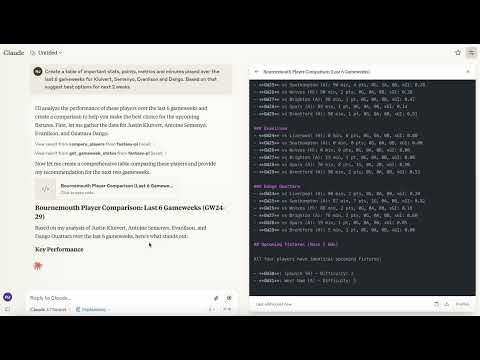
Demo of the Fantasy Premier League MCP Server in action
Claude Desktop
Cursor
Windsurf
Other MCP Compatible Desktop LLMs
Mobile is currently not supported.
Related MCP server: fpl-mcp
Rich Player Data: Access comprehensive player statistics from the FPL API
Team Information: Get details about Premier League teams
Gameweek Data: View current and past gameweek information
Player Search: Find players by name or team
Player Comparison: Compare detailed statistics between any two players
Python 3.10 or higher
Claude Desktop (for AI integration)
pip install fpl-mcppip install "fpl-mcp[dev]"pip install git+https://github.com/rishijatia/fantasy-pl-mcp.gitgit clone https://github.com/rishijatia/fantasy-pl-mcp.git
cd fantasy-pl-mcp
pip install -e .After installation, you have several options to run the server:
fpl-mcppython -m fpl_mcpConfigure Claude Desktop to use the installed package by editing your claude_desktop_config.json file:
Method 1: Using the Python module directly (most reliable)
{
  "mcpServers": {
    "fantasy-pl": {
      "command": "python",
      "args": ["-m", "fpl_mcp"]
    }
  }
}
Method 2: Using the installed command with full path (if installed with pip)
{
  "mcpServers": {
    "fantasy-pl": {
      "command": "/full/path/to/your/venv/bin/fpl-mcp"
    }
  }
}
Replace /full/path/to/your/venv/bin/fpl-mcp with the actual path to the executable. You can find this by running which fpl-mcp in your terminal after activating your virtual environment.
Note: Using just
"command": "fpl-mcp"may result in aspawn fpl-mcp ENOENTerror since Claude Desktop might not have access to your virtual environment's PATH. Using the full path or the Python module approach helps avoid this issue.
Start Claude for Desktop
You should see FPL tools available via the hammer icon
Example queries:
"Compare Mohamed Salah and Erling Haaland over the last 5 gameweeks"
"Find all Arsenal midfielders"
"What's the current gameweek status?"
"Show me the top 5 forwards by points"
Compare players: "Compare [Player1] and [Player2]"
Find players: "Find players from [Team]" or "Search for [Player Name]"
Fixture difficulty: "Show upcoming fixtures for [Team]"
Captain advice: "Who should I captain between [Player1] and [Player2]?"
Statistical analysis: "Compare underlying stats for [Player1] and [Player2]"
Form check: "Show me players in form right now"
Differential picks: "Suggest differentials under 10% ownership"
Team optimization: "Rate my team and suggest transfers"
Be specific with player names for accurate results
Include positions when searching (FWD, MID, DEF, GK)
For best captain advice, ask about form, fixtures, and underlying stats
Request comparison of specific metrics (xG, shots in box, etc.
For development and testing:
# If you have mcp[cli] installed
mcp dev -m fpl_mcp

# Or use npx
npx @modelcontextprotocol/inspector python -m fpl_mcpfpl://static/players - All player data with comprehensive statistics
fpl://static/players/{name} - Player data by name search
fpl://static/teams - All Premier League teams
fpl://static/teams/{name} - Team data by name search
fpl://gameweeks/current - Current gameweek data
fpl://gameweeks/all - All gameweeks data
fpl://fixtures - All fixtures for the current season
fpl://fixtures/gameweek/{gameweek_id} - Fixtures for a specific gameweek
fpl://fixtures/team/{team_name} - Fixtures for a specific team
fpl://players/{player_name}/fixtures - Upcoming fixtures for a specific player
fpl://gameweeks/blank - Information about upcoming blank gameweeks
fpl://gameweeks/double - Information about upcoming double gameweeks
search_fpl_players - Search for players by name, with optional position and team filters
get_player_information - Get detailed information and gameweek history for a player
analyze_players - Filter and analyze FPL players based on multiple criteria
compare_players - Compare multiple players across various metrics
get_price_changes - Get players whose price rose or fell in the current gameweek
get_gameweek_status - Get precise information about current, previous, and next gameweeks
analyze_player_fixtures - Analyze upcoming fixtures for a player with difficulty ratings
analyze_fixtures - Analyze upcoming fixtures for players, teams, or positions
get_blank_gameweeks - Get information about upcoming blank gameweeks
get_double_gameweeks - Get information about upcoming double gameweeks
get_gameweek_live_scores - Live player points and stats while matches are being played
get_dream_team - The official highest-scoring XI for a gameweek
suggest_captain - Rank your squad by captain score with per-component reasoning
check_fpl_authentication - Check if FPL authentication is working correctly
update_fpl_credentials - Update your stored FPL credentials from within a chat
get_my_team - View your authenticated team (requires authentication)
get_my_current_team - View your current team for the active gameweek (requires authentication)
get_team - View any team with a specific ID (requires authentication)
get_manager - Get manager details for a specific team ID (requires authentication)
get_manager_info - Get manager details (requires authentication)
get_manager_transfer_history - Get a manager's full transfer history
get_league_standings - Get standings for a classic league (requires authentication)
get_league_analytics - Analyze a league's managers, ownership trends, and performance
player_analysis_prompt - Create a prompt for analyzing an FPL player in depth
transfer_advice_prompt - Get advice on player transfers based on budget and position
team_rating_prompt - Create a prompt for rating and analyzing an FPL team
differential_players_prompt - Create a prompt for finding differential players with low ownership
chip_strategy_prompt - Create a prompt for chip strategy advice
To add new features:
Add resource handlers in the appropriate file within fpl_mcp/fpl/resources/
Add tool handlers in the appropriate file within fpl_mcp/fpl/tools/
Update the __main__.py file to register new resources and tools
Test using the MCP Inspector before deploying to Claude for Desktop
FPL migrated its login to PingOne (Ping Identity) OIDC, so authentication now uses an OIDC
refresh token rather than your email and password. The refresh token is exchanged for
short-lived access tokens automatically, and requests are sent with an
X-API-Authorization: Bearer header.
To use features requiring authentication (like accessing your team or private leagues), set up your refresh token:
# Run the credential setup tool
fpl-mcp-config setup
This interactive tool will:
Show you how to copy your OIDC refresh token from the browser
Prompt for the refresh token and your team ID
Save them (encrypted) to ~/.fpl-mcp/credentials.enc
Getting your refresh token:
Log in at https://fantasy.premierleague.com in your browser.
Open the DevTools Console (F12 → Console) and run:
copy(JSON.parse(localStorage.getItem(Object.keys(localStorage).find(k=>k.startsWith('oidc.user:')))).refresh_token)(If Chrome refuses, type allow pasting in the console first.) The refresh
token is now on your clipboard — paste it when prompted.
Alternatively: DevTools → Application → Local storage →
https://fantasy.premierleague.com, copy the whole JSON value of the key
starting with oidc.user: and paste that instead — setup extracts the
refresh_token field automatically.
Run fpl-mcp-config test right after setup: the first exchange claims the token
before your browser session can supersede it, and rotates it so the copy in your
browser is retired — that is expected, and your browser session recovers on its own.
You can test your authentication with:
fpl-mcp-config testAlternatively, you can manually configure authentication:
Create ~/.fpl-mcp/.env file with:
FPL_REFRESH_TOKEN=your_refresh_token
FPL_TEAM_ID=your_team_id
Or create ~/.fpl-mcp/config.json:
{
  "refresh_token": "your_refresh_token",
  "team_id": "your_team_id"
}
Or set environment variables:
export FPL_REFRESH_TOKEN=your_refresh_token
export FPL_TEAM_ID=your_team_id
Note: refresh tokens can be rotated or revoked by FPL. If authentication starts failing, re-run
fpl-mcp-config setupwith a freshly copied token.
If FPL changes its OIDC client or endpoints, you can override the defaults with environment variables (all optional):
Variable | Default |
|
|
|
|
|
|
The FPL API is not officially documented and may change without notice
Only read operations are currently supported
This occurs because Claude Desktop cannot find the fpl-mcp executable in its PATH.
Solution: Use one of these approaches:
Use the full path to the executable in your config file
{
  "mcpServers": {
    "fantasy-pl": {
      "command": "/full/path/to/your/venv/bin/fpl-mcp"
    }
  }
}
Use Python to run the module directly (preferred method)
{
  "mcpServers": {
    "fantasy-pl": {
      "command": "python",
      "args": ["-m", "fpl_mcp"]
    }
  }
}If the server starts but immediately disconnects:
Check logs at ~/Library/Logs/Claude/mcp*.log (macOS) or %APPDATA%\Claude\logs\mcp*.log (Windows)
Ensure all dependencies are installed
Try running the server manually with python -m fpl_mcp to see any errors
If the hammer icon doesn't appear:
Restart Claude Desktop completely
Verify your claude_desktop_config.json has correct JSON syntax
Ensure the path to Python or the executable is absolute, not relative
This project is licensed under the MIT License - see the LICENSE file for details.
Contributions are welcome! Please feel free to submit a Pull Request.
Fork the repository
Create your feature branch (git checkout -b feature/amazing-feature)
Commit your changes (git commit -m 'Add some amazing feature')
Push to the branch (git push origin feature/amazing-feature)
Open a Pull Request
For more details, please refer to the CONTRIBUTING.md file.
Fantasy Premier League API for providing the data
Model Context Protocol for the connectivity standard
Claude for the AI assistant capabilities
If you use this package in your research or project, please consider citing it:
@software{fpl_mcp,
  author = {Jatia, Rishi and Fantasy PL MCP Contributors},
  title = {Fantasy Premier League MCP Server},
  url = {https://github.com/rishijatia/fantasy-pl-mcp},
  version = {0.1.0},
  year = {2025},
}Analyze upcoming fixtures for players, teams, or positions
    Args:
        entity_type: Type of entity to analyze ("player", "team", or "position")
        entity_name: Name of the specific entity
        num_gameweeks: Number of gameweeks to look ahead
        include_blanks: Whether to include blank gameweek info
        include_doubles: Whether to include double gameweek info

    Returns:
        Fixture analysis with difficulty ratings and summary
Inputs: entity_name, entity_type, num_gameweeks, include_blanks, +1 more.
Analyze upcoming fixtures for a player and provide a difficulty rating
    Args:
        player_name: Player name to search for
        num_fixtures: Number of upcoming fixtures to analyze (default: 5)

    Returns:
        Analysis of player's upcoming fixtures with difficulty ratings
Inputs: player_name (required), num_fixtures.
Filter and analyze FPL players based on multiple criteria
    Args:
        position: Player position (e.g., "midfielders", "defenders")
        team: Team name filter
        min_price: Minimum player price in millions
        max_price: Maximum player price in millions
        min_points: Minimum total points
        min_ownership: Minimum ownership percentage
        max_ownership: Maximum ownership percentage
        form_threshold: Minimum form rating
        include_gameweeks: Whether to include gameweek-by-gameweek data
        num_gameweeks: Number of recent gameweeks to include
        sort_by: Metric to sort results by (default: points; bootstrap
            names like total_points/goals_scored are accepted as aliases)
        sort_order: Sort direction ("asc" or "desc")
        limit: Maximum number of players to return

    Returns:
        Filtered player data with summary statistics
Inputs: team, limit, sort_by, position, +9 more.
Check if FPL authentication is working correctly
    Returns:
        Authentication status and basic team information
Inputs: no named parameters.
Compare multiple players across various metrics
    Args:
        player_names: List of player names to compare (2-5 players recommended)
        metrics: List of metrics to compare (bootstrap names like
            total_points/goals_scored are accepted as aliases)
        include_gameweeks: Whether to include gameweek-by-gameweek comparison
        num_gameweeks: Number of recent gameweeks to include in comparison
        include_fixture_analysis: Whether to include fixture analysis including blanks and doubles

    Returns:
        Detailed comparison of players across the specified metrics
Inputs: player_names (required), metrics, num_gameweeks, include_gameweeks, +1 more.
Get information about upcoming blank gameweeks where teams don't have fixtures
    Args:
        num_gameweeks: Number of upcoming gameweeks to check (default: 5)

    Returns:
        Information about blank gameweeks and affected teams
Inputs: num_gameweeks.
Get information about upcoming double gameweeks where teams play multiple times
    Args:
        num_gameweeks: Number of upcoming gameweeks to check (default: 5)

    Returns:
        Information about double gameweeks and affected teams
Inputs: num_gameweeks.
Get the official dream team (highest-scoring XI) for a gameweek
    Args:
        gameweek_id: Gameweek to fetch (defaults to the current gameweek)

    Returns:
        The dream team with player names, teams, positions, and points
Inputs: gameweek_id.
Get live player points and stats for a gameweek while matches are being played
    Args:
        gameweek_id: Gameweek to fetch (defaults to the current gameweek)
        player_ids: Optional list of FPL player IDs to restrict the result to
        limit: Maximum number of players to return when player_ids is not given

    Returns:
        Live scores sorted by points, plus bonus-processing status
Inputs: limit, player_ids, gameweek_id.
Get precise information about current, previous, and next gameweeks
    Returns:
        Detailed information about gameweek timing, including exact status
Inputs: no named parameters.
Get rich analytics for a Fantasy Premier League mini-league
    Returns visualization-optimized data for various types of league analysis.

    Args:
        league_id: ID of the league to analyze
        analysis_type: Type of analysis to perform:
            - "overview": General league overview (default)
            - "historical": Historical performance analysis
            - "team_composition": Team composition analysis
            - "decisions": Captain and transfer decision analysis
            - "fixtures": Fixture difficulty comparison
        start_gw: Starting gameweek (defaults to 1 or use "current-N" format)
        end_gw: Ending gameweek (defaults to current)

    Returns:
        Rich analytics data structured for visualization
Inputs: league_id (required), end_gw, start_gw, analysis_type.
Get standings for a specified FPL league
    Args:
        league_id: ID of the league to fetch

    Returns:
        League information with standings and team details
Inputs: league_id (required).
Get detailed information about an FPL manager
    Args:
        team_id: FPL team ID to look up

    Returns:
        Manager information including history, name, team details, and leagues
Inputs: team_id (required).
Get detailed information about an FPL manager
    Args:
        team_id: FPL team ID (defaults to authenticated user)

    Returns:
        Manager info with leagues and performance stats
Inputs: team_id.
Get a manager's transfer history with player names and prices
    Args:
        team_id: FPL team ID to look up
        limit: Maximum number of transfers to return (most recent first)

    Returns:
        Transfer history grouped by gameweek
Inputs: team_id (required), limit.
Get your current team as shown on the transfers page, including selling prices, chips, and transfer state (requires authentication)
    Unlike get_my_team, this uses the authenticated my-team endpoint, so
    it reflects pending changes and per-player purchase/selling prices.

    Returns:
        Current squad with prices, available chips, and transfer status
Inputs: no named parameters.
Get your own FPL team for a specific gameweek
    Args:
        gameweek: Gameweek number (defaults to current gameweek)

    Returns:
        Detailed team information including player details, captain, and value

    Note:
        This uses your authenticated team ID from the FPL credentials.
        To get another team's details, use get_team and provide a team_id.
Inputs: gameweek.
Get detailed information and statistics for a specific player
    Args:
        player_id: FPL player ID (if provided, takes precedence over player_name)
        player_name: Player name to search for (used if player_id not provided)
        start_gameweek: Starting gameweek for filtering player history
        end_gameweek: Ending gameweek for filtering player history
        include_history: Whether to include gameweek-by-gameweek history
        include_fixtures: Whether to include upcoming fixtures

    Returns:
        Comprehensive player information including stats and history
Inputs: player_id, player_name, end_gameweek, start_gameweek, +2 more.
Get players whose price changed in the current gameweek (risers and fallers)
    Args:
        direction: Optional filter, "risers" or "fallers" (default: both)
        limit: Maximum number of players per direction

    Returns:
        Price risers and fallers with ownership and transfer momentum
Inputs: limit, direction.
Get any team's players, captain, and other details for a specific gameweek
    Args:
        team_id: FPL team ID (required)
        gameweek: Gameweek number (defaults to current gameweek)

    Returns:
        Detailed team information including player details, captain, and value
Inputs: team_id (required), gameweek.
Search for FPL players by name with optional filtering
    Args:
        query: Player name or partial name to search for
        position: Optional position filter (GKP, DEF, MID, FWD)
        team: Optional team name filter
        limit: Maximum number of results to return

    Returns:
        List of matching players with details
Inputs: query (required), team, limit, position.
Suggest who to captain from a team's current squad, ranked with reasoning
    Combines FPL's own expected points (ep_next), form, points per game,
    and upcoming fixture difficulty into a transparent captain score.

    Args:
        team_id: FPL team ID (defaults to your authenticated team)
        gameweek_id: Gameweek whose squad to analyze (defaults to current)

    Returns:
        Squad ranked by captain score with per-component breakdown
Inputs: team_id, gameweek_id.
Store a new FPL refresh token when the current one has expired.
    Use this when authenticated FPL tools fail with an invalid/expired refresh
    token error. Ask the user to fetch a fresh token first: log in at
    https://fantasy.premierleague.com, open the DevTools Console (F12), run

        copy(JSON.parse(localStorage.getItem(Object.keys(localStorage).find(k=>k.startsWith('oidc.user:')))).refresh_token)

    (typing 'allow pasting' first if Chrome refuses), and paste the clipboard
    contents here. Copying the whole 'oidc.user:...' JSON value from DevTools ->
    Application -> Local storage works too.

    Args:
        refresh_token: The copied oidc.user JSON value (or just its
            refresh_token field)
        team_id: FPL team ID; omit to keep the currently stored one

    Returns:
        Whether the new token was stored and validated against the FPL API
Inputs: refresh_token (required), team_id.
Recent tool additions, removals, and schema changes observed during successful MCP inspections.
Loading tool schema changelog…
Scored across 23 tools
Several tool pairs overlap in purpose, such as get_manager_info and get_manager, which both return manager details, and get_my_current_team vs get_my_team, which have subtle differences. Additionally, analyze_fixtures and analyze_player_fixtures both cover player fixture analysis, creating potential misselection. However, descriptions do help clarify most boundaries.
Tool names consistently use snake_case with verb_noun structure (get_, search_, analyze_, compare_, suggest_). Minor deviations exist, such as the duplicate get_manager_info vs get_manager and the similar get_my_current_team vs get_my_team, but the overall pattern is predictable and readable.
With 23 tools, the server is on the high side for a fantasy sports API. While the breadth covers many FPL data types (players, teams, leagues, gameweeks, analytics), a few tools like get_manager_info and get_manager are redundant and could be consolidated, making the count feel slightly bloated.
The tool set covers major FPL domains well: authentication, team management, player search and analysis, league standings and analytics, gameweek status including blanks and doubles, live scores, dream team, and captain suggestions. Minor gaps exist (e.g., no dedicated transfer recommendation tool), but agents can easily work around these with existing data.
A comprehensive Model Context Protocol (MCP) server that enables AI assistants to interact with yo…
MCP server for accessing Glypse's prediction market analytics and research.
An MCP server that provides read access to your cloud storage providers, bank accounts and more.
Sleeper MCP server for ChatGPT, Claude and any AI agent: set lineup, submit waiver claim, propose trade, answer trade offer, send league message, list matchups and list free agents in your own Sleeper account. Cotlet works in the account through your Cloud Browser, a real Chrome where you sign in to Sleeper yourself; Cotlet does not store your password and you need no Sleeper API key. About the official Sleeper API: Sleeper has only a limited API (checked 28 Oct 2026). Its public API is read-only and needs no token: it returns users, leagues, rosters, matchups, transactions and drafts, and it cannot set a lineup, place a waiver claim, propose a trade or post in league chat. Setup and FAQ: https://cotlet.dev/integrations/sleeper-api-mcp-server