
Fantasy Premier League MCP Server
# Fantasy Premier League MCP Server
[](https://badge.fury.io/py/fpl-mcp)
[](https://github.com/rishijatia/fantasy-pl-mcp/actions/workflows/package-check.yml)
[](https://pypi.org/project/fpl-mcp/)
[](https://opensource.org/licenses/MIT)
[](https://pepy.tech/project/fpl-mcp)
[](https://archestra.ai/mcp-catalog/rishijatia__fantasy-pl-mcp)
<a href="https://glama.ai/mcp/servers/2zxsxuxuj9">
<img width="380" height="200" src="https://glama.ai/mcp/servers/2zxsxuxuj9/badge" />
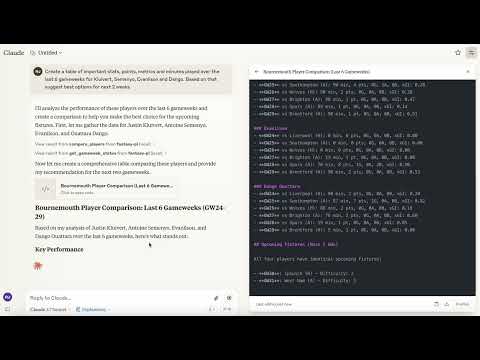
A Model Context Protocol (MCP) server that provides access to Fantasy Premier League (FPL) data and tools. This server allows you to interact with FPL data in Claude for Desktop and other MCP-compatible clients.
*Demo of the Fantasy Premier League MCP Server in action*
[](https://youtu.be/QfOOOQ_jeMA)
## Supported Platforms
- Claude Desktop
- Cursor
- Windsurf
- Other MCP Compatible Desktop LLMs
Mobile is currently not supported.
## Features
- **Rich Player Data**: Access comprehensive player statistics from the FPL API
- **Team Information**: Get details about Premier League teams
- **Gameweek Data**: View current and past gameweek information
- **Player Search**: Find players by name or team
- **Player Comparison**: Compare detailed statistics between any two players
## Requirements
- Python 3.10 or higher
- Claude Desktop (for AI integration)
## Installation
### Option 1: Install from PyPI (Recommended)
```bash
pip install fpl-mcp
```
### Option 1b: Install with Development Dependencies
```bash
pip install "fpl-mcp[dev]"
```
### Option 2: Install from GitHub
```bash
pip install git+https://github.com/rishijatia/fantasy-pl-mcp.git
```
### Option 3: Clone and Install Locally
```bash
git clone https://github.com/rishijatia/fantasy-pl-mcp.git
cd fantasy-pl-mcp
pip install -e .
```
## Running the Server
After installation, you have several options to run the server:
### 1. Using the CLI command
```bash
fpl-mcp
```
### 2. Using the Python module
```bash
python -m fpl_mcp
```
### 3. Using with Claude Desktop
Configure Claude Desktop to use the installed package by editing your `claude_desktop_config.json` file:
**Method 1: Using the Python module directly (most reliable)**
```json
{
"mcpServers": {
"fantasy-pl": {
"command": "python",
"args": ["-m", "fpl_mcp"]
}
}
}
```
**Method 2: Using the installed command with full path (if installed with pip)**
```json
{
"mcpServers": {
"fantasy-pl": {
"command": "/full/path/to/your/venv/bin/fpl-mcp"
}
}
}
```
Replace `/full/path/to/your/venv/bin/fpl-mcp` with the actual path to the executable. You can find this by running `which fpl-mcp` in your terminal after activating your virtual environment.
> **Note:** Using just `"command": "fpl-mcp"` may result in a `spawn fpl-mcp ENOENT` error since Claude Desktop might not have access to your virtual environment's PATH. Using the full path or the Python module approach helps avoid this issue.
## Usage
### In Claude for Desktop
1. Start Claude for Desktop
2. You should see FPL tools available via the hammer icon
3. Example queries:
- "Compare Mohamed Salah and Erling Haaland over the last 5 gameweeks"
- "Find all Arsenal midfielders"
- "What's the current gameweek status?"
- "Show me the top 5 forwards by points"
#### Fantasy-PL MCP Usage Instructions
#### Basic Commands:
- Compare players: "Compare [Player1] and [Player2]"
- Find players: "Find players from [Team]" or "Search for [Player Name]"
- Fixture difficulty: "Show upcoming fixtures for [Team]"
- Captain advice: "Who should I captain between [Player1] and [Player2]?"
#### Advanced Features:
- Statistical analysis: "Compare underlying stats for [Player1] and [Player2]"
- Form check: "Show me players in form right now"
- Differential picks: "Suggest differentials under 10% ownership"
- Team optimization: "Rate my team and suggest transfers"
#### Tips:
- Be specific with player names for accurate results
- Include positions when searching (FWD, MID, DEF, GK)
- For best captain advice, ask about form, fixtures, and underlying stats
- Request comparison of specific metrics (xG, shots in box, etc.
### MCP Inspector for Development
For development and testing:
```bash
# If you have mcp[cli] installed
mcp dev -m fpl_mcp
# Or use npx
npx @modelcontextprotocol/inspector python -m fpl_mcp
```
## Available Resources
- `fpl://static/players` - All player data with comprehensive statistics
- `fpl://static/players/{name}` - Player data by name search
- `fpl://static/teams` - All Premier League teams
- `fpl://static/teams/{name}` - Team data by name search
- `fpl://gameweeks/current` - Current gameweek data
- `fpl://gameweeks/all` - All gameweeks data
- `fpl://fixtures` - All fixtures for the current season
- `fpl://fixtures/gameweek/{gameweek_id}` - Fixtures for a specific gameweek
- `fpl://fixtures/team/{team_name}` - Fixtures for a specific team
- `fpl://players/{player_name}/fixtures` - Upcoming fixtures for a specific player
- `fpl://gameweeks/blank` - Information about upcoming blank gameweeks
- `fpl://gameweeks/double` - Information about upcoming double gameweeks
## Available Tools
### Players
- `search_fpl_players` - Search for players by name, with optional position and team filters
- `get_player_information` - Get detailed information and gameweek history for a player
- `analyze_players` - Filter and analyze FPL players based on multiple criteria
- `compare_players` - Compare multiple players across various metrics
- `get_price_changes` - Get players whose price rose or fell in the current gameweek
### Fixtures and gameweeks
- `get_gameweek_status` - Get precise information about current, previous, and next gameweeks
- `analyze_player_fixtures` - Analyze upcoming fixtures for a player with difficulty ratings
- `analyze_fixtures` - Analyze upcoming fixtures for players, teams, or positions
- `get_blank_gameweeks` - Get information about upcoming blank gameweeks
- `get_double_gameweeks` - Get information about upcoming double gameweeks
### Live gameweek
- `get_gameweek_live_scores` - Live player points and stats while matches are being played
- `get_dream_team` - The official highest-scoring XI for a gameweek
### Your team and advice
- `suggest_captain` - Rank your squad by captain score with per-component reasoning
- `check_fpl_authentication` - Check if FPL authentication is working correctly
- `update_fpl_credentials` - Update your stored FPL credentials from within a chat
- `get_my_team` - View your authenticated team (requires authentication)
- `get_my_current_team` - View your current team for the active gameweek (requires authentication)
- `get_team` - View any team with a specific ID (requires authentication)
- `get_manager` - Get manager details for a specific team ID (requires authentication)
- `get_manager_info` - Get manager details (requires authentication)
- `get_manager_transfer_history` - Get a manager's full transfer history
### Leagues
- `get_league_standings` - Get standings for a classic league (requires authentication)
- `get_league_analytics` - Analyze a league's managers, ownership trends, and performance
## Prompt Templates
- `player_analysis_prompt` - Create a prompt for analyzing an FPL player in depth
- `transfer_advice_prompt` - Get advice on player transfers based on budget and position
- `team_rating_prompt` - Create a prompt for rating and analyzing an FPL team
- `differential_players_prompt` - Create a prompt for finding differential players with low ownership
- `chip_strategy_prompt` - Create a prompt for chip strategy advice
## Development
### Adding Features
To add new features:
1. Add resource handlers in the appropriate file within `fpl_mcp/fpl/resources/`
2. Add tool handlers in the appropriate file within `fpl_mcp/fpl/tools/`
3. Update the `__main__.py` file to register new resources and tools
4. Test using the MCP Inspector before deploying to Claude for Desktop
## Authentication
FPL migrated its login to PingOne (Ping Identity) OIDC, so authentication now uses an OIDC
**refresh token** rather than your email and password. The refresh token is exchanged for
short-lived access tokens automatically, and requests are sent with an
`X-API-Authorization: Bearer` header.
To use features requiring authentication (like accessing your team or private leagues), set up
your refresh token:
```bash
# Run the credential setup tool
fpl-mcp-config setup
```
This interactive tool will:
1. Show you how to copy your OIDC refresh token from the browser
2. Prompt for the refresh token and your team ID
3. Save them (encrypted) to `~/.fpl-mcp/credentials.enc`
**Getting your refresh token:**
1. Log in at https://fantasy.premierleague.com in your browser.
2. Open the DevTools Console (F12 → Console) and run:
```js
copy(JSON.parse(localStorage.getItem(Object.keys(localStorage).find(k=>k.startsWith('oidc.user:')))).refresh_token)
```
(If Chrome refuses, type `allow pasting` in the console first.) The refresh
token is now on your clipboard — paste it when prompted.
3. Alternatively: DevTools → Application → Local storage →
`https://fantasy.premierleague.com`, copy the whole JSON value of the key
starting with `oidc.user:` and paste that instead — setup extracts the
`refresh_token` field automatically.
Run `fpl-mcp-config test` right after setup: the first exchange claims the token
before your browser session can supersede it, and rotates it so the copy in your
browser is retired — that is expected, and your browser session recovers on its own.
You can test your authentication with:
```bash
fpl-mcp-config test
```
Alternatively, you can manually configure authentication:
1. Create `~/.fpl-mcp/.env` file with:
```
FPL_REFRESH_TOKEN=your_refresh_token
FPL_TEAM_ID=your_team_id
```
2. Or create `~/.fpl-mcp/config.json`:
```json
{
"refresh_token": "your_refresh_token",
"team_id": "your_team_id"
}
```
3. Or set environment variables:
```bash
export FPL_REFRESH_TOKEN=your_refresh_token
export FPL_TEAM_ID=your_team_id
```
> Note: refresh tokens can be rotated or revoked by FPL. If authentication starts failing,
> re-run `fpl-mcp-config setup` with a freshly copied token.
### Advanced: overriding the OIDC endpoints
If FPL changes its OIDC client or endpoints, you can override the defaults with environment
variables (all optional):
| Variable | Default |
| --- | --- |
| `FPL_OIDC_CLIENT_ID` | `1f243d70-a140-4035-8c41-341f5af5aa12` |
| `FPL_OIDC_AUTHORITY` | `https://account.premierleague.com/as` |
| `FPL_TOKEN_URL` | `<FPL_OIDC_AUTHORITY>/token` |
## Limitations
- The FPL API is not officially documented and may change without notice
- Only read operations are currently supported
## Troubleshooting
### Common Issues
#### 1. "spawn fpl-mcp ENOENT" error in Claude Desktop
This occurs because Claude Desktop cannot find the `fpl-mcp` executable in its PATH.
**Solution:** Use one of these approaches:
- Use the full path to the executable in your config file
```json
{
"mcpServers": {
"fantasy-pl": {
"command": "/full/path/to/your/venv/bin/fpl-mcp"
}
}
}
```
- Use Python to run the module directly (preferred method)
```json
{
"mcpServers": {
"fantasy-pl": {
"command": "python",
"args": ["-m", "fpl_mcp"]
}
}
}
```
#### 2. Server disconnects immediately
If the server starts but immediately disconnects:
- Check logs at `~/Library/Logs/Claude/mcp*.log` (macOS) or `%APPDATA%\Claude\logs\mcp*.log` (Windows)
- Ensure all dependencies are installed
- Try running the server manually with `python -m fpl_mcp` to see any errors
#### 3. Server not showing in Claude Desktop
If the hammer icon doesn't appear:
- Restart Claude Desktop completely
- Verify your `claude_desktop_config.json` has correct JSON syntax
- Ensure the path to Python or the executable is absolute, not relative
## License
This project is licensed under the MIT License - see the LICENSE file for details.
## Contributing
Contributions are welcome! Please feel free to submit a Pull Request.
1. Fork the repository
2. Create your feature branch (`git checkout -b feature/amazing-feature`)
3. Commit your changes (`git commit -m 'Add some amazing feature'`)
4. Push to the branch (`git push origin feature/amazing-feature`)
5. Open a Pull Request
For more details, please refer to the [CONTRIBUTING.md](CONTRIBUTING.md) file.
## Acknowledgments
- [Fantasy Premier League API](https://fantasy.premierleague.com/api/) for providing the data
- [Model Context Protocol](https://modelcontextprotocol.io/) for the connectivity standard
- [Claude](https://claude.ai/) for the AI assistant capabilities
## Citation
If you use this package in your research or project, please consider citing it:
```bibtex
@software{fpl_mcp,
author = {Jatia, Rishi and Fantasy PL MCP Contributors},
title = {Fantasy Premier League MCP Server},
url = {https://github.com/rishijatia/fantasy-pl-mcp},
version = {0.1.0},
year = {2025},
}
```
TDQS
Scored across 23 tools
Several tool pairs overlap in purpose, such as get_manager_info and get_manager, which both return manager details, and get_my_current_team vs get_my_team, which have subtle differences. Additionally, analyze_fixtures and analyze_player_fixtures both cover player fixture analysis, creating potential misselection. However, descriptions do help clarify most boundaries.
Tool names consistently use snake_case with verb_noun structure (get_, search_, analyze_, compare_, suggest_). Minor deviations exist, such as the duplicate get_manager_info vs get_manager and the similar get_my_current_team vs get_my_team, but the overall pattern is predictable and readable.
With 23 tools, the server is on the high side for a fantasy sports API. While the breadth covers many FPL data types (players, teams, leagues, gameweeks, analytics), a few tools like get_manager_info and get_manager are redundant and could be consolidated, making the count feel slightly bloated.
The tool set covers major FPL domains well: authentication, team management, player search and analysis, league standings and analytics, gameweek status including blanks and doubles, live scores, dream team, and captain suggestions. Minor gaps exist (e.g., no dedicated transfer recommendation tool), but agents can easily work around these with existing data.