

F
licenseNot graded
qualityD
maintenanceEnables users to preprocess, analyze, and visualize CSV data through comprehensive tools for data manipulation, statistical analysis, and graph generation.
3
-

MCP Server 是一款专为交互式数据探索而设计的多功能工具。
您的个人数据科学家助理,将复杂的数据集转化为清晰、可操作的见解。
下载Claude桌面
在这里获取
安装和设置
在 macOS 上,在终端中运行以下命令:GXP1
加载模板和工具
服务器运行后,等待提示模板和工具在 Claude Desktop 中加载。
开始探索
从 MCP 中选择探索数据提示模板
通过提供所需的输入来开始对话:
csv_path :CSV 文件的本地路径
topic :探索的主题(例如,“纽约的天气模式”或“加州的房价”)
Related MCP server: MCP Tabular Data Analysis Server
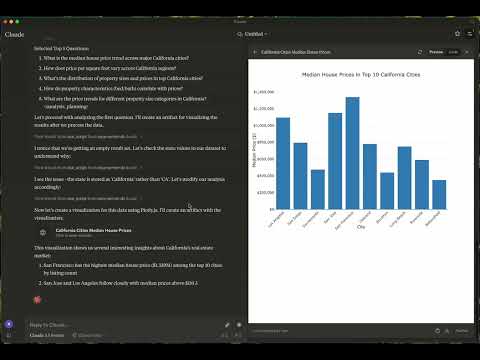
这些是如何利用 MCP 服务器探索数据而无需任何人工干预的示例。
Kaggle 数据集:美国房地产数据集
大小:2,226,382 个条目(178.9 MB)
主题:加州房价趋势
Kaggle 数据集: 200 万+ 英国每日天气历史
大小:2,836,186 个条目(169.3 MB)
主题:伦敦天气
报告:查看报告
图表:
explore-data :专为数据探索任务量身定制
加载csv
功能:将 CSV 文件加载到 DataFrame 中
参数:
csv_path (字符串,必需):CSV 文件的路径
df_name (字符串,可选):DataFrame 的名称。如果未提供,则默认为 df_1、df_2 等。
运行脚本
功能:执行Python脚本
参数:
script (字符串,必需):要执行的脚本
macOS: ~/Library/Application\ Support/Claude/claude_desktop_config.json
Windows: %APPDATA%/Claude/claude_desktop_config.json
"mcpServers": {
  "mcp-server-ds": {
    "command": "uv",
    "args": [
      "--directory",
      "/Users/username/src/mcp-server-ds",
      "run",
      "mcp-server-ds"
    ]
  }
}"mcpServers": {
"mcp-server-ds": {
"command": "uvx",
"args": [
"mcp-server-ds"
]
}
}同步依赖项
uv sync构建发行版
uv build在 dist/ 目录中生成源和轮子分布。
发布到 PyPI
uv publish欢迎贡献!无论您是修复错误、添加功能还是改进文档,您的帮助都会使这个项目更加完善。
如果您遇到错误或有任何建议,请在问题部分提交问题。包括:
重现步骤(如果适用)
预期行为与实际行为
屏幕截图或错误日志(如果相关)
本项目遵循 MIT 许可证。详情请参阅 LICENSE 文件。
有任何疑问或反馈?欢迎提交问题或联系维护人员。让我们携手共创辉煌!
这是一个由ReadingPlus.AI LLC运营的开源项目,并向整个社区开放贡献。
Load CSV File Tool
Purpose: Load a local CSV file into a DataFrame.
Usage Notes: • If a df_name is not provided, the tool will automatically assign names sequentially as df_1, df_2, and so on.
| Name | Required | Description | Default |
|---|---|---|---|
| csv_path | Yes | ||
| df_name | No |
Does the description disclose side effects, auth requirements, rate limits, or destructive behavior?
With no annotations provided, the description carries full burden for behavioral disclosure. It mentions the automatic naming behavior when df_name is omitted, which is helpful. However, it doesn't address critical behavioral aspects like error handling, file format requirements, memory implications, or what happens if the CSV path is invalid.
Agents need to know what a tool does to the world before calling it. Descriptions should go beyond structured annotations to explain consequences.
Is the description appropriately sized, front-loaded, and free of redundancy?
The description is well-structured with clear sections (Purpose, Usage Notes) and uses bullet points efficiently. Both sentences earn their place by providing essential information without unnecessary elaboration.
Shorter descriptions cost fewer tokens and are easier for agents to parse. Every sentence should earn its place.
Given the tool's complexity, does the description cover enough for an agent to succeed on first attempt?
For a data loading tool with no annotations, no output schema, and 0% schema description coverage, the description is insufficient. It doesn't explain what a DataFrame is in this context, what the tool returns, error conditions, or file format requirements. The description should provide more complete operational context.
Complex tools with many parameters or behaviors need more documentation. Simple tools need less. This dimension scales expectations accordingly.
Does the description clarify parameter syntax, constraints, interactions, or defaults beyond what the schema provides?
With 0% schema description coverage, the schema provides no parameter documentation. The description partially compensates by explaining the df_name parameter's behavior when omitted, but doesn't clarify csv_path requirements or format. It adds some value but doesn't fully compensate for the complete lack of schema documentation.
Input schemas describe structure but not intent. Descriptions should explain non-obvious parameter relationships and valid value ranges.
Does the description clearly state what the tool does and how it differs from similar tools?
The description clearly states the tool's purpose as 'Load a local CSV file into a DataFrame' with specific verb ('Load') and resource ('CSV file'), making it immediately understandable. However, it doesn't differentiate from the sibling tool 'run_script', which appears unrelated but could potentially handle similar data operations.
Agents choose between tools based on descriptions. A clear purpose with a specific verb and resource helps agents select the right tool.
Does the description explain when to use this tool, when not to, or what alternatives exist?
The description provides implied usage guidance through the 'Usage Notes' section about automatic naming when df_name isn't provided. However, it lacks explicit guidance on when to use this tool versus alternatives or any prerequisites for successful operation.
Agents often have multiple tools that could apply. Explicit usage guidance like "use X instead of Y when Z" prevents misuse.
Python Script Execution Tool
Purpose: Execute Python scripts for specific data analytics tasks.
Allowed Actions 1. Print Results: Output will be displayed as the script’s stdout. 2. [Optional] Save DataFrames: Store DataFrames in memory for future use by specifying a save_to_memory name.
Prohibited Actions 1. Overwriting Original DataFrames: Do not modify existing DataFrames to preserve their integrity for future tasks. 2. Creating Charts: Chart generation is not permitted.
| Name | Required | Description | Default |
|---|---|---|---|
| script | Yes | ||
| save_to_memory | No |
Does the description disclose side effects, auth requirements, rate limits, or destructive behavior?
With no annotations provided, the description carries the full burden of behavioral disclosure. It effectively describes key behavioral traits: output is displayed as stdout, optional saving of DataFrames in memory, and prohibitions on overwriting original DataFrames and creating charts. This covers execution behavior, memory handling, and constraints, though it doesn't address error handling, performance limits, or security aspects.
Agents need to know what a tool does to the world before calling it. Descriptions should go beyond structured annotations to explain consequences.
Is the description appropriately sized, front-loaded, and free of redundancy?
The description is well-structured with clear sections ('Purpose', 'Allowed Actions', 'Prohibited Actions'), making it easy to scan. It's appropriately sized without unnecessary fluff, though the 'Purpose' section could be more concise. Every sentence adds value, such as clarifying output behavior and constraints.
Shorter descriptions cost fewer tokens and are easier for agents to parse. Every sentence should earn its place.
Given the tool's complexity, does the description cover enough for an agent to succeed on first attempt?
Given the complexity of a script execution tool with no annotations and no output schema, the description is moderately complete. It covers execution purpose, allowed/prohibited actions, and some parameter context, but lacks details on error handling, return values, or integration with the sibling tool. For a tool with 2 parameters and significant behavioral implications, more completeness is needed.
Complex tools with many parameters or behaviors need more documentation. Simple tools need less. This dimension scales expectations accordingly.
Does the description clarify parameter syntax, constraints, interactions, or defaults beyond what the schema provides?
The schema description coverage is 0%, so the description must compensate for undocumented parameters. It mentions 'save_to_memory' in the 'Allowed Actions' section, adding some meaning beyond the schema. However, it doesn't explain the 'script' parameter's content or format, leaving a key parameter undocumented. With 2 parameters and low coverage, the description only partially compensates.
Input schemas describe structure but not intent. Descriptions should explain non-obvious parameter relationships and valid value ranges.
Does the description clearly state what the tool does and how it differs from similar tools?
The description clearly states the tool's purpose as 'Execute Python scripts for specific data analytics tasks,' providing a specific verb ('Execute') and resource ('Python scripts'). It distinguishes from the sibling tool 'load_csv' by focusing on script execution rather than data loading. However, it doesn't specify what 'specific data analytics tasks' entail, keeping it slightly vague.
Agents choose between tools based on descriptions. A clear purpose with a specific verb and resource helps agents select the right tool.
Does the description explain when to use this tool, when not to, or what alternatives exist?
The description provides implied usage guidance through 'Allowed Actions' and 'Prohibited Actions' sections, suggesting when to use certain features like saving DataFrames and when to avoid actions like chart generation. However, it lacks explicit guidance on when to use this tool versus the sibling 'load_csv' or other alternatives, and doesn't mention prerequisites or specific contexts for use.
Agents often have multiple tools that could apply. Explicit usage guidance like "use X instead of Y when Z" prevents misuse.
Recent tool additions, removals, and schema changes observed during successful MCP inspections.
v1.0.0load_csvrun_scriptScored across 2 tools
The two tools have clearly distinct purposes: load_csv is for loading CSV files into DataFrames, while run_script is for executing Python scripts for data analytics tasks. There is no overlap in functionality, and an agent would easily distinguish between them.
Both tools use snake_case naming, which is consistent, but they follow different patterns: load_csv uses a verb_noun format, while run_script uses verb_noun as well but with a more generic noun. This minor deviation keeps it mostly consistent but not perfectly aligned.
With only two tools, the server feels severely under-scoped for data exploration. Key operations like data transformation, filtering, aggregation, or visualization are missing, making it incomplete for typical data analysis workflows.
The tool set is highly incomplete for data exploration. It covers only loading data and running scripts, with no tools for common tasks like data cleaning, analysis, or exporting results. This will likely cause agent failures when trying to perform comprehensive data exploration.
Find novel, statistically validated patterns in tabular data — hypothesis-free.
AI data analyst: ask about your Excel, CSV, GA4 or database data and get charts and dashboards back
Ask data questions in natural language. Get SQL, insights, and charts from your databases.
Push CSV, JSON, JSONL or Parquet from your agent and get a link a human can explore.