

F
licenseNot graded
qualityD
maintenanceEnables users to preprocess, analyze, and visualize CSV data through comprehensive tools for data manipulation, statistical analysis, and graph generation.
3
-

MCP Server es una herramienta versátil diseñada para la exploración interactiva de datos.
Su asistente científico de datos personal, que convierte conjuntos de datos complejos en información clara y práctica.
Descargar Claude Desktop
Consíguelo aquí
Instalar y configurar
En macOS, ejecute el siguiente comando en su terminal: GXP1
Cargar plantillas y herramientas
Una vez que el servidor esté en ejecución, espere a que la plantilla de aviso y las herramientas se carguen en Claude Desktop.
Empieza a explorar
Seleccione la plantilla de solicitud de exploración de datos de MCP
Comience su conversación proporcionando las aportaciones necesarias:
csv_path : Ruta local al archivo CSV
topic : El tema de exploración (por ejemplo, "Patrones climáticos en Nueva York" o "Precios de la vivienda en California")
Related MCP server: MCP Tabular Data Analysis Server
Estos son ejemplos de cómo puede utilizar MCP Server para explorar datos sin intervención humana.
Conjunto de datos de Kaggle: Conjunto de datos inmobiliarios de EE. UU.
Tamaño: 2.226.382 entradas (178,9 MB)
Tema: Tendencias de los precios de la vivienda en California
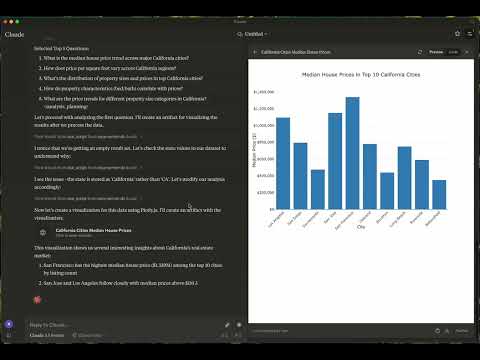
Conjunto de datos de Kaggle: más de 2 millones de historial meteorológico diario del Reino Unido
Tamaño: 2.836.186 entradas (169,3 MB)
Tema: El tiempo en Londres
Informe: Ver informe
Gráficos:
explore-data : Diseñado para tareas de exploración de datos
cargar-csv
Función: Carga un archivo CSV en un DataFrame
Argumentos:
csv_path (cadena, obligatoria): ruta al archivo CSV
df_name (cadena, opcional): Nombre del DataFrame. El valor predeterminado es df_1, df_2, etc., si no se proporciona.
ejecutar script
Función: ejecuta un script de Python
Argumentos:
script (cadena, obligatorio): el script a ejecutar
macOS: ~/Library/Application\ Support/Claude/claude_desktop_config.json
Ventanas: %APPDATA%/Claude/claude_desktop_config.json
"mcpServers": {
  "mcp-server-ds": {
    "command": "uv",
    "args": [
      "--directory",
      "/Users/username/src/mcp-server-ds",
      "run",
      "mcp-server-ds"
    ]
  }
}"mcpServers": {
"mcp-server-ds": {
"command": "uvx",
"args": [
"mcp-server-ds"
]
}
}Dependencias de sincronización
uv syncDistribuciones de compilación
uv buildGenera distribuciones de origen y de rueda en el directorio dist/.
Publicar en PyPI
uv publish¡Agradecemos tus contribuciones! Ya sea que estés corrigiendo errores, añadiendo funciones o mejorando la documentación, tu ayuda hace que este proyecto sea mejor.
Si encuentra algún error o tiene alguna sugerencia, abra un problema en la sección de problemas. Incluya:
Pasos para reproducir (si aplica)
Comportamiento esperado vs. comportamiento real
Capturas de pantalla o registros de errores (si corresponde)
Este proyecto está licenciado bajo la Licencia MIT. Consulte el archivo de LICENCIA para más detalles.
¿Preguntas? ¿Comentarios? Abre un problema o contacta con los mantenedores. ¡Hagamos que este proyecto sea increíble juntos!
Este es un proyecto de código abierto dirigido por ReadingPlus.AI LLC y abierto a contribuciones de toda la comunidad.
Load CSV File Tool
Purpose: Load a local CSV file into a DataFrame.
Usage Notes: • If a df_name is not provided, the tool will automatically assign names sequentially as df_1, df_2, and so on.
| Name | Required | Description | Default |
|---|---|---|---|
| csv_path | Yes | ||
| df_name | No |
Does the description disclose side effects, auth requirements, rate limits, or destructive behavior?
With no annotations provided, the description carries full burden for behavioral disclosure. It mentions the automatic naming behavior when df_name is omitted, which is helpful. However, it doesn't address critical behavioral aspects like error handling, file format requirements, memory implications, or what happens if the CSV path is invalid.
Agents need to know what a tool does to the world before calling it. Descriptions should go beyond structured annotations to explain consequences.
Is the description appropriately sized, front-loaded, and free of redundancy?
The description is well-structured with clear sections (Purpose, Usage Notes) and uses bullet points efficiently. Both sentences earn their place by providing essential information without unnecessary elaboration.
Shorter descriptions cost fewer tokens and are easier for agents to parse. Every sentence should earn its place.
Given the tool's complexity, does the description cover enough for an agent to succeed on first attempt?
For a data loading tool with no annotations, no output schema, and 0% schema description coverage, the description is insufficient. It doesn't explain what a DataFrame is in this context, what the tool returns, error conditions, or file format requirements. The description should provide more complete operational context.
Complex tools with many parameters or behaviors need more documentation. Simple tools need less. This dimension scales expectations accordingly.
Does the description clarify parameter syntax, constraints, interactions, or defaults beyond what the schema provides?
With 0% schema description coverage, the schema provides no parameter documentation. The description partially compensates by explaining the df_name parameter's behavior when omitted, but doesn't clarify csv_path requirements or format. It adds some value but doesn't fully compensate for the complete lack of schema documentation.
Input schemas describe structure but not intent. Descriptions should explain non-obvious parameter relationships and valid value ranges.
Does the description clearly state what the tool does and how it differs from similar tools?
The description clearly states the tool's purpose as 'Load a local CSV file into a DataFrame' with specific verb ('Load') and resource ('CSV file'), making it immediately understandable. However, it doesn't differentiate from the sibling tool 'run_script', which appears unrelated but could potentially handle similar data operations.
Agents choose between tools based on descriptions. A clear purpose with a specific verb and resource helps agents select the right tool.
Does the description explain when to use this tool, when not to, or what alternatives exist?
The description provides implied usage guidance through the 'Usage Notes' section about automatic naming when df_name isn't provided. However, it lacks explicit guidance on when to use this tool versus alternatives or any prerequisites for successful operation.
Agents often have multiple tools that could apply. Explicit usage guidance like "use X instead of Y when Z" prevents misuse.
Python Script Execution Tool
Purpose: Execute Python scripts for specific data analytics tasks.
Allowed Actions 1. Print Results: Output will be displayed as the script’s stdout. 2. [Optional] Save DataFrames: Store DataFrames in memory for future use by specifying a save_to_memory name.
Prohibited Actions 1. Overwriting Original DataFrames: Do not modify existing DataFrames to preserve their integrity for future tasks. 2. Creating Charts: Chart generation is not permitted.
| Name | Required | Description | Default |
|---|---|---|---|
| script | Yes | ||
| save_to_memory | No |
Does the description disclose side effects, auth requirements, rate limits, or destructive behavior?
With no annotations provided, the description carries the full burden of behavioral disclosure. It effectively describes key behavioral traits: output is displayed as stdout, optional saving of DataFrames in memory, and prohibitions on overwriting original DataFrames and creating charts. This covers execution behavior, memory handling, and constraints, though it doesn't address error handling, performance limits, or security aspects.
Agents need to know what a tool does to the world before calling it. Descriptions should go beyond structured annotations to explain consequences.
Is the description appropriately sized, front-loaded, and free of redundancy?
The description is well-structured with clear sections ('Purpose', 'Allowed Actions', 'Prohibited Actions'), making it easy to scan. It's appropriately sized without unnecessary fluff, though the 'Purpose' section could be more concise. Every sentence adds value, such as clarifying output behavior and constraints.
Shorter descriptions cost fewer tokens and are easier for agents to parse. Every sentence should earn its place.
Given the tool's complexity, does the description cover enough for an agent to succeed on first attempt?
Given the complexity of a script execution tool with no annotations and no output schema, the description is moderately complete. It covers execution purpose, allowed/prohibited actions, and some parameter context, but lacks details on error handling, return values, or integration with the sibling tool. For a tool with 2 parameters and significant behavioral implications, more completeness is needed.
Complex tools with many parameters or behaviors need more documentation. Simple tools need less. This dimension scales expectations accordingly.
Does the description clarify parameter syntax, constraints, interactions, or defaults beyond what the schema provides?
The schema description coverage is 0%, so the description must compensate for undocumented parameters. It mentions 'save_to_memory' in the 'Allowed Actions' section, adding some meaning beyond the schema. However, it doesn't explain the 'script' parameter's content or format, leaving a key parameter undocumented. With 2 parameters and low coverage, the description only partially compensates.
Input schemas describe structure but not intent. Descriptions should explain non-obvious parameter relationships and valid value ranges.
Does the description clearly state what the tool does and how it differs from similar tools?
The description clearly states the tool's purpose as 'Execute Python scripts for specific data analytics tasks,' providing a specific verb ('Execute') and resource ('Python scripts'). It distinguishes from the sibling tool 'load_csv' by focusing on script execution rather than data loading. However, it doesn't specify what 'specific data analytics tasks' entail, keeping it slightly vague.
Agents choose between tools based on descriptions. A clear purpose with a specific verb and resource helps agents select the right tool.
Does the description explain when to use this tool, when not to, or what alternatives exist?
The description provides implied usage guidance through 'Allowed Actions' and 'Prohibited Actions' sections, suggesting when to use certain features like saving DataFrames and when to avoid actions like chart generation. However, it lacks explicit guidance on when to use this tool versus the sibling 'load_csv' or other alternatives, and doesn't mention prerequisites or specific contexts for use.
Agents often have multiple tools that could apply. Explicit usage guidance like "use X instead of Y when Z" prevents misuse.
Recent tool additions, removals, and schema changes observed during successful MCP inspections.
v1.0.0load_csvrun_scriptScored across 2 tools
The two tools have clearly distinct purposes: load_csv is for loading CSV files into DataFrames, while run_script is for executing Python scripts for data analytics tasks. There is no overlap in functionality, and an agent would easily distinguish between them.
Both tools use snake_case naming, which is consistent, but they follow different patterns: load_csv uses a verb_noun format, while run_script uses verb_noun as well but with a more generic noun. This minor deviation keeps it mostly consistent but not perfectly aligned.
With only two tools, the server feels severely under-scoped for data exploration. Key operations like data transformation, filtering, aggregation, or visualization are missing, making it incomplete for typical data analysis workflows.
The tool set is highly incomplete for data exploration. It covers only loading data and running scripts, with no tools for common tasks like data cleaning, analysis, or exporting results. This will likely cause agent failures when trying to perform comprehensive data exploration.
Find novel, statistically validated patterns in tabular data — hypothesis-free.
AI data analyst: ask about your Excel, CSV, GA4 or database data and get charts and dashboards back
Ask data questions in natural language. Get SQL, insights, and charts from your databases.
Push CSV, JSON, JSONL or Parquet from your agent and get a link a human can explore.